










Study Group Sharing: 
The practice of programming 
Juggernaut Liu
Who is this sharing for? 
• Who wants to read this book 
• Who wants to be a good programmer 
• Who wants to know how to solve problems like the master 
• Who codes in C&C++
Who is the speaker? 
Programming Skills : 
•6 years experience in C# 
• Information Exchange 
• Internal API 
•3 years experience in JAVA 
• Real-time quotes server 
•2 years experience in C&C++ 
• WFBS 8.0 , WFBS 9.0 
• OSCE 10.6 SP3, OSCE 11 
Juggernaut Liu
Chapters 
• Style 
• Design 
• Interfaces 
• Debugging 
• Testing 
• Performance 
• Portability 
• Notation
STYLE
Style 
• Naming 
• Expressions and Statements 
• Define numbers 
• Comments
Style 
• Writing code that works well and is a pleasure to read 
–Programs are read not only by computers but also by programmers! 
• If you work on a program you didn’t write, preserve the style you find there. 
– The Boy Scout Rule : 
– Always leave the campground cleaner than you found it. 
• Once styling the program become automatic, your subconscious will take 
care of many of the details for you, and even the code you produce under 
pressure will be better!
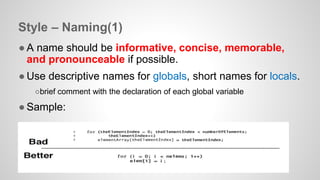
Style – Naming(1) 
● A name should be informative, concise, memorable, 
and pronounceable if possible. 
● Use descriptive names for globals, short names for locals. 
○brief comment with the declaration of each global variable 
● Sample:
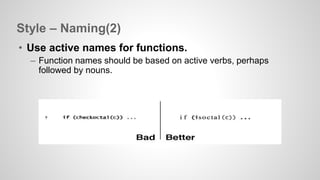
Style – Naming(2) 
• Use active names for functions. 
– Function names should be based on active verbs, perhaps 
followed by nouns.
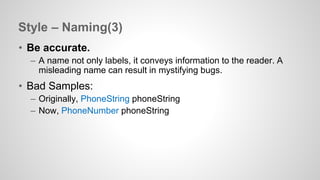
Style – Naming(3) 
• Be accurate. 
– A name not only labels, it conveys information to the reader. A 
misleading name can result in mystifying bugs. 
• Bad Samples: 
– Originally, PhoneString phoneString 
– Now, PhoneNumber phoneString
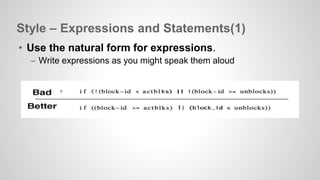
Style – Expressions and Statements(1) 
• Use the natural form for expressions. 
– Write expressions as you might speak them aloud
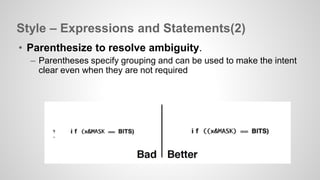
Style – Expressions and Statements(2) 
• Parenthesize to resolve ambiguity. 
– Parentheses specify grouping and can be used to make the intent 
clear even when they are not required
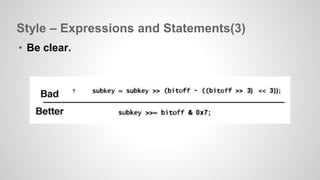
Style – Expressions and Statements(3) 
• Be clear.
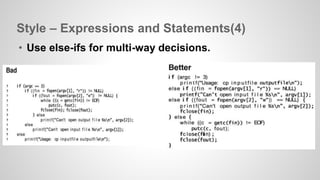
Style – Expressions and Statements(4) 
• Use else-ifs for multi-way decisions.
Style – Define numbers 
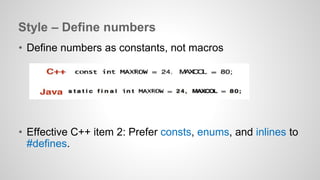
• Define numbers as constants, not macros 
• Effective C++ item 2: Prefer consts, enums, and inlines to 
#defines.
Style – Comments 
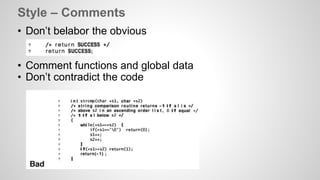
• Don’t belabor the obvious 
• Comment functions and global data 
• Don’t contradict the code
DESIGN
Design 
• "In the end, only familiarity with the tools and techniques 
of the field will provide the right solution for a particular 
problem, and only a certain amount of experience will 
provide consistently professional results.“ 
– Raymond Fielding. The Technique of Special Effects 
Cinematography
Design 
• A good algorithm or data structure might make it possible 
to solve a problem in seconds that could otherwise take 
years. 
• Assess potential algorithms and data structures. 
Consider how much data the program is likely to process. 
• It best to start detailed design with data structures, 
guided by knowledge of what algorithms might be used.
Design 
• Use a library or language feature if you can. 
• Write or borrow a short, simple, easy to understand 
implementation. 
• Production code takes much more effort than prototypes 
do.
INTERFACES
Interfaces - The issues to be worked out 
• Interfaces: 
– What services and access are provided? 
• Information hiding: 
– What information is visible and what is private? 
• Resource management: 
– Who is responsible for managing memory and other limited 
resources? 
• Error handling: 
– Who detects errors. who reports them, and how?
Interfaces – Principles(1) 
• Hide implementation details 
– The implementation behind the interface should be hidden from 
the rest of the program so it can be changed without affecting or 
breaking anything 
– Avoid global variables 
– Classes in C++ and Java are better mechanisms for hiding 
information
Interfaces – Principles(2) 
• Choose a small orthogonal set of primitives 
– An interface should provide as much functionality as necessary 
but no more, and the functions should not overlap excessively in 
their capabilities. 
– Narrow interfaces are to be preferred to wide ones 
– Do one thing, and do it well. 
– Don’t add to an interface just because it’s possible to do so
Interfaces – Principles(3) 
• Don't reach behind the user's back 
– A library function should not write secret files and variables or 
change global data, and it should be circumspect about modifying 
data in its caller.
Interfaces – Principles(4) 
• Do the same thing the same way everywhere. 
– Consistency and regularity are important.
Interfaces – Resource Management 
• Free a resource in the same layer that allocated it 
• C++ constructors and destructors help enforce this rule 
• The existence of automatic garbage collection does not 
mean that there are no memory-management issues in a 
design
Interfaces – Error handling 
● Detect errors at a low level, handle them at a high level 
● Use exceptions only for exceptional situations 
○ Exceptions should not be used for handling expected 
return values
DEBUG
Debug 
● Advice on Good Clues, Easy Bugs 
● Advice on No Clues, Hard Bugs 
● Non-reproducible Bugs
Debug - Advice on Good Clues, Easy Bugs 
• Look for familiar patterns 
– Ask yourself whether this is a familiar pattern 
• Examine the most recent change 
– Looking carefully at recent changes helps to localize the problem 
• Get a stack trace 
– Examine the state of a program after death. 
– Check improbable values of arguments 
• Explain your code to someone else 
– Read the code 
– Take a break
Debug - Advice on No Clues, Hard Bugs 
• Make the bug reproducible 
• Divide and conquer 
– Narrow down the possibilities 
– Proceed by binary search 
• Write self-checking code 
– Display messages 
– Logs 
– checking function 
• Keep records
Debug - Non-reproducible Bugs 
• Check whether all variables have been initialized 
• Does something depend on the external environment of 
the program?
TESTING
Testing 
● Test as You Write the Code 
● Tips for Testing
Testing - Test as You Write the Code(1) 
• Boundary condition testing 
– Off-by-one errors.
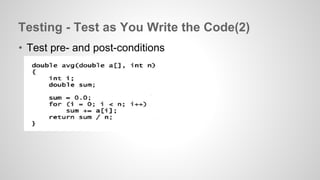
Testing - Test as You Write the Code(2) 
• Test pre- and post-conditions
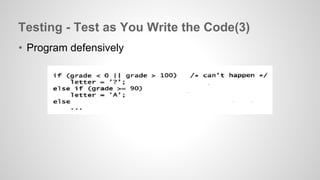
Testing - Test as You Write the Code(3) 
• Program defensively
Testing - Tips for Testing 
• Write testing code temporarily 
–In Unit Test : Do not add any code in production code just for testing. 
–Remove testing code before publishing 
• Use 0xDEADBEEF rather than 0 
• Clear Input / Output 
• Vary your test cases 
• Test on multiple machines, compilers, and operating 
systems.
PERFORMANCE
Performance 
● Find the bottleneck 
● Strategies for Speed 
● Space Efficiency 
● Basic cycle for performance optimization
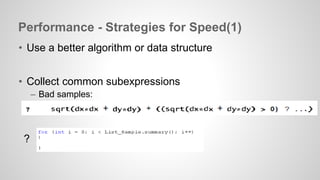
Performance - Strategies for Speed(1) 
• Use a better algorithm or data structure 
• Collect common subexpressions 
– Bad samples: 
?
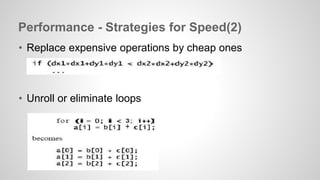
Performance - Strategies for Speed(2) 
• Replace expensive operations by cheap ones 
• Unroll or eliminate loops
Performance - Strategies for Speed(3) 
• Cache frequently-used values 
– Re-use recently accessed 
• Precompute results 
– Trading space for time
Performance - Strategies for Speed(4) 
• Buffer input and output 
– String += VS String.Append 
• Use approximate values 
– If accuracy isn't an issue, use lower-precision data types 
• Rewrite in a lower-level language 
– Lower-level languages tend to be more efficient.
Performance - Space Efficiency 
• Save space by using the smallest possible data type 
• Don't store what you can easily recompute 
• However : 
– Major improvements are more likely to come from better data 
structures or algorithm 
– Space efficiency often comes with a cost in run-time
Basic cycle for performance optimization 
● Measure 
● Focus on the few places where a change will make the 
most difference 
● Verify the correctness of your changes 
● Measure again
PORTABILITY
Portability 
● Why do we worry about portability? 
● Language 
● Headers and Libraries 
● Program Organization 
● Data Exchange 
● Internationalization 
● Summary
Portability – Why? 
Why do we worry about portability? 
•Less maintenance and more utility 
•Environments change 
•A portable program is a better designed program
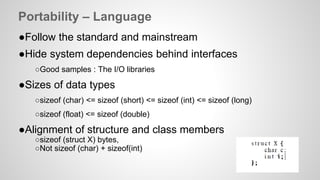
Portability – Language 
●Follow the standard and mainstream 
●Hide system dependencies behind interfaces 
○Good samples : The I/O libraries 
●Sizes of data types 
○sizeof (char) <= sizeof (short) <= sizeof (int) <= sizeof (long) 
○sizeof (float) <= sizeof (double) 
●Alignment of structure and class members 
○sizeof (struct X) bytes, 
○Not sizeof (char) + sizeof(int)
Portability – Headers and Libraries 
• Use standard libraries 
• Problems 
– Headers tend to be cluttered 
– Header files also can "pollute" the namespace by declaring a 
function with the same name 
• Solutions 
– Use a different header for each compiler or environment 
– Redefining the name
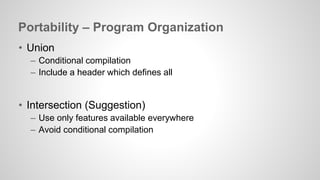
Portability – Program Organization 
• Union 
– Conditional compilation 
– Include a header which defines all 
• Intersection (Suggestion) 
– Use only features available everywhere 
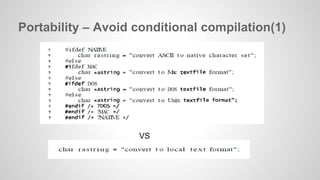
– Avoid conditional compilation
Portability – Avoid conditional compilation(1) 
VS
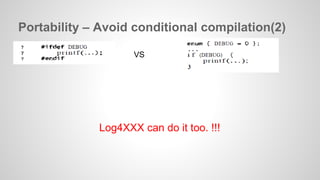
Portability – Avoid conditional compilation(2) 
VS 
Log4XXX can do it too. !!!
Portability – Data Exchange 
• TEXT 
• Binary Data 
– little-endian vs big-endian 
– Sender and receiver agree on the byte order in transmission
Portability – Internationalization 
• Do not assume ASCII 
– Unicode 
– UTF-8 
– Wide Characters (C/C++) 
• Do not assume English 
– L10N 
– UI
Portability - Summary 
• Portable code is an ideal that is well worth striving for, 
since so much time is wasted making changes to move a 
program from one system to another or to keep it running 
as it evolves and the systems it runs on changes. 
• The intersection approach is better than the union one. 
– Loss of efficiency and features 
– Z>B
NOTATION
Notation 
• Perhaps of all the creations of man language is the most 
astonishing. 
– Giles Lytton Strachey, Words and Poetry
Notation 
• If you find yourself writing too much code to do a mundane 
job, or if you have trouble expressing the process 
comfortably, maybe you're using the wrong language. 
• If the right language doesn't yet exist, that might be an 
opportunity to create it yourself.
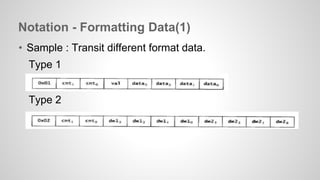
Notation - Formatting Data(1) 
• Sample : Transit different format data. 
Type 1 
Type 2
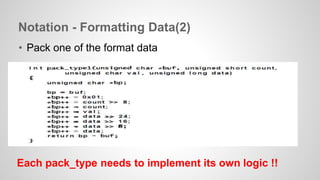
Notation - Formatting Data(2) 
• Pack one of the format data 
Each pack_type needs to implement its own logic !!
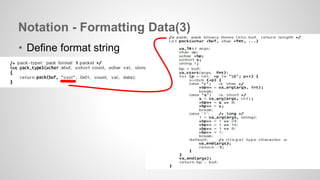
Notation - Formatting Data(3) 
• Define format string
Notation 
With the right notation, many problems become easier. 
Cool Sample : Cucumber
Reference 
• Reviews from Amazon 
– http://www.amazon.com/Practice-Programming-Addison-Wesley- 
Professional-Computing/dp/020161586X 
• All members’ power point in iShare 
• MSDN GC Class 
• My Blog 
– http://juggernaut-liu.blogspot.tw/2014/04/practice-of-programming-portability. 
html 
– http://juggernaut-liu.blogspot.tw/2014/05/practice-of-programming-notation. 
html
MSDN GC Class
Q & A

Reading Notes : the practice of programming

  • 1.
    Study Group Sharing: The practice of programming Juggernaut Liu
  • 2.
    Who is thissharing for? • Who wants to read this book • Who wants to be a good programmer • Who wants to know how to solve problems like the master • Who codes in C&C++
  • 3.
    Who is thespeaker? Programming Skills : •6 years experience in C# • Information Exchange • Internal API •3 years experience in JAVA • Real-time quotes server •2 years experience in C&C++ • WFBS 8.0 , WFBS 9.0 • OSCE 10.6 SP3, OSCE 11 Juggernaut Liu
  • 4.
    Chapters • Style • Design • Interfaces • Debugging • Testing • Performance • Portability • Notation
  • 5.
  • 6.
    Style • Naming • Expressions and Statements • Define numbers • Comments
  • 7.
    Style • Writingcode that works well and is a pleasure to read –Programs are read not only by computers but also by programmers! • If you work on a program you didn’t write, preserve the style you find there. – The Boy Scout Rule : – Always leave the campground cleaner than you found it. • Once styling the program become automatic, your subconscious will take care of many of the details for you, and even the code you produce under pressure will be better!
  • 8.
    Style – Naming(1) ● A name should be informative, concise, memorable, and pronounceable if possible. ● Use descriptive names for globals, short names for locals. ○brief comment with the declaration of each global variable ● Sample:
  • 9.
    Style – Naming(2) • Use active names for functions. – Function names should be based on active verbs, perhaps followed by nouns.
  • 10.
    Style – Naming(3) • Be accurate. – A name not only labels, it conveys information to the reader. A misleading name can result in mystifying bugs. • Bad Samples: – Originally, PhoneString phoneString – Now, PhoneNumber phoneString
  • 11.
    Style – Expressionsand Statements(1) • Use the natural form for expressions. – Write expressions as you might speak them aloud
  • 12.
    Style – Expressionsand Statements(2) • Parenthesize to resolve ambiguity. – Parentheses specify grouping and can be used to make the intent clear even when they are not required
  • 13.
    Style – Expressionsand Statements(3) • Be clear.
  • 14.
    Style – Expressionsand Statements(4) • Use else-ifs for multi-way decisions.
  • 15.
    Style – Definenumbers • Define numbers as constants, not macros • Effective C++ item 2: Prefer consts, enums, and inlines to #defines.
  • 16.
    Style – Comments • Don’t belabor the obvious • Comment functions and global data • Don’t contradict the code
  • 17.
  • 18.
    Design • "Inthe end, only familiarity with the tools and techniques of the field will provide the right solution for a particular problem, and only a certain amount of experience will provide consistently professional results.“ – Raymond Fielding. The Technique of Special Effects Cinematography
  • 19.
    Design • Agood algorithm or data structure might make it possible to solve a problem in seconds that could otherwise take years. • Assess potential algorithms and data structures. Consider how much data the program is likely to process. • It best to start detailed design with data structures, guided by knowledge of what algorithms might be used.
  • 20.
    Design • Usea library or language feature if you can. • Write or borrow a short, simple, easy to understand implementation. • Production code takes much more effort than prototypes do.
  • 21.
  • 22.
    Interfaces - Theissues to be worked out • Interfaces: – What services and access are provided? • Information hiding: – What information is visible and what is private? • Resource management: – Who is responsible for managing memory and other limited resources? • Error handling: – Who detects errors. who reports them, and how?
  • 23.
    Interfaces – Principles(1) • Hide implementation details – The implementation behind the interface should be hidden from the rest of the program so it can be changed without affecting or breaking anything – Avoid global variables – Classes in C++ and Java are better mechanisms for hiding information
  • 24.
    Interfaces – Principles(2) • Choose a small orthogonal set of primitives – An interface should provide as much functionality as necessary but no more, and the functions should not overlap excessively in their capabilities. – Narrow interfaces are to be preferred to wide ones – Do one thing, and do it well. – Don’t add to an interface just because it’s possible to do so
  • 25.
    Interfaces – Principles(3) • Don't reach behind the user's back – A library function should not write secret files and variables or change global data, and it should be circumspect about modifying data in its caller.
  • 26.
    Interfaces – Principles(4) • Do the same thing the same way everywhere. – Consistency and regularity are important.
  • 27.
    Interfaces – ResourceManagement • Free a resource in the same layer that allocated it • C++ constructors and destructors help enforce this rule • The existence of automatic garbage collection does not mean that there are no memory-management issues in a design
  • 28.
    Interfaces – Errorhandling ● Detect errors at a low level, handle them at a high level ● Use exceptions only for exceptional situations ○ Exceptions should not be used for handling expected return values
  • 29.
  • 30.
    Debug ● Adviceon Good Clues, Easy Bugs ● Advice on No Clues, Hard Bugs ● Non-reproducible Bugs
  • 31.
    Debug - Adviceon Good Clues, Easy Bugs • Look for familiar patterns – Ask yourself whether this is a familiar pattern • Examine the most recent change – Looking carefully at recent changes helps to localize the problem • Get a stack trace – Examine the state of a program after death. – Check improbable values of arguments • Explain your code to someone else – Read the code – Take a break
  • 32.
    Debug - Adviceon No Clues, Hard Bugs • Make the bug reproducible • Divide and conquer – Narrow down the possibilities – Proceed by binary search • Write self-checking code – Display messages – Logs – checking function • Keep records
  • 33.
    Debug - Non-reproducibleBugs • Check whether all variables have been initialized • Does something depend on the external environment of the program?
  • 34.
  • 35.
    Testing ● Testas You Write the Code ● Tips for Testing
  • 36.
    Testing - Testas You Write the Code(1) • Boundary condition testing – Off-by-one errors.
  • 37.
    Testing - Testas You Write the Code(2) • Test pre- and post-conditions
  • 38.
    Testing - Testas You Write the Code(3) • Program defensively
  • 39.
    Testing - Tipsfor Testing • Write testing code temporarily –In Unit Test : Do not add any code in production code just for testing. –Remove testing code before publishing • Use 0xDEADBEEF rather than 0 • Clear Input / Output • Vary your test cases • Test on multiple machines, compilers, and operating systems.
  • 40.
  • 41.
    Performance ● Findthe bottleneck ● Strategies for Speed ● Space Efficiency ● Basic cycle for performance optimization
  • 42.
    Performance - Strategiesfor Speed(1) • Use a better algorithm or data structure • Collect common subexpressions – Bad samples: ?
  • 43.
    Performance - Strategiesfor Speed(2) • Replace expensive operations by cheap ones • Unroll or eliminate loops
  • 44.
    Performance - Strategiesfor Speed(3) • Cache frequently-used values – Re-use recently accessed • Precompute results – Trading space for time
  • 45.
    Performance - Strategiesfor Speed(4) • Buffer input and output – String += VS String.Append • Use approximate values – If accuracy isn't an issue, use lower-precision data types • Rewrite in a lower-level language – Lower-level languages tend to be more efficient.
  • 46.
    Performance - SpaceEfficiency • Save space by using the smallest possible data type • Don't store what you can easily recompute • However : – Major improvements are more likely to come from better data structures or algorithm – Space efficiency often comes with a cost in run-time
  • 47.
    Basic cycle forperformance optimization ● Measure ● Focus on the few places where a change will make the most difference ● Verify the correctness of your changes ● Measure again
  • 48.
  • 49.
    Portability ● Whydo we worry about portability? ● Language ● Headers and Libraries ● Program Organization ● Data Exchange ● Internationalization ● Summary
  • 50.
    Portability – Why? Why do we worry about portability? •Less maintenance and more utility •Environments change •A portable program is a better designed program
  • 51.
    Portability – Language ●Follow the standard and mainstream ●Hide system dependencies behind interfaces ○Good samples : The I/O libraries ●Sizes of data types ○sizeof (char) <= sizeof (short) <= sizeof (int) <= sizeof (long) ○sizeof (float) <= sizeof (double) ●Alignment of structure and class members ○sizeof (struct X) bytes, ○Not sizeof (char) + sizeof(int)
  • 52.
    Portability – Headersand Libraries • Use standard libraries • Problems – Headers tend to be cluttered – Header files also can "pollute" the namespace by declaring a function with the same name • Solutions – Use a different header for each compiler or environment – Redefining the name
  • 53.
    Portability – ProgramOrganization • Union – Conditional compilation – Include a header which defines all • Intersection (Suggestion) – Use only features available everywhere – Avoid conditional compilation
  • 54.
    Portability – Avoidconditional compilation(1) VS
  • 55.
    Portability – Avoidconditional compilation(2) VS Log4XXX can do it too. !!!
  • 56.
    Portability – DataExchange • TEXT • Binary Data – little-endian vs big-endian – Sender and receiver agree on the byte order in transmission
  • 57.
    Portability – Internationalization • Do not assume ASCII – Unicode – UTF-8 – Wide Characters (C/C++) • Do not assume English – L10N – UI
  • 58.
    Portability - Summary • Portable code is an ideal that is well worth striving for, since so much time is wasted making changes to move a program from one system to another or to keep it running as it evolves and the systems it runs on changes. • The intersection approach is better than the union one. – Loss of efficiency and features – Z>B
  • 59.
  • 60.
    Notation • Perhapsof all the creations of man language is the most astonishing. – Giles Lytton Strachey, Words and Poetry
  • 61.
    Notation • Ifyou find yourself writing too much code to do a mundane job, or if you have trouble expressing the process comfortably, maybe you're using the wrong language. • If the right language doesn't yet exist, that might be an opportunity to create it yourself.
  • 62.
    Notation - FormattingData(1) • Sample : Transit different format data. Type 1 Type 2
  • 63.
    Notation - FormattingData(2) • Pack one of the format data Each pack_type needs to implement its own logic !!
  • 64.
    Notation - FormattingData(3) • Define format string
  • 65.
    Notation With theright notation, many problems become easier. Cool Sample : Cucumber
  • 66.
    Reference • Reviewsfrom Amazon – http://www.amazon.com/Practice-Programming-Addison-Wesley- Professional-Computing/dp/020161586X • All members’ power point in iShare • MSDN GC Class • My Blog – http://juggernaut-liu.blogspot.tw/2014/04/practice-of-programming-portability. html – http://juggernaut-liu.blogspot.tw/2014/05/practice-of-programming-notation. html
  • 67.
  • 68.