Raspberry pi
Aradhya Kundu
Contents
• Introduction
• History
• Objectives
• Features
• Hardware
• Technology
• Accessories
• Generation
• Internal connections
• Programming languages
• Kit components
• SDK
• Advantages
• Disadvantages
• Future scope
• Conclusion
Introduction
• What is Raspberry pi?
– The Raspberry Pi is a series of credit card
sized single-board computers.
– It was developed in the United Kingdom by
the Raspberry Pi Foundation.
– Intent to promote the teaching of basic computer
science in schools and developing countries.
History
• The Raspberry Pi is the work of the Raspberry Pi
Foundation, a charitable organisation.
• UK registered charity (No. 1129409), May 2009.
• It's supported by the University of Cambridge
Computer Laboratory and tech firm Broadcomm.
Objective
• To increase Computer science skills
• Access to computers
• Computer Science is concerned with much
more than simply being able to use a
computer.
• Children should understand how computers
work and how to program them.
Features
• Ultra low cost
• Low power consumption
• Instant start up and easy to maintain
• Small in size
• Provide a fun environment for experimenting
with programming and electronics
Hardware
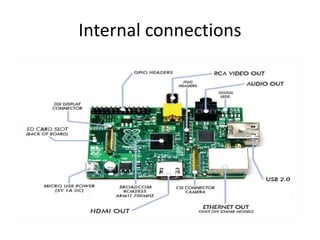
• 10/100 Base-T Ethernet socket
• HDMI socket
• USB 2.0 socket
• RCA video socket
• SD card socket
• Powered from micro USB socket
• 3.5mm audio out jack
• Header footprint for camera connection
Technology
• The Raspberry Pi has a Broadcom BCM2835
system on a chip (SoC),which includes an
ARM1176JZF-S 700 MHz processor
• Video Core IV GPU
• originally shipped with 256 megabytes of
RAM, later upgraded to 512MB.
• It does not include a built-in hard disk , but
uses an SD card for booting and long-term
storage.
Accessories
• Camera – It can
produce 1080p, 720p and 640x480p video.
The dimensions are 25 mm x 20 mm x 9 mm.
• Gertboard – A Raspberry Pi Foundation
sanctioned device, designed for educational
purposes.
• Infrared Camera.
• HAT (Hardware Attached on Top) expansion
boards
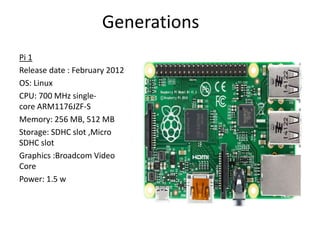
Generations
Pi 1
Release date : February 2012
OS: Linux
CPU: 700 MHz single-
core ARM1176JZF-S
Memory: 256 MB, 512 MB
Storage: SDHC slot ,Micro
SDHC slot
Graphics :Broadcom Video
Core
Power: 1.5 w
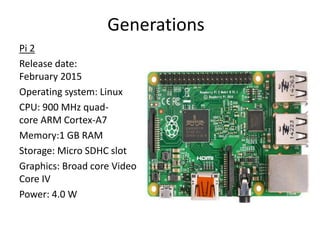
Generations
Pi 2
Release date:
February 2015
Operating system: Linux
CPU: 900 MHz quad-
core ARM Cortex-A7
Memory:1 GB RAM
Storage: Micro SDHC slot
Graphics: Broad core Video
Core IV
Power: 4.0 W
Generations
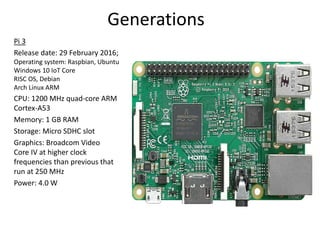
Pi 3
Release date: 29 February 2016;
Operating system: Raspbian, Ubuntu
Windows 10 IoT Core
RISC OS, Debian
Arch Linux ARM
CPU: 1200 MHz quad-core ARM
Cortex-A53
Memory: 1 GB RAM
Storage: Micro SDHC slot
Graphics: Broadcom Video
Core IV at higher clock
frequencies than previous that
run at 250 MHz
Power: 4.0 W
Generations
Upcoming version:
Raspberry Pi 2020:
– Exploit process scaling and keep price constant
– 8 cores, improved GPU, 8GB main memory
– WiFi, camera, matchbox sized case
– holographic laser projector, virtual keyboard
– FPGA logic on main SoC, high speed links, ….
– < $25
Internal connections
Programming languages
• The Raspberry Pi Foundation recommends Python
• Any language which will compile for ARMv6 can be
used
• Installed by default on the Raspberry Pi:
–C
–C++
–Java
–Scratch
–Ruby
Kit Components
• Essential:
– Raspberry Pi board
– Prepared Operating System SD Card
– USB keyboard
– Display (with HDMI, DVI, or Composite input)
– Power Supply
• Highly suggested extras include:
– USB mouse
– Internet connectivity - LAN cable
– Powered USB Hub
– Case
Software Development tools
• AlgoIDE
• BlueJ
• Fawlty Language
• Greenfoot
• Julia
• Lazarus – The professional Free Pascal RAD IDE.
• Object Pascal
• Ninja-IDE
• Xojo .
• V-Play Game Engine
Applications
• Entertainment:
– It can make your Old TV in to a smart TV. (You can
play Videos, 3D Games, Music, Browse Internet
and much more.
– Raspberry Pi can Act as Full HD 1080p Media
Player.
– Its a Mini Computer which just cost Rs.2,350/-
Applications
• Entertainment:
– You can connect a Monitor, Keyboard and Mouse
and use it as a normal computer.
– Its Graphics Capabilities is better than Apple
Products
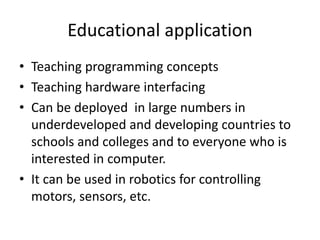
Educational application
• Teaching programming concepts
• Teaching hardware interfacing
• Can be deployed in large numbers in
underdeveloped and developing countries to
schools and colleges and to everyone who is
interested in computer.
• It can be used in robotics for controlling
motors, sensors, etc.
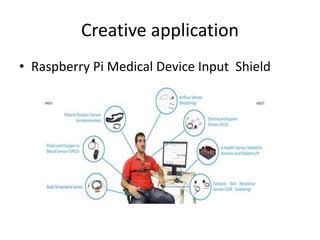
Creative application
• Raspberry Pi Medical Device Input Shield
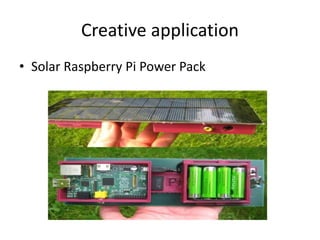
Creative application
• Solar Raspberry Pi Power Pack
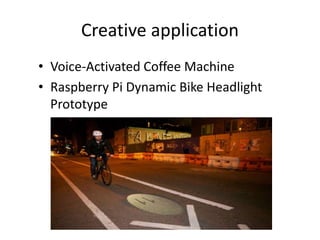
Creative application
• Voice-Activated Coffee Machine
• Raspberry Pi Dynamic Bike Headlight
Prototype
Advantages
• Iis able to display images or play videos at
1080p high definition resolution
• The product is energy efficient and provides a
greener ethical alternative to small businesses
• Environment friendly
Advantages
• You are not required to purchase any special
licenses from the Raspberry Pi Foundation to
use their product
• A credit card sized PC
• Very low cost ~£25 each
Disadvantages
• It does not have a Hard Disk associated with it for
permanent storage
• The RAM is a POP package on top of the SoC, so it’s not
removable or swappable.
• There is no Real time clock associated with the board.
• It does not replace your computer
• The Ethernet is only a 10/100 and the processor is not as
fast
• Unable to do any complex multitasking
• Not compatible with other operating systems such as
Windows
• This product will not be useful for bigger businesses that
already have big servers
Future scope
• Tablet version
• Interesting low-cost screen technologies
emerging
• Networks of Raspberries
• Powering the Raspberry Pi using a battery.
• It is a great solution against the large desktop
computers.
Conclusion
Raspberry Pi is an innovative product. The
sheer number of users and fan base support
the fact that the device can see a great future
ahead. The device can surely help anyone who
really wants to lean electronics and
computers. It can be effectively used if its
processing power is kept in mind. It can work
as a personal computer but cannot replace it.
Thank you

Raspberry pi

  • 1.
  • 2.
    Contents • Introduction • History •Objectives • Features • Hardware • Technology • Accessories • Generation • Internal connections • Programming languages • Kit components • SDK • Advantages • Disadvantages • Future scope • Conclusion
  • 3.
    Introduction • What isRaspberry pi? – The Raspberry Pi is a series of credit card sized single-board computers. – It was developed in the United Kingdom by the Raspberry Pi Foundation. – Intent to promote the teaching of basic computer science in schools and developing countries.
  • 4.
    History • The RaspberryPi is the work of the Raspberry Pi Foundation, a charitable organisation. • UK registered charity (No. 1129409), May 2009. • It's supported by the University of Cambridge Computer Laboratory and tech firm Broadcomm.
  • 5.
    Objective • To increaseComputer science skills • Access to computers • Computer Science is concerned with much more than simply being able to use a computer. • Children should understand how computers work and how to program them.
  • 6.
    Features • Ultra lowcost • Low power consumption • Instant start up and easy to maintain • Small in size • Provide a fun environment for experimenting with programming and electronics
  • 7.
    Hardware • 10/100 Base-TEthernet socket • HDMI socket • USB 2.0 socket • RCA video socket • SD card socket • Powered from micro USB socket • 3.5mm audio out jack • Header footprint for camera connection
  • 8.
    Technology • The RaspberryPi has a Broadcom BCM2835 system on a chip (SoC),which includes an ARM1176JZF-S 700 MHz processor • Video Core IV GPU • originally shipped with 256 megabytes of RAM, later upgraded to 512MB. • It does not include a built-in hard disk , but uses an SD card for booting and long-term storage.
  • 9.
    Accessories • Camera –It can produce 1080p, 720p and 640x480p video. The dimensions are 25 mm x 20 mm x 9 mm. • Gertboard – A Raspberry Pi Foundation sanctioned device, designed for educational purposes. • Infrared Camera. • HAT (Hardware Attached on Top) expansion boards
  • 10.
    Generations Pi 1 Release date: February 2012 OS: Linux CPU: 700 MHz single- core ARM1176JZF-S Memory: 256 MB, 512 MB Storage: SDHC slot ,Micro SDHC slot Graphics :Broadcom Video Core Power: 1.5 w
  • 11.
    Generations Pi 2 Release date: February2015 Operating system: Linux CPU: 900 MHz quad- core ARM Cortex-A7 Memory:1 GB RAM Storage: Micro SDHC slot Graphics: Broad core Video Core IV Power: 4.0 W
  • 12.
    Generations Pi 3 Release date:29 February 2016; Operating system: Raspbian, Ubuntu Windows 10 IoT Core RISC OS, Debian Arch Linux ARM CPU: 1200 MHz quad-core ARM Cortex-A53 Memory: 1 GB RAM Storage: Micro SDHC slot Graphics: Broadcom Video Core IV at higher clock frequencies than previous that run at 250 MHz Power: 4.0 W
  • 13.
    Generations Upcoming version: Raspberry Pi2020: – Exploit process scaling and keep price constant – 8 cores, improved GPU, 8GB main memory – WiFi, camera, matchbox sized case – holographic laser projector, virtual keyboard – FPGA logic on main SoC, high speed links, …. – < $25
  • 14.
  • 15.
    Programming languages • TheRaspberry Pi Foundation recommends Python • Any language which will compile for ARMv6 can be used • Installed by default on the Raspberry Pi: –C –C++ –Java –Scratch –Ruby
  • 16.
    Kit Components • Essential: –Raspberry Pi board – Prepared Operating System SD Card – USB keyboard – Display (with HDMI, DVI, or Composite input) – Power Supply • Highly suggested extras include: – USB mouse – Internet connectivity - LAN cable – Powered USB Hub – Case
  • 17.
    Software Development tools •AlgoIDE • BlueJ • Fawlty Language • Greenfoot • Julia • Lazarus – The professional Free Pascal RAD IDE. • Object Pascal • Ninja-IDE • Xojo . • V-Play Game Engine
  • 18.
    Applications • Entertainment: – Itcan make your Old TV in to a smart TV. (You can play Videos, 3D Games, Music, Browse Internet and much more. – Raspberry Pi can Act as Full HD 1080p Media Player. – Its a Mini Computer which just cost Rs.2,350/-
  • 19.
    Applications • Entertainment: – Youcan connect a Monitor, Keyboard and Mouse and use it as a normal computer. – Its Graphics Capabilities is better than Apple Products
  • 20.
    Educational application • Teachingprogramming concepts • Teaching hardware interfacing • Can be deployed in large numbers in underdeveloped and developing countries to schools and colleges and to everyone who is interested in computer. • It can be used in robotics for controlling motors, sensors, etc.
  • 21.
    Creative application • RaspberryPi Medical Device Input Shield
  • 22.
    Creative application • SolarRaspberry Pi Power Pack
  • 23.
    Creative application • Voice-ActivatedCoffee Machine • Raspberry Pi Dynamic Bike Headlight Prototype
  • 24.
    Advantages • Iis ableto display images or play videos at 1080p high definition resolution • The product is energy efficient and provides a greener ethical alternative to small businesses • Environment friendly
  • 25.
    Advantages • You arenot required to purchase any special licenses from the Raspberry Pi Foundation to use their product • A credit card sized PC • Very low cost ~£25 each
  • 26.
    Disadvantages • It doesnot have a Hard Disk associated with it for permanent storage • The RAM is a POP package on top of the SoC, so it’s not removable or swappable. • There is no Real time clock associated with the board. • It does not replace your computer • The Ethernet is only a 10/100 and the processor is not as fast • Unable to do any complex multitasking • Not compatible with other operating systems such as Windows • This product will not be useful for bigger businesses that already have big servers
  • 27.
    Future scope • Tabletversion • Interesting low-cost screen technologies emerging • Networks of Raspberries • Powering the Raspberry Pi using a battery. • It is a great solution against the large desktop computers.
  • 28.
    Conclusion Raspberry Pi isan innovative product. The sheer number of users and fan base support the fact that the device can see a great future ahead. The device can surely help anyone who really wants to lean electronics and computers. It can be effectively used if its processing power is kept in mind. It can work as a personal computer but cannot replace it. Thank you