Download to read offline
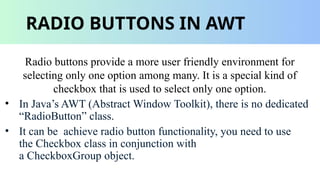

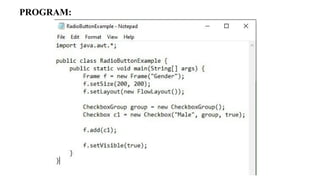

A RadioButton is a graphical user interface (GUI) component in Java that allows users to select one option from a group of mutually exclusive options. It is a type of Button that can be selected or deselected. When a RadioButton is selected, it is highlighted with a dot or a checkmark, indicating that it is the currently selected option. *History of RadioButtons* The concept of RadioButtons originated from the physical buttons used in old radios, where only one station could be selected at a time. This idea was later adopted in computer programming, and the first RadioButtons were implemented in graphical user interfaces. *How RadioButtons Work* A RadioButton is essentially a toggle button that can be either selected or deselected. When a RadioButton is selected, it is highlighted with a visual indicator, such as a dot or a checkmark. This indicates that the corresponding option has been chosen. *Key Features of RadioButtons* 1. *Mutual Exclusivity*: RadioButtons are designed to allow only one option to be selected at a time. This ensures that users can make a single, definitive choice. 2. *Visual Feedback*: RadioButtons provide immediate visual feedback when selected or deselected, helping users understand the current state of their selection. 3. *Easy to Use*: RadioButtons are intuitive and easy to use, making them accessible to users of all skill levels. *Types of RadioButtons* 1. *Standard RadioButtons*: These are the most common type of RadioButton, characterized by a circular or oval shape with a dot or checkmark indicator. 2. *Toggle RadioButtons*: These RadioButtons have a slightly different design, with a toggle-like appearance that indicates the selected state. 3. *Custom RadioButtons*: Developers can create custom RadioButtons with unique designs, shapes, and behaviors to suit specific application requirements. *RadioButton Best Practices* 1. *Use Clear and Concise Labels*: Ensure that the text labels accompanying RadioButtons are clear, concise, and easy to understand. 2. *Group Related Options*: Organize RadioButtons into logical groups to help users quickly identify related options. 3. *Provide Visual Feedback*: Ensure that RadioButtons provide clear visual feedback when selected or deselected. *Common RadioButton Use Cases* 1. *Forms and Surveys*: RadioButtons are commonly used in forms and surveys to collect user input and preferences. 2. *Settings and Configuration*: RadioButtons are used in application settings and configuration screens to allow users to customize their experience. 3. *Dashboards and Analytics*: RadioButtons can be used in dashboards and analytics tools to enable users to select specific data visualization options. *RadioButton Accessibility* 1. *Keyboard Navigation*: Ensure that RadioButtons can be navigated using the keyboard, allowing users with mobility or dexterity impairments to access the component. 2. *Screen Reader Support*: Ensure that RadioButtons are properly labeled and announced by scr


