Doğa Armangil, d.armangil@qworum.net, April 2024
Qworum: Making the Web more
suitable for applications
Why best-in-class applications need the Qworum frontend PaaS.
qworum.net
Outline
Business and technical reasons for upgrading the Web
Proven market need.
Business case: better customer service, easier partner integrations,
easier internal integrations.
Why the Web is still primarily a content platform.
What would make the Web a full-featured application platform.
Doğa Armangil
Founder
Qworum author
Software engineer
d.armangil@qworum.net
Module Federation
MF’s success has proved the
market need for UI-level
integrations.
Module federation
Business case
• Speci
fi
cally conceived for cross-team, cross-
business-unit integrations within an
organisation.
• Not made for cross-organisation integrations.
• Not made for integrating with the applications
of an acquired software company.
• Not made for software startups looking to be
acquired.
Team Team
Organisation
Organisation
✅
❌
Qworum
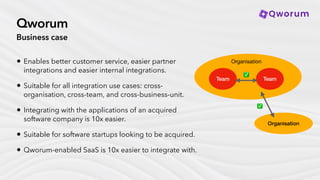
Business case
• Enables better customer service, easier partner
integrations and easier internal integrations.
• Suitable for all integration use cases: cross-
organisation, cross-team, and cross-business-unit.
• Integrating with the applications of an acquired
software company is 10x easier.
• Suitable for software startups looking to be acquired.
• Qworum-enabled SaaS is 10x easier to integrate with.
Team Team
Organisation
Organisation
✅
✅
Module federation
Technical aspects
• Not a technology, packages existing
technologies.
• The application shell is a potential performance
bottleneck for developer teams working in
parallel.
• In many cases, sharing responsability for the
same Web page may be a much too
fi
ne-
grained way of collaborating among devops
teams.
Application shell
Module Module
⚡⚡
Qworum
Technical aspects
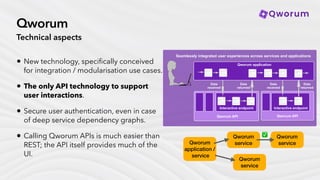
• New technology, speci
fi
cally conceived
for integration / modularisation use cases.
• The only API technology to support
user interactions.
• Secure user authentication, even in case
of deep service dependency graphs.
• Calling Qworum APIs is much easier than
REST; the API itself provides much of the
UI.
Qworum
application /
service
Qworum
service
Qworum
service
Qworum
service
✅
What’s a content platform?
Differences with application platforms
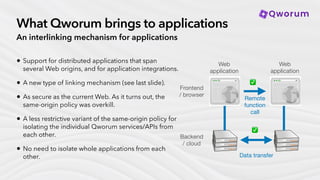
• On the Web, interlinking between content pages is
easy through hyperlinks.
• Interlinking between Web applications is
impossible, because there is no mechanism for
doing that.
• In fact, the Web platform goes out of its way to
isolate Web applications from each other (the
“same-origin policy”, or SOP).
• In today’s Web, instead of interlinking between
applications, we have integration mechanisms
performed at the backend. This happens “out-of-
band”, independently from the Web platform itself. Data transfer
Web
application
Web
application
❌
✅
Remote
function
call
Frontend
/ browser
Backend
/ cloud
What Qworum brings to applications
An interlinking mechanism for applications
• Support for distributed applications that span
several Web origins, and for application integrations.
• A new type of linking mechanism (see last slide).
• As secure as the current Web. As it turns out, the
same-origin policy was overkill.
• A less restrictive variant of the same-origin policy for
isolating the individual Qworum services/APIs from
each other.
• No need to isolate whole applications from each
other. Data transfer
Web
application
Web
application
✅
✅
Remote
function
call
Frontend
/ browser
Backend
/ cloud
What’s a content platform? (2)
Differences with application platforms
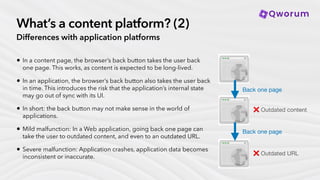
• In a content page, the browser’s back button takes the user back
one page. This works, as content is expected to be long-lived.
• In an application, the browser’s back button also takes the user back
in time. This introduces the risk that the application’s internal state
may go out of sync with its UI.
• In short: the back button may not make sense in the world of
applications.
• Mild malfunction: In a Web application, going back one page can
take the user to outdated content, and even to an outdated URL.
• Severe malfunction: Application crashes, application data becomes
inconsistent or inaccurate.
Back one page
Back one page
❌ Outdated URL
❌ Outdated content
What Qworum brings to applications (2)
Disabling the tab history
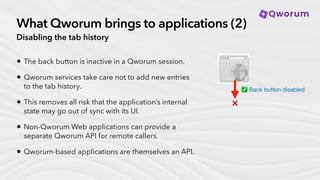
• The back button is inactive in a Qworum session.
• Qworum services take care not to add new entries
to the tab history.
• This removes all risk that the application’s internal
state may go out of sync with its UI.
• Non-Qworum Web applications can provide a
separate Qworum API for remote callers.
• Qworum-based applications are themselves an API.
✅ Back button disabled
❌
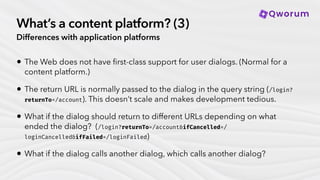
What’s a content platform? (3)
Differences with application platforms
• The Web does not have
fi
rst-class support for user dialogs. (Normal for a
content platform.)
• The return URL is normally passed to the dialog in the query string (/login?
returnTo=/account). This doesn’t scale and makes development tedious.
• What if the dialog should return to different URLs depending on what
ended the dialog? (/login?returnTo=/account&ifCancelled=/
loginCancelled&ifFailed=/loginFailed)
• What if the dialog calls another dialog, which calls another dialog?
What Qworum brings to applications (3)
Qworum scripts
• A new type of API where the endpoints provide
user dialogs.
• Qworum brings OOP methodologies to
application frontends.
• Qworum APIs are similar to OOP classes. API
endpoints are similar to object methods.
• The end-user sees a dialog when the Web
application runs a Qworum script that calls the
relevant endpoint.
• Query string not used for return addresses.
• Visit qworum.net for the full Qworum
speci
fi
cation.
<!—
A Qworum script that calls a login endpoint.
The Web application uses the Qworum browser extension
to run the script.
—>
<sequence xmlns='https://qworum.net/ns/v1/instruction/'>
<try>
<call href=‘/login' />
<catch faults=‘[“* cancelled”]'>
<goto href=‘/loginCancelled’ />
</catch>
<catch faults=‘[“* failed”]'>
<goto href=‘/loginFailed’ />
</catch>
</try>
<goto href=‘/account’ />
</sequence>
Qworum
browser extension
⚙
Web browser
Script sent
Next action to perform
∎

Qworum: Making the Web more suitable for applications

  • 1.
    Doğa Armangil, d.armangil@qworum.net,April 2024 Qworum: Making the Web more suitable for applications Why best-in-class applications need the Qworum frontend PaaS. qworum.net
  • 2.
    Outline Business and technicalreasons for upgrading the Web Proven market need. Business case: better customer service, easier partner integrations, easier internal integrations. Why the Web is still primarily a content platform. What would make the Web a full-featured application platform.
  • 3.
    Doğa Armangil Founder Qworum author Softwareengineer d.armangil@qworum.net
  • 4.
    Module Federation MF’s successhas proved the market need for UI-level integrations.
  • 5.
    Module federation Business case •Speci fi cally conceived for cross-team, cross- business-unit integrations within an organisation. • Not made for cross-organisation integrations. • Not made for integrating with the applications of an acquired software company. • Not made for software startups looking to be acquired. Team Team Organisation Organisation ✅ ❌
  • 6.
    Qworum Business case • Enablesbetter customer service, easier partner integrations and easier internal integrations. • Suitable for all integration use cases: cross- organisation, cross-team, and cross-business-unit. • Integrating with the applications of an acquired software company is 10x easier. • Suitable for software startups looking to be acquired. • Qworum-enabled SaaS is 10x easier to integrate with. Team Team Organisation Organisation ✅ ✅
  • 7.
    Module federation Technical aspects •Not a technology, packages existing technologies. • The application shell is a potential performance bottleneck for developer teams working in parallel. • In many cases, sharing responsability for the same Web page may be a much too fi ne- grained way of collaborating among devops teams. Application shell Module Module ⚡⚡
  • 8.
    Qworum Technical aspects • Newtechnology, speci fi cally conceived for integration / modularisation use cases. • The only API technology to support user interactions. • Secure user authentication, even in case of deep service dependency graphs. • Calling Qworum APIs is much easier than REST; the API itself provides much of the UI. Qworum application / service Qworum service Qworum service Qworum service ✅
  • 9.
    What’s a contentplatform? Differences with application platforms • On the Web, interlinking between content pages is easy through hyperlinks. • Interlinking between Web applications is impossible, because there is no mechanism for doing that. • In fact, the Web platform goes out of its way to isolate Web applications from each other (the “same-origin policy”, or SOP). • In today’s Web, instead of interlinking between applications, we have integration mechanisms performed at the backend. This happens “out-of- band”, independently from the Web platform itself. Data transfer Web application Web application ❌ ✅ Remote function call Frontend / browser Backend / cloud
  • 10.
    What Qworum bringsto applications An interlinking mechanism for applications • Support for distributed applications that span several Web origins, and for application integrations. • A new type of linking mechanism (see last slide). • As secure as the current Web. As it turns out, the same-origin policy was overkill. • A less restrictive variant of the same-origin policy for isolating the individual Qworum services/APIs from each other. • No need to isolate whole applications from each other. Data transfer Web application Web application ✅ ✅ Remote function call Frontend / browser Backend / cloud
  • 11.
    What’s a contentplatform? (2) Differences with application platforms • In a content page, the browser’s back button takes the user back one page. This works, as content is expected to be long-lived. • In an application, the browser’s back button also takes the user back in time. This introduces the risk that the application’s internal state may go out of sync with its UI. • In short: the back button may not make sense in the world of applications. • Mild malfunction: In a Web application, going back one page can take the user to outdated content, and even to an outdated URL. • Severe malfunction: Application crashes, application data becomes inconsistent or inaccurate. Back one page Back one page ❌ Outdated URL ❌ Outdated content
  • 12.
    What Qworum bringsto applications (2) Disabling the tab history • The back button is inactive in a Qworum session. • Qworum services take care not to add new entries to the tab history. • This removes all risk that the application’s internal state may go out of sync with its UI. • Non-Qworum Web applications can provide a separate Qworum API for remote callers. • Qworum-based applications are themselves an API. ✅ Back button disabled ❌
  • 13.
    What’s a contentplatform? (3) Differences with application platforms • The Web does not have fi rst-class support for user dialogs. (Normal for a content platform.) • The return URL is normally passed to the dialog in the query string (/login? returnTo=/account). This doesn’t scale and makes development tedious. • What if the dialog should return to different URLs depending on what ended the dialog? (/login?returnTo=/account&ifCancelled=/ loginCancelled&ifFailed=/loginFailed) • What if the dialog calls another dialog, which calls another dialog?
  • 14.
    What Qworum bringsto applications (3) Qworum scripts • A new type of API where the endpoints provide user dialogs. • Qworum brings OOP methodologies to application frontends. • Qworum APIs are similar to OOP classes. API endpoints are similar to object methods. • The end-user sees a dialog when the Web application runs a Qworum script that calls the relevant endpoint. • Query string not used for return addresses. • Visit qworum.net for the full Qworum speci fi cation. <!— A Qworum script that calls a login endpoint. The Web application uses the Qworum browser extension to run the script. —> <sequence xmlns='https://qworum.net/ns/v1/instruction/'> <try> <call href=‘/login' /> <catch faults=‘[“* cancelled”]'> <goto href=‘/loginCancelled’ /> </catch> <catch faults=‘[“* failed”]'> <goto href=‘/loginFailed’ /> </catch> </try> <goto href=‘/account’ /> </sequence> Qworum browser extension ⚙ Web browser Script sent Next action to perform ∎