Getting Started with SQL and
the ichris / Chris21BRE
Presented by Cam Gibbons
Getting Started with SQL and the ichris /
Chris21BRE
• What you will need
• Database creation
• Configuration
• System Verification and load / unload from database
• System Maintenance
• Documentation and resources
Introduction
Getting Started with SQL and the ichris /
Chris21BRE
• BRE
• SQL Server or SQL Express
• SQL Management studio
What you will need
Getting Started with SQL and the ichris /
Chris21BRE
• Database Naming convention for BRE database
QA naming convention: < Initials|MachineOS|MachineNo|_VersionNo_Build/JobNo> i.e.: CGLT805_814_81400
• Database Owner
Set Database Owner to be: chriscs
• Database script to configure the Database after creation
ALTER DATABASE [DATABASE NAME] COLLATE Latin1_General_BIN;
ALTER DATABASE [DATABASE NAME] SET READ_COMMITTED_SNAPSHOT ON;
ALTER DATABASE [DATABASE NAME] SET ALLOW_SNAPSHOT_ISOLATION ON;
ALTER DATABASE [DATABASE NAME] SET MULTI_USER;
Note: Replace DATABASE NAME with the name of the database (i.e. CGLT805_814_81400)
Database creation
Getting Started with SQL and the ichris /
Chris21BRE
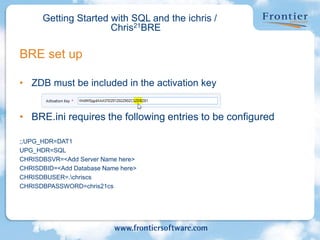
• ZDB must be included in the activation key
• BRE.ini requires the following entries to be configured
;;UPG_HDR=DAT1
UPG_HDR=SQL
CHRISDBSVR=<Add Server Name here>
CHRISDBID=<Add Database Name here>
CHRISDBUSER=.chriscs
CHRISDBPASSWORD=chris21cs
BRE set up
Getting Started with SQL and the ichris /
Chris21BRE
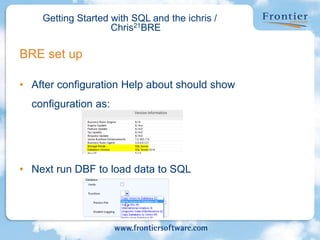
• After configuration Help about should show
configuration as:
• Next run DBF to load data to SQL
BRE set up
Getting Started with SQL and the ichris /
Chris21BRE
• Can verify storage location of files on FIL
• When taking a back up of data remember to backup the database, and also
the DAT directory
• When deleting a system you need to delete both the DAT and the database,
or unload the data to vision via DBF
• When upgrading a system, remember that your BRE.ini will need to be
included in the chriswork to ensure the configured settings are applied as
part of the upgrade.
• System performance under sql will be slower for processing data
BRE – Maintenance tasks
Getting Started with SQL and the ichris /
Chris21BRE
• Technical manual / System Error Manual
• SQL resources
• QA twiki site
Documentation and resources
Copyright © Frontier Software 2015
Commitment to customer service is
our number-one priority
Michael Howard, Founder

Quality Assurance config SQL and ichris.pptx

  • 1.
    Getting Started withSQL and the ichris / Chris21BRE Presented by Cam Gibbons
  • 2.
    Getting Started withSQL and the ichris / Chris21BRE • What you will need • Database creation • Configuration • System Verification and load / unload from database • System Maintenance • Documentation and resources Introduction
  • 3.
    Getting Started withSQL and the ichris / Chris21BRE • BRE • SQL Server or SQL Express • SQL Management studio What you will need
  • 4.
    Getting Started withSQL and the ichris / Chris21BRE • Database Naming convention for BRE database QA naming convention: < Initials|MachineOS|MachineNo|_VersionNo_Build/JobNo> i.e.: CGLT805_814_81400 • Database Owner Set Database Owner to be: chriscs • Database script to configure the Database after creation ALTER DATABASE [DATABASE NAME] COLLATE Latin1_General_BIN; ALTER DATABASE [DATABASE NAME] SET READ_COMMITTED_SNAPSHOT ON; ALTER DATABASE [DATABASE NAME] SET ALLOW_SNAPSHOT_ISOLATION ON; ALTER DATABASE [DATABASE NAME] SET MULTI_USER; Note: Replace DATABASE NAME with the name of the database (i.e. CGLT805_814_81400) Database creation
  • 5.
    Getting Started withSQL and the ichris / Chris21BRE • ZDB must be included in the activation key • BRE.ini requires the following entries to be configured ;;UPG_HDR=DAT1 UPG_HDR=SQL CHRISDBSVR=<Add Server Name here> CHRISDBID=<Add Database Name here> CHRISDBUSER=.chriscs CHRISDBPASSWORD=chris21cs BRE set up
  • 6.
    Getting Started withSQL and the ichris / Chris21BRE • After configuration Help about should show configuration as: • Next run DBF to load data to SQL BRE set up
  • 7.
    Getting Started withSQL and the ichris / Chris21BRE • Can verify storage location of files on FIL • When taking a back up of data remember to backup the database, and also the DAT directory • When deleting a system you need to delete both the DAT and the database, or unload the data to vision via DBF • When upgrading a system, remember that your BRE.ini will need to be included in the chriswork to ensure the configured settings are applied as part of the upgrade. • System performance under sql will be slower for processing data BRE – Maintenance tasks
  • 8.
    Getting Started withSQL and the ichris / Chris21BRE • Technical manual / System Error Manual • SQL resources • QA twiki site Documentation and resources
  • 9.
    Copyright © FrontierSoftware 2015 Commitment to customer service is our number-one priority Michael Howard, Founder