QTP Object Identification How QTP identifies object during and after recording How to use Object repository to view the captured Object Properties How to use Object Spy to view run-time object properties Test Object and Run Object properties Fore more QTP Realtime Scripts, visit  www.ramupalanki.com March 26, 2003
QTP – Object Properties A set of characteristics that define an object’s appearance, values, state and identity in an application.  Different objects in application are Image, List Item, Edit box, check box, radio button, Hyperlink and Submit/Command button. Fore more QTP Realtime Scripts, visit  www.ramupalanki.com March 26, 2003
QTP – Test Object Model The  test object model  is a large set of object types or  classes  that Quick Test uses to represent the objects in your application. A  test object  is an object that Quick Test creates in the test to represent the actual object in your application.  Fore more QTP Realtime Scripts, visit  www.ramupalanki.com March 26, 2003
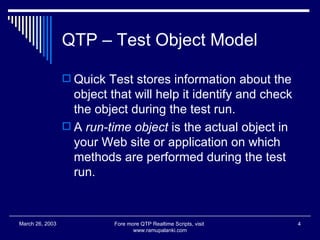
QTP – Test Object Model Quick Test stores information about the object that will help it identify and check the object during the test run.  A  run-time object  is the actual object in your Web site or application on which methods are performed during the test run. Fore more QTP Realtime Scripts, visit  www.ramupalanki.com March 26, 2003
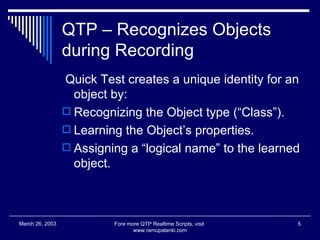
QTP – Recognizes Objects during Recording Quick Test creates a unique identity for an object by: Recognizing the Object type (“Class”). Learning the Object’s properties. Assigning a “logical name” to the learned object. Fore more QTP Realtime Scripts, visit  www.ramupalanki.com March 26, 2003
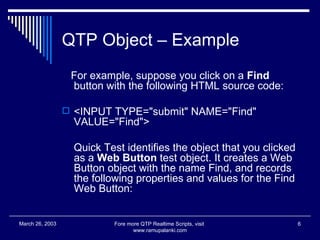
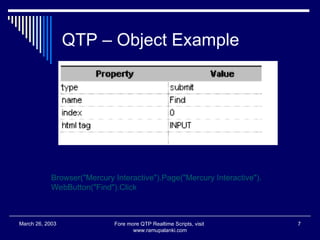
QTP Object – Example For example, suppose you click on a  Find  button with the following HTML source code:  <INPUT TYPE=&quot;submit&quot; NAME=&quot;Find&quot; VALUE=&quot;Find&quot;>  Quick Test identifies the object that you clicked as a  Web Button  test object. It creates a Web Button object with the name Find, and records the following properties and values for the Find Web Button:  Fore more QTP Realtime Scripts, visit  www.ramupalanki.com March 26, 2003
QTP – Object Example Fore more QTP Realtime Scripts, visit  www.ramupalanki.com March 26, 2003 Browser(&quot;Mercury Interactive&quot;).Page(&quot;Mercury Interactive&quot;). WebButton(&quot;Find&quot;).Click
QTP – Object Properties The  GetTOProperty  methods enable you to retrieve a specific property value that Quick Test uses to identify an object. The  SetTOProperty  method enables you to modify a property value that Quick Test uses to identify an object.  You use the  GetROProperty  method to retrieve the current value of a  test object property  from a run-time object in your application.  Fore more QTP Realtime Scripts, visit  www.ramupalanki.com March 26, 2003
QTP – Object Repository When you record a test, Quick Test adds each object on which you perform an operation to the Object Repository.  Test Object information is stored in Object Repository. You can also add objects to the object repository while editing your test. Fore more QTP Realtime Scripts, visit  www.ramupalanki.com March 26, 2003
QTP – Object Spy The Object Spy also enables you to view both the run-time object methods and the test object methods associated with an object. The Object Spy displays the object hierarchy tree and the run-time object methods or test object methods associated with the selected object in the Methods tab of the Object Spy dialog box.  Fore more QTP Realtime Scripts, visit  www.ramupalanki.com March 26, 2003
QTP – Object Identification properties If you expect that the values of the properties currently used in the object description may change. Then you can modify the mandatory and assistive properties that Quick Test learns when you record on an object of a given class  Fore more QTP Realtime Scripts, visit  www.ramupalanki.com March 26, 2003
QTP – Object Identification properties Select the Test Object’s environment Add or Remove Mandatory properties Add or remove Assistive / Secondary properties. You can specify a new property by clicking  New  and specifying a valid property name in the displayed Object classes dialog box. Fore more QTP Realtime Scripts, visit  www.ramupalanki.com March 26, 2003
QTP – Ordinal Identifier An ordinal identifier assigns the object a numerical value that indicates its order relative to other objects with similar descriptions. Acts as a third line of identification when mandatory and assistive properties are still not sufficient Types of ordinal identifiers: Index – indicates order of the object relative to other similar objects Location – Indicates order of the object relative to its location in the parent window/page Fore more QTP Realtime Scripts, visit  www.ramupalanki.com March 26, 2003
QTP – Objects Require more time When you run tests, your application may not always respond with the same speed. For example, it might take a few seconds:  for a progress bar to reach 100% for a status message to appear for a button to become enabled for a window or pop-up message to open  Fore more QTP Realtime Scripts, visit  www.ramupalanki.com March 26, 2003
QTP - Synchronization You can handle these anticipated timing problems by synchronizing your test to ensure that Quick Test waits until your application is ready before performing a certain step.  You can insert a  synchronization point , which instructs Quick Test to pause the test until an object property achieves the value you specify.  Fore more QTP Realtime Scripts, visit  www.ramupalanki.com March 26, 2003
QTP – Wait Statement You can enter  Wait  statements in the Expert View to instruct Quick Test to wait for a window to open or an object to appear.  Wait statements instruct Quick Test to wait a specified amount of time before proceeding to the next step.  Fore more QTP Realtime Scripts, visit  www.ramupalanki.com March 26, 2003

Qtp testing1

  • 1.
    QTP Object IdentificationHow QTP identifies object during and after recording How to use Object repository to view the captured Object Properties How to use Object Spy to view run-time object properties Test Object and Run Object properties Fore more QTP Realtime Scripts, visit www.ramupalanki.com March 26, 2003
  • 2.
    QTP – ObjectProperties A set of characteristics that define an object’s appearance, values, state and identity in an application. Different objects in application are Image, List Item, Edit box, check box, radio button, Hyperlink and Submit/Command button. Fore more QTP Realtime Scripts, visit www.ramupalanki.com March 26, 2003
  • 3.
    QTP – TestObject Model The test object model is a large set of object types or classes that Quick Test uses to represent the objects in your application. A test object is an object that Quick Test creates in the test to represent the actual object in your application. Fore more QTP Realtime Scripts, visit www.ramupalanki.com March 26, 2003
  • 4.
    QTP – TestObject Model Quick Test stores information about the object that will help it identify and check the object during the test run. A run-time object is the actual object in your Web site or application on which methods are performed during the test run. Fore more QTP Realtime Scripts, visit www.ramupalanki.com March 26, 2003
  • 5.
    QTP – RecognizesObjects during Recording Quick Test creates a unique identity for an object by: Recognizing the Object type (“Class”). Learning the Object’s properties. Assigning a “logical name” to the learned object. Fore more QTP Realtime Scripts, visit www.ramupalanki.com March 26, 2003
  • 6.
    QTP Object –Example For example, suppose you click on a Find button with the following HTML source code: <INPUT TYPE=&quot;submit&quot; NAME=&quot;Find&quot; VALUE=&quot;Find&quot;> Quick Test identifies the object that you clicked as a Web Button test object. It creates a Web Button object with the name Find, and records the following properties and values for the Find Web Button: Fore more QTP Realtime Scripts, visit www.ramupalanki.com March 26, 2003
  • 7.
    QTP – ObjectExample Fore more QTP Realtime Scripts, visit www.ramupalanki.com March 26, 2003 Browser(&quot;Mercury Interactive&quot;).Page(&quot;Mercury Interactive&quot;). WebButton(&quot;Find&quot;).Click
  • 8.
    QTP – ObjectProperties The GetTOProperty methods enable you to retrieve a specific property value that Quick Test uses to identify an object. The SetTOProperty method enables you to modify a property value that Quick Test uses to identify an object. You use the GetROProperty method to retrieve the current value of a test object property from a run-time object in your application. Fore more QTP Realtime Scripts, visit www.ramupalanki.com March 26, 2003
  • 9.
    QTP – ObjectRepository When you record a test, Quick Test adds each object on which you perform an operation to the Object Repository. Test Object information is stored in Object Repository. You can also add objects to the object repository while editing your test. Fore more QTP Realtime Scripts, visit www.ramupalanki.com March 26, 2003
  • 10.
    QTP – ObjectSpy The Object Spy also enables you to view both the run-time object methods and the test object methods associated with an object. The Object Spy displays the object hierarchy tree and the run-time object methods or test object methods associated with the selected object in the Methods tab of the Object Spy dialog box. Fore more QTP Realtime Scripts, visit www.ramupalanki.com March 26, 2003
  • 11.
    QTP – ObjectIdentification properties If you expect that the values of the properties currently used in the object description may change. Then you can modify the mandatory and assistive properties that Quick Test learns when you record on an object of a given class Fore more QTP Realtime Scripts, visit www.ramupalanki.com March 26, 2003
  • 12.
    QTP – ObjectIdentification properties Select the Test Object’s environment Add or Remove Mandatory properties Add or remove Assistive / Secondary properties. You can specify a new property by clicking New and specifying a valid property name in the displayed Object classes dialog box. Fore more QTP Realtime Scripts, visit www.ramupalanki.com March 26, 2003
  • 13.
    QTP – OrdinalIdentifier An ordinal identifier assigns the object a numerical value that indicates its order relative to other objects with similar descriptions. Acts as a third line of identification when mandatory and assistive properties are still not sufficient Types of ordinal identifiers: Index – indicates order of the object relative to other similar objects Location – Indicates order of the object relative to its location in the parent window/page Fore more QTP Realtime Scripts, visit www.ramupalanki.com March 26, 2003
  • 14.
    QTP – ObjectsRequire more time When you run tests, your application may not always respond with the same speed. For example, it might take a few seconds: for a progress bar to reach 100% for a status message to appear for a button to become enabled for a window or pop-up message to open Fore more QTP Realtime Scripts, visit www.ramupalanki.com March 26, 2003
  • 15.
    QTP - SynchronizationYou can handle these anticipated timing problems by synchronizing your test to ensure that Quick Test waits until your application is ready before performing a certain step. You can insert a synchronization point , which instructs Quick Test to pause the test until an object property achieves the value you specify. Fore more QTP Realtime Scripts, visit www.ramupalanki.com March 26, 2003
  • 16.
    QTP – WaitStatement You can enter Wait statements in the Expert View to instruct Quick Test to wait for a window to open or an object to appear. Wait statements instruct Quick Test to wait a specified amount of time before proceeding to the next step. Fore more QTP Realtime Scripts, visit www.ramupalanki.com March 26, 2003