Python Session - 5
Anirudha Anil Gaikwad
gaikwad.anirudha@gmail.com
What you learn
 Python Modules
 Python Package
 Python File I/O
Python Modules
Modules refer to a file containing Python statements and definitions.
A file containing Python code, for e.g.: filename.py, is called a module and its module name
would be filename.
We use modules to break down large programs into small manageable and organized files.
Furthermore, modules provide reusability of code.
We can define our most used functions in a module and import it, instead of copying their
definitions into different programs.
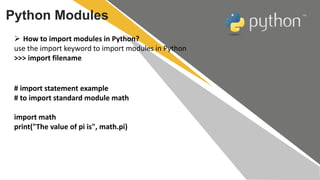
Python Modules
 How to import modules in Python?
use the import keyword to import modules in Python
>>> import filename
# import statement example
# to import standard module math
import math
print("The value of pi is", math.pi)
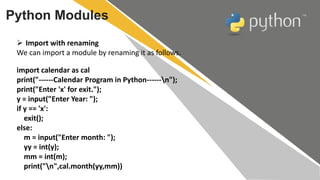
Python Modules
 Import with renaming
We can import a module by renaming it as follows.
import calendar as cal
print("------Calendar Program in Python------n");
print("Enter 'x' for exit.");
y = input("Enter Year: ");
if y == 'x':
exit();
else:
m = input("Enter month: ");
yy = int(y);
mm = int(m);
print("n",cal.month(yy,mm))
Python Modules
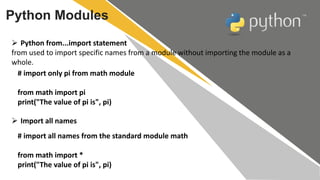
 Python from...import statement
from used to import specific names from a module without importing the module as a
whole.
# import only pi from math module
from math import pi
print("The value of pi is", pi)
 Import all names
# import all names from the standard module math
from math import *
print("The value of pi is", pi)
Python Package
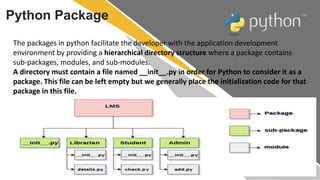
The packages in python facilitate the developer with the application development
environment by providing a hierarchical directory structure where a package contains
sub-packages, modules, and sub-modules.
A directory must contain a file named __init__.py in order for Python to consider it as a
package. This file can be left empty but we generally place the initialization code for that
package in this file.
Python File I/O
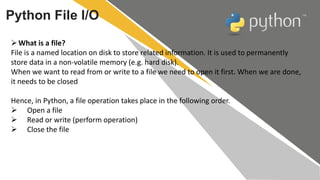
What is a file?
File is a named location on disk to store related information. It is used to permanently
store data in a non-volatile memory (e.g. hard disk).
When we want to read from or write to a file we need to open it first. When we are done,
it needs to be closed
Hence, in Python, a file operation takes place in the following order.
 Open a file
 Read or write (perform operation)
 Close the file
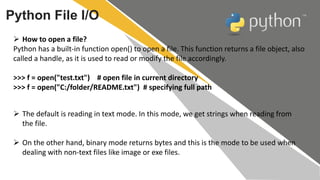
 How to open a file?
Python has a built-in function open() to open a file. This function returns a file object, also
called a handle, as it is used to read or modify the file accordingly.
>>> f = open("test.txt") # open file in current directory
>>> f = open("C:/folder/README.txt") # specifying full path
Python File I/O
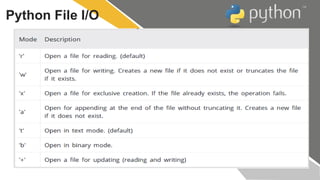
 The default is reading in text mode. In this mode, we get strings when reading from
the file.
 On the other hand, binary mode returns bytes and this is the mode to be used when
dealing with non-text files like image or exe files.
Python File I/O
Python File I/O
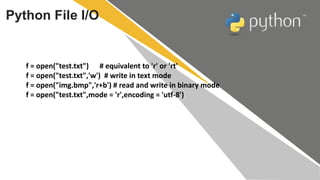
f = open("test.txt") # equivalent to 'r' or 'rt'
f = open("test.txt",'w') # write in text mode
f = open("img.bmp",'r+b') # read and write in binary mode
f = open("test.txt",mode = 'r',encoding = 'utf-8')
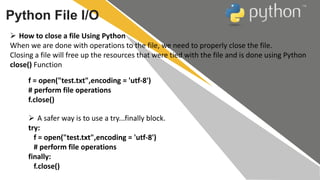
 How to close a file Using Python
When we are done with operations to the file, we need to properly close the file.
Closing a file will free up the resources that were tied with the file and is done using Python
close() Function
Python File I/O
f = open("test.txt",encoding = 'utf-8')
# perform file operations
f.close()
 A safer way is to use a try...finally block.
try:
f = open("test.txt",encoding = 'utf-8')
# perform file operations
finally:
f.close()
Python File I/O
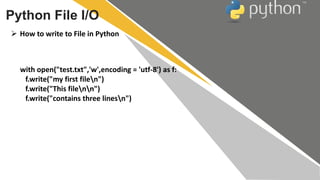
 How to write to File in Python
with open("test.txt",'w',encoding = 'utf-8') as f:
f.write("my first filen")
f.write("This filenn")
f.write("contains three linesn")
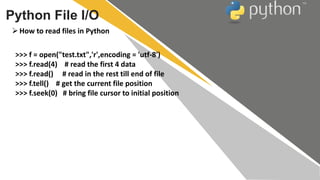
How to read files in Python
Python File I/O
>>> f = open("test.txt",'r',encoding = 'utf-8')
>>> f.read(4) # read the first 4 data
>>> f.read() # read in the rest till end of file
>>> f.tell() # get the current file position
>>> f.seek(0) # bring file cursor to initial position
Python File I/O
Python File I/O
T H A N K S

Python Session - 5

  • 1.
    Python Session -5 Anirudha Anil Gaikwad gaikwad.anirudha@gmail.com
  • 2.
    What you learn Python Modules  Python Package  Python File I/O
  • 3.
    Python Modules Modules referto a file containing Python statements and definitions. A file containing Python code, for e.g.: filename.py, is called a module and its module name would be filename. We use modules to break down large programs into small manageable and organized files. Furthermore, modules provide reusability of code. We can define our most used functions in a module and import it, instead of copying their definitions into different programs.
  • 4.
    Python Modules  Howto import modules in Python? use the import keyword to import modules in Python >>> import filename # import statement example # to import standard module math import math print("The value of pi is", math.pi)
  • 5.
    Python Modules  Importwith renaming We can import a module by renaming it as follows. import calendar as cal print("------Calendar Program in Python------n"); print("Enter 'x' for exit."); y = input("Enter Year: "); if y == 'x': exit(); else: m = input("Enter month: "); yy = int(y); mm = int(m); print("n",cal.month(yy,mm))
  • 6.
    Python Modules  Pythonfrom...import statement from used to import specific names from a module without importing the module as a whole. # import only pi from math module from math import pi print("The value of pi is", pi)  Import all names # import all names from the standard module math from math import * print("The value of pi is", pi)
  • 7.
    Python Package The packagesin python facilitate the developer with the application development environment by providing a hierarchical directory structure where a package contains sub-packages, modules, and sub-modules. A directory must contain a file named __init__.py in order for Python to consider it as a package. This file can be left empty but we generally place the initialization code for that package in this file.
  • 8.
    Python File I/O Whatis a file? File is a named location on disk to store related information. It is used to permanently store data in a non-volatile memory (e.g. hard disk). When we want to read from or write to a file we need to open it first. When we are done, it needs to be closed Hence, in Python, a file operation takes place in the following order.  Open a file  Read or write (perform operation)  Close the file
  • 9.
     How toopen a file? Python has a built-in function open() to open a file. This function returns a file object, also called a handle, as it is used to read or modify the file accordingly. >>> f = open("test.txt") # open file in current directory >>> f = open("C:/folder/README.txt") # specifying full path Python File I/O  The default is reading in text mode. In this mode, we get strings when reading from the file.  On the other hand, binary mode returns bytes and this is the mode to be used when dealing with non-text files like image or exe files.
  • 10.
  • 11.
    Python File I/O f= open("test.txt") # equivalent to 'r' or 'rt' f = open("test.txt",'w') # write in text mode f = open("img.bmp",'r+b') # read and write in binary mode f = open("test.txt",mode = 'r',encoding = 'utf-8')
  • 12.
     How toclose a file Using Python When we are done with operations to the file, we need to properly close the file. Closing a file will free up the resources that were tied with the file and is done using Python close() Function Python File I/O f = open("test.txt",encoding = 'utf-8') # perform file operations f.close()  A safer way is to use a try...finally block. try: f = open("test.txt",encoding = 'utf-8') # perform file operations finally: f.close()
  • 13.
    Python File I/O How to write to File in Python with open("test.txt",'w',encoding = 'utf-8') as f: f.write("my first filen") f.write("This filenn") f.write("contains three linesn")
  • 14.
    How to readfiles in Python Python File I/O >>> f = open("test.txt",'r',encoding = 'utf-8') >>> f.read(4) # read the first 4 data >>> f.read() # read in the rest till end of file >>> f.tell() # get the current file position >>> f.seek(0) # bring file cursor to initial position
  • 15.
  • 16.
  • 17.
    T H AN K S