M Vishnuvardhan
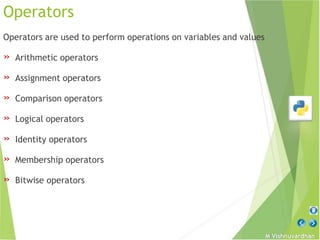
Operators
Operators are used to perform operations on variables and values
» Arithmetic operators
» Assignment operators
» Comparison operators
» Logical operators
» Identity operators
» Membership operators
» Bitwise operators
M Vishnuvardhan
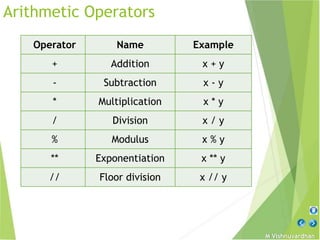
Arithmetic Operators
Operator Name Example
+ Addition x + y
- Subtraction x - y
* Multiplication x * y
/ Division x / y
% Modulus x % y
** Exponentiation x ** y
// Floor division x // y
M Vishnuvardhan
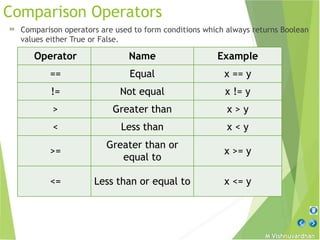
Comparison Operators
» Comparison operators are used to form conditions which always returns Boolean
values either True or False.
Operator Name Example
== Equal x == y
!= Not equal x != y
> Greater than x > y
< Less than x < y
>=
Greater than or
equal to
x >= y
<= Less than or equal to x <= y
M Vishnuvardhan
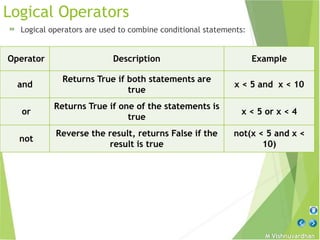
Logical Operators
» Logical operators are used to combine conditional statements:
Operator Description Example
and
Returns True if both statements are
true
x < 5 and x < 10
or
Returns True if one of the statements is
true
x < 5 or x < 4
not
Reverse the result, returns False if the
result is true
not(x < 5 and x <
10)
M Vishnuvardhan
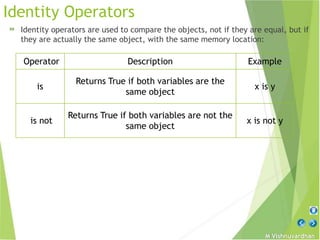
Identity Operators
» Identity operators are used to compare the objects, not if they are equal, but if
they are actually the same object, with the same memory location:
Operator Description Example
is
Returns True if both variables are the
same object
x is y
is not
Returns True if both variables are not the
same object
x is not y
M Vishnuvardhan
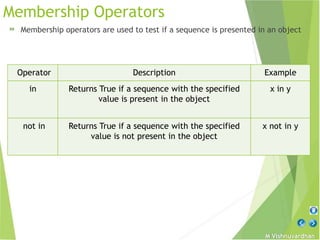
Membership Operators
» Membership operators are used to test if a sequence is presented in an object
Operator Description Example
in Returns True if a sequence with the specified
value is present in the object
x in y
not in Returns True if a sequence with the specified
value is not present in the object
x not in y
M Vishnuvardhan
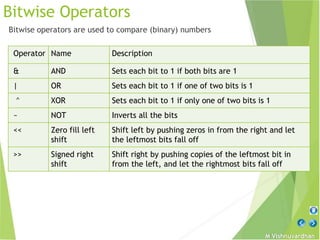
Bitwise Operators
Bitwise operators are used to compare (binary) numbers
Operator Name Description
& AND Sets each bit to 1 if both bits are 1
| OR Sets each bit to 1 if one of two bits is 1
^ XOR Sets each bit to 1 if only one of two bits is 1
~ NOT Inverts all the bits
<< Zero fill left
shift
Shift left by pushing zeros in from the right and let
the leftmost bits fall off
>> Signed right
shift
Shift right by pushing copies of the leftmost bit in
from the left, and let the rightmost bits fall off
M Vishnuvardhan
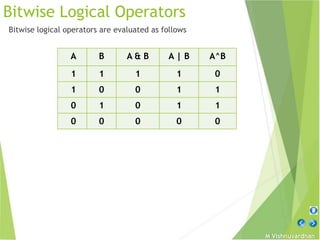
Bitwise Logical Operators
Bitwise logical operators are evaluated as follows
A B A & B A | B A^B
1 1 1 1 0
1 0 0 1 1
0 1 0 1 1
0 0 0 0 0
M Vishnuvardhan
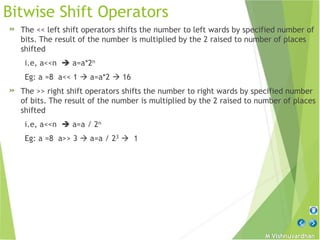
Bitwise Shift Operators
» The << left shift operators shifts the number to left wards by specified number of
bits. The result of the number is multiplied by the 2 raised to number of places
shifted
i.e, a<<n  a=a*2n
Eg: a =8 a<< 1  a=a*2  16
» The >> right shift operators shifts the number to right wards by specified number
of bits. The result of the number is multiplied by the 2 raised to number of places
shifted
i.e, a<<n  a=a / 2n
Eg: a =8 a>> 3  a=a / 23  1
M Vishnuvardhan
Assignment Statement
» Basic form: Eg: student = 'SSBN’
» Tuple assignment: Eg: x, y = 50, 100 # equivalent to: (x, y) = (50, 100)
» List assignment: Eg: [x, y] = [50, 100] # equivalent to: (x, y) = (50, 100)
» Sequence assignment: Eg: a, b, c, d= ‘SSBN’
» Extended Sequence unpacking: Eg: p, *q = 'Hello’
ranks = ['A', 'B', 'C', 'D’]
first, *rest = ranks
» Multiple- target assignment: Eg: x = y = 75
» Augmented assignment: Eg: x = 2
x += 1 # equivalent to: x = x + 1
M Vishnuvardhan
Print Statement
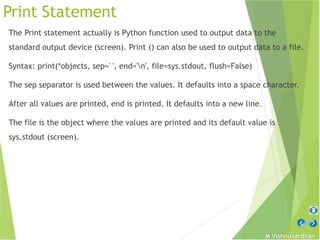
The Print statement actually is Python function used to output data to the
standard output device (screen). Print () can also be used to output data to a file.
Syntax: print(*objects, sep=' ', end='n', file=sys.stdout, flush=False)
The sep separator is used between the values. It defaults into a space character.
After all values are printed, end is printed. It defaults into a new line.
The file is the object where the values are printed and its default value is
sys.stdout (screen).
M Vishnuvardhan
Print Statement
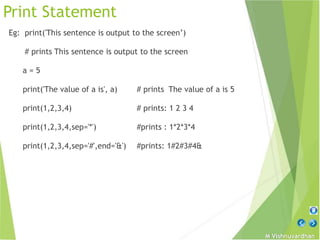
Eg: print('This sentence is output to the screen’)
# prints This sentence is output to the screen
a = 5
print('The value of a is', a) # prints The value of a is 5
print(1,2,3,4) # prints: 1 2 3 4
print(1,2,3,4,sep='*') #prints : 1*2*3*4
print(1,2,3,4,sep='#',end='&') #prints: 1#2#3#4&
M Vishnuvardhan
Output formatting
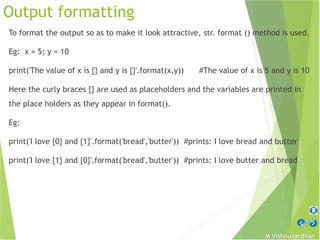
To format the output so as to make it look attractive, str. format () method is used.
Eg: x = 5; y = 10
print('The value of x is {} and y is {}'.format(x,y)) #The value of x is 5 and y is 10
Here the curly braces {} are used as placeholders and the variables are printed in
the place holders as they appear in format().
Eg:
print('I love {0} and {1}'.format('bread','butter')) #prints: I love bread and butter
print('I love {1} and {0}'.format('bread','butter')) #prints: I love butter and bread
M Vishnuvardhan
Output formatting
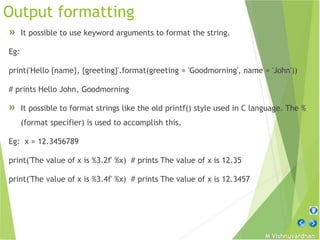
» It possible to use keyword arguments to format the string.
Eg:
print('Hello {name}, {greeting}'.format(greeting = 'Goodmorning', name = 'John'))
# prints Hello John, Goodmorning
» It possible to format strings like the old printf() style used in C language. The %
(format specifier) is used to accomplish this.
Eg: x = 12.3456789
print('The value of x is %3.2f' %x) # prints The value of x is 12.35
print('The value of x is %3.4f' %x) # prints The value of x is 12.3457
M Vishnuvardhan
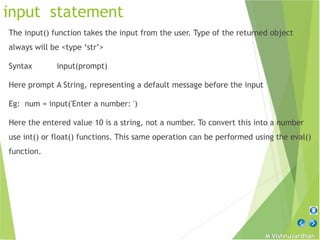
input statement
The input() function takes the input from the user. Type of the returned object
always will be <type ‘str’>
Syntax input(prompt)
Here prompt A String, representing a default message before the input
Eg: num = input('Enter a number: ')
Here the entered value 10 is a string, not a number. To convert this into a number
use int() or float() functions. This same operation can be performed using the eval()
function.
M Vishnuvardhan
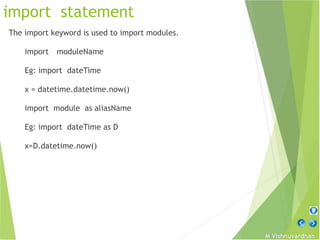
import statement
The import keyword is used to import modules.
import moduleName
Eg: import dateTime
x = datetime.datetime.now()
import module as aliasName
Eg: import dateTime as D
x=D.datetime.now()
M Vishnuvardhan

Python Operators.pptx

  • 2.
    M Vishnuvardhan Operators Operators areused to perform operations on variables and values » Arithmetic operators » Assignment operators » Comparison operators » Logical operators » Identity operators » Membership operators » Bitwise operators
  • 3.
    M Vishnuvardhan Arithmetic Operators OperatorName Example + Addition x + y - Subtraction x - y * Multiplication x * y / Division x / y % Modulus x % y ** Exponentiation x ** y // Floor division x // y
  • 4.
    M Vishnuvardhan Comparison Operators »Comparison operators are used to form conditions which always returns Boolean values either True or False. Operator Name Example == Equal x == y != Not equal x != y > Greater than x > y < Less than x < y >= Greater than or equal to x >= y <= Less than or equal to x <= y
  • 5.
    M Vishnuvardhan Logical Operators »Logical operators are used to combine conditional statements: Operator Description Example and Returns True if both statements are true x < 5 and x < 10 or Returns True if one of the statements is true x < 5 or x < 4 not Reverse the result, returns False if the result is true not(x < 5 and x < 10)
  • 6.
    M Vishnuvardhan Identity Operators »Identity operators are used to compare the objects, not if they are equal, but if they are actually the same object, with the same memory location: Operator Description Example is Returns True if both variables are the same object x is y is not Returns True if both variables are not the same object x is not y
  • 7.
    M Vishnuvardhan Membership Operators »Membership operators are used to test if a sequence is presented in an object Operator Description Example in Returns True if a sequence with the specified value is present in the object x in y not in Returns True if a sequence with the specified value is not present in the object x not in y
  • 8.
    M Vishnuvardhan Bitwise Operators Bitwiseoperators are used to compare (binary) numbers Operator Name Description & AND Sets each bit to 1 if both bits are 1 | OR Sets each bit to 1 if one of two bits is 1 ^ XOR Sets each bit to 1 if only one of two bits is 1 ~ NOT Inverts all the bits << Zero fill left shift Shift left by pushing zeros in from the right and let the leftmost bits fall off >> Signed right shift Shift right by pushing copies of the leftmost bit in from the left, and let the rightmost bits fall off
  • 9.
    M Vishnuvardhan Bitwise LogicalOperators Bitwise logical operators are evaluated as follows A B A & B A | B A^B 1 1 1 1 0 1 0 0 1 1 0 1 0 1 1 0 0 0 0 0
  • 10.
    M Vishnuvardhan Bitwise ShiftOperators » The << left shift operators shifts the number to left wards by specified number of bits. The result of the number is multiplied by the 2 raised to number of places shifted i.e, a<<n  a=a*2n Eg: a =8 a<< 1  a=a*2  16 » The >> right shift operators shifts the number to right wards by specified number of bits. The result of the number is multiplied by the 2 raised to number of places shifted i.e, a<<n  a=a / 2n Eg: a =8 a>> 3  a=a / 23  1
  • 11.
    M Vishnuvardhan Assignment Statement »Basic form: Eg: student = 'SSBN’ » Tuple assignment: Eg: x, y = 50, 100 # equivalent to: (x, y) = (50, 100) » List assignment: Eg: [x, y] = [50, 100] # equivalent to: (x, y) = (50, 100) » Sequence assignment: Eg: a, b, c, d= ‘SSBN’ » Extended Sequence unpacking: Eg: p, *q = 'Hello’ ranks = ['A', 'B', 'C', 'D’] first, *rest = ranks » Multiple- target assignment: Eg: x = y = 75 » Augmented assignment: Eg: x = 2 x += 1 # equivalent to: x = x + 1
  • 12.
    M Vishnuvardhan Print Statement ThePrint statement actually is Python function used to output data to the standard output device (screen). Print () can also be used to output data to a file. Syntax: print(*objects, sep=' ', end='n', file=sys.stdout, flush=False) The sep separator is used between the values. It defaults into a space character. After all values are printed, end is printed. It defaults into a new line. The file is the object where the values are printed and its default value is sys.stdout (screen).
  • 13.
    M Vishnuvardhan Print Statement Eg:print('This sentence is output to the screen’) # prints This sentence is output to the screen a = 5 print('The value of a is', a) # prints The value of a is 5 print(1,2,3,4) # prints: 1 2 3 4 print(1,2,3,4,sep='*') #prints : 1*2*3*4 print(1,2,3,4,sep='#',end='&') #prints: 1#2#3#4&
  • 14.
    M Vishnuvardhan Output formatting Toformat the output so as to make it look attractive, str. format () method is used. Eg: x = 5; y = 10 print('The value of x is {} and y is {}'.format(x,y)) #The value of x is 5 and y is 10 Here the curly braces {} are used as placeholders and the variables are printed in the place holders as they appear in format(). Eg: print('I love {0} and {1}'.format('bread','butter')) #prints: I love bread and butter print('I love {1} and {0}'.format('bread','butter')) #prints: I love butter and bread
  • 15.
    M Vishnuvardhan Output formatting »It possible to use keyword arguments to format the string. Eg: print('Hello {name}, {greeting}'.format(greeting = 'Goodmorning', name = 'John')) # prints Hello John, Goodmorning » It possible to format strings like the old printf() style used in C language. The % (format specifier) is used to accomplish this. Eg: x = 12.3456789 print('The value of x is %3.2f' %x) # prints The value of x is 12.35 print('The value of x is %3.4f' %x) # prints The value of x is 12.3457
  • 16.
    M Vishnuvardhan input statement Theinput() function takes the input from the user. Type of the returned object always will be <type ‘str’> Syntax input(prompt) Here prompt A String, representing a default message before the input Eg: num = input('Enter a number: ') Here the entered value 10 is a string, not a number. To convert this into a number use int() or float() functions. This same operation can be performed using the eval() function.
  • 17.
    M Vishnuvardhan import statement Theimport keyword is used to import modules. import moduleName Eg: import dateTime x = datetime.datetime.now() import module as aliasName Eg: import dateTime as D x=D.datetime.now()
  • 18.