Python Programming IoT Cen
tre of Excellence
Dr. Akey Sungheetha, Associate Professor, Computer Science
and Engineering.
Python Programming
Language
• The high-level language is a type of programming
language designed to simplify computer
programming.
• Memory-safe languages let programmers focus on
quality code, avoiding risks of low-level memory
management.
• Programming language expertise is essential in the
rapidly changing field of computer engineering.
• White House urges developers to avoid C and C++,
use 'memory-safe' programming languages
• The NSA list of memory safe programming
languages has been updated to reflect v1.1 of the
information sheet.
Python Programming
Uses
• Turbocharged Python: AI Accelerates
Computing Speed by Thousands of
Times
• Their development Scalene, an open-
source tool for dramatically speeding
up the programming language
Python, circumvents hardware issues
Latest in Python
• Enhancing Llama2's Proficiency in
Python through Supervised Fine-
Tuning and Low-Rank Adaptation
Techniques.
• From Python to C++, these are the
top robotic programming languages
bringing form and function to robots
working in the world today.
How to Install Python
on Windows
There are three installation
methods on Windows:
• The Microsoft Store
• The full installer
• Windows Subsystem for Linux
How to Check Your Python
Version on Windows
• To check if you already have Python on
your Windows machine, first open a
command-line application, such as
PowerShell.
• How to Check Your Python Version on
Windows
• To check if you already have Python on
your Windows machine, first open a
command-line application, such as
PowerShell.
Tip: Here’s how
you open
PowerShell:
TO TRY:
• Press the Win key.
• Type PowerShell.
• Press Enter.
• Alternatively, you can right-click
the Start button and select Windows
PowerShell or Windows PowerShell
(Admin).
• You can also use cmd.exe or Windows
Terminal.
Command Prompt
TO TRY:
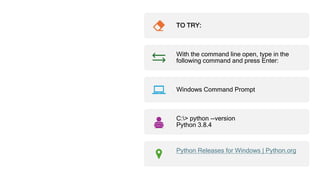
With the command line open, type in the
following command and press Enter:
Windows Command Prompt
C:> python --version
Python 3.8.4
Python Releases for Windows | Python.org
Alternative
Command
TO TRY:
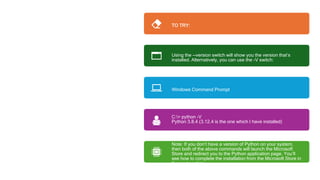
Using the --version switch will show you the version that’s
installed. Alternatively, you can use the -V switch:
Windows Command Prompt
C:> python -V
Python 3.8.4 (3.12.4 is the one which I have installed)
Note: If you don’t have a version of Python on your system,
then both of the above commands will launch the Microsoft
Store and redirect you to the Python application page. You’ll
see how to complete the installation from the Microsoft Store in
the next section.
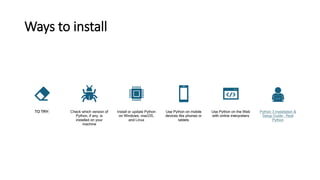
Ways to install
TO TRY: Check which version of
Python, if any, is
installed on your
machine
Install or update Python
on Windows, macOS,
and Linux
Use Python on mobile
devices like phones or
tablets
Use Python on the Web
with online interpreters
Python 3 Installation &
Setup Guide – Real
Python
Online compilers
• Online Python Compiler (Interpreter)
(programiz.com)
• Online Python Compiler - online editor
(onlinegdb.com)
• Online Python - IDE, Editor, Compiler,
Interpreter (online-python.com)
Write hello world program
TO TRY:
• PY4E - Python for Everybody IDE from
coursera may be used.
• The print() function in Python is used to
print Python objects as strings as standard
output.
• print("Hello World")
Variables
TO TRY:
• This Python code creates a variable
message and assigns it the value “Hello,
World!“. Then, the print() function is used to
print the value of the message variable to
the console.
• message = "Hello, World!"
• print(message)
Expressions in Python
TO TRY:
• An expression is a combination of operators and
operands that is interpreted to produce some other
value.
• In any programming language, an expression is
evaluated as per the precedence of its operators.
• So that if there is more than one operator in an
expression, their precedence decides which operation
operation will be performed first.
• x = 15 + 1.3
• print(x)
Python Conditions and If
statements
• Python supports the usual logical
conditions from mathematics:
• Equals: a == b
• Not Equals: a != b
• Less than: a < b
• Less than or equal to: a <= b
• Greater than: a > b
• Greater than or equal to: a >= b
Python Conditions and If
statements
TO TRY:
• a = 33
• b = 200
• if b > a:
• print("b is greater than a")
• Note: Tab space preceding print is
necessary
Creating a Function
• A function is a block of code which only
runs when it is called.
• In Python a function is defined using the
defkeyword:
• TO TRY:
• def my_function():
• print("Hello from a function")
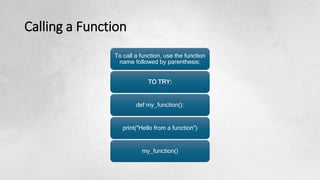
Calling a Function
To call a function, use the function
name followed by parenthesis:
TO TRY:
def my_function():
print("Hello from a function")
my_function()
Loops in Python
• Python programming language
provides two types of loops – For
loop and While loop to handle
looping requirements.
TO TRY:
• count = 0
• while (count < 3):
• count = count + 1
• print("Hello friends")
While loop and For
Loop in Python
• A while loop is used to execute a block of
statements repeatedly until a given
condition is satisfied.
• When the condition becomes false, the line
immediately after the loop in the program is
executed.
• For loops are used for sequential traversal.
• For example: traversing
a list or string or array etc.
• In Python, there is “for in” loop which is
like foreach loop in other languages.
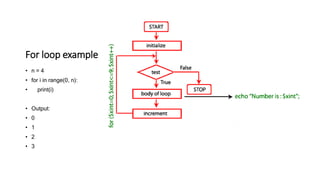
For loop example
• n = 4
• for i in range(0, n):
• print(i)
• Output:
• 0
• 1
• 2
• 3
Certification courses
Assignment
1. Diploma in Python Programming Provided by Alison1
2. Python For Everybody Specialization12
3. Deep Learning on Azure with Python: The Basics of Python
Programming1
4. Python 3: A Beginners Guide To Python Programming12
5. Computing in Python I: Fundamentals and Procedural Programming
6. Free Python Course with Certificate (scaler.com)
7. Free Python Course with Certificate | Learn Python Online (geeksforgeeks.org)
8. Free Python Course with Certificate (scaler.com)
• Submit the certificates in the below link
• Python IoT CoE training Student Evaluation
Certification completed students benefit
• Additional guidance on Python based projects
• Email: akey.sungheetha@alliance.edu.in
Example 1
1. # let's assume the user have two lists named
Key and values
2. key = ['p', 'q', 'r', 's', 't']
3. value = [56, 67, 43, 12, 6]
4. # the following method is used for comprehe
nsiong the dictionary
5. user_Dict = { X:Y for (X,Y) in zip(key, value)}
6. print ("user_Dict: ", user_Dict)
PYTHON IN IOT(INTERNET
OF THINGS)
• Internet of Things with Python – Javatpoint
• How to use Python for IoT projects:
Detailed Steps (dataheadhunters.com)
• Python for IoT: Connecting and Controlling
Devices | by VAISHAK | Medium
• Python for IoT Applications: Controlling
and Monitoring Devices
(tutorialspoint.com)
NUMPY
• Numpy is a scientific computing package that helps
to create datasets to test with the time series data
in IoT. Numpy features are used in IoT to read
sensor bulk data from the database inbuilt
functions in the system
• SOCKETS AND MYSQLDB
• Sockets that facilitate networking in IoT devices
include TCP/IP and UDP, which are compatible to
work with Python packages. TCP/IP and UDP act
as transport layer protocols for communication. The
MySQLdb is a go-to relational format database that
helps in the development of remote stores for the
IoT system.
MATPLOTLIB
• To get data insights, matplotlib visualizes the most
paramount operations by giving a variety of graphs to
represent the data.
• REQUESTS, TKINTER AND TENSORFLOW
• To make HTTP calls and parse responses in Python,
the request package acts as a major protocol for data
exchanges. Tkinter GUI puts the aspects of Python
script in a controlled distribution, which enables
functional testing and repeated executions in IoT
Python devices. Therefore, the numerical
computations of machine learning initiated into the
IoT systems utilize the representation in data flow
graphs dealing with huge non-linear datasets and
deep learning aspects.
IOT DEVICES USED TO DEVELOP
APPLICATIONS IN IOT
• Raspberry Pi Model 3
• Intel Edison
• Arduino
IOT SENSORS SIMULATORS USED IN PYTHON
PROGRAMMING INCLUDE:
MQ TELEMETRY TRANSPORT (MQTT) SENSOR
SIMULATOR
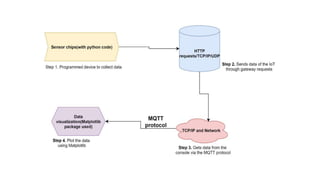
• MQTT protocol for the IoT in Python enables high-
speed data exchange with low payload
communication between the devices. User-friendly
requests of MQTT are made directly in Python. Data
is collected in real-time and easily analyzed in
mathematical computation libraries like matplotlib.
The diagram below shows the steps used for the data
flow:
https://www.topcoder.com/thrive/articles/python-in-
iot-internet-of-things
• Data logging using MQTT (install using pip install paho-mqtt)
Python is displayed below:
• import paho.mqtt.client as mqtt
• #Callback
• for received data from server
• def on_connect(data_iot, user, events):
• print(“connected with code” +
str(events))
• data = mqtt.Client()
• Data.on_connect = on_connect
• Data.on_message = on_message
• data.loop_forever()
• For instance, the MQTT protocol is used to send data of a light
bulb and install required dependencies and libraries as indicated
below:
•
AZURE IOT SDK IN
PYTHON
• Azure IoT hub offers a variety of features for IoT SDK usage which
provides the ability to connect devices and services. The IoT SDK is
supported by the MQTT protocol which facilitates the data exchange
processes. The device requirements to be used along with Python
include:
• Python version 3.7+: helps in both asynchronous and synchronous
API
• Azure-iot-device library
• The IoT hub SDK helps with the following aspects: access,
processing, and analysis of data for machine learning applications.
• The Azure IoT hub helps collect messages and feedback data
collected by IoT devices and is displayed in the code below:
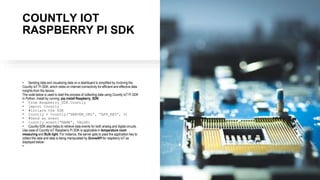
COUNTLY IOT
RASPBERRY PI SDK
• Sending data and visualizing data on a dashboard is simplified by involving the
Countly IoT Pi SDK, which relies on internet connectivity for efficient and effective data
insights from the device.
The code below is used to start the process of collecting data using Countly IoT Pi SDK
in Python. Install by running: pip install Raspberry_SDK:
• from Raspberry_SDK.Countly
• import Countly
• #intiate the SDK
• Countly = Countly(“SERVER_URL”, “APP_KEY”, 0)
• #Send an event
• countly.event(“NAME”, VALUE)
• Countly SDK also helps to retrieve data events for both analog and digital circuits.
Use case of Countly IoT Raspberry Pi SDK is applicable in temperature room
measuring and Bulb light. For instance, the server gets to pass the application key to
collect the data and data is being manipulated by GroveAPI for raspberry IoT as
displayed below:
•
Latest on Python for
IoT
• Top 20 Python Automation Projects Ideas For Beginners
(simplilearn.com)
• Top Python Features and How to Use Them
(simplilearn.com)
• Azure-connected IoT devices at risk of RCE due to critical
vulnerability | SC Media (scmagazine.com)
• Offensive IoT for Red Team Implants (Part 2) - Black Hills
Information Security (blackhillsinfosec.com)
• Use PyScript better with open source PyScript Recipes
#IoT #Python #Programming @JeffersGlass « Adafruit
Industries – Makers, hackers, artists, designers and
engineers!
• Pi IoT In Python Using Linux Drivers - GPIO Character
Driver (i-programmer.info)
• IoT in Education: 10 Key Examples | Built In

Python for IoT CoE.pptx KDOJWIHJNNNNNNNNNNNNNNNNNNNNNNNNNNNNNN

  • 1.
    Python Programming IoTCen tre of Excellence Dr. Akey Sungheetha, Associate Professor, Computer Science and Engineering.
  • 2.
    Python Programming Language • Thehigh-level language is a type of programming language designed to simplify computer programming. • Memory-safe languages let programmers focus on quality code, avoiding risks of low-level memory management. • Programming language expertise is essential in the rapidly changing field of computer engineering. • White House urges developers to avoid C and C++, use 'memory-safe' programming languages • The NSA list of memory safe programming languages has been updated to reflect v1.1 of the information sheet.
  • 3.
    Python Programming Uses • TurbochargedPython: AI Accelerates Computing Speed by Thousands of Times • Their development Scalene, an open- source tool for dramatically speeding up the programming language Python, circumvents hardware issues
  • 4.
    Latest in Python •Enhancing Llama2's Proficiency in Python through Supervised Fine- Tuning and Low-Rank Adaptation Techniques. • From Python to C++, these are the top robotic programming languages bringing form and function to robots working in the world today.
  • 5.
    How to InstallPython on Windows There are three installation methods on Windows: • The Microsoft Store • The full installer • Windows Subsystem for Linux
  • 6.
    How to CheckYour Python Version on Windows • To check if you already have Python on your Windows machine, first open a command-line application, such as PowerShell. • How to Check Your Python Version on Windows • To check if you already have Python on your Windows machine, first open a command-line application, such as PowerShell.
  • 7.
    Tip: Here’s how youopen PowerShell: TO TRY: • Press the Win key. • Type PowerShell. • Press Enter. • Alternatively, you can right-click the Start button and select Windows PowerShell or Windows PowerShell (Admin). • You can also use cmd.exe or Windows Terminal.
  • 8.
    Command Prompt TO TRY: Withthe command line open, type in the following command and press Enter: Windows Command Prompt C:> python --version Python 3.8.4 Python Releases for Windows | Python.org
  • 9.
    Alternative Command TO TRY: Using the--version switch will show you the version that’s installed. Alternatively, you can use the -V switch: Windows Command Prompt C:> python -V Python 3.8.4 (3.12.4 is the one which I have installed) Note: If you don’t have a version of Python on your system, then both of the above commands will launch the Microsoft Store and redirect you to the Python application page. You’ll see how to complete the installation from the Microsoft Store in the next section.
  • 10.
    Ways to install TOTRY: Check which version of Python, if any, is installed on your machine Install or update Python on Windows, macOS, and Linux Use Python on mobile devices like phones or tablets Use Python on the Web with online interpreters Python 3 Installation & Setup Guide – Real Python
  • 11.
    Online compilers • OnlinePython Compiler (Interpreter) (programiz.com) • Online Python Compiler - online editor (onlinegdb.com) • Online Python - IDE, Editor, Compiler, Interpreter (online-python.com)
  • 12.
    Write hello worldprogram TO TRY: • PY4E - Python for Everybody IDE from coursera may be used. • The print() function in Python is used to print Python objects as strings as standard output. • print("Hello World")
  • 13.
    Variables TO TRY: • ThisPython code creates a variable message and assigns it the value “Hello, World!“. Then, the print() function is used to print the value of the message variable to the console. • message = "Hello, World!" • print(message)
  • 14.
    Expressions in Python TOTRY: • An expression is a combination of operators and operands that is interpreted to produce some other value. • In any programming language, an expression is evaluated as per the precedence of its operators. • So that if there is more than one operator in an expression, their precedence decides which operation operation will be performed first. • x = 15 + 1.3 • print(x)
  • 15.
    Python Conditions andIf statements • Python supports the usual logical conditions from mathematics: • Equals: a == b • Not Equals: a != b • Less than: a < b • Less than or equal to: a <= b • Greater than: a > b • Greater than or equal to: a >= b
  • 16.
    Python Conditions andIf statements TO TRY: • a = 33 • b = 200 • if b > a: • print("b is greater than a") • Note: Tab space preceding print is necessary
  • 17.
    Creating a Function •A function is a block of code which only runs when it is called. • In Python a function is defined using the defkeyword: • TO TRY: • def my_function(): • print("Hello from a function")
  • 18.
    Calling a Function Tocall a function, use the function name followed by parenthesis: TO TRY: def my_function(): print("Hello from a function") my_function()
  • 19.
    Loops in Python •Python programming language provides two types of loops – For loop and While loop to handle looping requirements. TO TRY: • count = 0 • while (count < 3): • count = count + 1 • print("Hello friends")
  • 20.
    While loop andFor Loop in Python • A while loop is used to execute a block of statements repeatedly until a given condition is satisfied. • When the condition becomes false, the line immediately after the loop in the program is executed. • For loops are used for sequential traversal. • For example: traversing a list or string or array etc. • In Python, there is “for in” loop which is like foreach loop in other languages.
  • 21.
    For loop example •n = 4 • for i in range(0, n): • print(i) • Output: • 0 • 1 • 2 • 3
  • 22.
    Certification courses Assignment 1. Diplomain Python Programming Provided by Alison1 2. Python For Everybody Specialization12 3. Deep Learning on Azure with Python: The Basics of Python Programming1 4. Python 3: A Beginners Guide To Python Programming12 5. Computing in Python I: Fundamentals and Procedural Programming 6. Free Python Course with Certificate (scaler.com) 7. Free Python Course with Certificate | Learn Python Online (geeksforgeeks.org) 8. Free Python Course with Certificate (scaler.com) • Submit the certificates in the below link • Python IoT CoE training Student Evaluation Certification completed students benefit • Additional guidance on Python based projects • Email: akey.sungheetha@alliance.edu.in
  • 23.
    Example 1 1. #let's assume the user have two lists named Key and values 2. key = ['p', 'q', 'r', 's', 't'] 3. value = [56, 67, 43, 12, 6] 4. # the following method is used for comprehe nsiong the dictionary 5. user_Dict = { X:Y for (X,Y) in zip(key, value)} 6. print ("user_Dict: ", user_Dict)
  • 24.
    PYTHON IN IOT(INTERNET OFTHINGS) • Internet of Things with Python – Javatpoint • How to use Python for IoT projects: Detailed Steps (dataheadhunters.com) • Python for IoT: Connecting and Controlling Devices | by VAISHAK | Medium • Python for IoT Applications: Controlling and Monitoring Devices (tutorialspoint.com)
  • 25.
    NUMPY • Numpy isa scientific computing package that helps to create datasets to test with the time series data in IoT. Numpy features are used in IoT to read sensor bulk data from the database inbuilt functions in the system • SOCKETS AND MYSQLDB • Sockets that facilitate networking in IoT devices include TCP/IP and UDP, which are compatible to work with Python packages. TCP/IP and UDP act as transport layer protocols for communication. The MySQLdb is a go-to relational format database that helps in the development of remote stores for the IoT system.
  • 26.
    MATPLOTLIB • To getdata insights, matplotlib visualizes the most paramount operations by giving a variety of graphs to represent the data. • REQUESTS, TKINTER AND TENSORFLOW • To make HTTP calls and parse responses in Python, the request package acts as a major protocol for data exchanges. Tkinter GUI puts the aspects of Python script in a controlled distribution, which enables functional testing and repeated executions in IoT Python devices. Therefore, the numerical computations of machine learning initiated into the IoT systems utilize the representation in data flow graphs dealing with huge non-linear datasets and deep learning aspects.
  • 27.
    IOT DEVICES USEDTO DEVELOP APPLICATIONS IN IOT • Raspberry Pi Model 3 • Intel Edison • Arduino IOT SENSORS SIMULATORS USED IN PYTHON PROGRAMMING INCLUDE: MQ TELEMETRY TRANSPORT (MQTT) SENSOR SIMULATOR • MQTT protocol for the IoT in Python enables high- speed data exchange with low payload communication between the devices. User-friendly requests of MQTT are made directly in Python. Data is collected in real-time and easily analyzed in mathematical computation libraries like matplotlib. The diagram below shows the steps used for the data flow:
  • 29.
    https://www.topcoder.com/thrive/articles/python-in- iot-internet-of-things • Data loggingusing MQTT (install using pip install paho-mqtt) Python is displayed below: • import paho.mqtt.client as mqtt • #Callback • for received data from server • def on_connect(data_iot, user, events): • print(“connected with code” + str(events)) • data = mqtt.Client() • Data.on_connect = on_connect • Data.on_message = on_message • data.loop_forever() • For instance, the MQTT protocol is used to send data of a light bulb and install required dependencies and libraries as indicated below: •
  • 30.
    AZURE IOT SDKIN PYTHON • Azure IoT hub offers a variety of features for IoT SDK usage which provides the ability to connect devices and services. The IoT SDK is supported by the MQTT protocol which facilitates the data exchange processes. The device requirements to be used along with Python include: • Python version 3.7+: helps in both asynchronous and synchronous API • Azure-iot-device library • The IoT hub SDK helps with the following aspects: access, processing, and analysis of data for machine learning applications. • The Azure IoT hub helps collect messages and feedback data collected by IoT devices and is displayed in the code below:
  • 31.
    COUNTLY IOT RASPBERRY PISDK • Sending data and visualizing data on a dashboard is simplified by involving the Countly IoT Pi SDK, which relies on internet connectivity for efficient and effective data insights from the device. The code below is used to start the process of collecting data using Countly IoT Pi SDK in Python. Install by running: pip install Raspberry_SDK: • from Raspberry_SDK.Countly • import Countly • #intiate the SDK • Countly = Countly(“SERVER_URL”, “APP_KEY”, 0) • #Send an event • countly.event(“NAME”, VALUE) • Countly SDK also helps to retrieve data events for both analog and digital circuits. Use case of Countly IoT Raspberry Pi SDK is applicable in temperature room measuring and Bulb light. For instance, the server gets to pass the application key to collect the data and data is being manipulated by GroveAPI for raspberry IoT as displayed below: •
  • 32.
    Latest on Pythonfor IoT • Top 20 Python Automation Projects Ideas For Beginners (simplilearn.com) • Top Python Features and How to Use Them (simplilearn.com) • Azure-connected IoT devices at risk of RCE due to critical vulnerability | SC Media (scmagazine.com) • Offensive IoT for Red Team Implants (Part 2) - Black Hills Information Security (blackhillsinfosec.com) • Use PyScript better with open source PyScript Recipes #IoT #Python #Programming @JeffersGlass « Adafruit Industries – Makers, hackers, artists, designers and engineers! • Pi IoT In Python Using Linux Drivers - GPIO Character Driver (i-programmer.info) • IoT in Education: 10 Key Examples | Built In