• Was createdby Guido van Rossum, in the year 1986. Van Rossum wanted to
keep himself busy during the Christmas week as his office was closed for
holidays hence he decided to write an interpreter for a new scripting language
which would be a decendant of ABC (ABC is a general purpose language
influenced by ALGOL and SETL)
• Van Rossum was a big fan of the serial Monty Python’s Flying Circus hence he
gave the name Python to the language he had created.
• Though he had worked in various organizations , however the years 2005 thru
2012 he worked in google where he spent half his time developing the language.
• Van Rossum has come out of retirement and is working for Microsoft in the
development division.
HISTORY OF PYTHON
3.
• High Levelinterpreted general purpose language
• Emphasis on code readability with usage of indentation
• Enables the developer to write clear logical code for small as well as
large programs using constructs and object oriented approach
• Python is dynamically typed and garbage collected
• Supports structured programming, Object Oriented Programming
and Functional Programming
• Highly portable with a set of simple yet powerful syntax
• Python provides a standard style guide for coding called as PEP
standards
PYTHON AN INTRODUCTION
• Python 0.9.01991
• Python 2.0 2000
• Python 3.0 2008
• Python 2.7 discontinued in 2020.
• Latest version of Python is 3.10.4
• Python 3.0 is not completely backward compatible, which
means that code written in Python 2.0 will not be execute in
Python 3.0 with out modifications
PYTHON RELEASES
6.
• Jython :Standard Python Compiler for Java language
• Cython :Standard Python Compiler for C language
• IronPython: Python Implementation for #.NET framework
• PyPy: Python implementation using Python language
• RubyPython: A bridge between Ruby and Python Interpreters
• Anaconda Python: Python used for Analytics, Data Processing
and Scientific Computing
PYTHON FLAVOURS
7.
• Python canbe downloaded from the site
www.python.org
DOWNLOADING PYTHON
8.
• First downloadPython 3.10.5
from www.python.org
• Run the file you just
downloaded, and follow the
prompts.
• OK! Hopefully now everything
is good! Now, to test if that just
worked, type this in your DOS
window:
python –V
INSTALLING PYTHON
9.
• Google
• Nasa
•Dropbox
• IBM
• Instagram
• Mozilla
• Yahoo
• Quora
. . . . .So on and so forth
PYTHON IS USED BY
• A step-by-stepprocedure, which defines a set of instructions to
be executed in a certain order to get the desired output.
• Algorithms are generally created independent of underlying
languages, i.e. an algorithm can be implemented in more
than one programming language.
• Some important Categories of algorithm are
• Search − Search an item in a data structure.
• Sort − sort items
• Insert − insert item in a data structure.
• Update − update an existing item in a data structure.
• Delete − delete an existing item from a data structure.
ALGORITHM
12.
• Unambiguous −Algorithm should be clear and unambiguous
• Input − All prescribed inputs to the algorithm show be well-defined
• Output − There can be more than one output for an algorithm but
the outputs should meet the desired objective of the algorithm.
• Finiteness − Algorithms must terminate after a finite number of steps.
• Feasibility − Should be feasible with the available resources.
• Independent − An algorithm should have step-by-step directions,
which should be independent of any programming code.
ALGORITHM CHARACTERISTICS
• The followingreserve words cannot be used as identifier
names
RESERVE WORDS IN PYTHON
and
as
assert
async[Python 3.5]
await[Python 3.5]
break
class
continue
def
del
elif
else
except
False[Python 3.0]
finally
for
from
global
if
import
in
is
lambda
None
nonlocal[Python 3.0]
not
or
pass
raise
return
True[Python 3.0]
try
while
with
yield
• Identifiers needto start with an Alphabet
• Identifiers can contain a combination of the characaters a-
z/A-Z/0-9
• Identifiers can contain the character “_”
• Identifiers cannot contain special characters such as #,$,
%,@,&,*,!,~,`,-
• Python is case sensitive.
NAMING RULES FOR IDENTIFIERS
• Strings arerepresented as an array, where in every character in
the string can be accessed by specifying the index of the
character
• We can access the character ‘H’ by specifying the index 0 , E by
specifying the index 1 so and so forth.
• Since each character can be accessed individually in string, it
provides a opportunity to slice and dice on the given string.
• We can access the string from a forward direction or from a
reverse direction
• Strings are basically immutable (that which cannot be modified)
in nature
STRINGS
0 1 2 3 4
H E L L 0
28.
STRING FUNCTIONS
The followingare string functions which can be used to
manipulate strings
'capitalize’,
'casefold’,
'center’,
'count’,
'encode’,
'endswith’,
'expandtabs’,
'find’,
'format’,
'format_map’,
'index',
'isalnum’,
'isalpha’,
'isascii’,
'isdecimal’,
'isdigit’,
'isidentifier’,
'islower’,
'isnumeric’,
'isprintable’,
'isspace',
'istitle’,
'isupper’,
'join’,
'ljust’,
'lower’,
'lstrip’,
'maketrans’,
'partition’,
'removeprefix’,
'removesuffix’,
'replace',
'rfind’,
'rindex’,
'rjust’,
'rpartition’,
'rsplit’,
'rstrip’,
'split’,
'splitlines’,
'startswith’,
'strip’,
'swapcase’,
'title’,
'translate’,
'upper’,
'zfill'
• Elements thatcannot be
modified (immutable)
• Frozent Set
• Tuple
• List
• Dictionary
• Set
MUTABLE DATA TYPES
31.
LISTS
• lists canbe heterogeneous
• a = ['spam', 'eggs', 100, 1234, 2*2]
• Lists can be indexed and sliced:
• a[0] spam
• a[:2] ['spam', 'eggs']
• Lists can be manipulated
• a[2] = a[2] + 23
• a[0:2] = [1,12]
• a[0:0] = []
• len(a) 5
• a=[1,2,3]
• a=[1]+[2]+a[2,3]
the result of the above operation would be
• a=[1,2,2,3]
32.
LIST METHODS
• append(x)
•extend(L)
• append all items in list (like Tcl lappend)
• insert(i,x)
• remove(x)
• pop([i]), pop()
• create stack (FIFO), or queue (LIFO)
pop(0)
• index(x)
• return the index for value x
• count(x)
• how many times x appears
in list
• sort()
• sort items in place
• reverse()
• reverse list
• Clear()
• Copy()
33.
DEL – REMOVINGLIST ITEMS
• remove by index, not value
• remove slices from list (rather than by assigning an empty list)
>>> a = [-1,1,66.6,333,333,1234.5]
>>> del a[0]
>>> a
[1,66.6,333,333,1234.5]
>>> del a[2:4]
>>> a
[1,66.6,1234.5]
34.
TUPLES AND SEQUENCES
•lists, strings, tuples: examples of sequence type
• tuple = values separated by commas
>>> t = 123, 543, 'bar'
>>> t[0]
123
>>> t
(123, 543, 'bar')
35.
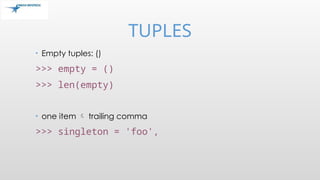
TUPLES
• Tuples maybe nested
>>> u = t, (1,2)
>>> u
((123, 542, 'bar'), (1,2))
• kind of like structs, but no element names:
• (x,y) coordinates
• database records
• like strings, immutable can't assign to individual items
TUPLES
• sequence unpacking distribute elements across variables
>>> t = 123, 543, 'bar'
>>> x, y, z = t
>>> x
123
• packing always creates tuple
• unpacking works for any sequence
38.
DICTIONARIES
• indexed bykeys
• keys are any immutable type: e.g., tuples
• but not lists (mutable!)
• uses 'key: value' notation
>>> tel = {'hgs' : 7042, 'lennox': 7018}
>>> tel['cs'] = 7000
>>> tel
39.
DICTIONARIES
• no particularorder
• delete elements with del
>>> del tel['foo']
• keys() method unsorted list of keys
>>> tel.keys()
['cs', 'lennox', 'hgs']
• use has_key() to check for existence
>>> tel.has_key('foo')
0
40.
CONDITIONS
• can checkfor sequence membership with is and is
not:
>>> if (4 in vec):
... print '4 is'
• chained comparisons: a less than b AND b equals c:
a < b == c
• and and or are short-circuit operators:
• evaluated from left to right
• stop evaluation as soon as outcome clear
41.
CONDITIONS
• Can assigncomparison to variable:
>>> s1,s2,s3='', 'foo', 'bar'
>>> non_null = s1 or s2 or s3
>>> non_null
foo
• Unlike C, no assignment within expression
42.
COMPARING SEQUENCES
• lexicographicalcomparison:
• compare first; if different outcome
• continue recursively
• subsequences are smaller
• strings use ASCII comparison
• can compare objects of different type, but by type name (list < string <
tuple)
INTRODUCTION TO SETS
Set is an unordered collection of elements.
It is a collection of unique elements.
Duplication of elements is not allowed.
Sets are mutable so we can easily add or remove elements.
A programmer can create a set by enclosing the elements
inside a pair of curly braces i.e. {}.
The elements within the set are separated by commas.
The set can be created by the in built set() function.
METHODS OF SETCLASS
• Function Meaning
s.add(x) Add element x to existing set s.
s.clear() Removes the entire element from the existing set.
S.remove(x) Removes item x from the set.
S1. issubset(S2)
A set S1 is a subset of S2, if every element in S1 is
also in S2. Therefore issubset() is used to check
whether s1 is subset of s2.
S2.issuperset(S1)
Let S1 and S2 be two sets. If S1 is subset of S2 and
the set S1 is not equal to S2 then the set S2 is
called superset of A.
48.
SET OPERATIONS
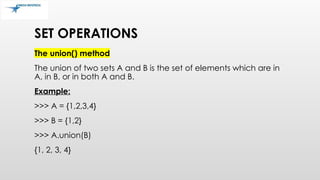
The union()method
The union of two sets A and B is the set of elements which are in
A, in B, or in both A and B.
Example:
>>> A = {1,2,3,4}
>>> B = {1,2}
>>> A.union(B)
{1, 2, 3, 4}
49.
SET OPERATIONS…..
The intersection()method
Intersection is a set which contains the elements that appear in
both sets.
Example:
>>> A = {1,2,3,4}
>>> B = {1,2}
>>> A.intersection(B)
{1, 2}
50.
SET OPERATIONS…..
The difference()method
The difference between two sets A and B is a set that contains
the elements in set A but not in set B.
Example:
>>> A = {1,2,3,4}
>>> B = {2,5,6,7,9}
>>> A.difference(B)
{1, 3, 2}
Note: A.difference B is equivalent to A - B
51.
SET OPERATIONS…..
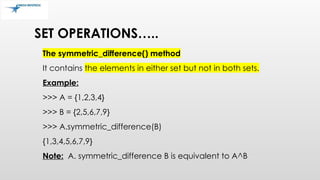
The symmetric_difference()method
It contains the elements in either set but not in both sets.
Example:
>>> A = {1,2,3,4}
>>> B = {2,5,6,7,9}
>>> A.symmetric_difference(B)
{1,3,4,5,6,7,9}
Note: A. symmetric_difference B is equivalent to A^B
CONTROL STRUCTURES(IF ,ELSE ,
ELIF)
• var1 = 100
if var1:
print "1 - Got a true expression value" ;
else:
print "1 - Got a false expression value"
54.
• If {conditionsto b e met}:
{do this}
{and this}
[but this happens regardless}
{because it is not indented}
Example1:
Y = 1
If y = = 1
Print ‘y still equals 1, I was just
checking”
CONDITIONAL STATEMENTS
FOR LOOP
• forletter in 'Python':
• print('Current Letter :', letter);
• fruits = ['banana', 'apple', 'mango']
• for fruit in fruits:
• print('Current fruit :', fruit)
57.
FOR LOOP
• fruits= ['banana', 'apple', 'mango']
• for index in range(len(fruits)):
• print ('Current fruit :', fruits[index])
58.
• Basically, thefor loop does something
foe every value in a list. The way it is
set out is a little confusing, but
otherwise is very basic.
• #cheerleading program
Word = raw_input(“ who do you go for?
”)
For letter in word:
Call = “Gimme a “ + letter + “!”
Print call
Print letter + “!”
Print “what does that spell?”
Print word + “!”
FOR LOOP
ELSE WITH LOOPS
•Python supports to have an else statement associated with a
loop statement.
• If the else statement is used with a for loop, the else statement
is executed when the loop has exhausted iterating the list.
• If the else statement is used with a while loop,
the else statement is executed when the condition becomes
false.
62.
Mar 6, 2025
ADVANCEDPROGRAMMING
SPRING 2002
LOOPS: BREAK, CONTINUE, ELSE
• break and continue like C
• else after loop exhaustion
for n in range(2,10):
for x in range(2,n):
if n % x == 0:
print n, 'equals', x, '*', n/x
break
else:
# loop fell through without finding a factor
print n, 'is prime'
63.
Mar 6, 2025
ADVANCEDPROGRAMMING
SPRING 2002
DO NOTHING
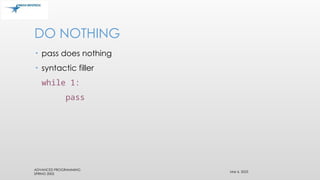
• pass does nothing
• syntactic filler
while 1:
pass
FUNCTIONS
• A blockof organized, reusable code that is used to perform a
single, related action.
• P rovide better modularity for application and code
reusability.
• Function blocks begin with the keyword def followed by the
function name and parentheses ( ( ) ).
66.
FUNCTIONS
• Any inputparameters or arguments should be placed within
these parentheses.
• The first statement of a function can be an optional statement
- docstring.
• The code block within every function starts with a colon (:) and
is indented.
• The statement return [expression] exits a function, optionally
passing back an expression to the caller.
67.
FUNCTIONS
• def printIt(str ):
"This prints a passed string into this function" printIt(str)
return
All parameters (arguments) in the Python language are passed
by reference.
68.
• Python haslot of pre-made
functions, that you can use
right now, simply by ‘calling’
them. ‘Calling’ is a function
involves you giving a
function input, and it will
return a value as output.
• Here is a general form that
calling a function takes.
function_name(parameters)
FUNCTIONS
Mar 6, 2025
ADVANCEDPROGRAMMING
SPRING 2002
LAMBDA FUNCTIONS
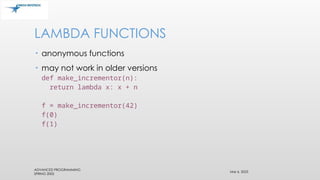
• anonymous functions
• may not work in older versions
def make_incrementor(n):
return lambda x: x + n
f = make_incrementor(42)
f(0)
f(1)
71.
Mar 6, 2025
ADVANCEDPROGRAMMING
SPRING 2002
CLASSES
• classes (and data types) are objects
• built-in types cannot be used as base classes by user
• arithmetic operators, subscripting can be redefined for class
instances (like C++, unlike Java)
72.
Mar 6, 2025
ADVANCEDPROGRAMMING
SPRING 2002
CLASS DEFINITIONS
Class ClassName:
<statement-1>
...
<statement-N>
• must be executed
• can be executed conditionally (see Tcl)
• creates new namespace
73.
ADVANCED PROGRAMMING
SPRING 2002
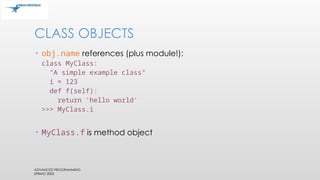
CLASSOBJECTS
• obj.name references (plus module!):
class MyClass:
"A simple example class"
i = 123
def f(self):
return 'hello world'
>>> MyClass.i
123
• MyClass.f is method object
74.
Mar 6, 2025
ADVANCEDPROGRAMMING
SPRING 2002
CLASS OBJECTS
• class instantiation:
>>> x = MyClass()
>>> x.f()
'hello world'
• creates new instance of class
• note x = MyClass vs. x = MyClass()
• ___init__() special method for initialization of object
def __init__(self,realpart,imagpart):
self.r = realpart
self.i = imagpart
75.
Mar 6, 2025
ADVANCEDPROGRAMMING
SPRING 2002
INSTANCE OBJECTS
• attribute references
• data attributes (C++/Java data members)
• created dynamically
x.counter = 1
while x.counter < 10:
x.counter = x.counter * 2
print x.counter
del x.counter
76.
Mar 6, 2025
ADVANCEDPROGRAMMING
SPRING 2002
METHOD OBJECTS
• Called immediately:
x.f()
• can be referenced:
xf = x.f
while 1:
print xf()
• object is passed as first argument of function 'self'
• x.f() is equivalent to MyClass.f(x)
77.
Mar 6, 2025
ADVANCEDPROGRAMMING
SPRING 2002
NOTES ON CLASSES
• Data attributes override method attributes with the same
name
• no real hiding not usable to implement pure abstract data
types
• clients (users) of an object can add data attributes
• first argument of method usually called self
• 'self' has no special meaning (cf. Java)
78.
Mar 6, 2025
ADVANCEDPROGRAMMING
SPRING 2002
ANOTHER EXAMPLE
• bag.py
class Bag:
def __init__(self):
self.data = []
def add(self, x):
self.data.append(x)
def addtwice(self,x):
self.add(x)
self.add(x)
79.
Mar 6, 2025
ADVANCEDPROGRAMMING
SPRING 2002
ANOTHER EXAMPLE, CONT'D.
• invoke:
>>> from bag import *
>>> l = Bag()
>>> l.add('first')
>>> l.add('second')
>>> l.data
['first', 'second']
80.
CLASSES
• Classes aredefined using the class statement
• >>> class Foo:
... def __init__(self):
... self.member = 1
... def GetMember(self):
... return self.member
...
>>>
81.
CLASSES
• Like functions,a class statement simply adds a class object to
the namespace
• >>> Foo
<class __main__.Foo at 1000960>
>>>
• Classes are instantiated using call syntax
• >>> f=Foo()
>>> f.GetMember()
1
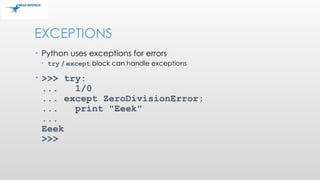
EXCEPTIONS
• try /finally block can guarantee execute of code even in
the face of exceptions
• >>> try:
... 1/0
... finally:
... print "Doing this anyway"
...
Doing this anyway
Traceback (innermost last): File "<interactive input>",
line 2, in ?
ZeroDivisionError: integer division or modulo
>>>
84.
Mar 6, 2025
ADVANCEDPROGRAMMING
SPRING 2002
HANDLING EXCEPTIONS
while 1:
try:
x = int(raw_input("Please enter a number: "))
break
except ValueError:
print "Not a valid number"
• First, execute try clause
• if no exception, skip except clause
• if exception, skip rest of try clause and use except clause
• if no matching exception, attempt outer try statement
85.
EXCEPTION HANDLING
• try:
•...........
• except ExceptionI:
• If there is ExceptionI, then execute this block.
• except ExceptionII: If there is ExceptionII, then
execute this block
• else: If there is no exception execute this
86.
TRY FINALLY
• Whenusing finally , exception clause should not be written, nor
the else clause.
• Try:
• ..
• ..
• Finally:
• ..
87.
Mar 6, 2025
ADVANCEDPROGRAMMING
SPRING 2002
HANDLING EXCEPTIONS
• try.py
import sys
for arg in sys.argv[1:]:
try:
f = open(arg, 'r')
except IOError:
print 'cannot open', arg
else:
print arg, 'lines:', len(f.readlines())
f.close
• e.g., as python try.py *.py
88.
EXCEPTION HANDLING
• try:
f= open("file.txt")
except IOError:
print "Could not open“
else:
f.close()
• a = [1,2,3]
try:
a[7] = 0
except (IndexError,TypeError):
print "IndexError caught”
except Exception, e:
print "Exception: ", e
except: # catch everything
print "Unexpected:"
print sys.exc_info()[0]
raise # re-throw caught
exception
try:
a[7] = 0
finally:
print "Will run regardless"
• Easily make your own
exceptions:
class myException(except)
def __init__(self,msg):
self.msg = msg
def __str__(self):
return
7/21/2022 88
CS 331
89.
MODULES
• collection offunctions and variables, typically in scripts
• definitions can be imported
• file name is module name + .py
• e.g., create module fibo.py
def fib(n): # write Fib. series up to n
...
def fib2(n): # return Fib. series up to n
90.
MODULES
• import module:
importfibo
• Use modules via "name space":
>>> fibo.fib(1000)
>>> fibo.__name__
'fibo'
• can give it a local name:
>>> fib = fibo.fib
>>> fib(500)
91.
MODULES
• function definition+ executable statements
• executed only when module is imported
• modules have private symbol tables
• avoids name clash for global variables
• accessible as module.globalname
• can import into name space:
>>> from fibo import fib, fib2
>>> fib(500)
• can import all names defined by module:
>>> from fibo import *
92.
MODULE SEARCH PATH
•current directory
• list of directories specified in PYTHONPATH
environment variable
• uses installation-default if not defined,
e.g., .:/usr/local/lib/python
• uses sys.path
>>> import sys
>>> sys.path
['', 'C:PROGRA~1Python2.2', 'C:Program FilesPython2.2
DLLs', 'C:Program FilesPython2.2lib', 'C:Program
FilesPython2.2liblib-tk', 'C:Program FilesPython2.2',
'C:Program FilesPython2.2libsite-packages']
OS
• import os
•Executing a command os.system()
• Get the users environment os.environ()
• Returns the current working directory. os.getcwd()
• Return the real group id of the current process. os.getgid()
95.
OS
• Return thecurrent process’s user id. os.getuid()
• Returns the real process ID of the current process. os.getpid()
• Set the current numeric umask and return the previous umask.
os.umask(mask)
• Return information identifying the current operating system.
os.uname()
96.
OS
• Change theroot directory of the current process to path.
os.chroot(path)
• Return a list of the entries in the directory given by path.
os.listdir(path)
• Create a directory named path with numeric mode mode.
os.mkdir(path)
• Recursive directory creation function. os.makedirs(path)
97.
OS
• Remove (delete)the file path. os.remove(path)
• Remove directories recursively. os.removedirs(path)
• Rename the file or directory src to dst. os.rename(src, dst)
• Remove (delete) the directory path. os.rmdir(path)
SYS
• sys.version
• sys.version_info
•Sys.argv #list of command line args
• sys.stdin, sys.stdout, sys.stderr
• Sys.stdout.write ,sys.stdin.readline
• Sys.platform
• fh = open("test.txt","w") ; sys.stdout = fh print("This
line goes to test.txt")
100.
• To opena text file you use, well,
the open() function. Seems
sensible. You pass certain
parameters to open() to tell it in
which way the file should be
opened –’r’ for read only and –’w’
for writing only, -’a’ for appending
and ‘r’+ both reading and writing.
• Ex-
openfile = open(‘pathtofile’, ‘r’)
Openfile.read()
FILE I/O
101.
I/O
import os
print os.getcwd()#get “.”
os.chdir('..')
import glob # file globbing
lst = glob.glob('*.txt') # get list of files
import shutil # mngmt tasks
shutil.copyfile('a.py','a.bak')
import pickle # serialization logic
ages = {"ron":18,"ted":21}
pickle.dump(ages,fout)
# serialize the map into a writable file
ages = pickle.load(fin)
# deserialize map from areadable file
# read binary records from a file
from struct import *
fin = None
try:
fin = open("input.bin","rb")
s = f.read(8)#easy to read in
while (len(s) == 8):
x,y,z = unpack(">HH<L", s)
print "Read record: "
"%04x %04x %08x"%
(x,y,z)
s = f.read(8)
except IOError:
pass
if fin: fin.close()
101







![• The following reserve words cannot be used as identifier
names
RESERVE WORDS IN PYTHON
and
as
assert
async[Python 3.5]
await[Python 3.5]
break
class
continue
def
del
elif
else
except
False[Python 3.0]
finally
for
from
global
if
import
in
is
lambda
None
nonlocal[Python 3.0]
not
or
pass
raise
return
True[Python 3.0]
try
while
with
yield](https://image.slidesharecdn.com/python-250306074919-7f305ccb/85/Python-basics-to-advanced-in-on-ppt-is-available-14-320.jpg)






![LISTS
• lists can be heterogeneous
• a = ['spam', 'eggs', 100, 1234, 2*2]
• Lists can be indexed and sliced:
• a[0] spam
• a[:2] ['spam', 'eggs']
• Lists can be manipulated
• a[2] = a[2] + 23
• a[0:2] = [1,12]
• a[0:0] = []
• len(a) 5
• a=[1,2,3]
• a=[1]+[2]+a[2,3]
the result of the above operation would be
• a=[1,2,2,3]](https://image.slidesharecdn.com/python-250306074919-7f305ccb/85/Python-basics-to-advanced-in-on-ppt-is-available-31-320.jpg)
![LIST METHODS
• append(x)
• extend(L)
• append all items in list (like Tcl lappend)
• insert(i,x)
• remove(x)
• pop([i]), pop()
• create stack (FIFO), or queue (LIFO)
pop(0)
• index(x)
• return the index for value x
• count(x)
• how many times x appears
in list
• sort()
• sort items in place
• reverse()
• reverse list
• Clear()
• Copy()](https://image.slidesharecdn.com/python-250306074919-7f305ccb/85/Python-basics-to-advanced-in-on-ppt-is-available-32-320.jpg)
![DEL – REMOVING LIST ITEMS
• remove by index, not value
• remove slices from list (rather than by assigning an empty list)
>>> a = [-1,1,66.6,333,333,1234.5]
>>> del a[0]
>>> a
[1,66.6,333,333,1234.5]
>>> del a[2:4]
>>> a
[1,66.6,1234.5]](https://image.slidesharecdn.com/python-250306074919-7f305ccb/85/Python-basics-to-advanced-in-on-ppt-is-available-33-320.jpg)
![TUPLES AND SEQUENCES
• lists, strings, tuples: examples of sequence type
• tuple = values separated by commas
>>> t = 123, 543, 'bar'
>>> t[0]
123
>>> t
(123, 543, 'bar')](https://image.slidesharecdn.com/python-250306074919-7f305ccb/85/Python-basics-to-advanced-in-on-ppt-is-available-34-320.jpg)


![DICTIONARIES
• indexed by keys
• keys are any immutable type: e.g., tuples
• but not lists (mutable!)
• uses 'key: value' notation
>>> tel = {'hgs' : 7042, 'lennox': 7018}
>>> tel['cs'] = 7000
>>> tel](https://image.slidesharecdn.com/python-250306074919-7f305ccb/85/Python-basics-to-advanced-in-on-ppt-is-available-38-320.jpg)
![DICTIONARIES
• no particular order
• delete elements with del
>>> del tel['foo']
• keys() method unsorted list of keys
>>> tel.keys()
['cs', 'lennox', 'hgs']
• use has_key() to check for existence
>>> tel.has_key('foo')
0](https://image.slidesharecdn.com/python-250306074919-7f305ccb/85/Python-basics-to-advanced-in-on-ppt-is-available-39-320.jpg)


![COMPARING SEQUENCES
(1,2,3) < (1,2,4)
[1,2,3] < [1,2,4]
'ABC' < 'C' < 'Pascal' < 'Python'
(1,2,3) == (1.0,2.0,3.0)
(1,2) < (1,2,-1)](https://image.slidesharecdn.com/python-250306074919-7f305ccb/85/Python-basics-to-advanced-in-on-ppt-is-available-43-320.jpg)






![FOR LOOP
• for letter in 'Python':
• print('Current Letter :', letter);
• fruits = ['banana', 'apple', 'mango']
• for fruit in fruits:
• print('Current fruit :', fruit)](https://image.slidesharecdn.com/python-250306074919-7f305ccb/85/Python-basics-to-advanced-in-on-ppt-is-available-56-320.jpg)
![FOR LOOP
• fruits = ['banana', 'apple', 'mango']
• for index in range(len(fruits)):
• print ('Current fruit :', fruits[index])](https://image.slidesharecdn.com/python-250306074919-7f305ccb/85/Python-basics-to-advanced-in-on-ppt-is-available-57-320.jpg)




![FUNCTIONS
• Any input parameters or arguments should be placed within
these parentheses.
• The first statement of a function can be an optional statement
- docstring.
• The code block within every function starts with a colon (:) and
is indented.
• The statement return [expression] exits a function, optionally
passing back an expression to the caller.](https://image.slidesharecdn.com/python-250306074919-7f305ccb/85/Python-basics-to-advanced-in-on-ppt-is-available-66-320.jpg)






![Mar 6, 2025
ADVANCED PROGRAMMING
SPRING 2002
ANOTHER EXAMPLE
• bag.py
class Bag:
def __init__(self):
self.data = []
def add(self, x):
self.data.append(x)
def addtwice(self,x):
self.add(x)
self.add(x)](https://image.slidesharecdn.com/python-250306074919-7f305ccb/85/Python-basics-to-advanced-in-on-ppt-is-available-78-320.jpg)
![Mar 6, 2025
ADVANCED PROGRAMMING
SPRING 2002
ANOTHER EXAMPLE, CONT'D.
• invoke:
>>> from bag import *
>>> l = Bag()
>>> l.add('first')
>>> l.add('second')
>>> l.data
['first', 'second']](https://image.slidesharecdn.com/python-250306074919-7f305ccb/85/Python-basics-to-advanced-in-on-ppt-is-available-79-320.jpg)




![Mar 6, 2025
ADVANCED PROGRAMMING
SPRING 2002
HANDLING EXCEPTIONS
• try.py
import sys
for arg in sys.argv[1:]:
try:
f = open(arg, 'r')
except IOError:
print 'cannot open', arg
else:
print arg, 'lines:', len(f.readlines())
f.close
• e.g., as python try.py *.py](https://image.slidesharecdn.com/python-250306074919-7f305ccb/85/Python-basics-to-advanced-in-on-ppt-is-available-87-320.jpg)
![EXCEPTION HANDLING
• try:
f = open("file.txt")
except IOError:
print "Could not open“
else:
f.close()
• a = [1,2,3]
try:
a[7] = 0
except (IndexError,TypeError):
print "IndexError caught”
except Exception, e:
print "Exception: ", e
except: # catch everything
print "Unexpected:"
print sys.exc_info()[0]
raise # re-throw caught
exception
try:
a[7] = 0
finally:
print "Will run regardless"
• Easily make your own
exceptions:
class myException(except)
def __init__(self,msg):
self.msg = msg
def __str__(self):
return
7/21/2022 88
CS 331](https://image.slidesharecdn.com/python-250306074919-7f305ccb/85/Python-basics-to-advanced-in-on-ppt-is-available-88-320.jpg)


![MODULE SEARCH PATH
• current directory
• list of directories specified in PYTHONPATH
environment variable
• uses installation-default if not defined,
e.g., .:/usr/local/lib/python
• uses sys.path
>>> import sys
>>> sys.path
['', 'C:PROGRA~1Python2.2', 'C:Program FilesPython2.2
DLLs', 'C:Program FilesPython2.2lib', 'C:Program
FilesPython2.2liblib-tk', 'C:Program FilesPython2.2',
'C:Program FilesPython2.2libsite-packages']](https://image.slidesharecdn.com/python-250306074919-7f305ccb/85/Python-basics-to-advanced-in-on-ppt-is-available-92-320.jpg)
![Mar 6, 2025
ADVANCED PROGRAMMING
SPRING 2002
MODULE LISTING
• use dir() for each module
>>> dir(fibo)
['___name___', 'fib', 'fib2']
>>> dir(sys)
['__displayhook__', '__doc__', '__excepthook__', '__name__', '__stderr__', '__st
din__', '__stdout__', '_getframe', 'argv', 'builtin_module_names', 'byteorder',
'copyright', 'displayhook', 'dllhandle', 'exc_info', 'exc_type', 'excepthook', '
exec_prefix', 'executable', 'exit', 'getdefaultencoding', 'getrecursionlimit', '
getrefcount', 'hexversion', 'last_type', 'last_value', 'maxint', 'maxunicode', '
modules', 'path', 'platform', 'prefix', 'ps1', 'ps2', 'setcheckinterval', 'setpr
ofile', 'setrecursionlimit', 'settrace', 'stderr', 'stdin', 'stdout', 'version',
'version_info', 'warnoptions', 'winver']](https://image.slidesharecdn.com/python-250306074919-7f305ccb/85/Python-basics-to-advanced-in-on-ppt-is-available-93-320.jpg)