Max Lai
使用 Pytest 進行單元測試
About Me
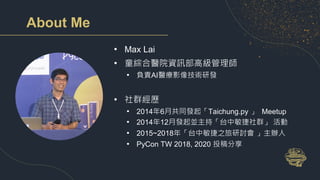
• Max Lai
• 童綜合醫院資訊部高級管理師
• 負責AI醫療影像技術研發
• 社群經歷
• 2014年6月共同發起「Taichung.py 」 Meetup
• 2014年12月發起並主持「台中敏捷社群」 活動
• 2015~2018年「台中敏捷之旅研討會 」主辦人
• PyCon TW 2018, 2020 投稿分享
今天的 demo code
https://github.com/cclai999/pycontw21-pytest
為什麼需要寫測試呢?
• 證明程式碼是依照自己想的一樣地在執行
• 手動驗證程式,非常麻煩,而且不能確定每次測試方式都是相同的
• 有了測試程式就能夠每次都執行相同的驗證條件
• 避免改A壞B
• 為了將來修改程式時設置一個安全網
• 給其他人一個如何使用自己程式的一個範例
執行環境準備(PyCharm Setup for Pytest)
• 安裝 Miniconda
• 安裝 PyCharm
• 安裝 Pytest
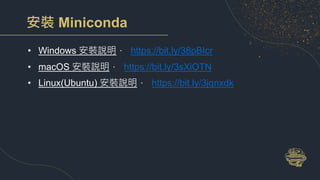
安裝 Miniconda
• Windows 安裝說明, https://bit.ly/38pBIcr
• macOS 安裝說明, https://bit.ly/3sXiOTN
• Linux(Ubuntu) 安裝說明, https://bit.ly/3jqnxdk
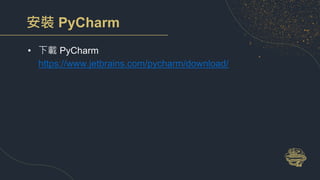
安裝 PyCharm
• 下載 PyCharm
https://www.jetbrains.com/pycharm/download/
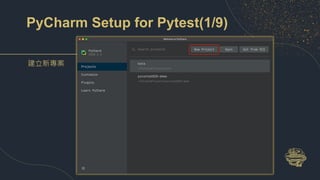
PyCharm Setup for Pytest(1/9)
建立新專案
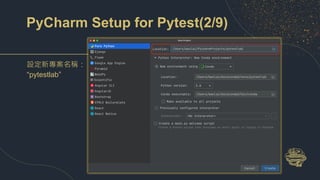
PyCharm Setup for Pytest(2/9)
設定新專案名稱:
“pytestlab”
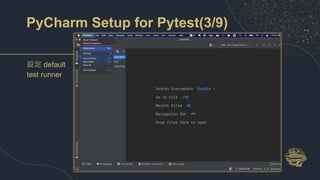
PyCharm Setup for Pytest(3/9)
設定 default
test runner
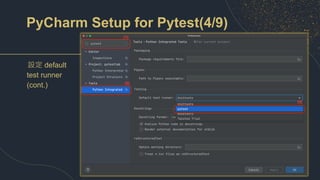
PyCharm Setup for Pytest(4/9)
設定 default
test runner
(cont.)
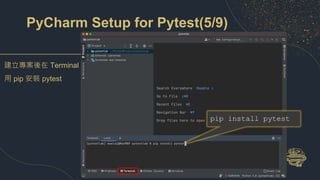
PyCharm Setup for Pytest(5/9)
pip install pytest
建立專案後在 Terminal
用 pip 安裝 pytest
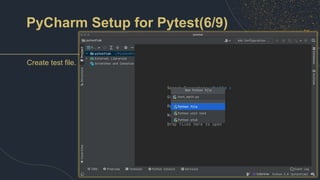
PyCharm Setup for Pytest(6/9)
Create test file.
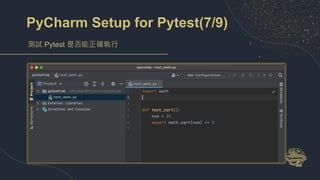
PyCharm Setup for Pytest(7/9)
測試 Pytest 是否能正確執行
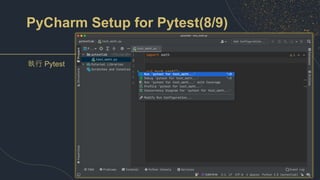
PyCharm Setup for Pytest(8/9)
執行 Pytest
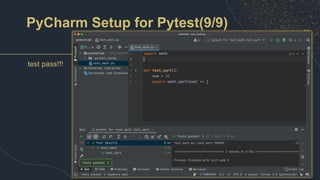
PyCharm Setup for Pytest(9/9)
test pass!!!
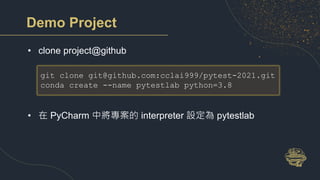
Demo Project
• clone project@github
• 在 PyCharm 中將專案的 interpreter 設定為 pytestlab
git clone git@github.com:cclai999/pytest-2021.git
conda create --name pytestlab python=3.8
unit test vs pytest
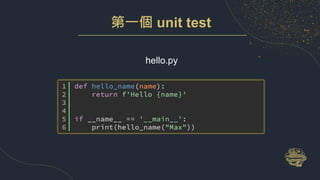
第一個 unit test
hello.py
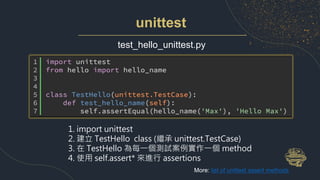
unittest
test_hello_unittest.py
1. import unittest
2. 建立 TestHello class (繼承 unittest.TestCase)
3. 在 TestHello 為每一個測試案例實作一個 method
4. 使用 self.assert* 來進行 assertions
More: list of unittest assert methods
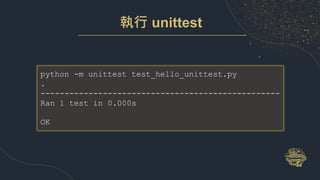
執行 unittest
python -m unittest test_hello_unittest.py
.
--------------------------------------------------
Ran 1 test in 0.000s
OK
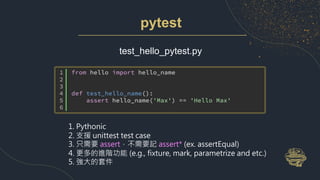
pytest
test_hello_pytest.py
1. Pythonic
2. 支援 unittest test case
3. 只需要 assert,不需要記 assert* (ex. assertEqual)
4. 更多的進階功能 (e.g., fixture, mark, parametrize and etc.)
5. 強大的套件
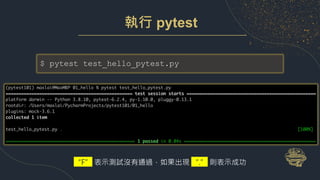
執行 pytest
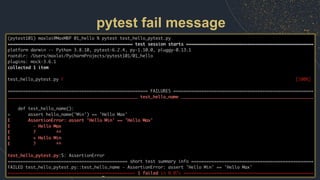
$ pytest test_hello_pytest.py
“F” 表示測試沒有通過,如果出現 “.” 則表示成功
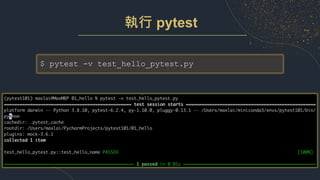
執行 pytest
$ pytest -v test_hello_pytest.py
pytest fail message
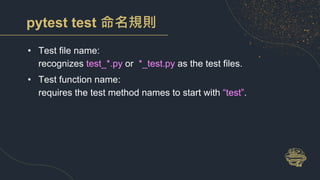
pytest test 命名規則
• Test file name:
recognizes test_*.py or *_test.py as the test files.
• Test function name:
requires the test method names to start with “test”.
PyCharm Demo
test hello.py
何謂單元測試
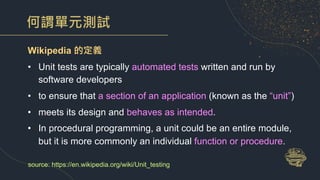
Wikipedia 的定義
• Unit tests are typically automated tests written and run by
software developers
• to ensure that a section of an application (known as the “unit”)
• meets its design and behaves as intended.
• In procedural programming, a unit could be an entire module,
but it is more commonly an individual function or procedure.
source: https://en.wikipedia.org/wiki/Unit_testing
何謂單元測試(cont.)
• 單元測試是一段自動化程式碼,
• 這段程式碼會呼叫被測試的工作單元之入口點,
• 然後檢查其中一個出口點。
• 單元測試大多數是使用單元測試框架編寫的。
• 它可以輕鬆地被編寫並且能夠快速運行。
• 它是可信賴的,可讀的以及可維護的。
• 只要我們產品程式碼沒有改變,單元測試的執行結果就應該是穩定
一致的。
source: The Art of Unit Testing, 3rd
三種單元測試的出口驗證
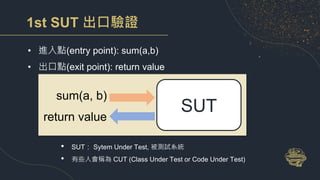
1st SUT 出口驗證
• 進入點(entry point): sum(a,b)
• 出口點(exit point): return value
SUT
sum(a, b)
return value
• SUT: Sytem Under Test, 被測試系統
• 有些人會稱為 CUT (Class Under Test or Code Under Test)
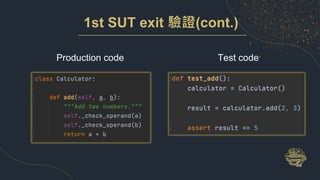
1st SUT exit 驗證(cont.)
Production code Test code
2nd SUT 出口驗證
• 進入點(entry point): M+(a)
• 出口點(exit point): MR(有時並沒有外部可存取的 getter)
SUT
M+
Calculator
[total]
MR
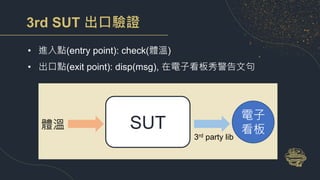
3rd SUT 出口驗證
• 進入點(entry point): check(體溫)
• 出口點(exit point): disp(msg), 在電子看板秀警告文句
SUT
體溫
電子
看板
3rd party lib
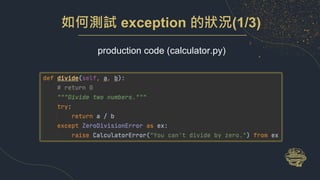
如何測試 exception 的狀況(1/3)
production code (calculator.py)
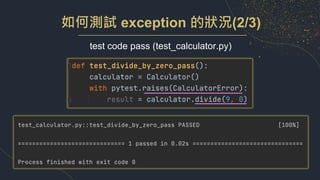
如何測試 exception 的狀況(2/3)
test code pass (test_calculator.py)
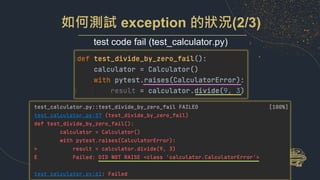
如何測試 exception 的狀況(2/3)
test code fail (test_calculator.py)
PyCharm Demo
c_exception/test_calculator.py
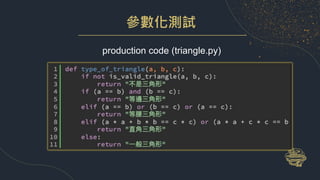
參數化測試
production code (triangle.py)
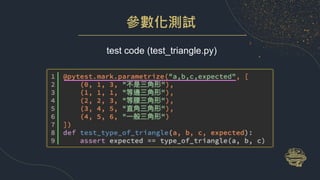
參數化測試
test code (test_triangle.py)
PyCharm Demo
d_parametrize/test_triangle.py
第一階段 Q&A
使用 Pytest 進行單元測試
Part 2
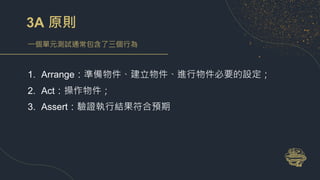
3A 原則
一個單元測試通常包含了三個行為
1. Arrange:準備物件、建立物件、進行物件必要的設定;
2. Act:操作物件;
3. Assert:驗證執行結果符合預期
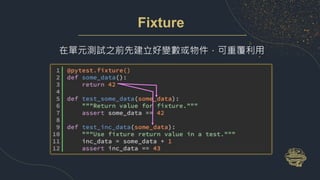
Fixture
在單元測試之前先建立好變數或物件,可重覆利用
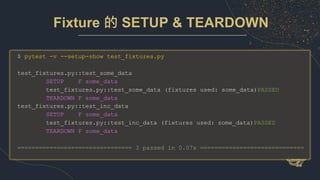
$ pytest -v --setup-show test_fixtures.py
test_fixtures.py::test_some_data
SETUP F some_data
test_fixtures.py::test_some_data (fixtures used: some_data)PASSED
TEARDOWN F some_data
test_fixtures.py::test_inc_data
SETUP F some_data
test_fixtures.py::test_inc_data (fixtures used: some_data)PASSED
TEARDOWN F some_data
================================ 3 passed in 0.07s =============================
Fixture 的 SETUP & TEARDOWN
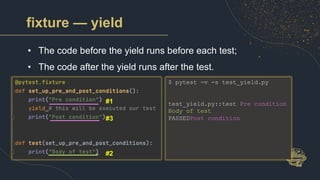
fixture — yield
• The code before the yield runs before each test;
• The code after the yield runs after the test.
$ pytest -v -s test_yield.py
test_yield.py::test Pre condition
Body of test
PASSEDPost condition
#1
#2
#3
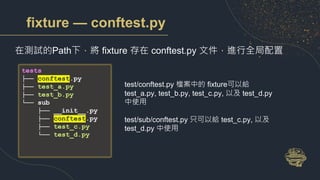
fixture — conftest.py
在測試的Path下,將 fixture 存在 conftest.py 文件,進行全局配置
test/conftest.py 檔案中的 fixture可以給
test_a.py, test_b.py, test_c.py, 以及 test_d.py
中使用
test/sub/conftest.py 只可以給 test_c.py, 以及
test_d.py 中使用
tests
├── conftest.py
├── test_a.py
├── test_b.py
└── sub
├── __init__.py
├── conftest.py
├── test_c.py
└── test_d.py
PyCharm Demo
e_fixture/test_fixtures.py
e_fixture/test_yield.py
二種單元測試的外部依賴
優秀單元測試的特性:
• 它應該運行得很快。
• 它總是會得到相同的結果(如果你沒有更動產品程式碼)。
• 它跟其他單元測試應該是完全獨立。
• 它應該在不需要作業系統檔、網路、資料庫的情況就能運行。
外部依賴的可能問題
• SUT:System Under Test或Software Under Test,待測程式。
• DOC:Depended-on Component(相依元件)。DOC是SUT
執行的時候會使用到的元件。
問題
• 當SUT所依賴的模組(DOC)無法被呼叫時,我們如何獨立驗證
SUT 的邏輯?
• 我們如何避免測試執行太慢?
source: xUnit Patterns - Test Double
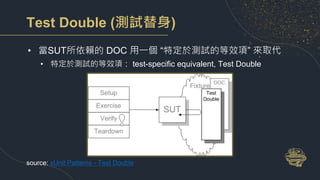
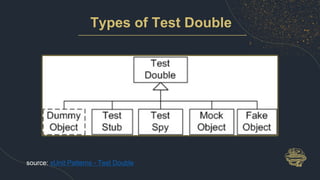
Test Double (測試替身)
• 當SUT所依賴的 DOC 用一個 “特定於測試的等效項” 來取代
• 特定於測試的等效項: test-specific equivalent, Test Double
source: xUnit Patterns - Test Double
Types of Test Double
source: xUnit Patterns - Test Double
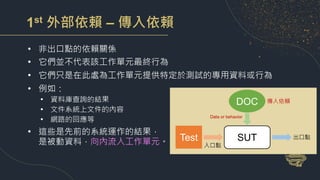
1st 外部依賴 – 傳入依賴
• 非出口點的依賴關係
• 它們並不代表該工作單元最終行為
• 它們只是在此處為工作單元提供特定於測試的專用資料或行為
• 例如:
• 資料庫查詢的結果
• 文件系統上文件的內容
• 網路的回應等
• 這些是先前的系統運作的結果,
是被動資料,向內流入工作單元。 SUT
Test 出口點
DOC
入口點
Data or behavior
傳入依賴
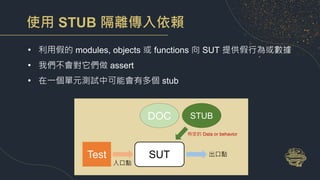
使用 STUB 隔離傳入依賴
• 利用假的 modules, objects 或 functions 向 SUT 提供假行為或數據
• 我們不會對它們做 assert
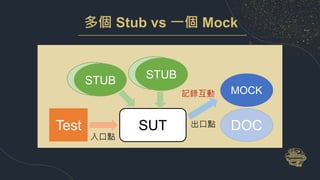
• 在一個單元測試中可能會有多個 stub
SUT
Test 出口點
DOC
入口點
特定的 Data or behavior
STUB
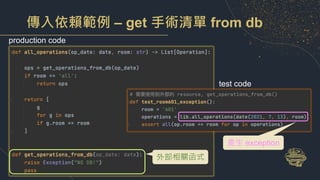
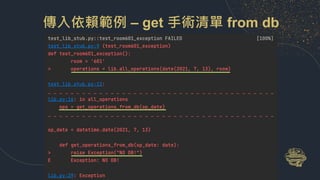
傳入依賴範例 – get 手術清單 from db
產生 exception
production code
test code
外部相關函式
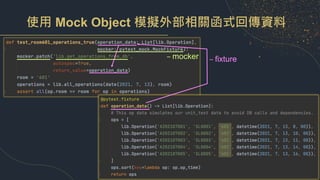
傳入依賴範例 – get 手術清單 from db
使用 Mock Object 模擬外部相關函式回傳資料
– fixture
– mocker
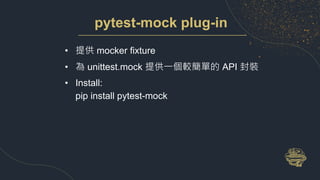
pytest-mock plug-in
• 提供 mocker fixture
• 為 unittest.mock 提供一個較簡單的 API 封裝
• Install:
pip install pytest-mock
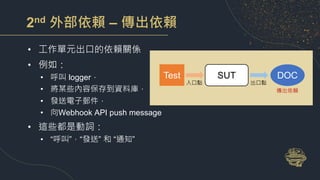
2nd 外部依賴 – 傳出依賴
• 工作單元出口的依賴關係
• 例如:
• 呼叫 logger,
• 將某些內容保存到資料庫,
• 發送電子郵件,
• 向Webhook API push message
• 這些都是動詞:
• “呼叫”,“發送” 和 “通知”
SUT
Test
出口點
DOC
入口點
傳出依賴
使用 Mock 打破輸出依賴
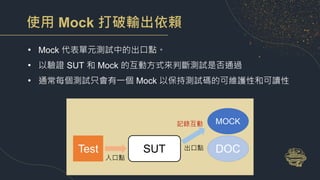
• Mock 代表單元測試中的出口點。
• 以驗證 SUT 和 Mock 的互動方式來判斷測試是否通過
• 通常每個測試只會有一個 Mock 以保持測試碼的可維護性和可讀性
SUT
Test DOC
入口點
MOCK
記錄互動
出口點
如何測試互動方式
• 檢查工作單元(SUT)如何呼叫DOC函數
• 以 Mock function/object 來記錄互動過程
• 在單元測試程式碼中檢查SUT對DOC的呼叫是正確的 (assert)
多個 Stub vs 一個 Mock
SUT
Test DOC
入口點
MOCK
記錄互動
出口點
DOC
STUB
DOC
STUB
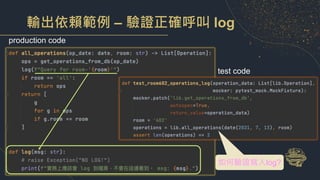
輸出依賴範例 – 驗證正確呼叫 log
production code
test code
如何驗證寫入log?
使用 Mock Object 確認是否傳入正確參數
– mocker:驗證傳入參數是否正確以及僅呼叫一次
• assert_called()
• assert_called_with()
• assert_any_call()
• …
source: python doc
test_lib_mock.py::test_room602_operations_log PASSED [100%]
======================== 1 passed in 0.03s =========================
使用 mocker.spy 記錄互動並且呼叫DOC
– mocker:驗證傳入參數是否正確以及僅呼叫一次
test_lib_mock.py::test_room602_operations_log_with_spy PASSED [100%]
實務上應該會 log 到檔案,不會在這邊看到。 msg: Query for room-'602'.
============================ 1 passed in 0.03s ==============================
PyCharm Demo
f_stub_mock_operation
第二階段 Q&A
使用 Pytest 進行單元測試
Part 3
整合測試
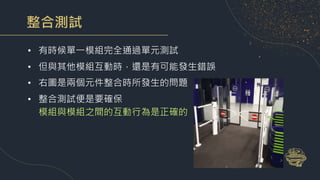
• 有時候單一模組完全通過單元測試
• 但與其他模組互動時,還是有可能發生錯誤
• 右圖是兩個元件整合時所發生的問題
• 整合測試便是要確保
模組與模組之間的互動行為是正確的
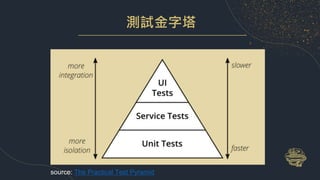
測試金字塔
source: The Practical Test Pyramid
flask-todos
Flask demo for RESTful API for Todo demo
flask-dodos
├── app
│ ├── __init__.py
│ ├── models.py
│ └── routes.py
├── test
│ ├── conftest.py
│ └── test_todos.py
├── config.py
├── main.py
└── requirements.txt
HTTP
Method
Action Examples
GET 取得資源的所有資料
http://[hostname]/api/tasks
取得待辦事項清單
GET 取得資源的特定資料
http://[hostname]/api/tasks/1
取得編號-1的待辦事項
POST 新增一筆資料
http://[hostname]/api/tasks
提供細節資料以新增待辦事項
PUT 更新某一待辦事項資料
http://[hostname]/api/tasks/1
更新編號-1待辦事項的資料
DELETE 刪除某一待辦事項
http://[hostname]/api/tasks/1
刪除更新編號-1待辦事項
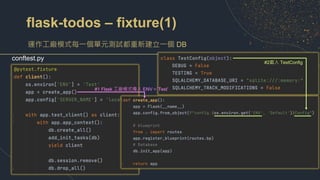
flask-todos – fixture(1)
運作工廠模式每一個單元測試都重新建立一個 DB
conftest.py
#1 Flask 工廠模式傳入 ENV=’Test’
#2載入 TestConfig
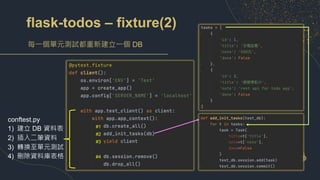
flask-todos – fixture(2)
每一個單元測試都重新建立一個 DB
conftest.py
1) 建立 DB 資料表
2) 插入二筆資料
3) 轉換至單元測試
4) 刪除資料庫表格
#1
#2
#3
#4
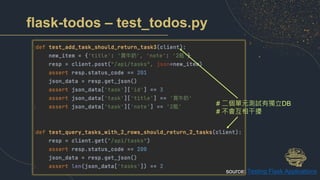
flask-todos – test_todos.py
# 二個單元測試有獨立DB
# 不會互相干擾
source: Testing Flask Applications
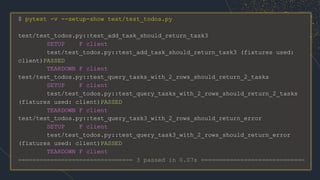
$ pytest -v --setup-show test/test_todos.py
test/test_todos.py::test_add_task_should_return_task3
SETUP F client
test/test_todos.py::test_add_task_should_return_task3 (fixtures used:
client)PASSED
TEARDOWN F client
test/test_todos.py::test_query_tasks_with_2_rows_should_return_2_tasks
SETUP F client
test/test_todos.py::test_query_tasks_with_2_rows_should_return_2_tasks
(fixtures used: client)PASSED
TEARDOWN F client
test/test_todos.py::test_query_task3_with_2_rows_should_return_error
SETUP F client
test/test_todos.py::test_query_task3_with_2_rows_should_return_error
(fixtures used: client)PASSED
TEARDOWN F client
================================ 3 passed in 0.07s =============================
pytest plug-in
• pytest-mock: mock object
• pytest-cov: code coverage
• pytest-freezegun: free time
more: Awesome pytest
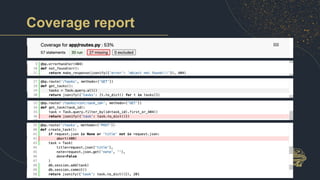
Code Coverage (程式碼覆蓋率)
• 軟體測試中的一種度量
• 描述程式中原始碼被測試的比例
• coverage.py 是最常被用來量測 code coverage 的工具
• pytest-cov 則是可以在 pytest 呼叫 coverage.py 的 plug in
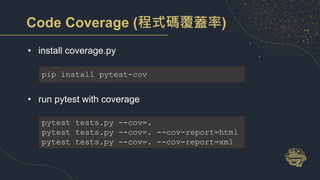
Code Coverage (程式碼覆蓋率)
• install coverage.py
• run pytest with coverage
pip install pytest-cov
pytest tests.py --cov=.
pytest tests.py --cov=. --cov-report=html
pytest tests.py --cov=. --cov-report=xml
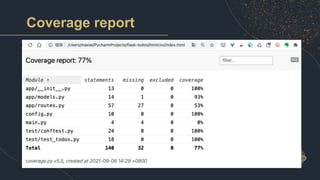
Coverage report
Coverage report
覆蓋率是否愈多愈好?
• 以 ROI 考慮單元測試覆蓋率:
先要找有商業邏輯判斷的程式碼
• 相對趨勢 > 絕對數字:
每次 commit 的 code coverage 不要下降
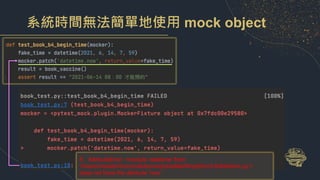
如何 Mock 系統時間
• 情境:預約疫苗
• 實作一個 function book_vaccine()
• 如果目前時間 > 2021/6/14 8:00, 回傳 “開始預約”
• 否則回傳 “2021-06-14 08:00 才能預約”
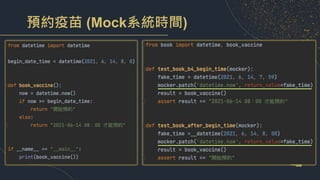
預約疫苗 (Mock系統時間)
系統時間無法簡單地使用 mock object
E AttributeError: <module 'datetime' from
'/Users/maxlai/miniconda3/envs/pytestlab/lib/python3.8/datetime.py’>
does not have the attribute 'now'
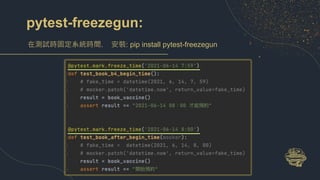
pytest-freezegun:
在測試時固定系統時間. 安裝: pip install pytest-freezegun
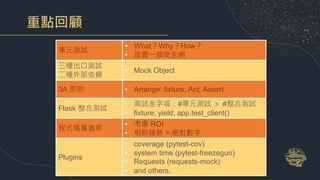
重點回顧
單元測試
• What?Why?How?
• 設置一個安全網
三種出口測試
二種外部依賴
• Mock Object
3A 原則 • Arrange: fixture; Act; Assert
Flask 整合測試
• 測試金字塔:#單元測試 > #整合測試
• fixture; yield; app.test_client()
程式碼覆蓋率
• 考慮 ROI
• 相對趨勢 > 絕對數字
Plugins
• coverage (pytest-cov)
• system time (pytest-freezegun)
• Requests (requests-mock)
• and others.
參考資料
• Python Testing with pytest
• The Art of Unit Testing, 3rd
• Testing Flask Applications
• 15 amazing pytest plugins
• Python Table Manners - 測試 (一)
Thanks
Taichung.py

使用 Pytest 進行單元測試 (PyCon TW 2021)