PyNarrative: A Python Library
for Data Storytelling
Angelica Lo Duca, Roberto Olinto Barsotti
Introduction
PyNarrative is a Python library we created and developed to facilitate data
narration.
The central theme of the work is the integration of technology and
communication through data storytelling.
There is a big gap between developers
and the communication of data, as
they often lack the necessary skills to
convey them clearly and effectively
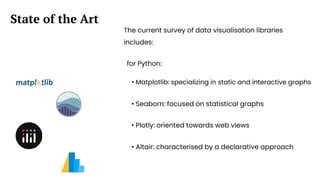
The current survey of data visualisation libraries
includes:
State of the Art
for Python:
• Matplotlib: specializing in static and interactive graphs
• Seaborn: focused on statistical graphs
• Plotly: oriented towards web views
• Altair: characterised by a declarative approach
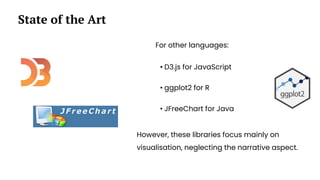
For other languages:
State of the Art
• D3.js for JavaScript
• ggplot2 for R
• JFreeChart for Java
However, these libraries focus mainly on
visualisation, neglecting the narrative aspect.
Data scientists face different challenges:
The Problem
• Existing tools, although powerful, are complex
to use
• Dozens of lines of code are needed to
implement narrative elements
• Different applications are necessary
• Communication with a non-technical audience
is difficult
To create a simple story using Altair requires
more than 100 lines of code, resulting in a
time-consuming technical set-up rather than
storytelling.
WHAT IS PYNARRATIVE?
PyNarrative is a library designed to integrate narrative
elements seamlessly into data visualization.
Instead of writing too many lines of code to add explanations,
annotations, and context, PyNarrative simplifies this process
with structured storytelling components.
PyNarrative was created with the aim of bridging the gap
between visualisation and data narration. Key features include:
Introduction to PyNarrative
• Integration with Altair as a technology base
• A structured narrative approach
• Significant reduction in code complexity
KEY INNOVATIONS:
● First library to natively implement full narrative structure
● Smooth and natural integration of all narrative elements
● Support for different cultures and reading styles
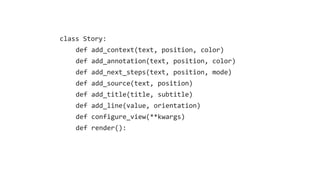
class Story:
def add_context(text, position, color)
def add_annotation(text, position, color)
def add_next_steps(text, position, mode)
def add_source(text, position)
def add_title(title, subtitle)
def add_line(value, orientation)
def configure_view(**kwargs)
def render():
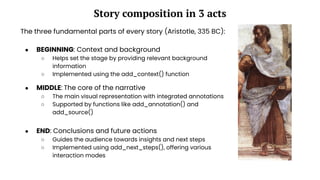
Story composition in 3 acts
The three fundamental parts of every story (Aristotle, 335 BC):
● MIDDLE: The core of the narrative
○ The main visual representation with integrated annotations
○ Supported by functions like add_annotation() and
add_source()
● END: Conclusions and future actions
○ Guides the audience towards insights and next steps
○ Implemented using add_next_steps(), offering various
interaction modes
● BEGINNING: Context and background
○ Helps set the stage by providing relevant background
information
○ Implemented using the add_context() function
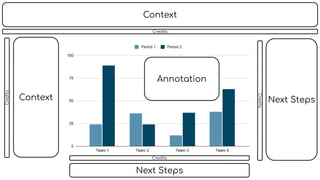
Context
Context
Next Steps
Next Steps
Annotation
Credits
Credits
Credits
Credits
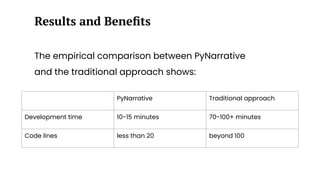
The empirical comparison between PyNarrative
and the traditional approach shows:
Results and Benefits
PyNarrative Traditional approach
Development time 10-15 minutes 70-100+ minutes
Code lines less than 20 beyond 100
Impact and Future
Future prospects may include:
Future Developments
Integration with AI:
• Automated context generation
• Image creation
• Annotation tips
• Layout optimization
Expansion of
functionalities:
• New display types
• Advanced narrative templates
• Support for complex datasets
The project achieved important goals:
Conclusions
• Significant reduction in complexity
• Improved data communication
• Effective narrative support
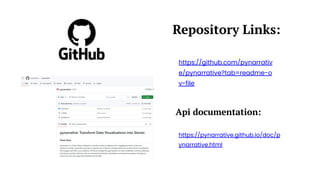
Repository Links:
https://github.com/pynarrativ
e/pynarrative?tab=readme-o
v-file
https://pynarrative.github.io/doc/p
ynarrative.html
Api documentation:
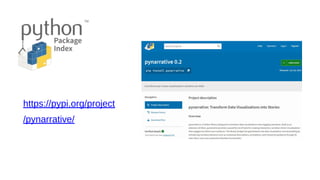
https://pypi.org/project
/pynarrative/
> pip install pynarrative
Thank you for
your attention

PyNarrative: A Python Library for Data Storytelling

  • 1.
    PyNarrative: A PythonLibrary for Data Storytelling Angelica Lo Duca, Roberto Olinto Barsotti
  • 2.
    Introduction PyNarrative is aPython library we created and developed to facilitate data narration. The central theme of the work is the integration of technology and communication through data storytelling.
  • 3.
    There is abig gap between developers and the communication of data, as they often lack the necessary skills to convey them clearly and effectively
  • 4.
    The current surveyof data visualisation libraries includes: State of the Art for Python: • Matplotlib: specializing in static and interactive graphs • Seaborn: focused on statistical graphs • Plotly: oriented towards web views • Altair: characterised by a declarative approach
  • 5.
    For other languages: Stateof the Art • D3.js for JavaScript • ggplot2 for R • JFreeChart for Java However, these libraries focus mainly on visualisation, neglecting the narrative aspect.
  • 6.
    Data scientists facedifferent challenges: The Problem • Existing tools, although powerful, are complex to use • Dozens of lines of code are needed to implement narrative elements • Different applications are necessary • Communication with a non-technical audience is difficult
  • 7.
    To create asimple story using Altair requires more than 100 lines of code, resulting in a time-consuming technical set-up rather than storytelling.
  • 8.
    WHAT IS PYNARRATIVE? PyNarrativeis a library designed to integrate narrative elements seamlessly into data visualization. Instead of writing too many lines of code to add explanations, annotations, and context, PyNarrative simplifies this process with structured storytelling components.
  • 9.
    PyNarrative was createdwith the aim of bridging the gap between visualisation and data narration. Key features include: Introduction to PyNarrative • Integration with Altair as a technology base • A structured narrative approach • Significant reduction in code complexity
  • 10.
    KEY INNOVATIONS: ● Firstlibrary to natively implement full narrative structure ● Smooth and natural integration of all narrative elements ● Support for different cultures and reading styles
  • 11.
    class Story: def add_context(text,position, color) def add_annotation(text, position, color) def add_next_steps(text, position, mode) def add_source(text, position) def add_title(title, subtitle) def add_line(value, orientation) def configure_view(**kwargs) def render():
  • 12.
    Story composition in3 acts The three fundamental parts of every story (Aristotle, 335 BC): ● MIDDLE: The core of the narrative ○ The main visual representation with integrated annotations ○ Supported by functions like add_annotation() and add_source() ● END: Conclusions and future actions ○ Guides the audience towards insights and next steps ○ Implemented using add_next_steps(), offering various interaction modes ● BEGINNING: Context and background ○ Helps set the stage by providing relevant background information ○ Implemented using the add_context() function
  • 13.
  • 14.
    The empirical comparisonbetween PyNarrative and the traditional approach shows: Results and Benefits PyNarrative Traditional approach Development time 10-15 minutes 70-100+ minutes Code lines less than 20 beyond 100
  • 15.
  • 16.
    Future prospects mayinclude: Future Developments Integration with AI: • Automated context generation • Image creation • Annotation tips • Layout optimization Expansion of functionalities: • New display types • Advanced narrative templates • Support for complex datasets
  • 17.
    The project achievedimportant goals: Conclusions • Significant reduction in complexity • Improved data communication • Effective narrative support
  • 18.
  • 19.
  • 20.
    > pip installpynarrative
  • 21.