OPENING THE MAGIC BOX:
Creating transitional Python libraries
and IDE tools for young learners
Welcome!
Juan Farfan Meg Ray Thomas Ricard
@teach_python@darkaardvark2 @gnarlychaplin
K12 CS Education:
Current Landscape
#CSforAll
Forms of CS Education in K12
At Home
After School
In the Classroom
#CSforAll
Equity, Access, Inclusion
Thinking is a Skill
A Literacy
Informed Citizens
K12 CS Education:
Where to Start?
Windows of Opportunity
✘Brain development research shows that
there are “Windows of Opportunity” for
learning language and math in early
childhood
✘Exposure precedes understanding
✘Confidence is key
✘Follow-up studies demonstrate long-term
academic gains
Theory of Cognitive Development
Starting with Objects
Sensorimotor Stage
Knowledge from sensory
experiences and physical
interactions with objects
Parsing Grammar
Preoperational Stage
Thinking with images and
symbols, but unable to logically
manipulate information
First Algorithms
Concrete Operational Stage
Applying logic and operations
on concrete objects to form
conclusions via induction
Layers of Abstraction
Formal Operational Stage
Emergence of deductive
reasoning through the use of
abstract concepts
Where does Computer Science fit in?
Traditionally, CS is introduced at the high school level
with roughly the following progression:
This does not work for young learners because it:
1. Begins with abstractions
2. Assumes deductive reasoning
3. Maps to knowledge from higher level math
Data Types -> Variables -> Control Flow -> Functions -> Classes
Window of Opportunity for Computer Science?
We’re starting from Scratch
Why does Scratch work for young children?
1. Actors (Objects) are primary & concrete
2.Maps to prior knowledge via simple, readable
methods
3.Inductive learning with preconfigured blocks
4.Event-driven programming generates
immediate sensory feedback
5.Complexity is constrained by the language
Beyond Scratch
How do we make a programming language and
environment accessible to young learners?
1. Make Actors (Objects) primary & concrete
2. Map prior knowledge to simple, readable
methods
3. Induce learning with preconfigured blocks
4. Generate immediate sensory feedback with
event-driven programming
5. Obscure complexity with custom libraries
Our approach
Python
Why Python?
✘Versatile
✘Teachers have heard of it
✘Brackets are hard for kids to type
Python Online
Python online
✘We use Skulpt as our compiler
✘http://www.skulpt.org/
✘It works
✘Has a growing support for standard library
✘Let’s us extend with javascript
You had me at hello
Visual Elements
Toolkit
Our Development
Process
When to extend Python modules/tools
✘Curriculum and Library together
✘Which topics for which grades
Let’s talk about an example python module...
Making a new tool part 2
✘Recently we’ve been teaching the concept of
a REST Api for 6th grade
✘Survey of professional tools
✘Decide what parts we like and don’t like for a
grade level
Compare professional tools
What do the pros use?
✘Urllib
✘Urllib2
✘Requests
Compare professional tools
Why not Requests?
✘Even ‘pip install requests’ may be a point of
friction
✘We’re not looking for features.
✘It’s not standard library
Compare professional tools
Why do we care about the standard library?
✘What does our compiler (Skulpt) use?
✘Most Something -> JS compilers are not
focused on community packages.
Compare professional tools
Requests vs Urllib2
Compare professional tools
Urllib2 syntax choices
Compare professional tools
Again, the audience.
✘Requests library for older audience (8th+)
✘Maybe Urllib isn’t the answer here.
✘Let’s make something new.
Making a new tool
Guiding principles
✘Classes need to use data they generate
✘Teachers need to manage the data
✘Teachers like spreadsheets
Conclusion: Custom Python object using Skulpt
Making a new tool
But wait,
✘Wasn’t the point to teach real world tools?
✘What exactly are we teaching then?
✘What’s the value of learning something that’s
specific to our platform?
Making a new tool
Core concept: making a request.
✘“Getting data” is a tough concept.
✘How can we make it more concrete?
Making a new tool
What we started with:
✘Link to unique survey posted in instructions
✘Link to data spreadsheet in instructions also
✘RequestSpreadsheet class
Making a new tool
Curriculum decides API, not the other way
around
Extending the idea
✘Visual representation
✘Conversion to JSON
✘Lessons about dictionaries
✘Maybe the URL is automatic?
Making a new tool
They’ve learned one part
✘Later curriculum will get them closer to using
a tool like Requests or Urllib
✘More advanced tools in a later grade
Developing a Tool for Learning
1. Start with learning goal and grade level
2.What are the other requirements?
3.Survey professional tools
4.Choose the parts we can use or build
5.Try it in the classroom!
Get Developing!
How to extend Skulpt
Since we’re here to learn about Python, let’s write
some Javascript.
How to extend Skulpt
Skulpt
✘Active Github community since 2011
✘Python in the browser with growing support
for Python standard library
✘New compiler features, like debugging, are on
the way
How to extend Skulpt
First steps
✘Fork the repo
✘https://github.com/skulpt/skulpt
✘Try out skulpt.py
How to extend Skulpt
Add a new “module” file to the lib
✘We’ll call our module “alerts.js”
How to extend Skulpt
Minimal module
>>> import alerts
How to extend Skulpt
Add a class
How to extend Skulpt
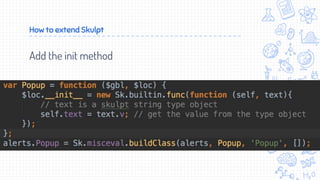
Add the init method
How to extend Skulpt
Add the show popup method
How to extend Skulpt
That’s it. Complete code:
How to extend Skulpt
Get Involved
1. Contribute to open source tools and education
projects
2.Volunteer to teach a class or club
3.Host interns or shadow days
4.Sponsor education events & donate old hardware
5.Create new education tools
(Links in the notes)
Thank you!
Please follow us at:
Juan Farfan: @darkaardvark2
Meg Ray: @teach_python
Thomas Ricard:
https://github.com/petroleyum/skulpt/tree/ext
ending-skulpt-example
Check out our platform: www.codesters.com

PyGotham opening the magic box

  • 1.
    OPENING THE MAGICBOX: Creating transitional Python libraries and IDE tools for young learners
  • 2.
    Welcome! Juan Farfan MegRay Thomas Ricard @teach_python@darkaardvark2 @gnarlychaplin
  • 3.
  • 5.
  • 6.
    Forms of CSEducation in K12 At Home After School In the Classroom
  • 7.
    #CSforAll Equity, Access, Inclusion Thinkingis a Skill A Literacy Informed Citizens
  • 8.
  • 9.
    Windows of Opportunity ✘Braindevelopment research shows that there are “Windows of Opportunity” for learning language and math in early childhood ✘Exposure precedes understanding ✘Confidence is key ✘Follow-up studies demonstrate long-term academic gains
  • 10.
  • 11.
    Starting with Objects SensorimotorStage Knowledge from sensory experiences and physical interactions with objects Parsing Grammar Preoperational Stage Thinking with images and symbols, but unable to logically manipulate information First Algorithms Concrete Operational Stage Applying logic and operations on concrete objects to form conclusions via induction Layers of Abstraction Formal Operational Stage Emergence of deductive reasoning through the use of abstract concepts
  • 12.
    Where does ComputerScience fit in? Traditionally, CS is introduced at the high school level with roughly the following progression: This does not work for young learners because it: 1. Begins with abstractions 2. Assumes deductive reasoning 3. Maps to knowledge from higher level math Data Types -> Variables -> Control Flow -> Functions -> Classes
  • 13.
    Window of Opportunityfor Computer Science?
  • 14.
    We’re starting fromScratch Why does Scratch work for young children? 1. Actors (Objects) are primary & concrete 2.Maps to prior knowledge via simple, readable methods 3.Inductive learning with preconfigured blocks 4.Event-driven programming generates immediate sensory feedback 5.Complexity is constrained by the language
  • 15.
    Beyond Scratch How dowe make a programming language and environment accessible to young learners? 1. Make Actors (Objects) primary & concrete 2. Map prior knowledge to simple, readable methods 3. Induce learning with preconfigured blocks 4. Generate immediate sensory feedback with event-driven programming 5. Obscure complexity with custom libraries
  • 16.
  • 18.
    Python Why Python? ✘Versatile ✘Teachers haveheard of it ✘Brackets are hard for kids to type
  • 19.
    Python Online Python online ✘Weuse Skulpt as our compiler ✘http://www.skulpt.org/ ✘It works ✘Has a growing support for standard library ✘Let’s us extend with javascript
  • 20.
    You had meat hello
  • 21.
  • 22.
  • 23.
  • 24.
    When to extendPython modules/tools ✘Curriculum and Library together ✘Which topics for which grades Let’s talk about an example python module...
  • 25.
    Making a newtool part 2 ✘Recently we’ve been teaching the concept of a REST Api for 6th grade ✘Survey of professional tools ✘Decide what parts we like and don’t like for a grade level
  • 26.
    Compare professional tools Whatdo the pros use? ✘Urllib ✘Urllib2 ✘Requests
  • 27.
    Compare professional tools Whynot Requests? ✘Even ‘pip install requests’ may be a point of friction ✘We’re not looking for features. ✘It’s not standard library
  • 28.
    Compare professional tools Whydo we care about the standard library? ✘What does our compiler (Skulpt) use? ✘Most Something -> JS compilers are not focused on community packages.
  • 29.
  • 30.
  • 31.
    Compare professional tools Again,the audience. ✘Requests library for older audience (8th+) ✘Maybe Urllib isn’t the answer here. ✘Let’s make something new.
  • 32.
    Making a newtool Guiding principles ✘Classes need to use data they generate ✘Teachers need to manage the data ✘Teachers like spreadsheets Conclusion: Custom Python object using Skulpt
  • 33.
    Making a newtool But wait, ✘Wasn’t the point to teach real world tools? ✘What exactly are we teaching then? ✘What’s the value of learning something that’s specific to our platform?
  • 34.
    Making a newtool Core concept: making a request. ✘“Getting data” is a tough concept. ✘How can we make it more concrete?
  • 35.
    Making a newtool What we started with: ✘Link to unique survey posted in instructions ✘Link to data spreadsheet in instructions also ✘RequestSpreadsheet class
  • 36.
    Making a newtool Curriculum decides API, not the other way around
  • 37.
    Extending the idea ✘Visualrepresentation ✘Conversion to JSON ✘Lessons about dictionaries ✘Maybe the URL is automatic?
  • 38.
    Making a newtool They’ve learned one part ✘Later curriculum will get them closer to using a tool like Requests or Urllib ✘More advanced tools in a later grade
  • 39.
    Developing a Toolfor Learning 1. Start with learning goal and grade level 2.What are the other requirements? 3.Survey professional tools 4.Choose the parts we can use or build 5.Try it in the classroom!
  • 40.
  • 41.
    How to extendSkulpt Since we’re here to learn about Python, let’s write some Javascript.
  • 42.
    How to extendSkulpt Skulpt ✘Active Github community since 2011 ✘Python in the browser with growing support for Python standard library ✘New compiler features, like debugging, are on the way
  • 43.
    How to extendSkulpt First steps ✘Fork the repo ✘https://github.com/skulpt/skulpt ✘Try out skulpt.py
  • 44.
    How to extendSkulpt Add a new “module” file to the lib ✘We’ll call our module “alerts.js”
  • 45.
    How to extendSkulpt Minimal module >>> import alerts
  • 46.
    How to extendSkulpt Add a class
  • 47.
    How to extendSkulpt Add the init method
  • 48.
    How to extendSkulpt Add the show popup method
  • 49.
    How to extendSkulpt That’s it. Complete code:
  • 50.
  • 51.
    Get Involved 1. Contributeto open source tools and education projects 2.Volunteer to teach a class or club 3.Host interns or shadow days 4.Sponsor education events & donate old hardware 5.Create new education tools (Links in the notes)
  • 53.
    Thank you! Please followus at: Juan Farfan: @darkaardvark2 Meg Ray: @teach_python Thomas Ricard: https://github.com/petroleyum/skulpt/tree/ext ending-skulpt-example Check out our platform: www.codesters.com

Editor's Notes

  • #6 National K12 CS Framework https://k12cs.org/ National K12 Standards http://blog.csta.acm.org/2016/02/17/draft-2016-csta-k-12-cs-standards-we-need-your-feedback/ New AP Course https://apstudent.collegeboard.org/apcourse/ap-computer-science-principles
  • #7 Learning at home with a parent or online Learning in an after school club, program, or camp Learning in a classroom setting, during the school day Opt-in electives Required classes
  • #10 Windows of Opportunity (http://dev.thelittleschool.net/PDF/new%20brain%20development%20research.pdf) Starting Early (http://www.nctm.org/Standards-and-Positions/Position-Statements/Mathematics-in-Early-Childhood-Learning/) The Algebra Problem (http://hepg.org/hel-home/issues/28_3/helarticle/the-algebra-problem_533) The Future of Children (https://www.princeton.edu/futureofchildren/publications/docs/05_03_01.pdf)
  • #11 Piaget’s Theory of Cognitive Development (https://en.wikipedia.org/wiki/Piaget%27s_theory_of_cognitive_development) Neo-Piagetian Theories (https://en.wikipedia.org/wiki/Neo-Piagetian_theories_of_cognitive_development)
  • #12 Sensorimotor Stage Infants learn about objects and object permanence After 6 months, children begin to respond more actively to the sounds of their native language Around 9 months, they speak their first words starting with oft-heard and easily pronounceable nouns [mama, doggy] From age 1-2, short phrases start to arise, mostly consisting of object+action or object+adj pairs (mommy eat, doggy bad) Children can start to link numbers to objects (two mommy, three doggy) Preoperational Stage From age 2-4, children begin to correctly assign pronouns After around age 4, they have acquired nuanced and understandable grammar (She’s eating dinner.) Literacy begins to develop around the same time Simple calculations, but unable to perform reversals Egocentrism and transductive reasoning Concrete Operational Stage Inductive reasoning Formal Operational Stage Algebra Research: Piaget’s Theory of Cognitive Development (https://en.wikipedia.org/wiki/Piaget%27s_theory_of_cognitive_development) Applying Piaget’s Theory (http://files.eric.ed.gov/fulltext/EJ841568.pdf) Brown’s Stages (http://www.speech-language-therapy.com/index.php?option=com_content&view=article&id=33:brown&catid=2:uncategorised&Itemid=117) Inductive Teaching (https://www.mcgill.ca/tised/files/tised/michael_prince_on_inductive_teaching_and_learning.pdf)
  • #13 MIT Intro to Python Syllabus (http://ocw.mit.edu/courses/electrical-engineering-and-computer-science/6-189-a-gentle-introduction-to-programming-using-python-january-iap-2011/calendar/)
  • #14 Scratch Project - https://scratch.mit.edu/projects/116440191/
  • #15 Scratch: Programming for everyone (http://web.media.mit.edu/~mres/scratch/scratch-cacm.pdf) Scratch (https://en.wikipedia.org/wiki/Scratch_(programming_language)) Why not Scratch? (http://www.fcet.staffs.ac.uk/nas1/CSTeachConf/2015/ScratchPython/a25-armoni.pdf)
  • #16 Mindstorms: Children, Computers, and Powerful Ideas by Seymour Papert (https://en.wikipedia.org/wiki/Mindstorms_(book))
  • #18 If it doesn’t work in the classroom, than it doesn’t work. Period.
  • #21 Starting with objects in curriculum based on the theory we talked about.
  • #22 Sprite is starting point ---> how does this apply to the rest of our environment and library? We’ve been talking about making the ideas concrete, these are other considerations we’ve found besides Concrete objects: Considerations: Mostly everything on the stage should have the same methods Sprites, Shapes, Text, Graphs, Charts Explicit Redundant Methods Many options for optional parameters
  • #23 Like drag and drop languages We think it should be runnable snippets Can both be singular methods or small example snippets Allows for easy discovery and experimentation Helps debug syntax errors Works as API documentation
  • #24 So we mentioned the difference between “professional tools” and “learning tools”. This is our process for deciding which tools and lessons are appropriate for a certain grade level.
  • #25 When I say “tools” I usually mean python modules or classes.
  • #26 Let’s say we want to teach programming along with statistics concepts. Let’s make a lesson about data science for kids. What’s it for? Who’s it for?
  • #27 If you search online for anything about “python” and APIs you’ll find a lot of people telling you to use Requests.
  • #28 Think about classroom experience, think about teachers I’ll add here that if this were 8th grade, then we’d use something like requests
  • #29 We use Skulpt as our compiler. The goal of the Skulpt project is be a faithful js implementation of python2.7, not to be the greatest hits of the python community. This may limit us in using tools that are “community standard”.
  • #30 So to give you an idea of how we compare languages, just look at these two “hello world” examples. We need to make these three lines as readable as possible. What could we change? What works or doesn’t work for our audience of 6th graders We’re not at all worried about features of a tool at this point. We just want this to be simple as possible.
  • #31 If we pick a package, how can we rewrite the same example to be more readable. Compare syntax of urllib2 methods which is easier to understand if you're 11 years old? would hiding the import statement make it clearer?
  • #32 I'll add here that if we were focusing on 8th grade then we would probably make a port of the Requests library in Skulpt (and we'll probably do that soon). We had an inclination that Requests would be a little "magic" for 6th grade though (which may be a mistake on our part)
  • #33 So we’re going to make a python object attached to our own codesters module that kids can use to “get data” Which we hope to make similar to consuming a REST API (in essence. It should kind of feel like urllib or something similar).
  • #34 So if we’re not using the Requests library or Urllib2, then how are we preparing kids for the Real World?
  • #35 Try to describe how abstract the idea of “getting data” is. Also even if students aren’t using a “real world” tool, they’re using class in a module, which can be a lesson about what a module is later, But we don’t want to talk about that for now.
  • #36 RequestSpreadsheet Class takes a survey, a link is generated that they copy paste into the editor Concept of a request But not misleading → can’t request just anything Leaves open to future dev RequestDoc, RequestMap
  • #37 Another core concept of the speech Columns and rows (vs. records)
  • #38 If the URL is automatic, would that start to ruin the lesson?
  • #39 Started with something concrete first, give them tools with more abstractions later
  • #42 You could make these tools offline. I want to talk about the Skulpt project how to use Skulpt because I think it’s cool.
  • #45 We’re going to write a simple Python module to do the usual javascript Hello World activity. We’re going to show one of those terrible js alert popups. We make a new js file right in this lib folder here. Skulpt will find all python and javascript files in this folder and try to serialize them into Modules in its standard library
  • #52 Open Source: Skulpt PSF Education workgroup Volunteer: Girls Who Code ScriptEd TEALS Host interns or shadow days: SEP/Pathfinders C/I ScriptEd Sponsor education events & donate old hardware: C/I A non-profit near you Your personal network