








Puppet Release
Workflows at Jive
Devon Peters
What is a Release?

2

© Jive confidential
Push to production, always, immediately

3

© Jive confidential
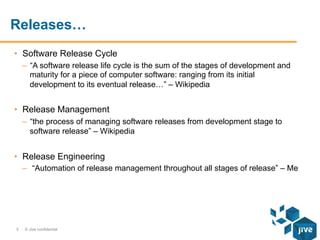
Releases…
•  Software Release Cycle
–  “A software release life cycle is the sum of the stages of development and
maturity for a piece of computer software: ranging from its initial
development to its eventual release…” – Wikipedia

•  Release Management
–  “the process of managing software releases from development stage to
software release” – Wikipedia

•  Release Engineering
–  “Automation of release management throughout all stages of release” – Me

5

© Jive confidential
More Dev in our Ops

RY
ATO
LIG
OB
PS
EVO
D
AGE
IM

6

© Jive confidential
We have formal release management
processes for all of our puppet
Domains

7

© Jive confidential
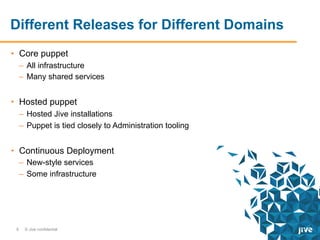
Different Releases for Different Domains
•  Core puppet
–  All infrastructure
–  Many shared services

•  Hosted puppet
–  Hosted Jive installations
–  Puppet is tied closely to Administration tooling

•  Continuous Deployment
–  New-style services
–  Some infrastructure

8

© Jive confidential
Releasing Core Puppet

9

© Jive confidential
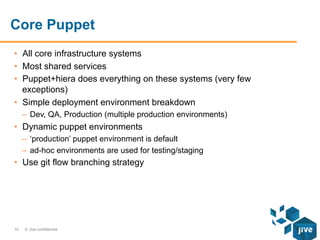
Core Puppet
•  All core infrastructure systems
•  Most shared services
•  Puppet+hiera does everything on these systems (very few
exceptions)
•  Simple deployment environment breakdown
–  Dev, QA, Production (multiple production environments)

•  Dynamic puppet environments
–  ‘production’ puppet environment is default
–  ad-hoc environments are used for testing/staging

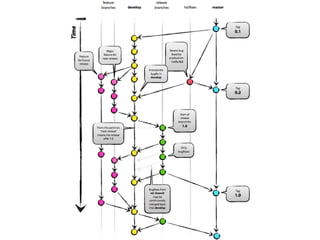
•  Use git flow branching strategy

10

© Jive confidential
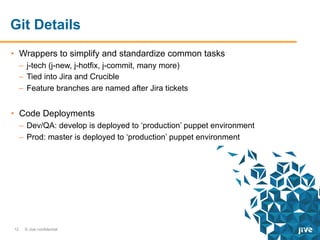
Git Details
•  Wrappers to simplify and standardize common tasks
–  j-tech (j-new, j-hotfix, j-commit, many more)
–  Tied into Jira and Crucible
–  Feature branches are named after Jira tickets

•  Code Deployments
–  Dev/QA: develop is deployed to ‘production’ puppet environment
–  Prod: master is deployed to ‘production’ puppet environment

12

© Jive confidential
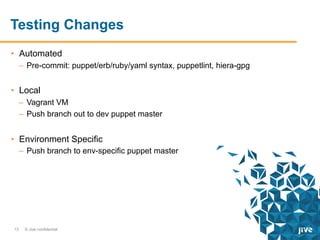
Testing Changes
•  Automated
–  Pre-commit: puppet/erb/ruby/yaml syntax, puppetlint, hiera-gpg

•  Local
–  Vagrant VM
–  Push branch out to dev puppet master

•  Environment Specific
–  Push branch to env-specific puppet master

13

© Jive confidential
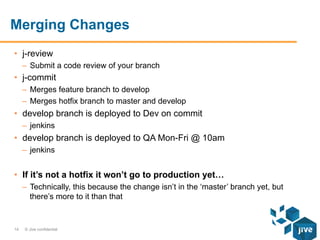
Merging Changes
•  j-review
–  Submit a code review of your branch

•  j-commit
–  Merges feature branch to develop
–  Merges hotfix branch to master and develop

•  develop branch is deployed to Dev on commit
–  jenkins

•  develop branch is deployed to QA Mon-Fri @ 10am
–  jenkins

•  If it’s not a hotfix it won’t go to production yet…
–  Technically, this because the change isn’t in the ‘master’ branch yet, but
there’s more to it than that

14

© Jive confidential
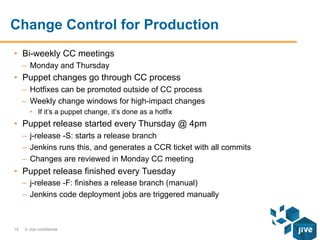
Change Control for Production
•  Bi-weekly CC meetings
–  Monday and Thursday

•  Puppet changes go through CC process
–  Hotfixes can be promoted outside of CC process
–  Weekly change windows for high-impact changes
•  If it’s a puppet change, it’s done as a hotfix

•  Puppet release started every Thursday @ 4pm
–  j-release -S: starts a release branch
–  Jenkins runs this, and generates a CCR ticket with all commits
–  Changes are reviewed in Monday CC meeting

•  Puppet release finished every Tuesday
–  j-release -F: finishes a release branch (manual)
–  Jenkins code deployment jobs are triggered manually

15

© Jive confidential
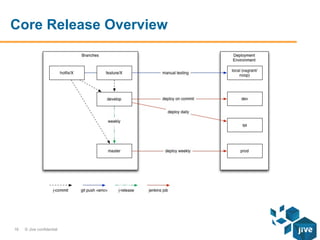
Core Release Overview

16

© Jive confidential
Releasing Hosted Puppet

17

© Jive confidential
Hosted Puppet
•  Nodes that run hosted customer installations
•  Very homogenous
•  Relatively simple puppet code
–  Puppet mostly supplements an in house administration tool (JCA)

•  Deployment environment breakdown
–  Dev, QA, Prod

•  Uses static puppet environments
–  ENC dictates the environment for a given node
–  Jenkins jobs deploy from git to appropriate puppet environment

•  Uses the git flow branching strategy
–  All the same j-tech tools

18

© Jive confidential
Testing Changes
•  Automated
–  Pre-commit: puppet/erb/ruby/yaml syntax, puppetlint, hiera-gpg

•  Get your own installation setup in Dev
–  Commit changes, and don’t walk away till you know they work
•  It’s somewhat acceptable to break dev, but try not to

–  Most OS related changes are just plucked from Core, and were likely tested
more thoroughly there

19

© Jive confidential
Merging Changes
•  j-review
–  Submit a code review of your branch

•  j-commit
–  Merges feature branch to develop
–  Merges hotfix branch to master and develop

•  develop branch is deployed to Dev on commit
–  jenkins
–  make sure you don’t break it

•  develop branch is deployed to QA ad-hoc
–  QA changes are tied to JCA application release QA cycles
–  jenkins

20

© Jive confidential
Creating Releases
•  Puppet releases are typically tied to JCA application releases
–  The app releases every 2 weeks
–  A puppet release could be a part of it

•  Doing a release
–  j-release -A: create, and finish a release branch

21

© Jive confidential
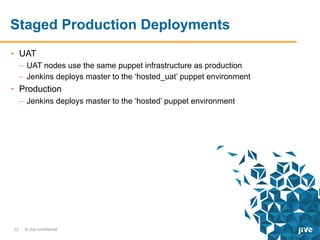
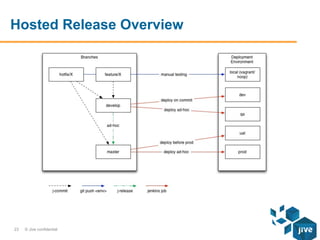
Staged Production Deployments
•  UAT
–  UAT nodes use the same puppet infrastructure as production
–  Jenkins deploys master to the ‘hosted_uat’ puppet environment

•  Production
–  Jenkins deploys master to the ‘hosted’ puppet environment

22

© Jive confidential
Hosted Release Overview

23

© Jive confidential
Continuous Deployment

24

© Jive confidential
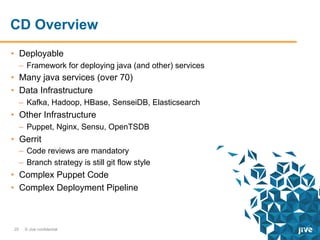
CD Overview
•  Deployable
–  Framework for deploying java (and other) services

•  Many java services (over 70)
•  Data Infrastructure
–  Kafka, Hadoop, HBase, SenseiDB, Elasticsearch

•  Other Infrastructure
–  Puppet, Nginx, Sensu, OpenTSDB

•  Gerrit
–  Code reviews are mandatory
–  Branch strategy is still git flow style

•  Complex Puppet Code
•  Complex Deployment Pipeline

25

© Jive confidential
Environment Overview
•  We call them clusters
–  virtual, dev, integ, test, release, preprod, prod

•  We also have geo-specific datacenters
–  local, intinteg, inttest, intrelease, phxpreprod, phxprod, amsprod

•  Hiera hierarchy includes all of these
–  These exist in hiera for other Puppet domains as well

•  Deployable configuration hierarchy includes all of these

26

© Jive confidential
Puppet Details

27

© Jive confidential
Puppet Overview
•  Dedicated puppet master(s) per cluster
•  Puppet agent is run on-demand by the deployment process
•  CD pipeline determines if puppet code can be promoted to the next
cluster
•  “Special” module and hiera trees
–  We don’t want to duplicate everything in Core
–  Developers need the ability to change puppet code or hiera data
–  We setup something we call Puppet for Projects
•  Combines Core puppet code with Project puppet code

28

© Jive confidential
Puppet for Projects - Layout
•  Core puppet
–  Basic layout is:
•  hiera/
•  manifests/
•  modules/

–  manifests/site.pp is basically: hiera_include(‘classes’)
–  Every commit triggers an artifact build job (jenkins)
•  Artifacts are uploaded to a Nexus repo, as puppet-0.0.1-<count>-<committish>

•  Project puppet
–  A project is basically a repo
–  The project repo contains the following directories:
•  puppet/hiera
•  puppet/modules

–  Contains maven configuration for Core puppet artifact and Combined
puppet artifact
29

© Jive confidential
Puppet for Projects – Configuration
•  puppet.conf
–  modulepath = /path/modules:/path/project/modules

•  hiera.yaml
–  project/%{some-hierarchy}
–  %{some-hierarchy}

30

© Jive confidential
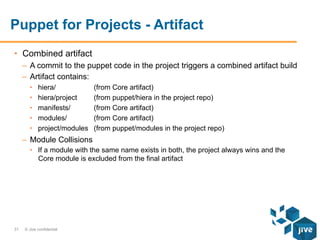
Puppet for Projects - Artifact
•  Combined artifact
–  A commit to the puppet code in the project triggers a combined artifact build
–  Artifact contains:
• 
• 
• 
• 
• 

hiera/
hiera/project
manifests/
modules/
project/modules

(from Core artifact)
(from puppet/hiera in the project repo)
(from Core artifact)
(from puppet/modules in the project repo)

–  Module Collisions
•  If a module with the same name exists in both, the project always wins and the
Core module is excluded from the final artifact

31

© Jive confidential
Deployable

32

© Jive confidential
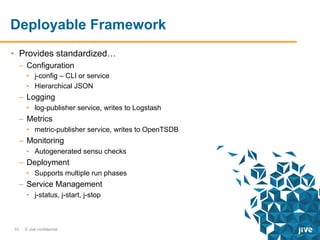
Deployable Framework
•  Provides standardized…
–  Configuration
•  j-config – CLI or service
•  Hierarchical JSON

–  Logging
•  log-publisher service, writes to Logstash

–  Metrics
•  metric-publisher service, writes to OpenTSDB

–  Monitoring
•  Autogenerated sensu checks

–  Deployment
•  Supports multiple run phases

–  Service Management
•  j-status, j-start, j-stop

33

© Jive confidential
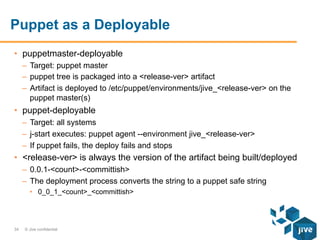
Puppet as a Deployable
•  puppetmaster-deployable
–  Target: puppet master
–  puppet tree is packaged into a <release-ver> artifact
–  Artifact is deployed to /etc/puppet/environments/jive_<release-ver> on the
puppet master(s)

•  puppet-deployable
–  Target: all systems
–  j-start executes: puppet agent --environment jive_<release-ver>
–  If puppet fails, the deploy fails and stops

•  <release-ver> is always the version of the artifact being built/deployed
–  0.0.1-<count>-<committish>
–  The deployment process converts the string to a puppet safe string
•  0_0_1_<count>_<committish>

34

© Jive confidential
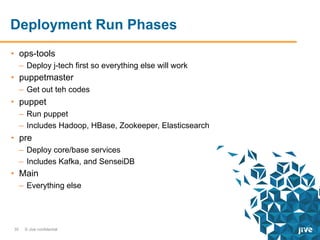
Deployment Run Phases
•  ops-tools
–  Deploy j-tech first so everything else will work

•  puppetmaster
–  Get out teh codes

•  puppet
–  Run puppet
–  Includes Hadoop, HBase, Zookeeper, Elasticsearch

•  pre
–  Deploy core/base services
–  Includes Kafka, and SenseiDB

•  Main
–  Everything else

35

© Jive confidential
Making a Puppet Change

36

© Jive confidential
Making a Puppet Change – Virtual
•  Vagrant VM
–  It’s big
•  minimum 4CPU, 8GB – for the VM alone

–  Full stack gets deployed and run
•  Hadoop, Kafka, etc, etc, etc – even all 70+ services if you want

–  j-vm -r
•  Fetches proper Core puppet artifact
•  Builds and deploys a puppet tree for vagrant, based on your local git repo
•  Executes vagrant puppet provisioner

–  Once it works on the vm, submit a review to Gerrit

37

© Jive confidential
Making a Puppet Change – Integ
•  Once the review is submitted, jenkins will:
–  Build Artifacts
–  Launch a VM-test job
•  Validating that what you did works on a vagrant VM there

–  Launch an integ deployment
•  Validating that things work in a multi-node non-vagrant environment

–  Comment on your review with Validated +1, or -1 (depending on results)
–  Once other reviewers give you +2 Gerrit will merge your commit
–  Once it’s merged…

38

© Jive confidential
Making a Puppet Change – Test
•  Once the commit is merged, jenkins will:
–  Build artifacts
–  Launch a Test deployment
–  Run more extensive tests
–  If the deployment and all tests pass, it’s ready for the next step

39

© Jive confidential
Making a Puppet Change – Release
•  Daily at 8am all commits that have passed Test are merged from
develop to master
•  Once this happens, jenkins will:
–  Build artifacts
–  Trigger a Release deployment
–  Rerun all of the tests
–  If all tests pass…

40

© Jive confidential
Making a Puppet Change – Preprod
•  If all tests pass, jenkins will:
–  Promote artifacts to preprod Nexus repo
–  Trigger a Preprod deploy
–  At this point, everything should be stable

41

© Jive confidential
Making a Puppet Change – Prod
•  During the next scheduled production release, someone will:
–  Trigger a Prod deploy
–  Currently done manually

42

© Jive confidential
That’s about it…

44

© Jive confidential
Review
•  Core
–  Complex puppet code to manage everything
–  Releases tied to Change Control
–  ~1000 nodes

•  Hosted
–  Relatively simple puppet code
–  Releases tied to Administration tool’s application releases
–  ~14000 nodes

•  Continuous Deployment
–  Complex puppet code
–  Fully Automated Release and Deployment
–  <200 nodes (but growing)
45

© Jive confidential
Thank You!

© Jive confidential

46
Questions?

© Jive confidential

47

Puppet Release Workflows at Jive Software

  • 1.
    Puppet Release Workflows atJive Devon Peters
  • 2.
    What is aRelease? 2 © Jive confidential
  • 3.
    Push to production,always, immediately 3 © Jive confidential
  • 5.
    Releases… •  Software ReleaseCycle –  “A software release life cycle is the sum of the stages of development and maturity for a piece of computer software: ranging from its initial development to its eventual release…” – Wikipedia •  Release Management –  “the process of managing software releases from development stage to software release” – Wikipedia •  Release Engineering –  “Automation of release management throughout all stages of release” – Me 5 © Jive confidential
  • 6.
    More Dev inour Ops RY ATO LIG OB PS EVO D AGE IM 6 © Jive confidential
  • 7.
    We have formalrelease management processes for all of our puppet Domains 7 © Jive confidential
  • 8.
    Different Releases forDifferent Domains •  Core puppet –  All infrastructure –  Many shared services •  Hosted puppet –  Hosted Jive installations –  Puppet is tied closely to Administration tooling •  Continuous Deployment –  New-style services –  Some infrastructure 8 © Jive confidential
  • 9.
    Releasing Core Puppet 9 ©Jive confidential
  • 10.
    Core Puppet •  Allcore infrastructure systems •  Most shared services •  Puppet+hiera does everything on these systems (very few exceptions) •  Simple deployment environment breakdown –  Dev, QA, Production (multiple production environments) •  Dynamic puppet environments –  ‘production’ puppet environment is default –  ad-hoc environments are used for testing/staging •  Use git flow branching strategy 10 © Jive confidential
  • 12.
    Git Details •  Wrappersto simplify and standardize common tasks –  j-tech (j-new, j-hotfix, j-commit, many more) –  Tied into Jira and Crucible –  Feature branches are named after Jira tickets •  Code Deployments –  Dev/QA: develop is deployed to ‘production’ puppet environment –  Prod: master is deployed to ‘production’ puppet environment 12 © Jive confidential
  • 13.
    Testing Changes •  Automated – Pre-commit: puppet/erb/ruby/yaml syntax, puppetlint, hiera-gpg •  Local –  Vagrant VM –  Push branch out to dev puppet master •  Environment Specific –  Push branch to env-specific puppet master 13 © Jive confidential
  • 14.
    Merging Changes •  j-review – Submit a code review of your branch •  j-commit –  Merges feature branch to develop –  Merges hotfix branch to master and develop •  develop branch is deployed to Dev on commit –  jenkins •  develop branch is deployed to QA Mon-Fri @ 10am –  jenkins •  If it’s not a hotfix it won’t go to production yet… –  Technically, this because the change isn’t in the ‘master’ branch yet, but there’s more to it than that 14 © Jive confidential
  • 15.
    Change Control forProduction •  Bi-weekly CC meetings –  Monday and Thursday •  Puppet changes go through CC process –  Hotfixes can be promoted outside of CC process –  Weekly change windows for high-impact changes •  If it’s a puppet change, it’s done as a hotfix •  Puppet release started every Thursday @ 4pm –  j-release -S: starts a release branch –  Jenkins runs this, and generates a CCR ticket with all commits –  Changes are reviewed in Monday CC meeting •  Puppet release finished every Tuesday –  j-release -F: finishes a release branch (manual) –  Jenkins code deployment jobs are triggered manually 15 © Jive confidential
  • 16.
    Core Release Overview 16 ©Jive confidential
  • 17.
  • 18.
    Hosted Puppet •  Nodesthat run hosted customer installations •  Very homogenous •  Relatively simple puppet code –  Puppet mostly supplements an in house administration tool (JCA) •  Deployment environment breakdown –  Dev, QA, Prod •  Uses static puppet environments –  ENC dictates the environment for a given node –  Jenkins jobs deploy from git to appropriate puppet environment •  Uses the git flow branching strategy –  All the same j-tech tools 18 © Jive confidential
  • 19.
    Testing Changes •  Automated – Pre-commit: puppet/erb/ruby/yaml syntax, puppetlint, hiera-gpg •  Get your own installation setup in Dev –  Commit changes, and don’t walk away till you know they work •  It’s somewhat acceptable to break dev, but try not to –  Most OS related changes are just plucked from Core, and were likely tested more thoroughly there 19 © Jive confidential
  • 20.
    Merging Changes •  j-review – Submit a code review of your branch •  j-commit –  Merges feature branch to develop –  Merges hotfix branch to master and develop •  develop branch is deployed to Dev on commit –  jenkins –  make sure you don’t break it •  develop branch is deployed to QA ad-hoc –  QA changes are tied to JCA application release QA cycles –  jenkins 20 © Jive confidential
  • 21.
    Creating Releases •  Puppetreleases are typically tied to JCA application releases –  The app releases every 2 weeks –  A puppet release could be a part of it •  Doing a release –  j-release -A: create, and finish a release branch 21 © Jive confidential
  • 22.
    Staged Production Deployments • UAT –  UAT nodes use the same puppet infrastructure as production –  Jenkins deploys master to the ‘hosted_uat’ puppet environment •  Production –  Jenkins deploys master to the ‘hosted’ puppet environment 22 © Jive confidential
  • 23.
  • 24.
  • 25.
    CD Overview •  Deployable – Framework for deploying java (and other) services •  Many java services (over 70) •  Data Infrastructure –  Kafka, Hadoop, HBase, SenseiDB, Elasticsearch •  Other Infrastructure –  Puppet, Nginx, Sensu, OpenTSDB •  Gerrit –  Code reviews are mandatory –  Branch strategy is still git flow style •  Complex Puppet Code •  Complex Deployment Pipeline 25 © Jive confidential
  • 26.
    Environment Overview •  Wecall them clusters –  virtual, dev, integ, test, release, preprod, prod •  We also have geo-specific datacenters –  local, intinteg, inttest, intrelease, phxpreprod, phxprod, amsprod •  Hiera hierarchy includes all of these –  These exist in hiera for other Puppet domains as well •  Deployable configuration hierarchy includes all of these 26 © Jive confidential
  • 27.
  • 28.
    Puppet Overview •  Dedicatedpuppet master(s) per cluster •  Puppet agent is run on-demand by the deployment process •  CD pipeline determines if puppet code can be promoted to the next cluster •  “Special” module and hiera trees –  We don’t want to duplicate everything in Core –  Developers need the ability to change puppet code or hiera data –  We setup something we call Puppet for Projects •  Combines Core puppet code with Project puppet code 28 © Jive confidential
  • 29.
    Puppet for Projects- Layout •  Core puppet –  Basic layout is: •  hiera/ •  manifests/ •  modules/ –  manifests/site.pp is basically: hiera_include(‘classes’) –  Every commit triggers an artifact build job (jenkins) •  Artifacts are uploaded to a Nexus repo, as puppet-0.0.1-<count>-<committish> •  Project puppet –  A project is basically a repo –  The project repo contains the following directories: •  puppet/hiera •  puppet/modules –  Contains maven configuration for Core puppet artifact and Combined puppet artifact 29 © Jive confidential
  • 30.
    Puppet for Projects– Configuration •  puppet.conf –  modulepath = /path/modules:/path/project/modules •  hiera.yaml –  project/%{some-hierarchy} –  %{some-hierarchy} 30 © Jive confidential
  • 31.
    Puppet for Projects- Artifact •  Combined artifact –  A commit to the puppet code in the project triggers a combined artifact build –  Artifact contains: •  •  •  •  •  hiera/ hiera/project manifests/ modules/ project/modules (from Core artifact) (from puppet/hiera in the project repo) (from Core artifact) (from Core artifact) (from puppet/modules in the project repo) –  Module Collisions •  If a module with the same name exists in both, the project always wins and the Core module is excluded from the final artifact 31 © Jive confidential
  • 32.
  • 33.
    Deployable Framework •  Providesstandardized… –  Configuration •  j-config – CLI or service •  Hierarchical JSON –  Logging •  log-publisher service, writes to Logstash –  Metrics •  metric-publisher service, writes to OpenTSDB –  Monitoring •  Autogenerated sensu checks –  Deployment •  Supports multiple run phases –  Service Management •  j-status, j-start, j-stop 33 © Jive confidential
  • 34.
    Puppet as aDeployable •  puppetmaster-deployable –  Target: puppet master –  puppet tree is packaged into a <release-ver> artifact –  Artifact is deployed to /etc/puppet/environments/jive_<release-ver> on the puppet master(s) •  puppet-deployable –  Target: all systems –  j-start executes: puppet agent --environment jive_<release-ver> –  If puppet fails, the deploy fails and stops •  <release-ver> is always the version of the artifact being built/deployed –  0.0.1-<count>-<committish> –  The deployment process converts the string to a puppet safe string •  0_0_1_<count>_<committish> 34 © Jive confidential
  • 35.
    Deployment Run Phases • ops-tools –  Deploy j-tech first so everything else will work •  puppetmaster –  Get out teh codes •  puppet –  Run puppet –  Includes Hadoop, HBase, Zookeeper, Elasticsearch •  pre –  Deploy core/base services –  Includes Kafka, and SenseiDB •  Main –  Everything else 35 © Jive confidential
  • 36.
    Making a PuppetChange 36 © Jive confidential
  • 37.
    Making a PuppetChange – Virtual •  Vagrant VM –  It’s big •  minimum 4CPU, 8GB – for the VM alone –  Full stack gets deployed and run •  Hadoop, Kafka, etc, etc, etc – even all 70+ services if you want –  j-vm -r •  Fetches proper Core puppet artifact •  Builds and deploys a puppet tree for vagrant, based on your local git repo •  Executes vagrant puppet provisioner –  Once it works on the vm, submit a review to Gerrit 37 © Jive confidential
  • 38.
    Making a PuppetChange – Integ •  Once the review is submitted, jenkins will: –  Build Artifacts –  Launch a VM-test job •  Validating that what you did works on a vagrant VM there –  Launch an integ deployment •  Validating that things work in a multi-node non-vagrant environment –  Comment on your review with Validated +1, or -1 (depending on results) –  Once other reviewers give you +2 Gerrit will merge your commit –  Once it’s merged… 38 © Jive confidential
  • 39.
    Making a PuppetChange – Test •  Once the commit is merged, jenkins will: –  Build artifacts –  Launch a Test deployment –  Run more extensive tests –  If the deployment and all tests pass, it’s ready for the next step 39 © Jive confidential
  • 40.
    Making a PuppetChange – Release •  Daily at 8am all commits that have passed Test are merged from develop to master •  Once this happens, jenkins will: –  Build artifacts –  Trigger a Release deployment –  Rerun all of the tests –  If all tests pass… 40 © Jive confidential
  • 41.
    Making a PuppetChange – Preprod •  If all tests pass, jenkins will: –  Promote artifacts to preprod Nexus repo –  Trigger a Preprod deploy –  At this point, everything should be stable 41 © Jive confidential
  • 42.
    Making a PuppetChange – Prod •  During the next scheduled production release, someone will: –  Trigger a Prod deploy –  Currently done manually 42 © Jive confidential
  • 44.
    That’s about it… 44 ©Jive confidential
  • 45.
    Review •  Core –  Complexpuppet code to manage everything –  Releases tied to Change Control –  ~1000 nodes •  Hosted –  Relatively simple puppet code –  Releases tied to Administration tool’s application releases –  ~14000 nodes •  Continuous Deployment –  Complex puppet code –  Fully Automated Release and Deployment –  <200 nodes (but growing) 45 © Jive confidential
  • 46.
    Thank You! © Jiveconfidential 46
  • 47.