Public Relations
Planning 101
Amy Foster
EDP 279
Smart Board Lesson
● The following link shows you the lesson I would use to explain a Public Relations Plan
● http://exchange.smarttech.com/details.html?id=9eef8c22-4a8e-4cd1-8723-2b1170b2
8fcb
Target Audience
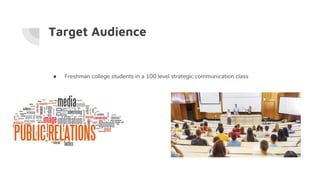
● Freshman college students in a 100 level strategic communication class
Adaptations to lesson plan
● Asking questions about how much students already know about the 10 steps in a
Public Relations plan.
● Example: Which of following is not a for creating a PR plan?
A: Tactics
B: Budget
C: Timeline
D: Feedback
Adaptations to lesson plan
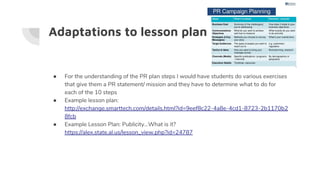
● For the understanding of the PR plan steps I would have students do various exercises
that give them a PR statement/ mission and they have to determine what to do for
each of the 10 steps
● Example lesson plan:
http://exchange.smarttech.com/details.html?id=9eef8c22-4a8e-4cd1-8723-2b1170b2
8fcb
● Example Lesson Plan: Publicity...What is it?
https://alex.state.al.us/lesson_view.php?id=24787
Adaptations
● I would allow the lesson plan to be available online for my students who have learning
disabilities.
● I would be aware of my surroundings for students who may come up and use the
interactive board but have a disability ( make sure they can reach the board and use
the tools)
● Also, having the text translated on the slides for international students
Using the Resources
● Using the smart board would allow the lesson and learning to be more interactive
which can increase a students memory and allow them to fully understand and
remember information
● Use my resources to find various other lesson plans accessible for smart boards and
successful learning .
Supporting Universal Design
● I would make sure the classroom is wheelchair accessible for students who have
disabilities so they can access the board and working with other students throughout
the room.
● Making sure that my slideshow texts are translated to accommodate my students who
are international and need that assistance.
● If a student cannot see or be interactive with the smartboards I will create new and fun
activities for them work on with students as well as help read questions and lessons to
them.

Public relations planning 101

  • 1.
  • 2.
    Smart Board Lesson ●The following link shows you the lesson I would use to explain a Public Relations Plan ● http://exchange.smarttech.com/details.html?id=9eef8c22-4a8e-4cd1-8723-2b1170b2 8fcb
  • 3.
    Target Audience ● Freshmancollege students in a 100 level strategic communication class
  • 4.
    Adaptations to lessonplan ● Asking questions about how much students already know about the 10 steps in a Public Relations plan. ● Example: Which of following is not a for creating a PR plan? A: Tactics B: Budget C: Timeline D: Feedback
  • 5.
    Adaptations to lessonplan ● For the understanding of the PR plan steps I would have students do various exercises that give them a PR statement/ mission and they have to determine what to do for each of the 10 steps ● Example lesson plan: http://exchange.smarttech.com/details.html?id=9eef8c22-4a8e-4cd1-8723-2b1170b2 8fcb ● Example Lesson Plan: Publicity...What is it? https://alex.state.al.us/lesson_view.php?id=24787
  • 6.
    Adaptations ● I wouldallow the lesson plan to be available online for my students who have learning disabilities. ● I would be aware of my surroundings for students who may come up and use the interactive board but have a disability ( make sure they can reach the board and use the tools) ● Also, having the text translated on the slides for international students
  • 7.
    Using the Resources ●Using the smart board would allow the lesson and learning to be more interactive which can increase a students memory and allow them to fully understand and remember information ● Use my resources to find various other lesson plans accessible for smart boards and successful learning .
  • 8.
    Supporting Universal Design ●I would make sure the classroom is wheelchair accessible for students who have disabilities so they can access the board and working with other students throughout the room. ● Making sure that my slideshow texts are translated to accommodate my students who are international and need that assistance. ● If a student cannot see or be interactive with the smartboards I will create new and fun activities for them work on with students as well as help read questions and lessons to them.