Inception To Adaption
​
sales@siliconsignals.i
www.siliconsignals.i +91-9408730545
​
sales@siliconsignals.io
www.siliconsignals.io +91-9408730545
Your Next
Design Partner!
PTS MAIN BOARD
PRODUCTION TEST INSTRUCTIONS
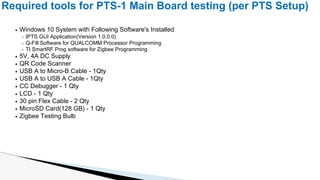
Windows 10 System with Following Software's Installed
IPTS GUI Application(Version 1.0.0.0)
Q-Fill Software for QUALCOMM Processor Programming
TI SmartRF Prog software for Zigbee Programming
5V, 4A DC Supply
QR Code Scanner
USB A to Micro-B Cable - 1Qty
USB A to USB A Cable - 1Qty
CC Debugger - 1 Qty
LCD - 1 Qty
30 pin Flex Cable - 2 Qty
MicroSD Card(128 GB) - 1 Qty
Zigbee Testing Bulb
Required tools for PTS-1 Main Board testing (per PTS Setup)
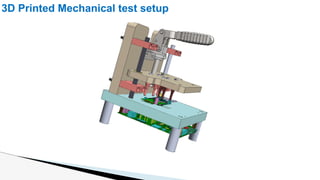
3D Printed Mechanical test setup
Main Board (DUT) Overview
Display Flex Cable Insertion Direction
Main Board TOP Side Main Board BOTTOM Side
POWER TEST FAIL PTS OK CONSOLE 1 CONSOLE 3
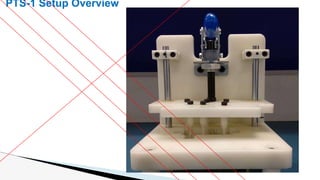
PTS-1 Setup Overview
POWER TEST FAIL PTS OK CONSOLE 1 CONSOLE 3
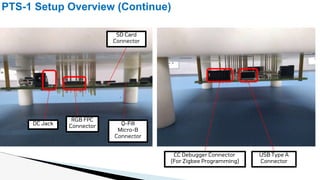
PTS-1 Setup Overview (Continue)
CC Debugger Connector
(For Zigbee Programming)
USB Type A
Connector
DC Jack
SD Card
Connector
Q-Fill
Micro-B
Connector
RGB FPC
Connector
POWER TEST FAIL PTS OK CONSOLE 1 CONSOLE 3
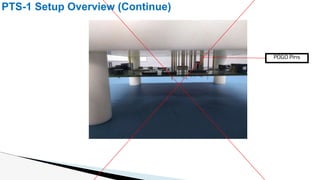
PTS-1 Setup Overview (Continue)
POGO Pins
POWER TEST FAIL PTS OK CONSOLE 1 CONSOLE 3
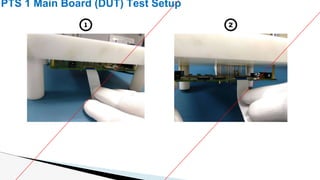
PTS 1 Main Board (DUT) Test Setup
1 2
PTS 1 Main Board (DUT) Testing Process (Continue)
Click on the Dropdown list and select the PTS
test
Select the PTS 1 Test from Dropdown list for Main board
Testing and press OK
Windows PC software
POWER TEST FAIL PTS OK CONSOLE 1 CONSOLE 3
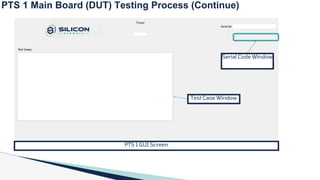
PTS 1 GUI Screen
Serial Code Window
Test Case Window
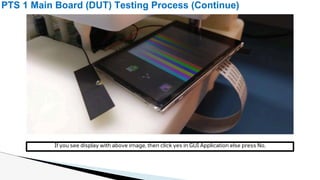
PTS 1 Main Board (DUT) Testing Process (Continue)
If you see display with above image, then click yes in GUI Application else press No.
Now PTS will check BLUETOOTH, CRYPTO-IC, SDCARD, WIFI one by one
PTS 1 Main Board (DUT) Testing Process (Continue)
Now operator have to wait for the sound from PTS speakers (Amplifier Testing), if it will produce Beep
Sound, then press YES in pop up else press NO
PTS 1 Main Board (DUT) Testing Process (Continue)
THANKS

PTS MAIN BOARD PRODUCTION TEST INSTRUCTIONS

  • 1.
    Inception To Adaption ​ sales@siliconsignals.i www.siliconsignals.i+91-9408730545 ​ sales@siliconsignals.io www.siliconsignals.io +91-9408730545 Your Next Design Partner! PTS MAIN BOARD PRODUCTION TEST INSTRUCTIONS
  • 2.
    Windows 10 Systemwith Following Software's Installed IPTS GUI Application(Version 1.0.0.0) Q-Fill Software for QUALCOMM Processor Programming TI SmartRF Prog software for Zigbee Programming 5V, 4A DC Supply QR Code Scanner USB A to Micro-B Cable - 1Qty USB A to USB A Cable - 1Qty CC Debugger - 1 Qty LCD - 1 Qty 30 pin Flex Cable - 2 Qty MicroSD Card(128 GB) - 1 Qty Zigbee Testing Bulb Required tools for PTS-1 Main Board testing (per PTS Setup)
  • 3.
  • 4.
    Main Board (DUT)Overview Display Flex Cable Insertion Direction Main Board TOP Side Main Board BOTTOM Side
  • 5.
    POWER TEST FAILPTS OK CONSOLE 1 CONSOLE 3 PTS-1 Setup Overview
  • 6.
    POWER TEST FAILPTS OK CONSOLE 1 CONSOLE 3 PTS-1 Setup Overview (Continue) CC Debugger Connector (For Zigbee Programming) USB Type A Connector DC Jack SD Card Connector Q-Fill Micro-B Connector RGB FPC Connector
  • 7.
    POWER TEST FAILPTS OK CONSOLE 1 CONSOLE 3 PTS-1 Setup Overview (Continue) POGO Pins
  • 8.
    POWER TEST FAILPTS OK CONSOLE 1 CONSOLE 3 PTS 1 Main Board (DUT) Test Setup 1 2
  • 9.
    PTS 1 MainBoard (DUT) Testing Process (Continue) Click on the Dropdown list and select the PTS test Select the PTS 1 Test from Dropdown list for Main board Testing and press OK Windows PC software
  • 10.
    POWER TEST FAILPTS OK CONSOLE 1 CONSOLE 3 PTS 1 GUI Screen Serial Code Window Test Case Window PTS 1 Main Board (DUT) Testing Process (Continue)
  • 11.
    PTS 1 MainBoard (DUT) Testing Process (Continue) If you see display with above image, then click yes in GUI Application else press No.
  • 12.
    Now PTS willcheck BLUETOOTH, CRYPTO-IC, SDCARD, WIFI one by one PTS 1 Main Board (DUT) Testing Process (Continue)
  • 13.
    Now operator haveto wait for the sound from PTS speakers (Amplifier Testing), if it will produce Beep Sound, then press YES in pop up else press NO PTS 1 Main Board (DUT) Testing Process (Continue)
  • 14.