Programming with
Python
                    Week 2
Dept. of Electrical Engineering and Computer Science
Academic Year 2010-2011
Week 1 - Highlights


• In Python, everything is an object.
• In Python, you never explicitly specify the datatype
  of anything.
• Based on what value you assign, Python keeps track
  of the datatype internally.
Week 1 - Highlights
• just indent and get on with your life.
• indentation is a language requirement. not a matter of
  style.
• Python uses carriage return to separate statements.
• Python uses a colon and indentation to separate code
  blocks.
  :
            ...
Mannerism: Dropbox usage


• Use Shared Dropbox folder more responsibly.
• Think of your friends.
• Think before you act.
Week 2
3.1 Introducing
Dictionaries

• Dictionary is a built-in datatype of Python.
• It defines a one-to-one relationship between keys and
  values.
• One-to-one relationship? Let’s see with a useful
  example.
One-to-one relationship?

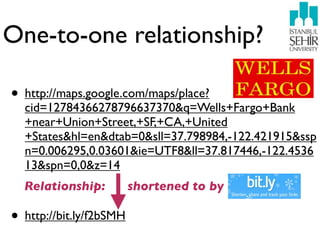
• http://maps.google.com/maps/place?
  cid=12784366278796637370&q=Wells+Fargo+Bank
  +near+Union+Street,+SF,+CA,+United
  +States&hl=en&dtab=0&sll=37.798984,-122.421915&ssp
  n=0.006295,0.03601&ie=UTF8&ll=37.817446,-122.4536
  13&spn=0,0&z=14
  Relationship:          shortened to by

• http://bit.ly/f2bSMH
Takeaway I: It's much easier to include

Key --> Value                                 the shorter link in an email or Twitter
                                              post without it breaking or taking up
                                              space.


 Takeaway II: bit.ly works by issuing a "301 redirect". When you shorten a link with bit.ly,
 you are redirecting a click from bit.ly to the destination URL. A 301 redirect is the most
 efficient and search engine-friendly method for webpage redirection.
3.1.1 Defining Dictionaries


• >>> d = {“bruce”: “lee”, “mortal”: “kombat”}
                                                 }
                                 {
• >>> d
  {'bruce': 'lee', 'mortal': 'kombat'}
• >>> d["bruce"]
  'lee'
Rules, rules, rules
• You can not have duplicate keys in a dictionary. Assigning
  a value to an existing key will wipe out the old value.
• You can add new key-value pairs at any time. This syntax
  is identical to modifying existing values.
• Be careful: you may be adding new values but are
  actually just modifying the same value over and over
  because your key isn't changing the way you think it is.
• Dictionaries are unordered.
• Dictionary keys are case-sensitive.
3.1.2 Modifying dictionaries
& case-sensitivity


                                     K
• >>> d = {}
• >>> d = {“key” : “value”}
• >>> d


                                     k
  {'key': 'value'}
• >>> d[“Key”] = “Value”
• >>> d
  {'Key': 'Value', 'key': 'value'}
Shepherd’s
salad of datatypes
• >>> d={"bruce":"lee","mortal":"kombat"}
• >>> d["air force"] = 1
• >>> d
  {'bruce': 'lee', 'air force': 1, 'mortal': 'kombat'}
• >>> d[2]="two"
• >>> d
  {'bruce': 'lee', 2: 'two', 'air force': 1, 'mortal': 'kombat'}
Dictionaries

• Dictionaries are NOT just for strings.
• Dictionary values can be any datatype. Within a single
  dictionary, you can have values of different datatypes.
• Dictionary keys are more restricted: strings and
  integers are mostly used (note: there are some others
  too).
3.1.3 Deleting Items
from Dictionaries
• >>> d
  {'bruce': 'lee', 2: 'two', 'air force': 1, 'mortal': 'kombat'}
• >>> del d[2]
• >>> d
  {'bruce': 'lee', 'air force': 1, 'mortal': 'kombat'}
• >>> d.clear()
• >>> d
  {}
3.2 Introducing Lists


• Shopping cart is a list.
Grocery list is a list.
Things to do is a list.
3.2.1 Defining Lists
• >>> li=["armani watch","hunting with the
  moon","amazon kindle","iphone 4"]
• >>> li
  ['armani watch', 'hunting with the moon', 'amazon
  kindle', 'iphone 4']
• >>> li[0]
  'armani watch'
• >>> li[3]
  'iphone 4'
Lists are

             , , ,]
• ordered.  [
• enclosed in square brackets.
• having their first element start at index 0.
Two way access
• Forward:
                 li[0]                                      li[3]


 li = ["armani watch","hunting with the moon","amazon kindle","iphone 4"]


• Backward:
                 li[-1]                                         li[-4]
Slicing a list


                                                 :3 ]
• Reading the list from left to right:
                                         [ 1
  i. the first slice index specifies the first element you
  want,
  ii. the second slice index specifies the first element you
  don't want,
  iii. the return value is everything in between.
Slicing at work

• >>> li
  ['armani watch', 'hunting with the moon', 'amazon
  kindle', 'iphone 4']
• >>> li[1:3]
  ['hunting with the moon', 'amazon kindle']
• >>> li[0:0] Ask in class...
Assuming list length is n

• li[:3] is the same as li[0:3].
• li[3:] is the same as li[3:n], where n is the length of the
  list.
• li[:n] will always return the first n elements.
• li[:] is shorthand for making a complete copy of a list: all
  elements of the original list are included. But this is not
  the same as the original li list; it is a new list that has the
  same elements.
3.2.1 Adding elements to
Lists

• >>> li
  ['armani watch', 'hunting with the moon', 'amazon
  kindle', 'iphone 4']
• >>> li.append("ipad 32gb wifi+3g")
• >>> li
  ['armani watch', 'hunting with the moon', 'amazon
  kindle', 'iphone 4', 'ipad 32gb wifi+3g']
3.2.1 Adding elements to
Lists

• >>> li
  ['armani watch', 'hunting with the moon', 'amazon
  kindle', 'iphone 4', 'ipad 32gb wifi+3g']
• >>> li.insert(1,”macbook pro”)
• >>> li
  ['armani watch', 'macbook pro', 'hunting with the moon',
  'amazon kindle', 'iphone 4', 'ipad 32gb wifi+3g']
3.2.1 Adding elements to
Lists
• >>> li
  ['armani watch', 'macbook pro', 'hunting with the moon',
  'amazon kindle', 'iphone 4', 'ipad 32gb wifi+3g']
• >>> li.extend(["zoolander dvd","v for vendetta
  dvd","gladiator dvd"])
• >>> li
  ['armani watch', 'macbook pro', 'hunting with the moon',
  'amazon kindle', 'iphone 4', 'ipad 32gb wifi+3g',
  'zoolander dvd', 'v for vendetta dvd', 'gladiator dvd']
Difference between extend
and append
• >>> li=["a","b","c"]          • >>> del li[3]
• >>> li                        • >>> li
  ['a', 'b', 'c']                 ['a', 'b', 'c']

• >>> li.append            • >>> li.extend(["d","e"])
• >>> li.append(["d","e"]) • >>>'b', 'c', 'd', 'e']
                             ['a',
                                   li

• >>> li
  ['a', 'b', 'c', ['d', 'e']]
3.2.3 Searching a List
• >>> li                      • >>> “c” in li
  ['a', 'b', 'c', 'd', 'e']      True
• >>> li                      • >>> “f” in li
  ['a', 'b', 'c', 'd', 'e']      False
• >>> li.index("a")           • >>> li.index(“g”) call last):
  0                             Traceback (most recent
                                 File "<pyshell#47>", line 1, in
• >>> li.index("e")              <module>
                                 li.index("g")
  4
                                 ValueError: list.index(x): x not in list
• >>> “c” in li
3.2.4 Deleting List elements
•   >>> li
    ['a', 'b', 'c', 'd', 'e']

•   >>> li.remove("a")

•   >>> li
    ['b', 'c', 'd', 'e']

•   >>> li.remove("f")
    Traceback (most recent call last): File "<pyshell#51>", line 1, in
    <module> li.remove("f") ValueError: list.remove(x): x not in list

•   >>> li.pop()
    'e'
3.2.5 Using List operators

• >>> li
  ['b', 'c', 'd']
• >>> li = ["a"] + li
• >>> li
  ['a', 'b', 'c', 'd']
• >>> li += ["e","f"]
• >>> li
  ['a', 'b', 'c', 'd', 'e', 'f']
3.2.5 Using List operators
  extend
• >>> li
  ['b', 'c', 'd']
                                           ext
                                         fas
                                    larg ter is
                                               end
• >>> li = ["a"] + li              an    e li for
• >>> li                                     sts
                                       in- . it
  ['a', 'b', 'c', 'd']
                                   op pla is
• >>> li += ["e","f"]                 era        ce
• >>> li                                  tio
  ['a', 'b', 'c', 'd', 'e', 'f']              n.
3.3 Introducing Tuples


                                     ,)
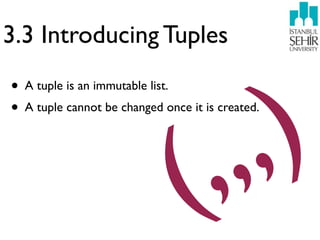
• A tuple is an immutable list.


                                 , ,
• A tuple cannot be changed once it is created.


                               (
Tuples have no methods


immutable
Tuples are good for?


• Tuples are faster than lists.
• Working with read-only data makes your code safer.
  Implicit write-protection.
• Note that tuples can be converted into lists and vice-
  versa.
3.4 Declaring Variables

• Python has local and global variables like most other
  languages, but it has no explicit variable
  declarations.
• Variables spring into existence by being assigned a
  value, and they are automatically destroyed when they
  go out of scope.
• Python will not allow you to reference a variable that
  has never been assigned a value; trying to do so will
  raise an exception.
VARIABLES


 VALUE
        = 1
 ASSIGNMENT
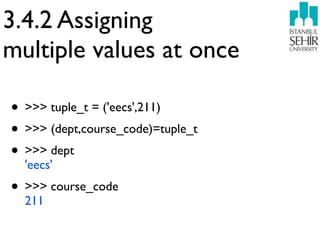
3.4.2 Assigning
multiple values at once

• >>> tuple_t = ('eecs',211)
• >>> (dept,course_code)=tuple_t
• >>> dept
  'eecs'
• >>> course_code
  211
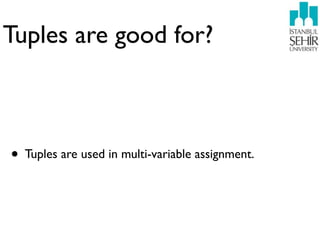
Tuples are good for?


• Tuples are used in multi-variable assignment.
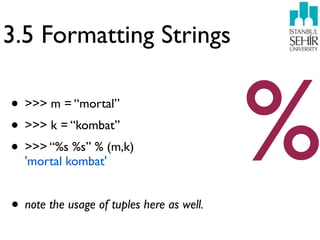
3.5 Formatting Strings

• >>> m = “mortal”
• >>> k = “kombat”
• >>> “%s %s” % (m,k)
  'mortal kombat'


• note the usage of tuples here as well.
                                           %
String formatting vs.
String concatenation


• >>> li
  ['a', 'b', 'c', 'd', 'e', 'f']
• >>> len(li)
  6
                                   %d
• >>> print "The length of the list is: %d" % (len(li),)
  The length of the list is: 6
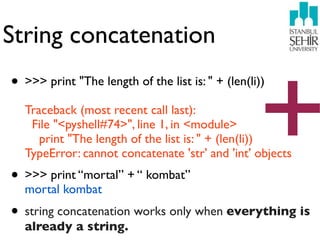
String concatenation


                                                   +
• >>> print "The length of the list is: " + (len(li))
  Traceback (most recent call last):
   File "<pyshell#74>", line 1, in <module>
     print "The length of the list is: " + (len(li))
  TypeError: cannot concatenate 'str' and 'int' objects
• >>> print “mortal” + “ kombat”
  mortal kombat
• string concatenation works only when everything is
  already a string.
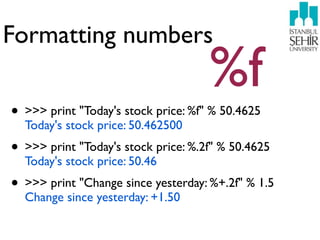
Formatting numbers
                                     %f
• >>> print "Today's stock price: %f" % 50.4625
  Today's stock price: 50.462500
• >>> print "Today's stock price: %.2f" % 50.4625
  Today's stock price: 50.46
• >>> print "Change since yesterday: %+.2f" % 1.5
  Change since yesterday: +1.50
3.6 Mapping Lists

• One of the most powerful features of Python is the list
  comprehension, which provides a compact way of
  mapping a list into another list by applying a function
  to each of the elements of the list.
• >>> l_numbers = [1,2,3,4]
• >>> [element*2 for element in l_numbers]
  [2, 4, 6, 8]
List comprehension
step by step
•   >>> params = {"server":"mpilgrim", "database":"master", "uid":"sa",
    "pwd":"secret"}

•   >>> params.items()
    [('pwd', 'secret'), ('database', 'master'), ('uid', 'sa'), ('server', 'mpilgrim')]

•   >>> [k for k, v in params.items()]


•
    ['pwd', 'database', 'uid', 'server']
    >>> [v for k, v in params.items()]
                                                    tuples
    ['secret', 'master', 'sa', 'mpilgrim']

•   >>> ["%s=%s" % (k, v) for k, v in params.items()]
    ['pwd=secret', 'database=master', 'uid=sa', 'server=mpilgrim']
3.7 Joining Lists and
Splitting Strings

• To join any list of strings into a single string, use the join
  method of a string object.
• >>> ";".join(["%s=%s" % (k, v) for k, v in params.items()])
  'pwd=secret;database=master;uid=sa;server=mpilgrim'
• join works only on lists of strings; it does not do any
  type coercion. Joining a list that has one or more non-
  string elements will raise an exception.
3.7 Joining Lists and
Splitting Strings
• >>> li = ";".join(["%s=%s" % (k, v) for k, v in
  params.items()])
• >>> li
  'pwd=secret;database=master;uid=sa;server=mpilgrim'
• >>> li.split(";")
  ['pwd=secret', 'database=master', 'uid=sa',
  'server=mpilgrim']
• Ask in class.. what do you notice?
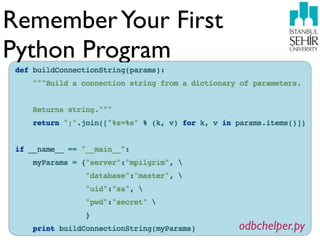
Remember Your First
Python Program


                      odbchelper.py
Dr. Ahmet Bulut took this picture in NYC during when he was
interning at IBM T.J.Watson Research Center in August 2004.

Programming with Python - Week 2

  • 1.
    Programming with Python Week 2 Dept. of Electrical Engineering and Computer Science Academic Year 2010-2011
  • 2.
    Week 1 -Highlights • In Python, everything is an object. • In Python, you never explicitly specify the datatype of anything. • Based on what value you assign, Python keeps track of the datatype internally.
  • 3.
    Week 1 -Highlights • just indent and get on with your life. • indentation is a language requirement. not a matter of style. • Python uses carriage return to separate statements. • Python uses a colon and indentation to separate code blocks. : ...
  • 4.
    Mannerism: Dropbox usage •Use Shared Dropbox folder more responsibly. • Think of your friends. • Think before you act.
  • 5.
  • 6.
    3.1 Introducing Dictionaries • Dictionaryis a built-in datatype of Python. • It defines a one-to-one relationship between keys and values. • One-to-one relationship? Let’s see with a useful example.
  • 7.
    One-to-one relationship? • http://maps.google.com/maps/place? cid=12784366278796637370&q=Wells+Fargo+Bank +near+Union+Street,+SF,+CA,+United +States&hl=en&dtab=0&sll=37.798984,-122.421915&ssp n=0.006295,0.03601&ie=UTF8&ll=37.817446,-122.4536 13&spn=0,0&z=14 Relationship: shortened to by • http://bit.ly/f2bSMH
  • 8.
    Takeaway I: It'smuch easier to include Key --> Value the shorter link in an email or Twitter post without it breaking or taking up space. Takeaway II: bit.ly works by issuing a "301 redirect". When you shorten a link with bit.ly, you are redirecting a click from bit.ly to the destination URL. A 301 redirect is the most efficient and search engine-friendly method for webpage redirection.
  • 9.
    3.1.1 Defining Dictionaries •>>> d = {“bruce”: “lee”, “mortal”: “kombat”} } { • >>> d {'bruce': 'lee', 'mortal': 'kombat'} • >>> d["bruce"] 'lee'
  • 10.
    Rules, rules, rules •You can not have duplicate keys in a dictionary. Assigning a value to an existing key will wipe out the old value. • You can add new key-value pairs at any time. This syntax is identical to modifying existing values. • Be careful: you may be adding new values but are actually just modifying the same value over and over because your key isn't changing the way you think it is. • Dictionaries are unordered. • Dictionary keys are case-sensitive.
  • 11.
    3.1.2 Modifying dictionaries &case-sensitivity K • >>> d = {} • >>> d = {“key” : “value”} • >>> d k {'key': 'value'} • >>> d[“Key”] = “Value” • >>> d {'Key': 'Value', 'key': 'value'}
  • 12.
    Shepherd’s salad of datatypes •>>> d={"bruce":"lee","mortal":"kombat"} • >>> d["air force"] = 1 • >>> d {'bruce': 'lee', 'air force': 1, 'mortal': 'kombat'} • >>> d[2]="two" • >>> d {'bruce': 'lee', 2: 'two', 'air force': 1, 'mortal': 'kombat'}
  • 13.
    Dictionaries • Dictionaries areNOT just for strings. • Dictionary values can be any datatype. Within a single dictionary, you can have values of different datatypes. • Dictionary keys are more restricted: strings and integers are mostly used (note: there are some others too).
  • 14.
    3.1.3 Deleting Items fromDictionaries • >>> d {'bruce': 'lee', 2: 'two', 'air force': 1, 'mortal': 'kombat'} • >>> del d[2] • >>> d {'bruce': 'lee', 'air force': 1, 'mortal': 'kombat'} • >>> d.clear() • >>> d {}
  • 15.
    3.2 Introducing Lists •Shopping cart is a list.
  • 16.
  • 17.
    Things to dois a list.
  • 18.
    3.2.1 Defining Lists •>>> li=["armani watch","hunting with the moon","amazon kindle","iphone 4"] • >>> li ['armani watch', 'hunting with the moon', 'amazon kindle', 'iphone 4'] • >>> li[0] 'armani watch' • >>> li[3] 'iphone 4'
  • 19.
    Lists are , , ,] • ordered. [ • enclosed in square brackets. • having their first element start at index 0.
  • 20.
    Two way access •Forward: li[0] li[3] li = ["armani watch","hunting with the moon","amazon kindle","iphone 4"] • Backward: li[-1] li[-4]
  • 21.
    Slicing a list :3 ] • Reading the list from left to right: [ 1 i. the first slice index specifies the first element you want, ii. the second slice index specifies the first element you don't want, iii. the return value is everything in between.
  • 22.
    Slicing at work •>>> li ['armani watch', 'hunting with the moon', 'amazon kindle', 'iphone 4'] • >>> li[1:3] ['hunting with the moon', 'amazon kindle'] • >>> li[0:0] Ask in class...
  • 23.
    Assuming list lengthis n • li[:3] is the same as li[0:3]. • li[3:] is the same as li[3:n], where n is the length of the list. • li[:n] will always return the first n elements. • li[:] is shorthand for making a complete copy of a list: all elements of the original list are included. But this is not the same as the original li list; it is a new list that has the same elements.
  • 24.
    3.2.1 Adding elementsto Lists • >>> li ['armani watch', 'hunting with the moon', 'amazon kindle', 'iphone 4'] • >>> li.append("ipad 32gb wifi+3g") • >>> li ['armani watch', 'hunting with the moon', 'amazon kindle', 'iphone 4', 'ipad 32gb wifi+3g']
  • 25.
    3.2.1 Adding elementsto Lists • >>> li ['armani watch', 'hunting with the moon', 'amazon kindle', 'iphone 4', 'ipad 32gb wifi+3g'] • >>> li.insert(1,”macbook pro”) • >>> li ['armani watch', 'macbook pro', 'hunting with the moon', 'amazon kindle', 'iphone 4', 'ipad 32gb wifi+3g']
  • 26.
    3.2.1 Adding elementsto Lists • >>> li ['armani watch', 'macbook pro', 'hunting with the moon', 'amazon kindle', 'iphone 4', 'ipad 32gb wifi+3g'] • >>> li.extend(["zoolander dvd","v for vendetta dvd","gladiator dvd"]) • >>> li ['armani watch', 'macbook pro', 'hunting with the moon', 'amazon kindle', 'iphone 4', 'ipad 32gb wifi+3g', 'zoolander dvd', 'v for vendetta dvd', 'gladiator dvd']
  • 27.
    Difference between extend andappend • >>> li=["a","b","c"] • >>> del li[3] • >>> li • >>> li ['a', 'b', 'c'] ['a', 'b', 'c'] • >>> li.append • >>> li.extend(["d","e"]) • >>> li.append(["d","e"]) • >>>'b', 'c', 'd', 'e'] ['a', li • >>> li ['a', 'b', 'c', ['d', 'e']]
  • 28.
    3.2.3 Searching aList • >>> li • >>> “c” in li ['a', 'b', 'c', 'd', 'e'] True • >>> li • >>> “f” in li ['a', 'b', 'c', 'd', 'e'] False • >>> li.index("a") • >>> li.index(“g”) call last): 0 Traceback (most recent File "<pyshell#47>", line 1, in • >>> li.index("e") <module> li.index("g") 4 ValueError: list.index(x): x not in list • >>> “c” in li
  • 29.
    3.2.4 Deleting Listelements • >>> li ['a', 'b', 'c', 'd', 'e'] • >>> li.remove("a") • >>> li ['b', 'c', 'd', 'e'] • >>> li.remove("f") Traceback (most recent call last): File "<pyshell#51>", line 1, in <module> li.remove("f") ValueError: list.remove(x): x not in list • >>> li.pop() 'e'
  • 30.
    3.2.5 Using Listoperators • >>> li ['b', 'c', 'd'] • >>> li = ["a"] + li • >>> li ['a', 'b', 'c', 'd'] • >>> li += ["e","f"] • >>> li ['a', 'b', 'c', 'd', 'e', 'f']
  • 31.
    3.2.5 Using Listoperators extend • >>> li ['b', 'c', 'd'] ext fas larg ter is end • >>> li = ["a"] + li an e li for • >>> li sts in- . it ['a', 'b', 'c', 'd'] op pla is • >>> li += ["e","f"] era ce • >>> li tio ['a', 'b', 'c', 'd', 'e', 'f'] n.
  • 32.
    3.3 Introducing Tuples ,) • A tuple is an immutable list. , , • A tuple cannot be changed once it is created. (
  • 33.
    Tuples have nomethods immutable
  • 34.
    Tuples are goodfor? • Tuples are faster than lists. • Working with read-only data makes your code safer. Implicit write-protection. • Note that tuples can be converted into lists and vice- versa.
  • 35.
    3.4 Declaring Variables •Python has local and global variables like most other languages, but it has no explicit variable declarations. • Variables spring into existence by being assigned a value, and they are automatically destroyed when they go out of scope. • Python will not allow you to reference a variable that has never been assigned a value; trying to do so will raise an exception.
  • 36.
    VARIABLES VALUE = 1 ASSIGNMENT
  • 37.
    3.4.2 Assigning multiple valuesat once • >>> tuple_t = ('eecs',211) • >>> (dept,course_code)=tuple_t • >>> dept 'eecs' • >>> course_code 211
  • 38.
    Tuples are goodfor? • Tuples are used in multi-variable assignment.
  • 39.
    3.5 Formatting Strings •>>> m = “mortal” • >>> k = “kombat” • >>> “%s %s” % (m,k) 'mortal kombat' • note the usage of tuples here as well. %
  • 40.
    String formatting vs. Stringconcatenation • >>> li ['a', 'b', 'c', 'd', 'e', 'f'] • >>> len(li) 6 %d • >>> print "The length of the list is: %d" % (len(li),) The length of the list is: 6
  • 41.
    String concatenation + • >>> print "The length of the list is: " + (len(li)) Traceback (most recent call last): File "<pyshell#74>", line 1, in <module> print "The length of the list is: " + (len(li)) TypeError: cannot concatenate 'str' and 'int' objects • >>> print “mortal” + “ kombat” mortal kombat • string concatenation works only when everything is already a string.
  • 42.
    Formatting numbers %f • >>> print "Today's stock price: %f" % 50.4625 Today's stock price: 50.462500 • >>> print "Today's stock price: %.2f" % 50.4625 Today's stock price: 50.46 • >>> print "Change since yesterday: %+.2f" % 1.5 Change since yesterday: +1.50
  • 43.
    3.6 Mapping Lists •One of the most powerful features of Python is the list comprehension, which provides a compact way of mapping a list into another list by applying a function to each of the elements of the list. • >>> l_numbers = [1,2,3,4] • >>> [element*2 for element in l_numbers] [2, 4, 6, 8]
  • 44.
    List comprehension step bystep • >>> params = {"server":"mpilgrim", "database":"master", "uid":"sa", "pwd":"secret"} • >>> params.items() [('pwd', 'secret'), ('database', 'master'), ('uid', 'sa'), ('server', 'mpilgrim')] • >>> [k for k, v in params.items()] • ['pwd', 'database', 'uid', 'server'] >>> [v for k, v in params.items()] tuples ['secret', 'master', 'sa', 'mpilgrim'] • >>> ["%s=%s" % (k, v) for k, v in params.items()] ['pwd=secret', 'database=master', 'uid=sa', 'server=mpilgrim']
  • 45.
    3.7 Joining Listsand Splitting Strings • To join any list of strings into a single string, use the join method of a string object. • >>> ";".join(["%s=%s" % (k, v) for k, v in params.items()]) 'pwd=secret;database=master;uid=sa;server=mpilgrim' • join works only on lists of strings; it does not do any type coercion. Joining a list that has one or more non- string elements will raise an exception.
  • 46.
    3.7 Joining Listsand Splitting Strings • >>> li = ";".join(["%s=%s" % (k, v) for k, v in params.items()]) • >>> li 'pwd=secret;database=master;uid=sa;server=mpilgrim' • >>> li.split(";") ['pwd=secret', 'database=master', 'uid=sa', 'server=mpilgrim'] • Ask in class.. what do you notice?
  • 47.
    Remember Your First PythonProgram odbchelper.py
  • 48.
    Dr. Ahmet Buluttook this picture in NYC during when he was interning at IBM T.J.Watson Research Center in August 2004.