•Hand-held programming terminal
•Personal computer
•Recording and Retrieving Data
•Human Machine Interfaces
(HMIs)
 A programming terminal device is needed to
enter, modify, and troubleshoot the PLC
program
 PLC manufacturers use various types of
programming devices
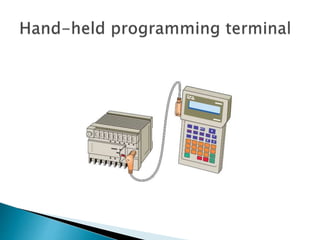
 The simplest type is the hand-held type
programmer shown in Figure
 This programming device has a connecting
cable so that it can be plugged into a PLC’s
programming port.
 Certain controllers use a plug-in panel rather
than a hand-held device.
 Hand-held programmers are compact,
inexpensive, and easy to use.
 These units contain multifunction keys and a
liquid-crystal display (LCD) or light-emitting
diode (LED) window.
 There are usually keys for instruction,
entering and editing, and navigation keys for
moving around the program.
 Hand-held programmers have limited display
capabilities.
 Some units will display only the last
instruction that has been programmed,
whereas other units will display from two to
four rungs of ladder logic.
 So-called intelligent hand-held programmers
are designed to support a certain family of
PLCs from a specific manufacturer.
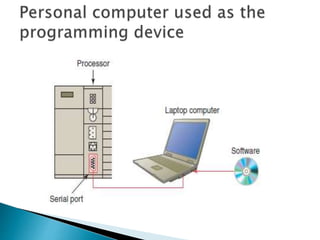
 The most popular method of PLC
programming is to use a personal computer
(PC) in conjunction with the manufacturer’s
programming software
 Typical capabilities of the programming
software include online and offline program
editing, online program monitoring, program
documentation, diagnosing malfunctions in
the PLC, and troubleshooting the controlled
system.
 Hard-copy reports generated in the software
can be printed on the computer’s printer.
 Most software packages will not allow you to
develop programs on another manufacturer’s
PLC.
 In some cases, a single manufacturer will
have multiple PLC families, each requiring its
own software to program.
 Printers are used to provide hard-copy printouts
of the processor’s memory in ladder program
format.
 Lengthy ladder programs cannot be shown
completely on a screen.
 Typically, a screen shows a maximum of five
rungs at a time.
 A printout can show programs of any length and
analyze the complete program.
 The PLC can have only one program in
memory at a time
 To change the program in the PLC, it is
necessary either to enter a new program
directly from the keyboard or to download
one from the computer hard drive
 Some CPUs support the use of a memory
cartridge that provides portable EEPROM
storage for the user program
 The cartridge can be used to copy a program
from one PLC to another similar type PLC
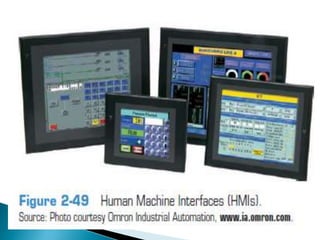
 A human machine interface (HMI) can be
connected to communicate with a PLC and to
replace pushbuttons, selector switches, pilot
lights, thumbwheels, and other operator
control panel devices
 Luminescent touch-screen keypads provide
an operator interface that operates like
traditional hardwired control panels
 Human machine interfaces give the ability to the
operator and to management to view the operation in
real time.
 Through personal computer–based setup software,
you can configure display screens to:
• Replace hardwired pushbuttons and pilot lights with
realistic-looking icons
• The machine operator need only touch the display
panel to activate the pushbuttons
• Show operations in graphic format for easier viewing
• Allow the operator to change timer and
counter preset by touching the numeric
keypad graphic on the touch screen
• Show alarms, complete with time of
occurrence and location
• Display variables as they change over time
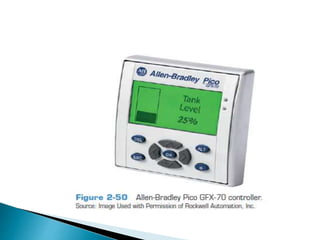
 The Allen-Bradley Pico GFX-70 controller,
shown in Figure 2-50 , serves as a controller
with HMI capabilities
 This device consists of three modular parts:
an HMI, processor/power supply, and I/O
modules
 The display/keypad can be used as an
operator interface or can be linked to control
operations to provide real time feedback
 It has the ability to show text, date and time,
as well as custom messages and bitmap
graphics, allowing operators to acknowledge
fault messages, enter values, and initiate
actions.
 Users can create both the control program
and HMI functionality using a personal
computer with PicoSoft Pro software installed
or the controller’s on-board display buttons.
Programming Terminal Devices about plc.ppt

Programming Terminal Devices about plc.ppt

  • 1.
    •Hand-held programming terminal •Personalcomputer •Recording and Retrieving Data •Human Machine Interfaces (HMIs)
  • 2.
     A programmingterminal device is needed to enter, modify, and troubleshoot the PLC program  PLC manufacturers use various types of programming devices  The simplest type is the hand-held type programmer shown in Figure
  • 4.
     This programmingdevice has a connecting cable so that it can be plugged into a PLC’s programming port.  Certain controllers use a plug-in panel rather than a hand-held device.
  • 5.
     Hand-held programmersare compact, inexpensive, and easy to use.  These units contain multifunction keys and a liquid-crystal display (LCD) or light-emitting diode (LED) window.  There are usually keys for instruction, entering and editing, and navigation keys for moving around the program.
  • 6.
     Hand-held programmershave limited display capabilities.  Some units will display only the last instruction that has been programmed, whereas other units will display from two to four rungs of ladder logic.  So-called intelligent hand-held programmers are designed to support a certain family of PLCs from a specific manufacturer.
  • 8.
     The mostpopular method of PLC programming is to use a personal computer (PC) in conjunction with the manufacturer’s programming software  Typical capabilities of the programming software include online and offline program editing, online program monitoring, program documentation, diagnosing malfunctions in the PLC, and troubleshooting the controlled system.
  • 9.
     Hard-copy reportsgenerated in the software can be printed on the computer’s printer.  Most software packages will not allow you to develop programs on another manufacturer’s PLC.  In some cases, a single manufacturer will have multiple PLC families, each requiring its own software to program.
  • 10.
     Printers areused to provide hard-copy printouts of the processor’s memory in ladder program format.  Lengthy ladder programs cannot be shown completely on a screen.  Typically, a screen shows a maximum of five rungs at a time.  A printout can show programs of any length and analyze the complete program.
  • 11.
     The PLCcan have only one program in memory at a time  To change the program in the PLC, it is necessary either to enter a new program directly from the keyboard or to download one from the computer hard drive
  • 13.
     Some CPUssupport the use of a memory cartridge that provides portable EEPROM storage for the user program  The cartridge can be used to copy a program from one PLC to another similar type PLC
  • 14.
     A humanmachine interface (HMI) can be connected to communicate with a PLC and to replace pushbuttons, selector switches, pilot lights, thumbwheels, and other operator control panel devices  Luminescent touch-screen keypads provide an operator interface that operates like traditional hardwired control panels
  • 15.
     Human machineinterfaces give the ability to the operator and to management to view the operation in real time.  Through personal computer–based setup software, you can configure display screens to: • Replace hardwired pushbuttons and pilot lights with realistic-looking icons • The machine operator need only touch the display panel to activate the pushbuttons • Show operations in graphic format for easier viewing
  • 17.
    • Allow theoperator to change timer and counter preset by touching the numeric keypad graphic on the touch screen • Show alarms, complete with time of occurrence and location • Display variables as they change over time
  • 19.
     The Allen-BradleyPico GFX-70 controller, shown in Figure 2-50 , serves as a controller with HMI capabilities  This device consists of three modular parts: an HMI, processor/power supply, and I/O modules  The display/keypad can be used as an operator interface or can be linked to control operations to provide real time feedback
  • 20.
     It hasthe ability to show text, date and time, as well as custom messages and bitmap graphics, allowing operators to acknowledge fault messages, enter values, and initiate actions.  Users can create both the control program and HMI functionality using a personal computer with PicoSoft Pro software installed or the controller’s on-board display buttons.