ProblemBolo 
Work Flows
Login Of Citizen 
<Work Flow will be confirmed Soon>
Citizen Complaining 
Done by Citizen 
Citizen 
Mobile 
App 
Website 
Complaint α 
Complaint α 
OR 
Data in Complaint (Aspects of 
Complaint): 
• Location 
• Issue: Sector 
Category 
Sub-Category 
• Time of Complaint 
• Personal Details of Complainer 
• Any media attached to Complaint
Creation of Pressure Group 
Done in Website & Displayed in App and Site 
PRESSURE GROUP 
• Pressure Group: All 
Complaints with Common 
Issue & Location 
• Contains Media Attached 
by all Citizens who 
complained. 
• Citizens of Pressure 
Group can interact with 
each other. 
• Information about all the 
aspects of complaint. 
Additional Aspects Of 
Pressure Group: 
Pending Time (From time 
of Complain Posting), 
Severity(# of Complainers), 
Status of Complaint(From 
GHMC Integration).
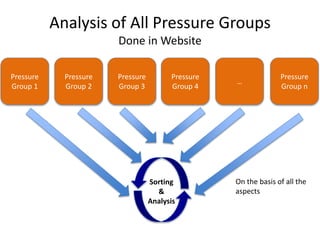
Analysis of All Pressure Groups 
Done in Website 
Pressure 
Group 1 
Pressure 
Group 3 
Pressure 
Group 2 
Pressure 
Group 4 
… 
Pressure 
Group n 
Sorting 
& 
Analysis 
On the basis of all the 
aspects
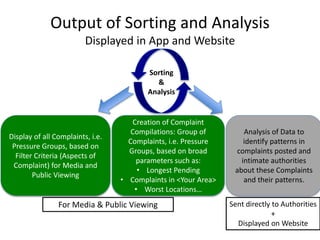
Output of Sorting and Analysis 
Displayed in App and Website 
Sorting 
& 
Analysis 
Display of all Complaints, i.e. 
Pressure Groups, based on 
Filter Criteria (Aspects of 
Complaint) for Media and 
Public Viewing 
Creation of Complaint 
Compilations: Group of 
Complaints, i.e. Pressure 
Groups, based on broad 
parameters such as: 
• Longest Pending 
• Complaints in <Your Area> 
• Worst Locations… 
Analysis of Data to 
identify patterns in 
complaints posted and 
intimate authorities 
about these Complaints 
and their patterns. 
For Media & Public Viewing Sent directly to Authorities 
+ 
Displayed on Website
For a Non-Complaining User (Media) 
• View any Complaint on Website/App: 
 Filter Search 
 Complaint Compilations 
 All Complaint Search 
• Can Complain about already existing Pressure 
Group Issue by pressing: “Same Problem!” 
Button. User is added as Complainer to that 
Pressure Group. 
 One can only comment in Pressure Group if he 
Complains about Issue of Pressure Group.

ProblemBolo WorkFlows

  • 1.
  • 2.
    Login Of Citizen <Work Flow will be confirmed Soon>
  • 3.
    Citizen Complaining Doneby Citizen Citizen Mobile App Website Complaint α Complaint α OR Data in Complaint (Aspects of Complaint): • Location • Issue: Sector Category Sub-Category • Time of Complaint • Personal Details of Complainer • Any media attached to Complaint
  • 4.
    Creation of PressureGroup Done in Website & Displayed in App and Site PRESSURE GROUP • Pressure Group: All Complaints with Common Issue & Location • Contains Media Attached by all Citizens who complained. • Citizens of Pressure Group can interact with each other. • Information about all the aspects of complaint. Additional Aspects Of Pressure Group: Pending Time (From time of Complain Posting), Severity(# of Complainers), Status of Complaint(From GHMC Integration).
  • 5.
    Analysis of AllPressure Groups Done in Website Pressure Group 1 Pressure Group 3 Pressure Group 2 Pressure Group 4 … Pressure Group n Sorting & Analysis On the basis of all the aspects
  • 6.
    Output of Sortingand Analysis Displayed in App and Website Sorting & Analysis Display of all Complaints, i.e. Pressure Groups, based on Filter Criteria (Aspects of Complaint) for Media and Public Viewing Creation of Complaint Compilations: Group of Complaints, i.e. Pressure Groups, based on broad parameters such as: • Longest Pending • Complaints in <Your Area> • Worst Locations… Analysis of Data to identify patterns in complaints posted and intimate authorities about these Complaints and their patterns. For Media & Public Viewing Sent directly to Authorities + Displayed on Website
  • 7.
    For a Non-ComplainingUser (Media) • View any Complaint on Website/App:  Filter Search  Complaint Compilations  All Complaint Search • Can Complain about already existing Pressure Group Issue by pressing: “Same Problem!” Button. User is added as Complainer to that Pressure Group.  One can only comment in Pressure Group if he Complains about Issue of Pressure Group.