Test Automation using Ruby, Watir, Rspec and AutoIT
         for GAMESCALE products testing.


   Presented by Sveatoslav Circel, Senior QA @Gametech LLC.
             mailto:sveatoslav.circel@gametech.md
Test Automation using Ruby, Watir, Rspec
                                and AutoIT for GAMESCALE products


Coverage:

*Introduction and advantages.
*Getting started with Ruby and Watir.
*Basic Watir elements and functions.
*Script structure and validation points.
*SVN Repository for automation scripts.
*Running the tests (BOUI + Frontend).
*Running the tests in batch.
*Analyzing the logs/results.
*Debugging with IRB.
Test Automation using Ruby, Watir, Rspec
                                                   and AutoIT for GAMESCALE products

     Advantages of Test Automation
Reliable: Tests perform precisely the same operations each time they are run,
   thereby eliminating human error
Repeatable: You can test how the software reacts under repeated execution of
  the same operations.
Programmable: You can program sophisticated tests that bring out hidden
   information from the application.
Comprehensive: You can build a suite of tests that covers every feature in your
  application.
Reusable: You can reuse tests on different versions of an application, even if
  the user interface changes.
Better Quality Software: Because you can run more tests in less time with
   fewer resources
Fast: Automated Tools run tests significantly faster than human users.
Cost Reduction: As the number of resources for regression test are reduced.
Test Automation using Ruby, Watir, Rspec
                                      and AutoIT for GAMESCALE products


The Ruby Language
         Dynamic;
         Easy to understand syntax;
         Easy to use interpreter;
         Object oriented;
         Cross-platform;
         Powerful class libraries;
         Massive online support communities base;


       More info on ruby: http://www.youtube.com/watch?v=fYIEV_6xhck
Test Automation using Ruby, Watir, Rspec
                                    and AutoIT for GAMESCALE products

       What is Watir?
   A free, open-source functional testing tool for
    web applications.
   It is a Ruby library which drives almost any
    browser the same way people do, clicks links,
    fills in forms, and presses buttons.
   Watir also checks results, such as whether
    expected text appears on the page or not.
   Because it’s build on Ruby, you have the power
    to connect to databases, read data files, save
    screenshots, manipulate the file system, export
    to CSV and XML, structure your code into
    reusable libraries.
Test Automation using Ruby, Watir, Rspec
                              and AutoIT for GAMESCALE products


      Why use Watir?

    Free

    Powerful

    Simple (easy to use and learn)

    Excellent Support

    It uses Ruby, a full-featured object
    oriented scripting language

    Broad usage in high level client base.
Test Automation using Ruby, Watir, Rspec
                                                     and AutoIT for GAMESCALE products

    What the Users say…
−   “…WATIR is by far the most complete web testing
    framework out here--that doesn't cost an arm and a leg.
    And this forum is the most active and well supported that I
    have seen. You can post a question and is just a short period
    of time get someone (most of the time the architects of the
    framework!) who will steer you in the right direct, give you a
    work around to get over any roadblocks, or add it to the
    framework if it doesn't currently exist. That is the reason I
    switched and tell everyone interest (and those not) that Ruby
    is the way to go! Save your money, get WATIR!”


               −    “Ruby is an awesome language and Watir
                is just too cool. It does things that other
               companies (ie. IBM/Rational, Mercury, Segue,
                etc) charge thousands and thousands of dollars a seat for. Anyway, now that
                    I'm gettin' the hang of Ruby and Watir, I'm starting to automate everything I do
                    on the web. Even the simple things like logging in to web sites, searches, you
                    name it.” (source: www.watir.com)
Test Automation using Ruby, Watir, Rspec
                                    and AutoIT for GAMESCALE products

     Features: Ruby Watir

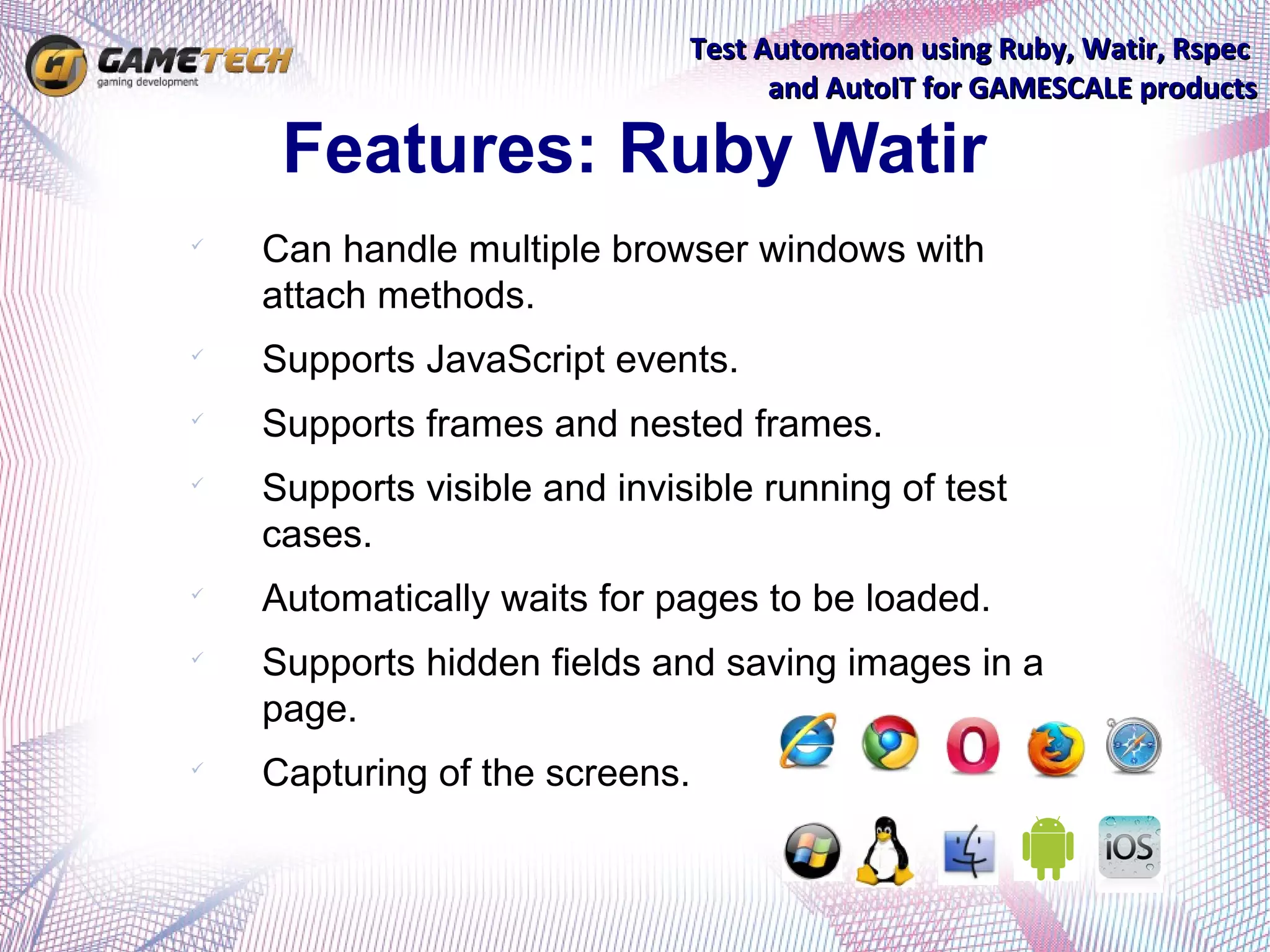
    Can handle multiple browser windows with
    attach methods.

    Supports JavaScript events.

    Supports frames and nested frames.

    Supports visible and invisible running of test
    cases.

    Automatically waits for pages to be loaded.

    Supports hidden fields and saving images in a
    page.

    Capturing of the screens.
Test Automation using Ruby, Watir, Rspec
                                                   and AutoIT for GAMESCALE products

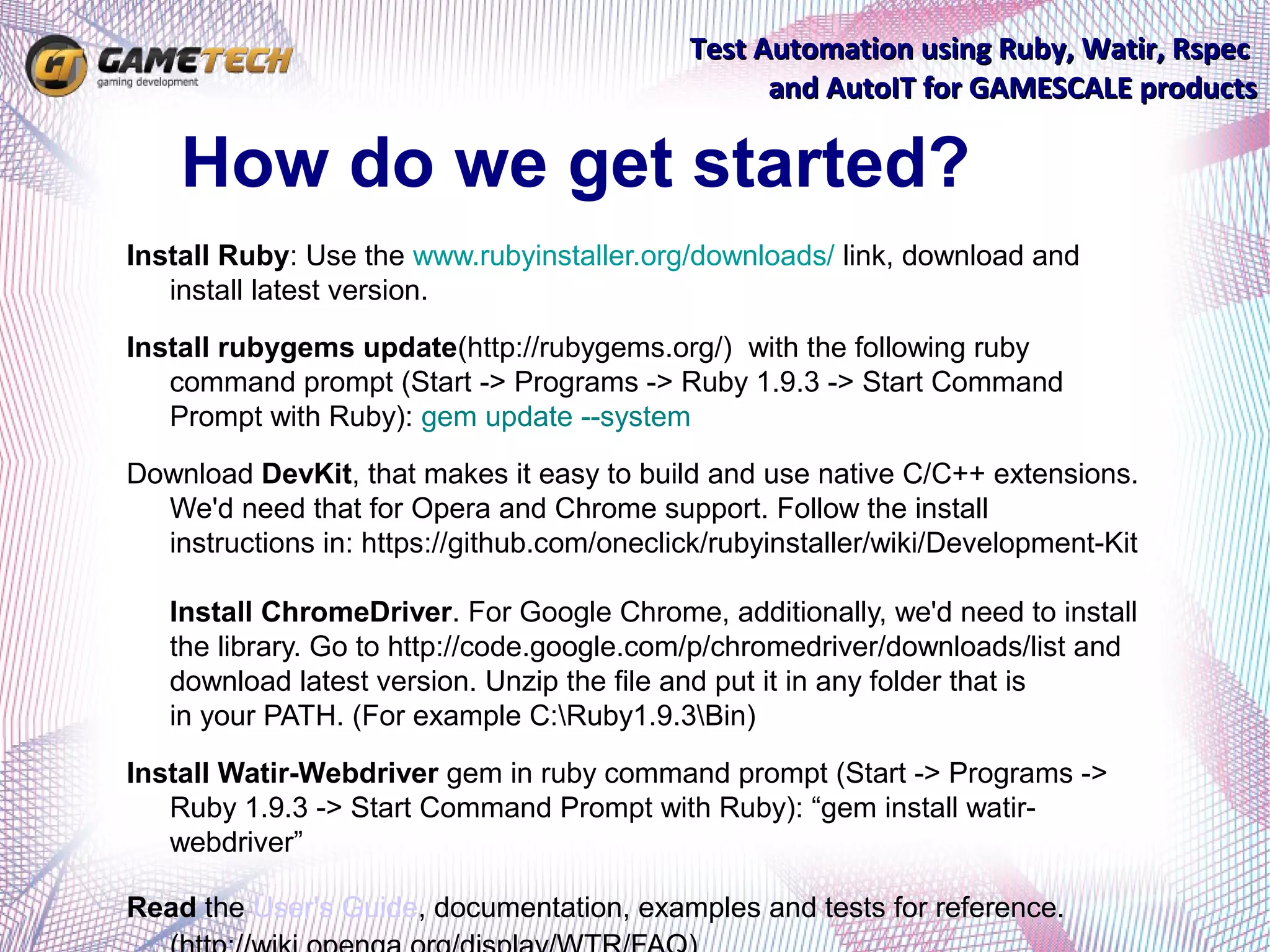
    How do we get started?
Install Ruby: Use the www.rubyinstaller.org/downloads/ link, download and
   install latest version.
Install rubygems update(http://rubygems.org/) with the following ruby
   command prompt (Start -> Programs -> Ruby 1.9.3 -> Start Command
   Prompt with Ruby): gem update --system
Download DevKit, that makes it easy to build and use native C/C++ extensions.
  We'd need that for Opera and Chrome support. Follow the install
  instructions in: https://github.com/oneclick/rubyinstaller/wiki/Development-Kit

   Install ChromeDriver. For Google Chrome, additionally, we'd need to install
   the library. Go to http://code.google.com/p/chromedriver/downloads/list and
   download latest version. Unzip the file and put it in any folder that is
   in your PATH. (For example C:Ruby1.9.3Bin)
Install Watir-Webdriver gem in ruby command prompt (Start -> Programs ->
   Ruby 1.9.3 -> Start Command Prompt with Ruby): “gem install watir-
   webdriver”

Read the User's Guide, documentation, examples and tests for reference.
Test Automation using Ruby, Watir, Rspec
                                                  and AutoIT for GAMESCALE products

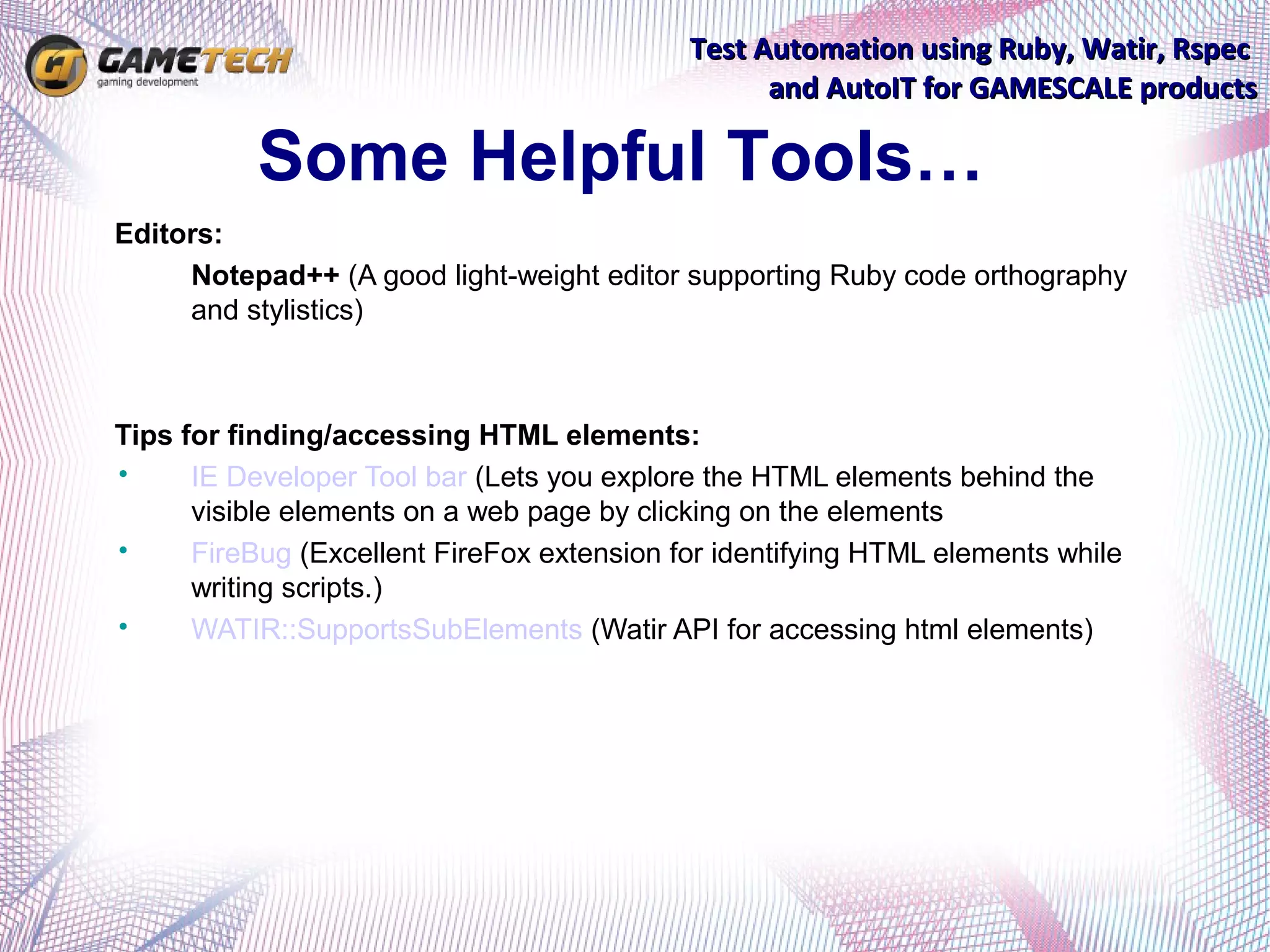
           Some Helpful Tools…
Editors:
•    Notepad++ (A good light-weight editor supporting Ruby code orthography
     and stylistics)


Tips for finding/accessing HTML elements:
•     IE Developer Tool bar (Lets you explore the HTML elements behind the
      visible elements on a web page by clicking on the elements
•     FireBug (Excellent FireFox extension for identifying HTML elements while
      writing scripts.)
•     WATIR::SupportsSubElements (Watir API for accessing html elements)
Test Automation using Ruby, Watir, Rspec
                                                          and AutoIT for GAMESCALE products


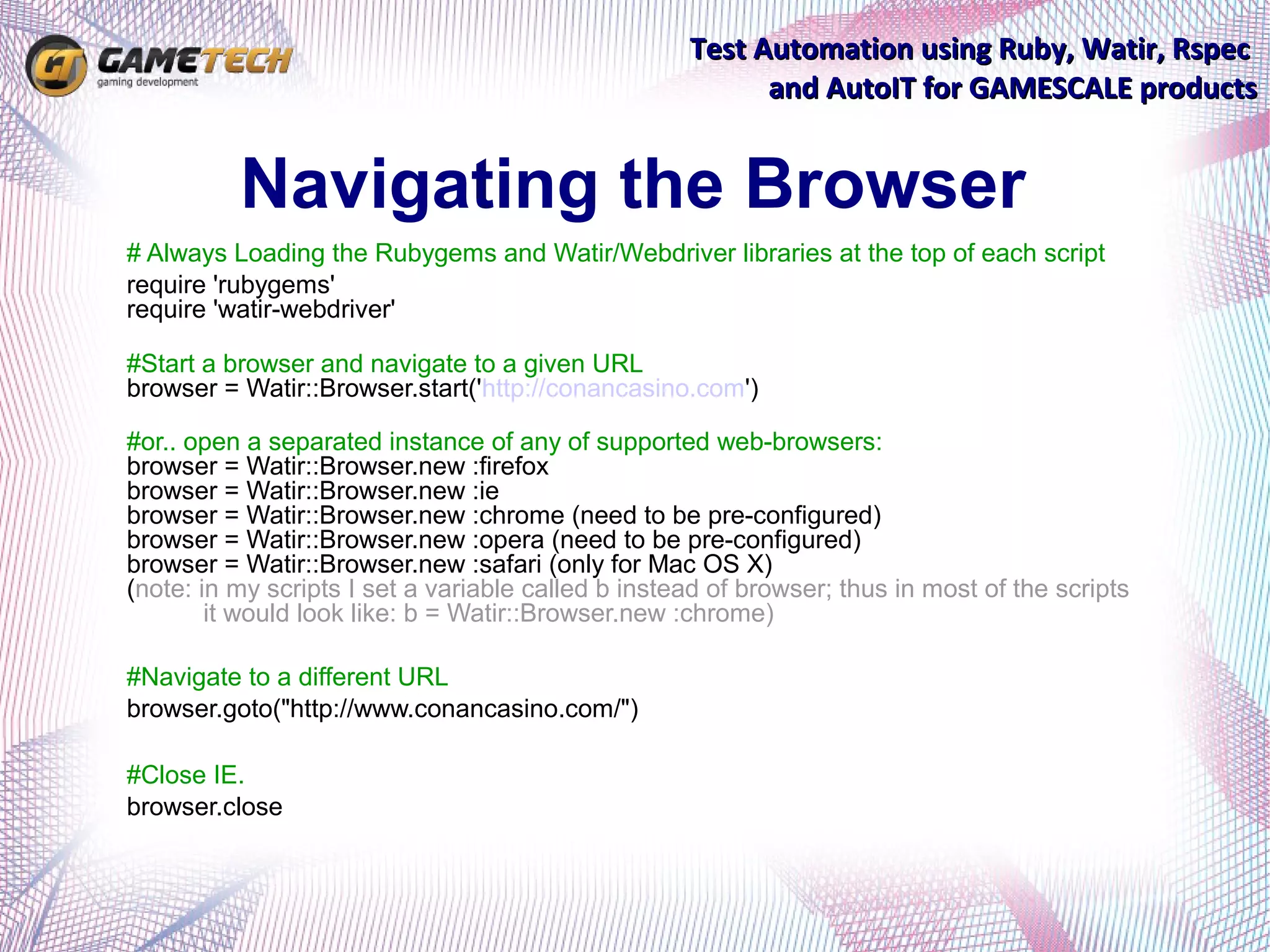
          Navigating the Browser
# Always Loading the Rubygems and Watir/Webdriver libraries at the top of each script
require 'rubygems'
require 'watir-webdriver'

#Start a browser and navigate to a given URL
browser = Watir::Browser.start('http://conancasino.com')

#or.. open a separated instance of any of supported web-browsers:
browser = Watir::Browser.new :firefox
browser = Watir::Browser.new :ie
browser = Watir::Browser.new :chrome (need to be pre-configured)
browser = Watir::Browser.new :opera (need to be pre-configured)
browser = Watir::Browser.new :safari (only for Mac OS X)
(note: in my scripts I set a variable called b instead of browser; thus in most of the scripts
        it would look like: b = Watir::Browser.new :chrome)

#Navigate to a different URL
browser.goto("http://www.conancasino.com/")

#Close IE.
browser.close
Test Automation using Ruby, Watir, Rspec
                                              and AutoIT for GAMESCALE products


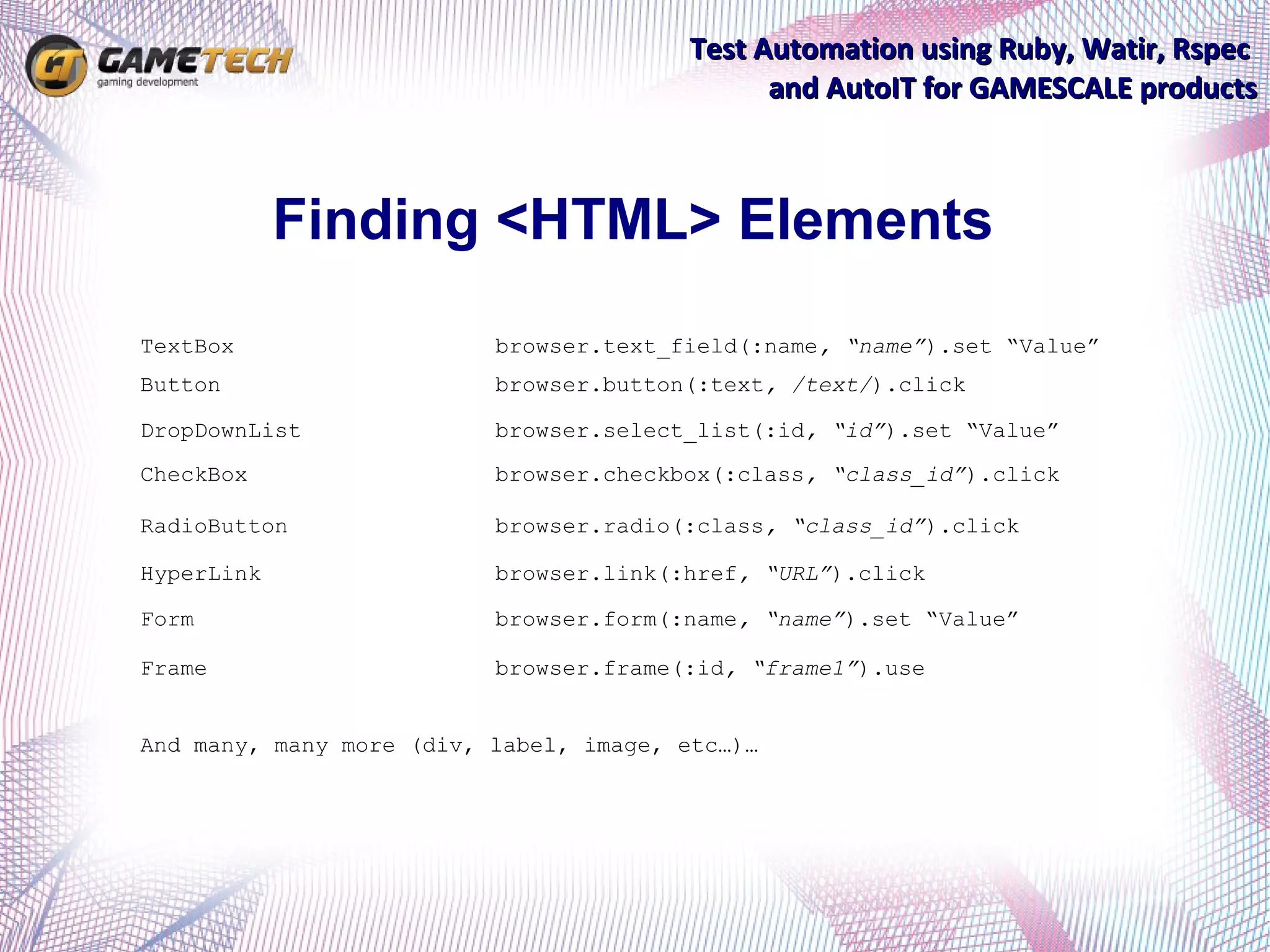
            Finding <HTML> Elements
TextBox                   browser.text_field(:name, “name”).set “Value”
Button                    browser.button(:text, /text/).click

DropDownList              browser.select_list(:id, “id”).set “Value”
CheckBox                  browser.checkbox(:class, “class_id”).click

RadioButton               browser.radio(:class, “class_id”).click

HyperLink                 browser.link(:href, “URL”).click

Form                      browser.form(:name, “name”).set “Value”

Frame                     browser.frame(:id, “frame1”).use


And many, many more (div, label, image, etc…)…
Test Automation using Ruby, Watir, Rspec
                              and AutoIT for GAMESCALE products

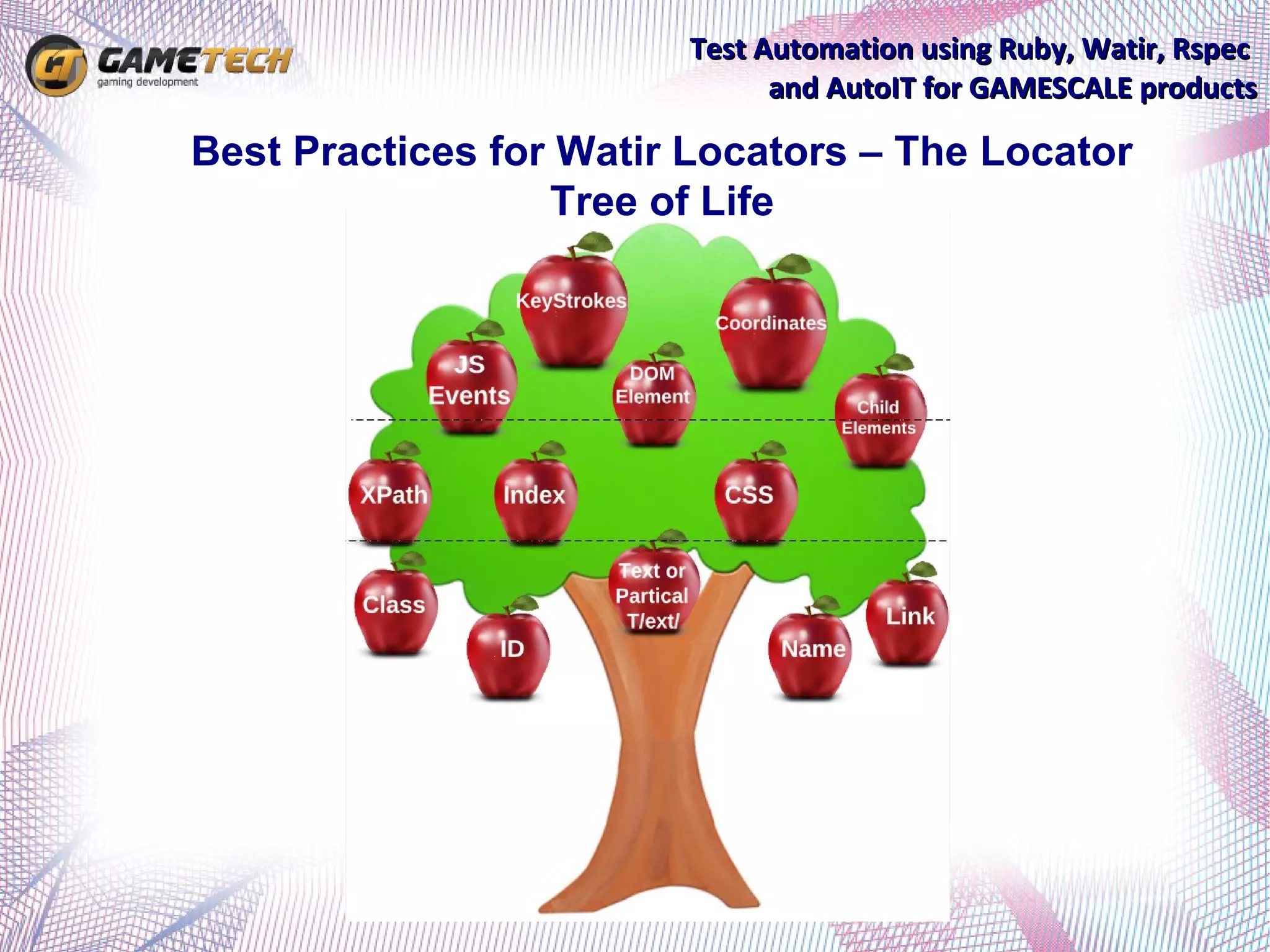
Best Practices for Watir Locators – The Locator
                  Tree of Life
Test Automation using Ruby, Watir, Rspec
                                                       and AutoIT for GAMESCALE products

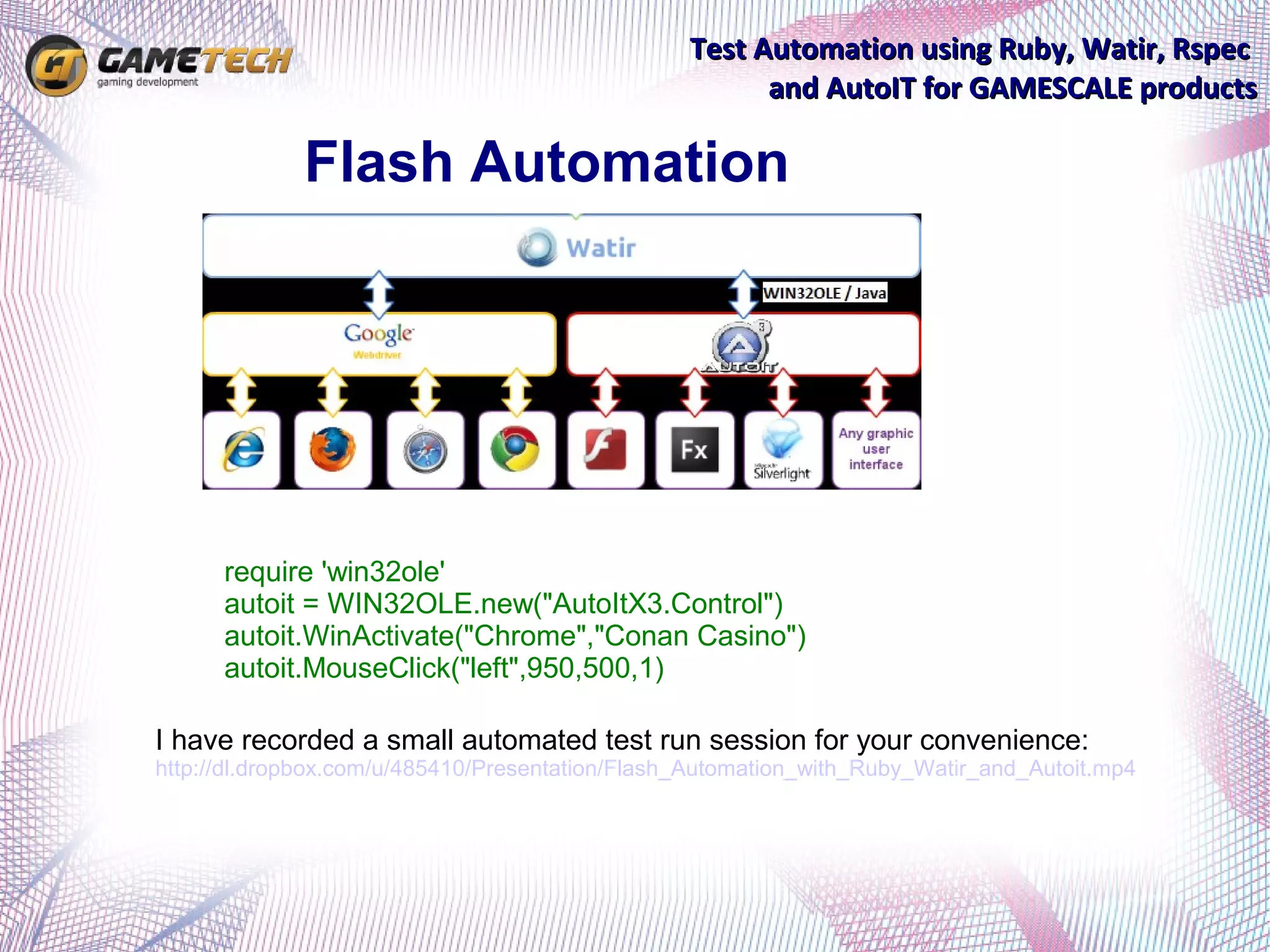
             Flash Automation


      require 'win32ole'
      autoit = WIN32OLE.new("AutoItX3.Control")
      autoit.WinActivate("Chrome","Conan Casino")
      autoit.MouseClick("left",950,500,1)

I have recorded a small automated test run session for your convenience:
http://dl.dropbox.com/u/485410/Presentation/Flash_Automation_with_Ruby_Watir_and_Autoit.mp4
Test Automation using Ruby, Watir, Rspec
                                                       and AutoIT for GAMESCALE products


             Running the scripts
Scripts are being executed using Ruby command promt. Open
ruby command prompt (Start -> Programs -> Ruby 1.9.3 ->
Start Command Prompt with Ruby); CD to directory with
scripts; Run using the following command:


ruby name_of_the_script.rb

I have recorded a small automated test run session for your convenience:
http://dl.dropbox.com/u/485410/Presentation/Running_a_script_and_analyzing_results.mp4
Test Automation using Ruby, Watir, Rspec
                                                         and AutoIT for GAMESCALE products


     Running the scripts in batch
In order to be able to run the scripts in batch, we created a simple
*.BAT file, in which included the set of all available scripts,
including both error and positive output redirection to txt files:
ruby FR001-Account-Creation-chrome.rb > FR001-Account-Creation-chrome.txt 2>&1

…


Open ruby command prompt (Start -> Programs -> Ruby 1.9.3 ->
Start Command Prompt with Ruby); CD to directory with scripts;
C:automationqa>Frontend.bat

I have recorded a small automated test run session for your convenience:

http://dl.dropbox.com/u/485410/Presentation/Analyzing_the_batch_results.mp4
Test Automation using Ruby, Watir, Rspec
                                                       and AutoIT for GAMESCALE products


           Analyzing the results
The scripts are saving 3 type of results:
1. Export scenario output as Passed/Failed in the test_results.csv, including
the name of the test and time of execution.


2. Save screenshots of the web pages in the same dirrectory where the
script is located.


3. Print the output to the user within the windows ruby shell - cmd. (can
also be redirected as output to a different file using > file.txt for further
analysis)


I have recorded a small automated test run session for your convenience:
http://dl.dropbox.com/u/485410/Presentation/Analyzing_the_batch_results.mp4

http://dl.dropbox.com/u/485410/Presentation/Running_a_script_and_analyzing_results.mp4
Test Automation using Ruby, Watir, Rspec
                                           and AutoIT for GAMESCALE products


         Local SVN Repository
The scripts are located in our SVN which is being permanently
  updated and renewed by new commits of improved scripts.
  The read-write permissions are granted only to QA team
  (including myself, Nick, Dmitrii and Vitalii). Read permissions
  – accessible to anyone within the company.
To access to SVN you have 2 ways
   1. In browser go to link:
   http://192.168.10.10/svn/gs1/trunk/tests/automatization/qa


2. Download the "TortoiseSVN"
   (http://tortoisesvn.net/downloads.html) and synchronize it with
   your local folder.
Note: Do not run the scripts from SVN, copy to local.
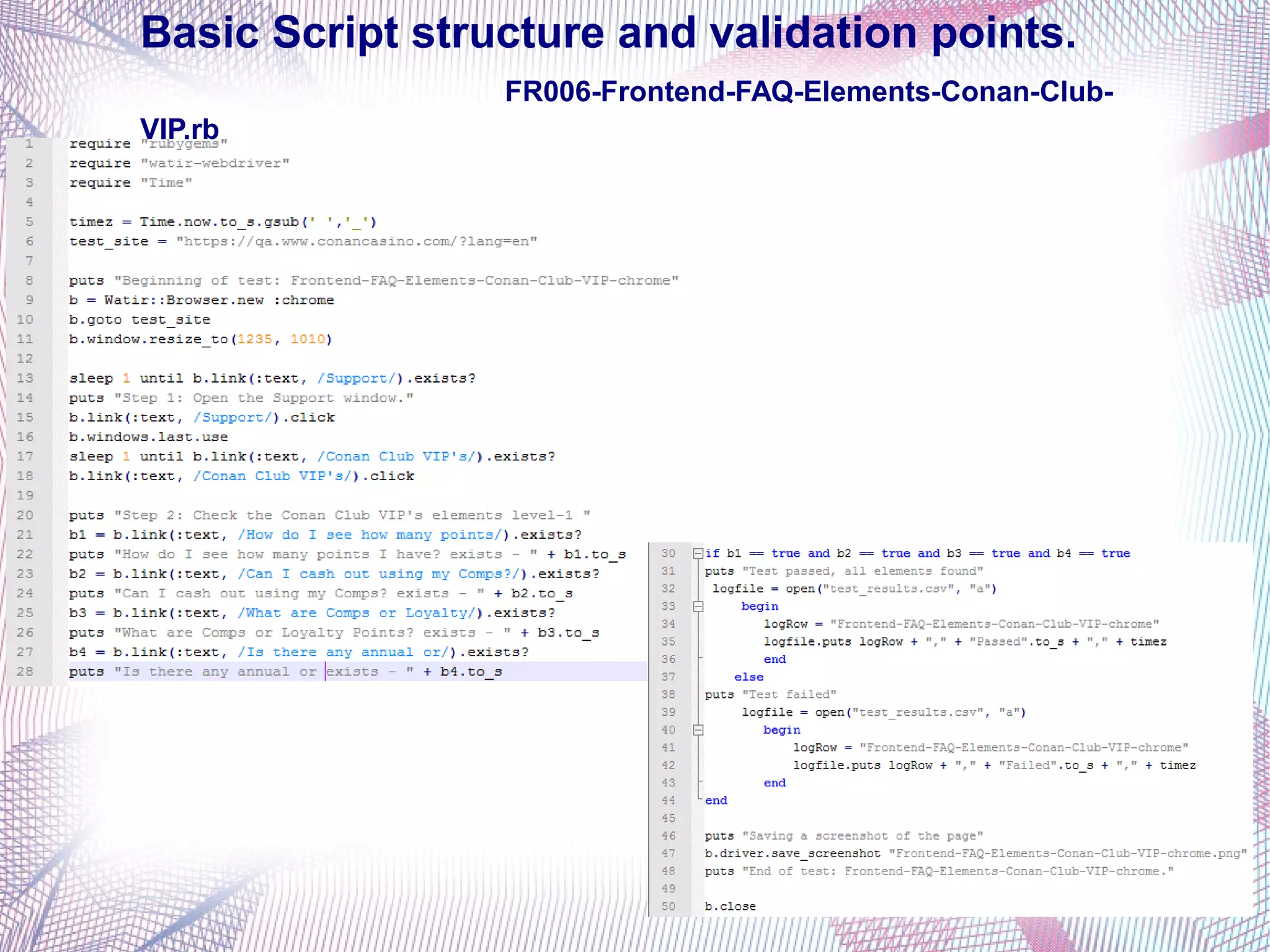
Basic Script structure and validation points.
                 FR006-Frontend-FAQ-Elements-Conan-Club-
VIP.rb
Test Automation using Ruby, Watir, Rspec
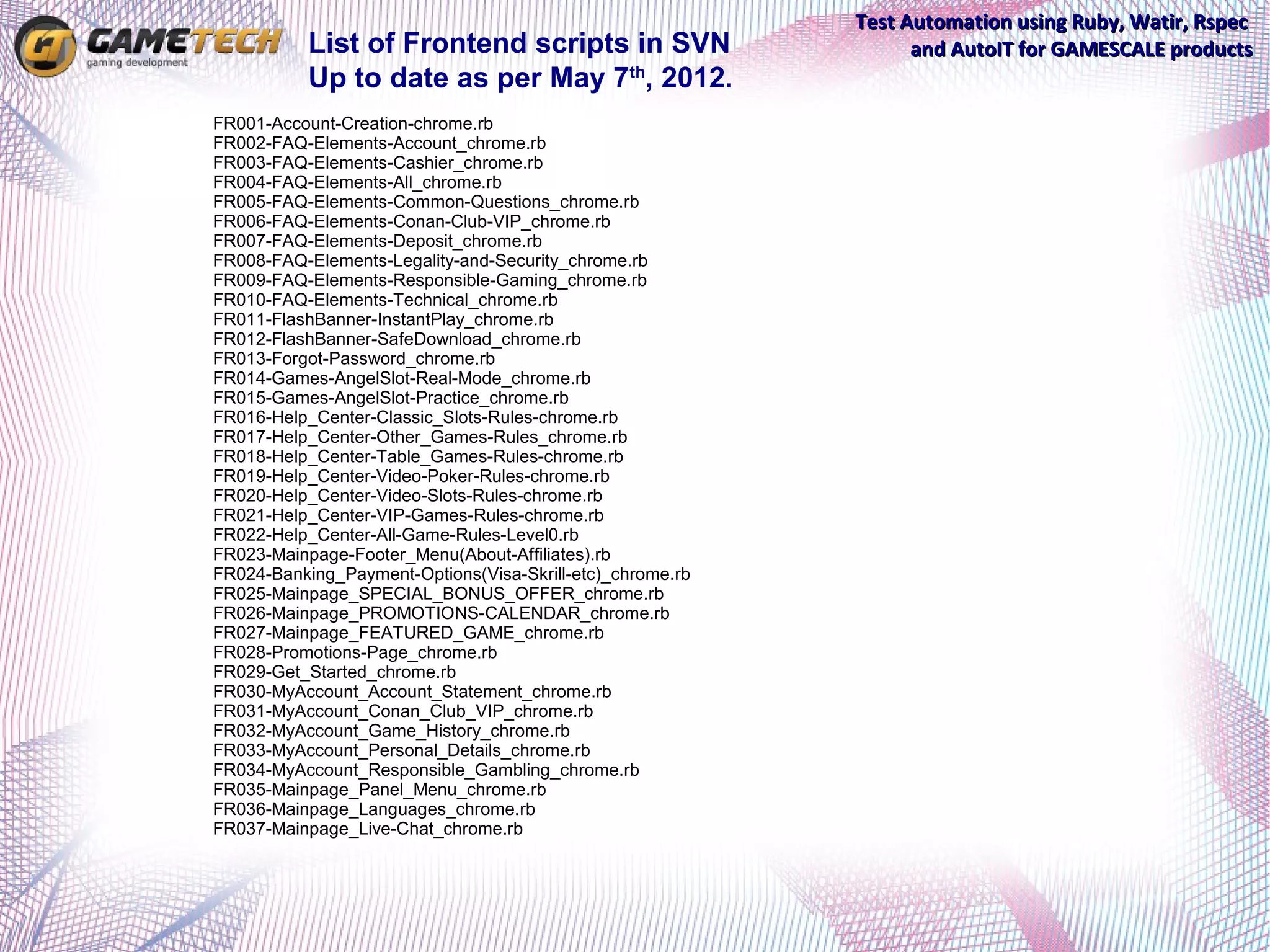
           List of Frontend scripts in SVN                       and AutoIT for GAMESCALE products
           Up to date as per May 7th, 2012.
FR001-Account-Creation-chrome.rb
FR002-FAQ-Elements-Account_chrome.rb
FR003-FAQ-Elements-Cashier_chrome.rb
FR004-FAQ-Elements-All_chrome.rb
FR005-FAQ-Elements-Common-Questions_chrome.rb
FR006-FAQ-Elements-Conan-Club-VIP_chrome.rb
FR007-FAQ-Elements-Deposit_chrome.rb
FR008-FAQ-Elements-Legality-and-Security_chrome.rb
FR009-FAQ-Elements-Responsible-Gaming_chrome.rb
FR010-FAQ-Elements-Technical_chrome.rb
FR011-FlashBanner-InstantPlay_chrome.rb
FR012-FlashBanner-SafeDownload_chrome.rb
FR013-Forgot-Password_chrome.rb
FR014-Games-AngelSlot-Real-Mode_chrome.rb
FR015-Games-AngelSlot-Practice_chrome.rb
FR016-Help_Center-Classic_Slots-Rules-chrome.rb
FR017-Help_Center-Other_Games-Rules_chrome.rb
FR018-Help_Center-Table_Games-Rules-chrome.rb
FR019-Help_Center-Video-Poker-Rules-chrome.rb
FR020-Help_Center-Video-Slots-Rules-chrome.rb
FR021-Help_Center-VIP-Games-Rules-chrome.rb
FR022-Help_Center-All-Game-Rules-Level0.rb
FR023-Mainpage-Footer_Menu(About-Affiliates).rb
FR024-Banking_Payment-Options(Visa-Skrill-etc)_chrome.rb
FR025-Mainpage_SPECIAL_BONUS_OFFER_chrome.rb
FR026-Mainpage_PROMOTIONS-CALENDAR_chrome.rb
FR027-Mainpage_FEATURED_GAME_chrome.rb
FR028-Promotions-Page_chrome.rb
FR029-Get_Started_chrome.rb
FR030-MyAccount_Account_Statement_chrome.rb
FR031-MyAccount_Conan_Club_VIP_chrome.rb
FR032-MyAccount_Game_History_chrome.rb
FR033-MyAccount_Personal_Details_chrome.rb
FR034-MyAccount_Responsible_Gambling_chrome.rb
FR035-Mainpage_Panel_Menu_chrome.rb
FR036-Mainpage_Languages_chrome.rb
FR037-Mainpage_Live-Chat_chrome.rb
Test Automation using Ruby, Watir, Rspec
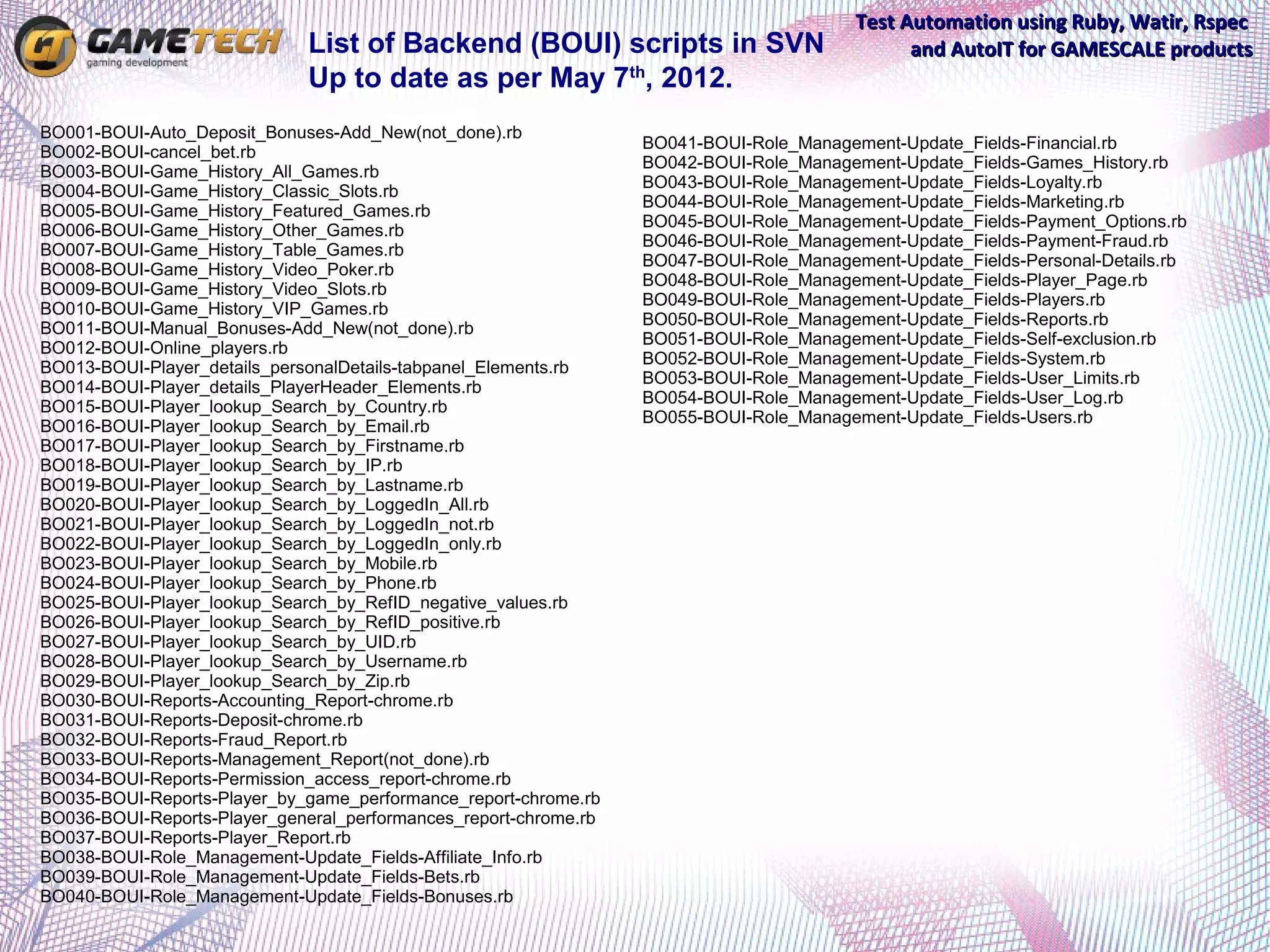
                              List of Backend (BOUI) scripts in SVN                            and AutoIT for GAMESCALE products
                              Up to date as per May 7th, 2012.
BO001-BOUI-Auto_Deposit_Bonuses-Add_New(not_done).rb
                                                                  BO041-BOUI-Role_Management-Update_Fields-Financial.rb
BO002-BOUI-cancel_bet.rb
                                                                  BO042-BOUI-Role_Management-Update_Fields-Games_History.rb
BO003-BOUI-Game_History_All_Games.rb
                                                                  BO043-BOUI-Role_Management-Update_Fields-Loyalty.rb
BO004-BOUI-Game_History_Classic_Slots.rb
                                                                  BO044-BOUI-Role_Management-Update_Fields-Marketing.rb
BO005-BOUI-Game_History_Featured_Games.rb
                                                                  BO045-BOUI-Role_Management-Update_Fields-Payment_Options.rb
BO006-BOUI-Game_History_Other_Games.rb
                                                                  BO046-BOUI-Role_Management-Update_Fields-Payment-Fraud.rb
BO007-BOUI-Game_History_Table_Games.rb
                                                                  BO047-BOUI-Role_Management-Update_Fields-Personal-Details.rb
BO008-BOUI-Game_History_Video_Poker.rb
                                                                  BO048-BOUI-Role_Management-Update_Fields-Player_Page.rb
BO009-BOUI-Game_History_Video_Slots.rb
                                                                  BO049-BOUI-Role_Management-Update_Fields-Players.rb
BO010-BOUI-Game_History_VIP_Games.rb
                                                                  BO050-BOUI-Role_Management-Update_Fields-Reports.rb
BO011-BOUI-Manual_Bonuses-Add_New(not_done).rb
                                                                  BO051-BOUI-Role_Management-Update_Fields-Self-exclusion.rb
BO012-BOUI-Online_players.rb
                                                                  BO052-BOUI-Role_Management-Update_Fields-System.rb
BO013-BOUI-Player_details_personalDetails-tabpanel_Elements.rb
                                                                  BO053-BOUI-Role_Management-Update_Fields-User_Limits.rb
BO014-BOUI-Player_details_PlayerHeader_Elements.rb
                                                                  BO054-BOUI-Role_Management-Update_Fields-User_Log.rb
BO015-BOUI-Player_lookup_Search_by_Country.rb
                                                                  BO055-BOUI-Role_Management-Update_Fields-Users.rb
BO016-BOUI-Player_lookup_Search_by_Email.rb
BO017-BOUI-Player_lookup_Search_by_Firstname.rb
BO018-BOUI-Player_lookup_Search_by_IP.rb
BO019-BOUI-Player_lookup_Search_by_Lastname.rb
BO020-BOUI-Player_lookup_Search_by_LoggedIn_All.rb
BO021-BOUI-Player_lookup_Search_by_LoggedIn_not.rb
BO022-BOUI-Player_lookup_Search_by_LoggedIn_only.rb
BO023-BOUI-Player_lookup_Search_by_Mobile.rb
BO024-BOUI-Player_lookup_Search_by_Phone.rb
BO025-BOUI-Player_lookup_Search_by_RefID_negative_values.rb
BO026-BOUI-Player_lookup_Search_by_RefID_positive.rb
BO027-BOUI-Player_lookup_Search_by_UID.rb
BO028-BOUI-Player_lookup_Search_by_Username.rb
BO029-BOUI-Player_lookup_Search_by_Zip.rb
BO030-BOUI-Reports-Accounting_Report-chrome.rb
BO031-BOUI-Reports-Deposit-chrome.rb
BO032-BOUI-Reports-Fraud_Report.rb
BO033-BOUI-Reports-Management_Report(not_done).rb
BO034-BOUI-Reports-Permission_access_report-chrome.rb
BO035-BOUI-Reports-Player_by_game_performance_report-chrome.rb
BO036-BOUI-Reports-Player_general_performances_report-chrome.rb
BO037-BOUI-Reports-Player_Report.rb
BO038-BOUI-Role_Management-Update_Fields-Affiliate_Info.rb
BO039-BOUI-Role_Management-Update_Fields-Bets.rb
BO040-BOUI-Role_Management-Update_Fields-Bonuses.rb
Test Automation using Ruby, Watir, Rspec
                                                             and AutoIT for GAMESCALE products
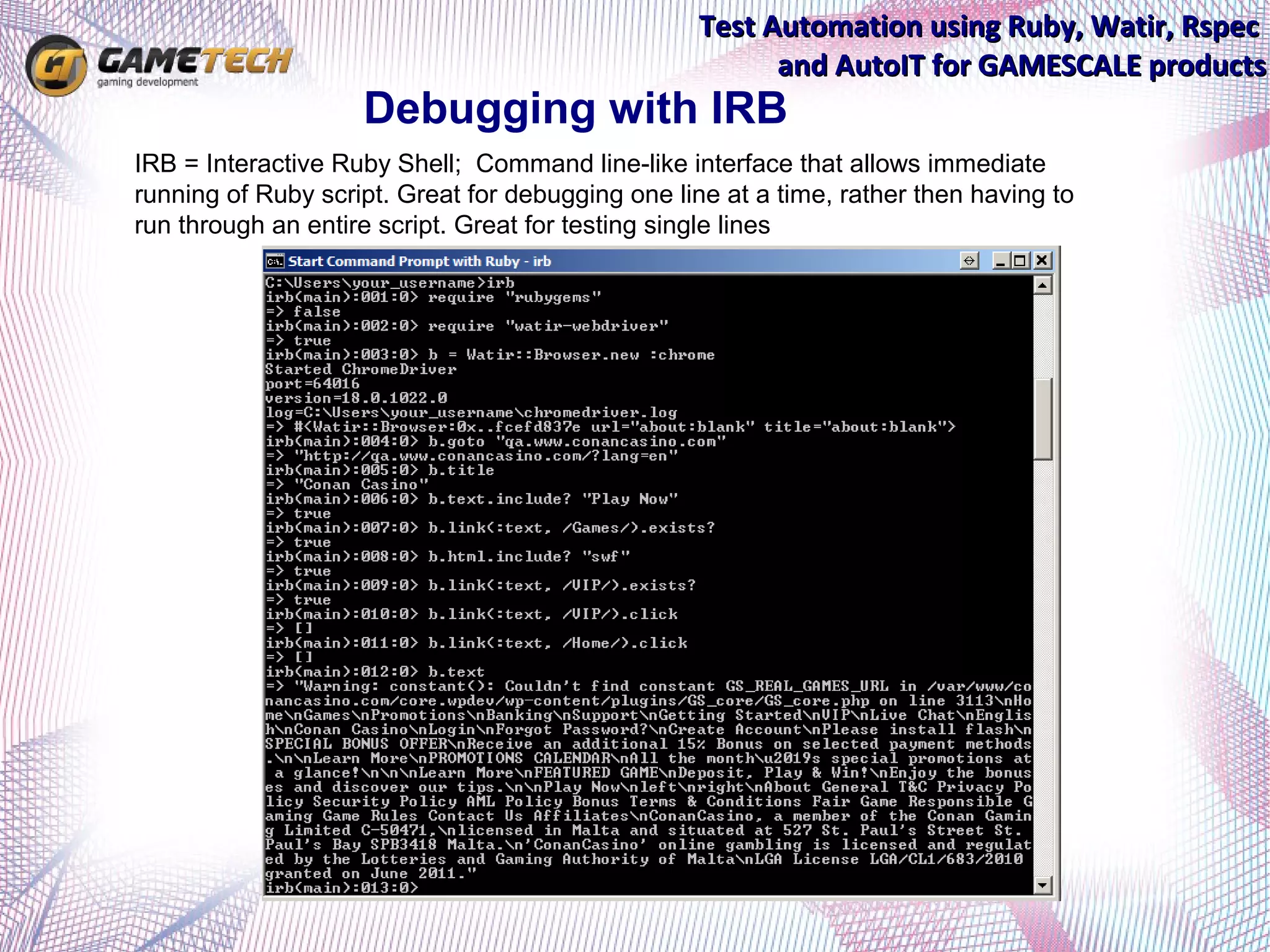
                        Debugging with IRB
•   IRB = Interactive Ruby Shell; Command line-like interface that allows immediate
    running of Ruby script. Great for debugging one line at a time, rather then having to
    run through an entire script. Great for testing single lines
Test Automation using Ruby, Watir, Rspec
                                                              and AutoIT for GAMESCALE products

       Plans for the future

         Practice test-driven development.

         Defects can be described using a test script that
         reproduces the defect. (attaching the script to Jira)

         Automation training the manual testers

         Creating a VM with ruby & watir pre-setup and ready to
         go.

         VirtualBox implementation and support of all OS'es and
         browsers for test automation (Win, *nix and Mac OS X
         systems)

         Continuous integration with JENKINS:
http://watirmelon.com/2011/08/29/running-your-watir-webdriver-tests-in-the-cloud-for-free/
http://blog.houseofsoft.org/2011/04/05/automate-your-feature-tests/4/
http://martinfowler.com/articles/continuousIntegration.html
Test Automation using Ruby, Watir, Rspec
             and AutoIT for GAMESCALE products

Questions ?…

Test Automation using Ruby, Watir, Rspec and AutoIT for GAMESCALE products testing.

  • 1.
    Test Automation usingRuby, Watir, Rspec and AutoIT for GAMESCALE products testing. Presented by Sveatoslav Circel, Senior QA @Gametech LLC. mailto:sveatoslav.circel@gametech.md
  • 2.
    Test Automation usingRuby, Watir, Rspec and AutoIT for GAMESCALE products Coverage: *Introduction and advantages. *Getting started with Ruby and Watir. *Basic Watir elements and functions. *Script structure and validation points. *SVN Repository for automation scripts. *Running the tests (BOUI + Frontend). *Running the tests in batch. *Analyzing the logs/results. *Debugging with IRB.
  • 3.
    Test Automation usingRuby, Watir, Rspec and AutoIT for GAMESCALE products Advantages of Test Automation Reliable: Tests perform precisely the same operations each time they are run, thereby eliminating human error Repeatable: You can test how the software reacts under repeated execution of the same operations. Programmable: You can program sophisticated tests that bring out hidden information from the application. Comprehensive: You can build a suite of tests that covers every feature in your application. Reusable: You can reuse tests on different versions of an application, even if the user interface changes. Better Quality Software: Because you can run more tests in less time with fewer resources Fast: Automated Tools run tests significantly faster than human users. Cost Reduction: As the number of resources for regression test are reduced.
  • 4.
    Test Automation usingRuby, Watir, Rspec and AutoIT for GAMESCALE products The Ruby Language  Dynamic;  Easy to understand syntax;  Easy to use interpreter;  Object oriented;  Cross-platform;  Powerful class libraries;  Massive online support communities base; More info on ruby: http://www.youtube.com/watch?v=fYIEV_6xhck
  • 5.
    Test Automation usingRuby, Watir, Rspec and AutoIT for GAMESCALE products What is Watir?  A free, open-source functional testing tool for web applications.  It is a Ruby library which drives almost any browser the same way people do, clicks links, fills in forms, and presses buttons.  Watir also checks results, such as whether expected text appears on the page or not.  Because it’s build on Ruby, you have the power to connect to databases, read data files, save screenshots, manipulate the file system, export to CSV and XML, structure your code into reusable libraries.
  • 6.
    Test Automation usingRuby, Watir, Rspec and AutoIT for GAMESCALE products Why use Watir?  Free  Powerful  Simple (easy to use and learn)  Excellent Support  It uses Ruby, a full-featured object oriented scripting language  Broad usage in high level client base.
  • 7.
    Test Automation usingRuby, Watir, Rspec and AutoIT for GAMESCALE products What the Users say… − “…WATIR is by far the most complete web testing framework out here--that doesn't cost an arm and a leg. And this forum is the most active and well supported that I have seen. You can post a question and is just a short period of time get someone (most of the time the architects of the framework!) who will steer you in the right direct, give you a work around to get over any roadblocks, or add it to the framework if it doesn't currently exist. That is the reason I switched and tell everyone interest (and those not) that Ruby is the way to go! Save your money, get WATIR!” − “Ruby is an awesome language and Watir is just too cool. It does things that other companies (ie. IBM/Rational, Mercury, Segue, etc) charge thousands and thousands of dollars a seat for. Anyway, now that I'm gettin' the hang of Ruby and Watir, I'm starting to automate everything I do on the web. Even the simple things like logging in to web sites, searches, you name it.” (source: www.watir.com)
  • 8.
    Test Automation usingRuby, Watir, Rspec and AutoIT for GAMESCALE products Features: Ruby Watir  Can handle multiple browser windows with attach methods.  Supports JavaScript events.  Supports frames and nested frames.  Supports visible and invisible running of test cases.  Automatically waits for pages to be loaded.  Supports hidden fields and saving images in a page.  Capturing of the screens.
  • 9.
    Test Automation usingRuby, Watir, Rspec and AutoIT for GAMESCALE products How do we get started? Install Ruby: Use the www.rubyinstaller.org/downloads/ link, download and install latest version. Install rubygems update(http://rubygems.org/) with the following ruby command prompt (Start -> Programs -> Ruby 1.9.3 -> Start Command Prompt with Ruby): gem update --system Download DevKit, that makes it easy to build and use native C/C++ extensions. We'd need that for Opera and Chrome support. Follow the install instructions in: https://github.com/oneclick/rubyinstaller/wiki/Development-Kit Install ChromeDriver. For Google Chrome, additionally, we'd need to install the library. Go to http://code.google.com/p/chromedriver/downloads/list and download latest version. Unzip the file and put it in any folder that is in your PATH. (For example C:Ruby1.9.3Bin) Install Watir-Webdriver gem in ruby command prompt (Start -> Programs -> Ruby 1.9.3 -> Start Command Prompt with Ruby): “gem install watir- webdriver” Read the User's Guide, documentation, examples and tests for reference.
  • 10.
    Test Automation usingRuby, Watir, Rspec and AutoIT for GAMESCALE products Some Helpful Tools… Editors: • Notepad++ (A good light-weight editor supporting Ruby code orthography and stylistics) Tips for finding/accessing HTML elements: • IE Developer Tool bar (Lets you explore the HTML elements behind the visible elements on a web page by clicking on the elements • FireBug (Excellent FireFox extension for identifying HTML elements while writing scripts.) • WATIR::SupportsSubElements (Watir API for accessing html elements)
  • 11.
    Test Automation usingRuby, Watir, Rspec and AutoIT for GAMESCALE products Navigating the Browser # Always Loading the Rubygems and Watir/Webdriver libraries at the top of each script require 'rubygems' require 'watir-webdriver' #Start a browser and navigate to a given URL browser = Watir::Browser.start('http://conancasino.com') #or.. open a separated instance of any of supported web-browsers: browser = Watir::Browser.new :firefox browser = Watir::Browser.new :ie browser = Watir::Browser.new :chrome (need to be pre-configured) browser = Watir::Browser.new :opera (need to be pre-configured) browser = Watir::Browser.new :safari (only for Mac OS X) (note: in my scripts I set a variable called b instead of browser; thus in most of the scripts it would look like: b = Watir::Browser.new :chrome) #Navigate to a different URL browser.goto("http://www.conancasino.com/") #Close IE. browser.close
  • 12.
    Test Automation usingRuby, Watir, Rspec and AutoIT for GAMESCALE products Finding <HTML> Elements TextBox browser.text_field(:name, “name”).set “Value” Button browser.button(:text, /text/).click DropDownList browser.select_list(:id, “id”).set “Value” CheckBox browser.checkbox(:class, “class_id”).click RadioButton browser.radio(:class, “class_id”).click HyperLink browser.link(:href, “URL”).click Form browser.form(:name, “name”).set “Value” Frame browser.frame(:id, “frame1”).use And many, many more (div, label, image, etc…)…
  • 13.
    Test Automation usingRuby, Watir, Rspec and AutoIT for GAMESCALE products Best Practices for Watir Locators – The Locator Tree of Life
  • 14.
    Test Automation usingRuby, Watir, Rspec and AutoIT for GAMESCALE products Flash Automation require 'win32ole' autoit = WIN32OLE.new("AutoItX3.Control") autoit.WinActivate("Chrome","Conan Casino") autoit.MouseClick("left",950,500,1) I have recorded a small automated test run session for your convenience: http://dl.dropbox.com/u/485410/Presentation/Flash_Automation_with_Ruby_Watir_and_Autoit.mp4
  • 15.
    Test Automation usingRuby, Watir, Rspec and AutoIT for GAMESCALE products Running the scripts Scripts are being executed using Ruby command promt. Open ruby command prompt (Start -> Programs -> Ruby 1.9.3 -> Start Command Prompt with Ruby); CD to directory with scripts; Run using the following command: ruby name_of_the_script.rb I have recorded a small automated test run session for your convenience: http://dl.dropbox.com/u/485410/Presentation/Running_a_script_and_analyzing_results.mp4
  • 16.
    Test Automation usingRuby, Watir, Rspec and AutoIT for GAMESCALE products Running the scripts in batch In order to be able to run the scripts in batch, we created a simple *.BAT file, in which included the set of all available scripts, including both error and positive output redirection to txt files: ruby FR001-Account-Creation-chrome.rb > FR001-Account-Creation-chrome.txt 2>&1 … Open ruby command prompt (Start -> Programs -> Ruby 1.9.3 -> Start Command Prompt with Ruby); CD to directory with scripts; C:automationqa>Frontend.bat I have recorded a small automated test run session for your convenience: http://dl.dropbox.com/u/485410/Presentation/Analyzing_the_batch_results.mp4
  • 17.
    Test Automation usingRuby, Watir, Rspec and AutoIT for GAMESCALE products Analyzing the results The scripts are saving 3 type of results: 1. Export scenario output as Passed/Failed in the test_results.csv, including the name of the test and time of execution. 2. Save screenshots of the web pages in the same dirrectory where the script is located. 3. Print the output to the user within the windows ruby shell - cmd. (can also be redirected as output to a different file using > file.txt for further analysis) I have recorded a small automated test run session for your convenience: http://dl.dropbox.com/u/485410/Presentation/Analyzing_the_batch_results.mp4 http://dl.dropbox.com/u/485410/Presentation/Running_a_script_and_analyzing_results.mp4
  • 18.
    Test Automation usingRuby, Watir, Rspec and AutoIT for GAMESCALE products Local SVN Repository The scripts are located in our SVN which is being permanently updated and renewed by new commits of improved scripts. The read-write permissions are granted only to QA team (including myself, Nick, Dmitrii and Vitalii). Read permissions – accessible to anyone within the company. To access to SVN you have 2 ways 1. In browser go to link: http://192.168.10.10/svn/gs1/trunk/tests/automatization/qa 2. Download the "TortoiseSVN" (http://tortoisesvn.net/downloads.html) and synchronize it with your local folder. Note: Do not run the scripts from SVN, copy to local.
  • 19.
    Basic Script structureand validation points. FR006-Frontend-FAQ-Elements-Conan-Club- VIP.rb
  • 20.
    Test Automation usingRuby, Watir, Rspec List of Frontend scripts in SVN and AutoIT for GAMESCALE products Up to date as per May 7th, 2012. FR001-Account-Creation-chrome.rb FR002-FAQ-Elements-Account_chrome.rb FR003-FAQ-Elements-Cashier_chrome.rb FR004-FAQ-Elements-All_chrome.rb FR005-FAQ-Elements-Common-Questions_chrome.rb FR006-FAQ-Elements-Conan-Club-VIP_chrome.rb FR007-FAQ-Elements-Deposit_chrome.rb FR008-FAQ-Elements-Legality-and-Security_chrome.rb FR009-FAQ-Elements-Responsible-Gaming_chrome.rb FR010-FAQ-Elements-Technical_chrome.rb FR011-FlashBanner-InstantPlay_chrome.rb FR012-FlashBanner-SafeDownload_chrome.rb FR013-Forgot-Password_chrome.rb FR014-Games-AngelSlot-Real-Mode_chrome.rb FR015-Games-AngelSlot-Practice_chrome.rb FR016-Help_Center-Classic_Slots-Rules-chrome.rb FR017-Help_Center-Other_Games-Rules_chrome.rb FR018-Help_Center-Table_Games-Rules-chrome.rb FR019-Help_Center-Video-Poker-Rules-chrome.rb FR020-Help_Center-Video-Slots-Rules-chrome.rb FR021-Help_Center-VIP-Games-Rules-chrome.rb FR022-Help_Center-All-Game-Rules-Level0.rb FR023-Mainpage-Footer_Menu(About-Affiliates).rb FR024-Banking_Payment-Options(Visa-Skrill-etc)_chrome.rb FR025-Mainpage_SPECIAL_BONUS_OFFER_chrome.rb FR026-Mainpage_PROMOTIONS-CALENDAR_chrome.rb FR027-Mainpage_FEATURED_GAME_chrome.rb FR028-Promotions-Page_chrome.rb FR029-Get_Started_chrome.rb FR030-MyAccount_Account_Statement_chrome.rb FR031-MyAccount_Conan_Club_VIP_chrome.rb FR032-MyAccount_Game_History_chrome.rb FR033-MyAccount_Personal_Details_chrome.rb FR034-MyAccount_Responsible_Gambling_chrome.rb FR035-Mainpage_Panel_Menu_chrome.rb FR036-Mainpage_Languages_chrome.rb FR037-Mainpage_Live-Chat_chrome.rb
  • 21.
    Test Automation usingRuby, Watir, Rspec List of Backend (BOUI) scripts in SVN and AutoIT for GAMESCALE products Up to date as per May 7th, 2012. BO001-BOUI-Auto_Deposit_Bonuses-Add_New(not_done).rb BO041-BOUI-Role_Management-Update_Fields-Financial.rb BO002-BOUI-cancel_bet.rb BO042-BOUI-Role_Management-Update_Fields-Games_History.rb BO003-BOUI-Game_History_All_Games.rb BO043-BOUI-Role_Management-Update_Fields-Loyalty.rb BO004-BOUI-Game_History_Classic_Slots.rb BO044-BOUI-Role_Management-Update_Fields-Marketing.rb BO005-BOUI-Game_History_Featured_Games.rb BO045-BOUI-Role_Management-Update_Fields-Payment_Options.rb BO006-BOUI-Game_History_Other_Games.rb BO046-BOUI-Role_Management-Update_Fields-Payment-Fraud.rb BO007-BOUI-Game_History_Table_Games.rb BO047-BOUI-Role_Management-Update_Fields-Personal-Details.rb BO008-BOUI-Game_History_Video_Poker.rb BO048-BOUI-Role_Management-Update_Fields-Player_Page.rb BO009-BOUI-Game_History_Video_Slots.rb BO049-BOUI-Role_Management-Update_Fields-Players.rb BO010-BOUI-Game_History_VIP_Games.rb BO050-BOUI-Role_Management-Update_Fields-Reports.rb BO011-BOUI-Manual_Bonuses-Add_New(not_done).rb BO051-BOUI-Role_Management-Update_Fields-Self-exclusion.rb BO012-BOUI-Online_players.rb BO052-BOUI-Role_Management-Update_Fields-System.rb BO013-BOUI-Player_details_personalDetails-tabpanel_Elements.rb BO053-BOUI-Role_Management-Update_Fields-User_Limits.rb BO014-BOUI-Player_details_PlayerHeader_Elements.rb BO054-BOUI-Role_Management-Update_Fields-User_Log.rb BO015-BOUI-Player_lookup_Search_by_Country.rb BO055-BOUI-Role_Management-Update_Fields-Users.rb BO016-BOUI-Player_lookup_Search_by_Email.rb BO017-BOUI-Player_lookup_Search_by_Firstname.rb BO018-BOUI-Player_lookup_Search_by_IP.rb BO019-BOUI-Player_lookup_Search_by_Lastname.rb BO020-BOUI-Player_lookup_Search_by_LoggedIn_All.rb BO021-BOUI-Player_lookup_Search_by_LoggedIn_not.rb BO022-BOUI-Player_lookup_Search_by_LoggedIn_only.rb BO023-BOUI-Player_lookup_Search_by_Mobile.rb BO024-BOUI-Player_lookup_Search_by_Phone.rb BO025-BOUI-Player_lookup_Search_by_RefID_negative_values.rb BO026-BOUI-Player_lookup_Search_by_RefID_positive.rb BO027-BOUI-Player_lookup_Search_by_UID.rb BO028-BOUI-Player_lookup_Search_by_Username.rb BO029-BOUI-Player_lookup_Search_by_Zip.rb BO030-BOUI-Reports-Accounting_Report-chrome.rb BO031-BOUI-Reports-Deposit-chrome.rb BO032-BOUI-Reports-Fraud_Report.rb BO033-BOUI-Reports-Management_Report(not_done).rb BO034-BOUI-Reports-Permission_access_report-chrome.rb BO035-BOUI-Reports-Player_by_game_performance_report-chrome.rb BO036-BOUI-Reports-Player_general_performances_report-chrome.rb BO037-BOUI-Reports-Player_Report.rb BO038-BOUI-Role_Management-Update_Fields-Affiliate_Info.rb BO039-BOUI-Role_Management-Update_Fields-Bets.rb BO040-BOUI-Role_Management-Update_Fields-Bonuses.rb
  • 22.
    Test Automation usingRuby, Watir, Rspec and AutoIT for GAMESCALE products Debugging with IRB • IRB = Interactive Ruby Shell; Command line-like interface that allows immediate running of Ruby script. Great for debugging one line at a time, rather then having to run through an entire script. Great for testing single lines
  • 23.
    Test Automation usingRuby, Watir, Rspec and AutoIT for GAMESCALE products Plans for the future  Practice test-driven development.  Defects can be described using a test script that reproduces the defect. (attaching the script to Jira)  Automation training the manual testers  Creating a VM with ruby & watir pre-setup and ready to go.  VirtualBox implementation and support of all OS'es and browsers for test automation (Win, *nix and Mac OS X systems)  Continuous integration with JENKINS: http://watirmelon.com/2011/08/29/running-your-watir-webdriver-tests-in-the-cloud-for-free/ http://blog.houseofsoft.org/2011/04/05/automate-your-feature-tests/4/ http://martinfowler.com/articles/continuousIntegration.html
  • 24.
    Test Automation usingRuby, Watir, Rspec and AutoIT for GAMESCALE products Questions ?…