Peter Bruce, Andrew Bruce
& Peter Gedeck
S
e
c
o
n
d
E
d
i
t
i
o
n
Practical
Statistics
for Data Scientists
50+ Essential Concepts Using R and Python
Peter Bruce, Andrew Bruce, and Peter Gedeck
Practical Statistics for
Data Scientists
50+ Essential Concepts Using R and Python
SECOND EDITION
Boston Farnham Sebastopol Tokyo
Beijing Boston Farnham Sebastopol Tokyo
Beijing
978-1-492-07294-2
[LSI]
Practical Statistics for Data Scientists
by Peter Bruce, Andrew Bruce, and Peter Gedeck
Copyright © 2020 Peter Bruce, Andrew Bruce, and Peter Gedeck. All rights reserved.
Printed in the United States of America.
Published by O’Reilly Media, Inc., 1005 Gravenstein Highway North, Sebastopol, CA 95472.
O’Reilly books may be purchased for educational, business, or sales promotional use. Online editions are
also available for most titles (http://oreilly.com). For more information, contact our corporate/institutional
sales department: 800-998-9938 or corporate@oreilly.com.
Editor: Nicole Tache
Production Editor: Kristen Brown
Copyeditor: Piper Editorial
Proofreader: Arthur Johnson
Indexer: Ellen Troutman-Zaig
Interior Designer: David Futato
Cover Designer: Karen Montgomery
Illustrator: Rebecca Demarest
May 2017: First Edition
May 2020: Second Edition
Revision History for the Second Edition
2020-04-10: First Release
See http://oreilly.com/catalog/errata.csp?isbn=9781492072942 for release details.
The O’Reilly logo is a registered trademark of O’Reilly Media, Inc. Practical Statistics for Data Scientists,
the cover image, and related trade dress are trademarks of O’Reilly Media, Inc.
The views expressed in this work are those of the authors, and do not represent the publisher’s views.
While the publisher and the authors have used good faith efforts to ensure that the information and
instructions contained in this work are accurate, the publisher and the authors disclaim all responsibility
for errors or omissions, including without limitation responsibility for damages resulting from the use of
or reliance on this work. Use of the information and instructions contained in this work is at your own
risk. If any code samples or other technology this work contains or describes is subject to open source
licenses or the intellectual property rights of others, it is your responsibility to ensure that your use
thereof complies with such licenses and/or rights.
Peter Bruce and Andrew Bruce would like to dedicate this book to the memories of our
parents, Victor G. Bruce and Nancy C. Bruce, who cultivated a passion for math and
science; and to our early mentors John W. Tukey and Julian Simon and our lifelong
friend Geoff Watson, who helped inspire us to pursue a career in statistics.
Peter Gedeck would like to dedicate this book to Tim Clark and Christian Kramer, with
deep thanks for their scientific collaboration and friendship.
Table of Contents
Preface. . . . . . . . . . . . . . . . . . . . . . . . . . . . . . . . . . . . . . . . . . . . . . . . . . . . . . . . . . . . . . . . . . . . . . xiii
1. Exploratory Data Analysis. . . . . . . . . . . . . . . . . . . . . . . . . . . . . . . . . . . . . . . . . . . . . . . . . . . . . 1
Elements of Structured Data 2
Further Reading 4
Rectangular Data 4
Data Frames and Indexes 6
Nonrectangular Data Structures 6
Further Reading 7
Estimates of Location 7
Mean 9
Median and Robust Estimates 10
Example: Location Estimates of Population and Murder Rates 12
Further Reading 13
Estimates of Variability 13
Standard Deviation and Related Estimates 14
Estimates Based on Percentiles 16
Example: Variability Estimates of State Population 18
Further Reading 19
Exploring the Data Distribution 19
Percentiles and Boxplots 20
Frequency Tables and Histograms 22
Density Plots and Estimates 24
Further Reading 26
Exploring Binary and Categorical Data 27
Mode 29
Expected Value 29
Probability 30
v
Further Reading 30
Correlation 30
Scatterplots 34
Further Reading 36
Exploring Two or More Variables 36
Hexagonal Binning and Contours (Plotting Numeric Versus Numeric Data) 36
Two Categorical Variables 39
Categorical and Numeric Data 41
Visualizing Multiple Variables 43
Further Reading 46
Summary 46
2. Data and Sampling Distributions. . . . . . . . . . . . . . . . . . . . . . . . . . . . . . . . . . . . . . . . . . . . . 47
Random Sampling and Sample Bias 48
Bias 50
Random Selection 51
Size Versus Quality: When Does Size Matter? 52
Sample Mean Versus Population Mean 53
Further Reading 53
Selection Bias 54
Regression to the Mean 55
Further Reading 57
Sampling Distribution of a Statistic 57
Central Limit Theorem 60
Standard Error 60
Further Reading 61
The Bootstrap 61
Resampling Versus Bootstrapping 65
Further Reading 65
Confidence Intervals 65
Further Reading 68
Normal Distribution 69
Standard Normal and QQ-Plots 71
Long-Tailed Distributions 73
Further Reading 75
Student’s t-Distribution 75
Further Reading 78
Binomial Distribution 78
Further Reading 80
Chi-Square Distribution 80
Further Reading 81
F-Distribution 82
vi | Table of Contents
Further Reading 82
Poisson and Related Distributions 82
Poisson Distributions 83
Exponential Distribution 84
Estimating the Failure Rate 84
Weibull Distribution 85
Further Reading 86
Summary 86
3. Statistical Experiments and Significance Testing. . . . . . . . . . . . . . . . . . . . . . . . . . . . . . . . 87
A/B Testing 88
Why Have a Control Group? 90
Why Just A/B? Why Not C, D,…? 91
Further Reading 92
Hypothesis Tests 93
The Null Hypothesis 94
Alternative Hypothesis 95
One-Way Versus Two-Way Hypothesis Tests 95
Further Reading 96
Resampling 96
Permutation Test 97
Example: Web Stickiness 98
Exhaustive and Bootstrap Permutation Tests 102
Permutation Tests: The Bottom Line for Data Science 102
Further Reading 103
Statistical Significance and p-Values 103
p-Value 106
Alpha 107
Type 1 and Type 2 Errors 109
Data Science and p-Values 109
Further Reading 110
t-Tests 110
Further Reading 112
Multiple Testing 112
Further Reading 116
Degrees of Freedom 116
Further Reading 118
ANOVA 118
F-Statistic 121
Two-Way ANOVA 123
Further Reading 124
Chi-Square Test 124
Table of Contents | vii
Chi-Square Test: A Resampling Approach 124
Chi-Square Test: Statistical Theory 127
Fisher’s Exact Test 128
Relevance for Data Science 130
Further Reading 131
Multi-Arm Bandit Algorithm 131
Further Reading 134
Power and Sample Size 135
Sample Size 136
Further Reading 138
Summary 139
4. Regression and Prediction. . . . . . . . . . . . . . . . . . . . . . . . . . . . . . . . . . . . . . . . . . . . . . . . . . 141
Simple Linear Regression 141
The Regression Equation 143
Fitted Values and Residuals 146
Least Squares 148
Prediction Versus Explanation (Profiling) 149
Further Reading 150
Multiple Linear Regression 150
Example: King County Housing Data 151
Assessing the Model 153
Cross-Validation 155
Model Selection and Stepwise Regression 156
Weighted Regression 159
Further Reading 161
Prediction Using Regression 161
The Dangers of Extrapolation 161
Confidence and Prediction Intervals 161
Factor Variables in Regression 163
Dummy Variables Representation 164
Factor Variables with Many Levels 167
Ordered Factor Variables 169
Interpreting the Regression Equation 169
Correlated Predictors 170
Multicollinearity 172
Confounding Variables 172
Interactions and Main Effects 174
Regression Diagnostics 176
Outliers 177
Influential Values 179
Heteroskedasticity, Non-Normality, and Correlated Errors 182
viii | Table of Contents
Partial Residual Plots and Nonlinearity 185
Polynomial and Spline Regression 187
Polynomial 188
Splines 189
Generalized Additive Models 192
Further Reading 193
Summary 194
5. Classification. . . . . . . . . . . . . . . . . . . . . . . . . . . . . . . . . . . . . . . . . . . . . . . . . . . . . . . . . . . . . 195
Naive Bayes 196
Why Exact Bayesian Classification Is Impractical 197
The Naive Solution 198
Numeric Predictor Variables 200
Further Reading 201
Discriminant Analysis 201
Covariance Matrix 202
Fisher’s Linear Discriminant 203
A Simple Example 204
Further Reading 207
Logistic Regression 208
Logistic Response Function and Logit 208
Logistic Regression and the GLM 210
Generalized Linear Models 212
Predicted Values from Logistic Regression 212
Interpreting the Coefficients and Odds Ratios 213
Linear and Logistic Regression: Similarities and Differences 214
Assessing the Model 216
Further Reading 219
Evaluating Classification Models 219
Confusion Matrix 221
The Rare Class Problem 223
Precision, Recall, and Specificity 223
ROC Curve 224
AUC 226
Lift 228
Further Reading 229
Strategies for Imbalanced Data 230
Undersampling 231
Oversampling and Up/Down Weighting 232
Data Generation 233
Cost-Based Classification 234
Exploring the Predictions 234
Table of Contents | ix
Further Reading 236
Summary 236
6. Statistical Machine Learning. . . . . . . . . . . . . . . . . . . . . . . . . . . . . . . . . . . . . . . . . . . . . . . . 237
K-Nearest Neighbors 238
A Small Example: Predicting Loan Default 239
Distance Metrics 241
One Hot Encoder 242
Standardization (Normalization, z-Scores) 243
Choosing K 246
KNN as a Feature Engine 247
Tree Models 249
A Simple Example 250
The Recursive Partitioning Algorithm 252
Measuring Homogeneity or Impurity 254
Stopping the Tree from Growing 256
Predicting a Continuous Value 257
How Trees Are Used 258
Further Reading 259
Bagging and the Random Forest 259
Bagging 260
Random Forest 261
Variable Importance 265
Hyperparameters 269
Boosting 270
The Boosting Algorithm 271
XGBoost 272
Regularization: Avoiding Overfitting 274
Hyperparameters and Cross-Validation 279
Summary 282
7. Unsupervised Learning. . . . . . . . . . . . . . . . . . . . . . . . . . . . . . . . . . . . . . . . . . . . . . . . . . . . . 283
Principal Components Analysis 284
A Simple Example 285
Computing the Principal Components 288
Interpreting Principal Components 289
Correspondence Analysis 292
Further Reading 294
K-Means Clustering 294
A Simple Example 295
K-Means Algorithm 298
Interpreting the Clusters 299
x | Table of Contents
Selecting the Number of Clusters 302
Hierarchical Clustering 304
A Simple Example 305
The Dendrogram 306
The Agglomerative Algorithm 308
Measures of Dissimilarity 309
Model-Based Clustering 311
Multivariate Normal Distribution 311
Mixtures of Normals 312
Selecting the Number of Clusters 315
Further Reading 318
Scaling and Categorical Variables 318
Scaling the Variables 319
Dominant Variables 321
Categorical Data and Gower’s Distance 322
Problems with Clustering Mixed Data 325
Summary 326
Bibliography. . . . . . . . . . . . . . . . . . . . . . . . . . . . . . . . . . . . . . . . . . . . . . . . . . . . . . . . . . . . . . . . . 327
Index. . . . . . . . . . . . . . . . . . . . . . . . . . . . . . . . . . . . . . . . . . . . . . . . . . . . . . . . . . . . . . . . . . . . . . . 329
Table of Contents | xi
Preface
This book is aimed at the data scientist with some familiarity with the R and/or
Python programming languages, and with some prior (perhaps spotty or ephemeral)
exposure to statistics. Two of the authors came to the world of data science from the
world of statistics, and have some appreciation of the contribution that statistics can
make to the art of data science. At the same time, we are well aware of the limitations
of traditional statistics instruction: statistics as a discipline is a century and a half old,
and most statistics textbooks and courses are laden with the momentum and inertia
of an ocean liner. All the methods in this book have some connection—historical or
methodological—to the discipline of statistics. Methods that evolved mainly out of
computer science, such as neural nets, are not included.
Two goals underlie this book:
• To lay out, in digestible, navigable, and easily referenced form, key concepts from
statistics that are relevant to data science.
• To explain which concepts are important and useful from a data science perspec‐
tive, which are less so, and why.
Conventions Used in This Book
The following typographical conventions are used in this book:
Italic
Indicates new terms, URLs, email addresses, filenames, and file extensions.
Constant width
Used for program listings, as well as within paragraphs to refer to program ele‐
ments such as variable or function names, databases, data types, environment
variables, statements, and keywords.
xiii
Constant width bold
Shows commands or other text that should be typed literally by the user.
Key Terms
Data science is a fusion of multiple disciplines, including statistics, computer science,
information technology, and domain-specific fields. As a result, several different
terms could be used to reference a given concept. Key terms and their synonyms will
be highlighted throughout the book in a sidebar such as this.
This element signifies a tip or suggestion.
This element signifies a general note.
This element indicates a warning or caution.
Using Code Examples
In all cases, this book gives code examples first in R and then in Python. In order to
avoid unnecessary repetition, we generally show only output and plots created by the
R code. We also skip the code required to load the required packages and data sets.
You can find the complete code as well as the data sets for download at https://
github.com/gedeck/practical-statistics-for-data-scientists.
This book is here to help you get your job done. In general, if example code is offered
with this book, you may use it in your programs and documentation. You do not
need to contact us for permission unless you’re reproducing a significant portion of
the code. For example, writing a program that uses several chunks of code from this
book does not require permission. Selling or distributing examples from O’Reilly
books does require permission. Answering a question by citing this book and quoting
example code does not require permission. Incorporating a significant amount of
xiv | Preface
example code from this book into your product’s documentation does require per‐
mission.
We appreciate, but do not require, attribution. An attribution usually includes the
title, author, publisher, and ISBN. For example: “Practical Statistics for Data Scientists
by Peter Bruce, Andrew Bruce, and Peter Gedeck (O’Reilly). Copyright 2020 Peter
Bruce, Andrew Bruce, and Peter Gedeck, 978-1-492-07294-2.”
If you feel your use of code examples falls outside fair use or the permission given
above, feel free to contact us at permissions@oreilly.com.
O’Reilly Online Learning
For more than 40 years, O’Reilly Media has provided technol‐
ogy and business training, knowledge, and insight to help
companies succeed.
Our unique network of experts and innovators share their knowledge and expertise
through books, articles, and our online learning platform. O’Reilly’s online learning
platform gives you on-demand access to live training courses, in-depth learning
paths, interactive coding environments, and a vast collection of text and video from
O’Reilly and 200+ other publishers. For more information, visit http://oreilly.com.
How to Contact Us
Please address comments and questions concerning this book to the publisher:
O’Reilly Media, Inc.
1005 Gravenstein Highway North
Sebastopol, CA 95472
800-998-9938 (in the United States or Canada)
707-829-0515 (international or local)
707-829-0104 (fax)
We have a web page for this book, where we list errata, examples, and any additional
information. You can access this page at https://oreil.ly/practicalStats_dataSci_2e.
Email bookquestions@oreilly.com to comment or ask technical questions about this
book.
For news and more information about our books and courses, see our website at
http://oreilly.com.
Preface | xv
Find us on Facebook: http://facebook.com/oreilly
Follow us on Twitter: http://twitter.com/oreillymedia
Watch us on YouTube: http://www.youtube.com/oreillymedia
Acknowledgments
The authors acknowledge the many people who helped make this book a reality.
Gerhard Pilcher, CEO of the data mining firm Elder Research, saw early drafts of the
book and gave us detailed and helpful corrections and comments. Likewise, Anya
McGuirk and Wei Xiao, statisticians at SAS, and Jay Hilfiger, fellow O’Reilly author,
provided helpful feedback on initial drafts of the book. Toshiaki Kurokawa, who
translated the first edition into Japanese, did a comprehensive job of reviewing and
correcting in the process. Aaron Schumacher and Walter Paczkowski thoroughly
reviewed the second edition of the book and provided numerous helpful and valuable
suggestions for which we are extremely grateful. Needless to say, any errors that
remain are ours alone.
At O’Reilly, Shannon Cutt has shepherded us through the publication process with
good cheer and the right amount of prodding, while Kristen Brown smoothly took
our book through the production phase. Rachel Monaghan and Eliahu Sussman cor‐
rected and improved our writing with care and patience, while Ellen Troutman-Zaig
prepared the index. Nicole Tache took over the reins for the second edition and has
both guided the process effectively and provided many good editorial suggestions to
improve the readability of the book for a broad audience. We also thank Marie Beau‐
gureau, who initiated our project at O’Reilly, as well as Ben Bengfort, O’Reilly author
and Statistics.com instructor, who introduced us to O’Reilly.
We, and this book, have also benefited from the many conversations Peter has had
over the years with Galit Shmueli, coauthor on other book projects.
Finally, we would like to especially thank Elizabeth Bruce and Deborah Donnell,
whose patience and support made this endeavor possible.
xvi | Preface
CHAPTER 1
Exploratory Data Analysis
This chapter focuses on the first step in any data science project: exploring the data.
Classical statistics focused almost exclusively on inference, a sometimes complex set
of procedures for drawing conclusions about large populations based on small sam‐
ples. In 1962, John W. Tukey (Figure 1-1) called for a reformation of statistics in his
seminal paper “The Future of Data Analysis” [Tukey-1962]. He proposed a new scien‐
tific discipline called data analysis that included statistical inference as just one com‐
ponent. Tukey forged links to the engineering and computer science communities (he
coined the terms bit, short for binary digit, and software), and his original tenets are
surprisingly durable and form part of the foundation for data science. The field of
exploratory data analysis was established with Tukey’s 1977 now-classic book Explor‐
atory Data Analysis [Tukey-1977]. Tukey presented simple plots (e.g., boxplots, scat‐
terplots) that, along with summary statistics (mean, median, quantiles, etc.), help
paint a picture of a data set.
With the ready availability of computing power and expressive data analysis software,
exploratory data analysis has evolved well beyond its original scope. Key drivers of
this discipline have been the rapid development of new technology, access to more
and bigger data, and the greater use of quantitative analysis in a variety of disciplines.
David Donoho, professor of statistics at Stanford University and former undergradu‐
ate student of Tukey’s, authored an excellent article based on his presentation at the
Tukey Centennial workshop in Princeton, New Jersey [Donoho-2015]. Donoho traces
the genesis of data science back to Tukey’s pioneering work in data analysis.
1
Figure 1-1. John Tukey, the eminent statistician whose ideas developed over 50 years ago
form the foundation of data science
Elements of Structured Data
Data comes from many sources: sensor measurements, events, text, images, and vid‐
eos. The Internet of Things (IoT) is spewing out streams of information. Much of this
data is unstructured: images are a collection of pixels, with each pixel containing RGB
(red, green, blue) color information. Texts are sequences of words and nonword char‐
acters, often organized by sections, subsections, and so on. Clickstreams are sequen‐
ces of actions by a user interacting with an app or a web page. In fact, a major
challenge of data science is to harness this torrent of raw data into actionable infor‐
mation. To apply the statistical concepts covered in this book, unstructured raw data
must be processed and manipulated into a structured form. One of the commonest
forms of structured data is a table with rows and columns—as data might emerge
from a relational database or be collected for a study.
There are two basic types of structured data: numeric and categorical. Numeric data
comes in two forms: continuous, such as wind speed or time duration, and discrete,
such as the count of the occurrence of an event. Categorical data takes only a fixed set
of values, such as a type of TV screen (plasma, LCD, LED, etc.) or a state name (Ala‐
bama, Alaska, etc.). Binary data is an important special case of categorical data that
takes on only one of two values, such as 0/1, yes/no, or true/false. Another useful type
of categorical data is ordinal data in which the categories are ordered; an example of
this is a numerical rating (1, 2, 3, 4, or 5).
Why do we bother with a taxonomy of data types? It turns out that for the purposes
of data analysis and predictive modeling, the data type is important to help determine
the type of visual display, data analysis, or statistical model. In fact, data science
software, such as R and Python, uses these data types to improve computational per‐
formance. More important, the data type for a variable determines how software will
handle computations for that variable.
2 | Chapter 1: Exploratory Data Analysis
Key Terms for Data Types
Numeric
Data that are expressed on a numeric scale.
Continuous
Data that can take on any value in an interval. (Synonyms: interval, float,
numeric)
Discrete
Data that can take on only integer values, such as counts. (Synonyms: integer,
count)
Categorical
Data that can take on only a specific set of values representing a set of possible
categories. (Synonyms: enums, enumerated, factors, nominal)
Binary
A special case of categorical data with just two categories of values, e.g., 0/1,
true/false. (Synonyms: dichotomous, logical, indicator, boolean)
Ordinal
Categorical data that has an explicit ordering. (Synonym: ordered factor)
Software engineers and database programmers may wonder why we even need the
notion of categorical and ordinal data for analytics. After all, categories are merely a
collection of text (or numeric) values, and the underlying database automatically han‐
dles the internal representation. However, explicit identification of data as categorical,
as distinct from text, does offer some advantages:
• Knowing that data is categorical can act as a signal telling software how statistical
procedures, such as producing a chart or fitting a model, should behave. In par‐
ticular, ordinal data can be represented as an ordered.factor in R, preserving a
user-specified ordering in charts, tables, and models. In Python, scikit-learn
supports ordinal data with the sklearn.preprocessing.OrdinalEncoder.
• Storage and indexing can be optimized (as in a relational database).
• The possible values a given categorical variable can take are enforced in the soft‐
ware (like an enum).
The third “benefit” can lead to unintended or unexpected behavior: the default
behavior of data import functions in R (e.g., read.csv) is to automatically convert a
text column into a factor. Subsequent operations on that column will assume that
the only allowable values for that column are the ones originally imported, and
assigning a new text value will introduce a warning and produce an NA (missing
Elements of Structured Data | 3
value). The pandas package in Python will not make such a conversion automatically.
However, you can specify a column as categorical explicitly in the read_csv function.
Key Ideas
• Data is typically classified in software by type.
• Data types include numeric (continuous, discrete) and categorical (binary,
ordinal).
• Data typing in software acts as a signal to the software on how to process the
data.
Further Reading
• The pandas documentation describes the different data types and how they can
be manipulated in Python.
• Data types can be confusing, since types may overlap, and the taxonomy in one
software may differ from that in another. The R Tutorial website covers the
taxonomy for R. The pandas documentation describes the different data types
and how they can be manipulated in Python.
• Databases are more detailed in their classification of data types, incorporating
considerations of precision levels, fixed- or variable-length fields, and more; see
the W3Schools guide to SQL.
Rectangular Data
The typical frame of reference for an analysis in data science is a rectangular data
object, like a spreadsheet or database table.
Rectangular data is the general term for a two-dimensional matrix with rows indicat‐
ing records (cases) and columns indicating features (variables); data frame is the spe‐
cific format in R and Python. The data doesn’t always start in this form: unstructured
data (e.g., text) must be processed and manipulated so that it can be represented as a
set of features in the rectangular data (see “Elements of Structured Data” on page 2).
Data in relational databases must be extracted and put into a single table for most
data analysis and modeling tasks.
4 | Chapter 1: Exploratory Data Analysis
Key Terms for Rectangular Data
Data frame
Rectangular data (like a spreadsheet) is the basic data structure for statistical and
machine learning models.
Feature
A column within a table is commonly referred to as a feature.
Synonyms
attribute, input, predictor, variable
Outcome
Many data science projects involve predicting an outcome—often a yes/no out‐
come (in Table 1-1, it is “auction was competitive or not”). The features are some‐
times used to predict the outcome in an experiment or a study.
Synonyms
dependent variable, response, target, output
Records
A row within a table is commonly referred to as a record.
Synonyms
case, example, instance, observation, pattern, sample
Table 1-1. A typical data frame format
Category currency sellerRating Duration endDay ClosePrice OpenPrice Competitive?
Music/Movie/Game US 3249 5 Mon 0.01 0.01 0
Automotive US 3115 7 Tue 0.01 0.01 0
Automotive US 3115 7 Tue 0.01 0.01 1
In Table 1-1, there is a mix of measured or counted data (e.g., duration and price) and
categorical data (e.g., category and currency). As mentioned earlier, a special form of
categorical variable is a binary (yes/no or 0/1) variable, seen in the rightmost column
in Table 1-1—an indicator variable showing whether an auction was competitive (had
multiple bidders) or not. This indicator variable also happens to be an outcome vari‐
able, when the scenario is to predict whether an auction is competitive or not.
Rectangular Data | 5
Data Frames and Indexes
Traditional database tables have one or more columns designated as an index, essen‐
tially a row number. This can vastly improve the efficiency of certain database quer‐
ies. In Python, with the pandas library, the basic rectangular data structure is a
DataFrame object. By default, an automatic integer index is created for a DataFrame
based on the order of the rows. In pandas, it is also possible to set multilevel/hier‐
archical indexes to improve the efficiency of certain operations.
In R, the basic rectangular data structure is a data.frame object. A data.frame also
has an implicit integer index based on the row order. The native R data.frame does
not support user-specified or multilevel indexes, though a custom key can be created
through the row.names attribute. To overcome this deficiency, two new packages are
gaining widespread use: data.table and dplyr. Both support multilevel indexes and
offer significant speedups in working with a data.frame.
Terminology Differences
Terminology for rectangular data can be confusing. Statisticians
and data scientists use different terms for the same thing. For a sta‐
tistician, predictor variables are used in a model to predict a
response or dependent variable. For a data scientist, features are used
to predict a target. One synonym is particularly confusing: com‐
puter scientists will use the term sample for a single row; a sample
to a statistician means a collection of rows.
Nonrectangular Data Structures
There are other data structures besides rectangular data.
Time series data records successive measurements of the same variable. It is the raw
material for statistical forecasting methods, and it is also a key component of the data
produced by devices—the Internet of Things.
Spatial data structures, which are used in mapping and location analytics, are more
complex and varied than rectangular data structures. In the object representation, the
focus of the data is an object (e.g., a house) and its spatial coordinates. The field view,
by contrast, focuses on small units of space and the value of a relevant metric (pixel
brightness, for example).
6 | Chapter 1: Exploratory Data Analysis
Graph (or network) data structures are used to represent physical, social, and abstract
relationships. For example, a graph of a social network, such as Facebook or
LinkedIn, may represent connections between people on the network. Distribution
hubs connected by roads are an example of a physical network. Graph structures are
useful for certain types of problems, such as network optimization and recommender
systems.
Each of these data types has its specialized methodology in data science. The focus of
this book is on rectangular data, the fundamental building block of predictive
modeling.
Graphs in Statistics
In computer science and information technology, the term graph
typically refers to a depiction of the connections among entities,
and to the underlying data structure. In statistics, graph is used to
refer to a variety of plots and visualizations, not just of connections
among entities, and the term applies only to the visualization, not
to the data structure.
Key Ideas
• The basic data structure in data science is a rectangular matrix in which rows are
records and columns are variables (features).
• Terminology can be confusing; there are a variety of synonyms arising from the
different disciplines that contribute to data science (statistics, computer science,
and information technology).
Further Reading
• Documentation on data frames in R
• Documentation on data frames in Python
Estimates of Location
Variables with measured or count data might have thousands of distinct values. A
basic step in exploring your data is getting a “typical value” for each feature (variable):
an estimate of where most of the data is located (i.e., its central tendency).
Estimates of Location | 7
Key Terms for Estimates of Location
Mean
The sum of all values divided by the number of values.
Synonym
average
Weighted mean
The sum of all values times a weight divided by the sum of the weights.
Synonym
weighted average
Median
The value such that one-half of the data lies above and below.
Synonym
50th percentile
Percentile
The value such that P percent of the data lies below.
Synonym
quantile
Weighted median
The value such that one-half of the sum of the weights lies above and below the
sorted data.
Trimmed mean
The average of all values after dropping a fixed number of extreme values.
Synonym
truncated mean
Robust
Not sensitive to extreme values.
Synonym
resistant
Outlier
A data value that is very different from most of the data.
Synonym
extreme value
8 | Chapter 1: Exploratory Data Analysis
At first glance, summarizing data might seem fairly trivial: just take the mean of the
data. In fact, while the mean is easy to compute and expedient to use, it may not
always be the best measure for a central value. For this reason, statisticians have
developed and promoted several alternative estimates to the mean.
Metrics and Estimates
Statisticians often use the term estimate for a value calculated from
the data at hand, to draw a distinction between what we see from
the data and the theoretical true or exact state of affairs. Data scien‐
tists and business analysts are more likely to refer to such a value as
a metric. The difference reflects the approach of statistics versus
that of data science: accounting for uncertainty lies at the heart of
the discipline of statistics, whereas concrete business or organiza‐
tional objectives are the focus of data science. Hence, statisticians
estimate, and data scientists measure.
Mean
The most basic estimate of location is the mean, or average value. The mean is the
sum of all values divided by the number of values. Consider the following set of num‐
bers: {3 5 1 2}. The mean is (3 + 5 + 1 + 2) / 4 = 11 / 4 = 2.75. You will encounter the
symbol x (pronounced “x-bar”) being used to represent the mean of a sample from a
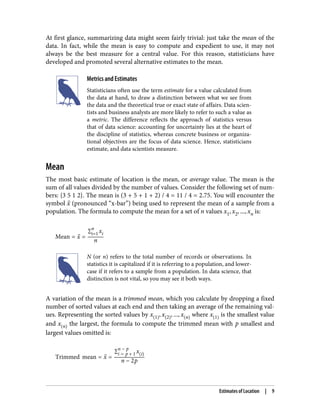
population. The formula to compute the mean for a set of n values x1, x2, ..., xn is:
Mean = x =
∑i=1
n
xi
n
N (or n) refers to the total number of records or observations. In
statistics it is capitalized if it is referring to a population, and lower‐
case if it refers to a sample from a population. In data science, that
distinction is not vital, so you may see it both ways.
A variation of the mean is a trimmed mean, which you calculate by dropping a fixed
number of sorted values at each end and then taking an average of the remaining val‐
ues. Representing the sorted values by x 1 , x 2 , ..., x n where x 1 is the smallest value
and x n the largest, the formula to compute the trimmed mean with p smallest and
largest values omitted is:
Trimmed mean = x =
∑i = p + 1
n − p
x i
n − 2p
Estimates of Location | 9
A trimmed mean eliminates the influence of extreme values. For example, in interna‐
tional diving the top score and bottom score from five judges are dropped, and the
final score is the average of the scores from the three remaining judges. This makes it
difficult for a single judge to manipulate the score, perhaps to favor their country’s
contestant. Trimmed means are widely used, and in many cases are preferable to
using the ordinary mean—see “Median and Robust Estimates” on page 10 for further
discussion.
Another type of mean is a weighted mean, which you calculate by multiplying each
data value xi by a user-specified weight wi and dividing their sum by the sum of the
weights. The formula for a weighted mean is:
Weighted mean = xw =
∑i = 1
n
wixi
∑i = 1
n
wi
There are two main motivations for using a weighted mean:
• Some values are intrinsically more variable than others, and highly variable
observations are given a lower weight. For example, if we are taking the average
from multiple sensors and one of the sensors is less accurate, then we might
downweight the data from that sensor.
• The data collected does not equally represent the different groups that we are
interested in measuring. For example, because of the way an online experiment
was conducted, we may not have a set of data that accurately reflects all groups in
the user base. To correct that, we can give a higher weight to the values from the
groups that were underrepresented.
Median and Robust Estimates
The median is the middle number on a sorted list of the data. If there is an even num‐
ber of data values, the middle value is one that is not actually in the data set, but
rather the average of the two values that divide the sorted data into upper and lower
halves. Compared to the mean, which uses all observations, the median depends only
on the values in the center of the sorted data. While this might seem to be a disadvan‐
tage, since the mean is much more sensitive to the data, there are many instances in
which the median is a better metric for location. Let’s say we want to look at typical
household incomes in neighborhoods around Lake Washington in Seattle. In com‐
paring the Medina neighborhood to the Windermere neighborhood, using the mean
would produce very different results because Bill Gates lives in Medina. If we use the
median, it won’t matter how rich Bill Gates is—the position of the middle observation
will remain the same.
10 | Chapter 1: Exploratory Data Analysis
For the same reasons that one uses a weighted mean, it is also possible to compute a
weighted median. As with the median, we first sort the data, although each data value
has an associated weight. Instead of the middle number, the weighted median is a
value such that the sum of the weights is equal for the lower and upper halves of the
sorted list. Like the median, the weighted median is robust to outliers.
Outliers
The median is referred to as a robust estimate of location since it is not influenced by
outliers (extreme cases) that could skew the results. An outlier is any value that is very
distant from the other values in a data set. The exact definition of an outlier is some‐
what subjective, although certain conventions are used in various data summaries
and plots (see “Percentiles and Boxplots” on page 20). Being an outlier in itself does
not make a data value invalid or erroneous (as in the previous example with Bill
Gates). Still, outliers are often the result of data errors such as mixing data of different
units (kilometers versus meters) or bad readings from a sensor. When outliers are the
result of bad data, the mean will result in a poor estimate of location, while the
median will still be valid. In any case, outliers should be identified and are usually
worthy of further investigation.
Anomaly Detection
In contrast to typical data analysis, where outliers are sometimes
informative and sometimes a nuisance, in anomaly detection the
points of interest are the outliers, and the greater mass of data
serves primarily to define the “normal” against which anomalies
are measured.
The median is not the only robust estimate of location. In fact, a trimmed mean is
widely used to avoid the influence of outliers. For example, trimming the bottom and
top 10% (a common choice) of the data will provide protection against outliers in all
but the smallest data sets. The trimmed mean can be thought of as a compromise
between the median and the mean: it is robust to extreme values in the data, but uses
more data to calculate the estimate for location.
Other Robust Metrics for Location
Statisticians have developed a plethora of other estimators for loca‐
tion, primarily with the goal of developing an estimator more
robust than the mean and also more efficient (i.e., better able to
discern small location differences between data sets). While these
methods are potentially useful for small data sets, they are not
likely to provide added benefit for large or even moderately sized
data sets.
Estimates of Location | 11
Example: Location Estimates of Population and Murder Rates
Table 1-2 shows the first few rows in the data set containing population and murder
rates (in units of murders per 100,000 people per year) for each US state (2010
Census).
Table 1-2. A few rows of the data.frame state of population and murder rate by state
State Population Murder rate Abbreviation
1 Alabama 4,779,736 5.7 AL
2 Alaska 710,231 5.6 AK
3 Arizona 6,392,017 4.7 AZ
4 Arkansas 2,915,918 5.6 AR
5 California 37,253,956 4.4 CA
6 Colorado 5,029,196 2.8 CO
7 Connecticut 3,574,097 2.4 CT
8 Delaware 897,934 5.8 DE
Compute the mean, trimmed mean, and median for the population using R:
> state <- read.csv('state.csv')
> mean(state[['Population']])
[1] 6162876
> mean(state[['Population']], trim=0.1)
[1] 4783697
> median(state[['Population']])
[1] 4436370
To compute mean and median in Python we can use the pandas methods of the data
frame. The trimmed mean requires the trim_mean function in scipy.stats:
state = pd.read_csv('state.csv')
state['Population'].mean()
trim_mean(state['Population'], 0.1)
state['Population'].median()
The mean is bigger than the trimmed mean, which is bigger than the median.
This is because the trimmed mean excludes the largest and smallest five states
(trim=0.1 drops 10% from each end). If we want to compute the average murder rate
for the country, we need to use a weighted mean or median to account for different
populations in the states. Since base R doesn’t have a function for weighted median,
we need to install a package such as matrixStats:
> weighted.mean(state[['Murder.Rate']], w=state[['Population']])
[1] 4.445834
> library('matrixStats')
12 | Chapter 1: Exploratory Data Analysis
> weightedMedian(state[['Murder.Rate']], w=state[['Population']])
[1] 4.4
Weighted mean is available with NumPy. For weighted median, we can use the special‐
ized package wquantiles:
np.average(state['Murder.Rate'], weights=state['Population'])
wquantiles.median(state['Murder.Rate'], weights=state['Population'])
In this case, the weighted mean and the weighted median are about the same.
Key Ideas
• The basic metric for location is the mean, but it can be sensitive to extreme
values (outlier).
• Other metrics (median, trimmed mean) are less sensitive to outliers and unusual
distributions and hence are more robust.
Further Reading
• The Wikipedia article on central tendency contains an extensive discussion of
various measures of location.
• John Tukey’s 1977 classic Exploratory Data Analysis (Pearson) is still widely read.
Estimates of Variability
Location is just one dimension in summarizing a feature. A second dimension, varia‐
bility, also referred to as dispersion, measures whether the data values are tightly clus‐
tered or spread out. At the heart of statistics lies variability: measuring it, reducing it,
distinguishing random from real variability, identifying the various sources of real
variability, and making decisions in the presence of it.
Key Terms for Variability Metrics
Deviations
The difference between the observed values and the estimate of location.
Synonyms
errors, residuals
Variance
The sum of squared deviations from the mean divided by n – 1 where n is the
number of data values.
Estimates of Variability | 13
Synonym
mean-squared-error
Standard deviation
The square root of the variance.
Mean absolute deviation
The mean of the absolute values of the deviations from the mean.
Synonyms
l1-norm, Manhattan norm
Median absolute deviation from the median
The median of the absolute values of the deviations from the median.
Range
The difference between the largest and the smallest value in a data set.
Order statistics
Metrics based on the data values sorted from smallest to biggest.
Synonym
ranks
Percentile
The value such that P percent of the values take on this value or less and (100–P)
percent take on this value or more.
Synonym
quantile
Interquartile range
The difference between the 75th percentile and the 25th percentile.
Synonym
IQR
Just as there are different ways to measure location (mean, median, etc.), there are
also different ways to measure variability.
Standard Deviation and Related Estimates
The most widely used estimates of variation are based on the differences, or devia‐
tions, between the estimate of location and the observed data. For a set of data
{1, 4, 4}, the mean is 3 and the median is 4. The deviations from the mean are the
differences: 1 – 3 = –2, 4 – 3 = 1, 4 – 3 = 1. These deviations tell us how dispersed the
data is around the central value.
14 | Chapter 1: Exploratory Data Analysis
One way to measure variability is to estimate a typical value for these deviations.
Averaging the deviations themselves would not tell us much—the negative deviations
offset the positive ones. In fact, the sum of the deviations from the mean is precisely
zero. Instead, a simple approach is to take the average of the absolute values of the
deviations from the mean. In the preceding example, the absolute value of the devia‐
tions is {2 1 1}, and their average is (2 + 1 + 1) / 3 = 1.33. This is known as the mean
absolute deviation and is computed with the formula:
Mean absolute deviation =
∑i = 1
n
xi − x
n
where x is the sample mean.
The best-known estimates of variability are the variance and the standard deviation,
which are based on squared deviations. The variance is an average of the squared
deviations, and the standard deviation is the square root of the variance:
Variance = s2
=
∑i = 1
n
xi − x 2
n − 1
Standard deviation = s = Variance
The standard deviation is much easier to interpret than the variance since it is on the
same scale as the original data. Still, with its more complicated and less intuitive for‐
mula, it might seem peculiar that the standard deviation is preferred in statistics over
the mean absolute deviation. It owes its preeminence to statistical theory: mathemati‐
cally, working with squared values is much more convenient than absolute values,
especially for statistical models.
Degrees of Freedom, and n or n – 1?
In statistics books, there is always some discussion of why we have n – 1 in the
denominator in the variance formula, instead of n, leading into the concept of degrees
of freedom. This distinction is not important since n is generally large enough that it
won’t make much difference whether you divide by n or n – 1. But in case you are
interested, here is the story. It is based on the premise that you want to make esti‐
mates about a population, based on a sample.
If you use the intuitive denominator of n in the variance formula, you will underesti‐
mate the true value of the variance and the standard deviation in the population. This
is referred to as a biased estimate. However, if you divide by n – 1 instead of n, the
variance becomes an unbiased estimate.
Estimates of Variability | 15
To fully explain why using n leads to a biased estimate involves the notion of degrees
of freedom, which takes into account the number of constraints in computing an esti‐
mate. In this case, there are n – 1 degrees of freedom since there is one constraint: the
standard deviation depends on calculating the sample mean. For most problems, data
scientists do not need to worry about degrees of freedom.
Neither the variance, the standard deviation, nor the mean absolute deviation is
robust to outliers and extreme values (see “Median and Robust Estimates” on page 10
for a discussion of robust estimates for location). The variance and standard devia‐
tion are especially sensitive to outliers since they are based on the squared deviations.
A robust estimate of variability is the median absolute deviation from the median or
MAD:
Median absolute deviation = Median x1 − m , x2 − m , ..., xN − m
where m is the median. Like the median, the MAD is not influenced by extreme val‐
ues. It is also possible to compute a trimmed standard deviation analogous to the
trimmed mean (see “Mean” on page 9).
The variance, the standard deviation, the mean absolute deviation,
and the median absolute deviation from the median are not equiv‐
alent estimates, even in the case where the data comes from a nor‐
mal distribution. In fact, the standard deviation is always greater
than the mean absolute deviation, which itself is greater than the
median absolute deviation. Sometimes, the median absolute devia‐
tion is multiplied by a constant scaling factor to put the MAD on
the same scale as the standard deviation in the case of a normal dis‐
tribution. The commonly used factor of 1.4826 means that 50% of
the normal distribution fall within the range ±MAD (see, e.g.,
https://oreil.ly/SfDk2).
Estimates Based on Percentiles
A different approach to estimating dispersion is based on looking at the spread of the
sorted data. Statistics based on sorted (ranked) data are referred to as order statistics.
The most basic measure is the range: the difference between the largest and smallest
numbers. The minimum and maximum values themselves are useful to know and are
helpful in identifying outliers, but the range is extremely sensitive to outliers and not
very useful as a general measure of dispersion in the data.
To avoid the sensitivity to outliers, we can look at the range of the data after dropping
values from each end. Formally, these types of estimates are based on differences
16 | Chapter 1: Exploratory Data Analysis
between percentiles. In a data set, the Pth percentile is a value such that at least P per‐
cent of the values take on this value or less and at least (100 – P) percent of the values
take on this value or more. For example, to find the 80th percentile, sort the data.
Then, starting with the smallest value, proceed 80 percent of the way to the largest
value. Note that the median is the same thing as the 50th percentile. The percentile is
essentially the same as a quantile, with quantiles indexed by fractions (so the .8 quan‐
tile is the same as the 80th percentile).
A common measurement of variability is the difference between the 25th percentile
and the 75th percentile, called the interquartile range (or IQR). Here is a simple exam‐
ple: {3,1,5,3,6,7,2,9}. We sort these to get {1,2,3,3,5,6,7,9}. The 25th percentile is at 2.5,
and the 75th percentile is at 6.5, so the interquartile range is 6.5 – 2.5 = 4. Software
can have slightly differing approaches that yield different answers (see the following
tip); typically, these differences are smaller.
For very large data sets, calculating exact percentiles can be computationally very
expensive since it requires sorting all the data values. Machine learning and statistical
software use special algorithms, such as [Zhang-Wang-2007], to get an approximate
percentile that can be calculated very quickly and is guaranteed to have a certain
accuracy.
Percentile: Precise Definition
If we have an even number of data (n is even), then the percentile is
ambiguous under the preceding definition. In fact, we could take
on any value between the order statistics x j and x j + 1 where j
satisfies:
100 *
j
n
≤ P < 100 *
j + 1
n
Formally, the percentile is the weighted average:
Percentile P = 1 − w x j + wx j + 1
for some weight w between 0 and 1. Statistical software has slightly
differing approaches to choosing w. In fact, the R function quan
tile offers nine different alternatives to compute the quantile.
Except for small data sets, you don’t usually need to worry about
the precise way a percentile is calculated. At the time of this writ‐
ing, Python’s numpy.quantile supports only one approach, linear
interpolation.
Estimates of Variability | 17
Example: Variability Estimates of State Population
Table 1-3 (repeated from Table 1-2 for convenience) shows the first few rows in the
data set containing population and murder rates for each state.
Table 1-3. A few rows of the data.frame state of population and murder rate by state
State Population Murder rate Abbreviation
1 Alabama 4,779,736 5.7 AL
2 Alaska 710,231 5.6 AK
3 Arizona 6,392,017 4.7 AZ
4 Arkansas 2,915,918 5.6 AR
5 California 37,253,956 4.4 CA
6 Colorado 5,029,196 2.8 CO
7 Connecticut 3,574,097 2.4 CT
8 Delaware 897,934 5.8 DE
Using R’s built-in functions for the standard deviation, the interquartile range (IQR),
and the median absolute deviation from the median (MAD), we can compute esti‐
mates of variability for the state population data:
> sd(state[['Population']])
[1] 6848235
> IQR(state[['Population']])
[1] 4847308
> mad(state[['Population']])
[1] 3849870
The pandas data frame provides methods for calculating standard deviation and
quantiles. Using the quantiles, we can easily determine the IQR. For the robust MAD,
we use the function robust.scale.mad from the statsmodels package:
state['Population'].std()
state['Population'].quantile(0.75) - state['Population'].quantile(0.25)
robust.scale.mad(state['Population'])
The standard deviation is almost twice as large as the MAD (in R, by default, the scale
of the MAD is adjusted to be on the same scale as the mean). This is not surprising
since the standard deviation is sensitive to outliers.
18 | Chapter 1: Exploratory Data Analysis
Key Ideas
• Variance and standard deviation are the most widespread and routinely reported
statistics of variability.
• Both are sensitive to outliers.
• More robust metrics include mean absolute deviation, median absolute deviation
from the median, and percentiles (quantiles).
Further Reading
• David Lane’s online statistics resource has a section on percentiles.
• Kevin Davenport has a useful post on R-Bloggers about deviations from the
median and their robust properties.
Exploring the Data Distribution
Each of the estimates we’ve covered sums up the data in a single number to describe
the location or variability of the data. It is also useful to explore how the data is dis‐
tributed overall.
Key Terms for Exploring the Distribution
Boxplot
A plot introduced by Tukey as a quick way to visualize the distribution of data.
Synonym
box and whiskers plot
Frequency table
A tally of the count of numeric data values that fall into a set of intervals (bins).
Histogram
A plot of the frequency table with the bins on the x-axis and the count (or pro‐
portion) on the y-axis. While visually similar, bar charts should not be confused
with histograms. See “Exploring Binary and Categorical Data” on page 27 for a
discussion of the difference.
Density plot
A smoothed version of the histogram, often based on a kernel density estimate.
Exploring the Data Distribution | 19
Percentiles and Boxplots
In “Estimates Based on Percentiles” on page 16, we explored how percentiles can be
used to measure the spread of the data. Percentiles are also valuable for summarizing
the entire distribution. It is common to report the quartiles (25th, 50th, and 75th per‐
centiles) and the deciles (the 10th, 20th, …, 90th percentiles). Percentiles are espe‐
cially valuable for summarizing the tails (the outer range) of the distribution. Popular
culture has coined the term one-percenters to refer to the people in the top 99th per‐
centile of wealth.
Table 1-4 displays some percentiles of the murder rate by state. In R, this would be
produced by the quantile function:
quantile(state[['Murder.Rate']], p=c(.05, .25, .5, .75, .95))
5% 25% 50% 75% 95%
1.600 2.425 4.000 5.550 6.510
The pandas data frame method quantile provides it in Python:
state['Murder.Rate'].quantile([0.05, 0.25, 0.5, 0.75, 0.95])
Table 1-4. Percentiles of murder rate by state
5% 25% 50% 75% 95%
1.60 2.42 4.00 5.55 6.51
The median is 4 murders per 100,000 people, although there is quite a bit of variabil‐
ity: the 5th percentile is only 1.6 and the 95th percentile is 6.51.
Boxplots, introduced by Tukey [Tukey-1977], are based on percentiles and give a
quick way to visualize the distribution of data. Figure 1-2 shows a boxplot of the pop‐
ulation by state produced by R:
boxplot(state[['Population']]/1000000, ylab='Population (millions)')
pandas provides a number of basic exploratory plots for data frame; one of them is
boxplots:
ax = (state['Population']/1_000_000).plot.box()
ax.set_ylabel('Population (millions)')
20 | Chapter 1: Exploratory Data Analysis
Figure 1-2. Boxplot of state populations
From this boxplot we can immediately see that the median state population is about 5
million, half the states fall between about 2 million and about 7 million, and there are
some high population outliers. The top and bottom of the box are the 75th and 25th
percentiles, respectively. The median is shown by the horizontal line in the box. The
dashed lines, referred to as whiskers, extend from the top and bottom of the box to
indicate the range for the bulk of the data. There are many variations of a boxplot;
see, for example, the documentation for the R function boxplot [R-base-2015]. By
default, the R function extends the whiskers to the furthest point beyond the box,
except that it will not go beyond 1.5 times the IQR. Matplotlib uses the same imple‐
mentation; other software may use a different rule.
Any data outside of the whiskers is plotted as single points or circles (often consid‐
ered outliers).
Exploring the Data Distribution | 21
Frequency Tables and Histograms
A frequency table of a variable divides up the variable range into equally spaced seg‐
ments and tells us how many values fall within each segment. Table 1-5 shows a fre‐
quency table of the population by state computed in R:
breaks <- seq(from=min(state[['Population']]),
to=max(state[['Population']]), length=11)
pop_freq <- cut(state[['Population']], breaks=breaks,
right=TRUE, include.lowest=TRUE)
table(pop_freq)
The function pandas.cut creates a series that maps the values into the segments.
Using the method value_counts, we get the frequency table:
binnedPopulation = pd.cut(state['Population'], 10)
binnedPopulation.value_counts()
Table 1-5. A frequency table of population by state
BinNumber BinRange Count States
1 563,626–4,232,658 24 WY,VT,ND,AK,SD,DE,MT,RI,NH,ME,HI,ID,NE,WV,NM,NV,UT,KS,AR,MS,IA,CT,OK,OR
2 4,232,659–
7,901,691
14 KY,LA,SC,AL,CO,MN,WI,MD,MO,TN,AZ,IN,MA,WA
3 7,901,692–
11,570,724
6 VA,NJ,NC,GA,MI,OH
4 11,570,725–
15,239,757
2 PA,IL
5 15,239,758–
18,908,790
1 FL
6 18,908,791–
22,577,823
1 NY
7 22,577,824–
26,246,856
1 TX
8 26,246,857–
29,915,889
0
9 29,915,890–
33,584,922
0
10 33,584,923–
37,253,956
1 CA
The least populous state is Wyoming, with 563,626 people, and the most populous is
California, with 37,253,956 people. This gives us a range of 37,253,956 – 563,626 =
36,690,330, which we must divide up into equal size bins—let’s say 10 bins. With 10
equal size bins, each bin will have a width of 3,669,033, so the first bin will span from
563,626 to 4,232,658. By contrast, the top bin, 33,584,923 to 37,253,956, has only one
state: California. The two bins immediately below California are empty, until we
22 | Chapter 1: Exploratory Data Analysis
reach Texas. It is important to include the empty bins; the fact that there are no values
in those bins is useful information. It can also be useful to experiment with different
bin sizes. If they are too large, important features of the distribution can be obscured.
If they are too small, the result is too granular, and the ability to see the bigger picture
is lost.
Both frequency tables and percentiles summarize the data by creat‐
ing bins. In general, quartiles and deciles will have the same count
in each bin (equal-count bins), but the bin sizes will be different.
The frequency table, by contrast, will have different counts in the
bins (equal-size bins), and the bin sizes will be the same.
A histogram is a way to visualize a frequency table, with bins on the x-axis and the
data count on the y-axis. In Figure 1-3, for example, the bin centered at 10 million
(1e+07) runs from roughly 8 million to 12 million, and there are six states in that bin.
To create a histogram corresponding to Table 1-5 in R, use the hist function with the
breaks argument:
hist(state[['Population']], breaks=breaks)
pandas supports histograms for data frames with the DataFrame.plot.hist method.
Use the keyword argument bins to define the number of bins. The various plot meth‐
ods return an axis object that allows further fine-tuning of the visualization using
Matplotlib:
ax = (state['Population'] / 1_000_000).plot.hist(figsize=(4, 4))
ax.set_xlabel('Population (millions)')
The histogram is shown in Figure 1-3. In general, histograms are plotted such that:
• Empty bins are included in the graph.
• Bins are of equal width.
• The number of bins (or, equivalently, bin size) is up to the user.
• Bars are contiguous—no empty space shows between bars, unless there is an
empty bin.
Exploring the Data Distribution | 23
Figure 1-3. Histogram of state populations
Statistical Moments
In statistical theory, location and variability are referred to as the
first and second moments of a distribution. The third and fourth
moments are called skewness and kurtosis. Skewness refers to
whether the data is skewed to larger or smaller values, and kurtosis
indicates the propensity of the data to have extreme values. Gener‐
ally, metrics are not used to measure skewness and kurtosis;
instead, these are discovered through visual displays such as Fig‐
ures 1-2 and 1-3.
Density Plots and Estimates
Related to the histogram is a density plot, which shows the distribution of data values
as a continuous line. A density plot can be thought of as a smoothed histogram,
although it is typically computed directly from the data through a kernel density esti‐
mate (see [Duong-2001] for a short tutorial). Figure 1-4 displays a density estimate
superposed on a histogram. In R, you can compute a density estimate using the
density function:
24 | Chapter 1: Exploratory Data Analysis
hist(state[['Murder.Rate']], freq=FALSE)
lines(density(state[['Murder.Rate']]), lwd=3, col='blue')
pandas provides the density method to create a density plot. Use the argument
bw_method to control the smoothness of the density curve:
ax = state['Murder.Rate'].plot.hist(density=True, xlim=[0,12], bins=range(1,12))
state['Murder.Rate'].plot.density(ax=ax)
ax.set_xlabel('Murder Rate (per 100,000)')
Plot functions often take an optional axis (ax) argument, which will cause the
plot to be added to the same graph.
A key distinction from the histogram plotted in Figure 1-3 is the scale of the y-axis: a
density plot corresponds to plotting the histogram as a proportion rather than counts
(you specify this in R using the argument freq=FALSE). Note that the total area under
the density curve = 1, and instead of counts in bins you calculate areas under the
curve between any two points on the x-axis, which correspond to the proportion of
the distribution lying between those two points.
Figure 1-4. Density of state murder rates
Exploring the Data Distribution | 25
Density Estimation
Density estimation is a rich topic with a long history in statistical
literature. In fact, over 20 R packages have been published that
offer functions for density estimation. [Deng-Wickham-2011] give
a comprehensive review of R packages, with a particular recom‐
mendation for ASH or KernSmooth. The density estimation methods
in pandas and scikit-learn also offer good implementations. For
many data science problems, there is no need to worry about the
various types of density estimates; it suffices to use the base
functions.
Key Ideas
• A frequency histogram plots frequency counts on the y-axis and variable values
on the x-axis; it gives a sense of the distribution of the data at a glance.
• A frequency table is a tabular version of the frequency counts found in a
histogram.
• A boxplot—with the top and bottom of the box at the 75th and 25th percentiles,
respectively—also gives a quick sense of the distribution of the data; it is often
used in side-by-side displays to compare distributions.
• A density plot is a smoothed version of a histogram; it requires a function to esti‐
mate a plot based on the data (multiple estimates are possible, of course).
Further Reading
• A SUNY Oswego professor provides a step-by-step guide to creating a boxplot.
• Density estimation in R is covered in Henry Deng and Hadley Wickham’s paper
of the same name.
• R-Bloggers has a useful post on histograms in R, including customization ele‐
ments, such as binning (breaks).
• R-Bloggers also has a similar post on boxplots in R.
• Matthew Conlen published an interactive presentation that demonstrates the
effect of choosing different kernels and bandwidth on kernel density estimates.
26 | Chapter 1: Exploratory Data Analysis
Exploring Binary and Categorical Data
For categorical data, simple proportions or percentages tell the story of the data.
Key Terms for Exploring Categorical Data
Mode
The most commonly occurring category or value in a data set.
Expected value
When the categories can be associated with a numeric value, this gives an average
value based on a category’s probability of occurrence.
Bar charts
The frequency or proportion for each category plotted as bars.
Pie charts
The frequency or proportion for each category plotted as wedges in a pie.
Getting a summary of a binary variable or a categorical variable with a few categories
is a fairly easy matter: we just figure out the proportion of 1s, or the proportions of
the important categories. For example, Table 1-6 shows the percentage of delayed
flights by the cause of delay at Dallas/Fort Worth Airport since 2010. Delays are cate‐
gorized as being due to factors under carrier control, air traffic control (ATC) system
delays, weather, security, or a late inbound aircraft.
Table 1-6. Percentage of delays by cause at Dallas/Fort Worth Airport
Carrier ATC Weather Security Inbound
23.02 30.40 4.03 0.12 42.43
Bar charts, seen often in the popular press, are a common visual tool for displaying a
single categorical variable. Categories are listed on the x-axis, and frequencies or pro‐
portions on the y-axis. Figure 1-5 shows the airport delays per year by cause for
Dallas/Fort Worth (DFW), and it is produced with the R function barplot:
barplot(as.matrix(dfw) / 6, cex.axis=0.8, cex.names=0.7,
xlab='Cause of delay', ylab='Count')
pandas also supports bar charts for data frames:
ax = dfw.transpose().plot.bar(figsize=(4, 4), legend=False)
ax.set_xlabel('Cause of delay')
ax.set_ylabel('Count')
Exploring Binary and Categorical Data | 27
Figure 1-5. Bar chart of airline delays at DFW by cause
Note that a bar chart resembles a histogram; in a bar chart the x-axis represents dif‐
ferent categories of a factor variable, while in a histogram the x-axis represents values
of a single variable on a numeric scale. In a histogram, the bars are typically shown
touching each other, with gaps indicating values that did not occur in the data. In a
bar chart, the bars are shown separate from one another.
Pie charts are an alternative to bar charts, although statisticians and data visualization
experts generally eschew pie charts as less visually informative (see [Few-2007]).
28 | Chapter 1: Exploratory Data Analysis
Numerical Data as Categorical Data
In “Frequency Tables and Histograms” on page 22, we looked at
frequency tables based on binning the data. This implicitly converts
the numeric data to an ordered factor. In this sense, histograms and
bar charts are similar, except that the categories on the x-axis in the
bar chart are not ordered. Converting numeric data to categorical
data is an important and widely used step in data analysis since it
reduces the complexity (and size) of the data. This aids in the dis‐
covery of relationships between features, particularly at the initial
stages of an analysis.
Mode
The mode is the value—or values in case of a tie—that appears most often in the data.
For example, the mode of the cause of delay at Dallas/Fort Worth airport is
“Inbound.” As another example, in most parts of the United States, the mode for reli‐
gious preference would be Christian. The mode is a simple summary statistic for
categorical data, and it is generally not used for numeric data.
Expected Value
A special type of categorical data is data in which the categories represent or can be
mapped to discrete values on the same scale. A marketer for a new cloud technology,
for example, offers two levels of service, one priced at $300/month and another at
$50/month. The marketer offers free webinars to generate leads, and the firm figures
that 5% of the attendees will sign up for the $300 service, 15% will sign up for the $50
service, and 80% will not sign up for anything. This data can be summed up, for
financial purposes, in a single “expected value,” which is a form of weighted mean, in
which the weights are probabilities.
The expected value is calculated as follows:
1. Multiply each outcome by its probability of occurrence.
2. Sum these values.
In the cloud service example, the expected value of a webinar attendee is thus $22.50
per month, calculated as follows:
EV = 0 . 05 300 + 0 . 15 50 + 0 . 80 0 = 22 . 5
The expected value is really a form of weighted mean: it adds the ideas of future
expectations and probability weights, often based on subjective judgment. Expected
value is a fundamental concept in business valuation and capital budgeting—for
Exploring Binary and Categorical Data | 29
example, the expected value of five years of profits from a new acquisition, or the
expected cost savings from new patient management software at a clinic.
Probability
We referred above to the probability of a value occurring. Most people have an intu‐
itive understanding of probability, encountering the concept frequently in weather
forecasts (the chance of rain) or sports analysis (the probability of winning). Sports
and games are more often expressed as odds, which are readily convertible to proba‐
bilities (if the odds that a team will win are 2 to 1, its probability of winning is 2/(2+1)
= 2/3). Surprisingly, though, the concept of probability can be the source of deep
philosophical discussion when it comes to defining it. Fortunately, we do not need a
formal mathematical or philosophical definition here. For our purposes, the probabil‐
ity that an event will happen is the proportion of times it will occur if the situation
could be repeated over and over, countless times. Most often this is an imaginary con‐
struction, but it is an adequate operational understanding of probability.
Key Ideas
• Categorical data is typically summed up in proportions and can be visualized in a
bar chart.
• Categories might represent distinct things (apples and oranges, male and female),
levels of a factor variable (low, medium, and high), or numeric data that has been
binned.
• Expected value is the sum of values times their probability of occurrence, often
used to sum up factor variable levels.
Further Reading
No statistics course is complete without a lesson on misleading graphs, which often
involves bar charts and pie charts.
Correlation
Exploratory data analysis in many modeling projects (whether in data science or in
research) involves examining correlation among predictors, and between predictors
and a target variable. Variables X and Y (each with measured data) are said to be posi‐
tively correlated if high values of X go with high values of Y, and low values of X go
with low values of Y. If high values of X go with low values of Y, and vice versa, the
variables are negatively correlated.
30 | Chapter 1: Exploratory Data Analysis
Key Terms for Correlation
Correlation coefficient
A metric that measures the extent to which numeric variables are associated with
one another (ranges from –1 to +1).
Correlation matrix
A table where the variables are shown on both rows and columns, and the cell
values are the correlations between the variables.
Scatterplot
A plot in which the x-axis is the value of one variable, and the y-axis the value of
another.
Consider these two variables, perfectly correlated in the sense that each goes from low
to high:
v1: {1, 2, 3}
v2: {4, 5, 6}
The vector sum of products is 1 · 4 + 2 · 5 + 3 · 6 = 32. Now try shuffling one of them
and recalculating—the vector sum of products will never be higher than 32. So this
sum of products could be used as a metric; that is, the observed sum of 32 could be
compared to lots of random shufflings (in fact, this idea relates to a resampling-based
estimate; see “Permutation Test” on page 97). Values produced by this metric, though,
are not that meaningful, except by reference to the resampling distribution.
More useful is a standardized variant: the correlation coefficient, which gives an esti‐
mate of the correlation between two variables that always lies on the same scale. To
compute Pearson’s correlation coefficient, we multiply deviations from the mean for
variable 1 times those for variable 2, and divide by the product of the standard
deviations:
r =
∑i = 1
n
xi − x yi − y
n − 1 sxsy
Note that we divide by n – 1 instead of n; see “Degrees of Freedom, and n or n – 1?”
on page 15 for more details. The correlation coefficient always lies between +1
(perfect positive correlation) and –1 (perfect negative correlation); 0 indicates no
correlation.
Variables can have an association that is not linear, in which case the correlation coef‐
ficient may not be a useful metric. The relationship between tax rates and revenue
Correlation | 31
raised is an example: as tax rates increase from zero, the revenue raised also increases.
However, once tax rates reach a high level and approach 100%, tax avoidance increa‐
ses and tax revenue actually declines.
Table 1-7, called a correlation matrix, shows the correlation between the daily returns
for telecommunication stocks from July 2012 through June 2015. From the table, you
can see that Verizon (VZ) and ATT (T) have the highest correlation. Level 3 (LVLT),
which is an infrastructure company, has the lowest correlation with the others. Note
the diagonal of 1s (the correlation of a stock with itself is 1) and the redundancy of
the information above and below the diagonal.
Table 1-7. Correlation between telecommunication stock returns
T CTL FTR VZ LVLT
T 1.000 0.475 0.328 0.678 0.279
CTL 0.475 1.000 0.420 0.417 0.287
FTR 0.328 0.420 1.000 0.287 0.260
VZ 0.678 0.417 0.287 1.000 0.242
LVLT 0.279 0.287 0.260 0.242 1.000
A table of correlations like Table 1-7 is commonly plotted to visually display the rela‐
tionship between multiple variables. Figure 1-6 shows the correlation between the
daily returns for major exchange-traded funds (ETFs). In R, we can easily create this
using the package corrplot:
etfs <- sp500_px[row.names(sp500_px) > '2012-07-01',
sp500_sym[sp500_sym$sector == 'etf', 'symbol']]
library(corrplot)
corrplot(cor(etfs), method='ellipse')
It is possible to create the same graph in Python, but there is no implementation in
the common packages. However, most support the visualization of correlation matri‐
ces using heatmaps. The following code demonstrates this using the seaborn.heat
map package. In the accompanying source code repository, we include Python code to
generate the more comprehensive visualization:
etfs = sp500_px.loc[sp500_px.index > '2012-07-01',
sp500_sym[sp500_sym['sector'] == 'etf']['symbol']]
sns.heatmap(etfs.corr(), vmin=-1, vmax=1,
cmap=sns.diverging_palette(20, 220, as_cmap=True))
The ETFs for the S&P 500 (SPY) and the Dow Jones Index (DIA) have a high correla‐
tion. Similarly, the QQQ and the XLK, composed mostly of technology companies,
are positively correlated. Defensive ETFs, such as those tracking gold prices (GLD),
oil prices (USO), or market volatility (VXX), tend to be weakly or negatively correla‐
ted with the other ETFs. The orientation of the ellipse indicates whether two variables
32 | Chapter 1: Exploratory Data Analysis

Practical Statistics for Data Scientists: 50+ Essential Concepts Using R and Python (Part 1)

  • 1.
    Peter Bruce, AndrewBruce & Peter Gedeck S e c o n d E d i t i o n Practical Statistics for Data Scientists 50+ Essential Concepts Using R and Python
  • 3.
    Peter Bruce, AndrewBruce, and Peter Gedeck Practical Statistics for Data Scientists 50+ Essential Concepts Using R and Python SECOND EDITION Boston Farnham Sebastopol Tokyo Beijing Boston Farnham Sebastopol Tokyo Beijing
  • 4.
    978-1-492-07294-2 [LSI] Practical Statistics forData Scientists by Peter Bruce, Andrew Bruce, and Peter Gedeck Copyright © 2020 Peter Bruce, Andrew Bruce, and Peter Gedeck. All rights reserved. Printed in the United States of America. Published by O’Reilly Media, Inc., 1005 Gravenstein Highway North, Sebastopol, CA 95472. O’Reilly books may be purchased for educational, business, or sales promotional use. Online editions are also available for most titles (http://oreilly.com). For more information, contact our corporate/institutional sales department: 800-998-9938 or corporate@oreilly.com. Editor: Nicole Tache Production Editor: Kristen Brown Copyeditor: Piper Editorial Proofreader: Arthur Johnson Indexer: Ellen Troutman-Zaig Interior Designer: David Futato Cover Designer: Karen Montgomery Illustrator: Rebecca Demarest May 2017: First Edition May 2020: Second Edition Revision History for the Second Edition 2020-04-10: First Release See http://oreilly.com/catalog/errata.csp?isbn=9781492072942 for release details. The O’Reilly logo is a registered trademark of O’Reilly Media, Inc. Practical Statistics for Data Scientists, the cover image, and related trade dress are trademarks of O’Reilly Media, Inc. The views expressed in this work are those of the authors, and do not represent the publisher’s views. While the publisher and the authors have used good faith efforts to ensure that the information and instructions contained in this work are accurate, the publisher and the authors disclaim all responsibility for errors or omissions, including without limitation responsibility for damages resulting from the use of or reliance on this work. Use of the information and instructions contained in this work is at your own risk. If any code samples or other technology this work contains or describes is subject to open source licenses or the intellectual property rights of others, it is your responsibility to ensure that your use thereof complies with such licenses and/or rights.
  • 5.
    Peter Bruce andAndrew Bruce would like to dedicate this book to the memories of our parents, Victor G. Bruce and Nancy C. Bruce, who cultivated a passion for math and science; and to our early mentors John W. Tukey and Julian Simon and our lifelong friend Geoff Watson, who helped inspire us to pursue a career in statistics. Peter Gedeck would like to dedicate this book to Tim Clark and Christian Kramer, with deep thanks for their scientific collaboration and friendship.
  • 7.
    Table of Contents Preface.. . . . . . . . . . . . . . . . . . . . . . . . . . . . . . . . . . . . . . . . . . . . . . . . . . . . . . . . . . . . . . . . . . . . . xiii 1. Exploratory Data Analysis. . . . . . . . . . . . . . . . . . . . . . . . . . . . . . . . . . . . . . . . . . . . . . . . . . . . . 1 Elements of Structured Data 2 Further Reading 4 Rectangular Data 4 Data Frames and Indexes 6 Nonrectangular Data Structures 6 Further Reading 7 Estimates of Location 7 Mean 9 Median and Robust Estimates 10 Example: Location Estimates of Population and Murder Rates 12 Further Reading 13 Estimates of Variability 13 Standard Deviation and Related Estimates 14 Estimates Based on Percentiles 16 Example: Variability Estimates of State Population 18 Further Reading 19 Exploring the Data Distribution 19 Percentiles and Boxplots 20 Frequency Tables and Histograms 22 Density Plots and Estimates 24 Further Reading 26 Exploring Binary and Categorical Data 27 Mode 29 Expected Value 29 Probability 30 v
  • 8.
    Further Reading 30 Correlation30 Scatterplots 34 Further Reading 36 Exploring Two or More Variables 36 Hexagonal Binning and Contours (Plotting Numeric Versus Numeric Data) 36 Two Categorical Variables 39 Categorical and Numeric Data 41 Visualizing Multiple Variables 43 Further Reading 46 Summary 46 2. Data and Sampling Distributions. . . . . . . . . . . . . . . . . . . . . . . . . . . . . . . . . . . . . . . . . . . . . 47 Random Sampling and Sample Bias 48 Bias 50 Random Selection 51 Size Versus Quality: When Does Size Matter? 52 Sample Mean Versus Population Mean 53 Further Reading 53 Selection Bias 54 Regression to the Mean 55 Further Reading 57 Sampling Distribution of a Statistic 57 Central Limit Theorem 60 Standard Error 60 Further Reading 61 The Bootstrap 61 Resampling Versus Bootstrapping 65 Further Reading 65 Confidence Intervals 65 Further Reading 68 Normal Distribution 69 Standard Normal and QQ-Plots 71 Long-Tailed Distributions 73 Further Reading 75 Student’s t-Distribution 75 Further Reading 78 Binomial Distribution 78 Further Reading 80 Chi-Square Distribution 80 Further Reading 81 F-Distribution 82 vi | Table of Contents
  • 9.
    Further Reading 82 Poissonand Related Distributions 82 Poisson Distributions 83 Exponential Distribution 84 Estimating the Failure Rate 84 Weibull Distribution 85 Further Reading 86 Summary 86 3. Statistical Experiments and Significance Testing. . . . . . . . . . . . . . . . . . . . . . . . . . . . . . . . 87 A/B Testing 88 Why Have a Control Group? 90 Why Just A/B? Why Not C, D,…? 91 Further Reading 92 Hypothesis Tests 93 The Null Hypothesis 94 Alternative Hypothesis 95 One-Way Versus Two-Way Hypothesis Tests 95 Further Reading 96 Resampling 96 Permutation Test 97 Example: Web Stickiness 98 Exhaustive and Bootstrap Permutation Tests 102 Permutation Tests: The Bottom Line for Data Science 102 Further Reading 103 Statistical Significance and p-Values 103 p-Value 106 Alpha 107 Type 1 and Type 2 Errors 109 Data Science and p-Values 109 Further Reading 110 t-Tests 110 Further Reading 112 Multiple Testing 112 Further Reading 116 Degrees of Freedom 116 Further Reading 118 ANOVA 118 F-Statistic 121 Two-Way ANOVA 123 Further Reading 124 Chi-Square Test 124 Table of Contents | vii
  • 10.
    Chi-Square Test: AResampling Approach 124 Chi-Square Test: Statistical Theory 127 Fisher’s Exact Test 128 Relevance for Data Science 130 Further Reading 131 Multi-Arm Bandit Algorithm 131 Further Reading 134 Power and Sample Size 135 Sample Size 136 Further Reading 138 Summary 139 4. Regression and Prediction. . . . . . . . . . . . . . . . . . . . . . . . . . . . . . . . . . . . . . . . . . . . . . . . . . 141 Simple Linear Regression 141 The Regression Equation 143 Fitted Values and Residuals 146 Least Squares 148 Prediction Versus Explanation (Profiling) 149 Further Reading 150 Multiple Linear Regression 150 Example: King County Housing Data 151 Assessing the Model 153 Cross-Validation 155 Model Selection and Stepwise Regression 156 Weighted Regression 159 Further Reading 161 Prediction Using Regression 161 The Dangers of Extrapolation 161 Confidence and Prediction Intervals 161 Factor Variables in Regression 163 Dummy Variables Representation 164 Factor Variables with Many Levels 167 Ordered Factor Variables 169 Interpreting the Regression Equation 169 Correlated Predictors 170 Multicollinearity 172 Confounding Variables 172 Interactions and Main Effects 174 Regression Diagnostics 176 Outliers 177 Influential Values 179 Heteroskedasticity, Non-Normality, and Correlated Errors 182 viii | Table of Contents
  • 11.
    Partial Residual Plotsand Nonlinearity 185 Polynomial and Spline Regression 187 Polynomial 188 Splines 189 Generalized Additive Models 192 Further Reading 193 Summary 194 5. Classification. . . . . . . . . . . . . . . . . . . . . . . . . . . . . . . . . . . . . . . . . . . . . . . . . . . . . . . . . . . . . 195 Naive Bayes 196 Why Exact Bayesian Classification Is Impractical 197 The Naive Solution 198 Numeric Predictor Variables 200 Further Reading 201 Discriminant Analysis 201 Covariance Matrix 202 Fisher’s Linear Discriminant 203 A Simple Example 204 Further Reading 207 Logistic Regression 208 Logistic Response Function and Logit 208 Logistic Regression and the GLM 210 Generalized Linear Models 212 Predicted Values from Logistic Regression 212 Interpreting the Coefficients and Odds Ratios 213 Linear and Logistic Regression: Similarities and Differences 214 Assessing the Model 216 Further Reading 219 Evaluating Classification Models 219 Confusion Matrix 221 The Rare Class Problem 223 Precision, Recall, and Specificity 223 ROC Curve 224 AUC 226 Lift 228 Further Reading 229 Strategies for Imbalanced Data 230 Undersampling 231 Oversampling and Up/Down Weighting 232 Data Generation 233 Cost-Based Classification 234 Exploring the Predictions 234 Table of Contents | ix
  • 12.
    Further Reading 236 Summary236 6. Statistical Machine Learning. . . . . . . . . . . . . . . . . . . . . . . . . . . . . . . . . . . . . . . . . . . . . . . . 237 K-Nearest Neighbors 238 A Small Example: Predicting Loan Default 239 Distance Metrics 241 One Hot Encoder 242 Standardization (Normalization, z-Scores) 243 Choosing K 246 KNN as a Feature Engine 247 Tree Models 249 A Simple Example 250 The Recursive Partitioning Algorithm 252 Measuring Homogeneity or Impurity 254 Stopping the Tree from Growing 256 Predicting a Continuous Value 257 How Trees Are Used 258 Further Reading 259 Bagging and the Random Forest 259 Bagging 260 Random Forest 261 Variable Importance 265 Hyperparameters 269 Boosting 270 The Boosting Algorithm 271 XGBoost 272 Regularization: Avoiding Overfitting 274 Hyperparameters and Cross-Validation 279 Summary 282 7. Unsupervised Learning. . . . . . . . . . . . . . . . . . . . . . . . . . . . . . . . . . . . . . . . . . . . . . . . . . . . . 283 Principal Components Analysis 284 A Simple Example 285 Computing the Principal Components 288 Interpreting Principal Components 289 Correspondence Analysis 292 Further Reading 294 K-Means Clustering 294 A Simple Example 295 K-Means Algorithm 298 Interpreting the Clusters 299 x | Table of Contents
  • 13.
    Selecting the Numberof Clusters 302 Hierarchical Clustering 304 A Simple Example 305 The Dendrogram 306 The Agglomerative Algorithm 308 Measures of Dissimilarity 309 Model-Based Clustering 311 Multivariate Normal Distribution 311 Mixtures of Normals 312 Selecting the Number of Clusters 315 Further Reading 318 Scaling and Categorical Variables 318 Scaling the Variables 319 Dominant Variables 321 Categorical Data and Gower’s Distance 322 Problems with Clustering Mixed Data 325 Summary 326 Bibliography. . . . . . . . . . . . . . . . . . . . . . . . . . . . . . . . . . . . . . . . . . . . . . . . . . . . . . . . . . . . . . . . . 327 Index. . . . . . . . . . . . . . . . . . . . . . . . . . . . . . . . . . . . . . . . . . . . . . . . . . . . . . . . . . . . . . . . . . . . . . . 329 Table of Contents | xi
  • 15.
    Preface This book isaimed at the data scientist with some familiarity with the R and/or Python programming languages, and with some prior (perhaps spotty or ephemeral) exposure to statistics. Two of the authors came to the world of data science from the world of statistics, and have some appreciation of the contribution that statistics can make to the art of data science. At the same time, we are well aware of the limitations of traditional statistics instruction: statistics as a discipline is a century and a half old, and most statistics textbooks and courses are laden with the momentum and inertia of an ocean liner. All the methods in this book have some connection—historical or methodological—to the discipline of statistics. Methods that evolved mainly out of computer science, such as neural nets, are not included. Two goals underlie this book: • To lay out, in digestible, navigable, and easily referenced form, key concepts from statistics that are relevant to data science. • To explain which concepts are important and useful from a data science perspec‐ tive, which are less so, and why. Conventions Used in This Book The following typographical conventions are used in this book: Italic Indicates new terms, URLs, email addresses, filenames, and file extensions. Constant width Used for program listings, as well as within paragraphs to refer to program ele‐ ments such as variable or function names, databases, data types, environment variables, statements, and keywords. xiii
  • 16.
    Constant width bold Showscommands or other text that should be typed literally by the user. Key Terms Data science is a fusion of multiple disciplines, including statistics, computer science, information technology, and domain-specific fields. As a result, several different terms could be used to reference a given concept. Key terms and their synonyms will be highlighted throughout the book in a sidebar such as this. This element signifies a tip or suggestion. This element signifies a general note. This element indicates a warning or caution. Using Code Examples In all cases, this book gives code examples first in R and then in Python. In order to avoid unnecessary repetition, we generally show only output and plots created by the R code. We also skip the code required to load the required packages and data sets. You can find the complete code as well as the data sets for download at https:// github.com/gedeck/practical-statistics-for-data-scientists. This book is here to help you get your job done. In general, if example code is offered with this book, you may use it in your programs and documentation. You do not need to contact us for permission unless you’re reproducing a significant portion of the code. For example, writing a program that uses several chunks of code from this book does not require permission. Selling or distributing examples from O’Reilly books does require permission. Answering a question by citing this book and quoting example code does not require permission. Incorporating a significant amount of xiv | Preface
  • 17.
    example code fromthis book into your product’s documentation does require per‐ mission. We appreciate, but do not require, attribution. An attribution usually includes the title, author, publisher, and ISBN. For example: “Practical Statistics for Data Scientists by Peter Bruce, Andrew Bruce, and Peter Gedeck (O’Reilly). Copyright 2020 Peter Bruce, Andrew Bruce, and Peter Gedeck, 978-1-492-07294-2.” If you feel your use of code examples falls outside fair use or the permission given above, feel free to contact us at permissions@oreilly.com. O’Reilly Online Learning For more than 40 years, O’Reilly Media has provided technol‐ ogy and business training, knowledge, and insight to help companies succeed. Our unique network of experts and innovators share their knowledge and expertise through books, articles, and our online learning platform. O’Reilly’s online learning platform gives you on-demand access to live training courses, in-depth learning paths, interactive coding environments, and a vast collection of text and video from O’Reilly and 200+ other publishers. For more information, visit http://oreilly.com. How to Contact Us Please address comments and questions concerning this book to the publisher: O’Reilly Media, Inc. 1005 Gravenstein Highway North Sebastopol, CA 95472 800-998-9938 (in the United States or Canada) 707-829-0515 (international or local) 707-829-0104 (fax) We have a web page for this book, where we list errata, examples, and any additional information. You can access this page at https://oreil.ly/practicalStats_dataSci_2e. Email bookquestions@oreilly.com to comment or ask technical questions about this book. For news and more information about our books and courses, see our website at http://oreilly.com. Preface | xv
  • 18.
    Find us onFacebook: http://facebook.com/oreilly Follow us on Twitter: http://twitter.com/oreillymedia Watch us on YouTube: http://www.youtube.com/oreillymedia Acknowledgments The authors acknowledge the many people who helped make this book a reality. Gerhard Pilcher, CEO of the data mining firm Elder Research, saw early drafts of the book and gave us detailed and helpful corrections and comments. Likewise, Anya McGuirk and Wei Xiao, statisticians at SAS, and Jay Hilfiger, fellow O’Reilly author, provided helpful feedback on initial drafts of the book. Toshiaki Kurokawa, who translated the first edition into Japanese, did a comprehensive job of reviewing and correcting in the process. Aaron Schumacher and Walter Paczkowski thoroughly reviewed the second edition of the book and provided numerous helpful and valuable suggestions for which we are extremely grateful. Needless to say, any errors that remain are ours alone. At O’Reilly, Shannon Cutt has shepherded us through the publication process with good cheer and the right amount of prodding, while Kristen Brown smoothly took our book through the production phase. Rachel Monaghan and Eliahu Sussman cor‐ rected and improved our writing with care and patience, while Ellen Troutman-Zaig prepared the index. Nicole Tache took over the reins for the second edition and has both guided the process effectively and provided many good editorial suggestions to improve the readability of the book for a broad audience. We also thank Marie Beau‐ gureau, who initiated our project at O’Reilly, as well as Ben Bengfort, O’Reilly author and Statistics.com instructor, who introduced us to O’Reilly. We, and this book, have also benefited from the many conversations Peter has had over the years with Galit Shmueli, coauthor on other book projects. Finally, we would like to especially thank Elizabeth Bruce and Deborah Donnell, whose patience and support made this endeavor possible. xvi | Preface
  • 19.
    CHAPTER 1 Exploratory DataAnalysis This chapter focuses on the first step in any data science project: exploring the data. Classical statistics focused almost exclusively on inference, a sometimes complex set of procedures for drawing conclusions about large populations based on small sam‐ ples. In 1962, John W. Tukey (Figure 1-1) called for a reformation of statistics in his seminal paper “The Future of Data Analysis” [Tukey-1962]. He proposed a new scien‐ tific discipline called data analysis that included statistical inference as just one com‐ ponent. Tukey forged links to the engineering and computer science communities (he coined the terms bit, short for binary digit, and software), and his original tenets are surprisingly durable and form part of the foundation for data science. The field of exploratory data analysis was established with Tukey’s 1977 now-classic book Explor‐ atory Data Analysis [Tukey-1977]. Tukey presented simple plots (e.g., boxplots, scat‐ terplots) that, along with summary statistics (mean, median, quantiles, etc.), help paint a picture of a data set. With the ready availability of computing power and expressive data analysis software, exploratory data analysis has evolved well beyond its original scope. Key drivers of this discipline have been the rapid development of new technology, access to more and bigger data, and the greater use of quantitative analysis in a variety of disciplines. David Donoho, professor of statistics at Stanford University and former undergradu‐ ate student of Tukey’s, authored an excellent article based on his presentation at the Tukey Centennial workshop in Princeton, New Jersey [Donoho-2015]. Donoho traces the genesis of data science back to Tukey’s pioneering work in data analysis. 1
  • 20.
    Figure 1-1. JohnTukey, the eminent statistician whose ideas developed over 50 years ago form the foundation of data science Elements of Structured Data Data comes from many sources: sensor measurements, events, text, images, and vid‐ eos. The Internet of Things (IoT) is spewing out streams of information. Much of this data is unstructured: images are a collection of pixels, with each pixel containing RGB (red, green, blue) color information. Texts are sequences of words and nonword char‐ acters, often organized by sections, subsections, and so on. Clickstreams are sequen‐ ces of actions by a user interacting with an app or a web page. In fact, a major challenge of data science is to harness this torrent of raw data into actionable infor‐ mation. To apply the statistical concepts covered in this book, unstructured raw data must be processed and manipulated into a structured form. One of the commonest forms of structured data is a table with rows and columns—as data might emerge from a relational database or be collected for a study. There are two basic types of structured data: numeric and categorical. Numeric data comes in two forms: continuous, such as wind speed or time duration, and discrete, such as the count of the occurrence of an event. Categorical data takes only a fixed set of values, such as a type of TV screen (plasma, LCD, LED, etc.) or a state name (Ala‐ bama, Alaska, etc.). Binary data is an important special case of categorical data that takes on only one of two values, such as 0/1, yes/no, or true/false. Another useful type of categorical data is ordinal data in which the categories are ordered; an example of this is a numerical rating (1, 2, 3, 4, or 5). Why do we bother with a taxonomy of data types? It turns out that for the purposes of data analysis and predictive modeling, the data type is important to help determine the type of visual display, data analysis, or statistical model. In fact, data science software, such as R and Python, uses these data types to improve computational per‐ formance. More important, the data type for a variable determines how software will handle computations for that variable. 2 | Chapter 1: Exploratory Data Analysis
  • 21.
    Key Terms forData Types Numeric Data that are expressed on a numeric scale. Continuous Data that can take on any value in an interval. (Synonyms: interval, float, numeric) Discrete Data that can take on only integer values, such as counts. (Synonyms: integer, count) Categorical Data that can take on only a specific set of values representing a set of possible categories. (Synonyms: enums, enumerated, factors, nominal) Binary A special case of categorical data with just two categories of values, e.g., 0/1, true/false. (Synonyms: dichotomous, logical, indicator, boolean) Ordinal Categorical data that has an explicit ordering. (Synonym: ordered factor) Software engineers and database programmers may wonder why we even need the notion of categorical and ordinal data for analytics. After all, categories are merely a collection of text (or numeric) values, and the underlying database automatically han‐ dles the internal representation. However, explicit identification of data as categorical, as distinct from text, does offer some advantages: • Knowing that data is categorical can act as a signal telling software how statistical procedures, such as producing a chart or fitting a model, should behave. In par‐ ticular, ordinal data can be represented as an ordered.factor in R, preserving a user-specified ordering in charts, tables, and models. In Python, scikit-learn supports ordinal data with the sklearn.preprocessing.OrdinalEncoder. • Storage and indexing can be optimized (as in a relational database). • The possible values a given categorical variable can take are enforced in the soft‐ ware (like an enum). The third “benefit” can lead to unintended or unexpected behavior: the default behavior of data import functions in R (e.g., read.csv) is to automatically convert a text column into a factor. Subsequent operations on that column will assume that the only allowable values for that column are the ones originally imported, and assigning a new text value will introduce a warning and produce an NA (missing Elements of Structured Data | 3
  • 22.
    value). The pandaspackage in Python will not make such a conversion automatically. However, you can specify a column as categorical explicitly in the read_csv function. Key Ideas • Data is typically classified in software by type. • Data types include numeric (continuous, discrete) and categorical (binary, ordinal). • Data typing in software acts as a signal to the software on how to process the data. Further Reading • The pandas documentation describes the different data types and how they can be manipulated in Python. • Data types can be confusing, since types may overlap, and the taxonomy in one software may differ from that in another. The R Tutorial website covers the taxonomy for R. The pandas documentation describes the different data types and how they can be manipulated in Python. • Databases are more detailed in their classification of data types, incorporating considerations of precision levels, fixed- or variable-length fields, and more; see the W3Schools guide to SQL. Rectangular Data The typical frame of reference for an analysis in data science is a rectangular data object, like a spreadsheet or database table. Rectangular data is the general term for a two-dimensional matrix with rows indicat‐ ing records (cases) and columns indicating features (variables); data frame is the spe‐ cific format in R and Python. The data doesn’t always start in this form: unstructured data (e.g., text) must be processed and manipulated so that it can be represented as a set of features in the rectangular data (see “Elements of Structured Data” on page 2). Data in relational databases must be extracted and put into a single table for most data analysis and modeling tasks. 4 | Chapter 1: Exploratory Data Analysis
  • 23.
    Key Terms forRectangular Data Data frame Rectangular data (like a spreadsheet) is the basic data structure for statistical and machine learning models. Feature A column within a table is commonly referred to as a feature. Synonyms attribute, input, predictor, variable Outcome Many data science projects involve predicting an outcome—often a yes/no out‐ come (in Table 1-1, it is “auction was competitive or not”). The features are some‐ times used to predict the outcome in an experiment or a study. Synonyms dependent variable, response, target, output Records A row within a table is commonly referred to as a record. Synonyms case, example, instance, observation, pattern, sample Table 1-1. A typical data frame format Category currency sellerRating Duration endDay ClosePrice OpenPrice Competitive? Music/Movie/Game US 3249 5 Mon 0.01 0.01 0 Music/Movie/Game US 3249 5 Mon 0.01 0.01 0 Automotive US 3115 7 Tue 0.01 0.01 0 Automotive US 3115 7 Tue 0.01 0.01 0 Automotive US 3115 7 Tue 0.01 0.01 0 Automotive US 3115 7 Tue 0.01 0.01 0 Automotive US 3115 7 Tue 0.01 0.01 1 Automotive US 3115 7 Tue 0.01 0.01 1 In Table 1-1, there is a mix of measured or counted data (e.g., duration and price) and categorical data (e.g., category and currency). As mentioned earlier, a special form of categorical variable is a binary (yes/no or 0/1) variable, seen in the rightmost column in Table 1-1—an indicator variable showing whether an auction was competitive (had multiple bidders) or not. This indicator variable also happens to be an outcome vari‐ able, when the scenario is to predict whether an auction is competitive or not. Rectangular Data | 5
  • 24.
    Data Frames andIndexes Traditional database tables have one or more columns designated as an index, essen‐ tially a row number. This can vastly improve the efficiency of certain database quer‐ ies. In Python, with the pandas library, the basic rectangular data structure is a DataFrame object. By default, an automatic integer index is created for a DataFrame based on the order of the rows. In pandas, it is also possible to set multilevel/hier‐ archical indexes to improve the efficiency of certain operations. In R, the basic rectangular data structure is a data.frame object. A data.frame also has an implicit integer index based on the row order. The native R data.frame does not support user-specified or multilevel indexes, though a custom key can be created through the row.names attribute. To overcome this deficiency, two new packages are gaining widespread use: data.table and dplyr. Both support multilevel indexes and offer significant speedups in working with a data.frame. Terminology Differences Terminology for rectangular data can be confusing. Statisticians and data scientists use different terms for the same thing. For a sta‐ tistician, predictor variables are used in a model to predict a response or dependent variable. For a data scientist, features are used to predict a target. One synonym is particularly confusing: com‐ puter scientists will use the term sample for a single row; a sample to a statistician means a collection of rows. Nonrectangular Data Structures There are other data structures besides rectangular data. Time series data records successive measurements of the same variable. It is the raw material for statistical forecasting methods, and it is also a key component of the data produced by devices—the Internet of Things. Spatial data structures, which are used in mapping and location analytics, are more complex and varied than rectangular data structures. In the object representation, the focus of the data is an object (e.g., a house) and its spatial coordinates. The field view, by contrast, focuses on small units of space and the value of a relevant metric (pixel brightness, for example). 6 | Chapter 1: Exploratory Data Analysis
  • 25.
    Graph (or network)data structures are used to represent physical, social, and abstract relationships. For example, a graph of a social network, such as Facebook or LinkedIn, may represent connections between people on the network. Distribution hubs connected by roads are an example of a physical network. Graph structures are useful for certain types of problems, such as network optimization and recommender systems. Each of these data types has its specialized methodology in data science. The focus of this book is on rectangular data, the fundamental building block of predictive modeling. Graphs in Statistics In computer science and information technology, the term graph typically refers to a depiction of the connections among entities, and to the underlying data structure. In statistics, graph is used to refer to a variety of plots and visualizations, not just of connections among entities, and the term applies only to the visualization, not to the data structure. Key Ideas • The basic data structure in data science is a rectangular matrix in which rows are records and columns are variables (features). • Terminology can be confusing; there are a variety of synonyms arising from the different disciplines that contribute to data science (statistics, computer science, and information technology). Further Reading • Documentation on data frames in R • Documentation on data frames in Python Estimates of Location Variables with measured or count data might have thousands of distinct values. A basic step in exploring your data is getting a “typical value” for each feature (variable): an estimate of where most of the data is located (i.e., its central tendency). Estimates of Location | 7
  • 26.
    Key Terms forEstimates of Location Mean The sum of all values divided by the number of values. Synonym average Weighted mean The sum of all values times a weight divided by the sum of the weights. Synonym weighted average Median The value such that one-half of the data lies above and below. Synonym 50th percentile Percentile The value such that P percent of the data lies below. Synonym quantile Weighted median The value such that one-half of the sum of the weights lies above and below the sorted data. Trimmed mean The average of all values after dropping a fixed number of extreme values. Synonym truncated mean Robust Not sensitive to extreme values. Synonym resistant Outlier A data value that is very different from most of the data. Synonym extreme value 8 | Chapter 1: Exploratory Data Analysis
  • 27.
    At first glance,summarizing data might seem fairly trivial: just take the mean of the data. In fact, while the mean is easy to compute and expedient to use, it may not always be the best measure for a central value. For this reason, statisticians have developed and promoted several alternative estimates to the mean. Metrics and Estimates Statisticians often use the term estimate for a value calculated from the data at hand, to draw a distinction between what we see from the data and the theoretical true or exact state of affairs. Data scien‐ tists and business analysts are more likely to refer to such a value as a metric. The difference reflects the approach of statistics versus that of data science: accounting for uncertainty lies at the heart of the discipline of statistics, whereas concrete business or organiza‐ tional objectives are the focus of data science. Hence, statisticians estimate, and data scientists measure. Mean The most basic estimate of location is the mean, or average value. The mean is the sum of all values divided by the number of values. Consider the following set of num‐ bers: {3 5 1 2}. The mean is (3 + 5 + 1 + 2) / 4 = 11 / 4 = 2.75. You will encounter the symbol x (pronounced “x-bar”) being used to represent the mean of a sample from a population. The formula to compute the mean for a set of n values x1, x2, ..., xn is: Mean = x = ∑i=1 n xi n N (or n) refers to the total number of records or observations. In statistics it is capitalized if it is referring to a population, and lower‐ case if it refers to a sample from a population. In data science, that distinction is not vital, so you may see it both ways. A variation of the mean is a trimmed mean, which you calculate by dropping a fixed number of sorted values at each end and then taking an average of the remaining val‐ ues. Representing the sorted values by x 1 , x 2 , ..., x n where x 1 is the smallest value and x n the largest, the formula to compute the trimmed mean with p smallest and largest values omitted is: Trimmed mean = x = ∑i = p + 1 n − p x i n − 2p Estimates of Location | 9
  • 28.
    A trimmed meaneliminates the influence of extreme values. For example, in interna‐ tional diving the top score and bottom score from five judges are dropped, and the final score is the average of the scores from the three remaining judges. This makes it difficult for a single judge to manipulate the score, perhaps to favor their country’s contestant. Trimmed means are widely used, and in many cases are preferable to using the ordinary mean—see “Median and Robust Estimates” on page 10 for further discussion. Another type of mean is a weighted mean, which you calculate by multiplying each data value xi by a user-specified weight wi and dividing their sum by the sum of the weights. The formula for a weighted mean is: Weighted mean = xw = ∑i = 1 n wixi ∑i = 1 n wi There are two main motivations for using a weighted mean: • Some values are intrinsically more variable than others, and highly variable observations are given a lower weight. For example, if we are taking the average from multiple sensors and one of the sensors is less accurate, then we might downweight the data from that sensor. • The data collected does not equally represent the different groups that we are interested in measuring. For example, because of the way an online experiment was conducted, we may not have a set of data that accurately reflects all groups in the user base. To correct that, we can give a higher weight to the values from the groups that were underrepresented. Median and Robust Estimates The median is the middle number on a sorted list of the data. If there is an even num‐ ber of data values, the middle value is one that is not actually in the data set, but rather the average of the two values that divide the sorted data into upper and lower halves. Compared to the mean, which uses all observations, the median depends only on the values in the center of the sorted data. While this might seem to be a disadvan‐ tage, since the mean is much more sensitive to the data, there are many instances in which the median is a better metric for location. Let’s say we want to look at typical household incomes in neighborhoods around Lake Washington in Seattle. In com‐ paring the Medina neighborhood to the Windermere neighborhood, using the mean would produce very different results because Bill Gates lives in Medina. If we use the median, it won’t matter how rich Bill Gates is—the position of the middle observation will remain the same. 10 | Chapter 1: Exploratory Data Analysis
  • 29.
    For the samereasons that one uses a weighted mean, it is also possible to compute a weighted median. As with the median, we first sort the data, although each data value has an associated weight. Instead of the middle number, the weighted median is a value such that the sum of the weights is equal for the lower and upper halves of the sorted list. Like the median, the weighted median is robust to outliers. Outliers The median is referred to as a robust estimate of location since it is not influenced by outliers (extreme cases) that could skew the results. An outlier is any value that is very distant from the other values in a data set. The exact definition of an outlier is some‐ what subjective, although certain conventions are used in various data summaries and plots (see “Percentiles and Boxplots” on page 20). Being an outlier in itself does not make a data value invalid or erroneous (as in the previous example with Bill Gates). Still, outliers are often the result of data errors such as mixing data of different units (kilometers versus meters) or bad readings from a sensor. When outliers are the result of bad data, the mean will result in a poor estimate of location, while the median will still be valid. In any case, outliers should be identified and are usually worthy of further investigation. Anomaly Detection In contrast to typical data analysis, where outliers are sometimes informative and sometimes a nuisance, in anomaly detection the points of interest are the outliers, and the greater mass of data serves primarily to define the “normal” against which anomalies are measured. The median is not the only robust estimate of location. In fact, a trimmed mean is widely used to avoid the influence of outliers. For example, trimming the bottom and top 10% (a common choice) of the data will provide protection against outliers in all but the smallest data sets. The trimmed mean can be thought of as a compromise between the median and the mean: it is robust to extreme values in the data, but uses more data to calculate the estimate for location. Other Robust Metrics for Location Statisticians have developed a plethora of other estimators for loca‐ tion, primarily with the goal of developing an estimator more robust than the mean and also more efficient (i.e., better able to discern small location differences between data sets). While these methods are potentially useful for small data sets, they are not likely to provide added benefit for large or even moderately sized data sets. Estimates of Location | 11
  • 30.
    Example: Location Estimatesof Population and Murder Rates Table 1-2 shows the first few rows in the data set containing population and murder rates (in units of murders per 100,000 people per year) for each US state (2010 Census). Table 1-2. A few rows of the data.frame state of population and murder rate by state State Population Murder rate Abbreviation 1 Alabama 4,779,736 5.7 AL 2 Alaska 710,231 5.6 AK 3 Arizona 6,392,017 4.7 AZ 4 Arkansas 2,915,918 5.6 AR 5 California 37,253,956 4.4 CA 6 Colorado 5,029,196 2.8 CO 7 Connecticut 3,574,097 2.4 CT 8 Delaware 897,934 5.8 DE Compute the mean, trimmed mean, and median for the population using R: > state <- read.csv('state.csv') > mean(state[['Population']]) [1] 6162876 > mean(state[['Population']], trim=0.1) [1] 4783697 > median(state[['Population']]) [1] 4436370 To compute mean and median in Python we can use the pandas methods of the data frame. The trimmed mean requires the trim_mean function in scipy.stats: state = pd.read_csv('state.csv') state['Population'].mean() trim_mean(state['Population'], 0.1) state['Population'].median() The mean is bigger than the trimmed mean, which is bigger than the median. This is because the trimmed mean excludes the largest and smallest five states (trim=0.1 drops 10% from each end). If we want to compute the average murder rate for the country, we need to use a weighted mean or median to account for different populations in the states. Since base R doesn’t have a function for weighted median, we need to install a package such as matrixStats: > weighted.mean(state[['Murder.Rate']], w=state[['Population']]) [1] 4.445834 > library('matrixStats') 12 | Chapter 1: Exploratory Data Analysis
  • 31.
    > weightedMedian(state[['Murder.Rate']], w=state[['Population']]) [1]4.4 Weighted mean is available with NumPy. For weighted median, we can use the special‐ ized package wquantiles: np.average(state['Murder.Rate'], weights=state['Population']) wquantiles.median(state['Murder.Rate'], weights=state['Population']) In this case, the weighted mean and the weighted median are about the same. Key Ideas • The basic metric for location is the mean, but it can be sensitive to extreme values (outlier). • Other metrics (median, trimmed mean) are less sensitive to outliers and unusual distributions and hence are more robust. Further Reading • The Wikipedia article on central tendency contains an extensive discussion of various measures of location. • John Tukey’s 1977 classic Exploratory Data Analysis (Pearson) is still widely read. Estimates of Variability Location is just one dimension in summarizing a feature. A second dimension, varia‐ bility, also referred to as dispersion, measures whether the data values are tightly clus‐ tered or spread out. At the heart of statistics lies variability: measuring it, reducing it, distinguishing random from real variability, identifying the various sources of real variability, and making decisions in the presence of it. Key Terms for Variability Metrics Deviations The difference between the observed values and the estimate of location. Synonyms errors, residuals Variance The sum of squared deviations from the mean divided by n – 1 where n is the number of data values. Estimates of Variability | 13
  • 32.
    Synonym mean-squared-error Standard deviation The squareroot of the variance. Mean absolute deviation The mean of the absolute values of the deviations from the mean. Synonyms l1-norm, Manhattan norm Median absolute deviation from the median The median of the absolute values of the deviations from the median. Range The difference between the largest and the smallest value in a data set. Order statistics Metrics based on the data values sorted from smallest to biggest. Synonym ranks Percentile The value such that P percent of the values take on this value or less and (100–P) percent take on this value or more. Synonym quantile Interquartile range The difference between the 75th percentile and the 25th percentile. Synonym IQR Just as there are different ways to measure location (mean, median, etc.), there are also different ways to measure variability. Standard Deviation and Related Estimates The most widely used estimates of variation are based on the differences, or devia‐ tions, between the estimate of location and the observed data. For a set of data {1, 4, 4}, the mean is 3 and the median is 4. The deviations from the mean are the differences: 1 – 3 = –2, 4 – 3 = 1, 4 – 3 = 1. These deviations tell us how dispersed the data is around the central value. 14 | Chapter 1: Exploratory Data Analysis
  • 33.
    One way tomeasure variability is to estimate a typical value for these deviations. Averaging the deviations themselves would not tell us much—the negative deviations offset the positive ones. In fact, the sum of the deviations from the mean is precisely zero. Instead, a simple approach is to take the average of the absolute values of the deviations from the mean. In the preceding example, the absolute value of the devia‐ tions is {2 1 1}, and their average is (2 + 1 + 1) / 3 = 1.33. This is known as the mean absolute deviation and is computed with the formula: Mean absolute deviation = ∑i = 1 n xi − x n where x is the sample mean. The best-known estimates of variability are the variance and the standard deviation, which are based on squared deviations. The variance is an average of the squared deviations, and the standard deviation is the square root of the variance: Variance = s2 = ∑i = 1 n xi − x 2 n − 1 Standard deviation = s = Variance The standard deviation is much easier to interpret than the variance since it is on the same scale as the original data. Still, with its more complicated and less intuitive for‐ mula, it might seem peculiar that the standard deviation is preferred in statistics over the mean absolute deviation. It owes its preeminence to statistical theory: mathemati‐ cally, working with squared values is much more convenient than absolute values, especially for statistical models. Degrees of Freedom, and n or n – 1? In statistics books, there is always some discussion of why we have n – 1 in the denominator in the variance formula, instead of n, leading into the concept of degrees of freedom. This distinction is not important since n is generally large enough that it won’t make much difference whether you divide by n or n – 1. But in case you are interested, here is the story. It is based on the premise that you want to make esti‐ mates about a population, based on a sample. If you use the intuitive denominator of n in the variance formula, you will underesti‐ mate the true value of the variance and the standard deviation in the population. This is referred to as a biased estimate. However, if you divide by n – 1 instead of n, the variance becomes an unbiased estimate. Estimates of Variability | 15
  • 34.
    To fully explainwhy using n leads to a biased estimate involves the notion of degrees of freedom, which takes into account the number of constraints in computing an esti‐ mate. In this case, there are n – 1 degrees of freedom since there is one constraint: the standard deviation depends on calculating the sample mean. For most problems, data scientists do not need to worry about degrees of freedom. Neither the variance, the standard deviation, nor the mean absolute deviation is robust to outliers and extreme values (see “Median and Robust Estimates” on page 10 for a discussion of robust estimates for location). The variance and standard devia‐ tion are especially sensitive to outliers since they are based on the squared deviations. A robust estimate of variability is the median absolute deviation from the median or MAD: Median absolute deviation = Median x1 − m , x2 − m , ..., xN − m where m is the median. Like the median, the MAD is not influenced by extreme val‐ ues. It is also possible to compute a trimmed standard deviation analogous to the trimmed mean (see “Mean” on page 9). The variance, the standard deviation, the mean absolute deviation, and the median absolute deviation from the median are not equiv‐ alent estimates, even in the case where the data comes from a nor‐ mal distribution. In fact, the standard deviation is always greater than the mean absolute deviation, which itself is greater than the median absolute deviation. Sometimes, the median absolute devia‐ tion is multiplied by a constant scaling factor to put the MAD on the same scale as the standard deviation in the case of a normal dis‐ tribution. The commonly used factor of 1.4826 means that 50% of the normal distribution fall within the range ±MAD (see, e.g., https://oreil.ly/SfDk2). Estimates Based on Percentiles A different approach to estimating dispersion is based on looking at the spread of the sorted data. Statistics based on sorted (ranked) data are referred to as order statistics. The most basic measure is the range: the difference between the largest and smallest numbers. The minimum and maximum values themselves are useful to know and are helpful in identifying outliers, but the range is extremely sensitive to outliers and not very useful as a general measure of dispersion in the data. To avoid the sensitivity to outliers, we can look at the range of the data after dropping values from each end. Formally, these types of estimates are based on differences 16 | Chapter 1: Exploratory Data Analysis
  • 35.
    between percentiles. Ina data set, the Pth percentile is a value such that at least P per‐ cent of the values take on this value or less and at least (100 – P) percent of the values take on this value or more. For example, to find the 80th percentile, sort the data. Then, starting with the smallest value, proceed 80 percent of the way to the largest value. Note that the median is the same thing as the 50th percentile. The percentile is essentially the same as a quantile, with quantiles indexed by fractions (so the .8 quan‐ tile is the same as the 80th percentile). A common measurement of variability is the difference between the 25th percentile and the 75th percentile, called the interquartile range (or IQR). Here is a simple exam‐ ple: {3,1,5,3,6,7,2,9}. We sort these to get {1,2,3,3,5,6,7,9}. The 25th percentile is at 2.5, and the 75th percentile is at 6.5, so the interquartile range is 6.5 – 2.5 = 4. Software can have slightly differing approaches that yield different answers (see the following tip); typically, these differences are smaller. For very large data sets, calculating exact percentiles can be computationally very expensive since it requires sorting all the data values. Machine learning and statistical software use special algorithms, such as [Zhang-Wang-2007], to get an approximate percentile that can be calculated very quickly and is guaranteed to have a certain accuracy. Percentile: Precise Definition If we have an even number of data (n is even), then the percentile is ambiguous under the preceding definition. In fact, we could take on any value between the order statistics x j and x j + 1 where j satisfies: 100 * j n ≤ P < 100 * j + 1 n Formally, the percentile is the weighted average: Percentile P = 1 − w x j + wx j + 1 for some weight w between 0 and 1. Statistical software has slightly differing approaches to choosing w. In fact, the R function quan tile offers nine different alternatives to compute the quantile. Except for small data sets, you don’t usually need to worry about the precise way a percentile is calculated. At the time of this writ‐ ing, Python’s numpy.quantile supports only one approach, linear interpolation. Estimates of Variability | 17
  • 36.
    Example: Variability Estimatesof State Population Table 1-3 (repeated from Table 1-2 for convenience) shows the first few rows in the data set containing population and murder rates for each state. Table 1-3. A few rows of the data.frame state of population and murder rate by state State Population Murder rate Abbreviation 1 Alabama 4,779,736 5.7 AL 2 Alaska 710,231 5.6 AK 3 Arizona 6,392,017 4.7 AZ 4 Arkansas 2,915,918 5.6 AR 5 California 37,253,956 4.4 CA 6 Colorado 5,029,196 2.8 CO 7 Connecticut 3,574,097 2.4 CT 8 Delaware 897,934 5.8 DE Using R’s built-in functions for the standard deviation, the interquartile range (IQR), and the median absolute deviation from the median (MAD), we can compute esti‐ mates of variability for the state population data: > sd(state[['Population']]) [1] 6848235 > IQR(state[['Population']]) [1] 4847308 > mad(state[['Population']]) [1] 3849870 The pandas data frame provides methods for calculating standard deviation and quantiles. Using the quantiles, we can easily determine the IQR. For the robust MAD, we use the function robust.scale.mad from the statsmodels package: state['Population'].std() state['Population'].quantile(0.75) - state['Population'].quantile(0.25) robust.scale.mad(state['Population']) The standard deviation is almost twice as large as the MAD (in R, by default, the scale of the MAD is adjusted to be on the same scale as the mean). This is not surprising since the standard deviation is sensitive to outliers. 18 | Chapter 1: Exploratory Data Analysis
  • 37.
    Key Ideas • Varianceand standard deviation are the most widespread and routinely reported statistics of variability. • Both are sensitive to outliers. • More robust metrics include mean absolute deviation, median absolute deviation from the median, and percentiles (quantiles). Further Reading • David Lane’s online statistics resource has a section on percentiles. • Kevin Davenport has a useful post on R-Bloggers about deviations from the median and their robust properties. Exploring the Data Distribution Each of the estimates we’ve covered sums up the data in a single number to describe the location or variability of the data. It is also useful to explore how the data is dis‐ tributed overall. Key Terms for Exploring the Distribution Boxplot A plot introduced by Tukey as a quick way to visualize the distribution of data. Synonym box and whiskers plot Frequency table A tally of the count of numeric data values that fall into a set of intervals (bins). Histogram A plot of the frequency table with the bins on the x-axis and the count (or pro‐ portion) on the y-axis. While visually similar, bar charts should not be confused with histograms. See “Exploring Binary and Categorical Data” on page 27 for a discussion of the difference. Density plot A smoothed version of the histogram, often based on a kernel density estimate. Exploring the Data Distribution | 19
  • 38.
    Percentiles and Boxplots In“Estimates Based on Percentiles” on page 16, we explored how percentiles can be used to measure the spread of the data. Percentiles are also valuable for summarizing the entire distribution. It is common to report the quartiles (25th, 50th, and 75th per‐ centiles) and the deciles (the 10th, 20th, …, 90th percentiles). Percentiles are espe‐ cially valuable for summarizing the tails (the outer range) of the distribution. Popular culture has coined the term one-percenters to refer to the people in the top 99th per‐ centile of wealth. Table 1-4 displays some percentiles of the murder rate by state. In R, this would be produced by the quantile function: quantile(state[['Murder.Rate']], p=c(.05, .25, .5, .75, .95)) 5% 25% 50% 75% 95% 1.600 2.425 4.000 5.550 6.510 The pandas data frame method quantile provides it in Python: state['Murder.Rate'].quantile([0.05, 0.25, 0.5, 0.75, 0.95]) Table 1-4. Percentiles of murder rate by state 5% 25% 50% 75% 95% 1.60 2.42 4.00 5.55 6.51 The median is 4 murders per 100,000 people, although there is quite a bit of variabil‐ ity: the 5th percentile is only 1.6 and the 95th percentile is 6.51. Boxplots, introduced by Tukey [Tukey-1977], are based on percentiles and give a quick way to visualize the distribution of data. Figure 1-2 shows a boxplot of the pop‐ ulation by state produced by R: boxplot(state[['Population']]/1000000, ylab='Population (millions)') pandas provides a number of basic exploratory plots for data frame; one of them is boxplots: ax = (state['Population']/1_000_000).plot.box() ax.set_ylabel('Population (millions)') 20 | Chapter 1: Exploratory Data Analysis
  • 39.
    Figure 1-2. Boxplotof state populations From this boxplot we can immediately see that the median state population is about 5 million, half the states fall between about 2 million and about 7 million, and there are some high population outliers. The top and bottom of the box are the 75th and 25th percentiles, respectively. The median is shown by the horizontal line in the box. The dashed lines, referred to as whiskers, extend from the top and bottom of the box to indicate the range for the bulk of the data. There are many variations of a boxplot; see, for example, the documentation for the R function boxplot [R-base-2015]. By default, the R function extends the whiskers to the furthest point beyond the box, except that it will not go beyond 1.5 times the IQR. Matplotlib uses the same imple‐ mentation; other software may use a different rule. Any data outside of the whiskers is plotted as single points or circles (often consid‐ ered outliers). Exploring the Data Distribution | 21
  • 40.
    Frequency Tables andHistograms A frequency table of a variable divides up the variable range into equally spaced seg‐ ments and tells us how many values fall within each segment. Table 1-5 shows a fre‐ quency table of the population by state computed in R: breaks <- seq(from=min(state[['Population']]), to=max(state[['Population']]), length=11) pop_freq <- cut(state[['Population']], breaks=breaks, right=TRUE, include.lowest=TRUE) table(pop_freq) The function pandas.cut creates a series that maps the values into the segments. Using the method value_counts, we get the frequency table: binnedPopulation = pd.cut(state['Population'], 10) binnedPopulation.value_counts() Table 1-5. A frequency table of population by state BinNumber BinRange Count States 1 563,626–4,232,658 24 WY,VT,ND,AK,SD,DE,MT,RI,NH,ME,HI,ID,NE,WV,NM,NV,UT,KS,AR,MS,IA,CT,OK,OR 2 4,232,659– 7,901,691 14 KY,LA,SC,AL,CO,MN,WI,MD,MO,TN,AZ,IN,MA,WA 3 7,901,692– 11,570,724 6 VA,NJ,NC,GA,MI,OH 4 11,570,725– 15,239,757 2 PA,IL 5 15,239,758– 18,908,790 1 FL 6 18,908,791– 22,577,823 1 NY 7 22,577,824– 26,246,856 1 TX 8 26,246,857– 29,915,889 0 9 29,915,890– 33,584,922 0 10 33,584,923– 37,253,956 1 CA The least populous state is Wyoming, with 563,626 people, and the most populous is California, with 37,253,956 people. This gives us a range of 37,253,956 – 563,626 = 36,690,330, which we must divide up into equal size bins—let’s say 10 bins. With 10 equal size bins, each bin will have a width of 3,669,033, so the first bin will span from 563,626 to 4,232,658. By contrast, the top bin, 33,584,923 to 37,253,956, has only one state: California. The two bins immediately below California are empty, until we 22 | Chapter 1: Exploratory Data Analysis
  • 41.
    reach Texas. Itis important to include the empty bins; the fact that there are no values in those bins is useful information. It can also be useful to experiment with different bin sizes. If they are too large, important features of the distribution can be obscured. If they are too small, the result is too granular, and the ability to see the bigger picture is lost. Both frequency tables and percentiles summarize the data by creat‐ ing bins. In general, quartiles and deciles will have the same count in each bin (equal-count bins), but the bin sizes will be different. The frequency table, by contrast, will have different counts in the bins (equal-size bins), and the bin sizes will be the same. A histogram is a way to visualize a frequency table, with bins on the x-axis and the data count on the y-axis. In Figure 1-3, for example, the bin centered at 10 million (1e+07) runs from roughly 8 million to 12 million, and there are six states in that bin. To create a histogram corresponding to Table 1-5 in R, use the hist function with the breaks argument: hist(state[['Population']], breaks=breaks) pandas supports histograms for data frames with the DataFrame.plot.hist method. Use the keyword argument bins to define the number of bins. The various plot meth‐ ods return an axis object that allows further fine-tuning of the visualization using Matplotlib: ax = (state['Population'] / 1_000_000).plot.hist(figsize=(4, 4)) ax.set_xlabel('Population (millions)') The histogram is shown in Figure 1-3. In general, histograms are plotted such that: • Empty bins are included in the graph. • Bins are of equal width. • The number of bins (or, equivalently, bin size) is up to the user. • Bars are contiguous—no empty space shows between bars, unless there is an empty bin. Exploring the Data Distribution | 23
  • 42.
    Figure 1-3. Histogramof state populations Statistical Moments In statistical theory, location and variability are referred to as the first and second moments of a distribution. The third and fourth moments are called skewness and kurtosis. Skewness refers to whether the data is skewed to larger or smaller values, and kurtosis indicates the propensity of the data to have extreme values. Gener‐ ally, metrics are not used to measure skewness and kurtosis; instead, these are discovered through visual displays such as Fig‐ ures 1-2 and 1-3. Density Plots and Estimates Related to the histogram is a density plot, which shows the distribution of data values as a continuous line. A density plot can be thought of as a smoothed histogram, although it is typically computed directly from the data through a kernel density esti‐ mate (see [Duong-2001] for a short tutorial). Figure 1-4 displays a density estimate superposed on a histogram. In R, you can compute a density estimate using the density function: 24 | Chapter 1: Exploratory Data Analysis
  • 43.
    hist(state[['Murder.Rate']], freq=FALSE) lines(density(state[['Murder.Rate']]), lwd=3,col='blue') pandas provides the density method to create a density plot. Use the argument bw_method to control the smoothness of the density curve: ax = state['Murder.Rate'].plot.hist(density=True, xlim=[0,12], bins=range(1,12)) state['Murder.Rate'].plot.density(ax=ax) ax.set_xlabel('Murder Rate (per 100,000)') Plot functions often take an optional axis (ax) argument, which will cause the plot to be added to the same graph. A key distinction from the histogram plotted in Figure 1-3 is the scale of the y-axis: a density plot corresponds to plotting the histogram as a proportion rather than counts (you specify this in R using the argument freq=FALSE). Note that the total area under the density curve = 1, and instead of counts in bins you calculate areas under the curve between any two points on the x-axis, which correspond to the proportion of the distribution lying between those two points. Figure 1-4. Density of state murder rates Exploring the Data Distribution | 25
  • 44.
    Density Estimation Density estimationis a rich topic with a long history in statistical literature. In fact, over 20 R packages have been published that offer functions for density estimation. [Deng-Wickham-2011] give a comprehensive review of R packages, with a particular recom‐ mendation for ASH or KernSmooth. The density estimation methods in pandas and scikit-learn also offer good implementations. For many data science problems, there is no need to worry about the various types of density estimates; it suffices to use the base functions. Key Ideas • A frequency histogram plots frequency counts on the y-axis and variable values on the x-axis; it gives a sense of the distribution of the data at a glance. • A frequency table is a tabular version of the frequency counts found in a histogram. • A boxplot—with the top and bottom of the box at the 75th and 25th percentiles, respectively—also gives a quick sense of the distribution of the data; it is often used in side-by-side displays to compare distributions. • A density plot is a smoothed version of a histogram; it requires a function to esti‐ mate a plot based on the data (multiple estimates are possible, of course). Further Reading • A SUNY Oswego professor provides a step-by-step guide to creating a boxplot. • Density estimation in R is covered in Henry Deng and Hadley Wickham’s paper of the same name. • R-Bloggers has a useful post on histograms in R, including customization ele‐ ments, such as binning (breaks). • R-Bloggers also has a similar post on boxplots in R. • Matthew Conlen published an interactive presentation that demonstrates the effect of choosing different kernels and bandwidth on kernel density estimates. 26 | Chapter 1: Exploratory Data Analysis
  • 45.
    Exploring Binary andCategorical Data For categorical data, simple proportions or percentages tell the story of the data. Key Terms for Exploring Categorical Data Mode The most commonly occurring category or value in a data set. Expected value When the categories can be associated with a numeric value, this gives an average value based on a category’s probability of occurrence. Bar charts The frequency or proportion for each category plotted as bars. Pie charts The frequency or proportion for each category plotted as wedges in a pie. Getting a summary of a binary variable or a categorical variable with a few categories is a fairly easy matter: we just figure out the proportion of 1s, or the proportions of the important categories. For example, Table 1-6 shows the percentage of delayed flights by the cause of delay at Dallas/Fort Worth Airport since 2010. Delays are cate‐ gorized as being due to factors under carrier control, air traffic control (ATC) system delays, weather, security, or a late inbound aircraft. Table 1-6. Percentage of delays by cause at Dallas/Fort Worth Airport Carrier ATC Weather Security Inbound 23.02 30.40 4.03 0.12 42.43 Bar charts, seen often in the popular press, are a common visual tool for displaying a single categorical variable. Categories are listed on the x-axis, and frequencies or pro‐ portions on the y-axis. Figure 1-5 shows the airport delays per year by cause for Dallas/Fort Worth (DFW), and it is produced with the R function barplot: barplot(as.matrix(dfw) / 6, cex.axis=0.8, cex.names=0.7, xlab='Cause of delay', ylab='Count') pandas also supports bar charts for data frames: ax = dfw.transpose().plot.bar(figsize=(4, 4), legend=False) ax.set_xlabel('Cause of delay') ax.set_ylabel('Count') Exploring Binary and Categorical Data | 27
  • 46.
    Figure 1-5. Barchart of airline delays at DFW by cause Note that a bar chart resembles a histogram; in a bar chart the x-axis represents dif‐ ferent categories of a factor variable, while in a histogram the x-axis represents values of a single variable on a numeric scale. In a histogram, the bars are typically shown touching each other, with gaps indicating values that did not occur in the data. In a bar chart, the bars are shown separate from one another. Pie charts are an alternative to bar charts, although statisticians and data visualization experts generally eschew pie charts as less visually informative (see [Few-2007]). 28 | Chapter 1: Exploratory Data Analysis
  • 47.
    Numerical Data asCategorical Data In “Frequency Tables and Histograms” on page 22, we looked at frequency tables based on binning the data. This implicitly converts the numeric data to an ordered factor. In this sense, histograms and bar charts are similar, except that the categories on the x-axis in the bar chart are not ordered. Converting numeric data to categorical data is an important and widely used step in data analysis since it reduces the complexity (and size) of the data. This aids in the dis‐ covery of relationships between features, particularly at the initial stages of an analysis. Mode The mode is the value—or values in case of a tie—that appears most often in the data. For example, the mode of the cause of delay at Dallas/Fort Worth airport is “Inbound.” As another example, in most parts of the United States, the mode for reli‐ gious preference would be Christian. The mode is a simple summary statistic for categorical data, and it is generally not used for numeric data. Expected Value A special type of categorical data is data in which the categories represent or can be mapped to discrete values on the same scale. A marketer for a new cloud technology, for example, offers two levels of service, one priced at $300/month and another at $50/month. The marketer offers free webinars to generate leads, and the firm figures that 5% of the attendees will sign up for the $300 service, 15% will sign up for the $50 service, and 80% will not sign up for anything. This data can be summed up, for financial purposes, in a single “expected value,” which is a form of weighted mean, in which the weights are probabilities. The expected value is calculated as follows: 1. Multiply each outcome by its probability of occurrence. 2. Sum these values. In the cloud service example, the expected value of a webinar attendee is thus $22.50 per month, calculated as follows: EV = 0 . 05 300 + 0 . 15 50 + 0 . 80 0 = 22 . 5 The expected value is really a form of weighted mean: it adds the ideas of future expectations and probability weights, often based on subjective judgment. Expected value is a fundamental concept in business valuation and capital budgeting—for Exploring Binary and Categorical Data | 29
  • 48.
    example, the expectedvalue of five years of profits from a new acquisition, or the expected cost savings from new patient management software at a clinic. Probability We referred above to the probability of a value occurring. Most people have an intu‐ itive understanding of probability, encountering the concept frequently in weather forecasts (the chance of rain) or sports analysis (the probability of winning). Sports and games are more often expressed as odds, which are readily convertible to proba‐ bilities (if the odds that a team will win are 2 to 1, its probability of winning is 2/(2+1) = 2/3). Surprisingly, though, the concept of probability can be the source of deep philosophical discussion when it comes to defining it. Fortunately, we do not need a formal mathematical or philosophical definition here. For our purposes, the probabil‐ ity that an event will happen is the proportion of times it will occur if the situation could be repeated over and over, countless times. Most often this is an imaginary con‐ struction, but it is an adequate operational understanding of probability. Key Ideas • Categorical data is typically summed up in proportions and can be visualized in a bar chart. • Categories might represent distinct things (apples and oranges, male and female), levels of a factor variable (low, medium, and high), or numeric data that has been binned. • Expected value is the sum of values times their probability of occurrence, often used to sum up factor variable levels. Further Reading No statistics course is complete without a lesson on misleading graphs, which often involves bar charts and pie charts. Correlation Exploratory data analysis in many modeling projects (whether in data science or in research) involves examining correlation among predictors, and between predictors and a target variable. Variables X and Y (each with measured data) are said to be posi‐ tively correlated if high values of X go with high values of Y, and low values of X go with low values of Y. If high values of X go with low values of Y, and vice versa, the variables are negatively correlated. 30 | Chapter 1: Exploratory Data Analysis
  • 49.
    Key Terms forCorrelation Correlation coefficient A metric that measures the extent to which numeric variables are associated with one another (ranges from –1 to +1). Correlation matrix A table where the variables are shown on both rows and columns, and the cell values are the correlations between the variables. Scatterplot A plot in which the x-axis is the value of one variable, and the y-axis the value of another. Consider these two variables, perfectly correlated in the sense that each goes from low to high: v1: {1, 2, 3} v2: {4, 5, 6} The vector sum of products is 1 · 4 + 2 · 5 + 3 · 6 = 32. Now try shuffling one of them and recalculating—the vector sum of products will never be higher than 32. So this sum of products could be used as a metric; that is, the observed sum of 32 could be compared to lots of random shufflings (in fact, this idea relates to a resampling-based estimate; see “Permutation Test” on page 97). Values produced by this metric, though, are not that meaningful, except by reference to the resampling distribution. More useful is a standardized variant: the correlation coefficient, which gives an esti‐ mate of the correlation between two variables that always lies on the same scale. To compute Pearson’s correlation coefficient, we multiply deviations from the mean for variable 1 times those for variable 2, and divide by the product of the standard deviations: r = ∑i = 1 n xi − x yi − y n − 1 sxsy Note that we divide by n – 1 instead of n; see “Degrees of Freedom, and n or n – 1?” on page 15 for more details. The correlation coefficient always lies between +1 (perfect positive correlation) and –1 (perfect negative correlation); 0 indicates no correlation. Variables can have an association that is not linear, in which case the correlation coef‐ ficient may not be a useful metric. The relationship between tax rates and revenue Correlation | 31
  • 50.
    raised is anexample: as tax rates increase from zero, the revenue raised also increases. However, once tax rates reach a high level and approach 100%, tax avoidance increa‐ ses and tax revenue actually declines. Table 1-7, called a correlation matrix, shows the correlation between the daily returns for telecommunication stocks from July 2012 through June 2015. From the table, you can see that Verizon (VZ) and ATT (T) have the highest correlation. Level 3 (LVLT), which is an infrastructure company, has the lowest correlation with the others. Note the diagonal of 1s (the correlation of a stock with itself is 1) and the redundancy of the information above and below the diagonal. Table 1-7. Correlation between telecommunication stock returns T CTL FTR VZ LVLT T 1.000 0.475 0.328 0.678 0.279 CTL 0.475 1.000 0.420 0.417 0.287 FTR 0.328 0.420 1.000 0.287 0.260 VZ 0.678 0.417 0.287 1.000 0.242 LVLT 0.279 0.287 0.260 0.242 1.000 A table of correlations like Table 1-7 is commonly plotted to visually display the rela‐ tionship between multiple variables. Figure 1-6 shows the correlation between the daily returns for major exchange-traded funds (ETFs). In R, we can easily create this using the package corrplot: etfs <- sp500_px[row.names(sp500_px) > '2012-07-01', sp500_sym[sp500_sym$sector == 'etf', 'symbol']] library(corrplot) corrplot(cor(etfs), method='ellipse') It is possible to create the same graph in Python, but there is no implementation in the common packages. However, most support the visualization of correlation matri‐ ces using heatmaps. The following code demonstrates this using the seaborn.heat map package. In the accompanying source code repository, we include Python code to generate the more comprehensive visualization: etfs = sp500_px.loc[sp500_px.index > '2012-07-01', sp500_sym[sp500_sym['sector'] == 'etf']['symbol']] sns.heatmap(etfs.corr(), vmin=-1, vmax=1, cmap=sns.diverging_palette(20, 220, as_cmap=True)) The ETFs for the S&P 500 (SPY) and the Dow Jones Index (DIA) have a high correla‐ tion. Similarly, the QQQ and the XLK, composed mostly of technology companies, are positively correlated. Defensive ETFs, such as those tracking gold prices (GLD), oil prices (USO), or market volatility (VXX), tend to be weakly or negatively correla‐ ted with the other ETFs. The orientation of the ellipse indicates whether two variables 32 | Chapter 1: Exploratory Data Analysis