Project Profile Document (PPD)
submission through FONERWA
website
• Access to FONERWA website
• Create account - Fill account registration form
• Filling PPD form
• Submitting PPD form
Contents
FONERWA - For a Green & Resilient Rwanda 3
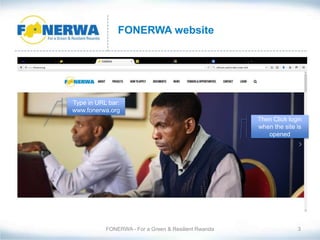
FONERWA website
Then Click login
when the site is
opened
Type in URL bar:
www.fonerwa.org
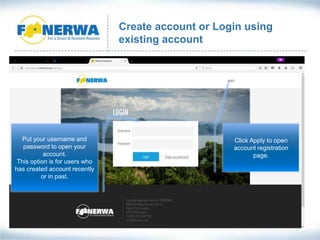
Create account or Login using
existing account
Click Apply to open
account registration
page.
Put your username and
password to open your
account.
This option is for users who
has created account recently
or in past.
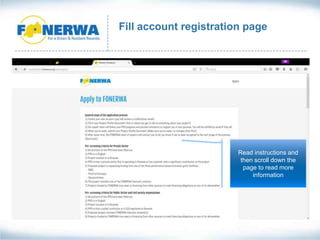
Fill account registration page
Read instructions and
then scroll down the
page to read more
information
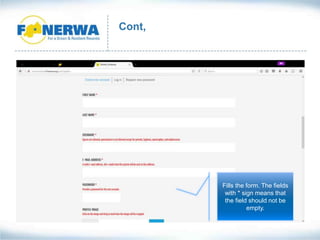
Cont,
Fills the form. The fields
with * sign means that
the field should not be
empty.
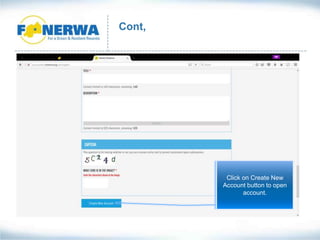
Cont,
Click on Create New
Account button to open
account.
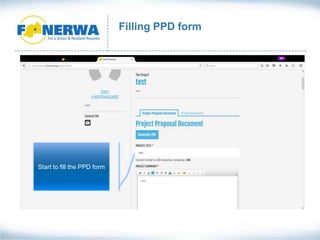
Filling PPD form
Start to fill the PPD form
Cont,
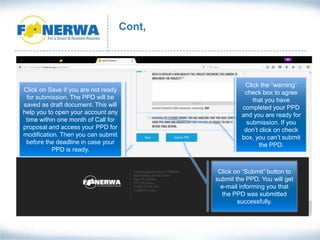
Click on Save if you are not ready
for submission. The PPD will be
saved as draft document. This will
help you to open your account any
time within one month of Call for
proposal and access your PPD for
modification. Then you can submit
before the deadline in case your
PPD is ready.
Click the “warning”
check box to agree
that you have
completed your PPD
and you are ready for
submission. If you
don’t click on check
box, you can’t submit
the PPD.
Click on “Submit” button to
submit the PPD. You will get
e-mail informing you that
the PPD was submitted
successfully.
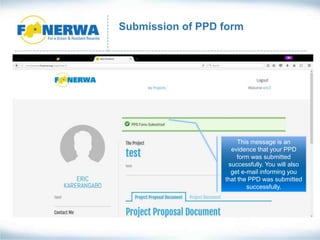
Submission of PPD form
This message is an
evidence that your PPD
form was submitted
successfully. You will also
get e-mail informing you
that the PPD was submitted
successfully.
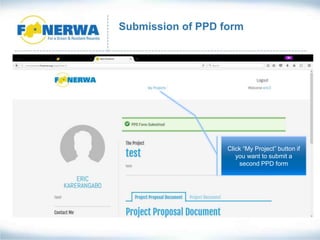
Submission of PPD form
Click “My Project” button if
you want to submit a
second PPD form
Submission of PPD form
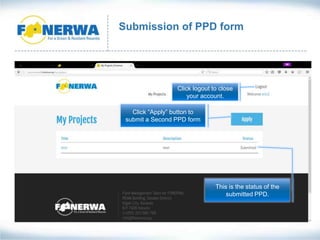
Click “Apply” button to
submit a Second PPD form
This is the status of the
submitted PPD.
Click logout to close
your account.

PPD submission

  • 1.
    Project Profile Document(PPD) submission through FONERWA website
  • 2.
    • Access toFONERWA website • Create account - Fill account registration form • Filling PPD form • Submitting PPD form Contents
  • 3.
    FONERWA - Fora Green & Resilient Rwanda 3 FONERWA website Then Click login when the site is opened Type in URL bar: www.fonerwa.org
  • 4.
    Create account orLogin using existing account Click Apply to open account registration page. Put your username and password to open your account. This option is for users who has created account recently or in past.
  • 5.
    Fill account registrationpage Read instructions and then scroll down the page to read more information
  • 6.
    Cont, Fills the form.The fields with * sign means that the field should not be empty.
  • 7.
    Cont, Click on CreateNew Account button to open account.
  • 8.
    Filling PPD form Startto fill the PPD form
  • 9.
    Cont, Click on Saveif you are not ready for submission. The PPD will be saved as draft document. This will help you to open your account any time within one month of Call for proposal and access your PPD for modification. Then you can submit before the deadline in case your PPD is ready. Click the “warning” check box to agree that you have completed your PPD and you are ready for submission. If you don’t click on check box, you can’t submit the PPD. Click on “Submit” button to submit the PPD. You will get e-mail informing you that the PPD was submitted successfully.
  • 10.
    Submission of PPDform This message is an evidence that your PPD form was submitted successfully. You will also get e-mail informing you that the PPD was submitted successfully.
  • 11.
    Submission of PPDform Click “My Project” button if you want to submit a second PPD form
  • 12.
    Submission of PPDform Click “Apply” button to submit a Second PPD form This is the status of the submitted PPD. Click logout to close your account.