Coupon Special, Union 
coupons stating coupon 
special or corporate 
coupons. 
Tax Exempt: Student 
show Purdue ID to 
receive Tax Exempt 
PMU Discounts: Press key 
to open discount menu. 
Menu includes: 
Coffee Club Card ~ press 
with the redemption of a 
full club card. 
Open % ~ Press when 
coupon states use open%. 
Other payments: This 
brings up a menu of 
coupons that are 
distributed by the Hotel.
Employee Discount: Employees 
use their Purdue ID, Press key, 
swipe ID to obtain the discount.
Credit Card: 
All cards backed by Visa, 
Discover, Master/Card, 
and American Express 
are ran as Credit. 
**Credit Cards: 
If a card is declined always ring it again. If it continues then give it back to the customer and 
explain that the card is not working. Ask for another form of payment. 
If a message appears that states card read failure, then manually enter the 16 digit number 
and press enter, enter the expiration date and press enter. The transaction should go 
through. 
If the balance is over $25.00 two receipts will print the customer must sign the first receipt 
and then you keep it and give them the second receipt.
PMU Gift Card: 
Press key, swipe gift card, 
press clear and receipt 
will print. 
Dining Dollars: 
Students only! 
Automatically tax 
exempts the transaction. 
Press key, swipe ID, press 
clear and receipt will 
print. 
Boiler Express: 
A prepaid account on 
your Purdue ID Card. 
Press key, swipe ID, press 
clear and receipt will 
print.
Room Charge: Room 
charges are for guests 
staying in the hotel. 
AR Charge: 
Temporary Credit 
Cards made for 
Conferences by the 
Business Office. 
AR Charge 
Room Charge
SIGN IN SCREEN BALANCE CHECK 
Press 
Balance 
Check Press one of the 
three, Boiler 
Express, Dining 
Dollars, or 
PMU Gift Card.
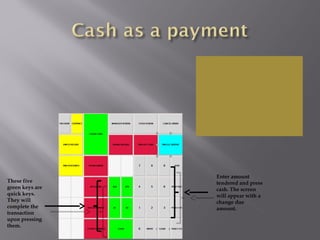
These five 
green keys are 
quick keys. 
They will 
complete the 
transaction 
upon pressing 
them. 
Enter amount 
tendered and press 
cash. The screen 
will appear with a 
change due 
amount.
You must test any 50 
or 100 dollar bills for 
authenticity. A 
counterfeit pen will 
be located at your 
Micros station. 
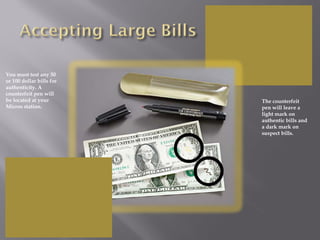
The counterfeit 
pen will leave a 
light mark on 
authentic bills and 
a dark mark on 
suspect bills.
You must test any 50 
or 100 dollar bills for 
authenticity. A 
counterfeit pen will 
be located at your 
Micros station. 
The counterfeit 
pen will leave a 
light mark on 
authentic bills and 
a dark mark on 
suspect bills.

PMU Micros Payment Screen Training

  • 2.
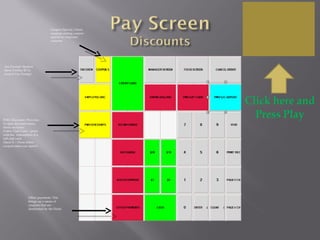
    Coupon Special, Union coupons stating coupon special or corporate coupons. Tax Exempt: Student show Purdue ID to receive Tax Exempt PMU Discounts: Press key to open discount menu. Menu includes: Coffee Club Card ~ press with the redemption of a full club card. Open % ~ Press when coupon states use open%. Other payments: This brings up a menu of coupons that are distributed by the Hotel.
  • 3.
    Employee Discount: Employees use their Purdue ID, Press key, swipe ID to obtain the discount.
  • 4.
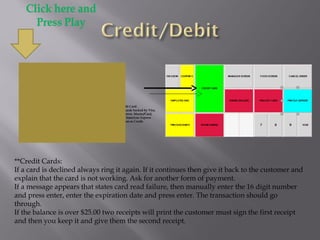
    Credit Card: Allcards backed by Visa, Discover, Master/Card, and American Express are ran as Credit. **Credit Cards: If a card is declined always ring it again. If it continues then give it back to the customer and explain that the card is not working. Ask for another form of payment. If a message appears that states card read failure, then manually enter the 16 digit number and press enter, enter the expiration date and press enter. The transaction should go through. If the balance is over $25.00 two receipts will print the customer must sign the first receipt and then you keep it and give them the second receipt.
  • 5.
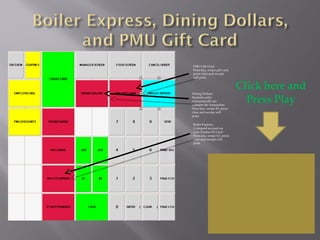
    PMU Gift Card: Press key, swipe gift card, press clear and receipt will print. Dining Dollars: Students only! Automatically tax exempts the transaction. Press key, swipe ID, press clear and receipt will print. Boiler Express: A prepaid account on your Purdue ID Card. Press key, swipe ID, press clear and receipt will print.
  • 6.
    Room Charge: Room charges are for guests staying in the hotel. AR Charge: Temporary Credit Cards made for Conferences by the Business Office. AR Charge Room Charge
  • 7.
    SIGN IN SCREENBALANCE CHECK Press Balance Check Press one of the three, Boiler Express, Dining Dollars, or PMU Gift Card.
  • 8.
    These five greenkeys are quick keys. They will complete the transaction upon pressing them. Enter amount tendered and press cash. The screen will appear with a change due amount.
  • 9.
    You must testany 50 or 100 dollar bills for authenticity. A counterfeit pen will be located at your Micros station. The counterfeit pen will leave a light mark on authentic bills and a dark mark on suspect bills.
  • 10.
    You must testany 50 or 100 dollar bills for authenticity. A counterfeit pen will be located at your Micros station. The counterfeit pen will leave a light mark on authentic bills and a dark mark on suspect bills.

Editor's Notes

  • #3 When using the coffee club card, only ring the coffee, press coffee club card key and then press cash to complete the transaction. When using open % only ring in item to be discounted, enter the percent and then enter the rest of the order. All coupons and Club Cards, keep receipt and staple to coupon or write the following information on the back of the coupon. Name Date Check # Location Other Payments: These coupons are given out by our Hotel. These are for events happening on campus and the coupon is good for a specified amount of breakfasts on a specific date. The customer will order the allotted number of breakfasts and then the cashier will take the coupon find the correct key located under other payments and press. The receipt will automatically print. Staple the receipt to the coupon.
  • #5 Credit Cards: If a card is declined always ring it again. If it continues then give it back to the customer and explain that the card is not working. Ask for another form of payment. If a message appears that states card read failure, then manually enter the 16 digit number and press enter, enter the expiration date and press enter. The transaction should go through. If the balance is over $25.00 two receipts will print the customer must sign the first receipt and then you keep it and give them the second receipt. Insufficient funds on Boiler Express, Dining Dollars, PMU Gift Card. Tell customer their card does not have enough to cover the balance, let them decide what they would like to do. They may ask you to check their balance if that is the case we will do this. We do not offer due to the lengthily procedure.
  • #8 To check a balance you will sign out to the sign in screen. Press Balance Check. Press desired tender. Boiler Express, Dining Dollars, or PMU Gift Card. Swipe the card. A message will appear stating the balance. The customer can use the remaining balance. If the card is empty they can keep it or you will wrap it in receipt paper and write your location and the balance on the outside. If they would like to use the balance you will cancel out to the sign in screen, re-sign in and re-ring the transaction. Go to pay, press the tender desired, enter the balance and swipe the card. That amount should be deducted from the balance leaving a new balance.
  • #9 Upon closing the transaction to cash, place tendered cash on ledge above cash drawer. Your drawer will open when the transaction is closed. Count the customers change to yourself, then again to the customer. Placing coins in their hand and then counting their bills out starting with the largest. For example, the customers change equals $7.16, place .16 cents in the customers hand, tell them their change is 7.16 then count 5, 6, and 7.
  • #10 If you receive a large bill, you must test for authenticity by marking on the bill with a counterfeit detector pen. Place a small mark on the bill. If the money is authentic you may accept a $50 bill, if the bill is a 100 $ bill you must first get approval from your supervisor. If a bill is ever found to be suspect you will advise your supervisor who will take over the situation for you. If your supervisor is not available you are to give the cash back to the customer and explain that you are unable to take a large bill and ask for another type of payment. The customer may pay with a different tender or cancel their order. Once the transaction is complete and the customer has left the Micros station, you will call the Purdue Police (non-emergency number). Explain the situation and the police will come to your location and request that you give them a description of the customer.