1
Designing Web-based
exercises - Hot Potatoes
(11 Jan 2002)
2
1. What is HOT POTATOES?
HOT POTATOES is a suite of six programs
for creating interactive educational exercises
for the World Wide Web. These are :
JBC : multiple-choice or true-false quizzes
JQuiz: text-entry or short-answer quizzes
JCloze: gap-fill exercises
JCross: crosswords
JMix : jumbled-sentence exercises
JMatch: matching and ordering exercises
3
2.How to download and install?
Step1: Download “winhotpot52.exe” from the
website:
http://web.uvic.ca/hrd/hotpot/winhotpot52.exe
Step2: Unzip the file and it will install itself.
Step3: In order to unlock all the features, you
will need to register the programs. You
can get registration username and
password from:
http://web.uvic.ca/hrd/hotpot/
4
3. Start Hot Potatoes
Click the Hot Potatoes short cut to start the program.
5
4. JBC
Title(1)
Question(2)
Feedback
(Optional)
Choices(3)
Check the
correct
choice(4)
Up for more
choices
Up for more
questions(5)
Export to
HTML(7)
Save(6) Unicode
6
Suggested sequence
(1) Key in the title.
(2) Key in question.
(3) Key in choices.
(4) Check the correct choice.
(5) Press Up button for next question.
Repeat (2) to (5) until end.
(6) Press Save button to save.
(7) Press Export button.
7
Practice 1
Title: S.1 Directed Number
Q1: 3 + 4 =?
A. 3
B. 5
C. 7
D. 9
Q2: 5 - 7 =?
A. -2
B. 0
C. 2
D. 4
Q3: -2 + 7
=?
A. -9
B. -5
C. 5
D. 7
•Use JBC to create the above test.
•Save the file with filename “p1.jbc”
•Export to HTML with filename “p1.htm”
8
5. Upload to the Internet
1) Use WS_FTP
9
6. Access to the On-line test
1) Key in the homepage address to open the
test.
e.g. http://lpy.hkcampus.net/~lpy-lhm/p1.htm
2) Key in the ihouse address and open the
visitor cabinet to choose the test.
e.g. http://www.hkedcity.net/ihouse/lpy-lhm
10
Practice 2
• Upload the test to Internet.
11
7. Export for printing or sharing
Step1: Select File -> Export for printing
Step2: Go to the destination (e.g. Word)
Step3: Select Paste
12
8. Key in Chinese characters
• Hot Potatoes does not support BIG-5 code
(Traditional Chinese Characters)
• To insert Chinese characters, we have to
use unicode.
• Before keying in Chinese characters, click
the button
13
• In the Unicode box, key in Chinese
characters.
• Click OK to return.
14
• The Chinese characters will become code.
• To view and edit, highlight the code and
click the Unicode button.
15
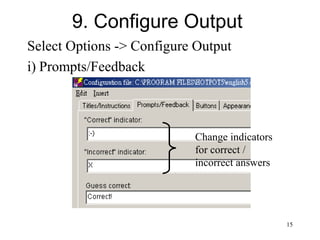
9. Configure Output
Select Options -> Configure Output
i) Prompts/Feedback
Change indicators
for correct /
incorrect answers
16
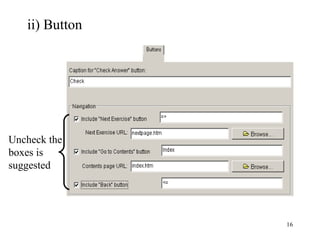
ii) Button
Uncheck the
boxes is
suggested
17
iii) Appearance
18
iv) Others
Prevent direct recall
19
10. Insert Picture
Step1: Move cursor to the place for insertion.
Step2: Select Insert -> Picture
20
Step3(i): Select Picture from Web URL
Key in Width
Key in Height
Key in the path
of the picture file
21
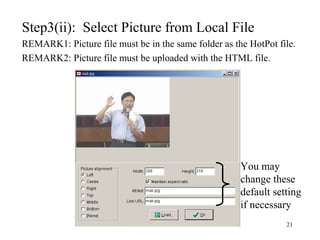
Step3(ii): Select Picture from Local File
REMARK1: Picture file must be in the same folder as the HotPot file.
REMARK2: Picture file must be uploaded with the HTML file.
You may
change these
default setting
if necessary
22
Practice 3
• Design 2 multiple choices questions. One
with picture from web and the other with
picture from local file.
23
11. Insert Link
Step1: Move cursor to the place for insertion.
Step2: Select Insert -> Link
24
Step3(i): Select Link to Web URL
Key in the path
of the picture file
Select _Blank
Text to form the link OR
Picture to form the link
25
Step3(ii): Select Link to Local File
REMARK1: File must be in the same folder as the HotPot file.
REMARK2: File must be uploaded with the HTML file.
Filename of the
local file
26
Practice 4
• Design 2 multiple choices questions. One
with Link to web and the other with Link to
local file.
27
12. JQuiz
Title(1)
Question(2)
Possible answers(3)
(At least one)
Up for more
questions(4)
Up for more
answers
Export to
HTML(6)
Save(5)
28
Suggested sequence
(1) Key in the title.
(2) Key in question.
(3) Key in possible answer(s).
(4) Press Up button for next question.
Repeat (2) to (4) until end.
(5) Press Save button to save.
(6) Press Export button.
29
13. JMatch
Title(1)
Right
items(3
)
Left
items(2)
Up for more
item pairs
Save(4) Export to
HTML(5)
30
14. JMix
Title(1)
Key in
the
sentence
in
sequence
of
blocks.
(2)
Key in
alternatives
(Optional)
(3)
Save(4) Export to
HTML(5)
31
15. JCloze
Export to
HTML(5)
Save(4)
Title(1)
Type in the text
(2)
Highlight the word for gap and
click the gap button. (3)
32
16. Potato Skins
• Web Site:
http://www.learnertools.com/potato_skins/
• Predefined output format for JBC
• No need to Export as HTML
• Support Chinese characters
• Hidden answer
33
References
• Hot potatoes download:
web.uvic.ca/hrd/hotpot/
• Hot potatoes Samples
www.tmmarden.edu.hk/presentation.html
• Handle Chinese in Hot Potatoes
http://www.glink.net.hk/~akclam/workshop/
manual.htm
• Potato skin download:
http://www.learnertools.com/potato_skins/

Plag

  • 1.
    1 Designing Web-based exercises -Hot Potatoes (11 Jan 2002)
  • 2.
    2 1. What isHOT POTATOES? HOT POTATOES is a suite of six programs for creating interactive educational exercises for the World Wide Web. These are : JBC : multiple-choice or true-false quizzes JQuiz: text-entry or short-answer quizzes JCloze: gap-fill exercises JCross: crosswords JMix : jumbled-sentence exercises JMatch: matching and ordering exercises
  • 3.
    3 2.How to downloadand install? Step1: Download “winhotpot52.exe” from the website: http://web.uvic.ca/hrd/hotpot/winhotpot52.exe Step2: Unzip the file and it will install itself. Step3: In order to unlock all the features, you will need to register the programs. You can get registration username and password from: http://web.uvic.ca/hrd/hotpot/
  • 4.
    4 3. Start HotPotatoes Click the Hot Potatoes short cut to start the program.
  • 5.
    5 4. JBC Title(1) Question(2) Feedback (Optional) Choices(3) Check the correct choice(4) Upfor more choices Up for more questions(5) Export to HTML(7) Save(6) Unicode
  • 6.
    6 Suggested sequence (1) Keyin the title. (2) Key in question. (3) Key in choices. (4) Check the correct choice. (5) Press Up button for next question. Repeat (2) to (5) until end. (6) Press Save button to save. (7) Press Export button.
  • 7.
    7 Practice 1 Title: S.1Directed Number Q1: 3 + 4 =? A. 3 B. 5 C. 7 D. 9 Q2: 5 - 7 =? A. -2 B. 0 C. 2 D. 4 Q3: -2 + 7 =? A. -9 B. -5 C. 5 D. 7 •Use JBC to create the above test. •Save the file with filename “p1.jbc” •Export to HTML with filename “p1.htm”
  • 8.
    8 5. Upload tothe Internet 1) Use WS_FTP
  • 9.
    9 6. Access tothe On-line test 1) Key in the homepage address to open the test. e.g. http://lpy.hkcampus.net/~lpy-lhm/p1.htm 2) Key in the ihouse address and open the visitor cabinet to choose the test. e.g. http://www.hkedcity.net/ihouse/lpy-lhm
  • 10.
    10 Practice 2 • Uploadthe test to Internet.
  • 11.
    11 7. Export forprinting or sharing Step1: Select File -> Export for printing Step2: Go to the destination (e.g. Word) Step3: Select Paste
  • 12.
    12 8. Key inChinese characters • Hot Potatoes does not support BIG-5 code (Traditional Chinese Characters) • To insert Chinese characters, we have to use unicode. • Before keying in Chinese characters, click the button
  • 13.
    13 • In theUnicode box, key in Chinese characters. • Click OK to return.
  • 14.
    14 • The Chinesecharacters will become code. • To view and edit, highlight the code and click the Unicode button.
  • 15.
    15 9. Configure Output SelectOptions -> Configure Output i) Prompts/Feedback Change indicators for correct / incorrect answers
  • 16.
  • 17.
  • 18.
  • 19.
    19 10. Insert Picture Step1:Move cursor to the place for insertion. Step2: Select Insert -> Picture
  • 20.
    20 Step3(i): Select Picturefrom Web URL Key in Width Key in Height Key in the path of the picture file
  • 21.
    21 Step3(ii): Select Picturefrom Local File REMARK1: Picture file must be in the same folder as the HotPot file. REMARK2: Picture file must be uploaded with the HTML file. You may change these default setting if necessary
  • 22.
    22 Practice 3 • Design2 multiple choices questions. One with picture from web and the other with picture from local file.
  • 23.
    23 11. Insert Link Step1:Move cursor to the place for insertion. Step2: Select Insert -> Link
  • 24.
    24 Step3(i): Select Linkto Web URL Key in the path of the picture file Select _Blank Text to form the link OR Picture to form the link
  • 25.
    25 Step3(ii): Select Linkto Local File REMARK1: File must be in the same folder as the HotPot file. REMARK2: File must be uploaded with the HTML file. Filename of the local file
  • 26.
    26 Practice 4 • Design2 multiple choices questions. One with Link to web and the other with Link to local file.
  • 27.
    27 12. JQuiz Title(1) Question(2) Possible answers(3) (Atleast one) Up for more questions(4) Up for more answers Export to HTML(6) Save(5)
  • 28.
    28 Suggested sequence (1) Keyin the title. (2) Key in question. (3) Key in possible answer(s). (4) Press Up button for next question. Repeat (2) to (4) until end. (5) Press Save button to save. (6) Press Export button.
  • 29.
    29 13. JMatch Title(1) Right items(3 ) Left items(2) Up formore item pairs Save(4) Export to HTML(5)
  • 30.
    30 14. JMix Title(1) Key in the sentence in sequence of blocks. (2) Keyin alternatives (Optional) (3) Save(4) Export to HTML(5)
  • 31.
    31 15. JCloze Export to HTML(5) Save(4) Title(1) Typein the text (2) Highlight the word for gap and click the gap button. (3)
  • 32.
    32 16. Potato Skins •Web Site: http://www.learnertools.com/potato_skins/ • Predefined output format for JBC • No need to Export as HTML • Support Chinese characters • Hidden answer
  • 33.
    33 References • Hot potatoesdownload: web.uvic.ca/hrd/hotpot/ • Hot potatoes Samples www.tmmarden.edu.hk/presentation.html • Handle Chinese in Hot Potatoes http://www.glink.net.hk/~akclam/workshop/ manual.htm • Potato skin download: http://www.learnertools.com/potato_skins/