PL/SQL using XML (Excel output).

Following are the prerequisites for setting output in excel using PL/SQL with
XML.

   1. Layout needs to be designed in Excel (XML Spread Sheet).
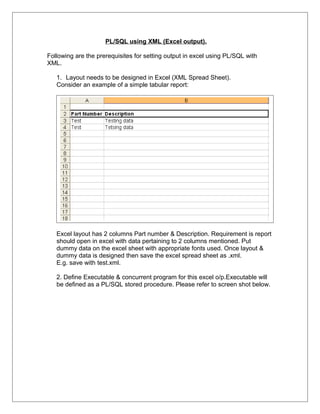
   Consider an example of a simple tabular report:


   Excel layout has 2 columns Part number & Description. Requirement is report
   should open in excel with data pertaining to 2 columns mentioned. Put
   dummy data on the excel sheet with appropriate fonts used. Once layout &
   dummy data is designed then save the excel spread sheet as .xml.
   E.g. save with test.xml.

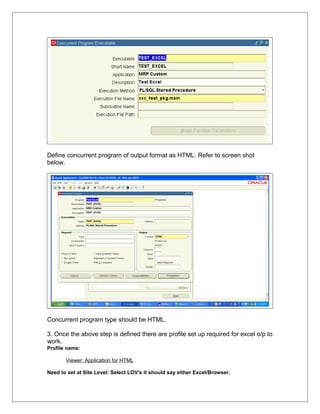
   2. Define Executable & concurrent program for this excel o/p.Executable will
   be defined as a PL/SQL stored procedure. Please refer to screen shot below.
Define concurrent program of output format as HTML: Refer to screen shot
below.


Concurrent program type should be HTML.

3. Once the above step is defined there are profile set up required for excel o/p to
work.
Profile name:

       Viewer: Application for HTML

Need to set at Site Level: Select LOV's it should say either Excel/Browser.
If LOV doesn’t shows Excel then need to perform the following step

    Go to System administrator->Install->Viewer Options.

Search for File format HTML.if not present create a new one.
File Format: HTML
Mime Type: application/vnd.ms-excel
Description: Microsoft Excel
Allow Native Client coding checkbox: Checked.

    Once this is done you should be able to open reports on excel.

4. Need to create a package for generating code in excel.

PROMPT CREATING PACKAGE SPECIFICATION FOR xxc_test_pkg
CREATE OR REPLACE PACKAGE xxc_test_pkg AS

        --
        PROCEDURE main             (errbuf    OUT       VARCHAR2,
                                   retcode    OUT       NUMBER
                                   );
       --
END xxc_test_pkg;

    PROMPT CREATING PACKAGE BODY FOR xxc_test_pkg
    CREATE OR REPLACE PACKAGE BODY xxc_test_pkg AS


     PROCEDURE new_row
     IS
     BEGiN
       fnd_file.put_line(fnd_file.output,'<Row>')
       ;
     END
     ;
     PROCEDURE end_row
     IS
     BEgiN
       fnd_file.put_line(fnd_file.output,'</Row>')
       ;
     END
     ;

       FUNCTION print_header
       RETURN NUMBER
       IS
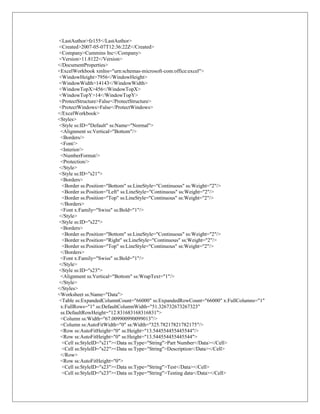
       lv_text varchar2(32767) :='<?xml version="1.0"?>
    <?mso-application progid="Excel.Sheet"?>
    <Workbook xmlns="urn:schemas-microsoft-com:office:spreadsheet"
    xmlns:o="urn:schemas-microsoft-com:office:office"
    xmlns:x="urn:schemas-microsoft-com:office:excel"
    xmlns:ss="urn:schemas-microsoft-com:office:spreadsheet"
    xmlns:html="http://www.w3.org/TR/REC-html40">
    <DocumentProperties xmlns="urn:schemas-microsoft-com:office:office">
     <Author>fz155</Author>
<LastAuthor>fz155</LastAuthor>
<Created>2007-05-07T12:36:22Z</Created>
<Company>Cummins Inc</Company>
<Version>11.8122</Version>
</DocumentProperties>
<ExcelWorkbook xmlns="urn:schemas-microsoft-com:office:excel">
<WindowHeight>7956</WindowHeight>
<WindowWidth>14143</WindowWidth>
<WindowTopX>456</WindowTopX>
<WindowTopY>14</WindowTopY>
<ProtectStructure>False</ProtectStructure>
<ProtectWindows>False</ProtectWindows>
</ExcelWorkbook>
<Styles>
<Style ss:ID="Default" ss:Name="Normal">
 <Alignment ss:Vertical="Bottom"/>
 <Borders/>
 <Font/>
 <Interior/>
 <NumberFormat/>
 <Protection/>
</Style>
<Style ss:ID="s21">
 <Borders>
  <Border ss:Position="Bottom" ss:LineStyle="Continuous" ss:Weight="2"/>
  <Border ss:Position="Left" ss:LineStyle="Continuous" ss:Weight="2"/>
  <Border ss:Position="Top" ss:LineStyle="Continuous" ss:Weight="2"/>
 </Borders>
 <Font x:Family="Swiss" ss:Bold="1"/>
</Style>
<Style ss:ID="s22">
 <Borders>
  <Border ss:Position="Bottom" ss:LineStyle="Continuous" ss:Weight="2"/>
  <Border ss:Position="Right" ss:LineStyle="Continuous" ss:Weight="2"/>
  <Border ss:Position="Top" ss:LineStyle="Continuous" ss:Weight="2"/>
 </Borders>
 <Font x:Family="Swiss" ss:Bold="1"/>
</Style>
<Style ss:ID="s23">
 <Alignment ss:Vertical="Bottom" ss:WrapText="1"/>
</Style>
</Styles>
<Worksheet ss:Name="Data">
<Table ss:ExpandedColumnCount="66000" ss:ExpandedRowCount="66000" x:FullColumns="1"
 x:FullRows="1" ss:DefaultColumnWidth="51.326732673267323"
 ss:DefaultRowHeight="12.831683168316831">
 <Column ss:Width="67.009900990099013"/>
 <Column ss:AutoFitWidth="0" ss:Width="325.78217821782175"/>
 <Row ss:AutoFitHeight="0" ss:Height="13.544554455445544"/>
 <Row ss:AutoFitHeight="0" ss:Height="13.544554455445544">
  <Cell ss:StyleID="s21"><Data ss:Type="String">Part Number</Data></Cell>
  <Cell ss:StyleID="s22"><Data ss:Type="String">Description</Data></Cell>
 </Row>
 <Row ss:AutoFitHeight="0">
  <Cell ss:StyleID="s23"><Data ss:Type="String">Test</Data></Cell>
  <Cell ss:StyleID="s23"><Data ss:Type="String">Testing data</Data></Cell>
</Row>
 <Row ss:AutoFitHeight="0">
 <Cell ss:StyleID="s23"><Data ss:Type="String">Test</Data></Cell>
 <Cell ss:StyleID="s23"><Data ss:Type="String">Tetsing data</Data></Cell>
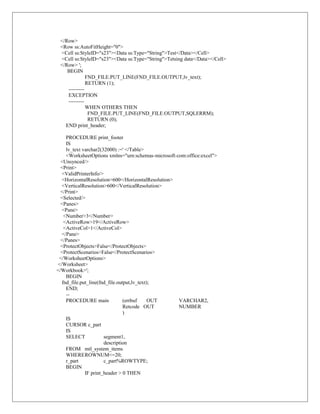
 </Row> ';
    BEGIN
              FND_FILE.PUT_LINE(FND_FILE.OUTPUT,lv_text);
              RETURN (1);
    ---------
    EXCEPTION
    ---------
              WHEN OTHERS THEN
               FND_FILE.PUT_LINE(FND_FILE.OUTPUT,SQLERRM);
               RETURN (0);
   END print_header;

    PROCEDURE print_footer
    IS
    lv_text varchar2(32000) :=' </Table>
    <WorksheetOptions xmlns="urn:schemas-microsoft-com:office:excel">
  <Unsynced/>
  <Print>
  <ValidPrinterInfo/>
  <HorizontalResolution>600</HorizontalResolution>
  <VerticalResolution>600</VerticalResolution>
  </Print>
  <Selected/>
  <Panes>
  <Pane>
   <Number>3</Number>
   <ActiveRow>19</ActiveRow>
   <ActiveCol>1</ActiveCol>
  </Pane>
  </Panes>
  <ProtectObjects>False</ProtectObjects>
  <ProtectScenarios>False</ProtectScenarios>
 </WorksheetOptions>
</Worksheet>
</Workbook>';
    BEGIN
  fnd_file.put_line(fnd_file.output,lv_text);
    END;
    --
    PROCEDURE main              (errbuf     OUT     VARCHAR2,
                                Retcode OUT         NUMBER
                                )
    IS
    CURSOR c_part
    IS
    SELECT            segment1,
                      description
    FROM mtl_system_items
    WHEREROWNUM<=20;
    r_part            c_part%ROWTYPE;
    BEGIN
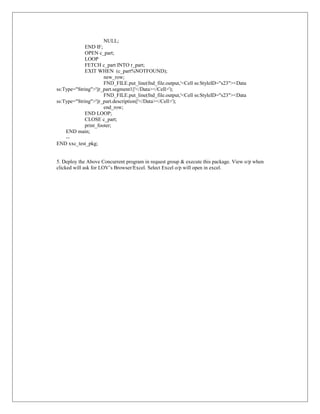
             IF print_header > 0 THEN
NULL;
             END IF;
             OPEN c_part;
             LOOP
             FETCH c_part INTO r_part;
             EXIT WHEN (c_part%NOTFOUND);
                      new_row;
                      FND_FILE.put_line(fnd_file.output,'<Cell ss:StyleID="s23"><Data
ss:Type="String">'||r_part.segment1||'</Data></Cell>');
                      FND_FILE.put_line(fnd_file.output,'<Cell ss:StyleID="s23"><Data
ss:Type="String">'||r_part.description||'</Data></Cell>');
                      end_row;
             END LOOP;
             CLOSE c_part;
             print_footer;
    END main;
    --
END xxc_test_pkg;


5. Deploy the Above Concurrent program in request group & execute this package. View o/p when
clicked will ask for LOV’s Browser/Excel. Select Excel o/p will open in excel.

Pl sql using_xml

  • 1.
    PL/SQL using XML(Excel output). Following are the prerequisites for setting output in excel using PL/SQL with XML. 1. Layout needs to be designed in Excel (XML Spread Sheet). Consider an example of a simple tabular report: Excel layout has 2 columns Part number & Description. Requirement is report should open in excel with data pertaining to 2 columns mentioned. Put dummy data on the excel sheet with appropriate fonts used. Once layout & dummy data is designed then save the excel spread sheet as .xml. E.g. save with test.xml. 2. Define Executable & concurrent program for this excel o/p.Executable will be defined as a PL/SQL stored procedure. Please refer to screen shot below.
  • 2.
    Define concurrent programof output format as HTML: Refer to screen shot below. Concurrent program type should be HTML. 3. Once the above step is defined there are profile set up required for excel o/p to work. Profile name: Viewer: Application for HTML Need to set at Site Level: Select LOV's it should say either Excel/Browser.
  • 3.
    If LOV doesn’tshows Excel then need to perform the following step Go to System administrator->Install->Viewer Options. Search for File format HTML.if not present create a new one. File Format: HTML Mime Type: application/vnd.ms-excel Description: Microsoft Excel Allow Native Client coding checkbox: Checked. Once this is done you should be able to open reports on excel. 4. Need to create a package for generating code in excel. PROMPT CREATING PACKAGE SPECIFICATION FOR xxc_test_pkg CREATE OR REPLACE PACKAGE xxc_test_pkg AS -- PROCEDURE main (errbuf OUT VARCHAR2, retcode OUT NUMBER ); -- END xxc_test_pkg; PROMPT CREATING PACKAGE BODY FOR xxc_test_pkg CREATE OR REPLACE PACKAGE BODY xxc_test_pkg AS PROCEDURE new_row IS BEGiN fnd_file.put_line(fnd_file.output,'<Row>') ; END ; PROCEDURE end_row IS BEgiN fnd_file.put_line(fnd_file.output,'</Row>') ; END ; FUNCTION print_header RETURN NUMBER IS lv_text varchar2(32767) :='<?xml version="1.0"?> <?mso-application progid="Excel.Sheet"?> <Workbook xmlns="urn:schemas-microsoft-com:office:spreadsheet" xmlns:o="urn:schemas-microsoft-com:office:office" xmlns:x="urn:schemas-microsoft-com:office:excel" xmlns:ss="urn:schemas-microsoft-com:office:spreadsheet" xmlns:html="http://www.w3.org/TR/REC-html40"> <DocumentProperties xmlns="urn:schemas-microsoft-com:office:office"> <Author>fz155</Author>
  • 4.
    <LastAuthor>fz155</LastAuthor> <Created>2007-05-07T12:36:22Z</Created> <Company>Cummins Inc</Company> <Version>11.8122</Version> </DocumentProperties> <ExcelWorkbook xmlns="urn:schemas-microsoft-com:office:excel"> <WindowHeight>7956</WindowHeight> <WindowWidth>14143</WindowWidth> <WindowTopX>456</WindowTopX> <WindowTopY>14</WindowTopY> <ProtectStructure>False</ProtectStructure> <ProtectWindows>False</ProtectWindows> </ExcelWorkbook> <Styles> <Styless:ID="Default" ss:Name="Normal"> <Alignment ss:Vertical="Bottom"/> <Borders/> <Font/> <Interior/> <NumberFormat/> <Protection/> </Style> <Style ss:ID="s21"> <Borders> <Border ss:Position="Bottom" ss:LineStyle="Continuous" ss:Weight="2"/> <Border ss:Position="Left" ss:LineStyle="Continuous" ss:Weight="2"/> <Border ss:Position="Top" ss:LineStyle="Continuous" ss:Weight="2"/> </Borders> <Font x:Family="Swiss" ss:Bold="1"/> </Style> <Style ss:ID="s22"> <Borders> <Border ss:Position="Bottom" ss:LineStyle="Continuous" ss:Weight="2"/> <Border ss:Position="Right" ss:LineStyle="Continuous" ss:Weight="2"/> <Border ss:Position="Top" ss:LineStyle="Continuous" ss:Weight="2"/> </Borders> <Font x:Family="Swiss" ss:Bold="1"/> </Style> <Style ss:ID="s23"> <Alignment ss:Vertical="Bottom" ss:WrapText="1"/> </Style> </Styles> <Worksheet ss:Name="Data"> <Table ss:ExpandedColumnCount="66000" ss:ExpandedRowCount="66000" x:FullColumns="1" x:FullRows="1" ss:DefaultColumnWidth="51.326732673267323" ss:DefaultRowHeight="12.831683168316831"> <Column ss:Width="67.009900990099013"/> <Column ss:AutoFitWidth="0" ss:Width="325.78217821782175"/> <Row ss:AutoFitHeight="0" ss:Height="13.544554455445544"/> <Row ss:AutoFitHeight="0" ss:Height="13.544554455445544"> <Cell ss:StyleID="s21"><Data ss:Type="String">Part Number</Data></Cell> <Cell ss:StyleID="s22"><Data ss:Type="String">Description</Data></Cell> </Row> <Row ss:AutoFitHeight="0"> <Cell ss:StyleID="s23"><Data ss:Type="String">Test</Data></Cell> <Cell ss:StyleID="s23"><Data ss:Type="String">Testing data</Data></Cell>
  • 5.
    </Row> <Row ss:AutoFitHeight="0"> <Cell ss:StyleID="s23"><Data ss:Type="String">Test</Data></Cell> <Cell ss:StyleID="s23"><Data ss:Type="String">Tetsing data</Data></Cell> </Row> '; BEGIN FND_FILE.PUT_LINE(FND_FILE.OUTPUT,lv_text); RETURN (1); --------- EXCEPTION --------- WHEN OTHERS THEN FND_FILE.PUT_LINE(FND_FILE.OUTPUT,SQLERRM); RETURN (0); END print_header; PROCEDURE print_footer IS lv_text varchar2(32000) :=' </Table> <WorksheetOptions xmlns="urn:schemas-microsoft-com:office:excel"> <Unsynced/> <Print> <ValidPrinterInfo/> <HorizontalResolution>600</HorizontalResolution> <VerticalResolution>600</VerticalResolution> </Print> <Selected/> <Panes> <Pane> <Number>3</Number> <ActiveRow>19</ActiveRow> <ActiveCol>1</ActiveCol> </Pane> </Panes> <ProtectObjects>False</ProtectObjects> <ProtectScenarios>False</ProtectScenarios> </WorksheetOptions> </Worksheet> </Workbook>'; BEGIN fnd_file.put_line(fnd_file.output,lv_text); END; -- PROCEDURE main (errbuf OUT VARCHAR2, Retcode OUT NUMBER ) IS CURSOR c_part IS SELECT segment1, description FROM mtl_system_items WHEREROWNUM<=20; r_part c_part%ROWTYPE; BEGIN IF print_header > 0 THEN
  • 6.
    NULL; END IF; OPEN c_part; LOOP FETCH c_part INTO r_part; EXIT WHEN (c_part%NOTFOUND); new_row; FND_FILE.put_line(fnd_file.output,'<Cell ss:StyleID="s23"><Data ss:Type="String">'||r_part.segment1||'</Data></Cell>'); FND_FILE.put_line(fnd_file.output,'<Cell ss:StyleID="s23"><Data ss:Type="String">'||r_part.description||'</Data></Cell>'); end_row; END LOOP; CLOSE c_part; print_footer; END main; -- END xxc_test_pkg; 5. Deploy the Above Concurrent program in request group & execute this package. View o/p when clicked will ask for LOV’s Browser/Excel. Select Excel o/p will open in excel.