Pirana Changes in the Latest Beta Version 3.0.2.50


General

     Remembers your exit page when you log onto the system.
     No explorer side bar (LH side).
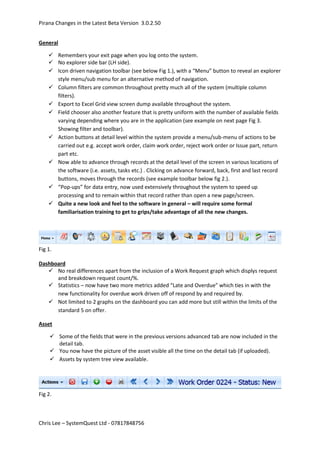
     Icon driven navigation toolbar (see below Fig 1.), with a “Menu” button to reveal an explorer
      style menu/sub menu for an alternative method of navigation.
     Column filters are common throughout pretty much all of the system (multiple column
      filters).
     Export to Excel Grid view screen dump available throughout the system.
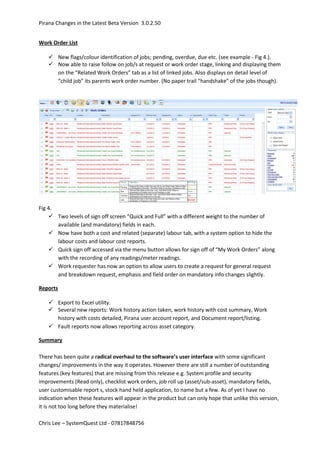
     Field chooser also another feature that is pretty uniform with the number of available fields
      varying depending where you are in the application (see example on next page Fig 3.
      Showing filter and toolbar).
     Action buttons at detail level within the system provide a menu/sub-menu of actions to be
      carried out e.g. accept work order, claim work order, reject work order or Issue part, return
      part etc.
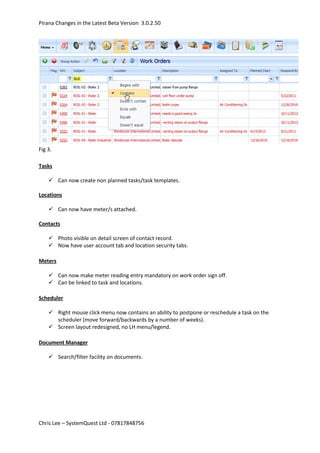
     Now able to advance through records at the detail level of the screen in various locations of
      the software (i.e. assets, tasks etc.) . Clicking on advance forward, back, first and last record
      buttons, moves through the records (see example toolbar below fig 2.).
     “Pop-ups” for data entry, now used extensively throughout the system to speed up
      processing and to remain within that record rather than open a new page/screen.
     Quite a new look and feel to the software in general – will require some formal
      familiarisation training to get to grips/take advantage of all the new changes.


Fig 1.

Dashboard
    No real differences apart from the inclusion of a Work Request graph which displys request
      and breakdown request count/%.
    Statistics – now have two more metrics added “Late and Overdue” which ties in with the
      new functionality for overdue work driven off of respond by and required by.
    Not limited to 2 graphs on the dashboard you can add more but still within the limits of the
      standard 5 on offer.

Asset

      Some of the fields that were in the previous versions advanced tab are now included in the
       detail tab.
      You now have the picture of the asset visible all the time on the detail tab (if uploaded).
      Assets by system tree view available.


Fig 2.


Chris Lee – SystemQuest Ltd - 07817848756
Pirana Changes in the Latest Beta Version 3.0.2.50


Fig 3.

Tasks

     Can now create non planned tasks/task templates.

Locations

     Can now have meter/s attached.

Contacts

     Photo visible on detail screen of contact record.
     Now have user account tab and location security tabs.

Meters

     Can now make meter reading entry mandatory on work order sign off.
     Can be linked to task and locations.

Scheduler

     Right mouse click menu now contains an ability to postpone or reschedule a task on the
      scheduler (move forward/backwards by a number of weeks).
     Screen layout redesigned, no LH menu/legend.

Document Manager

     Search/filter facility on documents.


Chris Lee – SystemQuest Ltd - 07817848756
Pirana Changes in the Latest Beta Version 3.0.2.50


Work Order List

     New flags/colour identification of jobs; pending, overdue, due etc. (see example - Fig 4.).
     Now able to raise follow on job/s at request or work order stage, linking and displaying them
      on the “Related Work Orders” tab as a list of linked jobs. Also displays on detail level of
      “child job” its parents work order number. (No paper trail “handshake” of the jobs though).


Fig 4.
     Two levels of sign off screen “Quick and Full” with a different weight to the number of
       available (and mandatory) fields in each.
     Now have both a cost and related (separate) labour tab, with a system option to hide the
       labour costs and labour cost reports.
     Quick sign off accessed via the menu button allows for sign off of “My Work Orders” along
       with the recording of any readings/meter readings.
     Work requester has now an option to allow users to create a request for general request
       and breakdown request, emphasis and field order on mandatory info changes slightly.

Reports

     Export to Excel utility.
     Several new reports: Work history action taken, work history with cost summary, Work
      history with costs detailed, Pirana user account report, and Document report/listing.
     Fault reports now allows reporting across asset category.

Summary

There has been quite a radical overhaul to the software’s user interface with some significant
changes/ improvements in the way it operates. However there are still a number of outstanding
features (key features) that are missing from this release e.g. System profile and security
improvements (Read only), checklist work orders, job roll up (asset/sub-asset), mandatory fields,
user customisable report s, stock hand held application, to name but a few. As of yet I have no
indication when these features will appear in the product but can only hope that unlike this version,
it is not too long before they materialise!

Chris Lee – SystemQuest Ltd - 07817848756

Pirana Beta Review

  • 1.
    Pirana Changes inthe Latest Beta Version 3.0.2.50 General  Remembers your exit page when you log onto the system.  No explorer side bar (LH side).  Icon driven navigation toolbar (see below Fig 1.), with a “Menu” button to reveal an explorer style menu/sub menu for an alternative method of navigation.  Column filters are common throughout pretty much all of the system (multiple column filters).  Export to Excel Grid view screen dump available throughout the system.  Field chooser also another feature that is pretty uniform with the number of available fields varying depending where you are in the application (see example on next page Fig 3. Showing filter and toolbar).  Action buttons at detail level within the system provide a menu/sub-menu of actions to be carried out e.g. accept work order, claim work order, reject work order or Issue part, return part etc.  Now able to advance through records at the detail level of the screen in various locations of the software (i.e. assets, tasks etc.) . Clicking on advance forward, back, first and last record buttons, moves through the records (see example toolbar below fig 2.).  “Pop-ups” for data entry, now used extensively throughout the system to speed up processing and to remain within that record rather than open a new page/screen.  Quite a new look and feel to the software in general – will require some formal familiarisation training to get to grips/take advantage of all the new changes. Fig 1. Dashboard  No real differences apart from the inclusion of a Work Request graph which displys request and breakdown request count/%.  Statistics – now have two more metrics added “Late and Overdue” which ties in with the new functionality for overdue work driven off of respond by and required by.  Not limited to 2 graphs on the dashboard you can add more but still within the limits of the standard 5 on offer. Asset  Some of the fields that were in the previous versions advanced tab are now included in the detail tab.  You now have the picture of the asset visible all the time on the detail tab (if uploaded).  Assets by system tree view available. Fig 2. Chris Lee – SystemQuest Ltd - 07817848756
  • 2.
    Pirana Changes inthe Latest Beta Version 3.0.2.50 Fig 3. Tasks  Can now create non planned tasks/task templates. Locations  Can now have meter/s attached. Contacts  Photo visible on detail screen of contact record.  Now have user account tab and location security tabs. Meters  Can now make meter reading entry mandatory on work order sign off.  Can be linked to task and locations. Scheduler  Right mouse click menu now contains an ability to postpone or reschedule a task on the scheduler (move forward/backwards by a number of weeks).  Screen layout redesigned, no LH menu/legend. Document Manager  Search/filter facility on documents. Chris Lee – SystemQuest Ltd - 07817848756
  • 3.
    Pirana Changes inthe Latest Beta Version 3.0.2.50 Work Order List  New flags/colour identification of jobs; pending, overdue, due etc. (see example - Fig 4.).  Now able to raise follow on job/s at request or work order stage, linking and displaying them on the “Related Work Orders” tab as a list of linked jobs. Also displays on detail level of “child job” its parents work order number. (No paper trail “handshake” of the jobs though). Fig 4.  Two levels of sign off screen “Quick and Full” with a different weight to the number of available (and mandatory) fields in each.  Now have both a cost and related (separate) labour tab, with a system option to hide the labour costs and labour cost reports.  Quick sign off accessed via the menu button allows for sign off of “My Work Orders” along with the recording of any readings/meter readings.  Work requester has now an option to allow users to create a request for general request and breakdown request, emphasis and field order on mandatory info changes slightly. Reports  Export to Excel utility.  Several new reports: Work history action taken, work history with cost summary, Work history with costs detailed, Pirana user account report, and Document report/listing.  Fault reports now allows reporting across asset category. Summary There has been quite a radical overhaul to the software’s user interface with some significant changes/ improvements in the way it operates. However there are still a number of outstanding features (key features) that are missing from this release e.g. System profile and security improvements (Read only), checklist work orders, job roll up (asset/sub-asset), mandatory fields, user customisable report s, stock hand held application, to name but a few. As of yet I have no indication when these features will appear in the product but can only hope that unlike this version, it is not too long before they materialise! Chris Lee – SystemQuest Ltd - 07817848756