Pimp your web browser at the library!  - Mozilla Firefox and creative marketing of library services Roman Koshykar RIT Libraries Upstate New York Science Librarians Meeting October 20, 2006
Firefox at the Library Firefox version 1 – released publicly in Fall 2004 Open source web browser; seen as more secure Installed on all library computers at RIT, as well as IE Not “official” web browser, but supported
Why Firefox Matters Key feature for us is Firefox’s  extensibility Extensions = “plugins” or other small software downloads that extend browser functionality Can we tap into use of Firefox to integrate library services right into a user’s browser window?
How did I get involved? What the heck is a TOOLS TECHNOLOGIST? Find an extension to get to library resources through Firefox browser Instruction on using such an extension Instruction on using Firefox
The Firefox Workshop Series of walk-in workshops Applications (i.e. Excel); Search tools (i.e. Google) Open to everyone – aimed at RIT staff Developed walk-in workshop for switching to Firefox
The Firefox Workshop First offered in February 2006 Offered once per quarter, except summer Covers basics – installing, relevant features, why Firefox is useful Non-techie – aimed at users of all levels Opportunity for creative marketing of library services?
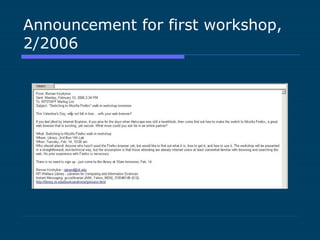
Announcement for first workshop, 2/2006
The Firefox Extension Winter 2006 – began looking for a way to connect Google Scholar results to SFX OpenURL results Found  OpenURL  Referrer  from Openly Free Requires user configuration with local SFX server
The Firefox Extension - reconsidered Installed OpenURL Referrer – tested Decided not to promote Found another extension that could be customized to local resources Did more than just connect Google Scholar to SFX
LibX toolbar for RIT LibX  developed by programmers at Virginia Tech Worked with us to develop customized build of LibX for RIT Installs a toolbar that allows searching of OPACs Also connects users to SFX from Google Scholar (with some coaxing) LibX built our toolbar to search both RIT Catalog and Connect NY consortial catalog
LibX toolbar for RIT  Rolled out March 2006 Installed LibX for RIT on all public computers in library (already had Firefox installed) Created local support page for LibX for RIT:  http://library.rit.edu/addons/ Users can download onto personal computer
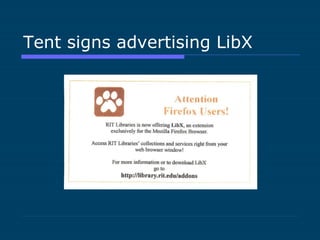
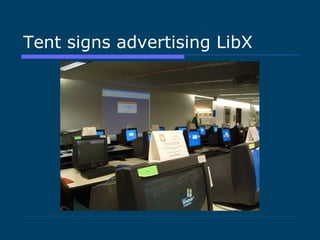
Promoting LibX for RIT Local support/download page Branded with our custom cue icon  Training session for library staff Incorporated into Firefox walk-in workshop Tent signs created; placed on public computer monitors Added to news scroll for spring quarter
Tent signs advertising LibX
What have we done? Advocating for Firefox    promoting new technology, educating users on its use LibX for RIT    integrating library resources into user’s personal information space Both projects    opportunities for creative marketing of library services
Special thanks Jon Jiras – LibX for RIT implementation Jen Freer – photos of tent signs
Thank You Roman Koshykar Email:  [email_address] IM: gccislibrarian

Pimp your web browser at the library

  • 1.
    Pimp your webbrowser at the library! - Mozilla Firefox and creative marketing of library services Roman Koshykar RIT Libraries Upstate New York Science Librarians Meeting October 20, 2006
  • 2.
    Firefox at theLibrary Firefox version 1 – released publicly in Fall 2004 Open source web browser; seen as more secure Installed on all library computers at RIT, as well as IE Not “official” web browser, but supported
  • 3.
    Why Firefox MattersKey feature for us is Firefox’s extensibility Extensions = “plugins” or other small software downloads that extend browser functionality Can we tap into use of Firefox to integrate library services right into a user’s browser window?
  • 4.
    How did Iget involved? What the heck is a TOOLS TECHNOLOGIST? Find an extension to get to library resources through Firefox browser Instruction on using such an extension Instruction on using Firefox
  • 5.
    The Firefox WorkshopSeries of walk-in workshops Applications (i.e. Excel); Search tools (i.e. Google) Open to everyone – aimed at RIT staff Developed walk-in workshop for switching to Firefox
  • 6.
    The Firefox WorkshopFirst offered in February 2006 Offered once per quarter, except summer Covers basics – installing, relevant features, why Firefox is useful Non-techie – aimed at users of all levels Opportunity for creative marketing of library services?
  • 7.
    Announcement for firstworkshop, 2/2006
  • 8.
    The Firefox ExtensionWinter 2006 – began looking for a way to connect Google Scholar results to SFX OpenURL results Found OpenURL Referrer from Openly Free Requires user configuration with local SFX server
  • 9.
    The Firefox Extension- reconsidered Installed OpenURL Referrer – tested Decided not to promote Found another extension that could be customized to local resources Did more than just connect Google Scholar to SFX
  • 10.
    LibX toolbar forRIT LibX developed by programmers at Virginia Tech Worked with us to develop customized build of LibX for RIT Installs a toolbar that allows searching of OPACs Also connects users to SFX from Google Scholar (with some coaxing) LibX built our toolbar to search both RIT Catalog and Connect NY consortial catalog
  • 11.
    LibX toolbar forRIT Rolled out March 2006 Installed LibX for RIT on all public computers in library (already had Firefox installed) Created local support page for LibX for RIT: http://library.rit.edu/addons/ Users can download onto personal computer
  • 12.
    Promoting LibX forRIT Local support/download page Branded with our custom cue icon Training session for library staff Incorporated into Firefox walk-in workshop Tent signs created; placed on public computer monitors Added to news scroll for spring quarter
  • 13.
  • 14.
  • 15.
    What have wedone? Advocating for Firefox  promoting new technology, educating users on its use LibX for RIT  integrating library resources into user’s personal information space Both projects  opportunities for creative marketing of library services
  • 16.
    Special thanks JonJiras – LibX for RIT implementation Jen Freer – photos of tent signs
  • 17.
    Thank You RomanKoshykar Email: [email_address] IM: gccislibrarian