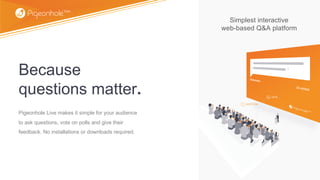
Simplest interactive
web-based Q&A platform
Because
questions matter.
Pigeonhole Live makes it simple for your audience
to ask questions, vote on polls and give their
feedback. No installations or downloads required.
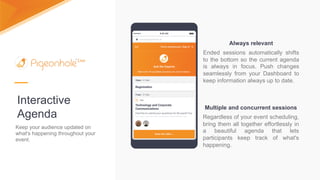
Interactive
Agenda
Keep your audience updated on
what's happening throughout your
event.
Always relevant
Ended sessions automatically shifts
to the bottom so the current agenda
is always in focus. Push changes
seamlessly from your Dashboard to
keep information always up to date.
Multiple and concurrent sessions
Regardless of your event scheduling,
bring them all together effortlessly in
a beautiful agenda that lets
participants keep track of what's
happening.
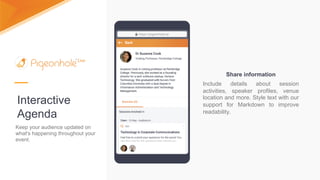
Interactive
Agenda
Keep your audience updated on
what's happening throughout your
event.
Share information
Include details about session
activities, speaker profiles, venue
location and more. Style text with our
support for Markdown to improve
readability.
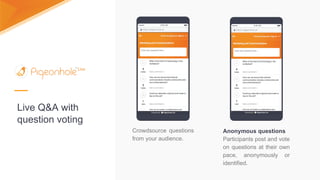
Anonymous questions
Participants post and vote
on questions at their own
pace, anonymously or
identified.
Crowdsource questions
from your audience.
Live Q&A with
question voting
Live Q&A with
question voting
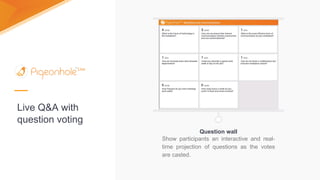
Question wall
Show participants an interactive and real-
time projection of questions as the votes
are casted.
Live Q&A with
Question Filtering
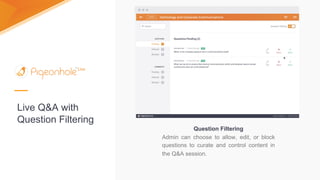
Question Filtering
Admin can choose to allow, edit, or block
questions to curate and control content in
the Q&A session.
Live Q&A with
Answers
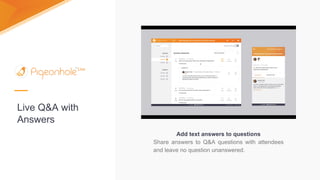
Add text answers to questions
Share answers to Q&A questions with attendees
and leave no question unanswered.
Live Q&A with
Answer Ratings
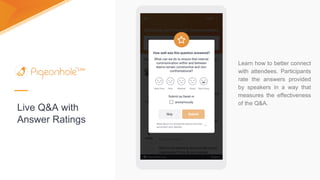
Learn how to better connect
with attendees. Participants
rate the answers provided
by speakers in a way that
measures the effectiveness
of the Q&A.
Live Q&A with
New Questions
Discovery
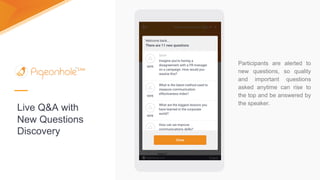
Participants are alerted to
new questions, so quality
and important questions
asked anytime can rise to
the top and be answered by
the speaker.
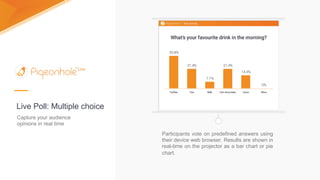
Participants vote on predefined answers using
their device web browser. Results are shown in
real-time on the projector as a bar chart or pie
chart.
Capture your audience
opinions in real time
Live Poll: Multiple choice
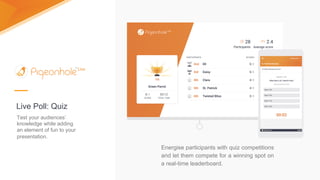
Energise participants with quiz competitions
and let them compete for a winning spot on
a real-time leaderboard.
Live Poll: Quiz
Test your audiences’
knowledge while adding
an element of fun to your
presentation.
Designed for every Learning and
Development need
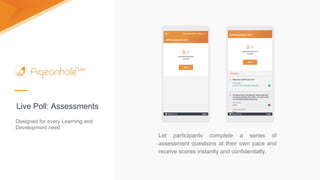
Let participants complete a series of
assessment questions at their own pace and
receive scores instantly and confidentially.
Live Poll: Assessments
Designed for every Learning and
Development need
If you are running an assessment based on a
lesson or presentation, close the loop by
reviewing answers using the Projector Panel
with all your participants.
Live Poll: Assessments
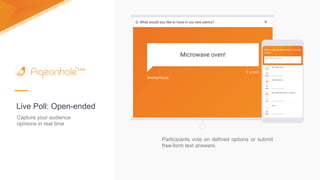
Participants vote on defined options or submit
free-form text answers.
Live Poll: Open-ended
Capture your audience
opinions in real time
Capture your audience
opinions in real time
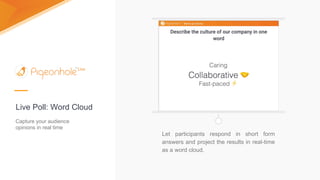
Live Poll: Word Cloud
Let participants respond in short form
answers and project the results in real-time
as a word cloud.
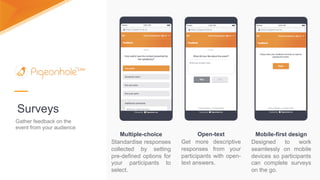
Mobile-first design
Designed to work
seamlessly on mobile
devices so participants
can complete surveys
on the go.
Surveys
Gather feedback on the
event from your audience
Multiple-choice
Standardise responses
collected by setting
pre-defined options for
your participants to
select.
Open-text
Get more descriptive
responses from your
participants with open-
text answers.
Themes
A look for each occasion
Customise your Projector Panel, Admin Panel and Audience Web App
with a background of your choice for each event and meeting. Choose
from a variety of solid colours, popular cities and nature sceneries for a
vibrant event experience.
Choose between vivid colours,
nature stills, and scenic cityscapes -
- at no additional cost.
Branding
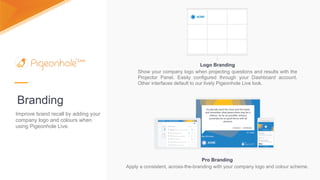
Logo Branding
Show your company logo when projecting questions and results with the
Projector Panel. Easily configured through your Dashboard account.
Other interfaces default to our lively Pigeonhole Live look.
Pro Branding
Apply a consistent, across-the-branding with your company logo and colour scheme.
Improve brand recall by adding your
company logo and colours when
using Pigeonhole Live.
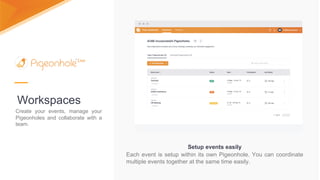
Workspaces
Create your events, manage your
Pigeonholes and collaborate with a
team.
Setup events easily
Each event is setup within its own Pigeonhole. You can coordinate
multiple events together at the same time easily.
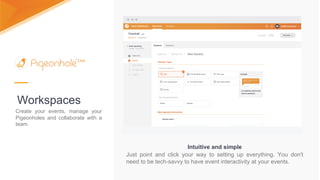
Workspaces
Intuitive and simple
Just point and click your way to setting up everything. You don't
need to be tech-savvy to have event interactivity at your events.
Create your events, manage your
Pigeonholes and collaborate with a
team.
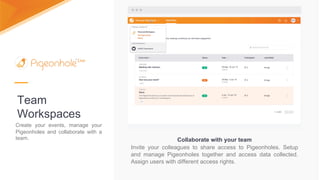
Team
Workspaces
Collaborate with your team
Invite your colleagues to share access to Pigeonholes. Setup
and manage Pigeonholes together and access data collected.
Assign users with different access rights.
Create your events, manage your
Pigeonholes and collaborate with a
team.
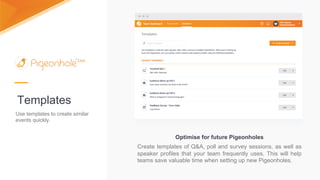
Templates
Use templates to create similar
events quickly.
Optimise for future Pigeonholes
Create templates of Q&A, poll and survey sessions, as well as
speaker profiles that your team frequently uses. This will help
teams save valuable time when setting up new Pigeonholes.
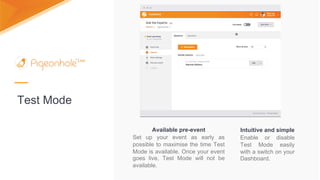
Test Mode
Intuitive and simple
Enable or disable
Test Mode easily
with a switch on your
Dashboard.
Available pre-event
Set up your event as early as
possible to maximise the time Test
Mode is available. Once your event
goes live, Test Mode will not be
available.
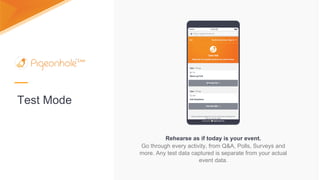
Test Mode
Rehearse as if today is your event.
Go through every activity, from Q&A, Polls, Surveys and
more. Any test data captured is separate from your actual
event data.
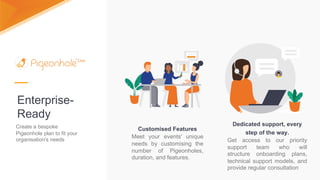
Enterprise-
Ready
Create a bespoke
Pigeonhole plan to fit your
organisation's needs
Customised Features
Meet your events' unique
needs by customising the
number of Pigeonholes,
duration, and features.
Dedicated support, every
step of the way.
Get access to our priority
support team who will
structure onboarding plans,
technical support models, and
provide regular consultation
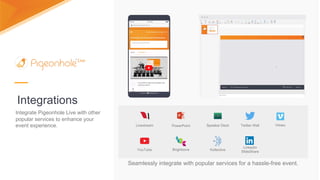
Integrations
Seamlessly integrate with popular services for a hassle-free event.
Livestream PowerPoint Speaker Deck
YouTube Brightcove Kollective
Twitter Wall
LinkedIn
SlideShare
Vimeo
Integrate Pigeonhole Live with other
popular services to enhance your
event experience.
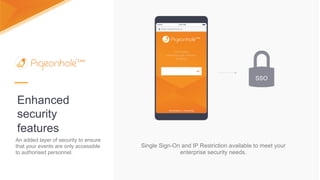
Enhanced
security
features
Single Sign-On and IP Restriction available to meet your
enterprise security needs.
SSO
An added layer of security to ensure
that your events are only accessible
to authorised personnel.
GlaxoSmithKline
Uses Pigeonhole
Live globally
Physical and remote Town Halls
Internal meetings
Conferences
Training Workshops
Focus Group Feedback
GSK uses the Enterprise Plan to
organise and implement
unlimited Pigeonhole events for:
Especially for questions that are
sensitive in nature, Pigeonhole
Live allows you to respond
anonymously so it takes away
that pressure from the ground,
and what it means is that in turn
you will have better response
rate from your employees.
“
”
GlaxoSmithKline, Pei San Chia
Commercial Training Manager, Global Business Insight.
Especially for questions that
are sensitive in nature,
Pigeonhole Live allows you to
respond anonymously so it
takes away that pressure from
the ground, and what it means
is that in turn you will have
better response rate from your
employees.
Pei San Chia
GlaxoSmithKline
Commercial Training Manager,
Global Business Insight.
“
”
Medtronic
Town Halls
Web Conferences
Face-to-face Meetings
Post-event Surveys
Today, Medtronic uses
Pigeonhole Live’s Enterprise Plan
across the Asian Pacific region for
internal communications:
Medtronic, Geraldine Lin
Program Manager
We definitely see an increase in
the engagement, because
people are actually voting on
questions they want the leaders
to answer.
Geraldine Lin
Medtronic, Program Manager
“
”

Pigeonhole Live Overview

  • 2.
    Simplest interactive web-based Q&Aplatform Because questions matter. Pigeonhole Live makes it simple for your audience to ask questions, vote on polls and give their feedback. No installations or downloads required.
  • 3.
    Interactive Agenda Keep your audienceupdated on what's happening throughout your event. Always relevant Ended sessions automatically shifts to the bottom so the current agenda is always in focus. Push changes seamlessly from your Dashboard to keep information always up to date. Multiple and concurrent sessions Regardless of your event scheduling, bring them all together effortlessly in a beautiful agenda that lets participants keep track of what's happening.
  • 4.
    Interactive Agenda Keep your audienceupdated on what's happening throughout your event. Share information Include details about session activities, speaker profiles, venue location and more. Style text with our support for Markdown to improve readability.
  • 5.
    Anonymous questions Participants postand vote on questions at their own pace, anonymously or identified. Crowdsource questions from your audience. Live Q&A with question voting
  • 6.
    Live Q&A with questionvoting Question wall Show participants an interactive and real- time projection of questions as the votes are casted.
  • 7.
    Live Q&A with QuestionFiltering Question Filtering Admin can choose to allow, edit, or block questions to curate and control content in the Q&A session.
  • 8.
    Live Q&A with Answers Addtext answers to questions Share answers to Q&A questions with attendees and leave no question unanswered.
  • 9.
    Live Q&A with AnswerRatings Learn how to better connect with attendees. Participants rate the answers provided by speakers in a way that measures the effectiveness of the Q&A.
  • 10.
    Live Q&A with NewQuestions Discovery Participants are alerted to new questions, so quality and important questions asked anytime can rise to the top and be answered by the speaker.
  • 11.
    Participants vote onpredefined answers using their device web browser. Results are shown in real-time on the projector as a bar chart or pie chart. Capture your audience opinions in real time Live Poll: Multiple choice
  • 12.
    Energise participants withquiz competitions and let them compete for a winning spot on a real-time leaderboard. Live Poll: Quiz Test your audiences’ knowledge while adding an element of fun to your presentation.
  • 13.
    Designed for everyLearning and Development need Let participants complete a series of assessment questions at their own pace and receive scores instantly and confidentially. Live Poll: Assessments
  • 14.
    Designed for everyLearning and Development need If you are running an assessment based on a lesson or presentation, close the loop by reviewing answers using the Projector Panel with all your participants. Live Poll: Assessments
  • 15.
    Participants vote ondefined options or submit free-form text answers. Live Poll: Open-ended Capture your audience opinions in real time
  • 16.
    Capture your audience opinionsin real time Live Poll: Word Cloud Let participants respond in short form answers and project the results in real-time as a word cloud.
  • 17.
    Mobile-first design Designed towork seamlessly on mobile devices so participants can complete surveys on the go. Surveys Gather feedback on the event from your audience Multiple-choice Standardise responses collected by setting pre-defined options for your participants to select. Open-text Get more descriptive responses from your participants with open- text answers.
  • 18.
    Themes A look foreach occasion Customise your Projector Panel, Admin Panel and Audience Web App with a background of your choice for each event and meeting. Choose from a variety of solid colours, popular cities and nature sceneries for a vibrant event experience. Choose between vivid colours, nature stills, and scenic cityscapes - - at no additional cost.
  • 19.
    Branding Logo Branding Show yourcompany logo when projecting questions and results with the Projector Panel. Easily configured through your Dashboard account. Other interfaces default to our lively Pigeonhole Live look. Pro Branding Apply a consistent, across-the-branding with your company logo and colour scheme. Improve brand recall by adding your company logo and colours when using Pigeonhole Live.
  • 20.
    Workspaces Create your events,manage your Pigeonholes and collaborate with a team. Setup events easily Each event is setup within its own Pigeonhole. You can coordinate multiple events together at the same time easily.
  • 21.
    Workspaces Intuitive and simple Justpoint and click your way to setting up everything. You don't need to be tech-savvy to have event interactivity at your events. Create your events, manage your Pigeonholes and collaborate with a team.
  • 22.
    Team Workspaces Collaborate with yourteam Invite your colleagues to share access to Pigeonholes. Setup and manage Pigeonholes together and access data collected. Assign users with different access rights. Create your events, manage your Pigeonholes and collaborate with a team.
  • 23.
    Templates Use templates tocreate similar events quickly. Optimise for future Pigeonholes Create templates of Q&A, poll and survey sessions, as well as speaker profiles that your team frequently uses. This will help teams save valuable time when setting up new Pigeonholes.
  • 24.
    Test Mode Intuitive andsimple Enable or disable Test Mode easily with a switch on your Dashboard. Available pre-event Set up your event as early as possible to maximise the time Test Mode is available. Once your event goes live, Test Mode will not be available.
  • 25.
    Test Mode Rehearse asif today is your event. Go through every activity, from Q&A, Polls, Surveys and more. Any test data captured is separate from your actual event data.
  • 26.
    Enterprise- Ready Create a bespoke Pigeonholeplan to fit your organisation's needs Customised Features Meet your events' unique needs by customising the number of Pigeonholes, duration, and features. Dedicated support, every step of the way. Get access to our priority support team who will structure onboarding plans, technical support models, and provide regular consultation
  • 27.
    Integrations Seamlessly integrate withpopular services for a hassle-free event. Livestream PowerPoint Speaker Deck YouTube Brightcove Kollective Twitter Wall LinkedIn SlideShare Vimeo Integrate Pigeonhole Live with other popular services to enhance your event experience.
  • 28.
    Enhanced security features Single Sign-On andIP Restriction available to meet your enterprise security needs. SSO An added layer of security to ensure that your events are only accessible to authorised personnel.
  • 29.
    GlaxoSmithKline Uses Pigeonhole Live globally Physicaland remote Town Halls Internal meetings Conferences Training Workshops Focus Group Feedback GSK uses the Enterprise Plan to organise and implement unlimited Pigeonhole events for: Especially for questions that are sensitive in nature, Pigeonhole Live allows you to respond anonymously so it takes away that pressure from the ground, and what it means is that in turn you will have better response rate from your employees. “ ” GlaxoSmithKline, Pei San Chia Commercial Training Manager, Global Business Insight. Especially for questions that are sensitive in nature, Pigeonhole Live allows you to respond anonymously so it takes away that pressure from the ground, and what it means is that in turn you will have better response rate from your employees. Pei San Chia GlaxoSmithKline Commercial Training Manager, Global Business Insight. “ ”
  • 30.
    Medtronic Town Halls Web Conferences Face-to-faceMeetings Post-event Surveys Today, Medtronic uses Pigeonhole Live’s Enterprise Plan across the Asian Pacific region for internal communications: Medtronic, Geraldine Lin Program Manager We definitely see an increase in the engagement, because people are actually voting on questions they want the leaders to answer. Geraldine Lin Medtronic, Program Manager “ ”