PhpUnit over Symfony
2
www.innobyte.com
PhpUnit docs: http://phpunit.de/manual/current/en/
PhpUnit tutorial: https://jtreminio.com/2013/03/unit-testing-
tutorial-introduction-to-phpunit/
Summary
1. Install
2. Running tests
3. Symfony 2 Unit Testing structure
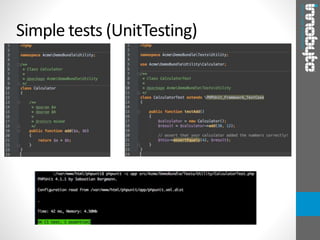
4. Simple tests (UnitTesting)
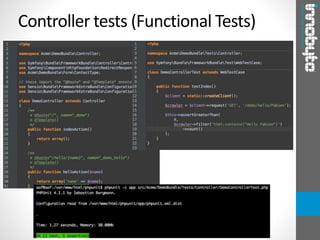
5. Controller tests (Functional Tests)
1. Client
2. Crawler
6. Code coverage
7. Assertions
8. Annotations
9. Example
Install
1. wget https://phar.phpunit.de/phpunit.phar
2. chmod +x phpunit.phar
3. mv phpunit.phar /usr/local/bin/phpunit
4. pear channel-discover pear.phpunit.de
5. pear remote-list -c phpunit
6. pear install phpunit/PHP_CodeCoverage
Running tests
1. phpunit.xml:
1. On Symfony 2, you must have app/phpunit.xml or app/phpunit.xml.dist. The second
one comes with the default Symfony 2 install and is more then enough.
2. You can find more about this on phpunit manual:
http://phpunit.de/manual/3.7/en/appendixes.configuration.html
2. Console:
1. Default: phpunit -c app
2. With code coverage: phpunit -c app –coverage-html /path/to/save
3. Running on an individual file: phpunit -c app src/Vendor/Bundle/Tests/MyTest.php
4. Run just some tests: phpunit -c app –filter=myMethodName
src/Vendor/Bundle/Tests/MyTest.php
5. More about what parameters accept phpunit you can find on:
http://phpunit.de/manual/3.7/en/textui.html
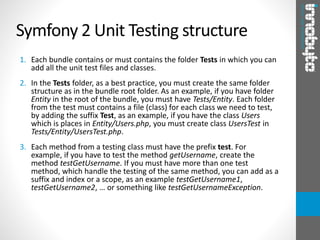
Symfony 2 Unit Testing structure
1. Each bundle contains or must contains the folder Tests in which you can
add all the unit test files and classes.
2. In the Tests folder, as a best practice, you must create the same folder
structure as in the bundle root folder. As an example, if you have folder
Entity in the root of the bundle, you must have Tests/Entity. Each folder
from the test must contains a file (class) for each class we need to test,
by adding the suffix Test, as an example, if you have the class Users
which is places in Entity/Users.php, you must create class UsersTest in
Tests/Entity/UsersTest.php.
3. Each method from a testing class must have the prefix test. For
example, if you have to test the method getUsername, create the
method testGetUsername. If you must have more than one test
method, which handle the testing of the same method, you can add as a
suffix and index or a scope, as an example testGetUsername1,
testGetUsername2, … or something like testGetUsernameException.
Simple tests (UnitTesting)
Controller tests (Functional Tests)
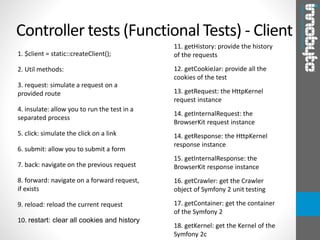
1. $client = static::createClient();
2. Util methods:
3. request: simulate a request on a
provided route
4. insulate: allow you to run the test in a
separated process
5. click: simulate the click on a link
6. submit: allow you to submit a form
7. back: navigate on the previous request
8. forward: navigate on a forward request,
if exists
9. reload: reload the current request
10. restart: clear all cookies and history
Controller tests (Functional Tests) - Client
11. getHistory: provide the history
of the requests
12. getCookieJar: provide all the
cookies of the test
13. getRequest: the HttpKernel
request instance
14. getInternalRequest: the
BrowserKit request instance
14. getResponse: the HttpKernel
response instance
15. getInternalResponse: the
BrowserKit response instance
16. getCrawler: get the Crawler
object of Symfony 2 unit testing
17. getContainer: get the container
of the Symfony 2
18. getKernel: get the Kernel of the
Symfony 2c
1. A Crawler instance is returned each time you make a request
with the Client. It allows you to traverse HTML documents,
select nodes, find links and forms.
2. Like jQuery, the Crawler has methods to traverse the DOM of
an HTML/XML document. For example, the following finds all
input[type=submit] elements, selects the last one on the
page, and then selects its immediate parent element.
3. More about the Crawler you can find:
http://symfony.com/doc/current/book/testing.html#the-
crawler
Controller tests (Functional Tests) -
Crawler
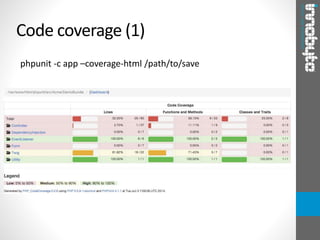
phpunit -c app –coverage-html /path/to/save
Code coverage (1)
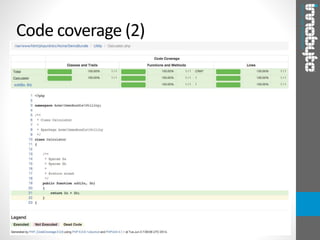
Code coverage (2)
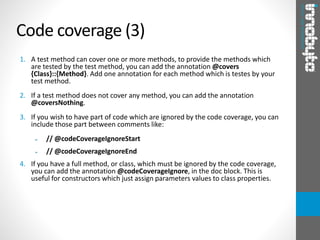
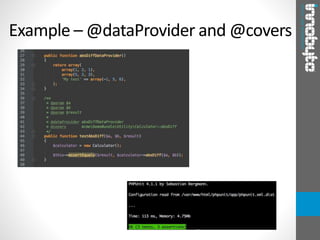
1. A test method can cover one or more methods, to provide the methods which
are tested by the test method, you can add the annotation @covers
{Class}::{Method}. Add one annotation for each method which is testes by your
test method.
2. If a test method does not cover any method, you can add the annotation
@coversNothing.
3. If you wish to have part of code which are ignored by the code coverage, you can
include those part between comments like:
➢ // @codeCoverageIgnoreStart
➢ // @codeCoverageIgnoreEnd
4. If you have a full method, or class, which must be ignored by the code coverage,
you can add the annotation @codeCoverageIgnore, in the doc block. This is
useful for constructors which just assign parameters values to class properties.
Code coverage (3)
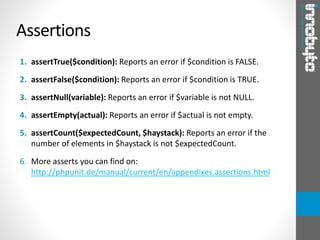
1. assertTrue($condition): Reports an error if $condition is FALSE.
2. assertFalse($condition): Reports an error if $condition is TRUE.
3. assertNull(variable): Reports an error if $variable is not NULL.
4. assertEmpty(actual): Reports an error if $actual is not empty.
5. assertCount($expectedCount, $haystack): Reports an error if the
number of elements in $haystack is not $expectedCount.
6. More asserts you can find on:
http://phpunit.de/manual/current/en/appendixes.assertions.html
Assertions
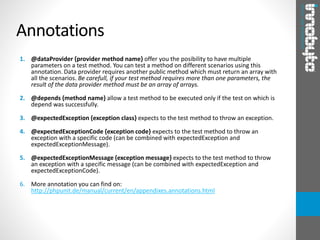
1. @dataProvider {provider method name} offer you the posibility to have multiple
parameters on a test method. You can test a method on different scenarios using this
annotation. Data provider requires another public method which must return an array with
all the scenarios. Be carefull, if your test method requires more than one parameters, the
result of the data provider method must be an array of arrays.
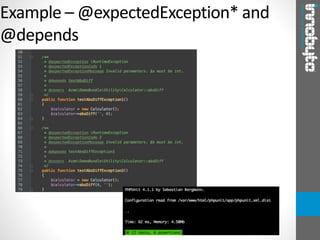
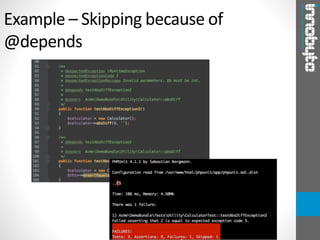
2. @depends {method name} allow a test method to be executed only if the test on which is
depend was successfully.
3. @expectedException {exception class} expects to the test method to throw an exception.
4. @expectedExceptionCode {exception code} expects to the test method to throw an
exception with a specific code (can be combined with expectedException and
expectedExceptionMessage).
5. @expectedExceptionMessage {exception message} expects to the test method to throw
an exception with a specific message (can be combined with expectedException and
expectedExceptionCode).
6. More annotation you can find on:
http://phpunit.de/manual/current/en/appendixes.annotations.html
Annotations
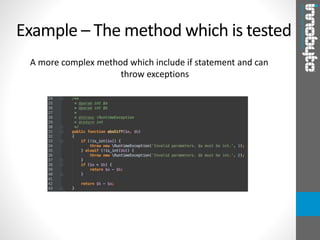
A more complex method which include if statement and can
throw exceptions
Example – The method which is tested
Example – @dataProvider and @covers
Example – @expectedException* and
@depends
Example – Skipping because of
@depends
Thank you!

Php unit

  • 1.
    PhpUnit over Symfony 2 www.innobyte.com PhpUnitdocs: http://phpunit.de/manual/current/en/ PhpUnit tutorial: https://jtreminio.com/2013/03/unit-testing- tutorial-introduction-to-phpunit/
  • 2.
    Summary 1. Install 2. Runningtests 3. Symfony 2 Unit Testing structure 4. Simple tests (UnitTesting) 5. Controller tests (Functional Tests) 1. Client 2. Crawler 6. Code coverage 7. Assertions 8. Annotations 9. Example
  • 3.
    Install 1. wget https://phar.phpunit.de/phpunit.phar 2.chmod +x phpunit.phar 3. mv phpunit.phar /usr/local/bin/phpunit 4. pear channel-discover pear.phpunit.de 5. pear remote-list -c phpunit 6. pear install phpunit/PHP_CodeCoverage
  • 4.
    Running tests 1. phpunit.xml: 1.On Symfony 2, you must have app/phpunit.xml or app/phpunit.xml.dist. The second one comes with the default Symfony 2 install and is more then enough. 2. You can find more about this on phpunit manual: http://phpunit.de/manual/3.7/en/appendixes.configuration.html 2. Console: 1. Default: phpunit -c app 2. With code coverage: phpunit -c app –coverage-html /path/to/save 3. Running on an individual file: phpunit -c app src/Vendor/Bundle/Tests/MyTest.php 4. Run just some tests: phpunit -c app –filter=myMethodName src/Vendor/Bundle/Tests/MyTest.php 5. More about what parameters accept phpunit you can find on: http://phpunit.de/manual/3.7/en/textui.html
  • 5.
    Symfony 2 UnitTesting structure 1. Each bundle contains or must contains the folder Tests in which you can add all the unit test files and classes. 2. In the Tests folder, as a best practice, you must create the same folder structure as in the bundle root folder. As an example, if you have folder Entity in the root of the bundle, you must have Tests/Entity. Each folder from the test must contains a file (class) for each class we need to test, by adding the suffix Test, as an example, if you have the class Users which is places in Entity/Users.php, you must create class UsersTest in Tests/Entity/UsersTest.php. 3. Each method from a testing class must have the prefix test. For example, if you have to test the method getUsername, create the method testGetUsername. If you must have more than one test method, which handle the testing of the same method, you can add as a suffix and index or a scope, as an example testGetUsername1, testGetUsername2, … or something like testGetUsernameException.
  • 6.
  • 7.
  • 8.
    1. $client =static::createClient(); 2. Util methods: 3. request: simulate a request on a provided route 4. insulate: allow you to run the test in a separated process 5. click: simulate the click on a link 6. submit: allow you to submit a form 7. back: navigate on the previous request 8. forward: navigate on a forward request, if exists 9. reload: reload the current request 10. restart: clear all cookies and history Controller tests (Functional Tests) - Client 11. getHistory: provide the history of the requests 12. getCookieJar: provide all the cookies of the test 13. getRequest: the HttpKernel request instance 14. getInternalRequest: the BrowserKit request instance 14. getResponse: the HttpKernel response instance 15. getInternalResponse: the BrowserKit response instance 16. getCrawler: get the Crawler object of Symfony 2 unit testing 17. getContainer: get the container of the Symfony 2 18. getKernel: get the Kernel of the Symfony 2c
  • 9.
    1. A Crawlerinstance is returned each time you make a request with the Client. It allows you to traverse HTML documents, select nodes, find links and forms. 2. Like jQuery, the Crawler has methods to traverse the DOM of an HTML/XML document. For example, the following finds all input[type=submit] elements, selects the last one on the page, and then selects its immediate parent element. 3. More about the Crawler you can find: http://symfony.com/doc/current/book/testing.html#the- crawler Controller tests (Functional Tests) - Crawler
  • 10.
    phpunit -c app–coverage-html /path/to/save Code coverage (1)
  • 11.
  • 12.
    1. A testmethod can cover one or more methods, to provide the methods which are tested by the test method, you can add the annotation @covers {Class}::{Method}. Add one annotation for each method which is testes by your test method. 2. If a test method does not cover any method, you can add the annotation @coversNothing. 3. If you wish to have part of code which are ignored by the code coverage, you can include those part between comments like: ➢ // @codeCoverageIgnoreStart ➢ // @codeCoverageIgnoreEnd 4. If you have a full method, or class, which must be ignored by the code coverage, you can add the annotation @codeCoverageIgnore, in the doc block. This is useful for constructors which just assign parameters values to class properties. Code coverage (3)
  • 13.
    1. assertTrue($condition): Reportsan error if $condition is FALSE. 2. assertFalse($condition): Reports an error if $condition is TRUE. 3. assertNull(variable): Reports an error if $variable is not NULL. 4. assertEmpty(actual): Reports an error if $actual is not empty. 5. assertCount($expectedCount, $haystack): Reports an error if the number of elements in $haystack is not $expectedCount. 6. More asserts you can find on: http://phpunit.de/manual/current/en/appendixes.assertions.html Assertions
  • 14.
    1. @dataProvider {providermethod name} offer you the posibility to have multiple parameters on a test method. You can test a method on different scenarios using this annotation. Data provider requires another public method which must return an array with all the scenarios. Be carefull, if your test method requires more than one parameters, the result of the data provider method must be an array of arrays. 2. @depends {method name} allow a test method to be executed only if the test on which is depend was successfully. 3. @expectedException {exception class} expects to the test method to throw an exception. 4. @expectedExceptionCode {exception code} expects to the test method to throw an exception with a specific code (can be combined with expectedException and expectedExceptionMessage). 5. @expectedExceptionMessage {exception message} expects to the test method to throw an exception with a specific message (can be combined with expectedException and expectedExceptionCode). 6. More annotation you can find on: http://phpunit.de/manual/current/en/appendixes.annotations.html Annotations
  • 15.
    A more complexmethod which include if statement and can throw exceptions Example – The method which is tested
  • 16.
  • 17.
  • 18.
    Example – Skippingbecause of @depends
  • 19.