Welcome
Perth MuleSoft Meetup
Thank you for joining us today
29-June-2023
Welcome
A SHOW OF HANDS:
Who is new to this Meetup?
Footer
Kari New
Salesforce Practice
Area Lead
Capgemini
Preetham
Namaskumar
Integration Practice
lead
Capgemini
Welcome
Presenters
Akshay
Jadhav
Lead Consultant
Capgemini
Amit
Sharma
Integration Architect
IBM/Western Power
Michael Price
MuleSoft
Agenda
4
 API Governance
 MuleSoft RPA
 MuleSoft Updates
 Wrap-up & Networking
MuleSoft API Governance
What’s been done at Western Power
Presenter - Amit Sharma
Agenda
● Need for Choosing MuleSoft
● What is Anypoint API governance
● Benefits (Western Power Context)
● Demo
● Q & A
API Governance
Launched in MuleSoft transform 2021
8 ‘Out of Box’ Rulesets or Custom in-house
(Rules applied on metadata extracted from REST API)
Single or Multiple Rulesets enforcement
(Single or multiple rulesets can be used to create a profile)
Benefits
● Shift left approach - Reduce development review cycles by validating conformance
during API design
● Helpful in the absence of SonarQube plugin – XML scanning issue
● Governance Console - Identify APIs with inconsistencies and improve their quality
with regular asset-level checks and notifications.
● Improve organization’s API quality: Identify conformance issues in published API
specifications and take steps to resolve them.
● Share governance best practices: Publish governance rulesets in Anypoint
Exchange to share with other developers.
● Enforce governance within your DevOps organization: Automate the application of
standards to your API contract and specification within your CI/CD pipeline.
Creating Custom Governance Rulesets | MuleSoft Documentation
Submit your ideas for rulesets you would like MuleSoft to provide in the ideas portal: https://help.mulesoft.com/s/ideas
Q & A
RPA- Robotic Process Automation
Presenter - Akshay Yadav
Understanding RPA- Robotic Process Automation
Robotic Process Automation (RPA) is a software technology that combines
robotics and automation to perform repetitive tasks.
Just like people, software robots can do things like what’s on screen, complete
the right keystrokes, navigate systems, identify and extract data, and perform a
wide range of defined actions.
These bots will not need a coffee break.
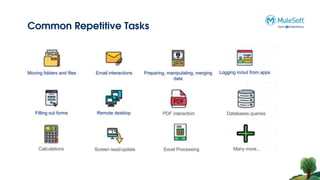
Common Repetitive Tasks
MuleSoft RPA
MuleSoft RPA
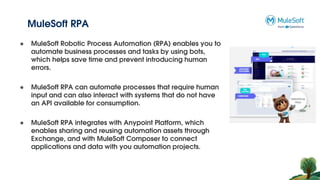
● MuleSoft Robotic Process Automation (RPA) enables you to
automate business processes and tasks by using bots,
which helps save time and prevent introducing human
errors.
● MuleSoft RPA can automate processes that require human
input and can also interact with systems that do not have
an API available for consumption.
● MuleSoft RPA integrates with Anypoint Platform, which
enables sharing and reusing automation assets through
Exchange, and with MuleSoft Composer to connect
applications and data with you automation projects.
Key Features and Capabilities
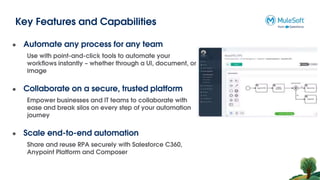
● Automate any process for any team
Use with point-and-click tools to automate your
workflows instantly – whether through a UI, document, or
image
● Collaborate on a secure, trusted platform
Empower businesses and IT teams to collaborate with
ease and break silos on every step of your automation
journey
● Scale end-to-end automation
Share and reuse RPA securely with Salesforce C360,
Anypoint Platform and Composer
MuleSoft Components
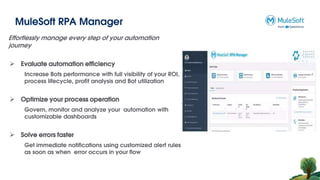
MuleSoft RPA Manager
Effortlessly manage every step of your automation
journey
 Evaluate automation efficiency
Increase Bots performance with full visibility of your ROI,
process lifecycle, profit analysis and Bot utilization
 Optimize your process operation
Govern, monitor and analyze your automation with
customizable dashboards
 Solve errors faster
Get immediate notifications using customized alert rules
as soon as when error occurs in your flow
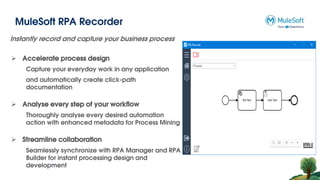
MuleSoft RPA Recorder
Instantly record and capture your business process
 Accelerate process design
Capture your everyday work in any application
and automatically create click-path
documentation
 Analyse every step of your workflow
Thoroughly analyse every desired automation
action with enhanced metadata for Process Mining
 Streamline collaboration
Seamlessly synchronize with RPA Manager and RPA
Builder for instant processing design and
development
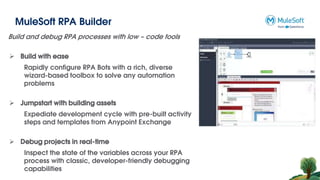
MuleSoft RPA Builder
Build and debug RPA processes with low – code tools
 Build with ease
Rapidly configure RPA Bots with a rich, diverse
wizard-based toolbox to solve any automation
problems
 Jumpstart with building assets
Expediate development cycle with pre-built activity
steps and templates from Anypoint Exchange
 Debug projects in real-time
Inspect the state of the variables across your RPA
process with classic, developer-friendly debugging
capabilities
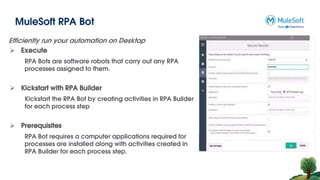
MuleSoft RPA Bot
Efficiently run your automation on Desktop
 Execute
RPA Bots are software robots that carry out any RPA
processes assigned to them.
 Kickstart with RPA Builder
Kickstart the RPA Bot by creating activities in RPA Builder
for each process step
 Prerequisites
RPA Bot requires a computer applications required for
processes are installed along with activities created in
RPA Builder for each process step.
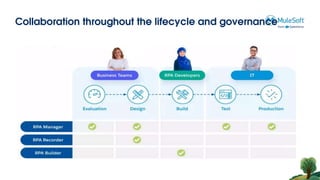
Collaboration throughout the lifecycle and governance
Use Case Demo
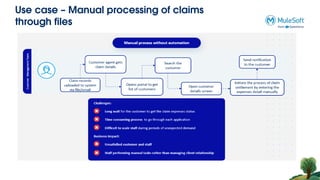
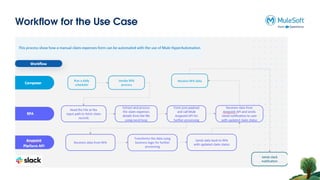
Use case – Manual processing of claims
through files
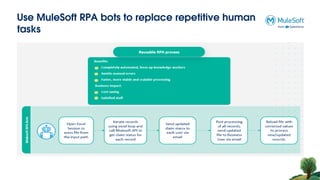
Use MuleSoft RPA bots to replace repetitive human
tasks
Workflow for the Use Case
Q & A
Thank You
Introduce yourself to your neighbor
Network Time

Perth MuleSoft Meetup June 2023

  • 1.
    Welcome Perth MuleSoft Meetup Thankyou for joining us today 29-June-2023
  • 2.
    Welcome A SHOW OFHANDS: Who is new to this Meetup? Footer Kari New Salesforce Practice Area Lead Capgemini Preetham Namaskumar Integration Practice lead Capgemini
  • 3.
  • 4.
    Agenda 4  API Governance MuleSoft RPA  MuleSoft Updates  Wrap-up & Networking
  • 5.
    MuleSoft API Governance What’sbeen done at Western Power Presenter - Amit Sharma
  • 6.
    Agenda ● Need forChoosing MuleSoft ● What is Anypoint API governance ● Benefits (Western Power Context) ● Demo ● Q & A
  • 7.
    API Governance Launched inMuleSoft transform 2021 8 ‘Out of Box’ Rulesets or Custom in-house (Rules applied on metadata extracted from REST API) Single or Multiple Rulesets enforcement (Single or multiple rulesets can be used to create a profile)
  • 8.
    Benefits ● Shift leftapproach - Reduce development review cycles by validating conformance during API design ● Helpful in the absence of SonarQube plugin – XML scanning issue ● Governance Console - Identify APIs with inconsistencies and improve their quality with regular asset-level checks and notifications. ● Improve organization’s API quality: Identify conformance issues in published API specifications and take steps to resolve them. ● Share governance best practices: Publish governance rulesets in Anypoint Exchange to share with other developers. ● Enforce governance within your DevOps organization: Automate the application of standards to your API contract and specification within your CI/CD pipeline. Creating Custom Governance Rulesets | MuleSoft Documentation Submit your ideas for rulesets you would like MuleSoft to provide in the ideas portal: https://help.mulesoft.com/s/ideas
  • 9.
  • 10.
    RPA- Robotic ProcessAutomation Presenter - Akshay Yadav
  • 11.
    Understanding RPA- RoboticProcess Automation Robotic Process Automation (RPA) is a software technology that combines robotics and automation to perform repetitive tasks. Just like people, software robots can do things like what’s on screen, complete the right keystrokes, navigate systems, identify and extract data, and perform a wide range of defined actions. These bots will not need a coffee break.
  • 12.
  • 13.
  • 14.
    MuleSoft RPA ● MuleSoftRobotic Process Automation (RPA) enables you to automate business processes and tasks by using bots, which helps save time and prevent introducing human errors. ● MuleSoft RPA can automate processes that require human input and can also interact with systems that do not have an API available for consumption. ● MuleSoft RPA integrates with Anypoint Platform, which enables sharing and reusing automation assets through Exchange, and with MuleSoft Composer to connect applications and data with you automation projects.
  • 15.
    Key Features andCapabilities ● Automate any process for any team Use with point-and-click tools to automate your workflows instantly – whether through a UI, document, or image ● Collaborate on a secure, trusted platform Empower businesses and IT teams to collaborate with ease and break silos on every step of your automation journey ● Scale end-to-end automation Share and reuse RPA securely with Salesforce C360, Anypoint Platform and Composer
  • 16.
  • 17.
    MuleSoft RPA Manager Effortlesslymanage every step of your automation journey  Evaluate automation efficiency Increase Bots performance with full visibility of your ROI, process lifecycle, profit analysis and Bot utilization  Optimize your process operation Govern, monitor and analyze your automation with customizable dashboards  Solve errors faster Get immediate notifications using customized alert rules as soon as when error occurs in your flow
  • 18.
    MuleSoft RPA Recorder Instantlyrecord and capture your business process  Accelerate process design Capture your everyday work in any application and automatically create click-path documentation  Analyse every step of your workflow Thoroughly analyse every desired automation action with enhanced metadata for Process Mining  Streamline collaboration Seamlessly synchronize with RPA Manager and RPA Builder for instant processing design and development
  • 19.
    MuleSoft RPA Builder Buildand debug RPA processes with low – code tools  Build with ease Rapidly configure RPA Bots with a rich, diverse wizard-based toolbox to solve any automation problems  Jumpstart with building assets Expediate development cycle with pre-built activity steps and templates from Anypoint Exchange  Debug projects in real-time Inspect the state of the variables across your RPA process with classic, developer-friendly debugging capabilities
  • 20.
    MuleSoft RPA Bot Efficientlyrun your automation on Desktop  Execute RPA Bots are software robots that carry out any RPA processes assigned to them.  Kickstart with RPA Builder Kickstart the RPA Bot by creating activities in RPA Builder for each process step  Prerequisites RPA Bot requires a computer applications required for processes are installed along with activities created in RPA Builder for each process step.
  • 21.
    Collaboration throughout thelifecycle and governance
  • 22.
  • 23.
    Use case –Manual processing of claims through files
  • 24.
    Use MuleSoft RPAbots to replace repetitive human tasks
  • 25.
  • 26.
  • 27.
  • 28.
    Introduce yourself toyour neighbor Network Time