
input for better outcomes
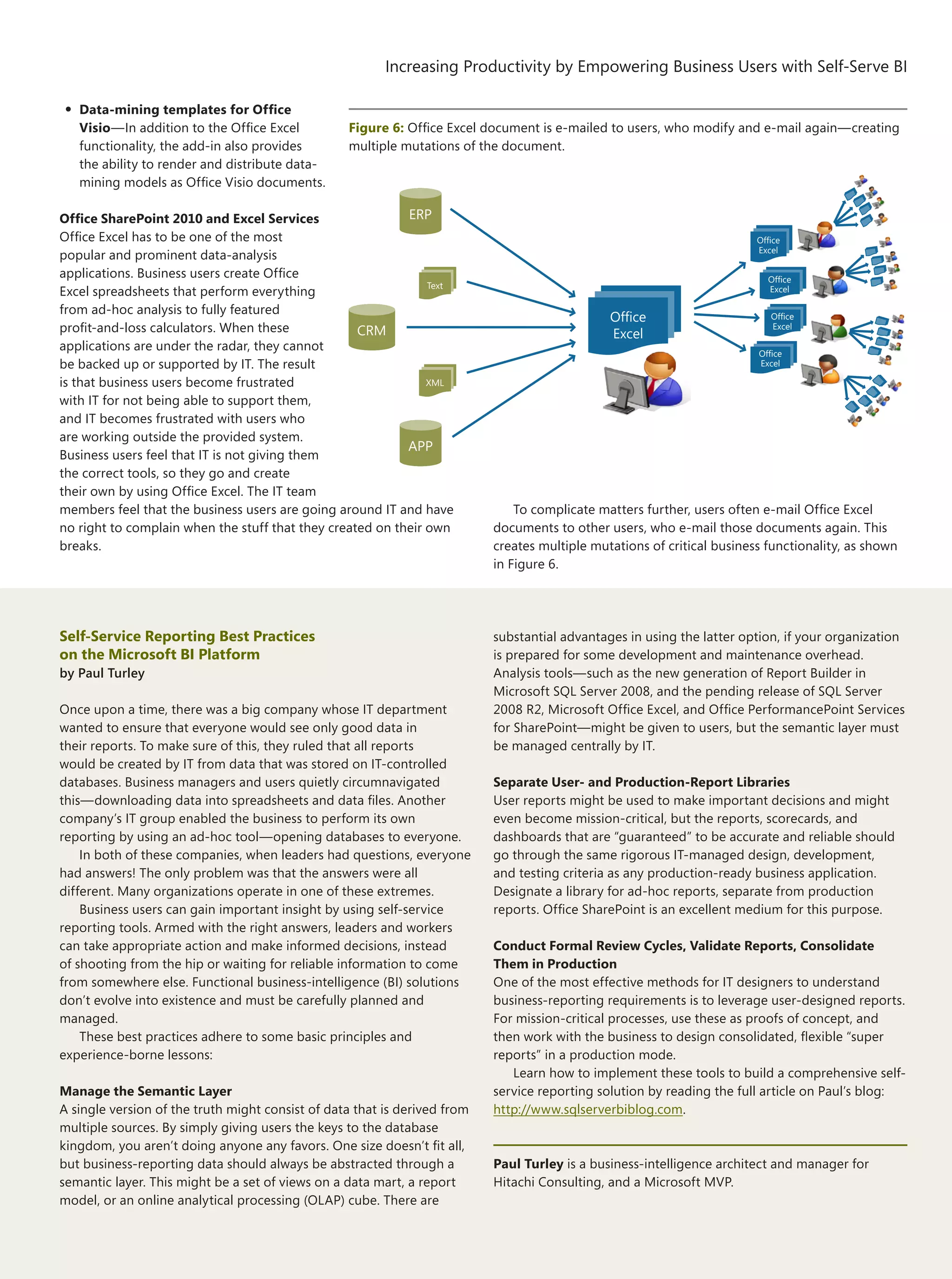
Learn the discipline, pursue the art, and contribute ideas at
www.architecturejournal.net
22
Lightweight SOAs: Exploring
Patterns and Principles of a New
Generation of SOA Solutions
Increasing Productivity by
Empowering Business Users with
Self-Serve BI
Business Insight =
Business Infrastructure =
Business-Intelligence Platform
Semantic Enterprise Optimizer
and Coexistence of Data Models
Thinking Global BI:
Data-Warehouse Principles for
Supporting Enterprise-Enabled
Business-Intelligence Applications
BI-to-LOB Integration:
Closing the Cycle
Taking Business Intelligence
Beyond the Business Analyst
Contents 21
Foreword	 1
by Diego Dagum
Thinking Global BI: Data-Warehouse Principles for
Supporting Enterprise-Enabled Business-Intelligence Applications	 2
by Charles Fichter
Design principles to support a global data-warehouse (DW) architecture.
BI-to-LOB Integration: Closing the Cycle	 8
by Razvan Grigoroiu
A discussion of the necessity of architecting BI solutions that focus on actionable data and
information flow back to LOB applications.
Increasing Productivity by Empowering
Business Users with Self-Serve BI	 13
by Ken Withee
A look at the latest wave of Microsoft tools and technologies that enable end-user self-serve BI.
Business Insight = Business Infractructure =
Business-Intelligence Platform	 20
by Dinesh Kumar
A prescriptive approach to planning and delivering BI services through the business-infrastructure
and business-capability models.
Semantic Enterprise Optimizer and Coexistence of Data Models	 27
by P.A. Sundararajan, Anupama Nithyanand, and S.V. Subrahmanya
Proposal of a semantic ontology–driven enterprise data–model architecture for interoperability,
integration, and adaptability for evolution.
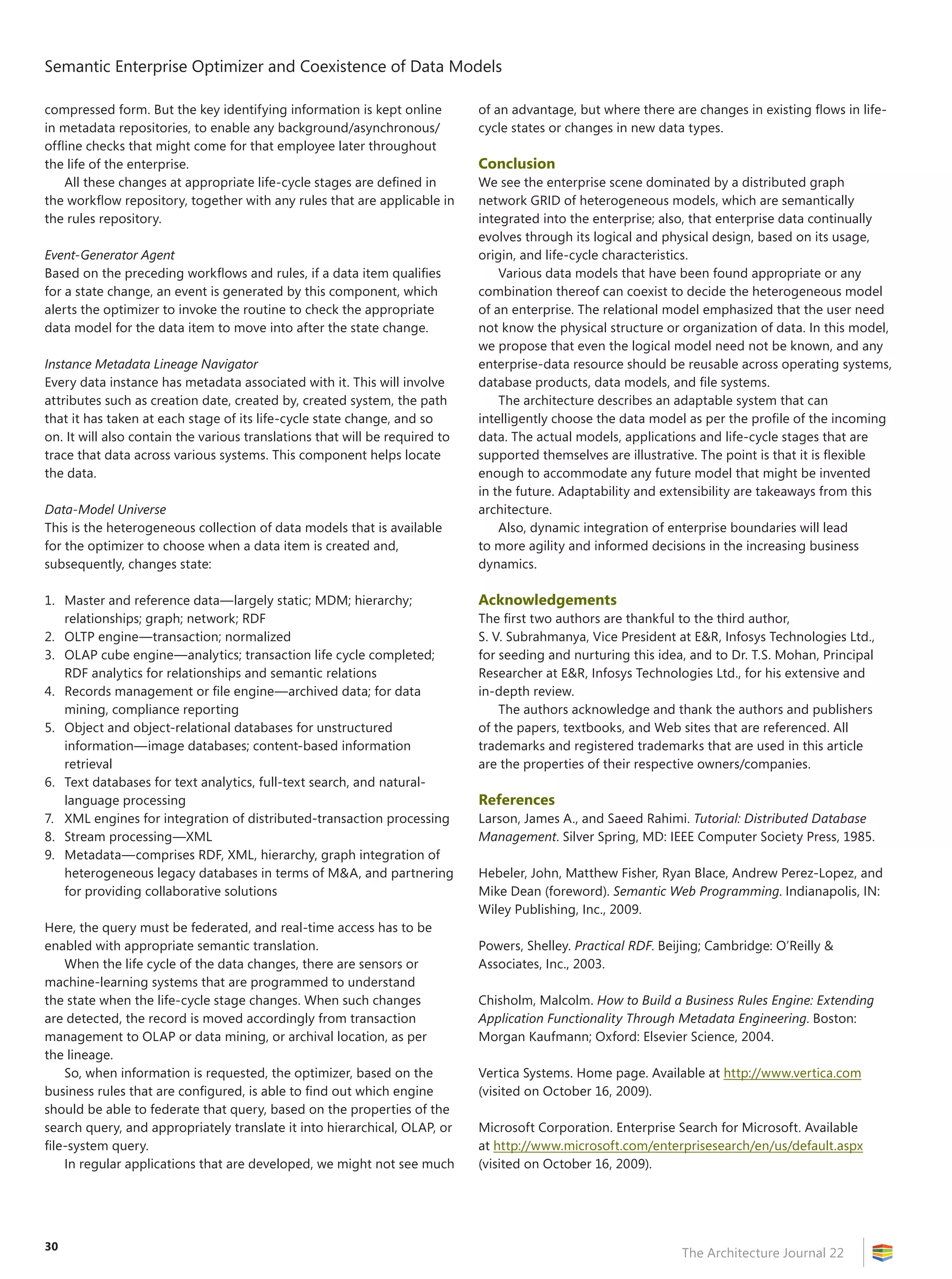
Lightweight SOAs: Exploring Patterns and Principles
of a New Generation of SOA Solutions	 32
by Jesus Rodriguez and Don Demsak
An exploration of how to address common challenges of traditional SOAs by using more scalable,
interoperable, and agile alternatives.
Sign up for your free subscription to The Architecture Journal www.architecturejournal.net
1
The Architecture Journal #22
Foreword
Dear Architect,
In this, the 22nd issue of The Architecture Journal, you’ll get our coverage on
business-intelligence (BI) aspects of which architects like you and me need to be
aware today.
As we did in previous issues, so as to guarantee accuracy, relevance, and quality,
we set up a board of subject-matter experts to analyze the problem space—
harvesting today’s main topic concerns.
The articles that you are about to read were chosen based on those concerns.
Let’s take a look at them:
•	Enterprise BI strategy—Dinesh Kumar (Microsoft) introduces the notion of
business infrastructure, which—together with capability models that are described
in previous issues of The Architecture Journal—help organizations not only gain
business insight, but act upon it, too.
•	Also, Sundararajan PA et al. (Infosys) propose a semantic enterprise data model for
interoperability—adaptable for evolution through its life cycle.
•	Embedding business insights into our applications—Traditionally, the final
output of BI is considered to be scorecards and reports that are used as strategic
decision support. Using implementation examples, Razvan Grigoroiu (Epicor)
tells us how to put these outcomes within the reach of line-of-business (LOB)
applications.
•	Infrastructure and performance—Charles Fichter (Microsoft) explains the design
principles for supporting a global data-warehouse architecture, with effectiveness
and performance in mind.
•	End-user and self-service BI—BI projects typically fall short in allowing users
who have basic experience to handle how results are exposed, without any
dependence on IT specialists. Ken Withee (Hitachi Consulting) shows multiple ways
to tackle this issue by using facilities that are already available throughout the
Microsoft platform.
As a side topic, outside the cover theme, this issue features an article by MVP
Jesus Rodriguez (Tellago) on lightweight SOA implementations, and their patterns
and principles.
The reader will also find more valuable BI input in side columns, as well
as our second companion series of short videos, which are available at
http://msdn.microsoft.com/en-us/architecture/bb380180.aspx.
I’d like to finish by thanking the team of subject matter experts who helped me
complete this challenge. First, I want to thank guest editor Matt Valentine for giving
me direction in the makeup of this issue. Also, for its guidance and suggestions
to give final shape to Matt’s ideas, I’d like to thank the editorial board that we put
together this time. (You’ll find their names on the left-hand side of this page, which is
reserved for this issue’s staff.)
Enjoy the issue! Remember that you may send any feedback to
archjrnl@microsoft.com.
Founder
Arvindra Sehmi
Director
Lucinda Rowley
Editor-in-Chief
Diego Dagum, Matt Valentine (Guest editor)
Editorial Board
Martin Sykes, Gustavo Gattass Ayub,
Gunther Lenz, Reeza Ali, Lou Carbone,
Alejandro Miguel, Charles Fichter, Danny Tambs,
Bob Pfeiff, Jay Gore, Bruno Aziza, Roger Toren,
Alejandro Pacheco
Editorial and Production Services	
WASSER Studios
Dionne Malatesta, Program Manager
Ismael Marrero, Editor
Dennis Thompson, Design Director
®
The information contained in The Architecture Journal
(“Journal”) is for information purposes only. The material
in the Journal does not constitute the opinion of Microsoft
Corporation (“Microsoft”) or Microsoft’s advice and you
should not rely on any material in this Journal without seeking
independent advice. Microsoft does not make any warranty or
representation as to the accuracy or fitness for purpose of any
material in this Journal and in no event does Microsoft accept
liability of any description, including liability for negligence
(except for personal injury or death), for any damages or losses
(including, without limitation, loss of business, revenue, profits,
or consequential loss) whatsoever resulting from use of this
Journal. The Journal may contain technical inaccuracies and
typographical errors. The Journal may be updated from time
to time and may at times be out of date. Microsoft accepts
no responsibility for keeping the information in this Journal
up to date or liability for any failure to do so. This Journal
contains material submitted and created by third parties. To
the maximum extent permitted by applicable law, Microsoft
excludes all liability for any illegality arising from or error,
omission or inaccuracy in this Journal and Microsoft takes no
responsibility for such third party material.
A list of Microsoft Corporation trademarks can be found at
http://www.microsoft.com/library/toolbar/3.0/trademarks
/en-us.mspx. Other trademarks or trade names mentioned
herein are the property of their respective owners.
All copyright and other intellectual property rights in the
material contained in the Journal belong, or are licensed to,
Microsoft Corporation. You may not copy, reproduce, transmit,
store, adapt or modify the layout or content of this Journal
without the prior written consent of Microsoft Corporation and
the individual authors.
Copyright © 2009 Microsoft Corporation. All rights reserved.
Diego Dagum
Editor-in-Chief
2
The Architecture Journal 22
Thinking Global BI:
Data‑Warehouse Principles for
Supporting Enterprise-Enabled
Business-Intelligence Applications
by Charles Fichter
Understanding Isolated Enterprise Data, and Accessing It
Enterprise architects who are looking to aggregate application
data stores into meaningful Multidimensional Online Analytical
Processing (MOLAP) dimensional models are often faced with many
internal obstacles to accessing source data. These obstacles are
often less technical and more business-, legal-, audit-, or security-
sensitive; or overhead is too restrictive, project process, or even
political, as business data can represent “turf” among executives
and divisions. Some of the obstacles are technology constraints such
as noncompatible or proprietary solutions, legacy file formats, and
nonrelational or unstructured data. But as vendor tools (especially
enhancements in Microsoft SQL Server 2008, particularly with
Microsoft SQL Server Integration Services [SSIS] capabilities) and
service oriented–architecture (SOA) technologies advance (for
example, adoption of WS* and other open connectivity standards),
this is becoming far less of an issue.
However, many BI projects are stalled and/or eventually killed
because of a failure by the team to understand accurately what data
was required, and how to access it successfully and make it usable.
Usability is a key concept. How do you take a dozen columns (with
names such as “xtssalescongproc”) and consolidate them in a central
fact table that has readable column names, so that end users can
leverage self-service BI technologies in the future?
The following are a few general tips to help avoid the pitfalls of
navigating access to isolated data:
1.	 Establish strong executive sponsorship early. The success of
your project will be determined by how deeply and broadly across
enterprise stores you have executive mandate. Asking for access is
merely 1 percent of the effort. You might be incurring significant
time and costs across divisions—often, potentially affecting
their service to customers to grant the analysis, access, and/or
aggregation that you might be asking of them. In addition, does
that division truly understand their own data? How much time
are you asking them to analyze and assess even what data and
capacity they have to provide for you? Do not underestimate the
importance of executive sponsorship or the potential cost of time
and resources that you might be asking across other high-value
data stores and the people who manage them.
2.	 Does anyone truly know the data? This might seem like an
obvious question; but, as we have done more of these efforts,
it never ceases to surprise how little enterprise customers often
know about their own data. Many ambitious BI projects are halted
quickly, with a realization that first a project team must perform
a full analysis of all enterprise data stores, which can often take
Summary
This article focuses on the design principles to support
a global data-warehouse (DW) architecture, the golden
triumph of any successful business-intelligence (BI)
application story. It draws from the Microsoft Global
independent software-vendor (ISV) partner experience
in designing enterprise BI applications by using
Microsoft platform technologies and contains external
links and references to public content that delves
deeper into the design topics that are covered.
This article assumes that the reader has some basic DW
understanding of a dimensional store, the underlying
fact tables in which columns are known as measures,
dimension tables in which columns are known as
attributes, and how schemas take on star and snowflake
patterns. There are many available resources to provide
this overview; however, if needed, a concise overview
can be found here: http://www.simple-talk.com/sql
/learn-sql-server/sql-server-data-warehouse-cribsheet.
This article focuses also on successful DW project
strategies and advanced topics of effective design for
performance.
Introduction
Architects who are looking to solve enterprise BI solutions are often
enticed by packaged software applications that are able to fulfill
executive requests for effective reports that reveal deep analysis of
business performance. Microsoft and its vast array of ISV partners
have made significant inroads into fulfilling a vision for easing the
burden of generating the BI dashboards that all executives dream
of—providing them with up-to-the-minute results of their business
strategies and the ability to drill down into specific areas. Too often
left unsaid, however, is the larger 90 percent effort that is left to
the supporting architect and IT force behind the glamorous UI:
how to get the data; scrub and aggregate it effectively; and design
appropriate, manageable, and performant dimensional stores,
including ad-hoc query support, remote geography replication,
and even data marts for mobile decision-maker support with ever-
increasing volumes of dimensional data.
3
Thinking Global BI: Data‑Warehouse Principles for Supporting Enterprise-Enabled Business-Intelligence Applications
The Architecture Journal 22
months. Simply looking at tables can befuddle architects who
are new to the data source, as column names do not inherently
describe the data that they contain. Often, applications and stores
have merely been maintained and not enhanced over the years,
and the intent and design of data stores is tribal knowledge that
was lost long ago. Can you effectively look at a 500-plus‑table
database and understand every relationship without
understanding the minutiae of every application that utilizes
the store? Using advanced vendor tools and ample time, perhaps.
The devil is in the details, and the strength of your dimensions and
attributes later depends on your understanding of the raw data
sources that are at the base of your aggregation.
3.	 Understand local priorities, and consolidate. The highest
BI reporting demands are often local/regional in nature (by
country/trading domain), which begs the question: Do you truly
need a giant, aggregated DW store immediately? Or can you more
effectively build a distributed warehouse and BI strategy, focusing
on local/regional needs along with corporate? This is explored in
more depth in the next section, as there might be significant cost
savings, less network saturation, and performance benefits to a
decentralized approach.
Consider Approaching Data Warehousing in Phases
Many BI and DW projects begin with ambitions to design and
build the world’s greatest aggregated, dimensional store ever, with
the intention of replicating subsets of the dimensional stores to
geographies (the notion of data marts). However, is this approach
always necessary or even feasible? Nearly every DW and BI project
underestimates the investment of time and resources that it takes
to design aggregation and scrub, build, and/or replicate data to
independent MOLAP stores to support global enterprise needs.
The maturity and skill of each enterprise to deliver BI solutions
can vary greatly, and breaking up the effort into smaller, agile-based
deliveries can help your teams gain the experience and expertise that
are needed to understand how to deliver against the larger, longer-
term objectives. Remember the 80/20 rule: Most of the time, you can
deliver 80 percent of the required features from 20 percent of the
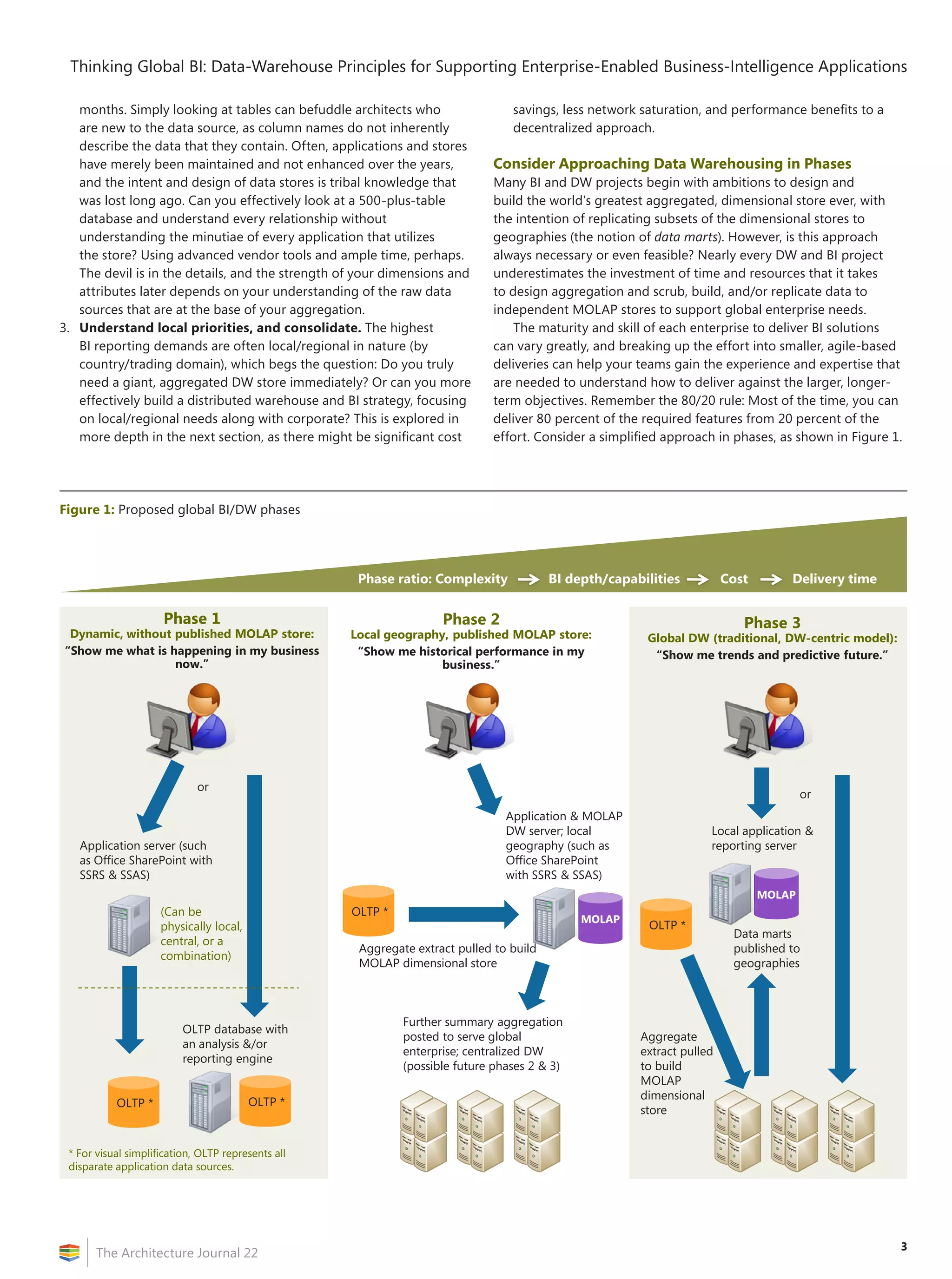
effort. Consider a simplified approach in phases, as shown in Figure 1.
Figure 1: Proposed global BI/DW phases
Phase 1
Dynamic, without published MOLAP store:
“Show me what is happening in my business
now.”
Application server (such
as Office SharePoint with
SSRS & SSAS)
or
OLTP database with
an analysis &/or
reporting engine
Phase ratio: Complexity BI depth/capabilities Cost Delivery time
Phase 2
Local geography, published MOLAP store:
“Show me historical performance in my
business.”
Application & MOLAP
DW server; local
geography (such as
Office SharePoint
with SSRS & SSAS)
Further summary aggregation
posted to serve global
enterprise; centralized DW
(possible future phases 2 & 3)
Aggregate extract pulled to build
MOLAP dimensional store
Phase 3
Global DW (traditional, DW-centric model):
“Show me trends and predictive future.”
Aggregate
extract pulled
to build
MOLAP
dimensional
store
Local application &
reporting server
Data marts
published to
geographies
or
(Can be
physically local,
central, or a
combination)
OLTP *
MOLAP
MOLAP
* For visual simplification, OLTP represents all
disparate application data sources.
OLTP *
OLTP * OLTP *
Thinking Global BI: Data‑Warehouse Principles for Supporting Enterprise-Enabled Business-Intelligence Applications
The Architecture Journal 22
4
Phase 1
If BI reporting needs are infrequent enough, leave as much source
data in place, and build multidimensional views through a distributed
caching strategy to deliver a subset of business solutions quickly. Can
you merely query efficiently by using advanced vendor tools against
existing application stores, even across competing platforms? This is
an important decision point that you will face early on. This approach
can address BI concerns such as, “Tell me what is happening in my
business now.” This strategy can be most effective with noncompatible
vendor technologies, or when strong divisional boundaries exist
between data stores. It is far more efficient (in terms of person-hour
commitment from your team), and you will be able to deliver solutions
quicker to the business units.
While this might result in longer wait time for users, using tools
such as SSIS can help you build packages to retrieve aggregate and
clean large quantities of data (even from non-Microsoft technology
stores), build the dimensional relationships in memory cache, and
present them to requesting applications via Microsoft SQL Server
Analysis Services (SSAS). In the past, this could be practical only
for relatively small quantities of data; however, database vendor
optimizations are making this scenario a real choice.
Phase 2
Whenever, possible, build and keep the dimensional stores locally.
With large volumes of aggregated data, companies can begin more
intense mining to address BI concerns such as, “Show me historical
performance.” To begin here, it is essential that you critically analyze
how much aggregate data replication truly is needed to a centralized
store. Can you more effectively populate local MOLAP stores to
represent regional business-analysis needs? When you examine
regional needs versus larger corporate needs, you will likely find
that more of the deeper, drilldown BI reporting needs are local/
regional in nature. Enterprise-wide BI queries tend to be broader,
trend based analysis that can be supported by summary aggregations
from smaller dimensional stores. Cheaper, inexpensive MOLAP stores
can be effectively maintained by local resources and greatly reduce
the complexity of a central warehouse design, as well as mitigate
potentially large network congestion and replication needs.
Consider beginning your efforts in a smaller, less-strategic division
of the company or geography to test your team’s ability. This design
approach is almost an inverse of the traditional DW and downstream
data-mart approach: Instead, the smaller, regionalized MOLAP
stores become aggregation feeds to a larger, further aggregated,
summary DW store for broader trending analysis. Although business
trends are pushing highly globalized patterns, the need for in-depth
regional mining is increasing, too; and relying solely on a centralized
DW pattern can require a massive investment in both physical and
people resources to maintain and might prove overly costly, fraught
with performance challenges, and overly cumbersome to enhance or
change.
Data-Integration Strategy
by Derek E. Wilson
Today, enterprises collect and store data easier than ever in a
variety of applications. Many of these applications are inside the
firewall, while some are in the cloud and others in remote locations.
All too often, application data is not collected and used across an
organization for consistent analysis and business decisions. The ability
to collect and analyze this data can benefit your company, if it is
treated as an organizational asset.
To create an enterprise business-intelligence (BI) architecture, you
must identify the core subject areas of your businesses, such as the
following:
Customer
Product
Employee
Inventory
When these have been identified, you must further define what
attributes should be collected for an enterprise view. The fields that
you define will be the backbone of your enterprise BI platform. For
instance, if a customer relationship management (CRM) system will
allow you to capture data that shows that a customer has three
children, must this piece of information be migrated to the enterprise
BI system, to let everyone in the organization leverage it to make
better business decisions? Knowing what attributes you must store for
the collective good of the organization will enable you to begin data
integration.
By leveraging Microsoft SQL Server and Microsoft BizTalk Server,
an enterprise BI and data-integration strategy can be developed
to integrate and store critical subject areas. The database structure
should be abstracted by using an enterprise integration pattern that is
known as the canonical data model. This model requires all incoming
data to meet a user-defined pattern. For instance, an enterprise BI
system might require the following fields:
First Name, Last Name
Address
City, State, ZIP Code
Phone Number
E-mail
Source applications likely store other information, such as mobile
number, gender, and age.
BizTalk Server can be leveraged to receive messages from various
applications and write the information in the appropriate database
tables.
When the data has been collected, it can be stored in an online
analytical processing (OLAP) cube and then presented to business
users for decision-making. The process of loading and adding
calculations to a cube allows everyone in the business to leverage
the work that is done to create value from the data. As users access
the cube, they get consistent answers to queries; and, when new
calculations are requested, everyone benefits from the additions.
By identifying, integrating, and creating central OLAP stores,
an organization can leverage data as an asset across the company.
Derek E. Wilson is a BI Architect and Manager in Nashville, TN. Visit
his Web site at www.derekewilson.com.
5
Thinking Global BI: Data‑Warehouse Principles for Supporting Enterprise-Enabled Business-Intelligence Applications
The Architecture Journal 22
Phase 3
Build and populate a traditional, independent, centralized DW of
your dreams to reach all of the more ambitious BI needs of your
company. This approach will address the harder BI concerns such as
the ever-elusive BI goldmine, “Predict future results,” which can be
accomplished only by analysis of trends across often voluminous,
company-wide historical data.
While historical trending and data mining can be performed
across geographies (read, utilizing or aggregating further from
Phase 2 [or even Phase 1] repositories), to get the raw reporting
and drilldown-supported dashboard experience against very large,
corporate-wide historical data, a centralized DW implementation
most likely will be the most effective choice. However, many successful
BI projects will likely find a blend between the Phase 2 and Phase 3
approaches.
Designing Effective, Performant,
Maintainable Dimensional Storage
As data warehousing has evolved, what once was a static strategy
of replicating large, read-only stores for reporting has become a far
more dynamic environment in which users are given expansive powers
such as building their own ad-hoc queries, self-service reporting
(using tools such as PowerPivot, previously codenamed “Gemini” and
an extension of Office Excel 2010 that will be available in the first half
of 2010 and enables users to pull down massive dimensional data to
the tune of 100 plus–million rows for real-time, cached pivoting), and
even write-back capabilities directly into the dimensional stores.
The power of the tools that are available to you at design time
can greatly affect the strength of your models, assist visually with
overcoming the complexity of the relationships, and reveal potential
bottlenecks, poor query structure, and ineffective mining semantics.
Through the use of the SSAS designer within Business Intelligence
Design Studio (BIDS), the architect is given a comprehensive set of
tools for designing and optimizing dimensional stores and queries
against those stores (see Figure 2).
Listed here are a few key DW principals to remember when you
are designing your dimensional models to maximize performance
later (more comprehensive articles on this subject and advanced
SSAS design can be found at http://technet.microsoft.com
/en-us/magazine/2008.04.dwperformance.aspx and at
http://www.ssas-info.com/analysis-services-papers/1216-sql-server
-2008-white-paper-analysis-services-performance-guide):
1.	 The overwhelming majority of MOLAP data will grow in your
fact tables. Constrain the number of measures in your fact tables,
as query processing is most effective against narrow-columned
tables. Expand the depth of attributes in the supporting dimension
tables. The benefit of breaking dimension tables into further
subdimension tables, when possible (snowflake pattern), is hotly
debated, although this approach generally gives more flexibility
when one considers scale-out models and utilizing indexing and
performance-enhancing technologies such as partitioning.
2.	 Implement surrogate keys for maintaining the key relationship
between fact and dimension tables, instead of enforcing
Figure 2: SSAS Designer—Dimensional modeling in BIDS
Thinking Global BI: Data‑Warehouse Principles for Supporting Enterprise-Enabled Business-Intelligence Applications
The Architecture Journal 22
6
foreign‑key constraints, which can often manifest as compound
keys that cover several columns. A surrogate key is an integer-
typed identity column that serves as an artificial primary key of the
dimension table. This approach can minimize storage requirements
and save storage/processing overhead for maintaining indexes.
3.	 While OLTP stores traditionally are highly normalized, this
is far less important for dimensional stores. Denormalized data
has certain advantages in extremely large stores—namely,
the reduction of joins that are required in queries. In addition,
database products such as SQL Server 2008 utilize a highly
optimized bitmap filtering (also known as “bloom filter”) that
eliminates largely redundant and irrelevant data from query
processing during star joins.
4.	 Prototype, prototype, prototype. Your physical design might
work well for initial static-reporting needs; however, as users
become accustomed to the new data that is available to them,
and as their expertise grows, you will need to support ad-hoc
querying in a substantial way. Ad-hoc queries have the capability
to create explosive data sets, depending upon the structure of
your historical modeling within your dimensions. Most database
products support test/modeling partitioning. Spend ample time
understanding the overall impact to your environment (including
indexing/maintenance) when ad-hoc support is considered.
Implementing self-service BI products such as PowerPivot, instead
of open ad-hoc query support, can greatly ease demands on the
server by delivering large chunks of dimensional data directly
down to the client for ease of manipulation by the user for
drilldown.
5.	 Implement a clustered index for the most common fact
table surrogate keys, and nonclustered indexes upon each of
the remaining surrogate keys. As per the previous item #4, the
addition of ad-hoc query support can greatly affect your indexing
strategy; however, for overall common-usage patterns, this
indexing strategy has proven efficient.
6.	 Use partitioned-table parallelism. Because of the growth of
fact tables over time, most DW architects implement a partition
strategy (breaking up the fact table over physical storage devices).
This is most commonly performed by using a date column, but
it can be performed as a range that is based on usage patterns
(supported by SQL Server 2008). SQL Server 2008 implements
a new partitioned-table parallelism (PTP) feature that highly
optimizes queries over partitioned tables by executing queries in
parallel across all available multicore processors. For more detailed
information on PTP and other new DW enhancements in SQL
Server 2008, visit http://technet.microsoft.com/en-us/library
/cc278097.aspx.
7.	 Implement a compression strategy. Over time, data warehouses
can become huge. Overhead for compression can often be
overcome by the reduction in redundant data—thereby, reducing
query processing time, as well as providing maintenance benefits
for size of data storage. However, the general strategy remains to
implement compression on the least-used data. Compression can
be applied in many different ways, including at partition, page,
row, and others. As per item #4, the most efficient pattern will
require extensive prototyping in your model.
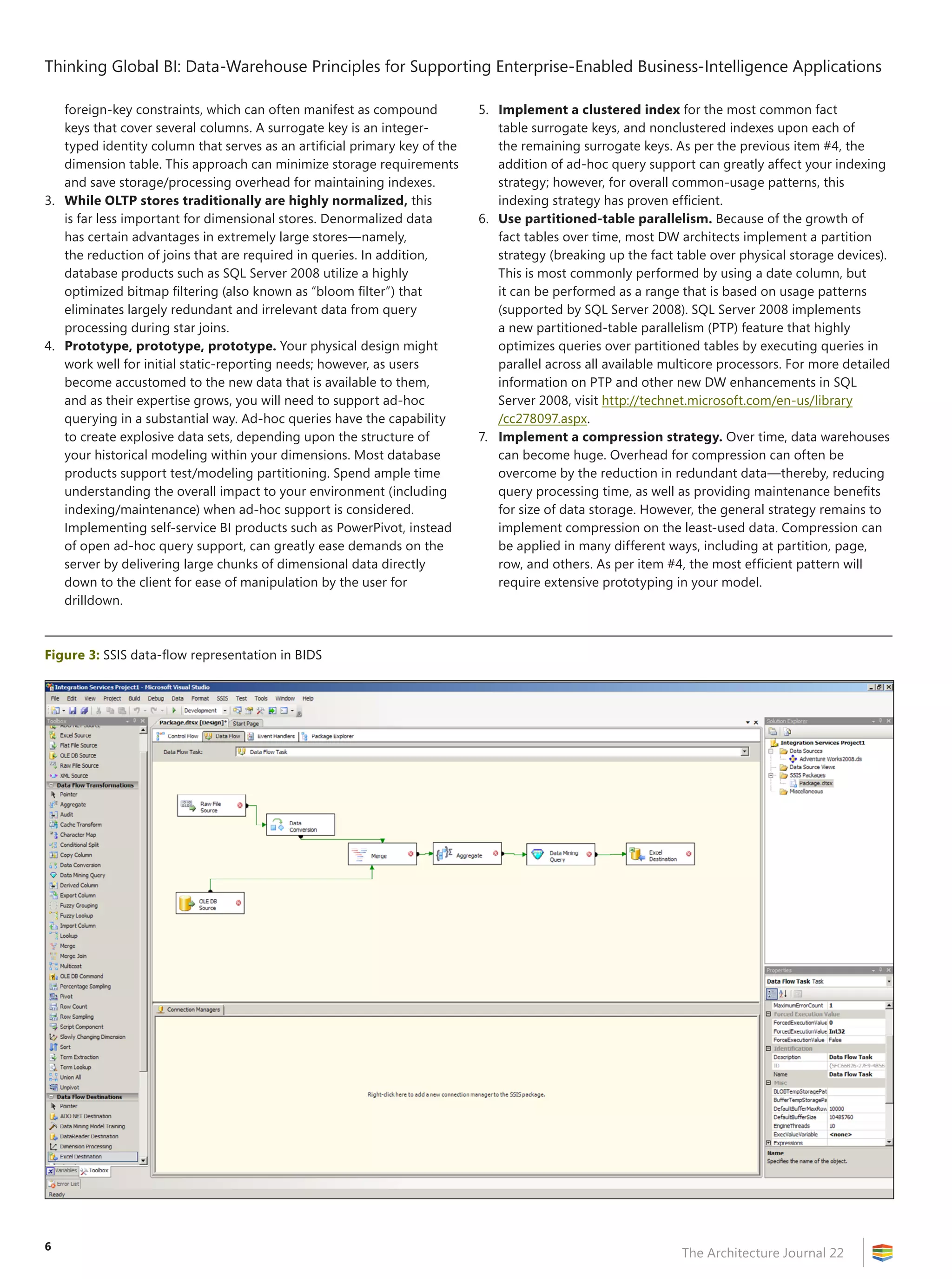
Figure 3: SSIS data-flow representation in BIDS
7
Thinking Global BI: Data‑Warehouse Principles for Supporting Enterprise-Enabled Business-Intelligence Applications
The Architecture Journal 22
Consolidation, Aggregation, and Population of the Stores
Fortunately, when you have determined what data to access and
designed your data-warehouse topology, aggregation and population
is becoming a more simplified task, thanks to advancements in
vendor tools. Using tools such as SSIS within BIDS (which ships with
SQL Server Enterprise edition), an architect can build a “package” that
can fetch, manipulate/clean, and publish data. SSIS comes with data
connectors that enable the architect to design packages to access all
the major database platforms (including Oracle, IBM, Teradata, and
others) and a comprehensive set of data-manipulation routines that
are conveniently arranged in a visual toolbox for easy drag-and-drop
operation in a visual data-flow model (see Figure 3 on page 6).
SSIS allows for highly sophisticated packages, including the ability
to loop through result sets; the ability to compare data from multiple
sources; nested routines to ensure specific order or compensation/
retry rules when failure occurs during the data-collection exercise
(for instance, the remote server in Central America is down for
maintenance); and sophisticated data transformation.
While SSIS can be compared to most traditional extract, transform,
and load (ETL)–type tools, it offers a far richer set of features to
complement the dynamic MOLAP environment of a DW that is
implemented with SQL Server 2008 and Analysis Services (for instance,
sophisticated SSIS packages can be imbedded within the DW and
called dynamically by stored procedures to perform routines that are
dictated by conditional data that is passed from within the Analysis
Services engine). Many Microsoft ISVs have even built sophisticated
SSIS package–execution strategies that are being called from within
Windows Workflow Foundation (WF) activities. This gives the added
possibility of managing highly state-dependent (or long-running)
types of data-aggregation scenarios.
For a more detailed overview of SSIS, visit
http://download.microsoft.com/download/a/c/d/acd8e043-d69b
-4f09-bc9e-4168b65aaa71/ssis2008Intro.doc.
Highly Distributed Data, Global Geography, Mobile-User
Data Marts, Ad Hoc Query, and Data-Synchronization
Considerations
Perhaps the most daunting challenge for enterprise architects who are
designing a DW solution that supports BI applications is to understand
the potential impact of a design upon the physical network assets. Will
the environment be able to sustain replication of massive amounts of
dimensional data on ever-increasing historical data?
A key to success is utilizing effective read-only snapshot replication
of predetermined aggregated subsets. This means a careful analysis of
the needs of each independent geography and the use of advanced
features within database products, such as extensive data compression
and “sparse” attributes on columns. SPARSE is a new column attribute
that is available in SQL Server 2008 and removes any physical data size
to null values. Because data warehouses are typically full of enormous
amounts of null field values (not every shoe from every store in every
region is purchased every day), the compression and removal of the
physical size of null value fields is essential. Many traditional data-
warehouse products do not have this capability, and SQL Server
2008 has many performance advantages for the replication of large
volumes of dimensional data.
Another effective strategy is to grant write-back and ad-hoc
query capabilities judiciously. These features by necessity create
larger overhead in design to support downstream geographies
and can greatly increase replication requirements and the possible
reconstitution of the aggregated dimensional stores (a very expensive
operation, as data volumes increase in size).
Fortunately, data replication has become a seamless art, thanks to
improvements within database vendors. Management of replication
partnerships, rollback on failures, and rules on data-consistency
violations all can be handled effectively within the replication-
management console. Together with significant performance
enhancements of both the replication engine and physical data size,
global enterprises can rely upon the SQL Server 2008 toolset to meet
even the most demanding data-warehouse and downstream data-
mart strategies.
But what about those power users who demand offline BI analysis
in a mobile fashion? Using the Microsoft platform, you can deliver
powerful BI even in a disconnected paradigm by utilizing SQL Server
CE or Express Edition on the client. Microsoft has worked with dozens
of Global ISVs that have designed application suites that utilize large
dimensional cube data on the client in a disconnected mode. You
can establish replication strategies within the client-side database
for when the mobile user is connected, or application designers
can implement Synchronization Services for ADO.NET and manage
data replication that is specific to the workflow needs within the
application. For more information, visit http://msdn.microsoft.com
/en-us/sync/default.aspx.
Conclusion
Enabling BI solutions for your enterprise first requires a significant
investment into an advanced understanding of the corporate data
within your access. For querying extremely large data volumes that
likely include historical references (data over time), dimensional
storage models such as data-warehouse design patterns (including
MOLAP and others) have proven the most efficient strategy. For
more detailed guidance in implementing your DW and BI solutions
by utilizing SQL Server 2008, visit http://www.microsoft.com
/sqlserver/2008/en/us/white-papers.aspx. In addition, for real-world
scale-out experiences, visit the best-practices work that has been
done by the SQL CAT team at http://sqlcat.com/.
About the Author
Charles Fichter (cfichter@microsoft.com) is a Senior Solution
Architect within the Developer Evangelism, Global ISV (Independent
Software Vendor) team at Microsoft Corporation. A 20-year veteran
software and database architect, Charles specializes in business
intelligence, Microsoft SQL Server, and Microsoft BizTalk Server, as
well as general .NET middle- and data-tier application and database
design. For the past four and a half years, Charles has focused on
assisting Global ISVs with their application-design strategies. Other
recent publications by Charles include the following:
•	“Business Intelligence, Data Warehousing and the ISV”
(white paper)
•	“Microsoft Manufacturing Toolkit” (video)
•	“Emery Forwarding: Freight Forwarder Realizes a 102 Percent ROI
with BizTalk Server” (case study)
Follow up on this topic
•	SQL Server Integration Services (SSIS):
http://msdn.microsoft.com/en-us/library/ms141026.aspx
•	SQL Server Analysis Services (SSAS): http://www.microsoft.com
/sqlserver/2008/en/us/analysis-services.aspx
•	PowerPivot: http://www.powerpivot.com/
8
The Architecture Journal 22
Summary
The business value of business intelligence (BI) will be
attained only when it leads to actions that result in
increased revenue or reduced cost. This article discusses
the necessity of architecting BI solutions that focus on
actionable data and information flow back to line-of-
business (LOB) applications.
Introduction
While the final output of business intelligence (BI) is traditionally
considered to be scorecards and reports that are used as strategic
decision support, we will see that this is no longer enough. BI can take
a greater role in ensuring that the value of information is harnessed to
its potential.
The value of information is quantified by the action that is taken
following analysis and its result. In order to maximize the value,
BI applications must streamline the decision and action processes.
The business value of BI information is attained only when it results
in a business operation that has the effect of increasing revenue or
reducing cost.
A BI report might indicate increased demand for a particular
product; but this information has value only if it leads to placed
purchase orders and distributions to stores, so that sales figures go up.
Such transactional operations are executed and managed with
the help of line-of-business (LOB) applications, such as Enterprise
Resource Planning (ERP) systems. BI solutions that implement a better
integration to LOB systems will ultimately provide the enterprise with
a better return on investment (ROI).
Recent advances in hardware and software technologies, such as
Microsoft SQL Server Integration Services (SSIS), allow up-to-date and
quality data to be summarized and made available to the information
user in near-real time.
The times when it took many person-days of IT staff effort to
gather such data for presentation in quarterly meetings are now
things of the past.
It is not uncommon for extract, transform, and load (ETL) processes
to collect data from LOB applications and underlying transactional
databases on an hourly basis or even more frequently.
There is available a wealth of near-real-time information that can
be utilized by LOB users to streamline operational processes.
Because of this, today’s BI solutions can take a more active role
in the operational space by offering a closer integration back to
LOB applications. Information should be presented in an interactive,
actionable way, so as to allow users to act on it.
This article argues that in order to attain the business value of
BI information, the final output of BI must be an action that triggers
a business operation on LOB applications. To achieve this goal,
BI solutions must be designed with actionable information in mind
and must offer a better integration with LOB applications that will
execute the action.
Agility Through Actionable Information
A classical BI solution would consist of four main logical layers: ETL,
a data warehouse, OLAP cubes, and presentation (that is, analysis
tools).
Data flows through these four layers in a way that is similar to the
following: A set of ETL jobs run periodically to gather information
from LOB data sources such as ERP systems and other applications
that service a business need or their underlying transactional
databases.
Data is transformed according to the need of the particular
BI implementation and loaded into a data warehouse (that is,
a database that is modeled in a denormalized star schema that is
optimized for a decision-support perspective).
From there, it is then stored in an analysis-friendly
multidimensional structure such as OLAP cubes.
On the presentation layer, Microsoft Office Excel is one of the
more popular analysis tools that is used today. It offers a well-known
user interface that can be utilized by users who occupy different roles
in the enterprise—from executives and business analysts to buyers
and other operational staff.
Using Office Excel 2007 and later releases, users can browse their
data that is available in OLAP cubes by using pivot tables to get an
overview on how the business is performing.
Potential problems or opportunities can be highlighted by using
color schemes, and the user can drilldown analyze the particular
information and conclude that an action must be taken.
Such an action is usually an operation on the LOB application from
which the transactional data was loaded. Users might switch then to
the LOB application and perform the required business operation.
In most cases, however, this is tedious work and disconnects from the
analysis context. In many cases, when it comes to this part, users have
expressed a desire for an automated solution.
In order to streamline decision-making processes, decrease
response time, and track the causality of such operations, this action
can be started from within the decision-support context and triggered
from the analysis tool (Office Excel, in this example).
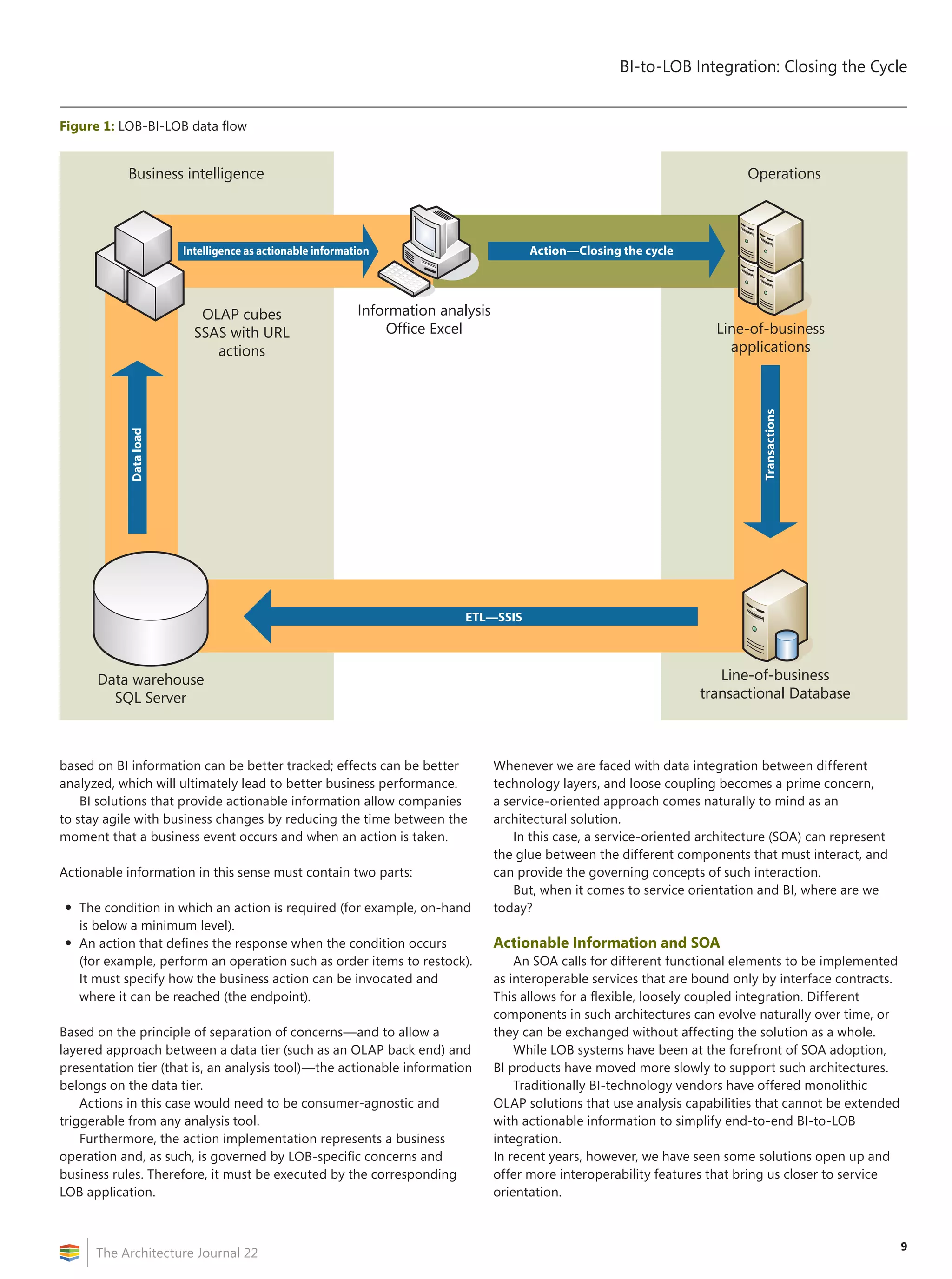
This step closes the data cycle from BI back to LOB applications
(see Figure 1 on page 9) and encapsulates decision-making logic.
The next generations of BI applications can be designed in such a
way that users can act on the information easily. This will bridge the
gap between BI analysis and operational processes, and will lead to
more cohesive enterprise solutions.
Information utilization is maximized, and BI can become in this
way a driver for business-process optimization. Actions that are taken
BI-to-LOB Integration:
Closing the Cycle
by Razvan Grigoroiu
9
BI-to-LOB Integration: Closing the Cycle
The Architecture Journal 22
based on BI information can be better tracked; effects can be better
analyzed, which will ultimately lead to better business performance.
BI solutions that provide actionable information allow companies
to stay agile with business changes by reducing the time between the
moment that a business event occurs and when an action is taken.
Actionable information in this sense must contain two parts:
•	The condition in which an action is required (for example, on-hand
is below a minimum level).
•	An action that defines the response when the condition occurs
(for example, perform an operation such as order items to restock).
It must specify how the business action can be invocated and
where it can be reached (the endpoint).
Based on the principle of separation of concerns—and to allow a
layered approach between a data tier (such as an OLAP back end) and
presentation tier (that is, an analysis tool)—the actionable information
belongs on the data tier.
Actions in this case would need to be consumer-agnostic and
triggerable from any analysis tool.
Furthermore, the action implementation represents a business
operation and, as such, is governed by LOB-specific concerns and
business rules. Therefore, it must be executed by the corresponding
LOB application.
Whenever we are faced with data integration between different
technology layers, and loose coupling becomes a prime concern,
a service-oriented approach comes naturally to mind as an
architectural solution.
In this case, a service-oriented architecture (SOA) can represent
the glue between the different components that must interact, and
can provide the governing concepts of such interaction.
But, when it comes to service orientation and BI, where are we
today?
Actionable Information and SOA
An SOA calls for different functional elements to be implemented
as interoperable services that are bound only by interface contracts.
This allows for a flexible, loosely coupled integration. Different
components in such architectures can evolve naturally over time, or
they can be exchanged without affecting the solution as a whole.
While LOB systems have been at the forefront of SOA adoption,
BI products have moved more slowly to support such architectures.
Traditionally BI-technology vendors have offered monolithic
OLAP solutions that use analysis capabilities that cannot be extended
with actionable information to simplify end-to-end BI-to-LOB
integration.
In recent years, however, we have seen some solutions open up and
offer more interoperability features that bring us closer to service
orientation.
Figure 1: LOB-BI-LOB data flow
Business intelligence Operations
Line-of-business
transactional Database
Data warehouse
SQL Server
OLAP cubes
SSAS with URL
actions
Line-of-business
applications
`
Information analysis
Office Excel
Action—Closing the cycle
ETL—SSIS
Intelligence as actionable information
Dataload
Transactions
BI-to-LOB Integration: Closing the Cycle
The Architecture Journal 22
10
With SQL Server Analysis Services (SSAS), Microsoft provides a feature
that is called “URL actions” and represents a mechanism to store
actionable information inside the OLAP cube metadata. Conditions
in which the action becomes available can be expressed by using the
MDX query language, and the URL provides an endpoint.
Such capabilities in OLAP technologies can be utilized to
implement an end-to-end integration back to LOB applications in
an SOA.
In an enterprise SOA, operations on LOB applications can be
exposed as Web services that hide the complexity of underlying
programs and, together with any external Cloud or B2B services,
can represent basic components in an infrastructure that models
business needs.
Office Excel has the native ability to consume the actionable
information by displaying to the user any available actions on cells
in which the predefined conditions are met. The caption that will be
displayed can also be defined dynamically by using MDX expressions.
Each cell of the analyzed cube is defined by one member (called
the current member) from every dimension.
The URL can be defined in the cube to include the current members as
a query string.
When the user performs the suggested action on a cell, Office Excel
will call the Web application that the URL has located. If necessary,
the Web application can collect more information from the user,
depending on the action.
Such a solution can leverage advances in rich Internet application
(RIA) technologies such as Ajax or Microsoft Silverlight.
A Silverlight front end has the advantage over classical Web
applications: Code that is written in a CLI language such as C# will
run on the client in the browser application, which minimizes cross-
computer calls to the server.
Silverlight is built on the .NET framework and can utilize Windows
Communication Foundation (WCF) as an out-of-the-box framework
for SOA integration. WCF provides a flexible API to implement SOAP
Web service calls from the client process.
Consequently, Silverlight can be utilized as a bridge between SOA
and BI.
The cell information (current members), together with any
additional information that is collected from the user, can be sent to
the Web service that implements the business action; and, at the end,
any service feedback can be displayed to the user.
Data flow between any such services can be orchestrated and
customized to fulfill the need of business operations.
Using Web services to expose operations on LOB applications in
an SOA is a way to utilize existing software assets better and increase
their participation in enterprise information flow. This also makes
Guerrilla BI:
Delivering a Tactical Business-Intelligence Project
by Andre Michel Vargas
“If ignorant both of your enemy and yourself, you are certain to
be in peril.”
SUN TZU
Business intelligence (BI) offers a distinct competitive advantage. By
transforming data into knowledge through BI, you can determine your
strengths and weaknesses while better understanding your position
in the marketplace. Whether it’s cost reduction, process optimization,
increasing revenue, or improving customer satisfaction, it’s more
important than ever to run your business better and faster. Knowledge
is critical to being agile and adaptive in a changing economy; a 1
percent head start can make all the difference. However, successful
BI initiatives are traditionally lengthy and expensive. So, how can
you affordably implement a winning BI initiative? Guerrilla business
intelligence (GBI) delivers the insight that you need, in weeks.
The GBI approach is the following:
1.	 Mobilize with speed. Reducing decision-making time is
critical. This doesn’t mean that decisions should be made hastily;
instead, speed requires preparation. In the first week of the GBI
deployment, teams must be embedded with business subject-
matter experts—thus, allowing teams to identify and address
hot spots.
2.	 Deploy small multiskilled teams. Form crossfunctional teams
to interpret your data, to gain insights on operational weaknesses
and strengths. Teams can focus on anything from cost-reduction
efforts and process-efficiency optimization to market analysis for
revenue opportunities.
3.	 Infiltrate iteratively and collaboratively. Infiltrate iteratively
through your business functions in four- to six-week deployments.
Clear objectives and short deployments bring focus. Also, teams
must collaborate with executives from each business function to
ensure that GBI efforts align with overall business strategy.
4.	 Leverage and extend your existing BI tools. Leverage
existing BI technologies with agile implementation techniques
to deliver value quickly. Then, expand on traditional BI tools
(data warehouse, ODS, dashboards, analytics, and so on)
with productivity-monitoring and optimization tools. A small
investment in these assets will allow your GBI team to analyze and
improve processes and support cost-reduction goals.
“Strategy without tactics is the slowest route to victory. Tactics
without strategy is the noise before defeat.”
SUN TZU
Implementing a GBI strategy can provide a key advantage in today’s
fluctuating economy. However, do not lose sight of the long term.
Investing in enterprise BI remains essential. When signs of growth
reappear, revise your BI strategy, including guerrilla tactics, for
optimal success and return on investment (ROI).
“Know thyself, know thine enemy. A thousand battles, a
thousand victories.”
SUN TZU
Andre Michel Vargas (andre.michel.vargas@paconsulting.com) is
a management consultant in PA Consulting Group’s IT Consulting
practice. He specializes in solving complex information-related issues,
including legacy-systems migration and integration, business-process
automation, and delivery of enterprise BI. For more information on
PA’s thinking around BI, please visit www.paconsulting.com/our-thinking
/business-intelligence-solutions.
11
BI-to-LOB Integration: Closing the Cycle
The Architecture Journal 22
collaboration of the components more flexible, and it becomes easier
to adapt to changes in business processes, which ultimately leads to a
better IT-to-business alignment.
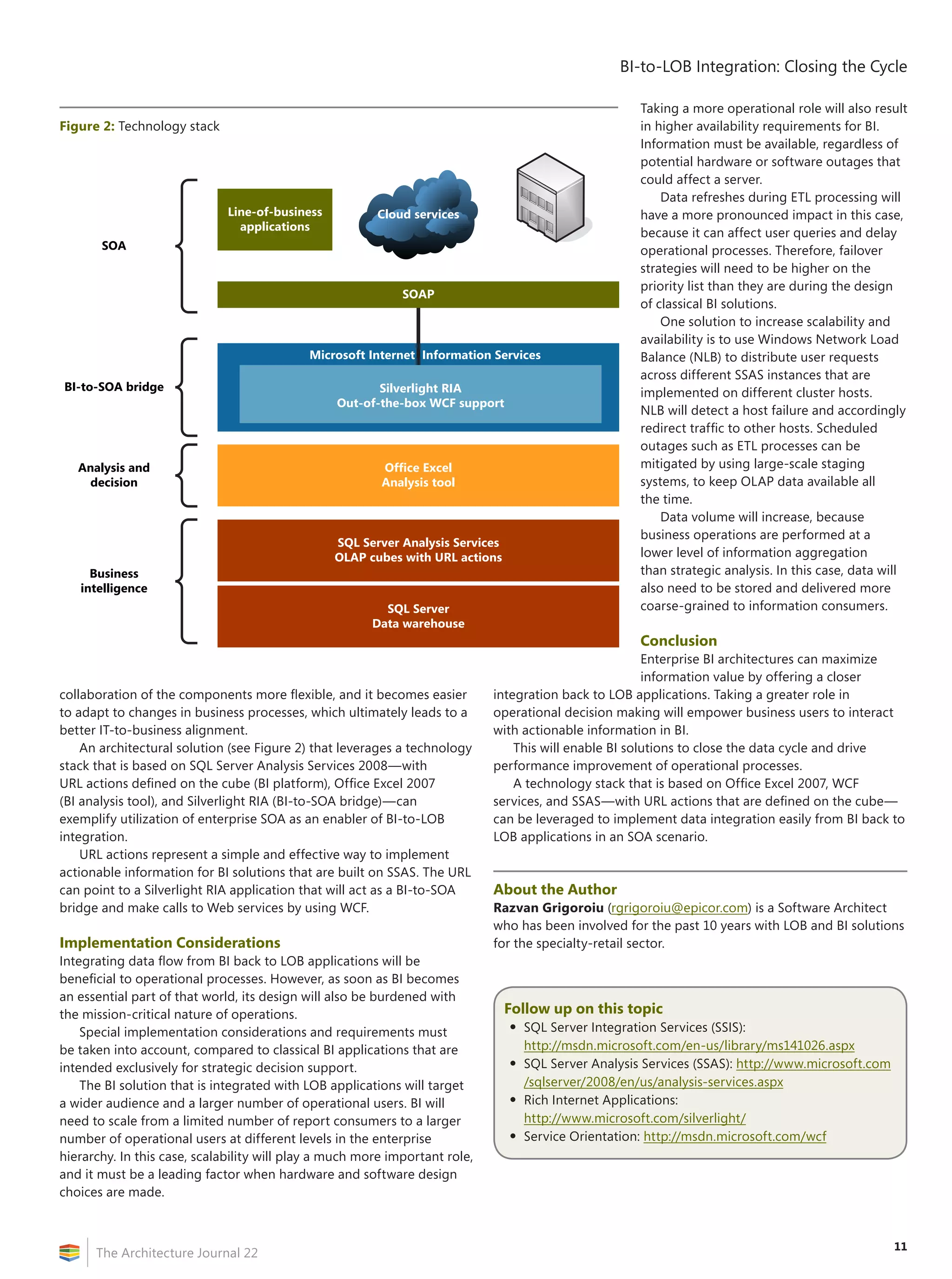
An architectural solution (see Figure 2) that leverages a technology
stack that is based on SQL Server Analysis Services 2008—with
URL actions defined on the cube (BI platform), Office Excel 2007
(BI analysis tool), and Silverlight RIA (BI-to-SOA bridge)—can
exemplify utilization of enterprise SOA as an enabler of BI-to-LOB
integration.
URL actions represent a simple and effective way to implement
actionable information for BI solutions that are built on SSAS. The URL
can point to a Silverlight RIA application that will act as a BI-to-SOA
bridge and make calls to Web services by using WCF.
Implementation Considerations
Integrating data flow from BI back to LOB applications will be
beneficial to operational processes. However, as soon as BI becomes
an essential part of that world, its design will also be burdened with
the mission-critical nature of operations.
Special implementation considerations and requirements must
be taken into account, compared to classical BI applications that are
intended exclusively for strategic decision support.
The BI solution that is integrated with LOB applications will target
a wider audience and a larger number of operational users. BI will
need to scale from a limited number of report consumers to a larger
number of operational users at different levels in the enterprise
hierarchy. In this case, scalability will play a much more important role,
and it must be a leading factor when hardware and software design
choices are made.
Taking a more operational role will also result
in higher availability requirements for BI.
Information must be available, regardless of
potential hardware or software outages that
could affect a server.
Data refreshes during ETL processing will
have a more pronounced impact in this case,
because it can affect user queries and delay
operational processes. Therefore, failover
strategies will need to be higher on the
priority list than they are during the design
of classical BI solutions.
One solution to increase scalability and
availability is to use Windows Network Load
Balance (NLB) to distribute user requests
across different SSAS instances that are
implemented on different cluster hosts.
NLB will detect a host failure and accordingly
redirect traffic to other hosts. Scheduled
outages such as ETL processes can be
mitigated by using large-scale staging
systems, to keep OLAP data available all
the time.
Data volume will increase, because
business operations are performed at a
lower level of information aggregation
than strategic analysis. In this case, data will
also need to be stored and delivered more
coarse-grained to information consumers.
Conclusion
Enterprise BI architectures can maximize
information value by offering a closer
integration back to LOB applications. Taking a greater role in
operational decision making will empower business users to interact
with actionable information in BI.
This will enable BI solutions to close the data cycle and drive
performance improvement of operational processes.
A technology stack that is based on Office Excel 2007, WCF
services, and SSAS—with URL actions that are defined on the cube—
can be leveraged to implement data integration easily from BI back to
LOB applications in an SOA scenario.
About the Author
Razvan Grigoroiu (rgrigoroiu@epicor.com) is a Software Architect
who has been involved for the past 10 years with LOB and BI solutions
for the specialty-retail sector.
Follow up on this topic
•	SQL Server Integration Services (SSIS):
http://msdn.microsoft.com/en-us/library/ms141026.aspx
•	SQL Server Analysis Services (SSAS): http://www.microsoft.com
/sqlserver/2008/en/us/analysis-services.aspx
•	Rich Internet Applications:
http://www.microsoft.com/silverlight/
•	Service Orientation: http://msdn.microsoft.com/wcf
Figure 2: Technology stack
SQL Server
Data warehouse
SQL Server Analysis Services
OLAP cubes with URL actions
Microsoft Internet Information Services
Office Excel
Analysis tool
Line-of-business
applications
Cloud services
B2B services
Business
intelligence
Analysis and
decision
BI-to-SOA bridge
SOA
SOAP
Silverlight RIA
Out-of-the-box WCF support
BI-to-LOB Integration: Closing the Cycle
The Architecture Journal 22
12
Performance Management:
How Technology Is Changing the Game
by Gustavo Gattass Ayub
Many enterprises have built the capabilities to monitor, analyze, and
plan their businesses. But the problem is that they are delivering
insight into the past, but not into up-to-the-moment performance.
Front-line managers increasingly need to know what’s happening
right now. Individual contributors need to have access to current data
to provide quality service. Retailers and manufacturers are taking
advantage of this to avoid stock-outs or overproduction. Financial-
services, logistics, and utilities companies are using stream-data
processing to increase operational efficiency and create new business
capabilities.
There are clearly three challenges: effective delivery of integrated
data to end users, the ability to process huge volumes of granular
data, and the ability to process data streams.
In-memory processing and 64-bit PCs are changing the way in
which end-users access current integrated data, as it allows them to
build reports, dashboards, and scorecards without the direct support
from IT (also known as self-service business intelligence [BI]). From
the IT perspective, it’s an alternative to delivering insight without the
need of long implementation cycles. The integration of in-memory
processing with business productivity tools such as spreadsheets and
intranet portals is becoming the option of choice to deliver the BI-for-
the masses vision.
Predictive analytics is a top priority in every enterprise profiting
from BI and its potential is directly related to the granularity and
latency of data. Today, in general, there is no big advantage in
working only with sets of aggregated data. The real advantage
comes from processing huge volumes of granular data in near-real-
time. From a technology perspective, there is a new generation of
data-warehouse (DW) appliances that will enable this capability for
organizations that need to predict beyond competition.
Stream-processing technologies allow real-time monitoring
by detecting events or patterns of events as data streams through
transactional systems and networks or from sensors. Complex event-
processing (or CEP) platforms are enabling new applications—varying
from pollution control to algorithmic trading. CEP is becoming a
mandatory capability for any BI platform, as new applications emerge
and also as the real-data integration paradigm might shift in the near
future from the repeatable cycles of the traditional ETL process to the
event-processing paradigm.
Together, these emerging technologies are playing a key role
in enabling some enterprises to evolve from the traditional DW
to modern BI platforms that have arrived to change the game by
providing real-time monitoring and much faster analysis.
Gustavo Gattass Ayub (ggattass@microsoft.com) is a Senior
Consultant at Microsoft Consulting Services Brazil.
Relevant Time-Performance Management
by Usha Venkatasubramanian
Organizations need to make informed business decisions at strategic,
tactical, and operational levels. Decision-support systems were offline
solutions that catered to specific needs. With new trends, there is a
need to cover a larger set of people—right from the CEO, who looks
at a larger timeframe, up to an operations manager, who needs recent
statistics. Therefore, we must build a performance-management
system that delivers information at the relevant time: Relevant
Time‑Performance Management (RTPM).
How can an organization provide self-service capability to the
business, while still maintaining the data recency and granularity?
We implemented a multilayered data warehouse that is both a sink
and a source of information. Data currency was maintained by using
a suitable adapter to poll data (for example, SSIS in the Microsoft BI
suite).
Management Organization-Structure Relevance
Near-real time data was trickle-fed into the lowest layer and reflected
in the output for the operational manager. Data was sourced to higher
levels of managers by creating higher layers of aggregation, and at
predefined time intervals. Granular data got offline-archived for the
future. When data reached the highest level of aggregation, it was
retained for comparative reporting for a longer duration of time.
Information Relevance
Current information requirements that are categorized as primary
data (information source) resided in all layers. Data that is not
required for querying was captured as supplementary data (data
sink). Some data from the secondary layer would move to the primary
layer, if there is a request for additional data. Likewise, a primary data
element would be retired by moving it to the secondary layer.
Data-Nature Relevance
A careful balancing act is needed to control the unwieldy growth
of the data volumes in the data-warehouse database, while still
providing the relevant information. An offline retention policy–based
archive helps maintain the relevant information.
Recency Relevance
Recency of information calls for a proper Change Data Capture
mechanism to be in place for different stakeholders to get what they
need. This would primarily depend on the nature of the source data
itself. Using metadata-driven CDC and normalized CDC, the data is
maintained as recently as required.
Delivery Relevance
Information delivery was a mix of push and pull to maintain the time
relevance. Standard reports were delivered through the push method
and ad-hoc reports through the pull method.
Some of the case studies in which we’ve used these principles
effectively can be seen at the following Web site: http://www.
lntinfotech.com/services/business_analytics/overview.asp.
Usha Venkatasubramanian (usha.v@lntinfotech.com) is the deputy
head of the Business Analytics Practice at LT Infotech.
13
The Architecture Journal 22
Summary
Enabling end-user self-serve business intelligence (BI)
is a critical step in modern business. The latest wave of
Microsoft products enable self-serve BI by using tools
and technologies such as Office SharePoint, PowerPivot,
Business Connectivity Services (BCS), Office Excel, and
Report Builder.
Introduction
Creating a self-serve environment is a critical evolutionary step in
any software environment. Imagine if the IT department had to be
involved in sending every e-mail message. The thought is almost
laughable. When an e-mail system has been put in place, it is
maintained by IT, but users are free to send, receive, and manage their
e-mail through self-serve tools such as Office Outlook, Thunderbird,
Lotus Notes, Eudora, and Pine.
Business intelligence has become increasingly important—many
would say critical—in modern business. Getting the right information
to the right person at the right time is the promise of BI, but this is
often easier said than done. Providing a self-serve mechanism for
business users is the next step in the BI story. Providing self-serve BI
allows for an exponential increase in the usefulness of BI by removing
the large hurdle that is involved in the back-and-forth interaction of
business users and the technical team. In essence, business users can
answer their own questions as they arise, without having to pause to
involve the IT team with every detail.
This article explores the latest Microsoft tools and technologies
that enable self-serve BI. In particular, it outlines the latest wave of
SQL Server, Office SharePoint, and other Office products and how
they can be used to provide self-serve BI to business users.
PowerPivot
When it comes to BI, there is a constant battle between business
users and IT. Business users know the functional components of
the business; they understand fully what they want to analyze and
the questions that they want to answer. The IT team understands
the structure of the data, the models, the cubes, data flow from the
operational systems, the data warehouse, and the control mechanisms
for the data. Business users often feel that IT is always saying “No”
when they make a request for a data cube, report, chart, graph, or
even raw data. The members of the IT team often feel that users are
making unreasonable requests, with timelines that equate to boiling
the ocean by first thing tomorrow morning. Self-serve BI attempts
to solve this problem by providing a mechanism that will satisfy the
analytical needs of users and provide the governance and control that
IT requires.
In its upcoming release of Office Excel 2010 and Office SharePoint
Server 2010, Microsoft attempts to provide the self-serve analytical
needs of business users in a feature that is known as PowerPivot.
PowerPivot and Office Excel 2010
PowerPivot is an add-in to Office Excel 2010 that, from the point of
view of business users, simply allows them to pull massive amounts of
data into Office Excel and then analyze it in a familiar environment.
The premise is that users are already familiar with Office Excel and
prefer to work in Office Excel, but are forced to go through IT when
they are dealing with large and complex data. The IT team then goes
through the process of modeling the data and building OLAP cubes
that then can be used by the business users to perform their analysis.
This back-and-forth nature is the root of a great deal of frustration for
both sides.
PowerPivot attempts to remove this interaction by providing
features in Office Excel that allow business users to pull in and
analyze very large amounts of data without having to interact with IT.
When users have completed an analysis, they can upload the Office
Excel document to an Office SharePoint library from which it can be
shared with the rest of the organization. Because these PowerPivot
documents live on the Office SharePoint server, IT maintains
governance and control over the entire process.
PowerPivot Architecture
From an IT point of view, the predictable thing about business users is
that they just want things to work; they are focused on their business
role and see technology only as a tool that helps them perform their
tasks. Under the covers, PowerPivot (formerly known as codename
“Gemini”) is an incredibly complex piece of technology in which
Microsoft has invested heavily to bring to market. Above the covers,
however (and what IT presents to the business user), PowerPivot is
simply Office Excel. Many business users will not even care that a
new technology has been introduced; they will just know that the
new version of Office Excel can solve their problems with analysis of
massive and complex data sets.
The technology that provides Office Excel the ability to analyze
millions upon millions of rows of data in line with what business
users are expecting can be found in memory. In particular, the data is
loaded into memory in what is known as in-memory column-based
storage and processing. In essence, users are building their own
in-memory data cube for analysis with Office Excel.
In order to get the amounts of data capabilities that are provided
by PowerPivot, the in-memory data structure is highly compressed
and read-only. The engine that is responsible for compressing and
Increasing Productivity
by Empowering Business Users
with Self-Serve BI
by Ken Withee
Increasing Productivity by Empowering Business Users with Self-Serve BI
The Architecture Journal 22
14
managing this in-memory data structure is
called VertiPaq.
PowerPivot and Office SharePoint
Server 2010
PowerPivot for Office SharePoint
accomplishes two important tasks. The
first is that it provides a home for the
PowerPivot documents that users create in
an environment that IT controls. The second
is that it provides users throughout the
organization the ability to view and interact
with PowerPivot documents by using nothing
more than their thin-client Web browser.
For business users, consuming a
PowerPivot document is as simple as
going to their Intranet site and clicking a
document. The document then renders in
their browser, and they can interact with the
document and perform their analysis. In fact,
the consumers do not even need to have
Office Excel installed on their local computers to interact with the
PowerPivot document. The result is that business users focus on their
business analysis and are oblivious to the technology that enables the
interaction.
PowerPivot Control and Governance
One of the biggest challenges in IT involves spreadsheets that
become critical to business users without the knowledge by IT of
their existence. Office SharePoint provides functionality that gives IT
the ability to track PowerPivot usage patterns. As PowerPivot (Office
Excel) documents bubble up in importance, IT can monitor and
identify the source data and business functionality.
Having visibility into which PowerPivot documents are
most frequently used by business users is critical in developing
management and disaster-recovery plans. For example, if an
extensively used PowerPivot document is pulling data from an
operational system that was thought to have minimal importance, IT
has achieved visibility into what is truly important to business users.
IT is then better able to accommodate the needs of their users going
forward.
Business Connectivity Services (BCS)
The major promise of BI is getting the right information to the right
person at the right time. When people think of BI information, they
usually think of numeric data and analytics. However, information
takes many forms, including nonnumeric information that lives in a
plethora of applications and databases.
Some of the most popular systems that require integration
include line-of-business (LOB) systems—often called enterprise
resource planning (ERP)—such as SAP, Oracle, Dynamics, Lawson,
Siebel, and Sage, to name just a few. Access to these systems often
is cumbersome and time consuming. A typical interaction involves
using specialized applications and screens to access or update the
information that lives in the ERP system.
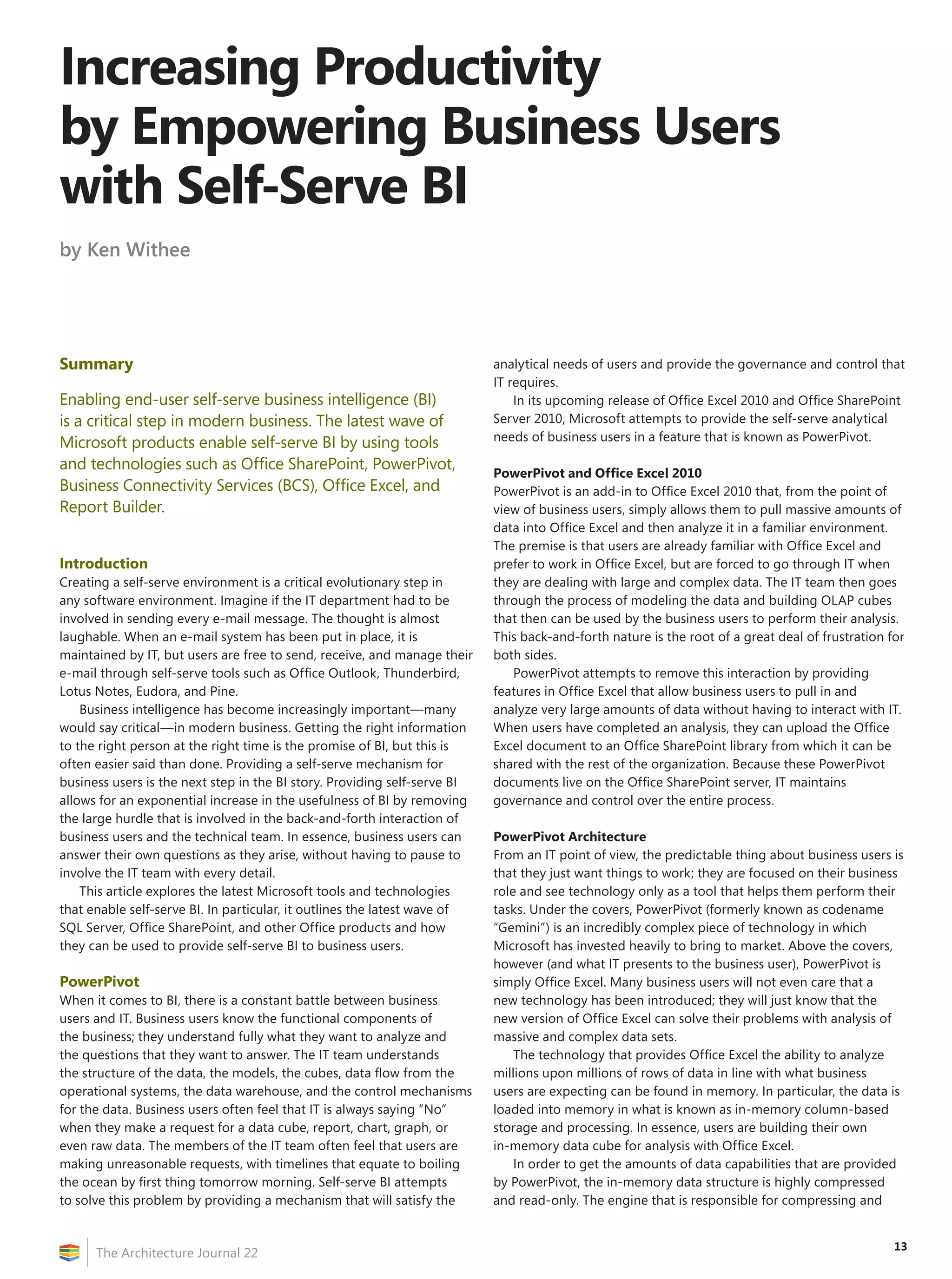
BCS is a technology that is included in Office SharePoint Server
2010 and provides integration and interaction (read/write) with
the information that is contained in external systems, as shown in
Figure 1.
Integrating a front-end user-facing portal with external systems
provides a single self-serve access point, without the need to install
specialized software on end-user desktops. For example, imagine a
customer-support representative taking an order from a customer.
There might be one application for entering the order, another for
taking notes on the call, and yet another for researching questions
that the customer has about products. If the customer notifies the
support representative of an address change, the representative must
access also the system that stores the customer information and make
the update. Business users have no need or desire to understand
where their data and information lives; they just want to interact with
the right information at the right time, in as easy a manner as possible.
The BCS technology provides a mechanism for the consolidation of
access points to external systems into one convenient portal location.
Consolidation greatly reduces the complexity of end-user job
functions by providing a single destination to perform business tasks
and find business information.
Reducing the complexity for users also reduces the number of
disparate requests that IT must service. Instead of IT having to support
connections, security, audits, and one-off projects for multiple
systems, IT only must set up the connection in the portal once and
then support the single portal framework. In addition, moving
everything to a single framework restores control over the external
systems to IT by moving users into a single environment.
BCS Architecture
BCS is an evolution of the Business Data Catalog (BDC) from
Office SharePoint 2007. BCS is baked into the Office SharePoint
2010 platform and the Office 2010 clients. BCS uses three primary
components that enable the connection to external systems. These
include Business Data Connectivity, an External Content Type
Repository, and External Lists. In addition the BCS client is included
also in the Office 2010 applications.
The External Content Type Repository and External Lists allow
solution architects not only to describe the external data model, but
also to define how the data should behave within Office SharePoint
and Office.
BCS connections are XML-based and include functionality to
connect to SOA-based services. When a connection file has been set
up, it can be used throughout the Office SharePoint environment by
end users.
Figure 1: BCS allows Office SharePoint 2010 read/write interaction with external systems.
CRM
XML
Text
Office SharePoint
ERP
APP
15
Increasing Productivity by Empowering Business Users with Self-Serve BI
The Architecture Journal 22
Report Builder
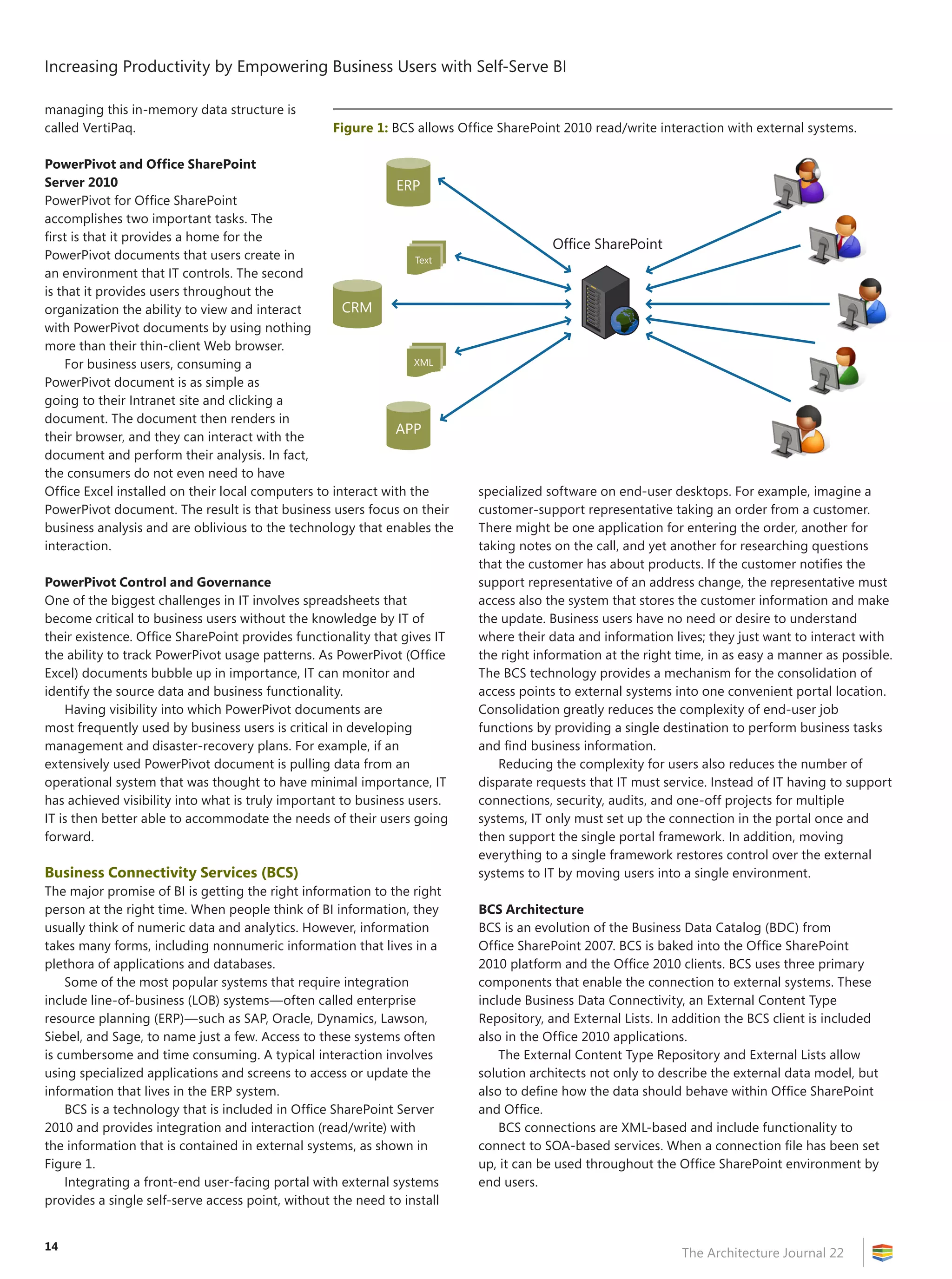
Report Builder is an application that is designed to provide end users
the ability to create and publish their own SQL Server Reporting
Services (SSRS) reports. Report Builder was designed for the end user
with the comfortable look and feel of other Microsoft Office products.
In particular, Report Builder includes the Office Ribbon at the top of
the report-design surface, as shown in Figure 2.
The underlying report-engine code base is shared with the
Business Intelligence Development Studio (BIDS) report-design
environment. This single underlying code base was designed to
provide functionality for end users to create reports by using Report
Builder and for developers to design reports by
using BIDS with functional parity, due to the shared
underlying code base.
Report Builder uses ClickOnce technology for
deployment. ClickOnce allows users to click the
link in either Report Manager or Office SharePoint
and download the application to their desktop
computers. ClickOnce alleviates the need for a
mass install by the IT department. When Report
Builder must be upgraded or updated, the new bits
are automatically downloaded to the user desktop
without the need for manual updates.
SQL Server Reporting Services
SQL Server Reporting Services (SSRS) is the reporting
component of the SQL Server product. The SSRS
architecture consists of a Windows Service that is
designed to render reports and a couple of SQL
Server databases that are designed to store content,
configuration, metadata, and temporary rendering
information. SSRS reports consist of an XML-based
format that is called Report Definition Language
(RDL). SSRS reports—or RDL files, in other words—
can be created by using either BIDS (Visual Studio) or
Report Builder.
An SSRS database can be installed in either
stand-alone mode or integrated mode. When it is
installed in stand-alone mode, a Web application that is known as
Report Manager is responsible for storing, managing, and providing
the reporting environment to end users. When it is installed in
integrated mode, Office SharePoint takes over, and Report Manager is
no longer used.
Although SSRS is a component of the SQL Server product, it is
not restricted to pulling data from only a SQL Server database. Using
Report Builder, end users can pull data from a number of different
connection types, including OLE DB, ODBC, Analysis Services, Oracle,
XML, Report Models, SAP Netweaver BI, Hyperion Essbase, and
TERADATA.
Figure 2: Report Builder is designed to provide business users with an easy-to-use
report-development environment.
Figure 3: Making the connection to an SSAS OLAP cube is accomplished on the Data tab of Office Excel.
Increasing Productivity by Empowering Business Users with Self-Serve BI
The Architecture Journal 22
16
Self-Serve Reporting
Business users launch Report Builder by clicking a
link in either Report Manager or Office SharePoint.
As soon as Report Builder is launched, business
users create connections to data sources and build
reports. The reports can then be saved into either
Report Manager or an Office SharePoint Document
Library. Other users can then connect to Report
Manager or the Office SharePoint site to view the
available reports. The IT team can maintain control by
providing “approved” reports, monitoring usage, and
limiting access to the servers that contain the source
data.
When SSRS is installed in integrated mode,
reports can take advantage of the Office SharePoint
Enterprise Content Management (ECM) features,
such as versioning, security, check-in/check-out, and
workflow. In addition, the responsibilities of IT are
reduced, because only a single content-management
system must be maintained and managed. In the
Office SharePoint environment, an SSRS report is
nothing more than a content type, such as an Office
Word document or Office Excel spreadsheet.
Office Excel and Excel Services
Office Excel has to be one of the most prolific and
ubiquitous data-analysis applications in the world.
Nearly every organization uses Office Excel in one capacity or
another. Some businesses use Office Excel almost exclusively to run
and manage their data needs. One of the most beloved data-analysis
features of Office Excel is the PivotTable. A PivotTable provides an
easy-to-use drag-and-drop interface for slicing, dicing, grouping, and
aggregating data. Beginning with Office Excel 2007, end users have
the ability to connect to and utilize the back-end SQL Server Analysis
Services (SSAS) server from the comfort of Office Excel on their
desktops. As a result, end users can browse and analyze OLAP cubes
and tap into the powerful data-mining capabilities that SSAS provides.
Using Office Excel to Browse SSAS Cubes
When connecting to and analyzing an SSAS OLAP cube, the business-
user experience is nearly identical to analyzing a local Office Excel
pivot table. A user makes the connection by selecting the From
Analysis Services option on the Get From Other Sources menu of
the Data tab, as shown in Figure 3 on page 15.
When the connection has been made, users can browse the cube
and perform an analysis, just as they would a local pivot table, as
shown in Figure 4.
Office Excel and SSAS Data Mining
A Data Mining add-in for Office Excel is available to provide access to
the data-mining algorithms that are contained within SSAS. Installing
the add-in provides a Data Mining tab in Office Excel with which
users can access the algorithms that are contained within the SSAS
Data Mining engine. The Data Mining tab in Office Excel is shown in
Figure 5.
The SQL Server Data Mining Add-In provides the following
functionality:
•	Data-analysis tools—Provides data-mining analysis tools to
the Office Excel client, allowing users to perform deeper analysis
on tables by using data that is contained in their Office Excel
spreadsheets.
•	Client for SSAS data mining—Provides the ability to create,
manage, and work with data-mining models from within the Office
Excel environment. Users can use either data that is contained in
the local spreadsheet or external data that is available through the
Analysis Services instance.
Figure 4: Browsing an SSAS OLAP cube as a PivotTable in Office Excel.
Figure 5: The Data Mining tab provides end users the ability to interact with the data-mining capabilities of SSAS.
17
Increasing Productivity by Empowering Business Users with Self-Serve BI
The Architecture Journal 22
•	Data-mining templates for Office
Visio—In addition to the Office Excel
functionality, the add-in also provides
the ability to render and distribute data-
mining models as Office Visio documents.
Office SharePoint 2010 and Excel Services
Office Excel has to be one of the most
popular and prominent data-analysis
applications. Business users create Office
Excel spreadsheets that perform everything
from ad-hoc analysis to fully featured
profit-and-loss calculators. When these
applications are under the radar, they cannot
be backed up or supported by IT. The result
is that business users become frustrated
with IT for not being able to support them,
and IT becomes frustrated with users who
are working outside the provided system.
Business users feel that IT is not giving them
the correct tools, so they go and create
their own by using Office Excel. The IT team
members feel that the business users are going around IT and have
no right to complain when the stuff that they created on their own
breaks.
To complicate matters further, users often e-mail Office Excel
documents to other users, who e-mail those documents again. This
creates multiple mutations of critical business functionality, as shown
in Figure 6.
Self-Service Reporting Best Practices
on the Microsoft BI Platform
by Paul Turley
Once upon a time, there was a big company whose IT department
wanted to ensure that everyone would see only good data in
their reports. To make sure of this, they ruled that all reports
would be created by IT from data that was stored on IT-controlled
databases. Business managers and users quietly circumnavigated
this—downloading data into spreadsheets and data files. Another
company’s IT group enabled the business to perform its own
reporting by using an ad-hoc tool—opening databases to everyone.
In both of these companies, when leaders had questions, everyone
had answers! The only problem was that the answers were all
different. Many organizations operate in one of these extremes.
Business users can gain important insight by using self-service
reporting tools. Armed with the right answers, leaders and workers
can take appropriate action and make informed decisions, instead
of shooting from the hip or waiting for reliable information to come
from somewhere else. Functional business-intelligence (BI) solutions
don’t evolve into existence and must be carefully planned and
managed.
These best practices adhere to some basic principles and
experience-borne lessons:
Manage the Semantic Layer
A single version of the truth might consist of data that is derived from
multiple sources. By simply giving users the keys to the database
kingdom, you aren’t doing anyone any favors. One size doesn’t fit all,
but business-reporting data should always be abstracted through a
semantic layer. This might be a set of views on a data mart, a report
model, or an online analytical processing (OLAP) cube. There are
substantial advantages in using the latter option, if your organization
is prepared for some development and maintenance overhead.
Analysis tools—such as the new generation of Report Builder in
Microsoft SQL Server 2008, and the pending release of SQL Server
2008 R2, Microsoft Office Excel, and Office PerformancePoint Services
for SharePoint—might be given to users, but the semantic layer must
be managed centrally by IT.
Separate User- and Production-Report Libraries
User reports might be used to make important decisions and might
even become mission-critical, but the reports, scorecards, and
dashboards that are “guaranteed” to be accurate and reliable should
go through the same rigorous IT-managed design, development,
and testing criteria as any production-ready business application.
Designate a library for ad-hoc reports, separate from production
reports. Office SharePoint is an excellent medium for this purpose.
Conduct Formal Review Cycles, Validate Reports, Consolidate
Them in Production
One of the most effective methods for IT designers to understand
business-reporting requirements is to leverage user-designed reports.
For mission-critical processes, use these as proofs of concept, and
then work with the business to design consolidated, flexible “super
reports” in a production mode.
Learn how to implement these tools to build a comprehensive self-
service reporting solution by reading the full article on Paul’s blog:
http://www.sqlserverbiblog.com.
Paul Turley is a business-intelligence architect and manager for
Hitachi Consulting, and a Microsoft MVP.
Figure 6: Office Excel document is e-mailed to users, who modify and e-mail again—creating
multiple mutations of the document.
Office
Excel
Office
Excel
Office
Excel
Office
Excel
Office
Excel
CRM
XML
Text
ERP
APP
Increasing Productivity by Empowering Business Users with Self-Serve BI
The Architecture Journal 22
18
Excel Services in Office SharePoint 2010
attempts to solve the issues with Office
Excel by providing a home for Office
Excel documents in the Office SharePoint
environment that is controlled and governed
by IT. When Office Excel documents are saved
in an Office SharePoint document library,
there is one version of the document, and
users can connect and use the document
without spawning multiple mutations, as
shown in Figure 7. The document can also
take advantage of the ECM features of Office
SharePoint, including versioning, security,
check-in/check-out, and workflow. In addition,
IT is able to gain oversight, visibility, and
control over the Office Excel applications with
which users are performing their business
tasks.
Office Excel documents in Office
SharePoint can use connection files that are
managed by the IT department. For example,
IT can create connection files to the source
systems and then simply point end users
to these approved connection files. This
alleviates the need for IT to service numerous requests for connection
information for every Office Excel file that is created for a business
problem.
One of the most powerful features of Office SharePoint is called
Excel Services. Excel Services is the ability to render Office Excel
documents in a thin client (Web browser). An important Office
Excel document can be saved to a document library, and the entire
organization can then view and interact with the Office Excel
document without having to leave their browser. The consumers of
the document just navigate to their company intranet and click the
Office Excel document.
This functionality is particularly powerful when thinking about
rolling out Office Excel 2010 to provide PowerPivot functionality. Only
a handful of business users actually produce content, with the rest just
consuming it. Using Excel Services, the only users who will need to
have Office Excel 2010 are the producers of content. The consumers
can interact with the PowerPivot documents without ever having to
leave their browser or install the latest version of Office Excel.
Conclusion
Report Builder is an end-user report-development tool that provides
end users the ability to create their own SSRS reports without the
need for an SSRS expert. The Report Builder application uses the
same underlying code base as the Business Intelligence Developer
Studio (BIDS), which is designed for professional developers. Allowing
end users to build their own reports takes a tremendous amount of
resource load off of the technical team—allowing them to focus on
the underlying data warehouse, instead of the tedious report-design
process.
Office Excel is one of the most ubiquitous data-analysis programs
that are used in the world today. Microsoft has recognized that people
are already comfortable with Office Excel and often do not want to
change to another application for data analysis. Office Excel can be
used as a client for the back-end SSAS server.
In particular, users can connect Office Excel to OLAP cubes that are
hosted on SSAS and slice and dice data in the same fashion in which
they would use a local PivotTable. In addition, Office Excel can be used
as a client for the data-mining functionality of the SSAS server. The
power of the data-mining algorithms can be leveraged with data that
is contained in a data warehouse or data that is local in Office Excel
spreadsheets. In both situations, Office Excel acts as a client for the
SSAS server, which provides end users with the power of SQL Server
and the comfort of Office Excel.
One of the biggest pain points in an OLAP environment is the
amount of effort that it takes to organize and develop data cubes.
Business users have to coordinate with BI developers to identify
the correct data, relationships, and aggregates. Requirements are
constantly shifting, and, by the time a cube has been developed,
the requirement has changed and must be reworked. Providing end
users the ability to create their own data cubes in an easy-to-use
environment is extremely important to the evolution of BI. PowerPivot
provides the ability for users to create in-memory cubes right on
their desktops in the familiar Office Excel environment. The cubes can
then be uploaded to an Office SharePoint site and accessed by users
throughout the organization.
Office SharePoint 2010 includes BCS, which provides read/
write integration between Office SharePoint and external systems.
Consolidating functionality into the Office SharePoint environment
reduces complexity for end users and provides a one-stop shop for
all content, including BI, reporting, analysis, communication, and
collaboration. In addition, IT can consolidate focus from multiple
access systems into a single portal system.
A self-serve environment is a key inflection point in any
technological solution. Placing the power of a solution in the hands
of end users unleashes an exponential power that can only be
realized through a self-serve environment. Surfacing BI information
into a collaborative environment such as Office SharePoint enables a
new form of BI that is called human business intelligence (HBI). HBI
merges the traditional analytical capabilities of a BI solution with the
knowledge of the people throughout the organization.
The latest wave of Microsoft products are interwoven to provide a
single cohesive self-serve environment for end-user content creation.
This places the power of content creation and analysis in the hands of
the end users. Without the intensive back-and-forth BI-development
Figure 7: Office Excel document is saved to Office SharePoint and accessed by users
throughout the organization by using only a thin client (Web browser).
Office
Excel
Office
SharePoint
CRM
XML
Text
ERP
APP
19
The Architecture Journal 22
process that currently exists, users are free to expand their knowledge
exponentially and on their own time.
Resources
Donald Farmer: Foraging in the Data Forest. Blog. Available at
http://www.beyeblogs.com/donaldfarmer/.
Molnar, Sheila, and Michael Otey. “Donald Farmer Discusses
the Benefits of Managed Self-Service.” SQL Server Magazine,
October 2009. Available at http://www.sqlmag.com/Articles
/ArticleID/102613/102613.html?Ad=1.
Microsoft Corporation. MSDN SQL Server Developer Center
documentation and articles. Available at http://msdn.microsoft.com
/en-us/library/bb418432(SQL.10).aspx.
SQL Server Reporting Services Team Blog. “Report Builder 3.0, August
CTP.” August 2009. Available at http://blogs.msdn.com
/sqlrsteamblog/.
Alton, Chris. “Reporting Services SharePoint Integration
Troubleshooting.” MSDN SQL Server Developer Center, August 2009.
Available at http://msdn.microsoft.com/en-us/library/ee384252.aspx.
Pendse, Nigel. “Commentary: Project Gemini—Microsoft’s Brilliant
OLAP Trojan Horse.” The BI Verdict, October 2008. Available at
http://www.olapreport.com/Comment_Gemini.htm.
PowerPivot Team Blog. “Linked Tables.” August 2009. Available at
http://blogs.msdn.com/gemini/.
About the Author
Ken Withee (KWithee@hitachiconsulting.com)is a consultant
with Hitachi Consulting and specializes in Microsoft technologies
in Seattle, WA. He is author of Microsoft Business Intelligence for
Dummies (Hoboken, NJ: For Dummies; Chichester: Wiley Press,
2009) and, along with Paul Turley, Thiago Silva, and Bryan C. Smith,
coauthor of Professional Microsoft SQL Server 2008 Reporting Services
(Indianapolis, IN: Wiley Publishing, Inc., 2008).
Follow up on this topic
•	PowerPivot: http://www.powerpivot.com/
Self-Service BI: A KPI for BI Initiative
by Uttama Mukherjee
A most commonly asked question is: Can the overall business
performance be attributed directly to the success of business
intelligence (BI)? To come up with a credible answer, the
prerequisite is to have a widespread adoption of an intuitive
BI, which comes from a self service–enabled BI setup. For the
sustenance of such models, it is better to ensure that self-
service BI initiatives are funded through a “pay-per-use”
process.
An index of assessing the degree of self-serviceability of BI
implementation is one of the key performance indicators (KPIs)
to measure the success of BI.
The following dimensions become critical to enable an all-
pervasive self-service BI.
People: Self-service for standard users can be addressed
through a governance process. The conflict of flexibility and
standardization becomes a topic of more elaborate deliberation
for implementing a self-service environment for power users.
Typically, power users having direct access to the enterprise-
wide “single version of truth’” results in possible runaway
queries and redundant reports. Such users must be provided
privileged access to “BI workspace,” defined succinctly by
Forrester as a data-exploration environment in which power
users can analyze data with near-complete freedom and
minimal dependency on IT, or without being impeded by data-
security restrictions.
Process: Standard users get a self-service option through
a set of predefined reports/analytics as a relatively static utility
service, to which they can subscribe at a price (notional/actual).
The accumulated credit may be used for funding future BI
initiatives. Depending on organization culture, consensus-
driven processes are established though a BICC framework.
Additionally, the BICC ensures transfer of the gathered insights
from power users to the larger group—evolving into a more
mature BI setup.
Technology: With the preceding two aspects addressed
appropriately, self-service demand of the majority of
information consumers can be met by using a standard
enterprise-wide BI setup. Considering that most of these
services are predefined, the load on the BI platform is
predictable to a large extent. But for power users, who are
synthesizers, additional data (internal/external, structured/
unstructured) and information requirements demand state-
of-the-art technology and higher throughput of the “BI
workspace.” To meet the needs of power users, technology
decisions become critical, and funding becomes a challenge.
One index (among probable others) to measure the degree
of self-service is to monitor the usage rate of utility analytics
by standard users and conduct a qualitative satisfaction survey
to monitor acceptance by power users. The “pay-per-use” fund
that is accumulated gives a quantitative measure.
Uttama Mukherjee (Uttama.mukherjee@hcl.in), Practice
Director–HCL Technologies, leads strategic BI consulting and
delivery services in BI across industries.
20
The Architecture Journal 22
Summary
To do things differently, one must look at things
differently. This article introduces the notion of
business infrastructure providing the necessary bridge
between (contextual) business insight and a (common)
business-intelligence (BI) platform. Using the business-
infrastructure and business-capability models, the
article provides a prescriptive approach to planning and
delivering BI services.
Changing Landscape
Currently, the IT industry is transitioning from an era of limited
capability of individual/functional reporting and analysis to one
that is defined by a connected, collaborative, and contextual world
of BI. Insight is gained not only by analyzing the past, but also by
anticipating and understanding the future. Insight has value only if
people are able to act on it in a timely manner.
As the need for real-time data gathering, analysis, and decision
making increases, so, too does, the need to perform actions
through transactional systems. Insight is not individual. In a world of
collaborative BI, people want to find, share, comment on, and review
data quite similarly to how they handle documents. Insight is a core
competency only if it comes naturally to people. As a result, cost,
capability, and consistency become equally important.
Table 1 provides a list of characteristics for business insight in any
organization.
Current Practices
Currently, there are two dominant approaches to delivering BI
capabilities. Some organizations utilize a “make-to-order” approach
to deliver a specific solution for a specific business need. For
example, when a sales team wants to target customers for upgrades
and new products, the IT group creates a customer data mart or
a report, extracting and summarizing data from CRM systems.
When manufacturing wants to analyze inventory or supply chain,
IT creates a manufacturing data mart, extracting and summarizing
information from an ERP system. To address new requirements,
these organizations keep adding layers to individual, functional,
or unidirectional reporting-and-analysis systems—introducing
duplication, delays, complexity, and cost.
Other organizations have adopted a “build it and they will
come” approach by building a massive, centralized, enterprise data
warehouse with the expectation that different groups might want to
access and analyze data someday. It takes significant effort as well as
expenditure to build something; then, it takes an equally huge effort
and cost to maintain and extend it.
These approaches to planning and building BI capabilities are not
sufficient to support new information-driven business processes and
organizational models. To gain and capitalize on business insight, we
must think differently about how we evaluate, plan, communicate, and
implement BI capabilities in the organization.
Next Practice
Understandably, people are driven by their needs. The BI-capability
planning and delivery must respect individuality while driving
consistent thinking and common capabilities in business and IT. This
article introduces the next practice with a capability model and a
methodical approach for planning BI capabilities for business insight.
Concept #1: Business Infrastructure
Just like IT, business also has an infrastructure.
Based on the work across a wide variety of industries and solution
scenarios, the author has realized that almost every business process
or activity is dependent on similar sets of capabilities. For example,
when cashing a check in a bank branch, a client asks the bank teller
about a new mortgage promotion. The teller calls someone in the
mortgage department to inquire about the new promotion. The
same client is thinking of rebalancing a financial portfolio and asks a
financial advisor in the same bank about treasury bonds. The advisor
calls a bond expert for information.
These two business activities are remarkably different and
performed in two different departments, yet both rely on a similar
Business Insight =
Business Infrastructure =
Business‑Intelligence Platform
by Dinesh Kumar
Table 1: Business-insight characteristics
Requirement Implication
Collaborating
across the
organization
User experience—Consistent approach to
delivering, analyzing, finding and sharing
information to make informed decisions
Collaboration—Ability to share, annotate,
and perform actions as you would with a
document
Transacting
decisions
Speed and integration—Real-time data
gathering, analysis, decision making, and
subsequently taking actions through
transactional systems
Anticipating
unknowns
Service-oriented—Adding, integrating, and
delivering additional data as it becomes
available or relevant
Reducing cost
of change and
ongoing operations
Platform—Shared services
21
Business Insight = Business Infrastructure = Business‑Intelligence Platform
The Architecture Journal 22
capability—that is, access to an expert. Likewise, various business
processes and functions need or use similar BI capabilities, which
are different only in content and context. For example, the finance
department is focused on financial data, whereas manufacturing is
focused on production and quality data. However, both need the
same BI capability: to report and analyze the information that they
value. In other words, improving the common BI capability—such as
reporting and analysis in the preceding example—will improve or
enable multiple business activities.
Just as with IT infrastructure, business infrastructure represents a
set of common, horizontal business capabilities that support multiple
specialized, vertical business processes and functions. Just as in
IT infrastructure, improvement of the business infrastructure will
reduce process complexity, enhance organizational agility, and drive
business maturity. Just as IT architecture includes both applications
and infrastructure capabilities, business architecture includes both
business-process capabilities and business infrastructure.
In the context of BI, we have organized the horizontal business
capabilities into three value domains. The value domains represent
the type of outcome or impact that is expected in the context of
a business process or activity in which the underlying capability is
leveraged.
(See Table 2 for the list of business capabilities that make up the
business infrastructure for business insight.)
One could argue that there could be additional business
capabilities under the business-management value domain. Financial,
customer, and product management are considered core capabilities
of every organization, regardless of size and industry, including
the public sector. Other areas of business management are either
extensions to these core areas or specific to an industry or an
organization. For example, in a utility company, logistics management
and workload management are added, as they are quite important
and distinct areas in the organization. In a financial institution,
individual and institutional banking are attributes of customer and
product management, but financial-advisor services are added as a
core capability for additional focus.
These capabilities are fairly industry-independent or process-
independent; therefore, they can be characterized along a value-
maturity model. The maturity model helps organizations to assess the
current state and articulate the desired state easily and quickly.
Table 3 on page page 22 provides examples of the maturity level
of some of the business-infrastructure capabilities. The detailed
model enumerates the maturity of each capability in terms of people,
process, information, access methods, security and compliance,
availability, and performance attributes.
Concept #2: BI Platform
BI is cross-functional, cross-people, and cross-data.
Just as there are common business capabilities that enable business
insight, there is also a collection of BI services that articulate
underlying technical BI capabilities. A service-oriented approach to
defining BI capabilities minimizes complexity and cost, while it drives
consistency and maturity in capabilities.
BI services are organized into four domains, each of which
addresses a distinct segment of the information flow. Table 4 on
page 22 lists the four domains and the relevant capabilities that are
included in each domain.
Figure 1 on page 23 articulates the collection of BI services under
each domain that use interfaces to other inbound, outbound, and
Table 2: Business-infrastructure capabilities
Value domain Business capability Description
Business management Plan  manage core business functions. Ability to plan  manage:
Financial management Cost and revenue across the organization.
Customer management Demand generation, sales, service, and customer satisfaction.
Product management Product planning, development, manufacturing, and distribution.
Innovation  transformation Drive growth  competitive advantage. Ability:
Synergistic work For a team to work together to perform an activity or deliver on a shared objective.
The team might include people from either within or outside the organization.
Consensus  decisions To gain necessary consensus among stakeholders and make decisions. Stakeholders
might involve people from across organizational boundaries.
Communication of timely, relevant
information
To send and receive required information to the appropriate people, when needed.
Communicator or receiver might be from either inside or outside the organization,
and communication may be either upstream or downstream.
Sense  respond To anticipate, detect, and monitor internal or external events or trends, and to take
appropriate actions.
Authoritative source of Information To rely upon information in any transaction or decision making.
Planning  delivery excellence Drive operational performance objectives. Ability to:
Information orchestration Consolidate information across business activities or disseminate information to
appropriate consumer, when and where needed.
Governance  compliance Ensure that various policies and rules are understood and that the organization
behaves accordingly.
Reporting  analysis Create, analyze, and deliver appropriate information, when and where needed.
Performance measurement Measure, monitor, and communicate appropriate cost and performance metrics of a
business activity or process.
Business Insight = Business Infrastructure = Business‑Intelligence Platform
The Architecture Journal 22
22
dependent services.
The concept of platform or infrastructure services can be applied
across the whole IT domain. It is expected that BI services will
leverage and integrate with other enterprise services such as security,
backup/recovery, and storage. The complete IT-service portfolio
with capability models is covered in a patent pending on IT Service
Architecture Planning and Management.
Just as there is a capability-maturity model for business
infrastructure, BI services are also characterized by using a capability-
maturity model. The BI-service maturity model leverages and extends
the Microsoft Infrastructure Optimization (IO) Model.
Table 5 on page 24 provides an example of BI-service maturity
levels. The model includes a range of attributes, addressing the
360-degree view of the service.
Concept #3: Relationships and Road Map
Don’t reinvent what we already know.
As the common business and technical capabilities are industry-,
organization-, or technology-independent, the relationships or
dependencies between business and technical capabilities are
predefined. This allows organizations to answer quickly such questions
as, “What technical capabilities do we need to enable a level of
maturity in a business-infrastructure capability?” and “What business
capability can be enabled by using a technical capability?”
Relationships help in rapidly defining the scope, identifying the
dependencies, and communicating value to various stakeholders.
Figure 2 on page 23 provides a framework for leveraging known
relationships and maturity models for developing the overall vision
and architecture road map.
Case Study: Assessment and Road-Map Planning
With the information model in hand, the process of aligning
and anticipating business needs, evaluating the current state,
articulating the vision, developing the road map, and leveraging
every opportunity to advance the journey becomes simpler, more
predictable, and repeatable.
Using a real case study and the previously described information
model, let us walk through the process and develop an assessment
and road map for BI.
Situation
Smart grids and smart appliances are changing the landscape in the
utility industry. Depending upon the fluctuation in prices, customers
might want to control their use of energy. This requires real-time
pricing and usage analysis. Based on the customers’ thresholds, they
control the appliances in real time. The business model of the utility
industry is also evolving. Within a few years, utility customers could
become suppliers by establishing their own solar power–generation
facilities. The utility company in this study wanted to ensure that its
BI efforts were designed to meet future challenges and plan the BI
architecture for the expected change in the industry.
Table 4: BI services and capabilities
BI-service domain Capabilities
Information delivery Accessing and delivering information, when
needed, on a device or tool through one or
more channels
Information analysis Aggregating, analyzing, visualizing, and
presenting information
Data integration Mapping, sharing, transforming, and
consolidating data
Data management Storing, extracting, loading, replicating,
archiving, and monitoring data
Table 3: Sample business capability-maturity model
Value-maturity level
Value domain Business capability Level 1 Level 2 Level 3 Level 4
Business
management
Customer
management
Sales and corporate
functions can
summarize and report
on sales performance.
Any individual or
business function
can understand and
monitor sales and
marketing data in their
own context.
An extended
organization (partners)
can access to sales and
support data for its
own analysis. People
can perform trending
and develop forecasts.
Access and analysis
can be performed
with nominal effort
anytime, anywhere,
and by anyone,
including customers.
Innovation 
transformation
Sense  respond Local, functional level.
Collect and report on
operational data.
Enterprise level; 24/7;
customer data.
Include partners and
remote locations.
Monitor, consolidate,
and analyze.
Worldwide level.
Information includes
industry and market
research.
Planning
 delivery
excellence
Information
orchestration
Orchestrate
information at
functional level—
based on internal
operational data, and
delivered in report
form on internal
network
Orchestrate
information at
enterprise level,
including customer
information—
consolidated and
available via remote
access, team sites,
portals, and COTS
apps.
Orchestrate
information across
partners (supply
chain)—analyzed and
available on multiple
device types or
networks.
Orchestrate
information across the
industry—allowing
what-if scenarios, and
available at point-of-
interest on any device
or network.
23
Business Insight = Business Infrastructure = Business‑Intelligence Platform
The Architecture Journal 22
Figure 1: BI-service architecture
Back-office
services
Financials
Supply chain
Workload
management
Customer
management
Human
resources
Foundation: Infrastructure  operations services
Firewall
Remote
access
Load
balancing Security
Clustering
(HA)
Auditing/
loggingDirectory
Backup/
recovery
...
MonitoringStorage
External
interfaces
Office
Phone/PDA
Web browser
Web services
Messaging
client
Billing
BI services  capabilities
Server OS
Database
Data integration
Data
transformation
Data
exchange
Master-data
management
Data
mapping
Data marts
Data
warehouse
Operational
data Store
Data
management
ETL
Replication
Archiving
Data store
OLAP
Information
analysis
Reporting
Analytics
Visualization
Scorecard
Dashboard
Data mining
Information
delivery
Distribution
Search
Publishing
Portal
Figure 2: Relationships and planning framework
Technologies
Business functions  processes
Predefinedrelationships
Information delivery
Information analysis
Data integration
Data management
Strategic objectives  drivers
Business management
Innovation  transformation
Planning  delivery excellence
Business
infrastructure
BI
services
Value (impact)
priorities
Cost
design patterns
Vision
architecture
road map
Maturity levels
Capabilities
dependencies
Business Insight = Business Infrastructure = Business‑Intelligence Platform
The Architecture Journal 22
24
Process and Deliverable
A simple five-step process and the information model produced the
desired output:
1.	 Understand the strategic objectives—what is or could be
driving the need for change.
Through interviews, 10 significant initiatives or objectives were
identified that addressed business, regulatory, and operational
goals. These objectives required improvement in people, process,
and information capabilities; as such, the case study will focus on
BI-related capabilities.
2.	 Identify the required business infrastructure.
Evaluating an individual business process can be very time-
consuming. Also, the overall scope and objective of each strategic
initiative is not always clear. Therefore, instead of analyzing various
business processes, the focus is to understand the maturity of
business-infrastructure capabilities in support of the strategic
initiatives.
Figure 3 on page 25 shows the number of strategic initiatives
or objectives that are enabled by each business-infrastructure
capability. This mapping identified the top business capabilities
that the organization must explore and understand for the current
and desired levels of maturity.
3.	 Identify and evaluate required business-infrastructure
capabilities.
Using the capability-maturity model, the current state was
assessed, and the desired state of business-infrastructure
capabilities that are needed to achieve the stated strategic
objectives was articulated. (See Figure 3 for a visual representation
of the current and desired maturity levels.) The analysis focused
on the capabilities that had the greatest impact on strategic
objectives and the largest relative gaps between the current and
desired states of capability maturity.
4.	 Identify and evaluate required technical BI capabilities.
Using the predefined relationship map between business
infrastructure and technical capabilities, the relevant technical
capabilities were identified and evaluated.
Using the maturity model and knowing the desired state
of the business capabilities, the maturity map for the technical
capabilities was developed (see Figure 4 on page 25.)
5.	 Develop the road map for realizing the vision.
Based on the business priorities, current and planned projects,
and dependencies between various capabilities, a statement of
direction was established. The projects and capabilities delivered
by these projects were organized along the four BI Services
domains in short-term, near-term and long-term time horizons.
The road map was not about building future capabilities today.
It emphasized beginning with the end in mind by architecting
current capabilities such that new capabilities can be introduced
cost-effectively when needed.
Using the knowledge of the maturity map of both business and
BI capabilities, the current and desired states of these capabilities,
Table 5: BI-service capability maturity—Analytics service
Attribute Description Level 1 Level 2 Level 3 Level 4
Analytics Provide ability to
analyze data from any
source
Information What types and formats
of information are
provided?
Functional or
departmental data
Business-process data Summary and details
across business entities
Historical, forecast, trends,
KPIs, scorecards; multi-
dimensional; XML formats
Transactions What actions can be
performed?
Import, create Slice and dice Trend, drilldown and
across
Predictive analysis, data
mining
Access Who can access the
capability, and how?
Desktop applications Web browser and
analytical tools; remote
access
Integrated productivity
suite, Web-based
interactive tools; Internet
access
Embedded LOB
applications, mobile
devices; available both
offline and on mobile
devices
Integration How is information
consolidated,
disseminated, or
integrated?
E-mail attachments; file-
based; batch
Web sites, database APIs;
scheduled
Workspaces, XML-based
interface; on-demand
Subscription and
notification; Web services;
real-time
Infrastructure How is this capability
implemented?
Individual files Functional portals IT-provisioned and
-managed
Hosting, shared services
Security How is information
secured or access
controlled?
None Access user-managed Role-based access Rights management;
compliance management
Performance What are the service
levels?
Response time acceptable
at major sites; availability
unpredictable or not
monitored
Response time acceptable
at branch location;
unplanned down time
Response time acceptable
at all user locations; 24/7
availability
Anytime, anywhere;
scalable
Operations How is this capability
provisioned, monitored,
or managed for
business continuity?
No formal backup/
recovery procedures
User-managed backup/
recovery; manual
monitoring and
provisioning
Centrally managed
backup/recovery;
automated monitoring,
reporting and provisioning
Automated backup/
recovery; monitoring
exceptions; self-
provisioning
Technologies How is the technology
life cycle managed?
No standard or guidelines Multiple technologies and
versions
Standard across one or
more business units
Enterprise-wide standard
25
Business Insight = Business Infrastructure = Business‑Intelligence Platform
The Architecture Journal 22
Figure 3: Business-capability alignment and maturity
Business
management
Financial management
Customer
management
Product management
Innovation 
transformation
Synergistic work
Consensus  decisions
Communication of
timely  relevant
information
Sense  respond
Authoritative source of
information
Planning 
delivery
excellence
Information
orchestration
Governance 
compliance
Reporting  analysis
Performance
measurement
1 2 3 4 5 6 7 8 9 10
Domain Capability
Number of strategic
objectives enabled
1 2 3 4
Value-maturity level
Current state
Desired state
Figure 4: BI-capability maturity
Information
access
Presence
Search
Portal
Delivery
Information
analysis
Reporting
Analytics
Scorecards
Data
integration
Master-data
management
Data warehouse
Data exchange
Data
management
Data store
OLAP
ETL
Replication
1 2 3 4
Domain Service Value-maturity level Current state
Desired state
The Architecture Journal 22
26
and the statement of direction, the organization is also able to
plan and execute each new initiative or project—ensuring that
every investment results in another step in the right direction.
Access to the Model
Microsoft has embodied the model that is presented in this article,
along with a structured approach for developing BI strategy, in a
service offering that is called Assessment and Road Map for Business
Intelligence. Using this service, an organization can gain access to the
model, obtain additional knowledge, and develop its first BI strategy
by using the model.
Conclusion
If an IT organization wants to create possibilities or “happy surprises”
for the business, it has to change its mindset and execution from
“think locally, act locally” to “think locally, act globally.” BI as a
platform service will help organizations deliver a consistent BI
experience while it maximizes ROI. Business infrastructure will
help business stakeholders and users to understand the business
commonalities and IT organizations to anticipate the business needs
and plan the BI road map. Together with business infrastructure and
BI platform, organizations not only can gain business insight, but also
can act upon it.
References
Kumar, Dinesh. “IT Service Architecture Planning and Management.”
U.S. Patent Pending. December 2007.
Ross, Jeanne W., Peter Weill, and David C. Robertson. Enterprise
Architecture as Strategy: Creating a Foundation for Business Execution.
Boston, MA: Harvard Business School Press, 2006.
Sykes, Martin, and Brad Clayton. “Surviving Turbulent Times:
Prioritizing IT Initiatives Using Business Architecture.” The Architecture
Journal, June 2009. http://msdn.microsoft.com/en-us/architecture/
aa902621.aspx.
Microsoft TechNet. Microsoft Infrastructure Optimization (IO) Model.
Available at http://www.microsoft.com/io.
Microsoft Services. Microsoft Assessment and Road Map for Business
Intelligence. Available at http://www.microsoft.com/microsoftservices/
en/us/bpio_bi.aspx.
Acknowledgements
Special thanks to Tom Freeman, Geoff Brock, and Brant Zwiefel from
Microsoft Services for their candid feedback and thorough reviews of
the draft.
About the Author
Dinesh Kumar (dineshk@microsoft.com) is a Principal Architect who
focuses on enterprise architecture and IT planning. His recent research
focuses on understanding business needs, planning, optimizing, and
managing IT as a service organization. Dinesh serves as co-chair of the
enterprise-architecture working group at Innovation Value Institute.
He is also on the CIO advisory board for MISQ Executive, a SIM
publication.
Follow up on this topic
•	MS Business Intelligence: http://www.microsoft.com/bi/
Anatomy of a Failure:
10 “Easy” Ways to Fail a BI Project
by Ciprian Jichici
In the past 10 years, business intelligence (BI) has gone
through the typical journey of a “hot” technology. It started
with the mystery of the first implementations, fresh out of
the academic world; went through the buzzword stage;
and ended up in the technological mainstream. Next to this
horizontal evolution, there has been a vertical one, in which
BI has descended from the top of the organization to the
masses and begun addressing a much broader set of business
needs.
Regardless of the phases through which it has gone,
BI has been—and, some argue, still is—an architectural
challenge. In real life, BI architects have to deal with multiple
technologies, platforms, and sources of data. Today, we do
have some kind of architectural guidance for most of the
components that play together in complex BI solutions.
Yet we still lack the proper architectural guidance on the
complicated topic of being successful in making them play
nicely together. Finally, the success equation of a BI project
has one more key element—people—who are tightly
connected to processes and culture.
From an architectural point of view, three of the most
common reasons for failure are the inability to recognize
that BI needs consistent architectural planning; unfortunate
selection of technologies; and over-focusing on technological
issues (such as performance and data volumes) too early in
the process. When it comes to data, failure to reveal relevant
information and granularity mismatch (together with poor
query response times) are two of the “easy” ways to derail a
BI project.
But perhaps the number-one reason for failure that
is related to data is assuming that BI is synonymous with
having a data warehouse. Finally, from a person’s point of
view, failing a BI project is as easy as assuming that end
users have the know-how to use the tools; not getting them
the appropriate levels of detail; and, of course, going over
budget (which, oddly enough, occurs many times as a result
of previous success).
It is safe to say that it is quite difficult to get BI right and
quite easy to get it wrong. To summarize the preceding, the
easiest way to fail your BI project is probably a “first build the
plant, then decide what to manufacture” approach.
Ciprian Jichici is participating in the Microsoft Regional
Directors Program as a Regional Director for Romania. Since
2003, he has been involved in many BI projects, workshops,
and presentations. You can read an extended version of the
preceding article at http://www.ciprianjichici.ro.
27
The Architecture Journal 22
Summary
The authors propose a semantic ontology–driven
enterprise data–model architecture for interoperability,
integration, and adaptability for evolution, by
autonomic agent-driven intelligent design of logical
as well as physical data models in a heterogeneous
distributed enterprise through its life cycle.
An enterprise-standard ontology (in Web Ontology
Language [OWL] and Semantic Web Rule Language
[SWRL]) for data is required to enable an automated
data platform that adds life-cycle activities to the
current Microsoft Enterprise Search and extend
Microsoft SQL Server through various engines for
unstructured data types, as well as many domain types
that are configurable by users through a Semantic-
query optimizer, and using Microsoft Office SharePoint
Server (MOSS) as a content and metadata repository to
tie all these components together.
Introduction
Data models differ in their structural organization to suit various
purposes. For example, product and organization hierarchies yield
well to the hierarchical model, which would not be straightforward
to represent and access in a relational model (see Table 1).
The model is decided by following factors:
1.	 Ease of representation and understandability of the structure for
the nature of data
2.	 Flexibility or maintainability of the representation
3.	 Ease of access and understanding the of retrieval, which involves
the query, navigation, or search steps and language
4.	 Ease of integration, which is an offshoot of maintainability and
understanding
5.	 Performance considerations
6.	 Space considerations
Depending on the requirement—be it a structured exact search
or a similarity-based unstructured, fuzzy search—we can have a
heterogeneous mix of structured, semistructured, and unstructured
information to give the right context to enterprise users.
While the relational database helped with the sharing of data,
metadata sharing itself is a challenge. Here, enterprise ontology
is a candidate solution for metadata integration, and it leverages
such advances for stable Enterprise Information Integration (EII) and
interoperability, in spite of the nebulous nature of an enterprise.
Ontologies are conceptual, sharable, reusable, generic, and
applicable across technical domains. They contain explicit knowledge
that is represented as rules and aids in inference. Also, they improve
communication across heterogeneous, disparate components, tools,
technologies, and stakeholders who are part of a single-domain
enterprise.
Evolution of Enterprise Integration
It is interesting to note the evolution of enterprise integration over
periods of time, when there were simple applications for each specific
task in the past, to the applications on the Web that can communicate
Semantic Enterprise Optimizer and
Coexistence of Data Models
by P. A. Sundararajan, Anupama Nithyanand, and S.V. Subrahmanya
Table 1: Data models for various purposes
Data-model name Purpose
Hierarchical Complex master-data hierarchies (1:M)
Very high schema-to-data ratio
Network Complex master-data relationships (M:M)
Spatial networks, life sciences, chemical
structures, distributed network of
relational tables
Relational Simple flat transactions
Very low schema-to-data ratio
Object Complex master-data relationships, with
nested repeating groups
XML Integration across heterogeneous
components; canonical; extensible
File systems Structured search
Record-oriented Primary-key retrieval—OLTP—sequential
processing
Column-oriented Secondary-key retrieval; analytics;
aggregates; large data volume, requiring
compression
Entity-attribute-value Flexibility; unknown domain; changes
often to the structure; sparse; numerous
types together
Semantic Enterprise Optimizer and Coexistence of Data Models
The Architecture Journal 22
28
with each other—achieving larger business functionality, and blurring
the boundaries of intranets, Internet, and enterprises:
1.	 Data file sharing in file systems
2.	 Databases
3.	 ERP, CRM, and MDM
4.	 ETL—data warehouse
5.	 Enterprise Information Integration (EII)
6.	 Enterprise Application Integration (EAI)—service-oriented
architecture (SOA)
7.	 Semantic Web services
With respect to information, too, the lines between fact and
dimension, data and language, and structured and unstructured are
blurred when a particular type of data morphs over time, with volume
and its importance to and relationship with its environment. A normal
transaction data model can progress from business intelligence and
predictive data mining to machine learning toward a knowledge
model and becomes actionable in language form, where it can
communicate with other systems and humans.
Enterprise data needs a common vocabulary and understanding
of the meaning of business entities and the relationships among them.
Due to the variety of vendors who specialize in the functions of an
enterprise, it usually is a common sight to see heterogeneous data
models from disparate products, technologies, and vendors having
to interoperate.
Data as a service with SOA, enterprise service bus (ESB), and
canonical data models have tried to address this disparity in
schema or structure, but have not addressed the seamless semantic
interoperability until the advent of Semantic Web services.
Semantic enterprise integration through enterprise Web Ontology
Language (OWL) can be a solution for the seamless semantic
interoperability in an enterprise.
Motivation for This Paper: Industry Trends
Accommodating and Coexisting with Diversity
Storing all the data in a row-oriented, third normal form (3NF)
relational schema might not be optimal. We see many trends, such as
various types of storage engines, that are configurable and extensible
in that specific domain data types can be configured and special
domain indexes built, and the optimizer can be made aware of them
to cater to heterogeneous data-type requirements. These object-
oriented semantic extensions are built as applications on top of the
database kernel, and there are APIs for developers to customize and
extend to add their own unstructured or semistructured data types.
This is used in spatial, media, and text-processing extensions that
come with the product. In some cases, native XML data types are also
supported.
Microsoft Enterprise Search is an example of disparate search
from e-mail in Microsoft Exchange Server to user profiles in Active
Directory to Business Data Catalog in Microsoft SQL Server RDBMS
and Microsoft Office documents.
Prominent players have addressed unstructured data in the
form of content-management systems, which again have to be
accommodated in the proper context with traditional enterprise
structured data—both metadata- and content-wise.
Offload to Auxiliary Units
Many database systems support a row-oriented OLTP store for
updated rows and columnar-compressed store for read-only store
or disk-based write-only store and memory-based read-only store—
moving them across frequently, according to their life-cycle stages
and the characteristics that they exhibit. Offloading some load to
auxiliary processors that specialize in SQL processing are also some
of the practices that we can observe in data-warehouse appliances.
Intelligent Autonomic Design
Many systems optimally design or recommend based on the following
inputs:
•	Logical schema
•	Sample data
•	Query workload
Some systems have abstracted the file-handling parts that must be
handled at the OS level.
Oracle Query Advisor and Access Advisor offer best plans, based
on statistics.
Impedance Mismatch and Semantic Interoperability
Object-Relation mapping (ORM) is a classic pattern in which there are
two different tools that would like to organize the same data, in two
different ways. Here, the same enterprise data has to be represented
by using an inheritance hierarchy in object-oriented design, whereas
it can be one or more tables in a relational database. LINQ to SQL and
LINQ to Entities (Entity Framework) are some tools that address this
space.
What if the database is a hierarchical database, or a plain entity-
attribute-value model?
If the language happens to be a functional programming model,
and the database that we use happens to be an object-oriented
database, a different sort of impedance mismatch might emerge.
So, wherever there are different paradigms that must communicate,
it is better to have an in-between intermediary.
In this case, the authors propose that the domain model (not
an object model) be represented in an enterprise-wide ontological
model—complete with all business logic, rules, constraints, and
knowledge represented. For each system that must communicate,
let it use this ontological model as a common denominator to talk to
systems.
Another area of impedance mismatch is the one between
a relational SQL model and the OLAP cube Multidimensional
Expressions (MDX). MDX is a language in which the levels of
hierarchical dimensions are semantically meaningful, which is not
the case with tuple-based SQL. Here again, a translation is required.
Instead of going for a point-to-point solution, we might benefit from
a common ontology.
The application requests a semantic-data-services provider, which
translates the query appropriately to the enterprise ontology model
and—depending on the data-source model—federates the query in
a modified form that is understood by the specific data model of the
data source.
The domain model is conceptual and could replace or reuse
the conceptual entity-relationship or UML class-object structural
diagrams.
Data-Flow Architecture for the Semantic Enterprise Model
The following sections explain the Semantic enterprise optimizer
that can bridge the gap between the various disparate data models
that can coexist and provide the data services intelligently (see also
Figure 1 on page 29).
29
Semantic Enterprise Optimizer and Coexistence of Data Models
The Architecture Journal 22
Autonomic Evolutionary Logical and Physical Design
Depending on the usage, volume of data, and the life-cycle stage, we
have a proposal for automatic logical and physical data-model design.
Initially, when a domain is not known with concrete requirements,
an entity-attribute-value model is always good to start with. Here,
the structure is defined by an administrative screen with parameters,
which takes the definition of the record structure and stores the
metadata and data by association.
After a periodic interval, there is an agent that watches over
the record types over a period of time, as well as the actual data
in the record values, to see if the changes have settled down and
the structure has become relatively stabilized. When the structure
is stabilized, the analyzer now qualifies which type of structure is
suitable for the entity—keeping into account the queries, the data
and its statistics, the changes to the structure and its relationship
with other entities, and its life-cycle stage.
Component Model of the Semantic Enterprise Optimizer
Semantic Enterprise Optimizer
The Semantic enterprise optimizer consults the workflow and rules
repositories in case of an insert or state change event, to find out
which data model should accommodate the incoming or state-
changed data item. In case of a query, it consults the instance
metadata lineage navigator to locate the data. Accordingly, it
federates the query to online or archived storages, and across
heterogeneous models and products. Here, SOA-based data and
enablement of metadata as a service is helpful.
Semantic Data Services
The Semantic Data Services extend the features of the data-service
object to enable ontology-driven semantics in its service. The
interface services consult the enterprise ontology for interaction.
Workflow and Rules Enterprise Semantic-Ontology Repository
For each type of data that is classified, we can define the lineage that
it should follow. For example, we can say that an employee-master
record in an enterprise will be entering as master data. It will follow
the semantic Resource Description Framework (RDF) model, in which
relationships for this employee with others in the organization are
defined. The employee master will also be distributed to have the
attendance details in the reporting location; however, salary details
will be in the central office, from where disbursements happen. The
employee record will be maintained in the online transaction systems
till the tenure of the employee with the enterprise. After the employee
has left, the employee record will remain for about one year for year-
over-year reporting, before it moves into a record-management
repository, where it is kept flattened for specific queries. Then, after
three years, it is moved into archival storages, which are kept in highly
Figure 1: Semantic enterprise optimizer and coexistence of data models
Query/search
from user
Data insertion/
update/deletion
from user
Instance metadata
lineage navigator
Workflow and rules enterprise
semantic-ontology repository
Rules repository for life
cycle and data-model
progression for data
Workflow repository
for life cycle and
data-model progression
for data
Event
generator
from life cycle–state
change of data
Relational
Distributed
Semantic
enterprise
optimizer
User
request
Semantic Enterprise Optimizer and Coexistence of Data Models
The Architecture Journal 22
30
compressed form. But the key identifying information is kept online
in metadata repositories, to enable any background/asynchronous/
offline checks that might come for that employee later throughout
the life of the enterprise.
All these changes at appropriate life-cycle stages are defined in
the workflow repository, together with any rules that are applicable in
the rules repository.
Event-Generator Agent
Based on the preceding workflows and rules, if a data item qualifies
for a state change, an event is generated by this component, which
alerts the optimizer to invoke the routine to check the appropriate
data model for the data item to move into after the state change.
Instance Metadata Lineage Navigator
Every data instance has metadata associated with it. This will involve
attributes such as creation date, created by, created system, the path
that it has taken at each stage of its life-cycle state change, and so
on. It will also contain the various translations that will be required to
trace that data across various systems. This component helps locate
the data.
Data-Model Universe
This is the heterogeneous collection of data models that is available
for the optimizer to choose when a data item is created and,
subsequently, changes state:
1.	 Master and reference data—largely static; MDM; hierarchy;
relationships; graph; network; RDF
2.	 OLTP engine—transaction; normalized
3.	 OLAP cube engine—analytics; transaction life cycle completed;
RDF analytics for relationships and semantic relations
4.	 Records management or file engine—archived data; for data
mining, compliance reporting
5.	 Object and object-relational databases for unstructured
information—image databases; content-based information
retrieval
6.	 Text databases for text analytics, full-text search, and natural-
language processing
7.	 XML engines for integration of distributed-transaction processing
8.	 Stream processing—XML
9.	 Metadata—comprises RDF, XML, hierarchy, graph integration of
heterogeneous legacy databases in terms of MA, and partnering
for providing collaborative solutions
Here, the query must be federated, and real-time access has to be
enabled with appropriate semantic translation.
When the life cycle of the data changes, there are sensors or
machine-learning systems that are programmed to understand
the state when the life-cycle stage changes. When such changes
are detected, the record is moved accordingly from transaction
management to OLAP or data mining, or archival location, as per
the lineage.
So, when information is requested, the optimizer, based on the
business rules that are configured, is able to find out which engine
should be able to federate that query, based on the properties of the
search query, and appropriately translate it into hierarchical, OLAP, or
file-system query.
In regular applications that are developed, we might not see much
of an advantage, but where there are changes in existing flows in life-
cycle states or changes in new data types.
Conclusion
We see the enterprise scene dominated by a distributed graph
network GRID of heterogeneous models, which are semantically
integrated into the enterprise; also, that enterprise data continually
evolves through its logical and physical design, based on its usage,
origin, and life-cycle characteristics.
Various data models that have been found appropriate or any
combination thereof can coexist to decide the heterogeneous model
of an enterprise. The relational model emphasized that the user need
not know the physical structure or organization of data. In this model,
we propose that even the logical model need not be known, and any
enterprise-data resource should be reusable across operating systems,
database products, data models, and file systems.
The architecture describes an adaptable system that can
intelligently choose the data model as per the profile of the incoming
data. The actual models, applications and life-cycle stages that are
supported themselves are illustrative. The point is that it is flexible
enough to accommodate any future model that might be invented
in the future. Adaptability and extensibility are takeaways from this
architecture.
Also, dynamic integration of enterprise boundaries will lead
to more agility and informed decisions in the increasing business
dynamics.
Acknowledgements
The first two authors are thankful to the third author,
S. V. Subrahmanya, Vice President at ER, Infosys Technologies Ltd.,
for seeding and nurturing this idea, and to Dr. T.S. Mohan, Principal
Researcher at ER, Infosys Technologies Ltd., for his extensive and
in-depth review.
The authors acknowledge and thank the authors and publishers
of the papers, textbooks, and Web sites that are referenced. All
trademarks and registered trademarks that are used in this article
are the properties of their respective owners/companies.
References
Larson, James A., and Saeed Rahimi. Tutorial: Distributed Database
Management. Silver Spring, MD: IEEE Computer Society Press, 1985.
Hebeler, John, Matthew Fisher, Ryan Blace, Andrew Perez-Lopez, and
Mike Dean (foreword). Semantic Web Programming. Indianapolis, IN:
Wiley Publishing, Inc., 2009.
Powers, Shelley. Practical RDF. Beijing; Cambridge: O’Reilly 
Associates, Inc., 2003.
Chisholm, Malcolm. How to Build a Business Rules Engine: Extending
Application Functionality Through Metadata Engineering. Boston:
Morgan Kaufmann; Oxford: Elsevier Science, 2004.
Vertica Systems. Home page. Available at http://www.vertica.com
(visited on October 16, 2009).
Microsoft Corporation. Enterprise Search for Microsoft. Available
at http://www.microsoft.com/enterprisesearch/en/us/default.aspx
(visited on October 16, 2009).
31
Semantic Enterprise Optimizer and Coexistence of Data Models
The Architecture Journal 22
G-SDAM. Grid-Enabled Semantic Data Access Middleware. Available at
http://gsdam.sourceforge.net/ (visited on October 18, 2009).
W3C. “A Semantic Web Primer for Object-Oriented Software
Developers.” Available at http://www.w3.org/TR/sw-oosd-primer/
(visited on October 18, 2009).
Oracle. Oracle Exadata. Available at http://www.oracle.com/database
/exadata.html (visited on October 21, 2009).
About the Authors
P. A. Sundararajan (sundara_rajan@infosys.com) is a Lead in the
Education  Research Department with ECOM Research Lab at Infosys
Technologies Ltd. He has nearly 14 years’ experience in application
development and data architecture in Discrete Manufacturing,
Mortgage, and Warranty Domains.
Anupama Nithyanand (anupama_nithyanand@infosys.com) is a
Lead Principal in the Education  Research Department at Infosys
Technologies Ltd. She has nearly 20 years’ experience in education,
research, consulting, and people development.
S. V. Subrahmanya (subrahmanyasv@infosys.com) is currently Vice
President at Infosys Technologies Ltd. and heads the ECOM Research
Lab in the Education  Research Department at Infosys. He has
authored three books and published several papers in international
conferences. He has nearly 23 years’ experience in the industry and
academics. His specialization is in Software Architecture.
Thinking Global BI: Data-Consistency Strategies for Highly
Distributed Business-Intelligence Applications
by Charles Fichter
The need for centralized data-warehousing (DW) systems to update
and frequently rebuild dimensional stores, and then replicate to
geographies (data marts), can create potential consistency challenges
as data volumes explode. In other words: Does your executive in
Japan see the same business results in near-real time as headquarter
executives in France? Throw in write-back into the dimensional
stores, plus a growing need to support mobile users in an offline
capacity, and suddenly you’ve inherited larger challenges of consistent
business-intelligence (BI) data. Consistent data view across the global
enterprise is a result of DW-performance optimizations that occur at
design time.
Here are some quick tips for thinking global BI:
•	Look for optimizations locally first. Seek ways in which to
create and manage Multidimensional Online Analytic Processing
(MOLAP) stores that are close to the users who consume it. You’ll
likely find that 80 percent or more of BI reporting needs are local/
regional in nature. Effective transformation packages (using tools
such as Microsoft SQL Server Integration Services [SSIS]) or even
managing data synchronization directly through application code
for asynch/mobile users (such as Synch Services for ADO.NET) can
often be more flexible than replication partnerships.
•	As much as possible, utilize compression and read-only
MOLAP for distribution. Many DW vendors have enabled write-
back capabilities into the MOLAP stores. Use these judiciously, and
minimize them to a smaller subset of stores.
•	Minimize fact table columns, and maximize dimension
attributes. The single biggest performance bottleneck in I/O for
building and replicating MOLAP stores is large fact tables that
have excessive column size. Large columns (attributes) within the
associated dimension tables can be processed far more efficiently.
Extending dimension tables to a snowflake pattern (further
subordinating dimension tables) for extremely large DW sizes can
further increase efficiencies, as you can utilize partitioning across
tables and other database features to increase performance.
•	If centralized DW, consider lightweight access (browser).
Utilizing tools such as SQL Server Report Builder, architects can
provide summary data by designing a set of fixed-format reports
that are accessible via a browser from a Reporting Services server.
By enabling technologies such as Microsoft PowerPivot for Excel
2010—formerly known as codename “Gemini” (to be available H1
2010)—users can download cubes for their own manipulation in
tools such as Office Excel 2010. PowerPivot utilizes an advanced
compression algorithm that can greatly reduce the physical data
size that is crossing the wire—to occur only when a “self-service”
request is initiated directly by a user.
You can learn more about Microsoft’s experiences in working directly
with customers in extremely large DW and BI implementations by
visiting the SQL CAT team Web site at http://sqlcat.com/.
Charles Fichter (cfichter@microsoft.com)is a Senior Solution Architect
within the Developer Evangelism, Global ISV (Independent Software
Vendor) team at Microsoft Corporation. For the past four and a
half years, Charles has focused on assisting Global ISVs with their
application-design strategies.
32
The Architecture Journal 22
Summary
This article explores some of the most common
challenges of traditional service-oriented architectures
(SOAs) and discusses how those challenges can be
addressed by using more scalable, interoperable, and
agile alternatives that we like to call “lightweight SOAs.”
Introduction
During the last few years, we have witnessed how the traditional
approach to service orientation (SOA) has constantly failed to deliver
the business value and agility that were a key element of its value
proposition. Arguably, we can find the causes to this situation in
the unnecessary complexity intrinsic of traditional SOA techniques
such as SOAP, WS-* protocols, or enterprise service buses (ESBs). As
a consequence, alternate lightweight SOA implementations that are
powered by architecture styles such as Representational State Transfer
(REST) and Web-Oriented Architectures (WOA) are slowly proving to
be more agile than the traditional SOA approach.
SOA: Architecting Without Constraints
SOA has been the cornerstone of distributed systems in the last few
years. Essentially, the fundamental promise of SOA was to facilitate
IT agility by implementing business
capabilities by using interoperable
interfaces that can be composed to
enable new business capabilities. From
an architectural style standpoint,
traditional SOA systems share a set of
characteristics, such as the following:
•	Leveraging SOAP and WSDL as the
fundamental standards for service
interfaces
•	Using WS-* protocols to enable
mission-critical enterprise-service
capabilities
•	Deploying a centralized ESB for
abstracting the different service
orchestrations
•	Using an integration server for
implementing complex business
processes
•	Using an SOA-governance tool to
enable the management of the
entire SOA
Simple enough, right? An ideal SOA infrastructure should resemble
Figure 1.
We can all agree that Figure 1, at least in theory, represents an
ideal architecture for enterprise applications. Unfortunately, large
SOA implementations have taught us that the previous architecture is
just that: an ideal that is permeated by enormous challenges in areas
such as versioning, interoperability, performance, scalability, and
governance.
These challenges are a direct consequence of the lack of
constraints in SOA systems. Architecture styles that do not impose
constraints in the underlying domain quite often produce complex
and unmanageable systems. Instead of simplifying the capabilities of
SOA and focusing on the important aspects—such as interoperability,
performance, and scalability—we decided to abstract complexity with
more standards and tools. As a result, we have been building systems
that present similar limitations to the ones that originated the SOA
movement in the first place.
One thing that we have learned from Ruby on Rails is the
“convention over configuration” or “essence vs. ceremony” mantra.
By removing options and sticking with conventions (that is, standard
ways of doing something), you can remove extra levels of abstraction
and, in doing so, remove unneeded complexity of systems. Embrace
the options, when needed, but do not provide them just for the sake
of giving options that will be underutilized.
Lightweight SOAs:
Exploring Patterns and Principles of
a New Generation of SOA Solutions
by Jesus Rodriguez and Don Demsak
Figure 1: Ideal SOA
Enterprise service bus (ESB)
SOA
governance
B
P
M
Service
LOB
Service
LOB
Service
LOB
Service Service
Integration
server
Service
33
Lightweight SOAs: Exploring Patterns and Principles of a New Generation of SOA Solutions
The Architecture Journal 22
Although this article does not attempt to present a forensic analysis
of failed SOA initiatives, we think that it is worth highlighting some
of the factors that developers should consider when they implement
large SOA solutions. Given the extent of this article, we decided to
concentrate on the following topics:
•	SOAP and transport abstraction
•	Abuse of description languages
•	ESB complexity
•	WS-* interoperability
•	SOA governance
The remainder of this article will dive deep into each of these
topics and will explore alternative architecture styles that can help
developers implement more robust SOA solutions.
SOAP and the Illusion of Transport Abstraction
The current generation of SOA solutions evolved around the
concepts of the Simple Object Access Protocol (SOAP). This protocol
was originally designed to abstract services from the underlying
transport protocol. Conceptually, SOAP services can be hosted by
using completely different transports, such as HTTP and
MSMQ. Although in theory it is a lovely idea, in practice
we have learned that SOAP reliance on transport
neutrality comes at a significant cost—a cost that can
be reduced when you do not need that neutrality. One
of the best examples of the limitations of transport
neutrality is the use of HTTP with SOAP-based service
endpoints.
The vast majority of SOAP-based services rely on
HTTP as the transport protocol. However, the SOA
HTTP binding uses only a very small subset of the HTTP
specification, reduced to the POST method and a couple
of headers. As a result, SOAP HTTP–based services do
not take advantage of many of the features that have
made HTTP one of the most popular and scalable
transport protocol in the history of computer systems.
If we have inherited something good from SOAP, it
has been the use of XML, which has drastically increased
the interoperability of distributed applications. However,
we can all agree that SOAP has
failed on its original expectations.
This about it: SOAP was originally
coined as the Simple Object Access
Protocol; but, as we all learned, it
is not simple, is not about object
access, and, arguably, is not a
protocol.
WSDL Abuse
The Web Service Description
Language (WSDL) is one of the
fundamental specifications in the
SOA portfolio. The purpose of
WSDL is to describe the capabilities
of a service, such as the messages
that it can send and receive or
how those messages are encoded
by using the SOAP protocol.
Conceptually, WSDL represents an
evolution of previous description
languages, such as the Interface Description Language (IDL), which
was the core of distributed programming technologies such as COM
and CORBA. Following a similar pattern, WSDL quickly became the
fundamental artifact that client applications used to generate “proxy”
representations that abstract the communication with the service.
Undoubtedly, the idea of generating proxy artifacts that are
based on a service Web Services Description Language (WSDL) can
facilitate client-service interactions in very simple environments. Like
its predecessors, the fundamental challenge of this approach is that
it introduces a level of coupling between the client and the service.
In large SOA scenarios that involve hundreds of services and clients,
that level of service-client dependency is typically the cause of serious
service-management and versioning challenges, as Figure 2 illustrates.
To ESB or Not to ESB
The seamless integration of heterogeneous line-of-business (LOB)
systems as part of business processes has been one of the promises
of enterprise SOA systems. These integration capabilities are normally
powered by a set of common patterns that constitute the backbone
of what the industry has considered one of the backbones of SOA:
the enterprise service bus (ESB).
Figure 2: WSDL dependency—a big challenge in large SOA implementations
Service
Client
WSDL
v1.0
Client
ClientClient
New
version
Service
Client
WSDL
v2.0
Client
ClientClient
Figure 3: Central ESB
ESB
Service Service Service
Service Service
Lightweight SOAs: Exploring Patterns and Principles of a New Generation of SOA Solutions
The Architecture Journal 22
34
Although there is no formal industry standard that defines
what an ESB is, at least we can find a set of commonalities
across the different ESB products. Typically, an ESB
abstracts a set of fundamental capabilities such as
protocol mapping, service choreographies, line-
of-business (LOB) adapters, message distribution,
transformations, and durability. Theoretically, we can use
this sophisticated feature to abstract the communication
between services and system—making the ESB the
central backbone of the enterprise, as Figure 3 on page 33
illustrates.
As architects, we have to love absolutely the diagram
in Figure 3. Undoubtedly, it represents an ideal model on
which messages are sent to a central service broker and
from there distributed to the final services. Unfortunately,
if we are working in a large SOA, we are very likely to
find that a central bus architecture introduces serious
limitations in aspects such as management, performance,
and scalability, as our entire integration infrastructure
now lives within a proprietary framework. Instead of
being a facilitator, an ESB can become a bottleneck for the agility,
governance, and scalability of our SOA. Consequently, we are forced
to start building applications that do not fully leverage the ESB, and
our architecture quickly starts to resemble the diagram in Figure 4.
WS-* Madness
After the first wave of SOA specifications was created, several
technology vendors began a collaborative effort to incorporate
some key enterprise capabilities such as security, reliable messaging,
and transactions into the SOAP/WSDL model. The result of this
effort materialized in a series of specifications such as WS-Security,
WS-Trust, and WS-ReliableMessaging, which the industry baptized
as WS-* protocols. Beyond the undeniable academic value of the
WS-* specifications, they have not received a wide adoption in
heterogeneous environments.
The limited WS-* adoption in the enterprise can ultimately
be seen as a consequence of the incredibly large number of WS-*
specifications that have been produced during the last few years.
Currently, there are more than a hundred different versions of WS-*
protocols, from which just a handful have seen real adoption on SOA
solutions. Interoperability is by far the most challenging aspect of
WS-*–based solutions, as different Web-service toolkits sometimes
implement different WS-* protocols, different versions of the same
protocols, or even different aspects of the same specification.
Additionally, the adoption of WS-* has fundamentally been reduced
to the .NET and Java ecosystems, which makes it completely
impractical to leverage emerging programming paradigms such as
dynamic or functional languages into SOA solutions (see Figure 5).
SOA Governance or SOA Dictatorship
Management and governance must be at the center of every
medium to large SOA. While we keep enabling business capabilities
via services, it is important to consider how to version, deploy,
monitor, and manage them. This set of functionalities has been the
bread and butter of SOA-governance platforms that have traditionally
evolved around the concepts of the Universal Description, Discovery,
and Integration (UDDI) specification.
Depending on our implementation, we might find that SOA-
governance platforms are sometimes too limited for truly managing
complex Web services. These types of challenges are very common
in SOA-governance solutions and
are a consequence of the fact that
Web-service technologies have
evolved relatively faster than the
corresponding SOA-governance
platforms.
SOA-governance technologies
have traditionally addressed
those limitations by relying on
a centralized model in which
services are virtualized in the
governance-hosting environments
and policies are enforced at a
central location. Although this
model can certainly be applicable
on small environments, it presents
serious limitations in terms of
interoperability, performance, and
scalability (see Figure 6 on page 35).
Figure 4: ESB reality in a large enterprise
ESB
Service Service Service
Service Service
Figure 5: WS-* interoperability challenges
WCF service
(secured by using
WS-Trust)
WCF client
Oracle
WebLogic
client
Ruby client
Apache Axis2 service
(hosted by using
JMS transport)
35
Lightweight SOAs: Exploring Patterns and Principles of a New Generation of SOA Solutions
The Architecture Journal 22
Introducing Lightweight SOAs
Conceptually, SOAs can be a very powerful
vehicle for delivering true business value
to enterprise applications. However,
some of the challenges that are explained
in the previous sections have caused
SOA initiatives to become multiyear,
multimillion-dollar projects that failed to
enable over the promised agility.
Despite these challenges, the benefits of
correctly enabling SOAs can result in a great
differentiator to deliver true business value
on an enterprise. However, we believe in a
lighter, more agile approach that leverages
the correct implementation techniques and
emerging architecture styles is mandatory
to implement SOA solutions correctly.
The remaining sections of this article
will introduce some of the patterns and
architecture techniques that we believe can
help address some of the challenges that
were presented in the previous section.
Fundamentally, we will focus on the
following aspects:
•	Leveraging RESTful services
•	WS-* interoperability
•	Federated ESB
•	Lightweight SOA governance
•	Embracing cloud computing
Embracing the Web: RESTful Services
In previous sections, the authors have explored various limitations of
the fundamental building blocks of traditional SOA systems such as
XML, SOAP, WSDL, and WS-* protocols. Although Web Services are
transport-agnostic, the vast majority of implementations in the real
world leverage HTTP as the underlying protocol. Those HTTP-hosted
services should (in theory, at least) work similarly to Web-based
systems. However, the different layers of abstractions that we have
built over the HTTP protocol limit those services from fully using the
capabilities of the Web.
To address some of these challenges, SOA technologies have
started to embrace more Web-friendly architecture styles, such as the
REST. REST has its origins in Roy Thomas Fielding’s PH.D dissertation
that states the principles that make the Web the most scalable and
interoperable system in the history of computer software. Essentially,
REST-enabled systems are modeled in terms of URI-addressable
resources that can be accessed through HTTP stateless interactions.
Following the principles of REST, we can architect highly scalable
services that truly leverage the principles of the Web.
Undoubtedly, REST has become a very appealing alternative to
SOAP/WS-* Web Services. The use of REST addresses some of the
limitations of traditional Web Services such as interoperability and
scalability.
The following are capabilities of RESTful services:
•	URI-addressable resources
•	HTTP-based interactions
•	Interoperability
•	Stateless interactions
•	Leveraging syndication formats
•	Multiple resource representation
•	Link-based relationships
•	Scalability
•	Caching
•	Standard methods
The simplicity from the consumer perspective and high levels of
interoperability of RESTful services are some of the factors that can
drastically improve the agility of the next generation of SOA solutions.
WS-* Interoperability
Despite the remarkable academic work that supports the WS-* family
of protocols, we can all agree that its adoption and benefits did not
reach initial expectations. Interoperability and complexity remain as
important challenges that we face in the adoption of WS-* protocols
in the enterprise.
When it comes to WS-* interoperability, the absolute best
practice is to identify the capabilities of the potential consumers of
our services. Based on that, we can determine which WS-* protocols
are best suited for our particular scenarios. In highly heterogeneous
environments, we should considering enabling different service
endpoints that support various WS-* capabilities. This approach
can drastically improve the interoperability of our services, given
that the different clients can interact with the service endpoint that
interoperates best with them.
For example, let us consider a scenario in which we must secure a
Web Service that is going to be consumed by .NET, Sun Metro, Oracle
WebLogic, and Ruby clients. In this scenario, we could enable three
service endpoints with different security configurations, based on the
consumer capabilities, as Figure 7 on page 36 illustrates.
Even in scenarios in which we decide to use WS-* protocols, the
technique that Figure 7 illustrates helps us improve interoperability by
Figure 6: Centralized SOA-governance models—impractical in large SOA implementations
Service
Service
Service
Service
Service
Policy
enforcement
Authentication
Authorization Monitoring
Virtualization
Client
Client
Client
Lightweight SOAs: Exploring Patterns and Principles of a New Generation of SOA Solutions
The Architecture Journal 22
36
enabling various endpoints that capture the
interoperability requirements of the different
service consumers.
Lightweight Federated ESBs
As explored in previous sections, a
centralized ESB very often is one of
the fundamental causes of failed SOA
initiatives. The ability to centralize very
smart functionalities such as message
routing, transformation, and workflows is as
appealing as it is unrealistic in medium-to
large-enterprise environments. Essentially, by
relying on the clean concept of the central
service bus, we drastically constrain the
options for scalability, specialization, and
management of the enterprise solutions that
leverage our SOA infrastructure.
After several failed attempts to
implement centralized ESBs in large
organizations, the industry has moved to a more agile pattern in
which the functionality is partitioned across multiple lightweight
physical ESBs that are grouped as a federated entity. This pattern
is commonly known as federated ESB and represents one of the
emerging architecture styles for building highly scalable ESB solutions
(see Figure 8).
The federated-ESB pattern addresses the fundamental limitations
of the centralized-ESB model by partitioning the infrastructure
into separate ESB that can be scaled and configured separately.
For instance, in this model, we can have a specific ESB infrastructure
to host the B2B interfaces, while another ESB is in charge of the
financial-transaction processing. This approach also centralizes certain
capabilities—such as security or endpoint configuration—that do not
impose any scalability limitation on the SOA infrastructure.
Lightweight Governance
The limited adoption of UDDI in large-scale SOA environments has
been a catalyst for the emergence of lighter and more interoperable
SOA-governance models that leverage new architecture styles, such as
the REST and Web 2.0. Essentially, these new models look to remove
some of the complexities that are bound to the centralized, UDDI-
based architectures—replacing them with widely adopted standards
such as HTTP, Atom, and JSON.
One of the most popular new SOA-governance models is the idea of
a RESTful Service Repository. In this model, traditional SOA constructs
such as service, endpoints, operations, and messages are represented
as resources that can be accessed through a set of RESTful interfaces.
Specifically, the use of resource-oriented standards such as Atom and
the Atom Publishing Protocol (APP) is very appealing to represent and
interact with SOA artifacts (see Figure 9 on page 37).
Figure 7: Pattern of multiple service endpoints
Service
WS-Trust endpoint
WS-Security endpoint
Custom security endpoint
WCF
client
Metro
client
Oracle
WL client
Ruby
client
Figure 8: Pattern of federated ESB
Business-activity
monitoring
Security
Operational
monitoring
Error handling
Business rules
ESB
ESB
ESB
Services Services Services
Service registry
37
Lightweight SOAs: Exploring Patterns and Principles of a New Generation of SOA Solutions
The Architecture Journal 22
This model represents a lighter, more flexible
approach to both design and runtime governance.
For example, runtime-governance aspects such as
endpoint resolution are reduced to a simple HTTP
GET request against the RESTful interfaces. The main
advantage of this type of governance probably
is the interoperability that is gained by the use of
RESTful services, which will allow us to extend our
SOA-governance practices beyond .NET and J2EE
to heterogeneous technologies such as dynamic or
functional languages.
Welcoming the Cloud
The emergence of cloud-computing models is steadily
changing the way in which we build distributed
systems. Specifically, we believe that the next
generations of SOA solutions are going to be a hybrid
of cloud and on-premises services and infrastructure
components. The influence of cloud computing is by
no means reduced to the ability of hosting enterprise
Web services in private or public clouds. Additionally,
there are specific SOA-infrastructure components
that can be directly enabled from cloud environments
as a complement to the traditional on-premises SOA
technologies (see Figure 10).
Figure 9: RESTful registry
Service
Service
Service
Client
Resolve-service
endpoint
Register-service
endpoint
RESTful registry
Figure 10: Enhancing on-premises SOAs with cloud infrastructures
Internet service
bus
Security-token
service
Data services
On-premises SOA On-premises SOA
Cloud services
Enterprise service bus
Client Client
Service Service
Enterprise service bus
Service Client
Service Service
Lightweight SOAs: Exploring Patterns and Principles of a New Generation of SOA Solutions
The Architecture Journal 22
38
Let us look at some examples:
•	Cloud-based service bus—Can we host an ESB in a cloud
infrastructure? Absolutely! This type of ESB leveraging can
enable capabilities such as message routing, publish-subscribe,
transformations, and service orchestration, which are the
cornerstones of on-premises ESBs.
•	Cloud-based security services—In the last few years, we
have witnessed the increasing adoption of security services
such as Windows Live ID or Facebook Connect. Leveraging
cloud security infrastructures can facilitate the implementation
of interoperable security mechanisms such as authentication,
identity representation, authorization, and federation on Internet
Web‑service APIs.
•	Cloud-based storage services—Arguably, storage services such
as Amazon S3 or Azure DB are the most appealing capability
of cloud infrastructures. Leveraging these types of service can
drastically increase the flexibility and interoperability of the data-
exchange mechanisms of our SOA, while it removes some of the
complexities that are associated with on-premises storage.
Conclusion
The traditional approach to SOA introduces serious challenges
that make it impractical for large implementations. This article
suggests a series of patterns that can help developers enable lighter,
interoperable, and scalable SOAs that can enable true business agility
in large enterprise scenarios.
Transport Abstraction
Consider first standardizing on the HTTP protocol. HTTP is a
great lightweight alternative, and it can interoperate with more
frameworks.
Do use SOAP  WS-* when transactions, durable messaging, or
extreme (TCP/IP) performance is required.
SOAP  WSDL
If you have already decided to standardize on HTTP, there is little
need for SOAP and WSDL. Learn to embrace technologies such as
REST, JSON, and Atom Pub, and use the Web to the fullest extent.
Do not use SOAP and WSDL unless you are sure that you need the
services that they provide.
Consider using REST, JSON, and Atom Pub as lightweight
alternatives.
Do not fall into the trap of generating WSDLs as a side effect of
creating SOAP-based services. Think contract first.
Governance  Discoverability
If you do not have WSDL, how can you govern your corporate
services? By using a service registry, of course! UDDI failed, but that
does not mean that a service repository was not needed—just that
UDDI was too complex and looking to solve the wrong issues. By
using a lightweight service registry that is built upon RESTful services,
you can still supply governance and discoverability, without the
complexity of UDDI.
Do store your service artifacts in a sort of repository—not just as
an option on an endpoint.
Do use your service repository to help govern the services of your
corporation.
Consider using a RESTful service repository for SOAP and RESTful
services, for governance and discoverability.
Enterprise Service Bus
To ESB or not to ESB: That is the question. Point-to-point
communications are strongly coupled and easy to implement. But
point-to-point communications, by their very nature, are brittle, tend
to stagnate, and limit the business-intelligence opportunities that are
embedded in the messages.
Do not confuse ESBs with event-processing systems. They are
similar, but have different scales and performance requirements.
Consider federated ESBs, as they address the limitations of a
centralized ESB (spoke and hub).
Do not reproduce your strongly coupled point-to-point patterns
within your ESB by simply moving the code to the bridge.
Consider using pub-sub over request-response when you are
building distributed systems.
Cloud-Based Services
Everything in the cloud: That seems to be where we are headed.
Microsoft was a bit early with its My Services concept, but more and
more services are headed towards the cloud.
Consider cloud-based security services over local, proprietary
security for public-facing services. It is arguably the most mature
of the cloud-based services.
Consider the possibility of future enhancements to take
advantage of cloud-based storage and the cloud-based
service bus.
The most important thing to keep in mind when you are building your
enterprise services is the mantra “convention over configuration.” By
keeping the number of options to a minimum and building only what
is required by the business, you can create lighter-weight services that
are easier to maintain and enhance.
About the Authors
Jesus Rodriguez (Jesus.Rodriguez@tellago.com) is the Chief Architect
at Tellago, Inc. He is also a Microsoft BizTalk Server MVP, an Oracle
ACE, and one of a few architects worldwide who is a member of the
Microsoft Connected Systems Advisor team.
Don Demsak is a Senior Solution Architect at Tellago, based out
of New Jersey, who specializes in building enterprise applications
by using .NET. He has a popular blog at www.donxml.com and is a
Microsoft Data Platform MVP, and a member of the INETA Speakers
Bureau.
Follow up on this topic
•	WCF JSON support:
http://msdn.microsoft.com/en-us/library/bb412173.aspx
•	RESTful WCF:
http://msdn.microsoft.com/en-us/library/bb412169.aspx
•	MS BizTalk ESB Toolkit:
http://msdn.microsoft.com/en-us/library/ee529141.aspx
•	Windows Server AppFabric:
http://msdn.microsoft.com/appfabric
subscribe at
www.architecturejournal.net22

Performance Management: How Technology is Changing the Game

  • 1.
    input for betteroutcomes Learn the discipline, pursue the art, and contribute ideas at www.architecturejournal.net 22 Lightweight SOAs: Exploring Patterns and Principles of a New Generation of SOA Solutions Increasing Productivity by Empowering Business Users with Self-Serve BI Business Insight = Business Infrastructure = Business-Intelligence Platform Semantic Enterprise Optimizer and Coexistence of Data Models Thinking Global BI: Data-Warehouse Principles for Supporting Enterprise-Enabled Business-Intelligence Applications BI-to-LOB Integration: Closing the Cycle Taking Business Intelligence Beyond the Business Analyst
  • 2.
    Contents 21 Foreword 1 byDiego Dagum Thinking Global BI: Data-Warehouse Principles for Supporting Enterprise-Enabled Business-Intelligence Applications 2 by Charles Fichter Design principles to support a global data-warehouse (DW) architecture. BI-to-LOB Integration: Closing the Cycle 8 by Razvan Grigoroiu A discussion of the necessity of architecting BI solutions that focus on actionable data and information flow back to LOB applications. Increasing Productivity by Empowering Business Users with Self-Serve BI 13 by Ken Withee A look at the latest wave of Microsoft tools and technologies that enable end-user self-serve BI. Business Insight = Business Infractructure = Business-Intelligence Platform 20 by Dinesh Kumar A prescriptive approach to planning and delivering BI services through the business-infrastructure and business-capability models. Semantic Enterprise Optimizer and Coexistence of Data Models 27 by P.A. Sundararajan, Anupama Nithyanand, and S.V. Subrahmanya Proposal of a semantic ontology–driven enterprise data–model architecture for interoperability, integration, and adaptability for evolution. Lightweight SOAs: Exploring Patterns and Principles of a New Generation of SOA Solutions 32 by Jesus Rodriguez and Don Demsak An exploration of how to address common challenges of traditional SOAs by using more scalable, interoperable, and agile alternatives. Sign up for your free subscription to The Architecture Journal www.architecturejournal.net
  • 3.
    1 The Architecture Journal#22 Foreword Dear Architect, In this, the 22nd issue of The Architecture Journal, you’ll get our coverage on business-intelligence (BI) aspects of which architects like you and me need to be aware today. As we did in previous issues, so as to guarantee accuracy, relevance, and quality, we set up a board of subject-matter experts to analyze the problem space— harvesting today’s main topic concerns. The articles that you are about to read were chosen based on those concerns. Let’s take a look at them: • Enterprise BI strategy—Dinesh Kumar (Microsoft) introduces the notion of business infrastructure, which—together with capability models that are described in previous issues of The Architecture Journal—help organizations not only gain business insight, but act upon it, too. • Also, Sundararajan PA et al. (Infosys) propose a semantic enterprise data model for interoperability—adaptable for evolution through its life cycle. • Embedding business insights into our applications—Traditionally, the final output of BI is considered to be scorecards and reports that are used as strategic decision support. Using implementation examples, Razvan Grigoroiu (Epicor) tells us how to put these outcomes within the reach of line-of-business (LOB) applications. • Infrastructure and performance—Charles Fichter (Microsoft) explains the design principles for supporting a global data-warehouse architecture, with effectiveness and performance in mind. • End-user and self-service BI—BI projects typically fall short in allowing users who have basic experience to handle how results are exposed, without any dependence on IT specialists. Ken Withee (Hitachi Consulting) shows multiple ways to tackle this issue by using facilities that are already available throughout the Microsoft platform. As a side topic, outside the cover theme, this issue features an article by MVP Jesus Rodriguez (Tellago) on lightweight SOA implementations, and their patterns and principles. The reader will also find more valuable BI input in side columns, as well as our second companion series of short videos, which are available at http://msdn.microsoft.com/en-us/architecture/bb380180.aspx. I’d like to finish by thanking the team of subject matter experts who helped me complete this challenge. First, I want to thank guest editor Matt Valentine for giving me direction in the makeup of this issue. Also, for its guidance and suggestions to give final shape to Matt’s ideas, I’d like to thank the editorial board that we put together this time. (You’ll find their names on the left-hand side of this page, which is reserved for this issue’s staff.) Enjoy the issue! Remember that you may send any feedback to archjrnl@microsoft.com. Founder Arvindra Sehmi Director Lucinda Rowley Editor-in-Chief Diego Dagum, Matt Valentine (Guest editor) Editorial Board Martin Sykes, Gustavo Gattass Ayub, Gunther Lenz, Reeza Ali, Lou Carbone, Alejandro Miguel, Charles Fichter, Danny Tambs, Bob Pfeiff, Jay Gore, Bruno Aziza, Roger Toren, Alejandro Pacheco Editorial and Production Services WASSER Studios Dionne Malatesta, Program Manager Ismael Marrero, Editor Dennis Thompson, Design Director ® The information contained in The Architecture Journal (“Journal”) is for information purposes only. The material in the Journal does not constitute the opinion of Microsoft Corporation (“Microsoft”) or Microsoft’s advice and you should not rely on any material in this Journal without seeking independent advice. Microsoft does not make any warranty or representation as to the accuracy or fitness for purpose of any material in this Journal and in no event does Microsoft accept liability of any description, including liability for negligence (except for personal injury or death), for any damages or losses (including, without limitation, loss of business, revenue, profits, or consequential loss) whatsoever resulting from use of this Journal. The Journal may contain technical inaccuracies and typographical errors. The Journal may be updated from time to time and may at times be out of date. Microsoft accepts no responsibility for keeping the information in this Journal up to date or liability for any failure to do so. This Journal contains material submitted and created by third parties. To the maximum extent permitted by applicable law, Microsoft excludes all liability for any illegality arising from or error, omission or inaccuracy in this Journal and Microsoft takes no responsibility for such third party material. A list of Microsoft Corporation trademarks can be found at http://www.microsoft.com/library/toolbar/3.0/trademarks /en-us.mspx. Other trademarks or trade names mentioned herein are the property of their respective owners. All copyright and other intellectual property rights in the material contained in the Journal belong, or are licensed to, Microsoft Corporation. You may not copy, reproduce, transmit, store, adapt or modify the layout or content of this Journal without the prior written consent of Microsoft Corporation and the individual authors. Copyright © 2009 Microsoft Corporation. All rights reserved. Diego Dagum Editor-in-Chief
  • 4.
    2 The Architecture Journal22 Thinking Global BI: Data‑Warehouse Principles for Supporting Enterprise-Enabled Business-Intelligence Applications by Charles Fichter Understanding Isolated Enterprise Data, and Accessing It Enterprise architects who are looking to aggregate application data stores into meaningful Multidimensional Online Analytical Processing (MOLAP) dimensional models are often faced with many internal obstacles to accessing source data. These obstacles are often less technical and more business-, legal-, audit-, or security- sensitive; or overhead is too restrictive, project process, or even political, as business data can represent “turf” among executives and divisions. Some of the obstacles are technology constraints such as noncompatible or proprietary solutions, legacy file formats, and nonrelational or unstructured data. But as vendor tools (especially enhancements in Microsoft SQL Server 2008, particularly with Microsoft SQL Server Integration Services [SSIS] capabilities) and service oriented–architecture (SOA) technologies advance (for example, adoption of WS* and other open connectivity standards), this is becoming far less of an issue. However, many BI projects are stalled and/or eventually killed because of a failure by the team to understand accurately what data was required, and how to access it successfully and make it usable. Usability is a key concept. How do you take a dozen columns (with names such as “xtssalescongproc”) and consolidate them in a central fact table that has readable column names, so that end users can leverage self-service BI technologies in the future? The following are a few general tips to help avoid the pitfalls of navigating access to isolated data: 1. Establish strong executive sponsorship early. The success of your project will be determined by how deeply and broadly across enterprise stores you have executive mandate. Asking for access is merely 1 percent of the effort. You might be incurring significant time and costs across divisions—often, potentially affecting their service to customers to grant the analysis, access, and/or aggregation that you might be asking of them. In addition, does that division truly understand their own data? How much time are you asking them to analyze and assess even what data and capacity they have to provide for you? Do not underestimate the importance of executive sponsorship or the potential cost of time and resources that you might be asking across other high-value data stores and the people who manage them. 2. Does anyone truly know the data? This might seem like an obvious question; but, as we have done more of these efforts, it never ceases to surprise how little enterprise customers often know about their own data. Many ambitious BI projects are halted quickly, with a realization that first a project team must perform a full analysis of all enterprise data stores, which can often take Summary This article focuses on the design principles to support a global data-warehouse (DW) architecture, the golden triumph of any successful business-intelligence (BI) application story. It draws from the Microsoft Global independent software-vendor (ISV) partner experience in designing enterprise BI applications by using Microsoft platform technologies and contains external links and references to public content that delves deeper into the design topics that are covered. This article assumes that the reader has some basic DW understanding of a dimensional store, the underlying fact tables in which columns are known as measures, dimension tables in which columns are known as attributes, and how schemas take on star and snowflake patterns. There are many available resources to provide this overview; however, if needed, a concise overview can be found here: http://www.simple-talk.com/sql /learn-sql-server/sql-server-data-warehouse-cribsheet. This article focuses also on successful DW project strategies and advanced topics of effective design for performance. Introduction Architects who are looking to solve enterprise BI solutions are often enticed by packaged software applications that are able to fulfill executive requests for effective reports that reveal deep analysis of business performance. Microsoft and its vast array of ISV partners have made significant inroads into fulfilling a vision for easing the burden of generating the BI dashboards that all executives dream of—providing them with up-to-the-minute results of their business strategies and the ability to drill down into specific areas. Too often left unsaid, however, is the larger 90 percent effort that is left to the supporting architect and IT force behind the glamorous UI: how to get the data; scrub and aggregate it effectively; and design appropriate, manageable, and performant dimensional stores, including ad-hoc query support, remote geography replication, and even data marts for mobile decision-maker support with ever- increasing volumes of dimensional data.
  • 5.
    3 Thinking Global BI:Data‑Warehouse Principles for Supporting Enterprise-Enabled Business-Intelligence Applications The Architecture Journal 22 months. Simply looking at tables can befuddle architects who are new to the data source, as column names do not inherently describe the data that they contain. Often, applications and stores have merely been maintained and not enhanced over the years, and the intent and design of data stores is tribal knowledge that was lost long ago. Can you effectively look at a 500-plus‑table database and understand every relationship without understanding the minutiae of every application that utilizes the store? Using advanced vendor tools and ample time, perhaps. The devil is in the details, and the strength of your dimensions and attributes later depends on your understanding of the raw data sources that are at the base of your aggregation. 3. Understand local priorities, and consolidate. The highest BI reporting demands are often local/regional in nature (by country/trading domain), which begs the question: Do you truly need a giant, aggregated DW store immediately? Or can you more effectively build a distributed warehouse and BI strategy, focusing on local/regional needs along with corporate? This is explored in more depth in the next section, as there might be significant cost savings, less network saturation, and performance benefits to a decentralized approach. Consider Approaching Data Warehousing in Phases Many BI and DW projects begin with ambitions to design and build the world’s greatest aggregated, dimensional store ever, with the intention of replicating subsets of the dimensional stores to geographies (the notion of data marts). However, is this approach always necessary or even feasible? Nearly every DW and BI project underestimates the investment of time and resources that it takes to design aggregation and scrub, build, and/or replicate data to independent MOLAP stores to support global enterprise needs. The maturity and skill of each enterprise to deliver BI solutions can vary greatly, and breaking up the effort into smaller, agile-based deliveries can help your teams gain the experience and expertise that are needed to understand how to deliver against the larger, longer- term objectives. Remember the 80/20 rule: Most of the time, you can deliver 80 percent of the required features from 20 percent of the effort. Consider a simplified approach in phases, as shown in Figure 1. Figure 1: Proposed global BI/DW phases Phase 1 Dynamic, without published MOLAP store: “Show me what is happening in my business now.” Application server (such as Office SharePoint with SSRS & SSAS) or OLTP database with an analysis &/or reporting engine Phase ratio: Complexity BI depth/capabilities Cost Delivery time Phase 2 Local geography, published MOLAP store: “Show me historical performance in my business.” Application & MOLAP DW server; local geography (such as Office SharePoint with SSRS & SSAS) Further summary aggregation posted to serve global enterprise; centralized DW (possible future phases 2 & 3) Aggregate extract pulled to build MOLAP dimensional store Phase 3 Global DW (traditional, DW-centric model): “Show me trends and predictive future.” Aggregate extract pulled to build MOLAP dimensional store Local application & reporting server Data marts published to geographies or (Can be physically local, central, or a combination) OLTP * MOLAP MOLAP * For visual simplification, OLTP represents all disparate application data sources. OLTP * OLTP * OLTP *
  • 6.
    Thinking Global BI:Data‑Warehouse Principles for Supporting Enterprise-Enabled Business-Intelligence Applications The Architecture Journal 22 4 Phase 1 If BI reporting needs are infrequent enough, leave as much source data in place, and build multidimensional views through a distributed caching strategy to deliver a subset of business solutions quickly. Can you merely query efficiently by using advanced vendor tools against existing application stores, even across competing platforms? This is an important decision point that you will face early on. This approach can address BI concerns such as, “Tell me what is happening in my business now.” This strategy can be most effective with noncompatible vendor technologies, or when strong divisional boundaries exist between data stores. It is far more efficient (in terms of person-hour commitment from your team), and you will be able to deliver solutions quicker to the business units. While this might result in longer wait time for users, using tools such as SSIS can help you build packages to retrieve aggregate and clean large quantities of data (even from non-Microsoft technology stores), build the dimensional relationships in memory cache, and present them to requesting applications via Microsoft SQL Server Analysis Services (SSAS). In the past, this could be practical only for relatively small quantities of data; however, database vendor optimizations are making this scenario a real choice. Phase 2 Whenever, possible, build and keep the dimensional stores locally. With large volumes of aggregated data, companies can begin more intense mining to address BI concerns such as, “Show me historical performance.” To begin here, it is essential that you critically analyze how much aggregate data replication truly is needed to a centralized store. Can you more effectively populate local MOLAP stores to represent regional business-analysis needs? When you examine regional needs versus larger corporate needs, you will likely find that more of the deeper, drilldown BI reporting needs are local/ regional in nature. Enterprise-wide BI queries tend to be broader, trend based analysis that can be supported by summary aggregations from smaller dimensional stores. Cheaper, inexpensive MOLAP stores can be effectively maintained by local resources and greatly reduce the complexity of a central warehouse design, as well as mitigate potentially large network congestion and replication needs. Consider beginning your efforts in a smaller, less-strategic division of the company or geography to test your team’s ability. This design approach is almost an inverse of the traditional DW and downstream data-mart approach: Instead, the smaller, regionalized MOLAP stores become aggregation feeds to a larger, further aggregated, summary DW store for broader trending analysis. Although business trends are pushing highly globalized patterns, the need for in-depth regional mining is increasing, too; and relying solely on a centralized DW pattern can require a massive investment in both physical and people resources to maintain and might prove overly costly, fraught with performance challenges, and overly cumbersome to enhance or change. Data-Integration Strategy by Derek E. Wilson Today, enterprises collect and store data easier than ever in a variety of applications. Many of these applications are inside the firewall, while some are in the cloud and others in remote locations. All too often, application data is not collected and used across an organization for consistent analysis and business decisions. The ability to collect and analyze this data can benefit your company, if it is treated as an organizational asset. To create an enterprise business-intelligence (BI) architecture, you must identify the core subject areas of your businesses, such as the following: Customer Product Employee Inventory When these have been identified, you must further define what attributes should be collected for an enterprise view. The fields that you define will be the backbone of your enterprise BI platform. For instance, if a customer relationship management (CRM) system will allow you to capture data that shows that a customer has three children, must this piece of information be migrated to the enterprise BI system, to let everyone in the organization leverage it to make better business decisions? Knowing what attributes you must store for the collective good of the organization will enable you to begin data integration. By leveraging Microsoft SQL Server and Microsoft BizTalk Server, an enterprise BI and data-integration strategy can be developed to integrate and store critical subject areas. The database structure should be abstracted by using an enterprise integration pattern that is known as the canonical data model. This model requires all incoming data to meet a user-defined pattern. For instance, an enterprise BI system might require the following fields: First Name, Last Name Address City, State, ZIP Code Phone Number E-mail Source applications likely store other information, such as mobile number, gender, and age. BizTalk Server can be leveraged to receive messages from various applications and write the information in the appropriate database tables. When the data has been collected, it can be stored in an online analytical processing (OLAP) cube and then presented to business users for decision-making. The process of loading and adding calculations to a cube allows everyone in the business to leverage the work that is done to create value from the data. As users access the cube, they get consistent answers to queries; and, when new calculations are requested, everyone benefits from the additions. By identifying, integrating, and creating central OLAP stores, an organization can leverage data as an asset across the company. Derek E. Wilson is a BI Architect and Manager in Nashville, TN. Visit his Web site at www.derekewilson.com.
  • 7.
    5 Thinking Global BI:Data‑Warehouse Principles for Supporting Enterprise-Enabled Business-Intelligence Applications The Architecture Journal 22 Phase 3 Build and populate a traditional, independent, centralized DW of your dreams to reach all of the more ambitious BI needs of your company. This approach will address the harder BI concerns such as the ever-elusive BI goldmine, “Predict future results,” which can be accomplished only by analysis of trends across often voluminous, company-wide historical data. While historical trending and data mining can be performed across geographies (read, utilizing or aggregating further from Phase 2 [or even Phase 1] repositories), to get the raw reporting and drilldown-supported dashboard experience against very large, corporate-wide historical data, a centralized DW implementation most likely will be the most effective choice. However, many successful BI projects will likely find a blend between the Phase 2 and Phase 3 approaches. Designing Effective, Performant, Maintainable Dimensional Storage As data warehousing has evolved, what once was a static strategy of replicating large, read-only stores for reporting has become a far more dynamic environment in which users are given expansive powers such as building their own ad-hoc queries, self-service reporting (using tools such as PowerPivot, previously codenamed “Gemini” and an extension of Office Excel 2010 that will be available in the first half of 2010 and enables users to pull down massive dimensional data to the tune of 100 plus–million rows for real-time, cached pivoting), and even write-back capabilities directly into the dimensional stores. The power of the tools that are available to you at design time can greatly affect the strength of your models, assist visually with overcoming the complexity of the relationships, and reveal potential bottlenecks, poor query structure, and ineffective mining semantics. Through the use of the SSAS designer within Business Intelligence Design Studio (BIDS), the architect is given a comprehensive set of tools for designing and optimizing dimensional stores and queries against those stores (see Figure 2). Listed here are a few key DW principals to remember when you are designing your dimensional models to maximize performance later (more comprehensive articles on this subject and advanced SSAS design can be found at http://technet.microsoft.com /en-us/magazine/2008.04.dwperformance.aspx and at http://www.ssas-info.com/analysis-services-papers/1216-sql-server -2008-white-paper-analysis-services-performance-guide): 1. The overwhelming majority of MOLAP data will grow in your fact tables. Constrain the number of measures in your fact tables, as query processing is most effective against narrow-columned tables. Expand the depth of attributes in the supporting dimension tables. The benefit of breaking dimension tables into further subdimension tables, when possible (snowflake pattern), is hotly debated, although this approach generally gives more flexibility when one considers scale-out models and utilizing indexing and performance-enhancing technologies such as partitioning. 2. Implement surrogate keys for maintaining the key relationship between fact and dimension tables, instead of enforcing Figure 2: SSAS Designer—Dimensional modeling in BIDS
  • 8.
    Thinking Global BI:Data‑Warehouse Principles for Supporting Enterprise-Enabled Business-Intelligence Applications The Architecture Journal 22 6 foreign‑key constraints, which can often manifest as compound keys that cover several columns. A surrogate key is an integer- typed identity column that serves as an artificial primary key of the dimension table. This approach can minimize storage requirements and save storage/processing overhead for maintaining indexes. 3. While OLTP stores traditionally are highly normalized, this is far less important for dimensional stores. Denormalized data has certain advantages in extremely large stores—namely, the reduction of joins that are required in queries. In addition, database products such as SQL Server 2008 utilize a highly optimized bitmap filtering (also known as “bloom filter”) that eliminates largely redundant and irrelevant data from query processing during star joins. 4. Prototype, prototype, prototype. Your physical design might work well for initial static-reporting needs; however, as users become accustomed to the new data that is available to them, and as their expertise grows, you will need to support ad-hoc querying in a substantial way. Ad-hoc queries have the capability to create explosive data sets, depending upon the structure of your historical modeling within your dimensions. Most database products support test/modeling partitioning. Spend ample time understanding the overall impact to your environment (including indexing/maintenance) when ad-hoc support is considered. Implementing self-service BI products such as PowerPivot, instead of open ad-hoc query support, can greatly ease demands on the server by delivering large chunks of dimensional data directly down to the client for ease of manipulation by the user for drilldown. 5. Implement a clustered index for the most common fact table surrogate keys, and nonclustered indexes upon each of the remaining surrogate keys. As per the previous item #4, the addition of ad-hoc query support can greatly affect your indexing strategy; however, for overall common-usage patterns, this indexing strategy has proven efficient. 6. Use partitioned-table parallelism. Because of the growth of fact tables over time, most DW architects implement a partition strategy (breaking up the fact table over physical storage devices). This is most commonly performed by using a date column, but it can be performed as a range that is based on usage patterns (supported by SQL Server 2008). SQL Server 2008 implements a new partitioned-table parallelism (PTP) feature that highly optimizes queries over partitioned tables by executing queries in parallel across all available multicore processors. For more detailed information on PTP and other new DW enhancements in SQL Server 2008, visit http://technet.microsoft.com/en-us/library /cc278097.aspx. 7. Implement a compression strategy. Over time, data warehouses can become huge. Overhead for compression can often be overcome by the reduction in redundant data—thereby, reducing query processing time, as well as providing maintenance benefits for size of data storage. However, the general strategy remains to implement compression on the least-used data. Compression can be applied in many different ways, including at partition, page, row, and others. As per item #4, the most efficient pattern will require extensive prototyping in your model. Figure 3: SSIS data-flow representation in BIDS
  • 9.
    7 Thinking Global BI:Data‑Warehouse Principles for Supporting Enterprise-Enabled Business-Intelligence Applications The Architecture Journal 22 Consolidation, Aggregation, and Population of the Stores Fortunately, when you have determined what data to access and designed your data-warehouse topology, aggregation and population is becoming a more simplified task, thanks to advancements in vendor tools. Using tools such as SSIS within BIDS (which ships with SQL Server Enterprise edition), an architect can build a “package” that can fetch, manipulate/clean, and publish data. SSIS comes with data connectors that enable the architect to design packages to access all the major database platforms (including Oracle, IBM, Teradata, and others) and a comprehensive set of data-manipulation routines that are conveniently arranged in a visual toolbox for easy drag-and-drop operation in a visual data-flow model (see Figure 3 on page 6). SSIS allows for highly sophisticated packages, including the ability to loop through result sets; the ability to compare data from multiple sources; nested routines to ensure specific order or compensation/ retry rules when failure occurs during the data-collection exercise (for instance, the remote server in Central America is down for maintenance); and sophisticated data transformation. While SSIS can be compared to most traditional extract, transform, and load (ETL)–type tools, it offers a far richer set of features to complement the dynamic MOLAP environment of a DW that is implemented with SQL Server 2008 and Analysis Services (for instance, sophisticated SSIS packages can be imbedded within the DW and called dynamically by stored procedures to perform routines that are dictated by conditional data that is passed from within the Analysis Services engine). Many Microsoft ISVs have even built sophisticated SSIS package–execution strategies that are being called from within Windows Workflow Foundation (WF) activities. This gives the added possibility of managing highly state-dependent (or long-running) types of data-aggregation scenarios. For a more detailed overview of SSIS, visit http://download.microsoft.com/download/a/c/d/acd8e043-d69b -4f09-bc9e-4168b65aaa71/ssis2008Intro.doc. Highly Distributed Data, Global Geography, Mobile-User Data Marts, Ad Hoc Query, and Data-Synchronization Considerations Perhaps the most daunting challenge for enterprise architects who are designing a DW solution that supports BI applications is to understand the potential impact of a design upon the physical network assets. Will the environment be able to sustain replication of massive amounts of dimensional data on ever-increasing historical data? A key to success is utilizing effective read-only snapshot replication of predetermined aggregated subsets. This means a careful analysis of the needs of each independent geography and the use of advanced features within database products, such as extensive data compression and “sparse” attributes on columns. SPARSE is a new column attribute that is available in SQL Server 2008 and removes any physical data size to null values. Because data warehouses are typically full of enormous amounts of null field values (not every shoe from every store in every region is purchased every day), the compression and removal of the physical size of null value fields is essential. Many traditional data- warehouse products do not have this capability, and SQL Server 2008 has many performance advantages for the replication of large volumes of dimensional data. Another effective strategy is to grant write-back and ad-hoc query capabilities judiciously. These features by necessity create larger overhead in design to support downstream geographies and can greatly increase replication requirements and the possible reconstitution of the aggregated dimensional stores (a very expensive operation, as data volumes increase in size). Fortunately, data replication has become a seamless art, thanks to improvements within database vendors. Management of replication partnerships, rollback on failures, and rules on data-consistency violations all can be handled effectively within the replication- management console. Together with significant performance enhancements of both the replication engine and physical data size, global enterprises can rely upon the SQL Server 2008 toolset to meet even the most demanding data-warehouse and downstream data- mart strategies. But what about those power users who demand offline BI analysis in a mobile fashion? Using the Microsoft platform, you can deliver powerful BI even in a disconnected paradigm by utilizing SQL Server CE or Express Edition on the client. Microsoft has worked with dozens of Global ISVs that have designed application suites that utilize large dimensional cube data on the client in a disconnected mode. You can establish replication strategies within the client-side database for when the mobile user is connected, or application designers can implement Synchronization Services for ADO.NET and manage data replication that is specific to the workflow needs within the application. For more information, visit http://msdn.microsoft.com /en-us/sync/default.aspx. Conclusion Enabling BI solutions for your enterprise first requires a significant investment into an advanced understanding of the corporate data within your access. For querying extremely large data volumes that likely include historical references (data over time), dimensional storage models such as data-warehouse design patterns (including MOLAP and others) have proven the most efficient strategy. For more detailed guidance in implementing your DW and BI solutions by utilizing SQL Server 2008, visit http://www.microsoft.com /sqlserver/2008/en/us/white-papers.aspx. In addition, for real-world scale-out experiences, visit the best-practices work that has been done by the SQL CAT team at http://sqlcat.com/. About the Author Charles Fichter (cfichter@microsoft.com) is a Senior Solution Architect within the Developer Evangelism, Global ISV (Independent Software Vendor) team at Microsoft Corporation. A 20-year veteran software and database architect, Charles specializes in business intelligence, Microsoft SQL Server, and Microsoft BizTalk Server, as well as general .NET middle- and data-tier application and database design. For the past four and a half years, Charles has focused on assisting Global ISVs with their application-design strategies. Other recent publications by Charles include the following: • “Business Intelligence, Data Warehousing and the ISV” (white paper) • “Microsoft Manufacturing Toolkit” (video) • “Emery Forwarding: Freight Forwarder Realizes a 102 Percent ROI with BizTalk Server” (case study) Follow up on this topic • SQL Server Integration Services (SSIS): http://msdn.microsoft.com/en-us/library/ms141026.aspx • SQL Server Analysis Services (SSAS): http://www.microsoft.com /sqlserver/2008/en/us/analysis-services.aspx • PowerPivot: http://www.powerpivot.com/
  • 10.
    8 The Architecture Journal22 Summary The business value of business intelligence (BI) will be attained only when it leads to actions that result in increased revenue or reduced cost. This article discusses the necessity of architecting BI solutions that focus on actionable data and information flow back to line-of- business (LOB) applications. Introduction While the final output of business intelligence (BI) is traditionally considered to be scorecards and reports that are used as strategic decision support, we will see that this is no longer enough. BI can take a greater role in ensuring that the value of information is harnessed to its potential. The value of information is quantified by the action that is taken following analysis and its result. In order to maximize the value, BI applications must streamline the decision and action processes. The business value of BI information is attained only when it results in a business operation that has the effect of increasing revenue or reducing cost. A BI report might indicate increased demand for a particular product; but this information has value only if it leads to placed purchase orders and distributions to stores, so that sales figures go up. Such transactional operations are executed and managed with the help of line-of-business (LOB) applications, such as Enterprise Resource Planning (ERP) systems. BI solutions that implement a better integration to LOB systems will ultimately provide the enterprise with a better return on investment (ROI). Recent advances in hardware and software technologies, such as Microsoft SQL Server Integration Services (SSIS), allow up-to-date and quality data to be summarized and made available to the information user in near-real time. The times when it took many person-days of IT staff effort to gather such data for presentation in quarterly meetings are now things of the past. It is not uncommon for extract, transform, and load (ETL) processes to collect data from LOB applications and underlying transactional databases on an hourly basis or even more frequently. There is available a wealth of near-real-time information that can be utilized by LOB users to streamline operational processes. Because of this, today’s BI solutions can take a more active role in the operational space by offering a closer integration back to LOB applications. Information should be presented in an interactive, actionable way, so as to allow users to act on it. This article argues that in order to attain the business value of BI information, the final output of BI must be an action that triggers a business operation on LOB applications. To achieve this goal, BI solutions must be designed with actionable information in mind and must offer a better integration with LOB applications that will execute the action. Agility Through Actionable Information A classical BI solution would consist of four main logical layers: ETL, a data warehouse, OLAP cubes, and presentation (that is, analysis tools). Data flows through these four layers in a way that is similar to the following: A set of ETL jobs run periodically to gather information from LOB data sources such as ERP systems and other applications that service a business need or their underlying transactional databases. Data is transformed according to the need of the particular BI implementation and loaded into a data warehouse (that is, a database that is modeled in a denormalized star schema that is optimized for a decision-support perspective). From there, it is then stored in an analysis-friendly multidimensional structure such as OLAP cubes. On the presentation layer, Microsoft Office Excel is one of the more popular analysis tools that is used today. It offers a well-known user interface that can be utilized by users who occupy different roles in the enterprise—from executives and business analysts to buyers and other operational staff. Using Office Excel 2007 and later releases, users can browse their data that is available in OLAP cubes by using pivot tables to get an overview on how the business is performing. Potential problems or opportunities can be highlighted by using color schemes, and the user can drilldown analyze the particular information and conclude that an action must be taken. Such an action is usually an operation on the LOB application from which the transactional data was loaded. Users might switch then to the LOB application and perform the required business operation. In most cases, however, this is tedious work and disconnects from the analysis context. In many cases, when it comes to this part, users have expressed a desire for an automated solution. In order to streamline decision-making processes, decrease response time, and track the causality of such operations, this action can be started from within the decision-support context and triggered from the analysis tool (Office Excel, in this example). This step closes the data cycle from BI back to LOB applications (see Figure 1 on page 9) and encapsulates decision-making logic. The next generations of BI applications can be designed in such a way that users can act on the information easily. This will bridge the gap between BI analysis and operational processes, and will lead to more cohesive enterprise solutions. Information utilization is maximized, and BI can become in this way a driver for business-process optimization. Actions that are taken BI-to-LOB Integration: Closing the Cycle by Razvan Grigoroiu
  • 11.
    9 BI-to-LOB Integration: Closing the Cycle TheArchitecture Journal 22 based on BI information can be better tracked; effects can be better analyzed, which will ultimately lead to better business performance. BI solutions that provide actionable information allow companies to stay agile with business changes by reducing the time between the moment that a business event occurs and when an action is taken. Actionable information in this sense must contain two parts: • The condition in which an action is required (for example, on-hand is below a minimum level). • An action that defines the response when the condition occurs (for example, perform an operation such as order items to restock). It must specify how the business action can be invocated and where it can be reached (the endpoint). Based on the principle of separation of concerns—and to allow a layered approach between a data tier (such as an OLAP back end) and presentation tier (that is, an analysis tool)—the actionable information belongs on the data tier. Actions in this case would need to be consumer-agnostic and triggerable from any analysis tool. Furthermore, the action implementation represents a business operation and, as such, is governed by LOB-specific concerns and business rules. Therefore, it must be executed by the corresponding LOB application. Whenever we are faced with data integration between different technology layers, and loose coupling becomes a prime concern, a service-oriented approach comes naturally to mind as an architectural solution. In this case, a service-oriented architecture (SOA) can represent the glue between the different components that must interact, and can provide the governing concepts of such interaction. But, when it comes to service orientation and BI, where are we today? Actionable Information and SOA An SOA calls for different functional elements to be implemented as interoperable services that are bound only by interface contracts. This allows for a flexible, loosely coupled integration. Different components in such architectures can evolve naturally over time, or they can be exchanged without affecting the solution as a whole. While LOB systems have been at the forefront of SOA adoption, BI products have moved more slowly to support such architectures. Traditionally BI-technology vendors have offered monolithic OLAP solutions that use analysis capabilities that cannot be extended with actionable information to simplify end-to-end BI-to-LOB integration. In recent years, however, we have seen some solutions open up and offer more interoperability features that bring us closer to service orientation. Figure 1: LOB-BI-LOB data flow Business intelligence Operations Line-of-business transactional Database Data warehouse SQL Server OLAP cubes SSAS with URL actions Line-of-business applications ` Information analysis Office Excel Action—Closing the cycle ETL—SSIS Intelligence as actionable information Dataload Transactions
  • 12.
    BI-to-LOB Integration: Closing the Cycle TheArchitecture Journal 22 10 With SQL Server Analysis Services (SSAS), Microsoft provides a feature that is called “URL actions” and represents a mechanism to store actionable information inside the OLAP cube metadata. Conditions in which the action becomes available can be expressed by using the MDX query language, and the URL provides an endpoint. Such capabilities in OLAP technologies can be utilized to implement an end-to-end integration back to LOB applications in an SOA. In an enterprise SOA, operations on LOB applications can be exposed as Web services that hide the complexity of underlying programs and, together with any external Cloud or B2B services, can represent basic components in an infrastructure that models business needs. Office Excel has the native ability to consume the actionable information by displaying to the user any available actions on cells in which the predefined conditions are met. The caption that will be displayed can also be defined dynamically by using MDX expressions. Each cell of the analyzed cube is defined by one member (called the current member) from every dimension. The URL can be defined in the cube to include the current members as a query string. When the user performs the suggested action on a cell, Office Excel will call the Web application that the URL has located. If necessary, the Web application can collect more information from the user, depending on the action. Such a solution can leverage advances in rich Internet application (RIA) technologies such as Ajax or Microsoft Silverlight. A Silverlight front end has the advantage over classical Web applications: Code that is written in a CLI language such as C# will run on the client in the browser application, which minimizes cross- computer calls to the server. Silverlight is built on the .NET framework and can utilize Windows Communication Foundation (WCF) as an out-of-the-box framework for SOA integration. WCF provides a flexible API to implement SOAP Web service calls from the client process. Consequently, Silverlight can be utilized as a bridge between SOA and BI. The cell information (current members), together with any additional information that is collected from the user, can be sent to the Web service that implements the business action; and, at the end, any service feedback can be displayed to the user. Data flow between any such services can be orchestrated and customized to fulfill the need of business operations. Using Web services to expose operations on LOB applications in an SOA is a way to utilize existing software assets better and increase their participation in enterprise information flow. This also makes Guerrilla BI: Delivering a Tactical Business-Intelligence Project by Andre Michel Vargas “If ignorant both of your enemy and yourself, you are certain to be in peril.” SUN TZU Business intelligence (BI) offers a distinct competitive advantage. By transforming data into knowledge through BI, you can determine your strengths and weaknesses while better understanding your position in the marketplace. Whether it’s cost reduction, process optimization, increasing revenue, or improving customer satisfaction, it’s more important than ever to run your business better and faster. Knowledge is critical to being agile and adaptive in a changing economy; a 1 percent head start can make all the difference. However, successful BI initiatives are traditionally lengthy and expensive. So, how can you affordably implement a winning BI initiative? Guerrilla business intelligence (GBI) delivers the insight that you need, in weeks. The GBI approach is the following: 1. Mobilize with speed. Reducing decision-making time is critical. This doesn’t mean that decisions should be made hastily; instead, speed requires preparation. In the first week of the GBI deployment, teams must be embedded with business subject- matter experts—thus, allowing teams to identify and address hot spots. 2. Deploy small multiskilled teams. Form crossfunctional teams to interpret your data, to gain insights on operational weaknesses and strengths. Teams can focus on anything from cost-reduction efforts and process-efficiency optimization to market analysis for revenue opportunities. 3. Infiltrate iteratively and collaboratively. Infiltrate iteratively through your business functions in four- to six-week deployments. Clear objectives and short deployments bring focus. Also, teams must collaborate with executives from each business function to ensure that GBI efforts align with overall business strategy. 4. Leverage and extend your existing BI tools. Leverage existing BI technologies with agile implementation techniques to deliver value quickly. Then, expand on traditional BI tools (data warehouse, ODS, dashboards, analytics, and so on) with productivity-monitoring and optimization tools. A small investment in these assets will allow your GBI team to analyze and improve processes and support cost-reduction goals. “Strategy without tactics is the slowest route to victory. Tactics without strategy is the noise before defeat.” SUN TZU Implementing a GBI strategy can provide a key advantage in today’s fluctuating economy. However, do not lose sight of the long term. Investing in enterprise BI remains essential. When signs of growth reappear, revise your BI strategy, including guerrilla tactics, for optimal success and return on investment (ROI). “Know thyself, know thine enemy. A thousand battles, a thousand victories.” SUN TZU Andre Michel Vargas (andre.michel.vargas@paconsulting.com) is a management consultant in PA Consulting Group’s IT Consulting practice. He specializes in solving complex information-related issues, including legacy-systems migration and integration, business-process automation, and delivery of enterprise BI. For more information on PA’s thinking around BI, please visit www.paconsulting.com/our-thinking /business-intelligence-solutions.
  • 13.
    11 BI-to-LOB Integration: Closing the Cycle TheArchitecture Journal 22 collaboration of the components more flexible, and it becomes easier to adapt to changes in business processes, which ultimately leads to a better IT-to-business alignment. An architectural solution (see Figure 2) that leverages a technology stack that is based on SQL Server Analysis Services 2008—with URL actions defined on the cube (BI platform), Office Excel 2007 (BI analysis tool), and Silverlight RIA (BI-to-SOA bridge)—can exemplify utilization of enterprise SOA as an enabler of BI-to-LOB integration. URL actions represent a simple and effective way to implement actionable information for BI solutions that are built on SSAS. The URL can point to a Silverlight RIA application that will act as a BI-to-SOA bridge and make calls to Web services by using WCF. Implementation Considerations Integrating data flow from BI back to LOB applications will be beneficial to operational processes. However, as soon as BI becomes an essential part of that world, its design will also be burdened with the mission-critical nature of operations. Special implementation considerations and requirements must be taken into account, compared to classical BI applications that are intended exclusively for strategic decision support. The BI solution that is integrated with LOB applications will target a wider audience and a larger number of operational users. BI will need to scale from a limited number of report consumers to a larger number of operational users at different levels in the enterprise hierarchy. In this case, scalability will play a much more important role, and it must be a leading factor when hardware and software design choices are made. Taking a more operational role will also result in higher availability requirements for BI. Information must be available, regardless of potential hardware or software outages that could affect a server. Data refreshes during ETL processing will have a more pronounced impact in this case, because it can affect user queries and delay operational processes. Therefore, failover strategies will need to be higher on the priority list than they are during the design of classical BI solutions. One solution to increase scalability and availability is to use Windows Network Load Balance (NLB) to distribute user requests across different SSAS instances that are implemented on different cluster hosts. NLB will detect a host failure and accordingly redirect traffic to other hosts. Scheduled outages such as ETL processes can be mitigated by using large-scale staging systems, to keep OLAP data available all the time. Data volume will increase, because business operations are performed at a lower level of information aggregation than strategic analysis. In this case, data will also need to be stored and delivered more coarse-grained to information consumers. Conclusion Enterprise BI architectures can maximize information value by offering a closer integration back to LOB applications. Taking a greater role in operational decision making will empower business users to interact with actionable information in BI. This will enable BI solutions to close the data cycle and drive performance improvement of operational processes. A technology stack that is based on Office Excel 2007, WCF services, and SSAS—with URL actions that are defined on the cube— can be leveraged to implement data integration easily from BI back to LOB applications in an SOA scenario. About the Author Razvan Grigoroiu (rgrigoroiu@epicor.com) is a Software Architect who has been involved for the past 10 years with LOB and BI solutions for the specialty-retail sector. Follow up on this topic • SQL Server Integration Services (SSIS): http://msdn.microsoft.com/en-us/library/ms141026.aspx • SQL Server Analysis Services (SSAS): http://www.microsoft.com /sqlserver/2008/en/us/analysis-services.aspx • Rich Internet Applications: http://www.microsoft.com/silverlight/ • Service Orientation: http://msdn.microsoft.com/wcf Figure 2: Technology stack SQL Server Data warehouse SQL Server Analysis Services OLAP cubes with URL actions Microsoft Internet Information Services Office Excel Analysis tool Line-of-business applications Cloud services B2B services Business intelligence Analysis and decision BI-to-SOA bridge SOA SOAP Silverlight RIA Out-of-the-box WCF support
  • 14.
    BI-to-LOB Integration: Closing the Cycle TheArchitecture Journal 22 12 Performance Management: How Technology Is Changing the Game by Gustavo Gattass Ayub Many enterprises have built the capabilities to monitor, analyze, and plan their businesses. But the problem is that they are delivering insight into the past, but not into up-to-the-moment performance. Front-line managers increasingly need to know what’s happening right now. Individual contributors need to have access to current data to provide quality service. Retailers and manufacturers are taking advantage of this to avoid stock-outs or overproduction. Financial- services, logistics, and utilities companies are using stream-data processing to increase operational efficiency and create new business capabilities. There are clearly three challenges: effective delivery of integrated data to end users, the ability to process huge volumes of granular data, and the ability to process data streams. In-memory processing and 64-bit PCs are changing the way in which end-users access current integrated data, as it allows them to build reports, dashboards, and scorecards without the direct support from IT (also known as self-service business intelligence [BI]). From the IT perspective, it’s an alternative to delivering insight without the need of long implementation cycles. The integration of in-memory processing with business productivity tools such as spreadsheets and intranet portals is becoming the option of choice to deliver the BI-for- the masses vision. Predictive analytics is a top priority in every enterprise profiting from BI and its potential is directly related to the granularity and latency of data. Today, in general, there is no big advantage in working only with sets of aggregated data. The real advantage comes from processing huge volumes of granular data in near-real- time. From a technology perspective, there is a new generation of data-warehouse (DW) appliances that will enable this capability for organizations that need to predict beyond competition. Stream-processing technologies allow real-time monitoring by detecting events or patterns of events as data streams through transactional systems and networks or from sensors. Complex event- processing (or CEP) platforms are enabling new applications—varying from pollution control to algorithmic trading. CEP is becoming a mandatory capability for any BI platform, as new applications emerge and also as the real-data integration paradigm might shift in the near future from the repeatable cycles of the traditional ETL process to the event-processing paradigm. Together, these emerging technologies are playing a key role in enabling some enterprises to evolve from the traditional DW to modern BI platforms that have arrived to change the game by providing real-time monitoring and much faster analysis. Gustavo Gattass Ayub (ggattass@microsoft.com) is a Senior Consultant at Microsoft Consulting Services Brazil. Relevant Time-Performance Management by Usha Venkatasubramanian Organizations need to make informed business decisions at strategic, tactical, and operational levels. Decision-support systems were offline solutions that catered to specific needs. With new trends, there is a need to cover a larger set of people—right from the CEO, who looks at a larger timeframe, up to an operations manager, who needs recent statistics. Therefore, we must build a performance-management system that delivers information at the relevant time: Relevant Time‑Performance Management (RTPM). How can an organization provide self-service capability to the business, while still maintaining the data recency and granularity? We implemented a multilayered data warehouse that is both a sink and a source of information. Data currency was maintained by using a suitable adapter to poll data (for example, SSIS in the Microsoft BI suite). Management Organization-Structure Relevance Near-real time data was trickle-fed into the lowest layer and reflected in the output for the operational manager. Data was sourced to higher levels of managers by creating higher layers of aggregation, and at predefined time intervals. Granular data got offline-archived for the future. When data reached the highest level of aggregation, it was retained for comparative reporting for a longer duration of time. Information Relevance Current information requirements that are categorized as primary data (information source) resided in all layers. Data that is not required for querying was captured as supplementary data (data sink). Some data from the secondary layer would move to the primary layer, if there is a request for additional data. Likewise, a primary data element would be retired by moving it to the secondary layer. Data-Nature Relevance A careful balancing act is needed to control the unwieldy growth of the data volumes in the data-warehouse database, while still providing the relevant information. An offline retention policy–based archive helps maintain the relevant information. Recency Relevance Recency of information calls for a proper Change Data Capture mechanism to be in place for different stakeholders to get what they need. This would primarily depend on the nature of the source data itself. Using metadata-driven CDC and normalized CDC, the data is maintained as recently as required. Delivery Relevance Information delivery was a mix of push and pull to maintain the time relevance. Standard reports were delivered through the push method and ad-hoc reports through the pull method. Some of the case studies in which we’ve used these principles effectively can be seen at the following Web site: http://www. lntinfotech.com/services/business_analytics/overview.asp. Usha Venkatasubramanian (usha.v@lntinfotech.com) is the deputy head of the Business Analytics Practice at LT Infotech.
  • 15.
    13 The Architecture Journal22 Summary Enabling end-user self-serve business intelligence (BI) is a critical step in modern business. The latest wave of Microsoft products enable self-serve BI by using tools and technologies such as Office SharePoint, PowerPivot, Business Connectivity Services (BCS), Office Excel, and Report Builder. Introduction Creating a self-serve environment is a critical evolutionary step in any software environment. Imagine if the IT department had to be involved in sending every e-mail message. The thought is almost laughable. When an e-mail system has been put in place, it is maintained by IT, but users are free to send, receive, and manage their e-mail through self-serve tools such as Office Outlook, Thunderbird, Lotus Notes, Eudora, and Pine. Business intelligence has become increasingly important—many would say critical—in modern business. Getting the right information to the right person at the right time is the promise of BI, but this is often easier said than done. Providing a self-serve mechanism for business users is the next step in the BI story. Providing self-serve BI allows for an exponential increase in the usefulness of BI by removing the large hurdle that is involved in the back-and-forth interaction of business users and the technical team. In essence, business users can answer their own questions as they arise, without having to pause to involve the IT team with every detail. This article explores the latest Microsoft tools and technologies that enable self-serve BI. In particular, it outlines the latest wave of SQL Server, Office SharePoint, and other Office products and how they can be used to provide self-serve BI to business users. PowerPivot When it comes to BI, there is a constant battle between business users and IT. Business users know the functional components of the business; they understand fully what they want to analyze and the questions that they want to answer. The IT team understands the structure of the data, the models, the cubes, data flow from the operational systems, the data warehouse, and the control mechanisms for the data. Business users often feel that IT is always saying “No” when they make a request for a data cube, report, chart, graph, or even raw data. The members of the IT team often feel that users are making unreasonable requests, with timelines that equate to boiling the ocean by first thing tomorrow morning. Self-serve BI attempts to solve this problem by providing a mechanism that will satisfy the analytical needs of users and provide the governance and control that IT requires. In its upcoming release of Office Excel 2010 and Office SharePoint Server 2010, Microsoft attempts to provide the self-serve analytical needs of business users in a feature that is known as PowerPivot. PowerPivot and Office Excel 2010 PowerPivot is an add-in to Office Excel 2010 that, from the point of view of business users, simply allows them to pull massive amounts of data into Office Excel and then analyze it in a familiar environment. The premise is that users are already familiar with Office Excel and prefer to work in Office Excel, but are forced to go through IT when they are dealing with large and complex data. The IT team then goes through the process of modeling the data and building OLAP cubes that then can be used by the business users to perform their analysis. This back-and-forth nature is the root of a great deal of frustration for both sides. PowerPivot attempts to remove this interaction by providing features in Office Excel that allow business users to pull in and analyze very large amounts of data without having to interact with IT. When users have completed an analysis, they can upload the Office Excel document to an Office SharePoint library from which it can be shared with the rest of the organization. Because these PowerPivot documents live on the Office SharePoint server, IT maintains governance and control over the entire process. PowerPivot Architecture From an IT point of view, the predictable thing about business users is that they just want things to work; they are focused on their business role and see technology only as a tool that helps them perform their tasks. Under the covers, PowerPivot (formerly known as codename “Gemini”) is an incredibly complex piece of technology in which Microsoft has invested heavily to bring to market. Above the covers, however (and what IT presents to the business user), PowerPivot is simply Office Excel. Many business users will not even care that a new technology has been introduced; they will just know that the new version of Office Excel can solve their problems with analysis of massive and complex data sets. The technology that provides Office Excel the ability to analyze millions upon millions of rows of data in line with what business users are expecting can be found in memory. In particular, the data is loaded into memory in what is known as in-memory column-based storage and processing. In essence, users are building their own in-memory data cube for analysis with Office Excel. In order to get the amounts of data capabilities that are provided by PowerPivot, the in-memory data structure is highly compressed and read-only. The engine that is responsible for compressing and Increasing Productivity by Empowering Business Users with Self-Serve BI by Ken Withee
  • 16.
    Increasing Productivity by EmpoweringBusiness Users with Self-Serve BI The Architecture Journal 22 14 managing this in-memory data structure is called VertiPaq. PowerPivot and Office SharePoint Server 2010 PowerPivot for Office SharePoint accomplishes two important tasks. The first is that it provides a home for the PowerPivot documents that users create in an environment that IT controls. The second is that it provides users throughout the organization the ability to view and interact with PowerPivot documents by using nothing more than their thin-client Web browser. For business users, consuming a PowerPivot document is as simple as going to their Intranet site and clicking a document. The document then renders in their browser, and they can interact with the document and perform their analysis. In fact, the consumers do not even need to have Office Excel installed on their local computers to interact with the PowerPivot document. The result is that business users focus on their business analysis and are oblivious to the technology that enables the interaction. PowerPivot Control and Governance One of the biggest challenges in IT involves spreadsheets that become critical to business users without the knowledge by IT of their existence. Office SharePoint provides functionality that gives IT the ability to track PowerPivot usage patterns. As PowerPivot (Office Excel) documents bubble up in importance, IT can monitor and identify the source data and business functionality. Having visibility into which PowerPivot documents are most frequently used by business users is critical in developing management and disaster-recovery plans. For example, if an extensively used PowerPivot document is pulling data from an operational system that was thought to have minimal importance, IT has achieved visibility into what is truly important to business users. IT is then better able to accommodate the needs of their users going forward. Business Connectivity Services (BCS) The major promise of BI is getting the right information to the right person at the right time. When people think of BI information, they usually think of numeric data and analytics. However, information takes many forms, including nonnumeric information that lives in a plethora of applications and databases. Some of the most popular systems that require integration include line-of-business (LOB) systems—often called enterprise resource planning (ERP)—such as SAP, Oracle, Dynamics, Lawson, Siebel, and Sage, to name just a few. Access to these systems often is cumbersome and time consuming. A typical interaction involves using specialized applications and screens to access or update the information that lives in the ERP system. BCS is a technology that is included in Office SharePoint Server 2010 and provides integration and interaction (read/write) with the information that is contained in external systems, as shown in Figure 1. Integrating a front-end user-facing portal with external systems provides a single self-serve access point, without the need to install specialized software on end-user desktops. For example, imagine a customer-support representative taking an order from a customer. There might be one application for entering the order, another for taking notes on the call, and yet another for researching questions that the customer has about products. If the customer notifies the support representative of an address change, the representative must access also the system that stores the customer information and make the update. Business users have no need or desire to understand where their data and information lives; they just want to interact with the right information at the right time, in as easy a manner as possible. The BCS technology provides a mechanism for the consolidation of access points to external systems into one convenient portal location. Consolidation greatly reduces the complexity of end-user job functions by providing a single destination to perform business tasks and find business information. Reducing the complexity for users also reduces the number of disparate requests that IT must service. Instead of IT having to support connections, security, audits, and one-off projects for multiple systems, IT only must set up the connection in the portal once and then support the single portal framework. In addition, moving everything to a single framework restores control over the external systems to IT by moving users into a single environment. BCS Architecture BCS is an evolution of the Business Data Catalog (BDC) from Office SharePoint 2007. BCS is baked into the Office SharePoint 2010 platform and the Office 2010 clients. BCS uses three primary components that enable the connection to external systems. These include Business Data Connectivity, an External Content Type Repository, and External Lists. In addition the BCS client is included also in the Office 2010 applications. The External Content Type Repository and External Lists allow solution architects not only to describe the external data model, but also to define how the data should behave within Office SharePoint and Office. BCS connections are XML-based and include functionality to connect to SOA-based services. When a connection file has been set up, it can be used throughout the Office SharePoint environment by end users. Figure 1: BCS allows Office SharePoint 2010 read/write interaction with external systems. CRM XML Text Office SharePoint ERP APP
  • 17.
    15 Increasing Productivity by EmpoweringBusiness Users with Self-Serve BI The Architecture Journal 22 Report Builder Report Builder is an application that is designed to provide end users the ability to create and publish their own SQL Server Reporting Services (SSRS) reports. Report Builder was designed for the end user with the comfortable look and feel of other Microsoft Office products. In particular, Report Builder includes the Office Ribbon at the top of the report-design surface, as shown in Figure 2. The underlying report-engine code base is shared with the Business Intelligence Development Studio (BIDS) report-design environment. This single underlying code base was designed to provide functionality for end users to create reports by using Report Builder and for developers to design reports by using BIDS with functional parity, due to the shared underlying code base. Report Builder uses ClickOnce technology for deployment. ClickOnce allows users to click the link in either Report Manager or Office SharePoint and download the application to their desktop computers. ClickOnce alleviates the need for a mass install by the IT department. When Report Builder must be upgraded or updated, the new bits are automatically downloaded to the user desktop without the need for manual updates. SQL Server Reporting Services SQL Server Reporting Services (SSRS) is the reporting component of the SQL Server product. The SSRS architecture consists of a Windows Service that is designed to render reports and a couple of SQL Server databases that are designed to store content, configuration, metadata, and temporary rendering information. SSRS reports consist of an XML-based format that is called Report Definition Language (RDL). SSRS reports—or RDL files, in other words— can be created by using either BIDS (Visual Studio) or Report Builder. An SSRS database can be installed in either stand-alone mode or integrated mode. When it is installed in stand-alone mode, a Web application that is known as Report Manager is responsible for storing, managing, and providing the reporting environment to end users. When it is installed in integrated mode, Office SharePoint takes over, and Report Manager is no longer used. Although SSRS is a component of the SQL Server product, it is not restricted to pulling data from only a SQL Server database. Using Report Builder, end users can pull data from a number of different connection types, including OLE DB, ODBC, Analysis Services, Oracle, XML, Report Models, SAP Netweaver BI, Hyperion Essbase, and TERADATA. Figure 2: Report Builder is designed to provide business users with an easy-to-use report-development environment. Figure 3: Making the connection to an SSAS OLAP cube is accomplished on the Data tab of Office Excel.
  • 18.
    Increasing Productivity by EmpoweringBusiness Users with Self-Serve BI The Architecture Journal 22 16 Self-Serve Reporting Business users launch Report Builder by clicking a link in either Report Manager or Office SharePoint. As soon as Report Builder is launched, business users create connections to data sources and build reports. The reports can then be saved into either Report Manager or an Office SharePoint Document Library. Other users can then connect to Report Manager or the Office SharePoint site to view the available reports. The IT team can maintain control by providing “approved” reports, monitoring usage, and limiting access to the servers that contain the source data. When SSRS is installed in integrated mode, reports can take advantage of the Office SharePoint Enterprise Content Management (ECM) features, such as versioning, security, check-in/check-out, and workflow. In addition, the responsibilities of IT are reduced, because only a single content-management system must be maintained and managed. In the Office SharePoint environment, an SSRS report is nothing more than a content type, such as an Office Word document or Office Excel spreadsheet. Office Excel and Excel Services Office Excel has to be one of the most prolific and ubiquitous data-analysis applications in the world. Nearly every organization uses Office Excel in one capacity or another. Some businesses use Office Excel almost exclusively to run and manage their data needs. One of the most beloved data-analysis features of Office Excel is the PivotTable. A PivotTable provides an easy-to-use drag-and-drop interface for slicing, dicing, grouping, and aggregating data. Beginning with Office Excel 2007, end users have the ability to connect to and utilize the back-end SQL Server Analysis Services (SSAS) server from the comfort of Office Excel on their desktops. As a result, end users can browse and analyze OLAP cubes and tap into the powerful data-mining capabilities that SSAS provides. Using Office Excel to Browse SSAS Cubes When connecting to and analyzing an SSAS OLAP cube, the business- user experience is nearly identical to analyzing a local Office Excel pivot table. A user makes the connection by selecting the From Analysis Services option on the Get From Other Sources menu of the Data tab, as shown in Figure 3 on page 15. When the connection has been made, users can browse the cube and perform an analysis, just as they would a local pivot table, as shown in Figure 4. Office Excel and SSAS Data Mining A Data Mining add-in for Office Excel is available to provide access to the data-mining algorithms that are contained within SSAS. Installing the add-in provides a Data Mining tab in Office Excel with which users can access the algorithms that are contained within the SSAS Data Mining engine. The Data Mining tab in Office Excel is shown in Figure 5. The SQL Server Data Mining Add-In provides the following functionality: • Data-analysis tools—Provides data-mining analysis tools to the Office Excel client, allowing users to perform deeper analysis on tables by using data that is contained in their Office Excel spreadsheets. • Client for SSAS data mining—Provides the ability to create, manage, and work with data-mining models from within the Office Excel environment. Users can use either data that is contained in the local spreadsheet or external data that is available through the Analysis Services instance. Figure 4: Browsing an SSAS OLAP cube as a PivotTable in Office Excel. Figure 5: The Data Mining tab provides end users the ability to interact with the data-mining capabilities of SSAS.
  • 19.
    17 Increasing Productivity by EmpoweringBusiness Users with Self-Serve BI The Architecture Journal 22 • Data-mining templates for Office Visio—In addition to the Office Excel functionality, the add-in also provides the ability to render and distribute data- mining models as Office Visio documents. Office SharePoint 2010 and Excel Services Office Excel has to be one of the most popular and prominent data-analysis applications. Business users create Office Excel spreadsheets that perform everything from ad-hoc analysis to fully featured profit-and-loss calculators. When these applications are under the radar, they cannot be backed up or supported by IT. The result is that business users become frustrated with IT for not being able to support them, and IT becomes frustrated with users who are working outside the provided system. Business users feel that IT is not giving them the correct tools, so they go and create their own by using Office Excel. The IT team members feel that the business users are going around IT and have no right to complain when the stuff that they created on their own breaks. To complicate matters further, users often e-mail Office Excel documents to other users, who e-mail those documents again. This creates multiple mutations of critical business functionality, as shown in Figure 6. Self-Service Reporting Best Practices on the Microsoft BI Platform by Paul Turley Once upon a time, there was a big company whose IT department wanted to ensure that everyone would see only good data in their reports. To make sure of this, they ruled that all reports would be created by IT from data that was stored on IT-controlled databases. Business managers and users quietly circumnavigated this—downloading data into spreadsheets and data files. Another company’s IT group enabled the business to perform its own reporting by using an ad-hoc tool—opening databases to everyone. In both of these companies, when leaders had questions, everyone had answers! The only problem was that the answers were all different. Many organizations operate in one of these extremes. Business users can gain important insight by using self-service reporting tools. Armed with the right answers, leaders and workers can take appropriate action and make informed decisions, instead of shooting from the hip or waiting for reliable information to come from somewhere else. Functional business-intelligence (BI) solutions don’t evolve into existence and must be carefully planned and managed. These best practices adhere to some basic principles and experience-borne lessons: Manage the Semantic Layer A single version of the truth might consist of data that is derived from multiple sources. By simply giving users the keys to the database kingdom, you aren’t doing anyone any favors. One size doesn’t fit all, but business-reporting data should always be abstracted through a semantic layer. This might be a set of views on a data mart, a report model, or an online analytical processing (OLAP) cube. There are substantial advantages in using the latter option, if your organization is prepared for some development and maintenance overhead. Analysis tools—such as the new generation of Report Builder in Microsoft SQL Server 2008, and the pending release of SQL Server 2008 R2, Microsoft Office Excel, and Office PerformancePoint Services for SharePoint—might be given to users, but the semantic layer must be managed centrally by IT. Separate User- and Production-Report Libraries User reports might be used to make important decisions and might even become mission-critical, but the reports, scorecards, and dashboards that are “guaranteed” to be accurate and reliable should go through the same rigorous IT-managed design, development, and testing criteria as any production-ready business application. Designate a library for ad-hoc reports, separate from production reports. Office SharePoint is an excellent medium for this purpose. Conduct Formal Review Cycles, Validate Reports, Consolidate Them in Production One of the most effective methods for IT designers to understand business-reporting requirements is to leverage user-designed reports. For mission-critical processes, use these as proofs of concept, and then work with the business to design consolidated, flexible “super reports” in a production mode. Learn how to implement these tools to build a comprehensive self- service reporting solution by reading the full article on Paul’s blog: http://www.sqlserverbiblog.com. Paul Turley is a business-intelligence architect and manager for Hitachi Consulting, and a Microsoft MVP. Figure 6: Office Excel document is e-mailed to users, who modify and e-mail again—creating multiple mutations of the document. Office Excel Office Excel Office Excel Office Excel Office Excel CRM XML Text ERP APP
  • 20.
    Increasing Productivity by EmpoweringBusiness Users with Self-Serve BI The Architecture Journal 22 18 Excel Services in Office SharePoint 2010 attempts to solve the issues with Office Excel by providing a home for Office Excel documents in the Office SharePoint environment that is controlled and governed by IT. When Office Excel documents are saved in an Office SharePoint document library, there is one version of the document, and users can connect and use the document without spawning multiple mutations, as shown in Figure 7. The document can also take advantage of the ECM features of Office SharePoint, including versioning, security, check-in/check-out, and workflow. In addition, IT is able to gain oversight, visibility, and control over the Office Excel applications with which users are performing their business tasks. Office Excel documents in Office SharePoint can use connection files that are managed by the IT department. For example, IT can create connection files to the source systems and then simply point end users to these approved connection files. This alleviates the need for IT to service numerous requests for connection information for every Office Excel file that is created for a business problem. One of the most powerful features of Office SharePoint is called Excel Services. Excel Services is the ability to render Office Excel documents in a thin client (Web browser). An important Office Excel document can be saved to a document library, and the entire organization can then view and interact with the Office Excel document without having to leave their browser. The consumers of the document just navigate to their company intranet and click the Office Excel document. This functionality is particularly powerful when thinking about rolling out Office Excel 2010 to provide PowerPivot functionality. Only a handful of business users actually produce content, with the rest just consuming it. Using Excel Services, the only users who will need to have Office Excel 2010 are the producers of content. The consumers can interact with the PowerPivot documents without ever having to leave their browser or install the latest version of Office Excel. Conclusion Report Builder is an end-user report-development tool that provides end users the ability to create their own SSRS reports without the need for an SSRS expert. The Report Builder application uses the same underlying code base as the Business Intelligence Developer Studio (BIDS), which is designed for professional developers. Allowing end users to build their own reports takes a tremendous amount of resource load off of the technical team—allowing them to focus on the underlying data warehouse, instead of the tedious report-design process. Office Excel is one of the most ubiquitous data-analysis programs that are used in the world today. Microsoft has recognized that people are already comfortable with Office Excel and often do not want to change to another application for data analysis. Office Excel can be used as a client for the back-end SSAS server. In particular, users can connect Office Excel to OLAP cubes that are hosted on SSAS and slice and dice data in the same fashion in which they would use a local PivotTable. In addition, Office Excel can be used as a client for the data-mining functionality of the SSAS server. The power of the data-mining algorithms can be leveraged with data that is contained in a data warehouse or data that is local in Office Excel spreadsheets. In both situations, Office Excel acts as a client for the SSAS server, which provides end users with the power of SQL Server and the comfort of Office Excel. One of the biggest pain points in an OLAP environment is the amount of effort that it takes to organize and develop data cubes. Business users have to coordinate with BI developers to identify the correct data, relationships, and aggregates. Requirements are constantly shifting, and, by the time a cube has been developed, the requirement has changed and must be reworked. Providing end users the ability to create their own data cubes in an easy-to-use environment is extremely important to the evolution of BI. PowerPivot provides the ability for users to create in-memory cubes right on their desktops in the familiar Office Excel environment. The cubes can then be uploaded to an Office SharePoint site and accessed by users throughout the organization. Office SharePoint 2010 includes BCS, which provides read/ write integration between Office SharePoint and external systems. Consolidating functionality into the Office SharePoint environment reduces complexity for end users and provides a one-stop shop for all content, including BI, reporting, analysis, communication, and collaboration. In addition, IT can consolidate focus from multiple access systems into a single portal system. A self-serve environment is a key inflection point in any technological solution. Placing the power of a solution in the hands of end users unleashes an exponential power that can only be realized through a self-serve environment. Surfacing BI information into a collaborative environment such as Office SharePoint enables a new form of BI that is called human business intelligence (HBI). HBI merges the traditional analytical capabilities of a BI solution with the knowledge of the people throughout the organization. The latest wave of Microsoft products are interwoven to provide a single cohesive self-serve environment for end-user content creation. This places the power of content creation and analysis in the hands of the end users. Without the intensive back-and-forth BI-development Figure 7: Office Excel document is saved to Office SharePoint and accessed by users throughout the organization by using only a thin client (Web browser). Office Excel Office SharePoint CRM XML Text ERP APP
  • 21.
    19 The Architecture Journal22 process that currently exists, users are free to expand their knowledge exponentially and on their own time. Resources Donald Farmer: Foraging in the Data Forest. Blog. Available at http://www.beyeblogs.com/donaldfarmer/. Molnar, Sheila, and Michael Otey. “Donald Farmer Discusses the Benefits of Managed Self-Service.” SQL Server Magazine, October 2009. Available at http://www.sqlmag.com/Articles /ArticleID/102613/102613.html?Ad=1. Microsoft Corporation. MSDN SQL Server Developer Center documentation and articles. Available at http://msdn.microsoft.com /en-us/library/bb418432(SQL.10).aspx. SQL Server Reporting Services Team Blog. “Report Builder 3.0, August CTP.” August 2009. Available at http://blogs.msdn.com /sqlrsteamblog/. Alton, Chris. “Reporting Services SharePoint Integration Troubleshooting.” MSDN SQL Server Developer Center, August 2009. Available at http://msdn.microsoft.com/en-us/library/ee384252.aspx. Pendse, Nigel. “Commentary: Project Gemini—Microsoft’s Brilliant OLAP Trojan Horse.” The BI Verdict, October 2008. Available at http://www.olapreport.com/Comment_Gemini.htm. PowerPivot Team Blog. “Linked Tables.” August 2009. Available at http://blogs.msdn.com/gemini/. About the Author Ken Withee (KWithee@hitachiconsulting.com)is a consultant with Hitachi Consulting and specializes in Microsoft technologies in Seattle, WA. He is author of Microsoft Business Intelligence for Dummies (Hoboken, NJ: For Dummies; Chichester: Wiley Press, 2009) and, along with Paul Turley, Thiago Silva, and Bryan C. Smith, coauthor of Professional Microsoft SQL Server 2008 Reporting Services (Indianapolis, IN: Wiley Publishing, Inc., 2008). Follow up on this topic • PowerPivot: http://www.powerpivot.com/ Self-Service BI: A KPI for BI Initiative by Uttama Mukherjee A most commonly asked question is: Can the overall business performance be attributed directly to the success of business intelligence (BI)? To come up with a credible answer, the prerequisite is to have a widespread adoption of an intuitive BI, which comes from a self service–enabled BI setup. For the sustenance of such models, it is better to ensure that self- service BI initiatives are funded through a “pay-per-use” process. An index of assessing the degree of self-serviceability of BI implementation is one of the key performance indicators (KPIs) to measure the success of BI. The following dimensions become critical to enable an all- pervasive self-service BI. People: Self-service for standard users can be addressed through a governance process. The conflict of flexibility and standardization becomes a topic of more elaborate deliberation for implementing a self-service environment for power users. Typically, power users having direct access to the enterprise- wide “single version of truth’” results in possible runaway queries and redundant reports. Such users must be provided privileged access to “BI workspace,” defined succinctly by Forrester as a data-exploration environment in which power users can analyze data with near-complete freedom and minimal dependency on IT, or without being impeded by data- security restrictions. Process: Standard users get a self-service option through a set of predefined reports/analytics as a relatively static utility service, to which they can subscribe at a price (notional/actual). The accumulated credit may be used for funding future BI initiatives. Depending on organization culture, consensus- driven processes are established though a BICC framework. Additionally, the BICC ensures transfer of the gathered insights from power users to the larger group—evolving into a more mature BI setup. Technology: With the preceding two aspects addressed appropriately, self-service demand of the majority of information consumers can be met by using a standard enterprise-wide BI setup. Considering that most of these services are predefined, the load on the BI platform is predictable to a large extent. But for power users, who are synthesizers, additional data (internal/external, structured/ unstructured) and information requirements demand state- of-the-art technology and higher throughput of the “BI workspace.” To meet the needs of power users, technology decisions become critical, and funding becomes a challenge. One index (among probable others) to measure the degree of self-service is to monitor the usage rate of utility analytics by standard users and conduct a qualitative satisfaction survey to monitor acceptance by power users. The “pay-per-use” fund that is accumulated gives a quantitative measure. Uttama Mukherjee (Uttama.mukherjee@hcl.in), Practice Director–HCL Technologies, leads strategic BI consulting and delivery services in BI across industries.
  • 22.
    20 The Architecture Journal22 Summary To do things differently, one must look at things differently. This article introduces the notion of business infrastructure providing the necessary bridge between (contextual) business insight and a (common) business-intelligence (BI) platform. Using the business- infrastructure and business-capability models, the article provides a prescriptive approach to planning and delivering BI services. Changing Landscape Currently, the IT industry is transitioning from an era of limited capability of individual/functional reporting and analysis to one that is defined by a connected, collaborative, and contextual world of BI. Insight is gained not only by analyzing the past, but also by anticipating and understanding the future. Insight has value only if people are able to act on it in a timely manner. As the need for real-time data gathering, analysis, and decision making increases, so, too does, the need to perform actions through transactional systems. Insight is not individual. In a world of collaborative BI, people want to find, share, comment on, and review data quite similarly to how they handle documents. Insight is a core competency only if it comes naturally to people. As a result, cost, capability, and consistency become equally important. Table 1 provides a list of characteristics for business insight in any organization. Current Practices Currently, there are two dominant approaches to delivering BI capabilities. Some organizations utilize a “make-to-order” approach to deliver a specific solution for a specific business need. For example, when a sales team wants to target customers for upgrades and new products, the IT group creates a customer data mart or a report, extracting and summarizing data from CRM systems. When manufacturing wants to analyze inventory or supply chain, IT creates a manufacturing data mart, extracting and summarizing information from an ERP system. To address new requirements, these organizations keep adding layers to individual, functional, or unidirectional reporting-and-analysis systems—introducing duplication, delays, complexity, and cost. Other organizations have adopted a “build it and they will come” approach by building a massive, centralized, enterprise data warehouse with the expectation that different groups might want to access and analyze data someday. It takes significant effort as well as expenditure to build something; then, it takes an equally huge effort and cost to maintain and extend it. These approaches to planning and building BI capabilities are not sufficient to support new information-driven business processes and organizational models. To gain and capitalize on business insight, we must think differently about how we evaluate, plan, communicate, and implement BI capabilities in the organization. Next Practice Understandably, people are driven by their needs. The BI-capability planning and delivery must respect individuality while driving consistent thinking and common capabilities in business and IT. This article introduces the next practice with a capability model and a methodical approach for planning BI capabilities for business insight. Concept #1: Business Infrastructure Just like IT, business also has an infrastructure. Based on the work across a wide variety of industries and solution scenarios, the author has realized that almost every business process or activity is dependent on similar sets of capabilities. For example, when cashing a check in a bank branch, a client asks the bank teller about a new mortgage promotion. The teller calls someone in the mortgage department to inquire about the new promotion. The same client is thinking of rebalancing a financial portfolio and asks a financial advisor in the same bank about treasury bonds. The advisor calls a bond expert for information. These two business activities are remarkably different and performed in two different departments, yet both rely on a similar Business Insight = Business Infrastructure = Business‑Intelligence Platform by Dinesh Kumar Table 1: Business-insight characteristics Requirement Implication Collaborating across the organization User experience—Consistent approach to delivering, analyzing, finding and sharing information to make informed decisions Collaboration—Ability to share, annotate, and perform actions as you would with a document Transacting decisions Speed and integration—Real-time data gathering, analysis, decision making, and subsequently taking actions through transactional systems Anticipating unknowns Service-oriented—Adding, integrating, and delivering additional data as it becomes available or relevant Reducing cost of change and ongoing operations Platform—Shared services
  • 23.
    21 Business Insight =Business Infrastructure = Business‑Intelligence Platform The Architecture Journal 22 capability—that is, access to an expert. Likewise, various business processes and functions need or use similar BI capabilities, which are different only in content and context. For example, the finance department is focused on financial data, whereas manufacturing is focused on production and quality data. However, both need the same BI capability: to report and analyze the information that they value. In other words, improving the common BI capability—such as reporting and analysis in the preceding example—will improve or enable multiple business activities. Just as with IT infrastructure, business infrastructure represents a set of common, horizontal business capabilities that support multiple specialized, vertical business processes and functions. Just as in IT infrastructure, improvement of the business infrastructure will reduce process complexity, enhance organizational agility, and drive business maturity. Just as IT architecture includes both applications and infrastructure capabilities, business architecture includes both business-process capabilities and business infrastructure. In the context of BI, we have organized the horizontal business capabilities into three value domains. The value domains represent the type of outcome or impact that is expected in the context of a business process or activity in which the underlying capability is leveraged. (See Table 2 for the list of business capabilities that make up the business infrastructure for business insight.) One could argue that there could be additional business capabilities under the business-management value domain. Financial, customer, and product management are considered core capabilities of every organization, regardless of size and industry, including the public sector. Other areas of business management are either extensions to these core areas or specific to an industry or an organization. For example, in a utility company, logistics management and workload management are added, as they are quite important and distinct areas in the organization. In a financial institution, individual and institutional banking are attributes of customer and product management, but financial-advisor services are added as a core capability for additional focus. These capabilities are fairly industry-independent or process- independent; therefore, they can be characterized along a value- maturity model. The maturity model helps organizations to assess the current state and articulate the desired state easily and quickly. Table 3 on page page 22 provides examples of the maturity level of some of the business-infrastructure capabilities. The detailed model enumerates the maturity of each capability in terms of people, process, information, access methods, security and compliance, availability, and performance attributes. Concept #2: BI Platform BI is cross-functional, cross-people, and cross-data. Just as there are common business capabilities that enable business insight, there is also a collection of BI services that articulate underlying technical BI capabilities. A service-oriented approach to defining BI capabilities minimizes complexity and cost, while it drives consistency and maturity in capabilities. BI services are organized into four domains, each of which addresses a distinct segment of the information flow. Table 4 on page 22 lists the four domains and the relevant capabilities that are included in each domain. Figure 1 on page 23 articulates the collection of BI services under each domain that use interfaces to other inbound, outbound, and Table 2: Business-infrastructure capabilities Value domain Business capability Description Business management Plan manage core business functions. Ability to plan manage: Financial management Cost and revenue across the organization. Customer management Demand generation, sales, service, and customer satisfaction. Product management Product planning, development, manufacturing, and distribution. Innovation transformation Drive growth competitive advantage. Ability: Synergistic work For a team to work together to perform an activity or deliver on a shared objective. The team might include people from either within or outside the organization. Consensus decisions To gain necessary consensus among stakeholders and make decisions. Stakeholders might involve people from across organizational boundaries. Communication of timely, relevant information To send and receive required information to the appropriate people, when needed. Communicator or receiver might be from either inside or outside the organization, and communication may be either upstream or downstream. Sense respond To anticipate, detect, and monitor internal or external events or trends, and to take appropriate actions. Authoritative source of Information To rely upon information in any transaction or decision making. Planning delivery excellence Drive operational performance objectives. Ability to: Information orchestration Consolidate information across business activities or disseminate information to appropriate consumer, when and where needed. Governance compliance Ensure that various policies and rules are understood and that the organization behaves accordingly. Reporting analysis Create, analyze, and deliver appropriate information, when and where needed. Performance measurement Measure, monitor, and communicate appropriate cost and performance metrics of a business activity or process.
  • 24.
    Business Insight =Business Infrastructure = Business‑Intelligence Platform The Architecture Journal 22 22 dependent services. The concept of platform or infrastructure services can be applied across the whole IT domain. It is expected that BI services will leverage and integrate with other enterprise services such as security, backup/recovery, and storage. The complete IT-service portfolio with capability models is covered in a patent pending on IT Service Architecture Planning and Management. Just as there is a capability-maturity model for business infrastructure, BI services are also characterized by using a capability- maturity model. The BI-service maturity model leverages and extends the Microsoft Infrastructure Optimization (IO) Model. Table 5 on page 24 provides an example of BI-service maturity levels. The model includes a range of attributes, addressing the 360-degree view of the service. Concept #3: Relationships and Road Map Don’t reinvent what we already know. As the common business and technical capabilities are industry-, organization-, or technology-independent, the relationships or dependencies between business and technical capabilities are predefined. This allows organizations to answer quickly such questions as, “What technical capabilities do we need to enable a level of maturity in a business-infrastructure capability?” and “What business capability can be enabled by using a technical capability?” Relationships help in rapidly defining the scope, identifying the dependencies, and communicating value to various stakeholders. Figure 2 on page 23 provides a framework for leveraging known relationships and maturity models for developing the overall vision and architecture road map. Case Study: Assessment and Road-Map Planning With the information model in hand, the process of aligning and anticipating business needs, evaluating the current state, articulating the vision, developing the road map, and leveraging every opportunity to advance the journey becomes simpler, more predictable, and repeatable. Using a real case study and the previously described information model, let us walk through the process and develop an assessment and road map for BI. Situation Smart grids and smart appliances are changing the landscape in the utility industry. Depending upon the fluctuation in prices, customers might want to control their use of energy. This requires real-time pricing and usage analysis. Based on the customers’ thresholds, they control the appliances in real time. The business model of the utility industry is also evolving. Within a few years, utility customers could become suppliers by establishing their own solar power–generation facilities. The utility company in this study wanted to ensure that its BI efforts were designed to meet future challenges and plan the BI architecture for the expected change in the industry. Table 4: BI services and capabilities BI-service domain Capabilities Information delivery Accessing and delivering information, when needed, on a device or tool through one or more channels Information analysis Aggregating, analyzing, visualizing, and presenting information Data integration Mapping, sharing, transforming, and consolidating data Data management Storing, extracting, loading, replicating, archiving, and monitoring data Table 3: Sample business capability-maturity model Value-maturity level Value domain Business capability Level 1 Level 2 Level 3 Level 4 Business management Customer management Sales and corporate functions can summarize and report on sales performance. Any individual or business function can understand and monitor sales and marketing data in their own context. An extended organization (partners) can access to sales and support data for its own analysis. People can perform trending and develop forecasts. Access and analysis can be performed with nominal effort anytime, anywhere, and by anyone, including customers. Innovation transformation Sense respond Local, functional level. Collect and report on operational data. Enterprise level; 24/7; customer data. Include partners and remote locations. Monitor, consolidate, and analyze. Worldwide level. Information includes industry and market research. Planning delivery excellence Information orchestration Orchestrate information at functional level— based on internal operational data, and delivered in report form on internal network Orchestrate information at enterprise level, including customer information— consolidated and available via remote access, team sites, portals, and COTS apps. Orchestrate information across partners (supply chain)—analyzed and available on multiple device types or networks. Orchestrate information across the industry—allowing what-if scenarios, and available at point-of- interest on any device or network.
  • 25.
    23 Business Insight =Business Infrastructure = Business‑Intelligence Platform The Architecture Journal 22 Figure 1: BI-service architecture Back-office services Financials Supply chain Workload management Customer management Human resources Foundation: Infrastructure operations services Firewall Remote access Load balancing Security Clustering (HA) Auditing/ loggingDirectory Backup/ recovery ... MonitoringStorage External interfaces Office Phone/PDA Web browser Web services Messaging client Billing BI services capabilities Server OS Database Data integration Data transformation Data exchange Master-data management Data mapping Data marts Data warehouse Operational data Store Data management ETL Replication Archiving Data store OLAP Information analysis Reporting Analytics Visualization Scorecard Dashboard Data mining Information delivery Distribution Search Publishing Portal Figure 2: Relationships and planning framework Technologies Business functions processes Predefinedrelationships Information delivery Information analysis Data integration Data management Strategic objectives drivers Business management Innovation transformation Planning delivery excellence Business infrastructure BI services Value (impact) priorities Cost design patterns Vision architecture road map Maturity levels Capabilities dependencies
  • 26.
    Business Insight =Business Infrastructure = Business‑Intelligence Platform The Architecture Journal 22 24 Process and Deliverable A simple five-step process and the information model produced the desired output: 1. Understand the strategic objectives—what is or could be driving the need for change. Through interviews, 10 significant initiatives or objectives were identified that addressed business, regulatory, and operational goals. These objectives required improvement in people, process, and information capabilities; as such, the case study will focus on BI-related capabilities. 2. Identify the required business infrastructure. Evaluating an individual business process can be very time- consuming. Also, the overall scope and objective of each strategic initiative is not always clear. Therefore, instead of analyzing various business processes, the focus is to understand the maturity of business-infrastructure capabilities in support of the strategic initiatives. Figure 3 on page 25 shows the number of strategic initiatives or objectives that are enabled by each business-infrastructure capability. This mapping identified the top business capabilities that the organization must explore and understand for the current and desired levels of maturity. 3. Identify and evaluate required business-infrastructure capabilities. Using the capability-maturity model, the current state was assessed, and the desired state of business-infrastructure capabilities that are needed to achieve the stated strategic objectives was articulated. (See Figure 3 for a visual representation of the current and desired maturity levels.) The analysis focused on the capabilities that had the greatest impact on strategic objectives and the largest relative gaps between the current and desired states of capability maturity. 4. Identify and evaluate required technical BI capabilities. Using the predefined relationship map between business infrastructure and technical capabilities, the relevant technical capabilities were identified and evaluated. Using the maturity model and knowing the desired state of the business capabilities, the maturity map for the technical capabilities was developed (see Figure 4 on page 25.) 5. Develop the road map for realizing the vision. Based on the business priorities, current and planned projects, and dependencies between various capabilities, a statement of direction was established. The projects and capabilities delivered by these projects were organized along the four BI Services domains in short-term, near-term and long-term time horizons. The road map was not about building future capabilities today. It emphasized beginning with the end in mind by architecting current capabilities such that new capabilities can be introduced cost-effectively when needed. Using the knowledge of the maturity map of both business and BI capabilities, the current and desired states of these capabilities, Table 5: BI-service capability maturity—Analytics service Attribute Description Level 1 Level 2 Level 3 Level 4 Analytics Provide ability to analyze data from any source Information What types and formats of information are provided? Functional or departmental data Business-process data Summary and details across business entities Historical, forecast, trends, KPIs, scorecards; multi- dimensional; XML formats Transactions What actions can be performed? Import, create Slice and dice Trend, drilldown and across Predictive analysis, data mining Access Who can access the capability, and how? Desktop applications Web browser and analytical tools; remote access Integrated productivity suite, Web-based interactive tools; Internet access Embedded LOB applications, mobile devices; available both offline and on mobile devices Integration How is information consolidated, disseminated, or integrated? E-mail attachments; file- based; batch Web sites, database APIs; scheduled Workspaces, XML-based interface; on-demand Subscription and notification; Web services; real-time Infrastructure How is this capability implemented? Individual files Functional portals IT-provisioned and -managed Hosting, shared services Security How is information secured or access controlled? None Access user-managed Role-based access Rights management; compliance management Performance What are the service levels? Response time acceptable at major sites; availability unpredictable or not monitored Response time acceptable at branch location; unplanned down time Response time acceptable at all user locations; 24/7 availability Anytime, anywhere; scalable Operations How is this capability provisioned, monitored, or managed for business continuity? No formal backup/ recovery procedures User-managed backup/ recovery; manual monitoring and provisioning Centrally managed backup/recovery; automated monitoring, reporting and provisioning Automated backup/ recovery; monitoring exceptions; self- provisioning Technologies How is the technology life cycle managed? No standard or guidelines Multiple technologies and versions Standard across one or more business units Enterprise-wide standard
  • 27.
    25 Business Insight =Business Infrastructure = Business‑Intelligence Platform The Architecture Journal 22 Figure 3: Business-capability alignment and maturity Business management Financial management Customer management Product management Innovation transformation Synergistic work Consensus decisions Communication of timely relevant information Sense respond Authoritative source of information Planning delivery excellence Information orchestration Governance compliance Reporting analysis Performance measurement 1 2 3 4 5 6 7 8 9 10 Domain Capability Number of strategic objectives enabled 1 2 3 4 Value-maturity level Current state Desired state Figure 4: BI-capability maturity Information access Presence Search Portal Delivery Information analysis Reporting Analytics Scorecards Data integration Master-data management Data warehouse Data exchange Data management Data store OLAP ETL Replication 1 2 3 4 Domain Service Value-maturity level Current state Desired state
  • 28.
    The Architecture Journal22 26 and the statement of direction, the organization is also able to plan and execute each new initiative or project—ensuring that every investment results in another step in the right direction. Access to the Model Microsoft has embodied the model that is presented in this article, along with a structured approach for developing BI strategy, in a service offering that is called Assessment and Road Map for Business Intelligence. Using this service, an organization can gain access to the model, obtain additional knowledge, and develop its first BI strategy by using the model. Conclusion If an IT organization wants to create possibilities or “happy surprises” for the business, it has to change its mindset and execution from “think locally, act locally” to “think locally, act globally.” BI as a platform service will help organizations deliver a consistent BI experience while it maximizes ROI. Business infrastructure will help business stakeholders and users to understand the business commonalities and IT organizations to anticipate the business needs and plan the BI road map. Together with business infrastructure and BI platform, organizations not only can gain business insight, but also can act upon it. References Kumar, Dinesh. “IT Service Architecture Planning and Management.” U.S. Patent Pending. December 2007. Ross, Jeanne W., Peter Weill, and David C. Robertson. Enterprise Architecture as Strategy: Creating a Foundation for Business Execution. Boston, MA: Harvard Business School Press, 2006. Sykes, Martin, and Brad Clayton. “Surviving Turbulent Times: Prioritizing IT Initiatives Using Business Architecture.” The Architecture Journal, June 2009. http://msdn.microsoft.com/en-us/architecture/ aa902621.aspx. Microsoft TechNet. Microsoft Infrastructure Optimization (IO) Model. Available at http://www.microsoft.com/io. Microsoft Services. Microsoft Assessment and Road Map for Business Intelligence. Available at http://www.microsoft.com/microsoftservices/ en/us/bpio_bi.aspx. Acknowledgements Special thanks to Tom Freeman, Geoff Brock, and Brant Zwiefel from Microsoft Services for their candid feedback and thorough reviews of the draft. About the Author Dinesh Kumar (dineshk@microsoft.com) is a Principal Architect who focuses on enterprise architecture and IT planning. His recent research focuses on understanding business needs, planning, optimizing, and managing IT as a service organization. Dinesh serves as co-chair of the enterprise-architecture working group at Innovation Value Institute. He is also on the CIO advisory board for MISQ Executive, a SIM publication. Follow up on this topic • MS Business Intelligence: http://www.microsoft.com/bi/ Anatomy of a Failure: 10 “Easy” Ways to Fail a BI Project by Ciprian Jichici In the past 10 years, business intelligence (BI) has gone through the typical journey of a “hot” technology. It started with the mystery of the first implementations, fresh out of the academic world; went through the buzzword stage; and ended up in the technological mainstream. Next to this horizontal evolution, there has been a vertical one, in which BI has descended from the top of the organization to the masses and begun addressing a much broader set of business needs. Regardless of the phases through which it has gone, BI has been—and, some argue, still is—an architectural challenge. In real life, BI architects have to deal with multiple technologies, platforms, and sources of data. Today, we do have some kind of architectural guidance for most of the components that play together in complex BI solutions. Yet we still lack the proper architectural guidance on the complicated topic of being successful in making them play nicely together. Finally, the success equation of a BI project has one more key element—people—who are tightly connected to processes and culture. From an architectural point of view, three of the most common reasons for failure are the inability to recognize that BI needs consistent architectural planning; unfortunate selection of technologies; and over-focusing on technological issues (such as performance and data volumes) too early in the process. When it comes to data, failure to reveal relevant information and granularity mismatch (together with poor query response times) are two of the “easy” ways to derail a BI project. But perhaps the number-one reason for failure that is related to data is assuming that BI is synonymous with having a data warehouse. Finally, from a person’s point of view, failing a BI project is as easy as assuming that end users have the know-how to use the tools; not getting them the appropriate levels of detail; and, of course, going over budget (which, oddly enough, occurs many times as a result of previous success). It is safe to say that it is quite difficult to get BI right and quite easy to get it wrong. To summarize the preceding, the easiest way to fail your BI project is probably a “first build the plant, then decide what to manufacture” approach. Ciprian Jichici is participating in the Microsoft Regional Directors Program as a Regional Director for Romania. Since 2003, he has been involved in many BI projects, workshops, and presentations. You can read an extended version of the preceding article at http://www.ciprianjichici.ro.
  • 29.
    27 The Architecture Journal22 Summary The authors propose a semantic ontology–driven enterprise data–model architecture for interoperability, integration, and adaptability for evolution, by autonomic agent-driven intelligent design of logical as well as physical data models in a heterogeneous distributed enterprise through its life cycle. An enterprise-standard ontology (in Web Ontology Language [OWL] and Semantic Web Rule Language [SWRL]) for data is required to enable an automated data platform that adds life-cycle activities to the current Microsoft Enterprise Search and extend Microsoft SQL Server through various engines for unstructured data types, as well as many domain types that are configurable by users through a Semantic- query optimizer, and using Microsoft Office SharePoint Server (MOSS) as a content and metadata repository to tie all these components together. Introduction Data models differ in their structural organization to suit various purposes. For example, product and organization hierarchies yield well to the hierarchical model, which would not be straightforward to represent and access in a relational model (see Table 1). The model is decided by following factors: 1. Ease of representation and understandability of the structure for the nature of data 2. Flexibility or maintainability of the representation 3. Ease of access and understanding the of retrieval, which involves the query, navigation, or search steps and language 4. Ease of integration, which is an offshoot of maintainability and understanding 5. Performance considerations 6. Space considerations Depending on the requirement—be it a structured exact search or a similarity-based unstructured, fuzzy search—we can have a heterogeneous mix of structured, semistructured, and unstructured information to give the right context to enterprise users. While the relational database helped with the sharing of data, metadata sharing itself is a challenge. Here, enterprise ontology is a candidate solution for metadata integration, and it leverages such advances for stable Enterprise Information Integration (EII) and interoperability, in spite of the nebulous nature of an enterprise. Ontologies are conceptual, sharable, reusable, generic, and applicable across technical domains. They contain explicit knowledge that is represented as rules and aids in inference. Also, they improve communication across heterogeneous, disparate components, tools, technologies, and stakeholders who are part of a single-domain enterprise. Evolution of Enterprise Integration It is interesting to note the evolution of enterprise integration over periods of time, when there were simple applications for each specific task in the past, to the applications on the Web that can communicate Semantic Enterprise Optimizer and Coexistence of Data Models by P. A. Sundararajan, Anupama Nithyanand, and S.V. Subrahmanya Table 1: Data models for various purposes Data-model name Purpose Hierarchical Complex master-data hierarchies (1:M) Very high schema-to-data ratio Network Complex master-data relationships (M:M) Spatial networks, life sciences, chemical structures, distributed network of relational tables Relational Simple flat transactions Very low schema-to-data ratio Object Complex master-data relationships, with nested repeating groups XML Integration across heterogeneous components; canonical; extensible File systems Structured search Record-oriented Primary-key retrieval—OLTP—sequential processing Column-oriented Secondary-key retrieval; analytics; aggregates; large data volume, requiring compression Entity-attribute-value Flexibility; unknown domain; changes often to the structure; sparse; numerous types together
  • 30.
    Semantic Enterprise Optimizerand Coexistence of Data Models The Architecture Journal 22 28 with each other—achieving larger business functionality, and blurring the boundaries of intranets, Internet, and enterprises: 1. Data file sharing in file systems 2. Databases 3. ERP, CRM, and MDM 4. ETL—data warehouse 5. Enterprise Information Integration (EII) 6. Enterprise Application Integration (EAI)—service-oriented architecture (SOA) 7. Semantic Web services With respect to information, too, the lines between fact and dimension, data and language, and structured and unstructured are blurred when a particular type of data morphs over time, with volume and its importance to and relationship with its environment. A normal transaction data model can progress from business intelligence and predictive data mining to machine learning toward a knowledge model and becomes actionable in language form, where it can communicate with other systems and humans. Enterprise data needs a common vocabulary and understanding of the meaning of business entities and the relationships among them. Due to the variety of vendors who specialize in the functions of an enterprise, it usually is a common sight to see heterogeneous data models from disparate products, technologies, and vendors having to interoperate. Data as a service with SOA, enterprise service bus (ESB), and canonical data models have tried to address this disparity in schema or structure, but have not addressed the seamless semantic interoperability until the advent of Semantic Web services. Semantic enterprise integration through enterprise Web Ontology Language (OWL) can be a solution for the seamless semantic interoperability in an enterprise. Motivation for This Paper: Industry Trends Accommodating and Coexisting with Diversity Storing all the data in a row-oriented, third normal form (3NF) relational schema might not be optimal. We see many trends, such as various types of storage engines, that are configurable and extensible in that specific domain data types can be configured and special domain indexes built, and the optimizer can be made aware of them to cater to heterogeneous data-type requirements. These object- oriented semantic extensions are built as applications on top of the database kernel, and there are APIs for developers to customize and extend to add their own unstructured or semistructured data types. This is used in spatial, media, and text-processing extensions that come with the product. In some cases, native XML data types are also supported. Microsoft Enterprise Search is an example of disparate search from e-mail in Microsoft Exchange Server to user profiles in Active Directory to Business Data Catalog in Microsoft SQL Server RDBMS and Microsoft Office documents. Prominent players have addressed unstructured data in the form of content-management systems, which again have to be accommodated in the proper context with traditional enterprise structured data—both metadata- and content-wise. Offload to Auxiliary Units Many database systems support a row-oriented OLTP store for updated rows and columnar-compressed store for read-only store or disk-based write-only store and memory-based read-only store— moving them across frequently, according to their life-cycle stages and the characteristics that they exhibit. Offloading some load to auxiliary processors that specialize in SQL processing are also some of the practices that we can observe in data-warehouse appliances. Intelligent Autonomic Design Many systems optimally design or recommend based on the following inputs: • Logical schema • Sample data • Query workload Some systems have abstracted the file-handling parts that must be handled at the OS level. Oracle Query Advisor and Access Advisor offer best plans, based on statistics. Impedance Mismatch and Semantic Interoperability Object-Relation mapping (ORM) is a classic pattern in which there are two different tools that would like to organize the same data, in two different ways. Here, the same enterprise data has to be represented by using an inheritance hierarchy in object-oriented design, whereas it can be one or more tables in a relational database. LINQ to SQL and LINQ to Entities (Entity Framework) are some tools that address this space. What if the database is a hierarchical database, or a plain entity- attribute-value model? If the language happens to be a functional programming model, and the database that we use happens to be an object-oriented database, a different sort of impedance mismatch might emerge. So, wherever there are different paradigms that must communicate, it is better to have an in-between intermediary. In this case, the authors propose that the domain model (not an object model) be represented in an enterprise-wide ontological model—complete with all business logic, rules, constraints, and knowledge represented. For each system that must communicate, let it use this ontological model as a common denominator to talk to systems. Another area of impedance mismatch is the one between a relational SQL model and the OLAP cube Multidimensional Expressions (MDX). MDX is a language in which the levels of hierarchical dimensions are semantically meaningful, which is not the case with tuple-based SQL. Here again, a translation is required. Instead of going for a point-to-point solution, we might benefit from a common ontology. The application requests a semantic-data-services provider, which translates the query appropriately to the enterprise ontology model and—depending on the data-source model—federates the query in a modified form that is understood by the specific data model of the data source. The domain model is conceptual and could replace or reuse the conceptual entity-relationship or UML class-object structural diagrams. Data-Flow Architecture for the Semantic Enterprise Model The following sections explain the Semantic enterprise optimizer that can bridge the gap between the various disparate data models that can coexist and provide the data services intelligently (see also Figure 1 on page 29).
  • 31.
    29 Semantic Enterprise Optimizerand Coexistence of Data Models The Architecture Journal 22 Autonomic Evolutionary Logical and Physical Design Depending on the usage, volume of data, and the life-cycle stage, we have a proposal for automatic logical and physical data-model design. Initially, when a domain is not known with concrete requirements, an entity-attribute-value model is always good to start with. Here, the structure is defined by an administrative screen with parameters, which takes the definition of the record structure and stores the metadata and data by association. After a periodic interval, there is an agent that watches over the record types over a period of time, as well as the actual data in the record values, to see if the changes have settled down and the structure has become relatively stabilized. When the structure is stabilized, the analyzer now qualifies which type of structure is suitable for the entity—keeping into account the queries, the data and its statistics, the changes to the structure and its relationship with other entities, and its life-cycle stage. Component Model of the Semantic Enterprise Optimizer Semantic Enterprise Optimizer The Semantic enterprise optimizer consults the workflow and rules repositories in case of an insert or state change event, to find out which data model should accommodate the incoming or state- changed data item. In case of a query, it consults the instance metadata lineage navigator to locate the data. Accordingly, it federates the query to online or archived storages, and across heterogeneous models and products. Here, SOA-based data and enablement of metadata as a service is helpful. Semantic Data Services The Semantic Data Services extend the features of the data-service object to enable ontology-driven semantics in its service. The interface services consult the enterprise ontology for interaction. Workflow and Rules Enterprise Semantic-Ontology Repository For each type of data that is classified, we can define the lineage that it should follow. For example, we can say that an employee-master record in an enterprise will be entering as master data. It will follow the semantic Resource Description Framework (RDF) model, in which relationships for this employee with others in the organization are defined. The employee master will also be distributed to have the attendance details in the reporting location; however, salary details will be in the central office, from where disbursements happen. The employee record will be maintained in the online transaction systems till the tenure of the employee with the enterprise. After the employee has left, the employee record will remain for about one year for year- over-year reporting, before it moves into a record-management repository, where it is kept flattened for specific queries. Then, after three years, it is moved into archival storages, which are kept in highly Figure 1: Semantic enterprise optimizer and coexistence of data models Query/search from user Data insertion/ update/deletion from user Instance metadata lineage navigator Workflow and rules enterprise semantic-ontology repository Rules repository for life cycle and data-model progression for data Workflow repository for life cycle and data-model progression for data Event generator from life cycle–state change of data Relational Distributed Semantic enterprise optimizer User request
  • 32.
    Semantic Enterprise Optimizerand Coexistence of Data Models The Architecture Journal 22 30 compressed form. But the key identifying information is kept online in metadata repositories, to enable any background/asynchronous/ offline checks that might come for that employee later throughout the life of the enterprise. All these changes at appropriate life-cycle stages are defined in the workflow repository, together with any rules that are applicable in the rules repository. Event-Generator Agent Based on the preceding workflows and rules, if a data item qualifies for a state change, an event is generated by this component, which alerts the optimizer to invoke the routine to check the appropriate data model for the data item to move into after the state change. Instance Metadata Lineage Navigator Every data instance has metadata associated with it. This will involve attributes such as creation date, created by, created system, the path that it has taken at each stage of its life-cycle state change, and so on. It will also contain the various translations that will be required to trace that data across various systems. This component helps locate the data. Data-Model Universe This is the heterogeneous collection of data models that is available for the optimizer to choose when a data item is created and, subsequently, changes state: 1. Master and reference data—largely static; MDM; hierarchy; relationships; graph; network; RDF 2. OLTP engine—transaction; normalized 3. OLAP cube engine—analytics; transaction life cycle completed; RDF analytics for relationships and semantic relations 4. Records management or file engine—archived data; for data mining, compliance reporting 5. Object and object-relational databases for unstructured information—image databases; content-based information retrieval 6. Text databases for text analytics, full-text search, and natural- language processing 7. XML engines for integration of distributed-transaction processing 8. Stream processing—XML 9. Metadata—comprises RDF, XML, hierarchy, graph integration of heterogeneous legacy databases in terms of MA, and partnering for providing collaborative solutions Here, the query must be federated, and real-time access has to be enabled with appropriate semantic translation. When the life cycle of the data changes, there are sensors or machine-learning systems that are programmed to understand the state when the life-cycle stage changes. When such changes are detected, the record is moved accordingly from transaction management to OLAP or data mining, or archival location, as per the lineage. So, when information is requested, the optimizer, based on the business rules that are configured, is able to find out which engine should be able to federate that query, based on the properties of the search query, and appropriately translate it into hierarchical, OLAP, or file-system query. In regular applications that are developed, we might not see much of an advantage, but where there are changes in existing flows in life- cycle states or changes in new data types. Conclusion We see the enterprise scene dominated by a distributed graph network GRID of heterogeneous models, which are semantically integrated into the enterprise; also, that enterprise data continually evolves through its logical and physical design, based on its usage, origin, and life-cycle characteristics. Various data models that have been found appropriate or any combination thereof can coexist to decide the heterogeneous model of an enterprise. The relational model emphasized that the user need not know the physical structure or organization of data. In this model, we propose that even the logical model need not be known, and any enterprise-data resource should be reusable across operating systems, database products, data models, and file systems. The architecture describes an adaptable system that can intelligently choose the data model as per the profile of the incoming data. The actual models, applications and life-cycle stages that are supported themselves are illustrative. The point is that it is flexible enough to accommodate any future model that might be invented in the future. Adaptability and extensibility are takeaways from this architecture. Also, dynamic integration of enterprise boundaries will lead to more agility and informed decisions in the increasing business dynamics. Acknowledgements The first two authors are thankful to the third author, S. V. Subrahmanya, Vice President at ER, Infosys Technologies Ltd., for seeding and nurturing this idea, and to Dr. T.S. Mohan, Principal Researcher at ER, Infosys Technologies Ltd., for his extensive and in-depth review. The authors acknowledge and thank the authors and publishers of the papers, textbooks, and Web sites that are referenced. All trademarks and registered trademarks that are used in this article are the properties of their respective owners/companies. References Larson, James A., and Saeed Rahimi. Tutorial: Distributed Database Management. Silver Spring, MD: IEEE Computer Society Press, 1985. Hebeler, John, Matthew Fisher, Ryan Blace, Andrew Perez-Lopez, and Mike Dean (foreword). Semantic Web Programming. Indianapolis, IN: Wiley Publishing, Inc., 2009. Powers, Shelley. Practical RDF. Beijing; Cambridge: O’Reilly Associates, Inc., 2003. Chisholm, Malcolm. How to Build a Business Rules Engine: Extending Application Functionality Through Metadata Engineering. Boston: Morgan Kaufmann; Oxford: Elsevier Science, 2004. Vertica Systems. Home page. Available at http://www.vertica.com (visited on October 16, 2009). Microsoft Corporation. Enterprise Search for Microsoft. Available at http://www.microsoft.com/enterprisesearch/en/us/default.aspx (visited on October 16, 2009).
  • 33.
    31 Semantic Enterprise Optimizerand Coexistence of Data Models The Architecture Journal 22 G-SDAM. Grid-Enabled Semantic Data Access Middleware. Available at http://gsdam.sourceforge.net/ (visited on October 18, 2009). W3C. “A Semantic Web Primer for Object-Oriented Software Developers.” Available at http://www.w3.org/TR/sw-oosd-primer/ (visited on October 18, 2009). Oracle. Oracle Exadata. Available at http://www.oracle.com/database /exadata.html (visited on October 21, 2009). About the Authors P. A. Sundararajan (sundara_rajan@infosys.com) is a Lead in the Education Research Department with ECOM Research Lab at Infosys Technologies Ltd. He has nearly 14 years’ experience in application development and data architecture in Discrete Manufacturing, Mortgage, and Warranty Domains. Anupama Nithyanand (anupama_nithyanand@infosys.com) is a Lead Principal in the Education Research Department at Infosys Technologies Ltd. She has nearly 20 years’ experience in education, research, consulting, and people development. S. V. Subrahmanya (subrahmanyasv@infosys.com) is currently Vice President at Infosys Technologies Ltd. and heads the ECOM Research Lab in the Education Research Department at Infosys. He has authored three books and published several papers in international conferences. He has nearly 23 years’ experience in the industry and academics. His specialization is in Software Architecture. Thinking Global BI: Data-Consistency Strategies for Highly Distributed Business-Intelligence Applications by Charles Fichter The need for centralized data-warehousing (DW) systems to update and frequently rebuild dimensional stores, and then replicate to geographies (data marts), can create potential consistency challenges as data volumes explode. In other words: Does your executive in Japan see the same business results in near-real time as headquarter executives in France? Throw in write-back into the dimensional stores, plus a growing need to support mobile users in an offline capacity, and suddenly you’ve inherited larger challenges of consistent business-intelligence (BI) data. Consistent data view across the global enterprise is a result of DW-performance optimizations that occur at design time. Here are some quick tips for thinking global BI: • Look for optimizations locally first. Seek ways in which to create and manage Multidimensional Online Analytic Processing (MOLAP) stores that are close to the users who consume it. You’ll likely find that 80 percent or more of BI reporting needs are local/ regional in nature. Effective transformation packages (using tools such as Microsoft SQL Server Integration Services [SSIS]) or even managing data synchronization directly through application code for asynch/mobile users (such as Synch Services for ADO.NET) can often be more flexible than replication partnerships. • As much as possible, utilize compression and read-only MOLAP for distribution. Many DW vendors have enabled write- back capabilities into the MOLAP stores. Use these judiciously, and minimize them to a smaller subset of stores. • Minimize fact table columns, and maximize dimension attributes. The single biggest performance bottleneck in I/O for building and replicating MOLAP stores is large fact tables that have excessive column size. Large columns (attributes) within the associated dimension tables can be processed far more efficiently. Extending dimension tables to a snowflake pattern (further subordinating dimension tables) for extremely large DW sizes can further increase efficiencies, as you can utilize partitioning across tables and other database features to increase performance. • If centralized DW, consider lightweight access (browser). Utilizing tools such as SQL Server Report Builder, architects can provide summary data by designing a set of fixed-format reports that are accessible via a browser from a Reporting Services server. By enabling technologies such as Microsoft PowerPivot for Excel 2010—formerly known as codename “Gemini” (to be available H1 2010)—users can download cubes for their own manipulation in tools such as Office Excel 2010. PowerPivot utilizes an advanced compression algorithm that can greatly reduce the physical data size that is crossing the wire—to occur only when a “self-service” request is initiated directly by a user. You can learn more about Microsoft’s experiences in working directly with customers in extremely large DW and BI implementations by visiting the SQL CAT team Web site at http://sqlcat.com/. Charles Fichter (cfichter@microsoft.com)is a Senior Solution Architect within the Developer Evangelism, Global ISV (Independent Software Vendor) team at Microsoft Corporation. For the past four and a half years, Charles has focused on assisting Global ISVs with their application-design strategies.
  • 34.
    32 The Architecture Journal22 Summary This article explores some of the most common challenges of traditional service-oriented architectures (SOAs) and discusses how those challenges can be addressed by using more scalable, interoperable, and agile alternatives that we like to call “lightweight SOAs.” Introduction During the last few years, we have witnessed how the traditional approach to service orientation (SOA) has constantly failed to deliver the business value and agility that were a key element of its value proposition. Arguably, we can find the causes to this situation in the unnecessary complexity intrinsic of traditional SOA techniques such as SOAP, WS-* protocols, or enterprise service buses (ESBs). As a consequence, alternate lightweight SOA implementations that are powered by architecture styles such as Representational State Transfer (REST) and Web-Oriented Architectures (WOA) are slowly proving to be more agile than the traditional SOA approach. SOA: Architecting Without Constraints SOA has been the cornerstone of distributed systems in the last few years. Essentially, the fundamental promise of SOA was to facilitate IT agility by implementing business capabilities by using interoperable interfaces that can be composed to enable new business capabilities. From an architectural style standpoint, traditional SOA systems share a set of characteristics, such as the following: • Leveraging SOAP and WSDL as the fundamental standards for service interfaces • Using WS-* protocols to enable mission-critical enterprise-service capabilities • Deploying a centralized ESB for abstracting the different service orchestrations • Using an integration server for implementing complex business processes • Using an SOA-governance tool to enable the management of the entire SOA Simple enough, right? An ideal SOA infrastructure should resemble Figure 1. We can all agree that Figure 1, at least in theory, represents an ideal architecture for enterprise applications. Unfortunately, large SOA implementations have taught us that the previous architecture is just that: an ideal that is permeated by enormous challenges in areas such as versioning, interoperability, performance, scalability, and governance. These challenges are a direct consequence of the lack of constraints in SOA systems. Architecture styles that do not impose constraints in the underlying domain quite often produce complex and unmanageable systems. Instead of simplifying the capabilities of SOA and focusing on the important aspects—such as interoperability, performance, and scalability—we decided to abstract complexity with more standards and tools. As a result, we have been building systems that present similar limitations to the ones that originated the SOA movement in the first place. One thing that we have learned from Ruby on Rails is the “convention over configuration” or “essence vs. ceremony” mantra. By removing options and sticking with conventions (that is, standard ways of doing something), you can remove extra levels of abstraction and, in doing so, remove unneeded complexity of systems. Embrace the options, when needed, but do not provide them just for the sake of giving options that will be underutilized. Lightweight SOAs: Exploring Patterns and Principles of a New Generation of SOA Solutions by Jesus Rodriguez and Don Demsak Figure 1: Ideal SOA Enterprise service bus (ESB) SOA governance B P M Service LOB Service LOB Service LOB Service Service Integration server Service
  • 35.
    33 Lightweight SOAs: Exploring Patternsand Principles of a New Generation of SOA Solutions The Architecture Journal 22 Although this article does not attempt to present a forensic analysis of failed SOA initiatives, we think that it is worth highlighting some of the factors that developers should consider when they implement large SOA solutions. Given the extent of this article, we decided to concentrate on the following topics: • SOAP and transport abstraction • Abuse of description languages • ESB complexity • WS-* interoperability • SOA governance The remainder of this article will dive deep into each of these topics and will explore alternative architecture styles that can help developers implement more robust SOA solutions. SOAP and the Illusion of Transport Abstraction The current generation of SOA solutions evolved around the concepts of the Simple Object Access Protocol (SOAP). This protocol was originally designed to abstract services from the underlying transport protocol. Conceptually, SOAP services can be hosted by using completely different transports, such as HTTP and MSMQ. Although in theory it is a lovely idea, in practice we have learned that SOAP reliance on transport neutrality comes at a significant cost—a cost that can be reduced when you do not need that neutrality. One of the best examples of the limitations of transport neutrality is the use of HTTP with SOAP-based service endpoints. The vast majority of SOAP-based services rely on HTTP as the transport protocol. However, the SOA HTTP binding uses only a very small subset of the HTTP specification, reduced to the POST method and a couple of headers. As a result, SOAP HTTP–based services do not take advantage of many of the features that have made HTTP one of the most popular and scalable transport protocol in the history of computer systems. If we have inherited something good from SOAP, it has been the use of XML, which has drastically increased the interoperability of distributed applications. However, we can all agree that SOAP has failed on its original expectations. This about it: SOAP was originally coined as the Simple Object Access Protocol; but, as we all learned, it is not simple, is not about object access, and, arguably, is not a protocol. WSDL Abuse The Web Service Description Language (WSDL) is one of the fundamental specifications in the SOA portfolio. The purpose of WSDL is to describe the capabilities of a service, such as the messages that it can send and receive or how those messages are encoded by using the SOAP protocol. Conceptually, WSDL represents an evolution of previous description languages, such as the Interface Description Language (IDL), which was the core of distributed programming technologies such as COM and CORBA. Following a similar pattern, WSDL quickly became the fundamental artifact that client applications used to generate “proxy” representations that abstract the communication with the service. Undoubtedly, the idea of generating proxy artifacts that are based on a service Web Services Description Language (WSDL) can facilitate client-service interactions in very simple environments. Like its predecessors, the fundamental challenge of this approach is that it introduces a level of coupling between the client and the service. In large SOA scenarios that involve hundreds of services and clients, that level of service-client dependency is typically the cause of serious service-management and versioning challenges, as Figure 2 illustrates. To ESB or Not to ESB The seamless integration of heterogeneous line-of-business (LOB) systems as part of business processes has been one of the promises of enterprise SOA systems. These integration capabilities are normally powered by a set of common patterns that constitute the backbone of what the industry has considered one of the backbones of SOA: the enterprise service bus (ESB). Figure 2: WSDL dependency—a big challenge in large SOA implementations Service Client WSDL v1.0 Client ClientClient New version Service Client WSDL v2.0 Client ClientClient Figure 3: Central ESB ESB Service Service Service Service Service
  • 36.
    Lightweight SOAs: Exploring Patternsand Principles of a New Generation of SOA Solutions The Architecture Journal 22 34 Although there is no formal industry standard that defines what an ESB is, at least we can find a set of commonalities across the different ESB products. Typically, an ESB abstracts a set of fundamental capabilities such as protocol mapping, service choreographies, line- of-business (LOB) adapters, message distribution, transformations, and durability. Theoretically, we can use this sophisticated feature to abstract the communication between services and system—making the ESB the central backbone of the enterprise, as Figure 3 on page 33 illustrates. As architects, we have to love absolutely the diagram in Figure 3. Undoubtedly, it represents an ideal model on which messages are sent to a central service broker and from there distributed to the final services. Unfortunately, if we are working in a large SOA, we are very likely to find that a central bus architecture introduces serious limitations in aspects such as management, performance, and scalability, as our entire integration infrastructure now lives within a proprietary framework. Instead of being a facilitator, an ESB can become a bottleneck for the agility, governance, and scalability of our SOA. Consequently, we are forced to start building applications that do not fully leverage the ESB, and our architecture quickly starts to resemble the diagram in Figure 4. WS-* Madness After the first wave of SOA specifications was created, several technology vendors began a collaborative effort to incorporate some key enterprise capabilities such as security, reliable messaging, and transactions into the SOAP/WSDL model. The result of this effort materialized in a series of specifications such as WS-Security, WS-Trust, and WS-ReliableMessaging, which the industry baptized as WS-* protocols. Beyond the undeniable academic value of the WS-* specifications, they have not received a wide adoption in heterogeneous environments. The limited WS-* adoption in the enterprise can ultimately be seen as a consequence of the incredibly large number of WS-* specifications that have been produced during the last few years. Currently, there are more than a hundred different versions of WS-* protocols, from which just a handful have seen real adoption on SOA solutions. Interoperability is by far the most challenging aspect of WS-*–based solutions, as different Web-service toolkits sometimes implement different WS-* protocols, different versions of the same protocols, or even different aspects of the same specification. Additionally, the adoption of WS-* has fundamentally been reduced to the .NET and Java ecosystems, which makes it completely impractical to leverage emerging programming paradigms such as dynamic or functional languages into SOA solutions (see Figure 5). SOA Governance or SOA Dictatorship Management and governance must be at the center of every medium to large SOA. While we keep enabling business capabilities via services, it is important to consider how to version, deploy, monitor, and manage them. This set of functionalities has been the bread and butter of SOA-governance platforms that have traditionally evolved around the concepts of the Universal Description, Discovery, and Integration (UDDI) specification. Depending on our implementation, we might find that SOA- governance platforms are sometimes too limited for truly managing complex Web services. These types of challenges are very common in SOA-governance solutions and are a consequence of the fact that Web-service technologies have evolved relatively faster than the corresponding SOA-governance platforms. SOA-governance technologies have traditionally addressed those limitations by relying on a centralized model in which services are virtualized in the governance-hosting environments and policies are enforced at a central location. Although this model can certainly be applicable on small environments, it presents serious limitations in terms of interoperability, performance, and scalability (see Figure 6 on page 35). Figure 4: ESB reality in a large enterprise ESB Service Service Service Service Service Figure 5: WS-* interoperability challenges WCF service (secured by using WS-Trust) WCF client Oracle WebLogic client Ruby client Apache Axis2 service (hosted by using JMS transport)
  • 37.
    35 Lightweight SOAs: Exploring Patternsand Principles of a New Generation of SOA Solutions The Architecture Journal 22 Introducing Lightweight SOAs Conceptually, SOAs can be a very powerful vehicle for delivering true business value to enterprise applications. However, some of the challenges that are explained in the previous sections have caused SOA initiatives to become multiyear, multimillion-dollar projects that failed to enable over the promised agility. Despite these challenges, the benefits of correctly enabling SOAs can result in a great differentiator to deliver true business value on an enterprise. However, we believe in a lighter, more agile approach that leverages the correct implementation techniques and emerging architecture styles is mandatory to implement SOA solutions correctly. The remaining sections of this article will introduce some of the patterns and architecture techniques that we believe can help address some of the challenges that were presented in the previous section. Fundamentally, we will focus on the following aspects: • Leveraging RESTful services • WS-* interoperability • Federated ESB • Lightweight SOA governance • Embracing cloud computing Embracing the Web: RESTful Services In previous sections, the authors have explored various limitations of the fundamental building blocks of traditional SOA systems such as XML, SOAP, WSDL, and WS-* protocols. Although Web Services are transport-agnostic, the vast majority of implementations in the real world leverage HTTP as the underlying protocol. Those HTTP-hosted services should (in theory, at least) work similarly to Web-based systems. However, the different layers of abstractions that we have built over the HTTP protocol limit those services from fully using the capabilities of the Web. To address some of these challenges, SOA technologies have started to embrace more Web-friendly architecture styles, such as the REST. REST has its origins in Roy Thomas Fielding’s PH.D dissertation that states the principles that make the Web the most scalable and interoperable system in the history of computer software. Essentially, REST-enabled systems are modeled in terms of URI-addressable resources that can be accessed through HTTP stateless interactions. Following the principles of REST, we can architect highly scalable services that truly leverage the principles of the Web. Undoubtedly, REST has become a very appealing alternative to SOAP/WS-* Web Services. The use of REST addresses some of the limitations of traditional Web Services such as interoperability and scalability. The following are capabilities of RESTful services: • URI-addressable resources • HTTP-based interactions • Interoperability • Stateless interactions • Leveraging syndication formats • Multiple resource representation • Link-based relationships • Scalability • Caching • Standard methods The simplicity from the consumer perspective and high levels of interoperability of RESTful services are some of the factors that can drastically improve the agility of the next generation of SOA solutions. WS-* Interoperability Despite the remarkable academic work that supports the WS-* family of protocols, we can all agree that its adoption and benefits did not reach initial expectations. Interoperability and complexity remain as important challenges that we face in the adoption of WS-* protocols in the enterprise. When it comes to WS-* interoperability, the absolute best practice is to identify the capabilities of the potential consumers of our services. Based on that, we can determine which WS-* protocols are best suited for our particular scenarios. In highly heterogeneous environments, we should considering enabling different service endpoints that support various WS-* capabilities. This approach can drastically improve the interoperability of our services, given that the different clients can interact with the service endpoint that interoperates best with them. For example, let us consider a scenario in which we must secure a Web Service that is going to be consumed by .NET, Sun Metro, Oracle WebLogic, and Ruby clients. In this scenario, we could enable three service endpoints with different security configurations, based on the consumer capabilities, as Figure 7 on page 36 illustrates. Even in scenarios in which we decide to use WS-* protocols, the technique that Figure 7 illustrates helps us improve interoperability by Figure 6: Centralized SOA-governance models—impractical in large SOA implementations Service Service Service Service Service Policy enforcement Authentication Authorization Monitoring Virtualization Client Client Client
  • 38.
    Lightweight SOAs: Exploring Patternsand Principles of a New Generation of SOA Solutions The Architecture Journal 22 36 enabling various endpoints that capture the interoperability requirements of the different service consumers. Lightweight Federated ESBs As explored in previous sections, a centralized ESB very often is one of the fundamental causes of failed SOA initiatives. The ability to centralize very smart functionalities such as message routing, transformation, and workflows is as appealing as it is unrealistic in medium-to large-enterprise environments. Essentially, by relying on the clean concept of the central service bus, we drastically constrain the options for scalability, specialization, and management of the enterprise solutions that leverage our SOA infrastructure. After several failed attempts to implement centralized ESBs in large organizations, the industry has moved to a more agile pattern in which the functionality is partitioned across multiple lightweight physical ESBs that are grouped as a federated entity. This pattern is commonly known as federated ESB and represents one of the emerging architecture styles for building highly scalable ESB solutions (see Figure 8). The federated-ESB pattern addresses the fundamental limitations of the centralized-ESB model by partitioning the infrastructure into separate ESB that can be scaled and configured separately. For instance, in this model, we can have a specific ESB infrastructure to host the B2B interfaces, while another ESB is in charge of the financial-transaction processing. This approach also centralizes certain capabilities—such as security or endpoint configuration—that do not impose any scalability limitation on the SOA infrastructure. Lightweight Governance The limited adoption of UDDI in large-scale SOA environments has been a catalyst for the emergence of lighter and more interoperable SOA-governance models that leverage new architecture styles, such as the REST and Web 2.0. Essentially, these new models look to remove some of the complexities that are bound to the centralized, UDDI- based architectures—replacing them with widely adopted standards such as HTTP, Atom, and JSON. One of the most popular new SOA-governance models is the idea of a RESTful Service Repository. In this model, traditional SOA constructs such as service, endpoints, operations, and messages are represented as resources that can be accessed through a set of RESTful interfaces. Specifically, the use of resource-oriented standards such as Atom and the Atom Publishing Protocol (APP) is very appealing to represent and interact with SOA artifacts (see Figure 9 on page 37). Figure 7: Pattern of multiple service endpoints Service WS-Trust endpoint WS-Security endpoint Custom security endpoint WCF client Metro client Oracle WL client Ruby client Figure 8: Pattern of federated ESB Business-activity monitoring Security Operational monitoring Error handling Business rules ESB ESB ESB Services Services Services Service registry
  • 39.
    37 Lightweight SOAs: Exploring Patternsand Principles of a New Generation of SOA Solutions The Architecture Journal 22 This model represents a lighter, more flexible approach to both design and runtime governance. For example, runtime-governance aspects such as endpoint resolution are reduced to a simple HTTP GET request against the RESTful interfaces. The main advantage of this type of governance probably is the interoperability that is gained by the use of RESTful services, which will allow us to extend our SOA-governance practices beyond .NET and J2EE to heterogeneous technologies such as dynamic or functional languages. Welcoming the Cloud The emergence of cloud-computing models is steadily changing the way in which we build distributed systems. Specifically, we believe that the next generations of SOA solutions are going to be a hybrid of cloud and on-premises services and infrastructure components. The influence of cloud computing is by no means reduced to the ability of hosting enterprise Web services in private or public clouds. Additionally, there are specific SOA-infrastructure components that can be directly enabled from cloud environments as a complement to the traditional on-premises SOA technologies (see Figure 10). Figure 9: RESTful registry Service Service Service Client Resolve-service endpoint Register-service endpoint RESTful registry Figure 10: Enhancing on-premises SOAs with cloud infrastructures Internet service bus Security-token service Data services On-premises SOA On-premises SOA Cloud services Enterprise service bus Client Client Service Service Enterprise service bus Service Client Service Service
  • 40.
    Lightweight SOAs: Exploring Patternsand Principles of a New Generation of SOA Solutions The Architecture Journal 22 38 Let us look at some examples: • Cloud-based service bus—Can we host an ESB in a cloud infrastructure? Absolutely! This type of ESB leveraging can enable capabilities such as message routing, publish-subscribe, transformations, and service orchestration, which are the cornerstones of on-premises ESBs. • Cloud-based security services—In the last few years, we have witnessed the increasing adoption of security services such as Windows Live ID or Facebook Connect. Leveraging cloud security infrastructures can facilitate the implementation of interoperable security mechanisms such as authentication, identity representation, authorization, and federation on Internet Web‑service APIs. • Cloud-based storage services—Arguably, storage services such as Amazon S3 or Azure DB are the most appealing capability of cloud infrastructures. Leveraging these types of service can drastically increase the flexibility and interoperability of the data- exchange mechanisms of our SOA, while it removes some of the complexities that are associated with on-premises storage. Conclusion The traditional approach to SOA introduces serious challenges that make it impractical for large implementations. This article suggests a series of patterns that can help developers enable lighter, interoperable, and scalable SOAs that can enable true business agility in large enterprise scenarios. Transport Abstraction Consider first standardizing on the HTTP protocol. HTTP is a great lightweight alternative, and it can interoperate with more frameworks. Do use SOAP WS-* when transactions, durable messaging, or extreme (TCP/IP) performance is required. SOAP WSDL If you have already decided to standardize on HTTP, there is little need for SOAP and WSDL. Learn to embrace technologies such as REST, JSON, and Atom Pub, and use the Web to the fullest extent. Do not use SOAP and WSDL unless you are sure that you need the services that they provide. Consider using REST, JSON, and Atom Pub as lightweight alternatives. Do not fall into the trap of generating WSDLs as a side effect of creating SOAP-based services. Think contract first. Governance Discoverability If you do not have WSDL, how can you govern your corporate services? By using a service registry, of course! UDDI failed, but that does not mean that a service repository was not needed—just that UDDI was too complex and looking to solve the wrong issues. By using a lightweight service registry that is built upon RESTful services, you can still supply governance and discoverability, without the complexity of UDDI. Do store your service artifacts in a sort of repository—not just as an option on an endpoint. Do use your service repository to help govern the services of your corporation. Consider using a RESTful service repository for SOAP and RESTful services, for governance and discoverability. Enterprise Service Bus To ESB or not to ESB: That is the question. Point-to-point communications are strongly coupled and easy to implement. But point-to-point communications, by their very nature, are brittle, tend to stagnate, and limit the business-intelligence opportunities that are embedded in the messages. Do not confuse ESBs with event-processing systems. They are similar, but have different scales and performance requirements. Consider federated ESBs, as they address the limitations of a centralized ESB (spoke and hub). Do not reproduce your strongly coupled point-to-point patterns within your ESB by simply moving the code to the bridge. Consider using pub-sub over request-response when you are building distributed systems. Cloud-Based Services Everything in the cloud: That seems to be where we are headed. Microsoft was a bit early with its My Services concept, but more and more services are headed towards the cloud. Consider cloud-based security services over local, proprietary security for public-facing services. It is arguably the most mature of the cloud-based services. Consider the possibility of future enhancements to take advantage of cloud-based storage and the cloud-based service bus. The most important thing to keep in mind when you are building your enterprise services is the mantra “convention over configuration.” By keeping the number of options to a minimum and building only what is required by the business, you can create lighter-weight services that are easier to maintain and enhance. About the Authors Jesus Rodriguez (Jesus.Rodriguez@tellago.com) is the Chief Architect at Tellago, Inc. He is also a Microsoft BizTalk Server MVP, an Oracle ACE, and one of a few architects worldwide who is a member of the Microsoft Connected Systems Advisor team. Don Demsak is a Senior Solution Architect at Tellago, based out of New Jersey, who specializes in building enterprise applications by using .NET. He has a popular blog at www.donxml.com and is a Microsoft Data Platform MVP, and a member of the INETA Speakers Bureau. Follow up on this topic • WCF JSON support: http://msdn.microsoft.com/en-us/library/bb412173.aspx • RESTful WCF: http://msdn.microsoft.com/en-us/library/bb412169.aspx • MS BizTalk ESB Toolkit: http://msdn.microsoft.com/en-us/library/ee529141.aspx • Windows Server AppFabric: http://msdn.microsoft.com/appfabric
  • 41.