
www.sunilos.com
www.raystec.com
PDBC
www.SunilOS.com 2
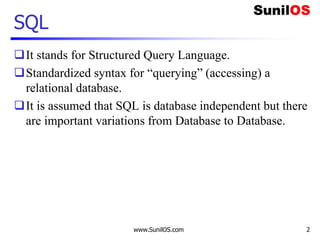
SQL
It stands for Structured Query Language.
Standardized syntax for “querying” (accessing) a
relational database.
It is assumed that SQL is database independent but there
are important variations from Database to Database.
www.SunilOS.com 3
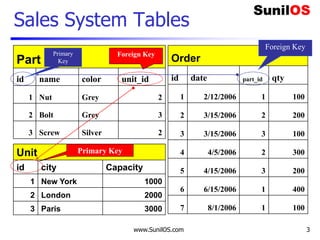
Sales System Tables
Order
id date part_id qty
1 2/12/2006 1 100
2 3/15/2006 2 200
3 3/15/2006 3 100
4 4/5/2006 2 300
5 4/15/2006 3 200
6 6/15/2006 1 400
7 8/1/2006 1 100
Part
id name color unit_id
1 Nut Grey 2
2 Bolt Grey 3
3 Screw Silver 2
Unit
id city Capacity
1 New York 1000
2 London 2000
3 Paris 3000
Primary Key
Foreign Key
Foreign Key
Primary
Key
www.SunilOS.com 4
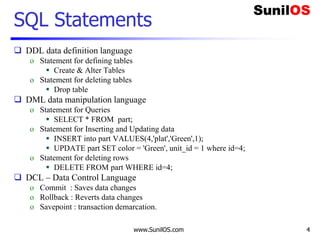
SQL Statements
 DDL data definition language
o Statement for defining tables
 Create & Alter Tables
o Statement for deleting tables
 Drop table
 DML data manipulation language
o Statement for Queries
 SELECT * FROM part;
o Statement for Inserting and Updating data
 INSERT into part VALUES(4,'plat','Green',1);
 UPDATE part SET color = 'Green', unit_id = 1 where id=4;
o Statement for deleting rows
 DELETE FROM part WHERE id=4;
 DCL – Data Control Language
o Commit : Saves data changes
o Rollback : Reverts data changes
o Savepoint : transaction demarcation.
www.SunilOS.com 5
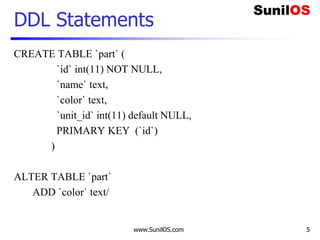
DDL Statements
CREATE TABLE `part` (
`id` int(11) NOT NULL,
`name` text,
`color` text,
`unit_id` int(11) default NULL,
PRIMARY KEY (`id`)
)
ALTER TABLE `part`
ADD `color` text/
www.SunilOS.com 6
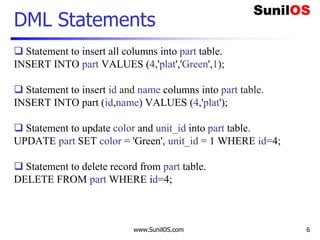
DML Statements
 Statement to insert all columns into part table.
INSERT INTO part VALUES (4,'plat','Green',1);
 Statement to insert id and name columns into part table.
INSERT INTO part (id,name) VALUES (4,'plat');
 Statement to update color and unit_id into part table.
UPDATE part SET color = 'Green', unit_id = 1 WHERE id=4;
 Statement to delete record from part table.
DELETE FROM part WHERE id=4;
www.SunilOS.com 7
DML - Select
Get all parts
o SELECT * FROM part;
Get all parts’ ids, names and colors
o SELECT id, name, color FROM part;
Get all grey color parts
o SELECT * FROM part WHERE color = ‘Grey’
Get all parts sorted by name
o SELECT * FROM part ORDER BY name
www.SunilOS.com 8
DML – Aggregate Functions
How many parts are there?
o SELECT count(*) from part;
o SELECT count(id) from part;
How many parts have been sold?
o SELECT sum(qty) from order
Which is the biggest deal so far?
o SELECT max(qty) from order;
Which is the minimum deal so far?
o SELECT min(qty) from order;
www.SunilOS.com 9
Joins
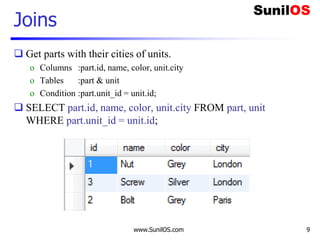
 Get parts with their cities of units.
o Columns :part.id, name, color, unit.city
o Tables :part & unit
o Condition :part.unit_id = unit.id;
 SELECT part.id, name, color, unit.city FROM part, unit
WHERE part.unit_id = unit.id;
www.SunilOS.com 10
Aliases
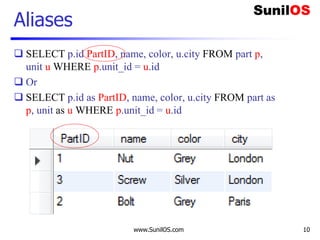
 SELECT p.id PartID, name, color, u.city FROM part p,
unit u WHERE p.unit_id = u.id
 Or
 SELECT p.id as PartID, name, color, u.city FROM part as
p, unit as u WHERE p.unit_id = u.id
SQL IN/BETWEEN
 Get the list of all Silver and Grey parts.
o SELECT * FROM part WHERE color IN ('Grey','Silver')
 Get orders those ordered quantities are between 100 to 200.
o SELECT * from orders WHERE qty BETWEEN 100 AND 200
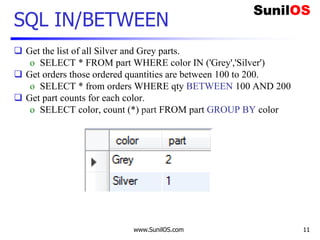
 Get part counts for each color.
o SELECT color, count (*) part FROM part GROUP BY color
www.SunilOS.com 11
www.SunilOS.com 12
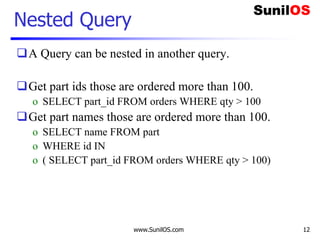
Nested Query
A Query can be nested in another query.
Get part ids those are ordered more than 100.
o SELECT part_id FROM orders WHERE qty > 100
Get part names those are ordered more than 100.
o SELECT name FROM part
o WHERE id IN
o ( SELECT part_id FROM orders WHERE qty > 100)
www.SunilOS.com 13
Joins
Outer Join
Inner Join
Left Join
Right Join
Joins
www.SunilOS.com 14
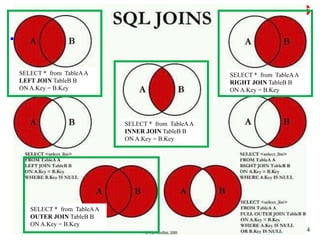
SELECT * from TableAA
LEFT JOIN TableB B
ON A.Key = B.Key
SELECT * from TableAA
RIGHT JOIN TableB B
ON A.Key = B.Key
SELECT * from TableAA
OUTER JOIN TableB B
ON A.Key = B.Key
SELECT * from TableAA
INNER JOIN TableB B
ON A.Key = B.Key
www.SunilOS.com 15
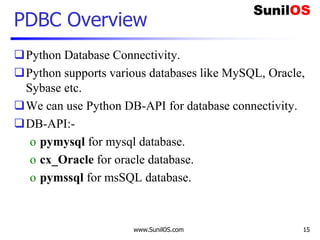
PDBC Overview
Python Database Connectivity.
Python supports various databases like MySQL, Oracle,
Sybase etc.
We can use Python DB-API for database connectivity.
DB-API:-
o pymysql for mysql database.
o cx_Oracle for oracle database.
o pymssql for msSQL database.
www.SunilOS.com 16
MYSQL – Get Data
 import pymysql
 result=""
 connection = pymysql.connect(host='localhost',user='root',password='root',db='test')
 with connection.cursor() as cursor:
 sql = "select * from part"
 cursor.execute(sql)
 result= cursor.fetchall()
 connection.close()
 for d in result:
 print(d[0]," ",d[1],"t", d[2])

Column value by index
SQL Query
DB URL Login ID PWD
www.SunilOS.com 17
Connect with Database
Here are the steps to be followed to make a database
call:
1. Import that database specific module.
2. Make connection to the Database
3. Create Cursor object
4. Execute cursor.fetchall and get Result or execute
insert/update/delete query and get number of records affected
Note:First Install pymysql by command
o pip install pymysql
www.SunilOS.com 18
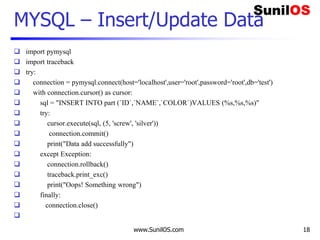
MYSQL – Insert/Update Data
 import pymysql
 import traceback
 try:
 connection = pymysql.connect(host='localhost',user='root',password='root',db='test')
 with connection.cursor() as cursor:
 sql = "INSERT INTO part (`ID`,`NAME`,`COLOR`)VALUES (%s,%s,%s)"
 try:
 cursor.execute(sql, (5, 'screw', 'silver'))
 connection.commit()
 print("Data add successfully")
 except Exception:
 connection.rollback()
 traceback.print_exc()
 print("Oops! Something wrong")
 finally:
 connection.close()

www.SunilOS.com 19
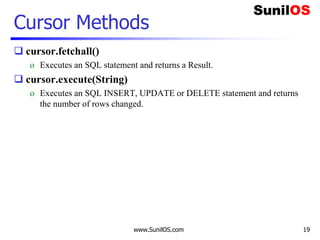
Cursor Methods
 cursor.fetchall()
o Executes an SQL statement and returns a Result.
 cursor.execute(String)
o Executes an SQL INSERT, UPDATE or DELETE statement and returns
the number of rows changed.
www.SunilOS.com 20
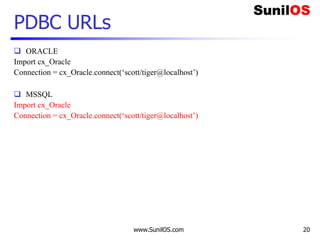
PDBC URLs
 ORACLE
Import cx_Oracle
Connection = cx_Oracle.connect(‘scott/tiger@localhost’)
 MSSQL
Import cx_Oracle
Connection = cx_Oracle.connect(‘scott/tiger@localhost’)
www.SunilOS.com 21
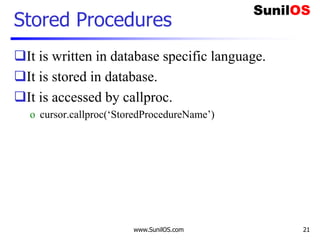
Stored Procedures
It is written in database specific language.
It is stored in database.
It is accessed by callproc.
o cursor.callproc(‘StoredProcedureName’)
www.SunilOS.com 22
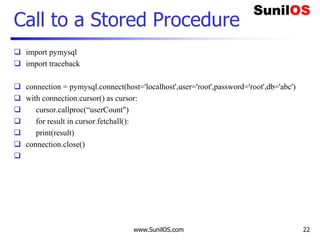
Call to a Stored Procedure
 import pymysql
 import traceback
 connection = pymysql.connect(host='localhost',user='root',password='root',db='abc')
 with connection.cursor() as cursor:
 cursor.callproc(“userCount")
 for result in cursor.fetchall():
 print(result)
 connection.close()

www.SunilOS.com 23
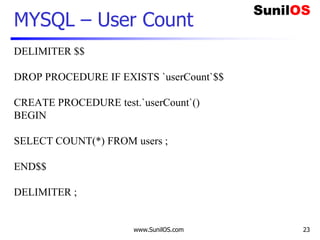
MYSQL – User Count
DELIMITER $$
DROP PROCEDURE IF EXISTS `userCount`$$
CREATE PROCEDURE test.`userCount`()
BEGIN
SELECT COUNT(*) FROM users ;
END$$
DELIMITER ;
www.SunilOS.com 24
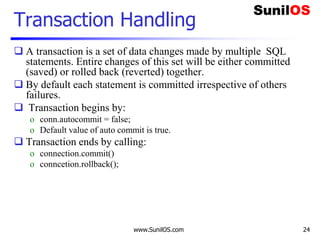
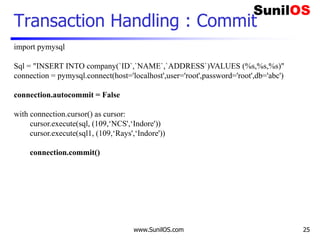
Transaction Handling
 A transaction is a set of data changes made by multiple SQL
statements. Entire changes of this set will be either committed
(saved) or rolled back (reverted) together.
 By default each statement is committed irrespective of others
failures.
 Transaction begins by:
o conn.autocommit = false;
o Default value of auto commit is true.
 Transaction ends by calling:
o connection.commit()
o conncetion.rollback();
www.SunilOS.com 25
Transaction Handling : Commit
import pymysql
Sql = "INSERT INTO company(`ID`,`NAME`,`ADDRESS`)VALUES (%s,%s,%s)"
connection = pymysql.connect(host='localhost',user='root',password='root',db='abc')
connection.autocommit = False
with connection.cursor() as cursor:
cursor.execute(sql, (109,‘NCS',‘Indore'))
cursor.execute(sql1, (109,‘Rays',‘Indore'))
connection.commit()
www.SunilOS.com 26
Mapping Python Types to SQL Types
SQL type Python Type
CHAR, VARCHAR, LONGVARCHAR String
NUMERIC, DECIMAL float
BIT bool
TINYINT int
SMALLINT int
INTEGER int
BIGINT int
REAL float
FLOAT, DOUBLE float
BINARY, VARBINARY, LONGVARBINARY byte.String
DATE datetime.date
TIME datetime.time
TIMESTAMP datetime.datetime
Date + Time
(Nano sec)
www.SunilOS.com 27
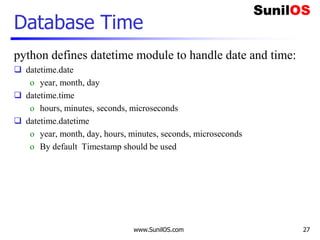
Database Time
python defines datetime module to handle date and time:
 datetime.date
o year, month, day
 datetime.time
o hours, minutes, seconds, microseconds
 datetime.datetime
o year, month, day, hours, minutes, seconds, microseconds
o By default Timestamp should be used
www.SunilOS.com 28
Metadata – Data about Data
 import pymysql
 connection = pymysql.connect(host='localhost',user='root',password='root',db='abc')
 with connection.cursor() as cursor:
 cursor.execute("select * from company ")
 cursor.fetchall()
 meta=cursor.description
 for data in meta:
 print("t",data[0],end="")
 connection.close()

www.SunilOS.com 29
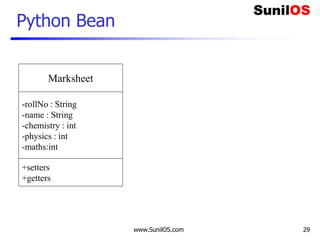
Python Bean
Marksheet
-rollNo : String
-name : String
-chemistry : int
-physics : int
-maths:int
+setters
+getters
www.SunilOS.com 30
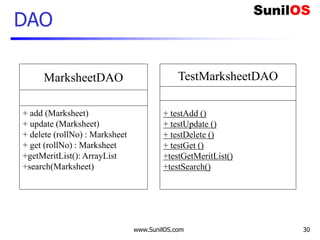
DAO
MarksheetDAO
+ add (Marksheet)
+ update (Marksheet)
+ delete (rollNo) : Marksheet
+ get (rollNo) : Marksheet
+getMeritList(): ArrayList
+search(Marksheet)
TestMarksheetDAO
+ testAdd ()
+ testUpdate ()
+ testDelete ()
+ testGet ()
+testGetMeritList()
+testSearch()
Disclaimer
This is an educational presentation to enhance the skill
of computer science students.
This presentation is available for free to computer
science students.
Some internet images from different URLs are used in
this presentation to simplify technical examples and
correlate examples with the real world.
We are grateful to owners of these URLs and pictures.
www.SunilOS.com 31
Thank You!
www.SunilOS.com 32
www.SunilOS.com

PDBC

  • 1.
  • 2.
    www.SunilOS.com 2 SQL It standsfor Structured Query Language. Standardized syntax for “querying” (accessing) a relational database. It is assumed that SQL is database independent but there are important variations from Database to Database.
  • 3.
    www.SunilOS.com 3 Sales SystemTables Order id date part_id qty 1 2/12/2006 1 100 2 3/15/2006 2 200 3 3/15/2006 3 100 4 4/5/2006 2 300 5 4/15/2006 3 200 6 6/15/2006 1 400 7 8/1/2006 1 100 Part id name color unit_id 1 Nut Grey 2 2 Bolt Grey 3 3 Screw Silver 2 Unit id city Capacity 1 New York 1000 2 London 2000 3 Paris 3000 Primary Key Foreign Key Foreign Key Primary Key
  • 4.
    www.SunilOS.com 4 SQL Statements DDL data definition language o Statement for defining tables  Create & Alter Tables o Statement for deleting tables  Drop table  DML data manipulation language o Statement for Queries  SELECT * FROM part; o Statement for Inserting and Updating data  INSERT into part VALUES(4,'plat','Green',1);  UPDATE part SET color = 'Green', unit_id = 1 where id=4; o Statement for deleting rows  DELETE FROM part WHERE id=4;  DCL – Data Control Language o Commit : Saves data changes o Rollback : Reverts data changes o Savepoint : transaction demarcation.
  • 5.
    www.SunilOS.com 5 DDL Statements CREATETABLE `part` ( `id` int(11) NOT NULL, `name` text, `color` text, `unit_id` int(11) default NULL, PRIMARY KEY (`id`) ) ALTER TABLE `part` ADD `color` text/
  • 6.
    www.SunilOS.com 6 DML Statements Statement to insert all columns into part table. INSERT INTO part VALUES (4,'plat','Green',1);  Statement to insert id and name columns into part table. INSERT INTO part (id,name) VALUES (4,'plat');  Statement to update color and unit_id into part table. UPDATE part SET color = 'Green', unit_id = 1 WHERE id=4;  Statement to delete record from part table. DELETE FROM part WHERE id=4;
  • 7.
    www.SunilOS.com 7 DML -Select Get all parts o SELECT * FROM part; Get all parts’ ids, names and colors o SELECT id, name, color FROM part; Get all grey color parts o SELECT * FROM part WHERE color = ‘Grey’ Get all parts sorted by name o SELECT * FROM part ORDER BY name
  • 8.
    www.SunilOS.com 8 DML –Aggregate Functions How many parts are there? o SELECT count(*) from part; o SELECT count(id) from part; How many parts have been sold? o SELECT sum(qty) from order Which is the biggest deal so far? o SELECT max(qty) from order; Which is the minimum deal so far? o SELECT min(qty) from order;
  • 9.
    www.SunilOS.com 9 Joins  Getparts with their cities of units. o Columns :part.id, name, color, unit.city o Tables :part & unit o Condition :part.unit_id = unit.id;  SELECT part.id, name, color, unit.city FROM part, unit WHERE part.unit_id = unit.id;
  • 10.
    www.SunilOS.com 10 Aliases  SELECTp.id PartID, name, color, u.city FROM part p, unit u WHERE p.unit_id = u.id  Or  SELECT p.id as PartID, name, color, u.city FROM part as p, unit as u WHERE p.unit_id = u.id
  • 11.
    SQL IN/BETWEEN  Getthe list of all Silver and Grey parts. o SELECT * FROM part WHERE color IN ('Grey','Silver')  Get orders those ordered quantities are between 100 to 200. o SELECT * from orders WHERE qty BETWEEN 100 AND 200  Get part counts for each color. o SELECT color, count (*) part FROM part GROUP BY color www.SunilOS.com 11
  • 12.
    www.SunilOS.com 12 Nested Query AQuery can be nested in another query. Get part ids those are ordered more than 100. o SELECT part_id FROM orders WHERE qty > 100 Get part names those are ordered more than 100. o SELECT name FROM part o WHERE id IN o ( SELECT part_id FROM orders WHERE qty > 100)
  • 13.
    www.SunilOS.com 13 Joins Outer Join InnerJoin Left Join Right Join
  • 14.
    Joins www.SunilOS.com 14 SELECT *from TableAA LEFT JOIN TableB B ON A.Key = B.Key SELECT * from TableAA RIGHT JOIN TableB B ON A.Key = B.Key SELECT * from TableAA OUTER JOIN TableB B ON A.Key = B.Key SELECT * from TableAA INNER JOIN TableB B ON A.Key = B.Key
  • 15.
    www.SunilOS.com 15 PDBC Overview PythonDatabase Connectivity. Python supports various databases like MySQL, Oracle, Sybase etc. We can use Python DB-API for database connectivity. DB-API:- o pymysql for mysql database. o cx_Oracle for oracle database. o pymssql for msSQL database.
  • 16.
    www.SunilOS.com 16 MYSQL –Get Data  import pymysql  result=""  connection = pymysql.connect(host='localhost',user='root',password='root',db='test')  with connection.cursor() as cursor:  sql = "select * from part"  cursor.execute(sql)  result= cursor.fetchall()  connection.close()  for d in result:  print(d[0]," ",d[1],"t", d[2])  Column value by index SQL Query DB URL Login ID PWD
  • 17.
    www.SunilOS.com 17 Connect withDatabase Here are the steps to be followed to make a database call: 1. Import that database specific module. 2. Make connection to the Database 3. Create Cursor object 4. Execute cursor.fetchall and get Result or execute insert/update/delete query and get number of records affected Note:First Install pymysql by command o pip install pymysql
  • 18.
    www.SunilOS.com 18 MYSQL –Insert/Update Data  import pymysql  import traceback  try:  connection = pymysql.connect(host='localhost',user='root',password='root',db='test')  with connection.cursor() as cursor:  sql = "INSERT INTO part (`ID`,`NAME`,`COLOR`)VALUES (%s,%s,%s)"  try:  cursor.execute(sql, (5, 'screw', 'silver'))  connection.commit()  print("Data add successfully")  except Exception:  connection.rollback()  traceback.print_exc()  print("Oops! Something wrong")  finally:  connection.close() 
  • 19.
    www.SunilOS.com 19 Cursor Methods cursor.fetchall() o Executes an SQL statement and returns a Result.  cursor.execute(String) o Executes an SQL INSERT, UPDATE or DELETE statement and returns the number of rows changed.
  • 20.
    www.SunilOS.com 20 PDBC URLs ORACLE Import cx_Oracle Connection = cx_Oracle.connect(‘scott/tiger@localhost’)  MSSQL Import cx_Oracle Connection = cx_Oracle.connect(‘scott/tiger@localhost’)
  • 21.
    www.SunilOS.com 21 Stored Procedures Itis written in database specific language. It is stored in database. It is accessed by callproc. o cursor.callproc(‘StoredProcedureName’)
  • 22.
    www.SunilOS.com 22 Call toa Stored Procedure  import pymysql  import traceback  connection = pymysql.connect(host='localhost',user='root',password='root',db='abc')  with connection.cursor() as cursor:  cursor.callproc(“userCount")  for result in cursor.fetchall():  print(result)  connection.close() 
  • 23.
    www.SunilOS.com 23 MYSQL –User Count DELIMITER $$ DROP PROCEDURE IF EXISTS `userCount`$$ CREATE PROCEDURE test.`userCount`() BEGIN SELECT COUNT(*) FROM users ; END$$ DELIMITER ;
  • 24.
    www.SunilOS.com 24 Transaction Handling A transaction is a set of data changes made by multiple SQL statements. Entire changes of this set will be either committed (saved) or rolled back (reverted) together.  By default each statement is committed irrespective of others failures.  Transaction begins by: o conn.autocommit = false; o Default value of auto commit is true.  Transaction ends by calling: o connection.commit() o conncetion.rollback();
  • 25.
    www.SunilOS.com 25 Transaction Handling: Commit import pymysql Sql = "INSERT INTO company(`ID`,`NAME`,`ADDRESS`)VALUES (%s,%s,%s)" connection = pymysql.connect(host='localhost',user='root',password='root',db='abc') connection.autocommit = False with connection.cursor() as cursor: cursor.execute(sql, (109,‘NCS',‘Indore')) cursor.execute(sql1, (109,‘Rays',‘Indore')) connection.commit()
  • 26.
    www.SunilOS.com 26 Mapping PythonTypes to SQL Types SQL type Python Type CHAR, VARCHAR, LONGVARCHAR String NUMERIC, DECIMAL float BIT bool TINYINT int SMALLINT int INTEGER int BIGINT int REAL float FLOAT, DOUBLE float BINARY, VARBINARY, LONGVARBINARY byte.String DATE datetime.date TIME datetime.time TIMESTAMP datetime.datetime Date + Time (Nano sec)
  • 27.
    www.SunilOS.com 27 Database Time pythondefines datetime module to handle date and time:  datetime.date o year, month, day  datetime.time o hours, minutes, seconds, microseconds  datetime.datetime o year, month, day, hours, minutes, seconds, microseconds o By default Timestamp should be used
  • 28.
    www.SunilOS.com 28 Metadata –Data about Data  import pymysql  connection = pymysql.connect(host='localhost',user='root',password='root',db='abc')  with connection.cursor() as cursor:  cursor.execute("select * from company ")  cursor.fetchall()  meta=cursor.description  for data in meta:  print("t",data[0],end="")  connection.close() 
  • 29.
    www.SunilOS.com 29 Python Bean Marksheet -rollNo: String -name : String -chemistry : int -physics : int -maths:int +setters +getters
  • 30.
    www.SunilOS.com 30 DAO MarksheetDAO + add(Marksheet) + update (Marksheet) + delete (rollNo) : Marksheet + get (rollNo) : Marksheet +getMeritList(): ArrayList +search(Marksheet) TestMarksheetDAO + testAdd () + testUpdate () + testDelete () + testGet () +testGetMeritList() +testSearch()
  • 31.
    Disclaimer This is aneducational presentation to enhance the skill of computer science students. This presentation is available for free to computer science students. Some internet images from different URLs are used in this presentation to simplify technical examples and correlate examples with the real world. We are grateful to owners of these URLs and pictures. www.SunilOS.com 31
  • 32.

Editor's Notes