1
JavaFundamentals:
6. Java Database
Romi Satria Wahono
romi@romisatriawahono.net
http://romisatriawahono.net
+6281586220090
3
Course Outline
1. OOP Concepts:
Konsep dan Paradigma Object-Oriented
2. Java Basics:
Memahami Sintaks dan Grammar Bahasa Java
3. Java GUI:
Swing, GUI Component, Event Handling, Pengembangan
Aplikasi GUI
4. Java Algorithms:
Pengantar Algoritma, Struktur Data, Algorithm Analysis
5. Java Advanced:
Eksepsi, Thread, Java API
6. Java Database:
Koneksi ke Database, Pengembangan Aplikasi Database
4
6. Java Database
5
Java Database
1. Pengantar Database
2. Pengantar SQL
3. Koneksi Aplikasi Java ke Database
4. Studi Kasus Aplikasi Java Database
6
6.1 Pengantar Database
7
Introduction to Database
 Database system is a computer based record
keeping system
 It is a system whose overall purpose is to
record and maintain information that is
deemed important to the organization
 Database is collection of stored operational
data which can be used and shared by
different applications and users of any
organization
8
Why Database
 Database system provides the organization with
centralized control of its operational data, which
is one of its most valuable assets
 This is totally opposite of the situation that is
happening in many organizations, where
typically each application has its own private
files (flat file). This makes the operational data
widely dispersed and difficult to control
9
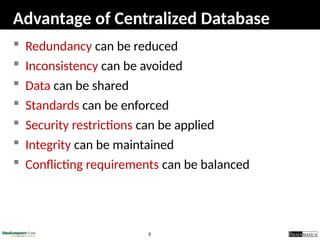
Advantage of Centralized Database
 Redundancy can be reduced
 Inconsistency can be avoided
 Data can be shared
 Standards can be enforced
 Security restrictions can be applied
 Integrity can be maintained
 Conflicting requirements can be balanced
10
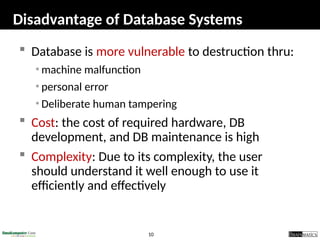
Disadvantage of Database Systems
 Database is more vulnerable to destruction thru:
• machine malfunction
• personal error
• Deliberate human tampering
 Cost: the cost of required hardware, DB
development, and DB maintenance is high
 Complexity: Due to its complexity, the user
should understand it well enough to use it
efficiently and effectively
11
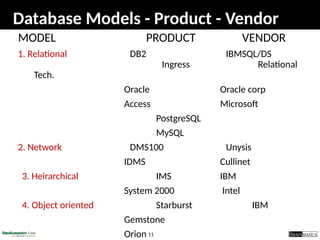
Database Models - Product - Vendor
MODEL PRODUCT VENDOR
1. Relational DB2 IBMSQL/DS
Ingress Relational
Tech.
Oracle Oracle corp
Access Microsoft
PostgreSQL
MySQL
2. Network DMS100 Unysis
IDMS Cullinet
3. Heirarchical IMS IBM
System 2000 Intel
4. Object oriented Starburst IBM
Gemstone
Orion
12
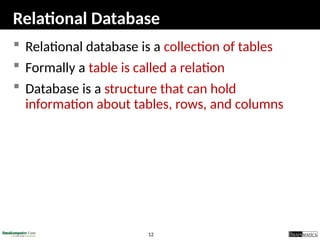
Relational Database
 Relational database is a collection of tables
 Formally a table is called a relation
 Database is a structure that can hold
information about tables, rows, and columns
13
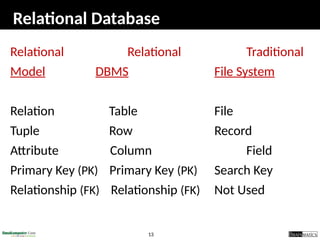
Relational Database
Relational Relational Traditional
Model DBMS File System
Relation Table File
Tuple Row Record
Attribute Column Field
Primary Key (PK) Primary Key (PK) Search Key
Relationship (FK) Relationship (FK) Not Used
14
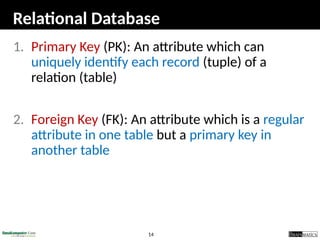
Relational Database
1. Primary Key (PK): An attribute which can
uniquely identify each record (tuple) of a
relation (table)
2. Foreign Key (FK): An attribute which is a regular
attribute in one table but a primary key in
another table
15
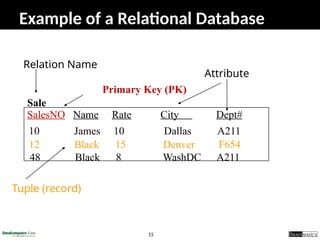
Example of a Relational Database
SalesNO Name Rate City Dept#
10 James 10 Dallas A211
12 Black 15 Denver F654
48 Black 8 WashDC A211
Sale
Primary Key (PK)
Relation Name
Tuple (record)
Attribute
16
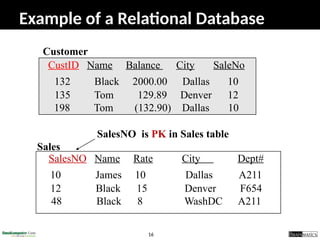
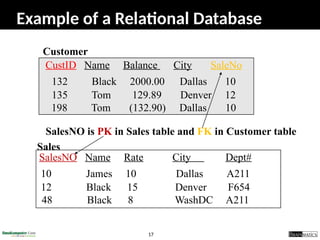
SalesNO Name Rate City Dept#
10 James 10 Dallas A211
12 Black 15 Denver F654
48 Black 8 WashDC A211
Sales
CustID Name Balance City SaleNo
132 Black 2000.00 Dallas 10
135 Tom 129.89 Denver 12
198 Tom (132.90) Dallas 10
Customer
SalesNO is PK in Sales table
Example of a Relational Database
17
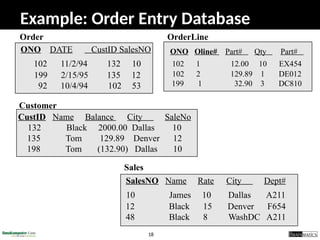
SalesNO Name Rate City Dept#
10 James 10 Dallas A211
12 Black 15 Denver F654
48 Black 8 WashDC A211
Sales
CustID Name Balance City SaleNo
132 Black 2000.00 Dallas 10
135 Tom 129.89 Denver 12
198 Tom (132.90) Dallas 10
Customer
SalesNO is PK in Sales table and FK in Customer table
Example of a Relational Database
18
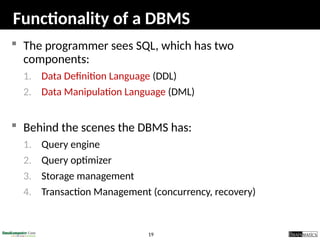
OrderLine
ONO Oline# Part# Qty Part#
102 1 12.00 10 EX454
102 2 129.89 1 DE012
199 1 32.90 3 DC810
ONO DATE CustID SalesNO
102 11/2/94 132 10
199 2/15/95 135 12
92 10/4/94 102 53
Order
CustID Name Balance City SaleNo
132 Black 2000.00 Dallas 10
135 Tom 129.89 Denver 12
198 Tom (132.90) Dallas 10
Customer
SalesNO Name Rate City Dept#
10 James 10 Dallas A211
12 Black 15 Denver F654
48 Black 8 WashDC A211
Sales
Example: Order Entry Database
19
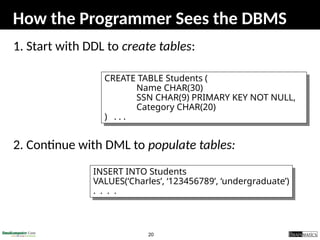
Functionality of a DBMS
 The programmer sees SQL, which has two
components:
1. Data Definition Language (DDL)
2. Data Manipulation Language (DML)
 Behind the scenes the DBMS has:
1. Query engine
2. Query optimizer
3. Storage management
4. Transaction Management (concurrency, recovery)
20
How the Programmer Sees the DBMS
1. Start with DDL to create tables:
2. Continue with DML to populate tables:
CREATE TABLE Students (
Name CHAR(30)
SSN CHAR(9) PRIMARY KEY NOT NULL,
Category CHAR(20)
) . . .
INSERT INTO Students
VALUES(‘Charles’, ‘123456789’, ‘undergraduate’)
. . . .
21
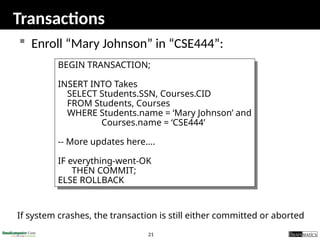
Transactions
 Enroll “Mary Johnson” in “CSE444”:
BEGIN TRANSACTION;
INSERT INTO Takes
SELECT Students.SSN, Courses.CID
FROM Students, Courses
WHERE Students.name = ‘Mary Johnson’ and
Courses.name = ‘CSE444’
-- More updates here....
IF everything-went-OK
THEN COMMIT;
ELSE ROLLBACK
If system crashes, the transaction is still either committed or aborted
22
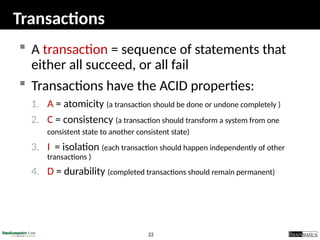
Transactions
 A transaction = sequence of statements that
either all succeed, or all fail
 Transactions have the ACID properties:
1. A = atomicity (a transaction should be done or undone completely )
2. C = consistency (a transaction should transform a system from one
consistent state to another consistent state)
3. I = isolation (each transaction should happen independently of other
transactions )
4. D = durability (completed transactions should remain permanent)
23
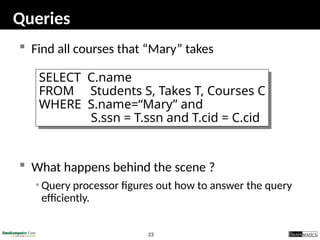
Queries
 Find all courses that “Mary” takes
 What happens behind the scene ?
• Query processor figures out how to answer the query
efficiently.
SELECT C.name
FROM Students S, Takes T, Courses C
WHERE S.name=“Mary” and
S.ssn = T.ssn and T.cid = C.cid
24
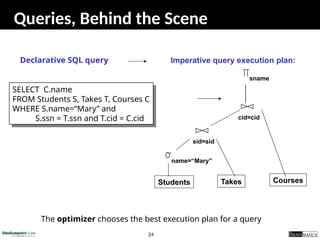
Queries, Behind the Scene
Imperative query execution plan:
SELECT C.name
FROM Students S, Takes T, Courses C
WHERE S.name=“Mary” and
S.ssn = T.ssn and T.cid = C.cid
Declarative SQL query
Students Takes
sid=sid
sname
name=“Mary”
cid=cid
Courses
The optimizer chooses the best execution plan for a query
25
6.2 Pengantar SQL
26
SQL Introduction
 Standard language for querying and manipulating
data
 SQL = Structured Query Language
 Many standards out there:
• ANSI SQL
• SQL92 (a.k.a. SQL2)
• SQL99 (a.k.a. SQL3)
• Vendors support various subsets of these
• What we discuss is common to all of them
27
SQL
 Data Definition Language (DDL)
• Create/alter/delete tables and their attributes
 Data Manipulation Language (DML)
• Query one or more tables
• Insert/delete/modify tuples in tables
 Transact-SQL
• Idea: package a sequence of SQL statements  server
28
Data Types in SQL
 Characters:
• CHAR(20) -- fixed length
• VARCHAR(40) -- variable length
 Numbers:
• BIGINT, INT, SMALLINT, TINYINT
• REAL, FLOAT -- differ in precision
• MONEY
 Times and dates:
• DATE
• DATETIME -- SQL Server
 Others... All are simple
29
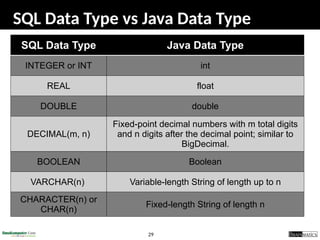
SQL Data Type vs Java Data Type
SQL Data Type Java Data Type
INTEGER or INT int
REAL float
DOUBLE double
DECIMAL(m, n)
Fixed-point decimal numbers with m total digits
and n digits after the decimal point; similar to
BigDecimal.
BOOLEAN Boolean
VARCHAR(n) Variable-length String of length up to n
CHARACTER(n) or
CHAR(n)
Fixed-length String of length n
30
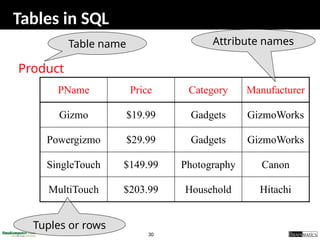
Tables in SQL
PName Price Category Manufacturer
Gizmo $19.99 Gadgets GizmoWorks
Powergizmo $29.99 Gadgets GizmoWorks
SingleTouch $149.99 Photography Canon
MultiTouch $203.99 Household Hitachi
Product
Attribute names
Table name
Tuples or rows
31
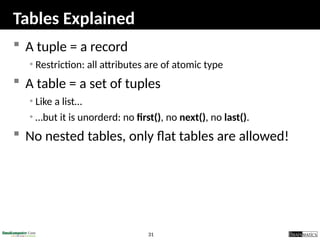
Tables Explained
 A tuple = a record
• Restriction: all attributes are of atomic type
 A table = a set of tuples
• Like a list…
• …but it is unorderd: no first(), no next(), no last().
 No nested tables, only flat tables are allowed!
32
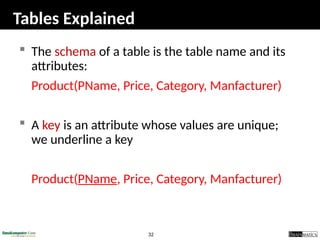
Tables Explained
 The schema of a table is the table name and its
attributes:
Product(PName, Price, Category, Manfacturer)
 A key is an attribute whose values are unique;
we underline a key
Product(PName, Price, Category, Manfacturer)
33
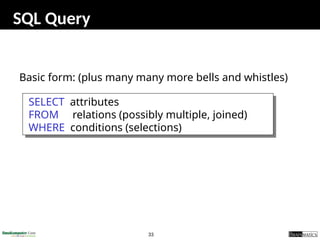
SQL Query
Basic form: (plus many many more bells and whistles)
SELECT attributes
FROM relations (possibly multiple, joined)
WHERE conditions (selections)
34
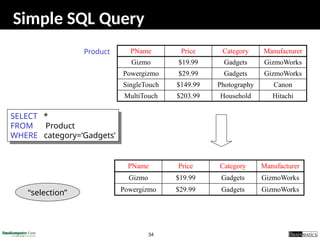
Simple SQL Query
PName Price Category Manufacturer
Gizmo $19.99 Gadgets GizmoWorks
Powergizmo $29.99 Gadgets GizmoWorks
SingleTouch $149.99 Photography Canon
MultiTouch $203.99 Household Hitachi
SELECT *
FROM Product
WHERE category=‘Gadgets’
Product
PName Price Category Manufacturer
Gizmo $19.99 Gadgets GizmoWorks
Powergizmo $29.99 Gadgets GizmoWorks
“selection”
35
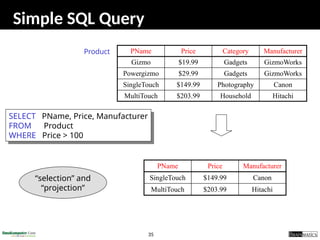
Simple SQL Query
PName Price Category Manufacturer
Gizmo $19.99 Gadgets GizmoWorks
Powergizmo $29.99 Gadgets GizmoWorks
SingleTouch $149.99 Photography Canon
MultiTouch $203.99 Household Hitachi
SELECT PName, Price, Manufacturer
FROM Product
WHERE Price > 100
Product
PName Price Manufacturer
SingleTouch $149.99 Canon
MultiTouch $203.99 Hitachi
“selection” and
“projection”
36
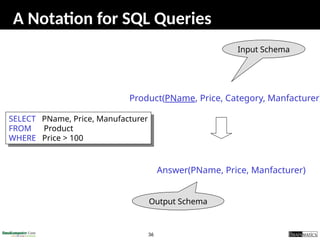
A Notation for SQL Queries
SELECT PName, Price, Manufacturer
FROM Product
WHERE Price > 100
Product(PName, Price, Category, Manfacturer)
Answer(PName, Price, Manfacturer)
Input Schema
Output Schema
37
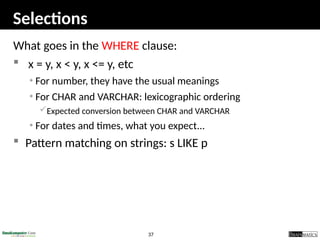
Selections
What goes in the WHERE clause:
 x = y, x < y, x <= y, etc
• For number, they have the usual meanings
• For CHAR and VARCHAR: lexicographic ordering
Expected conversion between CHAR and VARCHAR
• For dates and times, what you expect...
 Pattern matching on strings: s LIKE p
38
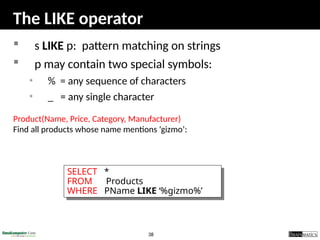
The LIKE operator
 s LIKE p: pattern matching on strings
 p may contain two special symbols:
• % = any sequence of characters
• _ = any single character
Product(Name, Price, Category, Manufacturer)
Find all products whose name mentions ‘gizmo’:
SELECT *
FROM Products
WHERE PName LIKE ‘%gizmo%’
39
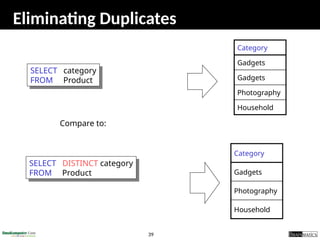
Eliminating Duplicates
Compare to:
SELECT DISTINCT category
FROM Product
Household
Photography
Gadgets
Category
SELECT category
FROM Product
Household
Photography
Gadgets
Gadgets
Category
40
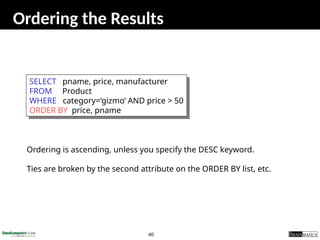
Ordering the Results
SELECT pname, price, manufacturer
FROM Product
WHERE category=‘gizmo’ AND price > 50
ORDER BY price, pname
Ordering is ascending, unless you specify the DESC keyword.
Ties are broken by the second attribute on the ORDER BY list, etc.
41
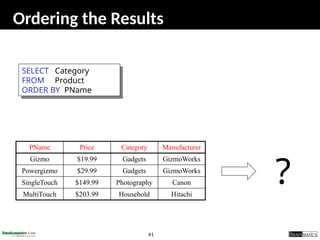
Ordering the Results
SELECT Category
FROM Product
ORDER BY PName
PName Price Category Manufacturer
Gizmo $19.99 Gadgets GizmoWorks
Powergizmo $29.99 Gadgets GizmoWorks
SingleTouch $149.99 Photography Canon
MultiTouch $203.99 Household Hitachi
?
42
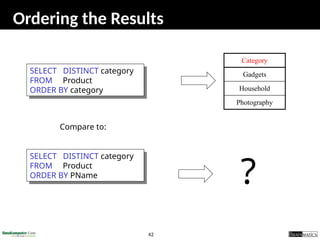
Ordering the Results
SELECT DISTINCT category
FROM Product
ORDER BY category
Compare to:
Category
Gadgets
Household
Photography
SELECT DISTINCT category
FROM Product
ORDER BY PName
?
43
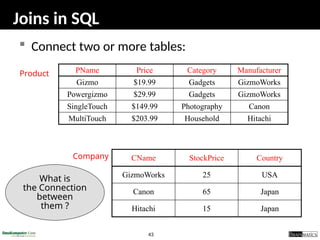
Joins in SQL
 Connect two or more tables:
PName Price Category Manufacturer
Gizmo $19.99 Gadgets GizmoWorks
Powergizmo $29.99 Gadgets GizmoWorks
SingleTouch $149.99 Photography Canon
MultiTouch $203.99 Household Hitachi
Product
Company CName StockPrice Country
GizmoWorks 25 USA
Canon 65 Japan
Hitachi 15 Japan
What is
the Connection
between
them ?
44
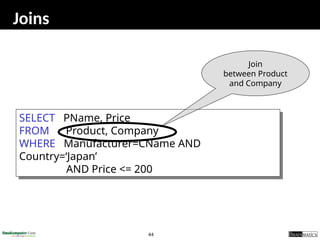
Joins
SELECT PName, Price
FROM Product, Company
WHERE Manufacturer=CName AND
Country=‘Japan’
AND Price <= 200
Join
between Product
and Company
45
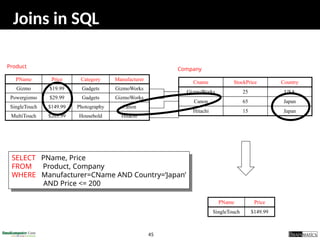
Joins in SQL
PName Price Category Manufacturer
Gizmo $19.99 Gadgets GizmoWorks
Powergizmo $29.99 Gadgets GizmoWorks
SingleTouch $149.99 Photography Canon
MultiTouch $203.99 Household Hitachi
Product
Company
Cname StockPrice Country
GizmoWorks 25 USA
Canon 65 Japan
Hitachi 15 Japan
PName Price
SingleTouch $149.99
SELECT PName, Price
FROM Product, Company
WHERE Manufacturer=CName AND Country=‘Japan’
AND Price <= 200
46
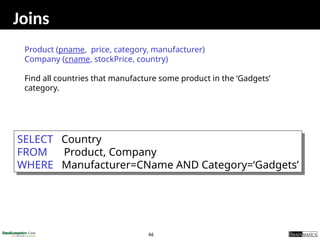
Joins
Product (pname, price, category, manufacturer)
Company (cname, stockPrice, country)
Find all countries that manufacture some product in the ‘Gadgets’
category.
SELECT Country
FROM Product, Company
WHERE Manufacturer=CName AND Category=‘Gadgets’
47
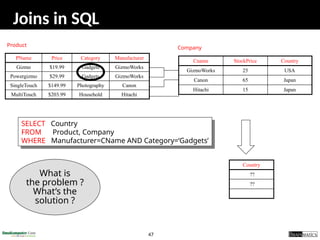
Joins in SQL
PName Price Category Manufacturer
Gizmo $19.99 Gadgets GizmoWorks
Powergizmo $29.99 Gadgets GizmoWorks
SingleTouch $149.99 Photography Canon
MultiTouch $203.99 Household Hitachi
Product Company
Cname StockPrice Country
GizmoWorks 25 USA
Canon 65 Japan
Hitachi 15 Japan
Country
??
??
What is
the problem ?
What’s the
solution ?
SELECT Country
FROM Product, Company
WHERE Manufacturer=CName AND Category=‘Gadgets’
48
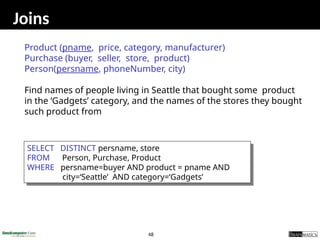
Joins
Product (pname, price, category, manufacturer)
Purchase (buyer, seller, store, product)
Person(persname, phoneNumber, city)
Find names of people living in Seattle that bought some product
in the ‘Gadgets’ category, and the names of the stores they bought
such product from
SELECT DISTINCT persname, store
FROM Person, Purchase, Product
WHERE persname=buyer AND product = pname AND
city=‘Seattle’ AND category=‘Gadgets’
49
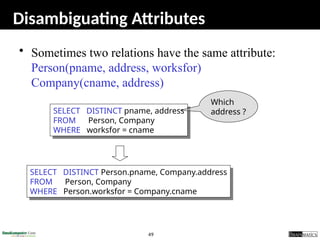
Disambiguating Attributes
• Sometimes two relations have the same attribute:
Person(pname, address, worksfor)
Company(cname, address)
SELECT DISTINCT pname, address
FROM Person, Company
WHERE worksfor = cname
SELECT DISTINCT Person.pname, Company.address
FROM Person, Company
WHERE Person.worksfor = Company.cname
Which
address ?
50
Tuple Variables
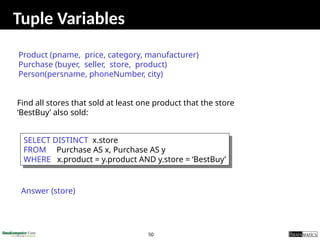
SELECT DISTINCT x.store
FROM Purchase AS x, Purchase AS y
WHERE x.product = y.product AND y.store = ‘BestBuy’
Find all stores that sold at least one product that the store
‘BestBuy’ also sold:
Answer (store)
Product (pname, price, category, manufacturer)
Purchase (buyer, seller, store, product)
Person(persname, phoneNumber, city)
51
Tuple Variables
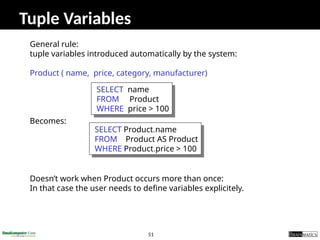
General rule:
tuple variables introduced automatically by the system:
Product ( name, price, category, manufacturer)
Becomes:
Doesn’t work when Product occurs more than once:
In that case the user needs to define variables explicitely.
SELECT name
FROM Product
WHERE price > 100
SELECT Product.name
FROM Product AS Product
WHERE Product.price > 100
52
Renaming Columns
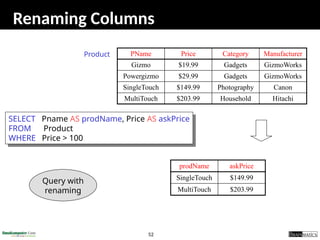
PName Price Category Manufacturer
Gizmo $19.99 Gadgets GizmoWorks
Powergizmo $29.99 Gadgets GizmoWorks
SingleTouch $149.99 Photography Canon
MultiTouch $203.99 Household Hitachi
SELECT Pname AS prodName, Price AS askPrice
FROM Product
WHERE Price > 100
Product
prodName askPrice
SingleTouch $149.99
MultiTouch $203.99
Query with
renaming
53
6.3 Koneksi Aplikasi Java ke
Database
54
Tahapan Akses Database dengan JDBC
55
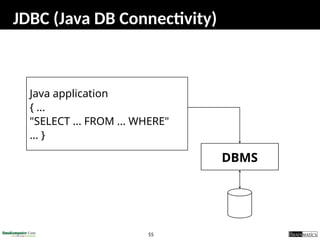
JDBC (Java DB Connectivity)
Java application
{ ...
"SELECT ... FROM ... WHERE"
... }
DBMS
56
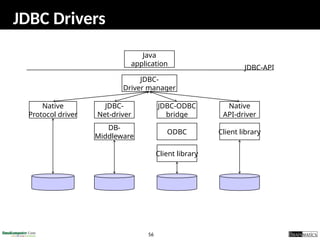
JDBC Drivers
Java
application
JDBC-
Driver manager
Native
Protocol driver
JDBC-
Net-driver
Native
API-driver
JDBC-ODBC
bridge
Client library
DB-
Middleware
ODBC
Client library
JDBC-API
57
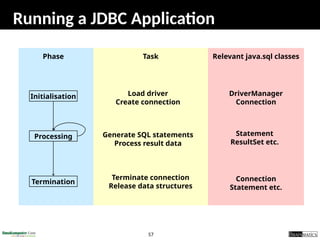
Running a JDBC Application
Phase Task Relevant java.sql classes
Initialisation
Processing
Termination
Load driver
Create connection
Generate SQL statements
Process result data
Terminate connection
Release data structures
DriverManager
Connection
Statement
ResultSet etc.
Connection
Statement etc.
58
A Simple JDBC application
loadDriver
getConnection
createStatement
execute(SQL)
Result handling
More
results ?
closeStatment
closeConnection
no
yes
import java.sql.*;
public class jdbctest {
public static void main(String args[]){
try{
Class.forName("org.postgresql.Driver");
Connection con = DriverManager.getConnection
("jdbc:postgresql://lsir-cis-pc8:5401/pcmdb", "user", "passwd");
Statement stmt = con.createStatement();
ResultSet rs = stmt.executeQuery
("select name, number from pcmtable where number < 2");
while(rs.next())
System.out.println(rs.getString(1) + " (" + rs.getInt(2) + ")
stmt.close()
con.close();
} catch(Exception e){
System.err.println(e);
}
}}
59
Loading of Driver
 Creates an instance of the driver
 Registers driver in the driver manager
 Explicit loading
String l_driver = "org.postgresql.Driver";
Class.forName(l_driver);
 Several drivers can be loaded and
registered
60
Implicit Driver Loading
 Setting system property: jdbc.drivers
• A colon-separated list of driver classnames
 Can be set when starting the application
java -Djdbc.drivers=org.postgresql.Driver application
 Can also be set from within the Java application
Properties prp = System.getProperties();
prp.put("jdbc.drivers"
"com.mimer.jdbc.Driver:org.postgresql.Driver");
System.setProperties(prp);
 The DriverManager class attempts to load all the
classes specified in jdbc.drivers when the
DriverManager class is initialized
61
Addressing Database
 A connection is a session with one database
 Databases are addressed using a URL of the
form "jdbc:<subprotocol>:<subname>"
 Examples
jdbc:postgresql:database
jdbc:postgresql://host/database
jdbc:postgresql://host:port/database
 Defaults: host=localhost, port=5432
62
Connecting to Database
 Connection is established
Connection con =
DriverManager.getConnection(URL,USERID,PWD);
 Connection properties (class Properties)
 Close the connection
con.close();
63
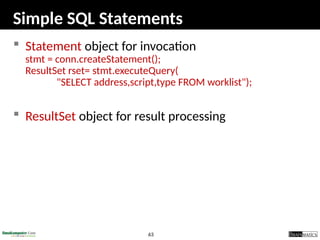
Simple SQL Statements
 Statement object for invocation
stmt = conn.createStatement();
ResultSet rset= stmt.executeQuery(
"SELECT address,script,type FROM worklist");
 ResultSet object for result processing
64
6.4 Studi Kasus Aplikasi Database
65
Aplikasi Database
1. Aplikasi Telepon
2. Aplikasi Guru
3. Aplikasi Bank
4. Aplikasi Penjualan Barang
66
Aplikasi Telepon
67
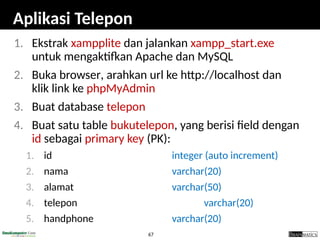
Aplikasi Telepon
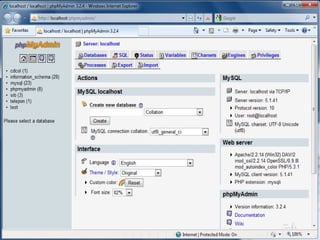
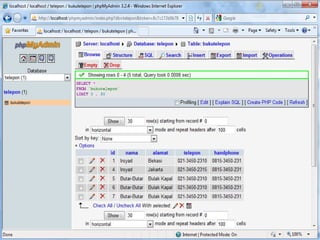
1. Ekstrak xampplite dan jalankan xampp_start.exe
untuk mengaktifkan Apache dan MySQL
2. Buka browser, arahkan url ke http://localhost dan
klik link ke phpMyAdmin
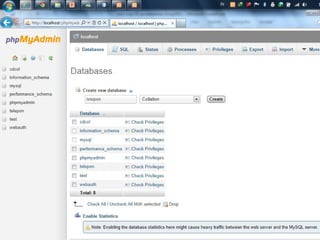
3. Buat database telepon
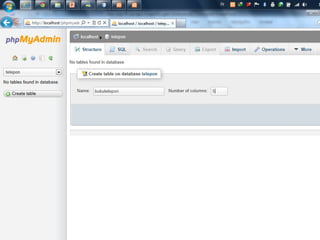
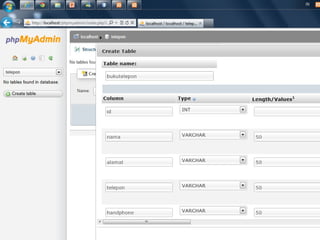
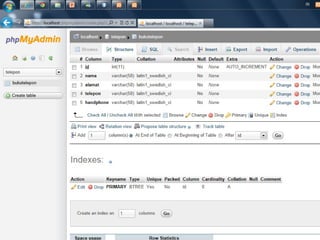
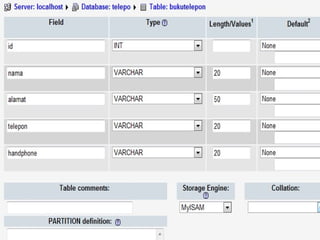
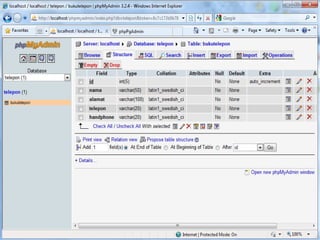
4. Buat satu table bukutelepon, yang berisi field dengan
id sebagai primary key (PK):
1. id integer (auto increment)
2. nama varchar(20)
3. alamat varchar(50)
4. telepon varchar(20)
5. handphone varchar(20)
68
69
70
71
73
74
75
76
79
Aplikasi Telepon
1. Extract dan copy folder 05 JAVA DATABASE di
NetbeansProject anda
2. Di Netbeans buka file tersebut melalui Open
project
3. Cek package db.mysql (versi text) dan
dbgui.mysql (versi gui)
4. Program yang ada di kedua package tersebut
akan mengakses dan melakukan query ke
database telepon (table bukutelepon)
80
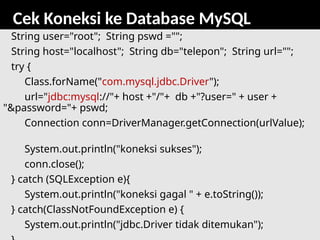
Cek Koneksi ke Database MySQL
String user="root"; String pswd ="";
String host="localhost"; String db="telepon"; String url="";
try {
Class.forName("com.mysql.jdbc.Driver");
url="jdbc:mysql://"+ host +"/"+ db +"?user=" + user +
"&password="+ pswd;
Connection conn=DriverManager.getConnection(urlValue);
System.out.println("koneksi sukses");
conn.close();
} catch (SQLException e){
System.out.println("koneksi gagal " + e.toString());
} catch(ClassNotFoundException e) {
System.out.println("jdbc.Driver tidak ditemukan");
81
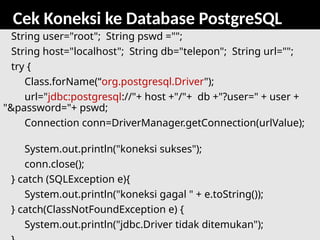
Cek Koneksi ke Database PostgreSQL
String user="root"; String pswd ="";
String host="localhost"; String db="telepon"; String url="";
try {
Class.forName(“org.postgresql.Driver");
url="jdbc:postgresql://"+ host +"/"+ db +"?user=" + user +
"&password="+ pswd;
Connection conn=DriverManager.getConnection(urlValue);
System.out.println("koneksi sukses");
conn.close();
} catch (SQLException e){
System.out.println("koneksi gagal " + e.toString());
} catch(ClassNotFoundException e) {
System.out.println("jdbc.Driver tidak ditemukan");
82
Aplikasi Guru
83
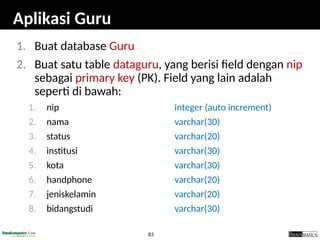
Aplikasi Guru
1. Buat database Guru
2. Buat satu table dataguru, yang berisi field dengan nip
sebagai primary key (PK). Field yang lain adalah
seperti di bawah:
1. nip integer (auto increment)
2. nama varchar(30)
3. status varchar(20)
4. institusi varchar(30)
5. kota varchar(30)
6. handphone varchar(20)
7. jeniskelamin varchar(20)
8. bidangstudi varchar(30)
84
Tugas: Aplikasi Guru
3. Pahami program yang ada di package
db.mysql
4. Buat 5 class java yang melakukan query ke
database Guru:
1. GuruConnection.java
2. GuruInsert.java
3. GuruRead.java
4. GuruUpdate.java
5. GuruDelete.java
85
Tugas: Aplikasi Guru
3. Pahami program yang ada di package
dbgui.mysql
4. Buat 1 class MenuUtama dan 4 class java GUI
yang melakukan query ke database Guru:
1. GuruInsertUI.java
2. GuruReadUI.java
3. GuruUpdateUI.java
4. GuruDeleteUI.java
5. MenuUtama.java
86
Aplikasi Bank
87
Aplikasi Bank
1. Pahami dengan baik Case Study: A Bank
Database yang terdapat pada buku Hortsmann
(halaman 871)
2. Buat dua tabel database: BankCustomer dan
Account
3. Buat dua class yang mendefinisikan dan
mengoperasikan aplikasi Bank: Bank.java dan
BankAccount.java
4. Buat satu class yang berisi method main yang
mengeksekusi aplikasi bank
88
Aplikasi Penjualan Barang
89
Aplikasi Penjualan Barang (Quantum)
1. Ekstrak quantum.zip
2. Buat database sib di MySQL dan import sib.sql
3. Open project quantum
4. Lakukan pengecekan dan perbaikan error yang
ada (klik kanan di project dan pilih Resolve
Reference Problem)
5. Build dan jalankan program
6. Pelajari dengan baik source codenya
90
Tugas
 Kembangkan aplikasi java berbasis GUI yang mengakses database
MySQL. Fitur utama dari aplikasi adalah kemampuan untuk CRUD
(create, read (listing), update, delete) data dari database MySQL dan
fitur transaksi serta reporting. Gunakan lebih dari satu table
 Pilih aplikasi dari list di bawah (digit terakhir NIM):
 Kirimkan file-file di bawah ke romi@brainmatics.com subject email
[OOP5-Universitas] Nama-NIM
• Source project netbeans dari aplikasi yang dibuat
• Ekspor (dumped) database MySQL (*.sql)
 Deadline: 2 Minggu
 Nyontek akan diberi nilai 0
6. Aplikasi Sirkulasi Perpustakaan
7. Aplikasi Rental Mobil
8. Aplikasi Penjualan Handphone
9. Aplikasi Penjualan CD Musik
0. Aplikasi Sewa PC
1. Aplikasi Online Penjualan Buku
2. Aplikasi Online Penjualan Handphone
3. Aplikasi Online Pengelolaan KRS
4. Aplikasi Online Penjualan Tiket Pesawat
5. Aplikasi Online Penjualan Tiket Kereta
91
Referensi
1. Sharon Zakhour et al, The Java Tutorial Fourth Edition,
http://java.sun.com/docs/books/tutorial
2. Cay Horstmann, Big Java: Earl Objects 5th
Edition, John Wiley & Sons,
2013
3. Deitel & Deitel, Java Howto Program 9th
Edition, Prentice Hall, 2012
4. Richard M. Reese, Oracle Certified Associate Java SE 7 Programmer
Study Guide, Packt Publishing, 2012
5. Walter Savitch, Absolute Java 5th
Edition, Pearson Education, 2013
6. Mark Allen Weiss, Data Structures and Algorithm Analysis in Java 3rd
Edition, Pearson Education, 2012
7. Anany Levitin, Introduction to the Design and Analysis of Algorithms
3rd
Edition, Pearson Education, 2012
8. Ying Bai, Practical Database Programming with Java, John Wiley &
Sons, 2011

presentasi romi-java-06-database-october2013.pptx

  • 1.
    1 JavaFundamentals: 6. Java Database RomiSatria Wahono romi@romisatriawahono.net http://romisatriawahono.net +6281586220090
  • 2.
    3 Course Outline 1. OOPConcepts: Konsep dan Paradigma Object-Oriented 2. Java Basics: Memahami Sintaks dan Grammar Bahasa Java 3. Java GUI: Swing, GUI Component, Event Handling, Pengembangan Aplikasi GUI 4. Java Algorithms: Pengantar Algoritma, Struktur Data, Algorithm Analysis 5. Java Advanced: Eksepsi, Thread, Java API 6. Java Database: Koneksi ke Database, Pengembangan Aplikasi Database
  • 3.
  • 4.
    5 Java Database 1. PengantarDatabase 2. Pengantar SQL 3. Koneksi Aplikasi Java ke Database 4. Studi Kasus Aplikasi Java Database
  • 5.
  • 6.
    7 Introduction to Database Database system is a computer based record keeping system  It is a system whose overall purpose is to record and maintain information that is deemed important to the organization  Database is collection of stored operational data which can be used and shared by different applications and users of any organization
  • 7.
    8 Why Database  Databasesystem provides the organization with centralized control of its operational data, which is one of its most valuable assets  This is totally opposite of the situation that is happening in many organizations, where typically each application has its own private files (flat file). This makes the operational data widely dispersed and difficult to control
  • 8.
    9 Advantage of CentralizedDatabase  Redundancy can be reduced  Inconsistency can be avoided  Data can be shared  Standards can be enforced  Security restrictions can be applied  Integrity can be maintained  Conflicting requirements can be balanced
  • 9.
    10 Disadvantage of DatabaseSystems  Database is more vulnerable to destruction thru: • machine malfunction • personal error • Deliberate human tampering  Cost: the cost of required hardware, DB development, and DB maintenance is high  Complexity: Due to its complexity, the user should understand it well enough to use it efficiently and effectively
  • 10.
    11 Database Models -Product - Vendor MODEL PRODUCT VENDOR 1. Relational DB2 IBMSQL/DS Ingress Relational Tech. Oracle Oracle corp Access Microsoft PostgreSQL MySQL 2. Network DMS100 Unysis IDMS Cullinet 3. Heirarchical IMS IBM System 2000 Intel 4. Object oriented Starburst IBM Gemstone Orion
  • 11.
    12 Relational Database  Relationaldatabase is a collection of tables  Formally a table is called a relation  Database is a structure that can hold information about tables, rows, and columns
  • 12.
    13 Relational Database Relational RelationalTraditional Model DBMS File System Relation Table File Tuple Row Record Attribute Column Field Primary Key (PK) Primary Key (PK) Search Key Relationship (FK) Relationship (FK) Not Used
  • 13.
    14 Relational Database 1. PrimaryKey (PK): An attribute which can uniquely identify each record (tuple) of a relation (table) 2. Foreign Key (FK): An attribute which is a regular attribute in one table but a primary key in another table
  • 14.
    15 Example of aRelational Database SalesNO Name Rate City Dept# 10 James 10 Dallas A211 12 Black 15 Denver F654 48 Black 8 WashDC A211 Sale Primary Key (PK) Relation Name Tuple (record) Attribute
  • 15.
    16 SalesNO Name RateCity Dept# 10 James 10 Dallas A211 12 Black 15 Denver F654 48 Black 8 WashDC A211 Sales CustID Name Balance City SaleNo 132 Black 2000.00 Dallas 10 135 Tom 129.89 Denver 12 198 Tom (132.90) Dallas 10 Customer SalesNO is PK in Sales table Example of a Relational Database
  • 16.
    17 SalesNO Name RateCity Dept# 10 James 10 Dallas A211 12 Black 15 Denver F654 48 Black 8 WashDC A211 Sales CustID Name Balance City SaleNo 132 Black 2000.00 Dallas 10 135 Tom 129.89 Denver 12 198 Tom (132.90) Dallas 10 Customer SalesNO is PK in Sales table and FK in Customer table Example of a Relational Database
  • 17.
    18 OrderLine ONO Oline# Part#Qty Part# 102 1 12.00 10 EX454 102 2 129.89 1 DE012 199 1 32.90 3 DC810 ONO DATE CustID SalesNO 102 11/2/94 132 10 199 2/15/95 135 12 92 10/4/94 102 53 Order CustID Name Balance City SaleNo 132 Black 2000.00 Dallas 10 135 Tom 129.89 Denver 12 198 Tom (132.90) Dallas 10 Customer SalesNO Name Rate City Dept# 10 James 10 Dallas A211 12 Black 15 Denver F654 48 Black 8 WashDC A211 Sales Example: Order Entry Database
  • 18.
    19 Functionality of aDBMS  The programmer sees SQL, which has two components: 1. Data Definition Language (DDL) 2. Data Manipulation Language (DML)  Behind the scenes the DBMS has: 1. Query engine 2. Query optimizer 3. Storage management 4. Transaction Management (concurrency, recovery)
  • 19.
    20 How the ProgrammerSees the DBMS 1. Start with DDL to create tables: 2. Continue with DML to populate tables: CREATE TABLE Students ( Name CHAR(30) SSN CHAR(9) PRIMARY KEY NOT NULL, Category CHAR(20) ) . . . INSERT INTO Students VALUES(‘Charles’, ‘123456789’, ‘undergraduate’) . . . .
  • 20.
    21 Transactions  Enroll “MaryJohnson” in “CSE444”: BEGIN TRANSACTION; INSERT INTO Takes SELECT Students.SSN, Courses.CID FROM Students, Courses WHERE Students.name = ‘Mary Johnson’ and Courses.name = ‘CSE444’ -- More updates here.... IF everything-went-OK THEN COMMIT; ELSE ROLLBACK If system crashes, the transaction is still either committed or aborted
  • 21.
    22 Transactions  A transaction= sequence of statements that either all succeed, or all fail  Transactions have the ACID properties: 1. A = atomicity (a transaction should be done or undone completely ) 2. C = consistency (a transaction should transform a system from one consistent state to another consistent state) 3. I = isolation (each transaction should happen independently of other transactions ) 4. D = durability (completed transactions should remain permanent)
  • 22.
    23 Queries  Find allcourses that “Mary” takes  What happens behind the scene ? • Query processor figures out how to answer the query efficiently. SELECT C.name FROM Students S, Takes T, Courses C WHERE S.name=“Mary” and S.ssn = T.ssn and T.cid = C.cid
  • 23.
    24 Queries, Behind theScene Imperative query execution plan: SELECT C.name FROM Students S, Takes T, Courses C WHERE S.name=“Mary” and S.ssn = T.ssn and T.cid = C.cid Declarative SQL query Students Takes sid=sid sname name=“Mary” cid=cid Courses The optimizer chooses the best execution plan for a query
  • 24.
  • 25.
    26 SQL Introduction  Standardlanguage for querying and manipulating data  SQL = Structured Query Language  Many standards out there: • ANSI SQL • SQL92 (a.k.a. SQL2) • SQL99 (a.k.a. SQL3) • Vendors support various subsets of these • What we discuss is common to all of them
  • 26.
    27 SQL  Data DefinitionLanguage (DDL) • Create/alter/delete tables and their attributes  Data Manipulation Language (DML) • Query one or more tables • Insert/delete/modify tuples in tables  Transact-SQL • Idea: package a sequence of SQL statements  server
  • 27.
    28 Data Types inSQL  Characters: • CHAR(20) -- fixed length • VARCHAR(40) -- variable length  Numbers: • BIGINT, INT, SMALLINT, TINYINT • REAL, FLOAT -- differ in precision • MONEY  Times and dates: • DATE • DATETIME -- SQL Server  Others... All are simple
  • 28.
    29 SQL Data Typevs Java Data Type SQL Data Type Java Data Type INTEGER or INT int REAL float DOUBLE double DECIMAL(m, n) Fixed-point decimal numbers with m total digits and n digits after the decimal point; similar to BigDecimal. BOOLEAN Boolean VARCHAR(n) Variable-length String of length up to n CHARACTER(n) or CHAR(n) Fixed-length String of length n
  • 29.
    30 Tables in SQL PNamePrice Category Manufacturer Gizmo $19.99 Gadgets GizmoWorks Powergizmo $29.99 Gadgets GizmoWorks SingleTouch $149.99 Photography Canon MultiTouch $203.99 Household Hitachi Product Attribute names Table name Tuples or rows
  • 30.
    31 Tables Explained  Atuple = a record • Restriction: all attributes are of atomic type  A table = a set of tuples • Like a list… • …but it is unorderd: no first(), no next(), no last().  No nested tables, only flat tables are allowed!
  • 31.
    32 Tables Explained  Theschema of a table is the table name and its attributes: Product(PName, Price, Category, Manfacturer)  A key is an attribute whose values are unique; we underline a key Product(PName, Price, Category, Manfacturer)
  • 32.
    33 SQL Query Basic form:(plus many many more bells and whistles) SELECT attributes FROM relations (possibly multiple, joined) WHERE conditions (selections)
  • 33.
    34 Simple SQL Query PNamePrice Category Manufacturer Gizmo $19.99 Gadgets GizmoWorks Powergizmo $29.99 Gadgets GizmoWorks SingleTouch $149.99 Photography Canon MultiTouch $203.99 Household Hitachi SELECT * FROM Product WHERE category=‘Gadgets’ Product PName Price Category Manufacturer Gizmo $19.99 Gadgets GizmoWorks Powergizmo $29.99 Gadgets GizmoWorks “selection”
  • 34.
    35 Simple SQL Query PNamePrice Category Manufacturer Gizmo $19.99 Gadgets GizmoWorks Powergizmo $29.99 Gadgets GizmoWorks SingleTouch $149.99 Photography Canon MultiTouch $203.99 Household Hitachi SELECT PName, Price, Manufacturer FROM Product WHERE Price > 100 Product PName Price Manufacturer SingleTouch $149.99 Canon MultiTouch $203.99 Hitachi “selection” and “projection”
  • 35.
    36 A Notation forSQL Queries SELECT PName, Price, Manufacturer FROM Product WHERE Price > 100 Product(PName, Price, Category, Manfacturer) Answer(PName, Price, Manfacturer) Input Schema Output Schema
  • 36.
    37 Selections What goes inthe WHERE clause:  x = y, x < y, x <= y, etc • For number, they have the usual meanings • For CHAR and VARCHAR: lexicographic ordering Expected conversion between CHAR and VARCHAR • For dates and times, what you expect...  Pattern matching on strings: s LIKE p
  • 37.
    38 The LIKE operator s LIKE p: pattern matching on strings  p may contain two special symbols: • % = any sequence of characters • _ = any single character Product(Name, Price, Category, Manufacturer) Find all products whose name mentions ‘gizmo’: SELECT * FROM Products WHERE PName LIKE ‘%gizmo%’
  • 38.
    39 Eliminating Duplicates Compare to: SELECTDISTINCT category FROM Product Household Photography Gadgets Category SELECT category FROM Product Household Photography Gadgets Gadgets Category
  • 39.
    40 Ordering the Results SELECTpname, price, manufacturer FROM Product WHERE category=‘gizmo’ AND price > 50 ORDER BY price, pname Ordering is ascending, unless you specify the DESC keyword. Ties are broken by the second attribute on the ORDER BY list, etc.
  • 40.
    41 Ordering the Results SELECTCategory FROM Product ORDER BY PName PName Price Category Manufacturer Gizmo $19.99 Gadgets GizmoWorks Powergizmo $29.99 Gadgets GizmoWorks SingleTouch $149.99 Photography Canon MultiTouch $203.99 Household Hitachi ?
  • 41.
    42 Ordering the Results SELECTDISTINCT category FROM Product ORDER BY category Compare to: Category Gadgets Household Photography SELECT DISTINCT category FROM Product ORDER BY PName ?
  • 42.
    43 Joins in SQL Connect two or more tables: PName Price Category Manufacturer Gizmo $19.99 Gadgets GizmoWorks Powergizmo $29.99 Gadgets GizmoWorks SingleTouch $149.99 Photography Canon MultiTouch $203.99 Household Hitachi Product Company CName StockPrice Country GizmoWorks 25 USA Canon 65 Japan Hitachi 15 Japan What is the Connection between them ?
  • 43.
    44 Joins SELECT PName, Price FROMProduct, Company WHERE Manufacturer=CName AND Country=‘Japan’ AND Price <= 200 Join between Product and Company
  • 44.
    45 Joins in SQL PNamePrice Category Manufacturer Gizmo $19.99 Gadgets GizmoWorks Powergizmo $29.99 Gadgets GizmoWorks SingleTouch $149.99 Photography Canon MultiTouch $203.99 Household Hitachi Product Company Cname StockPrice Country GizmoWorks 25 USA Canon 65 Japan Hitachi 15 Japan PName Price SingleTouch $149.99 SELECT PName, Price FROM Product, Company WHERE Manufacturer=CName AND Country=‘Japan’ AND Price <= 200
  • 45.
    46 Joins Product (pname, price,category, manufacturer) Company (cname, stockPrice, country) Find all countries that manufacture some product in the ‘Gadgets’ category. SELECT Country FROM Product, Company WHERE Manufacturer=CName AND Category=‘Gadgets’
  • 46.
    47 Joins in SQL PNamePrice Category Manufacturer Gizmo $19.99 Gadgets GizmoWorks Powergizmo $29.99 Gadgets GizmoWorks SingleTouch $149.99 Photography Canon MultiTouch $203.99 Household Hitachi Product Company Cname StockPrice Country GizmoWorks 25 USA Canon 65 Japan Hitachi 15 Japan Country ?? ?? What is the problem ? What’s the solution ? SELECT Country FROM Product, Company WHERE Manufacturer=CName AND Category=‘Gadgets’
  • 47.
    48 Joins Product (pname, price,category, manufacturer) Purchase (buyer, seller, store, product) Person(persname, phoneNumber, city) Find names of people living in Seattle that bought some product in the ‘Gadgets’ category, and the names of the stores they bought such product from SELECT DISTINCT persname, store FROM Person, Purchase, Product WHERE persname=buyer AND product = pname AND city=‘Seattle’ AND category=‘Gadgets’
  • 48.
    49 Disambiguating Attributes • Sometimestwo relations have the same attribute: Person(pname, address, worksfor) Company(cname, address) SELECT DISTINCT pname, address FROM Person, Company WHERE worksfor = cname SELECT DISTINCT Person.pname, Company.address FROM Person, Company WHERE Person.worksfor = Company.cname Which address ?
  • 49.
    50 Tuple Variables SELECT DISTINCTx.store FROM Purchase AS x, Purchase AS y WHERE x.product = y.product AND y.store = ‘BestBuy’ Find all stores that sold at least one product that the store ‘BestBuy’ also sold: Answer (store) Product (pname, price, category, manufacturer) Purchase (buyer, seller, store, product) Person(persname, phoneNumber, city)
  • 50.
    51 Tuple Variables General rule: tuplevariables introduced automatically by the system: Product ( name, price, category, manufacturer) Becomes: Doesn’t work when Product occurs more than once: In that case the user needs to define variables explicitely. SELECT name FROM Product WHERE price > 100 SELECT Product.name FROM Product AS Product WHERE Product.price > 100
  • 51.
    52 Renaming Columns PName PriceCategory Manufacturer Gizmo $19.99 Gadgets GizmoWorks Powergizmo $29.99 Gadgets GizmoWorks SingleTouch $149.99 Photography Canon MultiTouch $203.99 Household Hitachi SELECT Pname AS prodName, Price AS askPrice FROM Product WHERE Price > 100 Product prodName askPrice SingleTouch $149.99 MultiTouch $203.99 Query with renaming
  • 52.
    53 6.3 Koneksi AplikasiJava ke Database
  • 53.
  • 54.
    55 JDBC (Java DBConnectivity) Java application { ... "SELECT ... FROM ... WHERE" ... } DBMS
  • 55.
    56 JDBC Drivers Java application JDBC- Driver manager Native Protocoldriver JDBC- Net-driver Native API-driver JDBC-ODBC bridge Client library DB- Middleware ODBC Client library JDBC-API
  • 56.
    57 Running a JDBCApplication Phase Task Relevant java.sql classes Initialisation Processing Termination Load driver Create connection Generate SQL statements Process result data Terminate connection Release data structures DriverManager Connection Statement ResultSet etc. Connection Statement etc.
  • 57.
    58 A Simple JDBCapplication loadDriver getConnection createStatement execute(SQL) Result handling More results ? closeStatment closeConnection no yes import java.sql.*; public class jdbctest { public static void main(String args[]){ try{ Class.forName("org.postgresql.Driver"); Connection con = DriverManager.getConnection ("jdbc:postgresql://lsir-cis-pc8:5401/pcmdb", "user", "passwd"); Statement stmt = con.createStatement(); ResultSet rs = stmt.executeQuery ("select name, number from pcmtable where number < 2"); while(rs.next()) System.out.println(rs.getString(1) + " (" + rs.getInt(2) + ") stmt.close() con.close(); } catch(Exception e){ System.err.println(e); } }}
  • 58.
    59 Loading of Driver Creates an instance of the driver  Registers driver in the driver manager  Explicit loading String l_driver = "org.postgresql.Driver"; Class.forName(l_driver);  Several drivers can be loaded and registered
  • 59.
    60 Implicit Driver Loading Setting system property: jdbc.drivers • A colon-separated list of driver classnames  Can be set when starting the application java -Djdbc.drivers=org.postgresql.Driver application  Can also be set from within the Java application Properties prp = System.getProperties(); prp.put("jdbc.drivers" "com.mimer.jdbc.Driver:org.postgresql.Driver"); System.setProperties(prp);  The DriverManager class attempts to load all the classes specified in jdbc.drivers when the DriverManager class is initialized
  • 60.
    61 Addressing Database  Aconnection is a session with one database  Databases are addressed using a URL of the form "jdbc:<subprotocol>:<subname>"  Examples jdbc:postgresql:database jdbc:postgresql://host/database jdbc:postgresql://host:port/database  Defaults: host=localhost, port=5432
  • 61.
    62 Connecting to Database Connection is established Connection con = DriverManager.getConnection(URL,USERID,PWD);  Connection properties (class Properties)  Close the connection con.close();
  • 62.
    63 Simple SQL Statements Statement object for invocation stmt = conn.createStatement(); ResultSet rset= stmt.executeQuery( "SELECT address,script,type FROM worklist");  ResultSet object for result processing
  • 63.
    64 6.4 Studi KasusAplikasi Database
  • 64.
    65 Aplikasi Database 1. AplikasiTelepon 2. Aplikasi Guru 3. Aplikasi Bank 4. Aplikasi Penjualan Barang
  • 65.
  • 66.
    67 Aplikasi Telepon 1. Ekstrakxampplite dan jalankan xampp_start.exe untuk mengaktifkan Apache dan MySQL 2. Buka browser, arahkan url ke http://localhost dan klik link ke phpMyAdmin 3. Buat database telepon 4. Buat satu table bukutelepon, yang berisi field dengan id sebagai primary key (PK): 1. id integer (auto increment) 2. nama varchar(20) 3. alamat varchar(50) 4. telepon varchar(20) 5. handphone varchar(20)
  • 67.
  • 68.
  • 69.
  • 70.
  • 71.
  • 72.
  • 73.
  • 74.
  • 75.
    79 Aplikasi Telepon 1. Extractdan copy folder 05 JAVA DATABASE di NetbeansProject anda 2. Di Netbeans buka file tersebut melalui Open project 3. Cek package db.mysql (versi text) dan dbgui.mysql (versi gui) 4. Program yang ada di kedua package tersebut akan mengakses dan melakukan query ke database telepon (table bukutelepon)
  • 76.
    80 Cek Koneksi keDatabase MySQL String user="root"; String pswd =""; String host="localhost"; String db="telepon"; String url=""; try { Class.forName("com.mysql.jdbc.Driver"); url="jdbc:mysql://"+ host +"/"+ db +"?user=" + user + "&password="+ pswd; Connection conn=DriverManager.getConnection(urlValue); System.out.println("koneksi sukses"); conn.close(); } catch (SQLException e){ System.out.println("koneksi gagal " + e.toString()); } catch(ClassNotFoundException e) { System.out.println("jdbc.Driver tidak ditemukan");
  • 77.
    81 Cek Koneksi keDatabase PostgreSQL String user="root"; String pswd =""; String host="localhost"; String db="telepon"; String url=""; try { Class.forName(“org.postgresql.Driver"); url="jdbc:postgresql://"+ host +"/"+ db +"?user=" + user + "&password="+ pswd; Connection conn=DriverManager.getConnection(urlValue); System.out.println("koneksi sukses"); conn.close(); } catch (SQLException e){ System.out.println("koneksi gagal " + e.toString()); } catch(ClassNotFoundException e) { System.out.println("jdbc.Driver tidak ditemukan");
  • 78.
  • 79.
    83 Aplikasi Guru 1. Buatdatabase Guru 2. Buat satu table dataguru, yang berisi field dengan nip sebagai primary key (PK). Field yang lain adalah seperti di bawah: 1. nip integer (auto increment) 2. nama varchar(30) 3. status varchar(20) 4. institusi varchar(30) 5. kota varchar(30) 6. handphone varchar(20) 7. jeniskelamin varchar(20) 8. bidangstudi varchar(30)
  • 80.
    84 Tugas: Aplikasi Guru 3.Pahami program yang ada di package db.mysql 4. Buat 5 class java yang melakukan query ke database Guru: 1. GuruConnection.java 2. GuruInsert.java 3. GuruRead.java 4. GuruUpdate.java 5. GuruDelete.java
  • 81.
    85 Tugas: Aplikasi Guru 3.Pahami program yang ada di package dbgui.mysql 4. Buat 1 class MenuUtama dan 4 class java GUI yang melakukan query ke database Guru: 1. GuruInsertUI.java 2. GuruReadUI.java 3. GuruUpdateUI.java 4. GuruDeleteUI.java 5. MenuUtama.java
  • 82.
  • 83.
    87 Aplikasi Bank 1. Pahamidengan baik Case Study: A Bank Database yang terdapat pada buku Hortsmann (halaman 871) 2. Buat dua tabel database: BankCustomer dan Account 3. Buat dua class yang mendefinisikan dan mengoperasikan aplikasi Bank: Bank.java dan BankAccount.java 4. Buat satu class yang berisi method main yang mengeksekusi aplikasi bank
  • 84.
  • 85.
    89 Aplikasi Penjualan Barang(Quantum) 1. Ekstrak quantum.zip 2. Buat database sib di MySQL dan import sib.sql 3. Open project quantum 4. Lakukan pengecekan dan perbaikan error yang ada (klik kanan di project dan pilih Resolve Reference Problem) 5. Build dan jalankan program 6. Pelajari dengan baik source codenya
  • 86.
    90 Tugas  Kembangkan aplikasijava berbasis GUI yang mengakses database MySQL. Fitur utama dari aplikasi adalah kemampuan untuk CRUD (create, read (listing), update, delete) data dari database MySQL dan fitur transaksi serta reporting. Gunakan lebih dari satu table  Pilih aplikasi dari list di bawah (digit terakhir NIM):  Kirimkan file-file di bawah ke romi@brainmatics.com subject email [OOP5-Universitas] Nama-NIM • Source project netbeans dari aplikasi yang dibuat • Ekspor (dumped) database MySQL (*.sql)  Deadline: 2 Minggu  Nyontek akan diberi nilai 0 6. Aplikasi Sirkulasi Perpustakaan 7. Aplikasi Rental Mobil 8. Aplikasi Penjualan Handphone 9. Aplikasi Penjualan CD Musik 0. Aplikasi Sewa PC 1. Aplikasi Online Penjualan Buku 2. Aplikasi Online Penjualan Handphone 3. Aplikasi Online Pengelolaan KRS 4. Aplikasi Online Penjualan Tiket Pesawat 5. Aplikasi Online Penjualan Tiket Kereta
  • 87.
    91 Referensi 1. Sharon Zakhouret al, The Java Tutorial Fourth Edition, http://java.sun.com/docs/books/tutorial 2. Cay Horstmann, Big Java: Earl Objects 5th Edition, John Wiley & Sons, 2013 3. Deitel & Deitel, Java Howto Program 9th Edition, Prentice Hall, 2012 4. Richard M. Reese, Oracle Certified Associate Java SE 7 Programmer Study Guide, Packt Publishing, 2012 5. Walter Savitch, Absolute Java 5th Edition, Pearson Education, 2013 6. Mark Allen Weiss, Data Structures and Algorithm Analysis in Java 3rd Edition, Pearson Education, 2012 7. Anany Levitin, Introduction to the Design and Analysis of Algorithms 3rd Edition, Pearson Education, 2012 8. Ying Bai, Practical Database Programming with Java, John Wiley & Sons, 2011

Editor's Notes

  • #15 kjdfhg;jklsdfhg;sdjkhfg sdl;fkgj;sdklfjg;lsdkjfg;lksdr sd;klfg;lsdkjfg;lksdjfg’sd lskdfg;’lksdjfgl;kdjfg l;kasdfg;’lkdjfgl;kdsfg ;lkjglkajl;’ksdjfg ‘aksdjgflkasdjg kljlksdjfg ‘lkjsdfglkjasdfglk
  • #16 kjdfhg;jklsdfhg;sdjkhfg sdl;fkgj;sdklfjg;lsdkjfg;lksdr sd;klfg;lsdkjfg;lksdjfg’sd lskdfg;’lksdjfgl;kdjfg l;kasdfg;’lkdjfgl;kdsfg ;lkjglkajl;’ksdjfg ‘aksdjgflkasdjg kljlksdjfg ‘lkjsdfglkjasdfglk
  • #17 kjdfhg;jklsdfhg;sdjkhfg sdl;fkgj;sdklfjg;lsdkjfg;lksdr sd;klfg;lsdkjfg;lksdjfg’sd lskdfg;’lksdjfgl;kdjfg l;kasdfg;’lkdjfgl;kdsfg ;lkjglkajl;’ksdjfg ‘aksdjgflkasdjg kljlksdjfg ‘lkjsdfglkjasdfglk
  • #18 kjdfhg;jklsdfhg;sdjkhfg sdl;fkgj;sdklfjg;lsdkjfg;lksdr sd;klfg;lsdkjfg;lksdjfg’sd lskdfg;’lksdjfgl;kdjfg l;kasdfg;’lkdjfgl;kdsfg ;lkjglkajl;’ksdjfg ‘aksdjgflkasdjg kljlksdjfg ‘lkjsdfglkjasdfglk