Outsourcing Your SharePoint Hosting
The Cloud’s Fine Print Magnified
Simon Langlois – Product Manager, SherWeb
www.sharepointsummit.org
Simon Langlois
SharePoint Product Manager
Quebec
Canada
• Master in MKT Science
• 5 years at IBM Canada
• 3 years at SherWeb
• SP Summit Speaker
• SP Saturday Speaker
– Chicago, Montreal, Ottawa
Contact
• @simonlanglois
• slanglois@sherweb.com
blog.sherweb.com
• linkedin.com/in/silanglois
www.sharepointsummit.org
Agenda
1. Cloud Opportunities and Concerns
2. Cloud Hosting Models
3. Cloud Services
4. Licensing Options
…all about SharePoint!
www.sharepointsummit.org
Opportunities and
Concerns
www.sharepointsummit.org
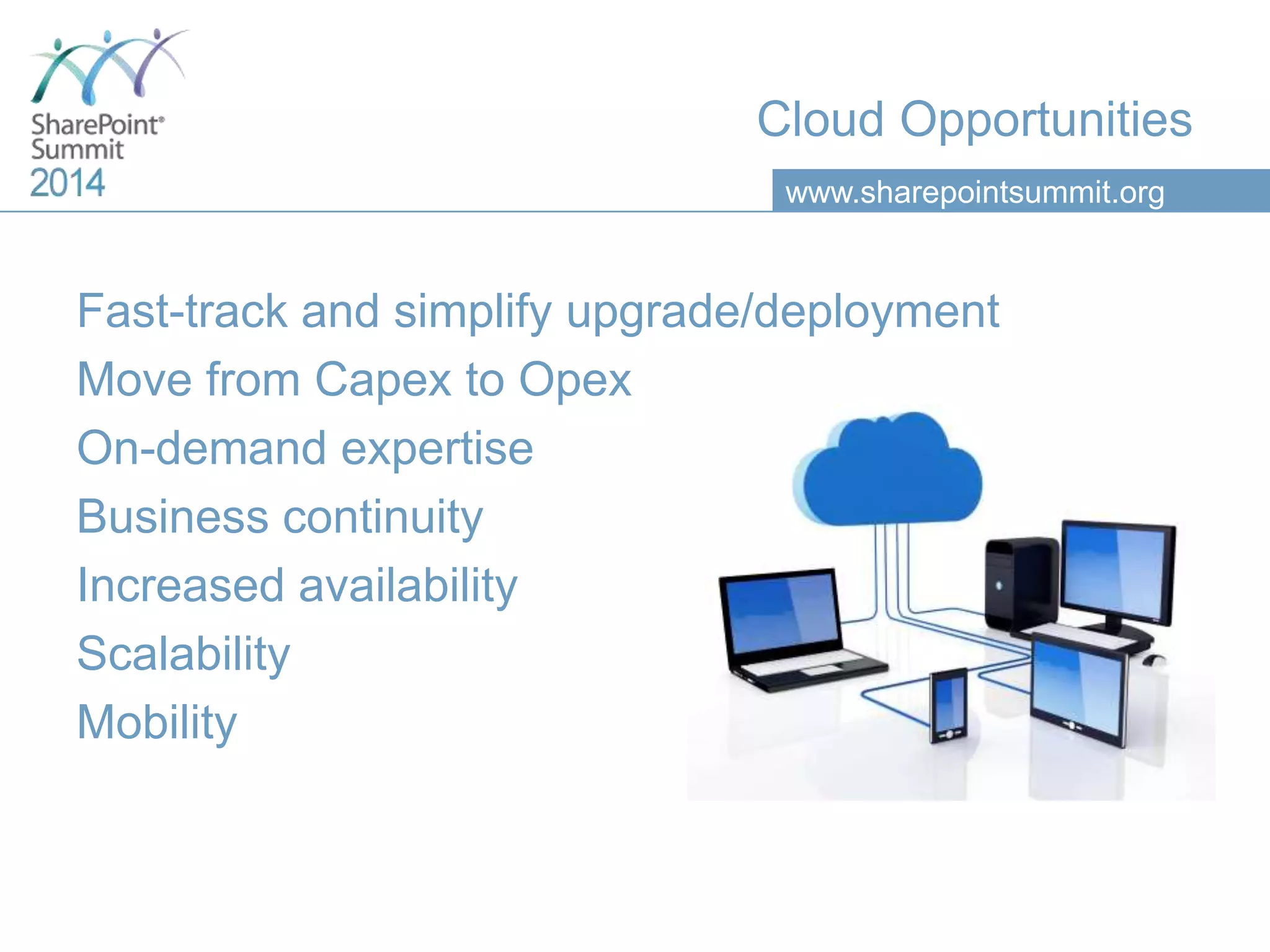
Cloud Opportunities
Fast-track and simplify upgrade/deployment
Move from Capex to Opex
On-demand expertise
Business continuity
Increased availability
Scalability
Mobility
www.sharepointsummit.org
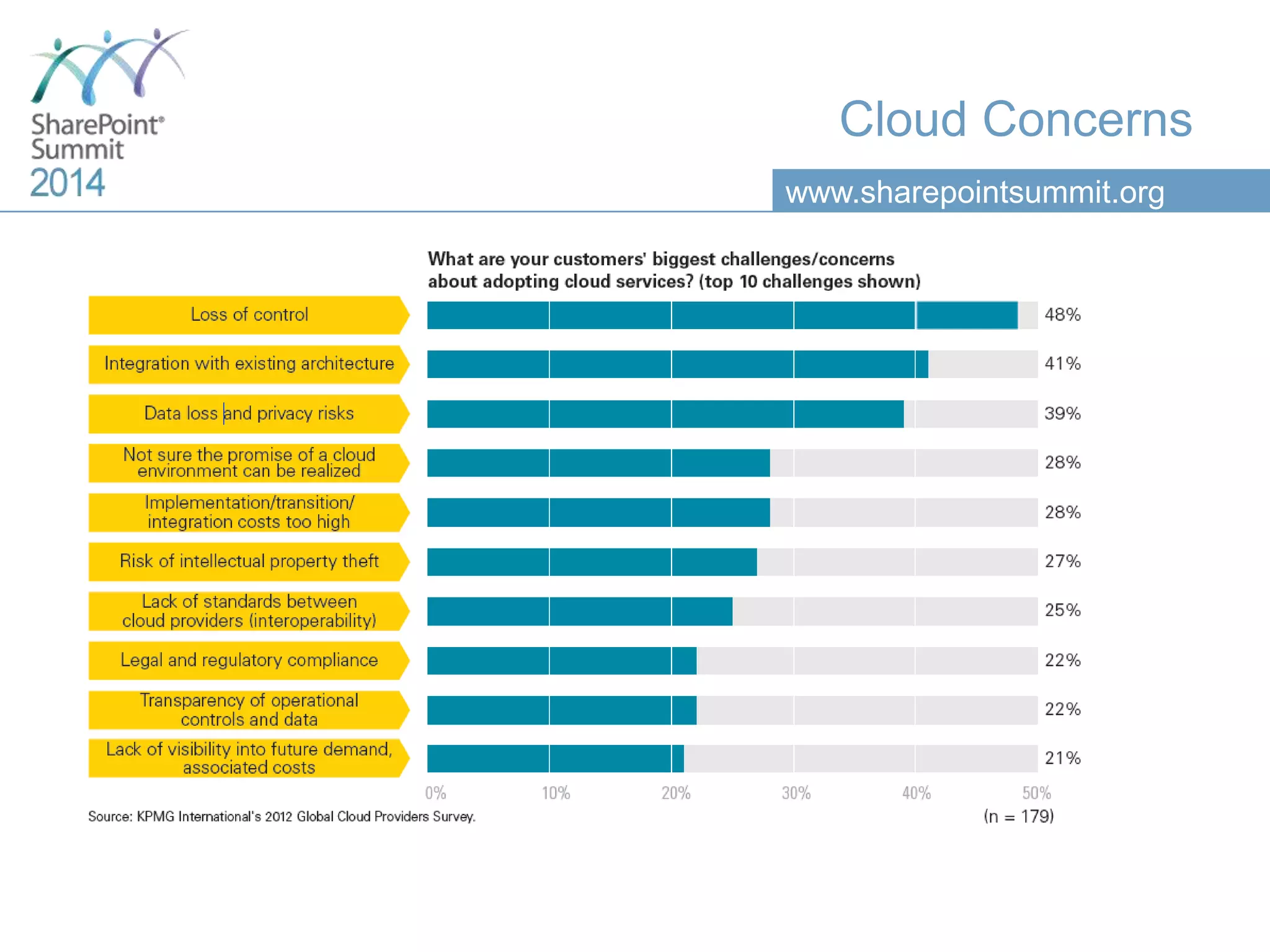
Cloud Concerns
www.sharepointsummit.org
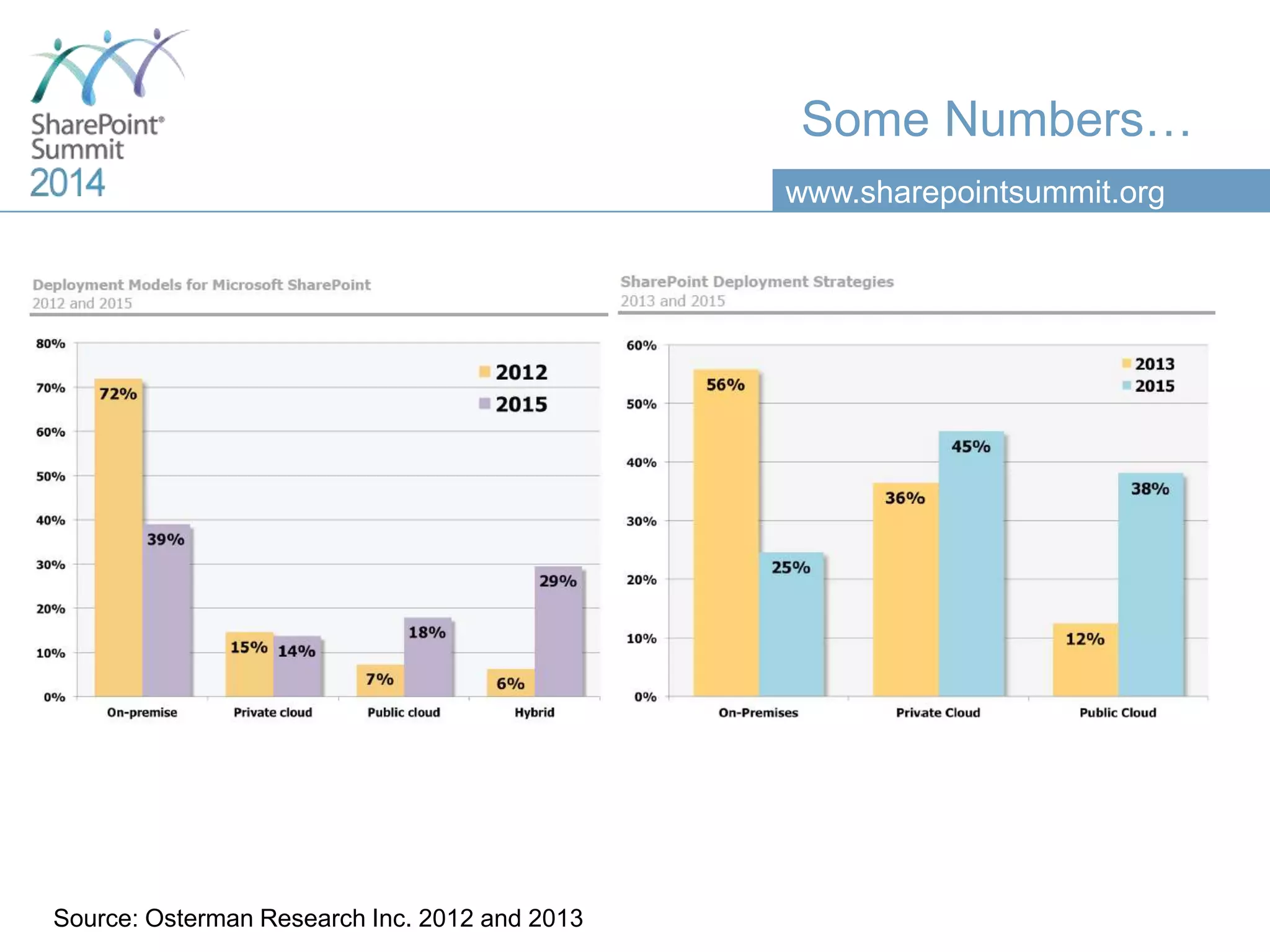
Some Numbers…
Source: Osterman Research Inc. 2012 and 2013
www.sharepointsummit.org
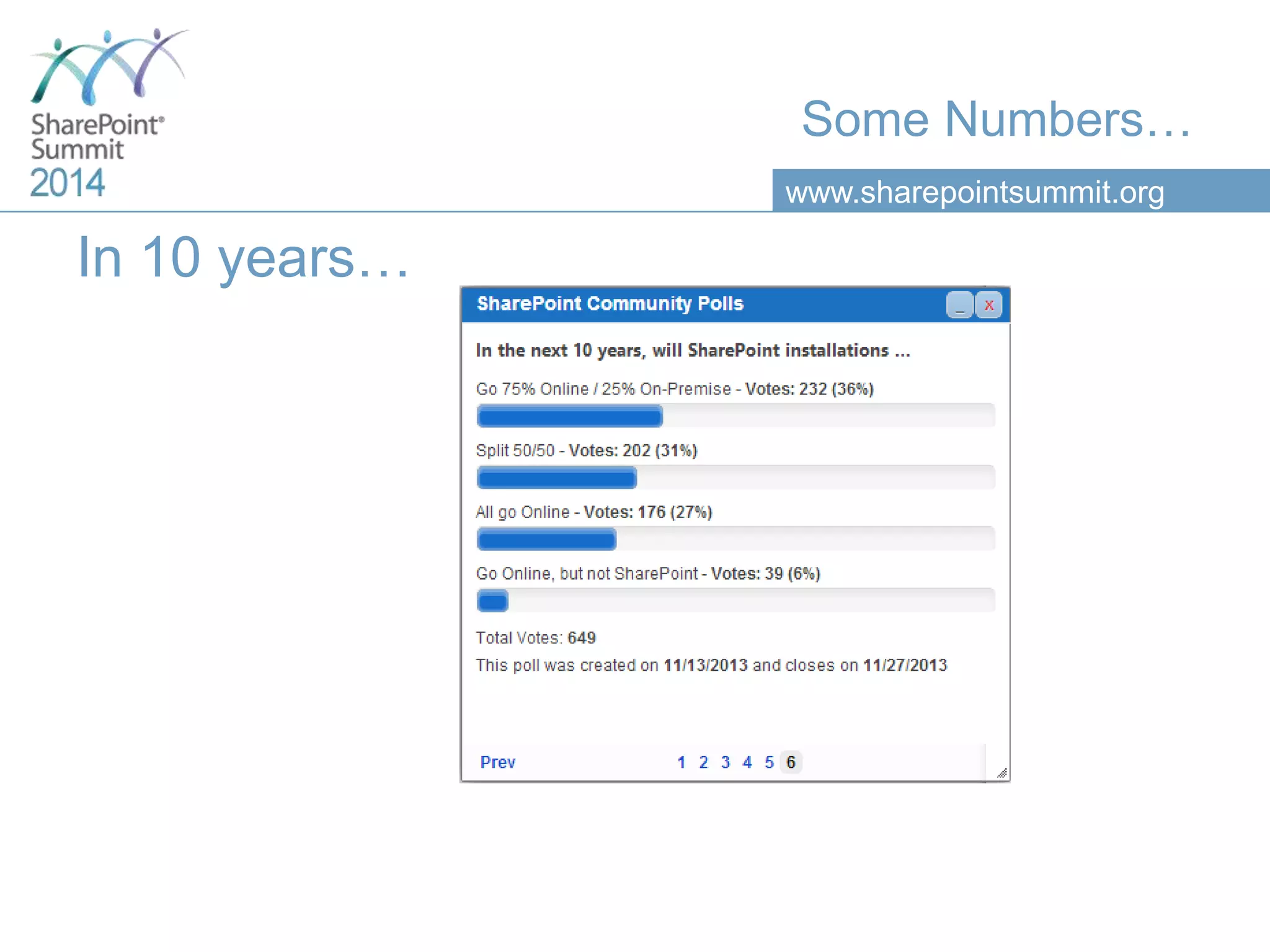
Some Numbers…
In 10 years…
www.sharepointsummit.org
Hosting Models
www.sharepointsummit.org
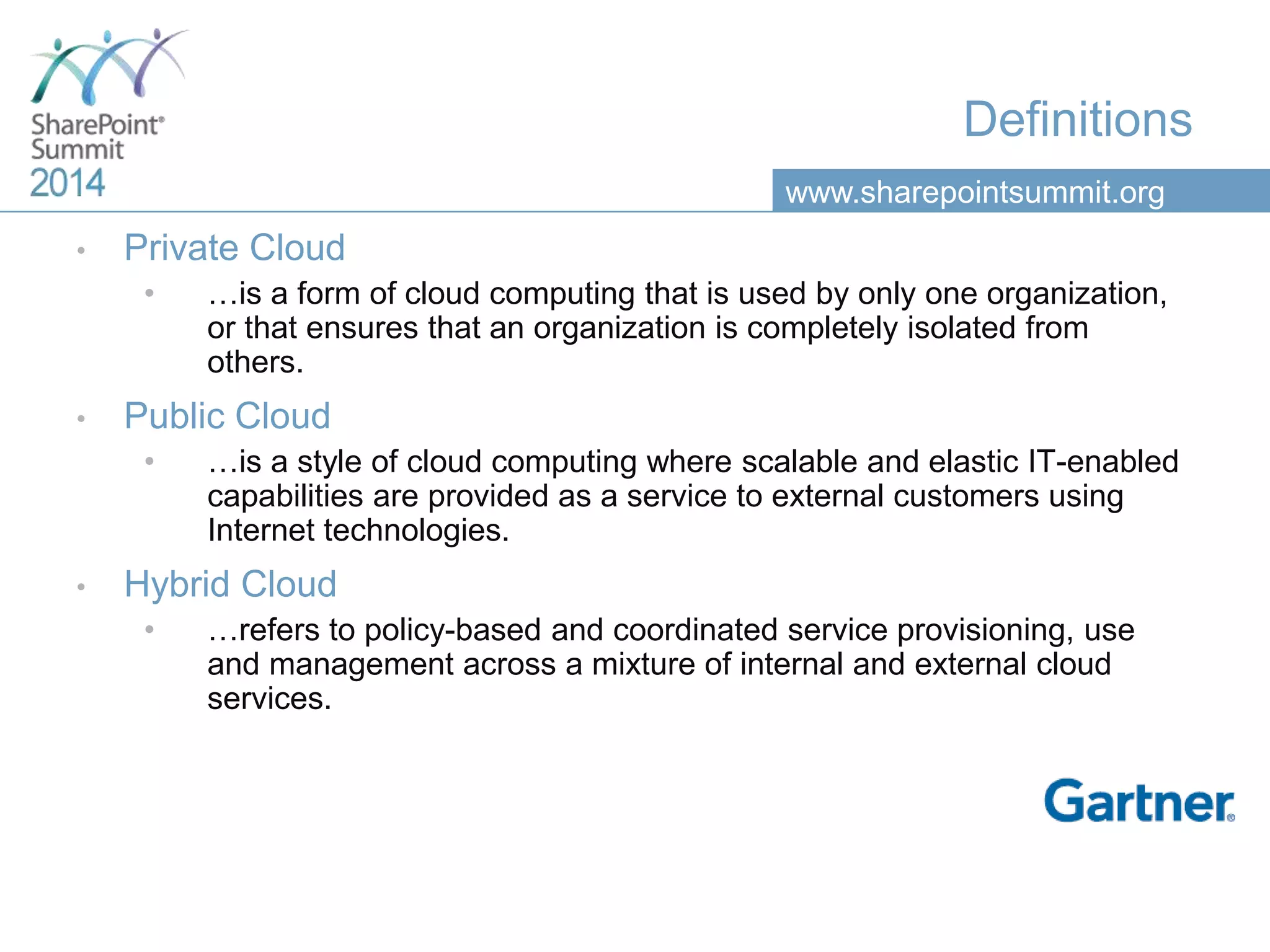
Definitions
• Private Cloud
• …is a form of cloud computing that is used by only one organization,
or that ensures that an organization is completely isolated from
others.
• Public Cloud
• …is a style of cloud computing where scalable and elastic IT-enabled
capabilities are provided as a service to external customers using
Internet technologies.
• Hybrid Cloud
• …refers to policy-based and coordinated service provisioning, use
and management across a mixture of internal and external cloud
services.
www.sharepointsummit.org
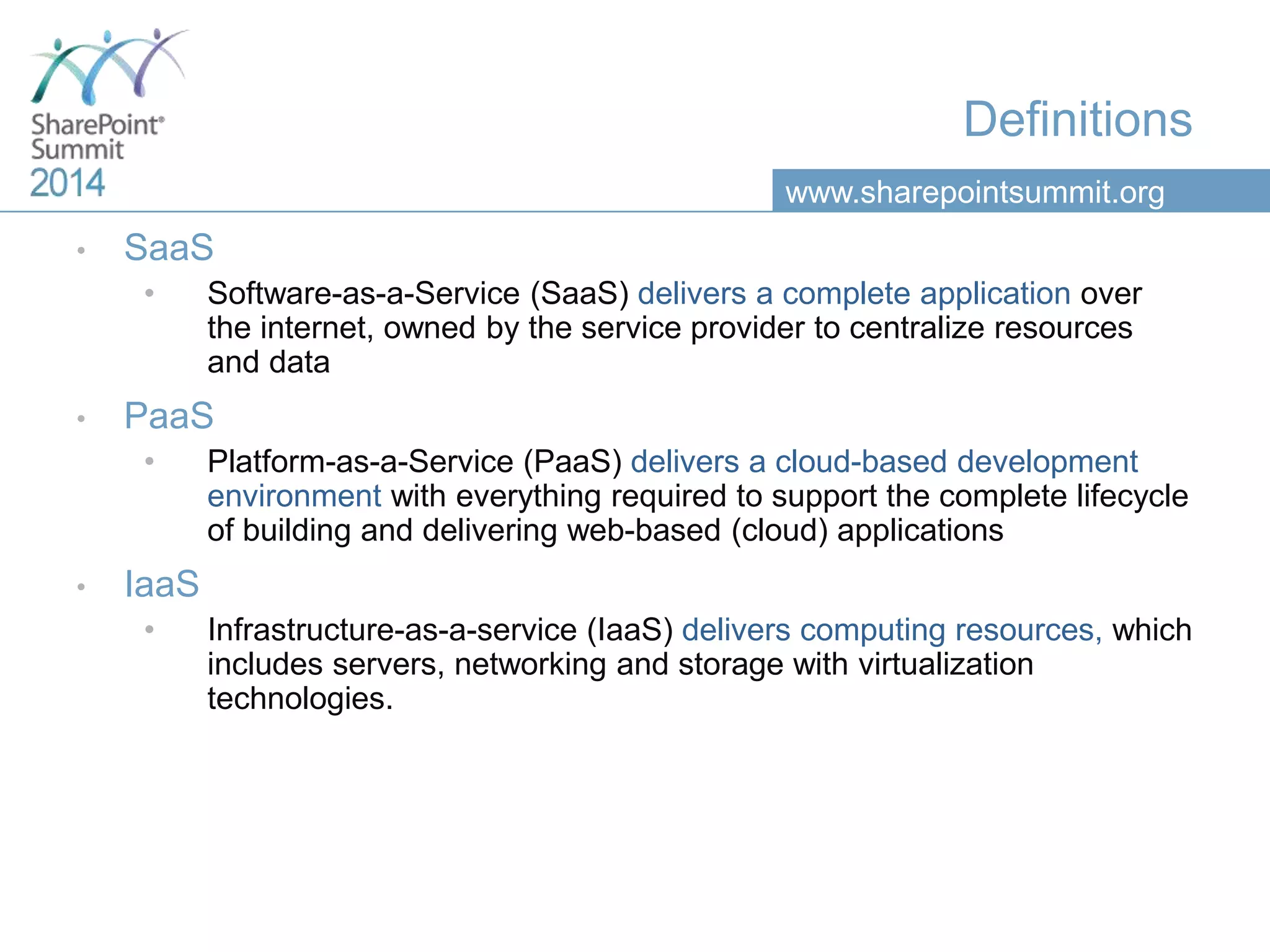
Definitions
• SaaS
• Software-as-a-Service (SaaS) delivers a complete application over
the internet, owned by the service provider to centralize resources
and data
• PaaS
• Platform-as-a-Service (PaaS) delivers a cloud-based development
environment with everything required to support the complete lifecycle
of building and delivering web-based (cloud) applications
• IaaS
• Infrastructure-as-a-service (IaaS) delivers computing resources, which
includes servers, networking and storage with virtualization
technologies.
www.sharepointsummit.org
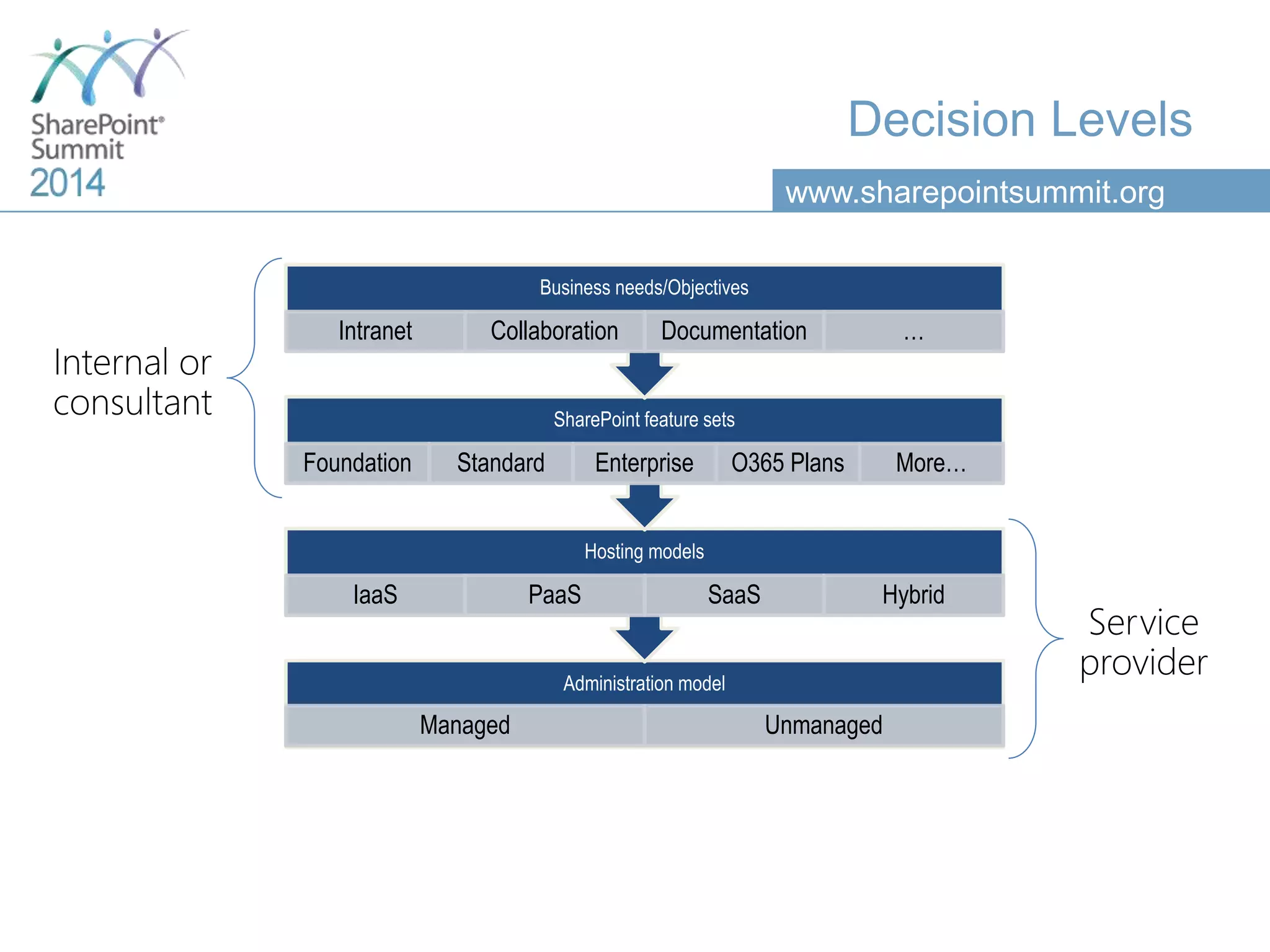
Decision Levels
Administration model
Managed Unmanaged
Hosting models
IaaS PaaS SaaS Hybrid
SharePoint feature sets
Foundation Standard Enterprise O365 Plans More…
Business needs/Objectives
Intranet Collaboration Documentation …
www.sharepointsummit.org
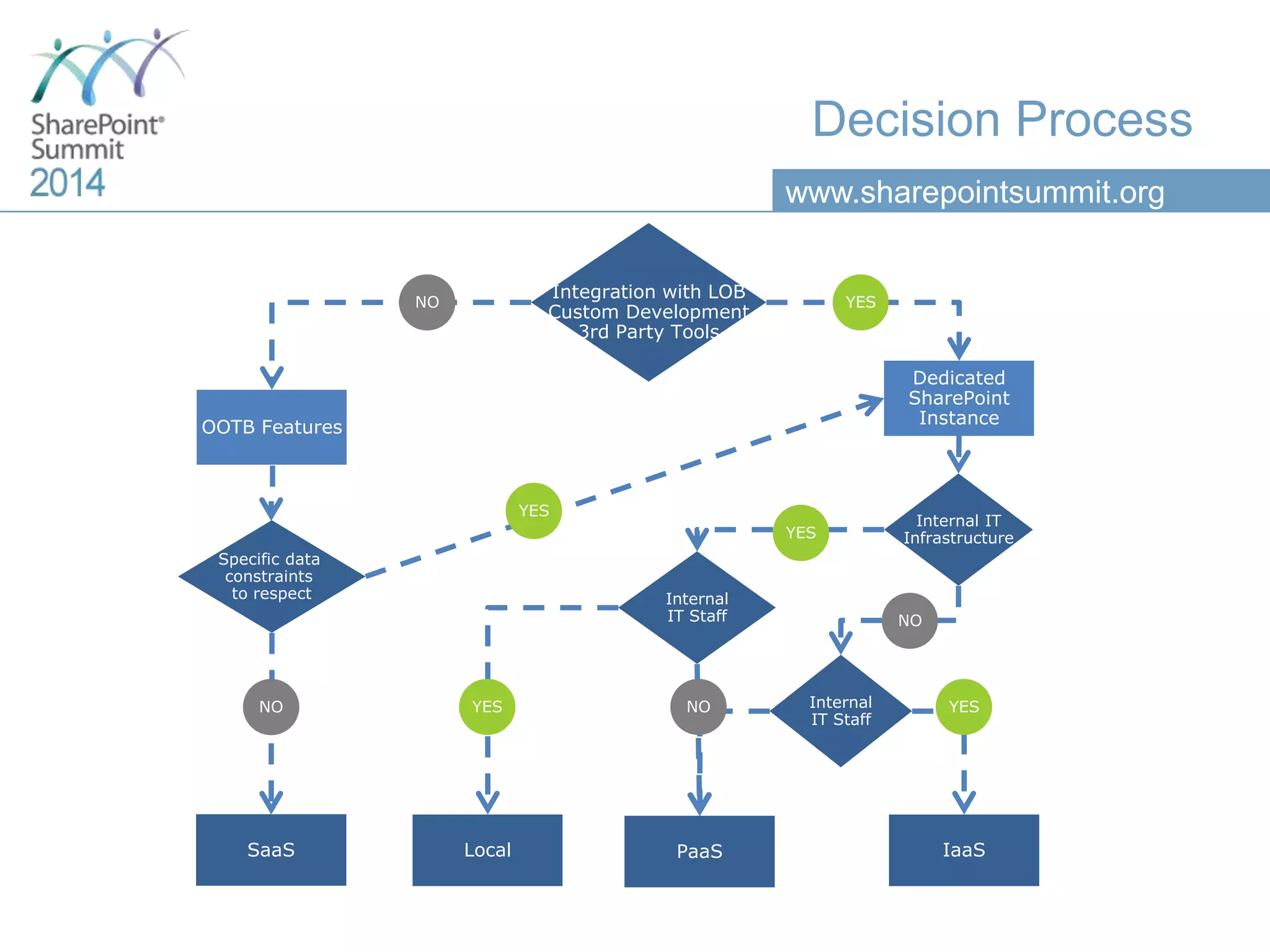
Integration with LOB
Custom Development
3rd Party Tools
NO YES
OOTB Features
Dedicated
SharePoint
Instance
SaaS
Specific data
constraints
to respect
YES
Internal IT
Infrastructure
Internal
IT Staff
Local IaaSPaaS
YES NO Internal
IT Staff
YES
YES
NO
NO
Decision Process
www.sharepointsummit.org
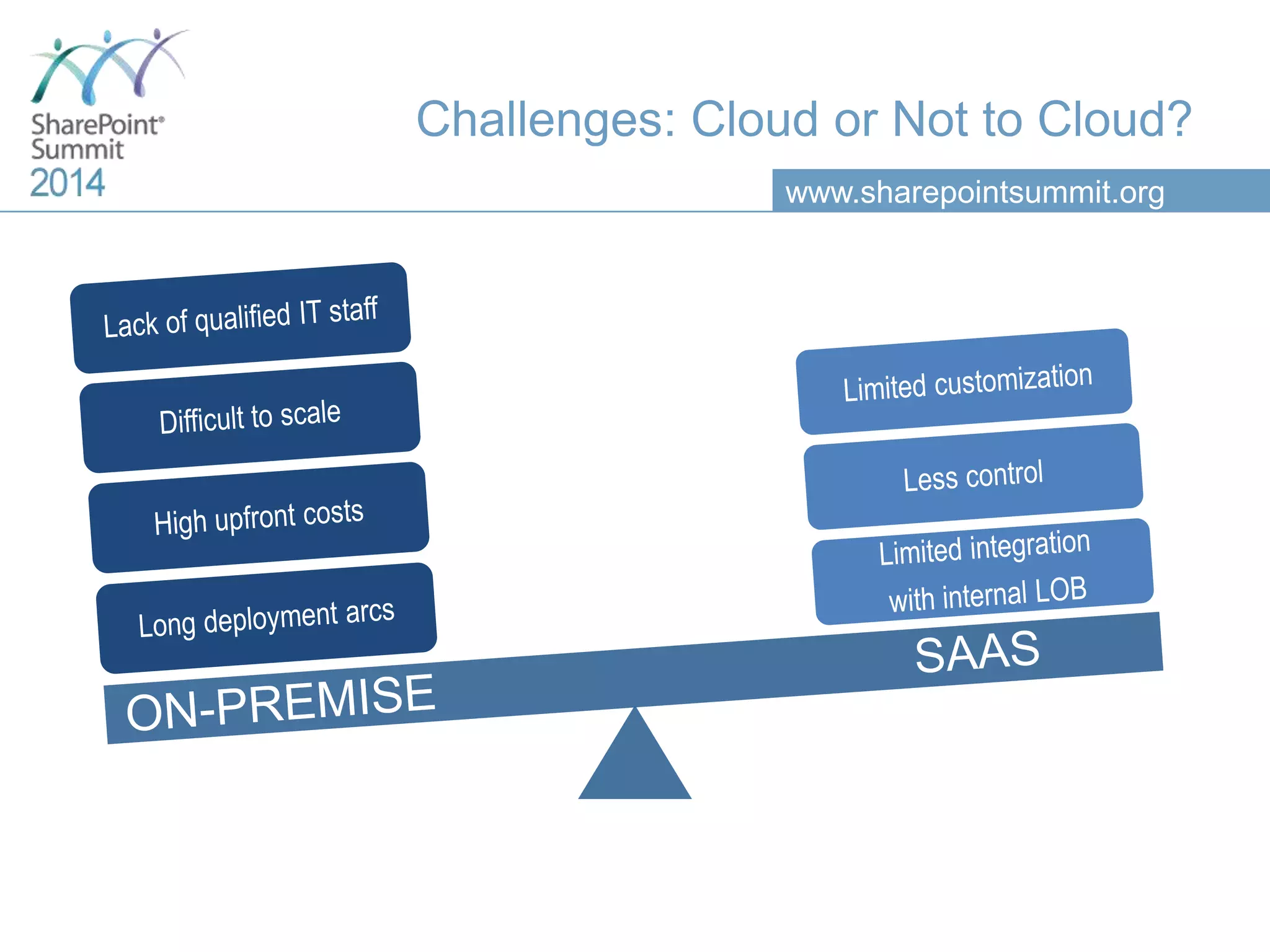
Challenges: Cloud or Not to Cloud?
www.sharepointsummit.org
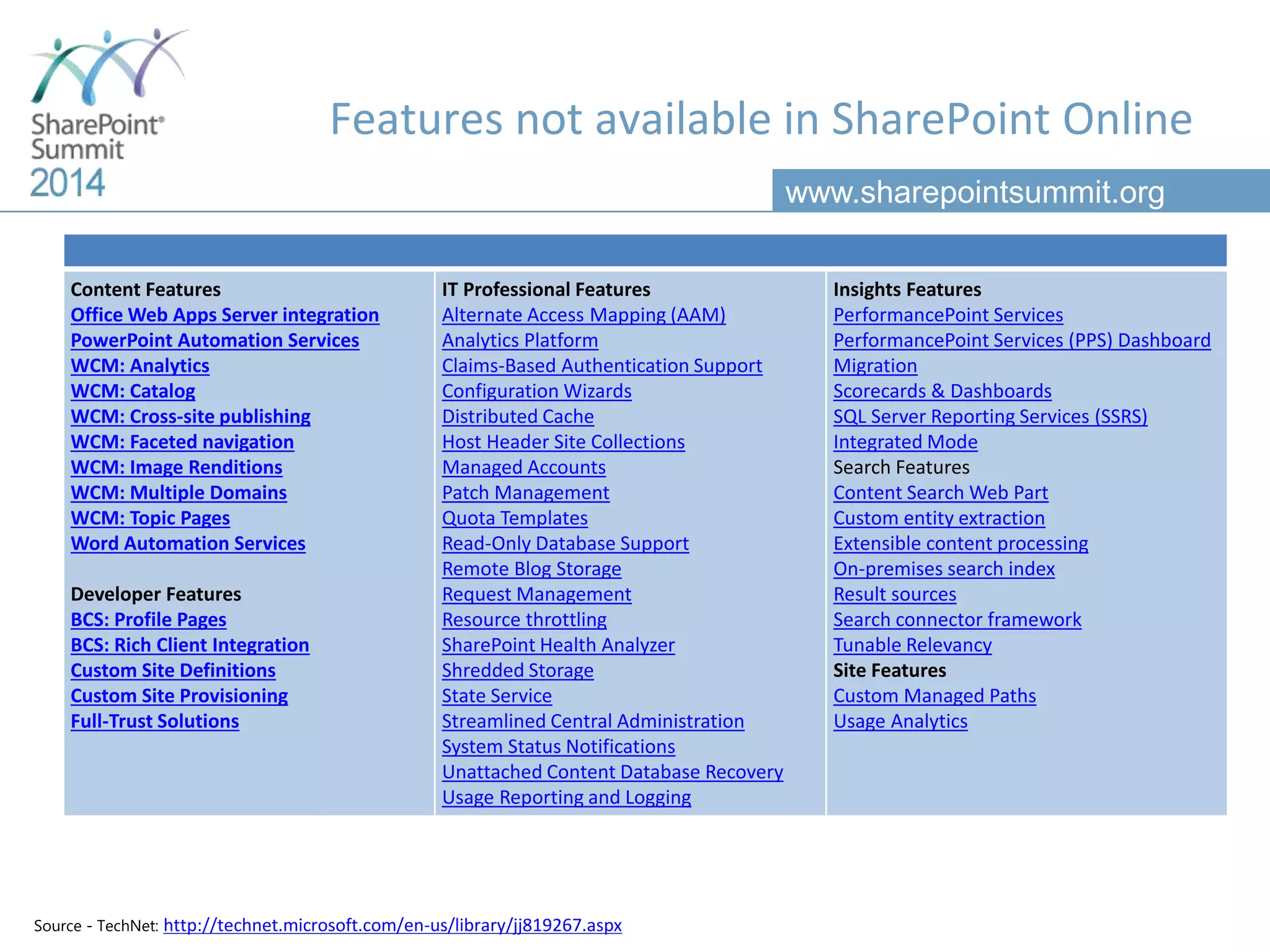
Features not available in SharePoint Online
Content Features
Office Web Apps Server integration
PowerPoint Automation Services
WCM: Analytics
WCM: Catalog
WCM: Cross-site publishing
WCM: Faceted navigation
WCM: Image Renditions
WCM: Multiple Domains
WCM: Topic Pages
Word Automation Services
Developer Features
BCS: Profile Pages
BCS: Rich Client Integration
Custom Site Definitions
Custom Site Provisioning
Full-Trust Solutions
IT Professional Features
Alternate Access Mapping (AAM)
Analytics Platform
Claims-Based Authentication Support
Configuration Wizards
Distributed Cache
Host Header Site Collections
Managed Accounts
Patch Management
Quota Templates
Read-Only Database Support
Remote Blog Storage
Request Management
Resource throttling
SharePoint Health Analyzer
Shredded Storage
State Service
Streamlined Central Administration
System Status Notifications
Unattached Content Database Recovery
Usage Reporting and Logging
Insights Features
PerformancePoint Services
PerformancePoint Services (PPS) Dashboard
Migration
Scorecards & Dashboards
SQL Server Reporting Services (SSRS)
Integrated Mode
Search Features
Content Search Web Part
Custom entity extraction
Extensible content processing
On-premises search index
Result sources
Search connector framework
Tunable Relevancy
Site Features
Custom Managed Paths
Usage Analytics
Source - TechNet: http://technet.microsoft.com/en-us/library/jj819267.aspx
www.sharepointsummit.org
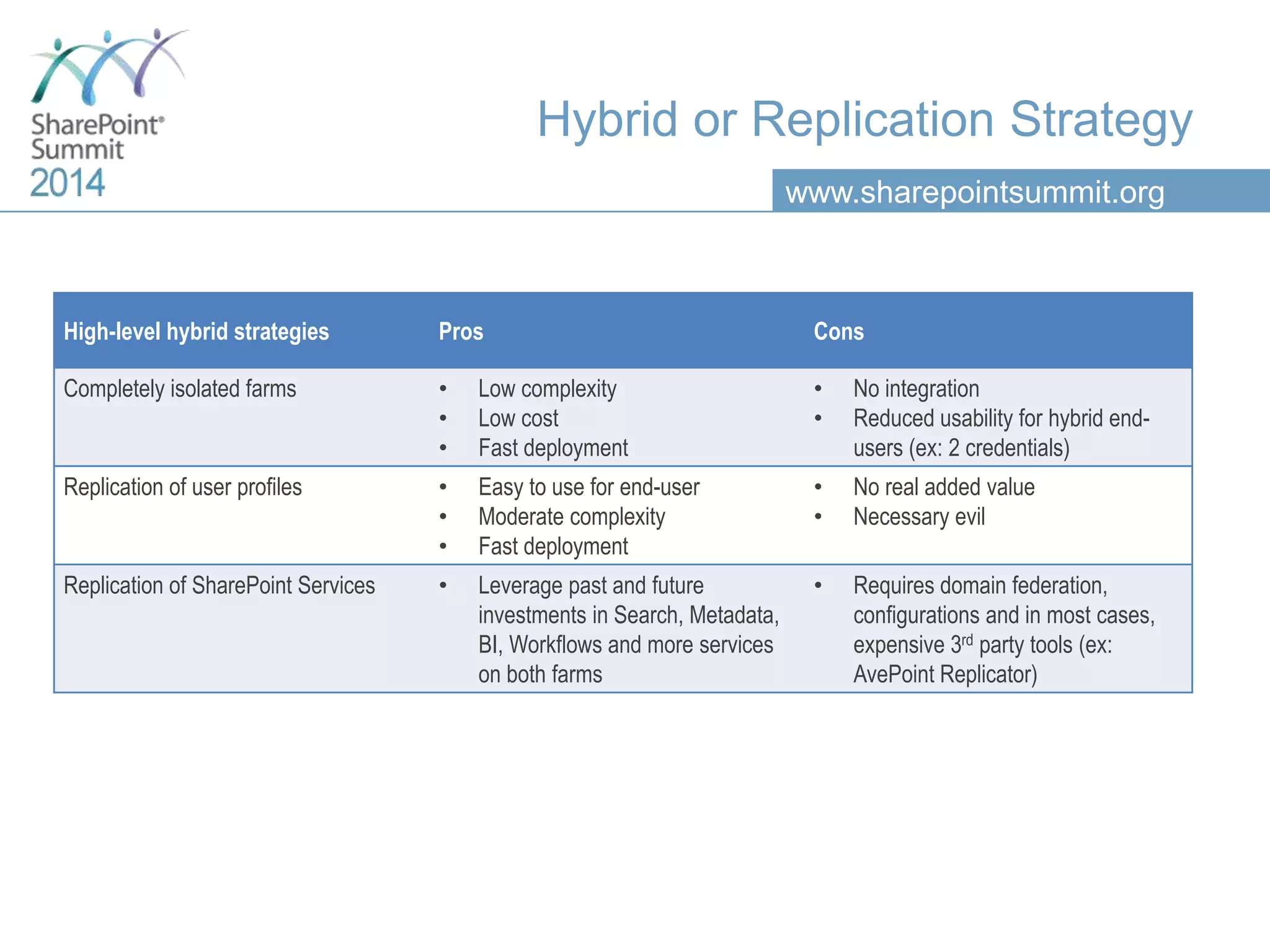
Hybrid or Replication Strategy
High-level hybrid strategies Pros Cons
Completely isolated farms • Low complexity
• Low cost
• Fast deployment
• No integration
• Reduced usability for hybrid end-
users (ex: 2 credentials)
Replication of user profiles • Easy to use for end-user
• Moderate complexity
• Fast deployment
• No real added value
• Necessary evil
Replication of SharePoint Services • Leverage past and future
investments in Search, Metadata,
BI, Workflows and more services
on both farms
• Requires domain federation,
configurations and in most cases,
expensive 3rd party tools (ex:
AvePoint Replicator)
www.sharepointsummit.org
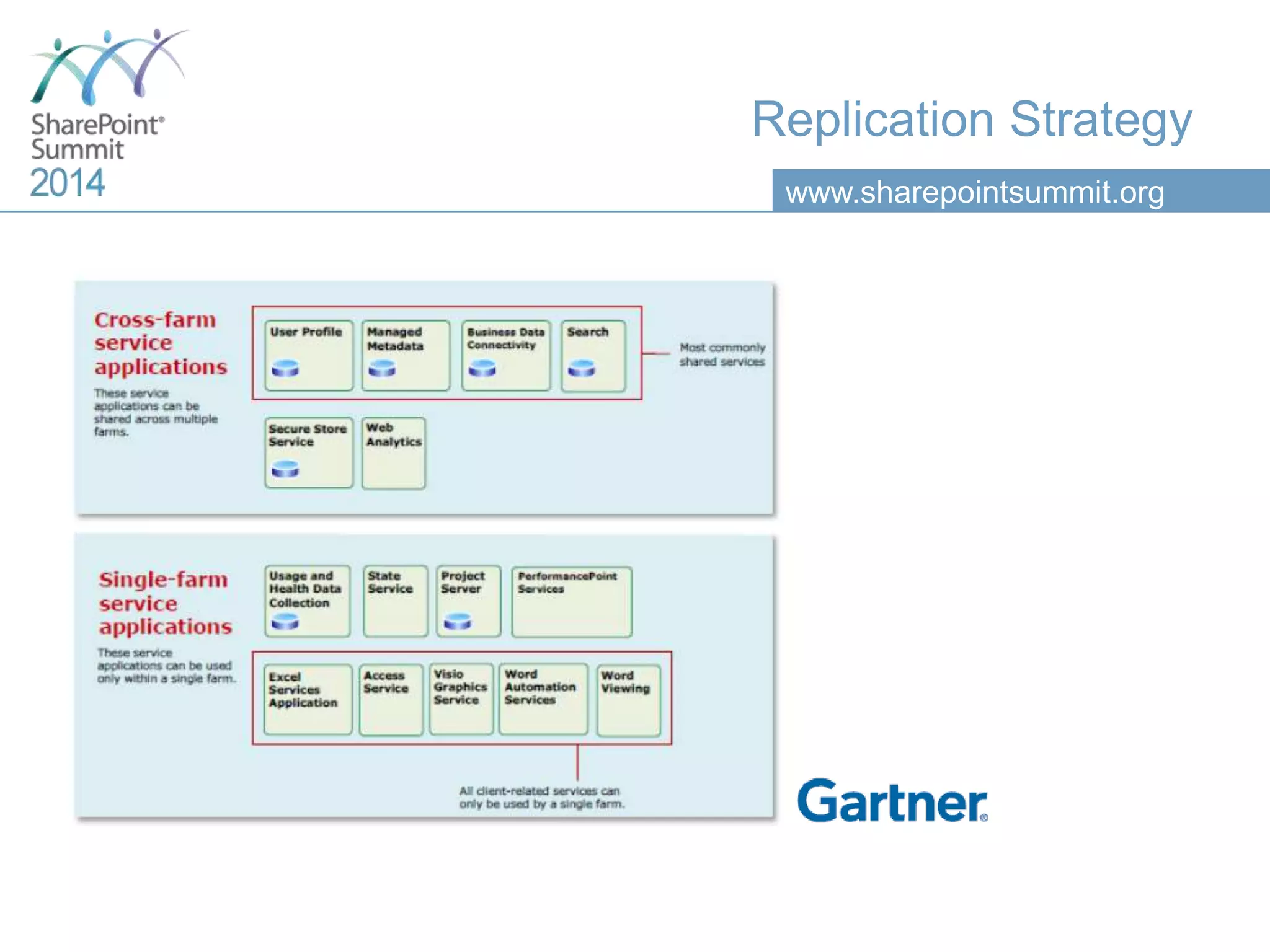
Replication Strategy
www.sharepointsummit.org
Cloud Services
Oversell
Under
deliver
Unsatis-
faction
www.sharepointsummit.org
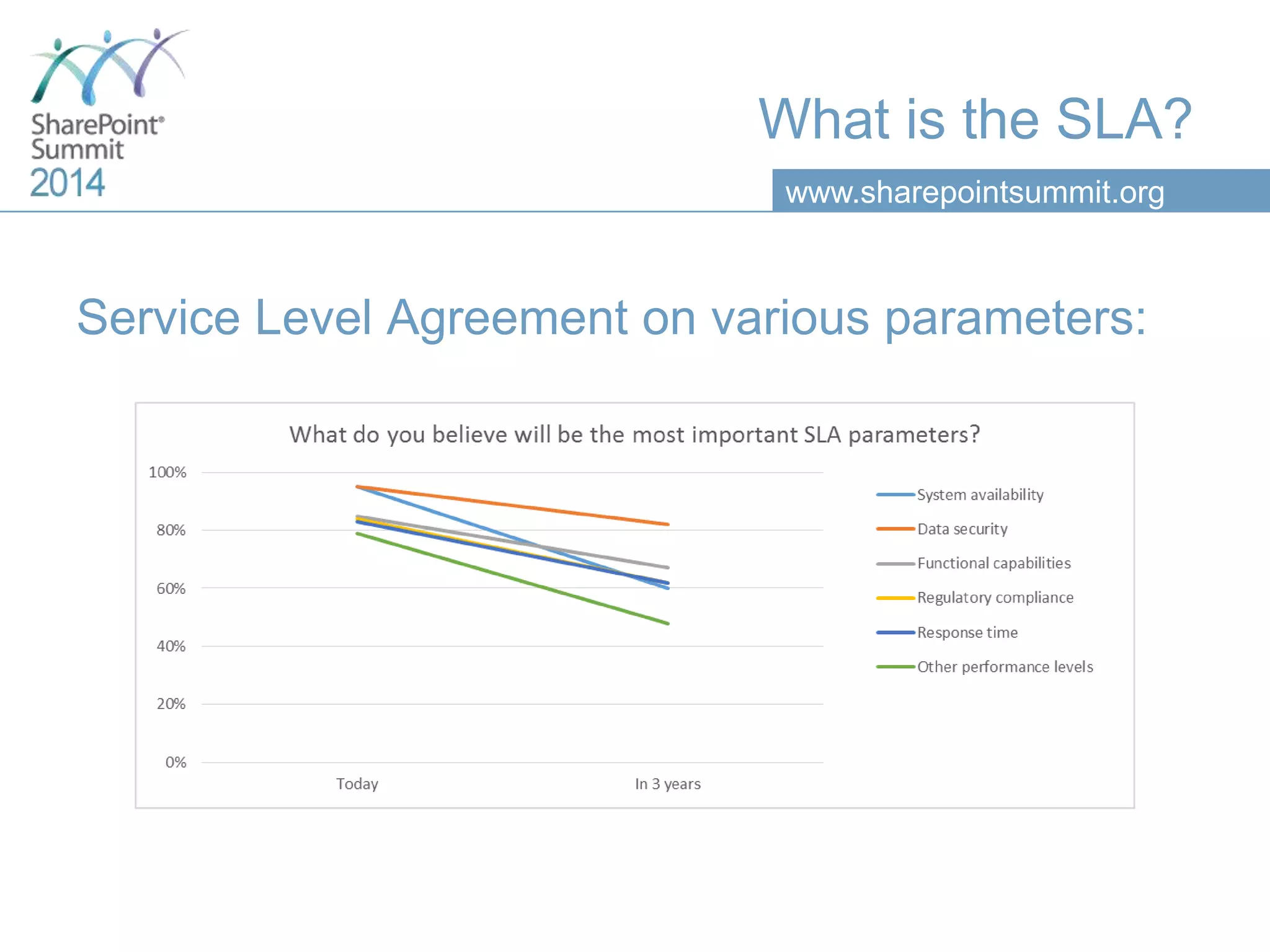
What is the SLA?
Service Level Agreement on various parameters:
www.sharepointsummit.org
What is the SLA?
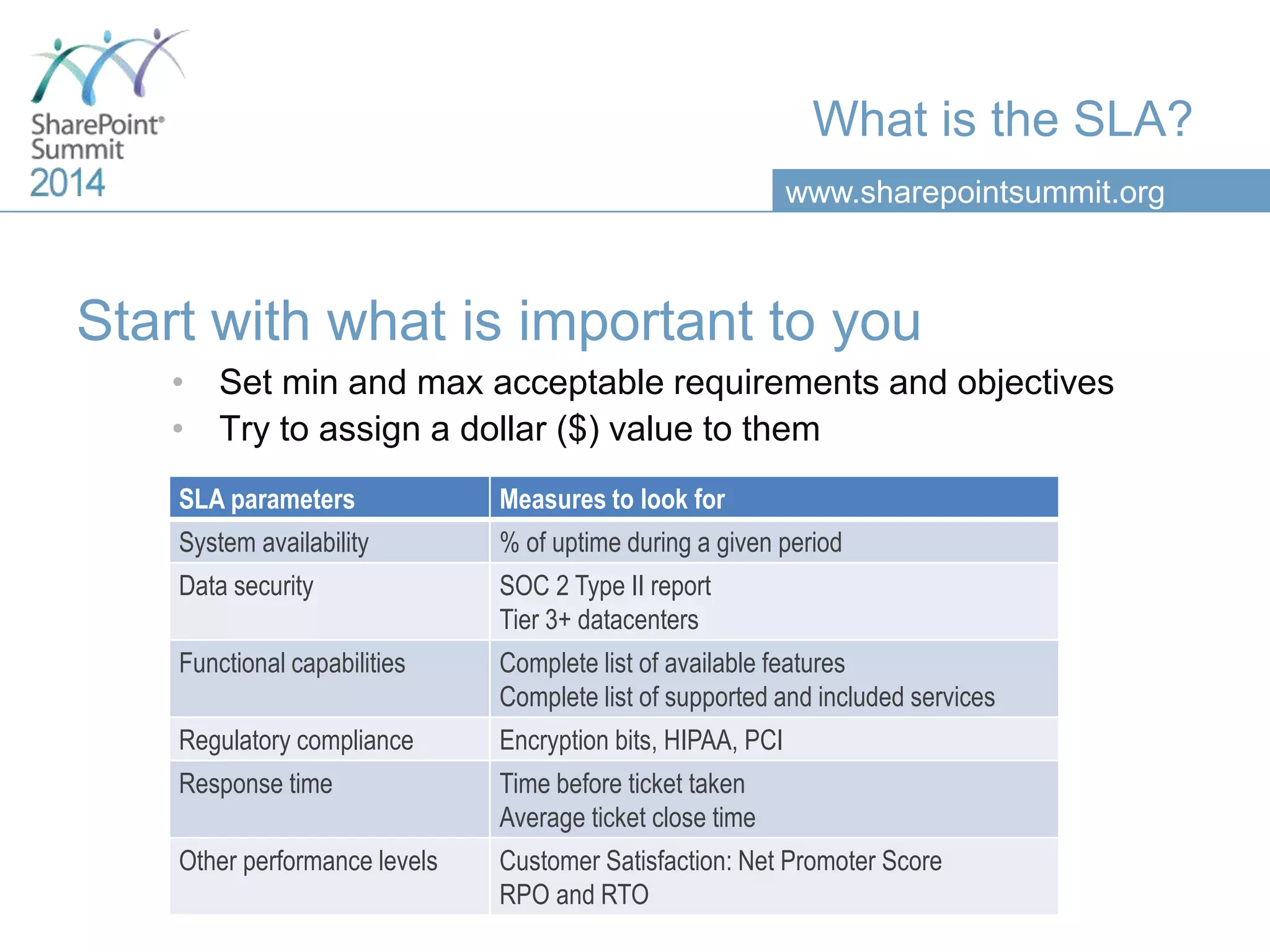
Start with what is important to you
• Set min and max acceptable requirements and objectives
• Try to assign a dollar ($) value to them
SLA parameters Measures to look for
System availability % of uptime during a given period
Data security SOC 2 Type II report
Tier 3+ datacenters
Functional capabilities Complete list of available features
Complete list of supported and included services
Regulatory compliance Encryption bits, HIPAA, PCI
Response time Time before ticket taken
Average ticket close time
Other performance levels Customer Satisfaction: Net Promoter Score
RPO and RTO
www.sharepointsummit.org
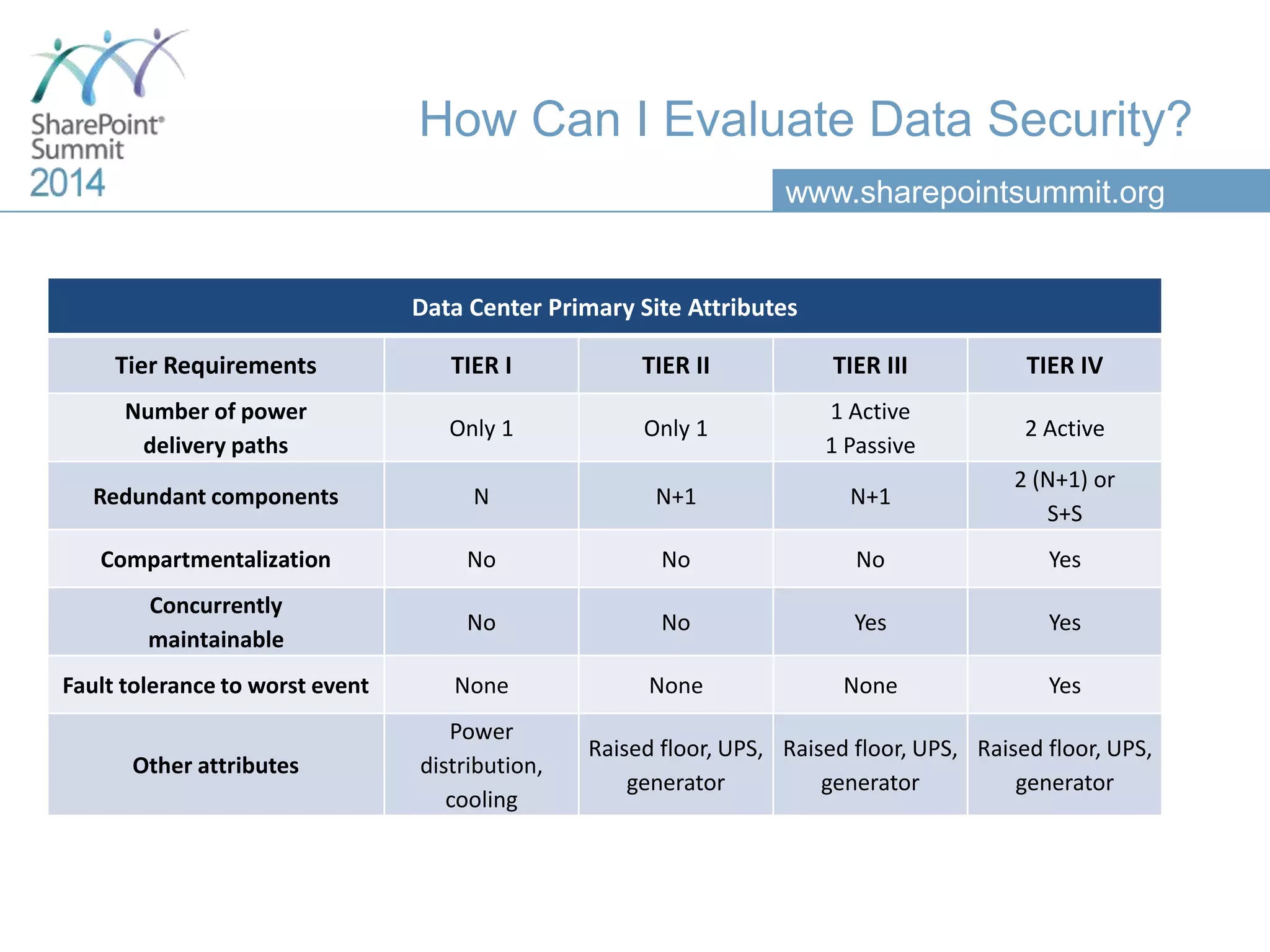
How Can I Evaluate Data Security?
Data Center Primary Site Attributes
Tier Requirements TIER I TIER II TIER III TIER IV
Number of power
delivery paths
Only 1 Only 1
1 Active
1 Passive
2 Active
Redundant components N N+1 N+1
2 (N+1) or
S+S
Compartmentalization No No No Yes
Concurrently
maintainable
No No Yes Yes
Fault tolerance to worst event None None None Yes
Other attributes
Power
distribution,
cooling
Raised floor, UPS,
generator
Raised floor, UPS,
generator
Raised floor, UPS,
generator
www.sharepointsummit.org
How Can I Evaluate Data Security?
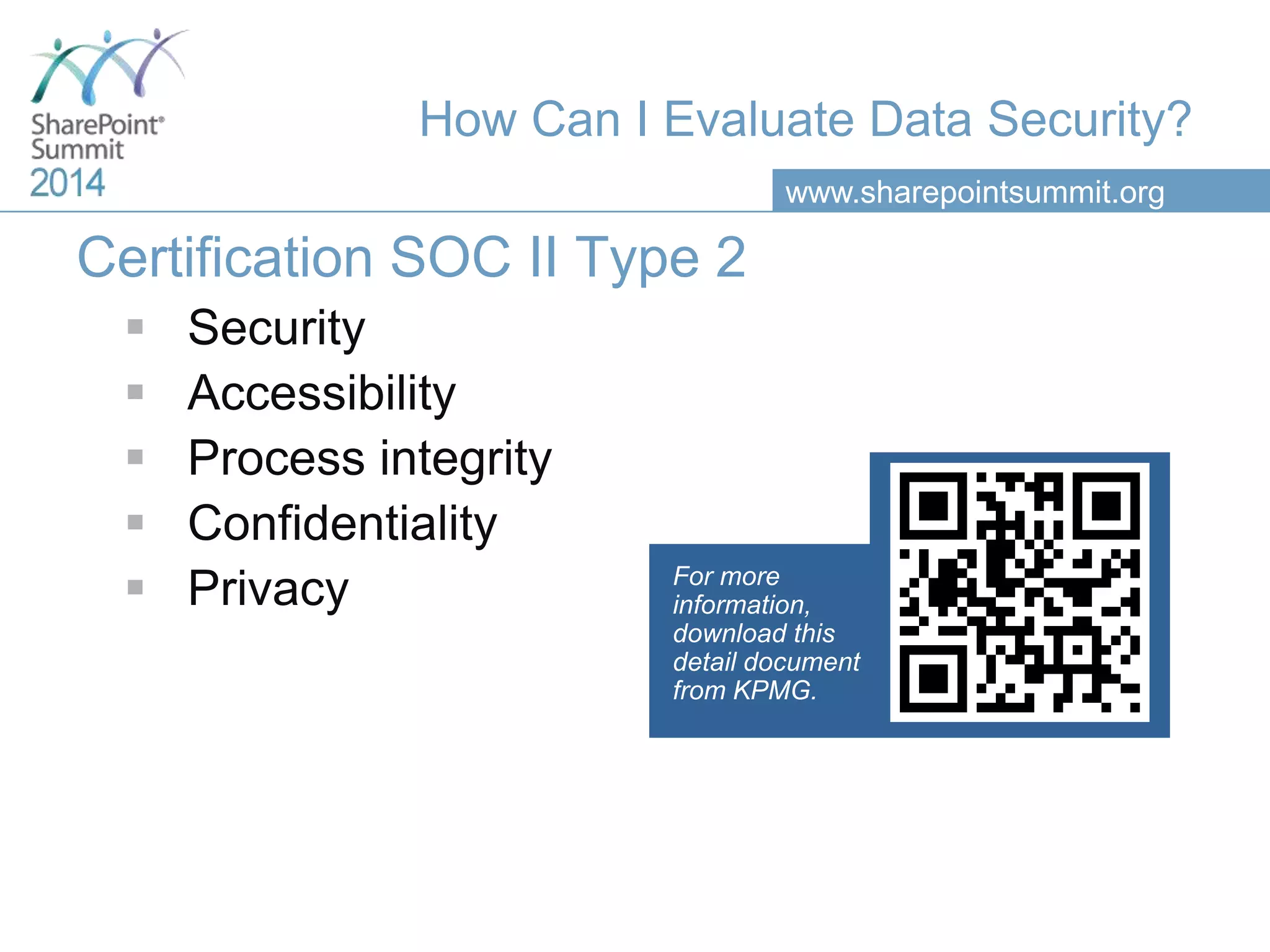
Certification SOC II Type 2
 Security
 Accessibility
 Process integrity
 Confidentiality
 Privacy For more
information,
download this
detail document
from KPMG.
www.sharepointsummit.org
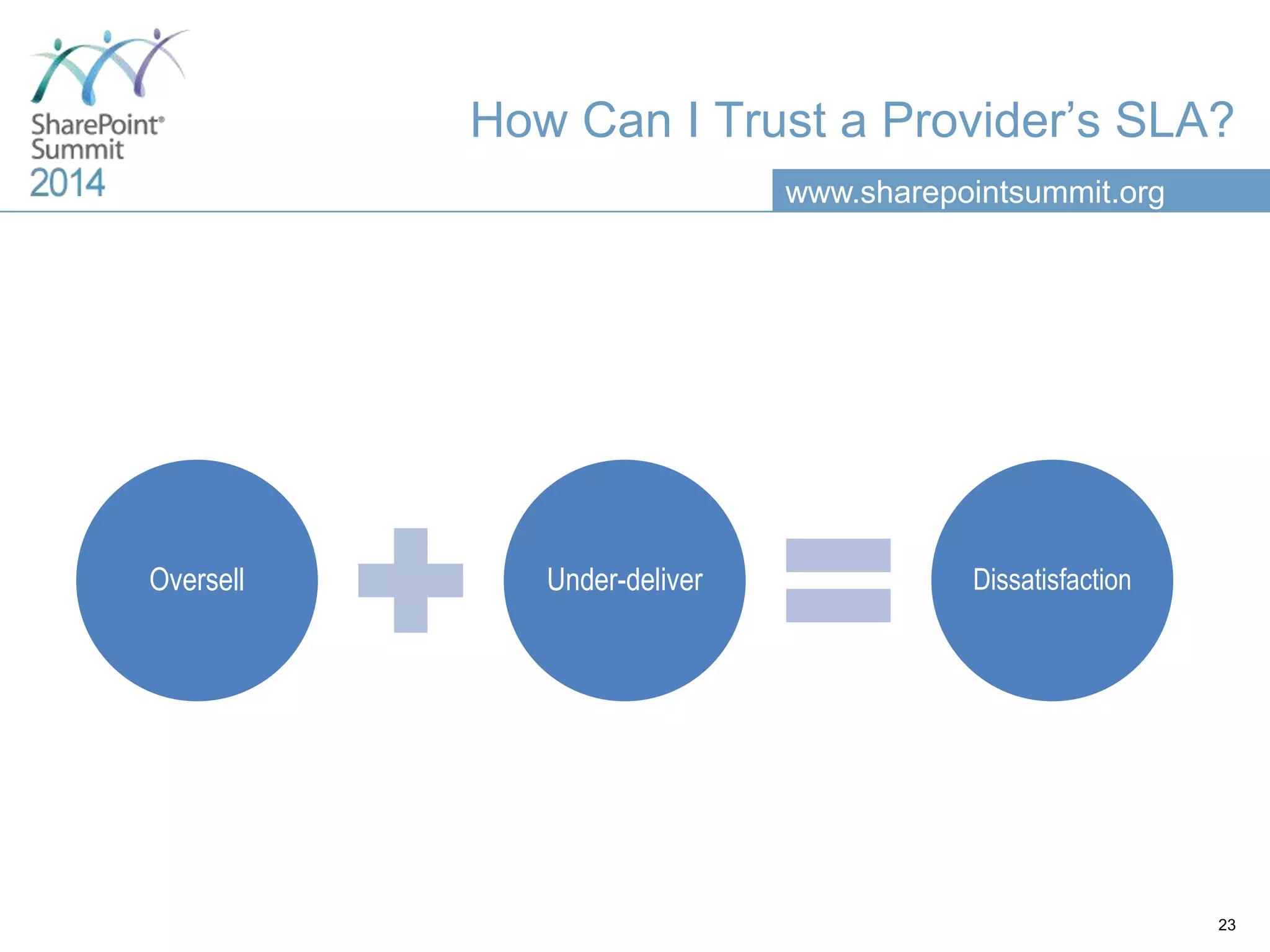
How Can I Trust a Provider’s SLA?
23
Oversell Under-deliver Dissatisfaction
www.sharepointsummit.org
How Can I Evaluate a NPS?
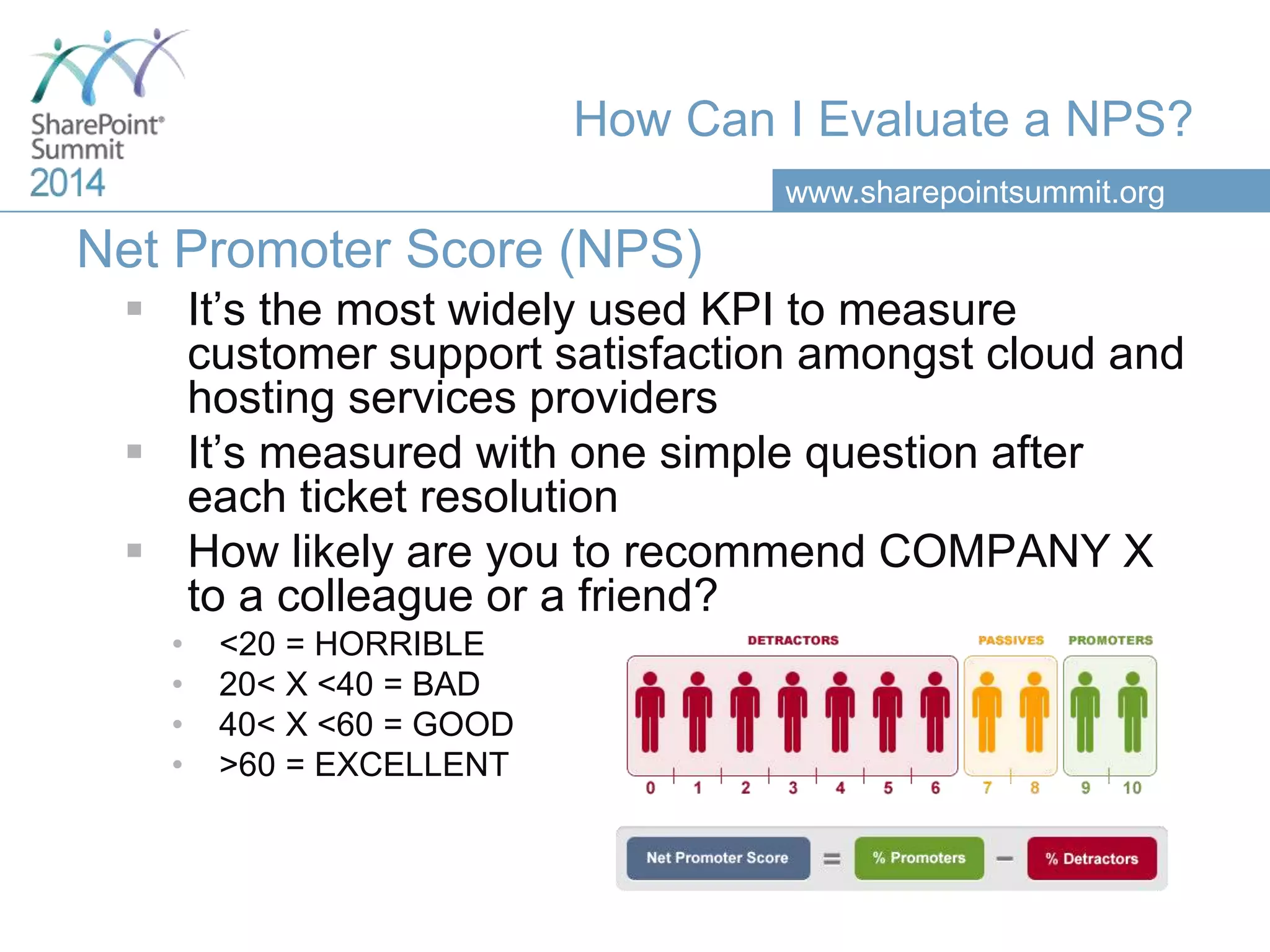
Net Promoter Score (NPS)
 It’s the most widely used KPI to measure
customer support satisfaction amongst cloud and
hosting services providers
 It’s measured with one simple question after
each ticket resolution
 How likely are you to recommend COMPANY X
to a colleague or a friend?
• <20 = HORRIBLE
• 20< X <40 = BAD
• 40< X <60 = GOOD
• >60 = EXCELLENT
www.sharepointsummit.org
Business Continuity
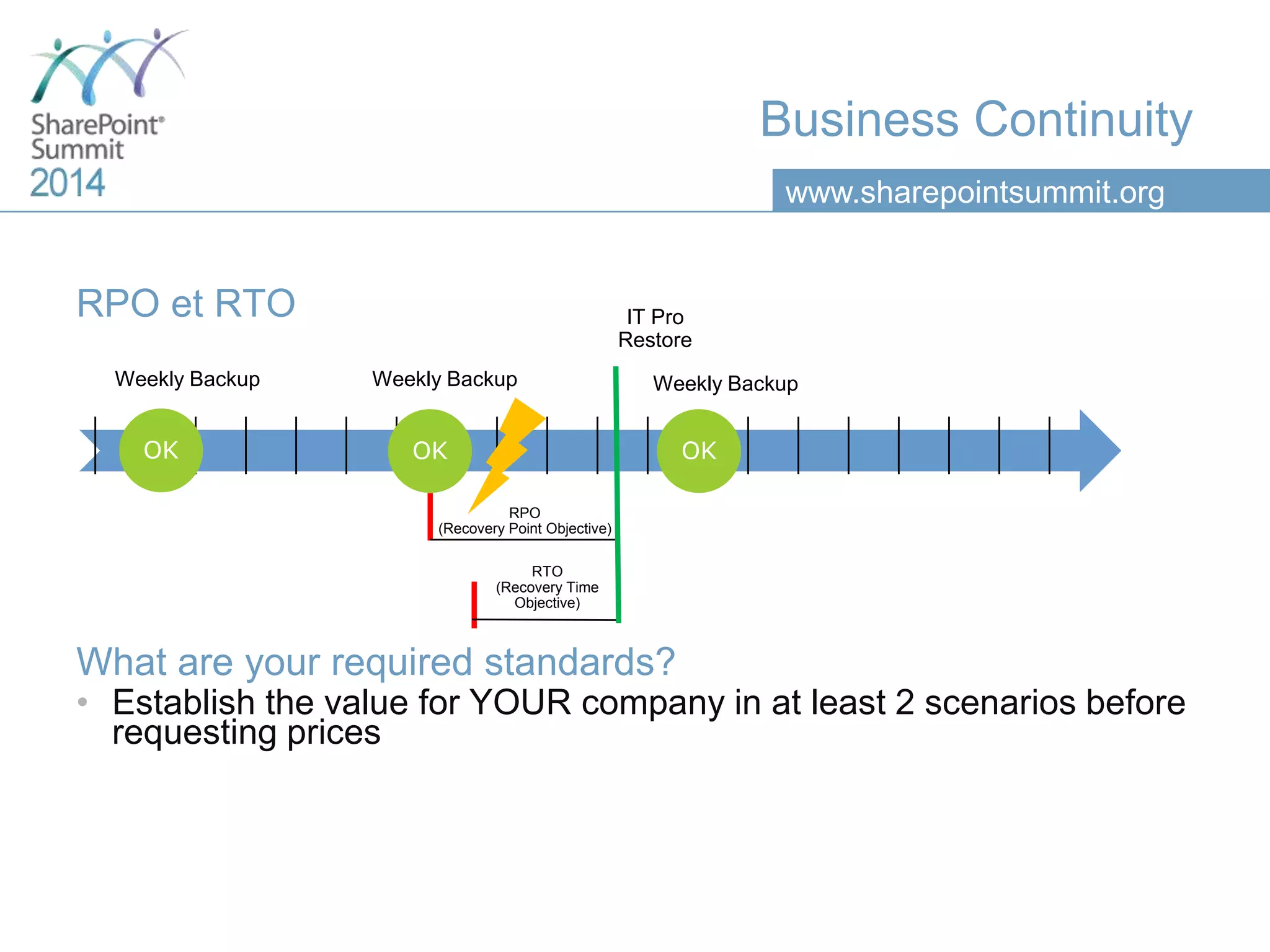
RPO et RTO
What are your required standards?
• Establish the value for YOUR company in at least 2 scenarios before
requesting prices
Weekly Backup
OK OK OK
IT Pro
Restore
RPO
(Recovery Point Objective)
RTO
(Recovery Time
Objective)
Weekly Backup Weekly Backup
www.sharepointsummit.org
Licenses
Oversell
Under
deliver
Unsatis-
faction
www.sharepointsummit.org
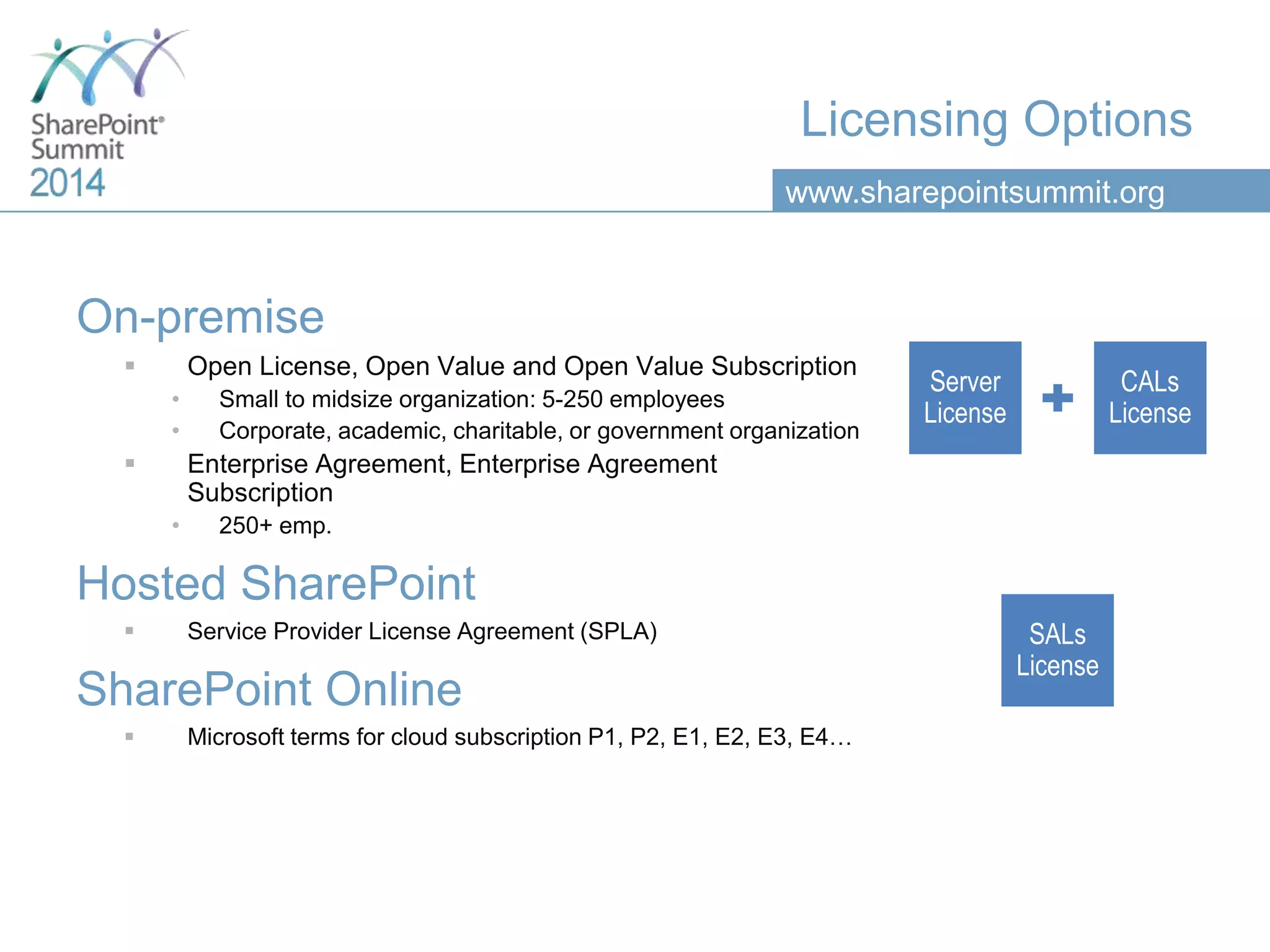
Licensing Options
On-premise
 Open License, Open Value and Open Value Subscription
• Small to midsize organization: 5-250 employees
• Corporate, academic, charitable, or government organization
 Enterprise Agreement, Enterprise Agreement
Subscription
• 250+ emp.
Hosted SharePoint
 Service Provider License Agreement (SPLA)
SharePoint Online
 Microsoft terms for cloud subscription P1, P2, E1, E2, E3, E4…
www.sharepointsummit.org
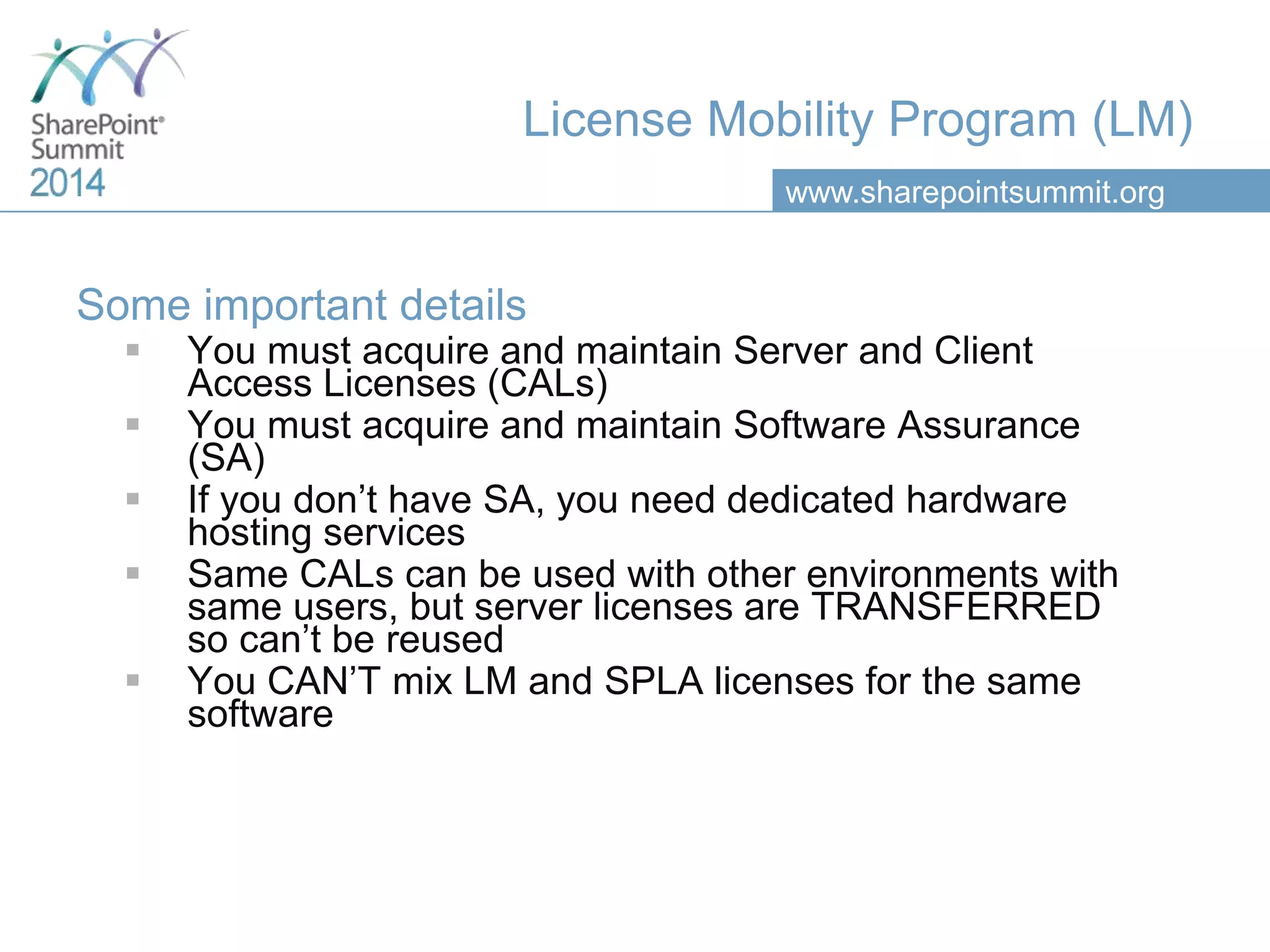
License Mobility Program (LM)
Some important details
 You must acquire and maintain Server and Client
Access Licenses (CALs)
 You must acquire and maintain Software Assurance
(SA)
 If you don’t have SA, you need dedicated hardware
hosting services
 Same CALs can be used with other environments with
same users, but server licenses are TRANSFERRED
so can’t be reused
 You CAN’T mix LM and SPLA licenses for the same
software
www.sharepointsummit.org
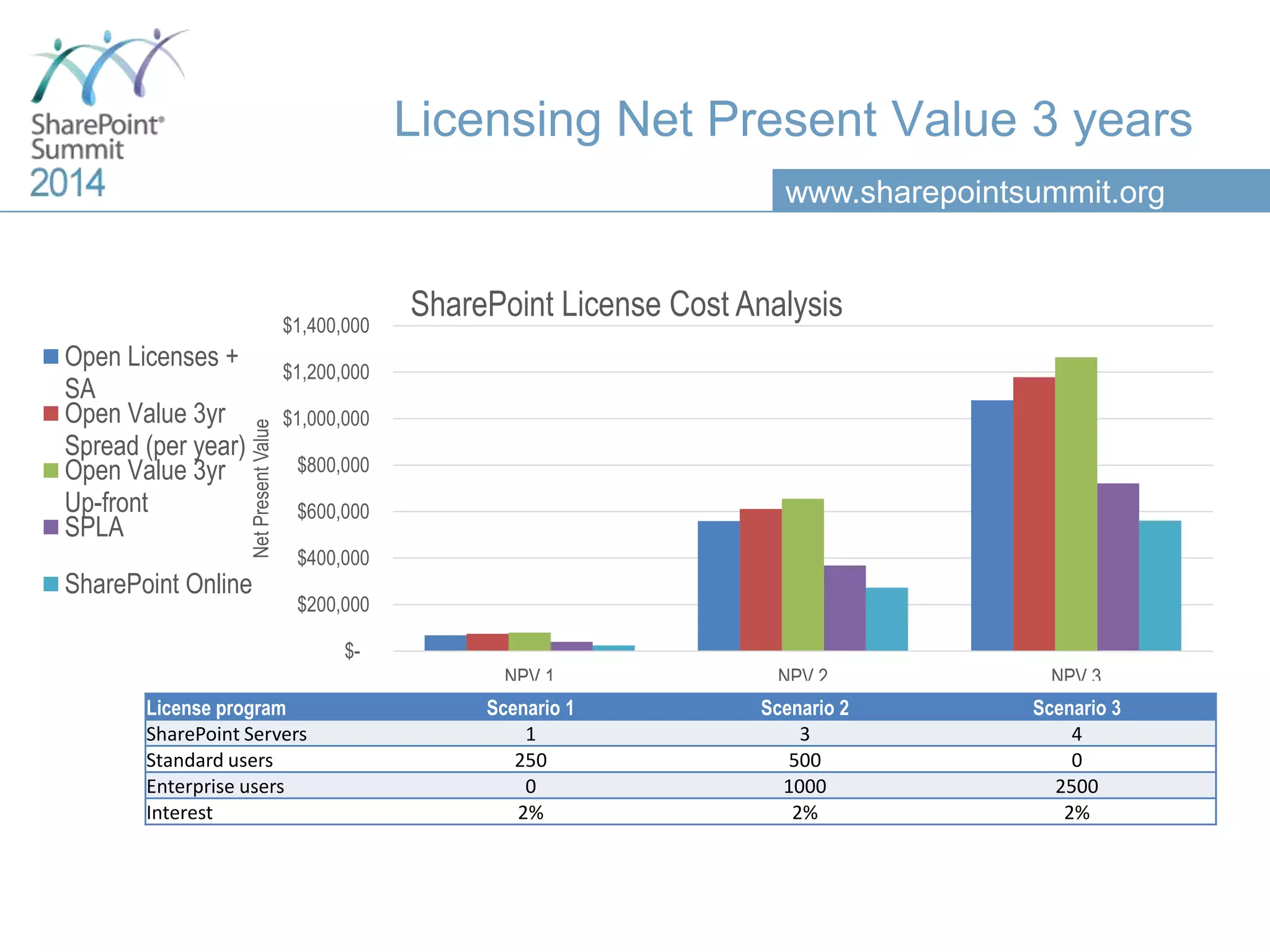
Licensing Net Present Value 3 years
License program Scenario 1 Scenario 2 Scenario 3
SharePoint Servers 1 3 4
Standard users 250 500 0
Enterprise users 0 1000 2500
Interest 2% 2% 2%
$-
$200,000
$400,000
$600,000
$800,000
$1,000,000
$1,200,000
$1,400,000
NPV 1 NPV 2 NPV 3
NetPresentValue
SharePoint License Cost Analysis
Open Licenses +
SA
Open Value 3yr
Spread (per year)
Open Value 3yr
Up-front
SPLA
SharePoint Online
www.sharepointsummit.org
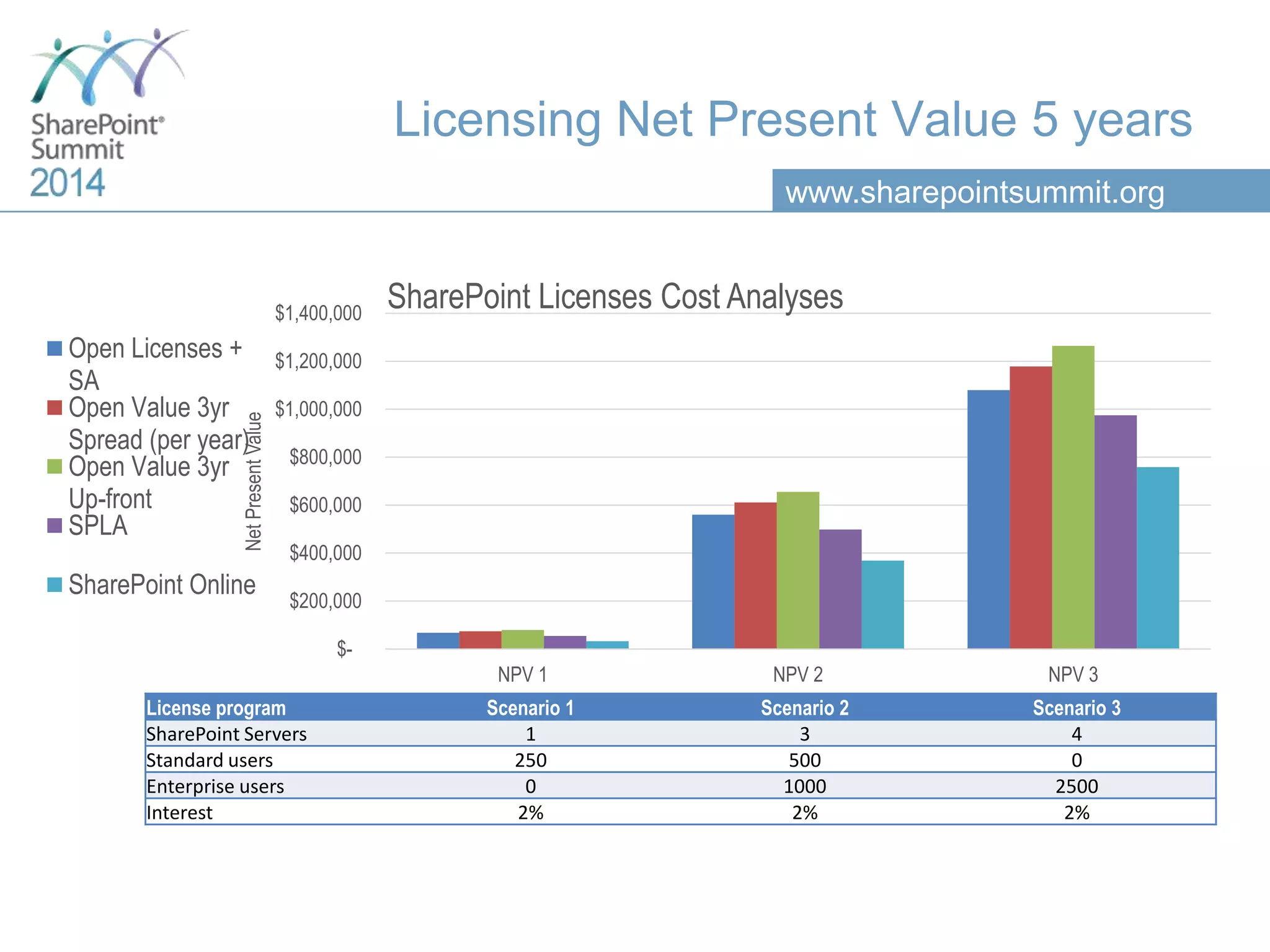
Licensing Net Present Value 5 years
License program Scenario 1 Scenario 2 Scenario 3
SharePoint Servers 1 3 4
Standard users 250 500 0
Enterprise users 0 1000 2500
Interest 2% 2% 2%
$-
$200,000
$400,000
$600,000
$800,000
$1,000,000
$1,200,000
$1,400,000
NPV 1 NPV 2 NPV 3
NetPresentValue
SharePoint Licenses Cost Analyses
Open Licenses +
SA
Open Value 3yr
Spread (per year)
Open Value 3yr
Up-front
SPLA
SharePoint Online
www.sharepointsummit.org
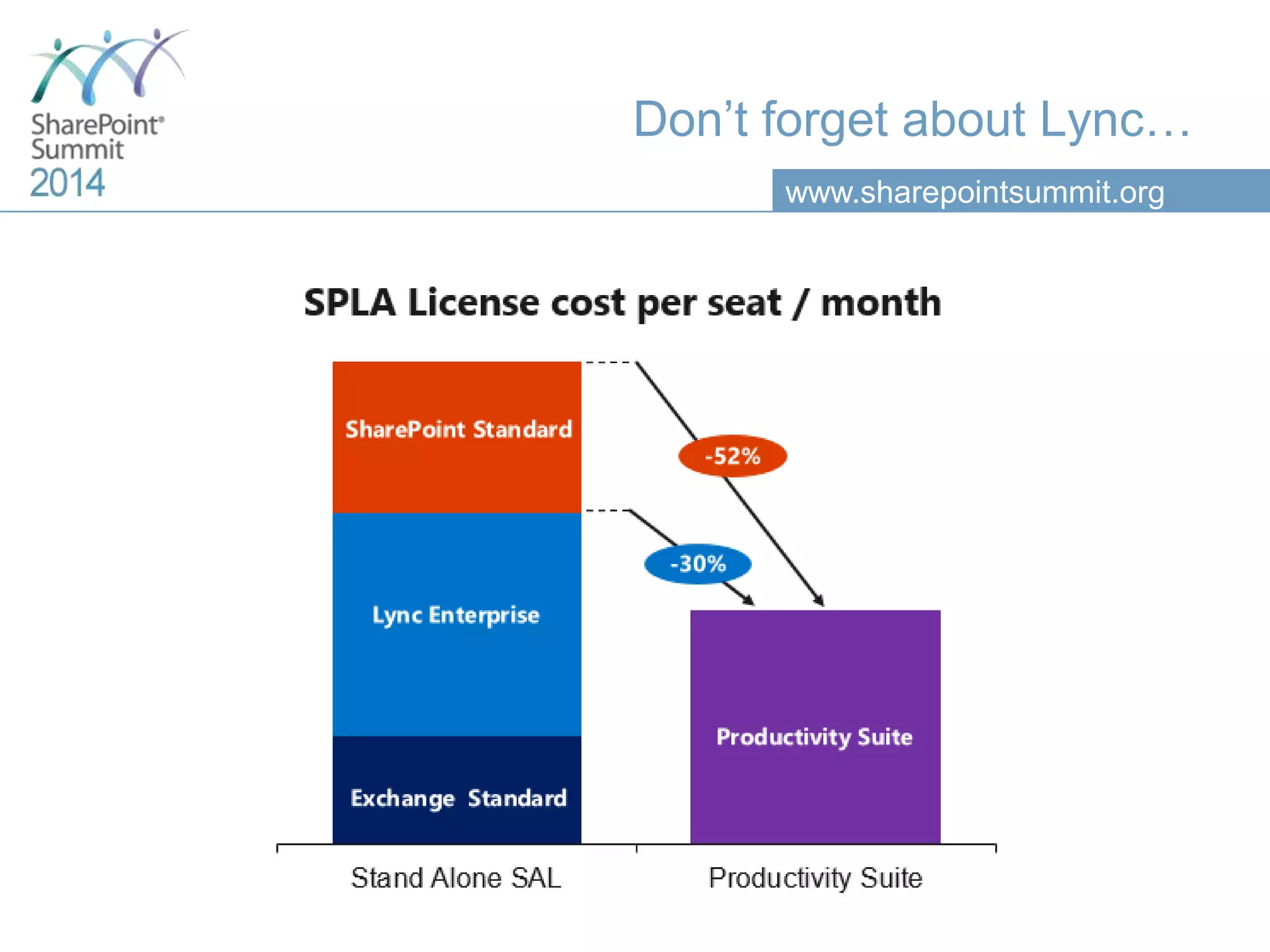
Don’t forget about Lync…
www.sharepointsummit.org
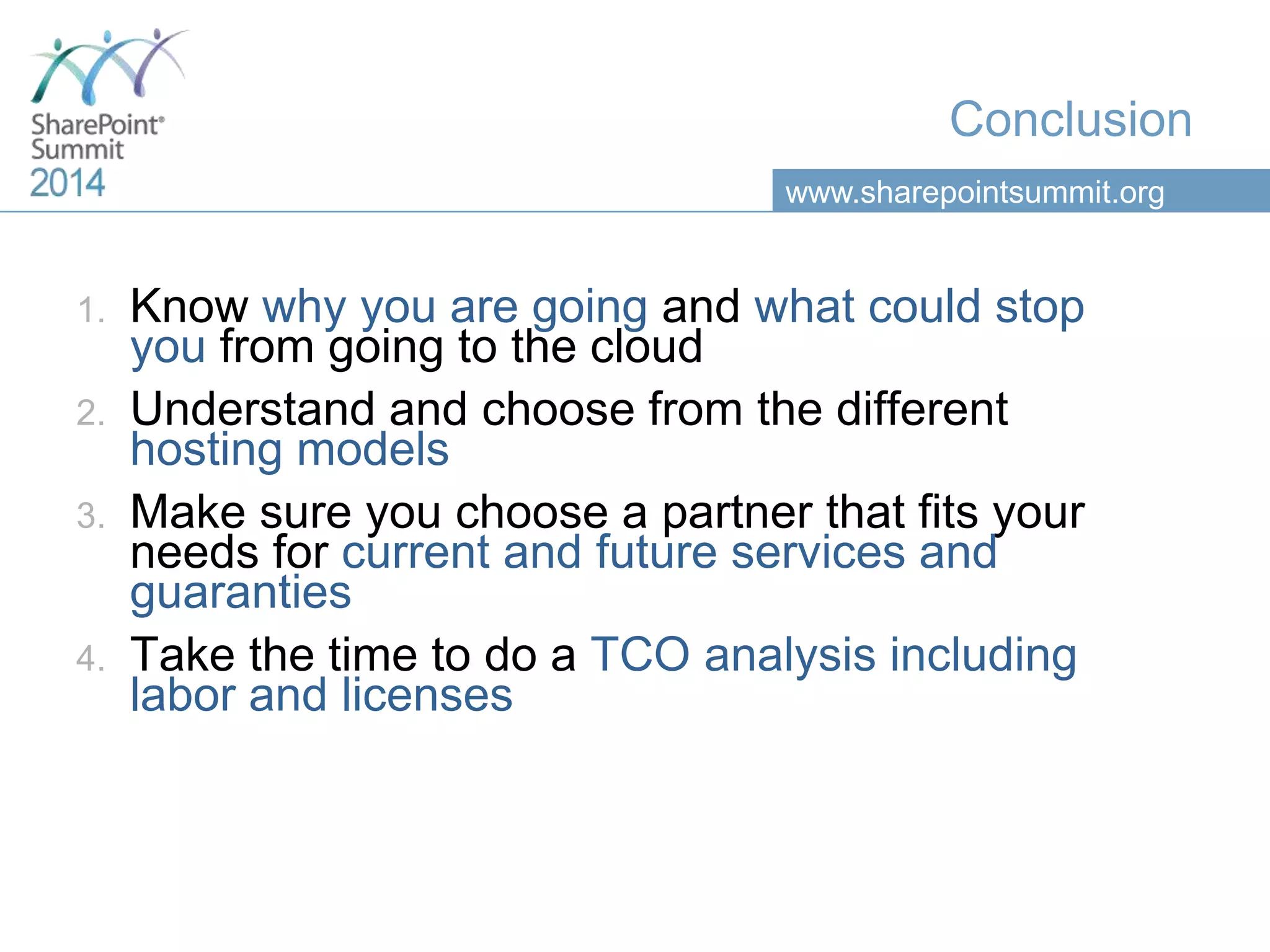
Conclusion
1. Know why you are going and what could stop
you from going to the cloud
2. Understand and choose from the different
hosting models
3. Make sure you choose a partner that fits your
needs for current and future services and
guaranties
4. Take the time to do a TCO analysis including
labor and licenses
Thank you for your attention!
This presentation will be available on the
Vancouver SharePoint Summit website a few days after the event.
Please rate this session!
Fill out the survey form

Outsourcing your share point hosting the cloud’s fine print magnified

  • 1.
    Outsourcing Your SharePointHosting The Cloud’s Fine Print Magnified Simon Langlois – Product Manager, SherWeb
  • 2.
    www.sharepointsummit.org Simon Langlois SharePoint ProductManager Quebec Canada • Master in MKT Science • 5 years at IBM Canada • 3 years at SherWeb • SP Summit Speaker • SP Saturday Speaker – Chicago, Montreal, Ottawa Contact • @simonlanglois • slanglois@sherweb.com blog.sherweb.com • linkedin.com/in/silanglois
  • 3.
    www.sharepointsummit.org Agenda 1. Cloud Opportunitiesand Concerns 2. Cloud Hosting Models 3. Cloud Services 4. Licensing Options …all about SharePoint!
  • 4.
  • 5.
    www.sharepointsummit.org Cloud Opportunities Fast-track andsimplify upgrade/deployment Move from Capex to Opex On-demand expertise Business continuity Increased availability Scalability Mobility
  • 6.
  • 7.
  • 8.
  • 9.
  • 10.
    www.sharepointsummit.org Definitions • Private Cloud •…is a form of cloud computing that is used by only one organization, or that ensures that an organization is completely isolated from others. • Public Cloud • …is a style of cloud computing where scalable and elastic IT-enabled capabilities are provided as a service to external customers using Internet technologies. • Hybrid Cloud • …refers to policy-based and coordinated service provisioning, use and management across a mixture of internal and external cloud services.
  • 11.
    www.sharepointsummit.org Definitions • SaaS • Software-as-a-Service(SaaS) delivers a complete application over the internet, owned by the service provider to centralize resources and data • PaaS • Platform-as-a-Service (PaaS) delivers a cloud-based development environment with everything required to support the complete lifecycle of building and delivering web-based (cloud) applications • IaaS • Infrastructure-as-a-service (IaaS) delivers computing resources, which includes servers, networking and storage with virtualization technologies.
  • 12.
    www.sharepointsummit.org Decision Levels Administration model ManagedUnmanaged Hosting models IaaS PaaS SaaS Hybrid SharePoint feature sets Foundation Standard Enterprise O365 Plans More… Business needs/Objectives Intranet Collaboration Documentation …
  • 13.
    www.sharepointsummit.org Integration with LOB CustomDevelopment 3rd Party Tools NO YES OOTB Features Dedicated SharePoint Instance SaaS Specific data constraints to respect YES Internal IT Infrastructure Internal IT Staff Local IaaSPaaS YES NO Internal IT Staff YES YES NO NO Decision Process
  • 14.
  • 15.
    www.sharepointsummit.org Features not availablein SharePoint Online Content Features Office Web Apps Server integration PowerPoint Automation Services WCM: Analytics WCM: Catalog WCM: Cross-site publishing WCM: Faceted navigation WCM: Image Renditions WCM: Multiple Domains WCM: Topic Pages Word Automation Services Developer Features BCS: Profile Pages BCS: Rich Client Integration Custom Site Definitions Custom Site Provisioning Full-Trust Solutions IT Professional Features Alternate Access Mapping (AAM) Analytics Platform Claims-Based Authentication Support Configuration Wizards Distributed Cache Host Header Site Collections Managed Accounts Patch Management Quota Templates Read-Only Database Support Remote Blog Storage Request Management Resource throttling SharePoint Health Analyzer Shredded Storage State Service Streamlined Central Administration System Status Notifications Unattached Content Database Recovery Usage Reporting and Logging Insights Features PerformancePoint Services PerformancePoint Services (PPS) Dashboard Migration Scorecards & Dashboards SQL Server Reporting Services (SSRS) Integrated Mode Search Features Content Search Web Part Custom entity extraction Extensible content processing On-premises search index Result sources Search connector framework Tunable Relevancy Site Features Custom Managed Paths Usage Analytics Source - TechNet: http://technet.microsoft.com/en-us/library/jj819267.aspx
  • 16.
    www.sharepointsummit.org Hybrid or ReplicationStrategy High-level hybrid strategies Pros Cons Completely isolated farms • Low complexity • Low cost • Fast deployment • No integration • Reduced usability for hybrid end- users (ex: 2 credentials) Replication of user profiles • Easy to use for end-user • Moderate complexity • Fast deployment • No real added value • Necessary evil Replication of SharePoint Services • Leverage past and future investments in Search, Metadata, BI, Workflows and more services on both farms • Requires domain federation, configurations and in most cases, expensive 3rd party tools (ex: AvePoint Replicator)
  • 17.
  • 18.
  • 19.
    www.sharepointsummit.org What is theSLA? Service Level Agreement on various parameters:
  • 20.
    www.sharepointsummit.org What is theSLA? Start with what is important to you • Set min and max acceptable requirements and objectives • Try to assign a dollar ($) value to them SLA parameters Measures to look for System availability % of uptime during a given period Data security SOC 2 Type II report Tier 3+ datacenters Functional capabilities Complete list of available features Complete list of supported and included services Regulatory compliance Encryption bits, HIPAA, PCI Response time Time before ticket taken Average ticket close time Other performance levels Customer Satisfaction: Net Promoter Score RPO and RTO
  • 21.
    www.sharepointsummit.org How Can IEvaluate Data Security? Data Center Primary Site Attributes Tier Requirements TIER I TIER II TIER III TIER IV Number of power delivery paths Only 1 Only 1 1 Active 1 Passive 2 Active Redundant components N N+1 N+1 2 (N+1) or S+S Compartmentalization No No No Yes Concurrently maintainable No No Yes Yes Fault tolerance to worst event None None None Yes Other attributes Power distribution, cooling Raised floor, UPS, generator Raised floor, UPS, generator Raised floor, UPS, generator
  • 22.
    www.sharepointsummit.org How Can IEvaluate Data Security? Certification SOC II Type 2  Security  Accessibility  Process integrity  Confidentiality  Privacy For more information, download this detail document from KPMG.
  • 23.
    www.sharepointsummit.org How Can ITrust a Provider’s SLA? 23 Oversell Under-deliver Dissatisfaction
  • 24.
    www.sharepointsummit.org How Can IEvaluate a NPS? Net Promoter Score (NPS)  It’s the most widely used KPI to measure customer support satisfaction amongst cloud and hosting services providers  It’s measured with one simple question after each ticket resolution  How likely are you to recommend COMPANY X to a colleague or a friend? • <20 = HORRIBLE • 20< X <40 = BAD • 40< X <60 = GOOD • >60 = EXCELLENT
  • 25.
    www.sharepointsummit.org Business Continuity RPO etRTO What are your required standards? • Establish the value for YOUR company in at least 2 scenarios before requesting prices Weekly Backup OK OK OK IT Pro Restore RPO (Recovery Point Objective) RTO (Recovery Time Objective) Weekly Backup Weekly Backup
  • 26.
  • 27.
    www.sharepointsummit.org Licensing Options On-premise  OpenLicense, Open Value and Open Value Subscription • Small to midsize organization: 5-250 employees • Corporate, academic, charitable, or government organization  Enterprise Agreement, Enterprise Agreement Subscription • 250+ emp. Hosted SharePoint  Service Provider License Agreement (SPLA) SharePoint Online  Microsoft terms for cloud subscription P1, P2, E1, E2, E3, E4…
  • 28.
    www.sharepointsummit.org License Mobility Program(LM) Some important details  You must acquire and maintain Server and Client Access Licenses (CALs)  You must acquire and maintain Software Assurance (SA)  If you don’t have SA, you need dedicated hardware hosting services  Same CALs can be used with other environments with same users, but server licenses are TRANSFERRED so can’t be reused  You CAN’T mix LM and SPLA licenses for the same software
  • 29.
    www.sharepointsummit.org Licensing Net PresentValue 3 years License program Scenario 1 Scenario 2 Scenario 3 SharePoint Servers 1 3 4 Standard users 250 500 0 Enterprise users 0 1000 2500 Interest 2% 2% 2% $- $200,000 $400,000 $600,000 $800,000 $1,000,000 $1,200,000 $1,400,000 NPV 1 NPV 2 NPV 3 NetPresentValue SharePoint License Cost Analysis Open Licenses + SA Open Value 3yr Spread (per year) Open Value 3yr Up-front SPLA SharePoint Online
  • 30.
    www.sharepointsummit.org Licensing Net PresentValue 5 years License program Scenario 1 Scenario 2 Scenario 3 SharePoint Servers 1 3 4 Standard users 250 500 0 Enterprise users 0 1000 2500 Interest 2% 2% 2% $- $200,000 $400,000 $600,000 $800,000 $1,000,000 $1,200,000 $1,400,000 NPV 1 NPV 2 NPV 3 NetPresentValue SharePoint Licenses Cost Analyses Open Licenses + SA Open Value 3yr Spread (per year) Open Value 3yr Up-front SPLA SharePoint Online
  • 31.
  • 32.
    www.sharepointsummit.org Conclusion 1. Know whyyou are going and what could stop you from going to the cloud 2. Understand and choose from the different hosting models 3. Make sure you choose a partner that fits your needs for current and future services and guaranties 4. Take the time to do a TCO analysis including labor and licenses
  • 33.
    Thank you foryour attention! This presentation will be available on the Vancouver SharePoint Summit website a few days after the event.
  • 34.
    Please rate thissession! Fill out the survey form

Editor's Notes

  • #3 Start: 1:00 Duration: 1:45 First, let me introduce myself My name is Simon I live in Sherbrooke, Canada and I work for SherWeb. SherWeb a world renown cloud services provider We started back in the 90’s as a web hoster, But rapidly got into the business application hosting with a big focus Microsoft productivity suite And finally got awarded Microsoft worldwide partner of the year at the last summer WPC So we are highly qualified and experienced with Exchange, SharePoint, Lync, hyper-v hosting challenges. More personally, I hold a Master degree in Marketing Science, so my background is more business than IT, But as you can see, I have been evolving in the IT space for more than 8 years And I can tell you without a doubt that understanding how market trends like cloud, social, mobile and big data are influencing organisational changes in todays companies is as important as understanding the technology itself for those who seeks to build effective IT strategies and make the right decisions when it comes to cloud opportunities. I am interested in everything that touches both SharePoint and the cloud looking for the next big innovation to build the product roadmap, or just to know what people do to generate value So don’t hesitate to add me on twitter or LinkedIn and reach out to me for a chat after the session. Now that we are done with the introductions, let’s jump right into it
  • #4 Start: 2:45 Duration: 1:30 So in todays session, I will start by introducing the subject with some revealing numbers about SharePoint actual deployments and future cloud strategies. We will then explore all possible hosting scenarios available to an organisation planning an upgrade or a migration and provide a simple and high-level decision framework for choosing the right model. I also cover the impacts of each choice on various critical topic like infrastructure, human resources, development, upgrades, compliance and more. We will continue by looking at services surrounding the cloud offering these days because we will see that these services might be as important as the hosting itself for some organisation. So amounts other things we will expose the different component of an SLA and highlight some key concept you might want to read before making a move. And finally, I well explain the various licensing options you have when moving to the cloud for SharePoint. For this, I included a revealing cost analysis for 3 scenarios with different licensing models.
  • #6 Start: 3:00 Duration: 3:45 If you are interested in the cloud, you must be looking to improve at least one of the following elements of your IT department. So first, fastraking and simplifying your SharePoint related projects. Is it me or is in today’s reality, every project is starting with 3 to 6 months delays already. It seems like everyone wants everything for yesterday. You probably want to go faster. Which ever solution you are choosing, there is a good chance that your cloud service provider have more experience with SharePoint upgrades and migrations than you own team, so it will undoubtedly accelerate the process. You might also want to reduce your capital expenditure and trade it for a operational expenditure model, to control cost. Cause we all know how large IT project can get out of control with cost overrun. There is also the finance concept of capital fast depreciation, and this trend is even more dominant in the IT sector because it has the biggest depreciation rate than any other sector. With an aging population and the fast technology evolution, finding and retaining SharePoint expertise is certainly one of todays IT department biggest challenge for maintaining a SharePoint environments. Organizations with sensitive data might be looking for of site backup or replication to ensure business continuity in case of a disaster. Except for very large firms, hosting SharePoint in the cloud will most probably increase its availability simply due to the top-of-the line infrastructure most providers is able to deploy with large scale economies. But we will see further in this presentation that availability is also a results of expertise and specifically when it comes to SharePoint. Scalability is also a great yet very general value of the cloud, almost a given nowadays. Anyone can see this value of the cloud as opposed to an on-premises deployment where you need to plan a lot more for hardware consideration. I think it has an even bigger value when looking specifically at SharePoint. SharePoint projects are always in separate phases. Some want to start with few users and onboard employees. Others want to start with everyone but have a plan to add use cases over several months and years. For instance, make an intranet with collaborative site in the first 6 month, document management in a year and extranet year two. And finally, we all know that mobility of the work force is a big issue that organisations need to address right now. We might ask how would the cloud address that. Well, simply by allowing you to have an internet facing intranet or extranet. So with a tablet or mobile, there connectivity experience at home or on the road is a lot more enhance than with the VPN connection required to connect to you local network. So again really high level opportunities, but a good summary that will hopefully help you sell the idea to the upper management.
  • #7 Start: 6:45 Duration: 0:00 So now lets look at the concerns or challenges that cloud consideration brought up. I decided to show you this graph from the 2012 Global KPMG survey because except the fact comfort increased a little since then, the priority concerns havent really changed. The first one is related to the lost of control. Related to ownership of the data. What will be my exit strategy. Will the provider have to right to sniff my data for information about my company? These are all valuable questions. But I also think that first element is tightly related to the second one, which refer the integration concept. Business are concern about the integration possibilities of a 3rd party managed platform 3rd most important challenge, is about the data loss and privacy risks. Not a surprise when we think about all the recent news or should I say scandal related to gouvernament agencies spying on there citizens. We can observe that these top 3 are significantly more important from the others but before moving on, I would like to direct your attention to the 4th one which put some lights on an important subject that is affecting cloud providers reputation and I will try to give you good tips on how to evaluate that later on in this presentation.
  • #8 Here are some interesting numbers comparing actual and future intention in regards to SharePoint deployment strategies. Both studies where conducted by Osman reaseach with one year interval. On the left are the results of 2012 survey and on the right are the 2013 survey result. First, most dominant observation is the rapid reduction of on-premises deployment. Respondant Average of 1000 employee, in SharePoint Conference in las vegas March, a lot of pool on this subject was conducting in session and I can tell you that in large organisation on-premises is more than 56%. My second observation would be the difference between the high 18% intention to move to a public cloud, and the 2013 low 12% result after a year as opposed to the difference between the low 14% intention to move to the private cloud and the 2013 36% result of privte cloud deployment. I explain this as the level of complexity and customisation SharePoint project require. Most organisation, before doing any deep analysis wants to move to a shared platform like Office365, but when confronted to le limitation decide to deploy in a private cloud environment. We will dig deeper into these considerations later on. Finally, you most probably realised that the Hybrid option has been removed from the options in the 2013 survey. It must after the differences, but it was a redundant option so it needed to be removed.
  • #9 I also wanted to show you these results you probably already saw on the SharePoint Community web site that I found interesting. It support the idea we just talked about when you see that the vast majority, 67%, think that even in 10 years there will still be at least 25% of deployment on-premises. But I wouldn’t have ask the question like this because I am amongst the one who thinks most SharePoint deployment will be in the cloud, but I think there will be a fair split between dedicated deployment in Infrastructure services like azure, amazon web services and other providers like SherWeb, platform as a service, where you have a managed but dedicated SharePoint instance and software as a service like Office365.