|| OPTIONS REDEFINED || Copyright © 2022 SoftClouds - All Rights Reserved
.IDEA
S
.INNOVATION
.INSPIRATIO
N
Adoption, Benefits & Customization
SoftClouds: CPQ JET ABC’s
|| OPTIONS REDEFINED || Copyright © 2022 SoftClouds - All Rights Reserved
About Us
Founded
2005
Other Locations
Hyderabad, India
Delhi, India
Tokyo, Japan
Headquarters
San Diego, CA
Target Market
Majors & Enterprise
|| OPTIONS REDEFINED || Copyright © 2022 SoftClouds - All Rights Reserved
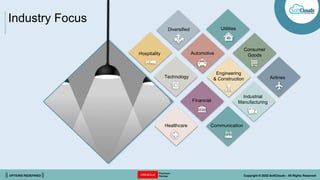
Industry Focus
Financial
Hospitality
Healthcare
Technology Airlines
Consumer
Goods
Engineering
& Construction
Industrial
Manufacturing
Communication
Automotive
Utilities
Diversified
|| OPTIONS REDEFINED || Copyright © 2022 SoftClouds - All Rights Reserved
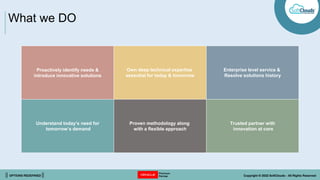
What we DO
Proactively identify needs &
introduce innovative solutions
Own deep technical expertise
essential for today & tomorrow
Enterprise level service &
Resolve solutions history
Understand today’s need for
tomorrow’s demand
Proven methodology along
with a flexible approach
Trusted partner with
innovation at core
|| OPTIONS REDEFINED || Copyright © 2022 SoftClouds - All Rights Reserved
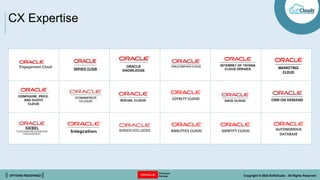
LOYALTY CLOUD
IDENTITY CLOUD
ANALYTICS CLOUD AUTONOMOUS
DATABASE
CX Expertise
|| OPTIONS REDEFINED || Copyright © 2022 SoftClouds - All Rights Reserved
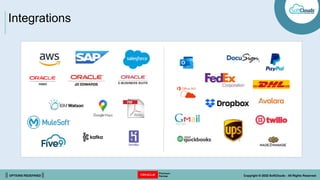
Integrations
|| OPTIONS REDEFINED || Copyright © 2022 SoftClouds - All Rights Reserved
Introduction to JET UI
01
What it is
02
Who should
use it
03
Where it’s going
|| OPTIONS REDEFINED || Copyright © 2022 SoftClouds - All Rights Reserved
What is JET?
Oracle’s JavaScript Extension Toolkit (JET)
• ‘Mobile First’ UI framework
• Based on modern JavaScript, CSS3 & HTML5 design &
development principles
• Provides a clean, streamlined UX
• Open-source & Oracle-contributed JavaScript libraries
make it simple to build & extend cloud-based, client-side
applications
• Will replace all legacy UIs as CPQ’s modern standard for
UIs
|| OPTIONS REDEFINED || Copyright © 2022 SoftClouds - All Rights Reserved
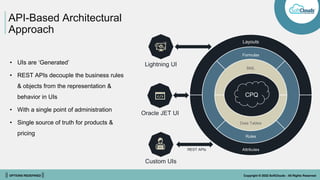
API-Based Architectural
Approach
CPQ
Layouts
Formulas
BML
Data Tables
Rules
Attributes
• UIs are ‘Generated’
• REST APIs decouple the business rules
& objects from the representation &
behavior in UIs
• With a single point of administration
• Single source of truth for products &
pricing
Lightning UI
Oracle JET UI
Custom UIs
REST APIs
|| OPTIONS REDEFINED || Copyright © 2022 SoftClouds - All Rights Reserved
JET UI
Modernized User Experience
Benefits
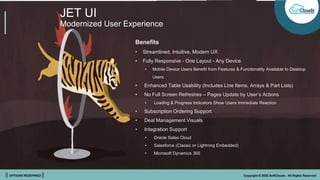
• Streamlined, Intuitive, Modern UX
• Fully Responsive - One Layout - Any Device
• Mobile Device Users Benefit from Features & Functionality Available to Desktop
Users
• Enhanced Table Usability (Includes Line Items, Arrays & Part Lists)
• No Full Screen Refreshes – Pages Update by User’s Actions
• Loading & Progress Indicators Show Users Immediate Reaction
• Subscription Ordering Support
• Deal Management Visuals
• Integration Support
• Oracle Sales Cloud
• Salesforce (Classic or Lightning Embedded)
• Microsoft Dynamics 365
|| OPTIONS REDEFINED || Copyright © 2022 SoftClouds - All Rights Reserved
JET UI
Modernized User Experience
Benefits
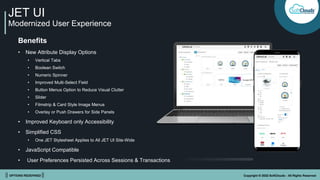
• New Attribute Display Options
• Vertical Tabs
• Boolean Switch
• Numeric Spinner
• Improved Multi-Select Field
• Button Menus Option to Reduce Visual Clutter
• Slider
• Filmstrip & Card Style Image Menus
• Overlay or Push Drawers for Side Panels
• Improved Keyboard only Accessibility
• Simplified CSS
• One JET Stylesheet Applies to All JET UI Site-Wide
• JavaScript Compatible
• User Preferences Persisted Across Sessions & Transactions
|| OPTIONS REDEFINED || Copyright © 2022 SoftClouds - All Rights Reserved
JET Transaction UI: Next-Level
Responsive Experience
Features
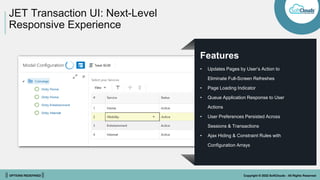
• Updates Pages by User’s Action to
Eliminate Full-Screen Refreshes
• Page Loading Indicator
• Queue Application Response to User
Actions
• User Preferences Persisted Across
Sessions & Transactions
• Ajax Hiding & Constraint Rules with
Configuration Arrays
|| OPTIONS REDEFINED || Copyright © 2022 SoftClouds - All Rights Reserved
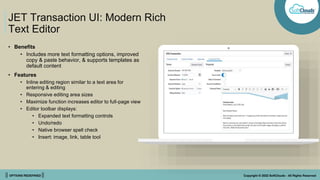
JET Transaction UI: Modern Rich
Text Editor
• Benefits
• Includes more text formatting options, improved
copy & paste behavior, & supports templates as
default content
• Features
• Inline editing region similar to a text area for
entering & editing
• Responsive editing area sizes
• Maximize function increases editor to full-page view
• Editor toolbar displays:
• Expanded text formatting controls
• Undo/redo
• Native browser spell check
• Insert: image, link, table tool
|| OPTIONS REDEFINED || Copyright © 2022 SoftClouds - All Rights Reserved
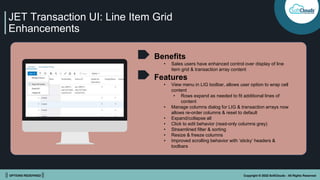
JET Transaction UI: Line Item Grid
Enhancements
Benefits
• Sales users have enhanced control over display of line
item grid & transaction array content
Features
• View menu in LIG toolbar, allows user option to wrap cell
content
• Rows expand as needed to fit additional lines of
content
• Manage columns dialog for LIG & transaction arrays now
allows re-order columns & reset to default
• Expand/collapse all
• Click to edit behavior (read-only columns grey)
• Streamlined filter & sorting
• Resize & freeze columns
• Improved scrolling behavior with ‘sticky’ headers &
toolbars
|| OPTIONS REDEFINED || Copyright © 2022 SoftClouds - All Rights Reserved
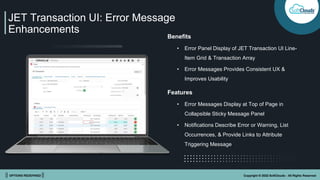
JET Transaction UI: Error Message
Enhancements
Benefits
• Error Panel Display of JET Transaction UI Line-
Item Grid & Transaction Array
• Error Messages Provides Consistent UX &
Improves Usability
Features
• Error Messages Display at Top of Page in
Collapsible Sticky Message Panel
• Notifications Describe Error or Warning, List
Occurrences, & Provide Links to Attribute
Triggering Message
|| OPTIONS REDEFINED || Copyright © 2022 SoftClouds - All Rights Reserved
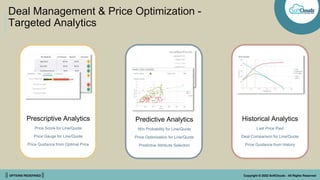
Deal Management & Price Optimization -
Targeted Analytics
Prescriptive Analytics
Price Score for Line/Quote
Price Gauge for Line/Quote
Price Guidance from Optimal Price
Predictive Analytics
Win Probability for Line/Quote
Price Optimization for Line/Quote
Predictive Attribute Selection
Historical Analytics
Last Price Paid
Deal Comparison for Line/Quote
Price Guidance from History
|| OPTIONS REDEFINED || Copyright © 2022 SoftClouds - All Rights Reserved
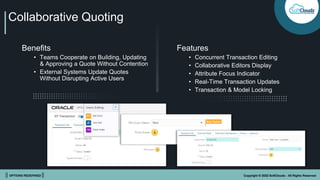
Collaborative Quoting
Benefits
• Teams Cooperate on Building, Updating
& Approving a Quote Without Contention
• External Systems Update Quotes
Without Disrupting Active Users
Features
• Concurrent Transaction Editing
• Collaborative Editors Display
• Attribute Focus Indicator
• Real-Time Transaction Updates
• Transaction & Model Locking
|| OPTIONS REDEFINED || Copyright © 2022 SoftClouds - All Rights Reserved
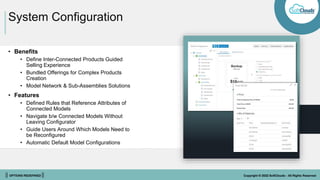
System Configuration
• Benefits
• Define Inter-Connected Products Guided
Selling Experience
• Bundled Offerings for Complex Products
Creation
• Model Network & Sub-Assemblies Solutions
• Features
• Defined Rules that Reference Attributes of
Connected Models
• Navigate b/w Connected Models Without
Leaving Configurator
• Guide Users Around Which Models Need to
be Reconfigured
• Automatic Default Model Configurations
|| OPTIONS REDEFINED || Copyright © 2022 SoftClouds - All Rights Reserved
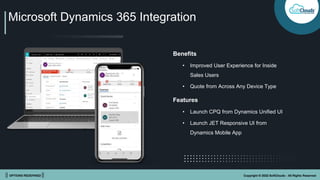
Microsoft Dynamics 365 Integration
Benefits
• Improved User Experience for Inside
Sales Users
• Quote from Across Any Device Type
Features
• Launch CPQ from Dynamics Unified UI
• Launch JET Responsive UI from
Dynamics Mobile App
|| OPTIONS REDEFINED || Copyright © 2022 SoftClouds - All Rights Reserved
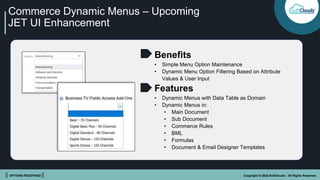
Commerce Dynamic Menus – Upcoming
JET UI Enhancement
Benefits
• Simple Menu Option Maintenance
• Dynamic Menu Option Filtering Based on Attribute
Values & User Input
Features
• Dynamic Menus with Data Table as Domain
• Dynamic Menus in:
• Main Document
• Sub Document
• Commerce Rules
• BML
• Formulas
• Document & Email Designer Templates
|| OPTIONS REDEFINED || Copyright © 2022 SoftClouds - All Rights Reserved
Enabling & Adoption Tips
How to do it Things to consider
|| OPTIONS REDEFINED || Copyright © 2022 SoftClouds - All Rights Reserved
Who Should Adopt JET UIs?
• Only JET Features like Transaction Arrays & Collaboration
• Adoption is a Matter of Timing
• Volume of JavaScript Customization
• Extremely Large Models with Thousands of Parts per Branch
(Pagination)
• Couple with Other Roadmap Projects Involving UI
• Mobile Layouts will Require Care to Switch in 19A
• Transition Selected Groups of Users Incrementally to Ease
Training & Change Management Requirements
Everyone!!!
|| OPTIONS REDEFINED || Copyright © 2022 SoftClouds - All Rights Reserved
What’s Involved in Adopting
CPQ JET UIs?
• New Features + New Experiences
• Using CPQ Differently
• Learning Curve Requires Training/Change Management
• Enabling JET UI for Test Users
• Optimizing JET Layout
• Defining JET CSS
• Now Consolidated into a Single Stylesheet
• Refactor JavaScript Customizations
• Changed HTML Document Object Model (DOM)
|| OPTIONS REDEFINED || Copyright © 2022 SoftClouds - All Rights Reserved
Behavioral Differences in CPQ JET UI
• Multiple main documents in a commerce process
aren't supported
• Action icons don't display on LIG lines (ex.
reconfigure)
• Actions are taken via LIG toolbar actions after
keyboard selection
• Drag & drop of LIG lines isn't supported. Can be re-
sequenced by editing line sequence number
• ‘Auto’ LIG column width = default of 100 px
• Concurrent access requires new REFRESH action
• File attachment merge sequencing is suboptimal
• Previous & next navigation isn't available in line
details
• Pagination is only option – but filtering may address
user requirements
• Line item grid colum header labels displays on hover.
End user can choose to wrap cell content from view
menu options
|| OPTIONS REDEFINED || Copyright © 2022 SoftClouds - All Rights Reserved
JET Responsive Transaction UI
Enable JET for a Limited Group of Users to Start
• Enabling JET responsive layout while maintaining existing legacy desktop layout
• Assigning user access to layouts based on user type & group
• With both layouts enabled, existing customers can make transition to JET responsive layout at their own pace
• Administrators don't need to log an SR to enable JET transaction UI
|| OPTIONS REDEFINED || Copyright © 2022 SoftClouds - All Rights Reserved
How to Enable JET UI
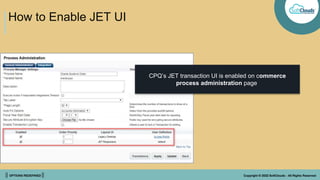
CPQ’s JET transaction UI is enabled on commerce
process administration page
|| OPTIONS REDEFINED || Copyright © 2022 SoftClouds - All Rights Reserved
How to Enable JET UI
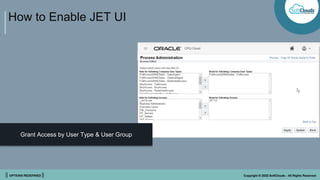
Grant Access by User Type & User Group
|| OPTIONS REDEFINED || Copyright © 2022 SoftClouds - All Rights Reserved
Layout Editor - Transaction
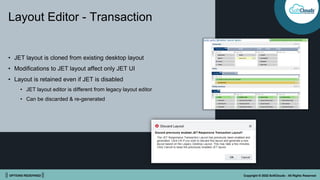
• JET layout is cloned from existing desktop layout
• Modifications to JET layout affect only JET UI
• Layout is retained even if JET is disabled
• JET layout editor is different from legacy layout editor
• Can be discarded & re-generated
|| OPTIONS REDEFINED || Copyright © 2022 SoftClouds - All Rights Reserved
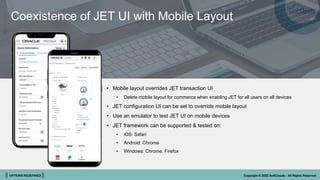
• Mobile layout overrides JET transaction UI
• Delete mobile layout for commerce when enabling JET for all users on all devices
• JET configuration UI can be set to override mobile layout
• Use an emulator to test JET UI on mobile devices
• JET framework can be supported & tested on:
• iOS: Safari
• Android: Chrome
• Windows: Chrome, Firefox
Coexistence of JET UI with Mobile Layout
|| OPTIONS REDEFINED || Copyright © 2022 SoftClouds - All Rights Reserved
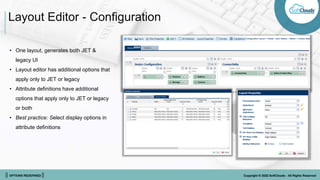
Layout Editor - Configuration
• One layout, generates both JET &
legacy UI
• Layout editor has additional options that
apply only to JET or legacy
• Attribute definitions have additional
options that apply only to JET or legacy
or both
• Best practice: Select display options in
attribute definitions
|| OPTIONS REDEFINED || Copyright © 2022 SoftClouds - All Rights Reserved
Optimizing Layouts for JET
Getting the Most Out of JET
|| OPTIONS REDEFINED || Copyright © 2022 SoftClouds - All Rights Reserved
Optimize LIG
Column Widths
Set line Item Grid Columns Wide Enough to Show Header Text
• Text doesn't wrap, so try to abbreviate or shorten labels
• Start with a width that suits content for each column
• Set default widths in px, especially for columns with large amount of
content or long labels
• Layout design for wide screens, let responsive behavior adapt content for
smaller screens. Use 3-5 columns of form inputs when possible
|| OPTIONS REDEFINED || Copyright © 2022 SoftClouds - All Rights Reserved
• Move all line item table-related actions into line Item table specific
toolbar
• Set line item grid table height to min. necessary
• Users able to see 15-20 line items with pagination controls
• Anticipate user interaction for large models
• Users can filter to view a subset of line Items
Optimize LIG
Column Height & Actions
|| OPTIONS REDEFINED || Copyright © 2022 SoftClouds - All Rights Reserved
Optimize Layout
Use only one set of panel columns per panel
• JET layout is responsive, panel columns will wrap & redistribute on smaller screens
• More than one set of panel columns in a single panel can result in a jumbled layout
Add ‘toolbars’ to contain sub-header labels & actions
• Use toolbars with labels for sub-headers inside panels
• Move any buttons from content area to these toolbars.
Add a REFRESH action to handle concurrent users
Use custom class to create fixed columns as needed
|| OPTIONS REDEFINED || Copyright © 2022 SoftClouds - All Rights Reserved
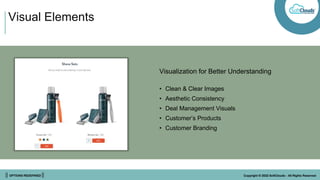
Visual Elements
Visualization for Better Understanding
• Clean & Clear Images
• Aesthetic Consistency
• Deal Management Visuals
• Customer’s Products
• Customer Branding
|| OPTIONS REDEFINED || Copyright © 2022 SoftClouds - All Rights Reserved
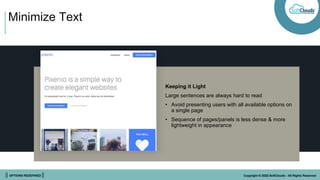
Minimize Text
Keeping it Light
Large sentences are always hard to read
• Avoid presenting users with all available options on
a single page
• Sequence of pages/panels is less dense & more
lightweight in appearance
|| OPTIONS REDEFINED || Copyright © 2022 SoftClouds - All Rights Reserved
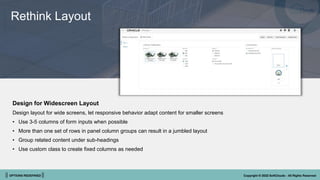
Rethink Layout
Design for Widescreen Layout
Design layout for wide screens, let responsive behavior adapt content for smaller screens
• Use 3-5 columns of form inputs when possible
• More than one set of rows in panel column groups can result in a jumbled layout
• Group related content under sub-headings
• Use custom class to create fixed columns as needed
|| OPTIONS REDEFINED || Copyright © 2022 SoftClouds - All Rights Reserved
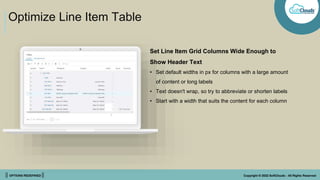
Optimize Line Item Table
Set Line Item Grid Columns Wide Enough to
Show Header Text
• Set default widths in px for columns with a large amount
of content or long labels
• Text doesn't wrap, so try to abbreviate or shorten labels
• Start with a width that suits the content for each column
|| OPTIONS REDEFINED || Copyright © 2022 SoftClouds - All Rights Reserved
Optimize Line Item Table
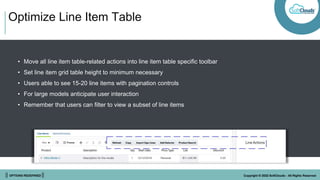
• Move all line item table-related actions into line item table specific toolbar
• Set line item grid table height to minimum necessary
• Users able to see 15-20 line items with pagination controls
• For large models anticipate user interaction
• Remember that users can filter to view a subset of line items
|| OPTIONS REDEFINED || Copyright © 2022 SoftClouds - All Rights Reserved
Use Right Display Type
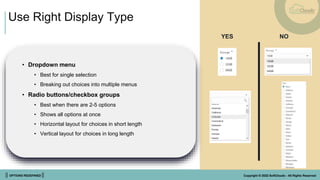
• Dropdown menu
• Best for single selection
• Breaking out choices into multiple menus
• Radio buttons/checkbox groups
• Best when there are 2-5 options
• Shows all options at once
• Horizontal layout for choices in short length
• Vertical layout for choices in long length
YES NO
|| OPTIONS REDEFINED || Copyright © 2022 SoftClouds - All Rights Reserved
Use Right Display Type
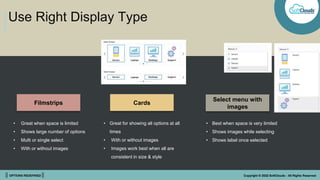
Filmstrips Cards
Select menu with
images
• Great when space is limited
• Shows large number of options
• Multi or single select
• With or without images
• Great for showing all options at all
times
• With or without images
• Images work best when all are
consistent in size & style
• Best when space is very limited
• Shows images while selecting
• Shows label once selected
|| OPTIONS REDEFINED || Copyright © 2022 SoftClouds - All Rights Reserved
Use Right Display Type
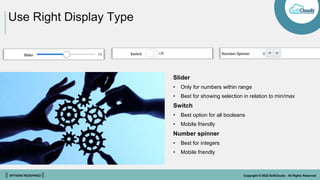
Slider
• Only for numbers within range
• Best for showing selection in relation to min/max
Switch
• Best option for all booleans
• Mobile friendly
Number spinner
• Best for integers
• Mobile friendly
|| OPTIONS REDEFINED || Copyright © 2022 SoftClouds - All Rights Reserved
TEST!!!!
• Test with variety of transactions, using
different computers
• Use an emulator to test different browsers &
devices
|| OPTIONS REDEFINED || Copyright © 2022 SoftClouds - All Rights Reserved
Styling & Customization
Best Practices Tips & Tricks
|| OPTIONS REDEFINED || Copyright © 2022 SoftClouds - All Rights Reserved
How do I customize JET UI?
Features
• Update pages with only data impacted by
the user’s action to eliminate full screen
refreshes
• Page Loading Indicator
• Queue application response to user
actions/edits
• User preferences persisted across sessions
and transactions
• Ajax Hiding & Constraint rules with
Configuration arrays
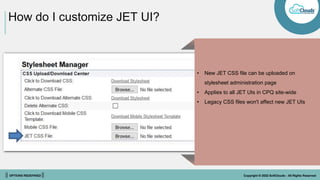
• New JET CSS file can be uploaded on
stylesheet administration page
• Applies to all JET UIs in CPQ site-wide
• Legacy CSS files won't affect new JET UIs
|| OPTIONS REDEFINED || Copyright © 2022 SoftClouds - All Rights Reserved
How do I create CSS for JET UI’s?
• Legacy UI - apply styling to classes, ID’s & HTML elements
• ID tags created by CPQ for each attribute, action, product family,
product line, model, & custom classes all remain same in JET HTML
structure
• HTML Structure Itself is very different from legacy UI
• Classes in JET are distinctly different from legacy classes
• Content is prefixed with ‘oj’ for Oracle JET
|| OPTIONS REDEFINED || Copyright © 2022 SoftClouds - All Rights Reserved
How can I force content to stay in
a fixed position?
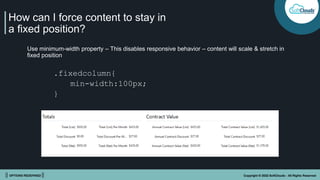
Use minimum-width property – This disables responsive behavior – content will scale & stretch in
fixed position
.fixedcolumn{
min-width:100px;
}
|| OPTIONS REDEFINED || Copyright © 2022 SoftClouds - All Rights Reserved
How do I style tabs?
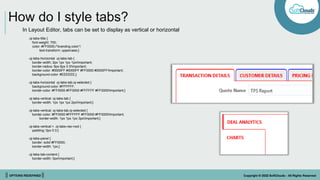
In Layout Editor, tabs can be set to display as vertical or horizontal
.oj-tabs-title {
font-weight: 700;
color: #FF0000;/*branding color*/
text-transform: uppercase;}
.oj-tabs-horizontal .oj-tabs-tab {
border-width: 2px 1px 1px 1px!important;
border-radius: 6px 6px 0 0!important;
border-color: #0000FF #0000FF #FF0000 #0000FF!important;
background-color: #EEEEEE;}
.oj-tabs-horizontal .oj-tabs-tab.oj-selected {
background-color: #FFFFFF;
border-color: #FF0000 #FF0000 #FFFFFF #FF0000!important;}
.oj-tabs-vertical .oj-tabs-tab {
border-width: 1px 1px 1px 2px!important;}
.oj-tabs-vertical .oj-tabs-tab.oj-selected {
border-color: #FF0000 #FFFFFF #FF0000 #FF0000!important;
border-width: 1px 1px 1px 3px!important;}
.oj-tabs-vertical > .oj-tabs-nav-root {
padding: 0px 0 0;}
.oj-tabs-panel {
border: solid #FF0000;
border-width: 1px;}
.oj-tabs-tab-content {
border-width: 0px!important;}
|| OPTIONS REDEFINED || Copyright © 2022 SoftClouds - All Rights Reserved
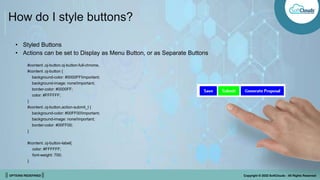
How do I style buttons?
• Styled Buttons
• Actions can be set to Display as Menu Button, or as Separate Buttons
#content .oj-button.oj-button-full-chrome,
#content .oj-button {
background-color: #0000FF!important;
background-image: none!important;
border-color: #0000FF;
color: #FFFFFF;
}
#content .oj-button.action-submit_t {
background-color: #00FF00!important;
background-image: none!important;
border-color: #00FF00;
}
#content .oj-button-label{
color: #FFFFFF;
font-weight: 700;
}
|| OPTIONS REDEFINED || Copyright © 2022 SoftClouds - All Rights Reserved
How do I change icons in Alta Navigation?
#cpq-alta-header > span{ align-items: center!important;}
#cpq-alta-header > span > img,
#cpq-alta-header > span > p {margin: 0 5px!important;}
#cpq-alta-header #cpq-header-tb .cpq-nav-threepages[aria-labelledby="ui-id-4"] .cpq-nav-icon::before {
content: url("../../image/Icons/navi_process1_24_ena.png")!important;}
#cpq-alta-header #cpq-header-tb .cpq-nav-threepages[aria-labelledby="ui-id-5"] .cpq-nav-icon::before {
content: url("../../image/Icons/navi_process2_24_ena.png")!important;}
#cpq-alta-header #cpq-header-tb a.oj-hover[aria-labelledby="ui-id-4"] .cpq-nav-icon::before {
content: url("../../image/Icons/navi_process1_24_hov.png")!important;}
#cpq-alta-header #cpq-header-tb a.oj-hover[aria-labelledby="ui-id-5"] .cpq-nav-icon::before {
content: url("../../image/Icons/navi_process2_24_hov.png")!important;}
#cpq-alta-header #cpq-header-tb a.cpq-selected[aria-labelledby="ui-id-4"] .cpq-nav-icon::before {
content: url("../../image/Icons/navi_process1_24_act.png")!important;}
#cpq-alta-header #cpq-header-tb a.cpq-selected[aria-labelledby="ui-id-5"] .cpq-nav-icon::before {
content: url("../../image/Icons/navi_process2_24_act.png")!important;}
This is an example of how CSS can be applied to Alta Navigation so that commerce process icons render
alternative images for each state; these Images are uploaded using File Manager.
|| OPTIONS REDEFINED || Copyright © 2022 SoftClouds - All Rights Reserved
What else can I style?
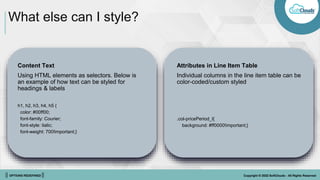
Content Text
Using HTML elements as selectors. Below is
an example of how text can be styled for
headings & labels
h1, h2, h3, h4, h5 {
color: #00ff00;
font-family: Courier;
font-style: italic;
font-weight: 700!important;}
Attributes in Line Item Table
Individual columns in the line item table can be
color-coded/custom styled
.col-pricePeriod_l{
background: #ff0000!important;}
|| OPTIONS REDEFINED || Copyright © 2022 SoftClouds - All Rights Reserved
What else can I style?
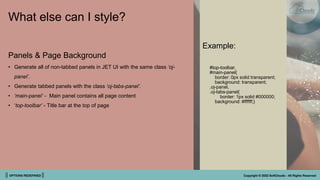
Example:
#top-toolbar,
#main-panel{
border: 0px solid transparent;
background: transparent;
.oj-panel,
.oj-tabs-panel{
border: 1px solid #000000;
background: #ffffff;}
Panels & Page Background
• Generate all of non-tabbed panels in JET UI with the same class ‘oj-
panel’.
• Generate tabbed panels with the class ‘oj-tabs-panel’.
• ‘main-panel’ - Main panel contains all page content
• ‘top-toolbar’ - Title bar at the top of page
|| OPTIONS REDEFINED || Copyright © 2022 SoftClouds - All Rights Reserved
What else can I style?
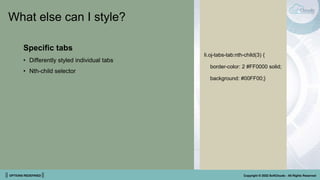
Specific tabs
• Differently styled individual tabs
• Nth-child selector
li.oj-tabs-tab:nth-child(3) {
border-color: 2 #FF0000 solid;
background: #00FF00;}
|| OPTIONS REDEFINED || Copyright © 2022 SoftClouds - All Rights Reserved
JavaScript Customizations in JET
• Minimizing JS
• Changed HTML DOM
• Attributes hidden from user are directly accessible by JS as of release 2020D
• Modifications to CPQ JavaScript Framework files
• Including JavaScript in a commerce HTML attribute
• Important considerations:
• Timing awareness
• Using setTimeout to defer a Script until current threads are completed
• Avoiding overuse of JavaScript, as it can affect performance
• Implement customizations on JET UIs
|| OPTIONS REDEFINED || Copyright © 2022 SoftClouds - All Rights Reserved
• When implementing JavaScript in an HTML attribute – store script in file
manager & reference this in the HTML attribute directly or in a default
BML function for the HTML attribute
• For improved performance, UI components are only rendered when the
user opens the containing panel or tab
• UI components are rendered progressively after the DOM ready event
has been fired
• Administrators may access these methods using custom JavaScript
contained in a separate file or in a read-only HTML attribute
• Methods reference with the namespace "CPQJS" as in the examples
below
CPQJS.setAttributeVal('myAttributeVarName','New Value');
CPQJS.onTableLoaded('lineItemGrid', setRowColors);
Using CPQJS API
|| OPTIONS REDEFINED || Copyright © 2022 SoftClouds - All Rights Reserved
Why SoftClouds?
• Well balanced & experienced team
• Team has delivered successful solutions
• Strategic thinking & solution providers
• Excellent leadership skills
• Working knowledge with C-level
• Flexible business models: fixed bid, time & material
• Execution locations: on-site, off-site, off-shore
|| OPTIONS REDEFINED || Copyright © 2022 SoftClouds - All Rights Reserved
Innovations
Expertise
Solutions
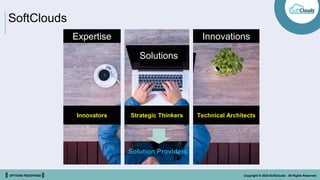
SoftClouds
Innovators Strategic Thinkers Technical Architects
Solution Providers
|| OPTIONS REDEFINED || Copyright © 2022 SoftClouds - All Rights Reserved
Thank You
|| OPTIONS REDEFINED || Copyright © 2022 SoftClouds - All Rights Reserved
Brian J. Friedman
GVP – Global Strategic Sales
415.378.7400
brianf@softclouds.com
www.softclouds.com

Oracle’s JavaScript Extension Toolkit (JET) | CPQ | SoftClouds

  • 1.
    || OPTIONS REDEFINED|| Copyright © 2022 SoftClouds - All Rights Reserved .IDEA S .INNOVATION .INSPIRATIO N Adoption, Benefits & Customization SoftClouds: CPQ JET ABC’s
  • 2.
    || OPTIONS REDEFINED|| Copyright © 2022 SoftClouds - All Rights Reserved About Us Founded 2005 Other Locations Hyderabad, India Delhi, India Tokyo, Japan Headquarters San Diego, CA Target Market Majors & Enterprise
  • 3.
    || OPTIONS REDEFINED|| Copyright © 2022 SoftClouds - All Rights Reserved Industry Focus Financial Hospitality Healthcare Technology Airlines Consumer Goods Engineering & Construction Industrial Manufacturing Communication Automotive Utilities Diversified
  • 4.
    || OPTIONS REDEFINED|| Copyright © 2022 SoftClouds - All Rights Reserved What we DO Proactively identify needs & introduce innovative solutions Own deep technical expertise essential for today & tomorrow Enterprise level service & Resolve solutions history Understand today’s need for tomorrow’s demand Proven methodology along with a flexible approach Trusted partner with innovation at core
  • 5.
    || OPTIONS REDEFINED|| Copyright © 2022 SoftClouds - All Rights Reserved LOYALTY CLOUD IDENTITY CLOUD ANALYTICS CLOUD AUTONOMOUS DATABASE CX Expertise
  • 6.
    || OPTIONS REDEFINED|| Copyright © 2022 SoftClouds - All Rights Reserved Integrations
  • 7.
    || OPTIONS REDEFINED|| Copyright © 2022 SoftClouds - All Rights Reserved Introduction to JET UI 01 What it is 02 Who should use it 03 Where it’s going
  • 8.
    || OPTIONS REDEFINED|| Copyright © 2022 SoftClouds - All Rights Reserved What is JET? Oracle’s JavaScript Extension Toolkit (JET) • ‘Mobile First’ UI framework • Based on modern JavaScript, CSS3 & HTML5 design & development principles • Provides a clean, streamlined UX • Open-source & Oracle-contributed JavaScript libraries make it simple to build & extend cloud-based, client-side applications • Will replace all legacy UIs as CPQ’s modern standard for UIs
  • 9.
    || OPTIONS REDEFINED|| Copyright © 2022 SoftClouds - All Rights Reserved API-Based Architectural Approach CPQ Layouts Formulas BML Data Tables Rules Attributes • UIs are ‘Generated’ • REST APIs decouple the business rules & objects from the representation & behavior in UIs • With a single point of administration • Single source of truth for products & pricing Lightning UI Oracle JET UI Custom UIs REST APIs
  • 10.
    || OPTIONS REDEFINED|| Copyright © 2022 SoftClouds - All Rights Reserved JET UI Modernized User Experience Benefits • Streamlined, Intuitive, Modern UX • Fully Responsive - One Layout - Any Device • Mobile Device Users Benefit from Features & Functionality Available to Desktop Users • Enhanced Table Usability (Includes Line Items, Arrays & Part Lists) • No Full Screen Refreshes – Pages Update by User’s Actions • Loading & Progress Indicators Show Users Immediate Reaction • Subscription Ordering Support • Deal Management Visuals • Integration Support • Oracle Sales Cloud • Salesforce (Classic or Lightning Embedded) • Microsoft Dynamics 365
  • 11.
    || OPTIONS REDEFINED|| Copyright © 2022 SoftClouds - All Rights Reserved JET UI Modernized User Experience Benefits • New Attribute Display Options • Vertical Tabs • Boolean Switch • Numeric Spinner • Improved Multi-Select Field • Button Menus Option to Reduce Visual Clutter • Slider • Filmstrip & Card Style Image Menus • Overlay or Push Drawers for Side Panels • Improved Keyboard only Accessibility • Simplified CSS • One JET Stylesheet Applies to All JET UI Site-Wide • JavaScript Compatible • User Preferences Persisted Across Sessions & Transactions
  • 12.
    || OPTIONS REDEFINED|| Copyright © 2022 SoftClouds - All Rights Reserved JET Transaction UI: Next-Level Responsive Experience Features • Updates Pages by User’s Action to Eliminate Full-Screen Refreshes • Page Loading Indicator • Queue Application Response to User Actions • User Preferences Persisted Across Sessions & Transactions • Ajax Hiding & Constraint Rules with Configuration Arrays
  • 13.
    || OPTIONS REDEFINED|| Copyright © 2022 SoftClouds - All Rights Reserved JET Transaction UI: Modern Rich Text Editor • Benefits • Includes more text formatting options, improved copy & paste behavior, & supports templates as default content • Features • Inline editing region similar to a text area for entering & editing • Responsive editing area sizes • Maximize function increases editor to full-page view • Editor toolbar displays: • Expanded text formatting controls • Undo/redo • Native browser spell check • Insert: image, link, table tool
  • 14.
    || OPTIONS REDEFINED|| Copyright © 2022 SoftClouds - All Rights Reserved JET Transaction UI: Line Item Grid Enhancements Benefits • Sales users have enhanced control over display of line item grid & transaction array content Features • View menu in LIG toolbar, allows user option to wrap cell content • Rows expand as needed to fit additional lines of content • Manage columns dialog for LIG & transaction arrays now allows re-order columns & reset to default • Expand/collapse all • Click to edit behavior (read-only columns grey) • Streamlined filter & sorting • Resize & freeze columns • Improved scrolling behavior with ‘sticky’ headers & toolbars
  • 15.
    || OPTIONS REDEFINED|| Copyright © 2022 SoftClouds - All Rights Reserved JET Transaction UI: Error Message Enhancements Benefits • Error Panel Display of JET Transaction UI Line- Item Grid & Transaction Array • Error Messages Provides Consistent UX & Improves Usability Features • Error Messages Display at Top of Page in Collapsible Sticky Message Panel • Notifications Describe Error or Warning, List Occurrences, & Provide Links to Attribute Triggering Message
  • 16.
    || OPTIONS REDEFINED|| Copyright © 2022 SoftClouds - All Rights Reserved Deal Management & Price Optimization - Targeted Analytics Prescriptive Analytics Price Score for Line/Quote Price Gauge for Line/Quote Price Guidance from Optimal Price Predictive Analytics Win Probability for Line/Quote Price Optimization for Line/Quote Predictive Attribute Selection Historical Analytics Last Price Paid Deal Comparison for Line/Quote Price Guidance from History
  • 17.
    || OPTIONS REDEFINED|| Copyright © 2022 SoftClouds - All Rights Reserved Collaborative Quoting Benefits • Teams Cooperate on Building, Updating & Approving a Quote Without Contention • External Systems Update Quotes Without Disrupting Active Users Features • Concurrent Transaction Editing • Collaborative Editors Display • Attribute Focus Indicator • Real-Time Transaction Updates • Transaction & Model Locking
  • 18.
    || OPTIONS REDEFINED|| Copyright © 2022 SoftClouds - All Rights Reserved System Configuration • Benefits • Define Inter-Connected Products Guided Selling Experience • Bundled Offerings for Complex Products Creation • Model Network & Sub-Assemblies Solutions • Features • Defined Rules that Reference Attributes of Connected Models • Navigate b/w Connected Models Without Leaving Configurator • Guide Users Around Which Models Need to be Reconfigured • Automatic Default Model Configurations
  • 19.
    || OPTIONS REDEFINED|| Copyright © 2022 SoftClouds - All Rights Reserved Microsoft Dynamics 365 Integration Benefits • Improved User Experience for Inside Sales Users • Quote from Across Any Device Type Features • Launch CPQ from Dynamics Unified UI • Launch JET Responsive UI from Dynamics Mobile App
  • 20.
    || OPTIONS REDEFINED|| Copyright © 2022 SoftClouds - All Rights Reserved Commerce Dynamic Menus – Upcoming JET UI Enhancement Benefits • Simple Menu Option Maintenance • Dynamic Menu Option Filtering Based on Attribute Values & User Input Features • Dynamic Menus with Data Table as Domain • Dynamic Menus in: • Main Document • Sub Document • Commerce Rules • BML • Formulas • Document & Email Designer Templates
  • 21.
    || OPTIONS REDEFINED|| Copyright © 2022 SoftClouds - All Rights Reserved Enabling & Adoption Tips How to do it Things to consider
  • 22.
    || OPTIONS REDEFINED|| Copyright © 2022 SoftClouds - All Rights Reserved Who Should Adopt JET UIs? • Only JET Features like Transaction Arrays & Collaboration • Adoption is a Matter of Timing • Volume of JavaScript Customization • Extremely Large Models with Thousands of Parts per Branch (Pagination) • Couple with Other Roadmap Projects Involving UI • Mobile Layouts will Require Care to Switch in 19A • Transition Selected Groups of Users Incrementally to Ease Training & Change Management Requirements Everyone!!!
  • 23.
    || OPTIONS REDEFINED|| Copyright © 2022 SoftClouds - All Rights Reserved What’s Involved in Adopting CPQ JET UIs? • New Features + New Experiences • Using CPQ Differently • Learning Curve Requires Training/Change Management • Enabling JET UI for Test Users • Optimizing JET Layout • Defining JET CSS • Now Consolidated into a Single Stylesheet • Refactor JavaScript Customizations • Changed HTML Document Object Model (DOM)
  • 24.
    || OPTIONS REDEFINED|| Copyright © 2022 SoftClouds - All Rights Reserved Behavioral Differences in CPQ JET UI • Multiple main documents in a commerce process aren't supported • Action icons don't display on LIG lines (ex. reconfigure) • Actions are taken via LIG toolbar actions after keyboard selection • Drag & drop of LIG lines isn't supported. Can be re- sequenced by editing line sequence number • ‘Auto’ LIG column width = default of 100 px • Concurrent access requires new REFRESH action • File attachment merge sequencing is suboptimal • Previous & next navigation isn't available in line details • Pagination is only option – but filtering may address user requirements • Line item grid colum header labels displays on hover. End user can choose to wrap cell content from view menu options
  • 25.
    || OPTIONS REDEFINED|| Copyright © 2022 SoftClouds - All Rights Reserved JET Responsive Transaction UI Enable JET for a Limited Group of Users to Start • Enabling JET responsive layout while maintaining existing legacy desktop layout • Assigning user access to layouts based on user type & group • With both layouts enabled, existing customers can make transition to JET responsive layout at their own pace • Administrators don't need to log an SR to enable JET transaction UI
  • 26.
    || OPTIONS REDEFINED|| Copyright © 2022 SoftClouds - All Rights Reserved How to Enable JET UI CPQ’s JET transaction UI is enabled on commerce process administration page
  • 27.
    || OPTIONS REDEFINED|| Copyright © 2022 SoftClouds - All Rights Reserved How to Enable JET UI Grant Access by User Type & User Group
  • 28.
    || OPTIONS REDEFINED|| Copyright © 2022 SoftClouds - All Rights Reserved Layout Editor - Transaction • JET layout is cloned from existing desktop layout • Modifications to JET layout affect only JET UI • Layout is retained even if JET is disabled • JET layout editor is different from legacy layout editor • Can be discarded & re-generated
  • 29.
    || OPTIONS REDEFINED|| Copyright © 2022 SoftClouds - All Rights Reserved • Mobile layout overrides JET transaction UI • Delete mobile layout for commerce when enabling JET for all users on all devices • JET configuration UI can be set to override mobile layout • Use an emulator to test JET UI on mobile devices • JET framework can be supported & tested on: • iOS: Safari • Android: Chrome • Windows: Chrome, Firefox Coexistence of JET UI with Mobile Layout
  • 30.
    || OPTIONS REDEFINED|| Copyright © 2022 SoftClouds - All Rights Reserved Layout Editor - Configuration • One layout, generates both JET & legacy UI • Layout editor has additional options that apply only to JET or legacy • Attribute definitions have additional options that apply only to JET or legacy or both • Best practice: Select display options in attribute definitions
  • 31.
    || OPTIONS REDEFINED|| Copyright © 2022 SoftClouds - All Rights Reserved Optimizing Layouts for JET Getting the Most Out of JET
  • 32.
    || OPTIONS REDEFINED|| Copyright © 2022 SoftClouds - All Rights Reserved Optimize LIG Column Widths Set line Item Grid Columns Wide Enough to Show Header Text • Text doesn't wrap, so try to abbreviate or shorten labels • Start with a width that suits content for each column • Set default widths in px, especially for columns with large amount of content or long labels • Layout design for wide screens, let responsive behavior adapt content for smaller screens. Use 3-5 columns of form inputs when possible
  • 33.
    || OPTIONS REDEFINED|| Copyright © 2022 SoftClouds - All Rights Reserved • Move all line item table-related actions into line Item table specific toolbar • Set line item grid table height to min. necessary • Users able to see 15-20 line items with pagination controls • Anticipate user interaction for large models • Users can filter to view a subset of line Items Optimize LIG Column Height & Actions
  • 34.
    || OPTIONS REDEFINED|| Copyright © 2022 SoftClouds - All Rights Reserved Optimize Layout Use only one set of panel columns per panel • JET layout is responsive, panel columns will wrap & redistribute on smaller screens • More than one set of panel columns in a single panel can result in a jumbled layout Add ‘toolbars’ to contain sub-header labels & actions • Use toolbars with labels for sub-headers inside panels • Move any buttons from content area to these toolbars. Add a REFRESH action to handle concurrent users Use custom class to create fixed columns as needed
  • 35.
    || OPTIONS REDEFINED|| Copyright © 2022 SoftClouds - All Rights Reserved Visual Elements Visualization for Better Understanding • Clean & Clear Images • Aesthetic Consistency • Deal Management Visuals • Customer’s Products • Customer Branding
  • 36.
    || OPTIONS REDEFINED|| Copyright © 2022 SoftClouds - All Rights Reserved Minimize Text Keeping it Light Large sentences are always hard to read • Avoid presenting users with all available options on a single page • Sequence of pages/panels is less dense & more lightweight in appearance
  • 37.
    || OPTIONS REDEFINED|| Copyright © 2022 SoftClouds - All Rights Reserved Rethink Layout Design for Widescreen Layout Design layout for wide screens, let responsive behavior adapt content for smaller screens • Use 3-5 columns of form inputs when possible • More than one set of rows in panel column groups can result in a jumbled layout • Group related content under sub-headings • Use custom class to create fixed columns as needed
  • 38.
    || OPTIONS REDEFINED|| Copyright © 2022 SoftClouds - All Rights Reserved Optimize Line Item Table Set Line Item Grid Columns Wide Enough to Show Header Text • Set default widths in px for columns with a large amount of content or long labels • Text doesn't wrap, so try to abbreviate or shorten labels • Start with a width that suits the content for each column
  • 39.
    || OPTIONS REDEFINED|| Copyright © 2022 SoftClouds - All Rights Reserved Optimize Line Item Table • Move all line item table-related actions into line item table specific toolbar • Set line item grid table height to minimum necessary • Users able to see 15-20 line items with pagination controls • For large models anticipate user interaction • Remember that users can filter to view a subset of line items
  • 40.
    || OPTIONS REDEFINED|| Copyright © 2022 SoftClouds - All Rights Reserved Use Right Display Type • Dropdown menu • Best for single selection • Breaking out choices into multiple menus • Radio buttons/checkbox groups • Best when there are 2-5 options • Shows all options at once • Horizontal layout for choices in short length • Vertical layout for choices in long length YES NO
  • 41.
    || OPTIONS REDEFINED|| Copyright © 2022 SoftClouds - All Rights Reserved Use Right Display Type Filmstrips Cards Select menu with images • Great when space is limited • Shows large number of options • Multi or single select • With or without images • Great for showing all options at all times • With or without images • Images work best when all are consistent in size & style • Best when space is very limited • Shows images while selecting • Shows label once selected
  • 42.
    || OPTIONS REDEFINED|| Copyright © 2022 SoftClouds - All Rights Reserved Use Right Display Type Slider • Only for numbers within range • Best for showing selection in relation to min/max Switch • Best option for all booleans • Mobile friendly Number spinner • Best for integers • Mobile friendly
  • 43.
    || OPTIONS REDEFINED|| Copyright © 2022 SoftClouds - All Rights Reserved TEST!!!! • Test with variety of transactions, using different computers • Use an emulator to test different browsers & devices
  • 44.
    || OPTIONS REDEFINED|| Copyright © 2022 SoftClouds - All Rights Reserved Styling & Customization Best Practices Tips & Tricks
  • 45.
    || OPTIONS REDEFINED|| Copyright © 2022 SoftClouds - All Rights Reserved How do I customize JET UI? Features • Update pages with only data impacted by the user’s action to eliminate full screen refreshes • Page Loading Indicator • Queue application response to user actions/edits • User preferences persisted across sessions and transactions • Ajax Hiding & Constraint rules with Configuration arrays • New JET CSS file can be uploaded on stylesheet administration page • Applies to all JET UIs in CPQ site-wide • Legacy CSS files won't affect new JET UIs
  • 46.
    || OPTIONS REDEFINED|| Copyright © 2022 SoftClouds - All Rights Reserved How do I create CSS for JET UI’s? • Legacy UI - apply styling to classes, ID’s & HTML elements • ID tags created by CPQ for each attribute, action, product family, product line, model, & custom classes all remain same in JET HTML structure • HTML Structure Itself is very different from legacy UI • Classes in JET are distinctly different from legacy classes • Content is prefixed with ‘oj’ for Oracle JET
  • 47.
    || OPTIONS REDEFINED|| Copyright © 2022 SoftClouds - All Rights Reserved How can I force content to stay in a fixed position? Use minimum-width property – This disables responsive behavior – content will scale & stretch in fixed position .fixedcolumn{ min-width:100px; }
  • 48.
    || OPTIONS REDEFINED|| Copyright © 2022 SoftClouds - All Rights Reserved How do I style tabs? In Layout Editor, tabs can be set to display as vertical or horizontal .oj-tabs-title { font-weight: 700; color: #FF0000;/*branding color*/ text-transform: uppercase;} .oj-tabs-horizontal .oj-tabs-tab { border-width: 2px 1px 1px 1px!important; border-radius: 6px 6px 0 0!important; border-color: #0000FF #0000FF #FF0000 #0000FF!important; background-color: #EEEEEE;} .oj-tabs-horizontal .oj-tabs-tab.oj-selected { background-color: #FFFFFF; border-color: #FF0000 #FF0000 #FFFFFF #FF0000!important;} .oj-tabs-vertical .oj-tabs-tab { border-width: 1px 1px 1px 2px!important;} .oj-tabs-vertical .oj-tabs-tab.oj-selected { border-color: #FF0000 #FFFFFF #FF0000 #FF0000!important; border-width: 1px 1px 1px 3px!important;} .oj-tabs-vertical > .oj-tabs-nav-root { padding: 0px 0 0;} .oj-tabs-panel { border: solid #FF0000; border-width: 1px;} .oj-tabs-tab-content { border-width: 0px!important;}
  • 49.
    || OPTIONS REDEFINED|| Copyright © 2022 SoftClouds - All Rights Reserved How do I style buttons? • Styled Buttons • Actions can be set to Display as Menu Button, or as Separate Buttons #content .oj-button.oj-button-full-chrome, #content .oj-button { background-color: #0000FF!important; background-image: none!important; border-color: #0000FF; color: #FFFFFF; } #content .oj-button.action-submit_t { background-color: #00FF00!important; background-image: none!important; border-color: #00FF00; } #content .oj-button-label{ color: #FFFFFF; font-weight: 700; }
  • 50.
    || OPTIONS REDEFINED|| Copyright © 2022 SoftClouds - All Rights Reserved How do I change icons in Alta Navigation? #cpq-alta-header > span{ align-items: center!important;} #cpq-alta-header > span > img, #cpq-alta-header > span > p {margin: 0 5px!important;} #cpq-alta-header #cpq-header-tb .cpq-nav-threepages[aria-labelledby="ui-id-4"] .cpq-nav-icon::before { content: url("../../image/Icons/navi_process1_24_ena.png")!important;} #cpq-alta-header #cpq-header-tb .cpq-nav-threepages[aria-labelledby="ui-id-5"] .cpq-nav-icon::before { content: url("../../image/Icons/navi_process2_24_ena.png")!important;} #cpq-alta-header #cpq-header-tb a.oj-hover[aria-labelledby="ui-id-4"] .cpq-nav-icon::before { content: url("../../image/Icons/navi_process1_24_hov.png")!important;} #cpq-alta-header #cpq-header-tb a.oj-hover[aria-labelledby="ui-id-5"] .cpq-nav-icon::before { content: url("../../image/Icons/navi_process2_24_hov.png")!important;} #cpq-alta-header #cpq-header-tb a.cpq-selected[aria-labelledby="ui-id-4"] .cpq-nav-icon::before { content: url("../../image/Icons/navi_process1_24_act.png")!important;} #cpq-alta-header #cpq-header-tb a.cpq-selected[aria-labelledby="ui-id-5"] .cpq-nav-icon::before { content: url("../../image/Icons/navi_process2_24_act.png")!important;} This is an example of how CSS can be applied to Alta Navigation so that commerce process icons render alternative images for each state; these Images are uploaded using File Manager.
  • 51.
    || OPTIONS REDEFINED|| Copyright © 2022 SoftClouds - All Rights Reserved What else can I style? Content Text Using HTML elements as selectors. Below is an example of how text can be styled for headings & labels h1, h2, h3, h4, h5 { color: #00ff00; font-family: Courier; font-style: italic; font-weight: 700!important;} Attributes in Line Item Table Individual columns in the line item table can be color-coded/custom styled .col-pricePeriod_l{ background: #ff0000!important;}
  • 52.
    || OPTIONS REDEFINED|| Copyright © 2022 SoftClouds - All Rights Reserved What else can I style? Example: #top-toolbar, #main-panel{ border: 0px solid transparent; background: transparent; .oj-panel, .oj-tabs-panel{ border: 1px solid #000000; background: #ffffff;} Panels & Page Background • Generate all of non-tabbed panels in JET UI with the same class ‘oj- panel’. • Generate tabbed panels with the class ‘oj-tabs-panel’. • ‘main-panel’ - Main panel contains all page content • ‘top-toolbar’ - Title bar at the top of page
  • 53.
    || OPTIONS REDEFINED|| Copyright © 2022 SoftClouds - All Rights Reserved What else can I style? Specific tabs • Differently styled individual tabs • Nth-child selector li.oj-tabs-tab:nth-child(3) { border-color: 2 #FF0000 solid; background: #00FF00;}
  • 54.
    || OPTIONS REDEFINED|| Copyright © 2022 SoftClouds - All Rights Reserved JavaScript Customizations in JET • Minimizing JS • Changed HTML DOM • Attributes hidden from user are directly accessible by JS as of release 2020D • Modifications to CPQ JavaScript Framework files • Including JavaScript in a commerce HTML attribute • Important considerations: • Timing awareness • Using setTimeout to defer a Script until current threads are completed • Avoiding overuse of JavaScript, as it can affect performance • Implement customizations on JET UIs
  • 55.
    || OPTIONS REDEFINED|| Copyright © 2022 SoftClouds - All Rights Reserved • When implementing JavaScript in an HTML attribute – store script in file manager & reference this in the HTML attribute directly or in a default BML function for the HTML attribute • For improved performance, UI components are only rendered when the user opens the containing panel or tab • UI components are rendered progressively after the DOM ready event has been fired • Administrators may access these methods using custom JavaScript contained in a separate file or in a read-only HTML attribute • Methods reference with the namespace "CPQJS" as in the examples below CPQJS.setAttributeVal('myAttributeVarName','New Value'); CPQJS.onTableLoaded('lineItemGrid', setRowColors); Using CPQJS API
  • 56.
    || OPTIONS REDEFINED|| Copyright © 2022 SoftClouds - All Rights Reserved Why SoftClouds? • Well balanced & experienced team • Team has delivered successful solutions • Strategic thinking & solution providers • Excellent leadership skills • Working knowledge with C-level • Flexible business models: fixed bid, time & material • Execution locations: on-site, off-site, off-shore
  • 57.
    || OPTIONS REDEFINED|| Copyright © 2022 SoftClouds - All Rights Reserved Innovations Expertise Solutions SoftClouds Innovators Strategic Thinkers Technical Architects Solution Providers
  • 58.
    || OPTIONS REDEFINED|| Copyright © 2022 SoftClouds - All Rights Reserved Thank You
  • 59.
    || OPTIONS REDEFINED|| Copyright © 2022 SoftClouds - All Rights Reserved Brian J. Friedman GVP – Global Strategic Sales 415.378.7400 brianf@softclouds.com www.softclouds.com