ORACLE ENDECA INFORMATION DISCOVERY
 CONNECTION WITH OBI SERVER

Waalwijk, 2013
CONNECTION WITH OBI SERVER


 A new feature with OEID v3.0 (and v2.4 with separate plugin) is to load data directly
 from an Oracle Business Intelligence (OBI) Server. For companies who are using
 OBI and have modeled their common enterprise information model in it this can be a
 very nice feature. One place to get the structured data from!


Aorta business intelligence
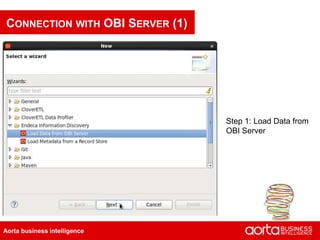
CONNECTION WITH OBI SERVER (1)


                                 Step 1: Load Data from
                                 OBI Server


Aorta business intelligence
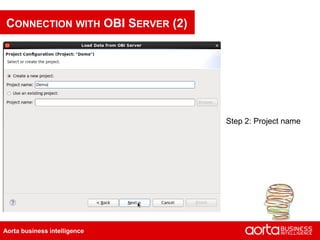
CONNECTION WITH OBI SERVER (2)


                                 Step 2: Project name


Aorta business intelligence
CONNECTION WITH OBI SERVER (3)


                                 Step 3: Configure target
                                 Endeca data domain


Aorta business intelligence
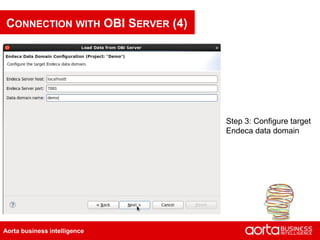
CONNECTION WITH OBI SERVER (4)


                                 Step 3: Configure target
                                 Endeca data domain


Aorta business intelligence
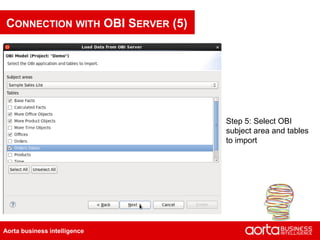
CONNECTION WITH OBI SERVER (5)


                                 Step 5: Select OBI
                                 subject area and tables
                                 to import


Aorta business intelligence
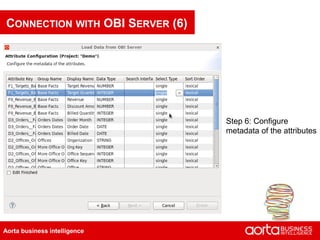
CONNECTION WITH OBI SERVER (6)


                                 Step 6: Configure
                                 metadata of the attributes


Aorta business intelligence
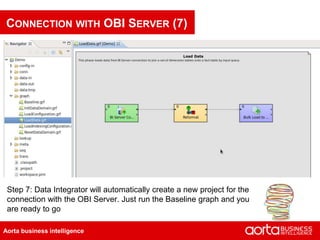
CONNECTION WITH OBI SERVER (7)


 Step 7: Data Integrator will automatically create a new project for the
 connection with the OBI Server. Just run the Baseline graph and you
 are ready to go

Aorta business intelligence
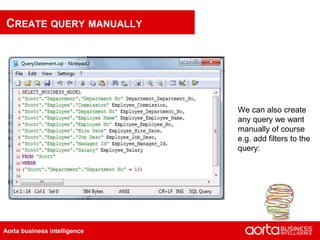
CREATE QUERY MANUALLY


                              We can also create
                              any query we want
                              manually of course
                              e.g. add filters to the
                              query:


Aorta business intelligence

Oracle endeca information discovery connection with obi server

  • 1.
    ORACLE ENDECA INFORMATIONDISCOVERY CONNECTION WITH OBI SERVER Waalwijk, 2013
  • 2.
    CONNECTION WITH OBISERVER A new feature with OEID v3.0 (and v2.4 with separate plugin) is to load data directly from an Oracle Business Intelligence (OBI) Server. For companies who are using OBI and have modeled their common enterprise information model in it this can be a very nice feature. One place to get the structured data from! Aorta business intelligence
  • 3.
    CONNECTION WITH OBISERVER (1) Step 1: Load Data from OBI Server Aorta business intelligence
  • 4.
    CONNECTION WITH OBISERVER (2) Step 2: Project name Aorta business intelligence
  • 5.
    CONNECTION WITH OBISERVER (3) Step 3: Configure target Endeca data domain Aorta business intelligence
  • 6.
    CONNECTION WITH OBISERVER (4) Step 3: Configure target Endeca data domain Aorta business intelligence
  • 7.
    CONNECTION WITH OBISERVER (5) Step 5: Select OBI subject area and tables to import Aorta business intelligence
  • 8.
    CONNECTION WITH OBISERVER (6) Step 6: Configure metadata of the attributes Aorta business intelligence
  • 9.
    CONNECTION WITH OBISERVER (7) Step 7: Data Integrator will automatically create a new project for the connection with the OBI Server. Just run the Baseline graph and you are ready to go Aorta business intelligence
  • 10.
    CREATE QUERY MANUALLY We can also create any query we want manually of course e.g. add filters to the query: Aorta business intelligence