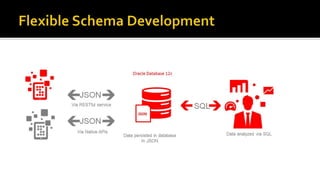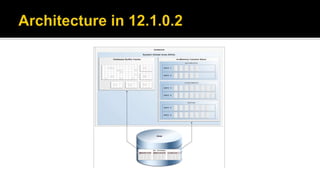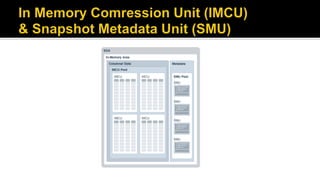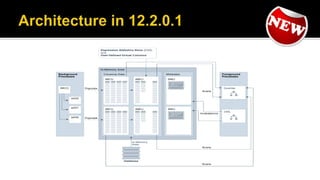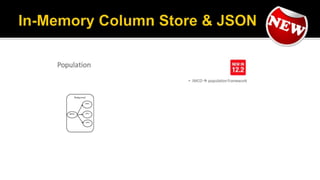

OGH Event – 24 October 2016
Marco Gralike
Principal Consultant
eProseed, The Netherlands
Oracle 20+ years experience
Oracle ACE Director
OakTable Member
www.xmldb.nl
 Many thanks for their endless patience (despite my stupid
questions and mistakes) and for helping out:
 Mark Drake (JSON / XMLDB)
 Beda Hammerschmidt (JSON/XMLDB)
 Andy Rivenes (DBIM)
 Maria Colgan (DB General / DBIM)
 What is JSON?
 Oracle 12.1.0.2
 Load & Store
 Select
 Index
 Oracle 12.2.0.1
 Generate
 Automate
 Improve performance via DBIM
Basic constructs
(recursive)
 Base values
number, string,
boolean, …
 Objects { }
sets of label-value
pairs
 Arrays [ ]
lists of values
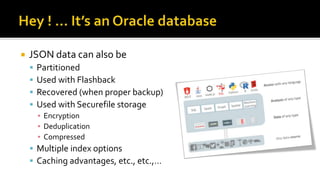
 JSON data can also be
 Partitioned
 Used with Flashback
 Recovered (when proper backup)
 Used with Securefile storage
▪ Encryption
▪ Deduplication
▪ Compressed
 Multiple index options
 Caching advantages, etc., etc.,…
 New in Oracle Database 12.1.0.2.0
 Store and manage JSON documents in Database
▪ JSON documents stored as text
▪ JSON documents can be indexed
 Access JSON documents via developer-friendly ‘Document-Store’ API’s
 SQL query capabilities over JSON documents for reporting and analysis
 Allows Oracle RDBMS to be used as a JSON Document Store
 Enables storing, indexing and querying of JSON documents
 No new JSON data type
 IS JSON constraint used to ensure a column contains valid JSON
documents
 Apply to (N)CLOB, (N)VARCHAR2, RAW and BLOB data
 Enables use of .dotted notation to navigate JSON document structure and
access content
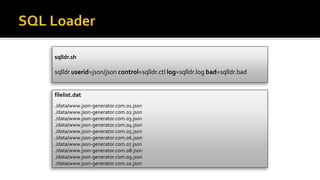
filelist.dat
./data/www.json-generator.com.01.json
./data/www.json-generator.com.02.json
./data/www.json-generator.com.03.json
./data/www.json-generator.com.04.json
./data/www.json-generator.com.05.json
./data/www.json-generator.com.06.json
./data/www.json-generator.com.07.json
./data/www.json-generator.com.08.json
./data/www.json-generator.com.09.json
./data/www.json-generator.com.10.json
sqlldr.sh
sqlldr userid=json/json control=sqlldr.ctl log=sqlldr.log bad=sqlldr.bad
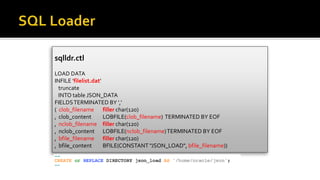
sqlldr.ctl
LOAD DATA
INFILE 'filelist.dat'
truncate
INTO table JSON_DATA
FIELDSTERMINATED BY ',‘
( clob_filename filler char(120)
, clob_content LOBFILE(clob_filename) TERMINATED BY EOF
, nclob_filename filler char(120)
, nclob_content LOBFILE(nclob_filename)TERMINATED BY EOF
, bfile_filename filler char(120)
, bfile_content BFILE(CONSTANT "JSON_LOAD", bfile_filename))
 Check constraint guarantees that values are valid JSON
documents
 IS [NOT] JSON predicate
 ReturnsTRUE if column value is JSON, FALSE otherwise
 Full parse of the data while validating syntax
 Tolerant and strict modes
 Use to ensure that the documents stored in a column are valid
JSON
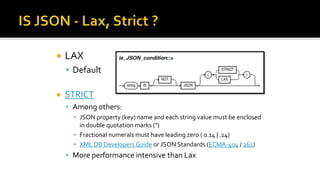
 LAX
 Default
 STRICT
 Among others:
▪ JSON property (key) name and each string value must be enclosed
in double quotation marks (")
▪ Fractional numerals must have leading zero ( 0.14 | .14)
▪ XML DB Developers Guide or JSON Standards (ECMA-404 / 262)
 More performance intensive than Lax
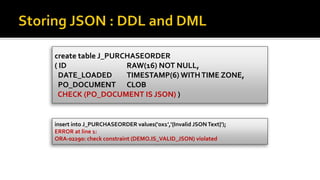
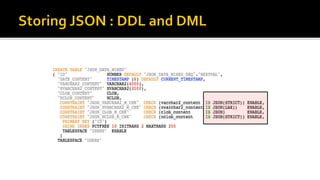
create table J_PURCHASEORDER
( ID RAW(16) NOT NULL,
DATE_LOADED TIMESTAMP(6) WITHTIME ZONE,
PO_DOCUMENT CLOB
CHECK (PO_DOCUMENT IS JSON) )
insert into J_PURCHASEORDER values(‘0x1’,‘{Invalid JSONText}');
ERROR at line 1:
ORA-02290: check constraint (DEMO.IS_VALID_JSON) violated
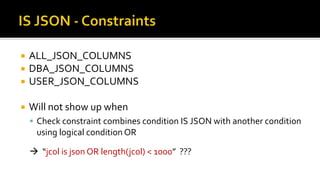
 ALL_JSON_COLUMNS
 DBA_JSON_COLUMNS
 USER_JSON_COLUMNS
 Will not show up when
 Check constraint combines condition IS JSON with another condition
using logical condition OR
 “jcol is json OR length(jcol) < 1000” ???
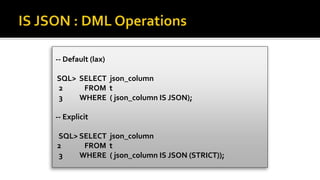
-- Default (lax)
SQL> SELECT json_column
2 FROM t
3 WHERE ( json_column IS JSON);
-- Explicit
SQL> SELECT json_column
2 FROM t
3 WHERE ( json_column IS JSON (STRICT));
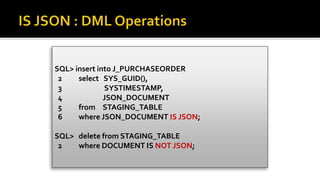
SQL> insert into J_PURCHASEORDER
2 select SYS_GUID(),
3 SYSTIMESTAMP,
4 JSON_DOCUMENT
5 from STAGING_TABLE
6 where JSON_DOCUMENT IS JSON;
SQL> delete from STAGING_TABLE
2 where DOCUMENT IS NOT JSON;
 JSON content is accessible from SQL via
new operators
 JSON operators use JSON Path
language to navigate JSON objects
 Proposed extention to SQL standards
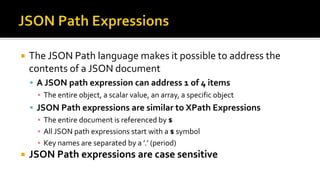
 The JSON Path language makes it possible to address the
contents of a JSON document
 A JSON path expression can address 1 of 4 items
▪ The entire object, a scalar value, an array, a specific object
 JSON Path expressions are similar to XPath Expressions
▪ The entire document is referenced by $
▪ All JSON path expressions start with a $ symbol
▪ Key names are separated by a ’.’ (period)
 JSON Path expressions are case sensitive
JSON Path Expression Type Contents
$.Reference String "ABULL-20120421"
$.ShippingInstructions.Address.zipcode Number 99236
$.ShippingInstructions.Address Object
{ "street": "200 SportingGreen",
"city": "South San Francisco",
"state": "CA",
"zipCode": 99236,
"country": “USA"
}
$LineItems Array
[ { "ItemNumber" : 1,
"Part" : {
"Description" : “Christmas”
"UPCCode" : 13131092899 }
},
{ "ItemNumber" : 2,
"Part" : {
"Description" : “Easter”
"UPCCode" : 13131092899 }
]
 Compatible with Java Script
 $.phone[0]
 Wildcards, Multi-Selects, Ranges
 $.phone[*], $.phone[0,1 5 to 9]
 Predicates
 .address?(.zip > $zip)
 SQL conversion functions usable in predicates
 .?(to_date(.date) > $date)
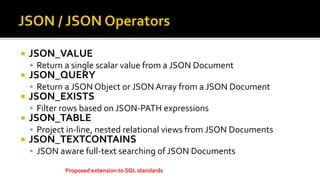
 JSON_VALUE
 Return a single scalar value from a JSON Document
 JSON_QUERY
 Return a JSON Object or JSON Array from a JSON Document
 JSON_EXISTS
 Filter rows based on JSON-PATH expressions
 JSON_TABLE
 Project in-line, nested relational views from JSON Documents
 JSON_TEXTCONTAINS
 JSON aware full-text searching of JSON Documents
Proposed extension to SQL standards
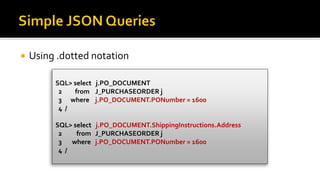
 Using .dotted notation
SQL> select j.PO_DOCUMENT
2 from J_PURCHASEORDER j
3 where j.PO_DOCUMENT.PONumber = 1600
4 /
SQL> select j.PO_DOCUMENT.ShippingInstructions.Address
2 from J_PURCHASEORDER j
3 where j.PO_DOCUMENT.PONumber = 1600
4 /
 Can only return a SCALAR value
SQL> select JSON_VALUE(PO_DOCUMENT,
2 '$.LineItems[0].Part.UnitPrice'
3 returning NUMBER(5,3))
4 from J_PURCHASEORDER p
5 where JSON_VALUE(PO_DOCUMENT,
6 '$.PONumber' returning NUMBER(10)) = 1600 ;
 Can only returns an ARRAY or OBJECT (= JSON content)
SELECT JSON_QUERY('{a:100, b:200, c:300}', '$.*' WITH WRAPPER)
AS value
FROM DUAL;
VALUE
--------------------------------------------------------------------------------
[100,200,300]
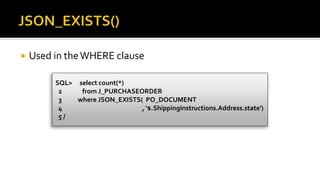
 Used in theWHERE clause
SQL> select count(*)
2 from J_PURCHASEORDER
3 where JSON_EXISTS( PO_DOCUMENT
4 , '$.ShippingInstructions.Address.state')
5 /
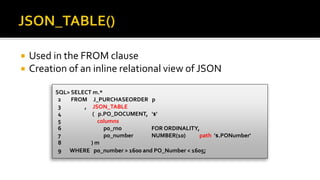
 Used in the FROM clause
 Creation of an inline relational view of JSON
SQL> SELECT m.*
2 FROM J_PURCHASEORDER p
3 , JSON_TABLE
4 ( p.PO_DOCUMENT, '$'
5 columns
6 po_rno FOR ORDINALITY,
7 po_number NUMBER(10) path '$.PONumber'
8 ) m
9 WHERE po_number > 1600 and PO_Number < 1605;
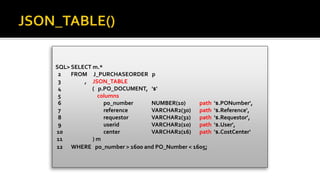
SQL> SELECT m.*
2 FROM J_PURCHASEORDER p
3 , JSON_TABLE
4 ( p.PO_DOCUMENT, '$'
5 columns
6 po_number NUMBER(10) path '$.PONumber',
7 reference VARCHAR2(30) path '$.Reference',
8 requestor VARCHAR2(32) path '$.Requestor',
9 userid VARCHAR2(10) path '$.User',
10 center VARCHAR2(16) path '$.CostCenter'
11 ) m
12 WHERE po_number > 1600 and PO_Number < 1605;
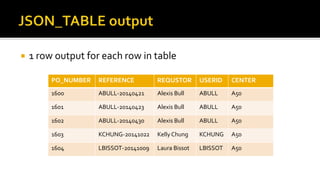
 1 row output for each row in table
PO_NUMBER REFERENCE REQUSTOR USERID CENTER
1600 ABULL-20140421 Alexis Bull ABULL A50
1601 ABULL-20140423 Alexis Bull ABULL A50
1602 ABULL-20140430 Alexis Bull ABULL A50
1603 KCHUNG-20141022 Kelly Chung KCHUNG A50
1604 LBISSOT-20141009 Laura Bissot LBISSOT A50
create or replace view J_PURCHASEORDER_DETAIL_VIEW as
select d.*
from J_PURCHASEORDER p,
JSON_TABLE
(p.PO_DOCUMENT, '$'
columns (
PO_NUMBER NUMBER(10) path '$.PONumber',
USERID VARCHAR2(10) path '$.User',
COSTCENTER VARCHAR2(16) path '$.CostCenter',
NESTED PATH '$.LineItems[*]'
columns
( ITEMNO NUMBER(38) path '$.ItemNumber',
UNITPRICE NUMBER(14,2) path '$.Part.UnitPrice'
) ) ) d;
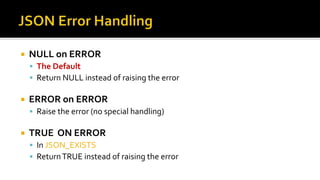
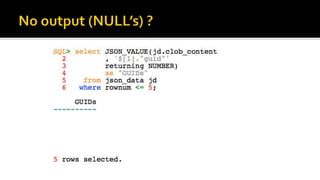
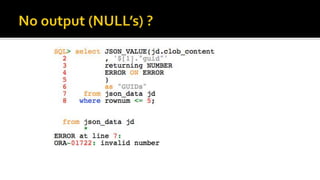
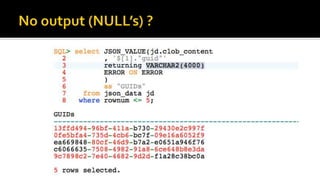
 NULL on ERROR
 The Default
 Return NULL instead of raising the error
 ERROR on ERROR
 Raise the error (no special handling)
 TRUE ON ERROR
 In JSON_EXISTS
 ReturnTRUE instead of raising the error
 FALSE ON ERROR
 In JSON_EXISTS
 Return FALSE instead of raising the error
 EMPTY ON ERROR
 In JSON_QUERY
 Return an empty array ([]) instead of raising the error
 DEFAULT 'literal_value' ON ERROR
 Return the specified value instead of raising the error
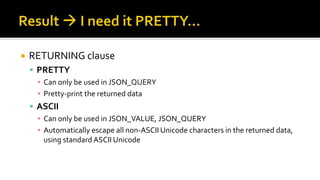
 RETURNING clause
 PRETTY
▪ Can only be used in JSON_QUERY
▪ Pretty-print the returned data
 ASCII
▪ Can only be used in JSON_VALUE, JSON_QUERY
▪ Automatically escape all non-ASCII Unicode characters in the returned data,
using standard ASCII Unicode
 JSON_TABLE, JSON_QUERY
 without WRAPPER clause
▪ DEFAULT, no change
▪ Raise error, if scalar/multiple values in non JSON result
 WITH WRAPPER
▪ Wrap result as a JSON ARRAY [ ]
 WITH CONDITIONAL WRAPPER
▪ Wrap result as a JSON ARRAY [ ]
▪ Don’t wrap result if scalar/multiple values in JSON result
JSON
Example
WITH WRAPPER WITHOUT
WRAPPER
WITH CONDITIONAL
WRAPPER
{"id": 38327}
(single object)
[{"id": 38327}] {"id": 38327} {"id": 38327}
[42, "a", true]
(single array)
[[42, "a", true]] [42, "a", true] [42, "a", true]
42 [42] Error
(scalar)
[42]
42, "a", true [42, "a", true] Error
(multiple values)
[42, "a", true]
none [] Error
(no values)
[]
For a single JSON object or array value, it is the same as WITHOUT WRAPPER.
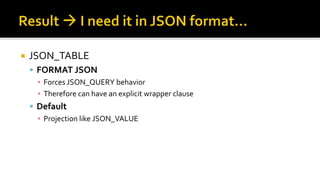
 JSON_TABLE
 FORMAT JSON
▪ Forces JSON_QUERY behavior
▪ Therefore can have an explicit wrapper clause
 Default
▪ Projection like JSON_VALUE
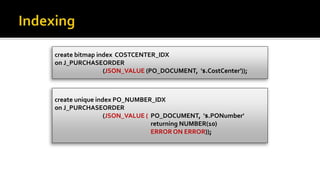
create unique index PO_NUMBER_IDX
on J_PURCHASEORDER
(JSON_VALUE ( PO_DOCUMENT, '$.PONumber'
returning NUMBER(10)
ERRORON ERROR));
create bitmap index COSTCENTER_IDX
on J_PURCHASEORDER
(JSON_VALUE (PO_DOCUMENT, '$.CostCenter'));
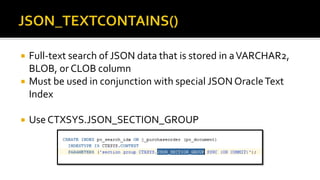
 Full-text search of JSON data that is stored in aVARCHAR2,
BLOB, or CLOB column
 Must be used in conjunction with special JSON OracleText
Index
 Use CTXSYS.JSON_SECTION_GROUP
 What is JSON?
 Oracle 12.1.0.2
 Load & Store
 Select
 Index
 Oracle 12.2.0.1
 Generate
 Automate
 Improve performance via DBIM
 Improvements
 Generate JSON
 PL/SQL support for JSON
 JSON Dataguide
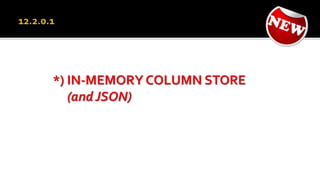
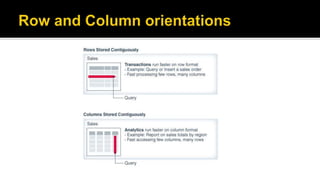
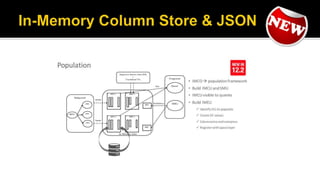
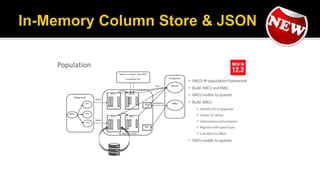
 In-Memory Column support for JSON
 Materialized view support for JSON
 …for In-Memory Column support…
 JSON documentation has its own manual
 “JSON Developers Guide”
 The JSON chapter in the “XMLDB Developers Guide” has been
removed
 Last version has approximately 200 pages
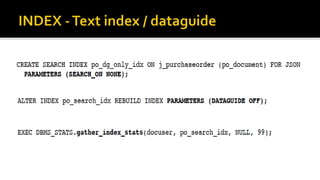
 You can use CREATE SEARCH INDEX with keywords FOR
JSON to create a search index, a dataguide, or both at the
same time.The default behavior is to create both.
 CREATE SEARCH INDEX … FOR JSON
 In “Parameters” clause
▪ SEARCH_ON NONE (disable search)
▪ DATAGUIDE ON
 ALTER INDEX … REBUILD
 Support for
 ARRAYS
 ARRAY ELEMENTS
 JSON_VALUE, JSON_TABLE support for
 DATE
 TIMESTAMP
 TIMESTAMP WITHTIMEZONE
 SDO_GEOMETRY
▪ GeoJSON objects
 PL/SQL
 Added SQL/JSON Functions and Conditions
functionality
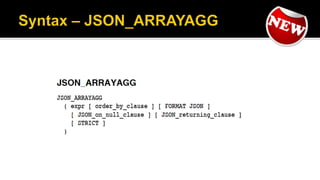
 JSON_ARRAY
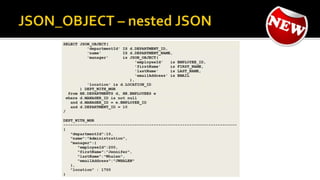
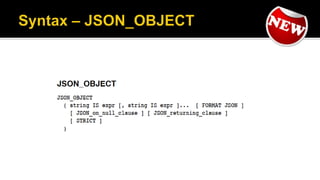
 JSON_OBJECT
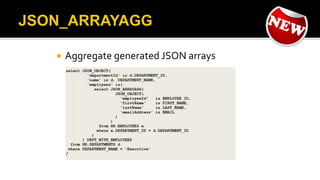
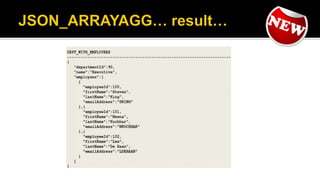
 JSON_ARRAYAGG
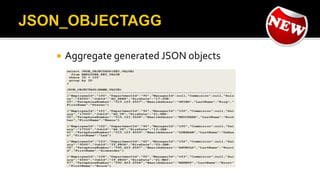
 JSON_OBJECTAGG
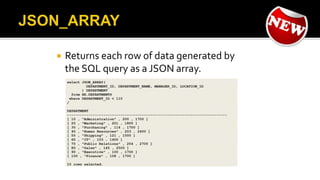
 Returns each row of data generated by
the SQL query as a JSON array.
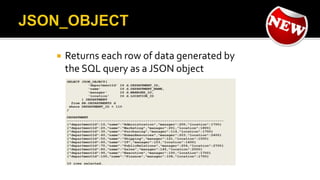
 Returns each row of data generated by
the SQL query as a JSON object
 Aggregate generated JSON arrays
 Aggregate generated JSON objects
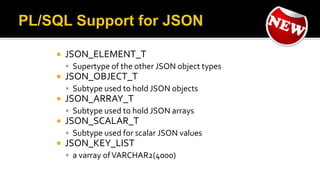
 JSON_ELEMENT_T
 Supertype of the other JSON object types
 JSON_OBJECT_T
 Subtype used to hold JSON objects
 JSON_ARRAY_T
 Subtype used to hold JSON arrays
 JSON_SCALAR_T
 Subtype used for scalar JSON values
 JSON_KEY_LIST
 a varray ofVARCHAR2(4000)
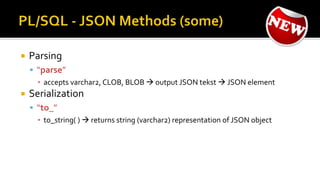
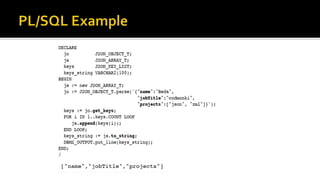
 Parsing
 “parse”
▪ accepts varchar2, CLOB, BLOB  output JSON tekst  JSON element
 Serialization
 “to_”
▪ to_string( )  returns string (varchar2) representation of JSON object
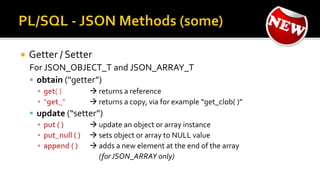
 Getter / Setter
For JSON_OBJECT_T and JSON_ARRAY_T
 obtain (“getter”)
▪ get( )  returns a reference
▪ “get_”  returns a copy, via for example “get_clob( )”
 update (“setter”)
▪ put ( )  update an object or array instance
▪ put_null ( )  sets object or array to NULL value
▪ append ( )  adds a new element at the end of the array
(forJSON_ARRAY only)
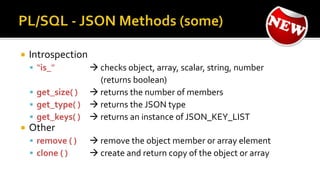
 Introspection
 “is_”  checks object, array, scalar, string, number
(returns boolean)
 get_size( )  returns the number of members
 get_type( )  returns the JSON type
 get_keys( )  returns an instance of JSON_KEY_LIST
 Other
 remove ( )  remove the object member or array element
 clone ( )  create and return copy of the object or array
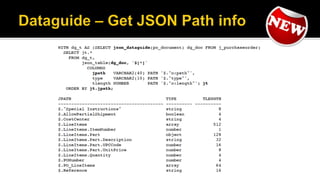
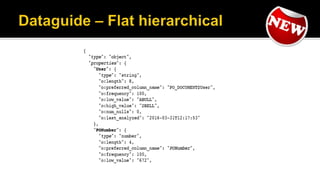
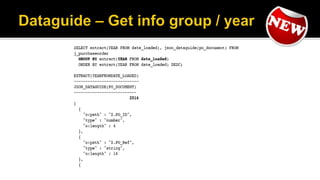
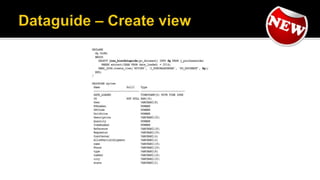
 A JSON dataguide lets you discover
information about the structure and
content of JSON documents stored in
Oracle Database.
 Manually via DBMS_JSON package
 Create JSON schema document
 Create views
 Automatically add or update virtual
columns
 MAX_STRING_SIZE = EXTENDED
 JSON combined with DG / DBIM
  OSON (DBIM JSON Binary Format)
 Search optimization
 Pre-validate, type-check or exclude content
before insert
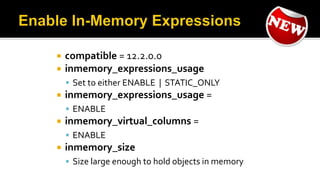
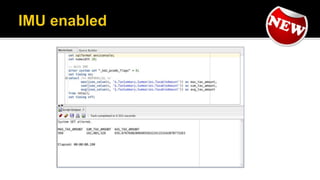
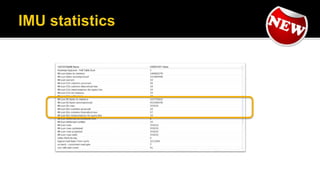
 compatible = 12.2.0.0
 inmemory_expressions_usage
 Set to either ENABLE | STATIC_ONLY
 inmemory_expressions_usage =
 ENABLE
 inmemory_virtual_columns =
 ENABLE
 inmemory_size
 Size large enough to hold objects in memory
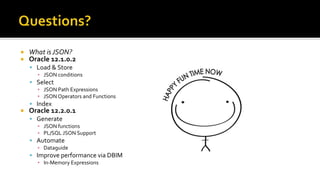
 What is JSON?
 Oracle 12.1.0.2
 Load & Store
▪ JSON conditions
 Select
▪ JSON Path Expressions
▪ JSON Operators and Functions
 Index
 Oracle 12.2.0.1
 Generate
▪ JSON functions
▪ PL/SQL JSON Support
 Automate
▪ Dataguide
 Improve performance via DBIM
▪ In-Memory Expressions
 Many thanks for their endless patience (despite my stupid
questions and mistakes) and for helping out:
 Mark Drake (JSON / XMLDB)
 Beda Hammerschmidt (JSON/XMLDB)
 Andy Rivenes (DBIM)
 Maria Colgan (DB General / DBIM)
 Oracle Database SQL Language
Reference
 JSON Functions
▪ JSON_QUERY
▪ JSON_TABLE
▪ JSON_VALUE
 JSON Conditions
▪ IS JSON
▪ JSON_EXISTS
▪ JSON_TEXTCONTAINS
 Oracle XMLDB Developers
Guide
 JSON in DB 12.1.0.2
 JSON Path Expressions
▪ Syntax
 Indexing JSON
▪ Syntax
 Loading JSON
▪ A Method
 JSON on xmldb.nl
 Stanford - Introduction to Databases (JSON)
 Eclipse JSON Editor Plugin
 JSONView addon (Firefox/Chrome)
 JSON Schema
 Get StartedWith JSON
 www.json-generator.com
 JSON Datasets: www.data.gov
OGH Event – 24 October 2016

Oracle Database - JSON and the In-Memory Database

  • 1.
    OGH Event –24 October 2016
  • 2.
    Marco Gralike Principal Consultant eProseed,The Netherlands Oracle 20+ years experience Oracle ACE Director OakTable Member www.xmldb.nl
  • 3.
     Many thanksfor their endless patience (despite my stupid questions and mistakes) and for helping out:  Mark Drake (JSON / XMLDB)  Beda Hammerschmidt (JSON/XMLDB)  Andy Rivenes (DBIM)  Maria Colgan (DB General / DBIM)
  • 5.
     What isJSON?  Oracle 12.1.0.2  Load & Store  Select  Index  Oracle 12.2.0.1  Generate  Automate  Improve performance via DBIM
  • 7.
    Basic constructs (recursive)  Basevalues number, string, boolean, …  Objects { } sets of label-value pairs  Arrays [ ] lists of values
  • 9.
     JSON datacan also be  Partitioned  Used with Flashback  Recovered (when proper backup)  Used with Securefile storage ▪ Encryption ▪ Deduplication ▪ Compressed  Multiple index options  Caching advantages, etc., etc.,…
  • 11.
     New inOracle Database 12.1.0.2.0  Store and manage JSON documents in Database ▪ JSON documents stored as text ▪ JSON documents can be indexed  Access JSON documents via developer-friendly ‘Document-Store’ API’s  SQL query capabilities over JSON documents for reporting and analysis
  • 12.
     Allows OracleRDBMS to be used as a JSON Document Store  Enables storing, indexing and querying of JSON documents  No new JSON data type  IS JSON constraint used to ensure a column contains valid JSON documents  Apply to (N)CLOB, (N)VARCHAR2, RAW and BLOB data  Enables use of .dotted notation to navigate JSON document structure and access content
  • 13.
  • 14.
    sqlldr.ctl LOAD DATA INFILE 'filelist.dat' truncate INTOtable JSON_DATA FIELDSTERMINATED BY ',‘ ( clob_filename filler char(120) , clob_content LOBFILE(clob_filename) TERMINATED BY EOF , nclob_filename filler char(120) , nclob_content LOBFILE(nclob_filename)TERMINATED BY EOF , bfile_filename filler char(120) , bfile_content BFILE(CONSTANT "JSON_LOAD", bfile_filename))
  • 17.
     Check constraintguarantees that values are valid JSON documents  IS [NOT] JSON predicate  ReturnsTRUE if column value is JSON, FALSE otherwise  Full parse of the data while validating syntax  Tolerant and strict modes  Use to ensure that the documents stored in a column are valid JSON
  • 18.
     LAX  Default STRICT  Among others: ▪ JSON property (key) name and each string value must be enclosed in double quotation marks (") ▪ Fractional numerals must have leading zero ( 0.14 | .14) ▪ XML DB Developers Guide or JSON Standards (ECMA-404 / 262)  More performance intensive than Lax
  • 19.
    create table J_PURCHASEORDER (ID RAW(16) NOT NULL, DATE_LOADED TIMESTAMP(6) WITHTIME ZONE, PO_DOCUMENT CLOB CHECK (PO_DOCUMENT IS JSON) ) insert into J_PURCHASEORDER values(‘0x1’,‘{Invalid JSONText}'); ERROR at line 1: ORA-02290: check constraint (DEMO.IS_VALID_JSON) violated
  • 20.
     ALL_JSON_COLUMNS  DBA_JSON_COLUMNS USER_JSON_COLUMNS  Will not show up when  Check constraint combines condition IS JSON with another condition using logical condition OR  “jcol is json OR length(jcol) < 1000” ???
  • 21.
    -- Default (lax) SQL>SELECT json_column 2 FROM t 3 WHERE ( json_column IS JSON); -- Explicit SQL> SELECT json_column 2 FROM t 3 WHERE ( json_column IS JSON (STRICT));
  • 22.
    SQL> insert intoJ_PURCHASEORDER 2 select SYS_GUID(), 3 SYSTIMESTAMP, 4 JSON_DOCUMENT 5 from STAGING_TABLE 6 where JSON_DOCUMENT IS JSON; SQL> delete from STAGING_TABLE 2 where DOCUMENT IS NOT JSON;
  • 26.
     JSON contentis accessible from SQL via new operators  JSON operators use JSON Path language to navigate JSON objects  Proposed extention to SQL standards
  • 27.
     The JSONPath language makes it possible to address the contents of a JSON document  A JSON path expression can address 1 of 4 items ▪ The entire object, a scalar value, an array, a specific object  JSON Path expressions are similar to XPath Expressions ▪ The entire document is referenced by $ ▪ All JSON path expressions start with a $ symbol ▪ Key names are separated by a ’.’ (period)  JSON Path expressions are case sensitive
  • 28.
    JSON Path ExpressionType Contents $.Reference String "ABULL-20120421" $.ShippingInstructions.Address.zipcode Number 99236 $.ShippingInstructions.Address Object { "street": "200 SportingGreen", "city": "South San Francisco", "state": "CA", "zipCode": 99236, "country": “USA" } $LineItems Array [ { "ItemNumber" : 1, "Part" : { "Description" : “Christmas” "UPCCode" : 13131092899 } }, { "ItemNumber" : 2, "Part" : { "Description" : “Easter” "UPCCode" : 13131092899 } ]
  • 29.
     Compatible withJava Script  $.phone[0]  Wildcards, Multi-Selects, Ranges  $.phone[*], $.phone[0,1 5 to 9]  Predicates  .address?(.zip > $zip)  SQL conversion functions usable in predicates  .?(to_date(.date) > $date)
  • 31.
     JSON_VALUE  Returna single scalar value from a JSON Document  JSON_QUERY  Return a JSON Object or JSON Array from a JSON Document  JSON_EXISTS  Filter rows based on JSON-PATH expressions  JSON_TABLE  Project in-line, nested relational views from JSON Documents  JSON_TEXTCONTAINS  JSON aware full-text searching of JSON Documents Proposed extension to SQL standards
  • 32.
     Using .dottednotation SQL> select j.PO_DOCUMENT 2 from J_PURCHASEORDER j 3 where j.PO_DOCUMENT.PONumber = 1600 4 / SQL> select j.PO_DOCUMENT.ShippingInstructions.Address 2 from J_PURCHASEORDER j 3 where j.PO_DOCUMENT.PONumber = 1600 4 /
  • 33.
     Can onlyreturn a SCALAR value SQL> select JSON_VALUE(PO_DOCUMENT, 2 '$.LineItems[0].Part.UnitPrice' 3 returning NUMBER(5,3)) 4 from J_PURCHASEORDER p 5 where JSON_VALUE(PO_DOCUMENT, 6 '$.PONumber' returning NUMBER(10)) = 1600 ;
  • 34.
     Can onlyreturns an ARRAY or OBJECT (= JSON content) SELECT JSON_QUERY('{a:100, b:200, c:300}', '$.*' WITH WRAPPER) AS value FROM DUAL; VALUE -------------------------------------------------------------------------------- [100,200,300]
  • 35.
     Used intheWHERE clause SQL> select count(*) 2 from J_PURCHASEORDER 3 where JSON_EXISTS( PO_DOCUMENT 4 , '$.ShippingInstructions.Address.state') 5 /
  • 36.
     Used inthe FROM clause  Creation of an inline relational view of JSON SQL> SELECT m.* 2 FROM J_PURCHASEORDER p 3 , JSON_TABLE 4 ( p.PO_DOCUMENT, '$' 5 columns 6 po_rno FOR ORDINALITY, 7 po_number NUMBER(10) path '$.PONumber' 8 ) m 9 WHERE po_number > 1600 and PO_Number < 1605;
  • 37.
    SQL> SELECT m.* 2FROM J_PURCHASEORDER p 3 , JSON_TABLE 4 ( p.PO_DOCUMENT, '$' 5 columns 6 po_number NUMBER(10) path '$.PONumber', 7 reference VARCHAR2(30) path '$.Reference', 8 requestor VARCHAR2(32) path '$.Requestor', 9 userid VARCHAR2(10) path '$.User', 10 center VARCHAR2(16) path '$.CostCenter' 11 ) m 12 WHERE po_number > 1600 and PO_Number < 1605;
  • 38.
     1 rowoutput for each row in table PO_NUMBER REFERENCE REQUSTOR USERID CENTER 1600 ABULL-20140421 Alexis Bull ABULL A50 1601 ABULL-20140423 Alexis Bull ABULL A50 1602 ABULL-20140430 Alexis Bull ABULL A50 1603 KCHUNG-20141022 Kelly Chung KCHUNG A50 1604 LBISSOT-20141009 Laura Bissot LBISSOT A50
  • 39.
    create or replaceview J_PURCHASEORDER_DETAIL_VIEW as select d.* from J_PURCHASEORDER p, JSON_TABLE (p.PO_DOCUMENT, '$' columns ( PO_NUMBER NUMBER(10) path '$.PONumber', USERID VARCHAR2(10) path '$.User', COSTCENTER VARCHAR2(16) path '$.CostCenter', NESTED PATH '$.LineItems[*]' columns ( ITEMNO NUMBER(38) path '$.ItemNumber', UNITPRICE NUMBER(14,2) path '$.Part.UnitPrice' ) ) ) d;
  • 41.
     NULL onERROR  The Default  Return NULL instead of raising the error  ERROR on ERROR  Raise the error (no special handling)  TRUE ON ERROR  In JSON_EXISTS  ReturnTRUE instead of raising the error
  • 42.
     FALSE ONERROR  In JSON_EXISTS  Return FALSE instead of raising the error  EMPTY ON ERROR  In JSON_QUERY  Return an empty array ([]) instead of raising the error  DEFAULT 'literal_value' ON ERROR  Return the specified value instead of raising the error
  • 47.
     RETURNING clause PRETTY ▪ Can only be used in JSON_QUERY ▪ Pretty-print the returned data  ASCII ▪ Can only be used in JSON_VALUE, JSON_QUERY ▪ Automatically escape all non-ASCII Unicode characters in the returned data, using standard ASCII Unicode
  • 48.
     JSON_TABLE, JSON_QUERY without WRAPPER clause ▪ DEFAULT, no change ▪ Raise error, if scalar/multiple values in non JSON result  WITH WRAPPER ▪ Wrap result as a JSON ARRAY [ ]  WITH CONDITIONAL WRAPPER ▪ Wrap result as a JSON ARRAY [ ] ▪ Don’t wrap result if scalar/multiple values in JSON result
  • 49.
    JSON Example WITH WRAPPER WITHOUT WRAPPER WITHCONDITIONAL WRAPPER {"id": 38327} (single object) [{"id": 38327}] {"id": 38327} {"id": 38327} [42, "a", true] (single array) [[42, "a", true]] [42, "a", true] [42, "a", true] 42 [42] Error (scalar) [42] 42, "a", true [42, "a", true] Error (multiple values) [42, "a", true] none [] Error (no values) [] For a single JSON object or array value, it is the same as WITHOUT WRAPPER.
  • 50.
     JSON_TABLE  FORMATJSON ▪ Forces JSON_QUERY behavior ▪ Therefore can have an explicit wrapper clause  Default ▪ Projection like JSON_VALUE
  • 52.
    create unique indexPO_NUMBER_IDX on J_PURCHASEORDER (JSON_VALUE ( PO_DOCUMENT, '$.PONumber' returning NUMBER(10) ERRORON ERROR)); create bitmap index COSTCENTER_IDX on J_PURCHASEORDER (JSON_VALUE (PO_DOCUMENT, '$.CostCenter'));
  • 53.
     Full-text searchof JSON data that is stored in aVARCHAR2, BLOB, or CLOB column  Must be used in conjunction with special JSON OracleText Index  Use CTXSYS.JSON_SECTION_GROUP
  • 54.
     What isJSON?  Oracle 12.1.0.2  Load & Store  Select  Index  Oracle 12.2.0.1  Generate  Automate  Improve performance via DBIM
  • 56.
     Improvements  GenerateJSON  PL/SQL support for JSON  JSON Dataguide  In-Memory Column support for JSON  Materialized view support for JSON  …for In-Memory Column support…
  • 58.
     JSON documentationhas its own manual  “JSON Developers Guide”  The JSON chapter in the “XMLDB Developers Guide” has been removed  Last version has approximately 200 pages
  • 59.
     You canuse CREATE SEARCH INDEX with keywords FOR JSON to create a search index, a dataguide, or both at the same time.The default behavior is to create both.  CREATE SEARCH INDEX … FOR JSON  In “Parameters” clause ▪ SEARCH_ON NONE (disable search) ▪ DATAGUIDE ON  ALTER INDEX … REBUILD
  • 61.
     Support for ARRAYS  ARRAY ELEMENTS
  • 62.
     JSON_VALUE, JSON_TABLEsupport for  DATE  TIMESTAMP  TIMESTAMP WITHTIMEZONE  SDO_GEOMETRY ▪ GeoJSON objects  PL/SQL  Added SQL/JSON Functions and Conditions functionality
  • 65.
     JSON_ARRAY  JSON_OBJECT JSON_ARRAYAGG  JSON_OBJECTAGG
  • 66.
     Returns eachrow of data generated by the SQL query as a JSON array.
  • 68.
     Returns eachrow of data generated by the SQL query as a JSON object
  • 71.
  • 74.
  • 77.
     JSON_ELEMENT_T  Supertypeof the other JSON object types  JSON_OBJECT_T  Subtype used to hold JSON objects  JSON_ARRAY_T  Subtype used to hold JSON arrays  JSON_SCALAR_T  Subtype used for scalar JSON values  JSON_KEY_LIST  a varray ofVARCHAR2(4000)
  • 78.
     Parsing  “parse” ▪accepts varchar2, CLOB, BLOB  output JSON tekst  JSON element  Serialization  “to_” ▪ to_string( )  returns string (varchar2) representation of JSON object
  • 79.
     Getter /Setter For JSON_OBJECT_T and JSON_ARRAY_T  obtain (“getter”) ▪ get( )  returns a reference ▪ “get_”  returns a copy, via for example “get_clob( )”  update (“setter”) ▪ put ( )  update an object or array instance ▪ put_null ( )  sets object or array to NULL value ▪ append ( )  adds a new element at the end of the array (forJSON_ARRAY only)
  • 80.
     Introspection  “is_” checks object, array, scalar, string, number (returns boolean)  get_size( )  returns the number of members  get_type( )  returns the JSON type  get_keys( )  returns an instance of JSON_KEY_LIST  Other  remove ( )  remove the object member or array element  clone ( )  create and return copy of the object or array
  • 84.
     A JSONdataguide lets you discover information about the structure and content of JSON documents stored in Oracle Database.  Manually via DBMS_JSON package
  • 85.
     Create JSONschema document  Create views  Automatically add or update virtual columns  MAX_STRING_SIZE = EXTENDED  JSON combined with DG / DBIM   OSON (DBIM JSON Binary Format)  Search optimization  Pre-validate, type-check or exclude content before insert
  • 102.
     compatible =12.2.0.0  inmemory_expressions_usage  Set to either ENABLE | STATIC_ONLY  inmemory_expressions_usage =  ENABLE  inmemory_virtual_columns =  ENABLE  inmemory_size  Size large enough to hold objects in memory
  • 107.
     What isJSON?  Oracle 12.1.0.2  Load & Store ▪ JSON conditions  Select ▪ JSON Path Expressions ▪ JSON Operators and Functions  Index  Oracle 12.2.0.1  Generate ▪ JSON functions ▪ PL/SQL JSON Support  Automate ▪ Dataguide  Improve performance via DBIM ▪ In-Memory Expressions
  • 108.
     Many thanksfor their endless patience (despite my stupid questions and mistakes) and for helping out:  Mark Drake (JSON / XMLDB)  Beda Hammerschmidt (JSON/XMLDB)  Andy Rivenes (DBIM)  Maria Colgan (DB General / DBIM)
  • 109.
     Oracle DatabaseSQL Language Reference  JSON Functions ▪ JSON_QUERY ▪ JSON_TABLE ▪ JSON_VALUE  JSON Conditions ▪ IS JSON ▪ JSON_EXISTS ▪ JSON_TEXTCONTAINS  Oracle XMLDB Developers Guide  JSON in DB 12.1.0.2  JSON Path Expressions ▪ Syntax  Indexing JSON ▪ Syntax  Loading JSON ▪ A Method  JSON on xmldb.nl
  • 110.
     Stanford -Introduction to Databases (JSON)  Eclipse JSON Editor Plugin  JSONView addon (Firefox/Chrome)  JSON Schema  Get StartedWith JSON  www.json-generator.com  JSON Datasets: www.data.gov
  • 111.
    OGH Event –24 October 2016