Viveka Solutions Oracle Application Technical Special Trainings
Alerts Oracle Alert gives you an immediate view of the critical activity in your database. It sends Notification for any unusual business events you need to know.  Basic Business Needs Lets you specify the exception conditions you want to know about, as often as you want to know about them. Informs you of exception conditions by sending alert messages through a single application - your electronic mail. Takes actions you specify, based upon your response to an alert message. Automatically performs routine database tasks, according to a schedule you define.
Exceptions & Alert Action Types Exception An exception is a specified condition found during  an alert check. For example, an alert checking for users who did  not change their passwords within the designated  time finds five users that meet the criteria. Each  user found is an exception.   Action Types Send an e-mail message Submit a concurrent program request Run a SQL statement script Run an operating system script
Alert Types Event Alert Event alerts immediately notify you of activity in your database as it happens. You define what a database event is an insert or an update to a table and Oracle Alert informs you when it happens. You specify the following:   A database event that you want to monitor, that is, an  insert and/or an update   to a specific database table. A SQL Select  statement that retrieves specific database  information as a result of the database event. As a result of Alert action you can   send a mail, running a concurrent program, running an operating script, or running a SQL statement script.
Alert Types Periodic Alert A Periodic alert periodically reports key information according to a schedule that you define. Rather than notify you of immediate exceptions in the database like an event alert, a periodic alert scans for specific database information specified by its SQL SELECT statement at scheduled intervals. You can specify the following: A SQL Select statement  that retrieves specific  database information.  The   Frequency   that you want the periodic alert to run  the SQL statement.  Actions   that you want Oracle Alert to perform once it  runs the SQL statement.       
Alert Action Level An alert action is an action you want your alert to perform. An alert action can fall under one of three levels: Detail action An action that represents one exception found in the database. Summary action An action that represents multiple exceptions found in the database. No exception action An action that represents no exceptions found in the database.
Using and Customizing Predefined Alerts Using Predefine Alerts All predefined alerts are initially disabled. You must enable the alerts you want to use.  Select the Oracle Alert Manager responsibility when you start Oracle Applications to view or use a predefined alert.  Customizing Predefined Alerts Electronic Mail Integration Standard Alert Message Text Alert Frequency Alert History
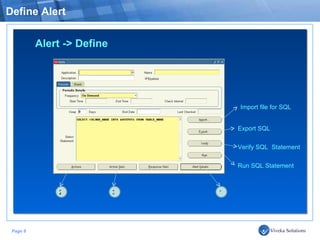
Define Alert Import file for SQL Export SQL  Verify SQL  Statement Run SQL Statement 1 2 3 Alert -> Define
Define Alert Alert Frequency
List of Alert Frequency
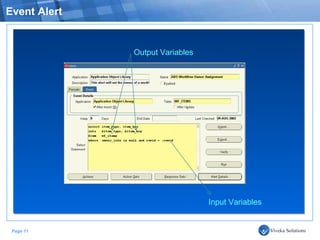
Event Alert Output Variables Input Variables
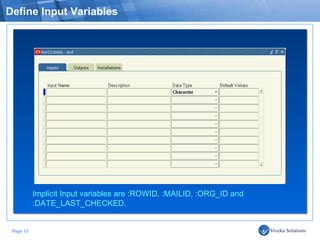
Define Input Variables Implicit Input variables are :ROWID, :MAILID, :ORG_ID and :DATE_LAST_CHECKED.
Define Output Variables
Define Oracle Schema
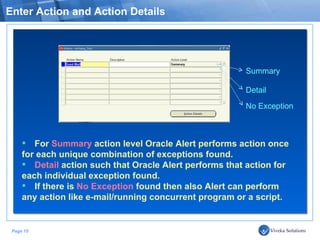
Enter Action and Action Details Summary Detail No Exception For  Summary  action level Oracle Alert performs action once  for each unique combination of exceptions found.  Detail  action such that Oracle Alert performs that action for  each individual exception found.  If there is  No Exception  found then also Alert can perform  any action like e-mail/running concurrent program or a script.
Enter Action Details Action Type - Message Send a Notification to concern persons via E-mail
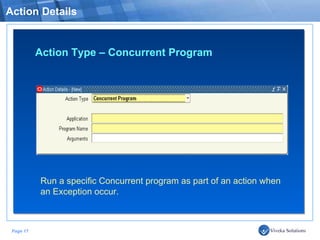
Action Details Action Type – Concurrent Program Run a specific Concurrent program as part of an action when an Exception occur.
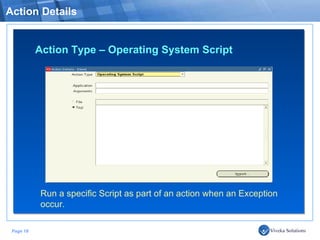
Action Details Action Type – Operating System Script Run a specific Script as part of an action when an Exception occur.
Define Action Set Abort Set Member Finally, add Action in the members tab to complete the Alert definition.
Viveka Solutions Thank You Viveka Solutions provides Online Trainings in Oracle Applications Technical as well as Functional (AP/AR/GL & OM) at very reasonable cost. For more information ,please visit  www.vivekasolutions.com Contact No:  +91.712.229.2235 | 9422.459.459

Oracle Applications Alerts

  • 1.
    Viveka Solutions OracleApplication Technical Special Trainings
  • 2.
    Alerts Oracle Alertgives you an immediate view of the critical activity in your database. It sends Notification for any unusual business events you need to know. Basic Business Needs Lets you specify the exception conditions you want to know about, as often as you want to know about them. Informs you of exception conditions by sending alert messages through a single application - your electronic mail. Takes actions you specify, based upon your response to an alert message. Automatically performs routine database tasks, according to a schedule you define.
  • 3.
    Exceptions & AlertAction Types Exception An exception is a specified condition found during an alert check. For example, an alert checking for users who did not change their passwords within the designated time finds five users that meet the criteria. Each user found is an exception.   Action Types Send an e-mail message Submit a concurrent program request Run a SQL statement script Run an operating system script
  • 4.
    Alert Types EventAlert Event alerts immediately notify you of activity in your database as it happens. You define what a database event is an insert or an update to a table and Oracle Alert informs you when it happens. You specify the following:   A database event that you want to monitor, that is, an insert and/or an update to a specific database table. A SQL Select statement that retrieves specific database information as a result of the database event. As a result of Alert action you can send a mail, running a concurrent program, running an operating script, or running a SQL statement script.
  • 5.
    Alert Types PeriodicAlert A Periodic alert periodically reports key information according to a schedule that you define. Rather than notify you of immediate exceptions in the database like an event alert, a periodic alert scans for specific database information specified by its SQL SELECT statement at scheduled intervals. You can specify the following: A SQL Select statement that retrieves specific database information.  The Frequency that you want the periodic alert to run the SQL statement.  Actions that you want Oracle Alert to perform once it runs the SQL statement.      
  • 6.
    Alert Action LevelAn alert action is an action you want your alert to perform. An alert action can fall under one of three levels: Detail action An action that represents one exception found in the database. Summary action An action that represents multiple exceptions found in the database. No exception action An action that represents no exceptions found in the database.
  • 7.
    Using and CustomizingPredefined Alerts Using Predefine Alerts All predefined alerts are initially disabled. You must enable the alerts you want to use. Select the Oracle Alert Manager responsibility when you start Oracle Applications to view or use a predefined alert. Customizing Predefined Alerts Electronic Mail Integration Standard Alert Message Text Alert Frequency Alert History
  • 8.
    Define Alert Importfile for SQL Export SQL Verify SQL Statement Run SQL Statement 1 2 3 Alert -> Define
  • 9.
  • 10.
    List of AlertFrequency
  • 11.
    Event Alert OutputVariables Input Variables
  • 12.
    Define Input VariablesImplicit Input variables are :ROWID, :MAILID, :ORG_ID and :DATE_LAST_CHECKED.
  • 13.
  • 14.
  • 15.
    Enter Action andAction Details Summary Detail No Exception For Summary action level Oracle Alert performs action once for each unique combination of exceptions found. Detail action such that Oracle Alert performs that action for each individual exception found. If there is No Exception found then also Alert can perform any action like e-mail/running concurrent program or a script.
  • 16.
    Enter Action DetailsAction Type - Message Send a Notification to concern persons via E-mail
  • 17.
    Action Details ActionType – Concurrent Program Run a specific Concurrent program as part of an action when an Exception occur.
  • 18.
    Action Details ActionType – Operating System Script Run a specific Script as part of an action when an Exception occur.
  • 19.
    Define Action SetAbort Set Member Finally, add Action in the members tab to complete the Alert definition.
  • 20.
    Viveka Solutions ThankYou Viveka Solutions provides Online Trainings in Oracle Applications Technical as well as Functional (AP/AR/GL & OM) at very reasonable cost. For more information ,please visit www.vivekasolutions.com Contact No: +91.712.229.2235 | 9422.459.459

Editor's Notes

  • #6 For example, you can define a periodic alert for Oracle Purchasing that sends a message to the Purchasing Manager listing the number of approved requisition lines that each purchasing agent placed on purchase orders. You can define this alert to run weekly, and provide performance measurement on a consistent and timely basis.
  • #9 On Demand- If you choose this frequency, Oracle Alert checks your periodic alert only when you specify. You do not have to fill in any other field in the Periodic Details block. You check on demand alerts by using the Request Periodic Alert Check window. On Day of the Month- If you choose this frequency, Oracle Alert checks your alert on a monthly basis on the day number you enter in the Day field. If you want your alert checked on the last day of the month, enter the number 31. Oracle Alert checks the alert on the 28th, 29th, 30th, or 31st, whichever is the actual last day of the month. On Day of the Week- If you choose this frequency, Oracle Alert checks your alert on the day of the week you enter in the Day field. Every N Calendar Days- If you choose this frequency, enter a value in the Days field. Oracle Alert considers every day a calendar day, and does not skip holidays. Every Day- Choosing this frequency is the same as choosing Every N Calendar Days and entering a value of 1 in the Days field. Every Other Day- Choosing this frequency is the same as choosing Every N Calendar Days and entering a value of 2 in the Days field. Every N Business Days- If you choose this frequency, enter a value in the Days field. Oracle Alert lets you choose your business days, but does not skip any holidays. A value of 1 indicates that Oracle Alert should check the alert every business day, and a value of 2 indicates that Oracle Alert should check the alert every other business day. If you enter 3 in the Days field, Oracle Alert checks your periodic alert every three business days. For example, if you enable your alert on a Monday, Oracle Alert checks the alert first on that Monday, then on Thursday, then on the following Tuesday, then the following Friday, and so on. Every Business Day- Choosing this frequency is the same as choosing Every N Business Days and entering a value of 1 in the Days field. Every Other Business Day- Choosing this frequency is the same as choosing Every N Business Days and entering a value of 2 in the Days field.   Start – End time and Check intervals For example, suppose you want Oracle Alert to check your alert every 2 and a half hours between the hours of 9:00 A.M. and 7:00 P.M. Enter 09:00:00 in the Start Time field, 19:00:00 in the End Time field, and 02:30:00 in the Check Interval field.   Specify a value in the Keep _ Days field to indicate the number of days of exceptions, actions, and response actions history you want to keep for this alert.
  • #10 On Demand- If you choose this frequency, Oracle Alert checks your periodic alert only when you specify. You do not have to fill in any other field in the Periodic Details block. You check on demand alerts by using the Request Periodic Alert Check window. On Day of the Month- If you choose this frequency, Oracle Alert checks your alert on a monthly basis on the day number you enter in the Day field. If you want your alert checked on the last day of the month, enter the number 31. Oracle Alert checks the alert on the 28th, 29th, 30th, or 31st, whichever is the actual last day of the month. On Day of the Week- If you choose this frequency, Oracle Alert checks your alert on the day of the week you enter in the Day field. Every N Calendar Days- If you choose this frequency, enter a value in the Days field. Oracle Alert considers every day a calendar day, and does not skip holidays. Every Day- Choosing this frequency is the same as choosing Every N Calendar Days and entering a value of 1 in the Days field. Every Other Day- Choosing this frequency is the same as choosing Every N Calendar Days and entering a value of 2 in the Days field. Every N Business Days- If you choose this frequency, enter a value in the Days field. Oracle Alert lets you choose your business days, but does not skip any holidays. A value of 1 indicates that Oracle Alert should check the alert every business day, and a value of 2 indicates that Oracle Alert should check the alert every other business day. If you enter 3 in the Days field, Oracle Alert checks your periodic alert every three business days. For example, if you enable your alert on a Monday, Oracle Alert checks the alert first on that Monday, then on Thursday, then on the following Tuesday, then the following Friday, and so on. Every Business Day- Choosing this frequency is the same as choosing Every N Business Days and entering a value of 1 in the Days field. Every Other Business Day- Choosing this frequency is the same as choosing Every N Business Days and entering a value of 2 in the Days field.   Start – End time and Check intervals For example, suppose you want Oracle Alert to check your alert every 2 and a half hours between the hours of 9:00 A.M. and 7:00 P.M. Enter 09:00:00 in the Start Time field, 19:00:00 in the End Time field, and 02:30:00 in the Check Interval field.   Specify a value in the Keep _ Days field to indicate the number of days of exceptions, actions, and response actions history you want to keep for this alert.
  • #11 On Demand- If you choose this frequency, Oracle Alert checks your periodic alert only when you specify. You do not have to fill in any other field in the Periodic Details block. You check on demand alerts by using the Request Periodic Alert Check window. On Day of the Month- If you choose this frequency, Oracle Alert checks your alert on a monthly basis on the day number you enter in the Day field. If you want your alert checked on the last day of the month, enter the number 31. Oracle Alert checks the alert on the 28th, 29th, 30th, or 31st, whichever is the actual last day of the month. On Day of the Week- If you choose this frequency, Oracle Alert checks your alert on the day of the week you enter in the Day field. Every N Calendar Days- If you choose this frequency, enter a value in the Days field. Oracle Alert considers every day a calendar day, and does not skip holidays. Every Day- Choosing this frequency is the same as choosing Every N Calendar Days and entering a value of 1 in the Days field. Every Other Day- Choosing this frequency is the same as choosing Every N Calendar Days and entering a value of 2 in the Days field. Every N Business Days- If you choose this frequency, enter a value in the Days field. Oracle Alert lets you choose your business days, but does not skip any holidays. A value of 1 indicates that Oracle Alert should check the alert every business day, and a value of 2 indicates that Oracle Alert should check the alert every other business day. If you enter 3 in the Days field, Oracle Alert checks your periodic alert every three business days. For example, if you enable your alert on a Monday, Oracle Alert checks the alert first on that Monday, then on Thursday, then on the following Tuesday, then the following Friday, and so on. Every Business Day- Choosing this frequency is the same as choosing Every N Business Days and entering a value of 1 in the Days field. Every Other Business Day- Choosing this frequency is the same as choosing Every N Business Days and entering a value of 2 in the Days field.   Start – End time and Check intervals For example, suppose you want Oracle Alert to check your alert every 2 and a half hours between the hours of 9:00 A.M. and 7:00 P.M. Enter 09:00:00 in the Start Time field, 19:00:00 in the End Time field, and 02:30:00 in the Check Interval field.   Specify a value in the Keep _ Days field to indicate the number of days of exceptions, actions, and response actions history you want to keep for this alert.
  • #12 Input :var1 inputs: :ROWID, :MAILID, :ORG_ID and :DATE_LAST_CHECKED. The values of the implicit inputs are as follows: • ROWID— Contains the ID number of the row where the insert or update that triggers an event alert occurs. • MAILID— Contains the email username of the person who enters an insert or update that triggers an event alert. • ORG_ID— Contains the organization ID that is selected when the alert runs. • DATE_LAST_CHECKED— Contains the date and time that the alert was most recently checked. Output &out1 You can also check the Check for Duplicates check box to customize the combination of outputs you want to verify as a possible duplicate exception each time the alert is checked. A duplicate exception is an exception that existed in your database during previous alert checks. You can define Oracle Alert to perform certain actions based on the presence of these duplicate exceptions.
  • #13 Input :var1 inputs: :ROWID, :MAILID, :ORG_ID and :DATE_LAST_CHECKED. The values of the implicit inputs are as follows: • ROWID— Contains the ID number of the row where the insert or update that triggers an event alert occurs. • MAILID— Contains the email username of the person who enters an insert or update that triggers an event alert. • ORG_ID— Contains the organization ID that is selected when the alert runs. • DATE_LAST_CHECKED— Contains the date and time that the alert was most recently checked. Output &out1 You can also check the Check for Duplicates check box to customize the combination of outputs you want to verify as a possible duplicate exception each time the alert is checked. A duplicate exception is an exception that existed in your database during previous alert checks. You can define Oracle Alert to perform certain actions based on the presence of these duplicate exceptions.
  • #14 Input :var1 inputs: :ROWID, :MAILID, :ORG_ID and :DATE_LAST_CHECKED. The values of the implicit inputs are as follows: • ROWID— Contains the ID number of the row where the insert or update that triggers an event alert occurs. • MAILID— Contains the email username of the person who enters an insert or update that triggers an event alert. • ORG_ID— Contains the organization ID that is selected when the alert runs. • DATE_LAST_CHECKED— Contains the date and time that the alert was most recently checked. Output &out1 You can also check the Check for Duplicates check box to customize the combination of outputs you want to verify as a possible duplicate exception each time the alert is checked. A duplicate exception is an exception that existed in your database during previous alert checks. You can define Oracle Alert to perform certain actions based on the presence of these duplicate exceptions.
  • #16 Action Level – Detail/Summary/No Exception   Detail or Summary Actions You can define a detail action such that Oracle Alert performs that action for each individual exception found.   You can also define a summary action such that Oracle Alert performs that action once for each unique combination of exceptions found.   You decide which exceptions you want Oracle Alert to consider as a unique combination. You can format a detail or summary message action to display the exception(s) in an easy–to–read message.   No Exception Actions Oracle Alert can perform actions if it finds no exceptions in your database. You can define Oracle Alert to send electronic mail messages, run SQL scripts or operating system scripts, or submit concurrent requests, or any combination of the above.  
  • #17 You can also enter in the List field, a distribution list that you define in the Distribution Lists window.   You can also have Oracle Alert print your message to the printer you specify in the Printer field. Enter in the Print For User field, the names, or alert outputs or response variables that represent the names of the recipients for whom you want to print a copy of the message. Separate the names by commas and do not use blank spaces within a name.    
  • #18 Enter any arguments you want to pass to the SQL statement script in the Arguments field, each separated by a space.
  • #19 Enter any arguments you want to pass to the SQL statement script in the Arguments field, each separated by a space.
  • #20 Defining Alert Action Set Members Note: When you add a member to your action set, Oracle Alert automatically indicates in the Type field whether the member is an action, escalation group, or threshold group, and what its action type is (e-mail message, concurrent request, operating system script, or SQL statement script). Oracle Alert also indicates whether the member is enable.   Check Suppress Duplicates (stop sending alerts) if you want Oracle Alert to suppress the actions in this action set if the exception found is a duplicate that occurred during the last alert check. Note that you first have to save history to use this function. In the Summary Threshold field, enter a number that represents the maximum number of exceptions that the alert Select statement can find before Oracle Alert switches from performing the detail action in the threshold group to performing the summary action. You can define a summary threshold for each threshold group that resides in an action set.   If an action fails, you can choose to have Oracle Alert abort the action set, continue processing other action set members, or process another action set. If you select Set: in the On Error Action field, Oracle Alert leaves the current action set and performs the action set whose sequence number you specify in the Seq field when an error occurs. If you select Member:, Oracle Alert performs the action set member whose sequence number you specify in the Seq field.
  • #21 Load Balancing Definitions The relevant hardware device, often called a server load balancer , receives the relevant network traffic for the site, and distributes it to the various servers in the cluster based on the load balancing methodology that it supports. By sending requests to different nodes within the server cluster, system performance is optimized, scalability is simplified, and application availability (a key requirement of Web-based applications) is greatly enhanced.