© Justin Robertson 2017. All rights reserved.
Object-Oriented
Programming
IB Computer Science Option D
© Justin Robertson 2017. All rights reserved.
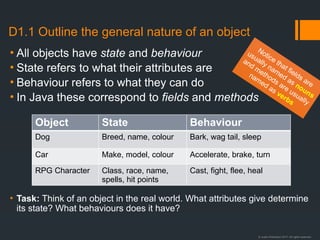
D1.1 Outline the general nature of an object
• All objects have state and behaviour
• State refers to what their attributes are
• Behaviour refers to what they can do
• In Java these correspond to fields and methods
• Task: Think of an object in the real world. What attributes give determine
its state? What behaviours does it have?
Object State Behaviour
Dog Breed, name, colour Bark, wag tail, sleep
Car Make, model, colour Accelerate, brake, turn
RPG Character Class, race, name,
spells, hit points
Cast, fight, flee, heal
Notice that fields are
usually named as nouns
and methods are usually
named as verbs
© Justin Robertson 2017. All rights reserved.
D.1.2 Distinguish an object
and its instantiation
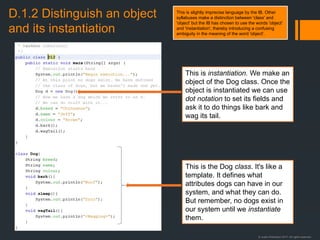
This is instantiation. We make an
object of the Dog class. Once the
object is instantiated we can use
dot notation to set its fields and
ask it to do things like bark and
wag its tail.
This is the Dog class. It's like a
template. It defines what
attributes dogs can have in our
system, and what they can do.
But remember, no dogs exist in
our system until we instantiate
them.
This is slightly imprecise language by the IB. Other
syllabuses make a distinction between 'class' and
'object' but the IB has chosen to use the words 'object'
and 'instantiation', thereby introducing a confusing
ambiguity in the meaning of the word 'object'.
© Justin Robertson 2017. All rights reserved.
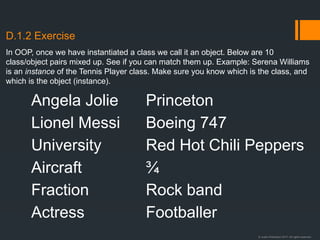
D.1.2 Exercise
Angela Jolie
Lionel Messi
University
Aircraft
Fraction
Actress
Princeton
Boeing 747
Red Hot Chili Peppers
¾
Rock band
Footballer
In OOP, once we have instantiated a class we call it an object. Below are 10
class/object pairs mixed up. See if you can match them up. Example: Serena Williams
is an instance of the Tennis Player class. Make sure you know which is the class, and
which is the object (instance).
© Justin Robertson 2017. All rights reserved.
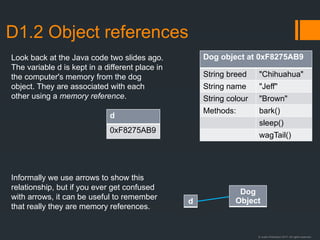
D1.2 Object references
d
0xF8275AB9
Dog object at 0xF8275AB9
String breed "Chihuahua"
String name "Jeff"
String colour "Brown"
Methods: bark()
sleep()
wagTail()
d
Dog
Object
Look back at the Java code two slides ago.
The variable d is kept in a different place in
the computer's memory from the dog
object. They are associated with each
other using a memory reference.
Informally we use arrows to show this
relationship, but if you ever get confused
with arrows, it can be useful to remember
that really they are memory references.
© Justin Robertson 2017. All rights reserved.
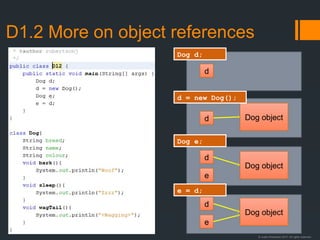
D1.2 More on object references
d
d Dog object
d
Dog object
e
d
Dog object
e
Dog d;
d = new Dog();
Dog e;
e = d;
© Justin Robertson 2017. All rights reserved.
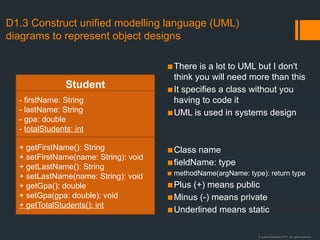
D1.3 Construct unified modelling language (UML)
diagrams to represent object designs
▪There is a lot to UML but I don't
think you will need more than this
▪It specifies a class without you
having to code it
▪UML is used in systems design
▪Class name
▪fieldName: type
▪ methodName(argName: type): return type
▪Plus (+) means public
▪Minus (-) means private
▪Underlined means static
Student
- firstName: String
- lastName: String
- gpa: double
- totalStudents: int
+ getFirstName(): String
+ setFirstName(name: String): void
+ getLastName(): String
+ setLastName(name: String): void
+ getGpa(): double
+ setGpa(gpa: double): void
+ getTotalStudents(): int
© Justin Robertson 2017. All rights reserved.
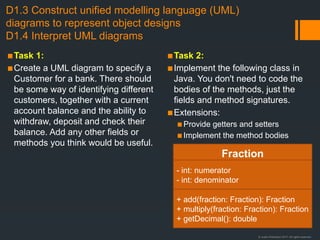
D1.3 Construct unified modelling language (UML)
diagrams to represent object designs
D1.4 Interpret UML diagrams
▪Task 1:
▪Create a UML diagram to specify a
Customer for a bank. There should
be some way of identifying different
customers, together with a current
account balance and the ability to
withdraw, deposit and check their
balance. Add any other fields or
methods you think would be useful.
▪Task 2:
▪Implement the following class in
Java. You don't need to code the
bodies of the methods, just the
fields and method signatures.
▪Extensions:
▪Provide getters and setters
▪Implement the method bodies
Fraction
- int: numerator
- int: denominator
+ add(fraction: Fraction): Fraction
+ multiply(fraction: Fraction): Fraction
+ getDecimal(): double
© Justin Robertson 2017. All rights reserved.
Relationships between UML objects
Bird
- species: String
- etc
+ getSpecies: String
+ setSpecies(species: String): void
Finch
[Finch-specifc variables]
[Finch-specifc methods]
Club
- members: Member[]
+ getMember(id: int): Member
Member
- id: int
+ getId(): int
Course
- students: Student[]
+ getStudent(id: int): Student
Student
- id: int
+ getId(): int
Inheritance
A finch is a bird.
Note that the arrow points at the
superclass.
Composition
A club has members..
When the club is deleted, its
members are deleted too.
Aggregation
A course has students..
When the course is deleted, the
students remain in the system..
Note: I doubt you would ever have to distinguish between composition and aggregation. If you get a
question and you think the answer is composition/aggregation then I suggest you do what I just did
and write "composition/aggregation" and then add "a Club has a Member" and give an example.
I also doubt you will need to remember the shapes of the connectors. I'm sure it would be fine just to
draw a line between the boxes and write "is a" or "has" in these cases.
© Justin Robertson 2017. All rights reserved.
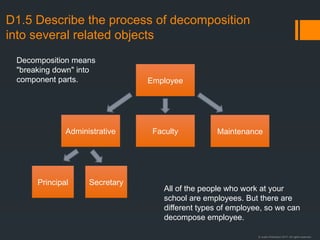
D1.5 Describe the process of decomposition
into several related objects
Principal
Employee
Administrative Faculty Maintenance
Secretary
Decomposition means
"breaking down" into
component parts.
All of the people who work at your
school are employees. But there are
different types of employee, so we can
decompose employee.
© Justin Robertson 2017. All rights reserved.
D1.5 Describe the process of decomposition
into several related objects
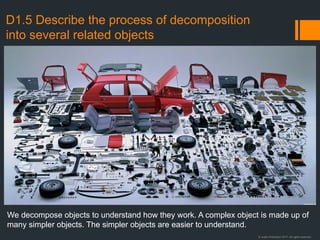
We decompose objects to understand how they work. A complex object is made up of
many simpler objects. The simpler objects are easier to understand.
© Justin Robertson 2017. All rights reserved.
D1.5 Describe the process of decomposition
into several related objects
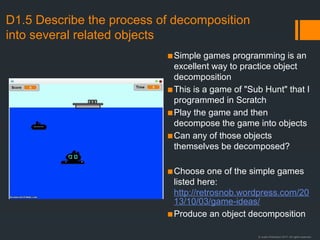
▪Simple games programming is an
excellent way to practice object
decomposition
▪This is a game of "Sub Hunt" that I
programmed in Scratch
▪Play the game and then
decompose the game into objects
▪Can any of those objects
themselves be decomposed?
▪Choose one of the simple games
listed here:
http://retrosnob.wordpress.com/20
13/10/03/game-ideas/
▪Produce an object decomposition
© Justin Robertson 2017. All rights reserved.
D1.6 Describe the relationships between
objects for a given problem.
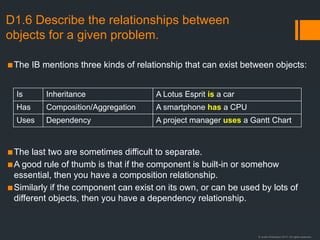
▪The IB mentions three kinds of relationship that can exist between objects:
▪The last two are sometimes difficult to separate.
▪A good rule of thumb is that if the component is built-in or somehow
essential, then you have a composition relationship.
▪Similarly if the component can exist on its own, or can be used by lots of
different objects, then you have a dependency relationship.
Is Inheritance A Lotus Esprit is a car
Has Composition/Aggregation A smartphone has a CPU
Uses Dependency A project manager uses a Gantt Chart
© Justin Robertson 2017. All rights reserved.
D1.6 Describe the relationships between
objects for a given problem.
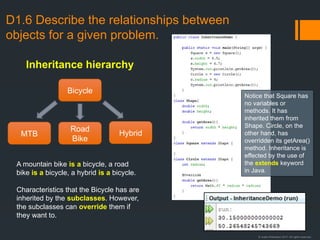
Bicycle
MTB
Road
Bike
Hybrid
A mountain bike is a bicycle, a road
bike is a bicycle, a hybrid is a bicycle.
Characteristics that the Bicycle has are
inherited by the subclasses. However,
the subclasses can override them if
they want to.
Inheritance hierarchy
Notice that Square has
no variables or
methods. It has
inherited them from
Shape. Circle, on the
other hand, has
overridden its getArea()
method. Inheritance is
effected by the use of
the extends keyword
in Java.
© Justin Robertson 2017. All rights reserved.
D1.6 Describe the relationships between
objects for a given problem.
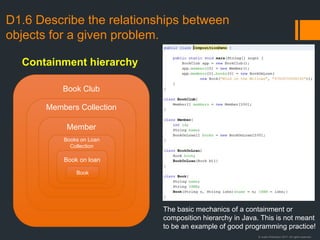
Book Club
Members Collection
Member
Books on Loan
Collection
Book on loan
Containment hierarchy
Book
The basic mechanics of a containment or
composition hierarchy in Java. This is not meant
to be an example of good programming practice!
© Justin Robertson 2017. All rights reserved.
D1.7 Outline the need to reduce dependencies
between objects in a given problem.
▪Two classes are said to form a
dependency if a change to one of
them necessitates a change in the
other.
▪On large software projects this can
cause significant problems.
▪This is also known as high
coupling.
▪Decoupling is desirable and is
what every software developer
strives for.
▪Encapsulation is one of many
ways to reduce coupling.
▪Most of the others are beyond the
IB syllabus, such as the use of
Interfaces, factory patterns and
dependency injections.
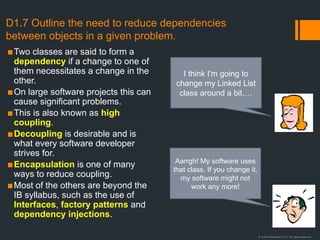
I think I'm going to
change my Linked List
class around a bit.…
Aarrgh! My software uses
that class. If you change it,
my software might not
work any more!
© Justin Robertson 2017. All rights reserved.
D1.8 Construct related objects for a given
problem
▪ The guide states "In examinations problems will
require the students to construct definitions for no
more than three objects and to explain their
relationships to each other and to any additional
classes defined by the examiners."
▪ I assume this means:
▪ Constructing UML diagrams from a textual description
of a scenario.
▪ Constructing code from a textual description of a
scenario.
▪ Constructing code from a set of UML diagrams.
▪ Students should study the sample question from
the IB.
▪ Things to consider are:
▪ Is there an inheritance (is-a) relationship?
▪ If so, which is the superclass and which are the
subclasses?
▪ What fields and methods does the superclass
have?
▪ What different fields and methods do each of
the subclasses have? (Remember that they will
all inherit the fields and methods from the
superclass.)
▪ Are there any containment/composition (has-a)
relationships?
▪Possible scenarios could be:
▪Car, Vehicle, Motorcycle, Van
▪Dog, Cat, Animal, Bird
▪Salesperson, Factory Worker,
Secretary, Employee
▪Task: for each scenario
▪Draw the inheritance hierarchy,
showing which is the superclass
▪Give the superclass two plausible
fields which should be inherited by
all subclasses
▪For each subclass, add one other
field specific to that subclass
▪Code the classes in Java
© Justin Robertson 2017. All rights reserved.
D1.9 Explain the need for different data
types to represent data items.
▪I read an excellent answer to this question on StackExchange. Here it is:
01010100 01101000 01100101 00100000 01110010 01100101 01100001 01110011 01101111 01101110 00100000 01110100 01101000 01100001 01110100 00100000 01110000 01110010 01101111 01100111 01110010
01100001 01101101 01101101 01100101 01110010 01110011 00100000 01110101 01110011 01100101 00100000 01100100 01100001 01110100 01100001 01110100 01111001 01110000 01100101 01110011 00100000
01110010 01100001 01110100 01101000 01100101 01110010 00100000 01110100 01101000 01100001 01101110 00100000 01110010 01100001 01110111 00100000 01100010 01101001 01110100 01110011 00100000
01101001 01110011 00100000 01100010 01100101 01100011 01100001 01110101 01110011 01100101 00100000 01110010 01100101 01110001 01110101 01101001 01110010 01101001 01101110 01100111 00100000
01110100 01101000 01100101 00100000 01101000 01110101 01101101 01100001 01101110 00100000 01100010 01110010 01100001 01101001 01101110 00100000 01110100 01101111 00100000 01110100 01110010
01100001 01101110 01110011 01101100 01100001 01110100 01100101 00100000 01100010 01101001 01101110 01100001 01110010 01111001 00100000 01110100 01101111 00100000 01110100 01101000 01100101
00100000 01100001 01110000 01110000 01110010 01101111 01110000 01110010 01101001 01100001 01110100 01100101 00100000 01110011 01100101 01101101 01100001 01101110 01110100 01111001 01100011
00100000 01110100 01111001 01110000 01100101 00100000 01101001 01101101 01110000 01101111 01110011 01100101 01110011 00100000 01100001 00100000 01101101 01100001 01110011 01110011 01101001
01110110 01100101 00100000 01100011 01101111 01100111 01101110 01101001 01110100 01101001 01110110 01100101 00100000 01101100 01101111 01100001 01100100 00100000 01110100 01101000 01100001
01110100 00100000 01110111 01101111 01110101 01101100 01100100 00100000 01101101 01100001 01101011 01100101 00100000 01110000 01110010 01101111 01100100 01110101 01100011 01110100 01101001
01110110 01101001 01110100 01111001 00100000 01101110 01101111 01101110 00101101 01100101 01111000 01101001 01110011 01110100 01100001 01101110 01110100 00101110 00100000 00100000 01000110
01101111 01110010 00100000 01101001 01101110 01110011 01110100 01100001 01101110 01100011 01100101 00101100 00100000 01101001 01110100 00100000 01101001 01110011 00100000 01101110 01100101
01100001 01110010 01101100 01111001 00100000 01100011 01100101 01110010 01110100 01100001 01101001 01101110 00100000 01110100 01101000 01100001 01110100 00100000 01101110 01101111 00100000
01101000 01111101 01101101 01100001 01101110 00100000 01100010 01100101 01101001 01101110 01100111 00100000 01110111 01101001 01101100 01101100 00100000 01110010 01100101 01100001 01100100
00100000 01110100 01101000 01101001 01110011 00100000 01110100 01100101 01111000 01110100 00100000 01110111 01101001 01110100 01101000 01101111 01110101 01110100 00100000 01110101 01110011
01101001 01101110 01100111 00100000 01110011 01101111 01101101 01100101 00100000 01110011 01101111 01110010 01110100 00100000 01101111 01100110 00100000 01101101 01100001 01100011 01101000
01101001 01101110 01100101 00100000 01110100 01110010 01100001 01101110 01110011 01101100 01100001 01110100 01101111 01110010 00100000 01110100 01101111 00100000 01110100 01110010 01100001
01101110 01110011 01101100 01100001 01110100 01100101 00100000 01110100 01101000 01100101 01110011 01100101 00100000 00110001 01110011 00100000 01100001 01101110 01100100 00100000 00110000
01110011 00100000 01101001 01101110 01110100 01101111 00100000 01100001 00100000 01100100 01100001 01110100 01100001 01110100 01111001 01110000 01100101 00100000 00101000 01110100 01100101
01111000 01110100 00101001 00100000 01111100 01101000 01100001 01110100 00100000 01110100 01101000 01100101 01111001 00100000 01100011 01100001 01101110 00100000 01101101 01101111 01110010
01100101 00100000 01101101 01100001 01110011 01101001 01101100 01111001 00100000 01110101 01101110 01100100 01100101 01110010 01110011 01110100 01100001 01101110 01100100 00101110 00100000
00100000 01010011 01101111 00100000 01101001 01110100 00100000 01101001 01110011 00100000 01110111 01101001 01110100 01101000 00100000 01100001 01101100 01101100 00100000 01100100 01100001
01110100 01100001 01110100 01111001 01110000 01100101 01110011 00101110 00100000 00100000 01010100 01101000 01100101 00100000 01101000 01110101 01101101 01100001 01101110 00100000 01101101
01100101 01101110 01110100 01100001 01101100 00100000 01110000 01110010 01101111 01100011 01100101 01110011 01110011 01101001 01101110 01100111 00100000 01110100 01101111 00100000 01100011
01101111 01101110 01110110 01100101 01110010 01110100 00100000 01100001 00100000 00110011 00110010 00101101 01100010 01101001 01110100 00100000 01110010 01100101 01110000 01110010 01100101
01110011 01100101 01101110 01110100 01100001 01110100 01101001 01101111 01101110 00100000 01101111 01100110 00100000 01100001 00100000 01100110 01101100 01101111 01100001 01110100 01101001
01101110 01100111 00100000 01110000 01101111 01101001 01101110 01110100 00100000 01101110 01010101 01101101 01100010 01100101 01110010 00100000 01101001 01101110 01110100 01101111 00100000
01110100 01101000 01100101 00100000 01110010 01100101 01110000 01110010 01100101 01110011 01100101 01101110 01110100 01100001 01110100 01101001 01101111 01101110 00100000 01110100 01101000
01100001 01110100 00100000 01101001 01110011 00100000 01100001 01100011 01110100 01110101 01100001 01101100 01101100 01111001 00100000 01110101 01101110 01100100 01100101 01110010 01110011
01110100 01100001 01101110 01100100 01100001 01100010 01101100 01100101 00100000 01101001 01110011 00100000 01100110 01100001 01110010 00100000 01100111 01110010 01100101 01100001 01110100
01100101 01110010 00100000 01110100 01101000 01100001 01101110 00100000 01110100 01101000 01100101 00100000 01100101 01100110 01101110 01101111 01110010 01110100 00100000 01110100 01101111
00100000 01110100 01110010 01100001 01101110 01110011 01101100 01100001 01110100 01100101 00100000 00110000 00110000 00110001 00110000 00110000 00110000 00110000 00110001 00100000 01101001
01101110 01110100 01101111 00100000 00100111 01100001 00100111 00101110 00100000 00100000 01011001 01100101 01110100 00100000 01101110 01101111 00100000 01101111 01101110 01100101 00100000
01110111 01101111 01110101 01101100 01100100 00100000 01100010 01100101 00100000 01110111 01101001 01101100 01101100 01101001 01101110 01100111 00100000 01110100 01101111 00100000 01100100
01101111 00100000 01100101 01110110 01100101 01101110 00100000 01110100 01101000 01101001 01110011 00100000 01100101 01100001 01110011 01101001 01100101 01110010 00100000 01110100 01110010
01100001 01101110 01110011 01101100 01100001 01110100 01101001 01101111 01101110 00101110 00100000 00100000 00100000 00001010 00001010 01010100 01101000 01100101 01110010 01100101 00100000
01110111 01100001 01110011 00100000 01100001 00100000 01010100 01101001 01101101 01100101 00100000 01110111 01101000 01100101 01101110 00100000 01110000 01100101 01101111 01110000 01101100
01100101 00100000 01100100 01101001 01100100 00100000 01110111 01101111 01110010 01101011 00100000 01100100 01101001 01110010 01100101 01100011 01110100 01101100 01111001 00100000 01101001
01101110 00100000 01100010 01101001 01101110 01100001 01110010 01111001 00101100 00100000 01100010 01110101 01110100 00100000 01101001 01110100 00100000 01110111 01100001 01110011 00100000
01100001 00100000 01110100 01101001 01101101 01100101 00100000 01110111 01101000 01100101 01101110 00100000 01110000 01110010 01101111 01100111 01110010 01100001 01101101 01110011 00100000
01100100 01101001 01100100 00100000 01100110 01100001 01101001 01110010 01101100 01111001 00100000 01110011 01101001 01101101 01110000 01101100 01100101 00100000 01110100 01100001 01110011
01101011 01110011 00100000 01101100 01101001 01101011 01100101 00100000 01100011 01110010 01100101 01100001 01110100 01101001 01101110 01000111 00100000 01110000 01110010 01101001 01101110
01110100 01100101 01100100 00100000 01110011 01101001 01101110 00100000 01110100 01100001 01101010 01101100 01100101 01110011 00101100 00100000 01110000 01110010 01101111 01100111 01110010
01100001 01101101 01110011 00100000 01110100 01101000 01100001 01110100 00100000 01110100 01101111 01100100 01100001 01111001 00100000 01100001 01110010 01100101 00100000 01100001 00100000
01110100 01101000 01110010 01101111 01110111 00101101 01100001 01110111 01100001 01111001 00100000 01101111 01101110 01100101 00101101 01101100 01101001 01101110 01100101 01110010 00100000
01110100 01101000 01100001 01101110 00100000 01110100 01101111 01101111 01101011 00100000 01101000 01101111 01110101 01110010 01110011 00100000 01101111 01110010 00100000 01100100 01100001
01111001 01110011 00100000 01101111 01100110 00100000 01110100 01111000 01101111 01110101 01100111 01101000 01110100 01001110 00000000
© Justin Robertson 2017. All rights reserved.
D1.9 Explain the need for different data
types to represent data items.
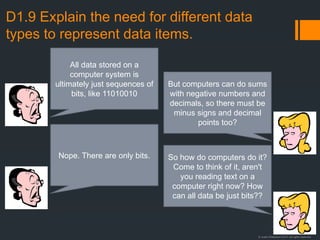
All data stored on a
computer system is
ultimately just sequences of
bits, like 11010010
But computers can do sums
with negative numbers and
decimals, so there must be
minus signs and decimal
points too?
Nope. There are only bits. So how do computers do it?
Come to think of it, aren't
you reading text on a
computer right now? How
can all data be just bits??
© Justin Robertson 2017. All rights reserved.
D1.9 Explain the need for different data
types to represent data items.
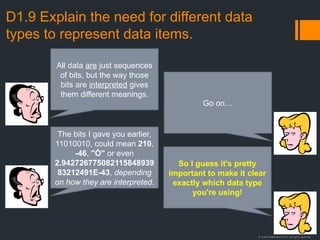
All data are just sequences
of bits, but the way those
bits are interpreted gives
them different meanings.
Go on…
The bits I gave you earlier,
11010010, could mean 210,
-46, "Ò" or even
2.942726775082115848939
83212491E-43, depending
on how they are interpreted.
So I guess it's pretty
important to make it clear
exactly which data type
you're using!
© Justin Robertson 2017. All rights reserved.
D1.9 Explain the need for different data
types to represent data items.
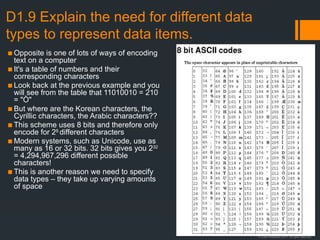
▪ Opposite is one of lots of ways of encoding
text on a computer
▪ It's a table of numbers and their
corresponding characters
▪ Look back at the previous example and you
will see from the table that 11010010 = 210
= "Ò"
▪ But where are the Korean characters, the
Cyrillic characters, the Arabic characters??
▪ This scheme uses 8 bits and therefore only
encode for 28
different characters
▪ Modern systems, such as Unicode, use as
many as 16 or 32 bits. 32 bits gives you 232
= 4,294,967,296 different possible
characters!
▪ This is another reason we need to specify
data types – they take up varying amounts
of space
© Justin Robertson 2017. All rights reserved.
D1.10 Describe how data items can be
passed to and from actions as parameters.
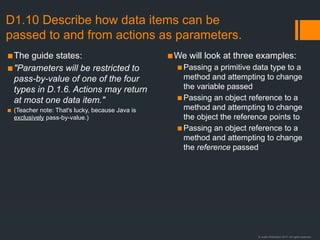
▪The guide states:
▪"Parameters will be restricted to
pass-by-value of one of the four
types in D.1.6. Actions may return
at most one data item."
▪ (Teacher note: That's lucky, because Java is
exclusively pass-by-value.)
▪We will look at three examples:
▪Passing a primitive data type to a
method and attempting to change
the variable passed
▪Passing an object reference to a
method and attempting to change
the object the reference points to
▪Passing an object reference to a
method and attempting to change
the reference passed
© Justin Robertson 2017. All rights reserved.
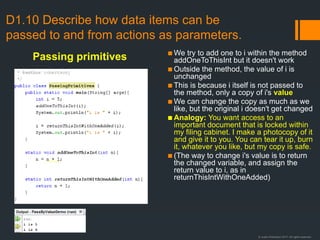
▪ We try to add one to i within the method
addOneToThisInt but it doesn't work
▪ Outside the method, the value of i is
unchanged
▪ This is because i itself is not passed to
the method, only a copy of i's value
▪ We can change the copy as much as we
like, but the original i doesn't get changed
▪ Analogy: You want access to an
important document that is locked within
my filing cabinet. I make a photocopy of it
and give it to you. You can tear it up, burn
it, whatever you like, but my copy is safe.
▪ (The way to change i's value is to return
the changed variable, and assign the
return value to i, as in
returnThisIntWithOneAdded)
D1.10 Describe how data items can be
passed to and from actions as parameters.
Passing primitives
© Justin Robertson 2017. All rights reserved.
D1.10 Describe how data items can be
passed to and from actions as parameters.
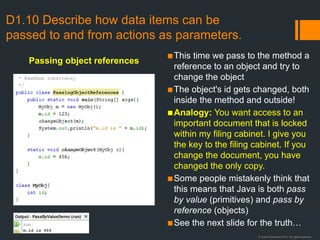
▪This time we pass to the method a
reference to an object and try to
change the object
▪The object's id gets changed, both
inside the method and outside!
▪Analogy: You want access to an
important document that is locked
within my filing cabinet. I give you
the key to the filing cabinet. If you
change the document, you have
changed the only copy.
▪Some people mistakenly think that
this means that Java is both pass
by value (primitives) and pass by
reference (objects)
▪See the next slide for the truth…
Passing object references
© Justin Robertson 2017. All rights reserved.
D1.10 Describe how data items can be
passed to and from actions as parameters.
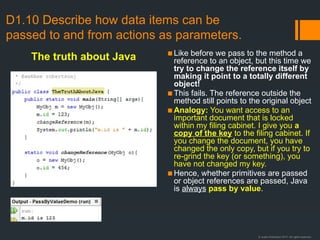
▪Like before we pass to the method a
reference to an object, but this time we
try to change the reference itself by
making it point to a totally different
object!
▪This fails. The reference outside the
method still points to the original object
▪Analogy: You want access to an
important document that is locked
within my filing cabinet. I give you a
copy of the key to the filing cabinet. If
you change the document, you have
changed the only copy, but if you try to
re-grind the key (or something), you
have not changed my key.
▪Hence, whether primitives are passed
or object references are passed, Java
is always pass by value.
The truth about Java
© Justin Robertson 2017. All rights reserved.
D1.10 Describe how data items can be
passed to and from actions as parameters.
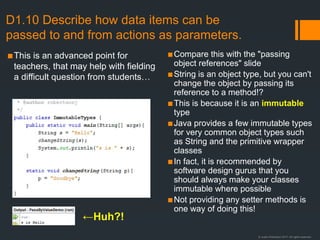
▪This is an advanced point for
teachers, that may help with fielding
a difficult question from students…
▪Compare this with the "passing
object references" slide
▪String is an object type, but you can't
change the object by passing its
reference to a method!?
▪This is because it is an immutable
type
▪Java provides a few immutable types
for very common object types such
as String and the primitive wrapper
classes
▪In fact, it is recommended by
software design gurus that you
should always make your classes
immutable where possible
▪Not providing any setter methods is
one way of doing this!
←Huh?!
© Justin Robertson 2017. All rights reserved.
D2.1 Define the term encapsulation
D2.4 Explain the advantages of encapsulation
▪ Encapsulation is the practice of hiding the inner design of an object data type in a class.
▪ In Java this is achieved by using the private keyword for fields and methods that should not be accessible
outside the class.
▪ This is also known as "data hiding"
▪ It is used to separate implementation (how an object is built) from interface (how an object can be used)
▪ It allows users of the object to concentrate on what is important to them, without having to get involved
with the complexities of how the object works.
▪ It also prevents other objects from accessing and possibly corrupting internal data.
▪ Finally, the interface/implementation decoupling helps to reduce dependencies because changes can be
made to the implementation without necessitating changes to the interface.
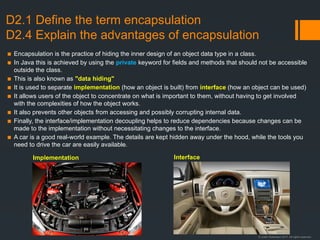
▪ A car is a good real-world example. The details are kept hidden away under the hood, while the tools you
need to drive the car are easily available.
Implementation Interface
© Justin Robertson 2017. All rights reserved.
D2.2 Define the term inheritance
D2.5 Explain the advantages of inheritance
▪ One class (the subclass) can be
programmed to inherit from another
class (the superclass)
▪ The subclass automatically gets all of
the fields and methods of the
superclass (except ones explicitly
declared as private)
▪ The subclass can override any of the
fields and methods of the superclass
by declaring its own version with the
same name
▪ Inheritance forms an "is-a"
relationship. For example, you might
design a Car class to inherit from a
Vehicle class because a car is a
vehicle.
▪Inheritance allows code reuse
because you can create a new
object type from an existing one;
you don't need to write the code
again.
▪It also helps to avoid errors by
reducing the number of times the
same piece of code has to be
written.
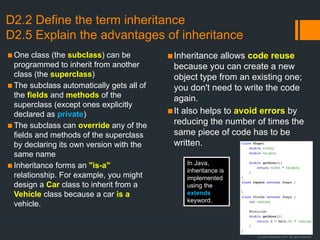
In Java,
inheritance is
implemented
using the
extends
keyword.
© Justin Robertson 2017. All rights reserved.
Practice with inheritance hierarchies
Sample Superclasses:
▪ Vehicle {Car, Bus, Lorry}
▪ Animal {…etc
▪ Employee
▪ RPGCharacter
▪ Shape
▪ Publication
▪ Subject
▪ Teacher
▪ Student
Task:
1. Choose a superclass.
2. Identify three possible subclasses
3. Identify one variable and one method
that belongs to the superclass
4. Identify one variable and one method
for each of the subclasses
▪ The "is-a" test
If you create an inheritance hierarchy e.g.
class [Subclass] extends [Superclass], then
it must make sense to say the sentence:
"A [Subclass] is a [Superclass]"
(e.g. "A square is a shape" makes sense.)
▪ If that sentence doesn't make sense for your
example, then you haven't got an
inheritance hierarchy.
▪ Which of these are valid inheritance
hierarchies using the "is-a" test?
▪ class Finch extends Bird
▪ class Guitar extends Instrument
▪ class Teacher extends School
▪ class Player extends FootballTeam
▪ class Beef extends Meat
▪ class Actor extends Movie
© Justin Robertson 2017. All rights reserved.
D2.3 Define the term polymorphism
D2.6 Explain the advantages of polymorphism
▪ Polymorphism in object-oriented languages refers
to the facility by which one object or function can
exhibit different attributes and behaviours
depending on the context.
▪ The guide states: "Actions have the same name
but different parameter lists and processes."
▪ This seems to suggest that the IB are only
interested in method overloading, which is
compile-time or "static" polymorphism.
▪ Method overloading allows the same name to be
used for more than one method.
▪ Java decides which method is the correct one to
use depending on the type and number of
arguments.
▪ This makes objects more robust because they can
gracefully handle lots of types of input.
▪ It also simplifies the code that uses the object,
because it doesn't have to explicitly deal with each
different possible scenario. The object itself can
do that.
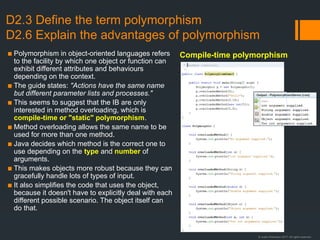
Compile-time polymorphism
© Justin Robertson 2017. All rights reserved.
D2.3 Define the term polymorphism
D2.6 Explain the advantages of polymorphism
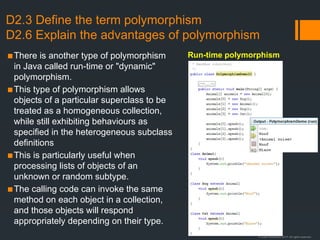
▪There is another type of polymorphism
in Java called run-time or "dynamic"
polymorphism.
▪This type of polymorphism allows
objects of a particular superclass to be
treated as a homogeneous collection,
while still exhibiting behaviours as
specified in the heterogeneous subclass
definitions
▪This is particularly useful when
processing lists of objects of an
unknown or random subtype.
▪The calling code can invoke the same
method on each object in a collection,
and those objects will respond
appropriately depending on their type.
Run-time polymorphism
© Justin Robertson 2017. All rights reserved.
D2.7 Describe the advantages of
libraries of objects.
▪A library is a repository of code that
can be imported into a project.
▪Libraries mean that code doesn't
need to be re-created by different
programmers each time they
develop some software.
▪Library code is often provided by
advanced programmers who know
the language well and have
optimized and tested it
thoroughly.
▪In this way, using library code
improves performance and
reliability of software.
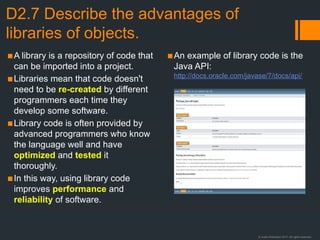
▪An example of library code is the
Java API:
http://docs.oracle.com/javase/7/docs/api/
© Justin Robertson 2017. All rights reserved.
D2.8 Describe the disadvantages of OOP
D2.9 Discuss the use of programming teams
▪Simple tasks can be over-
complicated by the use of OOP
▪Key concepts such as inheritance,
encapsulation and polymorphism
can be difficult to grasp initially
▪Programmers may be unfamiliar
with the approach; there is a
learning curve
▪Allows specialisation in one area,
e.g. testing, documentation
▪Dependency reduction using
techniques like encapsulation can
mean that different programmers
can work on different objects
simultaneously without any danger
of incompatibility
▪Concurrent development like this
reduces the time required to build
new software
▪Programmers working alone have
to do everything serially and have
to have expertise in all areas of
software design and development
Disadvantages of OOP Programming in teams
© Justin Robertson 2017. All rights reserved.
D2.10 Explain the advantages of modularity
in program development.
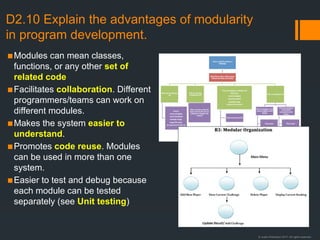
▪Modules can mean classes,
functions, or any other set of
related code
▪Facilitates collaboration. Different
programmers/teams can work on
different modules.
▪Makes the system easier to
understand.
▪Promotes code reuse. Modules
can be used in more than one
system.
▪Easier to test and debug because
each module can be tested
separately (see Unit testing)
© Justin Robertson 2017. All rights reserved.
D3.1 Define the terms: class, identifier, primitive, instance
variable, parameter variable, local variable
• Class: A class is the definition of a new reference (object) type. It is a
combination of data and operations that can be performed on that
data; a specification of the data members and methods of the object.
• Identifier: The name or label chosen by the programmer to represent a
variable, method, class, data type or any other element defined within the
program.
• Primitive: a basic non-object data type built in to a language; in Java the
primitives are byte, short, int, long, float, double, boolean, char
• Instance Variable: a variable defined in a class of which each instantiated
object has its own copy (cf class variable)
• Parameter variable: the variable in the signature of a method that holds
the value of the an argument passed to the method when it is called
• Local variable: a variable that has local scope; a variable defined within a
method that is not visible outside the method
© Justin Robertson 2017. All rights reserved.
D3.2 Define the terms: method, accessor, mutator,
constructor, signature, return value.
• Method: a procedure defined within a class
• Accessor: a public method that returns the value of a private instance
variable. Used along with a mutator to implement encapsulation. Also
"getter" because its name conventionally begins with "get", e.g. "getId" to
return the private Id variable.
• Mutator: a public method that allows the value of a private instance
variable to be set by passing a parameter. Used along with an accessor to
implement encapsulation. Also "setter" because its name conventionally
begins with "set", e.g. "setId" to set the value of the private Id variable.
• Constructor: a special method with the same name as the class that
executes when an object of the class is instantiated. Often used to
initialize instance variables.
• Signature: the first line of a method, which includes the return type, the
method name, and the parameter types and names
• Return value: the value returned by a method's return statement
© Justin Robertson 2017. All rights reserved.
A quick word about
the super keyword
• Super refers to the
superclass.
• When called as a method,
super() refers to the
superclass constructor.
• If the superclass
constructor is overloaded
then super() can be called
with parameters and
polymorphism will ensure
that the correct constructor
is called.
• In the example note that id
is private to the Employee
and so can't be accessed
in the Teacher.
• However, the value of the
id field can be set using a
call to the super() function
with id as a parameter.
public class SuperDemo {
public static void main(String[] args) {
System.out.println("Starting main...");
Teacher teacher = new Teacher(345);
System.out.println(teacher.getId());
}
}
class Employee {
private int id;
Employee() {
System.out.println("Employee constructor");
}
Employee(int id) {
this.id = id;
}
public int getId() {
return id;
}
}
class Teacher extends Employee {
Teacher() {
super();
System.out.println("Teacher constructor");
}
Teacher(int id) {
super(id);
}
}
© Justin Robertson 2017. All rights reserved.
D3.3 Define the terms: private, protected,
public, extends, static
• private: if a field or method is declared
private then it cannot be accessed or called
from outside the class; not even subclasses
will inherit elements marked private
• public: fields or methods marked public can
be accessed or called from anywhere
• protected: protected is between private and public; fields or methods
marked as protected can be accessed within the class, by subclasses
and by other classes within the same package, but not from outside the
package
• extends: the extends keyword establishes an inheritance relationship
between classes, e.g. Cat extends Animal
• static: fields or methods declared as static belong to the class itself, not
to any particular instance of the class. When the value of a static field
(aka class variable) is changed, it changes for all instances of that class.
© Justin Robertson 2017. All rights reserved.
D3.4 Describe the uses of the primitive data
types and the reference class string
• The guide states: "In examination questions the primitive types will be
limited to int, long, double, char and boolean."
Using int and long
• These are both integer types, which means they can store whole numbers only
• They can store positive and negative values
• ints generally use 32 bits, which means they have a maximum value of 231
-1
(2,147,483,647) and a minimum value of -231
(-2,147,483,648)
• longs are 64 bits giving a range of -263
(-9,223,372,036,854,775,808) to 263
-1
(9,223,372,036,854,775,807), so they provide a wider range, but they take up
more memory space
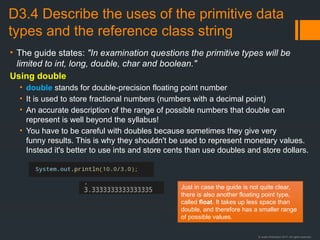
• The following code gives x a value of 2 not 2.5. This chopping off of the decimal
portion of a number is called truncation and it happens as a result of integer
division:
int x = 10/4;
Just in case the guide is not quite accurate, there are also
two other integer types: byte (8 bits) and short (16 bits). The
choice between which type to use will be governed by the
range of numbers you are likely to need in your program.
© Justin Robertson 2017. All rights reserved.
D3.4 Describe the uses of the primitive data
types and the reference class string
• The guide states: "In examination questions the primitive types will be
limited to int, long, double, char and boolean."
Using double
• double stands for double-precision floating point number
• It is used to store fractional numbers (numbers with a decimal point)
• An accurate description of the range of possible numbers that double can
represent is well beyond the syllabus!
• You have to be careful with doubles because sometimes they give very
funny results. This is why they shouldn't be used to represent monetary values.
Instead it's better to use ints and store cents than use doubles and store dollars.
Just in case the guide is not quite clear,
there is also another floating point type,
called float. It takes up less space than
double, and therefore has a smaller range
of possible values.
© Justin Robertson 2017. All rights reserved.
D3.4 Describe the uses of the primitive data
types and the reference class string
• The guide states: "In examination questions the primitive types will be
limited to int, long, double, char and boolean."
Using char
• A char can store a single character
• It has 16 bits and so can store 216
different values, from 0 to 65,535
• This allows for internationalization of Java by supporting a large variety of
character sets from different languages
Using boolean
• A boolean stores either true or false and can store nothing else
• They are often used as flag variables to signal that some condition has
become true, e.g. the end of an list has been reached
Using String
• Strings are object types in Java, not primitives
• They store textual information
• The String object has methods to make string handling easier, e.g.
length(), charAt(), contains(), indexOf(), etc
© Justin Robertson 2017. All rights reserved.
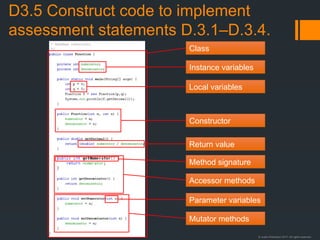
D3.5 Construct code to implement
assessment statements D.3.1–D.3.4.
Instance variables
Local variables
Parameter variables
Method signature
Return value
Class
Accessor methods
Mutator methods
Constructor
© Justin Robertson 2017. All rights reserved.
D3.6 Construct code examples related
to selection statements
if (condition 1) {
code 1
} else if (condition 2) {
code 2
} else {
code 3
}
switch (int variable) {
case 1: code1;
break;
case 2: code2;
break;
case 3: code3;
// No break!
case 4: code4;
break;
default: default code;
break;
}
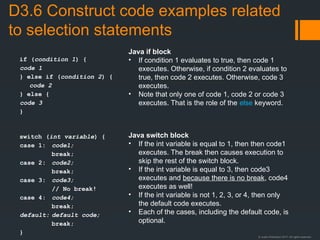
Java if block
• If condition 1 evaluates to true, then code 1
executes. Otherwise, if condition 2 evaluates to
true, then code 2 executes. Otherwise, code 3
executes.
• Note that only one of code 1, code 2 or code 3
executes. That is the role of the else keyword.
Java switch block
• If the int variable is equal to 1, then then code1
executes. The break then causes execution to
skip the rest of the switch block.
• If the int variable is equal to 3, then code3
executes and because there is no break, code4
executes as well!
• If the int variable is not 1, 2, 3, or 4, then only
the default code executes.
• Each of the cases, including the default code, is
optional.
© Justin Robertson 2017. All rights reserved.
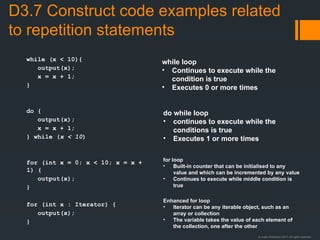
D3.7 Construct code examples related
to repetition statements
while (x < 10){
output(x);
x = x + 1;
}
do {
output(x);
x = x + 1;
} while (x < 10)
for (int x = 0; x < 10; x = x +
1) {
output(x);
}
for (int x : Iterator) {
output(x);
}
while loop
• Continues to execute while the
condition is true
• Executes 0 or more times
do while loop
• continues to execute while the
conditions is true
• Executes 1 or more times
for loop
• Built-in counter that can be initialised to any
value and which can be incremented by any value
• Continues to execute while middle condition is
true
Enhanced for loop
• Iterator can be any iterable object, such as an
array or collection
• The variable takes the value of each element of
the collection, one after the other
© Justin Robertson 2017. All rights reserved.
D3.8 Construct code examples related
to static arrays
• Declaration of an array
literal
• Direct access
• Standard array traversals
using a for loop and an
enhanced for loop
int array[] = {2, 5, 4, 8, 6, 7, 1, 3};
arry[4] = 0;
for (int i = 0; x < array.length; i = i + 1)
{
output(array[i]);
}
for (int i : array) {
output(i);
}
© Justin Robertson 2017. All rights reserved.
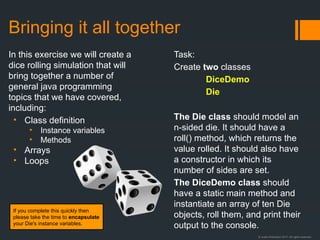
Bringing it all together
In this exercise we will create a
dice rolling simulation that will
bring together a number of
general java programming
topics that we have covered,
including:
• Class definition
• Instance variables
• Methods
• Arrays
• Loops
Task:
Create two classes
DiceDemo
Die
The Die class should model an
n-sided die. It should have a
roll() method, which returns the
value rolled. It should also have
a constructor in which its
number of sides are set.
The DiceDemo class should
have a static main method and
instantiate an array of ten Die
objects, roll them, and print their
output to the console.
If you complete this quickly then
please take the time to encapsulate
your Die's instance variables.
© Justin Robertson 2017. All rights reserved.
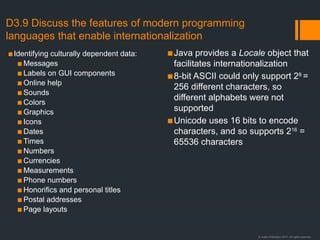
D3.9 Discuss the features of modern programming
languages that enable internationalization
▪Identifying culturally dependent data:
▪ Messages
▪ Labels on GUI components
▪ Online help
▪ Sounds
▪ Colors
▪ Graphics
▪ Icons
▪ Dates
▪ Times
▪ Numbers
▪ Currencies
▪ Measurements
▪ Phone numbers
▪ Honorifics and personal titles
▪ Postal addresses
▪ Page layouts
▪Java provides a Locale object that
facilitates internationalization
▪8-bit ASCII could only support 28
=
256 different characters, so
different alphabets were not
supported
▪Unicode uses 16 bits to encode
characters, and so supports 216
=
65536 characters
© Justin Robertson 2017. All rights reserved.
D3.10 Discuss the ethical and moral
obligations of programmers
• A good list is provided by the Association of Computer Machinery, which is the US professional
body for computer professionals:
• http://www.acm.org/about/code-of-ethics
• Another is provided by its British counterpart, the British Computer Society:
• http://www.bcs.org/category/6030
• The Computer Ethics Institute provides the Ten Commandments of Computer Ethics
• General areas to identify in exam questions are:
• Security: is data safe from unauthorised access?
• Privacy: how is personally identifiable data collected and stored?
• Plagiarism: presenting someone else's work as your own
• Piracy: copyright infringement
• Malware: hostile or intrusive software, including viruses
• Bugs: who is to blame for bugs in safety-critical systems, such as medical or nuclear reactor
control systems?
• The Open Source movement encourages software developers to release their source code for
others to study and use. Open source licence conditions say that any changes or modifications to
open source software must themselves be open source. The goals of the movement are:
• Learning through sharing
• Working cooperatively with like-minded people
• Producing high-quality software
© Justin Robertson 2017. All rights reserved.
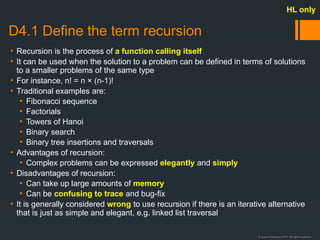
D4.1 Define the term recursion
• Recursion is the process of a function calling itself
• It can be used when the solution to a problem can be defined in terms of solutions
to a smaller problems of the same type
• For instance, n! = n × (n-1)!
• Traditional examples are:
• Fibonacci sequence
• Factorials
• Towers of Hanoi
• Binary search
• Binary tree insertions and traversals
• Advantages of recursion:
• Complex problems can be expressed elegantly and simply
• Disadvantages of recursion:
• Can take up large amounts of memory
• Can be confusing to trace and bug-fix
• It is generally considered wrong to use recursion if there is an iterative alternative
that is just as simple and elegant, e.g. linked list traversal
HL only
© Justin Robertson 2017. All rights reserved.
D4.2 Describe the application of recursive
algorithms
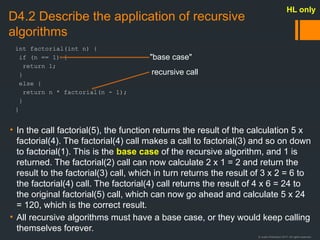
• In the call factorial(5), the function returns the result of the calculation 5 x
factorial(4). The factorial(4) call makes a call to factorial(3) and so on down
to factorial(1). This is the base case of the recursive algorithm, and 1 is
returned. The factorial(2) call can now calculate 2 x 1 = 2 and return the
result to the factorial(3) call, which in turn returns the result of 3 x 2 = 6 to
the factorial(4) call. The factorial(4) call returns the result of 4 x 6 = 24 to
the original factorial(5) call, which can now go ahead and calculate 5 x 24
= 120, which is the correct result.
• All recursive algorithms must have a base case, or they would keep calling
themselves forever.
HL only
int factorial(int n) {
if (n == 1) {
return 1;
}
else {
return n * factorial(n - 1);
}
}
"base case"
recursive call
© Justin Robertson 2017. All rights reserved.
D4.3 Construct algorithms that use recursion
• In addition to the factorial algorithm, here are some other recursive algorithms in Java that are
relevant to the course.
HL only
void hanoi(int n, int from, int to, int via){
if (n==0) {
return;
}
else{
hanoi(n-1, from, via, to);
System.out.println(count++ + ". Move a disc
from " + from + " to " + to);
hanoi(n-1, via, to, from);
}
}
int binary_search(int A[], int key, int imin, int imax) {
// calculate midpoint to cut set in half
int imid = midpoint(imin, imax);
// three-way comparison
if (A[imid] > key)
// key is in lower half of the list
return binary_search(A, key, imin, imid-1);
else if (A[imid] < key)
// key is in upper half of the list
return binary_search(A, key, imid+1, imax);
else
// key has been found
return imid;
}
void insertNode(Node root, int data) {
if (root == NULL)
root = new Node(data);
else if (data < root.getData())
insertNode(root.getLeft(), data);
else
insertNode(root.getRight(), data);
}
void inOrder(Node n){
if(n == null) return;
inOrder(n.left);
print(n);
inOrder(n.right);
}
Towers of Hanoi
inOrder binary tree traversal
Binary tree node insertion
Binary search
© Justin Robertson 2017. All rights reserved.
D4.4 Trace recursive algorithms
HL only
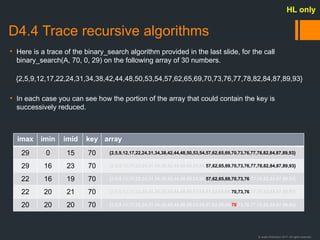
imax imin imid key array
29 0 15 70 {2,5,9,12,17,22,24,31,34,38,42,44,48,50,53,54,57,62,65,69,70,73,76,77,78,82,84,87,89,93}
29 16 23 70 {2,5,9,12,17,22,24,31,34,38,42,44,48,50,53,54,57,62,65,69,70,73,76,77,78,82,84,87,89,93}
22 16 19 70 {2,5,9,12,17,22,24,31,34,38,42,44,48,50,53,54,57,62,65,69,70,73,76,77,78,82,84,87,89,93}
22 20 21 70 {2,5,9,12,17,22,24,31,34,38,42,44,48,50,53,54,57,62,65,69,70,73,76,77,78,82,84,87,89,93}
20 20 20 70 {2,5,9,12,17,22,24,31,34,38,42,44,48,50,53,54,57,62,65,69,70,73,76,77,78,82,84,87,89,93}
• Here is a trace of the binary_search algorithm provided in the last slide, for the call
binary_search(A, 70, 0, 29) on the following array of 30 numbers.
{2,5,9,12,17,22,24,31,34,38,42,44,48,50,53,54,57,62,65,69,70,73,76,77,78,82,84,87,89,93}
• In each case you can see how the portion of the array that could contain the key is
successively reduced.
© Justin Robertson 2017. All rights reserved.
D4.5 Define the term object reference
• An object reference is an identifier through which a programmer can
access the fields and methods of an object type.
• It is different from the object itself, and is often called a pointer.
• Object references can have a special value of null, which means they are
not currently pointing to any object.
• An attempt to access a field or method of a null object reference results in
a NullPointerException.
• For more information see the slides at the beginning of this presentation:
• D1.2 Object references
• D1.2 More on object references
HL only
© Justin Robertson 2017. All rights reserved.
D4.6 Construct algorithms that use
reference mechanisms.
• Most of the algorithms using "reference mechanisms" are likely to be
associated with linked lists or binary trees. These will be covered in D4.8-
4.10.
HL only
© Justin Robertson 2017. All rights reserved.
D4.7 Identify the features of the abstract
data type (ADT) List
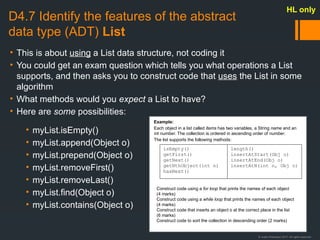
• This is about using a List data structure, not coding it
• You could get an exam question which tells you what operations a List
supports, and then asks you to construct code that uses the List in some
algorithm
• What methods would you expect a List to have?
• Here are some possibilities:
HL only
• myList.isEmpty()
• myList.append(Object o)
• myList.prepend(Object o)
• myList.removeFirst()
• myList.removeLast()
• myList.find(Object o)
• myList.contains(Object o)
Example:
Each object in a list called items has two variables, a String name and an
int number. The collection is ordered in ascending order of number.
The list supports the following methods:
Construct code using a for loop that prints the names of each object
(4 marks)
Construct code using a while loop that prints the names of each object
(4 marks)
Construct code that inserts an object o at the correct place in the list
(6 marks)
Construct code to sort the collection in descending order (2 marks)
isEmpty()
getFirst()
getNext()
getNthObject(int n)
hasNext()
length()
insertAtStart(Obj o)
insertAtEnd(Obj o)
insertAtN(int n, Obj o)
© Justin Robertson 2017. All rights reserved.
D4.8 Describe applications of lists
• Lists are very often used to create other standard data structures, like a
stack or queue
• Which of the standard methods that you might find in an abstract List
object would you need to implement each of these?
• Task: Construct a Stack class and a Queue class, complete with the
standard methods that you would expect for those data structures, each of
which contains a private List object that used to represent the stack/queue.
• It is also important to remember that just because you don't know how a
particular list method is implemented, that doesn't mean that it is an atomic
operation (atomic = single, indivisible).
• It still has to be implemented at some point!
• e.g. java.util.ArrayList is a growable array, but it still has to resize itself
from time to time, and that is always an expensive operation.
HL only
© Justin Robertson 2017. All rights reserved.
D4.9 Construct algorithms using a static
implementation of a list
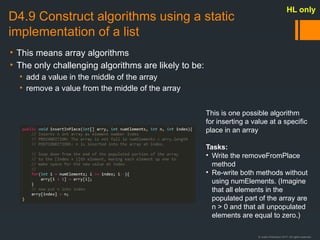
• This means array algorithms
• The only challenging algorithms are likely to be:
• add a value in the middle of the array
• remove a value from the middle of the array
HL only
This is one possible algorithm
for inserting a value at a specific
place in an array
Tasks:
• Write the removeFromPlace
method
• Re-write both methods without
using numElements. (Imagine
that all elements in the
populated part of the array are
n > 0 and that all unpopulated
elements are equal to zero.)
© Justin Robertson 2017. All rights reserved.
D4.10 Construct list algorithms using object
references
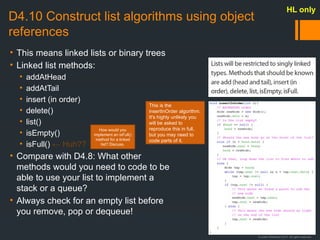
• This means linked lists or binary trees
• Linked list methods:
• addAtHead
• addAtTail
• insert (in order)
• delete()
• list()
• isEmpty()
• isFull() ← Huh??
• Compare with D4.8: What other
methods would you need to code to be
able to use your list to implement a
stack or a queue?
• Always check for an empty list before
you remove, pop or dequeue!
HL only
This is the
insertInOrder algorithm.
It's highly unlikely you
will be asked to
reproduce this in full,
but you may need to
code parts of it.
How would you
implement an isFull()
method for a linked
list? Discuss.
© Justin Robertson 2017. All rights reserved.
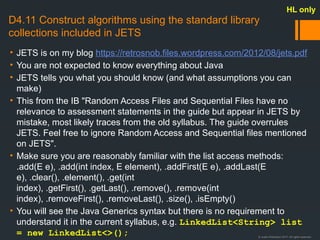
D4.11 Construct algorithms using the standard library
collections included in JETS
• JETS is on my blog https://retrosnob.files.wordpress.com/2012/08/jets.pdf
• You are not expected to know everything about Java
• JETS tells you what you should know (and what assumptions you can
make)
• This from the IB "Random Access Files and Sequential Files have no
relevance to assessment statements in the guide but appear in JETS by
mistake, most likely traces from the old syllabus. The guide overrules
JETS. Feel free to ignore Random Access and Sequential files mentioned
on JETS".
• Make sure you are reasonably familiar with the list access methods:
.add(E e), .add(int index, E element), .addFirst(E e), .addLast(E
e), .clear(), .element(), .get(int
index), .getFirst(), .getLast(), .remove(), .remove(int
index), .removeFirst(), .removeLast(), .size(), .isEmpty()
• You will see the Java Generics syntax but there is no requirement to
understand it in the current syllabus, e.g. LinkedList<String> list
= new LinkedList<>();
HL only
© Justin Robertson 2017. All rights reserved.
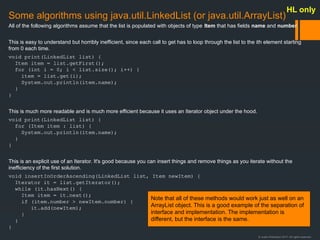
Some algorithms using java.util.LinkedList (or java.util.ArrayList)
All of the following algorithms assume that the list is populated with objects of type Item that has fields name and number.
This is easy to understand but horribly inefficient, since each call to get has to loop through the list to the ith element starting
from 0 each time.
void print(LinkedList list) {
Item item = list.getFirst();
for (int i = 0; i < list.size(); i++) {
item = list.get(i);
System.out.println(item.name);
}
}
This is much more readable and is much more efficient because it uses an Iterator object under the hood.
void print(LinkedList list) {
for (Item item : list) {
System.out.println(item.name);
}
}
This is an explicit use of an Iterator. It's good because you can insert things and remove things as you iterate without the
inefficiency of the first solution.
void insertInOrderAscending(LinkedList list, Item newItem) {
Iterator it = list.getIterator();
while (it.hasNext() {
Item item = it.next();
if (item.number > newItem.number) {
it.add(newItem);
}
}
}
Note that all of these methods would work just as well on an
ArrayList object. This is a good example of the separation of
interface and implementation. The implementation is
different, but the interface is the same.
HL only
© Justin Robertson 2017. All rights reserved.
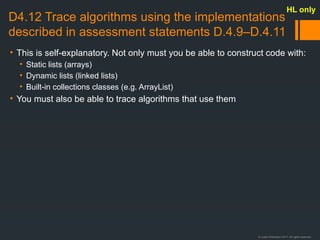
D4.12 Trace algorithms using the implementations
described in assessment statements D.4.9–D.4.11
• This is self-explanatory. Not only must you be able to construct code with:
• Static lists (arrays)
• Dynamic lists (linked lists)
• Built-in collections classes (e.g. ArrayList)
• You must also be able to trace algorithms that use them
HL only
© Justin Robertson 2017. All rights reserved.
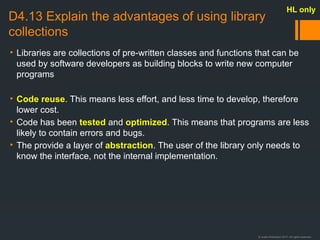
D4.13 Explain the advantages of using library
collections
• Libraries are collections of pre-written classes and functions that can be
used by software developers as building blocks to write new computer
programs
• Code reuse. This means less effort, and less time to develop, therefore
lower cost.
• Code has been tested and optimized. This means that programs are less
likely to contain errors and bugs.
• The provide a layer of abstraction. The user of the library only needs to
know the interface, not the internal implementation.
HL only
© Justin Robertson 2017. All rights reserved.
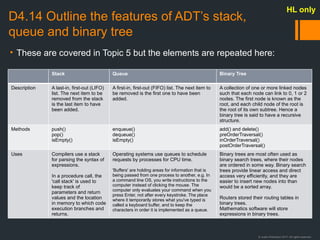
D4.14 Outline the features of ADT’s stack,
queue and binary tree
• These are covered in Topic 5 but the elements are repeated here:
HL only
Stack Queue Binary Tree
Description A last-in, first-out (LIFO)
list. The next item to be
removed from the stack
is the last item to have
been added.
A first-in, first-out (FIFO) list. The next item to
be removed is the first one to have been
added.
A collection of one or more linked nodes
such that each node can link to 0, 1 or 2
nodes. The first node is known as the
root, and each child node of the root is
the root of its own subtree. Hence a
binary tree is said to have a recursive
structure.
Methods push()
pop()
isEmpty()
enqueue()
dequeue()
isEmpty()
add() and delete()
preOrderTraversal()
inOrderTraversal()
postOrderTraversal()
Uses Compilers use a stack
for parsing the syntax of
expressions.
In a procedure call, the
'call stack' is used to
keep track of
parameters and return
values and the location
in memory to which code
execution branches and
returns.
Operating systems use queues to schedule
requests by processes for CPU time.
'Buffers' are holding areas for information that is
being passed from one process to another, e.g. In
a command line OS, you write instructions to the
computer instead of clicking the mouse. The
computer only evaluates your command when you
press Enter, not after every keystroke. The place
where it temporarily stores what you've typed is
called a keyboard buffer, and to keep the
characters in order it is implemented as a queue.
Binary trees are most often used as
binary search trees, where their nodes
are ordered in some way. Binary search
trees provide linear access and direct
access very efficiently, and they are
easier to insert new nodes into than
would be a sorted array.
Routers stored their routing tables in
binary trees.
Mathematics software will store
expressions in binary trees.
© Justin Robertson 2017. All rights reserved.
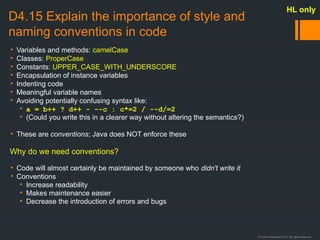
D4.15 Explain the importance of style and
naming conventions in code
• Variables and methods: camelCase
• Classes: ProperCase
• Constants: UPPER_CASE_WITH_UNDERSCORE
• Encapsulation of instance variables
• Indenting code
• Meaningful variable names
• Avoiding potentially confusing syntax like:
• a = b++ ? d++ - --c : c*=2 / --d/=2
• (Could you write this in a clearer way without altering the semantics?)
• These are conventions; Java does NOT enforce these
Why do we need conventions?
• Code will almost certainly be maintained by someone who didn't write it
• Conventions
• Increase readability
• Makes maintenance easier
• Decrease the introduction of errors and bugs
HL only
© Justin Robertson 2017. All rights reserved.
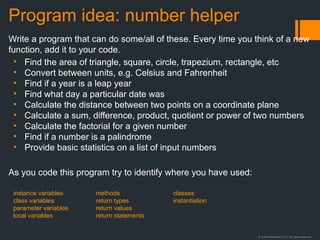
Program idea: number helper
Write a program that can do some/all of these. Every time you think of a new
function, add it to your code.
• Find the area of triangle, square, circle, trapezium, rectangle, etc
• Convert between units, e.g. Celsius and Fahrenheit
• Find if a year is a leap year
• Find what day a particular date was
• Calculate the distance between two points on a coordinate plane
• Calculate a sum, difference, product, quotient or power of two numbers
• Calculate the factorial for a given number
• Find if a number is a palindrome
• Provide basic statistics on a list of input numbers
As you code this program try to identify where you have used:
instance variables
class variables
parameter variables
local variables
methods
return types
return values
return statements
classes
instantiation

Option D Relacion de Conceptos basicos de modelamiento

  • 1.
    © Justin Robertson2017. All rights reserved. Object-Oriented Programming IB Computer Science Option D
  • 2.
    © Justin Robertson2017. All rights reserved. D1.1 Outline the general nature of an object • All objects have state and behaviour • State refers to what their attributes are • Behaviour refers to what they can do • In Java these correspond to fields and methods • Task: Think of an object in the real world. What attributes give determine its state? What behaviours does it have? Object State Behaviour Dog Breed, name, colour Bark, wag tail, sleep Car Make, model, colour Accelerate, brake, turn RPG Character Class, race, name, spells, hit points Cast, fight, flee, heal Notice that fields are usually named as nouns and methods are usually named as verbs
  • 3.
    © Justin Robertson2017. All rights reserved. D.1.2 Distinguish an object and its instantiation This is instantiation. We make an object of the Dog class. Once the object is instantiated we can use dot notation to set its fields and ask it to do things like bark and wag its tail. This is the Dog class. It's like a template. It defines what attributes dogs can have in our system, and what they can do. But remember, no dogs exist in our system until we instantiate them. This is slightly imprecise language by the IB. Other syllabuses make a distinction between 'class' and 'object' but the IB has chosen to use the words 'object' and 'instantiation', thereby introducing a confusing ambiguity in the meaning of the word 'object'.
  • 4.
    © Justin Robertson2017. All rights reserved. D.1.2 Exercise Angela Jolie Lionel Messi University Aircraft Fraction Actress Princeton Boeing 747 Red Hot Chili Peppers ¾ Rock band Footballer In OOP, once we have instantiated a class we call it an object. Below are 10 class/object pairs mixed up. See if you can match them up. Example: Serena Williams is an instance of the Tennis Player class. Make sure you know which is the class, and which is the object (instance).
  • 5.
    © Justin Robertson2017. All rights reserved. D1.2 Object references d 0xF8275AB9 Dog object at 0xF8275AB9 String breed "Chihuahua" String name "Jeff" String colour "Brown" Methods: bark() sleep() wagTail() d Dog Object Look back at the Java code two slides ago. The variable d is kept in a different place in the computer's memory from the dog object. They are associated with each other using a memory reference. Informally we use arrows to show this relationship, but if you ever get confused with arrows, it can be useful to remember that really they are memory references.
  • 6.
    © Justin Robertson2017. All rights reserved. D1.2 More on object references d d Dog object d Dog object e d Dog object e Dog d; d = new Dog(); Dog e; e = d;
  • 7.
    © Justin Robertson2017. All rights reserved. D1.3 Construct unified modelling language (UML) diagrams to represent object designs ▪There is a lot to UML but I don't think you will need more than this ▪It specifies a class without you having to code it ▪UML is used in systems design ▪Class name ▪fieldName: type ▪ methodName(argName: type): return type ▪Plus (+) means public ▪Minus (-) means private ▪Underlined means static Student - firstName: String - lastName: String - gpa: double - totalStudents: int + getFirstName(): String + setFirstName(name: String): void + getLastName(): String + setLastName(name: String): void + getGpa(): double + setGpa(gpa: double): void + getTotalStudents(): int
  • 8.
    © Justin Robertson2017. All rights reserved. D1.3 Construct unified modelling language (UML) diagrams to represent object designs D1.4 Interpret UML diagrams ▪Task 1: ▪Create a UML diagram to specify a Customer for a bank. There should be some way of identifying different customers, together with a current account balance and the ability to withdraw, deposit and check their balance. Add any other fields or methods you think would be useful. ▪Task 2: ▪Implement the following class in Java. You don't need to code the bodies of the methods, just the fields and method signatures. ▪Extensions: ▪Provide getters and setters ▪Implement the method bodies Fraction - int: numerator - int: denominator + add(fraction: Fraction): Fraction + multiply(fraction: Fraction): Fraction + getDecimal(): double
  • 9.
    © Justin Robertson2017. All rights reserved. Relationships between UML objects Bird - species: String - etc + getSpecies: String + setSpecies(species: String): void Finch [Finch-specifc variables] [Finch-specifc methods] Club - members: Member[] + getMember(id: int): Member Member - id: int + getId(): int Course - students: Student[] + getStudent(id: int): Student Student - id: int + getId(): int Inheritance A finch is a bird. Note that the arrow points at the superclass. Composition A club has members.. When the club is deleted, its members are deleted too. Aggregation A course has students.. When the course is deleted, the students remain in the system.. Note: I doubt you would ever have to distinguish between composition and aggregation. If you get a question and you think the answer is composition/aggregation then I suggest you do what I just did and write "composition/aggregation" and then add "a Club has a Member" and give an example. I also doubt you will need to remember the shapes of the connectors. I'm sure it would be fine just to draw a line between the boxes and write "is a" or "has" in these cases.
  • 10.
    © Justin Robertson2017. All rights reserved. D1.5 Describe the process of decomposition into several related objects Principal Employee Administrative Faculty Maintenance Secretary Decomposition means "breaking down" into component parts. All of the people who work at your school are employees. But there are different types of employee, so we can decompose employee.
  • 11.
    © Justin Robertson2017. All rights reserved. D1.5 Describe the process of decomposition into several related objects We decompose objects to understand how they work. A complex object is made up of many simpler objects. The simpler objects are easier to understand.
  • 12.
    © Justin Robertson2017. All rights reserved. D1.5 Describe the process of decomposition into several related objects ▪Simple games programming is an excellent way to practice object decomposition ▪This is a game of "Sub Hunt" that I programmed in Scratch ▪Play the game and then decompose the game into objects ▪Can any of those objects themselves be decomposed? ▪Choose one of the simple games listed here: http://retrosnob.wordpress.com/20 13/10/03/game-ideas/ ▪Produce an object decomposition
  • 13.
    © Justin Robertson2017. All rights reserved. D1.6 Describe the relationships between objects for a given problem. ▪The IB mentions three kinds of relationship that can exist between objects: ▪The last two are sometimes difficult to separate. ▪A good rule of thumb is that if the component is built-in or somehow essential, then you have a composition relationship. ▪Similarly if the component can exist on its own, or can be used by lots of different objects, then you have a dependency relationship. Is Inheritance A Lotus Esprit is a car Has Composition/Aggregation A smartphone has a CPU Uses Dependency A project manager uses a Gantt Chart
  • 14.
    © Justin Robertson2017. All rights reserved. D1.6 Describe the relationships between objects for a given problem. Bicycle MTB Road Bike Hybrid A mountain bike is a bicycle, a road bike is a bicycle, a hybrid is a bicycle. Characteristics that the Bicycle has are inherited by the subclasses. However, the subclasses can override them if they want to. Inheritance hierarchy Notice that Square has no variables or methods. It has inherited them from Shape. Circle, on the other hand, has overridden its getArea() method. Inheritance is effected by the use of the extends keyword in Java.
  • 15.
    © Justin Robertson2017. All rights reserved. D1.6 Describe the relationships between objects for a given problem. Book Club Members Collection Member Books on Loan Collection Book on loan Containment hierarchy Book The basic mechanics of a containment or composition hierarchy in Java. This is not meant to be an example of good programming practice!
  • 16.
    © Justin Robertson2017. All rights reserved. D1.7 Outline the need to reduce dependencies between objects in a given problem. ▪Two classes are said to form a dependency if a change to one of them necessitates a change in the other. ▪On large software projects this can cause significant problems. ▪This is also known as high coupling. ▪Decoupling is desirable and is what every software developer strives for. ▪Encapsulation is one of many ways to reduce coupling. ▪Most of the others are beyond the IB syllabus, such as the use of Interfaces, factory patterns and dependency injections. I think I'm going to change my Linked List class around a bit.… Aarrgh! My software uses that class. If you change it, my software might not work any more!
  • 17.
    © Justin Robertson2017. All rights reserved. D1.8 Construct related objects for a given problem ▪ The guide states "In examinations problems will require the students to construct definitions for no more than three objects and to explain their relationships to each other and to any additional classes defined by the examiners." ▪ I assume this means: ▪ Constructing UML diagrams from a textual description of a scenario. ▪ Constructing code from a textual description of a scenario. ▪ Constructing code from a set of UML diagrams. ▪ Students should study the sample question from the IB. ▪ Things to consider are: ▪ Is there an inheritance (is-a) relationship? ▪ If so, which is the superclass and which are the subclasses? ▪ What fields and methods does the superclass have? ▪ What different fields and methods do each of the subclasses have? (Remember that they will all inherit the fields and methods from the superclass.) ▪ Are there any containment/composition (has-a) relationships? ▪Possible scenarios could be: ▪Car, Vehicle, Motorcycle, Van ▪Dog, Cat, Animal, Bird ▪Salesperson, Factory Worker, Secretary, Employee ▪Task: for each scenario ▪Draw the inheritance hierarchy, showing which is the superclass ▪Give the superclass two plausible fields which should be inherited by all subclasses ▪For each subclass, add one other field specific to that subclass ▪Code the classes in Java
  • 18.
    © Justin Robertson2017. All rights reserved. D1.9 Explain the need for different data types to represent data items. ▪I read an excellent answer to this question on StackExchange. Here it is: 01010100 01101000 01100101 00100000 01110010 01100101 01100001 01110011 01101111 01101110 00100000 01110100 01101000 01100001 01110100 00100000 01110000 01110010 01101111 01100111 01110010 01100001 01101101 01101101 01100101 01110010 01110011 00100000 01110101 01110011 01100101 00100000 01100100 01100001 01110100 01100001 01110100 01111001 01110000 01100101 01110011 00100000 01110010 01100001 01110100 01101000 01100101 01110010 00100000 01110100 01101000 01100001 01101110 00100000 01110010 01100001 01110111 00100000 01100010 01101001 01110100 01110011 00100000 01101001 01110011 00100000 01100010 01100101 01100011 01100001 01110101 01110011 01100101 00100000 01110010 01100101 01110001 01110101 01101001 01110010 01101001 01101110 01100111 00100000 01110100 01101000 01100101 00100000 01101000 01110101 01101101 01100001 01101110 00100000 01100010 01110010 01100001 01101001 01101110 00100000 01110100 01101111 00100000 01110100 01110010 01100001 01101110 01110011 01101100 01100001 01110100 01100101 00100000 01100010 01101001 01101110 01100001 01110010 01111001 00100000 01110100 01101111 00100000 01110100 01101000 01100101 00100000 01100001 01110000 01110000 01110010 01101111 01110000 01110010 01101001 01100001 01110100 01100101 00100000 01110011 01100101 01101101 01100001 01101110 01110100 01111001 01100011 00100000 01110100 01111001 01110000 01100101 00100000 01101001 01101101 01110000 01101111 01110011 01100101 01110011 00100000 01100001 00100000 01101101 01100001 01110011 01110011 01101001 01110110 01100101 00100000 01100011 01101111 01100111 01101110 01101001 01110100 01101001 01110110 01100101 00100000 01101100 01101111 01100001 01100100 00100000 01110100 01101000 01100001 01110100 00100000 01110111 01101111 01110101 01101100 01100100 00100000 01101101 01100001 01101011 01100101 00100000 01110000 01110010 01101111 01100100 01110101 01100011 01110100 01101001 01110110 01101001 01110100 01111001 00100000 01101110 01101111 01101110 00101101 01100101 01111000 01101001 01110011 01110100 01100001 01101110 01110100 00101110 00100000 00100000 01000110 01101111 01110010 00100000 01101001 01101110 01110011 01110100 01100001 01101110 01100011 01100101 00101100 00100000 01101001 01110100 00100000 01101001 01110011 00100000 01101110 01100101 01100001 01110010 01101100 01111001 00100000 01100011 01100101 01110010 01110100 01100001 01101001 01101110 00100000 01110100 01101000 01100001 01110100 00100000 01101110 01101111 00100000 01101000 01111101 01101101 01100001 01101110 00100000 01100010 01100101 01101001 01101110 01100111 00100000 01110111 01101001 01101100 01101100 00100000 01110010 01100101 01100001 01100100 00100000 01110100 01101000 01101001 01110011 00100000 01110100 01100101 01111000 01110100 00100000 01110111 01101001 01110100 01101000 01101111 01110101 01110100 00100000 01110101 01110011 01101001 01101110 01100111 00100000 01110011 01101111 01101101 01100101 00100000 01110011 01101111 01110010 01110100 00100000 01101111 01100110 00100000 01101101 01100001 01100011 01101000 01101001 01101110 01100101 00100000 01110100 01110010 01100001 01101110 01110011 01101100 01100001 01110100 01101111 01110010 00100000 01110100 01101111 00100000 01110100 01110010 01100001 01101110 01110011 01101100 01100001 01110100 01100101 00100000 01110100 01101000 01100101 01110011 01100101 00100000 00110001 01110011 00100000 01100001 01101110 01100100 00100000 00110000 01110011 00100000 01101001 01101110 01110100 01101111 00100000 01100001 00100000 01100100 01100001 01110100 01100001 01110100 01111001 01110000 01100101 00100000 00101000 01110100 01100101 01111000 01110100 00101001 00100000 01111100 01101000 01100001 01110100 00100000 01110100 01101000 01100101 01111001 00100000 01100011 01100001 01101110 00100000 01101101 01101111 01110010 01100101 00100000 01101101 01100001 01110011 01101001 01101100 01111001 00100000 01110101 01101110 01100100 01100101 01110010 01110011 01110100 01100001 01101110 01100100 00101110 00100000 00100000 01010011 01101111 00100000 01101001 01110100 00100000 01101001 01110011 00100000 01110111 01101001 01110100 01101000 00100000 01100001 01101100 01101100 00100000 01100100 01100001 01110100 01100001 01110100 01111001 01110000 01100101 01110011 00101110 00100000 00100000 01010100 01101000 01100101 00100000 01101000 01110101 01101101 01100001 01101110 00100000 01101101 01100101 01101110 01110100 01100001 01101100 00100000 01110000 01110010 01101111 01100011 01100101 01110011 01110011 01101001 01101110 01100111 00100000 01110100 01101111 00100000 01100011 01101111 01101110 01110110 01100101 01110010 01110100 00100000 01100001 00100000 00110011 00110010 00101101 01100010 01101001 01110100 00100000 01110010 01100101 01110000 01110010 01100101 01110011 01100101 01101110 01110100 01100001 01110100 01101001 01101111 01101110 00100000 01101111 01100110 00100000 01100001 00100000 01100110 01101100 01101111 01100001 01110100 01101001 01101110 01100111 00100000 01110000 01101111 01101001 01101110 01110100 00100000 01101110 01010101 01101101 01100010 01100101 01110010 00100000 01101001 01101110 01110100 01101111 00100000 01110100 01101000 01100101 00100000 01110010 01100101 01110000 01110010 01100101 01110011 01100101 01101110 01110100 01100001 01110100 01101001 01101111 01101110 00100000 01110100 01101000 01100001 01110100 00100000 01101001 01110011 00100000 01100001 01100011 01110100 01110101 01100001 01101100 01101100 01111001 00100000 01110101 01101110 01100100 01100101 01110010 01110011 01110100 01100001 01101110 01100100 01100001 01100010 01101100 01100101 00100000 01101001 01110011 00100000 01100110 01100001 01110010 00100000 01100111 01110010 01100101 01100001 01110100 01100101 01110010 00100000 01110100 01101000 01100001 01101110 00100000 01110100 01101000 01100101 00100000 01100101 01100110 01101110 01101111 01110010 01110100 00100000 01110100 01101111 00100000 01110100 01110010 01100001 01101110 01110011 01101100 01100001 01110100 01100101 00100000 00110000 00110000 00110001 00110000 00110000 00110000 00110000 00110001 00100000 01101001 01101110 01110100 01101111 00100000 00100111 01100001 00100111 00101110 00100000 00100000 01011001 01100101 01110100 00100000 01101110 01101111 00100000 01101111 01101110 01100101 00100000 01110111 01101111 01110101 01101100 01100100 00100000 01100010 01100101 00100000 01110111 01101001 01101100 01101100 01101001 01101110 01100111 00100000 01110100 01101111 00100000 01100100 01101111 00100000 01100101 01110110 01100101 01101110 00100000 01110100 01101000 01101001 01110011 00100000 01100101 01100001 01110011 01101001 01100101 01110010 00100000 01110100 01110010 01100001 01101110 01110011 01101100 01100001 01110100 01101001 01101111 01101110 00101110 00100000 00100000 00100000 00001010 00001010 01010100 01101000 01100101 01110010 01100101 00100000 01110111 01100001 01110011 00100000 01100001 00100000 01010100 01101001 01101101 01100101 00100000 01110111 01101000 01100101 01101110 00100000 01110000 01100101 01101111 01110000 01101100 01100101 00100000 01100100 01101001 01100100 00100000 01110111 01101111 01110010 01101011 00100000 01100100 01101001 01110010 01100101 01100011 01110100 01101100 01111001 00100000 01101001 01101110 00100000 01100010 01101001 01101110 01100001 01110010 01111001 00101100 00100000 01100010 01110101 01110100 00100000 01101001 01110100 00100000 01110111 01100001 01110011 00100000 01100001 00100000 01110100 01101001 01101101 01100101 00100000 01110111 01101000 01100101 01101110 00100000 01110000 01110010 01101111 01100111 01110010 01100001 01101101 01110011 00100000 01100100 01101001 01100100 00100000 01100110 01100001 01101001 01110010 01101100 01111001 00100000 01110011 01101001 01101101 01110000 01101100 01100101 00100000 01110100 01100001 01110011 01101011 01110011 00100000 01101100 01101001 01101011 01100101 00100000 01100011 01110010 01100101 01100001 01110100 01101001 01101110 01000111 00100000 01110000 01110010 01101001 01101110 01110100 01100101 01100100 00100000 01110011 01101001 01101110 00100000 01110100 01100001 01101010 01101100 01100101 01110011 00101100 00100000 01110000 01110010 01101111 01100111 01110010 01100001 01101101 01110011 00100000 01110100 01101000 01100001 01110100 00100000 01110100 01101111 01100100 01100001 01111001 00100000 01100001 01110010 01100101 00100000 01100001 00100000 01110100 01101000 01110010 01101111 01110111 00101101 01100001 01110111 01100001 01111001 00100000 01101111 01101110 01100101 00101101 01101100 01101001 01101110 01100101 01110010 00100000 01110100 01101000 01100001 01101110 00100000 01110100 01101111 01101111 01101011 00100000 01101000 01101111 01110101 01110010 01110011 00100000 01101111 01110010 00100000 01100100 01100001 01111001 01110011 00100000 01101111 01100110 00100000 01110100 01111000 01101111 01110101 01100111 01101000 01110100 01001110 00000000
  • 19.
    © Justin Robertson2017. All rights reserved. D1.9 Explain the need for different data types to represent data items. All data stored on a computer system is ultimately just sequences of bits, like 11010010 But computers can do sums with negative numbers and decimals, so there must be minus signs and decimal points too? Nope. There are only bits. So how do computers do it? Come to think of it, aren't you reading text on a computer right now? How can all data be just bits??
  • 20.
    © Justin Robertson2017. All rights reserved. D1.9 Explain the need for different data types to represent data items. All data are just sequences of bits, but the way those bits are interpreted gives them different meanings. Go on… The bits I gave you earlier, 11010010, could mean 210, -46, "Ò" or even 2.942726775082115848939 83212491E-43, depending on how they are interpreted. So I guess it's pretty important to make it clear exactly which data type you're using!
  • 21.
    © Justin Robertson2017. All rights reserved. D1.9 Explain the need for different data types to represent data items. ▪ Opposite is one of lots of ways of encoding text on a computer ▪ It's a table of numbers and their corresponding characters ▪ Look back at the previous example and you will see from the table that 11010010 = 210 = "Ò" ▪ But where are the Korean characters, the Cyrillic characters, the Arabic characters?? ▪ This scheme uses 8 bits and therefore only encode for 28 different characters ▪ Modern systems, such as Unicode, use as many as 16 or 32 bits. 32 bits gives you 232 = 4,294,967,296 different possible characters! ▪ This is another reason we need to specify data types – they take up varying amounts of space
  • 22.
    © Justin Robertson2017. All rights reserved. D1.10 Describe how data items can be passed to and from actions as parameters. ▪The guide states: ▪"Parameters will be restricted to pass-by-value of one of the four types in D.1.6. Actions may return at most one data item." ▪ (Teacher note: That's lucky, because Java is exclusively pass-by-value.) ▪We will look at three examples: ▪Passing a primitive data type to a method and attempting to change the variable passed ▪Passing an object reference to a method and attempting to change the object the reference points to ▪Passing an object reference to a method and attempting to change the reference passed
  • 23.
    © Justin Robertson2017. All rights reserved. ▪ We try to add one to i within the method addOneToThisInt but it doesn't work ▪ Outside the method, the value of i is unchanged ▪ This is because i itself is not passed to the method, only a copy of i's value ▪ We can change the copy as much as we like, but the original i doesn't get changed ▪ Analogy: You want access to an important document that is locked within my filing cabinet. I make a photocopy of it and give it to you. You can tear it up, burn it, whatever you like, but my copy is safe. ▪ (The way to change i's value is to return the changed variable, and assign the return value to i, as in returnThisIntWithOneAdded) D1.10 Describe how data items can be passed to and from actions as parameters. Passing primitives
  • 24.
    © Justin Robertson2017. All rights reserved. D1.10 Describe how data items can be passed to and from actions as parameters. ▪This time we pass to the method a reference to an object and try to change the object ▪The object's id gets changed, both inside the method and outside! ▪Analogy: You want access to an important document that is locked within my filing cabinet. I give you the key to the filing cabinet. If you change the document, you have changed the only copy. ▪Some people mistakenly think that this means that Java is both pass by value (primitives) and pass by reference (objects) ▪See the next slide for the truth… Passing object references
  • 25.
    © Justin Robertson2017. All rights reserved. D1.10 Describe how data items can be passed to and from actions as parameters. ▪Like before we pass to the method a reference to an object, but this time we try to change the reference itself by making it point to a totally different object! ▪This fails. The reference outside the method still points to the original object ▪Analogy: You want access to an important document that is locked within my filing cabinet. I give you a copy of the key to the filing cabinet. If you change the document, you have changed the only copy, but if you try to re-grind the key (or something), you have not changed my key. ▪Hence, whether primitives are passed or object references are passed, Java is always pass by value. The truth about Java
  • 26.
    © Justin Robertson2017. All rights reserved. D1.10 Describe how data items can be passed to and from actions as parameters. ▪This is an advanced point for teachers, that may help with fielding a difficult question from students… ▪Compare this with the "passing object references" slide ▪String is an object type, but you can't change the object by passing its reference to a method!? ▪This is because it is an immutable type ▪Java provides a few immutable types for very common object types such as String and the primitive wrapper classes ▪In fact, it is recommended by software design gurus that you should always make your classes immutable where possible ▪Not providing any setter methods is one way of doing this! ←Huh?!
  • 27.
    © Justin Robertson2017. All rights reserved. D2.1 Define the term encapsulation D2.4 Explain the advantages of encapsulation ▪ Encapsulation is the practice of hiding the inner design of an object data type in a class. ▪ In Java this is achieved by using the private keyword for fields and methods that should not be accessible outside the class. ▪ This is also known as "data hiding" ▪ It is used to separate implementation (how an object is built) from interface (how an object can be used) ▪ It allows users of the object to concentrate on what is important to them, without having to get involved with the complexities of how the object works. ▪ It also prevents other objects from accessing and possibly corrupting internal data. ▪ Finally, the interface/implementation decoupling helps to reduce dependencies because changes can be made to the implementation without necessitating changes to the interface. ▪ A car is a good real-world example. The details are kept hidden away under the hood, while the tools you need to drive the car are easily available. Implementation Interface
  • 28.
    © Justin Robertson2017. All rights reserved. D2.2 Define the term inheritance D2.5 Explain the advantages of inheritance ▪ One class (the subclass) can be programmed to inherit from another class (the superclass) ▪ The subclass automatically gets all of the fields and methods of the superclass (except ones explicitly declared as private) ▪ The subclass can override any of the fields and methods of the superclass by declaring its own version with the same name ▪ Inheritance forms an "is-a" relationship. For example, you might design a Car class to inherit from a Vehicle class because a car is a vehicle. ▪Inheritance allows code reuse because you can create a new object type from an existing one; you don't need to write the code again. ▪It also helps to avoid errors by reducing the number of times the same piece of code has to be written. In Java, inheritance is implemented using the extends keyword.
  • 29.
    © Justin Robertson2017. All rights reserved. Practice with inheritance hierarchies Sample Superclasses: ▪ Vehicle {Car, Bus, Lorry} ▪ Animal {…etc ▪ Employee ▪ RPGCharacter ▪ Shape ▪ Publication ▪ Subject ▪ Teacher ▪ Student Task: 1. Choose a superclass. 2. Identify three possible subclasses 3. Identify one variable and one method that belongs to the superclass 4. Identify one variable and one method for each of the subclasses ▪ The "is-a" test If you create an inheritance hierarchy e.g. class [Subclass] extends [Superclass], then it must make sense to say the sentence: "A [Subclass] is a [Superclass]" (e.g. "A square is a shape" makes sense.) ▪ If that sentence doesn't make sense for your example, then you haven't got an inheritance hierarchy. ▪ Which of these are valid inheritance hierarchies using the "is-a" test? ▪ class Finch extends Bird ▪ class Guitar extends Instrument ▪ class Teacher extends School ▪ class Player extends FootballTeam ▪ class Beef extends Meat ▪ class Actor extends Movie
  • 30.
    © Justin Robertson2017. All rights reserved. D2.3 Define the term polymorphism D2.6 Explain the advantages of polymorphism ▪ Polymorphism in object-oriented languages refers to the facility by which one object or function can exhibit different attributes and behaviours depending on the context. ▪ The guide states: "Actions have the same name but different parameter lists and processes." ▪ This seems to suggest that the IB are only interested in method overloading, which is compile-time or "static" polymorphism. ▪ Method overloading allows the same name to be used for more than one method. ▪ Java decides which method is the correct one to use depending on the type and number of arguments. ▪ This makes objects more robust because they can gracefully handle lots of types of input. ▪ It also simplifies the code that uses the object, because it doesn't have to explicitly deal with each different possible scenario. The object itself can do that. Compile-time polymorphism
  • 31.
    © Justin Robertson2017. All rights reserved. D2.3 Define the term polymorphism D2.6 Explain the advantages of polymorphism ▪There is another type of polymorphism in Java called run-time or "dynamic" polymorphism. ▪This type of polymorphism allows objects of a particular superclass to be treated as a homogeneous collection, while still exhibiting behaviours as specified in the heterogeneous subclass definitions ▪This is particularly useful when processing lists of objects of an unknown or random subtype. ▪The calling code can invoke the same method on each object in a collection, and those objects will respond appropriately depending on their type. Run-time polymorphism
  • 32.
    © Justin Robertson2017. All rights reserved. D2.7 Describe the advantages of libraries of objects. ▪A library is a repository of code that can be imported into a project. ▪Libraries mean that code doesn't need to be re-created by different programmers each time they develop some software. ▪Library code is often provided by advanced programmers who know the language well and have optimized and tested it thoroughly. ▪In this way, using library code improves performance and reliability of software. ▪An example of library code is the Java API: http://docs.oracle.com/javase/7/docs/api/
  • 33.
    © Justin Robertson2017. All rights reserved. D2.8 Describe the disadvantages of OOP D2.9 Discuss the use of programming teams ▪Simple tasks can be over- complicated by the use of OOP ▪Key concepts such as inheritance, encapsulation and polymorphism can be difficult to grasp initially ▪Programmers may be unfamiliar with the approach; there is a learning curve ▪Allows specialisation in one area, e.g. testing, documentation ▪Dependency reduction using techniques like encapsulation can mean that different programmers can work on different objects simultaneously without any danger of incompatibility ▪Concurrent development like this reduces the time required to build new software ▪Programmers working alone have to do everything serially and have to have expertise in all areas of software design and development Disadvantages of OOP Programming in teams
  • 34.
    © Justin Robertson2017. All rights reserved. D2.10 Explain the advantages of modularity in program development. ▪Modules can mean classes, functions, or any other set of related code ▪Facilitates collaboration. Different programmers/teams can work on different modules. ▪Makes the system easier to understand. ▪Promotes code reuse. Modules can be used in more than one system. ▪Easier to test and debug because each module can be tested separately (see Unit testing)
  • 35.
    © Justin Robertson2017. All rights reserved. D3.1 Define the terms: class, identifier, primitive, instance variable, parameter variable, local variable • Class: A class is the definition of a new reference (object) type. It is a combination of data and operations that can be performed on that data; a specification of the data members and methods of the object. • Identifier: The name or label chosen by the programmer to represent a variable, method, class, data type or any other element defined within the program. • Primitive: a basic non-object data type built in to a language; in Java the primitives are byte, short, int, long, float, double, boolean, char • Instance Variable: a variable defined in a class of which each instantiated object has its own copy (cf class variable) • Parameter variable: the variable in the signature of a method that holds the value of the an argument passed to the method when it is called • Local variable: a variable that has local scope; a variable defined within a method that is not visible outside the method
  • 36.
    © Justin Robertson2017. All rights reserved. D3.2 Define the terms: method, accessor, mutator, constructor, signature, return value. • Method: a procedure defined within a class • Accessor: a public method that returns the value of a private instance variable. Used along with a mutator to implement encapsulation. Also "getter" because its name conventionally begins with "get", e.g. "getId" to return the private Id variable. • Mutator: a public method that allows the value of a private instance variable to be set by passing a parameter. Used along with an accessor to implement encapsulation. Also "setter" because its name conventionally begins with "set", e.g. "setId" to set the value of the private Id variable. • Constructor: a special method with the same name as the class that executes when an object of the class is instantiated. Often used to initialize instance variables. • Signature: the first line of a method, which includes the return type, the method name, and the parameter types and names • Return value: the value returned by a method's return statement
  • 37.
    © Justin Robertson2017. All rights reserved. A quick word about the super keyword • Super refers to the superclass. • When called as a method, super() refers to the superclass constructor. • If the superclass constructor is overloaded then super() can be called with parameters and polymorphism will ensure that the correct constructor is called. • In the example note that id is private to the Employee and so can't be accessed in the Teacher. • However, the value of the id field can be set using a call to the super() function with id as a parameter. public class SuperDemo { public static void main(String[] args) { System.out.println("Starting main..."); Teacher teacher = new Teacher(345); System.out.println(teacher.getId()); } } class Employee { private int id; Employee() { System.out.println("Employee constructor"); } Employee(int id) { this.id = id; } public int getId() { return id; } } class Teacher extends Employee { Teacher() { super(); System.out.println("Teacher constructor"); } Teacher(int id) { super(id); } }
  • 38.
    © Justin Robertson2017. All rights reserved. D3.3 Define the terms: private, protected, public, extends, static • private: if a field or method is declared private then it cannot be accessed or called from outside the class; not even subclasses will inherit elements marked private • public: fields or methods marked public can be accessed or called from anywhere • protected: protected is between private and public; fields or methods marked as protected can be accessed within the class, by subclasses and by other classes within the same package, but not from outside the package • extends: the extends keyword establishes an inheritance relationship between classes, e.g. Cat extends Animal • static: fields or methods declared as static belong to the class itself, not to any particular instance of the class. When the value of a static field (aka class variable) is changed, it changes for all instances of that class.
  • 39.
    © Justin Robertson2017. All rights reserved. D3.4 Describe the uses of the primitive data types and the reference class string • The guide states: "In examination questions the primitive types will be limited to int, long, double, char and boolean." Using int and long • These are both integer types, which means they can store whole numbers only • They can store positive and negative values • ints generally use 32 bits, which means they have a maximum value of 231 -1 (2,147,483,647) and a minimum value of -231 (-2,147,483,648) • longs are 64 bits giving a range of -263 (-9,223,372,036,854,775,808) to 263 -1 (9,223,372,036,854,775,807), so they provide a wider range, but they take up more memory space • The following code gives x a value of 2 not 2.5. This chopping off of the decimal portion of a number is called truncation and it happens as a result of integer division: int x = 10/4; Just in case the guide is not quite accurate, there are also two other integer types: byte (8 bits) and short (16 bits). The choice between which type to use will be governed by the range of numbers you are likely to need in your program.
  • 40.
    © Justin Robertson2017. All rights reserved. D3.4 Describe the uses of the primitive data types and the reference class string • The guide states: "In examination questions the primitive types will be limited to int, long, double, char and boolean." Using double • double stands for double-precision floating point number • It is used to store fractional numbers (numbers with a decimal point) • An accurate description of the range of possible numbers that double can represent is well beyond the syllabus! • You have to be careful with doubles because sometimes they give very funny results. This is why they shouldn't be used to represent monetary values. Instead it's better to use ints and store cents than use doubles and store dollars. Just in case the guide is not quite clear, there is also another floating point type, called float. It takes up less space than double, and therefore has a smaller range of possible values.
  • 41.
    © Justin Robertson2017. All rights reserved. D3.4 Describe the uses of the primitive data types and the reference class string • The guide states: "In examination questions the primitive types will be limited to int, long, double, char and boolean." Using char • A char can store a single character • It has 16 bits and so can store 216 different values, from 0 to 65,535 • This allows for internationalization of Java by supporting a large variety of character sets from different languages Using boolean • A boolean stores either true or false and can store nothing else • They are often used as flag variables to signal that some condition has become true, e.g. the end of an list has been reached Using String • Strings are object types in Java, not primitives • They store textual information • The String object has methods to make string handling easier, e.g. length(), charAt(), contains(), indexOf(), etc
  • 42.
    © Justin Robertson2017. All rights reserved. D3.5 Construct code to implement assessment statements D.3.1–D.3.4. Instance variables Local variables Parameter variables Method signature Return value Class Accessor methods Mutator methods Constructor
  • 43.
    © Justin Robertson2017. All rights reserved. D3.6 Construct code examples related to selection statements if (condition 1) { code 1 } else if (condition 2) { code 2 } else { code 3 } switch (int variable) { case 1: code1; break; case 2: code2; break; case 3: code3; // No break! case 4: code4; break; default: default code; break; } Java if block • If condition 1 evaluates to true, then code 1 executes. Otherwise, if condition 2 evaluates to true, then code 2 executes. Otherwise, code 3 executes. • Note that only one of code 1, code 2 or code 3 executes. That is the role of the else keyword. Java switch block • If the int variable is equal to 1, then then code1 executes. The break then causes execution to skip the rest of the switch block. • If the int variable is equal to 3, then code3 executes and because there is no break, code4 executes as well! • If the int variable is not 1, 2, 3, or 4, then only the default code executes. • Each of the cases, including the default code, is optional.
  • 44.
    © Justin Robertson2017. All rights reserved. D3.7 Construct code examples related to repetition statements while (x < 10){ output(x); x = x + 1; } do { output(x); x = x + 1; } while (x < 10) for (int x = 0; x < 10; x = x + 1) { output(x); } for (int x : Iterator) { output(x); } while loop • Continues to execute while the condition is true • Executes 0 or more times do while loop • continues to execute while the conditions is true • Executes 1 or more times for loop • Built-in counter that can be initialised to any value and which can be incremented by any value • Continues to execute while middle condition is true Enhanced for loop • Iterator can be any iterable object, such as an array or collection • The variable takes the value of each element of the collection, one after the other
  • 45.
    © Justin Robertson2017. All rights reserved. D3.8 Construct code examples related to static arrays • Declaration of an array literal • Direct access • Standard array traversals using a for loop and an enhanced for loop int array[] = {2, 5, 4, 8, 6, 7, 1, 3}; arry[4] = 0; for (int i = 0; x < array.length; i = i + 1) { output(array[i]); } for (int i : array) { output(i); }
  • 46.
    © Justin Robertson2017. All rights reserved. Bringing it all together In this exercise we will create a dice rolling simulation that will bring together a number of general java programming topics that we have covered, including: • Class definition • Instance variables • Methods • Arrays • Loops Task: Create two classes DiceDemo Die The Die class should model an n-sided die. It should have a roll() method, which returns the value rolled. It should also have a constructor in which its number of sides are set. The DiceDemo class should have a static main method and instantiate an array of ten Die objects, roll them, and print their output to the console. If you complete this quickly then please take the time to encapsulate your Die's instance variables.
  • 47.
    © Justin Robertson2017. All rights reserved. D3.9 Discuss the features of modern programming languages that enable internationalization ▪Identifying culturally dependent data: ▪ Messages ▪ Labels on GUI components ▪ Online help ▪ Sounds ▪ Colors ▪ Graphics ▪ Icons ▪ Dates ▪ Times ▪ Numbers ▪ Currencies ▪ Measurements ▪ Phone numbers ▪ Honorifics and personal titles ▪ Postal addresses ▪ Page layouts ▪Java provides a Locale object that facilitates internationalization ▪8-bit ASCII could only support 28 = 256 different characters, so different alphabets were not supported ▪Unicode uses 16 bits to encode characters, and so supports 216 = 65536 characters
  • 48.
    © Justin Robertson2017. All rights reserved. D3.10 Discuss the ethical and moral obligations of programmers • A good list is provided by the Association of Computer Machinery, which is the US professional body for computer professionals: • http://www.acm.org/about/code-of-ethics • Another is provided by its British counterpart, the British Computer Society: • http://www.bcs.org/category/6030 • The Computer Ethics Institute provides the Ten Commandments of Computer Ethics • General areas to identify in exam questions are: • Security: is data safe from unauthorised access? • Privacy: how is personally identifiable data collected and stored? • Plagiarism: presenting someone else's work as your own • Piracy: copyright infringement • Malware: hostile or intrusive software, including viruses • Bugs: who is to blame for bugs in safety-critical systems, such as medical or nuclear reactor control systems? • The Open Source movement encourages software developers to release their source code for others to study and use. Open source licence conditions say that any changes or modifications to open source software must themselves be open source. The goals of the movement are: • Learning through sharing • Working cooperatively with like-minded people • Producing high-quality software
  • 49.
    © Justin Robertson2017. All rights reserved. D4.1 Define the term recursion • Recursion is the process of a function calling itself • It can be used when the solution to a problem can be defined in terms of solutions to a smaller problems of the same type • For instance, n! = n × (n-1)! • Traditional examples are: • Fibonacci sequence • Factorials • Towers of Hanoi • Binary search • Binary tree insertions and traversals • Advantages of recursion: • Complex problems can be expressed elegantly and simply • Disadvantages of recursion: • Can take up large amounts of memory • Can be confusing to trace and bug-fix • It is generally considered wrong to use recursion if there is an iterative alternative that is just as simple and elegant, e.g. linked list traversal HL only
  • 50.
    © Justin Robertson2017. All rights reserved. D4.2 Describe the application of recursive algorithms • In the call factorial(5), the function returns the result of the calculation 5 x factorial(4). The factorial(4) call makes a call to factorial(3) and so on down to factorial(1). This is the base case of the recursive algorithm, and 1 is returned. The factorial(2) call can now calculate 2 x 1 = 2 and return the result to the factorial(3) call, which in turn returns the result of 3 x 2 = 6 to the factorial(4) call. The factorial(4) call returns the result of 4 x 6 = 24 to the original factorial(5) call, which can now go ahead and calculate 5 x 24 = 120, which is the correct result. • All recursive algorithms must have a base case, or they would keep calling themselves forever. HL only int factorial(int n) { if (n == 1) { return 1; } else { return n * factorial(n - 1); } } "base case" recursive call
  • 51.
    © Justin Robertson2017. All rights reserved. D4.3 Construct algorithms that use recursion • In addition to the factorial algorithm, here are some other recursive algorithms in Java that are relevant to the course. HL only void hanoi(int n, int from, int to, int via){ if (n==0) { return; } else{ hanoi(n-1, from, via, to); System.out.println(count++ + ". Move a disc from " + from + " to " + to); hanoi(n-1, via, to, from); } } int binary_search(int A[], int key, int imin, int imax) { // calculate midpoint to cut set in half int imid = midpoint(imin, imax); // three-way comparison if (A[imid] > key) // key is in lower half of the list return binary_search(A, key, imin, imid-1); else if (A[imid] < key) // key is in upper half of the list return binary_search(A, key, imid+1, imax); else // key has been found return imid; } void insertNode(Node root, int data) { if (root == NULL) root = new Node(data); else if (data < root.getData()) insertNode(root.getLeft(), data); else insertNode(root.getRight(), data); } void inOrder(Node n){ if(n == null) return; inOrder(n.left); print(n); inOrder(n.right); } Towers of Hanoi inOrder binary tree traversal Binary tree node insertion Binary search
  • 52.
    © Justin Robertson2017. All rights reserved. D4.4 Trace recursive algorithms HL only imax imin imid key array 29 0 15 70 {2,5,9,12,17,22,24,31,34,38,42,44,48,50,53,54,57,62,65,69,70,73,76,77,78,82,84,87,89,93} 29 16 23 70 {2,5,9,12,17,22,24,31,34,38,42,44,48,50,53,54,57,62,65,69,70,73,76,77,78,82,84,87,89,93} 22 16 19 70 {2,5,9,12,17,22,24,31,34,38,42,44,48,50,53,54,57,62,65,69,70,73,76,77,78,82,84,87,89,93} 22 20 21 70 {2,5,9,12,17,22,24,31,34,38,42,44,48,50,53,54,57,62,65,69,70,73,76,77,78,82,84,87,89,93} 20 20 20 70 {2,5,9,12,17,22,24,31,34,38,42,44,48,50,53,54,57,62,65,69,70,73,76,77,78,82,84,87,89,93} • Here is a trace of the binary_search algorithm provided in the last slide, for the call binary_search(A, 70, 0, 29) on the following array of 30 numbers. {2,5,9,12,17,22,24,31,34,38,42,44,48,50,53,54,57,62,65,69,70,73,76,77,78,82,84,87,89,93} • In each case you can see how the portion of the array that could contain the key is successively reduced.
  • 53.
    © Justin Robertson2017. All rights reserved. D4.5 Define the term object reference • An object reference is an identifier through which a programmer can access the fields and methods of an object type. • It is different from the object itself, and is often called a pointer. • Object references can have a special value of null, which means they are not currently pointing to any object. • An attempt to access a field or method of a null object reference results in a NullPointerException. • For more information see the slides at the beginning of this presentation: • D1.2 Object references • D1.2 More on object references HL only
  • 54.
    © Justin Robertson2017. All rights reserved. D4.6 Construct algorithms that use reference mechanisms. • Most of the algorithms using "reference mechanisms" are likely to be associated with linked lists or binary trees. These will be covered in D4.8- 4.10. HL only
  • 55.
    © Justin Robertson2017. All rights reserved. D4.7 Identify the features of the abstract data type (ADT) List • This is about using a List data structure, not coding it • You could get an exam question which tells you what operations a List supports, and then asks you to construct code that uses the List in some algorithm • What methods would you expect a List to have? • Here are some possibilities: HL only • myList.isEmpty() • myList.append(Object o) • myList.prepend(Object o) • myList.removeFirst() • myList.removeLast() • myList.find(Object o) • myList.contains(Object o) Example: Each object in a list called items has two variables, a String name and an int number. The collection is ordered in ascending order of number. The list supports the following methods: Construct code using a for loop that prints the names of each object (4 marks) Construct code using a while loop that prints the names of each object (4 marks) Construct code that inserts an object o at the correct place in the list (6 marks) Construct code to sort the collection in descending order (2 marks) isEmpty() getFirst() getNext() getNthObject(int n) hasNext() length() insertAtStart(Obj o) insertAtEnd(Obj o) insertAtN(int n, Obj o)
  • 56.
    © Justin Robertson2017. All rights reserved. D4.8 Describe applications of lists • Lists are very often used to create other standard data structures, like a stack or queue • Which of the standard methods that you might find in an abstract List object would you need to implement each of these? • Task: Construct a Stack class and a Queue class, complete with the standard methods that you would expect for those data structures, each of which contains a private List object that used to represent the stack/queue. • It is also important to remember that just because you don't know how a particular list method is implemented, that doesn't mean that it is an atomic operation (atomic = single, indivisible). • It still has to be implemented at some point! • e.g. java.util.ArrayList is a growable array, but it still has to resize itself from time to time, and that is always an expensive operation. HL only
  • 57.
    © Justin Robertson2017. All rights reserved. D4.9 Construct algorithms using a static implementation of a list • This means array algorithms • The only challenging algorithms are likely to be: • add a value in the middle of the array • remove a value from the middle of the array HL only This is one possible algorithm for inserting a value at a specific place in an array Tasks: • Write the removeFromPlace method • Re-write both methods without using numElements. (Imagine that all elements in the populated part of the array are n > 0 and that all unpopulated elements are equal to zero.)
  • 58.
    © Justin Robertson2017. All rights reserved. D4.10 Construct list algorithms using object references • This means linked lists or binary trees • Linked list methods: • addAtHead • addAtTail • insert (in order) • delete() • list() • isEmpty() • isFull() ← Huh?? • Compare with D4.8: What other methods would you need to code to be able to use your list to implement a stack or a queue? • Always check for an empty list before you remove, pop or dequeue! HL only This is the insertInOrder algorithm. It's highly unlikely you will be asked to reproduce this in full, but you may need to code parts of it. How would you implement an isFull() method for a linked list? Discuss.
  • 59.
    © Justin Robertson2017. All rights reserved. D4.11 Construct algorithms using the standard library collections included in JETS • JETS is on my blog https://retrosnob.files.wordpress.com/2012/08/jets.pdf • You are not expected to know everything about Java • JETS tells you what you should know (and what assumptions you can make) • This from the IB "Random Access Files and Sequential Files have no relevance to assessment statements in the guide but appear in JETS by mistake, most likely traces from the old syllabus. The guide overrules JETS. Feel free to ignore Random Access and Sequential files mentioned on JETS". • Make sure you are reasonably familiar with the list access methods: .add(E e), .add(int index, E element), .addFirst(E e), .addLast(E e), .clear(), .element(), .get(int index), .getFirst(), .getLast(), .remove(), .remove(int index), .removeFirst(), .removeLast(), .size(), .isEmpty() • You will see the Java Generics syntax but there is no requirement to understand it in the current syllabus, e.g. LinkedList<String> list = new LinkedList<>(); HL only
  • 60.
    © Justin Robertson2017. All rights reserved. Some algorithms using java.util.LinkedList (or java.util.ArrayList) All of the following algorithms assume that the list is populated with objects of type Item that has fields name and number. This is easy to understand but horribly inefficient, since each call to get has to loop through the list to the ith element starting from 0 each time. void print(LinkedList list) { Item item = list.getFirst(); for (int i = 0; i < list.size(); i++) { item = list.get(i); System.out.println(item.name); } } This is much more readable and is much more efficient because it uses an Iterator object under the hood. void print(LinkedList list) { for (Item item : list) { System.out.println(item.name); } } This is an explicit use of an Iterator. It's good because you can insert things and remove things as you iterate without the inefficiency of the first solution. void insertInOrderAscending(LinkedList list, Item newItem) { Iterator it = list.getIterator(); while (it.hasNext() { Item item = it.next(); if (item.number > newItem.number) { it.add(newItem); } } } Note that all of these methods would work just as well on an ArrayList object. This is a good example of the separation of interface and implementation. The implementation is different, but the interface is the same. HL only
  • 61.
    © Justin Robertson2017. All rights reserved. D4.12 Trace algorithms using the implementations described in assessment statements D.4.9–D.4.11 • This is self-explanatory. Not only must you be able to construct code with: • Static lists (arrays) • Dynamic lists (linked lists) • Built-in collections classes (e.g. ArrayList) • You must also be able to trace algorithms that use them HL only
  • 62.
    © Justin Robertson2017. All rights reserved. D4.13 Explain the advantages of using library collections • Libraries are collections of pre-written classes and functions that can be used by software developers as building blocks to write new computer programs • Code reuse. This means less effort, and less time to develop, therefore lower cost. • Code has been tested and optimized. This means that programs are less likely to contain errors and bugs. • The provide a layer of abstraction. The user of the library only needs to know the interface, not the internal implementation. HL only
  • 63.
    © Justin Robertson2017. All rights reserved. D4.14 Outline the features of ADT’s stack, queue and binary tree • These are covered in Topic 5 but the elements are repeated here: HL only Stack Queue Binary Tree Description A last-in, first-out (LIFO) list. The next item to be removed from the stack is the last item to have been added. A first-in, first-out (FIFO) list. The next item to be removed is the first one to have been added. A collection of one or more linked nodes such that each node can link to 0, 1 or 2 nodes. The first node is known as the root, and each child node of the root is the root of its own subtree. Hence a binary tree is said to have a recursive structure. Methods push() pop() isEmpty() enqueue() dequeue() isEmpty() add() and delete() preOrderTraversal() inOrderTraversal() postOrderTraversal() Uses Compilers use a stack for parsing the syntax of expressions. In a procedure call, the 'call stack' is used to keep track of parameters and return values and the location in memory to which code execution branches and returns. Operating systems use queues to schedule requests by processes for CPU time. 'Buffers' are holding areas for information that is being passed from one process to another, e.g. In a command line OS, you write instructions to the computer instead of clicking the mouse. The computer only evaluates your command when you press Enter, not after every keystroke. The place where it temporarily stores what you've typed is called a keyboard buffer, and to keep the characters in order it is implemented as a queue. Binary trees are most often used as binary search trees, where their nodes are ordered in some way. Binary search trees provide linear access and direct access very efficiently, and they are easier to insert new nodes into than would be a sorted array. Routers stored their routing tables in binary trees. Mathematics software will store expressions in binary trees.
  • 64.
    © Justin Robertson2017. All rights reserved. D4.15 Explain the importance of style and naming conventions in code • Variables and methods: camelCase • Classes: ProperCase • Constants: UPPER_CASE_WITH_UNDERSCORE • Encapsulation of instance variables • Indenting code • Meaningful variable names • Avoiding potentially confusing syntax like: • a = b++ ? d++ - --c : c*=2 / --d/=2 • (Could you write this in a clearer way without altering the semantics?) • These are conventions; Java does NOT enforce these Why do we need conventions? • Code will almost certainly be maintained by someone who didn't write it • Conventions • Increase readability • Makes maintenance easier • Decrease the introduction of errors and bugs HL only
  • 65.
    © Justin Robertson2017. All rights reserved. Program idea: number helper Write a program that can do some/all of these. Every time you think of a new function, add it to your code. • Find the area of triangle, square, circle, trapezium, rectangle, etc • Convert between units, e.g. Celsius and Fahrenheit • Find if a year is a leap year • Find what day a particular date was • Calculate the distance between two points on a coordinate plane • Calculate a sum, difference, product, quotient or power of two numbers • Calculate the factorial for a given number • Find if a number is a palindrome • Provide basic statistics on a list of input numbers As you code this program try to identify where you have used: instance variables class variables parameter variables local variables methods return types return values return statements classes instantiation