
OOJS
Object Oriented Programming
in Java Script
>> text and code snippets from a great book
>> Object-Oriented Java Script
>> by
>> Stoyan Stefanov
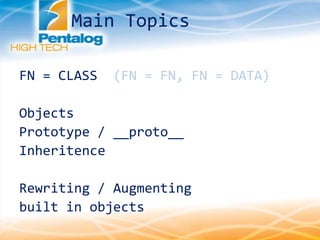
Main Topics
FN = CLASS (FN = FN, FN = DATA)
Objects
Prototype / __proto__
Inheritence
Rewriting / Augmenting
built in objects
JavaScript has many uses for functions, where most programming languages have a
special syntax for some object-oriented features,
JavaScript just uses functions.
[BASIC CONCEPTS ABOUT FUNCTIONS]
more parameters -> ignored
less parameters -> undefined
N.B.
An arguments array is created automatically inside each function.
>>> function args() { return arguments; }
>>> args();
[]
>>> args( 1, 2, 3, 4, true, 'ninja');
[1, 2, 3, 4, true, "ninja"]
FUNCTIONS
global variables -describes variables you define outside of any function
local variables -which are defined inside a function
N.B.
It is also important to note that if you
don't use var to declare a variable, this
Variable is automatically assigned global
scope.
>>> function f(){ local=2; }
>>> local;
ERROR
>>> f();
>>> local;
2
N.B.
A local variable overwrites
any global variable with the same
name.
GOOD PRACTISE - have less global var.
var a = 123;
function f() {
alert(a); //undefined
var a = 1;
alert(a);
}
f();
Scope of Variables
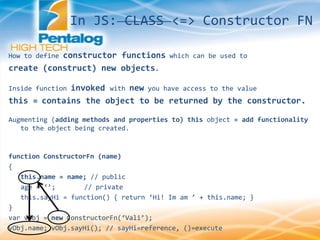
How to define constructor functions which can be used to
create (construct) new objects.
Inside function invoked with new you have access to the value
this = contains the object to be returned by the constructor.
Augmenting (adding methods and properties to) this object = add functionality
to the object being created.
function ConstructorFn (name)
{
this.name = name; // public
age = ‘’; // private
this.sayHi = function() { return ‘Hi! Im am ’ + this.name; }
}
var vObj = new ConstructorFn(‘Vali’);
vObj.name; vObj.sayHi(); // sayHi=reference, ()=execute
In JS: CLASS <=> Constructor FN
JavaScript programs run inside a host environment (the browser for example).
Now that you know about objects, it is time for the whole truth:
- host environment provides a global object
- all global variables are properties of the global object
If your host environment is the web browser, the global object is called window.
// global variable
>>> var a = 1;
>>> window['a']
>>> window.a
The Global Object
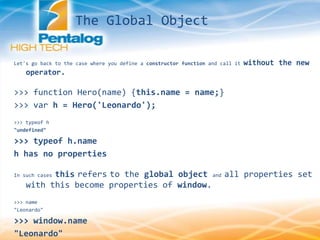
Let's go back to the case where you define a constructor function and call it without the new
operator.
>>> function Hero(name) {this.name = name;}
>>> var h = Hero('Leonardo');
>>> typeof h
"undefined"
>>> typeof h.name
h has no properties
In such cases this refers to the global object and all properties set
with this become properties of window.
>>> name
"Leonardo"
>>> window.name
"Leonardo"
The Global Object
Imagine the String() constructor didn't exist. Create
a constructor function MyString() that acts like
String() as closely as possible.
function MyStringConstructor(str){
var _self = this;
// this in some context may refer to other object
_self.length=0;
// public properties
_self.string=str;
/* self invoking or call expl
- init(str); executed when
object instanciated */
(
function(str){
_self.length = 0;
_self.string = str;
var i=0;
while( _self.string[i] )
{
//self.i = takes i as literal, not var
_self[i] = _self.string[i];
i++;
}
_self.length=i;
}
)(str);
Rewriting built-in objects
_self.toString = function(){
return _self.string;
};
_self.charAt = function(index){
validate(index,'index');
return _self[index];
};
_self.concat = function(str){
return _self.string + str;
};
_self.slice =
function(index1,index2)
{
validate(index1,'index');
validate(index2,'index2');
if (index2<0)
index2=_self.length + index2 -1;
var slice = '';
for(var i=index1;i<=index2; i++)
{
if (_self[i]) slice += _self[i];
}
return slice;
};
Rewriting built-in objects
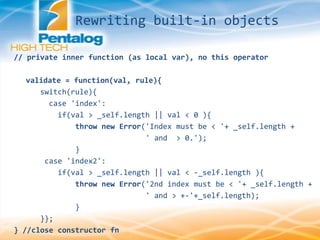
// private inner function (as local var), no this operator
validate = function(val, rule){
switch(rule){
case 'index':
if(val > _self.length || val < 0 ){
throw new Error('Index must be < '+ _self.length +
' and > 0.');
}
case 'index2':
if(val > _self.length || val < -_self.length ){
throw new Error('2nd index must be < '+ _self.length +
' and > +-'+_self.length);
}
}};
} //close constructor fn
Rewriting built-in objects
http://jsbin.com/agadaf/9/edit
(open js & console tabs)
var sObj = new MyStringConstructor('rodica');
console.log(sObj.length);
console.log(sObj[0]);
console.log(sObj.toString());
console.log(sObj.charAt(9));
console.log(sObj.concat(' is coding'));
console.log(sObj.slice(1,3));
console.log(sObj.slice(0,-2));
Rewriting built-in objects
The prototype Property
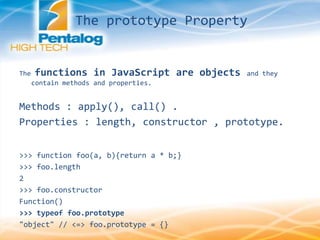
The functions in JavaScript are objects and they
contain methods and properties.
Methods : apply(), call() .
Properties : length, constructor , prototype.
>>> function foo(a, b){return a * b;}
>>> foo.length
2
>>> foo.constructor
Function()
>>> typeof foo.prototype
"object" // <=> foo.prototype = {}
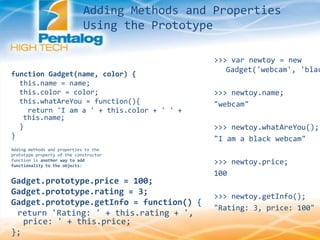
Adding Methods and Properties
Using the Prototype
function Gadget(name, color) {
this.name = name;
this.color = color;
this.whatAreYou = function(){
return 'I am a ' + this.color + ' ' +
this.name;
}
}
Adding methods and properties to the
prototype property of the constructor
function is another way to add
functionality to the objects:
Gadget.prototype.price = 100;
Gadget.prototype.rating = 3;
Gadget.prototype.getInfo = function() {
return 'Rating: ' + this.rating + ',
price: ' + this.price;
};
>>> var newtoy = new
Gadget('webcam', 'blac
>>> newtoy.name;
"webcam"
>>> newtoy.whatAreYou();
"I am a black webcam"
>>> newtoy.price;
100
>>> newtoy.getInfo();
"Rating: 3, price: 100"
prototype is "live"
you can modify the prototype at any time and all objects
(even those created before the modification) will
inherit the changes.
// add a new method to the prototype
Gadget.prototype.get = function(what) {
return this[what];
};
>>> newtoy.get('price');
100
>>> newtoy.get('color');
"black‚
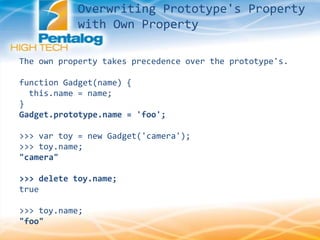
The own property takes precedence over the prototype's.
Overwriting Prototype's Property
with Own Property
The own property takes precedence over the prototype's.
function Gadget(name) {
this.name = name;
}
Gadget.prototype.name = 'foo';
>>> var toy = new Gadget('camera');
>>> toy.name;
"camera"
>>> delete toy.name;
true
>>> toy.name;
"foo"
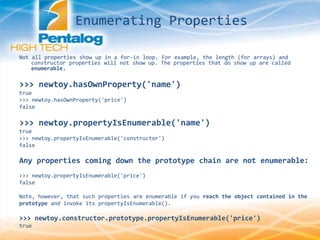
Enumerating Properties
propertyIsEnumerable() ; hasOwnProperty();
// constructor fn
function Gadget(name, color) {
this.name = name;
this.color = color;
this.someMethod = function(){return 1;}
}
Gadget.prototype.price = 100;
Gadget.prototype.rating = 3;
// new obj
var newtoy = new Gadget('webcam', 'black');
for (var prop in newtoy) {
// if (newtoy.hasOwnProperty(prop)) {
console.log(prop + ' = ' + newtoy[prop]);
// }
}
name = webcam
color = black
someMethod = function () { return 1; }
price = 100
rating = 3
Not all properties show up in a for-in loop. For example, the length (for arrays) and
constructor properties will not show up. The properties that do show up are called
enumerable.
>>> newtoy.hasOwnProperty('name')
true
>>> newtoy.hasOwnProperty('price')
false
>>> newtoy.propertyIsEnumerable('name')
true
>>> newtoy.propertyIsEnumerable('constructor')
false
Any properties coming down the prototype chain are not enumerable:
>>> newtoy.propertyIsEnumerable('price')
false
Note, however, that such properties are enumerable if you reach the object contained in the
prototype and invoke its propertyIsEnumerable().
>>> newtoy.constructor.prototype.propertyIsEnumerable('price')
true
Enumerating Properties
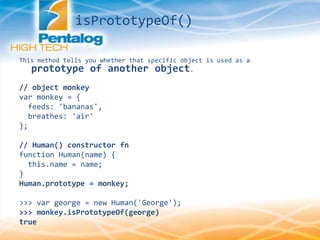
This method tells you whether that specific object is used as a
prototype of another object.
// object monkey
var monkey = {
feeds: 'bananas',
breathes: 'air'
};
// Human() constructor fn
function Human(name) {
this.name = name;
}
Human.prototype = monkey;
>>> var george = new Human('George');
>>> monkey.isPrototypeOf(george)
true
isPrototypeOf()
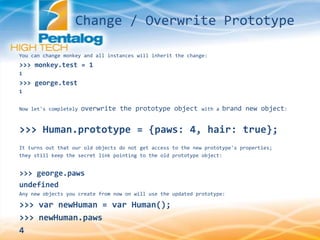
You can change monkey and all instances will inherit the change:
>>> monkey.test = 1
1
>>> george.test
1
Now let's completely overwrite the prototype object with a brand new object:
>>> Human.prototype = {paws: 4, hair: true};
It turns out that our old objects do not get access to the new prototype's properties;
they still keep the secret link pointing to the old prototype object:
>>> george.paws
undefined
Any new objects you create from now on will use the updated prototype:
>>> var newHuman = var Human();
>>> newHuman.paws
4
Change / Overwrite Prototype
__proto__ is not the same as prototype:
__proto__ is a property of the instances, whereas
prototype is a property of the constructor functions.
The secret link is exposed in Firefox as the __proto__ property , it does
not exist in Internet Explorer .
>>> var developer = new Human();
>>> typeof developer.__proto__
"object"
>>> typeof developer.prototype
"undefined"
The Secret __proto__ Link
Can you get from the developer object to the prototype object?
Well, you could, using constructor as the middleman, so having something like
developer. constructor.prototype should point to monkey. The problem is that this is not
very reliable, because constructor is more for informational purposes and can
easily be overwritten at any time. You can overwrite it with something that's not
even an object and this will not affect the normal functioning of the prototype chain.
>>> developer.constructor = 'junk'
"junk"
>>> typeof developer.constructor.prototype
"undefined"
It seems like the prototype is now all messed up ...but it isn't, because the developer
still breathes "air":
>>> developer.breathes
"air"
>>> developer.__proto__
Object feeds=bananas breathes=air
You should use __proto__ only for learning or debugging purposes.
The Secret __proto__ Link
The built-in objects such as the constructor functions Array, String, and even
Object, and Function can be augmented through their prototypes, which means
that you can, for example, add new methods to the Array prototype and in this way
make them available to all arrays. Let's do this.
Array.prototype.inArray = function(needle) {
/* this points to array obj, .length, [i] – are properties of the obj */
for (var i = 0, len = this.length; i < len; i++) {
if (this[i] === needle) {
return true;
}
}
return false;
}
Now all arrays will have the new method. Let's test:
>>> var a = ['red', 'green', 'blue'];
>>> a.inArray('red');
true
>>> a.inArray('yellow');
false
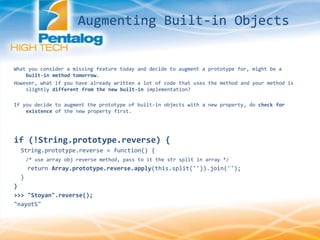
Augmenting Built-in Objects
What you consider a missing feature today and decide to augment a prototype for, might be a
built-in method tomorrow.
However, what if you have already written a lot of code that uses the method and your method is
slightly different from the new built-in implementation?
If you decide to augment the prototype of built-in objects with a new property, do check for
existence of the new property first.
if (!String.prototype.reverse) {
String.prototype.reverse = function() {
/* use array obj reverse method, pass to it the str split in array */
return Array.prototype.reverse.apply(this.split('')).join('');
}
}
>>> "Stoyan".reverse();
"nayotS"
Augmenting Built-in Objects
In this illustration, an object A contains a number of properties. One of the
properties is the hidden __proto__ property, which points to another
object, B. B's __proto__ property points to C. This chain ends with the
Object() object, which is the highest- level parent, and every
object inherits from it.
This is all good to know, but how does it help us? The practical side is that when
object A lacks a property but B has it, A can still access this property as its
own. The same applies if B also doesn't have the required property, but C does.
This is how inheritance takes place: an object can access any property
found somewhere up the inheritance chain.
Inheritance
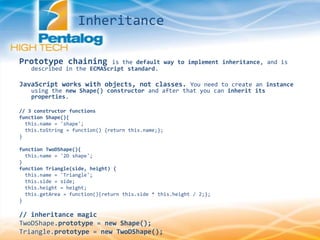
Prototype chaining is the default way to implement inheritance, and is
described in the ECMAScript standard.
JavaScript works with objects, not classes. You need to create an instance
using the new Shape() constructor and after that you can inherit its
properties.
// 3 constructor functions
function Shape(){
this.name = 'shape';
this.toString = function() {return this.name;};
}
function TwoDShape(){
this.name = '2D shape';
}
function Triangle(side, height) {
this.name = 'Triangle';
this.side = side;
this.height = height;
this.getArea = function(){return this.side * this.height / 2;};
}
// inheritance magic
TwoDShape.prototype = new Shape();
Triangle.prototype = new TwoDShape();
Inheritance

Oojs 1.1

  • 1.
    OOJS Object Oriented Programming inJava Script >> text and code snippets from a great book >> Object-Oriented Java Script >> by >> Stoyan Stefanov
  • 2.
    Main Topics FN =CLASS (FN = FN, FN = DATA) Objects Prototype / __proto__ Inheritence Rewriting / Augmenting built in objects
  • 3.
    JavaScript has manyuses for functions, where most programming languages have a special syntax for some object-oriented features, JavaScript just uses functions. [BASIC CONCEPTS ABOUT FUNCTIONS] more parameters -> ignored less parameters -> undefined N.B. An arguments array is created automatically inside each function. >>> function args() { return arguments; } >>> args(); [] >>> args( 1, 2, 3, 4, true, 'ninja'); [1, 2, 3, 4, true, "ninja"] FUNCTIONS
  • 4.
    global variables -describesvariables you define outside of any function local variables -which are defined inside a function N.B. It is also important to note that if you don't use var to declare a variable, this Variable is automatically assigned global scope. >>> function f(){ local=2; } >>> local; ERROR >>> f(); >>> local; 2 N.B. A local variable overwrites any global variable with the same name. GOOD PRACTISE - have less global var. var a = 123; function f() { alert(a); //undefined var a = 1; alert(a); } f(); Scope of Variables
  • 5.
    How to defineconstructor functions which can be used to create (construct) new objects. Inside function invoked with new you have access to the value this = contains the object to be returned by the constructor. Augmenting (adding methods and properties to) this object = add functionality to the object being created. function ConstructorFn (name) { this.name = name; // public age = ‘’; // private this.sayHi = function() { return ‘Hi! Im am ’ + this.name; } } var vObj = new ConstructorFn(‘Vali’); vObj.name; vObj.sayHi(); // sayHi=reference, ()=execute In JS: CLASS <=> Constructor FN
  • 6.
    JavaScript programs runinside a host environment (the browser for example). Now that you know about objects, it is time for the whole truth: - host environment provides a global object - all global variables are properties of the global object If your host environment is the web browser, the global object is called window. // global variable >>> var a = 1; >>> window['a'] >>> window.a The Global Object
  • 7.
    Let's go backto the case where you define a constructor function and call it without the new operator. >>> function Hero(name) {this.name = name;} >>> var h = Hero('Leonardo'); >>> typeof h "undefined" >>> typeof h.name h has no properties In such cases this refers to the global object and all properties set with this become properties of window. >>> name "Leonardo" >>> window.name "Leonardo" The Global Object
  • 8.
    Imagine the String()constructor didn't exist. Create a constructor function MyString() that acts like String() as closely as possible. function MyStringConstructor(str){ var _self = this; // this in some context may refer to other object _self.length=0; // public properties _self.string=str; /* self invoking or call expl - init(str); executed when object instanciated */ ( function(str){ _self.length = 0; _self.string = str; var i=0; while( _self.string[i] ) { //self.i = takes i as literal, not var _self[i] = _self.string[i]; i++; } _self.length=i; } )(str); Rewriting built-in objects
  • 9.
    _self.toString = function(){ return_self.string; }; _self.charAt = function(index){ validate(index,'index'); return _self[index]; }; _self.concat = function(str){ return _self.string + str; }; _self.slice = function(index1,index2) { validate(index1,'index'); validate(index2,'index2'); if (index2<0) index2=_self.length + index2 -1; var slice = ''; for(var i=index1;i<=index2; i++) { if (_self[i]) slice += _self[i]; } return slice; }; Rewriting built-in objects
  • 10.
    // private innerfunction (as local var), no this operator validate = function(val, rule){ switch(rule){ case 'index': if(val > _self.length || val < 0 ){ throw new Error('Index must be < '+ _self.length + ' and > 0.'); } case 'index2': if(val > _self.length || val < -_self.length ){ throw new Error('2nd index must be < '+ _self.length + ' and > +-'+_self.length); } }}; } //close constructor fn Rewriting built-in objects
  • 11.
    http://jsbin.com/agadaf/9/edit (open js &console tabs) var sObj = new MyStringConstructor('rodica'); console.log(sObj.length); console.log(sObj[0]); console.log(sObj.toString()); console.log(sObj.charAt(9)); console.log(sObj.concat(' is coding')); console.log(sObj.slice(1,3)); console.log(sObj.slice(0,-2)); Rewriting built-in objects
  • 12.
    The prototype Property Thefunctions in JavaScript are objects and they contain methods and properties. Methods : apply(), call() . Properties : length, constructor , prototype. >>> function foo(a, b){return a * b;} >>> foo.length 2 >>> foo.constructor Function() >>> typeof foo.prototype "object" // <=> foo.prototype = {}
  • 13.
    Adding Methods andProperties Using the Prototype function Gadget(name, color) { this.name = name; this.color = color; this.whatAreYou = function(){ return 'I am a ' + this.color + ' ' + this.name; } } Adding methods and properties to the prototype property of the constructor function is another way to add functionality to the objects: Gadget.prototype.price = 100; Gadget.prototype.rating = 3; Gadget.prototype.getInfo = function() { return 'Rating: ' + this.rating + ', price: ' + this.price; }; >>> var newtoy = new Gadget('webcam', 'blac >>> newtoy.name; "webcam" >>> newtoy.whatAreYou(); "I am a black webcam" >>> newtoy.price; 100 >>> newtoy.getInfo(); "Rating: 3, price: 100"
  • 14.
    prototype is "live" youcan modify the prototype at any time and all objects (even those created before the modification) will inherit the changes. // add a new method to the prototype Gadget.prototype.get = function(what) { return this[what]; }; >>> newtoy.get('price'); 100 >>> newtoy.get('color'); "black‚ The own property takes precedence over the prototype's.
  • 15.
    Overwriting Prototype's Property withOwn Property The own property takes precedence over the prototype's. function Gadget(name) { this.name = name; } Gadget.prototype.name = 'foo'; >>> var toy = new Gadget('camera'); >>> toy.name; "camera" >>> delete toy.name; true >>> toy.name; "foo"
  • 16.
    Enumerating Properties propertyIsEnumerable() ;hasOwnProperty(); // constructor fn function Gadget(name, color) { this.name = name; this.color = color; this.someMethod = function(){return 1;} } Gadget.prototype.price = 100; Gadget.prototype.rating = 3; // new obj var newtoy = new Gadget('webcam', 'black'); for (var prop in newtoy) { // if (newtoy.hasOwnProperty(prop)) { console.log(prop + ' = ' + newtoy[prop]); // } } name = webcam color = black someMethod = function () { return 1; } price = 100 rating = 3
  • 17.
    Not all propertiesshow up in a for-in loop. For example, the length (for arrays) and constructor properties will not show up. The properties that do show up are called enumerable. >>> newtoy.hasOwnProperty('name') true >>> newtoy.hasOwnProperty('price') false >>> newtoy.propertyIsEnumerable('name') true >>> newtoy.propertyIsEnumerable('constructor') false Any properties coming down the prototype chain are not enumerable: >>> newtoy.propertyIsEnumerable('price') false Note, however, that such properties are enumerable if you reach the object contained in the prototype and invoke its propertyIsEnumerable(). >>> newtoy.constructor.prototype.propertyIsEnumerable('price') true Enumerating Properties
  • 18.
    This method tellsyou whether that specific object is used as a prototype of another object. // object monkey var monkey = { feeds: 'bananas', breathes: 'air' }; // Human() constructor fn function Human(name) { this.name = name; } Human.prototype = monkey; >>> var george = new Human('George'); >>> monkey.isPrototypeOf(george) true isPrototypeOf()
  • 19.
    You can changemonkey and all instances will inherit the change: >>> monkey.test = 1 1 >>> george.test 1 Now let's completely overwrite the prototype object with a brand new object: >>> Human.prototype = {paws: 4, hair: true}; It turns out that our old objects do not get access to the new prototype's properties; they still keep the secret link pointing to the old prototype object: >>> george.paws undefined Any new objects you create from now on will use the updated prototype: >>> var newHuman = var Human(); >>> newHuman.paws 4 Change / Overwrite Prototype
  • 20.
    __proto__ is notthe same as prototype: __proto__ is a property of the instances, whereas prototype is a property of the constructor functions. The secret link is exposed in Firefox as the __proto__ property , it does not exist in Internet Explorer . >>> var developer = new Human(); >>> typeof developer.__proto__ "object" >>> typeof developer.prototype "undefined" The Secret __proto__ Link
  • 21.
    Can you getfrom the developer object to the prototype object? Well, you could, using constructor as the middleman, so having something like developer. constructor.prototype should point to monkey. The problem is that this is not very reliable, because constructor is more for informational purposes and can easily be overwritten at any time. You can overwrite it with something that's not even an object and this will not affect the normal functioning of the prototype chain. >>> developer.constructor = 'junk' "junk" >>> typeof developer.constructor.prototype "undefined" It seems like the prototype is now all messed up ...but it isn't, because the developer still breathes "air": >>> developer.breathes "air" >>> developer.__proto__ Object feeds=bananas breathes=air You should use __proto__ only for learning or debugging purposes. The Secret __proto__ Link
  • 22.
    The built-in objectssuch as the constructor functions Array, String, and even Object, and Function can be augmented through their prototypes, which means that you can, for example, add new methods to the Array prototype and in this way make them available to all arrays. Let's do this. Array.prototype.inArray = function(needle) { /* this points to array obj, .length, [i] – are properties of the obj */ for (var i = 0, len = this.length; i < len; i++) { if (this[i] === needle) { return true; } } return false; } Now all arrays will have the new method. Let's test: >>> var a = ['red', 'green', 'blue']; >>> a.inArray('red'); true >>> a.inArray('yellow'); false Augmenting Built-in Objects
  • 23.
    What you considera missing feature today and decide to augment a prototype for, might be a built-in method tomorrow. However, what if you have already written a lot of code that uses the method and your method is slightly different from the new built-in implementation? If you decide to augment the prototype of built-in objects with a new property, do check for existence of the new property first. if (!String.prototype.reverse) { String.prototype.reverse = function() { /* use array obj reverse method, pass to it the str split in array */ return Array.prototype.reverse.apply(this.split('')).join(''); } } >>> "Stoyan".reverse(); "nayotS" Augmenting Built-in Objects
  • 24.
    In this illustration,an object A contains a number of properties. One of the properties is the hidden __proto__ property, which points to another object, B. B's __proto__ property points to C. This chain ends with the Object() object, which is the highest- level parent, and every object inherits from it. This is all good to know, but how does it help us? The practical side is that when object A lacks a property but B has it, A can still access this property as its own. The same applies if B also doesn't have the required property, but C does. This is how inheritance takes place: an object can access any property found somewhere up the inheritance chain. Inheritance
  • 25.
    Prototype chaining isthe default way to implement inheritance, and is described in the ECMAScript standard. JavaScript works with objects, not classes. You need to create an instance using the new Shape() constructor and after that you can inherit its properties. // 3 constructor functions function Shape(){ this.name = 'shape'; this.toString = function() {return this.name;}; } function TwoDShape(){ this.name = '2D shape'; } function Triangle(side, height) { this.name = 'Triangle'; this.side = side; this.height = height; this.getArea = function(){return this.side * this.height / 2;}; } // inheritance magic TwoDShape.prototype = new Shape(); Triangle.prototype = new TwoDShape(); Inheritance