Odoo All In One Import Data App
Browseinfo
Sensing your needs
Reach us At
Email : contact@browseinfo.in
Contact : 079-29700001
About App : By Using this All in one
import data Odoo App you can
Import All Data of Odoo like
Sales, Purchase, Invoice,
Inventory,Bill of material,
Customer/Supplier Payment,
Bank Statement, Journal Entry,
Picking, Product, Customer,
Sale Price List, Purchase Price
List and Product Price List,
Chart Of Account.
FREE...
FREE...
FREE..
If you want to import extra fields
from default odoo apart from our
sample files, we will add those on
our import module without any extra
cost. You can purchase our All type
of data import app in Odoo and
contact us on sales@browseinfo.in
e.,g If you want to add Analytic
accounts on sale order or analytic
tags details on sale order line or on
purchase order vendor reference we
will add without any cost
Features :
* Import Order
* Import Product Template with Attributes
* Import Accounting Data
* Different Warning
* Import Warehouse Data
* Import and Update Master Data
* Supported Community and Enterprise Edition
Features :
* Import Order Lines
* Import Product Variant with Attributes
* Import Bill of Material
* Support Translation
* Import Price List
* Import Order with Date
* CSV/XLS file Supported
Import Customer/Supplier Invoice :
You have 3 different options to import invoice order :
1) Import with Code.
2) Import with Barcode.
3) Import with Name.
Find Article here : Odoo Import Bridge(CSV or Excel File) app
Some important points :
* Tax column is important you have to add "Tax column" though
there is no need of adding tax.
* When code is selected in Import option, please select file that
contains code of products.
* When barcode is selected in Import option, please select file
that contains barcode of products.
* When Name is selected in Import option, please select file that
contains name of products.
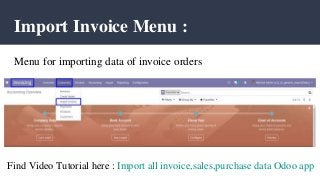
Import Invoice Menu :
Menu for importing data of invoice orders
Find Video Tutorial here : Import all invoice,sales,purchase data Odoo app
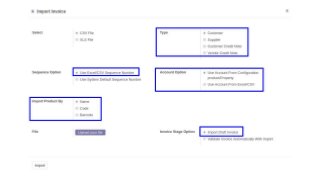
Import Invoice Wizard :
1. Sequence Option :
* If you want to import details of invoice number from
CSV/XLS you can also have option regarding this in import
invoice wizard.
* If you select "Use Excel/CSV Sequence Number" option then
name field will came from CSV/XLS file.
Import Invoice Wizard :
2. Invoice Stage Option :
* If you select "Import Draft Invoice" option then invoice will be
import in draft stage.
* If you select "Validate Invoice Automatically With Import"
option then invoice will be import in validate/Open stage.
Import Invoice Wizard :
3. Account Option : If you want to import Account from
XLS/CSV so you have option for "Account Option" regarding
this in import invoice wizard.
4. Type : You have also option for import invoice for Customer,
Vendors, Customer Refund(Customers Credit Note) or Vendors
Refund.
Import Invoice Wizard :
5. Import Product By :
* You have also option to import products by it's Name/ Barcode
or Code(Internal Reference).
* If you want to create product while importing invoice order
then you have to select import with "Name".
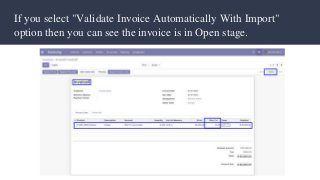
If you select "Validate Invoice Automatically With Import"
option then you can see the invoice is in Open stage.
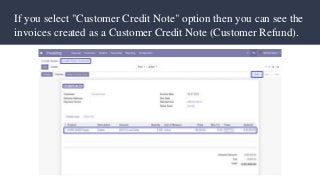
If you select "Customer Credit Note" option then you can see the
invoices created as a Customer Credit Note (Customer Refund).
Warning :
1. It will generate error if you
import wrong partner.
2. It will also generates errors
when you import wrong value of
Currency,Price List, UOM,
Salesperson and Tax.
Other Data that you can Import :
* Import Incoming Shipment/Delivery Order/Internal Transfer
* Import Invoice Lines / Journal Entry
* Import Customer/Supplier Payment
* Import Bank Statement Lines
* Import Sales Order
* Import Product Template
* Import Products With Vendor
* Import Inventory
Other Data that you can Import :
* Import Chart Of Account
* Import Product Price List
* Import Vendor Price List
* Import Sale Price List
* Import Bill of Material
* Import/Update Partners
* Import Purchase Order Lines
* Import Purchase Order
Import Product Template and it's Product Variants with
Attributes and Attributes Values
Here this import "Product Template with Attributes" feature
allows user to import product template with multiple product
variant along with its attributes and attributes value. single line
of template with multi attribute creates several variant automatic
same as odoo process. if we assign 2 attributes with 3 values then
it will create 1 product template with attributes value along with
6 variants.
Installation Guide :
Before installing this Odoo all import data Module you have to
install following packages in your system :
1.sudo pip install xlrd
2.sudo pip install xlwt
OR
1.sudo apt-get install python-xlrd
2.sudo apt-get install python-xlwt
Conclusion :
* Importing different sort of data is always
been headache, But Now by using this
Import data management Odoo apps It
become easy never been before.
* It can reduce you work efforts and makes
your life hassle free.
* Also available in many updated versions
like V13, V12, V11, V10, V9, V8
Apps May You Like :
WE FEEL
HAPPY
TO
SERVE
YOU….
Odoo
MigrationO
U
R
B
E
S
T
S
E
R
V
I
C
E
Contact on : contact@browseinfo.in
BrowseinfoSensing your needs
“Thank
You”
BrowseinfoSensing your needs
Email : contact@browseinfo.in
Contact : 079-29700001
Address : A-310, Siddhivinayak Tower,
Makarba, Ahmedabad 380051,
Gujarat, India.

Odoo all in one import data app

  • 1.
    Odoo All InOne Import Data App Browseinfo Sensing your needs Reach us At Email : contact@browseinfo.in Contact : 079-29700001
  • 2.
    About App :By Using this All in one import data Odoo App you can Import All Data of Odoo like Sales, Purchase, Invoice, Inventory,Bill of material, Customer/Supplier Payment, Bank Statement, Journal Entry, Picking, Product, Customer, Sale Price List, Purchase Price List and Product Price List, Chart Of Account.
  • 3.
    FREE... FREE... FREE.. If you wantto import extra fields from default odoo apart from our sample files, we will add those on our import module without any extra cost. You can purchase our All type of data import app in Odoo and contact us on sales@browseinfo.in e.,g If you want to add Analytic accounts on sale order or analytic tags details on sale order line or on purchase order vendor reference we will add without any cost
  • 4.
    Features : * ImportOrder * Import Product Template with Attributes * Import Accounting Data * Different Warning * Import Warehouse Data * Import and Update Master Data * Supported Community and Enterprise Edition
  • 5.
    Features : * ImportOrder Lines * Import Product Variant with Attributes * Import Bill of Material * Support Translation * Import Price List * Import Order with Date * CSV/XLS file Supported
  • 6.
    Import Customer/Supplier Invoice: You have 3 different options to import invoice order : 1) Import with Code. 2) Import with Barcode. 3) Import with Name. Find Article here : Odoo Import Bridge(CSV or Excel File) app
  • 7.
    Some important points: * Tax column is important you have to add "Tax column" though there is no need of adding tax. * When code is selected in Import option, please select file that contains code of products. * When barcode is selected in Import option, please select file that contains barcode of products. * When Name is selected in Import option, please select file that contains name of products.
  • 8.
    Import Invoice Menu: Menu for importing data of invoice orders Find Video Tutorial here : Import all invoice,sales,purchase data Odoo app
  • 9.
    Import Invoice Wizard: 1. Sequence Option : * If you want to import details of invoice number from CSV/XLS you can also have option regarding this in import invoice wizard. * If you select "Use Excel/CSV Sequence Number" option then name field will came from CSV/XLS file.
  • 10.
    Import Invoice Wizard: 2. Invoice Stage Option : * If you select "Import Draft Invoice" option then invoice will be import in draft stage. * If you select "Validate Invoice Automatically With Import" option then invoice will be import in validate/Open stage.
  • 11.
    Import Invoice Wizard: 3. Account Option : If you want to import Account from XLS/CSV so you have option for "Account Option" regarding this in import invoice wizard. 4. Type : You have also option for import invoice for Customer, Vendors, Customer Refund(Customers Credit Note) or Vendors Refund.
  • 12.
    Import Invoice Wizard: 5. Import Product By : * You have also option to import products by it's Name/ Barcode or Code(Internal Reference). * If you want to create product while importing invoice order then you have to select import with "Name".
  • 14.
    If you select"Validate Invoice Automatically With Import" option then you can see the invoice is in Open stage.
  • 15.
    If you select"Customer Credit Note" option then you can see the invoices created as a Customer Credit Note (Customer Refund).
  • 16.
    Warning : 1. Itwill generate error if you import wrong partner. 2. It will also generates errors when you import wrong value of Currency,Price List, UOM, Salesperson and Tax.
  • 17.
    Other Data thatyou can Import : * Import Incoming Shipment/Delivery Order/Internal Transfer * Import Invoice Lines / Journal Entry * Import Customer/Supplier Payment * Import Bank Statement Lines * Import Sales Order * Import Product Template * Import Products With Vendor * Import Inventory
  • 18.
    Other Data thatyou can Import : * Import Chart Of Account * Import Product Price List * Import Vendor Price List * Import Sale Price List * Import Bill of Material * Import/Update Partners * Import Purchase Order Lines * Import Purchase Order
  • 19.
    Import Product Templateand it's Product Variants with Attributes and Attributes Values Here this import "Product Template with Attributes" feature allows user to import product template with multiple product variant along with its attributes and attributes value. single line of template with multi attribute creates several variant automatic same as odoo process. if we assign 2 attributes with 3 values then it will create 1 product template with attributes value along with 6 variants.
  • 20.
    Installation Guide : Beforeinstalling this Odoo all import data Module you have to install following packages in your system : 1.sudo pip install xlrd 2.sudo pip install xlwt OR 1.sudo apt-get install python-xlrd 2.sudo apt-get install python-xlwt
  • 21.
    Conclusion : * Importingdifferent sort of data is always been headache, But Now by using this Import data management Odoo apps It become easy never been before. * It can reduce you work efforts and makes your life hassle free. * Also available in many updated versions like V13, V12, V11, V10, V9, V8
  • 22.
    Apps May YouLike : WE FEEL HAPPY TO SERVE YOU….
  • 23.
    Odoo MigrationO U R B E S T S E R V I C E Contact on :contact@browseinfo.in BrowseinfoSensing your needs
  • 24.
    “Thank You” BrowseinfoSensing your needs Email: contact@browseinfo.in Contact : 079-29700001 Address : A-310, Siddhivinayak Tower, Makarba, Ahmedabad 380051, Gujarat, India.