Node.js and
    WebSockets

     Gonzalo Ayuso 2011

          @gonzalo123
http://gonzalo123.wordpress.com
 https://github.com/gonzalo123
Part 1. Node.js
Part 2. WebSockets
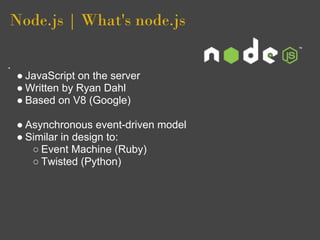
Node.js | What's node.js


â—Ź JavaScript on the server
â—Ź Written by Ryan Dahl
â—Ź Based on V8 (Google)

â—Ź Asynchronous event-driven model
â—Ź Similar in design to:
   â—‹ Event Machine (Ruby)
   â—‹ Twisted (Python)
Node.js | Why?

      I/O needs to be done differently
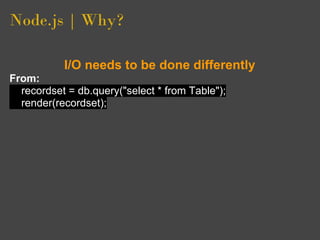
Node.js | Why?

           I/O needs to be done differently
From:
  recordset = db.query("select * from Table");
  render(recordset);
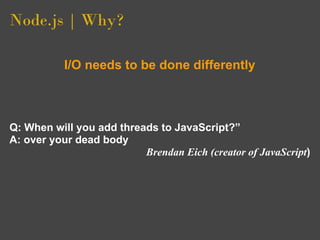
Node.js | Why?

           I/O needs to be done differently


Q: When will you add threads to JavaScript?”
A: over your dead body
                          Brendan Eich (creator of JavaScript)
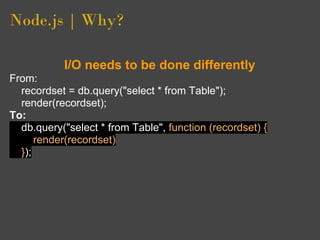
Node.js | Why?

           I/O needs to be done differently
From:
  recordset = db.query("select * from Table");
  render(recordset);
To:
  db.query("select * from Table", function (recordset) {
      render(recordset)
  });
Node.js | Why?

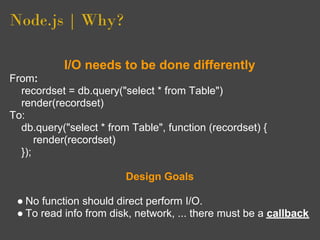
           I/O needs to be done differently
From:
  recordset = db.query("select * from Table")
  render(recordset)
To:
  db.query("select * from Table", function (recordset) {
      render(recordset)
  });

                         Design Goals

 â—Ź No function should direct perform I/O.
 â—Ź To read info from disk, network, ... there must be a callback
Node.js | Show me the code!

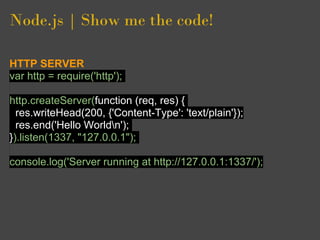
HTTP SERVER
var http = require('http');

http.createServer(function (req, res) {
  res.writeHead(200, {'Content-Type': 'text/plain'});
  res.end('Hello Worldn');
}).listen(1337, "127.0.0.1");

console.log('Server running at http://127.0.0.1:1337/');
Node.js | Show me the code!

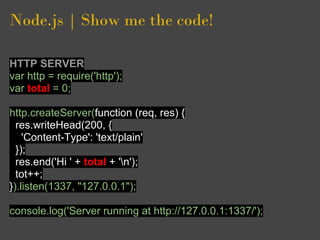
HTTP SERVER
var http = require('http');
var total = 0;

http.createServer(function (req, res) {
  res.writeHead(200, {
    'Content-Type': 'text/plain'
  });
  res.end('Hi ' + total + 'n');
  tot++;
}).listen(1337, "127.0.0.1");

console.log('Server running at http://127.0.0.1:1337/');
Node.js | Pros and Cons

PROS
 â—Ź Great I/O performance
 â—Ź Just JavaScript. We all know JavaScript
 â—Ź Community
 â—Ź A lot of modules available https://github.
   com/joyent/node/wiki/modules
 â—Ź npm
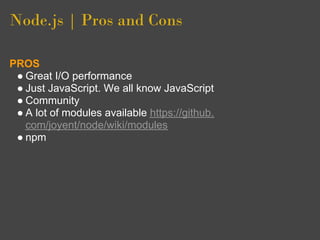
Node.js | Pros and Cons

PROS
 â—Ź Great I/O performance
 â—Ź Just JavaScript. We all know JavaScript
 â—Ź Community
 â—Ź A lot of modules available https://github.
   com/joyent/node/wiki/modules
 â—Ź npm
CONS
 â—Ź Hosting
 â—Ź We don't really know JavaScript
 â—Ź Modules too young
 â—Ź One thread, one single process for all
 â—Ź Windows support
Part 1. Node.js
Part 2. WebSockets
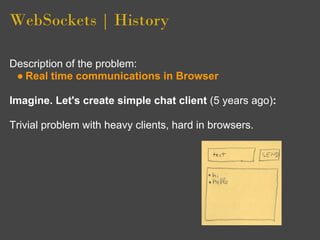
WebSockets | History

Description of the problem:
 â—Ź Real time communications in Browser
WebSockets | History

Description of the problem:
 â—Ź Real time communications in Browser

Imagine. Let's create simple chat client (5 years ago):

Trivial problem with heavy clients, hard in browsers.
WebSockets | History

COMET (Wikipedia):
Comet is a web application model in which a long-held HTTP request
allows a web server to push data to a browser, without the browser
explicitly requesting it.
WebSockets | History

COMET (Wikipedia):
Comet is a web application model in which a long-held HTTP request
allows a web server to push data to a browser, without the browser
explicitly requesting it.


Problem with COMET:
 â—Ź Servers (keep-alive, MaxClients, ...)
 â—Ź Clients
WebSockets | History

COMET (Wikipedia):
Comet is a web application model in which a long-held HTTP request
allows a web server to push data to a browser, without the browser
explicitly requesting it.


Problem with COMET:
 â—Ź Servers (keep-alive, MaxClients, ...)
 â—Ź Clients
WebSockets | Short Polling / Long
Polling
Short Polling
 â—Ź <meta http-equiv="refresh" content="5">
 â—Ź setInterval and setTimeout
 â—Ź Inneficient
 â—Ź Uses many resources (DB Connection, ...)
WebSockets | Short Polling / Long
Polling
Short Polling
 â—Ź <meta http-equiv="refresh" content="5">
 â—Ź setInterval and setTimeout
 â—Ź Inneficient
 â—Ź Uses many resources (DB Connection, ...)

Long Pooling
 â—Ź Looks like Real Time but it isn't RT
WebSockets | Short Polling / Long
Polling
Short Polling
 â—Ź <meta http-equiv="refresh" content="5">
 â—Ź setInterval and setTimeout
 â—Ź Inneficient
 â—Ź Uses many resources (DB Connection, ...)

Long Pooling
 â—Ź Looks like Real Time but it isn't RT

It works? Yes
It scales? No (Long Polling better but still No)
Is your sysadmin happy? No
WebSockets | Short Polling / Long
Polling
Short Polling
 â—Ź <meta http-equiv="refresh" content="5">
 â—Ź setInterval and setTimeout
 â—Ź Inneficient
 â—Ź Uses many resources (DB Connection, ...)

Long Pooling
 â—Ź Looks like Real Time but it isn't RT

It works? Yes
It scales? No (Long Polling better but still No)
Is your sysadmin happy? No
WebSockets | HTML5

WebSockets
This specification defines an API that enables Web pages to use the
WebSocket protocol for two-way communication with a remote host.
WebSockets | HTML5

WebSockets
This specification defines an API that enables Web pages to use the
WebSocket protocol for two-way communication with a remote host.

That's means:
 â—Ź The solution of the problem with RT at browser side
WebSockets | HTML5

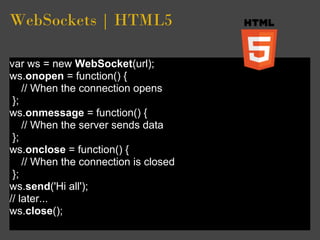
var ws = new WebSocket(url);
ws.onopen = function() {
    // When the connection opens
 };
ws.onmessage = function() {
    // When the server sends data
 };
ws.onclose = function() {
    // When the connection is closed
 };
ws.send('Hi all');
// later...
ws.close();
WebSockets | HTML5


            Cool but ...
WebSockets | HTML5


             Cool but ...
      Not all browsers support it
WebSockets | socket.io

Is there a solution?
WebSockets | socket.io

Is there a solution?

                       http://socket.io/
WebSockets | socket.io

Is there a solution?

                                               http://socket.io/

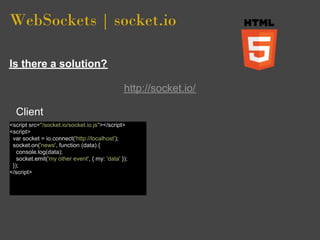
  Client
<script src="/socket.io/socket.io.js"></script>
<script>
 var socket = io.connect('http://localhost');
 socket.on('news', function (data) {
   console.log(data);
   socket.emit('my other event', { my: 'data' });
 });
</script>
WebSockets | socket.io

Is there a solution?

                                               http://socket.io/

  Client
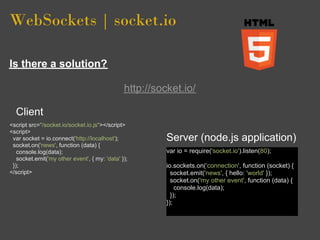
<script src="/socket.io/socket.io.js"></script>
<script>
 var socket = io.connect('http://localhost');            Server (node.js application)
 socket.on('news', function (data) {
   console.log(data);                                    var io = require('socket.io').listen(80);
   socket.emit('my other event', { my: 'data' });
 });                                                     io.sockets.on('connection', function (socket) {
</script>                                                  socket.emit('news', { hello: 'world' });
                                                           socket.on('my other event', function (data) {
                                                             console.log(data);
                                                           });
                                                         });
WebSockets | socket.io


                       http://socket.io/
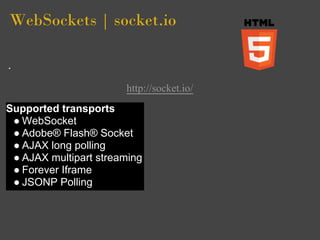
Supported transports
 â—Ź WebSocket
 ● Adobe® Flash® Socket
 â—Ź AJAX long polling
 â—Ź AJAX multipart streaming
 â—Ź Forever Iframe
 â—Ź JSONP Polling
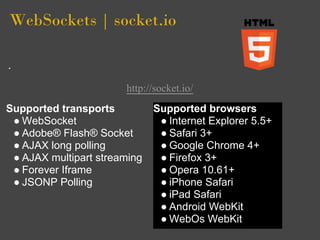
WebSockets | socket.io


                       http://socket.io/
Supported transports          Supported browsers
 â—Ź WebSocket                   â—Ź Internet Explorer 5.5+
 ● Adobe® Flash® Socket        ● Safari 3+
 â—Ź AJAX long polling           â—Ź Google Chrome 4+
 â—Ź AJAX multipart streaming    â—Ź Firefox 3+
 â—Ź Forever Iframe              â—Ź Opera 10.61+
 â—Ź JSONP Polling               â—Ź iPhone Safari
                               â—Ź iPad Safari
                               â—Ź Android WebKit
                               â—Ź WebOs WebKit
References


â—Ź http://dev.w3.org/html5/websockets/
â—Ź https://github.com/joyent/node/wiki/modules
â—Ź http://nodejs.org/
â—Ź http://socket.io/
â—Ź http://en.wikipedia.org/wiki/Push_technology
â—Ź http://www.youtube.com/watch?v=jo_B4LTHi3I
â—Ź http://gonzalo123.wordpress.
  com/category/technology/node-js/
The End.

    Many thanks
          @gonzalo123
http://gonzalo123.wordpress.com

Nodejs and WebSockets

  • 1.
    Node.js and WebSockets Gonzalo Ayuso 2011 @gonzalo123 http://gonzalo123.wordpress.com https://github.com/gonzalo123
  • 2.
    Part 1. Node.js Part2. WebSockets
  • 3.
    Node.js | What'snode.js â—Ź JavaScript on the server â—Ź Written by Ryan Dahl â—Ź Based on V8 (Google) â—Ź Asynchronous event-driven model â—Ź Similar in design to: â—‹ Event Machine (Ruby) â—‹ Twisted (Python)
  • 4.
    Node.js | Why? I/O needs to be done differently
  • 5.
    Node.js | Why? I/O needs to be done differently From: recordset = db.query("select * from Table"); render(recordset);
  • 6.
    Node.js | Why? I/O needs to be done differently Q: When will you add threads to JavaScript?” A: over your dead body Brendan Eich (creator of JavaScript)
  • 7.
    Node.js | Why? I/O needs to be done differently From: recordset = db.query("select * from Table"); render(recordset); To: db.query("select * from Table", function (recordset) { render(recordset) });
  • 8.
    Node.js | Why? I/O needs to be done differently From: recordset = db.query("select * from Table") render(recordset) To: db.query("select * from Table", function (recordset) { render(recordset) }); Design Goals ● No function should direct perform I/O. ● To read info from disk, network, ... there must be a callback
  • 9.
    Node.js | Show methe code! HTTP SERVER var http = require('http'); http.createServer(function (req, res) { res.writeHead(200, {'Content-Type': 'text/plain'}); res.end('Hello Worldn'); }).listen(1337, "127.0.0.1"); console.log('Server running at http://127.0.0.1:1337/');
  • 10.
    Node.js | Show methe code! HTTP SERVER var http = require('http'); var total = 0; http.createServer(function (req, res) { res.writeHead(200, { 'Content-Type': 'text/plain' }); res.end('Hi ' + total + 'n'); tot++; }).listen(1337, "127.0.0.1"); console.log('Server running at http://127.0.0.1:1337/');
  • 11.
    Node.js | Pros andCons PROS ● Great I/O performance ● Just JavaScript. We all know JavaScript ● Community ● A lot of modules available https://github. com/joyent/node/wiki/modules ● npm
  • 12.
    Node.js | Pros andCons PROS ● Great I/O performance ● Just JavaScript. We all know JavaScript ● Community ● A lot of modules available https://github. com/joyent/node/wiki/modules ● npm CONS ● Hosting ● We don't really know JavaScript ● Modules too young ● One thread, one single process for all ● Windows support
  • 13.
    Part 1. Node.js Part2. WebSockets
  • 14.
    WebSockets | History Descriptionof the problem: â—Ź Real time communications in Browser
  • 15.
    WebSockets | History Descriptionof the problem: â—Ź Real time communications in Browser Imagine. Let's create simple chat client (5 years ago): Trivial problem with heavy clients, hard in browsers.
  • 16.
    WebSockets | History COMET(Wikipedia): Comet is a web application model in which a long-held HTTP request allows a web server to push data to a browser, without the browser explicitly requesting it.
  • 17.
    WebSockets | History COMET(Wikipedia): Comet is a web application model in which a long-held HTTP request allows a web server to push data to a browser, without the browser explicitly requesting it. Problem with COMET: â—Ź Servers (keep-alive, MaxClients, ...) â—Ź Clients
  • 18.
    WebSockets | History COMET(Wikipedia): Comet is a web application model in which a long-held HTTP request allows a web server to push data to a browser, without the browser explicitly requesting it. Problem with COMET: â—Ź Servers (keep-alive, MaxClients, ...) â—Ź Clients
  • 19.
    WebSockets | ShortPolling / Long Polling Short Polling ● <meta http-equiv="refresh" content="5"> ● setInterval and setTimeout ● Inneficient ● Uses many resources (DB Connection, ...)
  • 20.
    WebSockets | ShortPolling / Long Polling Short Polling ● <meta http-equiv="refresh" content="5"> ● setInterval and setTimeout ● Inneficient ● Uses many resources (DB Connection, ...) Long Pooling ● Looks like Real Time but it isn't RT
  • 21.
    WebSockets | ShortPolling / Long Polling Short Polling ● <meta http-equiv="refresh" content="5"> ● setInterval and setTimeout ● Inneficient ● Uses many resources (DB Connection, ...) Long Pooling ● Looks like Real Time but it isn't RT It works? Yes It scales? No (Long Polling better but still No) Is your sysadmin happy? No
  • 22.
    WebSockets | ShortPolling / Long Polling Short Polling ● <meta http-equiv="refresh" content="5"> ● setInterval and setTimeout ● Inneficient ● Uses many resources (DB Connection, ...) Long Pooling ● Looks like Real Time but it isn't RT It works? Yes It scales? No (Long Polling better but still No) Is your sysadmin happy? No
  • 23.
    WebSockets | HTML5 WebSockets Thisspecification defines an API that enables Web pages to use the WebSocket protocol for two-way communication with a remote host.
  • 24.
    WebSockets | HTML5 WebSockets Thisspecification defines an API that enables Web pages to use the WebSocket protocol for two-way communication with a remote host. That's means: â—Ź The solution of the problem with RT at browser side
  • 25.
    WebSockets | HTML5 varws = new WebSocket(url); ws.onopen = function() { // When the connection opens }; ws.onmessage = function() { // When the server sends data }; ws.onclose = function() { // When the connection is closed }; ws.send('Hi all'); // later... ws.close();
  • 26.
    WebSockets | HTML5 Cool but ...
  • 27.
    WebSockets | HTML5 Cool but ... Not all browsers support it
  • 28.
    WebSockets | socket.io Isthere a solution?
  • 29.
    WebSockets | socket.io Isthere a solution? http://socket.io/
  • 30.
    WebSockets | socket.io Isthere a solution? http://socket.io/ Client <script src="/socket.io/socket.io.js"></script> <script> var socket = io.connect('http://localhost'); socket.on('news', function (data) { console.log(data); socket.emit('my other event', { my: 'data' }); }); </script>
  • 31.
    WebSockets | socket.io Isthere a solution? http://socket.io/ Client <script src="/socket.io/socket.io.js"></script> <script> var socket = io.connect('http://localhost'); Server (node.js application) socket.on('news', function (data) { console.log(data); var io = require('socket.io').listen(80); socket.emit('my other event', { my: 'data' }); }); io.sockets.on('connection', function (socket) { </script> socket.emit('news', { hello: 'world' }); socket.on('my other event', function (data) { console.log(data); }); });
  • 32.
    WebSockets | socket.io http://socket.io/ Supported transports ● WebSocket ● Adobe® Flash® Socket ● AJAX long polling ● AJAX multipart streaming ● Forever Iframe ● JSONP Polling
  • 33.
    WebSockets | socket.io http://socket.io/ Supported transports Supported browsers ● WebSocket ● Internet Explorer 5.5+ ● Adobe® Flash® Socket ● Safari 3+ ● AJAX long polling ● Google Chrome 4+ ● AJAX multipart streaming ● Firefox 3+ ● Forever Iframe ● Opera 10.61+ ● JSONP Polling ● iPhone Safari ● iPad Safari ● Android WebKit ● WebOs WebKit
  • 34.
    References â—Ź http://dev.w3.org/html5/websockets/ â—Ź https://github.com/joyent/node/wiki/modules â—Źhttp://nodejs.org/ â—Ź http://socket.io/ â—Ź http://en.wikipedia.org/wiki/Push_technology â—Ź http://www.youtube.com/watch?v=jo_B4LTHi3I â—Ź http://gonzalo123.wordpress. com/category/technology/node-js/
  • 35.
    The End. Many thanks @gonzalo123 http://gonzalo123.wordpress.com