By - Nitin Shinde
Nimbuzz for PC
2
3
Nimbuzz Lets You … Meet, Share
and Connect.
It’s freedom to communicate !!!
Overview :
4
Forget minutes or overage charges. Call Nimbuzz to Nimbuzz
for free on your data plan. Or use Nimbuzz-Out to call
landlines, mobile phones and internationally at low rates.
The more, the merrier. Use free calling, messaging, and file
sharing to connect with friends. Import friends from popular
instant messaging and social networks such as Facebook,
Windows Live (MSN), Google Talk, Yahoo.
Chat, instant messaging, share files, photos, videos, and more
– all for free with Nimbuzz. Join freedom!!
Creating Account :
5
Creating Account :
6
Account creation made simple just fill up following :
1) Username**
2) Password.
3) Email.
4) Phone Number.
5) Secured Set image.
6) Press “Create” …….you are logged in
**Note : Username is subject to availability.
Community Accounts :
7
Login to Accounts with valid credentials, upon validation …contacts will be
automatically visible in your roster.
Personalizing your Nimbuzz :
8
Personalize Nimbuzz right from Start up to your contacts visibility
in a single go !!!
Setting up for Video and Call :
9
Configure Audio and Video controls to enhance your experience with
Nimbuzz out calls….Why “type” when you can Talk and Share !!!
Add / Invite Friends to your Roster :
10
Add friends from Communities
like :
1) Nimbuzz
2) Facebook
3) Google Talk
4) Windows Live Messenger
5) Yahoo
Add Phone Contacts :
11
Add Phone nos. to call contacts with Nimbuzz out.
Adding Groups to Roster :
12
Add, Manage and customize “Groups” as per your need.
Chat Screen :
13
Chat, Share and explore multiple options within same application….
Chat options :
14
Multiple Chat options;
Get complete profile information of friends
Share a File :
15
File sharing made easy !!! …Send and Receive files right away from your PC with your
friends which will be stored in Inbox.
Group Chat :
16
Group chat enables you to share views with many @ the same time.
Security Tweak :
17
Some more security and personalization settings under tweak menu icon in chat screen
Nimbuzz Calls :
18
Tired to type…..use Call function to hear and talk to dear ones ……
Video Calls :
19
Setup up your Mic. and Web Cam to see them Live !!!
Nimbuzz Out Call :
20
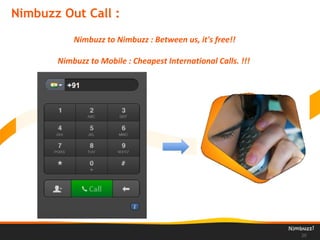
Nimbuzz to Nimbuzz : Between us, it's free!!
Nimbuzz to Mobile : Cheapest International Calls. !!!
Nimbuzz Tabs :
21
Contacts
Messages
Dial Pad
N - World
N-World : Avatars….
Access to N-World – From where you can
choose awesome avatars from over 11
categories
N-World : Social Chat Buddies…
Tweeting made simple with
Tweet Bot…..Go Tweet !!!
Laugh …Laugh ….Laugh with
our Joke Bot !!!
Chat Buddines are special Bot programs who respond with actions based on User inputs…
N-World : Games.
Defeat or get Defeated !!!
Test your gaming skills in this unreal
tournament of “Car Wars”. Invite and play
against your friends and know who’s faster.
N-World : Virtual Gift.
Happy Birthday !!!
Love You !! (^_^)
Surprise friends by sending Virtual Gifts available for every occasion.
Thank You
26

Nimbuzz PC Client

  • 1.
    By - NitinShinde
  • 2.
  • 3.
    3 Nimbuzz Lets You… Meet, Share and Connect. It’s freedom to communicate !!!
  • 4.
    Overview : 4 Forget minutesor overage charges. Call Nimbuzz to Nimbuzz for free on your data plan. Or use Nimbuzz-Out to call landlines, mobile phones and internationally at low rates. The more, the merrier. Use free calling, messaging, and file sharing to connect with friends. Import friends from popular instant messaging and social networks such as Facebook, Windows Live (MSN), Google Talk, Yahoo. Chat, instant messaging, share files, photos, videos, and more – all for free with Nimbuzz. Join freedom!!
  • 5.
  • 6.
    Creating Account : 6 Accountcreation made simple just fill up following : 1) Username** 2) Password. 3) Email. 4) Phone Number. 5) Secured Set image. 6) Press “Create” …….you are logged in **Note : Username is subject to availability.
  • 7.
    Community Accounts : 7 Loginto Accounts with valid credentials, upon validation …contacts will be automatically visible in your roster.
  • 8.
    Personalizing your Nimbuzz: 8 Personalize Nimbuzz right from Start up to your contacts visibility in a single go !!!
  • 9.
    Setting up forVideo and Call : 9 Configure Audio and Video controls to enhance your experience with Nimbuzz out calls….Why “type” when you can Talk and Share !!!
  • 10.
    Add / InviteFriends to your Roster : 10 Add friends from Communities like : 1) Nimbuzz 2) Facebook 3) Google Talk 4) Windows Live Messenger 5) Yahoo
  • 11.
    Add Phone Contacts: 11 Add Phone nos. to call contacts with Nimbuzz out.
  • 12.
    Adding Groups toRoster : 12 Add, Manage and customize “Groups” as per your need.
  • 13.
    Chat Screen : 13 Chat,Share and explore multiple options within same application….
  • 14.
    Chat options : 14 MultipleChat options; Get complete profile information of friends
  • 15.
    Share a File: 15 File sharing made easy !!! …Send and Receive files right away from your PC with your friends which will be stored in Inbox.
  • 16.
    Group Chat : 16 Groupchat enables you to share views with many @ the same time.
  • 17.
    Security Tweak : 17 Somemore security and personalization settings under tweak menu icon in chat screen
  • 18.
    Nimbuzz Calls : 18 Tiredto type…..use Call function to hear and talk to dear ones ……
  • 19.
    Video Calls : 19 Setupup your Mic. and Web Cam to see them Live !!!
  • 20.
    Nimbuzz Out Call: 20 Nimbuzz to Nimbuzz : Between us, it's free!! Nimbuzz to Mobile : Cheapest International Calls. !!!
  • 21.
  • 22.
    N-World : Avatars…. Accessto N-World – From where you can choose awesome avatars from over 11 categories
  • 23.
    N-World : SocialChat Buddies… Tweeting made simple with Tweet Bot…..Go Tweet !!! Laugh …Laugh ….Laugh with our Joke Bot !!! Chat Buddines are special Bot programs who respond with actions based on User inputs…
  • 24.
    N-World : Games. Defeator get Defeated !!! Test your gaming skills in this unreal tournament of “Car Wars”. Invite and play against your friends and know who’s faster.
  • 25.
    N-World : VirtualGift. Happy Birthday !!! Love You !! (^_^) Surprise friends by sending Virtual Gifts available for every occasion.
  • 26.