By - Nitin Shinde
Nimbuzz for iPhone
**Note : Features may vary depending on Phone.
Nimbuzz  Lets  You  …  Meet,  Share 
and Connect.
It’s freedom to communicate !!!
Overview :
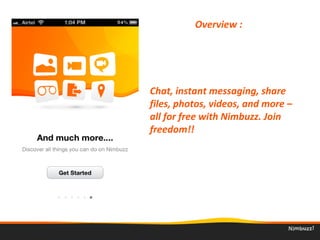
Chat, instant messaging, share 
files, photos, videos, and more – 
all for free with Nimbuzz. Join 
freedom!!
Overview :
Forget minutes or overage charges. 
Call Nimbuzz to Nimbuzz for free 
on your data plan. 
Overview :
Use Nimbuzz-Out to call landlines, 
mobile phones and internationally 
at low rates !!!
Overview :
Import friends from popular 
instant messaging and social 
networks such as Facebook, 
Windows Live (MSN), Google Talk, 
Yahoo. 
Overview :
Chat, instant messaging, share 
files, photos, videos, and more – 
all for free with Nimbuzz. Join 
freedom!!
Overview :
Initiating Start up :
Once Nimbuzz is installed, on start up it will 
display the following options:
1) “I’m new to Nimbuzz” : If User is a first 
time user then he has to create a new 
access account.
2) “I’m already a Nimbuzz user” :  If User has 
a existing account then he can login to 
account with the same credentials.
Creating New Account :
Creating Account for the first time…. just fill 
up following:
1) User name.*
2) Password.
3) Email address.
4) Secured image for verification.(Captcha)
*Note : Username is subject to availability
Press “Done” and your Account will  is 
created.   
Creating New Account :
Getting started :
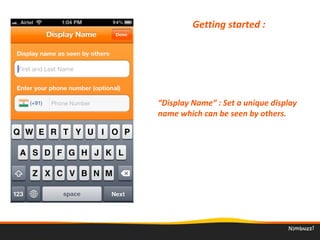
“Display Name” : Set a unique display 
name which can be seen by others.
Getting started :
“Phone Number” : Your phone 
number is used for friend matching 
and will never be shared  or displayed.
Roster :
Once logged in your roster will be 
displayed with  your available 
contacts.  
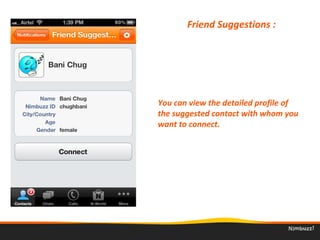
Friend Suggestions : 
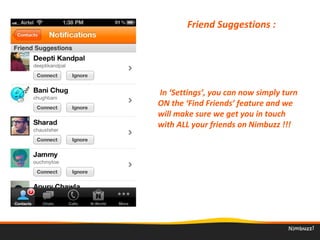
 In ‘Settings’, you can now simply turn 
ON the ‘Find Friends’ feature and we 
will make sure we get you in touch 
with ALL your friends on Nimbuzz !!!
Friend Suggestions : 
You can view the detailed profile of 
the suggested contact with whom you 
want to connect. 
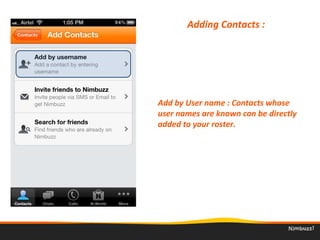
Adding Contacts : 
Add by User name : Contacts whose 
user names are known can be directly 
added to your roster. 
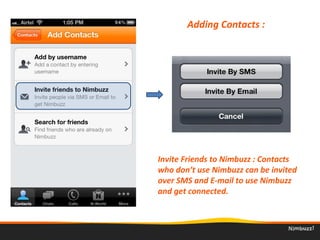
Adding Contacts : 
Invite Friends to Nimbuzz : Contacts 
who don’t use Nimbuzz can be invited 
over SMS and E-mail to use Nimbuzz 
and get connected. 
Adding Contacts : 
Discover new people, reconnect with old 
friends and acquaintances, and keep in 
touch with your colleagues right from your 
mobile.
User Profile : 
Personalize your Nimbuzz by setting a 
Funky name or a ghetto status line.
Set display pic either from direct 
camera or a image file from your 
memory card.
Status can be modified as per User’s 
requirement.
Community Accounts* : 
Import friends from popular instant 
messaging and social networks 
1) Windows Live Messenger.
2) Yahoo Messenger.
3) Facebook Chat.
4) Google Talk.
* Note : Login to Accounts with valid credentials, upon validation 
…contacts will be automatically  visible in your roster. 
Contact Options : 
Nimbuzz contacts added in your roster 
will display the following options; 
1. Chat
2. Call
3. Video Chat
4. Video Call
5. View Profile
6. Add to Favorites
Contact Options : 
Block those annoying contacts in a single go 
!!! …. All blocked contacts will be displayed in 
the Blocked list.
Blocked contacts will not be able to see you 
online or chat with you. 
To Block and Unblock view contact’s profile 
and change settings for the same. 
Contact Options : 
Viewing a Contacts Profile : 
A contacts profile will consist of the following;
1. Nickname
2. Community
3. Nimbuzz Id
4. Gender
5. Birthday
6. Address
7. City
8. Region
Chats : 
Incoming and Active chats are displayed 
in Chat tab. 
Chats will be displayed, till User deletes it.
Options in Chat : 
In a active chat the available options are;
1. Call Free
2. Video Call
3. Chat Video
4. Send Files through Camera or Library
5. My Location
6. Request Location
While calling a Nimbuzz contact following 
options are available;
1. Mute
2. Keypad
3. Speaker
4. Hold
5. Video On
6. Hide
7. End Call
Nimbuzz Call* :  
* Note : Call quality dependent on signal coverage.
Nimbuzz Video Call* : 
Video calling feature works over 3G/4G and 
Wi Fi, so no matter where you are you can 
always connect with your friends.
* Note : Video Call dependent on device capability.
Nimbuzz Out* Call : 
Nimbuzz to Nimbuzz : Between us, it's free!!
Nimbuzz to Mobile : Cheapest International Calls. !!! 
* Note : Credits required for Nimbuzz Out call.
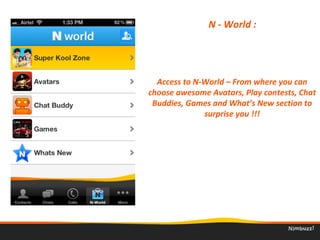
N - World : 
Access to N-World – From where you can 
choose awesome Avatars, Play contests, Chat 
Buddies, Games and What’s New section to 
surprise you !!!
More : 
Under this Menu the following options are 
available;
1. My Profile
2. Accounts
3. Favorites
4. Settings
5. Apps + 
Favorites : 
Add important and popular contacts to 
your Favourite's list.
Settings : 
View and Change the Settings for your 
Nimbuzz application as per requirement.
1. View Options.
2. Notifications.
3. Calling
Sort Contacts : 
Once your community contacts are 
loaded in roster you can sort them by 
their Name, Account or Presence Status
Sounds: 
Customise the Sound and Vibrate profile 
while receiving a;
1. New Chat Message
2. Incoming Call
3. Location Request
Setting up Voip : 
Choose between the VOIP service of either 
Nimbuzz Out* or a list of other SIP providers.
*Note : For Nimbuzz Out call credits are required
Other SIP* providers include;
1. Fast Voip
2. Nymgo
3. VoX
4. Badartel
5. GULF SIP
6. Voipax
Setting up Voip : 
*Note : For SIP call credits are required
Configure : 
Change and customize the tabs as per 
your requirement with the amazing drag 
drop feature …!!! 
Thank You
39

Nimbuzz iPhone Client