New Features in JDK 8
Ivan St. Ivanov
Dmitry Alexandrov
Martin Toshev
Agenda
• Lambda Expressions

• Other New Features in JDK 8
• JEPs and JDK 9 Development
Lambda Expressions
Lambdas
• Lambdas bring anonymous function types in Java
(JSR 335):
(parameters) -> {body}
• Example:
(x,y) -> x + y
Lambdas
• Lambdas bring anonymous function types in Java
(parameters) -> {body}

• Example:
(x,y) -> x + y

… well … Groovy (a superset of java) already
provides this …
Lambdas
• Lambdas can be used in place of functional
interfaces (interfaces with just one method such
as Runnable)
• Example:
new Thread(new Runnable() {
@Override
public void run() {
System.out.println("It
runs !");
}
}
).start();

new Thread(() ->
{ System.out.println("It runs !");
}
).start();
Lambdas
• Examples of such functional interfaces:
java.lang.Runnable -> run()
java.util.concurrent.Callable -> call()
java.security.PrivilegedAction -> run()
java.util.Comparator -> compare(T o1, T o2)
java.awt.event.ActionListener ->
actionPerformed (ActionEvent e)
java.lang.Iterable ->
forEach(Consumer<? super T> action)
Lambdas
java.lang.Iterable ->
forEach(Consumer<? super T> action) ?!?

Isn't this breaking backward compatibility ?!?
Lambdas
java.lang.Iterable ->
forEach(Consumer<? super T> action) ?!?

Isn't this breaking compatibility ?!?
No - because forEach is an extension method.
Lambdas
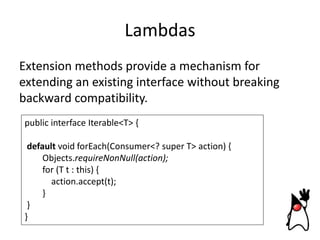
Extension methods provide a mechanism for
extending an existing interface without breaking
backward compatibility.
public interface Iterable<T> {
default void forEach(Consumer<? super T> action) {
Objects.requireNonNull(action);
for (T t : this) {
action.accept(t);
}
}
}
Lambdas
• This essentially means that lambdas can be used
to replace all functional interfaces used in a
gazillion of libraries
• Moreover lambdas increase performance when
used instead of anonymous inner classes because
they are implemented with the invokedynamic
instruction
• In this regard many of the standard JDK class
are being refactored to use lambdas
Lambdas
• Additional functional interfaces are provided by
the java.util.function package for use by lambdas
such as:
o Predicate<T> - one method with param of type T and
boolean return type
o Consumer<T> - one method with param T and no
return type
o Function<T, R> - one method with param T and return
type R
o Supplier<T> - one method with no params and
return type T
Stream API
• Databases and other programming languages
allow us to specify aggregate operations explicitly
• The streams API provides this mechanism in the
Java platform
• The notion of streams is derived from functional
programming languages
Stream API
• The stream API makes use of lambdas and
extension methods
• Streams can be applied on collections, arrays, IO
streams and generator functions
Stream API
• Streams can be finite or infinite
• Streams can apply intermediate functions on the
data that produce another stream (e.g. map,
reduce)
Stream API
java.util.stream.Stream<T> collection.stream();
java.util.stream.Stream<T>
collection.parallelStream();
Useful methods:
o filter(Predicate), map(Function),
reduce(BinaryOperator), collect()
o sum(), min(), max(), count()
o anyMatch(), allMatch(), forEach(),
Stream internals
int sum = widgets.stream()
.filter(w -> w.getColor() == RED)
.mapToInt(w -> w.getWeight())
.sum();

• Stream operations are composed into a pipeline
• Streams are lazy: computation is performed when
the terminal operation is invoked
Method references
• Intended to be used in lambda expressions,
preventing unnecessary boilerplate
• Example:
books.stream().map(b -> b.getTitle()) 
books.stream().map(Book::getTitle)

• Lambda parameter list and return type must
match the signature of the method
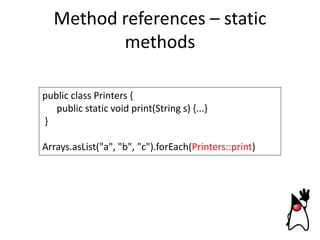
Method references – static
methods
public class Printers {
public static void print(String s) {...}
}
Arrays.asList("a", "b", "c").forEach(Printers::print)
Method references – instance
methods (1)
public class Document {
public String getPageContent(int pageNumber) {
return this.pages.get(pageNumber).getContent();
}
}
public static void printPages(Document doc, int[]
pageNumbers) {
Arrays.stream(pageNumbers)
.map(doc::getPageContent)
.forEach(Printers::print);
}
Method references – instance
methods (2)
public class Document {
public String getPageContent(int pageNumber) {
return this.pages.get(pageNumber).getContent();
}
}
public static void printDocuments(List<Page> pages) {
pages.stream()
.map(Page::getContent)
.forEach(Printers::print);
}
Method references – constructors

public static Stream<Page>
createPagesFrom(Stream<String> contents) {
return contents.map(Page::new).
}
Lambda Expressions:
Hands-On-Lab
Lambdas Hands-on-Lab:
Overview
•

Environment setup

•

Concept

•

Task categories
Lambdas Hands-on-Lab:
Environment Setup
•

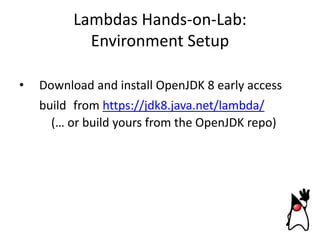
Download and install OpenJDK 8 early access
build from https://jdk8.java.net/lambda/
(… or build yours from the OpenJDK repo)
Lambdas Hands-on-Lab:
Environment Setup
•

Download and install an IDE:

o Eclipse
http://www.oracle.com/technetwork/articles/java/lambda1984522.html
(for Eclipse 4.3: Start IDE -> Install New Software)
http://build.eclipse.org/eclipse/builds/4P/siteDir/updates/4.3-Pbuilds
o IntelliJ IDEA CE
http://www.jetbrains.com/idea/free_java_ide.html
Lambdas Hands-on-Lab:
Environment Setup
•

Get the sources:
git clone https://github.com/AdoptOpenJDK/lambda-tutorial

or download

• Import the sources as Maven projects in the IDE
http://dmitryalexandrov.net/lambda.zip
• Set the Java 8 profile (source compatibility level)
• Check if the sources compile and that you are able to
run ConfigureYourLambdaBuildOfJdk
Lambdas Hands-on-Lab:
Concept
•

We have several classes and tests for them

•

Find “// your code here” and write the code !

•

Run the tests. Try to make them green!
(… read the comments.. They are useful !)
Lambdas Hands-on-Lab:
Task Categories
• Internal vs External Iteration

• Filtering and Collecting
• Mapping
• Method References
Lambdas Hands-on-Lab:
Internal vs External Iteration
Java 7 (External)
for (Shape shape: myShapes) {
shape.setColor(RED);
}

Java 8 (Internal)
myShapes.forEach(shape ->
shape.setColor(RED));
Lambdas Hands-on-Lab:
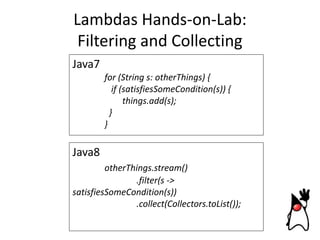
Filtering and Collecting
Java7
for (String s: otherThings) {
if (satisfiesSomeCondition(s)) {
things.add(s);
}
}

Java8
otherThings.stream()
.filter(s ->
satisfiesSomeCondition(s))
.collect(Collectors.toList());
Lambdas Hands-on-Lab:
Mapping
Java7
List<String> upperCaseStrings = new ArrayList<>();
for (String s: mixedCaseStrings) {
upperCaseStrings.add(s.toUpperCase());
}

Java8
mixedCaseStrings.stream()
.map(s -> s.toUpperCase())
.collect(Collectors.toList());
Lambdas Hands-on-Lab:
Mapping
Using a lambda expression:
myStrings.map(s -> s.toUpperCase());
Using a method reference:
myStrings.map(String::toUpperCase);
Can be used with:
• Static methods belonging to a particular class (<class>::<staticMethod>)
• Instance methods bound to a particular object instance (<obj> ::
<instanceMethod>)
• Instance methods bound to a particular class (<class> :: <instanceMethod>)
• Constructor belonging to a particular class (<class> :: new)
Lambdas Hands-on-Lab:
Default Methods
Java 8
public interface A {
default void foo(){
System.out.println("Calling A.foo()");
}
}
public class Clazz implements A {
}
Clazz clazz = new Clazz();
clazz.foo(); // Calling A.foo()
Lambdas Hands-on-Lab:
Default Methods
Java 8
public class Clazz2 implements A {
@Override
public void foo(){
System.out.println("Calling A.foo()");
}
}
Clazz2 clazz2 = new Clazz2();
clazz2.foo(); // Calling A.foo()
Lambdas Hands-on-Lab:
Let's have some fun
Lambdas Hands-on-Lab:
Hints
Examples:
The basic syntax of a lambda is either
(parameters) -> expression
1. (int x, int y) -> x + y
or
2. (x, y) -> x - y
(parameters) -> { statements; }
3. () -> 42
4. (String s) -> System.out.println(s)
5. x -> 2 * x
6. c -> { int s = c.size(); c.clear(); return s; }
7. myShapes.forEach(shape -> shape.setColor(RED));
8. otherThings.stream().filter(s ->
satisfiesSomeCondition(s)).collect(Collectors.toList()); 9.
mixedCaseStrings.stream().map(s -> s.toUpperCase()).collect(Collectors.toList());
10. myStrings.map(String::toUpperCase);
11. public interface A { default void foo(){ System.out.println("Calling A.foo()");} }
Other New Features in JDK 8
Date and Time API (JSR 310)
• Provides a new date, time and calendar API for
the Java SE platform
• Examples:
Clock clock = Clock.systemUTC();
ZoneId zone = ZoneId.systemDefault();
ZoneId customZone = ZoneId.of("Europe/Berlin");
Clock customClock = Clock.system(customZone);
DateTimeFormatter formatter = DateTimeFormatter.
ofPattern("MM-DD-YYYY");
LocalDate date = LocalDate.now();
String formattedDate = date.format(formatter);
System.out.println(formattedDate);
Nashorn (via JSR 223)
• Nashorn is a JavaScript engine developed in the
Java language
• A command line tool (jjs) for running javascript
without using Java is also provided
Nashorn (via JSR 223)
• Nashorn is a JavaScript engine developed in the
Java language
• A command line tool (jjs) for running javascript
without using Java is also provided
• … well … JDK 6 is already shipped with Mozilla's
Rhino JavaScript engine but is slower …
Nashorn (via JSR 223)
• Example (calling JavaScript from Java):
ScriptEngineManager m = new ScriptEngineManager();
ScriptEngine nashorn = m.getEngineByName("nashorn");
try {
nashorn.eval("print('Hello, world')");
} catch (ScriptException e) {
}
Nashorn (via JSR 223)
• Example (calling Java from JavaScript):
var ExampleType = Java.type("com.sample.Example");
var example = new ExampleType("arg");
print(example.method())
Parameter Names (JEP 118)
• Parameter names for method/constructor
parameters can be retrieved at runtime via
reflection
Method method = …
Parameter param = method.getParameters()[0];
System.out.println(param.getName());
Annotation on Java Types
(JSR 308, JEP 104)
• Extend the set of annotatable locations in the
syntax of the Java programming language
• Allow type checkers in the form of compiler plugins to provide stronger type checking
• Sample annotations: @notnull, @readonly
• Enhancements to JSR 269 (Pluggable
Annotation Processing API)
Repeating Annotations
(JEP 120)
• Change the Java programming language to allow
multiple annotations with the same type on a
single program element
Base64 Encoding/Decoding
(JEP 135)
• Defines a standard API for Base64 encoding and
decoding:
java.util.Base64.Encoder
java.util.Base64.Decoder
Concurrency Updates
(JEP 155)
• Scalable updatable variables (for frequent
updates from multiple threads) are part of the
concurrency updates:
java.util.concurrent.atomic.DoubleAccumulator
java.util.concurrent.atomic.DoubleAdder
java.util.concurrent.atomic.LongAccumulator
java.util.concurrent.atomic.LongAdder
Compact Profiles
(JEP 161)
• Defines a few subset Profiles of the Java SE
Platform Specification so that applications that do
not require the entire Platform can be deployed
and run on small devices.
• Currently three profiles:
o compact1
o compact2
o compact3
Other
• Prepare for modularization (JEP 162) - changes
and deprecation of APIs to prepare for the
modularization of the platform as undertaken by
project Jigsaw
• Permanent generation space removed - objects
from this space such as class metadata, static
variables and interned strings moved to heap
space
(improved convergence between OpenJDK and Oracle's JRockit)
Some books
JEPs and JDK 9 Development
So lets see what JEPs are left for JDK 9 ->
http://openjdk.java.net/jeps/
Q&A
References
OpenJDK 8 early access builds
https://jdk8.java.net/
Oracle JDK 8 early access builds
http://www.oracle.com/technetwork/java/javase/d
ownloads/ea-jsp-142245.html

Eclipse with JDK 8 support
https://wiki.eclipse.org/JDT_Core/Java8
References
OpenJDK mercurial repositories
http://hg.openjdk.java.net/
OpenJDK 9 build instructions
http://hg.openjdk.java.net/jdk9/jdk9/rawfile/tip/README-builds.html

JSR 337: Java SE 8 (Early Draft Review Specification)

http://cr.openjdk.java.net/~mr/se/8/java-se-8edr-spec.html
References
Lambda tutorial
https://github.com/AdoptOpenJDK/lambda-tutorial
State of the Lambda
http://cr.openjdk.java.net/~briangoetz/lambda/lam
bda-state-final.html

Lambda FAQ
http://www.lambdafaq.org/
References
Java SE tutorials: Lambda Expressions
http://docs.oracle.com/javase/tutorial/java/javaOO
/lambdaexpressions.html
Lambda Quick Start Guide
http://www.oracle.com/webfolder/technetwork/tu
torials/obe/java/Lambda-QuickStart/index.html
Java Enhancement Proposals
http://openjdk.java.net/jeps

New Features in JDK 8

  • 1.
    New Features inJDK 8 Ivan St. Ivanov Dmitry Alexandrov Martin Toshev
  • 2.
    Agenda • Lambda Expressions •Other New Features in JDK 8 • JEPs and JDK 9 Development
  • 3.
  • 4.
    Lambdas • Lambdas bringanonymous function types in Java (JSR 335): (parameters) -> {body} • Example: (x,y) -> x + y
  • 5.
    Lambdas • Lambdas bringanonymous function types in Java (parameters) -> {body} • Example: (x,y) -> x + y … well … Groovy (a superset of java) already provides this …
  • 6.
    Lambdas • Lambdas canbe used in place of functional interfaces (interfaces with just one method such as Runnable) • Example: new Thread(new Runnable() { @Override public void run() { System.out.println("It runs !"); } } ).start(); new Thread(() -> { System.out.println("It runs !"); } ).start();
  • 7.
    Lambdas • Examples ofsuch functional interfaces: java.lang.Runnable -> run() java.util.concurrent.Callable -> call() java.security.PrivilegedAction -> run() java.util.Comparator -> compare(T o1, T o2) java.awt.event.ActionListener -> actionPerformed (ActionEvent e) java.lang.Iterable -> forEach(Consumer<? super T> action)
  • 8.
    Lambdas java.lang.Iterable -> forEach(Consumer<? superT> action) ?!? Isn't this breaking backward compatibility ?!?
  • 9.
    Lambdas java.lang.Iterable -> forEach(Consumer<? superT> action) ?!? Isn't this breaking compatibility ?!? No - because forEach is an extension method.
  • 10.
    Lambdas Extension methods providea mechanism for extending an existing interface without breaking backward compatibility. public interface Iterable<T> { default void forEach(Consumer<? super T> action) { Objects.requireNonNull(action); for (T t : this) { action.accept(t); } } }
  • 11.
    Lambdas • This essentiallymeans that lambdas can be used to replace all functional interfaces used in a gazillion of libraries • Moreover lambdas increase performance when used instead of anonymous inner classes because they are implemented with the invokedynamic instruction • In this regard many of the standard JDK class are being refactored to use lambdas
  • 12.
    Lambdas • Additional functionalinterfaces are provided by the java.util.function package for use by lambdas such as: o Predicate<T> - one method with param of type T and boolean return type o Consumer<T> - one method with param T and no return type o Function<T, R> - one method with param T and return type R o Supplier<T> - one method with no params and return type T
  • 13.
    Stream API • Databasesand other programming languages allow us to specify aggregate operations explicitly • The streams API provides this mechanism in the Java platform • The notion of streams is derived from functional programming languages
  • 14.
    Stream API • Thestream API makes use of lambdas and extension methods • Streams can be applied on collections, arrays, IO streams and generator functions
  • 15.
    Stream API • Streamscan be finite or infinite • Streams can apply intermediate functions on the data that produce another stream (e.g. map, reduce)
  • 16.
    Stream API java.util.stream.Stream<T> collection.stream(); java.util.stream.Stream<T> collection.parallelStream(); Usefulmethods: o filter(Predicate), map(Function), reduce(BinaryOperator), collect() o sum(), min(), max(), count() o anyMatch(), allMatch(), forEach(),
  • 17.
    Stream internals int sum= widgets.stream() .filter(w -> w.getColor() == RED) .mapToInt(w -> w.getWeight()) .sum(); • Stream operations are composed into a pipeline • Streams are lazy: computation is performed when the terminal operation is invoked
  • 18.
    Method references • Intendedto be used in lambda expressions, preventing unnecessary boilerplate • Example: books.stream().map(b -> b.getTitle())  books.stream().map(Book::getTitle) • Lambda parameter list and return type must match the signature of the method
  • 19.
    Method references –static methods public class Printers { public static void print(String s) {...} } Arrays.asList("a", "b", "c").forEach(Printers::print)
  • 20.
    Method references –instance methods (1) public class Document { public String getPageContent(int pageNumber) { return this.pages.get(pageNumber).getContent(); } } public static void printPages(Document doc, int[] pageNumbers) { Arrays.stream(pageNumbers) .map(doc::getPageContent) .forEach(Printers::print); }
  • 21.
    Method references –instance methods (2) public class Document { public String getPageContent(int pageNumber) { return this.pages.get(pageNumber).getContent(); } } public static void printDocuments(List<Page> pages) { pages.stream() .map(Page::getContent) .forEach(Printers::print); }
  • 22.
    Method references –constructors public static Stream<Page> createPagesFrom(Stream<String> contents) { return contents.map(Page::new). }
  • 23.
  • 24.
  • 25.
    Lambdas Hands-on-Lab: Environment Setup • Downloadand install OpenJDK 8 early access build from https://jdk8.java.net/lambda/ (… or build yours from the OpenJDK repo)
  • 26.
    Lambdas Hands-on-Lab: Environment Setup • Downloadand install an IDE: o Eclipse http://www.oracle.com/technetwork/articles/java/lambda1984522.html (for Eclipse 4.3: Start IDE -> Install New Software) http://build.eclipse.org/eclipse/builds/4P/siteDir/updates/4.3-Pbuilds o IntelliJ IDEA CE http://www.jetbrains.com/idea/free_java_ide.html
  • 27.
    Lambdas Hands-on-Lab: Environment Setup • Getthe sources: git clone https://github.com/AdoptOpenJDK/lambda-tutorial or download • Import the sources as Maven projects in the IDE http://dmitryalexandrov.net/lambda.zip • Set the Java 8 profile (source compatibility level) • Check if the sources compile and that you are able to run ConfigureYourLambdaBuildOfJdk
  • 28.
    Lambdas Hands-on-Lab: Concept • We haveseveral classes and tests for them • Find “// your code here” and write the code ! • Run the tests. Try to make them green! (… read the comments.. They are useful !)
  • 29.
    Lambdas Hands-on-Lab: Task Categories •Internal vs External Iteration • Filtering and Collecting • Mapping • Method References
  • 30.
    Lambdas Hands-on-Lab: Internal vsExternal Iteration Java 7 (External) for (Shape shape: myShapes) { shape.setColor(RED); } Java 8 (Internal) myShapes.forEach(shape -> shape.setColor(RED));
  • 31.
    Lambdas Hands-on-Lab: Filtering andCollecting Java7 for (String s: otherThings) { if (satisfiesSomeCondition(s)) { things.add(s); } } Java8 otherThings.stream() .filter(s -> satisfiesSomeCondition(s)) .collect(Collectors.toList());
  • 32.
    Lambdas Hands-on-Lab: Mapping Java7 List<String> upperCaseStrings= new ArrayList<>(); for (String s: mixedCaseStrings) { upperCaseStrings.add(s.toUpperCase()); } Java8 mixedCaseStrings.stream() .map(s -> s.toUpperCase()) .collect(Collectors.toList());
  • 33.
    Lambdas Hands-on-Lab: Mapping Using alambda expression: myStrings.map(s -> s.toUpperCase()); Using a method reference: myStrings.map(String::toUpperCase); Can be used with: • Static methods belonging to a particular class (<class>::<staticMethod>) • Instance methods bound to a particular object instance (<obj> :: <instanceMethod>) • Instance methods bound to a particular class (<class> :: <instanceMethod>) • Constructor belonging to a particular class (<class> :: new)
  • 34.
    Lambdas Hands-on-Lab: Default Methods Java8 public interface A { default void foo(){ System.out.println("Calling A.foo()"); } } public class Clazz implements A { } Clazz clazz = new Clazz(); clazz.foo(); // Calling A.foo()
  • 35.
    Lambdas Hands-on-Lab: Default Methods Java8 public class Clazz2 implements A { @Override public void foo(){ System.out.println("Calling A.foo()"); } } Clazz2 clazz2 = new Clazz2(); clazz2.foo(); // Calling A.foo()
  • 36.
  • 37.
    Lambdas Hands-on-Lab: Hints Examples: The basicsyntax of a lambda is either (parameters) -> expression 1. (int x, int y) -> x + y or 2. (x, y) -> x - y (parameters) -> { statements; } 3. () -> 42 4. (String s) -> System.out.println(s) 5. x -> 2 * x 6. c -> { int s = c.size(); c.clear(); return s; } 7. myShapes.forEach(shape -> shape.setColor(RED)); 8. otherThings.stream().filter(s -> satisfiesSomeCondition(s)).collect(Collectors.toList()); 9. mixedCaseStrings.stream().map(s -> s.toUpperCase()).collect(Collectors.toList()); 10. myStrings.map(String::toUpperCase); 11. public interface A { default void foo(){ System.out.println("Calling A.foo()");} }
  • 38.
  • 39.
    Date and TimeAPI (JSR 310) • Provides a new date, time and calendar API for the Java SE platform • Examples: Clock clock = Clock.systemUTC(); ZoneId zone = ZoneId.systemDefault(); ZoneId customZone = ZoneId.of("Europe/Berlin"); Clock customClock = Clock.system(customZone); DateTimeFormatter formatter = DateTimeFormatter. ofPattern("MM-DD-YYYY"); LocalDate date = LocalDate.now(); String formattedDate = date.format(formatter); System.out.println(formattedDate);
  • 40.
    Nashorn (via JSR223) • Nashorn is a JavaScript engine developed in the Java language • A command line tool (jjs) for running javascript without using Java is also provided
  • 41.
    Nashorn (via JSR223) • Nashorn is a JavaScript engine developed in the Java language • A command line tool (jjs) for running javascript without using Java is also provided • … well … JDK 6 is already shipped with Mozilla's Rhino JavaScript engine but is slower …
  • 42.
    Nashorn (via JSR223) • Example (calling JavaScript from Java): ScriptEngineManager m = new ScriptEngineManager(); ScriptEngine nashorn = m.getEngineByName("nashorn"); try { nashorn.eval("print('Hello, world')"); } catch (ScriptException e) { }
  • 43.
    Nashorn (via JSR223) • Example (calling Java from JavaScript): var ExampleType = Java.type("com.sample.Example"); var example = new ExampleType("arg"); print(example.method())
  • 44.
    Parameter Names (JEP118) • Parameter names for method/constructor parameters can be retrieved at runtime via reflection Method method = … Parameter param = method.getParameters()[0]; System.out.println(param.getName());
  • 45.
    Annotation on JavaTypes (JSR 308, JEP 104) • Extend the set of annotatable locations in the syntax of the Java programming language • Allow type checkers in the form of compiler plugins to provide stronger type checking • Sample annotations: @notnull, @readonly • Enhancements to JSR 269 (Pluggable Annotation Processing API)
  • 46.
    Repeating Annotations (JEP 120) •Change the Java programming language to allow multiple annotations with the same type on a single program element
  • 47.
    Base64 Encoding/Decoding (JEP 135) •Defines a standard API for Base64 encoding and decoding: java.util.Base64.Encoder java.util.Base64.Decoder
  • 48.
    Concurrency Updates (JEP 155) •Scalable updatable variables (for frequent updates from multiple threads) are part of the concurrency updates: java.util.concurrent.atomic.DoubleAccumulator java.util.concurrent.atomic.DoubleAdder java.util.concurrent.atomic.LongAccumulator java.util.concurrent.atomic.LongAdder
  • 49.
    Compact Profiles (JEP 161) •Defines a few subset Profiles of the Java SE Platform Specification so that applications that do not require the entire Platform can be deployed and run on small devices. • Currently three profiles: o compact1 o compact2 o compact3
  • 50.
    Other • Prepare formodularization (JEP 162) - changes and deprecation of APIs to prepare for the modularization of the platform as undertaken by project Jigsaw • Permanent generation space removed - objects from this space such as class metadata, static variables and interned strings moved to heap space (improved convergence between OpenJDK and Oracle's JRockit)
  • 51.
  • 52.
    JEPs and JDK9 Development
  • 53.
    JEPs and JDK9 Development So lets see what JEPs are left for JDK 9 -> http://openjdk.java.net/jeps/
  • 54.
  • 55.
    References OpenJDK 8 earlyaccess builds https://jdk8.java.net/ Oracle JDK 8 early access builds http://www.oracle.com/technetwork/java/javase/d ownloads/ea-jsp-142245.html Eclipse with JDK 8 support https://wiki.eclipse.org/JDT_Core/Java8
  • 56.
    References OpenJDK mercurial repositories http://hg.openjdk.java.net/ OpenJDK9 build instructions http://hg.openjdk.java.net/jdk9/jdk9/rawfile/tip/README-builds.html JSR 337: Java SE 8 (Early Draft Review Specification) http://cr.openjdk.java.net/~mr/se/8/java-se-8edr-spec.html
  • 57.
    References Lambda tutorial https://github.com/AdoptOpenJDK/lambda-tutorial State ofthe Lambda http://cr.openjdk.java.net/~briangoetz/lambda/lam bda-state-final.html Lambda FAQ http://www.lambdafaq.org/
  • 58.
    References Java SE tutorials:Lambda Expressions http://docs.oracle.com/javase/tutorial/java/javaOO /lambdaexpressions.html Lambda Quick Start Guide http://www.oracle.com/webfolder/technetwork/tu torials/obe/java/Lambda-QuickStart/index.html Java Enhancement Proposals http://openjdk.java.net/jeps