2 0 1 2   T A C M A N


                                                           2012
                Tax Assistance Center Manual


                                                           U.S. Navy Office of the Judge Advocate General
     Electronic Income Tax Filing Guide and Self-Service
                                                           Legal Assistance Policy Division
      Filing Guide for U.S. Military VITA & Self Service
                    Tax Assistance Offices                 1322 Patterson Avenue SE, Ste. 3000
                                                           Washington Navy Yard, DC 20374
                                                           (202) 685-4641
                                               1
2 0 1 2   T A C M A N


Table of Contents

Introduction ............................................................................................... 4
     How to Use this Manual & Program Philosophy…………………………………………………4
     Program scope .................................................................................................................... 5
     Contact information………………………………………………………………………………….6
Chapter 1 – TAC Resource Requirements ............................................. 7
     Training……………………………………………………………………………………………….9

Chapter 2 – Publicity .............................................................................. 11
Chapter 3 – Customer Eligibility ............................................................ 13
Chapter 4 – Self-Service: NLSC INCONUS & Hawaii ............................ 14
     Self-Service tax programs. ............................................................................................................. 15
     Military OneSource v. IRS Free File Alliance...................................................................... 16
     Implementing self-service ................................................................................................... 17
     NLSO NMCI Functional Account Logins ............................................................................. 18
     Frequently Asked Questions for Self-Service TACs ........................................................... 20

Chapter 5 – Outstanding Initiatives ....................................................... 21
Chapter 6 – Reporting Requirements .................................................... 23
Chapter 7 – Individual Taxpayer Identification Numbers ..................... 24
Chapter 8 – Privacy Act, Volunteer Liability, Ethics & Competency ... 25
Chapter 9 – Volunteer Recognition ....................................................... 28
Chapter 10 – VITA/ELF: Setting the Program in Motion ....................... 29
     Registration with the IRS & Product Ordering ............................................................................. 29
     Filing Season Action Plan for VITA-ELF....................................................................................... 30
     TaxWise Software ............................................................................................................................ 32
     Software Setup… ............................................................................................................................. 33
     Setting Return Templates & Default Settings .............................................................................. 34
     Price List, Practitioner Pin & Prepare Use Only Fields .............................................................. 36
     Creating New Returns ..................................................................................................................... 38
     TaxWise Desktop ............................................................................................................................. 39
     TaxWise Important Phone Numbers ............................................................................................. 39


                                                                        2
2 0 1 2   T A C M A N


Chapter 11 – VITA/ELF: Preparing Federal Returns ............................. 40
     Transmitting the return .................................................................................................................... 42
     Fixing rejected returns, deleting returns and restoring deleted returns ................................... 43
     Running reports ................................................................................................................................ 44
     Electronic filing quick reference ..................................................................................................... 45
Chapter 12 – VITA/ELF: Filing State Returns ........................................ 46
Chapter 13 – VITA/ELF: Retention and Disposal of Records............... 48
     IRS VITA/ELF record retention requirements .............................................................................. 48
     Sample record of inventory ............................................................................................................. 49
     Reporting lost or stolen equipment................................................................................................ 50
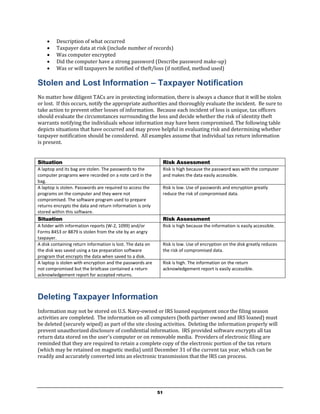
     Stolen and lost information – taxpayer notification ..................................................................... 51

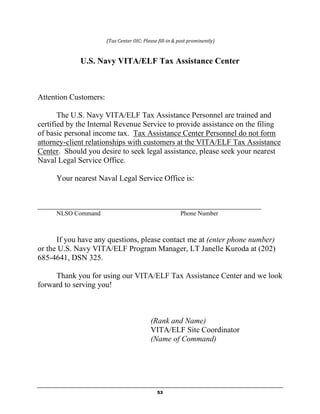
Appendix A – Notice of no Attorney-Client Formation......................... 52
Appendix B – Tax Assistance Center Intake Sheets & Survey ............ 54
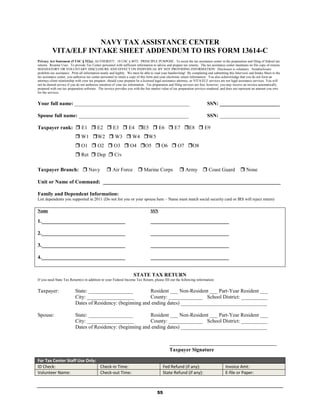
     VITA/ELF Addendum to IRS Intake Sheet 13614-C................................................................... 55
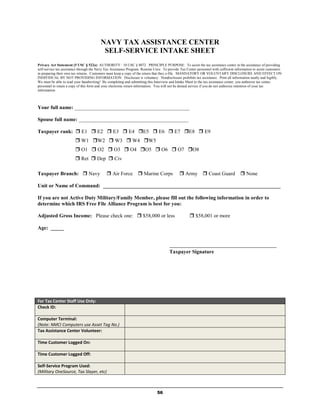
     Self-Service Intake Sheet ............................................................................................................... 56
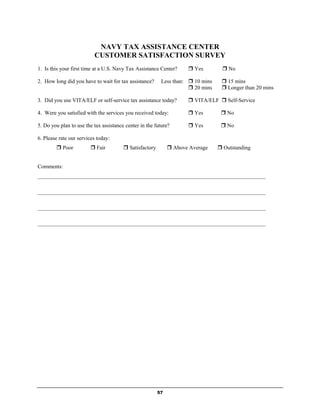
     Customer Satisfaction Survey ........................................................................................................ 57
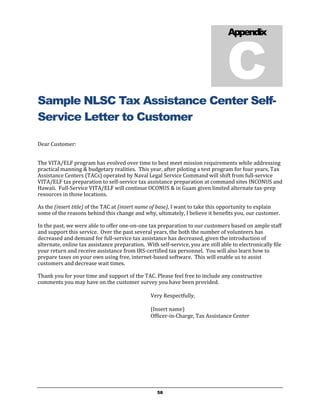
Appendix C – Sample NLSC TAC Self-Service Letter to Customer .... 58
Appendix D – NLSC TAC Self-Service Computer Log.......................... 59
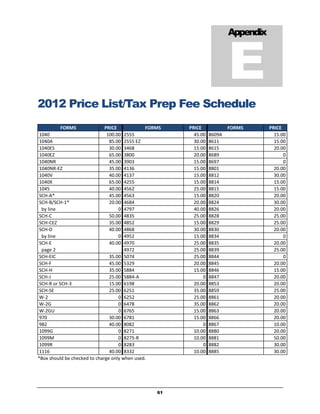
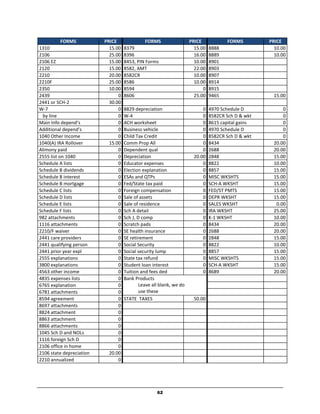
Appendix E – 2012 VITA/ELF Price List................................................. 61
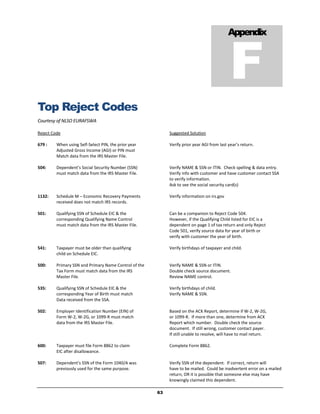
Appendix F – Top VITA/ELF Reject Codes............................................ 63
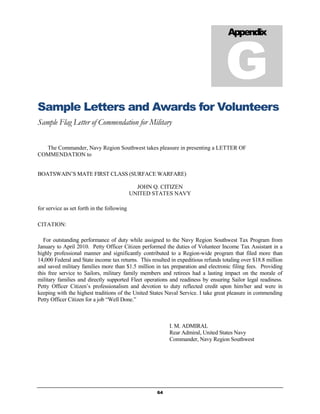
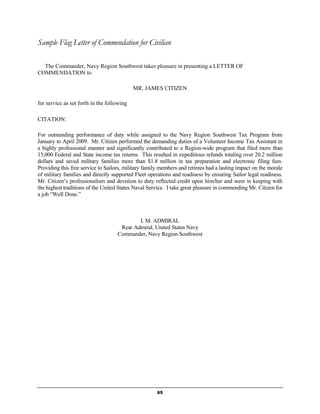
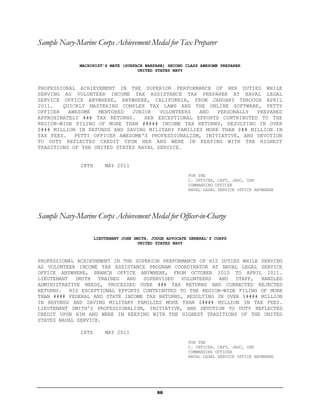
Appendix G – Sample Letters & Awards for Volunteers ...................... 64
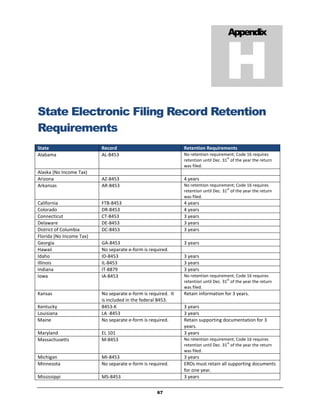
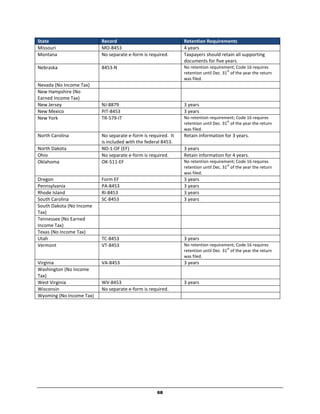
Appendix H – State ELF Record Retention Requirements .................. 67
Appendix I – Sample TAC Monthly Reports to Code 16..................... 69
Appendix J – 2012 IRS e-File Refund Cycle Chart ................................ 72
Acknowledgements: Code 16 would like to thank the NLSOs who shared their input and success stories
with us for inclusion in this manual and would like to especially thank NLSO MIDLANT for their input
in sharing their lessons learned on the self-service model.


Cover Photo: YOKOSUKA, Japan - A Volunteer Income Tax Assistant (VITA) at Naval Legal Service Office Pacific assists a
customer with his yearly taxes during the 2011 VITA tax season. VITA is part of the Armed Forces Tax Council (AFTC),
which oversees the operations of the military tax programs worldwide. Photo courtesy of LT Joshua Fryday, NLSO Pacific.


                                                                         3
2 0 1 2   T A C M A N


                                                                                                  I
                                                                                           Introduction


Introduction

T
        he Navy’s Volunteer Income Tax Assistance (VITA) and Electronic Filing (ELF) [VITA/ELF]
        program has been a success story for more than a decade. Beginning as a small pilot program in
        1995 which filed a few thousand returns, the program now completes tens of thousands of tax
        returns annually. The Navy’s Tax Assistance Centers (TACs) include large sites operated by
Naval Legal Service Command (NLSC) and smaller shipboard or remote sites overseas run by Fleet
commands. Regardless of size, every TAC provides a valuable service to Sailors and their families.

The Navy operates the VITA/ELF program in conjunction with the Internal Revenue Service (IRS),
specifically, its Wage and Investment Division, Stakeholder Partnerships, Education and Communication
section, commonly known as SPEC.

At the heart of the Navy’s tax program are the hundreds of volunteers trained by IRS SPEC personnel to
staff the TACs each year. Each VITA/ELF customer receives a tax return that is legible and free of
mathematical errors, and almost all returns are filed electronically. E-filed returns cost the IRS
substantially less to process than paper returns, and taxpayers receive their refunds in a fraction of the
time it takes to receive refunds for returns filed by mail.

On the heels of a successful pilot program, NLSC will institute self-service at all NLSC TACs within the
U.S. this year (tax year 2011). Self-service allows customers to prepare their own returns using free,
online programs on TAC computers, with assistance from trained volunteers as necessary. Overseas
NLSC locations will continue to offer full-service VITA. Non-NLSC TACs may provide full-service VITA as
desired. For more information, please see Chapter 4 on page 14.

How to use this Manual.          Review and use of this TACMAN should be made in conjunction with training
materials provided by the IRS, namely, IRS Pub 3189, Volunteer e-file Administrator Guide, and Publication
4012, Volunteer Resource Guide. Chapters 1-3 and 5-9 apply to ALL TACs. Chapter 4 applies to TACs
operating self-service sites only. Chapters 10-13 discuss the VITA/ELF program and apply to both TACs
operating self-service and full-service VITA/ELF. NLSC commands INCONUS and Hawaii, while mandated to
use self-service, will still obtain the qualifications to run a VITA/ELF center, although their VITA/ELF program
will be on a much smaller scale than in years past.

Program philosophy. There are four principles that                  Preparing State Returns
have guided VITA through its growth and which formed                In the past some TACs have only prepared
the basis for CNO sponsorship of the program.                       federal returns. Code 16 provides resources to
1. To take care of junior enlisted personnel by                     assist with the preparation of state returns, and
    providing Federal and State tax return                          tax software automatically populates state tax
    preparation services.                                           returns with information provided on the federal
                                                                    return. Let’s provide our Sailors with a
2. To ensure that no VITA/ELF eligible customer
                                                                    complete service and file both types!
    pays for commercial tax preparation services

                                                       4
2 0 1 2     T A C M A N


     unless he or she chooses to do so.
3. To take tax services to the Sailor.
4. To operate the program under the parameters established by our critical partner, the IRS.
TACs should consider these guiding principles along with available resources to achieve the most good
for the most customers. In the past, for example, some very busy sites have had a “1040EZ-only” policy
during their first few weeks of operation in order to ensure that junior personnel were assisted first.

Benefits of Electronically Filing Taxes Online
           Faster Refunds.    Given typical postal service and IRS processing requirements, Sailors on
            deployment or at a remote overseas station can expect to wait 45 days or more from the day
            they mail their returns to the day they see their refund checks. In contrast, electronic filers
            receive their refunds via direct deposit to their bank accounts as early as nine days after their
            return is transmitted to the IRS, no matter where they are in the world.
           Direct Deposit of Refunds. This automatic system takes the hassle and delay out of dealing
            with refund checks, especially for Sailors who are transferring or who are deployed and don’t
            have easy access to their bank.
           Accuracy. The accuracy rate for e-filed returns is 99.5%. As many as twelve people will
            handle the average paper return (from preparer to postal staff to IRS staff) and the error rate is
            as high as 20%. The e-filed return is sent from computer to computer, so there is less
            opportunity for human error, leading to fewer tax headaches for Sailors.
           VITA/ELF Afloat. The past several years have shown that it is possible to transmit returns
            while at sea. TaxWise software operates using military specific protocol communications over
            the Internet without violating security measures. The VITA/ELF program makes it possible for
            Sailors to file, receive their refunds, and check on the status of those refunds from anywhere in
            the world.
                                                       No Need for Refund Anticipation Loans. Refund
          IRS steps in to reduce RALs            Anticipation Loans (RALs) are short-term loans from
          In hopes of reducing the number of     commercial tax preparers or other sources, which are aimed
          RALs, the IRS recently removed the     at taxpayers desperate to get their refunds as soon as
          “debt indicator” function used by      possible. In the past, these loans often charged exorbitant
          financial institutions to facilitate those
                                                 fees and interest; depending on the amount and length of the
          loans.
                                                 loan, interest rates could reach as high as 980% APR! New
                                                 laws and DoD regulations prohibit RALs for military
            members if the total interest rate, including fees, exceeds 36%. The Navy tax assistance
            program reduces the number of Sailors who seek out these loans, as they can have their refunds
            deposited in their bank accounts in one to two weeks at no cost.

Limitations of the Navy Tax Assistance Program
Eligibility. The Navy’s Legal Assistance Program operates and oversees the Navy tax assistance program.
Consequently, only those customers eligible for legal assistance are eligible for tax assistance services. See
Chapter 3 on page 13 for more information.

Prioritization. The Navy tax assistance program is intended to primarily serve junior active duty Sailors
and their families; other eligible customers should be assisted as resources and program limitations
permit.

Scope. The Navy’s tax assistance program is not a full-service tax program. NLSC TACs INCONUS and
Hawaii are limited to the services provided by self-service providers such as Military OneSource and
TaxSlayer. Furthermore, TACs who operate VITA/ELF must strictly adhere to IRS guidelines. For
example, we cannot prepare any business returns (no Schedule Cs) other than for family on-base child
                                                         5
2 0 1 2   T A C M A N


  care providers using a Schedule C-EZ. We cannot prepare a return for multiple rental properties, but
  can prepare a Schedule E for a former principal residence that is
  now being used as a rental. Finally, we should not be preparing any
                                                                          The QSRs are:
  returns with complex Schedule D’s for significant buying and selling
  of stocks and bonds. Taxpayers who actively trade securities have       Return Preparation
  the ability and/or resources to do their own taxes or seek              1) Volunteer Certification
  professional assistance.
                                                                              2) Intake and Interview Process
                                                                              3) Quality Review Process
  Quality. Military TACs must adhere to applicable IRS Quality Site
                                                                              4) Reference Materials
  Requirements (QSRs). The Quality Site Requirements (QSR) are ten
  practices that the IRS considers necessary to ensure VITA/ELF sites         5) Volunteer Agreement,
                                                                              Standards of Conduct Agreement
  provide quality service and accurately prepared returns.
                                                                              6) Returns Timely Filed/Delivered

  Some of the QSRs are required publications or notices that each TAC         Administrative
  must make available. Your local IRS SPEC representative can help            7) Title VI, Civil Rights*
  ensure you are complying with the QSRs.                                     8) Correct SIDN Used
                                                                              9) Correct EFIN Used
 Competence. All tax preparers at military TACs must be certified to
                                                                              10) Security, Privacy and
 prepare taxes by the IRS, either through completion of in-person             Confidentiality Guidelines
 VITA training (taught by IRS instructors on bases worldwide) or via
 competency testing utilizing the IRS’s Link & Learn on-line program.          *not required for military TACs
 When completing on the on-line training, tax preparers should
 progress from Basic through Intermediate to Military (in lieu of
 Advanced). The on-line tests are difficult, and some tax preparers may not complete the whole series.
 Tax preparers should not exceed their level of comfort or certification, as level of comfort generally
 translates to level of competence. Supervisors must be attuned to the competence and limitations of their
 preparers and assign work (or refer customers out) accordingly. In short, don’t commit or permit legal or
 tax preparation malpractice!

                                    The staff at Code 16 is here to help you get your program online and
                                    to keep your existing program running smoothly by coordinating
   How do I get started?            with the IRS and TaxWise, the organization responsible for the
  software used in the VITA program. To get the word out, we publish this TACMAN, as well as periodic
  Tax Information Memoranda (TIMs). If you still have questions, you can always contact us at Code 16.

CONTACT                                                               U.S. Marine Corps VITA Program
                          U.S. Navy VITA Program
INFORMATION
                          LT Janelle Kuroda, JAGC, USN                Ms. Fran Rojo
                          janelle.kuroda@navy.mil                     francisca.rojo@usmc.mil
                          Ph. (202) 685-4641                          Ph. (703) 614-1266
                          DSN: 325
                          Fax: (202) 685-5486


                                                       6
2 0 1 2   T A C M A N


                                                                                         1
                                                                                          Chapter


TAC Resource Requirements

T
       here are four main types of resources required for the operation of a successful tax assistance
       center (TAC): personnel, facilities, equipment, and training. While there is modest funding for
       NMCI computers at NLSC sites, there is no provision for perhaps the most critical part of the tax
       assistance program – trained tax preparers. The following information will help you identify the
resources you’ll need, and give you some hints about where to find them.

Personnel
As you may already know, each TAC needs a “tax officer” to coordinate its day-to-day operations. For
the purposes of this program, the term “officer” should not be construed as requiring the individual in
charge of a tax office to be a commissioner officer. Motivated, energetic, and trained petty officers, CPOs,
and civilians have successfully run many TACs over the years. The tax officer will be responsible for
finding TAC spaces, staffing, securing computers and other supplies, and ensuring that tax returns are
properly filed. Depending upon the size of the TAC, this can be a full time job between December and
April (or June if you are overseas or deployed).

Securing adequate TAC personnel can be one of a tax officer’s biggest challenges. The Director, Navy
Staff released NAVADMIN 415/10 requesting support for the VITA/ELF program for the 2011 tax
season. A similar NAVADMIN will be released for the upcoming tax season. The level of support for
TACs varies from region to region. In some very supportive regions, local commands are directed to
supply TACs with a fixed number of TAD personnel. Full-time TAD personnel provide reliable TAC
staffing, and can become experts in tax preparation, especially when they have served as tax preparers
in previous years. When seeking TAD personnel, tax officers should check with their regional Transient
Personnel Unit or hospital to see if any limited duty Sailors could be available for the duration of the tax
season.

In areas where you cannot get full-time TAD personnel, be creative. Ask for part-time TAD personnel.
Use last year’s tax program numbers to remind Commanding Officers and Senior Enlisted Advisors of
the benefit of the program to their Sailors. Advertise in the community for civilian volunteers; many
sites have had good luck with retirees or spouses. Schedule some evening/weekend hours so that
military volunteers who cannot get time off from their military duties are able to help out. Remind
potential volunteers that tax preparation assists shipmates and is a skill which could be useful in a post-
Navy career.


                                                     7
2 0 1 2   T A C M A N


  Facilities

  TAC spaces will need to be available as early in the season as possible, but no later than January, since
  DFAS normally releases W-2 forms for all Active Duty Navy personnel during the third week in January.
  Navy reservist W-2s and USMC active duty and reserve personnel normally receive their W-2s during
  the second week of January. Larger TACs need several days to weeks just to troubleshoot the computers
  and software to prepare for the first day of tax preparation.

  You will need to have sufficient space to accommodate:
   private conversations (to protect confidentiality)
   waiting areas
   telephone lines and adequate electrical outlets
   desks, chairs, computers, printers and locked storage for VITA/ELF records and tax forms

  Ideally, TAC spaces will be in a high-traffic area to maximize accessibility and public exposure. Some
  bases have office trailers available through the Public Works Department. Make friends with your local
  Supply Officer, as they often have a remarkable ability to procure things and spaces. As a last resort,
  some VITA sites have been located in older buildings requiring extensive self-help (e.g. hanging dry wall
  and painting, or laying carpet) before opening to the public.


  Equipment
  Computers head the list of critical equipment. Both the Navy and Marine Corps have contracted with
  NMCI to lease computers for several sites. If you do not know if computers were ordered for your site
  you can contact the appropriate service representative listed on page 6.

  NLSC TAC NMCI computers are now leased on a yearly basis so they should not have to be removed and re-
  leased each year.

  Once the computers and printers arrive, contact the base IT department to have the printers installed.

  Other things you will need at your TAC include: photocopier, paper, printer toner and ink, file folders,
  pens/pencils, stapler/staples, sign-in-sheets, a shredder, list of IRS phone numbers, wastebaskets, and
  volunteer resource materials.


    LOCAL         COMMAND SUPPORT FOR                         TAX ASSISTANCE                  CENTERS
From Director, Navy Staff: “Past tax seasons have demonstrated that success of tax preparation program
depends on support from local commands. While the local NLSO, Staff Judge Advocate, or Command Tax
Representative will manage tax assistance centers, these centers depend on local commands for personnel,
equipment, and facilities. Commands must also ensure that junior Sailors are aware of their responsibility to
file tax returns and that free Navy services are available to assist them.” – NAVADMIN 357/11

NAVADMIN 357/11 released on231346Z Nov 11 detailed program guidance for the 2012 VITA/ELF & self-
service programs (Tax Year 2011).


                                                        8
2 0 1 2   T A C M A N


Training
Live, In-Person Training
IRS VITA Training. The IRS conducts VITA training at U.S. military installations over five-day periods
throughout December and January. Overseas training is provided at the following Navy bases in
January: Naples, Rota, and Yokosuka. All TAC volunteers must either pass the certification tests at the
end of the IRS VITA live training or pass the certification tests on IRS’s Link & Learn website, discussed
below. The IRS does not provide live training at every TAC, but often gives consolidated training, which
the tax officers at large TACs are responsible for coordinating. If you have training questions, contact
your IRS SPEC rep. Contact Code 16 if you need assistance finding your IRS SPEC rep.

Commercial Tax Courses. (H&R Block, Jackson Hewitt, Liberty Tax). Each of these tax preparation
commercial services offer a several-week course in most U.S. cities, generally from mid-September to
late November. These courses cover numerous aspects of income tax preparation, and involve thorough
training in completing tax forms. They are relatively low-priced ($200-$300). For more information,
please visit the H&R Block website at www.hrblock.com, or the Jackson Hewitt website at
www.jacksonhewitt.com, or Liberty Tax at www.libertytax.com.

The Army JAG School Federal Income Tax Course. This course is highly recommended for all new tax
officers. It is designed to cover advanced tax issues for attorneys who oversee tax programs. Due to a
reduction in available training quotas, non-attorney tax supervisors may not be able to attend this
training and should instead consider the commercial courses or VITA training as alternatives. In
addition to the Charlottesville course, the Army offers a five-day course on substantive tax law for
attorneys in Germany, Korea, and Hawaii during December-January each year.

TaxWise Training. For tax assistance centers that will offer customers both self-service and full-
service VITA/ELF, it is important to know how to use TaxWise software. TaxWise offers seminars in
several locations around the U.S. during November and December. These two-day seminars will
familiarize you with the basic operation of TaxWise, as well as the latest updates to the software. If you
are already familiar with TaxWise, or if there is extra space, you may be able to attend a TaxWise “Train
the Trainer” course covering advanced TaxWise topics. Your IRS SPEC rep can help get you signed up
for one of these courses.

Online Training – IRS Link & Learn
IRS “Link and Learn” online Training. Volunteers who cannot attend the IRS VITA training are
required to complete the IRS “Link and Learn” courses for Basic, Intermediate, Advanced and Military
                       levels. If you are operating a VITA site overseas, you may also want your
                       volunteers to be certified at the International level.
 Link and Learn is
 available on 14        To access “Link and Lean” – go to www.irs.gov, and in the search box at the top
 November 2011
                        right corner, type in the words “Link and Learn”. The first link that comes up will
                        lead directly to the training.

Volunteers should complete the course work for “Beginner,” “Intermediate,” and “Military” and take the
corresponding certification tests. Volunteers who wish to may also complete the International course.

 There is a TaxWise practice lab that allows volunteers to practice using TaxWise Online, and also allows
them to “prepare” returns for the fictitious situations in the certification tests. The practice lab can be
accessed from the “Link and Learn” site. The password to access the practice lab is: learntwo. From
there, the volunteer can set up his/her own practice lab account.

                                                     9
2 0 1 2   T A C M A N


Volunteers who do not pass the test may review the course materials and retake them. Anyone who
does not achieve the minimum score of 80% or above on the test or retest should be encouraged to
participate in another role other than Tax Preparer or Quality Reviewer.

Volunteers will NOT be able to prepare returns or conduct quality reviews until the tax officer has a
copy of the VITA certification certificate for each certification level, and a copy of the Volunteer
Agreement – Form 13615, with test scores and signed/dated by the volunteer. If a volunteer has
problems passing the more advanced certification courses, but can pass the basic and/or intermediate
levels, then he or she may be able to prepare returns for those levels only. Each TAC should have
screening questions in place that will allow tax preparers to determine which customers they can assist.
These questions will also help identify those people whose taxes are so complex that they fall out of the
scope of the VITA program. Screening during the appointment making process will save time for both
the volunteers and the taxpayers.


                                                   10
2 0 1 2   T A C M A N


                                                                                           2
                                                                                            Chapter


Publicity

H
           ow successfully you publicize your tax program will heavily influence the success of your
           program, from recruiting volunteers, to attracting business and gaining popular support for
           your program. We’ve compiled a brief list of possibilities. Please do not feel limited by this list,
           it is merely a place to start.

The Volunteers

Don’t overlook the most obvious source of publicity--your volunteers, who work throughout different
departments and commands on your base. These volunteers can drum up business by posting flyers,
asking their commands to run POD notes, and by just talking to their shipmates.

Television, Radio

If your base has an AFN television or radio station, ask the programming manager to do a story on VITA,
publicize the opening of the tax center, provide tax tips, etc. “Sailors helping Sailors” is always a popular
theme with our media, and VITA is a perfect example of that theme. Many stations will be willing to
produce a commercial advertising your site, with hours, location, etc.

NLSO Pacific recorded a great VITA video with AFN in Japan:
https://www.facebook.com/video/video.php?v=196351970376599

Newspaper

Most bases have a local military newspaper. These papers are generally happy to print your tax articles
as often as you care to write them, and may be willing to run an advertisement for your tax program at
no cost. If you do write articles, please forward a copy to Code 16 (preferably an electronic copy) so that
we can keep them as samples for other commands.

Many commands have success utilizing the local base newspaper to advertise about services provided at
their TAC.

NLSO Mid-Atlantic: http://www.norfolknavyflagship.com/news/quarterdeck/article_784bbe54-1d1f-11e1-
a90f-0019bb2963f4.html

NLSO Pacific Detachment Guam:
http://www.cnic.navy.mil/Guam/InstallationGuide/FacilitiesAndResources/Legal/NavalLegalServiceOffice-
TaxServices/CNICD_A072690


                                                      11
2 0 1 2   T A C M A N


End of year wrap-up by NLSO Northwest: http://navylegal.wordpress.com/2011/05/18/all-volunteer-vita-
program-a-success-for-2011-tax-season/

POD Notes

Use Plan of the Day or Plan of the Week notes as a reminder of the continuing availability of tax services
throughout the season, as well as to advertise for volunteers, and announce the opening and the closing
of the tax center.

Flyers, Brochures

With the sophisticated word processing programs we have on our computers these days, it is easy to
develop eye-catching flyers and brochures to distribute around your base. Good points to emphasize are
the no-cost service that VITA/ELF offers, the fast refunds available, and the convenience of doing taxes
on the base.

Chain of Command

Do not hesitate to ask your commanding officer to use some of the firepower behind his or her rank to
make CO-to-CO requests to local commands for volunteers or other assistance. A few Navy Regions have
been able to get the local Flag Commander’s support via a specific Flag message, or even a local
instruction, mandating assistance to the VITA/ELF program. This kind of message can benefit your
program immensely.

Public Affairs Office

Use the PAO already in place on your base for assistance- they have the experience and the contacts to
help you in putting together an effective publicity campaign, and getting broad-based dissemination of
information.

Base Tax Seminars

If you have the time, plan some seminars on popular military tax topics: Residential Rental Property,
Sale of Your Home, etc. People are always interested in how to save on their tax bill, and experience has
shown that these seminars are widely attended. Be creative; lunch time seminars, or Brown Bag
Seminars, limited to an hour in length have been a great success.

Volunteer Drive

One TAC had a very successful “Tax Center Volunteer Drive Booth” which they set up at the Navy
Exchange during a holiday shopping weekend in December. The booth resulted in recruiting 20% of
their volunteers for the tax season.

Code 16 Support

Before and during the tax season each year, Code 16 works with the worldwide military media to garner
publicity for the VITA/ELF program (Navy Times, Navy-Marine Corps News, Navy News Service, etc.) If
you are approached by the national media for information at your tax site, please refer them to Code 16
so that we can give a response from headquarters.


                                                    12
2 0 1 2   T A C M A N


                                                                                           3
                                                                                            Chapter


Customer Eligibility

T
          he Navy tax assistance program is operated under the auspices of the Navy Legal Assistance
          Program, and thus program eligibility is limited. Eligibility guidance can be found at JAGMAN
          0706 and JAGINST 5801.2A. All Navy TACs must abide by these limitations. Failing to do so
          risks cancellation of your VITA/ELF EFIN.

In general, assistance is limited to:
             Active Duty U.S. military
             Retired members entitled to retired/retainer pay and or military disability/VA
              compensation
             Dependent family members of above
             Reserve U.S. military on active duty for 30 days or more
             Reserve U.S. military on active duty for 29 days or less, in cases of emergency
             Reserve U.S. military during pre-mobilization
             Reserve U.S. military up to 30 days after demobilization
             20/20/20 spouses/dependents receiving transitional compensation
             Spouses, former spouses and children who are victims of abuse by members loosing the
              right to pay under 10 U.S.C. §1408(h)
             Dependents of members separated for dependent abuse consistent with 10 U.S.C. §1059

The following are eligible for services at tax offices overseas or afloat:
             DoD GS employees (non-contractors) stationed in foreign countries who are “U.S. hires” and
              their dependents
             Non-DoD civilian personnel employed by the U.S. government who are U.S. citizens, serving
              in locations in a foreign country or on a vessel of the Armed Forces of the U.S., where legal
              assistance from non-military legal assistance providers is not reasonably available. This
              includes contractors who are working in support of the U.S. government who are U.S.
              citizens overseas.

Questions about Eligibility? Contact Code             Civilians not entitled to tax assistance services should
16 if you have questions about eligibility at (202)   be allowed to help themselves to any IRS Publications
685-4641 (DSN 325)                                    and Forms, as these are provided free of charge to Navy
                                                      tax sites by the IRS.

Proof of Eligibility
             Valid Common Access Card (CAC) issued by the U.S. government
             Valid United States Uniformed Services identification issued by the U.S. government
             Valid driver’s license or identification card issued by a U.S. state

                                                        13
2 0 1 2   T A C M A N


                                                                                          4
                                                                                           Chapter


Self-Service: Naval Legal Service
Commands INCONUS & Hawaii
Transition to Self-Service Tax Assistance from full-service VITA/ELF


I
     n 2007, the Naval Legal Service Command began a self-service pilot, using programs such as
     Military OneSource to help customers prepare their own returns. The self-service pilot project was
     tested at key Naval Legal Service Office (NLSO) sites.

Under the self-service model, IRS trained and certified tax center staff will still be available to facilitate
and assist customers using the self-service center. Just as with full-service, only those customers eligible
for legal assistance services are eligible for the self-service program.

                         NEW    –   TRANSITION TO SELF-SERVICE

                        AT NLSC TAX          SITES, INCONUS                 &   HAWAII
          After four years of testing, starting in 2012 (tax year 2011), Commander, Naval Legal Service
          Command will transition to mandatory self-service at all NLSC sites at all tax assistance centers
          INCONUS and Hawaii, with exceptions made for any customer facing physical limitations in
          personal tax filing. This program is expected to reduce staffing by 50 percent than full-service
          VITA/ELF. Full-service VITA/ELF will remain at OCONUS NLSC locations (excluding Hawaii) because
          of reduced commercial tax filing alternatives and reduced access to timely expert tax advice
          overseas. This change does not apply to non-NLSC Fleet VITA tax centers, such as independent
          ships, hospitals, air detachments, etc.

What is Self-Service?
The self-service program is centered on TAC’s equipped with computer stations where customers
prepare their own tax returns with the assistance of a core group of volunteers. These volunteers act as
“floor monitors” and assist up to four or five customers at adjacent computer terminals simultaneously.
The customers prepare their own returns online. The recommended program for use by the U.S. Navy is
Military OneSource’s H&R Block at Home. Military OneSource is not operated through the IRS, and
therefore, no electronic filing is done on behalf of the customer. Therefore, no Form 8879 will be
generated. The IRS operates other programs through the Free File Alliance for taxpayers with $57,000
adjusted gross income (AGI) or less. However, these programs may charge for the preparation of state
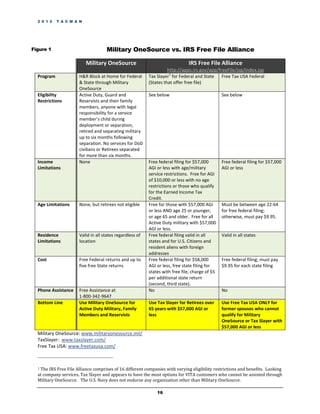
income tax returns. Please see Figure 1 on page 16 for more information on the services between the
different companies.

                                                     14
2 0 1 2   T A C M A N


Self-Service Tax Programs
Active and Reserve Military and Families in the U.S. -
Military OneSource
Military OneSource is an online extension of installation
services and offers tax preparation from January – June 30 of
each year through H&R Block at Home. This service is free for
all active duty, guard and reserve personnel and their families
as well as anyone who is a legal representative of a child of a
military member who is deployed or separated from the                  Military OneSource is
child. Members retain these benefits for up to six months          provided by the DoD at no
after they separate or retire from the military. There is no
                                                                    cost to Active Duty, Guard
cost to file a federal return or up to five state returns.
Military OneSource is the default program for all NLSC tax         and Reserve (regardless of
offices because it offers the most support at no cost to the       activation status) and their
servicemember and there are no income limitations. Military           families. It is a virtual
OneSource also provides tax assistance via phone during the          extension of installation
tax season. The website is:
http://www.militaryonesource.com/                                     services. Visit Military
                                                                           OneSource at
Retirees & Former Spouses                                         www.MilitaryOneSource.com
                                                                     or call 1-800-342-9647.
Because retirees and former spouses do not qualify for
Military OneSource, self-service TACs will need to use
alternate programs to provide tax services for these
individuals.

Tax Slayer is the recommended program for retirees and former spouses who are:
        - aged 25 years and under and aged 65 and over;
        - in the U.S.;
        AND
        - who have an adjusted gross income (AGI) of $57,000 or less.
        OR
        - who have an AGI of $10,000 or less;
        OR
        - who qualify for the Earned Income Credit.

Tax Slayer can be accessed at www.taxslayer.com. Note that Tax Slayer charges $5 for each additional
State return.

Free Tax USA is the recommended website for retirees and former spouses who are:
       - aged 22 to 64;
       - in the U.S.; and
       - have an AGI of $57,000 or less.
Free Tax USA can be accessed at http://www.freetaxusa.com/freefile

Note: Retirees and former spouses whose AGI is more than $57,000 will not be able to utilize the
self-service program. They should be referred to a commercial tax preparation service.

The U.S. Navy does not endorse any tax filing program aside from military VITA offices and
Military OneSource.

                                                   15
2 0 1 2   T A C M A N


Figure 1                            Military OneSource vs. IRS Free File Alliance

                          Military OneSource                                  IRS Free File Alliance
                                                                    http://apps.irs.gov/app/freeFile/jsp/index.jsp
  Program             H&R Block at Home for Federal       Tax Slayer1 for Federal and State   Free Tax USA Federal
                      & State through Military            (States that offer free file)
                      OneSource
  Eligibility         Active Duty, Guard and              See below                             See below
  Restrictions        Reservists and their family
                      members, anyone with legal
                      responsibility for a service
                      member’s child during
                      deployment or separation,
                      retired and separating military
                      up to six months following
                      separation. No services for DoD
                      civilians or Retirees separated
                      for more than six months.
  Income              None                                Free federal filing for $57,000       Free federal filing for $57,000
  Limitations                                             AGI or less with age/military         AGI or less
                                                          service restrictions. Free for AGI
                                                          of $10,000 or less with no age
                                                          restrictions or those who qualify
                                                          for the Earned Income Tax
                                                          Credit.
  Age Limitations     None, but retirees not eligible     Free for those with $57,000 AGI       Must be between age 22-64
                                                          or less AND age 25 or younger,        for free federal filing;
                                                          or age 65 and older. Free for all     otherwise, must pay $9.95.
                                                          Active Duty military with $57,000
                                                          AGI or less.
  Residence           Valid in all states regardless of   Free federal filing valid in all      Valid in all states
  Limitations         location                            states and for U.S. Citizens and
                                                          resident aliens with foreign
                                                          addresses
  Cost                Free Federal returns and up to      Free federal filing for $58,000       Free federal filing; must pay
                      five free State returns             AGI or less, free state filing for    $9.95 for each state filing
                                                          states with free file, charge of $5
                                                          per additional state return
                                                          (second, third state).
  Phone Assistance    Free Assistance at                  No                                    No
                      1-800-342-9647
  Bottom Line         Use Military OneSource for          Use Tax Slayer for Retirees over      Use Free Tax USA ONLY for
                      Active Duty Military, Family        65 years with $57,000 AGI or          former spouses who cannot
                      Members and Reservists              less                                  qualify for Military
                                                                                                OneSource or Tax Slayer with
                                                                                                $57,000 AGI or less
  Military OneSource: www.militaryonesource.mil/
  TaxSlayer: www.taxslayer.com/
  Free Tax USA: www.freetaxusa.com/


  1The IRS Free File Alliance comprises of 16 different companies with varying eligibility restrictions and benefits. Looking
  at company services, Tax Slayer and appears to have the most options for VITA customers who cannot be assisted through
  Military OneSource. The U.S. Navy does not endorse any organization other than Military OneSource.

                                                              16
2 0 1 2   T A C M A N


Implementing Self-Service
Policy
For NLSC, self-service is mandatory at TACs within the U.S. All other Fleet tax assistance centers can
decide whether to offer full-service VITA or combination full-service and self-service. A primary goal of
self-service is to educate our customers so that they will understand and have the ability to complete
their own tax returns. To promote that goal, ALL customers are required to use self-service, including
retirees. Customers who are physically unable to complete their taxes online, including our Wounded
Warriors, should be assisted with full-service VITA. Any other exceptions to the self-service
requirement must be made by the relevant NLSC Commanding Officer or his/her designee.

Availability
Self-service assistance is offered on a no-appointment, walk-in basis during established tax assistance
center hours of operation.

                                                    Determining Resources
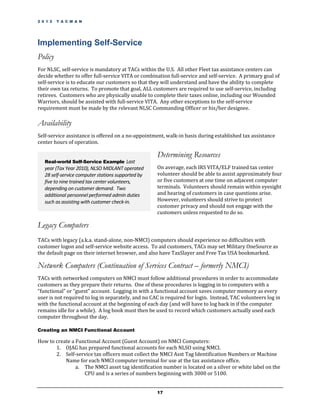
   Real-world Self-Service Example Last
   year (Tax Year 2010), NLSO MIDLANT operated      On average, each IRS VITA/ELF trained tax center
   28 self-service computer stations supported by   volunteer should be able to assist approximately four
   five to nine trained tax center volunteers,      or five customers at one time on adjacent computer
   depending on customer demand. Two                terminals. Volunteers should remain within eyesight
   additional personnel performed admin duties      and hearing of customers in case questions arise.
   such as assisting with customer check-in.        However, volunteers should strive to protect
                                                    customer privacy and should not engage with the
                                                    customers unless requested to do so.

Legacy Computers
TACs with legacy (a.k.a. stand-alone, non-NMCI) computers should experience no difficulties with
customer logon and self-service website access. To aid customers, TACs may set Military OneSource as
the default page on their internet browser, and also have TaxSlayer and Free Tax USA bookmarked.

Network Computers (Continuation of Services Contract – formerly NMCI)
TACs with networked computers on NMCI must follow additional procedures in order to accommodate
customers as they prepare their returns. One of these procedures is logging in to computers with a
“functional” or “guest” account. Logging in with a functional account saves computer memory as every
user is not required to log in separately, and no CAC is required for login. Instead, TAC volunteers log in
with the functional account at the beginning of each day (and will have to log back in if the computer
remains idle for a while). A log book must then be used to record which customers actually used each
computer throughout the day.

Creating an NMCI Functional Account

How to create a Functional Account (Guest Account) on NMCI Computers:
       1. OJAG has prepared functional accounts for each NLSO using NMCI.
       2. Self-service tax officers must collect the NMCI Asst Tag Identification Numbers or Machine
           Name for each NMCI computer terminal for use at the tax assistance office.
                a. The NMCI asset tag identification number is located on a silver or white label on the
                   CPU and is a series of numbers beginning with 3000 or 5100.


                                                    17
2 0 1 2   T A C M A N


                 b. The NMCI machine name is located on green bar located on the top left of the
                     monitor screen or by hovering over the “My Computer” login. The machine name is
                     only visible once the machine is turned on.
          3. Self-service tax officers should submit the list of NMCI asset tags to Mr. Roger O’Neal, U.S.
             Navy JAG Contracting Technical Representative (CTR) at (202) 685-5288 (DSN 325) or by
             email at roger.oneal@navy.mil.
          4. Once received, Mr. O’Neal will create a Move, Add Change (MAC) Request to NMCI to have
             passwords created for each login.
          5. Mr. O’Neal will email the tax officer when the functional account request has been approved
             by NMCI. The tax officer should then contact NMCI directly at 1-866-843-6624 and identify
             himself or herself as the owner of the account to access the password for the functional
             account. The functional accounts will only work on computers assigned to that unit’s TAC.

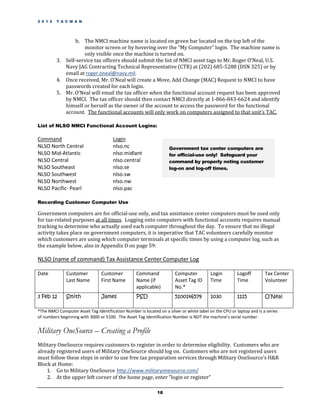
List of NLSO NMCI Functional Account Logins:

Command                                Login
NLSO North Central                     nlso.nc                      Government tax center computers are
NLSO Mid-Atlantic                      nlso.midlant                 for official-use only! Safeguard your
NLSO Central                           nlso.central                 command by properly noting customer
NLSO Southeast                         nlso.se                      log-on and log-off times.
NLSO Southwest                         nlso.sw
NLSO Northwest                         nlso.nw
NLSO Pacific- Pearl                    nlso.pac

Recording Customer Computer Use

Government computers are for official-use only, and tax assistance center computers must be used only
for tax-related purposes at all times. Logging onto computers with functional accounts requires manual
tracking to determine who actually used each computer throughout the day. To ensure that no illegal
activity takes place on government computers, it is imperative that TAC volunteers carefully monitor
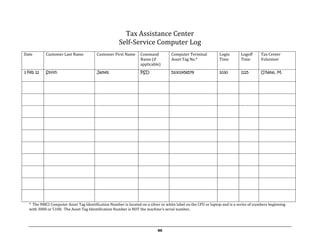
which customers are using which computer terminals at specific times by using a computer log, such as
the example below, also in Appendix D on page 59:

NLSO (name of command) Tax Assistance Center Computer Log

Date          Customer           Customer          Command             Computer           Login        Logoff         Tax Center
              Last Name          First Name        Name (if            Asset Tag ID       Time         Time           Volunteer
                                                   applicable)         No.*
3 Feb 12      Smith              James             PSD                 5100146579         1030         1115           O’Neal

*The NMCI Computer Asset Tag Identification Number is located on a silver or white label on the CPU or laptop and is a series
of numbers beginning with 3000 or 5100. The Asset Tag Identification Number is NOT the machine’s serial number.


Military OneSource – Creating a Profile
Military OneSource requires customers to register in order to determine eligibility. Customers who are
already registered users of Military OneSource should log on. Customers who are not registered users
must follow these steps in order to use free tax preparation services through Military OneSource’s H&R
Block at Home:
    1. Go to Military OneSource http://www.militaryonesource.com/
    2. At the upper left corner of the home page, enter “login or register”

                                                              18
2 0 1 2   T A C M A N


    3.  Select your branch of service (Army, Marine Corps, Navy, Air Force)
    4.  Select your status (Active or Reserve)
    5.  Select your role (Military Member or Military Family Member)
    6.  Select your region (Stateside or Overseas)
    7.  Select your State (click on your state abbreviation on the interactive map)
    8.  Select your Unit (Listed once state is selected – select your base installation)
    9.  Create the following:
            a. Username (4-15 characters)
            b. Password (6-10 characters)
            c. Confirm Password
            d. Display Name (Display name will appear on all Discussion Board postings, should the
                customer choose to post a discussion)
            e. Email Address
                                                                   Customers who do not want to set up a Military
    10. Check the box attesting “I attest that I am eligible       OneSource account may use an alternate tax service
        to access Military OneSource” if this is accurate          (perhaps through the IRS’s FreeFile Program), but
    11. Enter “Save”                                               should be alerted about possible fees
    12. Begin using Military OneSource tax assistance

Using Self-Service
As self-service is not VITA/ELF, no EFIN is required because the customer is preparing his/her own
return and also transmitting his/her own return. Tax assistance center volunteers should remind
customers to print a copy of their return before submitting it online to the IRS. Online tax preparation
companies normally communicate with the customer via email at a later date if the return has been
accepted properly, or if there were errors, but customers should print a copy of their return for their
records before transmitting.

Note on Privacy

It is important to ensure that customers who utilize self-service do not inadvertently share or store their
personally-identifiable information (PII) such as their tax return, on the shared tax assistance center
computers. As all customers use the same functional account, no customer should store or save
information on the computer, as it will be accessible by others. Tax assistance center OICs and
volunteers are responsible for warning customers against storing or saving their PII. Tax assistance
center volunteers are encouraged to check that customers did not save their PII.

How to permanently delete files:
   1. Delete the file you want discarded
   2. Empty the “Recycle Bin” icon on your Desktop

Communicating the Change
The change in manner and scope of tax services provided under the new self-service model may create
confusion and possible frustration for repeat TAC customers who have come to expect full-service tax
preparation. Code 16 has sent out a Navy-wide message informing commands of this change, which is
currently being routed for release. Providing senior commanders and potential TAC customers with a
clear message communicating the change is the best way to stop complaints before they begin. This may
be accomplished through record message traffic, DoD media, flag and general officer briefings, DoN
websites and general base advertising methods. Additionally, a sample letter to customers can be found
in Appendix C on page 58.


                                                      19
2 0 1 2   T A C M A N


Frequently Asked Questions for Self-Service TACs

What if a customer has difficulty using the self-service program?
As stated above, for NLSC, self-service is mandatory at TACs within the U.S. If a customer has difficulty
utilizing the self-service program, the TAC volunteer will assist that customer using the self-service tax
preparation program. Customers will not be given full-service VITA simply because they are having
difficulties with self-service or refuse to have self-service. The policy for NLSC TACs INCONUS and
Hawaii is that the volunteer will continue to assist the customer utilizing the self-service program. This
ensures that the customers learns the most about how to do their own taxes, NLSC gets the full benefit of
utilizing a self-service program, and encourages the next customer to also do the same. If the customer
requires more attention and there are other customers that the volunteer was assisting, another
volunteer may step in to assist the rest of the customers while the first customer continues to be helped.

What if a customer is physically unable to complete their taxes online?
Customers who are physically unable to complete their taxes online, including our Wounded Warriors,
should be assisted with VITA services.

What if a customer must file a paper return and cannot file an electronic return?
Customers who are required to file paper returns may be provided with VITA paper tax return
assistance from TAC personnel.

What if a customer must file a previous year’s return?
Customers who need to file previous year returns may be assisted with VITA services.

What if a customer qualifies for tax assistance services, but does not qualify for Military
OneSource (retiree) and has an AGI of over $57,000 and cannot file free using
programs through the IRS Free File Alliance?
The purpose of the Navy tax assistance program is to primarily assist junior enlisted personnel with their tax
preparation. The Navy does not set income limits for programs operating under the IRS Free File Alliance.
Individuals who do not qualify for Military OneSource and also do not qualify for the IRS Free File Alliance
should seek alternative tax assistance, such as Quicken, Turbo Tax, and other low-cost tax preparation
software or should seek to use a non-military VITA/ELF program that may be able to assist him or her.


                                                      20
2 0 1 2   T A C M A N


                                                                                        5
                                                                                        Chapter


Outstanding Initiatives

I
      n addition to traditional tax assistance services, there are many ways reach Sailors and teach them
      about how to prepare their taxes. Below are a few outstanding initiatives that various TACs shared
      with Code 16. Please continue to share your stories with us!

Command POC Program
NLSO Pacific increased their returns by 15% based upon a variety of initiatives, including their
“Command POC Program.” At the NLSO Pacific Tax Officer's request, each area command appointed a
VITA POC as a collateral duty. The command VITA POC served as a point of contact for command
members and for the Tax Officer. The Tax Officer trained the VITA POCs to be able to disseminate
information, organize command events, prepare individual taxes outside the tax center, and track
progress at each command. This network was helpful to announce the opening of tax centers, details of
services, and updates. The VITA POCs also developed an internally cohesive network that supported
and helped each other. In all, there were 28 VITA POCs, including one for each homeported ship, and
even a POC for on-base housing. It’s a great initiative by NLSO Pacific that can definitely be utilized at
other commands!

Satellite VITA at “A” School
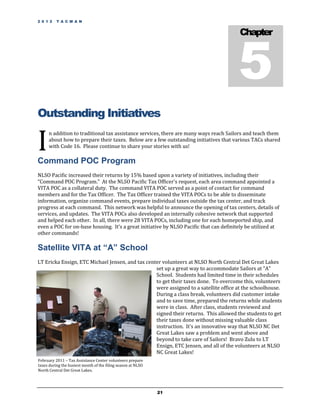
LT Ericka Ensign, ETC Michael Jensen, and tax center volunteers at NLSO North Central Det Great Lakes
                                                  set up a great way to accommodate Sailors at "A"
                                                  School. Students had limited time in their schedules
                                                  to get their taxes done. To overcome this, volunteers
                                                  were assigned to a satellite office at the schoolhouse.
                                                  During a class break, volunteers did customer intake
                                                  and to save time, prepared the returns while students
                                                  were in class. After class, students reviewed and
                                                  signed their returns. This allowed the students to get
                                                  their taxes done without missing valuable class
                                                  instruction. It's an innovative way that NLSO NC Det
                                                  Great Lakes saw a problem and went above and
                                                  beyond to take care of Sailors! Bravo Zulu to LT
                                                  Ensign, ETC Jensen, and all of the volunteers at NLSO
                                                  NC Great Lakes!
February 2011 – Tax Assistance Center volunteers prepare
taxes during the busiest month of the filing season at NLSO
North Central Det Great Lakes.


                                                              21
2 0 1 2 T A C M A N
2 8 - S E P - 1 1


VITA at Sea
Eleven VITA specialists flew on board USS RONALD REAGAN (CVN 76) to prepare and e-file Federal and
state income tax returns while the during the carrier’s six-month deployment to the western Pacific
Ocean and Persian Gulf. LT Elan Ghazal, Southwest Region Tax OIC of NLSO SW, coordinated the visit
with S-1 Division LCPO CSCS (SW/AW) Francisco Marigundon and Franchise Tax Board VITA Military
Program Coordinator Ernest Feliciano.

Senior Chief Marigundon credited the program’s success to the IRS and VITA leaders. “The can-do
assistance from the IRS and FTB VITA program enabled the USS Ronald Reagan to become a floating tax
center capable of e-filing federal and California income tax returns for
6,000 sailors, six aviation squadrons from Air Wing One-Four and a
support ship in the Strike Group.”

Their story was printed in a press release. Bravo Zulu to LT Ghazal,
Senior Chief Marigundon and Mr. Feliciano for their outstanding
efforts!


Self-Service Taxes Underway
Servicemembers in 7th Fleet were quite busy after the March 11, 2011
earthquake and subsequent tsunami hit Japan. However, that didn’t
stop the NLSO Pacific TAC from providing excellent support to Sailors
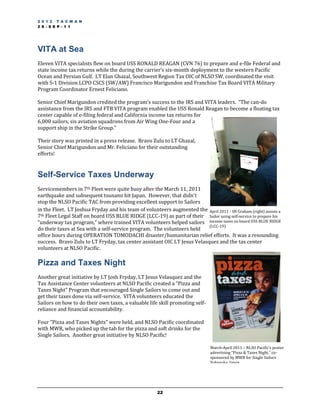
in the Fleet. LT Joshua Fryday and his team of volunteers augmented the April 2011 - SN Graham (right) assists a
7th Fleet Legal Staff on board USS BLUE RIDGE (LCC-19) as part of their Sailor using self-service to prepare his
“underway tax program,” where trained VITA volunteers helped sailors income taxes on board USS BLUE RIDGE
                                                                          (LCC-19)
do their taxes at Sea with a self-service program. The volunteers held
office hours during OPERATION TOMODACHI disaster/humanitarian relief efforts. It was a resounding
success. Bravo Zulu to LT Fryday, tax center assistant OIC LT Jesus Velasquez and the tax center
volunteers at NLSO Pacific.

Pizza and Taxes Night
Another great initiative by LT Josh Fryday, LT Jesus Velasquez and the
Tax Assistance Center volunteers at NLSO Pacific created a “Pizza and
Taxes Night” Program that encouraged Single Sailors to come out and
get their taxes done via self-service. VITA volunteers educated the
Sailors on how to do their own taxes, a valuable life skill promoting self-
reliance and financial accountability.

Four “Pizza and Taxes Nights” were held, and NLSO Pacific coordinated
with MWR, who picked up the tab for the pizza and soft drinks for the
Single Sailors. Another great initiative by NLSO Pacific!

                                                                               March-April 2011 – NLSO Pacific’s poster
                                                                               advertising “Pizza & Taxes Night,” co-
                                                                               sponsored by MWR for Single Sailors
                                                                               Yokosuka, Japan.


                                                       22
6
                                                                                       Chapter


Reporting Requirements
Monthly Statistics to OJAG


E
        ach site is required to submit monthly statistics for a period starting on the 16th and ending on
        the 15th of each month. These statistics allow us to track how the sites are doing in comparison
        with previous years and spot problems before it becomes too late to solve them. The format for
        these statistics will be e-mailed before the first report is due and should be submitted in
electronic form. Your TaxWise software will help you track the numbers you’ll need, which is a principal
reason we have you enter certain information on the default forms. Please see Appendix I on page 69
for a sample report.

After-Action Reports
To aid us in improving the Navy tax assistance program, each TAC is required to submit an After-Action
Report (AAR) to Code 16 by 4 May. Keep in mind that for overseas sites, this means that your AAR will
be due prior to the close of your tax center on June 15. This is done so that overseas TACs can have
input into the overall U.S. Navy tax assistance AAR, which is completed prior to June 15 and is provided
to the JAG, CNO, and the Secretary of the Navy. The format for the AAR will be e-mailed during the tax
season. Remember that this report should be submitted in addition to the last monthly statistic report.

Due Dates to OJAG Code 16
Reporting Period            Report Due            Date Due
16-Nov – 15 Dec             Monthly Report        19 Dec (Mon)
16 Dec – 15 Jan             Monthly Report        20 Jan (Fri)
16 Jan – 15 Feb             Monthly Report        22 Feb (Wed)
16 Feb – 15 Mar             Monthly Report        22 Mar (Thu)
16 Mar – 17 Apr             Monthly Report        23 Apr (Mon)
2012 tax season             After Action Report   4 May (Fri)
18 Apr – 15 May             Monthly Report*       22 May (Tue)
16 May – 15 Jun             Monthly Report*       22 Jun (Fri)
*Overseas VITA/ELF offices only


                                                    23
7
                                                                                       Chapter


Individual Taxpayer Identification
Numbers (ITINs)

A
         n Individual Taxpayer Identification Number (ITIN) is a number that is issued for tax reporting
         purposes. It is similar to a Social Security Number (SSN) and is commonly issued to identify
         persons who are not otherwise eligible for an SSN.

Current tax law requires that anyone listed as a dependent on a return have an SSN, an EIN, or ITIN. A
non-resident alien who is filing a tax return (such as the spouse of a US citizen or resident) must apply
for an ITIN. Without the ITIN, the US citizen or resident cannot claim an exemption for the spouse and
the spouses cannot take advantage of the Married Filing Jointly filing status.

The ITIN application, IRS Form W-7, may be made by mail and requires the individual to mail original
documentation (proof of identity and alien status- usually a passport) to the IRS. The documents are
                                                 later returned. The application may also be filed in
                                                 person at any IRS office, or at an IRS-approved
 Note: To claim a child as a dependent, you must Acceptance Agent.
satisfy more than just having a social security
number or an ITIN. See IRS Pub 17 for the         The IRS has recognized Code 16 as an Acceptance
                                                  Agent for ITIN documents, and Code 16 has delegated
rules on claiming a non-resident as a dependent.
                                                  this authority to overseas Navy Legal Service Command
                                                  (NLSC) commands. Under this agreement, NLSC
commands can examine the original documents of an applicant, certify on IRS Form W-7 that the proper
documents have been presented, and then send the W-7 to the IRS for processing without having to
attach any accompanying documents. The issued ITIN will then be sent back to the Acceptance Agent for
delivery to the ITIN applicant. Please bear in mind that the IRS requires that we maintain the
documents submitted by our customers in our files, for periodic inspections.


                                                    24
8
                                                                                           Chapter


Privacy Act, Volunteer Liability,
Ethics, and Competency
Privacy Act Considerations


Y
         ou cannot prepare a tax return for your customers without collecting information protected by the
         Privacy Act. As noted above, you are required to retain copies of forms for a certain length of time
         after the returns are filed. These paper records, and the associated electronic records of returns, fall
         under the Privacy Act and must be protected accordingly. You must include a Privacy Act Statement
in the customer intake sheet. NLSC commands may use their office’s standard Privacy Act statement. You can
incorporate this into an addendum to the Interview and Intake Form as seen in the sample in Appendix B.


Volunteer Liability
As a government employee, any service member or DOD employee who volunteers at a TAC is protected
from liability for damages caused by errors in tax form preparation, by the Federal Tort Claims Act, and
other tort law. Of course, this does not give our volunteers license to be negligent on tax returns they
prepare, but it does shield government employees from personally answering complaints about their tax
services. It should be noted that civilian volunteers are NOT protected under these rules and could
potentially be subject to liability if a valid tort claim is brought against them. However, there is some
protection provided by VITA/ELF, which states that a VITA/ELF trained volunteer is legally protected to
the extent that he or she has been certified by the IRS. Therefore, the scope of tax preparation services
provided by each volunteer should always be limited to the volunteer’s level of certification.

Ethics

Compensation Issues
The Navy tax assistance program is a service provided at no cost to taxpayers who are eligible for
military legal assistance services. Under no circumstances are volunteers or any other persons
associated with the program to accept any compensation for providing these services. In addition, a
volunteer cannot provide free tax assistance program through the military program and maintain a
commercial tax preparation business on the side. This would create a conflict of interest and might


                                                       25
create the appearance that the volunteer was trying to use tax assistance program to solicit customers.
To avoid this, we must turn away any volunteer who also works as a commercial tax preparer.

Tax Assistance Program not legal assistance – no formation of Attorney-Client relationship
OJAG Code 13 (Ethics) issued an opinion in 1997 regarding the formation of attorney/client
relationships when an attorney prepares tax returns as part of the Navy’s tax assistance VITA/ELF
program. In most cases, an attorney preparing a tax return under these circumstances does not form an
attorney-client relationship. To guard against potential problems, Code 16 created a sample notice to
post at TACs. Please see Appendix A on page 52. Additionally, Code 16 incorporated a disclaimer
statement in the Privacy Act statement to notify customers that no attorney-client relationship is being
formed. Please see the VITA/ELF Intake Sheet Addendum in Appendix B on page 54.


Competence Issues
The Navy tax assistance program is designed to serve a limited type of customer with a limited type of
tax return. If a person has a substantial income or complicated business or other expenses, he or she
needs to use a professional preparer rather than the Navy tax assistance program. Not only is the tax
assistance program not designed to prepare complicated returns-- it is not authorized to prepare
business returns. A tax preparer should never attempt to prepare a return he or she knows is beyond
their level of competency or authority. Please ensure that your volunteers clearly understand that they
should refer returns beyond their comfort level to a supervisor, or to a professional preparer.

Volunteer Quality Alerts (VQA) are excellent tools to provide volunteers with educational messages on
tax law subject matters. Please ensure that these are passed placed at the computer workstations
immediately upon receipt, so that each volunteer can review the VQA’s.

Honesty
Customers may, from time to time, request that you cut corners on the tax law in order to illegally
generate a larger tax refund. Don’t do it! A tax preparation customer either qualifies for certain
deductions or not; and all IRS rules are derived from Federal law. This may sound self-evident, but
recent problems with the Earned Income Credit have served to highlight the need for the accurate and
honest reporting of income. Simply put, the practices of hiding income or claiming unauthorized
dependents are illegal and may result in harsh penalties for the taxpayer. Even though we are generally
exempt from liability as government employees, we are not protected when there is fraud involved.

Site Reviews
IRS SPEC conducts site and return reviews as part of the Volunteer Return Preparation Program –
Quality Improvement Process. The goal of the reviews is to ensure that the site is operating effectively
and efficiently; is adhering to standard operating procedures; that taxpayers are receiving quality
service; and to enhance the quality of volunteer return preparation. Three types of reviews will be
conducted; site, return, and shopping. The Site review focuses on quality, while the Return and
Shopping reviews measure accuracy.

     Site Review is conducted by an IRS SPEC Tax Specialist and is pre-scheduled with the Site
      Coordinator. Site reviews measure the administrative aspects of our site – assessing adherence
      to quality site requirements.


                                                   26
 A limited number of shopping reviews will be conducted by IRS SPEC to measure the accuracy of
  return preparation provided by volunteers. Shoppers will consist of IRS SPEC employees.
  Shopping reviews will not be pre-scheduled.

 While conducting the Site Review, the same Tax Specialist will review completed returns and
  cross check them against corresponding intake sheets to help determine the accuracy of the
  return. Return Reviews are not designed to involve the taxpayers, so it is essential that intake
  sheets have been accurately and fully completed. This review should be conducted before the
  taxpayer leaves the site. If errors are identified, the return must not be filed until the return is
  corrected and discussed with the taxpayer.


                                                27
9
                                                                                              Chapter


Volunteer Recognition
Volunteers find fulfillment when they know their assistance has been worthwhile. Recognition for a job well
done will help reinforce those feelings.

Your volunteers provide an important and valuable service. From site opening to site closing, let them know
that their time and talents are appreciated.

Consider getting a regional commander, preferably an Admiral, to write a letter of appreciation for some of
your volunteers. Flag letters of commendation will give volunteers 1 point on their enlisted advancement
exams.

Consider asking your regional commander to award a Navy and Marine Corps Achievement Medal to your
especially outstanding volunteers. This is a great way to recognize the work of your top volunteer(s), and also
earns them two points towards their enlisted advancement exam.

Awards and letters of appreciation are a great way to recognize your volunteers and keep them coming back
year after year. Large TACs may wish to set up parameters as to how many returns a volunteer must
complete to qualify for certain awards (for example, to qualify for a FLOC, a volunteer must complete 75
returns). There are many ways to gauge the performance of your top volunteers to ensure they get recognized
for their great contributions.

Please see Appendix G on page 64 for sample awards criteria and write-ups. Many thanks to LT Elan Ghazal
from NLSO Southwest in preparing the samples for us to share with you!


                                                      28
10
                                                                                       Chapter


VITA/ELF: Setting the Program in
Motion
Registration with the IRS


T
        he first step toward becoming a VITA/ELF TAC is registration with the IRS. Tax officers who are
        establishing a new TAC need to apply for an Electronic Filing Identification Number (EFIN). Tax
        officers can apply for EFINs by filling out IRS Form 8633, and forwarding it to Code 16 for
        approval and delivery to the IRS. You must also contact your local IRS Spec Rep (call Code 16 for
more information), who will assign you a Site Identification Number (SIDN) to establish a new TAC.

You may also register on-line to request an EFIN by creating an e-services account. Registration
requires a password and PIN. After registering, the tax officer will receive access to the On-line e-file
Application for requesting an EFIN.

       A tax officer can go to www.irs.gov and access the e-file Application.
       A tax officer may also file paper Form 8633 to apply for an EFIN. To access this form, please go
        on the IRS website and type in “Form 8633” in the search box.

All previously established TACs should use the same EFIN as last year. If your TAC address has changed
you will need to write a letter to the IRS giving them this updated information.

Send the letter to:
                                                                            Previously established
                 Internal Revenue Service, Andover Campus,                  VITA/ELF TACs do not
                 Attn: EFU Acceptance, Stop 983, P. O. Box 4099             need to apply for a new
                 Woburn, MA 01888-4099                                      EFIN!

Note: If your TAC filed fewer than 35 returns the previous year, your EFIN may have been deactivated.
Contact your IRS SPEC rep.

VITA/ELF Product Ordering
Please contact your local IRS SPEC rep to order products. Your IRS SPEC rep can order materials for your TAC
using the electronic product ordering system, known as CAPS. You may also order materials by using Form


                                                     29
2333V, Volunteer Program Order Form, but this is being transitioned to the CAPS system, where your IRS
SPEC rep will place the orders for you.

Materials should be ordered as soon as possible and at least four weeks prior to your training class. The tax
officer is responsible for ordering materials for both the TAC and training certification classes. The order is
made using Form 2333V, Volunteer Order Form. You should retain a copy of the form, and fax the original to
your IRS SPEC contact. The IRS SPEC contact will review the order and then forward it to the National
Distribution Center (NDC). The procedure normally takes about three weeks. As a minimum, the following
should be ordered for each student:
•         Publication 4491, VITA/TCE Training Guide (1 per volunteer)

Other products and reference materials that may be useful include:
•       Pub. 3, Armed Forces’ Tax Guide
•       Pub. 17, Your Federal Income Tax
•       Pub. 54, Tax Guide for U.S. Citizens’ and Resident Aliens’ Living Abroad
•       Pub. 730, Important Tax Records Envelope (enough for every customer)
•       Pub. 1084, IRS Volunteer Coordinator’s Guide
•       Pub. 3189, Volunteer e-file Administrator Guide
•       Pub. 3676A, VITA/TCE Site Location Poster
•       Pub. 4053, Your Civil Rights Are Protected Poster
•       Pub. 4327, ITIN Bilingual Brochure
•       Pub. 4481, Your Civil Rights Are Protected Stuffer
•       Pub. 4555-e, VITA/TCE E-Instructor Guidance (must be downloaded)
•       TaxWise Reference Manual
•       Form 8158, Quality Review Sheet (enough for every customer)
•       Form 13206, Volunteer Assistance Summary Report (1 copy/month)
•       Form 13614, Intake and Interview Sheet (enough for every customer)
•       Form 13645, Wallet Card (1 per volunteer)
•       Form 13715, Site Information Sheet (1 copy/month)

Each site should:
•         Keep a copy of Publications 3, 17, and 54 in each office that will be used to prepare tax returns.
•         Have once copy of Publications 1084, 3189, 4555-e, and this SOP. Pub 4555-e must be downloaded
from the IRS web site. It will not be available to order.
•         Have enough of Publication 3676A (Site Location Poster), to display in the community with site
locations, hours of operation, and contact information to make appointments
•         Have enough of Publications 4053 (Civil Rights Are Protected Poster), 4327 (ITIN Bilingual Brochure,
and 4481 (Civil Rights Are Protected Stuffer) to be made available to customers at each NLSO
•         Order Forms 13206 (Volunteer Assistance Summary Report), and 13715 (Site Information Sheet) and
make enough copies so that each form can be filled out monthly during the tax season (February-June for
overseas locations) The Volunteer Assistance Summary Report must list every volunteer and level of
certification. It may be necessary to use more than one form each month to accommodate all of the volunteers.
•         Order enough of Pub. 730 (tax records envelope), Form 8158 (quality Review Sheet), and Form
13614 (Intake & Interview Sheet) for every customer. There is also an Intake Addendum (see Appendix B on
page 54) that each site is encouraged to use as it provides more information about each customer.

Filing Season Action Plan for VITA-ELF
September
    - Begin completing Form 2333V for training materials order and submit to your IRS SPEC contact.


                                                       30
October
   -      Begin volunteer recruitment. Contact volunteers from previous tax year and work on recruiting new
          volunteers
   -      Schedule date and place for classroom VITA training
   -      Complete any additional Forms 2333V for training material orders and submit to IRS SPEC contact
   -      Identify/secure computer equipment for VITA site and VITA tax preparation locations

November
   -      Begin preparing site information sheet
   -      Contact volunteers who have indicated that they can’t make the classroom training to begin the on-
          line “Link and Learn” training for the required IRS certification (available 14 Nov 2011)
   -      Complete any additional Forms 2333V for training materials and submit to IRS SPEC contact

December
   -      Begin community awareness publicity
   -      Verify order of forms and supplies for the VITA site
   -      Continue volunteer “Link and Learn” training certification
   -      After training, secure completed Form 13615, Volunteer Agreement, from each volunteer
   -      Navy sites: Submit monthly stats report for the period 16 Nov – 15 Dec (this month may just include
          volunteer manhours if no taxes were prepared). The first monthly stats report is due to the VITA/ELF
          Program Manager on 19 December. janelle.kuroda@navy.mil

January
   -      Forward the original Forms 13615 to the local IRS SPEC contact and retain a copy at the VITA site
   -      Continue volunteer training and certification
   -      Hold classroom training provided by IRS SPEC contact
   -      After training, complete optional Form 13645, Wallet Card, for each certified volunteer and issue to all
          certified volunteers
   -      Post publicity posters, Publication 3676 (see exhibit 4 for list of VITA limitations)
   -      Attend site Coordinator training, or complete training on-line through “Link and Learn”
   -      Establish a Quality Review process for all returns prepared at the site
   -      Distribute the Quality Alerts to all volunteers
   -      Complete the computer set-up. Set defaults, including the SIDN, and enter user names and initial
          passwords for all users in the program
   -      Recognize volunteer efforts
   -      Navy sites: Submit monthly report for the period 16 Dec – 15 Jan (this month may just include
          volunteer manhours if no taxes were prepared) . The monthly report is due on 20 January to the
          VITA/ELF Program Manager. janelle.kuroda@navy.mil

February
   -      Open VITA/TCE site (some sites may be prepared to open earlier to coincide with the release of W2s)
   -      Implement a Site Quality Review process for all returns prepared at the site
   -      Submit Form 13206, Volunteer Assistance Summary Report, to the IRS SPEC listing each volunteer by
          the 3rd day after the end of the month after the site opens (report each volunteer only once on Form
          13206 during a filing season)
   -      Complete or update Form 13715, Volunteer Site Information Sheet, and submit to IRS SPEC contact
   -      Complete optional Form 13645, Wallet Card, for each certified volunteer, and issue to all certified
          volunteers
   -      Distribute the Quality Alerts to the volunteers
   -      Recognize volunteer efforts


                                                        31
-    Start Site Review
    -    Navy sites: Submit monthly report for the period 16 Jan – 15 Feb. The monthly report is due on 22
         February to the VITA/ELF Program Manager. janelle.kuroda@navy.mil

March
    -    Submit Form 13206 for any new volunteers
    -    Implement the Site Quality Review process for all returns prepared at the site
    -    Work with IRS SPEC contact to prepare certificates for volunteers
    -    Distribute Quality Alerts to each volunteer
    -    Recognize volunteer efforts
    -    Schedule Volunteer Recognition ceremony
    -    Submit awards for volunteers
    -    Navy sites: Submit monthly report for the period 16 Feb – 15 Mar. The monthly report is due 22
         March to the VITA/ELF Program Manager. janelle.kuroda@navy.mil

April*
    -    Submit Form 13206 for any new volunteers
    -    Distribute Quality Alerts to all volunteers
    -    Recognize volunteer efforts
    -    Mail Form 8879 to the IRS Submission Processing Campus and IRS SPEC office or store them properly
         until December 31st of that filing year
    -    Compile numbers on each volunteer to submit individuals for awards
    -    Hold volunteer recognition ceremony
    -    Initiate site close-out procedures
    -    Evaluate filing season, site, and volunteers
    -    Provide IRS SPEC contact with feedback to improve or enhance operation for next year
    -    Navy sites: Submit final report for the period 16 Mar – 17 Apr. Final report is due on 23 Apr to the
         VITA/ELF Program Manager. janelle.kuroda@navy.mil
    -    Navy sites: Complete After-Action Report. The AAR is due on 4 May to the VITA/ELF Program
         Manager. janelle.kuroda@navy.mil

*Overseas VITA/ELF Sites remain in operation until June 15 and will continue to run the VITA/ELF program
until June. Navy Sites should continue to provide monthly reports by the 22nd day of the month to the
VITA/ELF Program Manager. It is highly recommended that overseas sites prepare their After Action Reports
before the end of the filing season to get them to Code 16 by 4 May for inclusion in the overall U.S. Navy
VITA/ELF After Action Report.


TaxWise Software
TaxWise is available in two versions, “Desktop” which is the CD-ROM software, and “Online,” also known
by its acronym “TWO,” which is web-based software. Tax centers should order software through their
IRS SPEC rep. The same EFIN may not use both versions.

If you have ordered the TaxWise Desktop version (see the blue
box to the right), you will receive a CD from the TaxWise vendor           TACs with continuous access to high-speed
in December. This software will enable you to install the                  internet should use TaxWise Online. TACs with
program and practice sample returns. Throughout the year, the              only intermittent internet access, such as those
                                                                           onboard naval vessels or in remote locations
vendor will release numerous updates to the program, and many              overseas, should use TaxWise Desktop.
of them are mandatory. These updates can be downloaded by the
transmitting computer, saved on a floppy drive (or USB drive if


                                                     32
allowed by your command), and then transferred to the other computers. If you ordered the TaxWise
Online Version (like most NLSC commands), you do not need to worry about updates, since the software
vendor automatically posts the updates on its website. Users of the Online Version will receive a letter
around December explaining how to sign into the system for the first time.

Tax officers will have to decide which version of TaxWise is best for their site.

Both products provide:
    The ability to set defaults to eliminate key strokes.
    The ability to enter the SIDN (Site Identification Number).
    The ability to review and batch returns prior to transmission.
    Security – TaxWise software applications provide encryption as well as encrypted transmissions
       of taxpayer data from the site to TaxWise and from TaxWise to the IRS Electronic Management
       System (EMS). TaxWise employees with access to taxpayer data undergo background
       investigations and TaxWise facilities undergo an annual security review by the IRS Security Staff
       as well as periodic ad hoc security inspections.
    Forms can be printed in English or Spanish.
    Ability to transmit a batch of returns instead of one-on-one transmission.
    Third-party transmission – all IRS sites use indirect transmission. TaxWise serves as the third
       party transmitter to the IRS.
    Ability to load or access software application from all computers located at the site.
    Reports – the contract provides weekly production reports to the IRS point of contact (POC)
       which are provided to all SPEC employees and available to SPEC partners. In addition, individual
       sites have the ability to pull ad hoc reports. Refer to IRS Publication 3189, Volunteer e-file
       Administrator Guide, for more information on pulling reports.


Software Setup
Using TaxWise Online eliminates most of the difficulties connected with the software set-up. The
TaxWise vendor keeps the application updated and all the administrator has to do is update the
preparer list. Some initial set-up is required. Follow the guidance found in IRS Pub 3189 for the initial
set-up. Note that a copy of IRS Pub 3189 is included on the TaxWise CD, which will be provided to TWO
sites as a backup. However, sites that initially sign up for TWO cannot use the CD version of the software
without the permission of Universal Tax Systems (UTS), the company that produces TaxWise.

Setup Guidance
Security concerns are becoming more important as unscrupulous users try to use technology to steal
personal information and potentially commit internet based attacks on DoD computer systems. In order
to counter this threat, TaxWise has several security measures. The first security practice is the use of
passwords. The first time the administrator logs into TWO he or she will need to log in as the ADMIN
user, enter the customer ID provided by TaxWise on the software packing list, enter the user name
ADMIN, and then enter the 20 digit Registration Code, also provided by TaxWise on the packing list. The
administrator will then be prompted to create a new password and will need to follow the new security
guidelines for the passwords.

        ADMIN   -    Must be 8 characters including 1 uppercase, 1 lowercase, 1 numeric, and 1 special
                     character.


                                                     33
User Passwords     -   Must also be 8 characters including 1 uppercase, 1 lowercase, 1 numeric,
                               and 1 special character.

Code 16 requires statistics regarding the nature of the
volunteers providing the service. TWO can help provide
                                                                       Site Identification Number (SIDN) – This nine-
details on the production of all of your volunteers who are
                                                                       digit number begins with an “S” for VITA sites (P is
logged in (it will not help for people like greeters and               for paid preparers- which we are not) and
supervisors; you will have to manually keep track of that).            identifies your tax site. Be sure you enter it
To optimize the reporting abilities of the software all users          correctly the first time so that all your taxes are
should assign names as follows:                                        filed properly. Filling out the wrong SIDN can
                                                                       result in rejections for each return your center
                                                                       creates.
While logged-in as an Administrator go to the main page.
On the main page click the Manage Users button on the
toolbar. TaxWise Online will then display the User Manager window. In that window click on Create a
New User to open the Create User window. [The ADMIN user also establishes the limits of authority of
each other user. For example, the ADMIN user can assign another user to have “E-Filing Authority” in
addition to tax preparation authority. See Pub. 3189 for more information.]

The “Real Name” field has three sub-fields, presumably First, MI, and Last. In the First Name sub-field
use the following naming convention:

        Rank of the volunteer (2 CHAR):
            Enlisted                                E1, E2, etc.
            Officer                                 WO, O3, O4
            Government Employee                     GS
            Family Member (Dependent)               DP
            Retiree                                 RE
            Unaffiliated civilian volunteer         CV

        Status of volunteer (2 CHAR)
             Non-NLSC TAD                           TA
             Non-NLSC Volunteer                     VO
             NLSC Personnel                         NL
             Other                                  OT
        User defined (17 CHAR)
                                                                   Electronic Filing Identification Number (EFIN) –
Examples:       E4NLStephani I Chase                               This six-digit number identifies your VITA program,
                GSVOLeslie B Smart                                 normally associated with your command. Be sure you
                REOTAbraham J Smith                                enter it in correctly the first time so that all your taxes
                                                                   are filed properly to avoid rejections. Also, ensure you
                CVOTElmer J Fudd                                   identify your site not just by the acronym but by city
                                                                   and state as well (i.e. NLSO MIDLANT, Norfolk,
                                                                   Virginia)
Setting Return Templates
Return templates allows any user with Return Template rights to complete common information that
will apply to all subsequent tax returns created. To create a return template, simply click on the return
template icon and follow the instructions.

Default Settings
Tax Form Defaults are used to enter information that users of TWO want to appear in all tax returns.
There are certain defaults that are already set by TWO. These are:


                                                     34
•       Appropriate form to use – “1040”
•       Customers’ name, address, phone number, date of birth, and occupation designed as required
        fields
•       “Are you excluding Puerto Rico income from this return?”
•       Return type – “E-File Only”
•       Third Party Designee
•       “IRS only” box will be checked
•       Form 8867
•       Form 8158

Setting defaults for the Site Identification Number (SIDN), EFIN, and site information on Form 8879 are
required. Also, setting the SIDN on the Main Information Sheet is a required default. Other common
defaults listed below are optional, but recommended.

•       Preparer’s Use Field (create drop downs with volunteer & customer stats – pay grade, AD status,
        etc. – see page 19 of this SOP for more info)
•       Form W-2
•       Schedule A
•       Self-Select & Practioner’s Pin with box checked
•       Check box – “what form are you e-filing using PIN’s” – “income tax return)
•       Preparer’s information with SIDN, EFIN, and name, address, & phone number of command
•       Price List

Now that we have a Return Template, and know which defaults we would want to set, we are ready to
create a return template.

•       Click Return Template
•       Click the Edit icon next to the new Return Template
•       The Main Information Sheet appears

To set the default and make entries “required” for each return prepared:

•       Click Ctrl+ Spacebar while your cursor is in the desired field
•       Click Ctrl+ Spacebar in a blank field will turn Red (required field)
•       Click Ctrl+ Spacebar in a Red field will turn off the required field

The following sections of the Main Information Sheet should be defaulted as a “Required Field”:

•       Present Home Address
•       Zip Code
•       Taxpayer’s Daytime Phone Number
•       Taxpayer’s Date of Birth
•       Taxpayer’s Occupation
•       Type of return
•       State Information
•       No to “Are you excluding Puerto Rico income”
•       Filing status
•       SIDN in the PTIN field
•       Check the IRS only box
•       Taxpayer/spouse pin
•       3rd party designee information – should check “No”


                                                     35
•       Form 8879 ERO section
•       Firm name – enter site name
•       Firm’s address – enter site’s address
•       Zip Code – click the save icon to populate the city and state
•       Ctrl+ Spacebar to remove the red in the SSN and EIN fields

Click Save and double check that all Main Information Sheet defaults are correct.

Additional forms can be added to the Tax Form Defaults/Return Templates by selecting the “add a
Form” button. Enter the form name in the “Search For” box and press go.

•       Click Add link and make a field required by pressing Ctrl+ Spacebar
•       Click the Save icon

Price List and Practitioner Pin
To add the Price List form, follow the steps above. This form is important, as it will generate an invoice
for every customer. Although the services we provide are free, this invoice gives the customer a chance
to see the money they are saving, and also gives us a breakdown for our value of services. Once you are
in the Return Templates screen, click on the Add a form button and then select the form Price. The
current tax preparation fees are listed in Appendix D.

On the left side of the screen you will see a section labeled Loaded Forms. Click on the form Main
Information Sheet. Once that form loads, scroll down to the section labeled “Self-Select and Practioner
PIN(s).” Fill in the blank for “ERO PIN for both the Self-Select and Practioner PIN programs” with any 5-
digit number. We recommend using the digits 98765 for uniformity. Next, check the box following the
statement, “Check if using the Practioner PIN method for e-filing this income tax return or Form 4868
with direct debit.” Ensure the radial button is checked after the statement, “The income tax return”
referring to the question, “What form(s) are you e-filing using PINs?”

Even though you are using Practioner PIN, you still need to modify Form 8879. Select the applicable
form from the form list and insert your EFIN in the first blank. Next, scroll down to Part III of the form
and check the box next to “IRS Only” and then hit Save. Place your SIDN in the field labeled “PTIN” and
place “MILITARY VITA” in the field labeled “Firm’s Name.” No other fields are required for Military VITA
sites. You may add your address as appropriate.

Finally, you may want to modify the information following the horizontal line. This will help the
volunteers to remember to collect this information. For the field “Taxpayer’s PIN”, enter customer’s last
5 of their social security number. Ensure the radial button for “authorize” is selected. This section is
important, as it has to do with the customer electronically signing the document. The volunteer must go
over this section with the customer while he/she is preparing the return and get the customer’s
permission to electronically ‘sign’ the customer’s name through the use of the second (and if married,
filing jointly, the third) PIN.

Preparer Use Only Fields
Preparer use fields are critically important. The tax officer can run a “preparer use field report” in the
“reports” section of TaxWise. TaxWise generates all of the preparer use field data in an single excel
spreadsheet. The tax officer can then manipulate the spreadsheet to get information for the Code 16 statistical
reports and to get information for writing volunteer awards. To do this, however, the preparer use fields
must be set up correctly and utilized correctly from the very beginning of the tax season. (If the tax officer


                                                      36
doesn’t do this, he or she will quickly discover that there is no other way for TaxWise to give an accurate
accounting of the number of federal returns prepared.)

While logged-in as an Administrator with Return Template rights, go to the main page. On the main
page click the Return Templates button on the toolbar. TaxWise Online displays the Return
Templates page. Next, click the Edit button (looks like a piece of paper slightly rolled). On the left side
of the screen you will see a section labeled Loaded Forms. Click on the form Main Information Sheet
to require use of the Preparer Use Only Fields. Scroll to the bottom of the Main Information Sheet and
press the CTRL + SPACE BAR on the blank line following 1 - 7. This makes those fields mandatory.


           Field 1: Branch of Service
                     Choices:      USN, USMC, USCG, USA, USAF
           Field 2: Status of Service
                     Choices:      AD, DEP, RET, CIV, MIDN2
           Field 3: Rank                                             Preparer Use Only Fields are extremely important
                     Choices:      E1, E2, E3, E4, E5, E6, E7,      to set up prior to the tax season so that the tax
                        E8, E9                                       officer can keep track of the number of returns and
                                    WO, O1-O3, O4-O5, O6-O10         refunds. They are also a great tool for volunteer
           Field 4: Federal refund amount                            awards at the end of the tax season.
           Field 5: State refund amount
           Filed 6: “Price” of return (note: we do NOT charge
           our customers; VITA is a free service; however, we do track how much money we saved our
           customers)
           Field 7: Preparer identification number (you will have to maintain a list of preparer numbers in
           excel or elsewhere, or preparers initials

Practice Tip.      Once the preparer use fields are set up, tax preparers should fill them in for every
return. Fields 1-3 can be set up as drop down boxes. The preparer must then manual enter the Federal
refund in field 4, the total state refund in field 5 (add up the refunds from all state returns prepared for
that customer), and the price from the price list in field 6. (The preparer simply transfers the price from
the field directly below to that box.) Then the preparer should enter their assigned preparer number (or
their initials) in field 7.

Notes on the Preparer Use Field Report. The preparer use field report will not accurately capture
the number of state returns completed because preparer use field 5 includes the total of all the state
refunds prepared for that taxpayer. You can run a separate “state tax return” report to get that number
for the Code 16 monthly reports.


2   Tax assistance centers at the U.S. Naval Academy should include MIDN as a status of service


                                                              37
Not only can the Preparer Use Field report gather nearly all the Code 16 monthly report data, but it is
helpful for writing awards at the end of the year, too. As long as the preparers have consistently filled in
the preparer use fields (along with their preparer number or initials) the tax officer can sort the
preparer use field report by preparer number or initials and see exactly how many returns each
preparer has completed and what the total refunds were for that preparer.

Finishing the Templates
Always make sure you save and close all your templates and then make sure you assign your templates
to your users. If you have questions on how to do this see IRS Pub 1389.

Creating New Returns
Note: Even if a customer qualifies for the 1040EZ or 1040A, always use the form 1040 when
preparing tax returns with TaxWise!

•       In TaxWise, click on the New Return icon
•       Enter the taxpayer’s SSN in the Social Security Number box
•       Re-enter the SSN to verify that it is correct
•       If the taxpayer used VITA last year, there will be an option to carry forward much of the
        information that was used last year. This will simplify things tremendously, as a lot of the
        information that you need will already be filled in. Be careful to check everything, however, as it
        can be easy to miss something that may have changed over the year.
•       TWO has two methods to input the information for the tax return, Interview and Form based.
•       The interview allows you to gather information that determines which tax forms must be
        included in each return. Based on the answers to the questions, TWO will direct you to those
        forms and automatically fill in taxpayer’s information whenever possible. Although this
        method is not required, it is highly recommended for newer tax preparers.
•       The “Go to tax forms” method is similar to TaxWise desktop. The preparer completes the Main
        Information Sheet, opens 1040 page 1 and adds the appropriate forms as the 1040 is completed.


Navigating Tips
Color Coding
•       Red underline – estimated entry/required
•       Black underline – direct input
•       Yellow underline – Calculated
•       Blue underline – Overridden
•       Press TAB to navigate through screens
•       Press NEXT to continue
•       Select edit to enter Dependent Information

Shortcuts
•       Ctrl+Enter – (un) override
•       Ctrl+Space – (un) estimate
•       Ctrl+R – Refreshes the return
•       Ctrl+F – Search for an entry on the page
•       F11 – Minimizes the Internet Explorer toolbar


                                                     38
To link to a supporting or additional form, you will click on the Link icon to access the window where
you can select the form you need.

TaxWise Desktop
TaxWise Desktop allows TACs with limited or intermittent internet connectivity to run TaxWise and
submit returns. In order to submit returns electronically, at least one computer in the TAC should have
internet access. The other computers can be networked to that primary “server” computer. Follow the
guidance found in IRS Pub 3189 for initial set-up.

Price List
This year’s price list is found in Appendix E on page 61. Again, TaxWise should be pre-loading the price
list for this tax season which will save the step of loading it yourself manually.


Data Collection
The use of Fields 1-7 and the service price list will help the Legal Assistance Policy Division at both the
U.S. Navy and U.S. Marine Corps with our requirement to collect data from the tax centers to show the
value added by the program as well as its costs. These statistics help justify the existence of the tax
assistance program and will also aid you in knowing how many returns each of your volunteers
prepared for awards at the end of the tax season. In order to make data collection simple and
transparent for the tax sites and robust and accurate for the headquarters components full automation
is required. The use of these fields and the standard reporting format will make this process accurate
and relatively straightforward. Monthly report forms are provided in Appendix I on page 69.

Questions or Problems with Software?
If you have questions or are experiencing problems with TaxWise online, contact TaxWise Volunteer
Support directly at: 1-800-411-6391.

You may also contact your local IRS SPEC Rep. For overseas VITA/ELF programs, your IRS SPEC Rep is
Ms. Cecilia James, cecilia.y.james@irs.gov. You may also contact the VITA/ELF Program Manager at
Code 16 for assistance in reaching TaxWise or the IRS at (202) 685-4641, DSN 325-4641.


                                                     39
11
                                                                                  Chapter


VITA/ELF: Preparing Federal
Returns

A
        s previously stated, we cannot provide a “one size fits all” solution, but through years of
        repetition we have determined some best practices which should be applicable to all sites. This
        section will describe the ideal process in the preparation of federal returns. These guidelines
        are time tested methods to help you prepare more tax returns faster and with greater accuracy.

Prior to Coming to the Tax Center
Even before any customers enter the tax center, proper planning can make the visit to the tax center
more efficient and less frustrating for both the customers and the volunteers.

   Advertisement. Advertise your TAC to help as many Sailors as possible! You can write articles for
    the base paper; have the Commanding Officers and Senior Enlisted Advisors in your AOR spread
    your word. Some bases have a commercial tax preparation service that contracts with the exchange.
    If there is a commercial competitor you may want to see if the NEX will permit a sign regarding the
    free tax service available on base.

   Appointments/Walk-In. Each center establishes its own policy but experience shows that a mix is
    often best. People who are pressed for time will appreciate the reliability of appointments, while
    others will like the ability to simply walk-in and receive service. Be flexible. See what works best
    and adjust accordingly. Generally, a single person’s return can be completed in about 30 minutes,
    depending upon the preparer, and more complex returns with rental property, etc. can require up to
    90 minutes to prepare. TAC volunteers should ask customers basic questions when a customer calls
    to set up an appointment in order to determine which volunteer will have the necessary certification
    to prepare the best return for that customer and to also identify taxpayers whose taxes fall out of
    scope with the VITA program.

   Required Paperwork. Use advertising to provide potential customer with information regarding
    the required paperwork. Customers who come to the TAC missing required paperwork simply
    waste the TACs time and their own. The following items should be requested of all customers:


                                                   40
      Social Security Cards for all family members and spouses3
                 W-2’s, 1099’s, 1098’s etc.
                 Last year’s tax returns (not essential, but can be extremely helpful)
                 Checkbook (for direct deposits – the customer may provide this information in another way)
                                                                Applicable receipts for Schedule A and
                                                       adjustment items
There is a special exception for spouses in                     If filing in the status of Married Filing Jointly,
combat zones that permits the filing spouse to e-      both taxpayers must be present to “sign” the return OR
file a return with only a written statement setting
forth that the other spouse is in a combat zone
                                                       present a signed Power of Attorney (POA) for taxes. The
and is unable to sign (and presumably there is no      POA available from the IRS, Form 2848, is the best option,
POA). This, and any non-IRS POA, must be sent          though appropriate military issued Special Powers of
in separately to IRS with a Form 8453.                 Attorney with tax authority can be acceptable. If all that is
                                                       available is a valid General POA, it can also be used. IRS
                  Form 2848 can be found online through the IRS website by doing a search on the IRS
                  website for “Form 2848.”
 Arrival at the Tax Center
 The tax officer should strive to make the TAC environment courteous and professional to put customers
 at ease and give them confidence in our tax preparation services.

  Check-In Requirements                                      Greeter (probably practical only at large
  Customers must complete Parts I through IV of          TACs). The greeter’s job is to welcome the customers
  IRS Form 13614-C, the Intake/Interview and        to the TAC and to be responsible for the waiting area.
  Quality Review Sheet.                             The greeter is also your first line in quality control as
  We are strongly encouraging use of a local        they must ensure that the customers (1) are eligible for
  supplemental intake form such as the one
                                                    tax services; and (2) they have all necessary documents
  provided in Appendix B. This form is, by definition,
  supplemental to, and does not replace, IRS Form   needed to prepare their tax return. The greeter should
  13614-C. If you wish to create a form that        also have the customers fill out the IRS Form 13614-C
  replaces 13614-C and gathers more information,    Intake/Interview & Quality Review Sheet (and local
  that form must be approved by the IRS SPEC rep.   addendum if you have one). While volunteers who
                                                    have not passed IRS VITA testing can serve as greeters,
           only certified volunteers can go over Part V of the 13614-C with a customer.
          Volunteers. After the volunteer is ready to meet the customer, the volunteer should go out to
           the waiting area and call for the customer. The volunteer should introduce him or herself to the
           customer in a professional manner. The volunteer then reviews the Intake/Interview & Quality
           Review Sheet and the tax documents provided by the tax payer. The Intake Sheet cannot help
           the volunteer unless the volunteer takes the time to use it.
          Prepare taxes. The volunteer then works with the customer to prepare their taxes.


 Quality Control
 This is a critical and required step to ensuring the customer’s return is completed correctly. Methods
 may vary from TAC to TAC, but any method used must be in accordance with VITA Quality program
 standards and use the combined intake and quality form, Form 13614-C.


 3Note—Social Security Number/Name mismatches are the single largest reason for e-file rejects each year. The IRS highly
 recommends that you actually view SSN cards for all family members and spouses instead of military issued ID cards
 (once you have established eligibility for services) to confirm names and SSNs before e-filing.


                                                           41
   TACs have the option to appoint a Designated Reviewer, or alternatively, use Peer Reviewers or a
    Self Review process. A Designated Reviewer is someone who checks the accuracy of all tax returns
    prepared at the site. In the Peer Review system, certified tax preparers check one another’s work.
    A Self Reviewer is someone who prepares the return and subsequently performs the quality review
    on the same return. Use of any of these processes is acceptable so long as it accomplishes the goal.

                                                  Once the return has been completed, the quality
How the quality review process works.             reviewer should collect the IRS Form 13614-C,
                                                  Intake/Interview & Quality Review Sheet, the
completed tax return, and all of the supporting documents. The reviewer must use the 13614-C to check
the tax return for accuracy, and use the checklist contained on page 4 of the 13614-C to ensure the
return is accurate. We also strongly encourage that the taxpayer be present and actively involved in this
entire process.

Printing the Return
Be careful not to print unnecessary forms. This is a waste of resources, has the potential to create
security problems, and can create confusion. For electronically filed returns, the customer should leave
with one copy of his or her tax return. For paper returns, provide the customer with two copies: one to
mail to the IRS, and one to keep for his or her records. The TAC should keep a copy of the 8879 (or the
8453 if a POA was used), the Main Information Sheet, and copies of any W-2s and 1099s. For more
information on document retention policies and practices, see Chapter 13 on page 48 of this TACMAN.

Transmitting the Return
Administrators (or assigned e-filers) should submit returns in batches, as opposed to one at a time.
Most TACs choose to submit returns once each day, at the end of the day. After logging into TaxWise, the
administrator (or e-filer) should select the Show All Returns option. At the top of that page, there will
be a tab that says submit e-files. Select that tab. Every return that has been marked as ready to e-file
should appear on the screen. Select the returns that you want to transmit. During this process, TaxWise
performs an electronic filing check on the returns, assigns a Declaration Control Number (DCN) to each
return, and compiles a Declaration Control Report (DCR). You must print this report each time you
transmit. It is your verification of what tax returns were transmitted and when.

Acknowledgements
Click on the View Acks icon to view a return’s e-file status. This window displays all acknowledgements
for a 72-hour period. To get the most up-to-date acknowledgement information, you must specify the
time period before clicking the View Acks tab. Administrators, Super Users, and E-file Users have
permission to view acknowledgements. The following information is displayed in the “View Acks”
window:

       Date – Date of acknowledgement
       TIN – Taxpayer Social Security Number
       Name – Taxpayer name
       Ack Type – Displays Federal or State
       Refund – Displays refund or balance due
       Status – Displays accepted or rejected
       E-file State – Displays the state associated with the Ack type
       Sig Doc – Displays if the IRS accepted the PIN


                                                    42
     Debt Ind – Displays None, FMS, IRS, IRS/FMS
         EIC Ind – Displays Y if the taxpayer was flagged to complete Form
         Svc Center – Displays the IRS Service Center that accepted or rejected the return
         DCN – Displays the Declaration Control Number

Rejects
There are several methods of identifying rejected returns.
    The rejects are listed on the Acknowledgement report
    Run the reject report from the TaxWise Return Query
            o Click on the Return Query icon
            o Click the Rejected Returns link
            o The list will display the returns rejected within the past 72 hours
            o Click the link next to the SSN to view the record
            o Click on the reject history link. The reject history for the SSN entered in the return
               query will be displayed
            o Click the reject code link to display the IRS reject code details
            o Click the sequence # link to display the associated TaxWise location

Fixing Rejects
When a return is rejected, an attempt should be made to correct it and then re-transmit the return.
TACs should establish an internal policy to handle rejects. In some offices, each tax preparer has their
own “reject box.” When a return is rejected, the E-filer places the paperwork for that return in the
preparer’s reject box and the preparer must tax steps to fix the return and resubmit it. The e-filer then
retransmits the return. The return will retain its original DCN if the e-file is recreated and later re-
transmitted.
     Open the rejected return
     Click the Run Diagnostics icon
     The rejected entries will become red hyperlinks under the Electronic Filing Errors section

Deleting Returns
From the Homepage or Return page, click on the Delete Returns link. Select the return for deletion and
click the Delete button. A warning will be displayed, select OK. The “Delete Returns Results” box will
display to confirm the deleted return(s). Click Close and the return(s) will be deleted from your list of
returns.

Restoring Deleted Returns
TWO will restore the last edited version of a deleted return. Select New Return from the toolbar.

     Enter the SSN twice for validation.
         o Select Go to Interview or
         o Select Go to Tax Forms or
         o Select Close to cancel the process
     You will be prompted to restore previously deleted returns
         o Select Restore Return to the last edited version of the deleted return
         o Select Create New Return to start a blank return
         o Select Close to cancel the process


                                                     43
Running Reports
TWO reports will run from the Report Server on the customer support site, or the administrator can
click the “Run Reports” at the top of the TaxWise Homepage screen. Use the following URL to access the
support site: https://support.taxwise.com

     To login to the support, you will need your 9-digit ID provided with your TWO software
      shipment.
     Select My Information from the support homepage
     Select Reports
     Suggested monthly reports include:
          o Customer List
          o IRS Electronic Filing Summary
          o IRS Summary Report (acceptance)
          o Preparer Summary Report
          o Returns by Tax Forms with Schedules
          o All reports designed as TWO reports
     NOTE: If you have set up the Preparer Use Fields correctly, as described above, the Preparer
      Use Field report (available on the “reports” section of TaxWise) can substitute for nearly all of
      these other reports (except the State Report). You simply have to use excel functions like
      sorting and adding, to get all of the information you need.

When to Paper File
The majority of our tax returns are filed electronically. After all, e-filing is a primary purpose of the
VITA/ELF program. However, some returns cannot be filed electronically.

       Tax Returns for previous years
       Tax Returns with fiscal year tax periods
       Tax Returns with foreign addresses (FPO/APO addresses are not foreign)
       Amended Tax Returns
       Tax Returns for Decedents
       Returns containing forms or schedules that cannot be processed by the IRS E-file (IRS Pub
        1345A, Filing Season Supplement for Electronic Return Originators, published in December of
        each year, will list currently accepted forms and schedules.)
       NOTE: “Married Filing Separately” (MFS) returns normally cannot be submitted electronically
        from community-property states. Military VITA sites are not subject to this limitation, as IRS
        allows us to file MFS returns for Sailors who are residents of non-community property states but
        are stationed in community property states. However, you must take care to observe the
        special MFS rules when preparing returns for Sailors who are residents of community
        property states (AZ, CA, ID, LA, NV, NM, TX, WA, WI)

If a return is not eligible for e-filing, you may still use TaxWise to prepare a paper return for the
customer and have the customer mail the return in to the IRS on his or her own. Be sure to advise the
customer that they must include any supporting documents such as Powers of Attorney, Overseas
Certifications, etc.


                                                      44
Electronic Filing Quick Reference
Each taxpayer must leave with the following:

       A paper copy of the completed return and Form 8879 and Customer Consent Form.
       If the taxpayer owes money, a Form 1040-V, Payment Voucher.

TAC must keep:

       Copies of W-2s, 1099’s, etc.
       Original Form 8879 (or alternative).
       Signed copy of Customer Consent Form.

If a return is rejected:
 Review error code to locate problem
 Contact taxpayer, if necessary
 If you cannot find the taxpayer after a diligent search, no further action is required. [This should be
     an extremely rare occurrence for a military VITA/ELF site.]
 Correct error, create new file, and re-transmit
 If return cannot be corrected, or is repeatedly rejected, advise taxpayer to send in the paper return
     with the W-2 (you will have to return the original back to the taxpayer).

Refunds:

If direct deposit, should be deposited within approximately ten days of return being accepted.


                                                    45
12
                                                                                     Chapter


VITA/ELF: Filing State Returns

Y
        ou are required to file state tax returns as part of the Navy VITA/ELF program. Filing state
        returns ensures that customers don’t have to go to a paid preparer to have their state taxes
        prepared.

Code 16 State Tax Guide
Code 16 provides tax officers with an annual State Tax Guide which, along with the state segments on
TaxWise, makes filing state income taxes easy. The State Tax Guide contains basic information about
each state that answers questions about residency, special benefits to military members, unusual
income laws, and so forth. The State Tax Guide is set to be released in early January 2012 to all tax site
coordinators via email.

The State Tax Guide is also placed on the Navy JAG website at:
http://www.jag.navy.mil/organization/code_16_tax_info.htm

Minot Air Force Base Online State Tax Guide
In addition to the Code 16 State Tax Guide, you may also refer to Minot AFB’s Online State Tax Guide,
prepared by Mr. Clint Baxter. This guide is very handy, but unfortunately, due to budget cuts, it may not
be updated for this year’s filing season, and if you use this guide, you will also need to check for state
updates. Many thanks to Mr. Baxter and the Minot AFB Legal Office for sharing this guide with us.

You may access the guide by clicking on this link: http://min.midco.net/StateInstructions/www/

The majority of state tax returns may be filed using the Federal/State e-file program. This program
allows us to send both federal and state returns in one big electronic packet. The IRS then extracts the
state return and forwards it to the appropriate state.

                                                 All military VITA/ELF sites are eligible to download
  Nine states do not levy any income tax:        software for these states from the TaxWise website.
  Alaska, Florida, Nevada, New Hampshire,        More information on this process will be available with
  South Dakota, Tennessee, Texas,                your software.
  Washington, and Wyoming.


                                                    46
Federal/State e-file is supported in the following 41 states and the District of Columbia:

         Alabama                           Kansas                        New York
         Arizona                           Kentucky                      North Carolina
         Arkansas                          Louisiana                     North Dakota
         California                        Maine                         Ohio
         Colorado                          Maryland                      Oklahoma
         Connecticut                       Massachusetts                 Oregon
         Delaware                          Michigan                      Pennsylvania
         District of Columbia              Minnesota                     Rhode Island
         Georgia                           Mississippi                   South Carolina
         Hawaii                            Missouri                      Utah
         Idaho                             Montana                       Vermont
         Illinois                          Nebraska                      Virginia
         Indiana                           New Jersey                    West Virginia
         Iowa                              New Mexico                    Wisconsin


Processing State Returns
State returns are processed similarly to federal returns, with the exception that rejections cannot always
be re-submitted electronically. Corrected returns must be mailed to the state by the taxpayer.

If a return is accepted, certain documents may need to be mailed to the state. Unfortunately, the
requirements for each state are different. You will need to reference the State Tax Guide to the see
requirements for each state.

In order to avoid the hassle of having different storage systems for different states, you may wish to
store all documents for one tax year for the longest length of time required by any state (i.e., 4 years).
Appendix G is a chart will help you in determining how long to keep the IRS Form 8453s and other
documents state-by-state.

Limitations
If you have filed a federal return that includes IRS Form 2555 (Foreign Earned Income Exclusion), that
return must be filed with the IRS Andover Service Center (UTS will do this automatically). This means
that with Federal ELF returns, which include Form 2555, you are limited to filing state returns that are
controlled by the Andover Service Center (CT, DE, ME, MD, MA, NH, NJ, NY, PA, RI, VT, VA, and PR). For
all other states, you must file a paper copy by mail if your federal return includes a Form 2555.


                                                     47
13
                                                                                  Chapter


VITA/ELF: Retention and Disposal
of Returns

O
         nce the tax return is complete and the taxpayer has left the site,
         the VITA site coordinator and all volunteers must ensure that
         the information provided during return preparation process is        For more information please
         protected. The software provided by IRS for tax preparation          refer to IRS Pub 3189,
automatically encrypts tax data whether it is stored on the user's            Volunteer e-file Administration
                                                                              Guide, post-filing procedures
computer or on removable media. For electronically filed returns, the         tab & pages.
IRS requires that certain documents be retained.

IRS VITA/ELF Record Retention Requirements

    NEW      –   FORM      8879 NO LONGER                  NEEDS       TO BE KEPT FOR                 THREE
                                   YEARS       BEGINNING TY               2011
            IRS Form 8879 and required documents (W2s, Form 1099s) no longer need to be kept for three
            years. The IRS issued a policy change that removes this retention requirement beginning with Tax
            Year 2011. However, although the IRS does not require retention of these documents, U.S. Navy
            VITA/ELF Programs are required to keep these forms until December 31st of the year in which the
            return was filed in case there is a problem with a customer’s return and the customer must be
            contacted. VITA/ELF centers must continue to retain records from previous years, as this rule is
            not retroactive. This shift in policy reduces the burden placed on volunteers and IRS employees
            and reduces costs.
The following documents must be retained until December 31st of the year the return was filed:
     One signed copy of Form 8879 or Form 8878 (required when you have a Form 4868 or Form
         2350 and you are making a Direct Debit) for all returns prepared using the Practitioner PIN.
     Forms W-2, and W-2G and Forms 1099-R.
     IRS Acknowledgement Reports.
     Master backup devices using PMSD of all electronically-transmitted returns.
     Any supporting documents, not included in the electronic return.
     Customer’s paper or electronic data for subsequent return preparation if the customer has
         authorized retention of data as required in Publication 4299, Privacy and Confidentiality-A
         Public Trust.


                                                     48
   Copy of Form 8453, U.S. Individual Tax Transmittal for an IRS e-file Return, if required.

 The tax officer is required to store the aforementioned documents for the applicable dates. Appropriate
 disposal methods, such as shredding or burning of paper records and physical or magnetic destruction
 of disks, should be used to dispose of data at the end of the retention period. Ensure a proper record of
 inventory is taken. See the sample record below:

 Sample Record of Inventory:
  VITA Site       Exact            Title       Inclusive       Description       Contains      Retention          Disposal
                 Location                        Dates                             PII        Requirement          Date

NLSO Pacific   Room      33A,   2011   VITA   Jan     2012-   Form 8879, W-      Yes        December 31st of    December 31,
               Cabinets 1 & 2   Records       April 2012      2s,    1099Rs,                year in which the   2012
                                                              Intake Sheets,                return was filed
                                                              Federal Paper
                                                              Returns

NLSO Pacific   Room      33A,   2011   VITA   Jan     2012-   State Returns      Yes        3 Years             April 17, 2015
               Cabinet 6        Records       April 2012      (various states)

NLSO Pacific   Room      33A,   2011   VITA   Jan     2012-   Ala.,     Ark.,    Yes        December 31st of    December 31,
               Cabinet 7        Records       April 2012      Iowa,   Mass.,                the year in which   2012
                                                              Neb.,     N.H.,               the return was
                                                              N.Y., Okla., Vt.              filed
                                                              State Returns


 In previous years, the IRS allowed VITA site coordinators to ship Forms 8879, W-2, and 1099-R to the
 Cincinnati Submission Processing Center for retention. Effective December 21, 2011, due to the change
 in retention for Form 8879s, the IRS will no longer retain these forms for VITA/ELF programs.


 Federal Paper Returns
 Copies of paper prepared tax returns or related information should be maintained until December 31st
 of the year in which the return was filed.


 IRS Form 13614-C Intake Sheets and Supplemental VITA Center Intake Sheets
 IRS Form 13614-C customer intake sheets and supplemental VITA center intake sheets should be
 maintained until December 31st of the year in which the return was filed.

 State Returns
 U.S. Navy VITA/ELF Sites must maintain the state equivalent of Form 8879 until December 31st of the
 year in which the return was filed beginning in TY 2011 for the following states:
       Alabama
       Arkansas
       Iowa
       Massachusetts


                                                       49
   Nebraska
       New Hampshire (no income tax)
       New York
       Oklahoma
       Vermont

All other Form 8879 equivalents for other states must be retained according to state regulations
(normally for a period of three years).

Providing a Safe Environment for Information
Implement a process to ensure information is adequately protected at all times. At a minimum, the tax
officer should:
      Ensure that the information provided during the course of tax return preparation is under the
         care of volunteers at all times.
      Use locked storage. If portable storage devices
         are authorized (most U.S. Navy systems such as           Security Alert! These records contain sensitive,
                                                                  personally identifiable information. Do not leave
         One-Net and NMCI do not allow them), secure
                                                                  these records in an unsecure location. Treat it as
         these devices if they contain tax information.           though your own tax return data was commingled
      Label and account for the devices.                         with your customer’s data.
      Secure the equipment used for electronic tax
         return preparation and filing.
      Use passwords to prevent unauthorized access to the computer and software.
      Ensure portable equipment is under the care of a volunteer at all times.
      Use limited or controlled access locations for storing equipment.
      Guard equipment connected to the Internet with virus protection software.
      Ensure information is not accessible to general computer users who share equipment.
      Use data encryption processes when available to secure data stored on computers and on back-
         up devices.
      Ensure computer settings do not store passwords and any other key information that could
         provide access to information on the computer.
      Record the make, model and serial number of all computer equipment used and keep in a secure
         location. This can save valuable time if it is necessary to report the equipment as lost or stolen.

Reporting Lost or Stolen Equipment
It is necessary to report incidents of lost or theft equipment (including equipment owned by the U.S.
Navy) to the IRS, in addition to following U.S. Navy procedures
regarding the breach of Personally Identifiable Information (PII). U.S.
                                                                               For more information please
Navy procedures regarding the breach of PII are not discussed in this          refer to IRS Pub 4299, Privacy
Chapter, but tax officers should familiarize themselves with the latest        and Confidentiality – A Public
PII guidance from the U.S. Navy and the Department of Defense. If              Trust
there is a breach of PII and/or lost or stolen equipment, IMMEDIATELY
notify the VITA/ELF Manager at Code 16. Tax officers should provide all available information
regarding the breach to the VITA/ELF Program Manager at Code 16, who will notify the IRS, complete
incident assessment and documentation within ten days. If a computer or other equipment is reported
missing, the following information should be provided to Code 16:
       Serial number
       Make
       Model of computer


                                                        50
    Description of what occurred
        Taxpayer data at risk (include number of records)
        Was computer encrypted
        Did the computer have a strong password (Describe password make-up)
        Was or will taxpayers be notified of theft/loss (if notified, method used)

Stolen and Lost Information – Taxpayer Notification
No matter how diligent TACs are in protecting information, there is always a chance that it will be stolen
or lost. If this occurs, notify the appropriate authorities and thoroughly evaluate the incident. Be sure to
take action to prevent other losses of information. Because each incident of loss is unique, tax officers
should evaluate the circumstances surrounding the loss and decide whether the risk of identity theft
warrants notifying the individuals whose information may have been compromised. The following table
depicts situations that have occurred and may prove helpful in evaluating risk and determining whether
taxpayer notification should be considered. All examples assume that individual tax return information
is present.


Situation                                                        Risk Assessment
A laptop and its bag are stolen. The passwords to the            Risk is high because the password was with the computer
computer programs were recorded on a note card in the            and makes the data easily accessible.
bag.
A laptop is stolen. Passwords are required to access the         Risk is low. Use of passwords and encryption greatly
programs on the computer and they were not                       reduce the risk of compromised data.
compromised. The software program used to prepare
returns encrypts the data and return information is only
stored within this software.
Situation                                                        Risk Assessment
A folder with information reports (W-2, 1099) and/or             Risk is high because the information is easily accessible.
Forms 8453 or 8879 is stolen from the site by an angry
taxpayer.
A disk containing return information is lost. The data on        Risk is low. Use of encryption on the disk greatly reduces
the disk was saved using a tax preparation software              the risk of compromised data.
program that encrypts the data when saved to a disk.
A laptop is stolen with encryption and the passwords are         Risk is high. The information on the return
not compromised but the briefcase contained a return             acknowledgement report is easily accessible.
acknowledgement report for accepted returns.


Deleting Taxpayer Information
Information may not be stored on U.S. Navy-owned or IRS loaned equipment once the filing season
activities are completed. The information on all computers (both partner owned and IRS loaned) must
be deleted (securely wiped) as part of the site closing activities. Deleting the information properly will
prevent unauthorized disclosure of confidential information. IRS provided software encrypts all tax
return data stored on the user's computer or on removable media. Providers of electronic filing are
reminded that they are required to retain a complete copy of the electronic portion of the tax return
(which may be retained on magnetic media) until December 31 of the current tax year, which can be
readily and accurately converted into an electronic transmission that the IRS can process.


                                                            51
A
                                 Appendix


Notice of no Attorney-Client Relationship
Formation at NLSC VITA/ELF Tax
Assistance Centers
[Please see next page]


                         52
(Tax Center OIC: Please fill-in & post prominently)


             U.S. Navy VITA/ELF Tax Assistance Center


Attention Customers:

       The U.S. Navy VITA/ELF Tax Assistance Personnel are trained and
certified by the Internal Revenue Service to provide assistance on the filing
of basic personal income tax. Tax Assistance Center Personnel do not form
attorney-client relationships with customers at the VITA/ELF Tax Assistance
Center. Should you desire to seek legal assistance, please seek your nearest
Naval Legal Service Office.

     Your nearest Naval Legal Service Office is:


_________________________________________________________
     NLSO Command                                        Phone Number


      If you have any questions, please contact me at (enter phone number)
or the U.S. Navy VITA/ELF Program Manager, LT Janelle Kuroda at (202)
685-4641, DSN 325.

     Thank you for using our VITA/ELF Tax Assistance Center and we look
forward to serving you!


                                           (Rank and Name)
                                           VITA/ELF Site Coordinator
                                           (Name of Command)


                                              53
B
                                Appendix


VITA/ELF Addendum to IRS Intake Sheet
13614-C, Self-Service Tax Center Intake
Sheet & Customer Survey
[See next pages]


                    54
NAVY TAX ASSISTANCE CENTER
          VITA/ELF INTAKE SHEET ADDENDUM TO IRS FORM 13614-C
Privacy Act Statement (5 USC § 522a): AUTHORITY: 10 USC § 8072. PRINCIPLE PURPOSE: To assist the tax assistance center in the preparation and filing of federal tax
returns. Routine Uses: To provide Tax Center personnel with sufficient information to advise and prepare tax returns. The tax assistance center maintains no file copy of returns.
MANDATORY OR VOLUNTARY DISCLOSURE AND EFFECT ON INDIVIDUAL BY NOT PROVIDING INFORMATION: Disclosure is voluntary. Nondisclosure
prohibits tax assistance. Print all information neatly and legibly. We must be able to read your handwriting! By completing and submitting this Interview and Intake Sheet to the
tax assistance center, you authorize tax center personnel to retain a copy of this form and your electronic return information. You also acknowledge that you do not form an
attorney-client relationship with your tax preparer, should your preparer be a licensed legal assistance attorney, as VITA/ELF services are not legal assistance services. You will
not be denied service if you do not authorize retention of your tax information. Tax preparation and filing services are free, however, you may receive an invoice automatically
prepared with our tax preparation software. The invoice provides you with the fair market value of tax preparation services rendered, and does not represent an amount you owe
for the services.


Your full name: ____________________________________________                                                                SSN: _______________________

Spouse full name: __________________________________________                                                                SSN: _______________________

Taxpayer rank:  E1  E2  E3  E4 E5  E6  E7 E8  E9
                            W1 W2  W3  W4 W5
                            O1  O2  O3  O4 O5  O6  O7 O8
                            Ret  Dep  Civ

Taxpayer Branch:  Navy                            Air Force             Marine Corps                  Army  Coast Guard                          None

Unit or Name of Command: ____________________________________________________________________

Family and Dependent Information:
List dependents you supported in 2011 (Do not list you or your spouse here – Name must match social security card or IRS will reject return)

Name                                                                               SSN

1.________________________________                                                 ______________________________

2.________________________________                                                 ______________________________

3.________________________________                                                 ______________________________

4.________________________________                                                 ______________________________


                                                                      STATE TAX RETURN
If you need State Tax Return(s) in addition to your Federal Income Tax Return, please fill out the following information:


Taxpayer:                  State: _________________          Resident ___ Non-Resident ___ Part-Year Resident ___
                           City: __________________          County: _____________ School District: __________
                           Dates of Residency: (beginning and ending dates) _________________________________

Spouse:                    State: _________________          Resident ___ Non-Resident ___ Part-Year Resident ___
                           City: __________________          County: _____________ School District: __________
                           Dates of Residency: (beginning and ending dates) _________________________________


                                                                                                 _________________________________________
                                                                                                 Taxpayer Signature

For Tax Center Staff Use Only:
ID Check:                      Check-in Time:                                                Fed Refund (if any):                         Invoice Amt:
Volunteer Name:                Check-out Time:                                               State Refund (if any):                       E-file or Paper:


                                                                                        55
NAVY TAX ASSISTANCE CENTER
                                          SELF-SERVICE INTAKE SHEET
Privacy Act Statement (5 USC § 522a): AUTHORITY: 10 USC § 8072. PRINCIPLE PURPOSE: To assist the tax assistance center in the assistance of providing
self-service tax assistance through the Navy Tax Assistance Program. Routine Uses: To provide Tax Center personnel with sufficient information to assist customers
in preparing their own tax returns. Customers must keep a copy of the return that they e-file. MANDATORY OR VOLUNTARY DISCLOSURE AND EFFECT ON
INDIVIDUAL BY NOT PROVIDING INFORMATION: Disclosure is voluntary. Nondisclosure prohibits tax assistance. Print all information neatly and legibly.
We must be able to read your handwriting! By completing and submitting this Interview and Intake Sheet to the tax assistance center, you authorize tax center
personnel to retain a copy of this form and your electronic return information. You will not be denied service if you do not authorize retention of your tax
information.


Your full name: ____________________________________________

Spouse full name: __________________________________________

Taxpayer rank:  E1  E2  E3  E4 E5  E6  E7 E8  E9
                         W1 W2  W3  W4 W5
                         O1  O2  O3  O4 O5  O6  O7 O8
                         Ret  Dep  Civ

Taxpayer Branch:  Navy                       Air Force           Marine Corps               Army  Coast Guard                     None

Unit or Name of Command: ____________________________________________________________________

If you are not Active Duty Military/Family Member, please fill out the following information in order to
determine which IRS Free File Alliance Program is best for you:

Adjusted Gross Income: Please check one:  $58,000 or less                                           $58,001 or more

Age: _____


                                                                                       _________________________________________
                                                                                       Taxpayer Signature


For Tax Center Staff Use Only:
Check ID:

Computer Terminal:
(Note: NMCI Computers use Asset Tag No.)
Tax Assistance Center Volunteer:

Time Customer Logged On:

Time Customer Logged Off:

Self-Service Program Used:
(Military OneSource, Tax Slayer, etc)


                                                                               56
NAVY TAX ASSISTANCE CENTER
                          CUSTOMER SATISFACTION SURVEY
1. Is this your first time at a U.S. Navy Tax Assistance Center?      Yes         No

2. How long did you have to wait for tax assistance?      Less than:  10 mins     15 mins
                                                                      20 mins     Longer than 20 mins

3. Did you use VITA/ELF or self-service tax assistance today?         VITA/ELF  Self-Service

4. Were you satisfied with the services you received today:           Yes         No

5. Do you plan to use the tax assistance center in the future?        Yes         No

6. Please rate our services today:
         Poor           Fair           Satisfactory         Above Average     Outstanding


Comments:
___________________________________________________________________________________

___________________________________________________________________________________

___________________________________________________________________________________

___________________________________________________________________________________


                                                         57
C
                                                                                  Appendix


Sample NLSC Tax Assistance Center Self-
Service Letter to Customer

Dear Customer:


The VITA/ELF program has evolved over time to best meet mission requirements while addressing
practical manning & budgetary realities. This year, after piloting a test program for four years, Tax
Assistance Centers (TACs) operated by Naval Legal Service Command will shift from full-service
VITA/ELF tax preparation to self-service tax assistance preparation at command sites INCONUS and
Hawaii. Full-Service VITA/ELF will continue OCONUS & in Guam given limited alternate tax-prep
resources in those locations.

As the (insert title) of the TAC at (insert name of base), I want to take this opportunity to explain
some of the reasons behind this change and why, ultimately, I believe it benefits you, our customer.

In the past, we were able to offer one-on-one tax preparation to our customers based on ample staff
and support this service. Over the past several years, the both the number of volunteers has
decreased and demand for full-service tax assistance has decreased, given the introduction of
alternate, online tax assistance preparation. With self-service, you are still able to electronically file
your return and receive assistance from IRS-certified tax personnel. You will also learn how to
prepare taxes on your own using free, internet-based software. This will enable us to assist
customers and decrease wait times.

Thank you for your time and support of the TAC. Please feel free to include any constructive
comments you may have on the customer survey you have been provided.

                                                 Very Respectfully,

                                                 (Insert name)
                                                 Officer-in-Charge, Tax Assistance Center


                                                   58
D
                               Appendix


NLSC Tax Assistance Center Self-Service
Computer Log
[See next page]


                   59
Tax Assistance Center
                                                     Self-Service Computer Log
Date       Customer Last Name           Customer First Name      Command           Computer Terminal           Login       Logoff     Tax Center
                                                                 Name (if          Asset Tag No.*              Time        Time       Volunteer
                                                                 applicable)
3 Feb 12   Smith                        James                    PSD               51001456579                 1030        1115       O’Neal, M.


  * The NMCI Computer Asset Tag Identification Number is located on a silver or white label on the CPU or laptop and is a series of numbers beginning
  with 3000 or 5100. The Asset Tag Identification Number is NOT the machine’s serial number.


                                                                           60
E
                                                                          Appendix


2012 Price List/Tax Prep Fee Schedule
          FORMS              PRICE             FORMS    PRICE             FORMS      PRICE
 1040                         100.00   2555               45.00   8609A                15.00
 1040A                         85.00   2555 EZ            30.00   8611                 15.00
 1040ES                        30.00   3468               15.00   8615                 20.00
 1040EZ                        65.00   3800               20.00   8689                     0
 1040NR                        45.00   3903               15.00   8697                     0
 1040NR-EZ                     35.00   4136               15.00   8801                 20.00
 1040V                         40.00   4137               15.00   8812                 30.00
 1040X                         65.00   4255               15.00   8814                 15.00
 1045                          40.00   4562               25.00   8815                 15.00
 SCH-A*                        45.00   4563               15.00   8820                 20.00
 SCH-B/SCH-1*                  20.00   4684               20.00   8824                 30.00
  by line                          0   4797               40.00   8826                 20.00
 SCH-C                         50.00   4835               25.00   8828                 25.00
 SCH-CEZ                       35.00   4852               15.00   8829                 25.00
 SCH-D                         40.00   4868               30.00   8830                 20.00
  by line                          0   4952               15.00   8834                     0
 SCH-E                         40.00   4970               25.00   8835                 20.00
  page 2                               4972               25.00   8839                 25.00
 SCH-EIC                        35.00 5074                25.00   8844                     0
 SCH-F                          45.00 5329                20.00   8845                 20.00
 SCH-H                          35.00 5884                15.00   8846                 15.00
 SCH-J                          25.00 5884-A                  0   8847                 20.00
 SCH-R or SCH-3                 15.00 6198                20.00   8853                 20.00
 SCH-SE                         25.00 6251                35.00   8859                 25.00
 W-2                                0 6252                25.00   8861                 20.00
 W-2G                               0 6478                35.00   8862                 20.00
 W-2GU                              0 6765                15.00   8863                 20.00
 970                            30.00 6781                15.00   8866                 20.00
 982                            40.00 8082                    0   8867                 10.00
 1099G                              0 8271                10.00   8880                 20.00
 1099M                              0 8275-R              10.00   8881                 50.00
 1099R                              0 8283                    0   8882                 30.00
 1116                           40.00 8332                10.00   8885                 30.00
*Box should be checked to charge only when used.


                                                   61
FORMS          PRICE               FORMS                 PRICE            FORMS         PRICE
1310                        15.00   8379                              15.00   8888                   10.00
2106                        25.00   8396                              16.00   8889                   10.00
2106 EZ                     15.00   8453, PIN Forms                   10.00   8901
2120                        15.00   8582, AMT                         22.00   8903
2210                        20.00   8582CR                            10.00   8907
2210F                       25.00   8586                              10.00   8914
2350                        10.00   8594                                  0   8915
2439                            0   8606                              25.00   9465                  15.00
2441 or SCH-2               30.00
W-7                             0   8829 depreciation                    0    4970 Schedule D           0
  by line                       0   W-4                                  0    8582CR Sch D & wkt        0
Main Info depend’s              0   ACH worksheet                        0    8615 capital gains        0
Additional depend’s             0   Business vehicle                     0    4970 Schedule D           0
1040 Other Income               0   Child Tax Credit                     0    8582CR Sch D & wkt        0
1040(A) IRA Rollover        15.00   Comm Prop All                        0    8434                  20.00
Alimony paid                    0   Dependent qual                       0    2688                  20.00
2555 list on 1040               0   Depreciation                     20.00    2848                  15.00
Schedule A lists                0   Educator expenses                    0    8822                  10.00
Schedule B dividends            0   Election explanation                 0    8857                  15.00
Schedule B interest             0   ESAs and QTPs                        0    MISC WKSHTS           15.00
Schedule B mortgage             0   Fed/State tax paid                   0    SCH-A WKSHT           15.00
Schedule C lists                0   Foreign compensation                 0    FED/ST PMTS           15.00
Schedule D lists                0   Sale of assets                       0    DEPR WKSHT            15.00
Schedule E lists                0   Sale of residence                    0    SALES WKSHT            0.00
Schedule F lists                0   Sch A detail                         0    IRA WKSHT             25.00
982 attachments                 0   Sch J, D comp                        0    K-1 WKSHT             10.00
1116 attachments                0   Scratch pads                         0    8434                  20.00
2210/F waiver                   0   SE health insurance                  0    2688                  20.00
2441 care providers             0   SE retirement                        0    2848                  15.00
2441 qualifying person          0   Social Security                      0    8822                  10.00
2441 prior year expl            0   Social security lump                 0    8857                  15.00
2555 explanations               0   State tax refund                     0    MISC WKSHTS           15.00
3800 explanations               0   Student loan interest                0    SCH-A WKSHT           15.00
4563 other income               0   Tuition and fees ded                 0    8689                  20.00
4835 expenses lists             0   Bank Products
6765 explanation                0          Leave all blank, we do
6781 attachments                0          use these
8594 agreement                  0   STATE TAXES                      50.00
8697 attachments                0
8824 attachment                 0
8863 attachment                 0
8866 attachments                0
1045 Sch D and NOLs             0
1116 foreign Sch D              0
2106 office in home             0
2106 state depreciation     20.00
2210 annualized                 0


                                                   62
F
                                                                                            Appendix


Top Reject Codes
Courtesy of NLSO EURAFSWA

Reject Code                                                 Suggested Solution

679 :    When using Self-Select PIN, the prior year         Verify prior year AGI from last year’s return.
         Adjusted Gross Income (AGI) or PIN must
         Match data from the IRS Master File.

504:     Dependent’s Social Security Number (SSN)           Verify NAME & SSN or ITIN. Check spelling & data entry.
         must match data from the IRS Master File.          Verify info with customer and have customer contact SSA
                                                            to verify information.
                                                            Ask to see the social security card(s)

1132:    Schedule M – Economic Recovery Payments            Verify information on irs.gov
         received does not match IRS records.

501:     Qualifying SSN of Schedule EIC & the               Can be a companion to Reject Code 504.
         corresponding Qualifying Name Control              However, if the Qualifying Child listed for EIC is a
         must match data from the IRS Master File.          dependent on page 1 of tax return and only Reject
                                                            Code 501, verify source data for year of birth or
                                                            verify with customer the year of birth.

541:     Taxpayer must be older than qualifying             Verify birthdays of taxpayer and child.
         child on Schedule EIC.

500:     Primary SSN and Primary Name Control of the        Verify NAME & SSN or ITIN.
         Tax Form must match data from the IRS              Double check source document.
         Master File.                                       Review NAME control.

535:     Qualifying SSN of Schedule EIC & the               Verify birthdays of child.
         corresponding Year of Birth must match             Verify NAME & SSN.
         Data received from the SSA.

502:     Employer Identification Number (EIN) of            Based on the ACK Report, determine if W-2, W-2G,
         Form W-2, W-2G, or 1099-R must match               or 1099-R. If more than one, determine from ACK
         data from the IRS Master File.                     Report which number. Double check the source
                                                            document. If still wrong, customer contact payer.
                                                            If still unable to resolve, will have to mail return.

600:     Taxpayer must file Form 8862 to claim              Complete Form 8862.
         EIC after disallowance.

507:     Dependent’s SSN of the Form 1040/A was             Verify SSN of the dependent. If correct, return will
         previously used for the same purpose.              have to be mailed. Could be inadvertent error on a mailed
                                                            return, OR it is possible that someone else may have
                                                            knowingly claimed this dependent.

                                                       63
G
                                                                                    Appendix


Sample Letters and Awards for Volunteers
Sample Flag Letter of Commendation for Military

  The Commander, Navy Region Southwest takes pleasure in presenting a LETTER OF
COMMENDATION to


BOATSWAIN’S MATE FIRST CLASS (SURFACE WARFARE)

                                              JOHN Q. CITIZEN
                                            UNITED STATES NAVY

for service as set forth in the following

CITATION:

   For outstanding performance of duty while assigned to the Navy Region Southwest Tax Program from
January to April 2010. Petty Officer Citizen performed the duties of Volunteer Income Tax Assistant in a
highly professional manner and significantly contributed to a Region-wide program that filed more than
14,000 Federal and State income tax returns. This resulted in expeditious refunds totaling over $18.8 million
and saved military families more than $1.5 million in tax preparation and electronic filing fees. Providing
this free service to Sailors, military family members and retirees had a lasting impact on the morale of
military families and directly supported Fleet operations and readiness by ensuring Sailor legal readiness.
Petty Officer Citizen’s professionalism and devotion to duty reflected credit upon him/her and were in
keeping with the highest traditions of the United States Naval Service. I take great pleasure in commending
Petty Officer Citizen for a job “Well Done.”


                                                          I. M. ADMIRAL
                                                          Rear Admiral, United States Navy
                                                          Commander, Navy Region Southwest


                                                     64
Sample Flag Letter of Commendation for Civilian

  The Commander, Navy Region Southwest takes pleasure in presenting a LETTER OF
COMMENDATION to

                                            MR. JAMES CITIZEN

for service as set forth in the following

CITATION:

For outstanding performance of duty while assigned to the Navy Region Southwest Tax Program from
January to April 2009. Mr. Citizen performed the demanding duties of a Volunteer Income Tax Assistant in
a highly professional manner and significantly contributed to a Region-wide program that filed more than
15,000 Federal and State income tax returns. This resulted in expeditious refunds totaling over 20.2 million
dollars and saved military families more than $1.8 million in tax preparation and electronic filing fees.
Providing this free service to Sailors, military family members and retirees had a lasting impact on the morale
of military families and directly supported Fleet operations and readiness by ensuring Sailor legal readiness.
Mr. Citizen’s professionalism and devotion to duty reflected credit upon him/her and were in keeping with
the highest traditions of the United States Naval Service. I take great pleasure in commending Mr. Citizen for
a job “Well Done.”


                                            I. M. ADMIRAL
                                     Rear Admiral, United States Navy
                                    Commander, Navy Region Southwest


                                                      65
Sample Navy-Marine Corps Achievement Medal for Tax Preparer

              MACHINIST’S MATE (SURFACE WARFARE) SECOND CLASS AWESOME PREPARER
                                     UNITED STATES NAVY


PROFESSIONAL ACHIEVEMENT IN THE SUPERIOR PERFORMANCE OF HER DUTIES WHILE
SERVING AS VOLUNTEER INCOME TAX ASSISTANCE TAX PREPARER AT NAVAL LEGAL
SERVICE OFFICE ANYWHERE, ANYWHERE, CALIFORNIA, FROM JANUARY THROUGH APRIL
2011.   QUICKLY MASTERING COMPLEX TAX LAWS AND THE ONLINE SOFTWARE, PETTY
OFFICER   AWESOME  MENTORED   JUNIOR   VOLUNTEERS  AND   PERSONALLY  PREPARED
APPROXIMATELY ### TAX RETURNS.    HER EXCEPTIONAL EFFORTS CONTRIBUTED TO THE
REGION-WIDE FILING OF MORE THAN ##### INCOME TAX RETURNS, RESULTING IN OVER
$### MILLION IN REFUNDS AND SAVING MILITARY FAMILIES MORE THAN $## MILLION IN
TAX FEES. PETTY OFFICER AWESOME'S PROFESSIONALISM, INITIATIVE, AND DEVOTION
TO DUTY REFLECTED CREDIT UPON HER AND WERE IN KEEPING WITH THE HIGHEST
TRADITIONS OF THE UNITED STATES NAVAL SERVICE.


              28TH       MAY 2011
                                                          FOR THE
                                                          C. OFFICER, CAPT, JAGC, USN
                                                          COMMANDING OFFICER
                                                          NAVAL LEGAL SERVICE OFFICE ANYWHERE


Sample Navy-Marine Corps Achievement Medal for Officer-in-Charge

                     LIEUTENANT JOHN SMITH, JUDGE ADVOCATE GENERAL’S CORPS
                                      UNITED STATES NAVY


PROFESSIONAL ACHIEVEMENT IN THE SUPERIOR PERFORMANCE OF HIS DUTIES WHILE SERVING
AS VOLUNTEER INCOME TAX ASSISTANCE PROGRAM COORDINATOR AT NAVAL LEGAL SERVICE
OFFICE ANYWHERE, BRANCH OFFICE ANYWHERE, FROM OCTOBER 2010 TO APRIL 2011.
LIEUTENANT SMITH TRAINED AND SUPERVISED VOLUNTEERS AND STAFF, HANDLED
ADMINISTRATIVE NEEDS, PROCESSED OVER ### TAX RETURNS AND CORRECTED REJECTED
RETURNS. HIS EXCEPTIONAL EFFORTS CONTRIBUTED TO THE REGION-WIDE FILING OF MORE
THAN #### FEDERAL AND STATE INCOME TAX RETURNS, RESULTING IN OVER $#### MILLION
IN REFUNDS AND SAVING MILITARY FAMILIES MORE THAN $#### MILLION IN TAX FEES.
LIEUTENANT SMITH’S PROFESSIONALISM, INITIATIVE, AND DEVOTION TO DUTY REFLECTED
CREDIT UPON HIM AND WERE IN KEEPING WITH THE HIGHEST TRADITIONS OF THE UNITED
STATES NAVAL SERVICE.

              28TH       MAY 2011
                                                          FOR THE
                                                          C. OFFICER, CAPT, JAGC, USN
                                                          COMMANDING OFFICER
                                                          NAVAL LEGAL SERVICE OFFICE ANYWHERE


                                              66
H
                                                                                      Appendix


State Electronic Filing Record Retention
Requirements
State                     Record                               Retention Requirements
Alabama                   AL-8453                              No retention requirement; Code 16 requires
                                                                                      st
                                                               retention until Dec. 31 of the year the return
                                                               was filed.
Alaska (No Income Tax)
Arizona                   AZ-8453                              4 years
Arkansas                  AR-8453                              No retention requirement; Code 16 requires
                                                                                      st
                                                               retention until Dec. 31 of the year the return
                                                               was filed.
California                FTB-8453                             4 years
Colorado                  DR-8453                              4 years
Connecticut               CT-8453                              3 years
Delaware                  DE-8453                              3 years
District of Columbia      DC-8453                              3 years
Florida (No Income Tax)
Georgia                   GA-8453                              3 years
Hawaii                    No separate e-form is required.
Idaho                     ID-8453                              3 years
Illinois                  IL-8453                              3 years
Indiana                   IT-8879                              3 years
Iowa                      IA-8453                              No retention requirement; Code 16 requires
                                                                                      st
                                                               retention until Dec. 31 of the year the return
                                                               was filed.
Kansas                    No separate e-form is required. It   Retain information for 3 years.
                          is included in the federal 8453.
Kentucky                  8453-K                               3 years
Louisiana                 LA -8453                             3 years
Maine                     No separate e-form is required.      Retain supporting documentation for 3
                                                               years.
Maryland                  EL 101                               3 years
Massachusetts             M-8453                               No retention requirement; Code 16 requires
                                                                                      st
                                                               retention until Dec. 31 of the year the return
                                                               was filed.
Michigan                  MI-8453                              3 years
Minnesota                 No separate e-form is required.      EROs must retain all supporting documents
                                                               for one year.
Mississippi               MS-8453                              3 years


                                                    67
State                     Record                               Retention Requirements
Missouri                  MO-8453                              4 years
Montana                   No separate e-form is required.      Taxpayers should retain all supporting
                                                               documents for five years.
Nebraska                  8453-N                               No retention requirement; Code 16 requires
                                                                                      st
                                                               retention until Dec. 31 of the year the return
                                                               was filed.
Nevada (No Income Tax)
New Hampshire (No
Earned Income Tax)
New Jersey                NJ-8879                              3 years
New Mexico                PIT-8453                             3 years
New York                  TR-579-IT                            No retention requirement; Code 16 requires
                                                                                      st
                                                               retention until Dec. 31 of the year the return
                                                               was filed.
North Carolina            No separate e-form is required. It   Retain information for 3 years.
                          is included with the federal 8453.
North Dakota              ND-1-OF (EF)                         3 years
Ohio                      No separate e-form is required.      Retain information for 4 years.
Oklahoma                  OK-511-EF                            No retention requirement; Code 16 requires
                                                                                      st
                                                               retention until Dec. 31 of the year the return
                                                               was filed.
Oregon                    Form EF                              3 years
Pennsylvania              PA-8453                              3 years
Rhode Island              RI-8453                              3 years
South Carolina            SC-8453                              3 years
South Dakota (No Income
Tax)
Tennessee (No Earned
Income Tax)
Texas (No Income Tax)
Utah                      TC-8453                              3 years
Vermont                   VT-8453                              No retention requirement; Code 16 requires
                                                                                      st
                                                               retention until Dec. 31 of the year the return
                                                               was filed.
Virginia                  VA-8453                              3 years
Washington (No Income
Tax)
West Virginia             WV-8453                              3 years
Wisconsin                 No separate e-form is required.
Wyoming (No Income Tax)


                                                    68
I
                                                        Appendix


Sample TAC Monthly Report to Code 16
VITA/ELF for all TACs and Self-Service for NLSC TACs.

[See next pages]


                                                 69
70
71
J
                                                                                 Appendix


2012 IRS e-File Refund Cycle Chart
Used to inform customers of when they can expect to receive their tax refund when electronically filing
their taxes (both VITA/ELF and self-service).

[See next page]


                                                   72

Navy JAG tax handbook 2012

  • 1.
    2 0 12 T A C M A N 2012 Tax Assistance Center Manual U.S. Navy Office of the Judge Advocate General Electronic Income Tax Filing Guide and Self-Service Legal Assistance Policy Division Filing Guide for U.S. Military VITA & Self Service Tax Assistance Offices 1322 Patterson Avenue SE, Ste. 3000 Washington Navy Yard, DC 20374 (202) 685-4641 1
  • 2.
    2 0 12 T A C M A N Table of Contents Introduction ............................................................................................... 4 How to Use this Manual & Program Philosophy…………………………………………………4 Program scope .................................................................................................................... 5 Contact information………………………………………………………………………………….6 Chapter 1 – TAC Resource Requirements ............................................. 7 Training……………………………………………………………………………………………….9 Chapter 2 – Publicity .............................................................................. 11 Chapter 3 – Customer Eligibility ............................................................ 13 Chapter 4 – Self-Service: NLSC INCONUS & Hawaii ............................ 14 Self-Service tax programs. ............................................................................................................. 15 Military OneSource v. IRS Free File Alliance...................................................................... 16 Implementing self-service ................................................................................................... 17 NLSO NMCI Functional Account Logins ............................................................................. 18 Frequently Asked Questions for Self-Service TACs ........................................................... 20 Chapter 5 – Outstanding Initiatives ....................................................... 21 Chapter 6 – Reporting Requirements .................................................... 23 Chapter 7 – Individual Taxpayer Identification Numbers ..................... 24 Chapter 8 – Privacy Act, Volunteer Liability, Ethics & Competency ... 25 Chapter 9 – Volunteer Recognition ....................................................... 28 Chapter 10 – VITA/ELF: Setting the Program in Motion ....................... 29 Registration with the IRS & Product Ordering ............................................................................. 29 Filing Season Action Plan for VITA-ELF....................................................................................... 30 TaxWise Software ............................................................................................................................ 32 Software Setup… ............................................................................................................................. 33 Setting Return Templates & Default Settings .............................................................................. 34 Price List, Practitioner Pin & Prepare Use Only Fields .............................................................. 36 Creating New Returns ..................................................................................................................... 38 TaxWise Desktop ............................................................................................................................. 39 TaxWise Important Phone Numbers ............................................................................................. 39 2
  • 3.
    2 0 12 T A C M A N Chapter 11 – VITA/ELF: Preparing Federal Returns ............................. 40 Transmitting the return .................................................................................................................... 42 Fixing rejected returns, deleting returns and restoring deleted returns ................................... 43 Running reports ................................................................................................................................ 44 Electronic filing quick reference ..................................................................................................... 45 Chapter 12 – VITA/ELF: Filing State Returns ........................................ 46 Chapter 13 – VITA/ELF: Retention and Disposal of Records............... 48 IRS VITA/ELF record retention requirements .............................................................................. 48 Sample record of inventory ............................................................................................................. 49 Reporting lost or stolen equipment................................................................................................ 50 Stolen and lost information – taxpayer notification ..................................................................... 51 Appendix A – Notice of no Attorney-Client Formation......................... 52 Appendix B – Tax Assistance Center Intake Sheets & Survey ............ 54 VITA/ELF Addendum to IRS Intake Sheet 13614-C................................................................... 55 Self-Service Intake Sheet ............................................................................................................... 56 Customer Satisfaction Survey ........................................................................................................ 57 Appendix C – Sample NLSC TAC Self-Service Letter to Customer .... 58 Appendix D – NLSC TAC Self-Service Computer Log.......................... 59 Appendix E – 2012 VITA/ELF Price List................................................. 61 Appendix F – Top VITA/ELF Reject Codes............................................ 63 Appendix G – Sample Letters & Awards for Volunteers ...................... 64 Appendix H – State ELF Record Retention Requirements .................. 67 Appendix I – Sample TAC Monthly Reports to Code 16..................... 69 Appendix J – 2012 IRS e-File Refund Cycle Chart ................................ 72 Acknowledgements: Code 16 would like to thank the NLSOs who shared their input and success stories with us for inclusion in this manual and would like to especially thank NLSO MIDLANT for their input in sharing their lessons learned on the self-service model. Cover Photo: YOKOSUKA, Japan - A Volunteer Income Tax Assistant (VITA) at Naval Legal Service Office Pacific assists a customer with his yearly taxes during the 2011 VITA tax season. VITA is part of the Armed Forces Tax Council (AFTC), which oversees the operations of the military tax programs worldwide. Photo courtesy of LT Joshua Fryday, NLSO Pacific. 3
  • 4.
    2 0 12 T A C M A N I Introduction Introduction T he Navy’s Volunteer Income Tax Assistance (VITA) and Electronic Filing (ELF) [VITA/ELF] program has been a success story for more than a decade. Beginning as a small pilot program in 1995 which filed a few thousand returns, the program now completes tens of thousands of tax returns annually. The Navy’s Tax Assistance Centers (TACs) include large sites operated by Naval Legal Service Command (NLSC) and smaller shipboard or remote sites overseas run by Fleet commands. Regardless of size, every TAC provides a valuable service to Sailors and their families. The Navy operates the VITA/ELF program in conjunction with the Internal Revenue Service (IRS), specifically, its Wage and Investment Division, Stakeholder Partnerships, Education and Communication section, commonly known as SPEC. At the heart of the Navy’s tax program are the hundreds of volunteers trained by IRS SPEC personnel to staff the TACs each year. Each VITA/ELF customer receives a tax return that is legible and free of mathematical errors, and almost all returns are filed electronically. E-filed returns cost the IRS substantially less to process than paper returns, and taxpayers receive their refunds in a fraction of the time it takes to receive refunds for returns filed by mail. On the heels of a successful pilot program, NLSC will institute self-service at all NLSC TACs within the U.S. this year (tax year 2011). Self-service allows customers to prepare their own returns using free, online programs on TAC computers, with assistance from trained volunteers as necessary. Overseas NLSC locations will continue to offer full-service VITA. Non-NLSC TACs may provide full-service VITA as desired. For more information, please see Chapter 4 on page 14. How to use this Manual. Review and use of this TACMAN should be made in conjunction with training materials provided by the IRS, namely, IRS Pub 3189, Volunteer e-file Administrator Guide, and Publication 4012, Volunteer Resource Guide. Chapters 1-3 and 5-9 apply to ALL TACs. Chapter 4 applies to TACs operating self-service sites only. Chapters 10-13 discuss the VITA/ELF program and apply to both TACs operating self-service and full-service VITA/ELF. NLSC commands INCONUS and Hawaii, while mandated to use self-service, will still obtain the qualifications to run a VITA/ELF center, although their VITA/ELF program will be on a much smaller scale than in years past. Program philosophy. There are four principles that Preparing State Returns have guided VITA through its growth and which formed In the past some TACs have only prepared the basis for CNO sponsorship of the program. federal returns. Code 16 provides resources to 1. To take care of junior enlisted personnel by assist with the preparation of state returns, and providing Federal and State tax return tax software automatically populates state tax preparation services. returns with information provided on the federal return. Let’s provide our Sailors with a 2. To ensure that no VITA/ELF eligible customer complete service and file both types! pays for commercial tax preparation services 4
  • 5.
    2 0 12 T A C M A N unless he or she chooses to do so. 3. To take tax services to the Sailor. 4. To operate the program under the parameters established by our critical partner, the IRS. TACs should consider these guiding principles along with available resources to achieve the most good for the most customers. In the past, for example, some very busy sites have had a “1040EZ-only” policy during their first few weeks of operation in order to ensure that junior personnel were assisted first. Benefits of Electronically Filing Taxes Online  Faster Refunds. Given typical postal service and IRS processing requirements, Sailors on deployment or at a remote overseas station can expect to wait 45 days or more from the day they mail their returns to the day they see their refund checks. In contrast, electronic filers receive their refunds via direct deposit to their bank accounts as early as nine days after their return is transmitted to the IRS, no matter where they are in the world.  Direct Deposit of Refunds. This automatic system takes the hassle and delay out of dealing with refund checks, especially for Sailors who are transferring or who are deployed and don’t have easy access to their bank.  Accuracy. The accuracy rate for e-filed returns is 99.5%. As many as twelve people will handle the average paper return (from preparer to postal staff to IRS staff) and the error rate is as high as 20%. The e-filed return is sent from computer to computer, so there is less opportunity for human error, leading to fewer tax headaches for Sailors.  VITA/ELF Afloat. The past several years have shown that it is possible to transmit returns while at sea. TaxWise software operates using military specific protocol communications over the Internet without violating security measures. The VITA/ELF program makes it possible for Sailors to file, receive their refunds, and check on the status of those refunds from anywhere in the world.  No Need for Refund Anticipation Loans. Refund IRS steps in to reduce RALs Anticipation Loans (RALs) are short-term loans from In hopes of reducing the number of commercial tax preparers or other sources, which are aimed RALs, the IRS recently removed the at taxpayers desperate to get their refunds as soon as “debt indicator” function used by possible. In the past, these loans often charged exorbitant financial institutions to facilitate those fees and interest; depending on the amount and length of the loans. loan, interest rates could reach as high as 980% APR! New laws and DoD regulations prohibit RALs for military members if the total interest rate, including fees, exceeds 36%. The Navy tax assistance program reduces the number of Sailors who seek out these loans, as they can have their refunds deposited in their bank accounts in one to two weeks at no cost. Limitations of the Navy Tax Assistance Program Eligibility. The Navy’s Legal Assistance Program operates and oversees the Navy tax assistance program. Consequently, only those customers eligible for legal assistance are eligible for tax assistance services. See Chapter 3 on page 13 for more information. Prioritization. The Navy tax assistance program is intended to primarily serve junior active duty Sailors and their families; other eligible customers should be assisted as resources and program limitations permit. Scope. The Navy’s tax assistance program is not a full-service tax program. NLSC TACs INCONUS and Hawaii are limited to the services provided by self-service providers such as Military OneSource and TaxSlayer. Furthermore, TACs who operate VITA/ELF must strictly adhere to IRS guidelines. For example, we cannot prepare any business returns (no Schedule Cs) other than for family on-base child 5
  • 6.
    2 0 12 T A C M A N care providers using a Schedule C-EZ. We cannot prepare a return for multiple rental properties, but can prepare a Schedule E for a former principal residence that is now being used as a rental. Finally, we should not be preparing any The QSRs are: returns with complex Schedule D’s for significant buying and selling of stocks and bonds. Taxpayers who actively trade securities have Return Preparation the ability and/or resources to do their own taxes or seek 1) Volunteer Certification professional assistance. 2) Intake and Interview Process 3) Quality Review Process Quality. Military TACs must adhere to applicable IRS Quality Site 4) Reference Materials Requirements (QSRs). The Quality Site Requirements (QSR) are ten practices that the IRS considers necessary to ensure VITA/ELF sites 5) Volunteer Agreement, Standards of Conduct Agreement provide quality service and accurately prepared returns. 6) Returns Timely Filed/Delivered Some of the QSRs are required publications or notices that each TAC Administrative must make available. Your local IRS SPEC representative can help 7) Title VI, Civil Rights* ensure you are complying with the QSRs. 8) Correct SIDN Used 9) Correct EFIN Used Competence. All tax preparers at military TACs must be certified to 10) Security, Privacy and prepare taxes by the IRS, either through completion of in-person Confidentiality Guidelines VITA training (taught by IRS instructors on bases worldwide) or via competency testing utilizing the IRS’s Link & Learn on-line program. *not required for military TACs When completing on the on-line training, tax preparers should progress from Basic through Intermediate to Military (in lieu of Advanced). The on-line tests are difficult, and some tax preparers may not complete the whole series. Tax preparers should not exceed their level of comfort or certification, as level of comfort generally translates to level of competence. Supervisors must be attuned to the competence and limitations of their preparers and assign work (or refer customers out) accordingly. In short, don’t commit or permit legal or tax preparation malpractice! The staff at Code 16 is here to help you get your program online and to keep your existing program running smoothly by coordinating How do I get started? with the IRS and TaxWise, the organization responsible for the software used in the VITA program. To get the word out, we publish this TACMAN, as well as periodic Tax Information Memoranda (TIMs). If you still have questions, you can always contact us at Code 16. CONTACT U.S. Marine Corps VITA Program U.S. Navy VITA Program INFORMATION LT Janelle Kuroda, JAGC, USN Ms. Fran Rojo janelle.kuroda@navy.mil francisca.rojo@usmc.mil Ph. (202) 685-4641 Ph. (703) 614-1266 DSN: 325 Fax: (202) 685-5486 6
  • 7.
    2 0 12 T A C M A N 1 Chapter TAC Resource Requirements T here are four main types of resources required for the operation of a successful tax assistance center (TAC): personnel, facilities, equipment, and training. While there is modest funding for NMCI computers at NLSC sites, there is no provision for perhaps the most critical part of the tax assistance program – trained tax preparers. The following information will help you identify the resources you’ll need, and give you some hints about where to find them. Personnel As you may already know, each TAC needs a “tax officer” to coordinate its day-to-day operations. For the purposes of this program, the term “officer” should not be construed as requiring the individual in charge of a tax office to be a commissioner officer. Motivated, energetic, and trained petty officers, CPOs, and civilians have successfully run many TACs over the years. The tax officer will be responsible for finding TAC spaces, staffing, securing computers and other supplies, and ensuring that tax returns are properly filed. Depending upon the size of the TAC, this can be a full time job between December and April (or June if you are overseas or deployed). Securing adequate TAC personnel can be one of a tax officer’s biggest challenges. The Director, Navy Staff released NAVADMIN 415/10 requesting support for the VITA/ELF program for the 2011 tax season. A similar NAVADMIN will be released for the upcoming tax season. The level of support for TACs varies from region to region. In some very supportive regions, local commands are directed to supply TACs with a fixed number of TAD personnel. Full-time TAD personnel provide reliable TAC staffing, and can become experts in tax preparation, especially when they have served as tax preparers in previous years. When seeking TAD personnel, tax officers should check with their regional Transient Personnel Unit or hospital to see if any limited duty Sailors could be available for the duration of the tax season. In areas where you cannot get full-time TAD personnel, be creative. Ask for part-time TAD personnel. Use last year’s tax program numbers to remind Commanding Officers and Senior Enlisted Advisors of the benefit of the program to their Sailors. Advertise in the community for civilian volunteers; many sites have had good luck with retirees or spouses. Schedule some evening/weekend hours so that military volunteers who cannot get time off from their military duties are able to help out. Remind potential volunteers that tax preparation assists shipmates and is a skill which could be useful in a post- Navy career. 7
  • 8.
    2 0 12 T A C M A N Facilities TAC spaces will need to be available as early in the season as possible, but no later than January, since DFAS normally releases W-2 forms for all Active Duty Navy personnel during the third week in January. Navy reservist W-2s and USMC active duty and reserve personnel normally receive their W-2s during the second week of January. Larger TACs need several days to weeks just to troubleshoot the computers and software to prepare for the first day of tax preparation. You will need to have sufficient space to accommodate:  private conversations (to protect confidentiality)  waiting areas  telephone lines and adequate electrical outlets  desks, chairs, computers, printers and locked storage for VITA/ELF records and tax forms Ideally, TAC spaces will be in a high-traffic area to maximize accessibility and public exposure. Some bases have office trailers available through the Public Works Department. Make friends with your local Supply Officer, as they often have a remarkable ability to procure things and spaces. As a last resort, some VITA sites have been located in older buildings requiring extensive self-help (e.g. hanging dry wall and painting, or laying carpet) before opening to the public. Equipment Computers head the list of critical equipment. Both the Navy and Marine Corps have contracted with NMCI to lease computers for several sites. If you do not know if computers were ordered for your site you can contact the appropriate service representative listed on page 6. NLSC TAC NMCI computers are now leased on a yearly basis so they should not have to be removed and re- leased each year. Once the computers and printers arrive, contact the base IT department to have the printers installed. Other things you will need at your TAC include: photocopier, paper, printer toner and ink, file folders, pens/pencils, stapler/staples, sign-in-sheets, a shredder, list of IRS phone numbers, wastebaskets, and volunteer resource materials. LOCAL COMMAND SUPPORT FOR TAX ASSISTANCE CENTERS From Director, Navy Staff: “Past tax seasons have demonstrated that success of tax preparation program depends on support from local commands. While the local NLSO, Staff Judge Advocate, or Command Tax Representative will manage tax assistance centers, these centers depend on local commands for personnel, equipment, and facilities. Commands must also ensure that junior Sailors are aware of their responsibility to file tax returns and that free Navy services are available to assist them.” – NAVADMIN 357/11 NAVADMIN 357/11 released on231346Z Nov 11 detailed program guidance for the 2012 VITA/ELF & self- service programs (Tax Year 2011). 8
  • 9.
    2 0 12 T A C M A N Training Live, In-Person Training IRS VITA Training. The IRS conducts VITA training at U.S. military installations over five-day periods throughout December and January. Overseas training is provided at the following Navy bases in January: Naples, Rota, and Yokosuka. All TAC volunteers must either pass the certification tests at the end of the IRS VITA live training or pass the certification tests on IRS’s Link & Learn website, discussed below. The IRS does not provide live training at every TAC, but often gives consolidated training, which the tax officers at large TACs are responsible for coordinating. If you have training questions, contact your IRS SPEC rep. Contact Code 16 if you need assistance finding your IRS SPEC rep. Commercial Tax Courses. (H&R Block, Jackson Hewitt, Liberty Tax). Each of these tax preparation commercial services offer a several-week course in most U.S. cities, generally from mid-September to late November. These courses cover numerous aspects of income tax preparation, and involve thorough training in completing tax forms. They are relatively low-priced ($200-$300). For more information, please visit the H&R Block website at www.hrblock.com, or the Jackson Hewitt website at www.jacksonhewitt.com, or Liberty Tax at www.libertytax.com. The Army JAG School Federal Income Tax Course. This course is highly recommended for all new tax officers. It is designed to cover advanced tax issues for attorneys who oversee tax programs. Due to a reduction in available training quotas, non-attorney tax supervisors may not be able to attend this training and should instead consider the commercial courses or VITA training as alternatives. In addition to the Charlottesville course, the Army offers a five-day course on substantive tax law for attorneys in Germany, Korea, and Hawaii during December-January each year. TaxWise Training. For tax assistance centers that will offer customers both self-service and full- service VITA/ELF, it is important to know how to use TaxWise software. TaxWise offers seminars in several locations around the U.S. during November and December. These two-day seminars will familiarize you with the basic operation of TaxWise, as well as the latest updates to the software. If you are already familiar with TaxWise, or if there is extra space, you may be able to attend a TaxWise “Train the Trainer” course covering advanced TaxWise topics. Your IRS SPEC rep can help get you signed up for one of these courses. Online Training – IRS Link & Learn IRS “Link and Learn” online Training. Volunteers who cannot attend the IRS VITA training are required to complete the IRS “Link and Learn” courses for Basic, Intermediate, Advanced and Military levels. If you are operating a VITA site overseas, you may also want your volunteers to be certified at the International level. Link and Learn is available on 14 To access “Link and Lean” – go to www.irs.gov, and in the search box at the top November 2011 right corner, type in the words “Link and Learn”. The first link that comes up will lead directly to the training. Volunteers should complete the course work for “Beginner,” “Intermediate,” and “Military” and take the corresponding certification tests. Volunteers who wish to may also complete the International course. There is a TaxWise practice lab that allows volunteers to practice using TaxWise Online, and also allows them to “prepare” returns for the fictitious situations in the certification tests. The practice lab can be accessed from the “Link and Learn” site. The password to access the practice lab is: learntwo. From there, the volunteer can set up his/her own practice lab account. 9
  • 10.
    2 0 12 T A C M A N Volunteers who do not pass the test may review the course materials and retake them. Anyone who does not achieve the minimum score of 80% or above on the test or retest should be encouraged to participate in another role other than Tax Preparer or Quality Reviewer. Volunteers will NOT be able to prepare returns or conduct quality reviews until the tax officer has a copy of the VITA certification certificate for each certification level, and a copy of the Volunteer Agreement – Form 13615, with test scores and signed/dated by the volunteer. If a volunteer has problems passing the more advanced certification courses, but can pass the basic and/or intermediate levels, then he or she may be able to prepare returns for those levels only. Each TAC should have screening questions in place that will allow tax preparers to determine which customers they can assist. These questions will also help identify those people whose taxes are so complex that they fall out of the scope of the VITA program. Screening during the appointment making process will save time for both the volunteers and the taxpayers. 10
  • 11.
    2 0 12 T A C M A N 2 Chapter Publicity H ow successfully you publicize your tax program will heavily influence the success of your program, from recruiting volunteers, to attracting business and gaining popular support for your program. We’ve compiled a brief list of possibilities. Please do not feel limited by this list, it is merely a place to start. The Volunteers Don’t overlook the most obvious source of publicity--your volunteers, who work throughout different departments and commands on your base. These volunteers can drum up business by posting flyers, asking their commands to run POD notes, and by just talking to their shipmates. Television, Radio If your base has an AFN television or radio station, ask the programming manager to do a story on VITA, publicize the opening of the tax center, provide tax tips, etc. “Sailors helping Sailors” is always a popular theme with our media, and VITA is a perfect example of that theme. Many stations will be willing to produce a commercial advertising your site, with hours, location, etc. NLSO Pacific recorded a great VITA video with AFN in Japan: https://www.facebook.com/video/video.php?v=196351970376599 Newspaper Most bases have a local military newspaper. These papers are generally happy to print your tax articles as often as you care to write them, and may be willing to run an advertisement for your tax program at no cost. If you do write articles, please forward a copy to Code 16 (preferably an electronic copy) so that we can keep them as samples for other commands. Many commands have success utilizing the local base newspaper to advertise about services provided at their TAC. NLSO Mid-Atlantic: http://www.norfolknavyflagship.com/news/quarterdeck/article_784bbe54-1d1f-11e1- a90f-0019bb2963f4.html NLSO Pacific Detachment Guam: http://www.cnic.navy.mil/Guam/InstallationGuide/FacilitiesAndResources/Legal/NavalLegalServiceOffice- TaxServices/CNICD_A072690 11
  • 12.
    2 0 12 T A C M A N End of year wrap-up by NLSO Northwest: http://navylegal.wordpress.com/2011/05/18/all-volunteer-vita- program-a-success-for-2011-tax-season/ POD Notes Use Plan of the Day or Plan of the Week notes as a reminder of the continuing availability of tax services throughout the season, as well as to advertise for volunteers, and announce the opening and the closing of the tax center. Flyers, Brochures With the sophisticated word processing programs we have on our computers these days, it is easy to develop eye-catching flyers and brochures to distribute around your base. Good points to emphasize are the no-cost service that VITA/ELF offers, the fast refunds available, and the convenience of doing taxes on the base. Chain of Command Do not hesitate to ask your commanding officer to use some of the firepower behind his or her rank to make CO-to-CO requests to local commands for volunteers or other assistance. A few Navy Regions have been able to get the local Flag Commander’s support via a specific Flag message, or even a local instruction, mandating assistance to the VITA/ELF program. This kind of message can benefit your program immensely. Public Affairs Office Use the PAO already in place on your base for assistance- they have the experience and the contacts to help you in putting together an effective publicity campaign, and getting broad-based dissemination of information. Base Tax Seminars If you have the time, plan some seminars on popular military tax topics: Residential Rental Property, Sale of Your Home, etc. People are always interested in how to save on their tax bill, and experience has shown that these seminars are widely attended. Be creative; lunch time seminars, or Brown Bag Seminars, limited to an hour in length have been a great success. Volunteer Drive One TAC had a very successful “Tax Center Volunteer Drive Booth” which they set up at the Navy Exchange during a holiday shopping weekend in December. The booth resulted in recruiting 20% of their volunteers for the tax season. Code 16 Support Before and during the tax season each year, Code 16 works with the worldwide military media to garner publicity for the VITA/ELF program (Navy Times, Navy-Marine Corps News, Navy News Service, etc.) If you are approached by the national media for information at your tax site, please refer them to Code 16 so that we can give a response from headquarters. 12
  • 13.
    2 0 12 T A C M A N 3 Chapter Customer Eligibility T he Navy tax assistance program is operated under the auspices of the Navy Legal Assistance Program, and thus program eligibility is limited. Eligibility guidance can be found at JAGMAN 0706 and JAGINST 5801.2A. All Navy TACs must abide by these limitations. Failing to do so risks cancellation of your VITA/ELF EFIN. In general, assistance is limited to:  Active Duty U.S. military  Retired members entitled to retired/retainer pay and or military disability/VA compensation  Dependent family members of above  Reserve U.S. military on active duty for 30 days or more  Reserve U.S. military on active duty for 29 days or less, in cases of emergency  Reserve U.S. military during pre-mobilization  Reserve U.S. military up to 30 days after demobilization  20/20/20 spouses/dependents receiving transitional compensation  Spouses, former spouses and children who are victims of abuse by members loosing the right to pay under 10 U.S.C. §1408(h)  Dependents of members separated for dependent abuse consistent with 10 U.S.C. §1059 The following are eligible for services at tax offices overseas or afloat:  DoD GS employees (non-contractors) stationed in foreign countries who are “U.S. hires” and their dependents  Non-DoD civilian personnel employed by the U.S. government who are U.S. citizens, serving in locations in a foreign country or on a vessel of the Armed Forces of the U.S., where legal assistance from non-military legal assistance providers is not reasonably available. This includes contractors who are working in support of the U.S. government who are U.S. citizens overseas. Questions about Eligibility? Contact Code Civilians not entitled to tax assistance services should 16 if you have questions about eligibility at (202) be allowed to help themselves to any IRS Publications 685-4641 (DSN 325) and Forms, as these are provided free of charge to Navy tax sites by the IRS. Proof of Eligibility  Valid Common Access Card (CAC) issued by the U.S. government  Valid United States Uniformed Services identification issued by the U.S. government  Valid driver’s license or identification card issued by a U.S. state 13
  • 14.
    2 0 12 T A C M A N 4 Chapter Self-Service: Naval Legal Service Commands INCONUS & Hawaii Transition to Self-Service Tax Assistance from full-service VITA/ELF I n 2007, the Naval Legal Service Command began a self-service pilot, using programs such as Military OneSource to help customers prepare their own returns. The self-service pilot project was tested at key Naval Legal Service Office (NLSO) sites. Under the self-service model, IRS trained and certified tax center staff will still be available to facilitate and assist customers using the self-service center. Just as with full-service, only those customers eligible for legal assistance services are eligible for the self-service program. NEW – TRANSITION TO SELF-SERVICE AT NLSC TAX SITES, INCONUS & HAWAII After four years of testing, starting in 2012 (tax year 2011), Commander, Naval Legal Service Command will transition to mandatory self-service at all NLSC sites at all tax assistance centers INCONUS and Hawaii, with exceptions made for any customer facing physical limitations in personal tax filing. This program is expected to reduce staffing by 50 percent than full-service VITA/ELF. Full-service VITA/ELF will remain at OCONUS NLSC locations (excluding Hawaii) because of reduced commercial tax filing alternatives and reduced access to timely expert tax advice overseas. This change does not apply to non-NLSC Fleet VITA tax centers, such as independent ships, hospitals, air detachments, etc. What is Self-Service? The self-service program is centered on TAC’s equipped with computer stations where customers prepare their own tax returns with the assistance of a core group of volunteers. These volunteers act as “floor monitors” and assist up to four or five customers at adjacent computer terminals simultaneously. The customers prepare their own returns online. The recommended program for use by the U.S. Navy is Military OneSource’s H&R Block at Home. Military OneSource is not operated through the IRS, and therefore, no electronic filing is done on behalf of the customer. Therefore, no Form 8879 will be generated. The IRS operates other programs through the Free File Alliance for taxpayers with $57,000 adjusted gross income (AGI) or less. However, these programs may charge for the preparation of state income tax returns. Please see Figure 1 on page 16 for more information on the services between the different companies. 14
  • 15.
    2 0 12 T A C M A N Self-Service Tax Programs Active and Reserve Military and Families in the U.S. - Military OneSource Military OneSource is an online extension of installation services and offers tax preparation from January – June 30 of each year through H&R Block at Home. This service is free for all active duty, guard and reserve personnel and their families as well as anyone who is a legal representative of a child of a military member who is deployed or separated from the Military OneSource is child. Members retain these benefits for up to six months provided by the DoD at no after they separate or retire from the military. There is no cost to Active Duty, Guard cost to file a federal return or up to five state returns. Military OneSource is the default program for all NLSC tax and Reserve (regardless of offices because it offers the most support at no cost to the activation status) and their servicemember and there are no income limitations. Military families. It is a virtual OneSource also provides tax assistance via phone during the extension of installation tax season. The website is: http://www.militaryonesource.com/ services. Visit Military OneSource at Retirees & Former Spouses www.MilitaryOneSource.com or call 1-800-342-9647. Because retirees and former spouses do not qualify for Military OneSource, self-service TACs will need to use alternate programs to provide tax services for these individuals. Tax Slayer is the recommended program for retirees and former spouses who are: - aged 25 years and under and aged 65 and over; - in the U.S.; AND - who have an adjusted gross income (AGI) of $57,000 or less. OR - who have an AGI of $10,000 or less; OR - who qualify for the Earned Income Credit. Tax Slayer can be accessed at www.taxslayer.com. Note that Tax Slayer charges $5 for each additional State return. Free Tax USA is the recommended website for retirees and former spouses who are: - aged 22 to 64; - in the U.S.; and - have an AGI of $57,000 or less. Free Tax USA can be accessed at http://www.freetaxusa.com/freefile Note: Retirees and former spouses whose AGI is more than $57,000 will not be able to utilize the self-service program. They should be referred to a commercial tax preparation service. The U.S. Navy does not endorse any tax filing program aside from military VITA offices and Military OneSource. 15
  • 16.
    2 0 12 T A C M A N Figure 1 Military OneSource vs. IRS Free File Alliance Military OneSource IRS Free File Alliance http://apps.irs.gov/app/freeFile/jsp/index.jsp Program H&R Block at Home for Federal Tax Slayer1 for Federal and State Free Tax USA Federal & State through Military (States that offer free file) OneSource Eligibility Active Duty, Guard and See below See below Restrictions Reservists and their family members, anyone with legal responsibility for a service member’s child during deployment or separation, retired and separating military up to six months following separation. No services for DoD civilians or Retirees separated for more than six months. Income None Free federal filing for $57,000 Free federal filing for $57,000 Limitations AGI or less with age/military AGI or less service restrictions. Free for AGI of $10,000 or less with no age restrictions or those who qualify for the Earned Income Tax Credit. Age Limitations None, but retirees not eligible Free for those with $57,000 AGI Must be between age 22-64 or less AND age 25 or younger, for free federal filing; or age 65 and older. Free for all otherwise, must pay $9.95. Active Duty military with $57,000 AGI or less. Residence Valid in all states regardless of Free federal filing valid in all Valid in all states Limitations location states and for U.S. Citizens and resident aliens with foreign addresses Cost Free Federal returns and up to Free federal filing for $58,000 Free federal filing; must pay five free State returns AGI or less, free state filing for $9.95 for each state filing states with free file, charge of $5 per additional state return (second, third state). Phone Assistance Free Assistance at No No 1-800-342-9647 Bottom Line Use Military OneSource for Use Tax Slayer for Retirees over Use Free Tax USA ONLY for Active Duty Military, Family 65 years with $57,000 AGI or former spouses who cannot Members and Reservists less qualify for Military OneSource or Tax Slayer with $57,000 AGI or less Military OneSource: www.militaryonesource.mil/ TaxSlayer: www.taxslayer.com/ Free Tax USA: www.freetaxusa.com/ 1The IRS Free File Alliance comprises of 16 different companies with varying eligibility restrictions and benefits. Looking at company services, Tax Slayer and appears to have the most options for VITA customers who cannot be assisted through Military OneSource. The U.S. Navy does not endorse any organization other than Military OneSource. 16
  • 17.
    2 0 12 T A C M A N Implementing Self-Service Policy For NLSC, self-service is mandatory at TACs within the U.S. All other Fleet tax assistance centers can decide whether to offer full-service VITA or combination full-service and self-service. A primary goal of self-service is to educate our customers so that they will understand and have the ability to complete their own tax returns. To promote that goal, ALL customers are required to use self-service, including retirees. Customers who are physically unable to complete their taxes online, including our Wounded Warriors, should be assisted with full-service VITA. Any other exceptions to the self-service requirement must be made by the relevant NLSC Commanding Officer or his/her designee. Availability Self-service assistance is offered on a no-appointment, walk-in basis during established tax assistance center hours of operation. Determining Resources Real-world Self-Service Example Last year (Tax Year 2010), NLSO MIDLANT operated On average, each IRS VITA/ELF trained tax center 28 self-service computer stations supported by volunteer should be able to assist approximately four five to nine trained tax center volunteers, or five customers at one time on adjacent computer depending on customer demand. Two terminals. Volunteers should remain within eyesight additional personnel performed admin duties and hearing of customers in case questions arise. such as assisting with customer check-in. However, volunteers should strive to protect customer privacy and should not engage with the customers unless requested to do so. Legacy Computers TACs with legacy (a.k.a. stand-alone, non-NMCI) computers should experience no difficulties with customer logon and self-service website access. To aid customers, TACs may set Military OneSource as the default page on their internet browser, and also have TaxSlayer and Free Tax USA bookmarked. Network Computers (Continuation of Services Contract – formerly NMCI) TACs with networked computers on NMCI must follow additional procedures in order to accommodate customers as they prepare their returns. One of these procedures is logging in to computers with a “functional” or “guest” account. Logging in with a functional account saves computer memory as every user is not required to log in separately, and no CAC is required for login. Instead, TAC volunteers log in with the functional account at the beginning of each day (and will have to log back in if the computer remains idle for a while). A log book must then be used to record which customers actually used each computer throughout the day. Creating an NMCI Functional Account How to create a Functional Account (Guest Account) on NMCI Computers: 1. OJAG has prepared functional accounts for each NLSO using NMCI. 2. Self-service tax officers must collect the NMCI Asst Tag Identification Numbers or Machine Name for each NMCI computer terminal for use at the tax assistance office. a. The NMCI asset tag identification number is located on a silver or white label on the CPU and is a series of numbers beginning with 3000 or 5100. 17
  • 18.
    2 0 12 T A C M A N b. The NMCI machine name is located on green bar located on the top left of the monitor screen or by hovering over the “My Computer” login. The machine name is only visible once the machine is turned on. 3. Self-service tax officers should submit the list of NMCI asset tags to Mr. Roger O’Neal, U.S. Navy JAG Contracting Technical Representative (CTR) at (202) 685-5288 (DSN 325) or by email at roger.oneal@navy.mil. 4. Once received, Mr. O’Neal will create a Move, Add Change (MAC) Request to NMCI to have passwords created for each login. 5. Mr. O’Neal will email the tax officer when the functional account request has been approved by NMCI. The tax officer should then contact NMCI directly at 1-866-843-6624 and identify himself or herself as the owner of the account to access the password for the functional account. The functional accounts will only work on computers assigned to that unit’s TAC. List of NLSO NMCI Functional Account Logins: Command Login NLSO North Central nlso.nc Government tax center computers are NLSO Mid-Atlantic nlso.midlant for official-use only! Safeguard your NLSO Central nlso.central command by properly noting customer NLSO Southeast nlso.se log-on and log-off times. NLSO Southwest nlso.sw NLSO Northwest nlso.nw NLSO Pacific- Pearl nlso.pac Recording Customer Computer Use Government computers are for official-use only, and tax assistance center computers must be used only for tax-related purposes at all times. Logging onto computers with functional accounts requires manual tracking to determine who actually used each computer throughout the day. To ensure that no illegal activity takes place on government computers, it is imperative that TAC volunteers carefully monitor which customers are using which computer terminals at specific times by using a computer log, such as the example below, also in Appendix D on page 59: NLSO (name of command) Tax Assistance Center Computer Log Date Customer Customer Command Computer Login Logoff Tax Center Last Name First Name Name (if Asset Tag ID Time Time Volunteer applicable) No.* 3 Feb 12 Smith James PSD 5100146579 1030 1115 O’Neal *The NMCI Computer Asset Tag Identification Number is located on a silver or white label on the CPU or laptop and is a series of numbers beginning with 3000 or 5100. The Asset Tag Identification Number is NOT the machine’s serial number. Military OneSource – Creating a Profile Military OneSource requires customers to register in order to determine eligibility. Customers who are already registered users of Military OneSource should log on. Customers who are not registered users must follow these steps in order to use free tax preparation services through Military OneSource’s H&R Block at Home: 1. Go to Military OneSource http://www.militaryonesource.com/ 2. At the upper left corner of the home page, enter “login or register” 18
  • 19.
    2 0 12 T A C M A N 3. Select your branch of service (Army, Marine Corps, Navy, Air Force) 4. Select your status (Active or Reserve) 5. Select your role (Military Member or Military Family Member) 6. Select your region (Stateside or Overseas) 7. Select your State (click on your state abbreviation on the interactive map) 8. Select your Unit (Listed once state is selected – select your base installation) 9. Create the following: a. Username (4-15 characters) b. Password (6-10 characters) c. Confirm Password d. Display Name (Display name will appear on all Discussion Board postings, should the customer choose to post a discussion) e. Email Address Customers who do not want to set up a Military 10. Check the box attesting “I attest that I am eligible OneSource account may use an alternate tax service to access Military OneSource” if this is accurate (perhaps through the IRS’s FreeFile Program), but 11. Enter “Save” should be alerted about possible fees 12. Begin using Military OneSource tax assistance Using Self-Service As self-service is not VITA/ELF, no EFIN is required because the customer is preparing his/her own return and also transmitting his/her own return. Tax assistance center volunteers should remind customers to print a copy of their return before submitting it online to the IRS. Online tax preparation companies normally communicate with the customer via email at a later date if the return has been accepted properly, or if there were errors, but customers should print a copy of their return for their records before transmitting. Note on Privacy It is important to ensure that customers who utilize self-service do not inadvertently share or store their personally-identifiable information (PII) such as their tax return, on the shared tax assistance center computers. As all customers use the same functional account, no customer should store or save information on the computer, as it will be accessible by others. Tax assistance center OICs and volunteers are responsible for warning customers against storing or saving their PII. Tax assistance center volunteers are encouraged to check that customers did not save their PII. How to permanently delete files: 1. Delete the file you want discarded 2. Empty the “Recycle Bin” icon on your Desktop Communicating the Change The change in manner and scope of tax services provided under the new self-service model may create confusion and possible frustration for repeat TAC customers who have come to expect full-service tax preparation. Code 16 has sent out a Navy-wide message informing commands of this change, which is currently being routed for release. Providing senior commanders and potential TAC customers with a clear message communicating the change is the best way to stop complaints before they begin. This may be accomplished through record message traffic, DoD media, flag and general officer briefings, DoN websites and general base advertising methods. Additionally, a sample letter to customers can be found in Appendix C on page 58. 19
  • 20.
    2 0 12 T A C M A N Frequently Asked Questions for Self-Service TACs What if a customer has difficulty using the self-service program? As stated above, for NLSC, self-service is mandatory at TACs within the U.S. If a customer has difficulty utilizing the self-service program, the TAC volunteer will assist that customer using the self-service tax preparation program. Customers will not be given full-service VITA simply because they are having difficulties with self-service or refuse to have self-service. The policy for NLSC TACs INCONUS and Hawaii is that the volunteer will continue to assist the customer utilizing the self-service program. This ensures that the customers learns the most about how to do their own taxes, NLSC gets the full benefit of utilizing a self-service program, and encourages the next customer to also do the same. If the customer requires more attention and there are other customers that the volunteer was assisting, another volunteer may step in to assist the rest of the customers while the first customer continues to be helped. What if a customer is physically unable to complete their taxes online? Customers who are physically unable to complete their taxes online, including our Wounded Warriors, should be assisted with VITA services. What if a customer must file a paper return and cannot file an electronic return? Customers who are required to file paper returns may be provided with VITA paper tax return assistance from TAC personnel. What if a customer must file a previous year’s return? Customers who need to file previous year returns may be assisted with VITA services. What if a customer qualifies for tax assistance services, but does not qualify for Military OneSource (retiree) and has an AGI of over $57,000 and cannot file free using programs through the IRS Free File Alliance? The purpose of the Navy tax assistance program is to primarily assist junior enlisted personnel with their tax preparation. The Navy does not set income limits for programs operating under the IRS Free File Alliance. Individuals who do not qualify for Military OneSource and also do not qualify for the IRS Free File Alliance should seek alternative tax assistance, such as Quicken, Turbo Tax, and other low-cost tax preparation software or should seek to use a non-military VITA/ELF program that may be able to assist him or her. 20
  • 21.
    2 0 12 T A C M A N 5 Chapter Outstanding Initiatives I n addition to traditional tax assistance services, there are many ways reach Sailors and teach them about how to prepare their taxes. Below are a few outstanding initiatives that various TACs shared with Code 16. Please continue to share your stories with us! Command POC Program NLSO Pacific increased their returns by 15% based upon a variety of initiatives, including their “Command POC Program.” At the NLSO Pacific Tax Officer's request, each area command appointed a VITA POC as a collateral duty. The command VITA POC served as a point of contact for command members and for the Tax Officer. The Tax Officer trained the VITA POCs to be able to disseminate information, organize command events, prepare individual taxes outside the tax center, and track progress at each command. This network was helpful to announce the opening of tax centers, details of services, and updates. The VITA POCs also developed an internally cohesive network that supported and helped each other. In all, there were 28 VITA POCs, including one for each homeported ship, and even a POC for on-base housing. It’s a great initiative by NLSO Pacific that can definitely be utilized at other commands! Satellite VITA at “A” School LT Ericka Ensign, ETC Michael Jensen, and tax center volunteers at NLSO North Central Det Great Lakes set up a great way to accommodate Sailors at "A" School. Students had limited time in their schedules to get their taxes done. To overcome this, volunteers were assigned to a satellite office at the schoolhouse. During a class break, volunteers did customer intake and to save time, prepared the returns while students were in class. After class, students reviewed and signed their returns. This allowed the students to get their taxes done without missing valuable class instruction. It's an innovative way that NLSO NC Det Great Lakes saw a problem and went above and beyond to take care of Sailors! Bravo Zulu to LT Ensign, ETC Jensen, and all of the volunteers at NLSO NC Great Lakes! February 2011 – Tax Assistance Center volunteers prepare taxes during the busiest month of the filing season at NLSO North Central Det Great Lakes. 21
  • 22.
    2 0 12 T A C M A N 2 8 - S E P - 1 1 VITA at Sea Eleven VITA specialists flew on board USS RONALD REAGAN (CVN 76) to prepare and e-file Federal and state income tax returns while the during the carrier’s six-month deployment to the western Pacific Ocean and Persian Gulf. LT Elan Ghazal, Southwest Region Tax OIC of NLSO SW, coordinated the visit with S-1 Division LCPO CSCS (SW/AW) Francisco Marigundon and Franchise Tax Board VITA Military Program Coordinator Ernest Feliciano. Senior Chief Marigundon credited the program’s success to the IRS and VITA leaders. “The can-do assistance from the IRS and FTB VITA program enabled the USS Ronald Reagan to become a floating tax center capable of e-filing federal and California income tax returns for 6,000 sailors, six aviation squadrons from Air Wing One-Four and a support ship in the Strike Group.” Their story was printed in a press release. Bravo Zulu to LT Ghazal, Senior Chief Marigundon and Mr. Feliciano for their outstanding efforts! Self-Service Taxes Underway Servicemembers in 7th Fleet were quite busy after the March 11, 2011 earthquake and subsequent tsunami hit Japan. However, that didn’t stop the NLSO Pacific TAC from providing excellent support to Sailors in the Fleet. LT Joshua Fryday and his team of volunteers augmented the April 2011 - SN Graham (right) assists a 7th Fleet Legal Staff on board USS BLUE RIDGE (LCC-19) as part of their Sailor using self-service to prepare his “underway tax program,” where trained VITA volunteers helped sailors income taxes on board USS BLUE RIDGE (LCC-19) do their taxes at Sea with a self-service program. The volunteers held office hours during OPERATION TOMODACHI disaster/humanitarian relief efforts. It was a resounding success. Bravo Zulu to LT Fryday, tax center assistant OIC LT Jesus Velasquez and the tax center volunteers at NLSO Pacific. Pizza and Taxes Night Another great initiative by LT Josh Fryday, LT Jesus Velasquez and the Tax Assistance Center volunteers at NLSO Pacific created a “Pizza and Taxes Night” Program that encouraged Single Sailors to come out and get their taxes done via self-service. VITA volunteers educated the Sailors on how to do their own taxes, a valuable life skill promoting self- reliance and financial accountability. Four “Pizza and Taxes Nights” were held, and NLSO Pacific coordinated with MWR, who picked up the tab for the pizza and soft drinks for the Single Sailors. Another great initiative by NLSO Pacific! March-April 2011 – NLSO Pacific’s poster advertising “Pizza & Taxes Night,” co- sponsored by MWR for Single Sailors Yokosuka, Japan. 22
  • 23.
    6 Chapter Reporting Requirements Monthly Statistics to OJAG E ach site is required to submit monthly statistics for a period starting on the 16th and ending on the 15th of each month. These statistics allow us to track how the sites are doing in comparison with previous years and spot problems before it becomes too late to solve them. The format for these statistics will be e-mailed before the first report is due and should be submitted in electronic form. Your TaxWise software will help you track the numbers you’ll need, which is a principal reason we have you enter certain information on the default forms. Please see Appendix I on page 69 for a sample report. After-Action Reports To aid us in improving the Navy tax assistance program, each TAC is required to submit an After-Action Report (AAR) to Code 16 by 4 May. Keep in mind that for overseas sites, this means that your AAR will be due prior to the close of your tax center on June 15. This is done so that overseas TACs can have input into the overall U.S. Navy tax assistance AAR, which is completed prior to June 15 and is provided to the JAG, CNO, and the Secretary of the Navy. The format for the AAR will be e-mailed during the tax season. Remember that this report should be submitted in addition to the last monthly statistic report. Due Dates to OJAG Code 16 Reporting Period Report Due Date Due 16-Nov – 15 Dec Monthly Report 19 Dec (Mon) 16 Dec – 15 Jan Monthly Report 20 Jan (Fri) 16 Jan – 15 Feb Monthly Report 22 Feb (Wed) 16 Feb – 15 Mar Monthly Report 22 Mar (Thu) 16 Mar – 17 Apr Monthly Report 23 Apr (Mon) 2012 tax season After Action Report 4 May (Fri) 18 Apr – 15 May Monthly Report* 22 May (Tue) 16 May – 15 Jun Monthly Report* 22 Jun (Fri) *Overseas VITA/ELF offices only 23
  • 24.
    7 Chapter Individual Taxpayer Identification Numbers (ITINs) A n Individual Taxpayer Identification Number (ITIN) is a number that is issued for tax reporting purposes. It is similar to a Social Security Number (SSN) and is commonly issued to identify persons who are not otherwise eligible for an SSN. Current tax law requires that anyone listed as a dependent on a return have an SSN, an EIN, or ITIN. A non-resident alien who is filing a tax return (such as the spouse of a US citizen or resident) must apply for an ITIN. Without the ITIN, the US citizen or resident cannot claim an exemption for the spouse and the spouses cannot take advantage of the Married Filing Jointly filing status. The ITIN application, IRS Form W-7, may be made by mail and requires the individual to mail original documentation (proof of identity and alien status- usually a passport) to the IRS. The documents are later returned. The application may also be filed in person at any IRS office, or at an IRS-approved Note: To claim a child as a dependent, you must Acceptance Agent. satisfy more than just having a social security number or an ITIN. See IRS Pub 17 for the The IRS has recognized Code 16 as an Acceptance Agent for ITIN documents, and Code 16 has delegated rules on claiming a non-resident as a dependent. this authority to overseas Navy Legal Service Command (NLSC) commands. Under this agreement, NLSC commands can examine the original documents of an applicant, certify on IRS Form W-7 that the proper documents have been presented, and then send the W-7 to the IRS for processing without having to attach any accompanying documents. The issued ITIN will then be sent back to the Acceptance Agent for delivery to the ITIN applicant. Please bear in mind that the IRS requires that we maintain the documents submitted by our customers in our files, for periodic inspections. 24
  • 25.
    8 Chapter Privacy Act, Volunteer Liability, Ethics, and Competency Privacy Act Considerations Y ou cannot prepare a tax return for your customers without collecting information protected by the Privacy Act. As noted above, you are required to retain copies of forms for a certain length of time after the returns are filed. These paper records, and the associated electronic records of returns, fall under the Privacy Act and must be protected accordingly. You must include a Privacy Act Statement in the customer intake sheet. NLSC commands may use their office’s standard Privacy Act statement. You can incorporate this into an addendum to the Interview and Intake Form as seen in the sample in Appendix B. Volunteer Liability As a government employee, any service member or DOD employee who volunteers at a TAC is protected from liability for damages caused by errors in tax form preparation, by the Federal Tort Claims Act, and other tort law. Of course, this does not give our volunteers license to be negligent on tax returns they prepare, but it does shield government employees from personally answering complaints about their tax services. It should be noted that civilian volunteers are NOT protected under these rules and could potentially be subject to liability if a valid tort claim is brought against them. However, there is some protection provided by VITA/ELF, which states that a VITA/ELF trained volunteer is legally protected to the extent that he or she has been certified by the IRS. Therefore, the scope of tax preparation services provided by each volunteer should always be limited to the volunteer’s level of certification. Ethics Compensation Issues The Navy tax assistance program is a service provided at no cost to taxpayers who are eligible for military legal assistance services. Under no circumstances are volunteers or any other persons associated with the program to accept any compensation for providing these services. In addition, a volunteer cannot provide free tax assistance program through the military program and maintain a commercial tax preparation business on the side. This would create a conflict of interest and might 25
  • 26.
    create the appearancethat the volunteer was trying to use tax assistance program to solicit customers. To avoid this, we must turn away any volunteer who also works as a commercial tax preparer. Tax Assistance Program not legal assistance – no formation of Attorney-Client relationship OJAG Code 13 (Ethics) issued an opinion in 1997 regarding the formation of attorney/client relationships when an attorney prepares tax returns as part of the Navy’s tax assistance VITA/ELF program. In most cases, an attorney preparing a tax return under these circumstances does not form an attorney-client relationship. To guard against potential problems, Code 16 created a sample notice to post at TACs. Please see Appendix A on page 52. Additionally, Code 16 incorporated a disclaimer statement in the Privacy Act statement to notify customers that no attorney-client relationship is being formed. Please see the VITA/ELF Intake Sheet Addendum in Appendix B on page 54. Competence Issues The Navy tax assistance program is designed to serve a limited type of customer with a limited type of tax return. If a person has a substantial income or complicated business or other expenses, he or she needs to use a professional preparer rather than the Navy tax assistance program. Not only is the tax assistance program not designed to prepare complicated returns-- it is not authorized to prepare business returns. A tax preparer should never attempt to prepare a return he or she knows is beyond their level of competency or authority. Please ensure that your volunteers clearly understand that they should refer returns beyond their comfort level to a supervisor, or to a professional preparer. Volunteer Quality Alerts (VQA) are excellent tools to provide volunteers with educational messages on tax law subject matters. Please ensure that these are passed placed at the computer workstations immediately upon receipt, so that each volunteer can review the VQA’s. Honesty Customers may, from time to time, request that you cut corners on the tax law in order to illegally generate a larger tax refund. Don’t do it! A tax preparation customer either qualifies for certain deductions or not; and all IRS rules are derived from Federal law. This may sound self-evident, but recent problems with the Earned Income Credit have served to highlight the need for the accurate and honest reporting of income. Simply put, the practices of hiding income or claiming unauthorized dependents are illegal and may result in harsh penalties for the taxpayer. Even though we are generally exempt from liability as government employees, we are not protected when there is fraud involved. Site Reviews IRS SPEC conducts site and return reviews as part of the Volunteer Return Preparation Program – Quality Improvement Process. The goal of the reviews is to ensure that the site is operating effectively and efficiently; is adhering to standard operating procedures; that taxpayers are receiving quality service; and to enhance the quality of volunteer return preparation. Three types of reviews will be conducted; site, return, and shopping. The Site review focuses on quality, while the Return and Shopping reviews measure accuracy.  Site Review is conducted by an IRS SPEC Tax Specialist and is pre-scheduled with the Site Coordinator. Site reviews measure the administrative aspects of our site – assessing adherence to quality site requirements. 26
  • 27.
     A limitednumber of shopping reviews will be conducted by IRS SPEC to measure the accuracy of return preparation provided by volunteers. Shoppers will consist of IRS SPEC employees. Shopping reviews will not be pre-scheduled.  While conducting the Site Review, the same Tax Specialist will review completed returns and cross check them against corresponding intake sheets to help determine the accuracy of the return. Return Reviews are not designed to involve the taxpayers, so it is essential that intake sheets have been accurately and fully completed. This review should be conducted before the taxpayer leaves the site. If errors are identified, the return must not be filed until the return is corrected and discussed with the taxpayer. 27
  • 28.
    9 Chapter Volunteer Recognition Volunteers find fulfillment when they know their assistance has been worthwhile. Recognition for a job well done will help reinforce those feelings. Your volunteers provide an important and valuable service. From site opening to site closing, let them know that their time and talents are appreciated. Consider getting a regional commander, preferably an Admiral, to write a letter of appreciation for some of your volunteers. Flag letters of commendation will give volunteers 1 point on their enlisted advancement exams. Consider asking your regional commander to award a Navy and Marine Corps Achievement Medal to your especially outstanding volunteers. This is a great way to recognize the work of your top volunteer(s), and also earns them two points towards their enlisted advancement exam. Awards and letters of appreciation are a great way to recognize your volunteers and keep them coming back year after year. Large TACs may wish to set up parameters as to how many returns a volunteer must complete to qualify for certain awards (for example, to qualify for a FLOC, a volunteer must complete 75 returns). There are many ways to gauge the performance of your top volunteers to ensure they get recognized for their great contributions. Please see Appendix G on page 64 for sample awards criteria and write-ups. Many thanks to LT Elan Ghazal from NLSO Southwest in preparing the samples for us to share with you! 28
  • 29.
    10 Chapter VITA/ELF: Setting the Program in Motion Registration with the IRS T he first step toward becoming a VITA/ELF TAC is registration with the IRS. Tax officers who are establishing a new TAC need to apply for an Electronic Filing Identification Number (EFIN). Tax officers can apply for EFINs by filling out IRS Form 8633, and forwarding it to Code 16 for approval and delivery to the IRS. You must also contact your local IRS Spec Rep (call Code 16 for more information), who will assign you a Site Identification Number (SIDN) to establish a new TAC. You may also register on-line to request an EFIN by creating an e-services account. Registration requires a password and PIN. After registering, the tax officer will receive access to the On-line e-file Application for requesting an EFIN.  A tax officer can go to www.irs.gov and access the e-file Application.  A tax officer may also file paper Form 8633 to apply for an EFIN. To access this form, please go on the IRS website and type in “Form 8633” in the search box. All previously established TACs should use the same EFIN as last year. If your TAC address has changed you will need to write a letter to the IRS giving them this updated information. Send the letter to: Previously established Internal Revenue Service, Andover Campus, VITA/ELF TACs do not Attn: EFU Acceptance, Stop 983, P. O. Box 4099 need to apply for a new Woburn, MA 01888-4099 EFIN! Note: If your TAC filed fewer than 35 returns the previous year, your EFIN may have been deactivated. Contact your IRS SPEC rep. VITA/ELF Product Ordering Please contact your local IRS SPEC rep to order products. Your IRS SPEC rep can order materials for your TAC using the electronic product ordering system, known as CAPS. You may also order materials by using Form 29
  • 30.
    2333V, Volunteer ProgramOrder Form, but this is being transitioned to the CAPS system, where your IRS SPEC rep will place the orders for you. Materials should be ordered as soon as possible and at least four weeks prior to your training class. The tax officer is responsible for ordering materials for both the TAC and training certification classes. The order is made using Form 2333V, Volunteer Order Form. You should retain a copy of the form, and fax the original to your IRS SPEC contact. The IRS SPEC contact will review the order and then forward it to the National Distribution Center (NDC). The procedure normally takes about three weeks. As a minimum, the following should be ordered for each student: • Publication 4491, VITA/TCE Training Guide (1 per volunteer) Other products and reference materials that may be useful include: • Pub. 3, Armed Forces’ Tax Guide • Pub. 17, Your Federal Income Tax • Pub. 54, Tax Guide for U.S. Citizens’ and Resident Aliens’ Living Abroad • Pub. 730, Important Tax Records Envelope (enough for every customer) • Pub. 1084, IRS Volunteer Coordinator’s Guide • Pub. 3189, Volunteer e-file Administrator Guide • Pub. 3676A, VITA/TCE Site Location Poster • Pub. 4053, Your Civil Rights Are Protected Poster • Pub. 4327, ITIN Bilingual Brochure • Pub. 4481, Your Civil Rights Are Protected Stuffer • Pub. 4555-e, VITA/TCE E-Instructor Guidance (must be downloaded) • TaxWise Reference Manual • Form 8158, Quality Review Sheet (enough for every customer) • Form 13206, Volunteer Assistance Summary Report (1 copy/month) • Form 13614, Intake and Interview Sheet (enough for every customer) • Form 13645, Wallet Card (1 per volunteer) • Form 13715, Site Information Sheet (1 copy/month) Each site should: • Keep a copy of Publications 3, 17, and 54 in each office that will be used to prepare tax returns. • Have once copy of Publications 1084, 3189, 4555-e, and this SOP. Pub 4555-e must be downloaded from the IRS web site. It will not be available to order. • Have enough of Publication 3676A (Site Location Poster), to display in the community with site locations, hours of operation, and contact information to make appointments • Have enough of Publications 4053 (Civil Rights Are Protected Poster), 4327 (ITIN Bilingual Brochure, and 4481 (Civil Rights Are Protected Stuffer) to be made available to customers at each NLSO • Order Forms 13206 (Volunteer Assistance Summary Report), and 13715 (Site Information Sheet) and make enough copies so that each form can be filled out monthly during the tax season (February-June for overseas locations) The Volunteer Assistance Summary Report must list every volunteer and level of certification. It may be necessary to use more than one form each month to accommodate all of the volunteers. • Order enough of Pub. 730 (tax records envelope), Form 8158 (quality Review Sheet), and Form 13614 (Intake & Interview Sheet) for every customer. There is also an Intake Addendum (see Appendix B on page 54) that each site is encouraged to use as it provides more information about each customer. Filing Season Action Plan for VITA-ELF September - Begin completing Form 2333V for training materials order and submit to your IRS SPEC contact. 30
  • 31.
    October - Begin volunteer recruitment. Contact volunteers from previous tax year and work on recruiting new volunteers - Schedule date and place for classroom VITA training - Complete any additional Forms 2333V for training material orders and submit to IRS SPEC contact - Identify/secure computer equipment for VITA site and VITA tax preparation locations November - Begin preparing site information sheet - Contact volunteers who have indicated that they can’t make the classroom training to begin the on- line “Link and Learn” training for the required IRS certification (available 14 Nov 2011) - Complete any additional Forms 2333V for training materials and submit to IRS SPEC contact December - Begin community awareness publicity - Verify order of forms and supplies for the VITA site - Continue volunteer “Link and Learn” training certification - After training, secure completed Form 13615, Volunteer Agreement, from each volunteer - Navy sites: Submit monthly stats report for the period 16 Nov – 15 Dec (this month may just include volunteer manhours if no taxes were prepared). The first monthly stats report is due to the VITA/ELF Program Manager on 19 December. janelle.kuroda@navy.mil January - Forward the original Forms 13615 to the local IRS SPEC contact and retain a copy at the VITA site - Continue volunteer training and certification - Hold classroom training provided by IRS SPEC contact - After training, complete optional Form 13645, Wallet Card, for each certified volunteer and issue to all certified volunteers - Post publicity posters, Publication 3676 (see exhibit 4 for list of VITA limitations) - Attend site Coordinator training, or complete training on-line through “Link and Learn” - Establish a Quality Review process for all returns prepared at the site - Distribute the Quality Alerts to all volunteers - Complete the computer set-up. Set defaults, including the SIDN, and enter user names and initial passwords for all users in the program - Recognize volunteer efforts - Navy sites: Submit monthly report for the period 16 Dec – 15 Jan (this month may just include volunteer manhours if no taxes were prepared) . The monthly report is due on 20 January to the VITA/ELF Program Manager. janelle.kuroda@navy.mil February - Open VITA/TCE site (some sites may be prepared to open earlier to coincide with the release of W2s) - Implement a Site Quality Review process for all returns prepared at the site - Submit Form 13206, Volunteer Assistance Summary Report, to the IRS SPEC listing each volunteer by the 3rd day after the end of the month after the site opens (report each volunteer only once on Form 13206 during a filing season) - Complete or update Form 13715, Volunteer Site Information Sheet, and submit to IRS SPEC contact - Complete optional Form 13645, Wallet Card, for each certified volunteer, and issue to all certified volunteers - Distribute the Quality Alerts to the volunteers - Recognize volunteer efforts 31
  • 32.
    - Start Site Review - Navy sites: Submit monthly report for the period 16 Jan – 15 Feb. The monthly report is due on 22 February to the VITA/ELF Program Manager. janelle.kuroda@navy.mil March - Submit Form 13206 for any new volunteers - Implement the Site Quality Review process for all returns prepared at the site - Work with IRS SPEC contact to prepare certificates for volunteers - Distribute Quality Alerts to each volunteer - Recognize volunteer efforts - Schedule Volunteer Recognition ceremony - Submit awards for volunteers - Navy sites: Submit monthly report for the period 16 Feb – 15 Mar. The monthly report is due 22 March to the VITA/ELF Program Manager. janelle.kuroda@navy.mil April* - Submit Form 13206 for any new volunteers - Distribute Quality Alerts to all volunteers - Recognize volunteer efforts - Mail Form 8879 to the IRS Submission Processing Campus and IRS SPEC office or store them properly until December 31st of that filing year - Compile numbers on each volunteer to submit individuals for awards - Hold volunteer recognition ceremony - Initiate site close-out procedures - Evaluate filing season, site, and volunteers - Provide IRS SPEC contact with feedback to improve or enhance operation for next year - Navy sites: Submit final report for the period 16 Mar – 17 Apr. Final report is due on 23 Apr to the VITA/ELF Program Manager. janelle.kuroda@navy.mil - Navy sites: Complete After-Action Report. The AAR is due on 4 May to the VITA/ELF Program Manager. janelle.kuroda@navy.mil *Overseas VITA/ELF Sites remain in operation until June 15 and will continue to run the VITA/ELF program until June. Navy Sites should continue to provide monthly reports by the 22nd day of the month to the VITA/ELF Program Manager. It is highly recommended that overseas sites prepare their After Action Reports before the end of the filing season to get them to Code 16 by 4 May for inclusion in the overall U.S. Navy VITA/ELF After Action Report. TaxWise Software TaxWise is available in two versions, “Desktop” which is the CD-ROM software, and “Online,” also known by its acronym “TWO,” which is web-based software. Tax centers should order software through their IRS SPEC rep. The same EFIN may not use both versions. If you have ordered the TaxWise Desktop version (see the blue box to the right), you will receive a CD from the TaxWise vendor TACs with continuous access to high-speed in December. This software will enable you to install the internet should use TaxWise Online. TACs with program and practice sample returns. Throughout the year, the only intermittent internet access, such as those onboard naval vessels or in remote locations vendor will release numerous updates to the program, and many overseas, should use TaxWise Desktop. of them are mandatory. These updates can be downloaded by the transmitting computer, saved on a floppy drive (or USB drive if 32
  • 33.
    allowed by yourcommand), and then transferred to the other computers. If you ordered the TaxWise Online Version (like most NLSC commands), you do not need to worry about updates, since the software vendor automatically posts the updates on its website. Users of the Online Version will receive a letter around December explaining how to sign into the system for the first time. Tax officers will have to decide which version of TaxWise is best for their site. Both products provide:  The ability to set defaults to eliminate key strokes.  The ability to enter the SIDN (Site Identification Number).  The ability to review and batch returns prior to transmission.  Security – TaxWise software applications provide encryption as well as encrypted transmissions of taxpayer data from the site to TaxWise and from TaxWise to the IRS Electronic Management System (EMS). TaxWise employees with access to taxpayer data undergo background investigations and TaxWise facilities undergo an annual security review by the IRS Security Staff as well as periodic ad hoc security inspections.  Forms can be printed in English or Spanish.  Ability to transmit a batch of returns instead of one-on-one transmission.  Third-party transmission – all IRS sites use indirect transmission. TaxWise serves as the third party transmitter to the IRS.  Ability to load or access software application from all computers located at the site.  Reports – the contract provides weekly production reports to the IRS point of contact (POC) which are provided to all SPEC employees and available to SPEC partners. In addition, individual sites have the ability to pull ad hoc reports. Refer to IRS Publication 3189, Volunteer e-file Administrator Guide, for more information on pulling reports. Software Setup Using TaxWise Online eliminates most of the difficulties connected with the software set-up. The TaxWise vendor keeps the application updated and all the administrator has to do is update the preparer list. Some initial set-up is required. Follow the guidance found in IRS Pub 3189 for the initial set-up. Note that a copy of IRS Pub 3189 is included on the TaxWise CD, which will be provided to TWO sites as a backup. However, sites that initially sign up for TWO cannot use the CD version of the software without the permission of Universal Tax Systems (UTS), the company that produces TaxWise. Setup Guidance Security concerns are becoming more important as unscrupulous users try to use technology to steal personal information and potentially commit internet based attacks on DoD computer systems. In order to counter this threat, TaxWise has several security measures. The first security practice is the use of passwords. The first time the administrator logs into TWO he or she will need to log in as the ADMIN user, enter the customer ID provided by TaxWise on the software packing list, enter the user name ADMIN, and then enter the 20 digit Registration Code, also provided by TaxWise on the packing list. The administrator will then be prompted to create a new password and will need to follow the new security guidelines for the passwords. ADMIN - Must be 8 characters including 1 uppercase, 1 lowercase, 1 numeric, and 1 special character. 33
  • 34.
    User Passwords - Must also be 8 characters including 1 uppercase, 1 lowercase, 1 numeric, and 1 special character. Code 16 requires statistics regarding the nature of the volunteers providing the service. TWO can help provide Site Identification Number (SIDN) – This nine- details on the production of all of your volunteers who are digit number begins with an “S” for VITA sites (P is logged in (it will not help for people like greeters and for paid preparers- which we are not) and supervisors; you will have to manually keep track of that). identifies your tax site. Be sure you enter it To optimize the reporting abilities of the software all users correctly the first time so that all your taxes are should assign names as follows: filed properly. Filling out the wrong SIDN can result in rejections for each return your center creates. While logged-in as an Administrator go to the main page. On the main page click the Manage Users button on the toolbar. TaxWise Online will then display the User Manager window. In that window click on Create a New User to open the Create User window. [The ADMIN user also establishes the limits of authority of each other user. For example, the ADMIN user can assign another user to have “E-Filing Authority” in addition to tax preparation authority. See Pub. 3189 for more information.] The “Real Name” field has three sub-fields, presumably First, MI, and Last. In the First Name sub-field use the following naming convention: Rank of the volunteer (2 CHAR): Enlisted E1, E2, etc. Officer WO, O3, O4 Government Employee GS Family Member (Dependent) DP Retiree RE Unaffiliated civilian volunteer CV Status of volunteer (2 CHAR) Non-NLSC TAD TA Non-NLSC Volunteer VO NLSC Personnel NL Other OT User defined (17 CHAR) Electronic Filing Identification Number (EFIN) – Examples: E4NLStephani I Chase This six-digit number identifies your VITA program, GSVOLeslie B Smart normally associated with your command. Be sure you REOTAbraham J Smith enter it in correctly the first time so that all your taxes are filed properly to avoid rejections. Also, ensure you CVOTElmer J Fudd identify your site not just by the acronym but by city and state as well (i.e. NLSO MIDLANT, Norfolk, Virginia) Setting Return Templates Return templates allows any user with Return Template rights to complete common information that will apply to all subsequent tax returns created. To create a return template, simply click on the return template icon and follow the instructions. Default Settings Tax Form Defaults are used to enter information that users of TWO want to appear in all tax returns. There are certain defaults that are already set by TWO. These are: 34
  • 35.
    Appropriate form to use – “1040” • Customers’ name, address, phone number, date of birth, and occupation designed as required fields • “Are you excluding Puerto Rico income from this return?” • Return type – “E-File Only” • Third Party Designee • “IRS only” box will be checked • Form 8867 • Form 8158 Setting defaults for the Site Identification Number (SIDN), EFIN, and site information on Form 8879 are required. Also, setting the SIDN on the Main Information Sheet is a required default. Other common defaults listed below are optional, but recommended. • Preparer’s Use Field (create drop downs with volunteer & customer stats – pay grade, AD status, etc. – see page 19 of this SOP for more info) • Form W-2 • Schedule A • Self-Select & Practioner’s Pin with box checked • Check box – “what form are you e-filing using PIN’s” – “income tax return) • Preparer’s information with SIDN, EFIN, and name, address, & phone number of command • Price List Now that we have a Return Template, and know which defaults we would want to set, we are ready to create a return template. • Click Return Template • Click the Edit icon next to the new Return Template • The Main Information Sheet appears To set the default and make entries “required” for each return prepared: • Click Ctrl+ Spacebar while your cursor is in the desired field • Click Ctrl+ Spacebar in a blank field will turn Red (required field) • Click Ctrl+ Spacebar in a Red field will turn off the required field The following sections of the Main Information Sheet should be defaulted as a “Required Field”: • Present Home Address • Zip Code • Taxpayer’s Daytime Phone Number • Taxpayer’s Date of Birth • Taxpayer’s Occupation • Type of return • State Information • No to “Are you excluding Puerto Rico income” • Filing status • SIDN in the PTIN field • Check the IRS only box • Taxpayer/spouse pin • 3rd party designee information – should check “No” 35
  • 36.
    Form 8879 ERO section • Firm name – enter site name • Firm’s address – enter site’s address • Zip Code – click the save icon to populate the city and state • Ctrl+ Spacebar to remove the red in the SSN and EIN fields Click Save and double check that all Main Information Sheet defaults are correct. Additional forms can be added to the Tax Form Defaults/Return Templates by selecting the “add a Form” button. Enter the form name in the “Search For” box and press go. • Click Add link and make a field required by pressing Ctrl+ Spacebar • Click the Save icon Price List and Practitioner Pin To add the Price List form, follow the steps above. This form is important, as it will generate an invoice for every customer. Although the services we provide are free, this invoice gives the customer a chance to see the money they are saving, and also gives us a breakdown for our value of services. Once you are in the Return Templates screen, click on the Add a form button and then select the form Price. The current tax preparation fees are listed in Appendix D. On the left side of the screen you will see a section labeled Loaded Forms. Click on the form Main Information Sheet. Once that form loads, scroll down to the section labeled “Self-Select and Practioner PIN(s).” Fill in the blank for “ERO PIN for both the Self-Select and Practioner PIN programs” with any 5- digit number. We recommend using the digits 98765 for uniformity. Next, check the box following the statement, “Check if using the Practioner PIN method for e-filing this income tax return or Form 4868 with direct debit.” Ensure the radial button is checked after the statement, “The income tax return” referring to the question, “What form(s) are you e-filing using PINs?” Even though you are using Practioner PIN, you still need to modify Form 8879. Select the applicable form from the form list and insert your EFIN in the first blank. Next, scroll down to Part III of the form and check the box next to “IRS Only” and then hit Save. Place your SIDN in the field labeled “PTIN” and place “MILITARY VITA” in the field labeled “Firm’s Name.” No other fields are required for Military VITA sites. You may add your address as appropriate. Finally, you may want to modify the information following the horizontal line. This will help the volunteers to remember to collect this information. For the field “Taxpayer’s PIN”, enter customer’s last 5 of their social security number. Ensure the radial button for “authorize” is selected. This section is important, as it has to do with the customer electronically signing the document. The volunteer must go over this section with the customer while he/she is preparing the return and get the customer’s permission to electronically ‘sign’ the customer’s name through the use of the second (and if married, filing jointly, the third) PIN. Preparer Use Only Fields Preparer use fields are critically important. The tax officer can run a “preparer use field report” in the “reports” section of TaxWise. TaxWise generates all of the preparer use field data in an single excel spreadsheet. The tax officer can then manipulate the spreadsheet to get information for the Code 16 statistical reports and to get information for writing volunteer awards. To do this, however, the preparer use fields must be set up correctly and utilized correctly from the very beginning of the tax season. (If the tax officer 36
  • 37.
    doesn’t do this,he or she will quickly discover that there is no other way for TaxWise to give an accurate accounting of the number of federal returns prepared.) While logged-in as an Administrator with Return Template rights, go to the main page. On the main page click the Return Templates button on the toolbar. TaxWise Online displays the Return Templates page. Next, click the Edit button (looks like a piece of paper slightly rolled). On the left side of the screen you will see a section labeled Loaded Forms. Click on the form Main Information Sheet to require use of the Preparer Use Only Fields. Scroll to the bottom of the Main Information Sheet and press the CTRL + SPACE BAR on the blank line following 1 - 7. This makes those fields mandatory. Field 1: Branch of Service  Choices: USN, USMC, USCG, USA, USAF Field 2: Status of Service  Choices: AD, DEP, RET, CIV, MIDN2 Field 3: Rank Preparer Use Only Fields are extremely important  Choices: E1, E2, E3, E4, E5, E6, E7, to set up prior to the tax season so that the tax E8, E9 officer can keep track of the number of returns and WO, O1-O3, O4-O5, O6-O10 refunds. They are also a great tool for volunteer Field 4: Federal refund amount awards at the end of the tax season. Field 5: State refund amount Filed 6: “Price” of return (note: we do NOT charge our customers; VITA is a free service; however, we do track how much money we saved our customers) Field 7: Preparer identification number (you will have to maintain a list of preparer numbers in excel or elsewhere, or preparers initials Practice Tip. Once the preparer use fields are set up, tax preparers should fill them in for every return. Fields 1-3 can be set up as drop down boxes. The preparer must then manual enter the Federal refund in field 4, the total state refund in field 5 (add up the refunds from all state returns prepared for that customer), and the price from the price list in field 6. (The preparer simply transfers the price from the field directly below to that box.) Then the preparer should enter their assigned preparer number (or their initials) in field 7. Notes on the Preparer Use Field Report. The preparer use field report will not accurately capture the number of state returns completed because preparer use field 5 includes the total of all the state refunds prepared for that taxpayer. You can run a separate “state tax return” report to get that number for the Code 16 monthly reports. 2 Tax assistance centers at the U.S. Naval Academy should include MIDN as a status of service 37
  • 38.
    Not only canthe Preparer Use Field report gather nearly all the Code 16 monthly report data, but it is helpful for writing awards at the end of the year, too. As long as the preparers have consistently filled in the preparer use fields (along with their preparer number or initials) the tax officer can sort the preparer use field report by preparer number or initials and see exactly how many returns each preparer has completed and what the total refunds were for that preparer. Finishing the Templates Always make sure you save and close all your templates and then make sure you assign your templates to your users. If you have questions on how to do this see IRS Pub 1389. Creating New Returns Note: Even if a customer qualifies for the 1040EZ or 1040A, always use the form 1040 when preparing tax returns with TaxWise! • In TaxWise, click on the New Return icon • Enter the taxpayer’s SSN in the Social Security Number box • Re-enter the SSN to verify that it is correct • If the taxpayer used VITA last year, there will be an option to carry forward much of the information that was used last year. This will simplify things tremendously, as a lot of the information that you need will already be filled in. Be careful to check everything, however, as it can be easy to miss something that may have changed over the year. • TWO has two methods to input the information for the tax return, Interview and Form based. • The interview allows you to gather information that determines which tax forms must be included in each return. Based on the answers to the questions, TWO will direct you to those forms and automatically fill in taxpayer’s information whenever possible. Although this method is not required, it is highly recommended for newer tax preparers. • The “Go to tax forms” method is similar to TaxWise desktop. The preparer completes the Main Information Sheet, opens 1040 page 1 and adds the appropriate forms as the 1040 is completed. Navigating Tips Color Coding • Red underline – estimated entry/required • Black underline – direct input • Yellow underline – Calculated • Blue underline – Overridden • Press TAB to navigate through screens • Press NEXT to continue • Select edit to enter Dependent Information Shortcuts • Ctrl+Enter – (un) override • Ctrl+Space – (un) estimate • Ctrl+R – Refreshes the return • Ctrl+F – Search for an entry on the page • F11 – Minimizes the Internet Explorer toolbar 38
  • 39.
    To link toa supporting or additional form, you will click on the Link icon to access the window where you can select the form you need. TaxWise Desktop TaxWise Desktop allows TACs with limited or intermittent internet connectivity to run TaxWise and submit returns. In order to submit returns electronically, at least one computer in the TAC should have internet access. The other computers can be networked to that primary “server” computer. Follow the guidance found in IRS Pub 3189 for initial set-up. Price List This year’s price list is found in Appendix E on page 61. Again, TaxWise should be pre-loading the price list for this tax season which will save the step of loading it yourself manually. Data Collection The use of Fields 1-7 and the service price list will help the Legal Assistance Policy Division at both the U.S. Navy and U.S. Marine Corps with our requirement to collect data from the tax centers to show the value added by the program as well as its costs. These statistics help justify the existence of the tax assistance program and will also aid you in knowing how many returns each of your volunteers prepared for awards at the end of the tax season. In order to make data collection simple and transparent for the tax sites and robust and accurate for the headquarters components full automation is required. The use of these fields and the standard reporting format will make this process accurate and relatively straightforward. Monthly report forms are provided in Appendix I on page 69. Questions or Problems with Software? If you have questions or are experiencing problems with TaxWise online, contact TaxWise Volunteer Support directly at: 1-800-411-6391. You may also contact your local IRS SPEC Rep. For overseas VITA/ELF programs, your IRS SPEC Rep is Ms. Cecilia James, cecilia.y.james@irs.gov. You may also contact the VITA/ELF Program Manager at Code 16 for assistance in reaching TaxWise or the IRS at (202) 685-4641, DSN 325-4641. 39
  • 40.
    11 Chapter VITA/ELF: Preparing Federal Returns A s previously stated, we cannot provide a “one size fits all” solution, but through years of repetition we have determined some best practices which should be applicable to all sites. This section will describe the ideal process in the preparation of federal returns. These guidelines are time tested methods to help you prepare more tax returns faster and with greater accuracy. Prior to Coming to the Tax Center Even before any customers enter the tax center, proper planning can make the visit to the tax center more efficient and less frustrating for both the customers and the volunteers.  Advertisement. Advertise your TAC to help as many Sailors as possible! You can write articles for the base paper; have the Commanding Officers and Senior Enlisted Advisors in your AOR spread your word. Some bases have a commercial tax preparation service that contracts with the exchange. If there is a commercial competitor you may want to see if the NEX will permit a sign regarding the free tax service available on base.  Appointments/Walk-In. Each center establishes its own policy but experience shows that a mix is often best. People who are pressed for time will appreciate the reliability of appointments, while others will like the ability to simply walk-in and receive service. Be flexible. See what works best and adjust accordingly. Generally, a single person’s return can be completed in about 30 minutes, depending upon the preparer, and more complex returns with rental property, etc. can require up to 90 minutes to prepare. TAC volunteers should ask customers basic questions when a customer calls to set up an appointment in order to determine which volunteer will have the necessary certification to prepare the best return for that customer and to also identify taxpayers whose taxes fall out of scope with the VITA program.  Required Paperwork. Use advertising to provide potential customer with information regarding the required paperwork. Customers who come to the TAC missing required paperwork simply waste the TACs time and their own. The following items should be requested of all customers: 40
  • 41.
    Social Security Cards for all family members and spouses3  W-2’s, 1099’s, 1098’s etc.  Last year’s tax returns (not essential, but can be extremely helpful)  Checkbook (for direct deposits – the customer may provide this information in another way)  Applicable receipts for Schedule A and adjustment items There is a special exception for spouses in  If filing in the status of Married Filing Jointly, combat zones that permits the filing spouse to e- both taxpayers must be present to “sign” the return OR file a return with only a written statement setting forth that the other spouse is in a combat zone present a signed Power of Attorney (POA) for taxes. The and is unable to sign (and presumably there is no POA available from the IRS, Form 2848, is the best option, POA). This, and any non-IRS POA, must be sent though appropriate military issued Special Powers of in separately to IRS with a Form 8453. Attorney with tax authority can be acceptable. If all that is available is a valid General POA, it can also be used. IRS Form 2848 can be found online through the IRS website by doing a search on the IRS website for “Form 2848.” Arrival at the Tax Center The tax officer should strive to make the TAC environment courteous and professional to put customers at ease and give them confidence in our tax preparation services. Check-In Requirements  Greeter (probably practical only at large Customers must complete Parts I through IV of TACs). The greeter’s job is to welcome the customers IRS Form 13614-C, the Intake/Interview and to the TAC and to be responsible for the waiting area. Quality Review Sheet. The greeter is also your first line in quality control as We are strongly encouraging use of a local they must ensure that the customers (1) are eligible for supplemental intake form such as the one tax services; and (2) they have all necessary documents provided in Appendix B. This form is, by definition, supplemental to, and does not replace, IRS Form needed to prepare their tax return. The greeter should 13614-C. If you wish to create a form that also have the customers fill out the IRS Form 13614-C replaces 13614-C and gathers more information, Intake/Interview & Quality Review Sheet (and local that form must be approved by the IRS SPEC rep. addendum if you have one). While volunteers who have not passed IRS VITA testing can serve as greeters, only certified volunteers can go over Part V of the 13614-C with a customer.  Volunteers. After the volunteer is ready to meet the customer, the volunteer should go out to the waiting area and call for the customer. The volunteer should introduce him or herself to the customer in a professional manner. The volunteer then reviews the Intake/Interview & Quality Review Sheet and the tax documents provided by the tax payer. The Intake Sheet cannot help the volunteer unless the volunteer takes the time to use it.  Prepare taxes. The volunteer then works with the customer to prepare their taxes. Quality Control This is a critical and required step to ensuring the customer’s return is completed correctly. Methods may vary from TAC to TAC, but any method used must be in accordance with VITA Quality program standards and use the combined intake and quality form, Form 13614-C. 3Note—Social Security Number/Name mismatches are the single largest reason for e-file rejects each year. The IRS highly recommends that you actually view SSN cards for all family members and spouses instead of military issued ID cards (once you have established eligibility for services) to confirm names and SSNs before e-filing. 41
  • 42.
    TACs have the option to appoint a Designated Reviewer, or alternatively, use Peer Reviewers or a Self Review process. A Designated Reviewer is someone who checks the accuracy of all tax returns prepared at the site. In the Peer Review system, certified tax preparers check one another’s work. A Self Reviewer is someone who prepares the return and subsequently performs the quality review on the same return. Use of any of these processes is acceptable so long as it accomplishes the goal. Once the return has been completed, the quality How the quality review process works. reviewer should collect the IRS Form 13614-C, Intake/Interview & Quality Review Sheet, the completed tax return, and all of the supporting documents. The reviewer must use the 13614-C to check the tax return for accuracy, and use the checklist contained on page 4 of the 13614-C to ensure the return is accurate. We also strongly encourage that the taxpayer be present and actively involved in this entire process. Printing the Return Be careful not to print unnecessary forms. This is a waste of resources, has the potential to create security problems, and can create confusion. For electronically filed returns, the customer should leave with one copy of his or her tax return. For paper returns, provide the customer with two copies: one to mail to the IRS, and one to keep for his or her records. The TAC should keep a copy of the 8879 (or the 8453 if a POA was used), the Main Information Sheet, and copies of any W-2s and 1099s. For more information on document retention policies and practices, see Chapter 13 on page 48 of this TACMAN. Transmitting the Return Administrators (or assigned e-filers) should submit returns in batches, as opposed to one at a time. Most TACs choose to submit returns once each day, at the end of the day. After logging into TaxWise, the administrator (or e-filer) should select the Show All Returns option. At the top of that page, there will be a tab that says submit e-files. Select that tab. Every return that has been marked as ready to e-file should appear on the screen. Select the returns that you want to transmit. During this process, TaxWise performs an electronic filing check on the returns, assigns a Declaration Control Number (DCN) to each return, and compiles a Declaration Control Report (DCR). You must print this report each time you transmit. It is your verification of what tax returns were transmitted and when. Acknowledgements Click on the View Acks icon to view a return’s e-file status. This window displays all acknowledgements for a 72-hour period. To get the most up-to-date acknowledgement information, you must specify the time period before clicking the View Acks tab. Administrators, Super Users, and E-file Users have permission to view acknowledgements. The following information is displayed in the “View Acks” window:  Date – Date of acknowledgement  TIN – Taxpayer Social Security Number  Name – Taxpayer name  Ack Type – Displays Federal or State  Refund – Displays refund or balance due  Status – Displays accepted or rejected  E-file State – Displays the state associated with the Ack type  Sig Doc – Displays if the IRS accepted the PIN 42
  • 43.
    Debt Ind – Displays None, FMS, IRS, IRS/FMS  EIC Ind – Displays Y if the taxpayer was flagged to complete Form  Svc Center – Displays the IRS Service Center that accepted or rejected the return  DCN – Displays the Declaration Control Number Rejects There are several methods of identifying rejected returns.  The rejects are listed on the Acknowledgement report  Run the reject report from the TaxWise Return Query o Click on the Return Query icon o Click the Rejected Returns link o The list will display the returns rejected within the past 72 hours o Click the link next to the SSN to view the record o Click on the reject history link. The reject history for the SSN entered in the return query will be displayed o Click the reject code link to display the IRS reject code details o Click the sequence # link to display the associated TaxWise location Fixing Rejects When a return is rejected, an attempt should be made to correct it and then re-transmit the return. TACs should establish an internal policy to handle rejects. In some offices, each tax preparer has their own “reject box.” When a return is rejected, the E-filer places the paperwork for that return in the preparer’s reject box and the preparer must tax steps to fix the return and resubmit it. The e-filer then retransmits the return. The return will retain its original DCN if the e-file is recreated and later re- transmitted.  Open the rejected return  Click the Run Diagnostics icon  The rejected entries will become red hyperlinks under the Electronic Filing Errors section Deleting Returns From the Homepage or Return page, click on the Delete Returns link. Select the return for deletion and click the Delete button. A warning will be displayed, select OK. The “Delete Returns Results” box will display to confirm the deleted return(s). Click Close and the return(s) will be deleted from your list of returns. Restoring Deleted Returns TWO will restore the last edited version of a deleted return. Select New Return from the toolbar.  Enter the SSN twice for validation. o Select Go to Interview or o Select Go to Tax Forms or o Select Close to cancel the process  You will be prompted to restore previously deleted returns o Select Restore Return to the last edited version of the deleted return o Select Create New Return to start a blank return o Select Close to cancel the process 43
  • 44.
    Running Reports TWO reportswill run from the Report Server on the customer support site, or the administrator can click the “Run Reports” at the top of the TaxWise Homepage screen. Use the following URL to access the support site: https://support.taxwise.com  To login to the support, you will need your 9-digit ID provided with your TWO software shipment.  Select My Information from the support homepage  Select Reports  Suggested monthly reports include: o Customer List o IRS Electronic Filing Summary o IRS Summary Report (acceptance) o Preparer Summary Report o Returns by Tax Forms with Schedules o All reports designed as TWO reports  NOTE: If you have set up the Preparer Use Fields correctly, as described above, the Preparer Use Field report (available on the “reports” section of TaxWise) can substitute for nearly all of these other reports (except the State Report). You simply have to use excel functions like sorting and adding, to get all of the information you need. When to Paper File The majority of our tax returns are filed electronically. After all, e-filing is a primary purpose of the VITA/ELF program. However, some returns cannot be filed electronically.  Tax Returns for previous years  Tax Returns with fiscal year tax periods  Tax Returns with foreign addresses (FPO/APO addresses are not foreign)  Amended Tax Returns  Tax Returns for Decedents  Returns containing forms or schedules that cannot be processed by the IRS E-file (IRS Pub 1345A, Filing Season Supplement for Electronic Return Originators, published in December of each year, will list currently accepted forms and schedules.)  NOTE: “Married Filing Separately” (MFS) returns normally cannot be submitted electronically from community-property states. Military VITA sites are not subject to this limitation, as IRS allows us to file MFS returns for Sailors who are residents of non-community property states but are stationed in community property states. However, you must take care to observe the special MFS rules when preparing returns for Sailors who are residents of community property states (AZ, CA, ID, LA, NV, NM, TX, WA, WI) If a return is not eligible for e-filing, you may still use TaxWise to prepare a paper return for the customer and have the customer mail the return in to the IRS on his or her own. Be sure to advise the customer that they must include any supporting documents such as Powers of Attorney, Overseas Certifications, etc. 44
  • 45.
    Electronic Filing QuickReference Each taxpayer must leave with the following:  A paper copy of the completed return and Form 8879 and Customer Consent Form.  If the taxpayer owes money, a Form 1040-V, Payment Voucher. TAC must keep:  Copies of W-2s, 1099’s, etc.  Original Form 8879 (or alternative).  Signed copy of Customer Consent Form. If a return is rejected:  Review error code to locate problem  Contact taxpayer, if necessary  If you cannot find the taxpayer after a diligent search, no further action is required. [This should be an extremely rare occurrence for a military VITA/ELF site.]  Correct error, create new file, and re-transmit  If return cannot be corrected, or is repeatedly rejected, advise taxpayer to send in the paper return with the W-2 (you will have to return the original back to the taxpayer). Refunds: If direct deposit, should be deposited within approximately ten days of return being accepted. 45
  • 46.
    12 Chapter VITA/ELF: Filing State Returns Y ou are required to file state tax returns as part of the Navy VITA/ELF program. Filing state returns ensures that customers don’t have to go to a paid preparer to have their state taxes prepared. Code 16 State Tax Guide Code 16 provides tax officers with an annual State Tax Guide which, along with the state segments on TaxWise, makes filing state income taxes easy. The State Tax Guide contains basic information about each state that answers questions about residency, special benefits to military members, unusual income laws, and so forth. The State Tax Guide is set to be released in early January 2012 to all tax site coordinators via email. The State Tax Guide is also placed on the Navy JAG website at: http://www.jag.navy.mil/organization/code_16_tax_info.htm Minot Air Force Base Online State Tax Guide In addition to the Code 16 State Tax Guide, you may also refer to Minot AFB’s Online State Tax Guide, prepared by Mr. Clint Baxter. This guide is very handy, but unfortunately, due to budget cuts, it may not be updated for this year’s filing season, and if you use this guide, you will also need to check for state updates. Many thanks to Mr. Baxter and the Minot AFB Legal Office for sharing this guide with us. You may access the guide by clicking on this link: http://min.midco.net/StateInstructions/www/ The majority of state tax returns may be filed using the Federal/State e-file program. This program allows us to send both federal and state returns in one big electronic packet. The IRS then extracts the state return and forwards it to the appropriate state. All military VITA/ELF sites are eligible to download Nine states do not levy any income tax: software for these states from the TaxWise website. Alaska, Florida, Nevada, New Hampshire, More information on this process will be available with South Dakota, Tennessee, Texas, your software. Washington, and Wyoming. 46
  • 47.
    Federal/State e-file issupported in the following 41 states and the District of Columbia: Alabama Kansas New York Arizona Kentucky North Carolina Arkansas Louisiana North Dakota California Maine Ohio Colorado Maryland Oklahoma Connecticut Massachusetts Oregon Delaware Michigan Pennsylvania District of Columbia Minnesota Rhode Island Georgia Mississippi South Carolina Hawaii Missouri Utah Idaho Montana Vermont Illinois Nebraska Virginia Indiana New Jersey West Virginia Iowa New Mexico Wisconsin Processing State Returns State returns are processed similarly to federal returns, with the exception that rejections cannot always be re-submitted electronically. Corrected returns must be mailed to the state by the taxpayer. If a return is accepted, certain documents may need to be mailed to the state. Unfortunately, the requirements for each state are different. You will need to reference the State Tax Guide to the see requirements for each state. In order to avoid the hassle of having different storage systems for different states, you may wish to store all documents for one tax year for the longest length of time required by any state (i.e., 4 years). Appendix G is a chart will help you in determining how long to keep the IRS Form 8453s and other documents state-by-state. Limitations If you have filed a federal return that includes IRS Form 2555 (Foreign Earned Income Exclusion), that return must be filed with the IRS Andover Service Center (UTS will do this automatically). This means that with Federal ELF returns, which include Form 2555, you are limited to filing state returns that are controlled by the Andover Service Center (CT, DE, ME, MD, MA, NH, NJ, NY, PA, RI, VT, VA, and PR). For all other states, you must file a paper copy by mail if your federal return includes a Form 2555. 47
  • 48.
    13 Chapter VITA/ELF: Retention and Disposal of Returns O nce the tax return is complete and the taxpayer has left the site, the VITA site coordinator and all volunteers must ensure that the information provided during return preparation process is For more information please protected. The software provided by IRS for tax preparation refer to IRS Pub 3189, automatically encrypts tax data whether it is stored on the user's Volunteer e-file Administration Guide, post-filing procedures computer or on removable media. For electronically filed returns, the tab & pages. IRS requires that certain documents be retained. IRS VITA/ELF Record Retention Requirements NEW – FORM 8879 NO LONGER NEEDS TO BE KEPT FOR THREE YEARS BEGINNING TY 2011 IRS Form 8879 and required documents (W2s, Form 1099s) no longer need to be kept for three years. The IRS issued a policy change that removes this retention requirement beginning with Tax Year 2011. However, although the IRS does not require retention of these documents, U.S. Navy VITA/ELF Programs are required to keep these forms until December 31st of the year in which the return was filed in case there is a problem with a customer’s return and the customer must be contacted. VITA/ELF centers must continue to retain records from previous years, as this rule is not retroactive. This shift in policy reduces the burden placed on volunteers and IRS employees and reduces costs. The following documents must be retained until December 31st of the year the return was filed:  One signed copy of Form 8879 or Form 8878 (required when you have a Form 4868 or Form 2350 and you are making a Direct Debit) for all returns prepared using the Practitioner PIN.  Forms W-2, and W-2G and Forms 1099-R.  IRS Acknowledgement Reports.  Master backup devices using PMSD of all electronically-transmitted returns.  Any supporting documents, not included in the electronic return.  Customer’s paper or electronic data for subsequent return preparation if the customer has authorized retention of data as required in Publication 4299, Privacy and Confidentiality-A Public Trust. 48
  • 49.
    Copy of Form 8453, U.S. Individual Tax Transmittal for an IRS e-file Return, if required. The tax officer is required to store the aforementioned documents for the applicable dates. Appropriate disposal methods, such as shredding or burning of paper records and physical or magnetic destruction of disks, should be used to dispose of data at the end of the retention period. Ensure a proper record of inventory is taken. See the sample record below: Sample Record of Inventory: VITA Site Exact Title Inclusive Description Contains Retention Disposal Location Dates PII Requirement Date NLSO Pacific Room 33A, 2011 VITA Jan 2012- Form 8879, W- Yes December 31st of December 31, Cabinets 1 & 2 Records April 2012 2s, 1099Rs, year in which the 2012 Intake Sheets, return was filed Federal Paper Returns NLSO Pacific Room 33A, 2011 VITA Jan 2012- State Returns Yes 3 Years April 17, 2015 Cabinet 6 Records April 2012 (various states) NLSO Pacific Room 33A, 2011 VITA Jan 2012- Ala., Ark., Yes December 31st of December 31, Cabinet 7 Records April 2012 Iowa, Mass., the year in which 2012 Neb., N.H., the return was N.Y., Okla., Vt. filed State Returns In previous years, the IRS allowed VITA site coordinators to ship Forms 8879, W-2, and 1099-R to the Cincinnati Submission Processing Center for retention. Effective December 21, 2011, due to the change in retention for Form 8879s, the IRS will no longer retain these forms for VITA/ELF programs. Federal Paper Returns Copies of paper prepared tax returns or related information should be maintained until December 31st of the year in which the return was filed. IRS Form 13614-C Intake Sheets and Supplemental VITA Center Intake Sheets IRS Form 13614-C customer intake sheets and supplemental VITA center intake sheets should be maintained until December 31st of the year in which the return was filed. State Returns U.S. Navy VITA/ELF Sites must maintain the state equivalent of Form 8879 until December 31st of the year in which the return was filed beginning in TY 2011 for the following states:  Alabama  Arkansas  Iowa  Massachusetts 49
  • 50.
    Nebraska  New Hampshire (no income tax)  New York  Oklahoma  Vermont All other Form 8879 equivalents for other states must be retained according to state regulations (normally for a period of three years). Providing a Safe Environment for Information Implement a process to ensure information is adequately protected at all times. At a minimum, the tax officer should:  Ensure that the information provided during the course of tax return preparation is under the care of volunteers at all times.  Use locked storage. If portable storage devices are authorized (most U.S. Navy systems such as Security Alert! These records contain sensitive, personally identifiable information. Do not leave One-Net and NMCI do not allow them), secure these records in an unsecure location. Treat it as these devices if they contain tax information. though your own tax return data was commingled  Label and account for the devices. with your customer’s data.  Secure the equipment used for electronic tax return preparation and filing.  Use passwords to prevent unauthorized access to the computer and software.  Ensure portable equipment is under the care of a volunteer at all times.  Use limited or controlled access locations for storing equipment.  Guard equipment connected to the Internet with virus protection software.  Ensure information is not accessible to general computer users who share equipment.  Use data encryption processes when available to secure data stored on computers and on back- up devices.  Ensure computer settings do not store passwords and any other key information that could provide access to information on the computer.  Record the make, model and serial number of all computer equipment used and keep in a secure location. This can save valuable time if it is necessary to report the equipment as lost or stolen. Reporting Lost or Stolen Equipment It is necessary to report incidents of lost or theft equipment (including equipment owned by the U.S. Navy) to the IRS, in addition to following U.S. Navy procedures regarding the breach of Personally Identifiable Information (PII). U.S. For more information please Navy procedures regarding the breach of PII are not discussed in this refer to IRS Pub 4299, Privacy Chapter, but tax officers should familiarize themselves with the latest and Confidentiality – A Public PII guidance from the U.S. Navy and the Department of Defense. If Trust there is a breach of PII and/or lost or stolen equipment, IMMEDIATELY notify the VITA/ELF Manager at Code 16. Tax officers should provide all available information regarding the breach to the VITA/ELF Program Manager at Code 16, who will notify the IRS, complete incident assessment and documentation within ten days. If a computer or other equipment is reported missing, the following information should be provided to Code 16:  Serial number  Make  Model of computer 50
  • 51.
    Description of what occurred  Taxpayer data at risk (include number of records)  Was computer encrypted  Did the computer have a strong password (Describe password make-up)  Was or will taxpayers be notified of theft/loss (if notified, method used) Stolen and Lost Information – Taxpayer Notification No matter how diligent TACs are in protecting information, there is always a chance that it will be stolen or lost. If this occurs, notify the appropriate authorities and thoroughly evaluate the incident. Be sure to take action to prevent other losses of information. Because each incident of loss is unique, tax officers should evaluate the circumstances surrounding the loss and decide whether the risk of identity theft warrants notifying the individuals whose information may have been compromised. The following table depicts situations that have occurred and may prove helpful in evaluating risk and determining whether taxpayer notification should be considered. All examples assume that individual tax return information is present. Situation Risk Assessment A laptop and its bag are stolen. The passwords to the Risk is high because the password was with the computer computer programs were recorded on a note card in the and makes the data easily accessible. bag. A laptop is stolen. Passwords are required to access the Risk is low. Use of passwords and encryption greatly programs on the computer and they were not reduce the risk of compromised data. compromised. The software program used to prepare returns encrypts the data and return information is only stored within this software. Situation Risk Assessment A folder with information reports (W-2, 1099) and/or Risk is high because the information is easily accessible. Forms 8453 or 8879 is stolen from the site by an angry taxpayer. A disk containing return information is lost. The data on Risk is low. Use of encryption on the disk greatly reduces the disk was saved using a tax preparation software the risk of compromised data. program that encrypts the data when saved to a disk. A laptop is stolen with encryption and the passwords are Risk is high. The information on the return not compromised but the briefcase contained a return acknowledgement report is easily accessible. acknowledgement report for accepted returns. Deleting Taxpayer Information Information may not be stored on U.S. Navy-owned or IRS loaned equipment once the filing season activities are completed. The information on all computers (both partner owned and IRS loaned) must be deleted (securely wiped) as part of the site closing activities. Deleting the information properly will prevent unauthorized disclosure of confidential information. IRS provided software encrypts all tax return data stored on the user's computer or on removable media. Providers of electronic filing are reminded that they are required to retain a complete copy of the electronic portion of the tax return (which may be retained on magnetic media) until December 31 of the current tax year, which can be readily and accurately converted into an electronic transmission that the IRS can process. 51
  • 52.
    A Appendix Notice of no Attorney-Client Relationship Formation at NLSC VITA/ELF Tax Assistance Centers [Please see next page] 52
  • 53.
    (Tax Center OIC:Please fill-in & post prominently) U.S. Navy VITA/ELF Tax Assistance Center Attention Customers: The U.S. Navy VITA/ELF Tax Assistance Personnel are trained and certified by the Internal Revenue Service to provide assistance on the filing of basic personal income tax. Tax Assistance Center Personnel do not form attorney-client relationships with customers at the VITA/ELF Tax Assistance Center. Should you desire to seek legal assistance, please seek your nearest Naval Legal Service Office. Your nearest Naval Legal Service Office is: _________________________________________________________ NLSO Command Phone Number If you have any questions, please contact me at (enter phone number) or the U.S. Navy VITA/ELF Program Manager, LT Janelle Kuroda at (202) 685-4641, DSN 325. Thank you for using our VITA/ELF Tax Assistance Center and we look forward to serving you! (Rank and Name) VITA/ELF Site Coordinator (Name of Command) 53
  • 54.
    B Appendix VITA/ELF Addendum to IRS Intake Sheet 13614-C, Self-Service Tax Center Intake Sheet & Customer Survey [See next pages] 54
  • 55.
    NAVY TAX ASSISTANCECENTER VITA/ELF INTAKE SHEET ADDENDUM TO IRS FORM 13614-C Privacy Act Statement (5 USC § 522a): AUTHORITY: 10 USC § 8072. PRINCIPLE PURPOSE: To assist the tax assistance center in the preparation and filing of federal tax returns. Routine Uses: To provide Tax Center personnel with sufficient information to advise and prepare tax returns. The tax assistance center maintains no file copy of returns. MANDATORY OR VOLUNTARY DISCLOSURE AND EFFECT ON INDIVIDUAL BY NOT PROVIDING INFORMATION: Disclosure is voluntary. Nondisclosure prohibits tax assistance. Print all information neatly and legibly. We must be able to read your handwriting! By completing and submitting this Interview and Intake Sheet to the tax assistance center, you authorize tax center personnel to retain a copy of this form and your electronic return information. You also acknowledge that you do not form an attorney-client relationship with your tax preparer, should your preparer be a licensed legal assistance attorney, as VITA/ELF services are not legal assistance services. You will not be denied service if you do not authorize retention of your tax information. Tax preparation and filing services are free, however, you may receive an invoice automatically prepared with our tax preparation software. The invoice provides you with the fair market value of tax preparation services rendered, and does not represent an amount you owe for the services. Your full name: ____________________________________________ SSN: _______________________ Spouse full name: __________________________________________ SSN: _______________________ Taxpayer rank:  E1  E2  E3  E4 E5  E6  E7 E8  E9  W1 W2  W3  W4 W5  O1  O2  O3  O4 O5  O6  O7 O8  Ret  Dep  Civ Taxpayer Branch:  Navy  Air Force  Marine Corps  Army  Coast Guard  None Unit or Name of Command: ____________________________________________________________________ Family and Dependent Information: List dependents you supported in 2011 (Do not list you or your spouse here – Name must match social security card or IRS will reject return) Name SSN 1.________________________________ ______________________________ 2.________________________________ ______________________________ 3.________________________________ ______________________________ 4.________________________________ ______________________________ STATE TAX RETURN If you need State Tax Return(s) in addition to your Federal Income Tax Return, please fill out the following information: Taxpayer: State: _________________ Resident ___ Non-Resident ___ Part-Year Resident ___ City: __________________ County: _____________ School District: __________ Dates of Residency: (beginning and ending dates) _________________________________ Spouse: State: _________________ Resident ___ Non-Resident ___ Part-Year Resident ___ City: __________________ County: _____________ School District: __________ Dates of Residency: (beginning and ending dates) _________________________________ _________________________________________ Taxpayer Signature For Tax Center Staff Use Only: ID Check: Check-in Time: Fed Refund (if any): Invoice Amt: Volunteer Name: Check-out Time: State Refund (if any): E-file or Paper: 55
  • 56.
    NAVY TAX ASSISTANCECENTER SELF-SERVICE INTAKE SHEET Privacy Act Statement (5 USC § 522a): AUTHORITY: 10 USC § 8072. PRINCIPLE PURPOSE: To assist the tax assistance center in the assistance of providing self-service tax assistance through the Navy Tax Assistance Program. Routine Uses: To provide Tax Center personnel with sufficient information to assist customers in preparing their own tax returns. Customers must keep a copy of the return that they e-file. MANDATORY OR VOLUNTARY DISCLOSURE AND EFFECT ON INDIVIDUAL BY NOT PROVIDING INFORMATION: Disclosure is voluntary. Nondisclosure prohibits tax assistance. Print all information neatly and legibly. We must be able to read your handwriting! By completing and submitting this Interview and Intake Sheet to the tax assistance center, you authorize tax center personnel to retain a copy of this form and your electronic return information. You will not be denied service if you do not authorize retention of your tax information. Your full name: ____________________________________________ Spouse full name: __________________________________________ Taxpayer rank:  E1  E2  E3  E4 E5  E6  E7 E8  E9  W1 W2  W3  W4 W5  O1  O2  O3  O4 O5  O6  O7 O8  Ret  Dep  Civ Taxpayer Branch:  Navy  Air Force  Marine Corps  Army  Coast Guard  None Unit or Name of Command: ____________________________________________________________________ If you are not Active Duty Military/Family Member, please fill out the following information in order to determine which IRS Free File Alliance Program is best for you: Adjusted Gross Income: Please check one:  $58,000 or less  $58,001 or more Age: _____ _________________________________________ Taxpayer Signature For Tax Center Staff Use Only: Check ID: Computer Terminal: (Note: NMCI Computers use Asset Tag No.) Tax Assistance Center Volunteer: Time Customer Logged On: Time Customer Logged Off: Self-Service Program Used: (Military OneSource, Tax Slayer, etc) 56
  • 57.
    NAVY TAX ASSISTANCECENTER CUSTOMER SATISFACTION SURVEY 1. Is this your first time at a U.S. Navy Tax Assistance Center?  Yes  No 2. How long did you have to wait for tax assistance? Less than:  10 mins  15 mins  20 mins  Longer than 20 mins 3. Did you use VITA/ELF or self-service tax assistance today?  VITA/ELF  Self-Service 4. Were you satisfied with the services you received today:  Yes  No 5. Do you plan to use the tax assistance center in the future?  Yes  No 6. Please rate our services today:  Poor  Fair  Satisfactory  Above Average  Outstanding Comments: ___________________________________________________________________________________ ___________________________________________________________________________________ ___________________________________________________________________________________ ___________________________________________________________________________________ 57
  • 58.
    C Appendix Sample NLSC Tax Assistance Center Self- Service Letter to Customer Dear Customer: The VITA/ELF program has evolved over time to best meet mission requirements while addressing practical manning & budgetary realities. This year, after piloting a test program for four years, Tax Assistance Centers (TACs) operated by Naval Legal Service Command will shift from full-service VITA/ELF tax preparation to self-service tax assistance preparation at command sites INCONUS and Hawaii. Full-Service VITA/ELF will continue OCONUS & in Guam given limited alternate tax-prep resources in those locations. As the (insert title) of the TAC at (insert name of base), I want to take this opportunity to explain some of the reasons behind this change and why, ultimately, I believe it benefits you, our customer. In the past, we were able to offer one-on-one tax preparation to our customers based on ample staff and support this service. Over the past several years, the both the number of volunteers has decreased and demand for full-service tax assistance has decreased, given the introduction of alternate, online tax assistance preparation. With self-service, you are still able to electronically file your return and receive assistance from IRS-certified tax personnel. You will also learn how to prepare taxes on your own using free, internet-based software. This will enable us to assist customers and decrease wait times. Thank you for your time and support of the TAC. Please feel free to include any constructive comments you may have on the customer survey you have been provided. Very Respectfully, (Insert name) Officer-in-Charge, Tax Assistance Center 58
  • 59.
    D Appendix NLSC Tax Assistance Center Self-Service Computer Log [See next page] 59
  • 60.
    Tax Assistance Center Self-Service Computer Log Date Customer Last Name Customer First Name Command Computer Terminal Login Logoff Tax Center Name (if Asset Tag No.* Time Time Volunteer applicable) 3 Feb 12 Smith James PSD 51001456579 1030 1115 O’Neal, M. * The NMCI Computer Asset Tag Identification Number is located on a silver or white label on the CPU or laptop and is a series of numbers beginning with 3000 or 5100. The Asset Tag Identification Number is NOT the machine’s serial number. 60
  • 61.
    E Appendix 2012 Price List/Tax Prep Fee Schedule FORMS PRICE FORMS PRICE FORMS PRICE 1040 100.00 2555 45.00 8609A 15.00 1040A 85.00 2555 EZ 30.00 8611 15.00 1040ES 30.00 3468 15.00 8615 20.00 1040EZ 65.00 3800 20.00 8689 0 1040NR 45.00 3903 15.00 8697 0 1040NR-EZ 35.00 4136 15.00 8801 20.00 1040V 40.00 4137 15.00 8812 30.00 1040X 65.00 4255 15.00 8814 15.00 1045 40.00 4562 25.00 8815 15.00 SCH-A* 45.00 4563 15.00 8820 20.00 SCH-B/SCH-1* 20.00 4684 20.00 8824 30.00 by line 0 4797 40.00 8826 20.00 SCH-C 50.00 4835 25.00 8828 25.00 SCH-CEZ 35.00 4852 15.00 8829 25.00 SCH-D 40.00 4868 30.00 8830 20.00 by line 0 4952 15.00 8834 0 SCH-E 40.00 4970 25.00 8835 20.00 page 2 4972 25.00 8839 25.00 SCH-EIC 35.00 5074 25.00 8844 0 SCH-F 45.00 5329 20.00 8845 20.00 SCH-H 35.00 5884 15.00 8846 15.00 SCH-J 25.00 5884-A 0 8847 20.00 SCH-R or SCH-3 15.00 6198 20.00 8853 20.00 SCH-SE 25.00 6251 35.00 8859 25.00 W-2 0 6252 25.00 8861 20.00 W-2G 0 6478 35.00 8862 20.00 W-2GU 0 6765 15.00 8863 20.00 970 30.00 6781 15.00 8866 20.00 982 40.00 8082 0 8867 10.00 1099G 0 8271 10.00 8880 20.00 1099M 0 8275-R 10.00 8881 50.00 1099R 0 8283 0 8882 30.00 1116 40.00 8332 10.00 8885 30.00 *Box should be checked to charge only when used. 61
  • 62.
    FORMS PRICE FORMS PRICE FORMS PRICE 1310 15.00 8379 15.00 8888 10.00 2106 25.00 8396 16.00 8889 10.00 2106 EZ 15.00 8453, PIN Forms 10.00 8901 2120 15.00 8582, AMT 22.00 8903 2210 20.00 8582CR 10.00 8907 2210F 25.00 8586 10.00 8914 2350 10.00 8594 0 8915 2439 0 8606 25.00 9465 15.00 2441 or SCH-2 30.00 W-7 0 8829 depreciation 0 4970 Schedule D 0 by line 0 W-4 0 8582CR Sch D & wkt 0 Main Info depend’s 0 ACH worksheet 0 8615 capital gains 0 Additional depend’s 0 Business vehicle 0 4970 Schedule D 0 1040 Other Income 0 Child Tax Credit 0 8582CR Sch D & wkt 0 1040(A) IRA Rollover 15.00 Comm Prop All 0 8434 20.00 Alimony paid 0 Dependent qual 0 2688 20.00 2555 list on 1040 0 Depreciation 20.00 2848 15.00 Schedule A lists 0 Educator expenses 0 8822 10.00 Schedule B dividends 0 Election explanation 0 8857 15.00 Schedule B interest 0 ESAs and QTPs 0 MISC WKSHTS 15.00 Schedule B mortgage 0 Fed/State tax paid 0 SCH-A WKSHT 15.00 Schedule C lists 0 Foreign compensation 0 FED/ST PMTS 15.00 Schedule D lists 0 Sale of assets 0 DEPR WKSHT 15.00 Schedule E lists 0 Sale of residence 0 SALES WKSHT 0.00 Schedule F lists 0 Sch A detail 0 IRA WKSHT 25.00 982 attachments 0 Sch J, D comp 0 K-1 WKSHT 10.00 1116 attachments 0 Scratch pads 0 8434 20.00 2210/F waiver 0 SE health insurance 0 2688 20.00 2441 care providers 0 SE retirement 0 2848 15.00 2441 qualifying person 0 Social Security 0 8822 10.00 2441 prior year expl 0 Social security lump 0 8857 15.00 2555 explanations 0 State tax refund 0 MISC WKSHTS 15.00 3800 explanations 0 Student loan interest 0 SCH-A WKSHT 15.00 4563 other income 0 Tuition and fees ded 0 8689 20.00 4835 expenses lists 0 Bank Products 6765 explanation 0 Leave all blank, we do 6781 attachments 0 use these 8594 agreement 0 STATE TAXES 50.00 8697 attachments 0 8824 attachment 0 8863 attachment 0 8866 attachments 0 1045 Sch D and NOLs 0 1116 foreign Sch D 0 2106 office in home 0 2106 state depreciation 20.00 2210 annualized 0 62
  • 63.
    F Appendix Top Reject Codes Courtesy of NLSO EURAFSWA Reject Code Suggested Solution 679 : When using Self-Select PIN, the prior year Verify prior year AGI from last year’s return. Adjusted Gross Income (AGI) or PIN must Match data from the IRS Master File. 504: Dependent’s Social Security Number (SSN) Verify NAME & SSN or ITIN. Check spelling & data entry. must match data from the IRS Master File. Verify info with customer and have customer contact SSA to verify information. Ask to see the social security card(s) 1132: Schedule M – Economic Recovery Payments Verify information on irs.gov received does not match IRS records. 501: Qualifying SSN of Schedule EIC & the Can be a companion to Reject Code 504. corresponding Qualifying Name Control However, if the Qualifying Child listed for EIC is a must match data from the IRS Master File. dependent on page 1 of tax return and only Reject Code 501, verify source data for year of birth or verify with customer the year of birth. 541: Taxpayer must be older than qualifying Verify birthdays of taxpayer and child. child on Schedule EIC. 500: Primary SSN and Primary Name Control of the Verify NAME & SSN or ITIN. Tax Form must match data from the IRS Double check source document. Master File. Review NAME control. 535: Qualifying SSN of Schedule EIC & the Verify birthdays of child. corresponding Year of Birth must match Verify NAME & SSN. Data received from the SSA. 502: Employer Identification Number (EIN) of Based on the ACK Report, determine if W-2, W-2G, Form W-2, W-2G, or 1099-R must match or 1099-R. If more than one, determine from ACK data from the IRS Master File. Report which number. Double check the source document. If still wrong, customer contact payer. If still unable to resolve, will have to mail return. 600: Taxpayer must file Form 8862 to claim Complete Form 8862. EIC after disallowance. 507: Dependent’s SSN of the Form 1040/A was Verify SSN of the dependent. If correct, return will previously used for the same purpose. have to be mailed. Could be inadvertent error on a mailed return, OR it is possible that someone else may have knowingly claimed this dependent. 63
  • 64.
    G Appendix Sample Letters and Awards for Volunteers Sample Flag Letter of Commendation for Military The Commander, Navy Region Southwest takes pleasure in presenting a LETTER OF COMMENDATION to BOATSWAIN’S MATE FIRST CLASS (SURFACE WARFARE) JOHN Q. CITIZEN UNITED STATES NAVY for service as set forth in the following CITATION: For outstanding performance of duty while assigned to the Navy Region Southwest Tax Program from January to April 2010. Petty Officer Citizen performed the duties of Volunteer Income Tax Assistant in a highly professional manner and significantly contributed to a Region-wide program that filed more than 14,000 Federal and State income tax returns. This resulted in expeditious refunds totaling over $18.8 million and saved military families more than $1.5 million in tax preparation and electronic filing fees. Providing this free service to Sailors, military family members and retirees had a lasting impact on the morale of military families and directly supported Fleet operations and readiness by ensuring Sailor legal readiness. Petty Officer Citizen’s professionalism and devotion to duty reflected credit upon him/her and were in keeping with the highest traditions of the United States Naval Service. I take great pleasure in commending Petty Officer Citizen for a job “Well Done.” I. M. ADMIRAL Rear Admiral, United States Navy Commander, Navy Region Southwest 64
  • 65.
    Sample Flag Letterof Commendation for Civilian The Commander, Navy Region Southwest takes pleasure in presenting a LETTER OF COMMENDATION to MR. JAMES CITIZEN for service as set forth in the following CITATION: For outstanding performance of duty while assigned to the Navy Region Southwest Tax Program from January to April 2009. Mr. Citizen performed the demanding duties of a Volunteer Income Tax Assistant in a highly professional manner and significantly contributed to a Region-wide program that filed more than 15,000 Federal and State income tax returns. This resulted in expeditious refunds totaling over 20.2 million dollars and saved military families more than $1.8 million in tax preparation and electronic filing fees. Providing this free service to Sailors, military family members and retirees had a lasting impact on the morale of military families and directly supported Fleet operations and readiness by ensuring Sailor legal readiness. Mr. Citizen’s professionalism and devotion to duty reflected credit upon him/her and were in keeping with the highest traditions of the United States Naval Service. I take great pleasure in commending Mr. Citizen for a job “Well Done.” I. M. ADMIRAL Rear Admiral, United States Navy Commander, Navy Region Southwest 65
  • 66.
    Sample Navy-Marine CorpsAchievement Medal for Tax Preparer MACHINIST’S MATE (SURFACE WARFARE) SECOND CLASS AWESOME PREPARER UNITED STATES NAVY PROFESSIONAL ACHIEVEMENT IN THE SUPERIOR PERFORMANCE OF HER DUTIES WHILE SERVING AS VOLUNTEER INCOME TAX ASSISTANCE TAX PREPARER AT NAVAL LEGAL SERVICE OFFICE ANYWHERE, ANYWHERE, CALIFORNIA, FROM JANUARY THROUGH APRIL 2011. QUICKLY MASTERING COMPLEX TAX LAWS AND THE ONLINE SOFTWARE, PETTY OFFICER AWESOME MENTORED JUNIOR VOLUNTEERS AND PERSONALLY PREPARED APPROXIMATELY ### TAX RETURNS. HER EXCEPTIONAL EFFORTS CONTRIBUTED TO THE REGION-WIDE FILING OF MORE THAN ##### INCOME TAX RETURNS, RESULTING IN OVER $### MILLION IN REFUNDS AND SAVING MILITARY FAMILIES MORE THAN $## MILLION IN TAX FEES. PETTY OFFICER AWESOME'S PROFESSIONALISM, INITIATIVE, AND DEVOTION TO DUTY REFLECTED CREDIT UPON HER AND WERE IN KEEPING WITH THE HIGHEST TRADITIONS OF THE UNITED STATES NAVAL SERVICE. 28TH MAY 2011 FOR THE C. OFFICER, CAPT, JAGC, USN COMMANDING OFFICER NAVAL LEGAL SERVICE OFFICE ANYWHERE Sample Navy-Marine Corps Achievement Medal for Officer-in-Charge LIEUTENANT JOHN SMITH, JUDGE ADVOCATE GENERAL’S CORPS UNITED STATES NAVY PROFESSIONAL ACHIEVEMENT IN THE SUPERIOR PERFORMANCE OF HIS DUTIES WHILE SERVING AS VOLUNTEER INCOME TAX ASSISTANCE PROGRAM COORDINATOR AT NAVAL LEGAL SERVICE OFFICE ANYWHERE, BRANCH OFFICE ANYWHERE, FROM OCTOBER 2010 TO APRIL 2011. LIEUTENANT SMITH TRAINED AND SUPERVISED VOLUNTEERS AND STAFF, HANDLED ADMINISTRATIVE NEEDS, PROCESSED OVER ### TAX RETURNS AND CORRECTED REJECTED RETURNS. HIS EXCEPTIONAL EFFORTS CONTRIBUTED TO THE REGION-WIDE FILING OF MORE THAN #### FEDERAL AND STATE INCOME TAX RETURNS, RESULTING IN OVER $#### MILLION IN REFUNDS AND SAVING MILITARY FAMILIES MORE THAN $#### MILLION IN TAX FEES. LIEUTENANT SMITH’S PROFESSIONALISM, INITIATIVE, AND DEVOTION TO DUTY REFLECTED CREDIT UPON HIM AND WERE IN KEEPING WITH THE HIGHEST TRADITIONS OF THE UNITED STATES NAVAL SERVICE. 28TH MAY 2011 FOR THE C. OFFICER, CAPT, JAGC, USN COMMANDING OFFICER NAVAL LEGAL SERVICE OFFICE ANYWHERE 66
  • 67.
    H Appendix State Electronic Filing Record Retention Requirements State Record Retention Requirements Alabama AL-8453 No retention requirement; Code 16 requires st retention until Dec. 31 of the year the return was filed. Alaska (No Income Tax) Arizona AZ-8453 4 years Arkansas AR-8453 No retention requirement; Code 16 requires st retention until Dec. 31 of the year the return was filed. California FTB-8453 4 years Colorado DR-8453 4 years Connecticut CT-8453 3 years Delaware DE-8453 3 years District of Columbia DC-8453 3 years Florida (No Income Tax) Georgia GA-8453 3 years Hawaii No separate e-form is required. Idaho ID-8453 3 years Illinois IL-8453 3 years Indiana IT-8879 3 years Iowa IA-8453 No retention requirement; Code 16 requires st retention until Dec. 31 of the year the return was filed. Kansas No separate e-form is required. It Retain information for 3 years. is included in the federal 8453. Kentucky 8453-K 3 years Louisiana LA -8453 3 years Maine No separate e-form is required. Retain supporting documentation for 3 years. Maryland EL 101 3 years Massachusetts M-8453 No retention requirement; Code 16 requires st retention until Dec. 31 of the year the return was filed. Michigan MI-8453 3 years Minnesota No separate e-form is required. EROs must retain all supporting documents for one year. Mississippi MS-8453 3 years 67
  • 68.
    State Record Retention Requirements Missouri MO-8453 4 years Montana No separate e-form is required. Taxpayers should retain all supporting documents for five years. Nebraska 8453-N No retention requirement; Code 16 requires st retention until Dec. 31 of the year the return was filed. Nevada (No Income Tax) New Hampshire (No Earned Income Tax) New Jersey NJ-8879 3 years New Mexico PIT-8453 3 years New York TR-579-IT No retention requirement; Code 16 requires st retention until Dec. 31 of the year the return was filed. North Carolina No separate e-form is required. It Retain information for 3 years. is included with the federal 8453. North Dakota ND-1-OF (EF) 3 years Ohio No separate e-form is required. Retain information for 4 years. Oklahoma OK-511-EF No retention requirement; Code 16 requires st retention until Dec. 31 of the year the return was filed. Oregon Form EF 3 years Pennsylvania PA-8453 3 years Rhode Island RI-8453 3 years South Carolina SC-8453 3 years South Dakota (No Income Tax) Tennessee (No Earned Income Tax) Texas (No Income Tax) Utah TC-8453 3 years Vermont VT-8453 No retention requirement; Code 16 requires st retention until Dec. 31 of the year the return was filed. Virginia VA-8453 3 years Washington (No Income Tax) West Virginia WV-8453 3 years Wisconsin No separate e-form is required. Wyoming (No Income Tax) 68
  • 69.
    I Appendix Sample TAC Monthly Report to Code 16 VITA/ELF for all TACs and Self-Service for NLSC TACs. [See next pages] 69
  • 70.
  • 71.
  • 72.
    J Appendix 2012 IRS e-File Refund Cycle Chart Used to inform customers of when they can expect to receive their tax refund when electronically filing their taxes (both VITA/ELF and self-service). [See next page] 72