Copyright © 2019, Oracle and/or its affiliates. All rights reserved. |
Balasubramanian Kandasamy
Senior Software Development
Manager, MySQL Release Engineering
MySQL Day – November 14, 2019
MySQL on Docker and
Kubernetes
The following is intended to outline our general product direction. It is intended for
information purposes only, and may not be incorporated into any contract. It is not a
commitment to deliver any material, code, or functionality, and should not be relied
upon in making purchasing decisions. The development, release, timing, and pricing
of any features or functionality described for Oracle’s products may change and
remains at the sole discretion of Oracle Corporation.
Safe Harbor
Agenda
• MySQL on Docker
• Official MySQL Containers
• MySQL InnoDB Cluster Setup using Docker
Compose Demo
• MySQL on Kubernetes
• Q & A
A Modern Database for the Digital Age
100%
Virtually all organizations
require their most critical
systems to be highly available
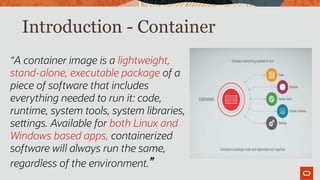
Introduction - Container
“A container image is a lightweight,
stand-alone, executable package of a
piece of software that includes
everything needed to run it: code,
runtime, system tools, system libraries,
settings. Available for both Linux and
Windows based apps, containerized
software will always run the same,
regardless of the environment.”
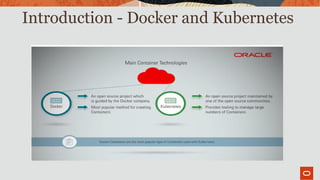
Introduction - Docker and Kubernetes
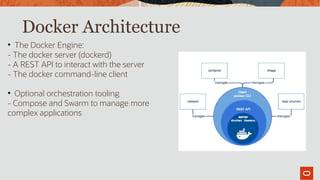
Docker Architecture

The Docker Engine:
- The docker server (dockerd)
- A REST API to interact with the server
- The docker command-line client

Optional orchestration tooling
- Compose and Swarm to manage more
complex applications
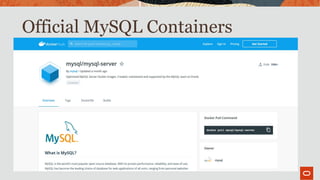
Official MySQL Containers
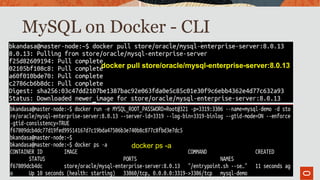
MySQL on Docker - CLI
• docker pull store/oracle/mysql-enterprise-server:8.0.13
docker ps -a
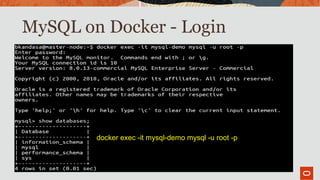
MySQL on Docker - Login
•
docker exec -it mysql-demo mysql -u root -p
Docker Containers: Use Cases
• For Developers
– Automates the repetitive tasks of setting up and configuring development environments so that
developers can focus on what matters: building great software.
• For Operations
– Streamlines software delivery. Develop and deploy bug fixes and new features without roadblocks. Scale
applications in real time.
• For the Enterprise
–Docker is a Containers-as-a-Service platform for the enterprise that manages and secures diverse
applications across disparate infrastructure, both on-premises and in the cloud. Docker EE fuels innovation
by bringing traditional applications and microservices built on Windows, Linux or Linux-on-mainframe into
a single, secure software supply chain. Organizations can modernize applications, infrastructure and
operational models by bringing forward existing IT investments while integrating new technology at the rate
of business.
Operational Problems to Solve
• Orchestration of MySQL (InnoDB Cluster)
• Securing data files
• Auditing
• Monitoring
Get InnoDB Cluster Running on Docker
MySQL Enterprise Edition that is
MySQL InnoDB Cluster and Docker
• To use Security Enhancements, we need
the Enterprise Edition of MySQL, available
from MOS
• Additionally, we need MySQL Enterprise
Monitor to measure replication
performance.
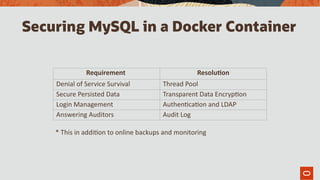
Securing MySQL in a Docker Container
Requirement Resolution
Denial of Service Survival Thread Pool
Secure Persisted Data Transparent Data Encryption
Login Management Authentication and LDAP
Answering Auditors Audit Log
* This in addition to online backups and monitoring
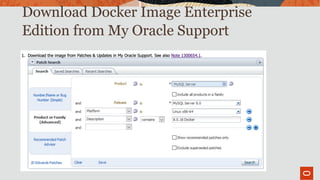
Download Docker Image Enterprise
Edition from My Oracle Support
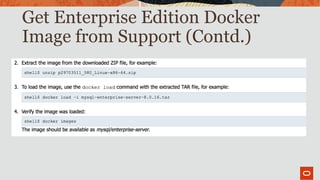
Get Enterprise Edition Docker
Image from Support (Contd.)
Create Persisted Volumes
/var/lib/mysql is the data directory in the base
image, it needs to be persisted outside of the
container
This is done via
volumes:
-[host path]:[container path substituted]
We create a directory per MySQL instance
~/Docker/PersistedMounts
Docker-compose.yml Edits –Persisting Data
image: mysql/mysql-server:8.0.16
ports:
- "3301:3306"
command: ["mysqld","--server_id=1","--binlog_checksum=NONE","--gtid_mode=ON","--
enforce_gtid_consistency=ON","--log_bin","--log_slave_updates=ON","--
master_info_repository=TABLE","--relay_log_info_repository=TABLE","--
transaction_write_set_extraction=XXHASH64","--user=mysql","--skip-host-cache","--skip-
name-resolve", "--default_authentication_plugin=mysql_native_password"]
volumes:
- ~Docker/PersistedMounts/mysql-server-1:/var/lib/mysql
We’ve added a Docker Volumes identifier mapping the
container /var/lib/mysql/ path to a mountpoint referring
to ~Docker/PersistedMounts/[server-name] on the
container’s host
Docker Compose –Adding Plugins
...
command: ["mysqld","--server_id=1","--binlog_checksum=NONE","--gtid_mode=ON","--
enforce_gtid_consistency=ON","--log_bin","--log_slave_updates=ON","--
master_info_repository=TABLE","--relay_log_info_repository=TABLE","--
transaction_write_set_extraction=XXHASH64","--user=mysql","--skip-host-cache","--
skip-name-resolve", "--default_authentication_plugin=mysql_native_password",
”--early-plugin-load=keyring_file.so",
"--keyring_file_data=/var/lib/mysql-keyring/keyring", "--plugin-load-
add=audit_log.so"
]
...
We’re loading TDE (keyring.so) early, and setting the keyring_file_data directory
and Audit Logging (audit_log.so)
Demo - InnoDB Setup
using Docker compose
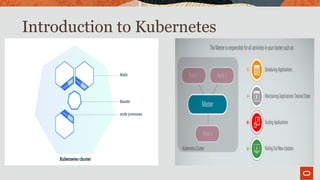
Introduction to Kubernetes

Kubelet, a process responsible for
communication between the
Kubernetes Master and the Node; it
manages the Pods and the
containers running on a machine.

A container runtime (like Docker, rkt)
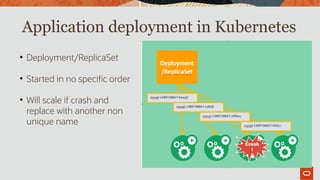
Application deployment in Kubernetes

Deployment/ReplicaSet

Started in no specific order

Will scale if crash and
replace with another non
unique name
Database deployment in Kubernetes

Kubernetes Pods are mortal

Consistent Access

Database containers require
persistent storage

Database is a complex stateful
application

Don’t scale if unhealthy
StatefulSet
Cra
sh!
mysql-0
mysql-1
mysql-2
Don’t scale
and must
replace
mysql-2
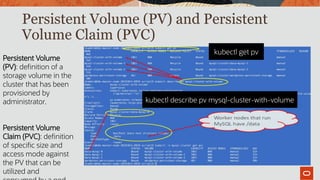
Persistent Volume (PV) and Persistent
Volume Claim (PVC)
kubectl get pv
kubectl describe pv mysql-cluster-with-volume
Persistent Volume
(PV): definition of a
storage volume in the
cluster that has been
provisioned by
administrator.
Persistent Volume
Claim (PVC): definition
of specific size and
access mode against
the PV that can be
utilized and
Label and Node Selector
 Label is assigned to a group of worker node
 NodeSelector can be used to achieve node affinity to a specific group of worker node.
shell > kubectl label nodes k8s-worker-node1-20191015-1016 typenode=mysql
shell > kubectl label nodes instance-20191015-2224 typenode=router
Oracle MySQL Operator
- Automates deploying, managing and running custom application
- Operator calls API to customize the cluster behavior for custom resources
- Create and delete MySQL InnoDB Clusters in Kubernetes with ease
- Automate database backups, failure detection and recovery
- Schedule automated backups as part of Cluster definition
- Create “on-demand” backups.
Oracle MySQL Operator
Download MySQL Operator
shell > git clone
https://github.com/oracle/mysql-operator.git
Initialize helm and install tiller
shell > helm init
Create namespace for MySQL Operator
shell > kubectl create ns mysql-operator
Install mysql-operator chart using helm
shell > helm install --name mysql-operator mysql-operator
Note:

MySQL Operator will download and install MySQL CE 8.0.12

Database can be upgraded to the latest MySQL EE 8.0.18
(Download patch 30417240 from MOS for MySQL EE 8.0.18
docker image)
kubectl -n mysql-operator get pod
Kubectl -n kube-system get pod
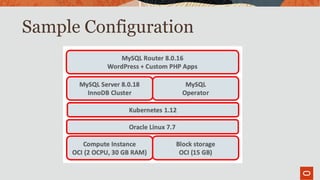
Sample Configuration
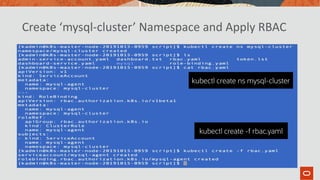
Create ‘mysql-cluster’ Namespace and Apply RBAC
kubectl create ns mysql-cluster
kubectl create -f rbac.yaml
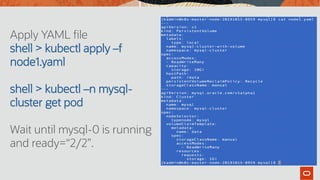
Apply YAML file
shell > kubectl apply –f
node1.yaml
shell > kubectl –n mysql-
cluster get pod
Wait until mysql-0 is running
and ready=“2/2”.
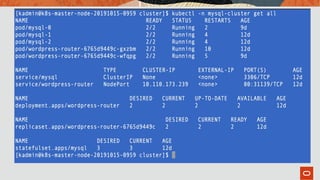
Apply YAML file
shell > kubectl apply –f
node2.yaml
shell > kubectl –n mysql-
cluster get pod
Wait until mysql-1 is running
and ready=“2/2”.
Apply YAML file
shell > kubectl apply –f
node3.yaml
shell > kubectl –n mysql-
cluster get pod
Wait until mysql-2 is running
and ready=“2/2”.
Rolling Upgrade to MySQL Enterprise Edition 8.0.18
shell > kubectl apply
shell > kubectl –n mysql-cluster edit statefulset mysql
Replace the value for “image” with the MySQL EE 8.0.18 docker image from “sudo docker images”
Wrapping up
• MySQL is up to the task of running InnoDB Cluster on Docker containers
• MySQL needs to be secured to mitigate Docker risk profile
• EE has the tools to secure MySQL/Docker
• Monitoring is a critical aspect of MySQL/Docker deployments that MySQL
Enterprise Edition solves
• Kubernetes can provide automation, orchestration and high availability
infrastructure
• MySQL InnoDB Cluster can be deployed rapidly in Kubernetes cluster as
stateful set providing isolation from other containers using shared resource,
and portability between environment.
Questions

MySQL on Docker and Kubernetes

  • 1.
    Copyright © 2019,Oracle and/or its affiliates. All rights reserved. | Balasubramanian Kandasamy Senior Software Development Manager, MySQL Release Engineering MySQL Day – November 14, 2019 MySQL on Docker and Kubernetes
  • 2.
    The following isintended to outline our general product direction. It is intended for information purposes only, and may not be incorporated into any contract. It is not a commitment to deliver any material, code, or functionality, and should not be relied upon in making purchasing decisions. The development, release, timing, and pricing of any features or functionality described for Oracle’s products may change and remains at the sole discretion of Oracle Corporation. Safe Harbor
  • 3.
    Agenda • MySQL onDocker • Official MySQL Containers • MySQL InnoDB Cluster Setup using Docker Compose Demo • MySQL on Kubernetes • Q & A
  • 4.
    A Modern Databasefor the Digital Age
  • 5.
    100% Virtually all organizations requiretheir most critical systems to be highly available
  • 6.
    Introduction - Container “Acontainer image is a lightweight, stand-alone, executable package of a piece of software that includes everything needed to run it: code, runtime, system tools, system libraries, settings. Available for both Linux and Windows based apps, containerized software will always run the same, regardless of the environment.”
  • 7.
    Introduction - Dockerand Kubernetes
  • 8.
    Docker Architecture  The DockerEngine: - The docker server (dockerd) - A REST API to interact with the server - The docker command-line client  Optional orchestration tooling - Compose and Swarm to manage more complex applications
  • 9.
  • 10.
    MySQL on Docker- CLI • docker pull store/oracle/mysql-enterprise-server:8.0.13 docker ps -a
  • 11.
    MySQL on Docker- Login • docker exec -it mysql-demo mysql -u root -p
  • 12.
    Docker Containers: UseCases • For Developers – Automates the repetitive tasks of setting up and configuring development environments so that developers can focus on what matters: building great software. • For Operations – Streamlines software delivery. Develop and deploy bug fixes and new features without roadblocks. Scale applications in real time. • For the Enterprise –Docker is a Containers-as-a-Service platform for the enterprise that manages and secures diverse applications across disparate infrastructure, both on-premises and in the cloud. Docker EE fuels innovation by bringing traditional applications and microservices built on Windows, Linux or Linux-on-mainframe into a single, secure software supply chain. Organizations can modernize applications, infrastructure and operational models by bringing forward existing IT investments while integrating new technology at the rate of business.
  • 13.
    Operational Problems toSolve • Orchestration of MySQL (InnoDB Cluster) • Securing data files • Auditing • Monitoring
  • 14.
    Get InnoDB ClusterRunning on Docker MySQL Enterprise Edition that is
  • 15.
    MySQL InnoDB Clusterand Docker • To use Security Enhancements, we need the Enterprise Edition of MySQL, available from MOS • Additionally, we need MySQL Enterprise Monitor to measure replication performance.
  • 16.
    Securing MySQL ina Docker Container Requirement Resolution Denial of Service Survival Thread Pool Secure Persisted Data Transparent Data Encryption Login Management Authentication and LDAP Answering Auditors Audit Log * This in addition to online backups and monitoring
  • 17.
    Download Docker ImageEnterprise Edition from My Oracle Support
  • 18.
    Get Enterprise EditionDocker Image from Support (Contd.)
  • 19.
    Create Persisted Volumes /var/lib/mysqlis the data directory in the base image, it needs to be persisted outside of the container This is done via volumes: -[host path]:[container path substituted] We create a directory per MySQL instance ~/Docker/PersistedMounts
  • 20.
    Docker-compose.yml Edits –PersistingData image: mysql/mysql-server:8.0.16 ports: - "3301:3306" command: ["mysqld","--server_id=1","--binlog_checksum=NONE","--gtid_mode=ON","-- enforce_gtid_consistency=ON","--log_bin","--log_slave_updates=ON","-- master_info_repository=TABLE","--relay_log_info_repository=TABLE","-- transaction_write_set_extraction=XXHASH64","--user=mysql","--skip-host-cache","--skip- name-resolve", "--default_authentication_plugin=mysql_native_password"] volumes: - ~Docker/PersistedMounts/mysql-server-1:/var/lib/mysql We’ve added a Docker Volumes identifier mapping the container /var/lib/mysql/ path to a mountpoint referring to ~Docker/PersistedMounts/[server-name] on the container’s host
  • 21.
    Docker Compose –AddingPlugins ... command: ["mysqld","--server_id=1","--binlog_checksum=NONE","--gtid_mode=ON","-- enforce_gtid_consistency=ON","--log_bin","--log_slave_updates=ON","-- master_info_repository=TABLE","--relay_log_info_repository=TABLE","-- transaction_write_set_extraction=XXHASH64","--user=mysql","--skip-host-cache","-- skip-name-resolve", "--default_authentication_plugin=mysql_native_password", ”--early-plugin-load=keyring_file.so", "--keyring_file_data=/var/lib/mysql-keyring/keyring", "--plugin-load- add=audit_log.so" ] ... We’re loading TDE (keyring.so) early, and setting the keyring_file_data directory and Audit Logging (audit_log.so)
  • 22.
    Demo - InnoDBSetup using Docker compose
  • 23.
  • 24.
    Introduction to Kubernetes  Kubelet,a process responsible for communication between the Kubernetes Master and the Node; it manages the Pods and the containers running on a machine.  A container runtime (like Docker, rkt)
  • 25.
    Application deployment inKubernetes  Deployment/ReplicaSet  Started in no specific order  Will scale if crash and replace with another non unique name
  • 26.
    Database deployment inKubernetes  Kubernetes Pods are mortal  Consistent Access  Database containers require persistent storage  Database is a complex stateful application  Don’t scale if unhealthy StatefulSet Cra sh! mysql-0 mysql-1 mysql-2 Don’t scale and must replace mysql-2
  • 27.
    Persistent Volume (PV)and Persistent Volume Claim (PVC) kubectl get pv kubectl describe pv mysql-cluster-with-volume Persistent Volume (PV): definition of a storage volume in the cluster that has been provisioned by administrator. Persistent Volume Claim (PVC): definition of specific size and access mode against the PV that can be utilized and
  • 29.
    Label and NodeSelector  Label is assigned to a group of worker node  NodeSelector can be used to achieve node affinity to a specific group of worker node. shell > kubectl label nodes k8s-worker-node1-20191015-1016 typenode=mysql shell > kubectl label nodes instance-20191015-2224 typenode=router
  • 30.
    Oracle MySQL Operator -Automates deploying, managing and running custom application - Operator calls API to customize the cluster behavior for custom resources - Create and delete MySQL InnoDB Clusters in Kubernetes with ease - Automate database backups, failure detection and recovery - Schedule automated backups as part of Cluster definition - Create “on-demand” backups.
  • 31.
    Oracle MySQL Operator DownloadMySQL Operator shell > git clone https://github.com/oracle/mysql-operator.git Initialize helm and install tiller shell > helm init Create namespace for MySQL Operator shell > kubectl create ns mysql-operator Install mysql-operator chart using helm shell > helm install --name mysql-operator mysql-operator Note:  MySQL Operator will download and install MySQL CE 8.0.12  Database can be upgraded to the latest MySQL EE 8.0.18 (Download patch 30417240 from MOS for MySQL EE 8.0.18 docker image) kubectl -n mysql-operator get pod Kubectl -n kube-system get pod
  • 32.
  • 33.
    Create ‘mysql-cluster’ Namespaceand Apply RBAC kubectl create ns mysql-cluster kubectl create -f rbac.yaml
  • 34.
    Apply YAML file shell> kubectl apply –f node1.yaml shell > kubectl –n mysql- cluster get pod Wait until mysql-0 is running and ready=“2/2”.
  • 35.
    Apply YAML file shell> kubectl apply –f node2.yaml shell > kubectl –n mysql- cluster get pod Wait until mysql-1 is running and ready=“2/2”.
  • 36.
    Apply YAML file shell> kubectl apply –f node3.yaml shell > kubectl –n mysql- cluster get pod Wait until mysql-2 is running and ready=“2/2”.
  • 37.
    Rolling Upgrade toMySQL Enterprise Edition 8.0.18 shell > kubectl apply shell > kubectl –n mysql-cluster edit statefulset mysql Replace the value for “image” with the MySQL EE 8.0.18 docker image from “sudo docker images”
  • 39.
    Wrapping up • MySQLis up to the task of running InnoDB Cluster on Docker containers • MySQL needs to be secured to mitigate Docker risk profile • EE has the tools to secure MySQL/Docker • Monitoring is a critical aspect of MySQL/Docker deployments that MySQL Enterprise Edition solves • Kubernetes can provide automation, orchestration and high availability infrastructure • MySQL InnoDB Cluster can be deployed rapidly in Kubernetes cluster as stateful set providing isolation from other containers using shared resource, and portability between environment.
  • 40.