Élise Desaulniers
Alexandre Simard
Multilingual Content
With WordPress
@desa_simard
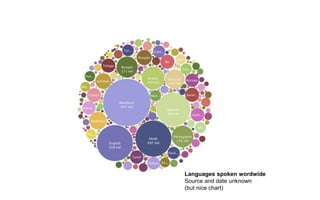
Languages spoken wordwide
Source and date unknown
(but nice chart)
The list of multilingual countries
and regions is huuuuuge!
Multilingualism is a
matter of accessibility.
“We recommend that you do not allow automated translations to
get indexed. (...) they could potentially be viewed as spam.
If your users can’t understand an automated translation or if it
feels artificial to them, you should ask yourself whether you
really want to present this kind of content to them.”
No automated
translation. Ever.
- Google :)
Flags are not languages.
Don’t use flags as language switchers.
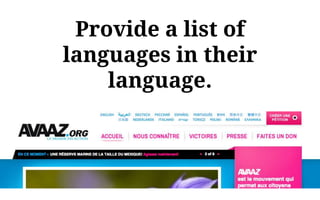
I speak français, not French.
Provide a list of
languages in their
language.
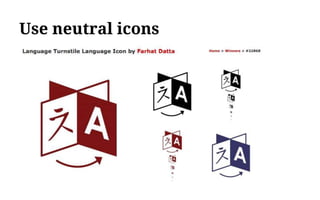
Use neutral icons
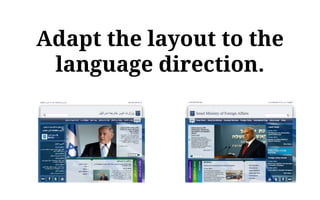
Adapt the layout to the
language direction.
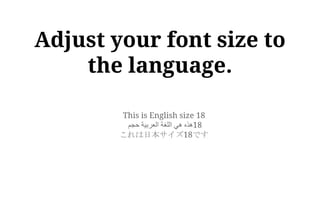
This is English size 18
‫هذه‬‫هي‬‫اللغة‬‫العربية‬‫حجم‬ 18
これは日本サイズ18です
Adjust your font size to
the language.
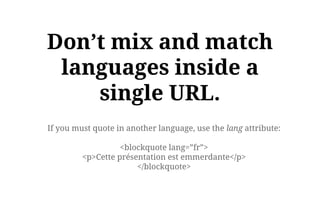
If you must quote in another language, use the lang attribute:
<blockquote lang=”fr”>
<p>Cette présentation est emmerdante</p>
</blockquote>
Don’t mix and match
languages inside a
single URL.
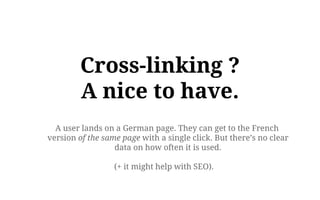
Cross-linking ?
A nice to have.
A user lands on a German page. They can get to the French
version of the same page with a single click. But there’s no clear
data on how often it is used.
(+ it might help with SEO).
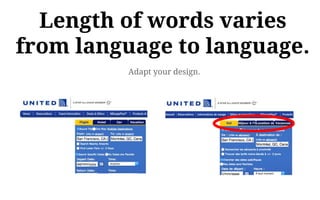
Adapt your design.
Length of words varies
from language to language.
Let’s (try to) do this
with WordPress
Translating WordPress
and themes and plugins
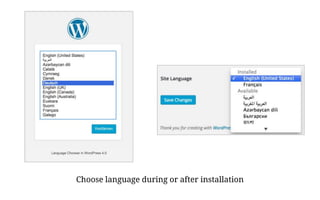
Choose language during or after installation
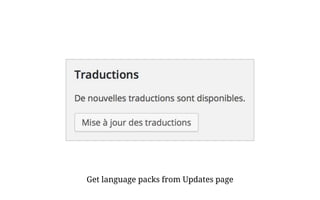
Get language packs from Updates page
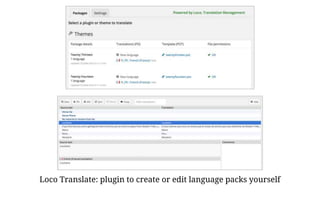
Loco Translate: plugin to create or edit language packs yourself
What do we mean by “content”?
Translating content
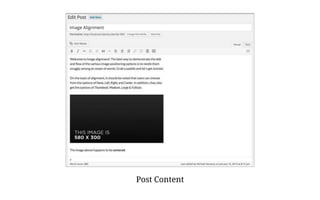
Post Content
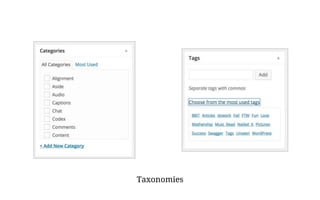
Taxonomies
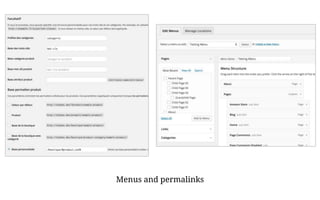
Menus and permalinks
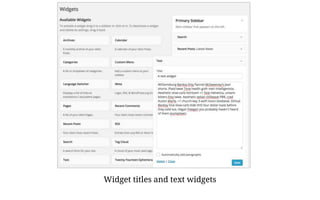
Widget titles and text widgets
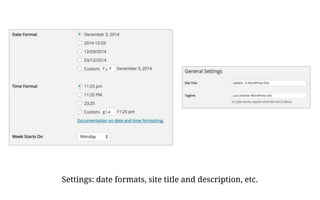
Settings: date formats, site title and description, etc.
We’re just getting started, actually
Pretty simple, eh?
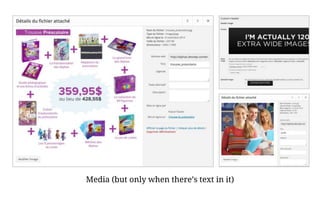
Media (but only when there’s text in it)
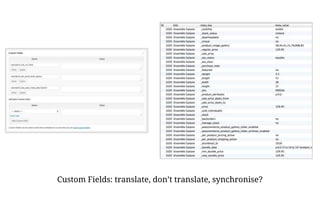
Custom Fields: translate, don’t translate, synchronise?
Mo’ plugins,
mo’ problems
Especially true in multilingual sites
Three approaches
to solving content translation
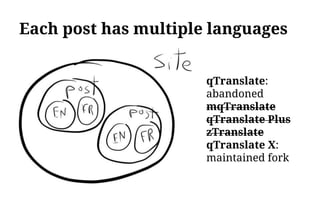
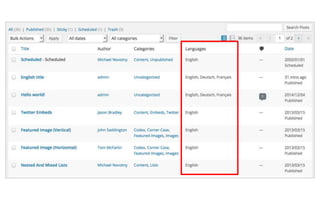
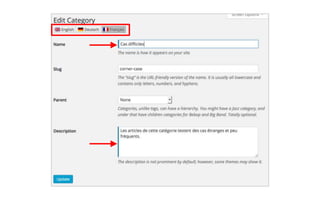
Each post has multiple languages
qTranslate:
abandoned
mqTranslate
qTranslate Plus
zTranslate
qTranslate X:
maintained fork
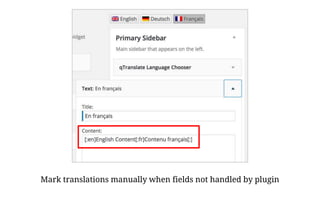
Mark translations manually when fields not handled by plugin
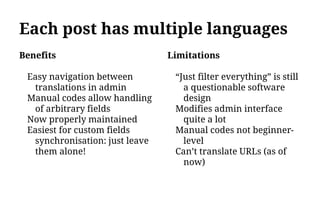
Each post has multiple languages
Benefits
Easy navigation between
translations in admin
Manual codes allow handling
of arbitrary fields
Now properly maintained
Easiest for custom fields
synchronisation: just leave
them alone!
Limitations
“Just filter everything” is still
a questionable software
design
Modifies admin interface
quite a lot
Manual codes not beginner-
level
Can’t translate URLs (as of
now)
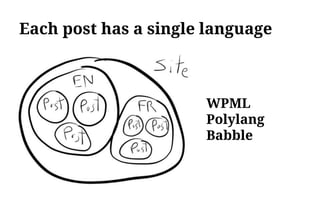
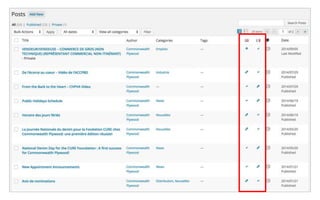
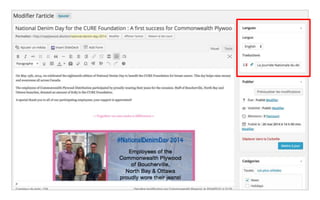
Each post has a single language
WPML
Polylang
Babble
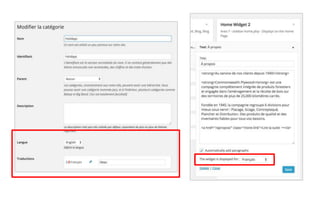
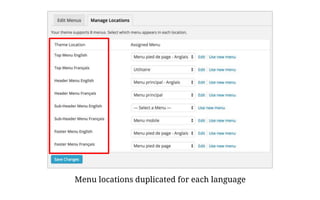
Menu locations duplicated for each language
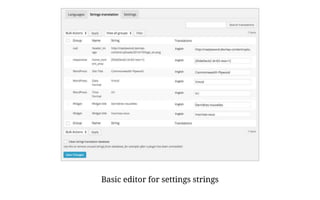
Basic editor for settings strings
Each post has a single language
Benefits
Many options to choose from
Interface looks more
WordPress-native
Translatable URLs
(Arguably) better software
design
Limitations
Settings translations complex
Custom fields handling
complex
[WPML] Not free
[Babble] Does not allow
creation of content in
languages other default
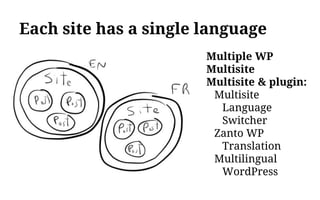
Each site has a single language
Multiple WP
Multisite
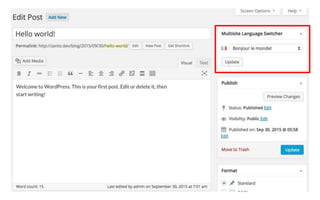
Multisite & plugin:
Multisite
Language
Switcher
Zanto WP
Translation
Multilingual
WordPress
Each site has a single language
Benefits
Plugins optional: yay for
vanilla WordPress
Only solution for
WordPress.com
Most compatible plugins out
of the box
All settings translatable
(header image!)
Limitations
Multiple WP installs:
maintenance headache
Multisite: installation and
hosting somewhat more
complex
Most complex for custom
fields synchronization
Zanto, Multilingual Press not
100% free
Cross-linking translations
Links to translations: where?
Widget
Menu item(s)
Below content (in each post)
Anywhere you want (template tag)
Questions to ask yourself
How to handle the home page language negotiation?
Where to link if no translation of current page exists?
Do you really need a page-to-page language switcher?
A fourth approach?
Localization as a service
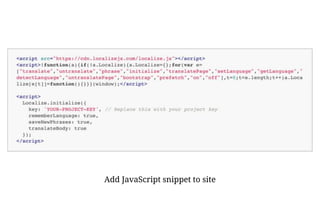
Add JavaScript snippet to site
Take translation out of WordPress
On each page view:
1.Collect all strings on the page
2.Send original strings to the service
3.Service returns approved translations
4.If approved translation exists, replace
string with it
5.If not, add translation job in the service
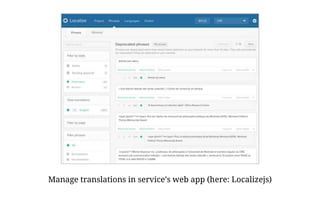
Manage translations in service’s web app (here: Localizejs)
Localization as a service
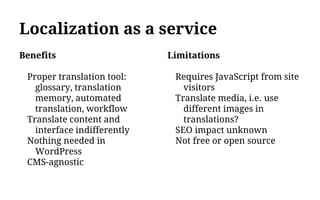
Benefits
Proper translation tool:
glossary, translation
memory, automated
translation, workflow
Translate content and
interface indifferently
Nothing needed in
WordPress
CMS-agnostic
Limitations
Requires JavaScript from site
visitors
Translate media, i.e. use
different images in
translations?
SEO impact unknown
Not free or open source
Is this the future?
Élise Desaulniers
Alexandre Simard
@desa_simard
desaulniers-simard.com

Multilingual content with WordPress

  • 1.
    Élise Desaulniers Alexandre Simard MultilingualContent With WordPress @desa_simard
  • 4.
    Languages spoken wordwide Sourceand date unknown (but nice chart)
  • 5.
    The list ofmultilingual countries and regions is huuuuuge!
  • 7.
    Multilingualism is a matterof accessibility.
  • 8.
    “We recommend thatyou do not allow automated translations to get indexed. (...) they could potentially be viewed as spam. If your users can’t understand an automated translation or if it feels artificial to them, you should ask yourself whether you really want to present this kind of content to them.” No automated translation. Ever. - Google :)
  • 9.
    Flags are notlanguages. Don’t use flags as language switchers.
  • 10.
    I speak français,not French. Provide a list of languages in their language.
  • 11.
  • 12.
    Adapt the layoutto the language direction.
  • 13.
    This is Englishsize 18 ‫هذه‬‫هي‬‫اللغة‬‫العربية‬‫حجم‬ 18 これは日本サイズ18です Adjust your font size to the language.
  • 14.
    If you mustquote in another language, use the lang attribute: <blockquote lang=”fr”> <p>Cette présentation est emmerdante</p> </blockquote> Don’t mix and match languages inside a single URL.
  • 15.
    Cross-linking ? A niceto have. A user lands on a German page. They can get to the French version of the same page with a single click. But there’s no clear data on how often it is used. (+ it might help with SEO).
  • 16.
    Adapt your design. Lengthof words varies from language to language.
  • 17.
    Let’s (try to)do this with WordPress
  • 18.
  • 19.
    Choose language duringor after installation
  • 20.
    Get language packsfrom Updates page
  • 21.
    Loco Translate: pluginto create or edit language packs yourself
  • 22.
    What do wemean by “content”? Translating content
  • 23.
  • 24.
  • 25.
  • 26.
    Widget titles andtext widgets
  • 27.
    Settings: date formats,site title and description, etc.
  • 28.
    We’re just gettingstarted, actually Pretty simple, eh?
  • 29.
    Media (but onlywhen there’s text in it)
  • 30.
    Custom Fields: translate,don’t translate, synchronise?
  • 31.
    Mo’ plugins, mo’ problems Especiallytrue in multilingual sites
  • 32.
    Three approaches to solvingcontent translation
  • 33.
    Each post hasmultiple languages qTranslate: abandoned mqTranslate qTranslate Plus zTranslate qTranslate X: maintained fork
  • 38.
    Mark translations manuallywhen fields not handled by plugin
  • 39.
    Each post hasmultiple languages Benefits Easy navigation between translations in admin Manual codes allow handling of arbitrary fields Now properly maintained Easiest for custom fields synchronisation: just leave them alone! Limitations “Just filter everything” is still a questionable software design Modifies admin interface quite a lot Manual codes not beginner- level Can’t translate URLs (as of now)
  • 40.
    Each post hasa single language WPML Polylang Babble
  • 44.
    Menu locations duplicatedfor each language
  • 45.
    Basic editor forsettings strings
  • 46.
    Each post hasa single language Benefits Many options to choose from Interface looks more WordPress-native Translatable URLs (Arguably) better software design Limitations Settings translations complex Custom fields handling complex [WPML] Not free [Babble] Does not allow creation of content in languages other default
  • 47.
    Each site hasa single language Multiple WP Multisite Multisite & plugin: Multisite Language Switcher Zanto WP Translation Multilingual WordPress
  • 50.
    Each site hasa single language Benefits Plugins optional: yay for vanilla WordPress Only solution for WordPress.com Most compatible plugins out of the box All settings translatable (header image!) Limitations Multiple WP installs: maintenance headache Multisite: installation and hosting somewhat more complex Most complex for custom fields synchronization Zanto, Multilingual Press not 100% free
  • 51.
  • 52.
    Links to translations:where? Widget Menu item(s) Below content (in each post) Anywhere you want (template tag)
  • 53.
    Questions to askyourself How to handle the home page language negotiation? Where to link if no translation of current page exists? Do you really need a page-to-page language switcher?
  • 54.
  • 55.
  • 56.
    Take translation outof WordPress On each page view: 1.Collect all strings on the page 2.Send original strings to the service 3.Service returns approved translations 4.If approved translation exists, replace string with it 5.If not, add translation job in the service
  • 57.
    Manage translations inservice’s web app (here: Localizejs)
  • 58.
    Localization as aservice Benefits Proper translation tool: glossary, translation memory, automated translation, workflow Translate content and interface indifferently Nothing needed in WordPress CMS-agnostic Limitations Requires JavaScript from site visitors Translate media, i.e. use different images in translations? SEO impact unknown Not free or open source
  • 59.
    Is this thefuture?
  • 60.

Editor's Notes

  • #2 We are a humane web agency from Montréal. We are not native English speakers When I started giving lectures in English, I decided to give this warning in the begining.
  • #3 When I say otter, I mean other. But we’re here to talk about WordPress and multilingual content.
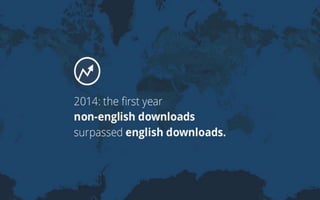
  • #4 2014 was an important year for WP. For the first time in history, the non-English downloads of WordPress surpassed the English downloads.
  • #5 As WordPress will continue democratizing publishing, download stats will hopefully look like this
  • #6 Problem is many countries and regions are multilingual. You all know that : There is many countries, such as Belgium or Canada, which are officially multilingual. But they may have many monolinguals in their population. Officially monolingual countries, on the other hand, such as France, can have sizable multilingual populations. There’s obviously a need for multilingual websites.
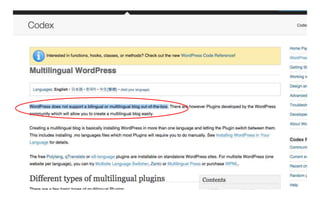
  • #7 And what about WordPress ? The first line of the Codex makes it clear : WordPress does not support a bilingual or multilingual blog out-of-the box. Woups. We’ll come back to that in a few minutes. But before, let’s talk about the multilingual web.
  • #8 Web accessibility refers to the inclusive practice of removing barriers that prevent access to some people or group of people. When sites are correctly designed, developed and edited, all users have equal access to information and functionality. Speaking japanese has nothing to do with being blind. It’s not a handicap. But I really think we have to see multilingualism as a matter of accessibility. And we’ll go through a few good practices and advice.
  • #9 Basically, if you don’t want to translate, don’t do it. Anybody can google translate themselves.
  • #10 A single language is spoken in many countries. A single country can have multiple languages. Your visitors are not flag-spotters. For instance with Chinese there are 2 types of Chinese Characters that different nations read: + Simplified (China) + Traditional (Taiwan, Singapore, HK) How is a flag supposed to represent those nations? Would people from Singapore somehow think they should click the Taiwan flag?
  • #11 Provide users a list of language names in their that language. So instead of “English, Spanish, German…” offer users “English, Español, Deutsch”.
  • #12 If you need to use Icons, use neutral ones. For instance, this one one a design prize last year Or use a globe ?
  • #13 This exemple is taken from the Israelian ministry of foreign affairs. The site on the left is in Persian. On the right is in English. Persian reads right to left. Eglish left to right. Navigation has switched sides. And content is adapted to the language (ex : slider).
  • #15 You should always use only one language per post or page. If you need to quote, use the lang attibute. Helpful for Google and readers for blind people.
  • #17 Describe. This is what happens when translators translate without context.
  • #19 First thing we have to do is make sure WordPress and themes and plugins are shown in the correct language for the visitor.
  • #20 When you install WordPress, you can choose which language you want. If you missed it during installation, you can choose it later on in the general settings. Once this choice has beeen made, WordPress will download what they call now “language packs”, which are basically files containing the translated strings themselves. These translations will be used for the whole WP interface.
  • #21 Some of your theme and plugins may or may not have the language packs installed or updated since the install. In the software update page, you’ll see a translation section if there are new translations available. There is not much details on which translations you can get when you click the button. It’s fairly new… But it will go grab all the languages packs that exists in the repository for everyhting you’ve got installed on your site. Very recently, language packs have been made available for all themes and plugins developers that use the official repository. For commercial plugins and themes, developers have to manage their translation their own way. You have to check with your vendor or find language packs for translation vendors themselves.
  • #22 If there’s no language pack or you want to edit the language pack, you can install the Loco Translate plugin. Which allows you to create and edit language packs. Obviously, your themes and plugins will need to be coded correctly to work with language packs. Which is not the case right now for all plugins and themes. So sometimes, it will not work. And you may suffer.
  • #30 What does translating media even mean, in the context of WordPress? Custom header: good luck! We won’t cover this.
  • #31 The joy of Custom Fields. Some needing to be translated, some not. Some needing to be synchronised, some not. Also, a lot of hidden custom fields. Used extensively by plugins and themes. Example: custom fields for a single WooCommerce product.
  • #32 More plugins = more custom fields = higher possibility of breakage.
  • #33 Now I get to show off my superior drawing skills.
  • #34 Qtranslate: the original solution. Barely maintained for very long. Many semi-maintained forks. Now fixed!
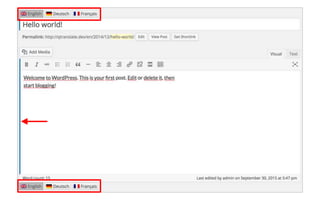
  • #36 Blue border indicates translatable fields
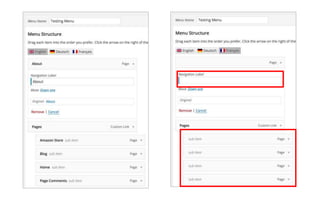
  • #38 Empty “Navigation Label”: recommended way to remove an item for a specific language Untranslated page: ugh.
  • #39 Note: in the backend, that’s actually what’s saved in the database for all translated fields.
  • #41 A popular approach. WPML: the “automatic” recommendation, but it’s big, slow and buggy Polylang: WPML redone right way (according to us anyway) Babble: made by Code For The People, recently acquired by Automattic. nacin @WCSF: “if we were to do multilingual in Core, that’s how we’d do it”. We think the Core people need to take a better look at Polylang. Screenshots will be from Polylang, but WPML looks very similar.
  • #48 Adding a plugin allows linking posts & terms translations together. Screenshots are from Multisite Langue Switcher.
  • #53 Of note: all of these are meant to output a list of languages. Usually, they’ll want to display the current language too. Not ideal for our usual bilingual setup where we only want to display a single link to the other language.
  • #58 This is Localizejs’ translation interface. Others exist: Bablic, Transifex Live. Localizejs = recommended multilingual solution for Squarespace.
  • #60 Let’s open the floor.