UNIVERSITY OF NIGERIA - SUNY OSWEGO WORKSHOP
1
MOODLE TRAINING
MOODLE TUTORIAL
By
DR. CHIELO IFEANYI CELESTINE
Chief Programmer
&
Head Webometrics Section
ICT Unit, UNN
UNIVERSITY OF NIGERIA - SUNY OSWEGO WORKSHOP
2
MOODLE TRAINING
IN T RO DUC T ION
Overview
Modular Object Oriented Distant Learning Environment (MOODLE) is a web
application that can enable a teacher to prepare a course online or in a
website and enable learners to access the course. In other words,
MOODLE enables a teacher to extend a classroom to the internet.
MOODLE is a typical examples of a Course Management System (CMS) or
a Learning Management System (LMS) and every of such systems are web
applications, they run on a server and are accessed through a web
browser.
UNIVERSITY OF NIGERIA - SUNY OSWEGO WORKSHOP
3
MOODLE TRAINING
INSTRUCTIONAL OBJECTIVES
By the end of this module, the students should be able to:
1.Log in to MOODLE
2. Create a course in MOODLE
3. Add users to the course
4. Add activities and/or resources to the course
UNIVERSITY OF NIGERIA - SUNY OSWEGO WORKSHOP
4
MOODLE TRAINING
LOGGING INTO MOODLE
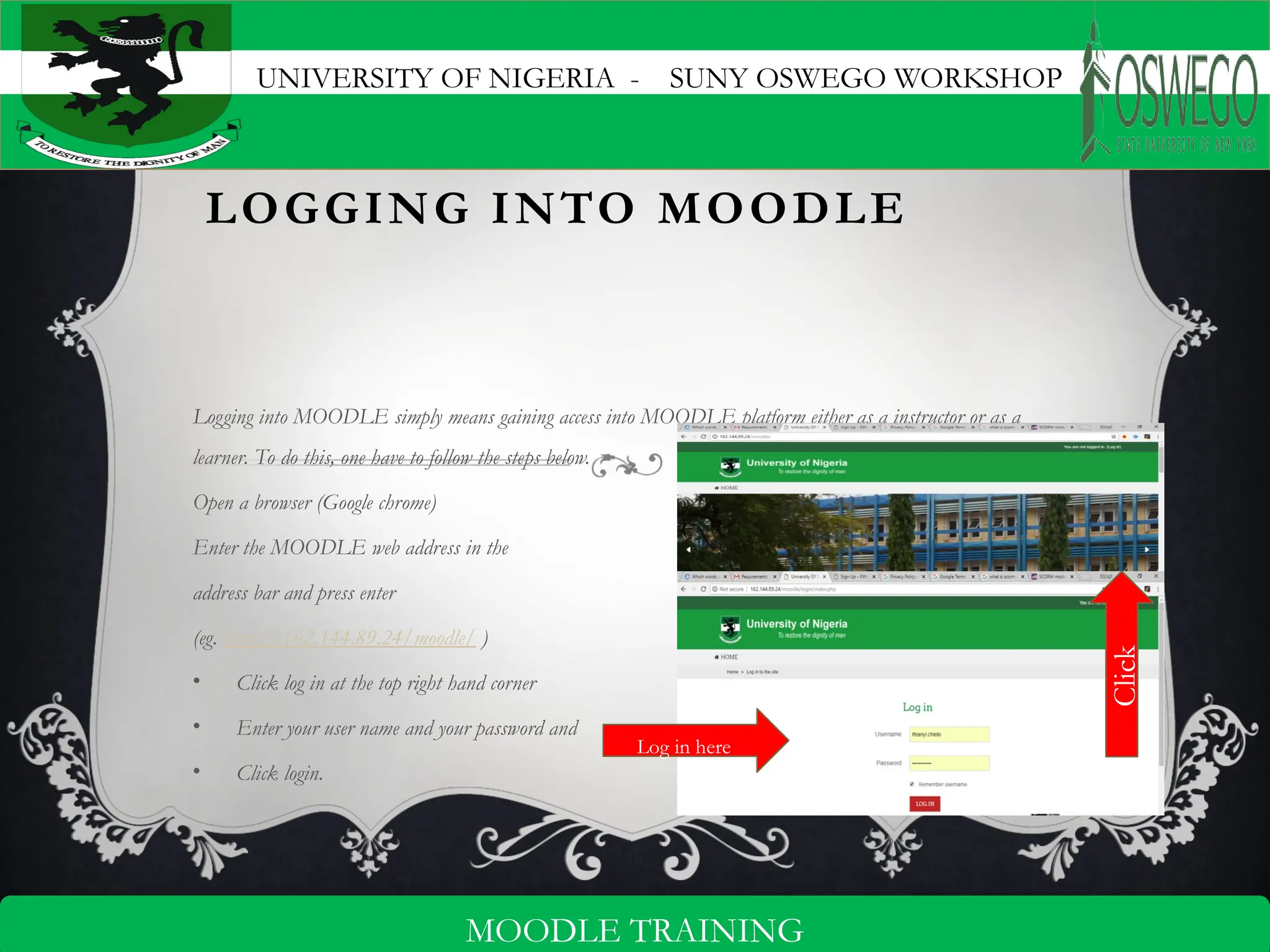
Logging into MOODLE simply means gaining access into MOODLE platform either as a instructor or as a
learner. To do this, one have to follow the steps below.
Open a browser (Google chrome)
Enter the MOODLE web address in the
address bar and press enter
(eg. http://162.144.89.24/moodle/ )
• Click log in at the top right hand corner
• Enter your user name and your password and
• Click login.
Click
Log in here
UNIVERSITY OF NIGERIA - SUNY OSWEGO WORKSHOP
5
MOODLE TRAINING
CREATING A COURSE
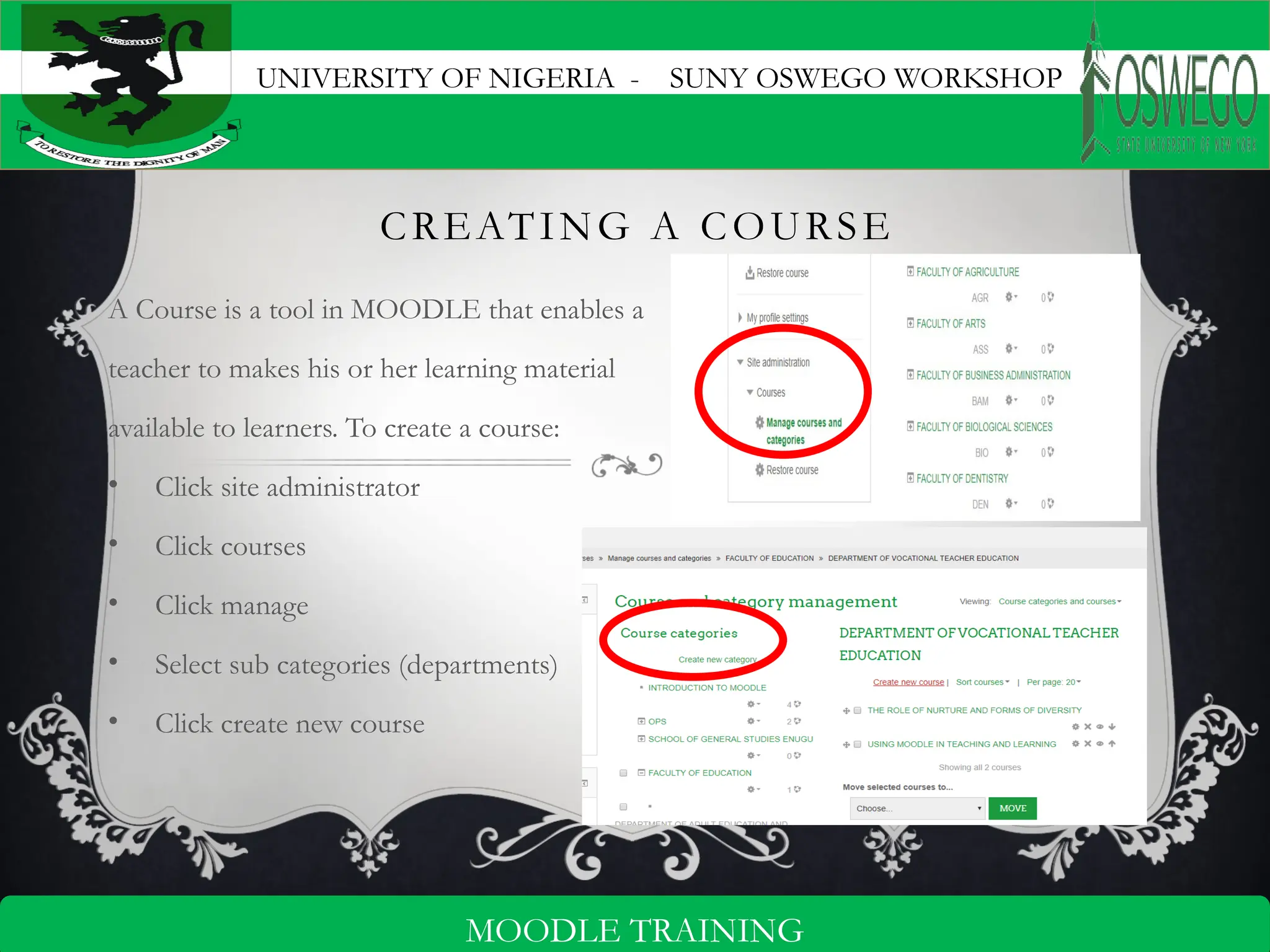
A Course is a tool in MOODLE that enables a
teacher to makes his or her learning material
available to learners. To create a course:
• Click site administrator
• Click courses
• Click manage
• Select sub categories (departments)
• Click create new course
UNIVERSITY OF NIGERIA - SUNY OSWEGO WORKSHOP
6
MOODLE TRAINING
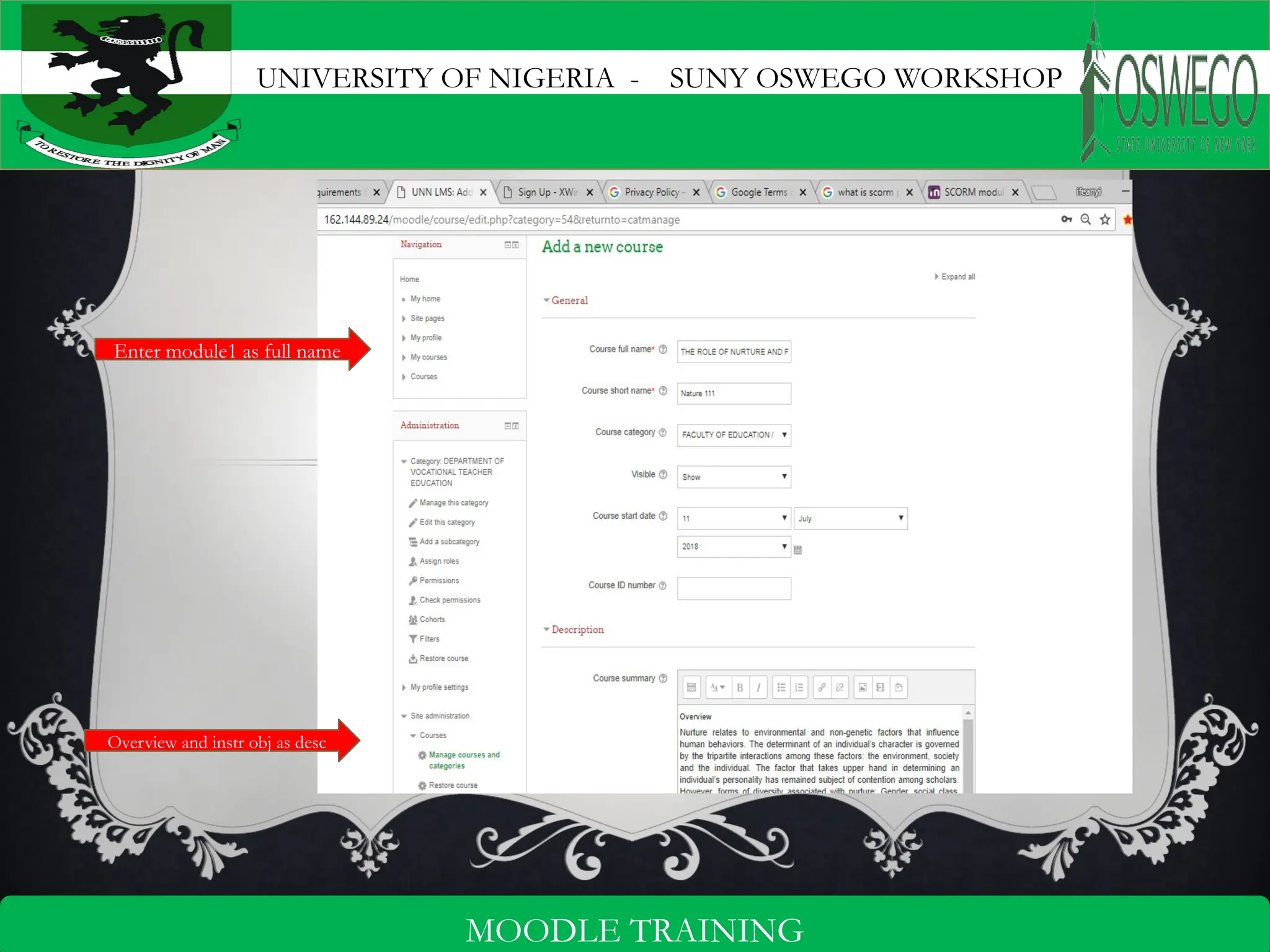
Enter module1 as full name
Overview and instr obj as desc
UNIVERSITY OF NIGERIA - SUNY OSWEGO WORKSHOP
7
MOODLE TRAINING
ENROLL USERS
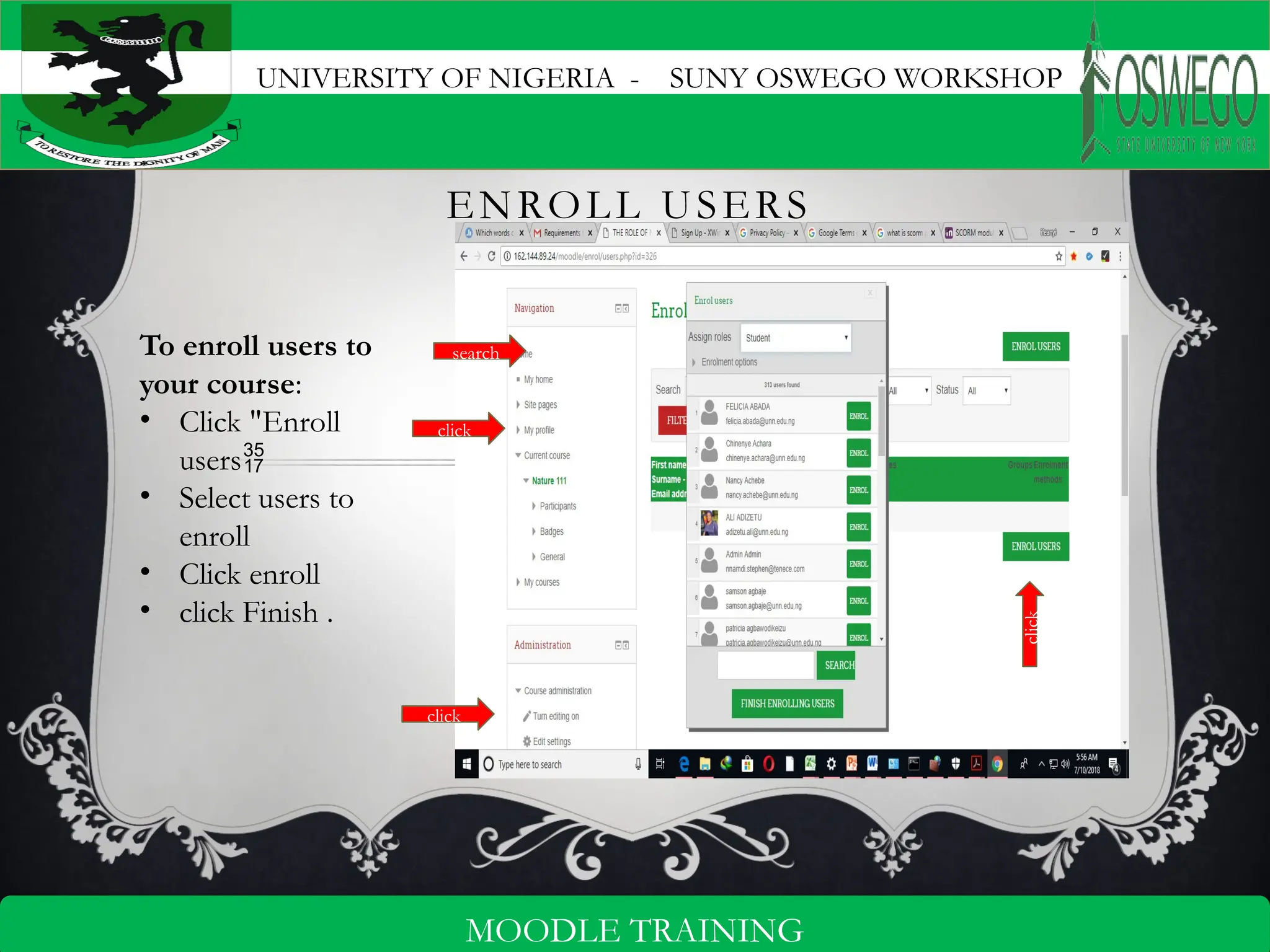
To enroll users to
your course:
• Click "Enroll
users
• Select users to
enroll
• Click enroll
• click Finish .
click
search
click
click
UNIVERSITY OF NIGERIA - SUNY OSWEGO WORKSHOP
8
MOODLE TRAINING
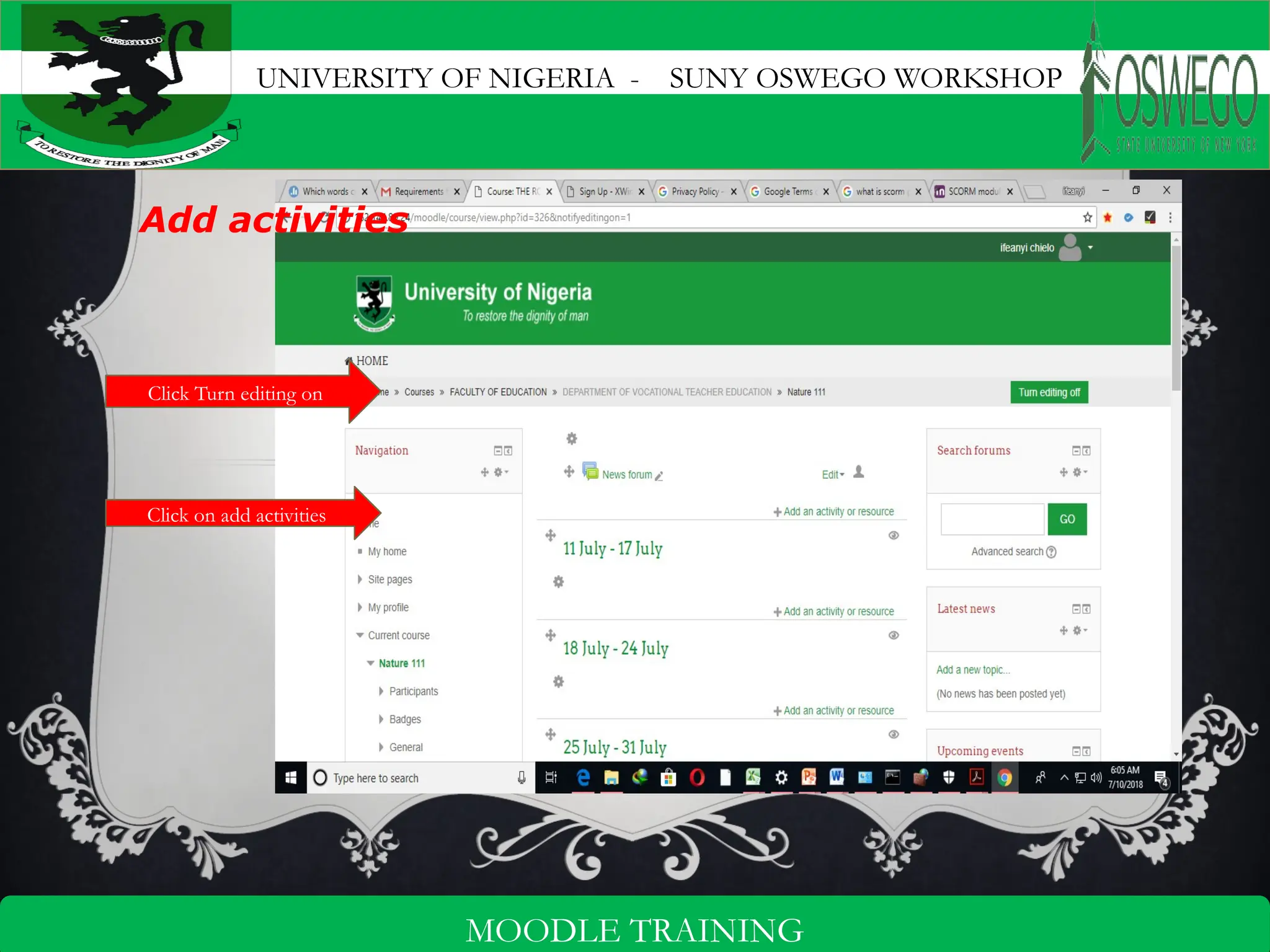
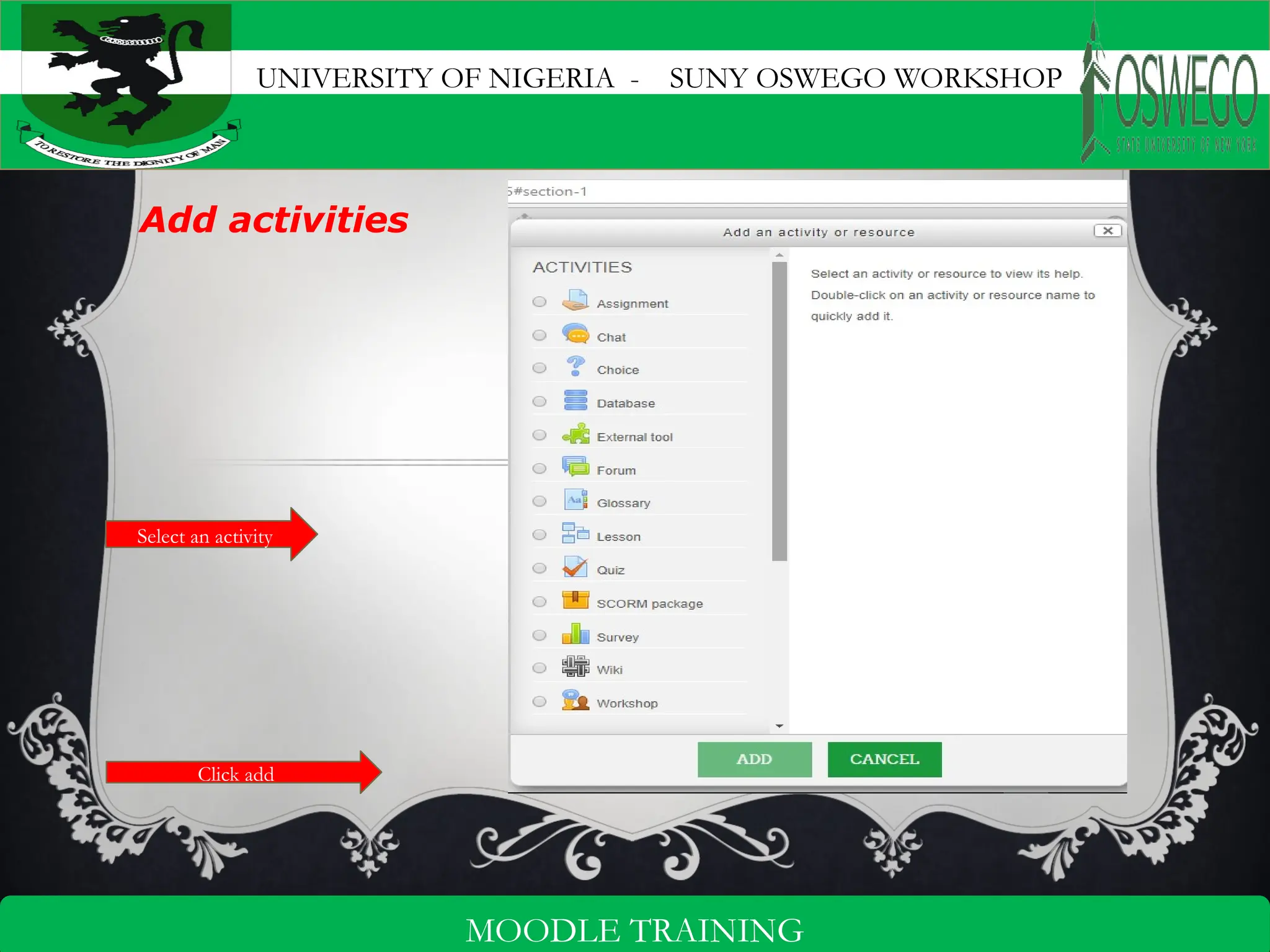
Add activities
Click Turn editing on
Click on add activities
UNIVERSITY OF NIGERIA - SUNY OSWEGO WORKSHOP
9
MOODLE TRAINING
Add activities
Select an activity
Click add
UNIVERSITY OF NIGERIA - SUNY OSWEGO WORKSHOP
10
MOODLE TRAINING
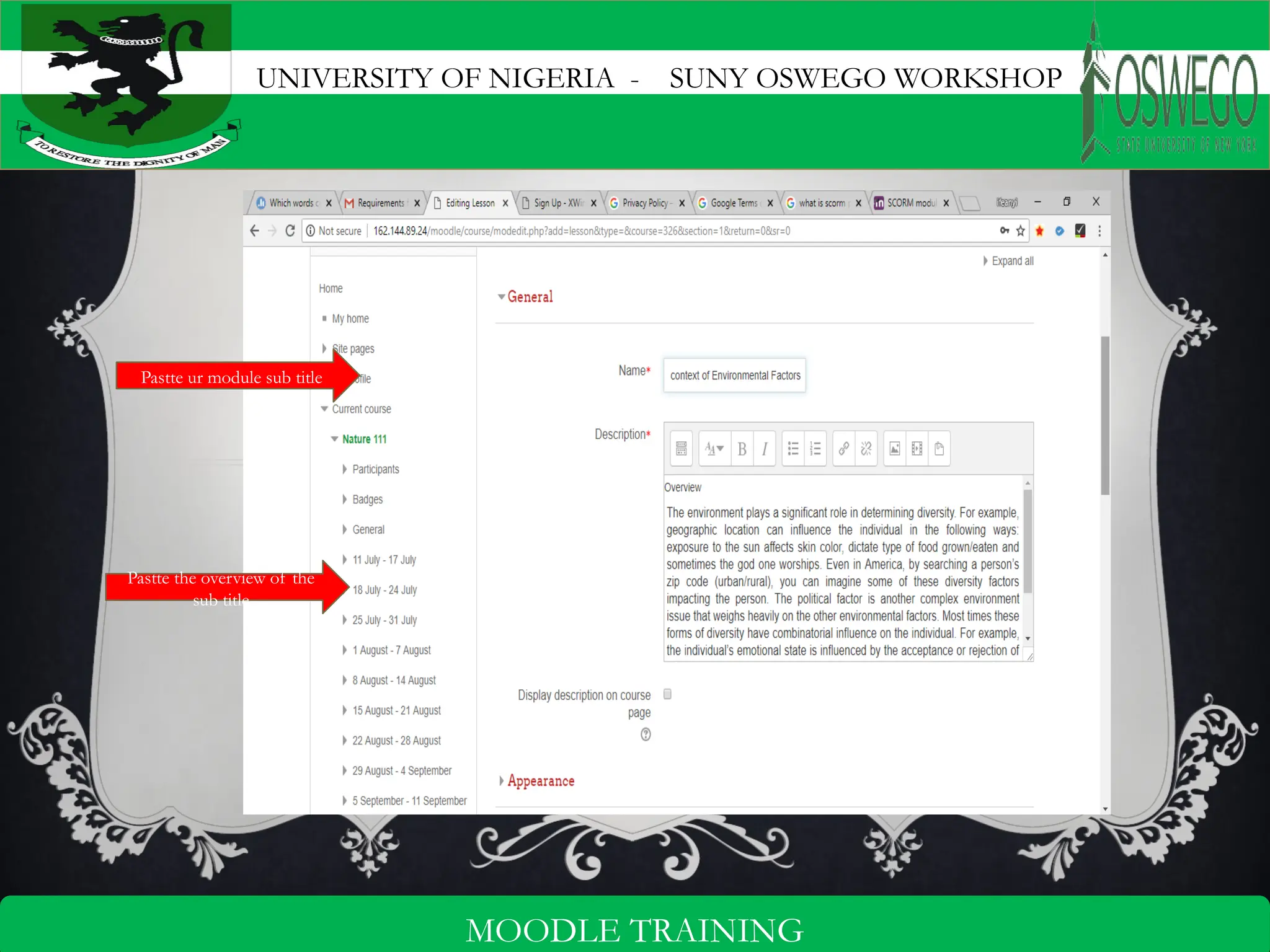
Pastte ur module sub title
Pastte the overview of the
sub title
UNIVERSITY OF NIGERIA - SUNY OSWEGO WORKSHOP
11
MOODLE TRAINING
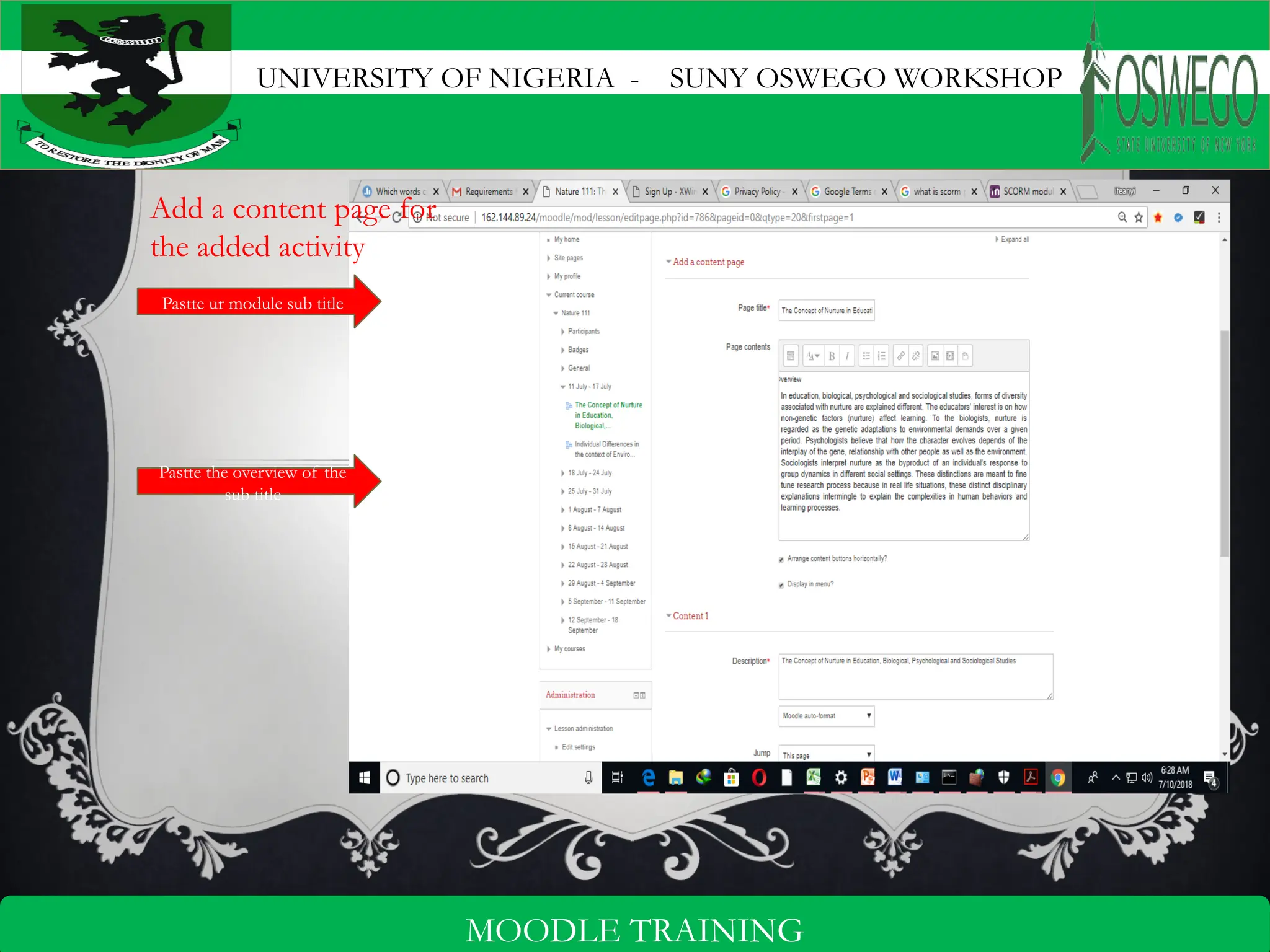
Add a content page for
the added activity
Pastte ur module sub title
Pastte the overview of the
sub title
UNIVERSITY OF NIGERIA - SUNY OSWEGO WORKSHOP
12
MOODLE TRAINING
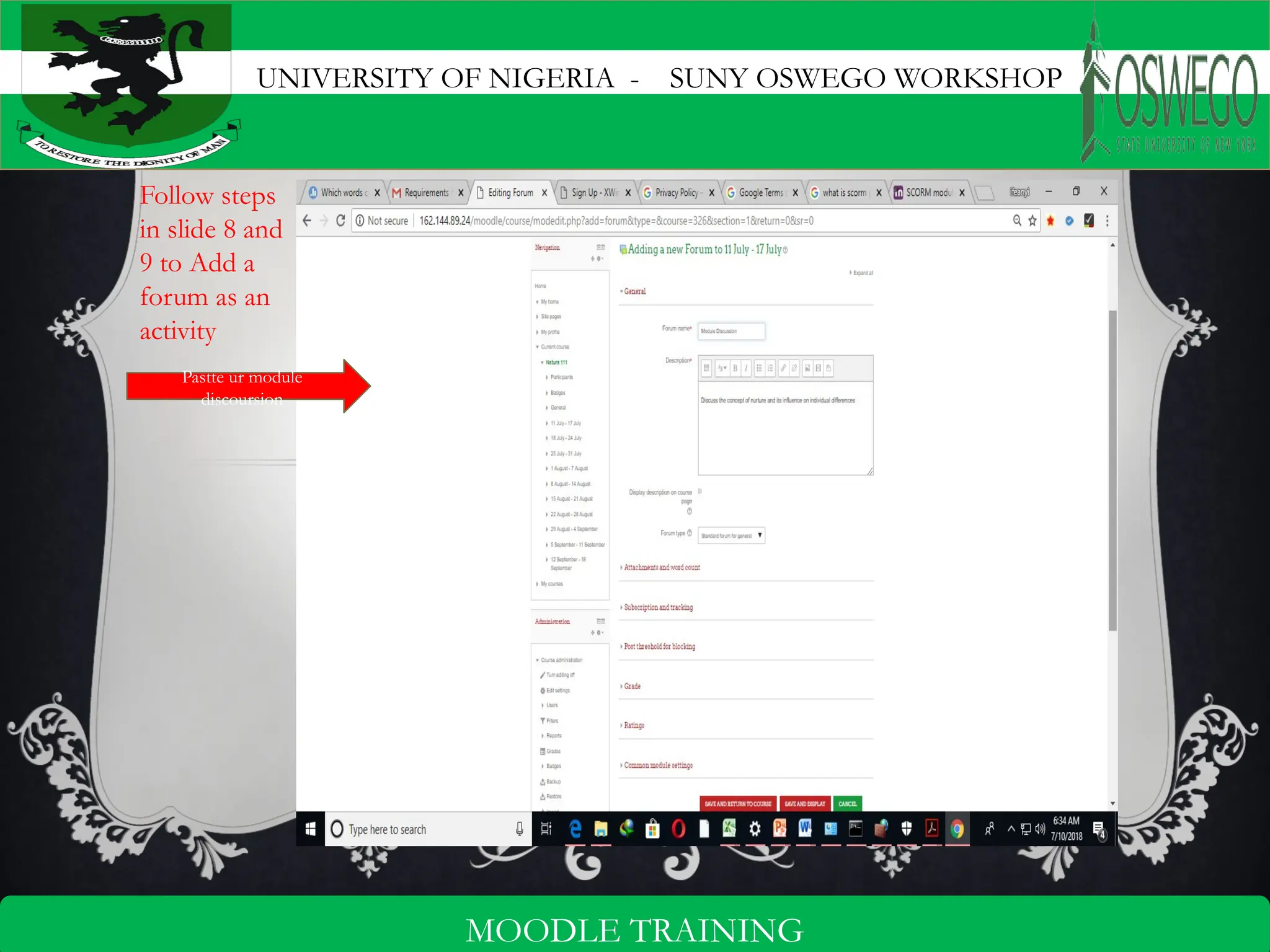
Follow steps
in slide 8 and
9 to Add a
forum as an
activity
Pastte ur module
discoursion
UNIVERSITY OF NIGERIA - SUNY OSWEGO WORKSHOP
13
MOODLE TRAINING
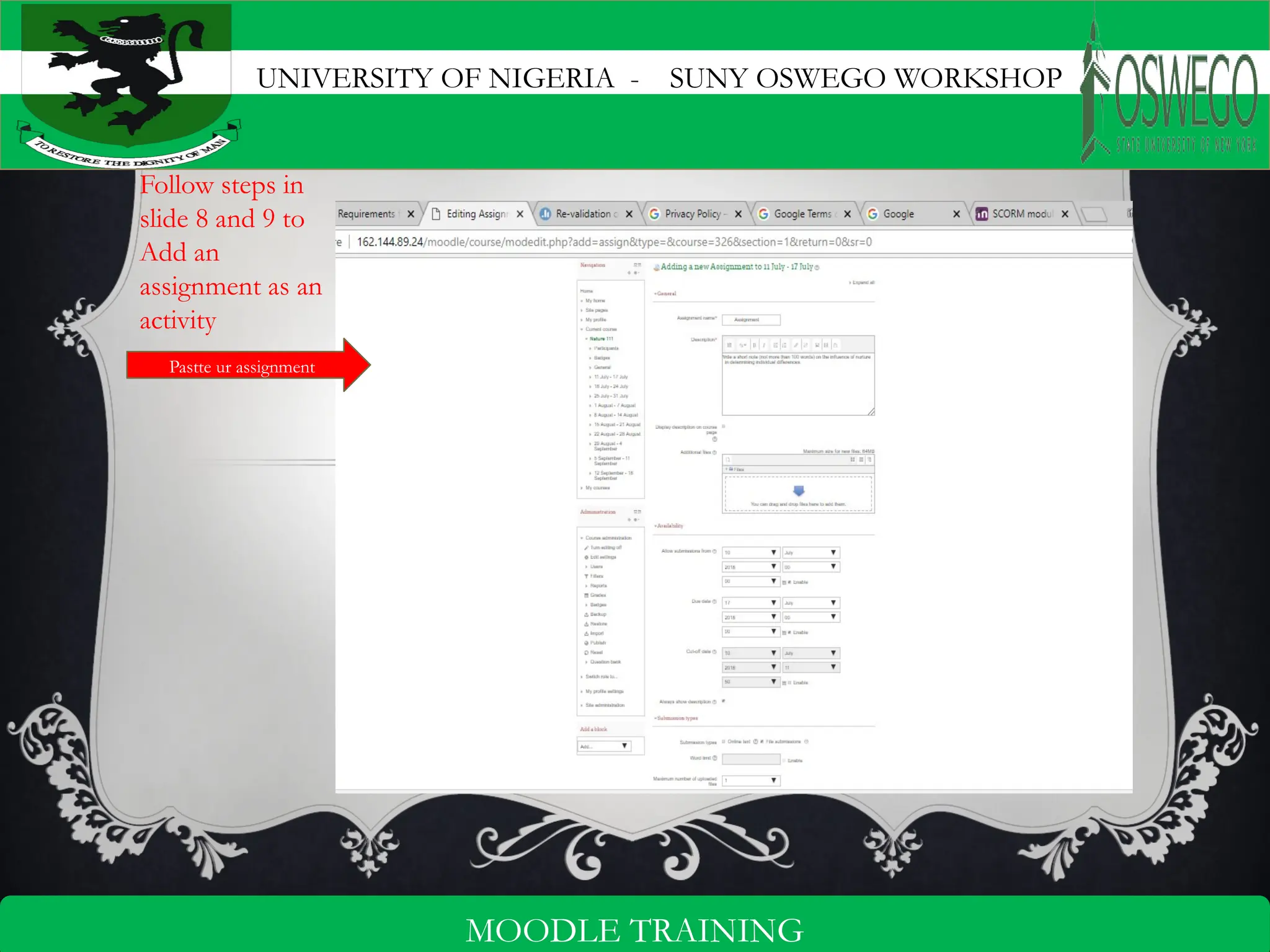
Follow steps in
slide 8 and 9 to
Add an
assignment as an
activity
Pastte ur assignment
UNIVERSITY OF NIGERIA - SUNY OSWEGO WORKSHOP
14
MOODLE TRAINING
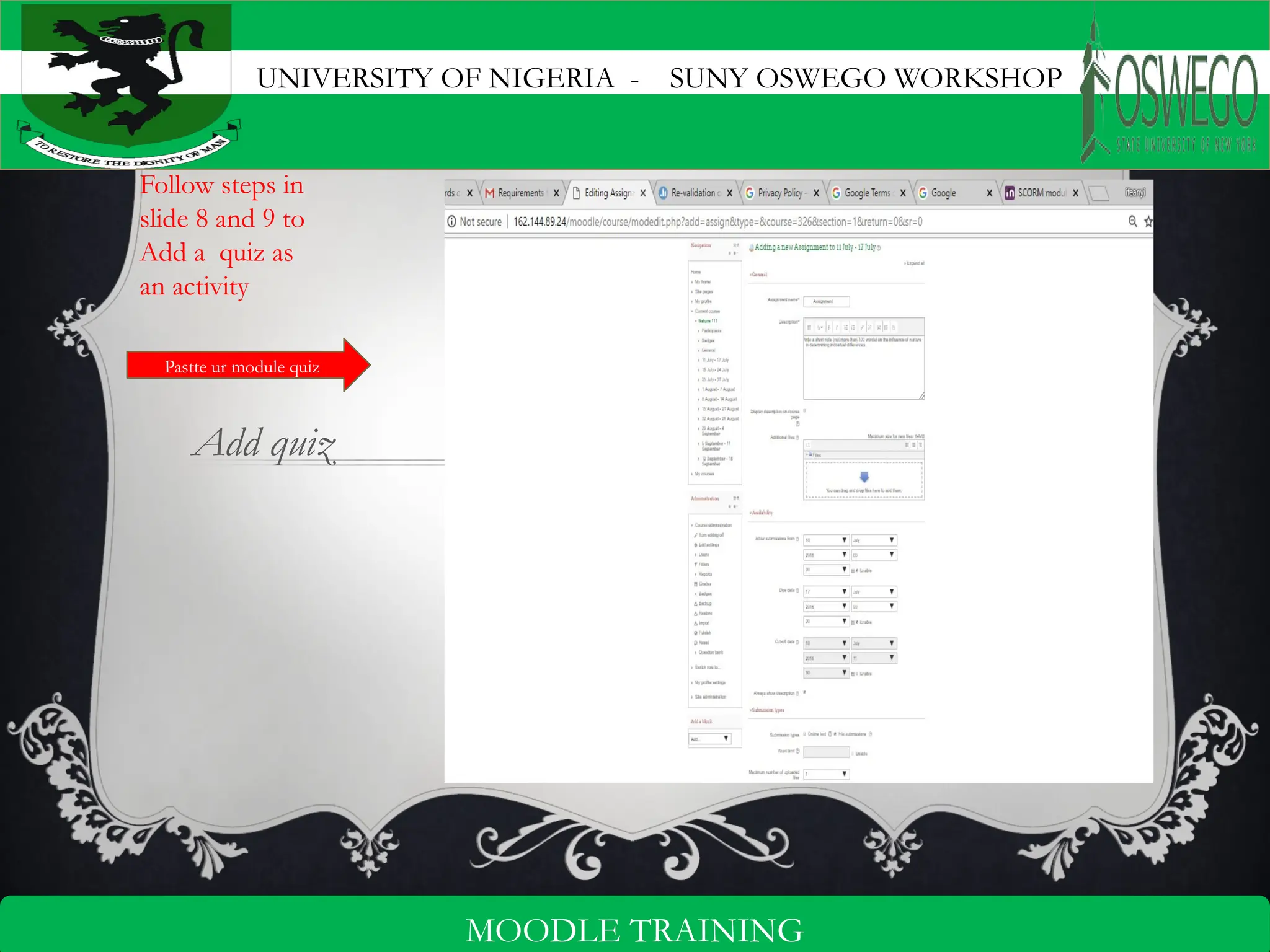
Add quiz
Follow steps in
slide 8 and 9 to
Add a quiz as
an activity
Pastte ur module quiz
UNIVERSITY OF NIGERIA - SUNY OSWEGO WORKSHOP
15
MOODLE TRAINING
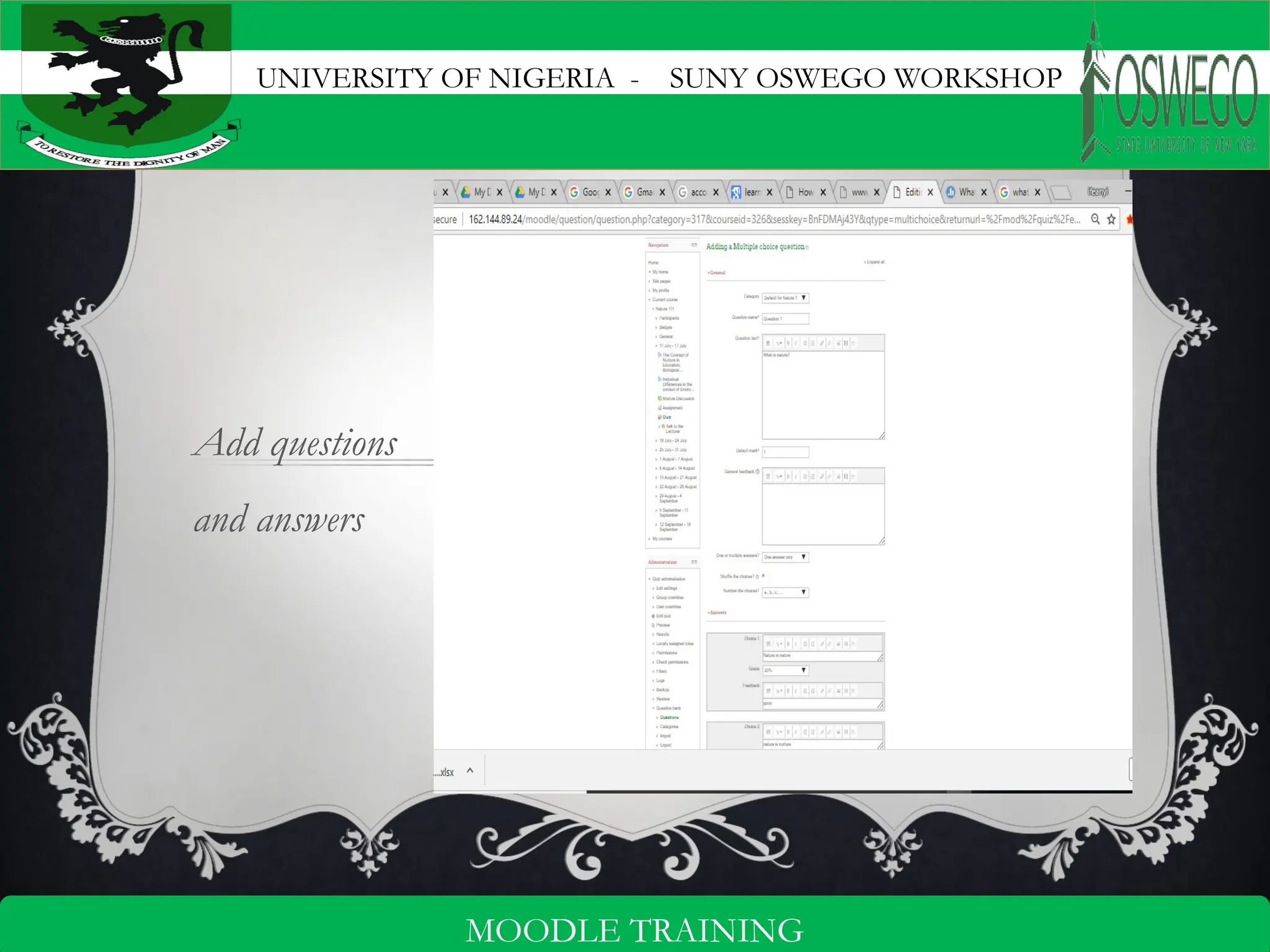
Add questions
and answers
UNIVERSITY OF NIGERIA - SUNY OSWEGO WORKSHOP
16
MOODLE TRAINING
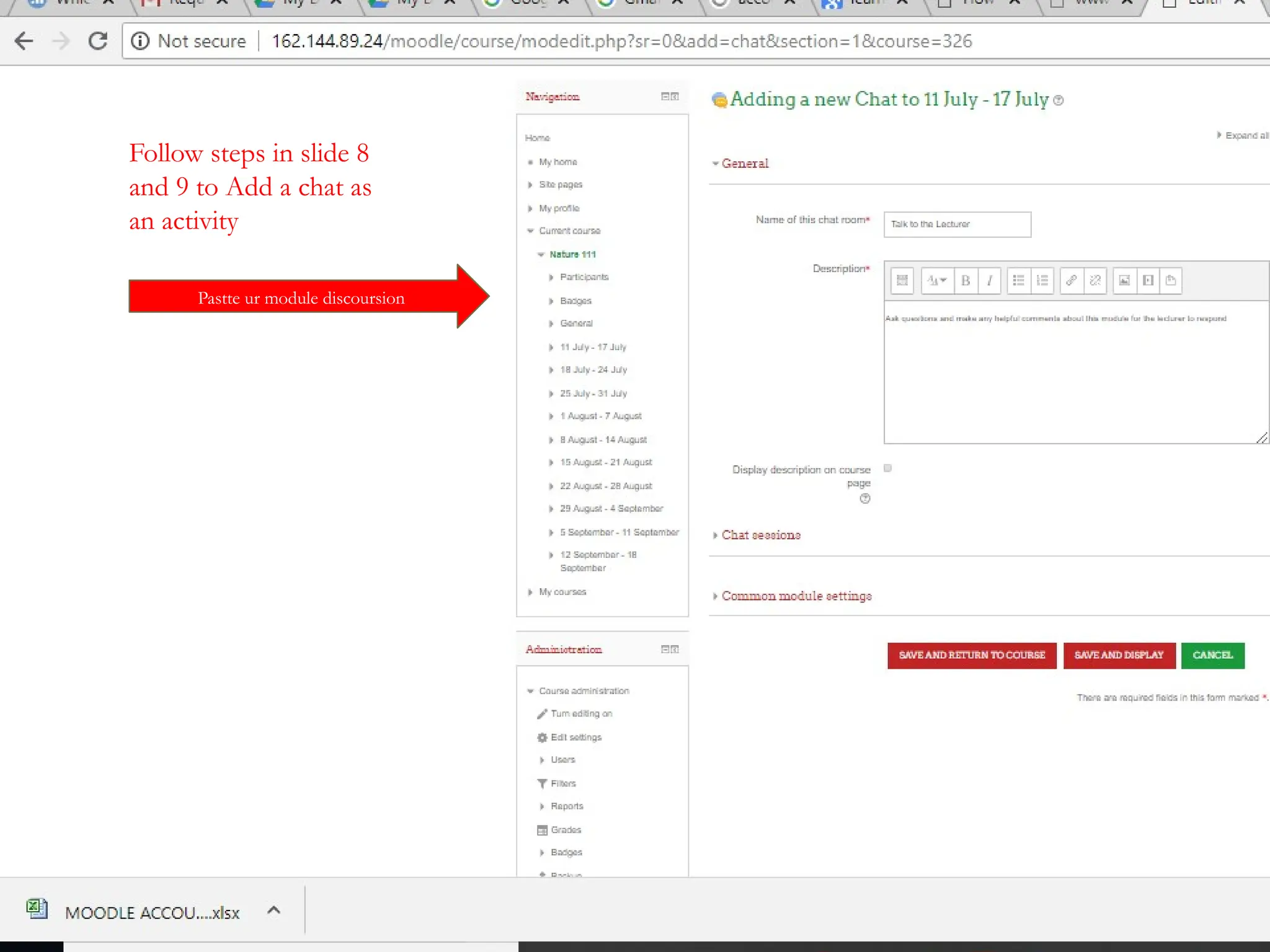
Follow steps in slide 8
and 9 to Add a chat as
an activity
Pastte ur module discoursion
UNIVERSITY OF NIGERIA - SUNY OSWEGO WORKSHOP
17
MOODLE TRAINING
ST EP 11. N O TE T HAT YO U C AN E D I T YO U
P ROF IL E P H OT O TO YO UR C H O IC E.
THANKS

Moodle-Training-Tutorial-Presentation.pptx

  • 1.
    UNIVERSITY OF NIGERIA- SUNY OSWEGO WORKSHOP 1 MOODLE TRAINING MOODLE TUTORIAL By DR. CHIELO IFEANYI CELESTINE Chief Programmer & Head Webometrics Section ICT Unit, UNN
  • 2.
    UNIVERSITY OF NIGERIA- SUNY OSWEGO WORKSHOP 2 MOODLE TRAINING IN T RO DUC T ION Overview Modular Object Oriented Distant Learning Environment (MOODLE) is a web application that can enable a teacher to prepare a course online or in a website and enable learners to access the course. In other words, MOODLE enables a teacher to extend a classroom to the internet. MOODLE is a typical examples of a Course Management System (CMS) or a Learning Management System (LMS) and every of such systems are web applications, they run on a server and are accessed through a web browser.
  • 3.
    UNIVERSITY OF NIGERIA- SUNY OSWEGO WORKSHOP 3 MOODLE TRAINING INSTRUCTIONAL OBJECTIVES By the end of this module, the students should be able to: 1.Log in to MOODLE 2. Create a course in MOODLE 3. Add users to the course 4. Add activities and/or resources to the course
  • 4.
    UNIVERSITY OF NIGERIA- SUNY OSWEGO WORKSHOP 4 MOODLE TRAINING LOGGING INTO MOODLE Logging into MOODLE simply means gaining access into MOODLE platform either as a instructor or as a learner. To do this, one have to follow the steps below. Open a browser (Google chrome) Enter the MOODLE web address in the address bar and press enter (eg. http://162.144.89.24/moodle/ ) • Click log in at the top right hand corner • Enter your user name and your password and • Click login. Click Log in here
  • 5.
    UNIVERSITY OF NIGERIA- SUNY OSWEGO WORKSHOP 5 MOODLE TRAINING CREATING A COURSE A Course is a tool in MOODLE that enables a teacher to makes his or her learning material available to learners. To create a course: • Click site administrator • Click courses • Click manage • Select sub categories (departments) • Click create new course
  • 6.
    UNIVERSITY OF NIGERIA- SUNY OSWEGO WORKSHOP 6 MOODLE TRAINING Enter module1 as full name Overview and instr obj as desc
  • 7.
    UNIVERSITY OF NIGERIA- SUNY OSWEGO WORKSHOP 7 MOODLE TRAINING ENROLL USERS To enroll users to your course: • Click "Enroll users • Select users to enroll • Click enroll • click Finish . click search click click
  • 8.
    UNIVERSITY OF NIGERIA- SUNY OSWEGO WORKSHOP 8 MOODLE TRAINING Add activities Click Turn editing on Click on add activities
  • 9.
    UNIVERSITY OF NIGERIA- SUNY OSWEGO WORKSHOP 9 MOODLE TRAINING Add activities Select an activity Click add
  • 10.
    UNIVERSITY OF NIGERIA- SUNY OSWEGO WORKSHOP 10 MOODLE TRAINING Pastte ur module sub title Pastte the overview of the sub title
  • 11.
    UNIVERSITY OF NIGERIA- SUNY OSWEGO WORKSHOP 11 MOODLE TRAINING Add a content page for the added activity Pastte ur module sub title Pastte the overview of the sub title
  • 12.
    UNIVERSITY OF NIGERIA- SUNY OSWEGO WORKSHOP 12 MOODLE TRAINING Follow steps in slide 8 and 9 to Add a forum as an activity Pastte ur module discoursion
  • 13.
    UNIVERSITY OF NIGERIA- SUNY OSWEGO WORKSHOP 13 MOODLE TRAINING Follow steps in slide 8 and 9 to Add an assignment as an activity Pastte ur assignment
  • 14.
    UNIVERSITY OF NIGERIA- SUNY OSWEGO WORKSHOP 14 MOODLE TRAINING Add quiz Follow steps in slide 8 and 9 to Add a quiz as an activity Pastte ur module quiz
  • 15.
    UNIVERSITY OF NIGERIA- SUNY OSWEGO WORKSHOP 15 MOODLE TRAINING Add questions and answers
  • 16.
    UNIVERSITY OF NIGERIA- SUNY OSWEGO WORKSHOP 16 MOODLE TRAINING Follow steps in slide 8 and 9 to Add a chat as an activity Pastte ur module discoursion
  • 17.
    UNIVERSITY OF NIGERIA- SUNY OSWEGO WORKSHOP 17 MOODLE TRAINING ST EP 11. N O TE T HAT YO U C AN E D I T YO U P ROF IL E P H OT O TO YO UR C H O IC E. THANKS